What's inside
- Key Takeaways
- Quick Picks
- How We Chose These Picks
- What Does an Aftermarket Cooler Actually Fix?
- Which Processors Gain the Most From an Aftermarket Cooler?
- How Should You Read a Cooler Listing Before Trusting It?
- The Best Aftermarket CPU Coolers, Pick by Pick
- How Do You Choose Between Air and Liquid for Your Build?
- How Do You Install an Aftermarket Cooler Without Drama?
- How Do the Six Picks Compare Side by Side?
- How Do You Keep an Aftermarket Cooler Performing for Years?
- How Should You Set Fan Curves Once the Cooler Is In?
- How Much Does Case Airflow Change the Result?
- What Are the Most Common Mistakes When Replacing a Stock Cooler?
- Final Recommendation
- Frequently Asked Questions
- Related Guides
As an Amazon Associate I earn from qualifying purchases. This post may contain affiliate links at no extra cost to you.
widgetverdict.com is reader-supported. When you buy through links on our site, we may earn an affiliate commission.
Where to buy: links in the quick picks table lead to a checked Amazon listing for every cooler here; between them they cover compact single towers, twin-tower flagships and one 360mm liquid loop, so the shortlist works whether your case is a roomy mid tower or something tighter.
The cooler bundled in a processor box, when one is bundled at all, is built to a cost target rather than a comfort target. It keeps the chip inside its warranty envelope and little more, which is why so many builders start shopping for the best aftermarket cpu coolers within weeks of a new build: the stock unit runs loud under load, lets boost clocks sag during long renders, and turns a warm room into an audible one. An aftermarket cooler is the rare upgrade that improves three things at once — temperatures, noise and the sustained clock speeds a modern processor is allowed to hold — without touching anything else in the system.
This shortlist deliberately mixes the two families. Four of the six picks move heat through fin stacks and heat pipes; one is a sealed liquid loop with a 360mm radiator; and the sixth, a compact twin tower, sits between the camps in both size and intent. That spread matters because the right answer depends on your case, your memory kit and your tolerance for fan noise far more than on any single benchmark chart. Read the detailed sections with your own build in mind, and treat the comparison table near the end as a map of trade-offs rather than a league table.
Key Takeaways
- Twin-tower air coolers such as the Peerless Assassin 120 SE and the FROZN A620 PRO SE now cover most desktop processors without any plumbing at all.
- The ARCTIC 360mm loop is the pick when sustained all-core loads, not short bursts, define your workload.
- Height is the first specification to check: the Noctua NH-D15 stands 168mm tall, while the FROZN A620 PRO SE is listed at 157mm.
- Single-tower designs like the Hyper 212 Black II remain the sensible upgrade for modest processors and tight budgets of space.
- Socket support in the listings spans AMD AM5 and AM4 plus Intel LGA1851 and LGA1700, so current platforms are covered across the board.
- Every pick here uses PWM fans, which means your motherboard, not a fixed curve, decides how loud the cooler gets.
Quick Picks
| Pick | Badge | Why it earns its place |
|---|---|---|
| Thermalright Peerless Assassin 120 SE | The value flagship | Six heat pipes and twin 120mm fans deliver twin-tower cooling without a flagship-sized hole in the budget. |
| Cooler Master Hyper 212 Black II | The easy first upgrade | Four heat pipes and one PWM fan in a slim single tower that asks very little of your case or your patience. |
| be quiet! Pure Rock Pro 3 Silver | The compact twin tower | A 250W TDP rating and two silent 120mm PWM fans packed into a double-tower frame that stays case-friendly. |
| Noctua NH-D15 chromax.Black | The long-term anchor | A dual-tower heavyweight in black, built for builders who intend to keep one cooler across several platforms. |
| ARCTIC Liquid Freezer III Pro 360 | The liquid option | Three 120mm fans on a 360mm radiator for sustained loads, with support for LGA1851, LGA1700, AM4 and AM5. |
| ID-COOLING FROZN A620 PRO SE | The measured middle | Listed at 157mm tall with a 260W rating, six heat pipes and dual 120mm fans tuned for low noise. |
How We Chose These Picks
We started from the question a buyer actually asks: what breaks first with a stock cooler? In our reading it is rarely peak temperature on day one. It is the noise floor during ordinary work, the way boost behaviour decays twenty minutes into a compile or a game, and the moment a tall memory kit or a side panel refuses to cooperate with a cooler chosen from a photograph. So the shortlist was built around coverage of real failure modes rather than around a single performance axis.
Each pick had to clear three bars. First, the listing itself had to state the facts we repeat — heat pipe counts, fan sizes, socket support, height or TDP where given — because a cooler you cannot verify on paper is a cooler you cannot plan a build around. Second, the six had to span the genuine decision points: single tower versus twin tower, air versus liquid, compact versus full-height. Third, every design here is a current, mainstream product with mounting hardware for the sockets people are actually buying, AMD AM5 and Intel LGA1700 families included. Coolers that only made sense as historical curiosities, or that duplicated another pick’s job exactly, were left out even when their reputations were strong.
We also weighed the ownership details that never appear in benchmark charts. Mounting systems were judged on whether a first-time builder can complete them without a third hand. Fan connectors and splitter arrangements were checked for sanity, because a twin tower whose two fans cannot both reach a header without gymnastics is a flaw no fin stack excuses. And we favoured designs whose makers publish complete dimensions, because a cooler is a physical object that must share a case with memory, a graphics card and a side panel — the specification sheet is part of the product.
What Does an Aftermarket Cooler Actually Fix?
A processor’s advertised boost clock is a conditional promise: the chip will run that fast while temperature and power headroom allow. A stock cooler spends that headroom quickly. Under a sustained load the die temperature climbs toward its limit, the firmware trims clock speeds to protect the silicon, and the small bundled fan spins up to speeds where its noise becomes the loudest thing in the room. An aftermarket cooler attacks all three symptoms with the same tool — surface area. More fin area and more heat pipes move heat away from the cold plate faster, so the fans can turn slower for the same result, and slower fans are quieter fans.
The second fix is acoustic character, which numbers capture badly. A large fan turning slowly produces a low, even wash of sound; a small fan at full speed produces a whine that cuts through game audio and calls alike. Every pick in this guide uses 120mm-class fans or larger fin stacks precisely because diameter is the cheapest noise reduction there is. The third fix is consistency: a cooler with thermal headroom keeps clock speeds flat across a whole work session instead of tapering, which is the difference between a machine that feels fast at minute two and one that still feels fast at hour two.
There is a fourth, quieter benefit that rarely makes the box copy: thermal headroom is component kindness. Voltage regulation circuitry, memory and the processor itself all live longer and behave more predictably when the neighbourhood they sit in runs cooler, and a large heatsink or radiator lowers the temperature of the air everything else in the case has to breathe. Nobody should buy a cooler as a life-extension tonic, but a build whose cooling was chosen generously tends to be a build that stays out of the troubleshooting forums.
Which Processors Gain the Most From an Aftermarket Cooler?
Not every processor is equally imprisoned by its stock cooling, and honesty here saves money. A low-power chip in a machine that browses, streams and edits documents may never ask its bundled cooler a hard question; the upgrade in that build is about silence, and a modest single tower answers it completely. The processors that gain most are the ones whose performance is defined by sustained behaviour: high-core-count desktop chips that render, compile and encode, and gaming processors whose boost clocks are a headline feature the stock cooler cannot afford to fund for long.
There is a middle case worth naming, because it describes a huge share of real machines: the capable mid-range processor in a case with mediocre airflow. There the stock cooler is not failing outright, it is negotiating — accepting higher temperatures and louder fans as the price of a warm chassis. An aftermarket tower changes the negotiation entirely, because its larger fin stack tolerates warm intake air far better than a small bundled heatsink can. Owners of such machines consistently report the largest before-and-after difference, larger than the flagship owners who were already near the ceiling of what cooling can give.
Finally, consider the room. A computer in a bedroom studio, a shared flat or an open-plan office exports its noise to other people, and the value of a cooler that drops the acoustic floor is social as much as technical. The picks in this guide were chosen with that full spread in mind: one for the modest chip, several for the demanding ones, and all of them quieter than the hardware they replace.
There is also the question of what the upgrade replaces in your upgrade queue. Builders often reach for a faster processor when a machine feels slow under load, when the honest diagnosis is that the existing processor is throttling on heat it cannot shed. Cooling is dramatically cheaper than silicon, and it should be ruled out first: a machine whose clocks recover after a cooler swap did not need a new chip at all, and the money not spent there tends to find better uses elsewhere in the build.
How Should You Read a Cooler Listing Before Trusting It?
Cooler listings mix three kinds of fact, and a careful buyer separates them. The first kind is geometry: height, tower layout, radiator size. These are hard numbers you can plan around, and the listings here supply several — 168mm for the NH-D15, 157mm for the FROZN A620 PRO SE, a 360mm radiator for the ARCTIC loop. Geometry never lies, but it is also incomplete: a listing that omits height is not hiding a small cooler, it is simply a listing you must cross-check against the manufacturer’s own specification page before ordering.
The second kind is construction: heat pipe counts, fan sizes, fan speeds. Six heat pipes on the Peerless Assassin and the FROZN, four on the Hyper 212, dual 120mm fans on most of the twin towers — these tell you how the cooler moves heat and how much air it can push at full speed. Fan speed ceilings deserve a second look. A fan rated to 1550RPM, like the Peerless Assassin’s pair, is announcing its noise ceiling as much as its cooling ceiling; designs that need very high speeds to perform tend to be the ones you hear through headphones.
The third kind is the rating: TDP figures such as the Pure Rock Pro 3’s 250W and the FROZN’s 260W. Treat these as the manufacturer’s own sizing guidance rather than as laboratory measurements, because there is no single industry test every brand follows. A rating tells you which class of processor the maker designed the cooler for, and that is genuinely useful — matching a 250W-class cooler to a processor that draws well under that figure leaves the headroom that keeps fans slow. What a rating cannot do is rank two brands against each other with precision, and any buying decision that rests on a 10W difference between rival listings is resting on fog.
The Best Aftermarket CPU Coolers, Pick by Pick

Thermalright Peerless Assassin 120 SE — The value flagship
The Peerless Assassin 120 SE is the cooler that reset expectations for what a twin-tower design should cost, and its specification explains the reputation: six heat pipes using AGHP technology run through two fin stacks, each fed by its own 120mm PWM fan rated to 1550RPM. That is the architecture of a flagship — dual towers, dual fans, a pipe count that matches coolers twice its price — assembled with an discipline about cost that shows in the plain finish rather than in anything that touches performance.
In a build, what you notice is how unremarkable the experience is, in the best sense. The twin fans top out at a moderate speed, so even at full chat the sound stays in the low register that disappears under room noise. The front fan sits over the memory slots, which is the one planning point: tall heatspreaders on your RAM can push that fan a few millimetres up its mounting clips, and a few millimetres is sometimes the difference between a side panel that closes and one that bulges. Standard-height memory avoids the question entirely. Mounting follows the familiar backplate pattern for modern AMD and Intel sockets, and the whole unit feels engineered by people who expected it to be compared, specification by specification, against famous names.
It also ages gracefully as a purchase. Because the cooling capacity sits well above what mainstream processors demand, the fans rarely need their upper range in ordinary service, and hardware that loafs is hardware that lasts. When owners eventually move the cooler to a hotter chip, the headroom they bought on day one is still there waiting. That is the real substance behind the value argument: not that it undercuts rivals once, but that it keeps the question of cooling closed through upgrades that would expose a lesser heatsink.
- Heat pipes: 6, AGHP technology
- Fans: dual 120mm PWM, up to 1550RPM
- Layout: dual-tower fin stacks
- Fit notes: front fan overhangs the memory slots; plan RAM height accordingly
Strengths
- Twin-tower cooling capacity at a single-tower price tier
- Moderate maximum fan speed keeps the noise character low and even
- Six heat pipes give it headroom over high-core-count processors
Trade-offs
- Front fan can clash with tall memory heatspreaders
- Plain finish will not satisfy builders dressing a showcase window
- Size still rules it out of genuinely small cases
Best for: builders who want flagship-class air cooling and would rather spend the savings on storage or memory. Not suited for: a case whose memory kit wears tall decorative heatspreaders you refuse to swap.

Cooler Master Hyper 212 Black II — The easy first upgrade
Some product lines survive because they keep answering the same question well, and the Hyper 212 family has been the default first upgrade for over a decade. This Black II version carries four heat pipes and a single PWM fan in a slim single-tower frame, and the listing confirms support for AMD AM5 and AM4 alongside Intel LGA1851 and LGA1700 — which means the same modest cooler can follow a processor upgrade across both camps, a trick few budget parts manage.
The appeal is the absence of drama. A single tower leaves the memory slots completely clear, the fan is the only moving part to wire, and the blacked-out finish disappears into dark interiors instead of advertising itself. It will not tame a flagship processor pushed to sustained all-core loads, and it does not pretend to: this is the cooler for the six-core chip in a home office machine, the hand-me-down gaming PC, the build where the stock cooler is the only genuinely annoying component. Within that brief it is close to ideal, because every compromise it makes is one its intended buyer will never feel, while every compromise it refuses — socket coverage, PWM control, sane dimensions — is one they would have felt immediately.
There is also a teaching value to this cooler that veterans forget: it is the design many builders learn installation on. The mounting steps are visible, the tolerances are forgiving, and a mistake costs minutes rather than a bent bracket. A first-time builder who starts here learns the order of operations — backplate, standoffs, paste, even pressure, fan header — on hardware that explains itself, and carries those habits to every cooler that follows.
- Heat pipes: 4
- Fan: single PWM fan
- Socket support named in listing: AMD AM5/AM4, Intel LGA1851/1700
- Layout: slim single tower, memory slots left clear
Strengths
- Current socket support on both AMD and Intel sides
- Slim tower keeps all memory slots accessible
- Simple one-fan install suits first-time builders
Trade-offs
- Four heat pipes set a ceiling on sustained high-end loads
- Single fan must work harder, and spin faster, than twin-fan rivals
- No headroom for a future flagship processor swap
Best for: a first upgrade from a stock cooler on a mid-range processor. Not suited for: sustained all-core rendering on a high-core-count flagship chip.

be quiet! Pure Rock Pro 3 Silver — The compact twin tower
be quiet! built its name on exactly what the brand promises, and the Pure Rock Pro 3 Silver applies that discipline to a double-tower frame the listing describes as compact. The stated figures are a 250W TDP rating and two silent 120mm PWM fans, one nestled between the towers in the classic twin-stack arrangement. The silver finish is the understated one in the range, all brushed metal and restraint, aimed at builders who find RGB lighting about as welcome as a case speaker.
What distinguishes this cooler in a shortlist full of twin towers is intent. Where the Peerless Assassin chases value and the NH-D15 chases the last degree, the Pure Rock Pro 3 chases the balance point where a powerful processor stays cool and the machine stays out of your attention. A 250W rating covers the realistic draw of mainstream performance chips with room to spare, and the compact qualifier matters in practice: double-tower cooling that does not automatically become the largest object in the case, dictating every other component choice around it. For a workstation that sits beside a desk rather than under it, that balance is the whole argument.
The silver finish deserves a word of its own, because be quiet! sells a black sibling and the choice is not merely cosmetic in a windowed case. Silver fin stacks brighten an interior and show dust sooner, which some owners count as a prompt to clean and others as a chore announced too often. Either way, the hardware underneath is identical in intent: a double tower that behaves like a considerate colleague, present in the thermals and absent from the room’s soundscape.
- Rating stated in listing: 250W TDP
- Fans: 2 silent 120mm PWM
- Layout: double tower, compact frame
- Platforms named in listing: AMD and Intel
Strengths
- 250W TDP rating covers performance processors with margin
- Compact twin-tower frame is easier to house than full-size rivals
- Fans chosen for quiet running rather than headline airflow
Trade-offs
- Silver finish only suits some build themes
- Compact towers leave less fin area than full-height flagships
- Quieter fan tuning trades a little peak capacity for calm
Best for: a powerful but civilised workstation build that lives within earshot. Not suited for: an overclocking project chasing the highest sustained clocks available.
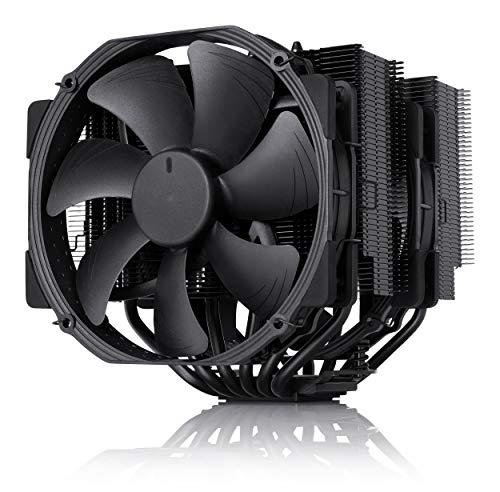
Noctua NH-D15 chromax.Black — The long-term anchor
The NH-D15 has been the reference point for air cooling for so long that other coolers are routinely described by their distance from it. This chromax.Black version keeps the dual-tower formula and dresses it in black from fin to fan blade, answering the one complaint the original’s beige palette always drew. The listing states its height plainly: 168mm. That number is the whole planning conversation. If your case clears it, you are buying one of the most thoroughly engineered heatsinks ever sold; if it does not, no amount of reputation will close your side panel.
Owning one is a study in a company sweating details other brands skip. The mounting system is famously methodical, the fans are the sort other manufacturers get compared against, and Noctua’s habit of supporting its coolers across socket generations turns the purchase into infrastructure rather than a consumable: builders carry these from platform to platform the way they carry a good power supply. Inside this shortlist it is the pick for the person who upgrades processors more often than coolers and wants the question settled for years. The size is real, the memory clearance over the front slots needs the same respect as any twin tower, and the price sits at the top of the air-cooling tier — but the product justifies its tier by still being the answer long after cheaper coolers have been replaced twice.
Consider, too, what the chromax treatment signals about the product’s stage of life. A manufacturer only invests in cosmetic variants of a design it expects to sell for years more, and buyers benefit from that maturity: the mounting quirks are documented in a thousand build logs, the fan behaviour is a known quantity, and spare parts and brackets remain in the catalogue. Novelty is exciting in graphics cards; in a heatsink, proven is the compliment that matters.
- Height stated in listing: 168mm
- Layout: dual tower, dual fans
- Finish: chromax.Black throughout
- Positioning: enthusiast-grade, low-noise focus
Strengths
- Reference-class cooling from a proven dual-tower design
- Black finish finally matches dark build themes
- Mounting hardware and support culture built for platform changes
Trade-offs
- 168mm height excludes many narrower cases outright
- Top-of-tier pricing for an air cooler
- Front tower overhang demands standard-height memory planning
Best for: a long-term build you intend to upgrade around the cooler, not with it. Not suited for: a case with less than 168mm of cooler clearance above the socket.

ARCTIC Liquid Freezer III Pro 360 — The liquid option
Every shortlist of aftermarket coolers needs one honest liquid entry, and the Liquid Freezer III Pro 360 earns the slot on specification: a 360mm radiator carrying three 120mm fans, with the listing naming support for Intel LGA1851 and LGA1700 plus AMD AM4 and AM5. Liquid changes the geometry of the problem. Instead of stacking fins above the socket — where they fight memory kits and side panels — the heat travels through tubes to a radiator mounted at the case’s front or roof, where three fans exhaust it directly out of the chassis.
That geometry is why this pick exists for sustained workloads. A rendering queue or a long shader compile holds a processor at full draw for hours, and a large radiator sheds that heat with its fans turning lazily, because the surface area dwarfs anything that fits above a socket. The costs are procedural rather than thermal: your case needs a 360mm mounting position, the tubes need a sensible route, and a pump joins the fans as a component with a lifespan to think about. None of that is difficult, but it is a different afternoon than bolting on a tower. Choose it when the workload is genuinely continuous, or when your case was designed around a radiator from the start, and it stops being the exotic option and becomes the obvious one.
Placement choices reward a moment’s thought. A roof-mounted radiator exhausts heat straight out of the case and keeps the graphics card breathing cooler intake air; a front-mounted unit feeds the radiator the coolest air in the room but warms the interior slightly with its exhaust. Both are legitimate, and the difference matters less than simply having three fans’ worth of radiator in the loop at all. Builders with tempered-glass fronts and restricted intake should lean roof-ward, where the exhaust path is unobstructed.
- Radiator: 360mm, 3 × 120mm fans
- Type: all-in-one liquid cooler
- Sockets named in listing: LGA1851, LGA1700, AM4, AM5
- Fit notes: needs a 360mm radiator mount in the case
Strengths
- Radiator surface area handles sustained loads with slow fans
- Nothing tall above the socket, so memory clearance is a non-issue
- Current socket support across both processor camps
Trade-offs
- Requires a case with a 360mm radiator position
- Pump adds a wear component air coolers do not have
- Installation involves more routing and planning than a tower
Best for: sustained all-core workloads in a case built to house a radiator. Not suited for: a compact case with no 360mm mounting position.

ID-COOLING FROZN A620 PRO SE — The measured middle
The FROZN A620 PRO SE is the most precisely specified cooler in this guide, because its listing does the buyer’s homework out loud: dual-tower layout, 157mm height, a 260W rating, six heat pipes, and dual 120mm fans described as quiet with a 27.2dB figure attached. Hold those numbers against the NH-D15’s 168mm and the planning value becomes clear — here is twin-tower capacity that stands 11mm shorter, a margin that decides fit in a meaningful slice of mid tower cases.
ID-COOLING’s design reads as a checklist of what twin-tower buyers ask for, answered without flourish. Six pipes is the count the class leaders use. The 260W rating sits above the Pure Rock Pro 3’s figure, aimed at hotter processors. And the noise figure in the listing signals where the fan tuning priorities lie: this is a cooler meant to be heard as little as its dimensions allow it to be seen. In the middle of the shortlist it plays a specific role — the pick for the builder who measured their case, found the flagship towers a few millimetres too ambitious, and refuses to drop to a single tower as the price of closing the side panel.
That buyer is more common than flagship marketing suggests. Case manufacturers quote cooler clearance to the millimetre, and the gap between 160mm and 168mm of clearance covers a large share of the mid towers sold in the last five years. A cooler that publishes 157mm and backs it with a 260W rating is speaking directly to that installed base, and the dual-fan, six-pipe hardware means the conversation is about fit rather than about settling.
- Height stated in listing: 157mm
- Rating stated in listing: 260W
- Heat pipes: 6; fans: dual 120mm, listed at 27.2dB
- Layout: dual tower
Strengths
- 157mm height fits cases the 168mm flagships cannot enter
- 260W rating with six heat pipes for hot processors
- Listing states a low-noise figure for its dual fans
Trade-offs
- Still a twin tower: memory clearance needs checking
- Brand support network is smaller than Noctua’s or Cooler Master’s
- 157mm remains too tall for slim or small-form-factor cases
Best for: a mid tower build whose clearance ruled out the tallest twin towers. Not suited for: a low-profile or ITX enclosure of any kind.
How Do You Choose Between Air and Liquid for Your Build?
Start with the case, because the case votes first. A 360mm liquid cooler needs a radiator mount of that size, usually at the front or roof, and front mounting can trade against drive cages or graphics card length. An air tower needs vertical clearance above the socket and nothing else. Measure both before falling for either: the listings in this guide state heights where the manufacturers provide them, and your case manual states its cooler clearance and radiator support in the same plain language.
Next, be honest about the load profile. Games and everyday work spike and idle; almost any pick here handles them gracefully, and the decision becomes about noise and fit. Sustained workloads — rendering, compiling large projects, simulation, long exports — are where radiator surface area and twin-tower fin mass earn their keep, because the cooler must shed the processor’s full draw indefinitely, not for ninety seconds. Finally, weigh temperament. Air coolers are fit-and-forget hardware with fans as the only moving parts. Liquid adds a pump and tubing in exchange for its geometry. Neither answer is wrong; they are answers for different builders.
Memory deserves its own sentence in this decision, because it eliminates more twin towers than any other component. If your build already includes tall memory, or you intend to add decorative kits later, either choose a single tower, choose liquid, or choose a twin tower and accept raising its front fan — with the height consequences that follow. Builders planning memory first and cooling second should say so at the start; the shortlist above contains at least one pick for every ordering of those priorities, which is precisely why it contains both a slim single tower and a radiator.
Budget, lastly, should be allocated by consequence rather than by category prestige. The gap between the Hyper 212 Black II and the NH-D15 buys a great deal of cooling, but it also buys a meaningful amount of memory or storage. The right spend is the one that removes your actual bottleneck — noise, sustained clocks, fit — and stops there. Every pick in this guide is the correct purchase for somebody; the buying-guide questions above exist to work out whether that somebody is you.
How Do You Install an Aftermarket Cooler Without Drama?
Work on the motherboard outside the case whenever the build allows it, with the board resting on its box. Fit the backplate and standoffs first and check them against the socket named on the box — AM5 and LGA1700 hardware look similar at a glance and are not interchangeable. Apply thermal paste as a small pea-sized dot at the centre of the heatspreader for most processors; the mounting pressure spreads it. Lower the cooler straight down, then tighten the mounting screws in alternating corners, a turn or two at a time, so pressure builds evenly across the die.
Connect the fan cables to the CPU_FAN header before the cooler swallows your access to it — on twin towers, route the front fan’s cable before clipping the fan on. In the BIOS or your board’s fan software, confirm the header is set to PWM mode, then let the machine run a heavy load for ten minutes while you watch temperatures settle. A cooler that is seated correctly shows stable, unremarkable numbers and stays that way; a mounting mistake announces itself immediately with temperatures that climb and refuse to level off, which is your cue to reseat rather than to worry.
Removing an old stock cooler has one hazard worth rehearsing, especially on AMD sockets where the processor sits in a pin-grid or land-grid socket that grips it: dried paste can bond the chip to the heatsink strongly enough that pulling the cooler lifts the processor straight out with it. Warm the machine under load for a few minutes before shutdown, then twist the cooler gently as you ease it upward rather than pulling dead vertical. The twist breaks the bond sideways, the chip stays in its socket, and a two-minute precaution saves an afternoon of very careful pin inspection.
For the liquid pick, installation adds two decisions: where the radiator goes, and which way its fans blow. Mount the radiator so its fans exhaust out of the case at the roof, or intake at the front, and keep the tube run free of sharp bends or contact with other fans. Check that the pump cable reaches a header your board can monitor, because being able to see pump speed in software is your long-term health check for the loop. None of this is harder than the air install; it is simply a different set of small decisions, each cheap to get right at the bench and annoying to revisit later.
How Do the Six Picks Compare Side by Side?
| Pick | Type | Heat pipes / radiator | Fans | Stated figure |
|---|---|---|---|---|
| Peerless Assassin 120 SE | Air, dual tower | 6 pipes | 2 × 120mm PWM | 1550RPM fan speed |
| Hyper 212 Black II | Air, single tower | 4 pipes | 1 × PWM | AM5/AM4, LGA1851/1700 |
| Pure Rock Pro 3 Silver | Air, double tower | — | 2 × 120mm PWM | 250W TDP |
| NH-D15 chromax.Black | Air, dual tower | — | 2 fans | 168mm height |
| Liquid Freezer III Pro 360 | AIO liquid | 360mm radiator | 3 × 120mm | LGA1851/1700, AM4/AM5 |
| FROZN A620 PRO SE | Air, dual tower | 6 pipes | 2 × 120mm | 157mm, 260W |
Read the table as a set of shapes rather than a ranking. The single tower is the only pick that never asks a question about your memory or your case width. The twin towers trade that innocence for fin mass. The liquid cooler leaves the socket area empty entirely and spends its bulk at the case wall instead. The stated figures column only repeats what each listing itself declares, which is why some cells describe sockets and others describe watts: manufacturers publish different facts, and a careful buyer compares like with like within each product’s own documentation before ordering.
One pattern in the table is worth pulling out, because it predicts ownership better than any single row: fan count tracks acoustic behaviour. Two fans sharing a job can each turn slower than one fan doing it alone, and three radiator fans slower still, so the multi-fan picks hold their composure at load levels where the single-fan Hyper 212 is audibly working. That is not a defect in the Hyper 212 — its job is a smaller one — but it explains why the shortlist’s centre of gravity sits with twin-fan designs, and why buyers sensitive to noise should start their reading there rather than at the budget end.
How Do You Keep an Aftermarket Cooler Performing for Years?
Dust is the only enemy these coolers really have, and it works slowly. Fin stacks accumulate a felt of dust between the fins that insulates exactly the surfaces meant to shed heat, and radiator fins clog the same way. A twice-yearly clean with compressed air — holding each fan blade still so it cannot spin up like a turbine — restores the cooler you bought. Owners in homes with pets or carpets should halve that interval and will see the difference in their temperature logs if they do.
Fans themselves are the wear item on an air cooler, and the symptom of age is not failure but character: a bearing that was silent begins to tick or hum at certain speeds. Because every pick here uses standard 120mm-class PWM fans, a tired fan is a small, replaceable part rather than a dead cooler, which is one more reason the big air towers make sense as long-term purchases. On the liquid side, the pump is the equivalent component; a loop whose pump grows louder over the years is telling you its remaining life honestly, and monitoring software that logs pump speed makes the trend easy to spot.
Thermal paste, contrary to forum folklore, does not need annual replacement. A properly applied layer works for years; repaste when you remove the cooler for another reason, or if temperatures creep upward after dust has been ruled out. Chasing a degree by repasting every season mostly risks a worse mount than the one you had. The ownership pattern that keeps these coolers at their best is boring: clean fins, healthy fans, a curve set with intent, and a mount left undisturbed.
How Should You Set Fan Curves Once the Cooler Is In?
The hardware is only half of the noise story; the fan curve is the other half, and the factory curve on most motherboards is written for a stock cooler, not for the hardware in this guide. A twin tower or a 360mm radiator has enough thermal mass and surface area that its fans can idle at very low speeds through desktop work and browsing without temperatures moving at all. Setting a curve that holds fans near their minimum until the processor passes a genuinely warm threshold — and only then ramps in a smooth slope rather than a staircase — turns a good cooler into a silent one.
Two practical points matter more than any particular numbers. First, give the curve hysteresis if your board offers it, so the fans do not hunt up and down around a threshold during bursty work; a steady tone is far less noticeable than a wandering one, even at the same average speed. Second, tune for the load you actually run. A curve shaped around a stress test will be louder than necessary for gaming, and a curve shaped around gaming may let a render run warmer than you would like. Most boards store several profiles, and switching between a quiet profile and a performance profile is a legitimate, underused answer to owning one machine for both work and play.
Revisit the curve after a week of real use. Dust, room temperature and the season all move the numbers slightly, and the curve you set on installation day was a guess informed by hope. The builders who end up delighted with an aftermarket cooler are almost always the ones who treated the curve as part of the product — because with PWM fans on every pick in this guide, it is.
How Much Does Case Airflow Change the Result?
A CPU cooler does not work in a vacuum of its own; it works in the air your case gives it, and that air’s temperature sets the floor under everything the heatsink achieves. A tower cooler fed with air that has already passed over a hot graphics card starts its job several degrees behind the same cooler fed with fresh intake. This is why two owners of the same cooler can report different results and both be telling the truth, and why the first diagnostic for disappointing temperatures should be the case’s fan arrangement rather than the cooler itself.
The practical rules are simple. Give the case a clear intake path at the front or bottom and an unobstructed exhaust at the rear and roof, so air moves through the chassis in one direction instead of churning. Keep a tower cooler’s airflow aligned with that path — front fan pulling in, exhaust leaving by the nearest case fan — rather than fighting it. And remember that the radiator pick sidesteps much of this: a roof-mounted radiator exhausts processor heat before it ever joins the case’s internal air, which is one reason liquid builds often show calmer graphics card temperatures as a side effect.
None of this demands a fan shopping spree. Most cases need only their stock fans arranged sensibly and their dust filters cleaned on the same schedule as the cooler itself. Cooling is a system, and the aftermarket cooler is its most visible part rather than its only part; the builders who understand that are the ones whose temperature graphs stay boring for years.
What Are the Most Common Mistakes When Replacing a Stock Cooler?
The classic error is buying by reputation and measuring never. A cooler 5mm too tall does not fit 95% — it fits not at all, and the discovery arrives with the build spread across the desk. Measure your case’s stated clearance, then compare it with the height in the listing, and leave a few millimetres of humility in the arithmetic. The second mistake is forgetting the memory: twin towers overhang the slots nearest the socket, and tall heatspreaders turn a ten-minute install into a fan-raising compromise that can add the very millimetres you were short.
Third comes paste theatre — too much, too little, or a forgotten plastic film on the cold plate, which still happens often enough that every experienced builder checks for it out loud. Fourth, plugging the cooler’s fans into a case-fan header instead of CPU_FAN, leaving the motherboard blind to the one fan it most needs to control. And fifth, judging the result in the first thirty seconds: temperatures under a real, sustained load, checked after the paste has settled through a few heat cycles, are the numbers that describe the cooler you actually bought.
A sixth mistake belongs to liquid buyers specifically: mounting the radiator without checking what it displaces. A front-mounted 360mm unit can consume the space a long graphics card or a drive cage was using, and a roof-mounted one can crowd the motherboard’s top edge and its power cables. Dry-fit the radiator before the cold plate goes on, while every option is still open. Ten minutes with the radiator held in place by hand has saved more builds than any specification sheet ever written.
Final Recommendation
If one cooler here has to be named for the typical reader, it is the Thermalright Peerless Assassin 120 SE: twin-tower capacity, six heat pipes and moderate fan speeds at a price tier that leaves money for the rest of the build. It is the rare product that answers the stock-cooler complaint completely — cooler, quieter, steadier — without asking the buyer to become a cooling enthusiast first.
Builders whose cases refuse tall towers should look at the FROZN A620 PRO SE’s 157mm stance or the Pure Rock Pro 3’s compact frame, while sustained-load workstations belong with the ARCTIC 360mm loop. The Hyper 212 Black II remains the right answer for a modest processor, and the NH-D15 remains the right answer for a decade. Choose by your case dimensions and your load profile, in that order, and the cooler you pick will still be the quietest decision in the build years from now. Measure the case, respect the memory, set the fan curve with intent, and the stock cooler’s racket becomes a story you tell about the machine you used to own.
Frequently Asked Questions
Is an aftermarket cooler worth it if I do not overclock?
Yes, and overclocking is honestly the least of the reasons. A better cooler lowers noise at every load level, lets the processor hold its normal boost clocks for longer, and removes the thermal ceiling that makes a machine feel tired during long sessions. The gains show up in ordinary work, not just in benchmark runs. Plenty of owners buy one purely so the machine stops being audible during video calls, and that alone is a rational purchase.
How do I know whether a cooler fits my case?
Your case manual states a maximum CPU cooler height and its radiator mounting positions. Compare those figures with the height stated in the cooler’s listing — 168mm for the NH-D15, 157mm for the FROZN A620 PRO SE — and confirm your memory height against any tower that overhangs the slots. If the case manual is lost, the manufacturer’s product page carries the same figures, and a ruler across the inside of the case, from the motherboard tray side to the panel, gives a rough check that should still be treated with a few millimetres of caution.
Does a liquid cooler need maintenance?
Sealed all-in-one units need no refilling or draining at any point in their service life. The ongoing care is the same as any cooler’s: keep the radiator and fans free of dust, since a clogged radiator loses the surface area that justified buying it, and check occasionally that the pump and fans still report sensible speeds in your monitoring software.
Will these coolers work with both AMD and Intel processors?
The listings name broad support: the Hyper 212 Black II covers AMD AM5/AM4 and Intel LGA1851/1700, and the ARCTIC loop names LGA1851, LGA1700, AM4 and AM5. Always confirm your exact socket appears in the mounting hardware list for the specific unit before ordering, since brackets differ between platforms.
How much thermal paste should I apply?
A pea-sized amount at the centre of the heatspreader is the reliable default for mainstream desktop processors. Mounting pressure spreads it into a thin layer. More paste does not cool better; it mostly makes a mess at the socket edges and complicates the next removal.
Can I reuse my old cooler on a new motherboard?
Often, yes, provided the manufacturer supplies a mounting kit for the new socket and the cooler still fits the new case. This is where established brands with long support histories, Noctua being the famous example, repay their price: a bracket request is cheaper than a new heatsink. Keep the original mounting hardware and the proof of purchase somewhere findable; the builders who reuse coolers across three platforms are the ones who treated the bracket bag as part of the product rather than as packaging.
Related Guides
Cooling is one half of a build’s manners; the other half is choosing the rest of the platform around it. If liquid caught your eye, the dedicated roundup at Best CPU AIO Coolers compares radiator options in depth. Builders on AMD should read Best CPU Air Coolers Ryzen for socket-specific picks, and anyone working in a small case will find their shortlist at Best ITX Low Profile CPU Coolers.


