What's inside
- Key Takeaways
- Quick Picks
- How We Chose These Picks
- What Makes Ryzen Cooling Different From Intel Cooling?
- How Should You Tune a Fan Curve for Ryzen’s Spiky Behaviour?
- The Best CPU Air Coolers for Ryzen, Pick by Pick
- Should a Ryzen Build Consider Liquid Instead of Air?
- How Do You Match a Cooler to Your Ryzen Processor Tier?
- How Should You Read Ryzen Temperatures After the Install?
- How Do You Install a Tower Cooler on AM5 or AM4?
- How Do the Six Towers Compare Side by Side?
- What Happens to the Rest of the Board Around a Big Tower?
- What Are the Most Common Mistakes Ryzen Owners Make With Coolers?
- Final Recommendation
- Frequently Asked Questions
- Related Guides
As an Amazon Associate I earn from qualifying purchases. This post may contain affiliate links at no extra cost to you.
widgetverdict.com is reader-supported. When you buy through links on our site, we may earn an affiliate commission.
Where to buy: all six towers below link to checked Amazon listings; between them they cover both Ryzen sockets in service today, from a slim single tower for a modest chip to a screen-topped twin tower for a flagship gaming build.
Ryzen processors ask something specific of a cooler. The heat comes from compact chiplets rather than one broad die, the boost algorithm spends every degree of headroom it is given, and the AM5 socket’s thicker heatspreader changes how a cold plate should meet the chip. None of this makes Ryzen hard to cool — the platform’s mainstream chips are genuinely efficient — but it does make the choice of cooler more consequential than the same choice on a platform that treats cooling as plumbing. Owners hunting for the best cpu air coolers ryzen builders actually recommend are really hunting for three things: mounting hardware that fits AM5 and AM4 without improvisation, enough fin mass to hold boost clocks through long sessions, and fans that do not make a gaming room sound like a server closet. Air remains the default answer for most Ryzen machines — no pump, no radiator mount required, nothing above the socket but fins and patience.
The six picks below are all air towers, chosen for Ryzen first and general use second. Two are Thermalright twin towers at different altitudes of ambition, one of them carrying a display; one is the segment’s reference flagship in black; one is be quiet!’s compact double tower with a stated 250W rating; one is the Phantom Spirit EVO with seven heat pipes; and one is the slim veteran that still solves the modest build better than anything newer. Socket fit is checked pick by pick, because on Ryzen the bracket is half the product, and a bracket that almost fits is simply a bracket that does not fit at all.
Key Takeaways
- AM5 and AM4 mounting support is the first check for any Ryzen cooler; the Hyper 212 Black II names both sockets in its listing.
- Twin towers dominate the shortlist because Ryzen’s boost behaviour rewards thermal headroom with sustained clocks.
- The Phantom Spirit 120 EVO brings seven 6mm heat pipes and fans listed up to 2150RPM for hot-running chips.
- Peerless Assassin 120 Vision MAX adds a 480 × 854 resolution display to the twin-tower formula.
- The NH-D15 chromax.Black stands 168mm tall — measure your case before falling for it.
- Pure Rock Pro 3 Black pairs a stated 250W TDP rating with a quiet-tuned pair of 120mm PWM fans in a compact frame.
Quick Picks
| Pick | Badge | Why it earns its place |
|---|---|---|
| Thermalright Peerless Assassin 120 SE | The Ryzen value standard | Six heat pipes and twin 120mm fans give AM5 builds flagship-shaped cooling at a midrange tier. |
| Thermalright Phantom Spirit 120 EVO | The seven-pipe step up | Seven 6mm heat pipes and dual PWM fans listed to 2150RPM for Ryzen chips that run hot. |
| Cooler Master Hyper 212 Black II | The named-socket safe buy | Its listing states AMD AM5 and AM4 support outright, in a slim tower that clears every memory kit. |
| Thermalright Peerless Assassin 120 Vision MAX | The tower with a screen | A twin-tower radiator at 2150RPM fan speed with a 480 × 854 display for build telemetry. |
| Noctua NH-D15 chromax.Black | The reference flagship | Dual-tower cooling in black at 168mm tall, for Ryzen builds with the case to house it. |
| be quiet! Pure Rock Pro 3 Black | The compact rated tower | A 250W TDP rating and a pair of quiet 120mm PWM fans in a double-tower frame that stays manageable. |
How We Chose These Picks
Ryzen-first selection meant weighting three things general cooler guides treat as footnotes. Mounting came first: a cooler whose AM5 hardware is an afterthought or an extra purchase starts its life in a Ryzen build with a demerit, so the shortlist favours designs whose listings and hardware speak to current AMD sockets directly. Heat-spreading came second, because Ryzen’s chiplet layout concentrates heat in a smaller area than a monolithic die of similar power, and cold plates with more heat pipes feeding more fin area handle that concentration with less drama. Fan behaviour came third: Ryzen’s boost algorithm makes cooling audible in a literal sense, since a cooler working harder announces itself, so fan speed ceilings and tuning intent were read as performance specifications, not comfort garnish.
Everything repeated about each product comes from its listing — pipe counts, fan speeds, the display resolution, the TDP rating, the one stated height. Where a listing does not publish a figure, this guide does not borrow one from a sibling model or a previous generation, because Thermalright in particular sells several similar towers whose numbers differ in exactly the places a buyer would copy them. The six picks were then arranged to span the real Ryzen market: the budget-conscious AM4 holdout, the mainstream AM5 gaming build, the high-core-count workstation, and the showcase machine that wants its cooler to hold a screen.
Deliberately absent are the deep-discount no-name towers that crowd the platform’s search results. A Ryzen cooler is a decade-class purchase bolted directly to the most expensive component in the machine; the saving offered by an anonymous bracket and an unlabelled fan is the worst bargain in the build. Every maker in this shortlist publishes its specifications, stands behind its mounting hardware and will still exist when a future socket needs a bracket — criteria that filtered the field more ruthlessly than any thermal figure could.
What Makes Ryzen Cooling Different From Intel Cooling?
Start with the geography of heat. A Ryzen desktop processor places its compute in one or two small chiplets offset from the centre of the package, beneath a thick integrated heatspreader on AM5. The result is a hotspot that is smaller and more intense than the headline power draw suggests. A cooler’s cold plate and heat pipes must gather that concentrated heat and distribute it across the fin stack before the fans can do their work, which is why pipe count and plate design matter on Ryzen out of proportion to their importance on paper.
Then consider what the processor does with cooling. Ryzen’s boost behaviour is explicitly opportunistic: given thermal headroom, the chip raises clocks; denied it, clocks settle lower. The practical consequence is that a better cooler can make a Ryzen processor measurably faster at completely stock settings, without any overclocking, simply by letting the algorithm spend headroom it was designed to spend. Owners coming from platforms where cooling only changed temperatures sometimes miss this: on Ryzen, cooling is a performance component.
The same opportunism explains why Ryzen cooling advice ages so well. A cooler that is generous for today’s chip is not wasted capacity; it is the environment in which tomorrow’s chip, dropped into the same socket, will immediately perform at its best. Platforms that reward headroom turn cooling from a per-processor purchase into platform infrastructure, and the shortlist above was assembled with exactly that horizon — buy the environment once, then let processors come and go inside it.
Finally, the socket itself. AM5 kept the mounting geometry that made many AM4 coolers compatible, but the platform’s backplate arrangement and the heatspreader’s height mean “fits AM4” should never be assumed to mean “fits AM5 correctly” without the maker’s own statement. Every pick in this guide was chosen with that caution in mind, and the detailed sections note exactly what each listing claims.
There is a behavioural difference too, in how the two platforms’ owners shop. Ryzen’s range spans very efficient mainstream chips and genuinely hot flagships under one socket, which means the same motherboard can host processors with wildly different cooling appetites across its life. A cooler chosen for the platform rather than for the first chip — with surplus the current processor may not need — is therefore not overbuying on Ryzen; it is buying the socket’s whole future at once, at the moment when the choosing is cheapest.
How Should You Tune a Fan Curve for Ryzen’s Spiky Behaviour?
Ryzen temperatures move in a way that confuses factory fan curves. The chiplet hotspot can jump sharply the instant a load begins — a game level loading, a compile starting — long before the heatsink itself has warmed at all. A curve that reacts to the processor’s instantaneous reading will chase those spikes, surging the fans for a load that would have passed in seconds, and the machine develops a revving habit that owners describe as the cooler being “nervous”. The heatsink’s fin mass exists precisely to absorb those spikes silently; the curve should let it.
The remedy is delay and slope. Most motherboard fan software offers a response delay — hold the fans steady for several seconds before reacting — and that single setting transforms Ryzen acoustics, because genuine sustained loads outlast the delay while spikes expire beneath it. Above the delay, shape a slope that reaches working speed across the temperature band where your real workloads live, reserving the top of the fan’s range for temperatures you would actually worry about. On the high-ceiling picks here, the EVO and the Vision MAX at 2150RPM, that reservation matters: the ceiling is insurance, and a curve that visits it daily has been drawn wrong.
Set the curve against a real workload, not a stress test’s opening minute. Run the game or the render you actually bought the machine for, watch where temperatures settle after fifteen minutes, and draw the curve so the fans sit just below audibility at that settled point. Ryzen’s boost will use whatever headroom the arrangement leaves, and the owner gets a machine whose sound describes its workload honestly — quiet at the desktop, purposeful at work, and never theatrical in between.
Two smaller settings complete the job. Set the case fans to follow a slower, steadier signal than the cooler fans — motherboard or graphics card temperature if your board offers it — so the case does not join the processor’s spike-chasing with a chorus of its own. And save the finished curve as a profile before experimenting further; every tuner eventually draws a worse curve than the one they replaced, and the professional move is being able to go back. These are five-minute settings with a multi-year payoff, which is the best exchange rate in all of PC building.
The Best CPU Air Coolers for Ryzen, Pick by Pick

Thermalright Peerless Assassin 120 SE — The Ryzen value standard
In a Ryzen context the Peerless Assassin 120 SE reads as a checklist of what the platform asks for. Six heat pipes using AGHP technology gather heat from the cold plate and spread it across two fin stacks; twin 120mm PWM fans, listed at up to 1550RPM, move air through both. That moderate fan ceiling is a quiet virtue on Ryzen, whose boost behaviour keeps coolers working in the middle of their range for long stretches — a fan that tops out at a sensible speed spends its working life in a sensible register.
The pairing with mainstream Ryzen chips is the natural one: the six- and eight-core processors that anchor most AM5 gaming builds produce exactly the sustained, bursty load pattern this tower handles without theatre. During shader compiles and long sessions the fin mass absorbs the spikes; during desktop work the fans subside to near-silence. The familiar caveat about the front fan overhanging the memory slots applies here as everywhere, with the same remedy — standard-height memory, or accept the front fan riding a few millimetres higher on its clips.
What elevates it from good cooler to Ryzen standard is the absence of a platform tax. Thermalright’s mounting hardware speaks to current AMD sockets without drama, the price tier leaves budget for the memory and storage an AM5 build also demands, and the cooling ceiling sits high enough that a later processor upgrade within the platform does not reopen the cooling question. Many AM5 builds will start and end their cooling deliberation here, and the deliberation will have been sound.
One more Ryzen-specific observation in its favour: the platform’s owners tend to keep processors a long time and upgrade within the socket, and a cooler with genuine surplus capacity is the enabler of that habit. The Peerless Assassin bought for a six-core chip today is not embarrassed by the eight-core that replaces it in two years, and that continuity — one mount, one curve philosophy, no reopened questions — is worth more than the small specification differences that separate it from its own siblings.
- Heat pipes: 6, AGHP technology
- Fans: dual 120mm PWM, listed up to 1550RPM
- Layout: dual tower
- Ryzen fit: current AMD socket mounting in the box
Strengths
- Six pipes suit Ryzen’s concentrated hotspot well
- Moderate fan ceiling keeps working noise low
- Value tier leaves AM5 build budget intact
Trade-offs
- Front fan overhang requires memory height planning
- No display or lighting for showcase builds
- Twin-tower width rules out narrow cases
Best for: mainstream AM5 gaming builds that want cooling settled in one purchase. Not suited for: a narrow case or a memory kit with tall heatspreaders you intend to keep.

Thermalright Phantom Spirit 120 EVO — The seven-pipe step up
The Phantom Spirit 120 EVO is Thermalright’s answer to the buyer who looked at the Peerless Assassin and asked for more of everything: seven heat pipes of 6mm diameter instead of six, and dual PWM fans listed up to 2150RPM instead of 1550RPM. On Ryzen that specification reads as intent. The extra pipe gives the cold plate another path for chiplet heat to reach the fins, and the higher fan ceiling gives the curve somewhere to go during the all-core loads where high-core-count Ryzen chips earn their living.
That ceiling cuts both ways, and the honest section should say so. A fan allowed to reach 2150RPM will be heard when it does, so the EVO rewards owners who tune: cap the curve where your workload’s returns diminish, and the extra headroom becomes insurance rather than noise. Untuned, in a board’s default performance mode, this is the keenest, most eager cooler in the guide. Tuned, it is the one with the deepest reserves for a sixteen-core chip rendering through the night.
The EVO also illustrates how to read a manufacturer’s range. Thermalright sells it above the Peerless Assassin not as a replacement but as a rung, and Ryzen buyers should choose between them by processor rather than by enthusiasm: mainstream chips are served completely by the cheaper tower, while the hotter, denser flagships can spend what the EVO offers. Buying the rung your processor actually stands on is the whole skill this category teaches.
The EVO’s seven pipes deserve one more sentence of context, because pipe count is the specification buyers most often fetishise. Pipes move heat; fins shed it; fans clear it. The three work as a chain, and a chain is judged at its weakest link — which is why this guide reads the EVO’s pipes together with its fan ceiling and its fin stacks rather than as a standalone score. Thermalright balanced the chain for hot chips, and the balance, not the number seven, is the product.
- Heat pipes: 7 × 6mm
- Fans: dual PWM, listed up to 2150RPM
- Layout: dual tower
- Positioning: step above the Peerless Assassin line
Strengths
- Seven pipes for concentrated chiplet heat
- High fan ceiling gives tuned curves real headroom
- Built for high-core-count Ryzen workloads
Trade-offs
- Full-speed fans are plainly audible
- Rewards curve tuning; default modes waste its manners
- More cooler than mainstream Ryzen chips can use
Best for: high-core-count Ryzen processors under sustained all-core loads. Not suited for: a quiet-first build whose owner will never tune a fan curve.

Cooler Master Hyper 212 Black II — The named-socket safe buy
For a Ryzen buyer, the most reassuring sentence in any listing in this guide belongs to the Hyper 212 Black II: its specification states AMD AM5 and AM4 support outright, alongside Intel’s LGA1851 and LGA1700. No cross-referencing a compatibility PDF, no wondering whether a bracket ships separately. Four heat pipes and a single PWM fan in a slim tower complete a specification aimed squarely at the Ryzen builds that need competence rather than spectacle — the six-core office machine, the AM4 system getting a second life, the first PC built by someone who wants the cooler to be the least interesting decision in it.
The slim tower’s Ryzen-specific gift is memory freedom. AM5 builds often pair fast DDR5 kits whose heatspreaders grow taller with each product cycle, and a single tower that never overhangs the slots removes the entire category of fit anxiety. Installation is correspondingly simple, which matters on a platform where the processor sits in a socket that rewards careful, unhurried mounting.
Its ceiling is equally clear. Sustained all-core loads on the flagship Ryzen chips will ask more than four heat pipes and one fan can quietly give, and the boost algorithm will settle accordingly. But a cooler should be judged against its brief, and within its brief — mainstream Ryzen processors, honest work, quiet rooms — the Hyper 212 Black II remains the purchase nobody regrets, which is why its family name has survived a decade of rivals.
It is also, quietly, the best troubleshooting cooler in the guide. When a Ryzen build misbehaves — a suspect mount, a doubtful flagship tower, a temperature mystery — a slim, known-quantity cooler that mounts in minutes and clears everything is the control experiment experienced builders reach for. Owning one as the spare, after it has served as the starter, is a pattern so common among AMD veterans that it deserves naming here as a legitimate ownership path rather than an upgrade failure.
- Heat pipes: 4
- Fan: single PWM
- Sockets named in listing: AMD AM5/AM4, Intel LGA1851/1700
- Layout: slim single tower, full memory clearance
Strengths
- AM5 and AM4 support stated in the listing itself
- Slim tower clears every memory kit
- Simple install suits first Ryzen builds
Trade-offs
- Four pipes cap sustained flagship performance
- Single fan works harder than twin-fan rivals
- No headroom for a later flagship upgrade
Best for: mainstream Ryzen processors on either AM5 or AM4. Not suited for: sustained all-core work on a flagship high-core-count chip.

Thermalright Peerless Assassin 120 Vision MAX — The tower with a screen
The Vision MAX takes the Peerless Assassin formula — twin towers, in this version with fans listed at 2150RPM — and mounts a display on top with a resolution of 480 × 854. That portrait-format panel is the largest screen fitted to an air cooler in this guide, and its natural content is Ryzen telemetry: processor temperature, clock behaviour, load. Where a liquid loop’s screen sits on a pump block at the socket, this one rides above the fin stacks like a dashboard, visible through any windowed panel.
Why put a screen on an air cooler at all? Because the Ryzen owner’s most-asked question — what is my boost doing right now — is a question about information, and a tower-top display answers it without an overlay intruding on the game or a second monitor on the desk. Used that way, the Vision MAX is an instrument. It also signals where Thermalright thinks the twin-tower market is heading: with cooling capacity commoditised across its own range, differentiation moves to what the cooler shows you.
The cautions are the honest ones. A display needs a data connection and software, adding a thread to the install that plain towers do not have, and the screen’s value collapses entirely in a closed case. The 2150RPM fan ceiling matches the Phantom Spirit EVO’s eagerness, so the same tuning advice applies. Buy it as a dashboard that also cools superbly, in a windowed build, and it is a coherent product; buy it for a sealed workstation and you have paid for a television in a room with no chairs.
Consider the display’s content discipline before ordering, the way you would for any dashboard. A restrained rotation — temperature, then clock speed, then fan behaviour — stays informative for years, while a screen cycling animations becomes wallpaper within a month. The hardware supports both futures equally; the difference is entirely in the owner’s intent, and intent is cheapest to settle before the box is open.
- Display: 480 × 854 resolution panel on the tower
- Fans: twin-tower arrangement, listed at 2150RPM
- Layout: dual tower with display housing
- Role: telemetry-first flagship of the Assassin line
Strengths
- Large portrait display suits live Ryzen telemetry
- Twin-tower capacity with a high fan ceiling
- Distinctive centrepiece for windowed builds
Trade-offs
- Screen is wasted in a closed case
- Display adds a data connection to the install
- High fan ceiling needs curve tuning for quiet rooms
Best for: a windowed AM5 showcase build that will actually watch its telemetry. Not suited for: a closed workstation case.
Noctua NH-D15 chromax.Black — The reference flagship
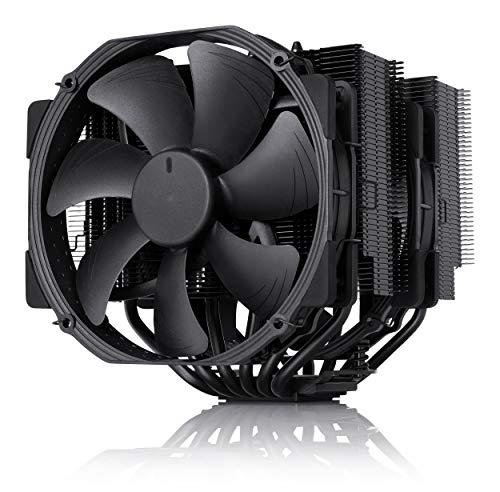
Every Ryzen cooling discussion eventually orbits the NH-D15, because it remains the air cooler other air coolers are measured against — and on Ryzen its virtues align with the platform’s demands. The dual-tower fin mass gives the boost algorithm a deep well of headroom to draw on, and Noctua’s mounting system is the most methodical in the business, a genuine consideration on a socket where even cold-plate pressure matters to a concentrated hotspot. This chromax.Black version keeps the formula and removes the beige.
The listing states the planning figure plainly: 168mm of height. That excludes a slice of cases and demands respect for memory clearance under the front tower, the standard twin-tower negotiation. What the buyer receives for accommodating it is the segment’s most complete ownership package — fans refined over generations, a support culture that treats a years-old cooler as a current product, and mounting provision that follows platforms as they change. Ryzen owners planning to ride AM5 through several processor generations are precisely the audience for a cooler bought as infrastructure.
It is also the pick that most rewards patience in tuning. The fin mass means the fans can be capped conservatively while the tower’s surface area does the work, and the result is a flagship Ryzen machine whose cooling is simply never part of any conversation again — not about noise, not about clocks, not about fit. Silence of that completeness is what the top of this market sells.
Ryzen owners should also register what the NH-D15’s longevity does to the platform maths. AM5 is a socket AMD intends to support across multiple processor generations, and a cooler with a mounting ecosystem that follows the platform turns each processor upgrade into a chip swap rather than a cooling project. Spread across two or three processors, the flagship’s price divides itself into instalments that look very different from the sticker — the accountant’s argument for the most expensive object in this guide.
- Height stated in listing: 168mm
- Layout: dual tower, dual fans
- Finish: chromax.Black
- Positioning: enthusiast-grade, low-noise focus
Strengths
- Reference-class headroom for Ryzen boost behaviour
- Methodical mounting suits AM5’s demands
- Support culture built for long platform lives
Trade-offs
- 168mm height excludes narrower cases
- Top-tier pricing among air coolers
- Front tower overhangs the nearest memory slots
Best for: a long-lived AM5 build that will see several processors under one cooler. Not suited for: a case offering less than 168mm of cooler clearance.

be quiet! Pure Rock Pro 3 Black — The compact rated tower
The black version of be quiet!’s compact double tower carries the same stated figures as its silver sibling: a 250W TDP rating and two silent 120mm PWM fans, in a frame the listing describes as a compact double tower. For Ryzen that rating is the useful headline — it frames the cooler honestly against the platform’s performance processors, whose sustained draw sits comfortably inside such an envelope with room for the boost algorithm to breathe.
The black finish changes the audience rather than the hardware. Silver reads as workstation equipment; black disappears into the dark interiors most Ryzen gaming builds now use, and the fans’ quiet-first tuning suits machines that live in bedrooms and shared spaces. be quiet!’s design language is restraint throughout — no lighting, no screen, no sculpture — and in a shortlist containing a tower with a television on it, that restraint is itself a position worth offering.
As a Ryzen pick it occupies the deliberate middle: more capacity and composure than the slim single tower, less bulk and less ceremony than the 168mm flagship, and a stated rating that lets a buyer match it to a processor class without guesswork. Builders who want their cooling decision to be quiet in every sense — acoustically, visually, and in the amount of thought it demands afterwards — will find this the most congenial object in the guide.
The compact frame carries one more Ryzen-relevant benefit: working room. AM5 motherboards pack their VRM heatsinks and first expansion slot close to the socket, and a double tower that keeps its footprint disciplined leaves fingers and cables space to work during installation and later maintenance. It is an unglamorous virtue that owners appreciate every time they reach into the case, which over a platform’s life is more often than the specification sheet would suggest.
- Rating stated in listing: 250W TDP
- Fans: 2 silent 120mm PWM
- Layout: double tower, compact frame
- Finish: black
Strengths
- 250W rating frames Ryzen processor matching clearly
- Compact twin tower is easier to house than flagships
- Quiet-tuned fans suit living-space machines
Trade-offs
- No lighting or display for showcase themes
- Compact frame leaves less fin area than full-height towers
- Quiet tuning trades a little peak capacity
Best for: a black-themed Ryzen build that values calm over ceremony. Not suited for: an overclocking showcase that wants its cooler to perform visually.
Should a Ryzen Build Consider Liquid Instead of Air?
It should consider it, and usually decline it for reasons this guide exists to explain — but the consideration should be honest. Liquid’s genuine advantages on Ryzen are the same as anywhere: nothing tall above the socket, radiator surface area at the case wall, and sustained-load composure. A sixteen-core chip rendering in a case with excellent radiator mounts is a legitimate liquid candidate, and owners who choose it are not making an error.
Air’s counter-argument on this platform is unusually strong, though. The boost algorithm’s appetite is for headroom, and the twin towers here supply headroom in the quantity Ryzen can actually spend; the returns on cooling beyond that point diminish quickly. Air also washes the VRM neighbourhood with moving air, asks nothing of the case’s radiator mounts, and contains no pump to age. Add the platform’s longevity — a tower bought for AM5 today will very likely mount its successor — and the default Ryzen answer remains a fin stack, with liquid reserved for the cases and workloads that specifically call for it. The neighbouring AIO guide covers that call in full.
There is also a diagnostic honesty to air that Ryzen owners come to value. When an air-cooled machine runs warm, the suspects are few and visible: dust in the fins, a fan slowing down, a mount that needs reseating, a curve drawn badly. Each can be checked with eyes and ears in minutes. Liquid adds coolant and a pump to that list — manageable, but longer — and on a platform whose owners tend to tinker, the shorter list is a feature that never appears in a specification table.
How Do You Match a Cooler to Your Ryzen Processor Tier?
Work by sustained behaviour rather than by the name on the box. Mainstream six- and eight-core Ryzen processors, gaming and working at stock settings, are served completely by the single tower and the value twin tower in this guide; their loads are real but not relentless, and both picks hold boost behaviour where owners expect it. The hotter territory begins with the high-core-count chips under all-core loads — rendering, compiling, simulation — where every core draws at once for hours. There the seven-pipe EVO, the Pure Rock Pro 3’s rated envelope and the NH-D15’s mass stop being luxuries and become the mechanism by which the processor keeps its promises.
The X3D gaming chips deserve a specific word, because their cache-stacked design makes them both efficient and particular: they reward good cooling with the same boost generosity as the rest of the family, but their sensitivity to heat at the cache layer means a cooler that holds temperatures steady, rather than merely low on average, serves them best. Steady is a fin-mass quality, which is one more reason twin towers dominate this shortlist. When in doubt between two rungs, buy the cooler for the processor you will plausibly own next, not the one leaving the build — coolers outlive chips on this platform.
One tier question deserves direct treatment: the efficient gaming variants that draw modest power in play tempt buyers toward the smallest cooler in the guide, and for pure gaming that logic holds. But the same machines often inherit the household’s second jobs — video exports, photo library processing, the occasional compile — and those jobs are all-core and patient. A rung of headroom above the gaming requirement is what keeps the second jobs quiet, and it costs far less than the regret of a cooler at its limit every weekend.
How Should You Read Ryzen Temperatures After the Install?
New Ryzen owners routinely panic at numbers that would be unremarkable on another platform, so the reading deserves a section of its own. Ryzen reports temperature with an emphasis on the hottest point of the compute die, and its boost algorithm is designed to use the available thermal envelope assertively — the chip treats headroom as a resource to spend, not a cushion to preserve. A processor that runs warm under a full, sustained load while holding high clocks is behaving as designed; the figure to watch is not the peak but the pattern.
The pattern that matters has three features. Temperatures should level off under a constant load rather than climbing indefinitely, which confirms the cooler is shedding heat as fast as the chip produces it. Clock speeds should hold steady alongside those temperatures, which confirms the headroom bargain is being honoured. And idle behaviour should subside to a calm baseline once the load ends, which confirms the mount and the curve are both sane. A cooler in this guide, properly mounted, delivers all three on its intended tier of processor.
Judge your install after several days, not several minutes. Paste settles through heat cycles, fan curves get their delays tuned, and the owner’s ear calibrates to the machine’s new voice. The Ryzen builds that end up loved are the ones whose owners measured the pattern, adjusted once with intent, and then stopped measuring — because the machine had stopped giving them reasons to.
How Do You Install a Tower Cooler on AM5 or AM4?
Begin with the socket’s own hardware. AM5 boards retain the stock backplate, and most coolers in this guide build their mounting on it with standoffs and brackets; AM4 installs may involve the cooler’s own backplate depending on the design. Follow the AMD-specific page of the manual rather than the Intel one — the parts bags look similar and are not. Fit the brackets before paste, confirm the cooler clears the board’s VRM heatsinks by dry-fitting it, and only then commit.
Paste application on Ryzen rewards restraint: a small pea-sized amount at the centre of the heatspreader, spread by mounting pressure. The chiplet layout tempts some builders toward elaborate patterns, but pressure and a flat cold plate do the work, and excess paste at the socket edges of an AM5 chip is a mess with no thermal upside. Tighten in alternating corners, connect the fans to CPU_FAN — using the supplied splitter on twin towers so both fans answer to one curve — and set the header to PWM mode before the first long load. Then verify with a sustained workload, watching that temperatures level off and stay level, which is the signature of a mount done right.
Removing a previous cooler from a Ryzen socket carries the platform’s one famous hazard: paste can bond the processor to the old heatsink, and a straight upward pull can lift the chip out of an AM4 socket with the cooler. Warm the system under load first, shut down, and twist the cooler gently as you lift so the bond breaks sideways. On AM5 the retention frame holds the chip more securely, but the twist costs nothing and remains the professional habit. Two minutes of patience here has saved more processors than any tool in the box.
How Do the Six Towers Compare Side by Side?
| Pick | Heat pipes | Fans | Stated figure | Character |
|---|---|---|---|---|
| Peerless Assassin 120 SE | 6 | 2 × 120mm PWM | 1550RPM ceiling | Value standard |
| Phantom Spirit 120 EVO | 7 × 6mm | Dual PWM | 2150RPM ceiling | Hot-chip headroom |
| Hyper 212 Black II | 4 | 1 × PWM | AM5/AM4 named | Slim safe buy |
| Assassin 120 Vision MAX | — | Twin tower | 480 × 854 display | Telemetry showcase |
| NH-D15 chromax.Black | — | Dual fans | 168mm height | Reference flagship |
| Pure Rock Pro 3 Black | — | 2 × 120mm PWM | 250W TDP | Compact and calm |
The table’s shape tells the Ryzen story compactly: five of the six picks put two fans over substantial fin stacks, because the platform’s boost behaviour converts fin mass into clock speed. The single tower is the exception that serves the platform’s modest end, and it earns its place by naming both sockets in its own listing — the only pick whose compatibility pitch is printed in its specification rather than implied.
The fan ceiling column is the one to read with a tuner’s eye. The two 2150RPM designs are not louder coolers by destiny; they are coolers with a taller top gear, and whether that gear is ever engaged belongs to the owner’s curve. The 1550RPM Peerless Assassin makes the opposite promise — a ceiling low enough that even an untuned board cannot make it shrill. Neither promise is better in the abstract. They suit different relationships with the BIOS, and the Ryzen buyer who knows which relationship they have has effectively chosen between them already.
What Happens to the Rest of the Board Around a Big Tower?
A large air cooler is a neighbourhood, and its neighbours are the VRM heatsinks above the socket, the first memory slot beside it and the top expansion slot below. Air towers interact with all three. The fin stacks and fans move a great deal of air across that neighbourhood, much of it washing over the voltage regulation circuitry — a side benefit liquid cooling cannot claim, since a pump block moves no air at all. Boards with modest VRM heatsinks quietly appreciate a tower’s spill, and long Ryzen work sessions are exactly when that circuitry works hardest.
The costs are access and clearance, already noted in the pick sections: a front fan that must ride higher over tall memory, a top expansion slot that sits closer to the fin stack than fingers would like, and EPS power cables at the board’s top edge that should be routed before the tower goes on, not after. None of these are surprises to a builder who dry-fits; all of them are ambushes to one who does not. The dry fit — cooler held in place, memory seated, cables imagined — takes four minutes and is the highest-value step in any tower installation on this platform.
Graphics card clearance deserves its own sentence, because modern cards are thick and Ryzen boards place the primary slot close under the socket. Every pick here is a mainstream tower whose width the board layout anticipates, but a dry fit confirms what anticipation promises, and confirms it while returning the cooler is still a theoretical option rather than a logistical project.
Memory maintenance is the recurring version of the same story. A twin tower’s front fan usually needs unclipping to reach the nearest slots, which takes a minute and no tools on the designs here — but it does mean a memory upgrade on a Ryzen tower build is a small ceremony rather than a hot-swap. Owners who swap kits for testing or content creation should weigh the Hyper 212’s permanent clear access more heavily than its specification suggests; for everyone else, the ceremony happens rarely enough to be a fair price for the fin mass above it.
What Are the Most Common Mistakes Ryzen Owners Make With Coolers?
The first is assuming AM4 compatibility guarantees AM5 correctness. The sockets share a family resemblance and a mounting heritage, but the buyer should still see AM5 named by the maker, as the Hyper 212’s listing does, before money moves. The second is starving a twin tower with a lazy fan connection — plugging one fan into CPU_FAN and the other into a case header on a different curve, so the pair work against each other’s rhythm instead of sharing one.
Third is judging a Ryzen cooler by a two-minute burst test. The platform’s whole thermal character is sustained: a cooler that looks brilliant in a spike and fades over twenty minutes has failed the actual assignment. Fourth, over-pasting in response to chiplet anxiety, which produces squeeze-out at the socket and no improvement at the die. And fifth, forgetting that the stock cooler included with some Ryzen processors is a legitimate placeholder — installing it while the chosen tower ships is not a compromise, it is a schedule, provided the real cooler is genuinely on its way.
A sixth mistake is subtler and increasingly common: enabling an aggressive motherboard performance mode and blaming the cooler for the consequences. Board vendors ship modes that raise power limits well beyond the processor’s standard envelope, and a tower chosen for stock behaviour will sound overwhelmed by a workload it was never matched to. Set the platform to its standard limits first, judge the cooler there, and only then decide whether the extra power — and the cooling it demands — is a trade you actually want.
Final Recommendation
Most Ryzen builders should buy the Peerless Assassin 120 SE and spend the difference on memory: it answers the platform’s demands — pipe count for the hotspot, fin mass for the boost algorithm, sane fan speeds for the room — at a tier that respects the rest of the build. It is the cooler this platform’s mainstream would design for itself if it could hold a vote. Step up to the Phantom Spirit 120 EVO when a high-core-count chip will work all-core for hours, to the Pure Rock Pro 3 Black when calm is the brief, to the NH-D15 when the cooler is meant to outlive two processors, and to the Vision MAX when the build deserves a dashboard. The Hyper 212 Black II remains the right answer for the mainstream chip and the first build. Match the tower to the processor’s sustained behaviour, verify the socket statement with your own eyes before the box arrives, tune the curve once with patience, and a Ryzen machine will hold its clocks the way its box promised — quietly, at length, and without the cooling ever becoming the story of the build again.
Frequently Asked Questions
Do AM4 coolers fit AM5 motherboards?
Many do, because AM5 preserved much of AM4’s mounting geometry, but “many” is not “all”, and correct fit also depends on backplate arrangements. Treat the maker’s own socket statement as the authority — the Hyper 212 Black II’s listing, for example, names AM5 and AM4 explicitly — and never force a bracket that resists. If your cooler predates AM5 and its maker offers an upgrade kit, that kit is the correct path; improvised spacing with the wrong standoffs changes mounting pressure in ways that show up as baffling temperatures.
Does a better cooler really make a Ryzen processor faster?
At stock settings, it can. Ryzen’s boost algorithm raises clocks when thermal headroom exists and trims them when it does not, so a cooler with more fin mass and better heat spreading lets the chip hold higher clocks through sustained work. The effect is largest in long, heavy loads and smallest in brief desktop bursts. This is not overclocking and involves no warranty adventures; it is the processor doing exactly what its designers intended, in a thermal environment that finally lets it.
How much thermal paste does a Ryzen chip need?
A pea-sized amount at the centre of the heatspreader is the reliable default. Mounting pressure spreads it across the surface, including over the chiplet regions beneath. Elaborate patterns and excessive quantities add mess without adding performance, and squeeze-out around an AM5 socket is a nuisance to clean. If you remove a cooler and find the old paste dry and cracked, clean both surfaces fully before the new application; layering fresh paste over old is the one method reliably worse than every pattern argument on the internet.
Is the stock Ryzen cooler good enough?
For a mainstream processor doing everyday work, the bundled cooler is adequate and honest. The upgrade case rests on noise, sustained boost behaviour and hotter processors — if none of those trouble you, the stock unit is not a problem waiting to be solved. Most owners who upgrade cite the sound first. Note also that several Ryzen processors ship with no cooler in the box at all, in which case the question answers itself and this guide becomes a shopping list rather than an upgrade debate.
Why do twin towers dominate Ryzen recommendations?
Because the platform converts cooling into clock speed. Two fin stacks and two fans provide the surface area and heat spreading that a concentrated chiplet hotspot and an opportunistic boost algorithm can jointly exploit. Single towers serve the modest end of the range well, but the headroom story belongs to the twins. The pattern is visible in this very shortlist: five of six picks are twin-fan designs, chosen independently against different budgets and briefs, which says more about Ryzen’s appetite than any single recommendation could. It also says something about value: on this platform, the second fan and the second fin stack are not decoration, they are the mechanism by which the processor you already paid for reaches the performance printed on its box.
Should I worry about cooler weight on the motherboard?
Large towers are heavy, and the correct response is procedural rather than anxious: use the full mounting hardware including the backplate, transport the machine with the board horizontal or the cooler supported, and avoid shipping an assembled tower-cooled PC without internal bracing. Installed and stationary, a properly mounted twin tower is a non-issue. Motherboard makers design their socket areas around exactly these coolers, and the mounting systems spread the load across the backplate rather than hanging it from the board’s surface.
Related Guides
Ryzen cooling sits inside a wider set of decisions covered by the neighbouring guides, and a builder who has settled the tower has usually settled the machine’s character along with it. Builders in small cases should start at Best ITX Low Profile CPU Coolers, those chasing silence across any platform will want Best Quiet CPU Air Coolers, and anyone whose case dimensions are the binding constraint should measure against Best CPU Coolers That Will Fit Mid Tower before ordering.
Related guides
- Best Gaming Keyboard: Six Boards From Rapid-Trigger Esports Picks to Macro Flagships
- Best Time Machine Compatible Hard Drives: Mac-Ready and Reformatted Picks
- Best 3.0 Qualcomm Quick Chargers: QC 3.0 Adapters That Still Earn Their Outlet
- Best 3D Mechanical Engineering Laptops: Certified Workstations for CAD and Simulation



[…] fits are both better than a favourite that does not. AMD builders comparing both worlds should read Best CPU Air Coolers Ryzen, small-case owners will find their format at Best ITX Low Profile CPU Coolers, and anyone whose […]