What's inside
- Key Takeaways
- Quick Picks
- How We Chose These Picks
- What Actually Makes a Cooler Quiet?
- How Should You Judge Quiet in Your Own Room?
- The Best Quiet CPU Air Coolers, Pick by Pick
- Why Do Some Quiet Coolers Still Hum?
- What Does Quiet Mean When the Machine Is a Work Tool?
- How Do You Set Up a Quiet Machine Beyond the Cooler?
- How Do You Install a Big Quiet Tower Without Spoiling It?
- How Do the Six Picks Compare on Quiet Strategy?
- What Are the Most Common Mistakes When Chasing a Quiet PC?
- Final Recommendation
- Frequently Asked Questions
- Related Guides
As an Amazon Associate I earn from qualifying purchases. This post may contain affiliate links at no extra cost to you.
widgetverdict.com is reader-supported. When you buy through links on our site, we may earn an affiliate commission.
Where to buy: the six coolers below link to checked Amazon listings, and they share one design conviction — that a processor’s cooling should be felt in its clock speeds and never heard across the room, during a call, or through a bedroom wall at night.
Quiet is the specification nobody can print honestly on a box, which is why the hunt for the best quiet cpu air coolers is really a hunt for design intent — for the accumulation of small, expensive decisions about fin density, bearing quality, blade shape and speed ceilings that separate a cooler engineered for silence from one merely marketed at it. Any cooler can be quiet at idle; the question is what it sounds like at the loads you actually run, in the room where you actually sit, during the hours you actually work. The coolers that answer well share a recognisable anatomy: generous fin area so the fans can turn slowly, fans chosen for the character of their sound rather than the size of their airflow figure, and speed ceilings set by people who understood that the top of the range is a place a well-matched cooler should rarely visit.
This shortlist is built around that anatomy. Three of the six picks come from be quiet!, the brand that treats silence as its founding brief, including a flagship with a semi-passive mode and a stated 300W rating. Two are Noctua designs, the reference for low-noise engineering at both tower and low-profile heights. And one is a value twin tower whose modest 1550RPM fan ceiling turns out to be an acoustic feature in disguise. No decibel figures are quoted anywhere in this guide, because none of the listings state comparable ones — quiet here is argued from design, which is the only honest way to argue it, and from the listening tests any owner can run in the room where the machine will actually live.
Key Takeaways
- Quiet comes from fin area and fan character, not from a single printed number; this guide argues it from design.
- The Dark Rock Pro 6 pairs 7 heat pipes and 2 PWM fans with a stated 300W TDP and a semi-passive mode.
- The Dark Rock 5 runs six heat pipes behind a single premium fan, with high RAM and VRM compatibility.
- Pure Rock Pro 3 Silver brings a 250W rating and quiet-tuned 120mm PWM fans in a compact double tower.
- The NH-D15 chromax.Black is the low-noise reference tower, standing 168mm tall.
- The Peerless Assassin 120 SE’s 1550RPM ceiling keeps its working voice in a low register.
Quick Picks
| Pick | Badge | Why it earns its place |
|---|---|---|
| be quiet! Dark Rock Pro 6 | The silent flagship | Seven heat pipes, two PWM fans, a 300W rating and a semi-passive mode for a machine that can idle in silence. |
| be quiet! Dark Rock 5 | The single-tower hush | A six-pipe single tower whose premium fan and clearance-shaped frame suit tall memory kits. |
| be quiet! Pure Rock Pro 3 Silver | The compact calm | A 250W TDP rating with quiet-tuned twin 120mm PWM fans in a manageable double tower. |
| Noctua NH-D15 chromax.Black | The reference in black | Dual-tower mass and Noctua’s low-noise fan culture, at 168mm tall. |
| Noctua NH-L9x65 | The small-room option | At 65mm it brings the same quiet-first engineering to ITX and SFF builds. |
| Thermalright Peerless Assassin 120 SE | The quiet bargain | Six heat pipes and twin fans capped at 1550RPM, so its loudest is still a low voice. |
How We Chose These Picks
Choosing quiet coolers without quoting a single laboratory decibel figure requires a discipline of its own. We selected on the design decisions that produce quiet in real rooms: fin area relative to the processor class served, because area is what lets fans slow down; fan pedigree, because a fan’s bearing and blade design decide whether its sound is a forgettable wash or a memorable tone; stated speed ceilings, because a cooler that cannot spin fast cannot scream; and any explicit silence engineering in the listing, such as the Dark Rock Pro 6’s semi-passive mode, where the fans can rest entirely at light loads.
Everything factual in the detailed sections comes from the listings — pipe counts, fan counts, the TDP ratings, the NH-D15’s height, the NH-L9x65’s 65mm, the Peerless Assassin’s 1550RPM. Where a listing offers no noise figure, this guide offers none either, and instead describes the behaviour a buyer should expect and how to verify it in their own room. That restraint is deliberate: noise numbers measured on different benches in different rooms are the least comparable figures in all of hardware, and a quiet guide that invented them would fail at its only job.
The six were then checked for spread. A quiet guide that only served flagship processors in tall cases would fail the bedroom PC, the home office and the small-form-factor build alike, so the list runs from a 300W-rated flagship down to a 65mm low-profile unit, with the value segment represented by a cooler whose quiet is a by-product of its sensible ceiling. Silence is a system property, and the shortlist treats it as one.
Two categories were excluded on principle. Liquid coolers were left to their own guide, not because they cannot be quiet — a large radiator at low fan speeds is a formidable silencer — but because they add a pump’s constant tone to the equation, and a guide about air should not smuggle in a second acoustic problem while solving the first. And the deep-discount towers with unlabelled fans were excluded without regret: a fan whose maker will not put a name to it is a fan whose low-speed character nobody has engineered, and low-speed character is this entire category.
What Actually Makes a Cooler Quiet?
Three things, in order of importance. The first is surface area. A heatsink sheds heat through its fins, and the more area it presents, the less air velocity it needs to move the same heat — and fan noise rises far faster than fan speed, so a modest reduction in required speed buys a disproportionate reduction in sound. This is why the quiet end of the market is populated by large towers and why every flagship in this guide is physically generous: they are not showing off, they are purchasing silence with aluminium.
The second is fan character. Two fans at the same speed can produce entirely different experiences — one a smooth wash of broadband sound that the ear files under “room”, the other a tonal hum or a bearing tick that the ear tracks all evening. Blade shape, bearing quality and motor smoothness decide which you get, and they are why certain brands’ fans are spoken of the way good microphones are: as instruments. The third is control. A quiet cooler under a crude fan curve is a loud cooler waiting for a spike; PWM control with a sensible curve, drawn against real workloads, is what converts quiet hardware into a quiet machine.
Heat pipes play a supporting role that deserves its credit: they decide how evenly the fin stack is fed. A stack whose heat arrives concentrated in one corner needs its fans to work that corner’s air harder, while a stack fed evenly by six or seven pipes uses all of its area at once — and area used evenly is area that lets the fans slow down. Pipe counts in this guide are therefore acoustic specifications in disguise, which is why the quiet flagship carries seven and the single-tower hush carries six.
Notice what is absent from the list: exotic materials, liquid, and sheer fan size alone. A big fan with a poor bearing is a big source of annoyance, and a small, excellent fan inside a well-fed fin stack can be the quietest thing in a build. Quiet is an engineering outcome, not a component category, and the picks below were chosen as outcomes first.
One more factor deserves promotion from footnote to principle: time. A cooler’s sound at minute one of a load is not its sound at minute forty, because fin stacks heat-soak and fans climb to their working equilibrium slowly. Quiet judged on a cold start flatters every cooler ever made. The designs in this guide were chosen for their equilibrium behaviour — the speeds they settle at, in the second hour, when the room has forgotten the machine exists. That is the only quiet worth paying for, and it cannot be photographed for a listing.
How Should You Judge Quiet in Your Own Room?
Since printed figures cannot be trusted across brands, the honest buyer becomes their own measurement instrument — and ears, used methodically, are better instruments than they are usually credited with being. The protocol has three passes. First, the idle pass: at your desk, at your usual working hour, is the machine audible at all when it does nothing? A semi-passive design should pass this absolutely; a well-tuned slow fan should pass it in most rooms. Second, the work pass: under your heaviest regular load, does the sound have a tone — a hum, a whine, a tick — or is it a shapeless wash? Tone is what the ear cannot stop tracking; wash is what it forgets.
The third pass is the night pass, and it is the one that decides satisfaction for bedroom and studio machines. Rooms at night are several worlds quieter than rooms at noon, and a machine that was invisible at lunch can own the darkness. Judge there, or know that you have not judged yet. Owners shopping for a quiet cooler should also perform the reverse test on their current machine: identify which component they actually hear at each pass. It is remarkably common to discover that the processor cooler was innocent and the graphics card or a case fan was the voice all along — a discovery that redirects the budget to where the noise lives.
None of this requires equipment, which is precisely why it outperforms equipment: a decibel figure cannot tell you whether a sound will bother you, because bother is a property of tone, timing and attention, not of volume alone. The coolers in this guide were selected to pass all three passes for their intended processors — stopped or slow at idle, shapeless at work, and beneath the floor of a quiet room at night.
Run the same three passes a month after the build, not only on the first evening. Dust, a settling mount and a curve you adjusted once and forgot can each move the result, and the month-later audit is the difference between a machine that was quiet on delivery and a machine that is quiet as a habit. Owners who build the audit into the same calendar reminder as the dust cleaning rarely hear their computers at all, which is the entire point stated as a schedule.
The Best Quiet CPU Air Coolers, Pick by Pick
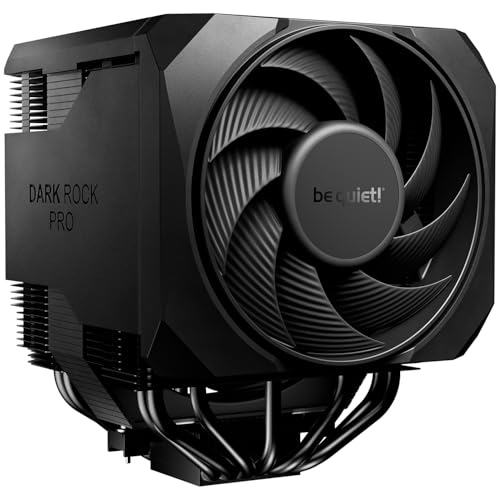
be quiet! Dark Rock Pro 6 — The silent flagship
The Dark Rock Pro 6 states its ambitions in the plainest terms in this guide: seven heat pipes, two PWM fans, a 300W TDP rating — and a semi-passive mode. That last feature is the thesis of the whole product. In semi-passive operation the fans can stop entirely under light loads, which means the machine on your desk, doing the ordinary work of a day, makes no fan noise at all. Not a low hum, not a faint wash — silence, of the kind only a stopped fan can certify. When load arrives, the fans wake into a fin stack large enough to keep their speeds civilised.
The 300W rating frames who this is for: the flagship processors, the high-core-count workstations, the machines whose owners refuse to choose between power and peace. A cooler rated well above its processor’s draw spends its life in the low end of its fans’ range, and the Dark Rock Pro 6’s architecture — twin towers’ worth of fin area implied by its class, seven pipes feeding them — is designed to live there. be quiet! also notes high RAM and VRM cooler compatibility for the range, a practical mercy in a flagship that could easily have been shaped without regard for either.
It is the most considered object in this guide, and its price and size will say so. But the buyer it serves — the professional whose recording, calls or concentration share a room with a genuinely powerful machine — is not buying a cooler so much as buying the room back. Judged on that transaction, the semi-passive flagship is not an extravagance. It is the only pick here that can promise a working machine with literally no fan sound at all, and it keeps the promise by design rather than by tuning.
One ownership detail follows from the fan-stop design: a semi-passive machine asks its owner to trust stillness. The first week, most owners check temperatures compulsively, because a silent computer reads as a stopped computer to instincts trained by decades of fan noise. The temperatures will be fine — that is what the fin mass is for — and the instinct recalibrates. What remains is the strangest luxury in modern computing: a powerful machine that gives no audible evidence of existing until its owner asks it to work hard.
- Rating stated in listing: 300W TDP
- Heat pipes: 7; fans: 2 PWM
- Mode: semi-passive — fans can rest at light load
- Fit notes: high RAM and VRM compatibility claimed for the design
Strengths
- Semi-passive mode delivers true silence at light loads
- 300W rating gives flagship processors deep headroom
- Seven pipes feed a flagship-class fin area
Trade-offs
- Flagship size demands a case that can house it
- Top-tier pricing within air cooling
- Its capacity is wasted on modest processors
Best for: a flagship workstation in a room where silence is a working requirement. Not suited for: a modest processor that will never leave the fans’ lowest range anyway.

be quiet! Dark Rock 5 — The single-tower hush
The Dark Rock 5 makes the quiet argument in a smaller frame: six high-performance heat pipes and a Silent Wings fan, in a design whose listing emphasises high RAM and VRM cooler compatibility. That emphasis is the product’s personality. Where the Pro 6 maximises, the 5 accommodates — its shape is drawn so the memory slots and the motherboard’s power circuitry keep their room, which makes it the be quiet! flagship philosophy translated for builds that cannot or will not host a twin-tower monument.
The Silent Wings name carries the brand’s fan engineering in a single unit: one excellent fan, asked to do the whole job, and therefore specified like it matters. A single-fan cooler lives or dies by that fan’s character across its whole range, and the Dark Rock line’s reputation rests on fans whose sound stays smooth as they climb. In a mid-size case with a mainstream performance processor, the result is a machine whose cooling voice sits permanently in the background — present if you listen for it, absent from your attention if you do not.
Choose it over the Pro 6 when the processor’s ambitions are mainstream, the case is mid-sized, or the memory kit is tall enough to make twin towers a negotiation. It gives up the semi-passive party trick and some ceiling, and in exchange it fits more builds, clears more components and costs the owner less thought. In the quiet market, that is not the lesser product; it is the one most likely to be correctly matched, and correct matching is where quiet actually comes from.
The RAM and VRM compatibility deserves a second mention from the quiet angle specifically, because clearance shapes airflow. A tower that crowds the memory and the board’s power stages forces its exhaust into turbulent paths, and turbulence is noise the fan never made. A frame drawn to give those components room — as this one’s listing claims — lets air leave in straight lines, and straight lines are quiet. It is a small, unglamorous mechanism, and it is exactly the sort that separates designed quiet from advertised quiet.
- Heat pipes: 6, high-performance
- Fan: Silent Wings series
- Fit notes: high RAM and VRM compatibility in listing
- Role: single-tower expression of the Dark Rock line
Strengths
- Silent Wings fan character across its range
- Clearance-conscious shape suits tall memory
- Six pipes serve mainstream performance processors
Trade-offs
- No semi-passive mode
- Single fan has less ceiling than the twin-fan Pro 6
- Flagship processors under sustained load will ask more
Best for: a mid-size, quiet-first build with mainstream performance hardware. Not suited for: a flagship processor under sustained all-core loads.

be quiet! Pure Rock Pro 3 Silver — The compact calm
The Pure Rock Pro 3 Silver approaches quiet from the direction of proportion: a double-tower cooler in a compact frame, a stated 250W TDP rating, and two silent 120mm PWM fans. The rating matters to the acoustic story more than buyers realise. A cooler whose envelope sits comfortably above the processor’s sustained draw is a cooler whose fans live at the bottom of their range, and the bottom of a well-designed fan’s range is where quiet is manufactured. be quiet! built this one to live there permanently.
The silver finish gives it a distinct place in the brand’s own range — the workstation aesthetic, brushed and bright, in a market segment that defaults to black. Understated is the point: this is the cooler for the machine that sits in a studio, a clinic, a professional office, where the computer should look like equipment and sound like nothing. Its compact twin-tower frame respects the cases such rooms tend to use, which are chosen for their desks rather than their radiators.
Against its larger Dark Rock siblings, the Pure Rock Pro 3 trades ceiling for manners and size. Against the value twin towers, it trades a little raw capacity for fan tuning that prioritises the ear over the chart. Both trades are coherent, and the buyer who recognises their own machine in that description — powerful enough, quiet above all, housed with restraint — will find this the most precisely aimed product in the guide.
There is a pairing worth stating for workstation buyers: this cooler and a semi-passive power supply, in a case with slow case fans, produce a machine whose entire acoustic budget at ordinary loads is close to zero moving parts. The Pure Rock Pro 3 is often the keystone of such builds precisely because its envelope matches professional processors without the flagship towers’ bulk, leaving the case’s interior — and its airflow — calm in every sense the word supports.
- Rating stated in listing: 250W TDP
- Fans: 2 silent 120mm PWM
- Layout: double tower, compact frame
- Finish: silver
Strengths
- 250W envelope keeps fans in their quiet range
- Compact frame fits cases the flagships cannot
- Professional silver finish suits workspaces
Trade-offs
- Less fin area than the Dark Rock flagships
- No semi-passive mode
- Silver finish will not suit dark themed builds
Best for: a professional workstation that must be powerful and unheard in equal measure. Not suited for: a dark showcase build or a flagship run at its limits.
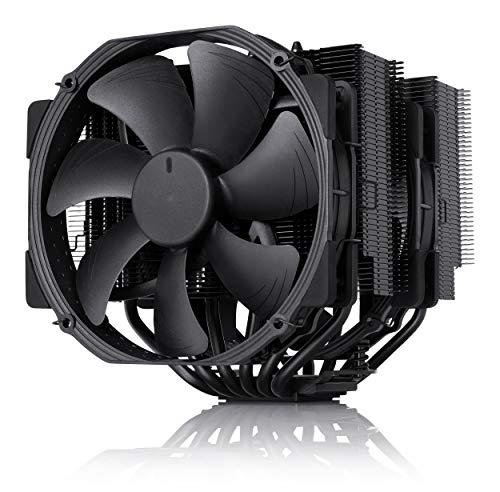
Noctua NH-D15 chromax.Black — The reference in black
The NH-D15’s place in a quiet guide is earned the old way: by being the cooler reviewers have used for years as the acoustic yardstick. Its dual-tower fin mass is the largest argument in this list — surface area on a scale that lets two fans turn slowly through loads that would have lesser coolers singing — and Noctua’s fans are the segment’s reference for sound character, the smooth broadband wash that disappears into a room. The chromax.Black finish simply lets all of that live in a modern dark build without the brand’s traditional colours announcing themselves.
The listing’s stated figure is the one the buyer must respect: 168mm of height. Quiet on this scale is not portable; it needs a case with the clearance to house the fin stacks, and memory that accepts the front tower’s overhang or a fan raised to accommodate it. Owners who clear those gates describe the same experience in the same words across a decade of forums: the machine’s cooling stops being a topic. Temperatures, clocks and noise all leave the conversation at once, which is the deepest form quiet can take.
It lacks the Dark Rock Pro 6’s semi-passive certification, and in a silent room at idle a stopped fan beats a slow one. But under sustained load — the condition that separates quiet claims from quiet machines — the NH-D15’s combination of mass and fan quality remains the benchmark the rest of this guide is quietly arranged around. Buy it when the workload is heavy, the case is tall, and the plan is to keep the cooler longer than the processor under it.
A note on the black finish from the quiet buyer’s chair: it changes nothing acoustically, and that is its virtue. For years the NH-D15’s performance came with a colour scheme that dictated a build’s entire palette, and some quiet buyers chose lesser coolers for aesthetic peace instead. The chromax version removes that tax. The reference cooler can now be bought on its merits alone, in a machine that looks the way its owner wants — and a guide about removing distractions should applaud the removal of that one.
- Height stated in listing: 168mm
- Layout: dual tower, dual fans
- Positioning: enthusiast-grade, low-noise
- Finish: chromax.Black
Strengths
- Fin mass lets fans stay slow under real loads
- Reference-class fan sound character
- Built and supported as a multi-platform purchase
Trade-offs
- 168mm height excludes many cases
- No semi-passive fan stop
- Memory clearance needs the usual twin-tower planning
Best for: a heavy workload in a tall case, kept for the long term. Not suited for: a case with less than 168mm of cooler clearance.
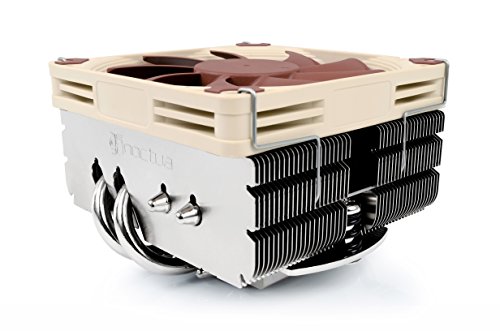
Noctua NH-L9x65 — The small-room option
Quiet means something different in a small case on a desk: the machine is closer, the room’s other sounds are nearer, and there is no fin mass to hide behind. The NH-L9x65, at 65mm tall, is Noctua’s answer inside those constraints — a low-profile cooler whose listing promises quiet, high-performance cooling for ITX and SFF builds across Intel and AMD platforms. Its presence in this guide is a reminder that the quiet buyer is not always a tower buyer; sometimes the quiet buyer has four litres of case and a machine that sits beside the monitor.
What it offers at 65mm is the brand’s discipline in miniature: a mounting system that removes improvisation from a build with no room for it, a fan chosen for character at the speeds a low-profile unit must use, and fin volume that is generous precisely relative to its height class. Matched to an efficient processor — the natural ITX pairing — the result is a small machine whose voice stays beneath the room’s floor, which is all its owner ever asked.
Its limits are the format’s, stated plainly: it will not make a hot flagship silent, because nothing at 65mm can, and it does not fit the slimmest sandwich cases. But for the roomier ITX build whose brief is calm — the living-room PC, the bedroom workstation, the studio’s second machine — it is the pick that proves quiet is a discipline, not a dimension.
Living-room duty deserves its sentence: a PC beside a television competes with dialogue, and dialogue is recorded far quieter than game audio or music. A cooler that passes the living-room test — inaudible across a sofa’s distance during a film’s quiet scenes — has passed the strictest acoustic examination in domestic computing. The NH-L9x65, over an efficient processor, is the pick in this guide built to sit that examination in a case small enough to belong under the screen.
- Height stated in listing: 65mm
- Layout: low-profile, down-draft
- Positioning: quiet, high-performance, ITX/SFF
- Platforms: Intel and AMD named in listing
Strengths
- Quiet-first engineering in a 65mm frame
- Mounting quality suited to tight builds
- Down-draft air also cools the motherboard
Trade-offs
- Low-profile ceiling on processor ambition
- Too tall for slim sandwich cases
- Premium pricing within its height class
Best for: a roomier ITX build whose brief is calm at desk distance. Not suited for: a flagship processor or a sub-55mm case.

Thermalright Peerless Assassin 120 SE — The quiet bargain
The Peerless Assassin 120 SE was not designed as a quiet cooler, and this guide includes it because its specification accidentally describes one: six heat pipes with AGHP technology, two fin stacks, and twin 120mm PWM fans whose listed ceiling is 1550RPM. That ceiling is the acoustic story. A fan that cannot exceed a moderate speed cannot produce the high-register sound that makes coolers infamous; its worst case is a low, even push of air that rooms absorb. Matched to a mainstream processor, it spends its life far below even that ceiling.
The value context sharpens the point. The other picks here buy quiet with flagship engineering, semi-passive modes and reference fans; the Peerless Assassin buys a large share of the same experience with fin area and restraint, at a tier that leaves the budget for the rest of a quiet system — and quiet is a system, a fact this guide repeats deliberately. Money saved on the cooler can become a quieter graphics card, a better case, slower case fans: the system’s total voice is what the owner hears, and this pick is the budget’s best friend in lowering it.
Its fans will not match the Noctua or be quiet! units for sheer sound character at equal speed, and it offers no fan-stop mode. But judged as the quietest machine a given total budget can build, rather than the quietest cooler a given line item can buy, the Peerless Assassin’s case is formidable — and it is the pick this guide expects to sell the most of, for exactly that reason.
Its owners should spend ten of the saved minutes on the curve, because the bargain’s one condition is tuning. The fans’ ceiling is modest, but a default motherboard profile will still park them higher than the work requires; draw the curve down to the workload, with delay for the spikes, and the value tower settles into the same low register as rivals costing far more. The saving buys the hardware; the tuning, which is free, buys the quiet.
- Heat pipes: 6, AGHP technology
- Fans: dual 120mm PWM, listed up to 1550RPM
- Layout: dual tower
- Role: value route to a quiet system
Strengths
- 1550RPM ceiling caps its worst-case voice
- Twin towers give mainstream chips easy headroom
- Value tier funds quiet elsewhere in the system
Trade-offs
- Fan character trails the reference brands
- No semi-passive mode
- Front fan overhang needs memory planning
Best for: a quiet total system built to a sensible overall budget. Not suited for: a recording-grade silent brief at flagship loads.
Why Do Some Quiet Coolers Still Hum?
Because volume and tone are different problems, and a cooler can solve the first while failing the second. The hum that survives an otherwise quiet build usually has one of three sources. The first is resonance: a fan at a particular speed excites a panel, a fin stack or a desk surface into sympathetic vibration, and the machine acquires a note that belongs to the furniture as much as to the fan. The cure is rarely a new cooler — it is a small speed change that moves the fan out of the resonant neighbourhood, or a soft mount that breaks the vibration’s path.
The second source is bearing character at low speed. Some fans are exemplary at full chat and faintly gritty at the crawl, which is precisely backwards for quiet duty, where the crawl is where the fan lives. This is the unglamorous territory where the reference brands earn their premiums: their fans are specified for the bottom of the range, not the top. The third source is electrical — a motor driven by a poorly implemented control signal can tick or whine at low duty cycles, which is why this guide insists on PWM mode being set correctly in the BIOS rather than left to a voltage mode the header guessed at.
Diagnosing which of the three you have is a two-minute exercise: vary the fan speed slowly by hand in software and listen for where the tone appears and vanishes. A tone tied to one narrow speed band is resonance or bearing; a tone present across the low range is control. Each has a fix, and none of the fixes is buying a different cooler in a panic. Quiet machines are usually tuned into existence, and the tuning starts with knowing which sound you are actually hearing.
What Does Quiet Mean When the Machine Is a Work Tool?
For a growing class of owners, the PC’s noise is not a comfort issue but a production defect. A microphone does not forgive fan noise the way an ear does: recordings capture the wash the owner had learned to ignore, calls carry it to colleagues, and live streams broadcast it to strangers. In those rooms the quiet brief is professional, and it changes the buying order — the semi-passive flagship stops being a luxury and becomes the only configuration that lets a powerful machine sit within microphone range of its owner while working.
Concentration work makes a quieter version of the same demand. Knowledge workers may never record a note, but a tonal hum at the edge of hearing taxes attention across an eight-hour day in a way its owner will feel as tiredness without ever naming the cause. The coolers in this guide serve that worker with the same hardware and a different justification: not silence as pleasure, but silence as the absence of a tax. It is why the guide weighs fan character — tone — as heavily as fan volume, because the tax is levied by tone.
There is a test for this class of owner that outperforms every specification: record thirty seconds of your current machine, at your desk, during your heaviest ordinary task, and listen to the recording through headphones. What the microphone hears is what your callers and your audience hear, and it is usually worse than what your ears reported. Then buy accordingly — which, for anyone whose living is made within earshot of the machine, usually means buying from the top half of this list and never regretting it.
The same logic reaches the home’s shared spaces. A machine in an open-plan living area is heard by people who did not choose it, at hours they did not choose, doing work they do not benefit from — and household harmony has ended arguments that no specification sheet could settle. The quiet cooler, in that setting, is not a component preference at all. It is a courtesy with a mounting bracket, and it tends to be the purchase the whole household ends up grateful for.
How Do You Set Up a Quiet Machine Beyond the Cooler?
The cooler is the loudest voice in most builds, but it is not the only one, and a quiet brief fails if the rest of the choir sings over it. Start with the fan curve, drawn with delay so brief processor spikes never move the fans at all, and with a ceiling set at the speed where your ears, in your room, stop forgiving. Then audit the case fans with the same ear: fewer fans turning slowly beat many fans turning slower still, because each adds its own tone. Finally, hunt the small sounds — a hard drive’s seek, a pump that does not exist in these air builds, a cable ticking against a blade — because a genuinely quiet cooler exposes them all, and the owner’s satisfaction is set by the loudest remaining noise, not the quietest component.
Placement finishes the job. A machine under a desk sounds quieter than the same machine on it; a machine on a hard surface borrows the surface as a sounding board for vibration, which soft feet or a mat will calm. None of this costs what a flagship cooler costs, and all of it multiplies the flagship’s effect. Quiet is the most systemic property a PC has, and the owners who achieve it are the ones who stopped shopping for a silent part and started building a silent arrangement.
Dust belongs in this section too, because a quiet machine ages audibly before it ages thermally. A fin stack furred with dust needs faster fans for the same cooling, so the machine’s voice rises gradually across a year — slowly enough that the owner adapts, until a cleaning restores the original silence in an afternoon and the difference is startling. Twice-yearly cleaning is not maintenance for the cooler’s sake; it is how a quiet build stays the build you bought.
How Do You Install a Big Quiet Tower Without Spoiling It?
The installation discipline is the standard one — board out of the case where possible, correct backplate, pea-sized paste, alternating corners for even pressure — with two quiet-specific additions. First, decouple: ensure no cable rests against a fan frame or a fin stack, because vibration travels down anything that touches, and a cable’s buzz at a resonant speed has ruined more silent builds than any fan. Route the fan leads with slack and keep them clear of blades and fins alike.
Second, verify under the conditions you bought the cooler for. Run your real workload for twenty minutes in the room, at the hour, you will actually use it — a quiet verdict delivered by a benchmark at noon in an empty house is worth little to a machine that works at midnight in a shared flat. Listen for tone, not volume: a smooth wash at a slightly higher level is a better outcome than a faint whine, and if a tone appears at a particular speed, adjust the curve to live below or above that speed rather than on it. Fans have resonant neighbourhoods; the tuner’s job is simply not to park in one.
Keep the packaging and the spare mounting hardware, as with any cooler, but on a quiet build keep one more thing: a note of the curve you settled on and the speeds it produced. Fan control settings live in BIOS profiles and software that get reset by updates, battery failures and motherboard swaps, and the owner who can restore a tuned curve from a note is an owner whose machine stays quiet for years instead of until the first CMOS clear.
How Do the Six Picks Compare on Quiet Strategy?
| Pick | Heat pipes | Fans | Stated figure | Quiet strategy |
|---|---|---|---|---|
| Dark Rock Pro 6 | 7 | 2 PWM | 300W TDP | Semi-passive fan stop |
| Dark Rock 5 | 6 | Silent Wings | RAM/VRM clearance | Fan character, single tower |
| Pure Rock Pro 3 Silver | — | 2 × 120mm PWM | 250W TDP | Oversized envelope, low speeds |
| NH-D15 chromax.Black | — | Dual fans | 168mm height | Fin mass and reference fans |
| NH-L9x65 | — | Low-profile fan | 65mm height | Discipline at small scale |
| Peerless Assassin 120 SE | 6 | 2 × 120mm PWM | 1550RPM ceiling | Speed cap and value |
The strategies column is the guide in miniature: there are at least four distinct roads to a quiet machine — stopping the fans, perfecting the fan, oversizing the envelope, and capping the speed — and the six picks divide among them. Choosing a road that suits your processor and your room matters more than choosing the most expensive vehicle on any single road.
The stated-figure column also teaches a lesson in reading this market: two picks publish TDP ratings, two publish heights, one publishes a fan ceiling and one publishes a clearance claim. There is no common currency, which is precisely why cross-brand decibel shopping fails and why this guide compares strategies instead of scores. A buyer who understands what each figure is for — envelope, gate, ceiling, fit — can read any future listing in the category and know which question it answers.
What Are the Most Common Mistakes When Chasing a Quiet PC?
The first is buying the cooler and skipping the curve. A flagship fan set governed by a motherboard’s default performance profile will rev at every spike, and its owner will conclude the cooler was oversold when the software was underdone. The second is judging quiet in the wrong room at the wrong hour: a machine that seems silent in a daytime office can be the loudest object in a midnight bedroom, and the verdict that matters is the one from the chair you actually sit in.
Third, mismatching the envelope — a small cooler on a flagship processor must run its fans hard to survive, and no fan character survives being run hard; the quietest cooler for a hot chip is a big one loafing, never a small one striving. Fourth, forgetting the graphics card, which in many gaming builds is louder than any pick in this guide and sets the system’s real noise floor. And fifth, chasing a printed decibel figure across brands, when the figures were measured in different rooms with different methods and describe the bench more than the product.
A sixth mistake is subtler and increasingly common: silencing the processor cooler in a build whose power supply or graphics card runs a semi-passive trick of its own, badly coordinated. Three components each stopping and starting their fans on independent thresholds can produce a machine that breathes in turns — a chorus of small starts that draws more attention than one steady wash. Coordinate the thresholds where the software allows, or accept one component’s gentle constancy as the floor the others rest beneath. Silence, like music, is mostly about what happens between the notes.
Final Recommendation
If the brief is silence itself, the Dark Rock Pro 6 is the answer this guide was written to reach: semi-passive at rest, immense in reserve, and engineered by the one brand in this category that treats quiet not as a feature to advertise but as a founding document to obey. The Dark Rock 5 and Pure Rock Pro 3 carry the same philosophy into smaller frames and mainstream processors, the NH-D15 remains the load-bearing reference for heavy work in tall cases, the NH-L9x65 proves the discipline scales down gracefully to 65mm, and the Peerless Assassin 120 SE is the quiet system’s best economic move by a wide margin in any currency. Choose the envelope that matches your processor, draw the curve with patience, audit the result at night with your own ears, and the loudest thing in the room will go back to being the weather outside it, which is where a working machine’s owner always wanted it.
Frequently Asked Questions
Is a bigger cooler always quieter?
Generally, yes, because fin area lets fans turn slower for the same cooling, and fan noise grows much faster than fan speed. The exceptions are mismatches: a big cooler with poor fans, or one governed by a crude curve, can be louder than a small cooler well matched to a modest processor. Size buys the potential for quiet; fans and tuning deliver it. Think of the heatsink as the budget and the fans as the spending — a large budget spent badly still makes noise.
What does semi-passive mode actually do?
It lets the cooler’s fans stop completely under light loads, as the Dark Rock Pro 6’s listing describes, so the machine produces no fan noise at all during ordinary desktop work, document editing, browsing, media playback at sensible volumes, and the long stretches of reading and writing that make up most professional days everywhere in the modern office. The heatsink’s mass absorbs light heat passively, and the fans start when the load genuinely needs them. It is the only route to certified silence at idle. Owners should set the restart threshold thoughtfully — a fan that wakes for every email is worse than one that never quite sleeps — but the mode itself is simple, and once tuned it disappears from thought entirely.
Why does this guide not quote decibel figures?
Because the listings do not state comparable ones, and figures from different benches, rooms and methods cannot be ranked honestly against each other. Quiet is argued here from the design decisions that produce it — fin area, fan character, speed ceilings, semi-passive modes — and from how to verify the result in your own room, which is the only measurement that will ever matter to you. Where a maker does publish a figure for its own range, it can still guide a choice between that maker’s models; it simply cannot be carried across brands like a currency.
Can a fan curve make a loud cooler quiet?
It can make a capable cooler quiet, by keeping its fans in their calm range and ignoring brief spikes. It cannot rescue a cooler whose envelope is too small for the processor, because that cooler must run hard to survive at any curve. Match the hardware first; then let the curve finish the job it was designed for. The practical test is equilibrium: if the fans still climb after twenty minutes of your real workload, the curve is not the problem — the envelope is, and the honest fix is a larger cooler, not a braver graph.
Are two fans quieter than one?
At the same cooling job, usually: two fans sharing work can each turn slower than one fan working alone, and slower is quieter. The advantage depends on both fans being well made and governed by the same curve, which is why the twin-fan picks here run their pairs from a single header arrangement rather than leaving the second fan to chance. The exception is a very light workload, where one excellent fan at a crawl — or, on the semi-passive flagship, no fan at all — beats two fans idling together.
Does the case matter as much as the cooler?
Nearly. A case decides what air the cooler breathes, how much of its sound escapes, and whether panels resonate with it. A quiet cooler in a case with a rattling panel and starved intake will disappoint its owner through no fault of its own. Treat case, cooler and curve as one purchase decision with three parts. If the budget forces an order, buy the cooler first and the case second; a good cooler survives a case upgrade, while a beautiful case cannot silence a striving heatsink.
Related Guides
Quiet is one brief among several these categories serve. Builders whose cases cap their ambitions should check the tape-measure guide at Best CPU Coolers That Will Fit Mid Tower before assuming a flagship will fit. The same measure-first, match-the-envelope discipline applies beyond the desk: on the road it begins with Best Car Chargers, and for the phone that shares your nightstand, Best Wireless Chargers applies it to the smallest machines of all.


