What's inside
- Key Takeaways
- Quick Picks
- How We Chose These Picks
- Why Does a 360mm Radiator Dominate This Category?
- What Separates One 360mm Loop From Another?
- The Best CPU AIO Coolers, Pick by Pick
- Where Should a 360mm Radiator Live in Your Case?
- How Do You Install and Tune a Liquid Loop?
- How Does a Radiator Change the Rest of the Build?
- How Should You Decide Between Two Loops That Look Identical on Paper?
- How Do the Six Loops Compare Side by Side?
- Should Your Fan Curve Follow the Processor or the Coolant?
- How Quiet Is a Pump, Really?
- What Are the Most Common Mistakes When Buying an AIO?
- Final Recommendation
- Frequently Asked Questions
- Related Guides
As an Amazon Associate I earn from qualifying purchases. This post may contain affiliate links at no extra cost to you.
widgetverdict.com is reader-supported. When you buy through links on our site, we may earn an affiliate commission.
Where to buy: the six liquid coolers below all link to checked Amazon listings, and every one of them is a 360mm design — the differences that matter are in the pump block, the fans, the lighting system and one very large screen on the flagship.
There is a moment in many builds when air cooling stops being the simple answer. The processor is a flagship that holds heavy loads for hours, the case was designed with a radiator mount as its centrepiece, or the memory kit is so tall that any tower becomes a negotiation. That is the moment buyers start comparing the best cpu aio coolers, and the comparison has changed character in recent years: the 360mm all-in-one is no longer an exotic upgrade but the standard size, sold by every serious cooling brand, with the competition moved from raw capacity to refinement — quieter pumps, smarter fans, lighting that integrates instead of merely glowing, and in two cases here, a screen on the pump block.
All six picks below use a 360mm radiator with three 120mm fans, so this guide is not about which size to buy. It is about which interpretation of the format suits your build: the performance-first loop with no lighting at all, its illuminated sibling, a flagship with a 5-inch display, a design-led unit with an infinity mirror pump head, a motherboard-synced value in the classic mould, and a white build’s option with its own smaller screen. Read the pump-block sections carefully, because with capacity this evenly matched, the block is where these products actually differ.
Key Takeaways
- Every pick here is a 360mm radiator with three 120mm fans, so choose on pump design, fans and lighting rather than size.
- The two ARCTIC Pro 360 versions split the range cleanly: plain for performance purists, A-RGB for lit builds.
- CORSAIR’s TITAN II 360 RX LCD carries a 5-inch IPS LCD screen on the pump block, driven over DisplayPort.
- The Thermaltake TH360 ARGB Sync V2 lists fan speeds of 500 to 2000 RPM and syncs its lighting through the motherboard.
- Thermalright’s FW 360 White ARGB adds a smaller IPS screen at 320 × 240 resolution for white-themed builds.
- Socket support across the shortlist covers Intel LGA1851 and LGA1700 plus AMD AM5 and AM4.
Quick Picks
| Pick | Badge | Why it earns its place |
|---|---|---|
| ARCTIC Pro 360 (Liquid Freezer III) | The performance purist | Three 120mm fans, no lighting theatrics, and support for LGA1851, LGA1700, AM4 and AM5. |
| ARCTIC Pro 360 A-RGB | The lit twin | The same 360mm platform with addressable RGB fans for windowed builds that want the glow. |
| CORSAIR iCUE LINK TITAN II 360 RX LCD | The showcase flagship | A 5-inch IPS LCD on the pump block and unified RX II RGB fans on a single-link cabling system. |
| Antec Luna 360 ARGB | The design statement | An infinity mirror pump head and three 120mm PWM ARGB fans give it a look nothing else here copies. |
| Thermaltake TH360 ARGB Sync V2 | The motherboard’s friend | PWM fans spanning 500 to 2000 RPM, a mirror waterblock and lighting that syncs with the board. |
| Thermalright FW 360 White ARGB | The white build’s screen | A 320 × 240 IPS display on the block, ARGB fans and a full white finish for themed builds. |
How We Chose These Picks
Shortlisting liquid coolers starts with a refusal: we would not mix radiator sizes to manufacture variety. A buyer comparing 360mm units is asking a focused question, and padding the list with smaller radiators would answer a different one. So the six picks all share the format, and the selection work went into representing the genuine branches of the 360mm market — the unlit performance loop, the lit version of the same idea, the screen-equipped flagships at two scales of ambition, the design-led pump head, and the sync-with-your-board traditionalist.
Every fact repeated in the detailed sections comes from the product’s own listing: radiator and fan configuration, the sockets named, the screen sizes and resolutions where a screen exists, the fan speed range where one is published. Where a listing is silent — and pump specifications are the usual silence — we describe behaviour qualitatively instead of filling the gap with numbers from other models or other years. Liquid coolers are revised quietly and often, and the listing in front of the buyer is the only specification sheet that can be trusted to describe the unit in the box.
We also weighed what ownership actually involves. A 360mm loop is a commitment to a case with the right mounts, to routing tubes with sensible bends, and to a pump as a wear component alongside the fans. Picks earned their places by making that commitment easy to honour: clear socket coverage, fans on standard PWM control, and lighting systems that either integrate with the motherboard or run through a coherent ecosystem of their own, rather than demanding a drawer of proprietary adapters.
Two familiar names were deliberately left to other guides rather than shoehorned here. Builders who need a smaller radiator for a compact case will not find one in this list, because a 240mm or 280mm unit answers a different question — how to fit liquid into a case that cannot take 360mm — and deserves its own comparison on its own terms. Likewise, custom-loop components were excluded entirely: they share vocabulary with these sealed units and nothing else, least of all the maintenance contract.
Why Does a 360mm Radiator Dominate This Category?
The physics is mostly about area and patience. A 360mm radiator presents three 120mm fans’ worth of fin surface to the air, and that surface lets the loop shed a flagship processor’s heat with the fans turning at speeds where their noise stays in the background register. Smaller radiators can match the peak cooling for short bursts, but a burst is not the workload that sends people shopping for liquid in the first place. Rendering queues, simulation runs, long compiles and extended gaming sessions on high-core-count chips are marathons, and marathons are won by surface area.
The format also won on case design. Mid towers and full towers now ship with 360mm mounts at the front or roof as a matter of course, so the radiator has a home waiting for it, and the space above the socket — the contested territory where tower coolers fight memory kits and side panels — stays empty. A pump block is a low, compact object; nothing about it cares how tall your RAM heatspreaders are. For builders whose aesthetic runs to visible memory and clean socket areas, that emptiness is not a side effect but the point.
Standardisation followed the format’s victory, and buyers benefit from it daily. Because 360mm became the default, every serious brand competes in it, mounting hardware converged on the same current sockets, and the second-hand knowledge base — build logs, mounting photographs, troubleshooting threads — is deepest exactly here. Choosing the standard size is not a failure of imagination; it is how you buy into the most debugged, best documented corner of the market, where any problem you meet has been met before by someone who wrote down the answer.
There is a servicing argument too, quieter than the others. Three fans on a radiator are three standard parts, each replaceable, each running slowly because the work is shared. The pump remains the one component with a finite, less predictable life, which is why the sections below pay attention to how each maker treats pump control and monitoring. A loop you can watch is a loop you can trust for years.
It is worth dismissing one lingering myth directly: that liquid is inherently fragile or exotic. The modern all-in-one is a sealed appliance, installed with the same hand tools as an air cooler, filled at the factory and never opened in service. Its failure modes — a tired fan, an ageing pump — announce themselves gradually in monitoring software rather than suddenly on a deadline. The builders still picturing custom-loop plumbing and leak tests are remembering a different hobby; the products in this guide belong to the appliance era of liquid cooling, and they behave like it.
What Separates One 360mm Loop From Another?
With radiator size held constant, four things separate these products. The first is the cold plate and pump assembly — the block that sits on the processor. Its job is to move heat from a small, intense source into moving coolant, and its design decides how the loop behaves at the extremes: a block tuned for high flow suits flagship processors, while the mounting hardware around it decides how evenly pressure spreads across the heatspreader. Buyers cannot see any of this in a photograph, which is why the detailed sections lean on what the listings state and describe the rest in terms of behaviour rather than invented figures.
The second separator is the fans, and not merely their lighting. Fan blade design decides the tone a radiator makes at working speeds — a low whoosh is forgotten in minutes, a tonal hum is remembered all evening — and the control range decides how much of that behaviour your curve can reach. The Thermaltake’s published 500 to 2000 RPM span is the honest extreme in this guide: a wide range is a promise that the fan can be both quiet and strong, at different moments, under your instruction.
Third comes the cabling and control philosophy, which sounds mundane until you are an hour into an install. CORSAIR’s linked fans exist because three fans traditionally mean six cables, and six cables in a tight case mean compromises. Motherboard-synced designs like the Thermaltake accept the cables and repay you with a single control point. Neither philosophy is wrong; they optimise different afternoons. Fourth, and most visible, is the pump block’s face — plain, mirrored, or a screen — which is the only part of the loop most owners will look at daily. Choose that face as deliberately as you choose the radiator position, because you will see it far more often than you will think about coolant.
The Best CPU AIO Coolers, Pick by Pick

ARCTIC Liquid Freezer III Pro 360 — The performance purist
ARCTIC’s reputation in liquid cooling was built by people who treat lighting as an optional extra and thermals as the entire product, and this plain version of the Liquid Freezer III Pro 360 is that philosophy in a box: a 360mm radiator, three 120mm fans, and a listing that spends its words on socket support — Intel LGA1851 and LGA1700, AMD AM4 and AM5 — rather than on glow. In a shortlist full of illuminated rivals it is the control sample, the loop against which the value of everyone else’s extras can be measured.
The ownership experience matches the intent. With no lighting system to configure, the install is radiator, block, fans, headers, done — and the tuning conversation afterwards is purely about fan and pump curves, which is where the performance actually lives. ARCTIC’s following among workstation builders comes from exactly this: hardware that treats the loop as infrastructure. If your case has no window, or has one you never look through, every rival’s lighting budget is money spent on an audience that does not exist, and this is the unit that declines to spend it.
There is a subtler advantage to the plain loop that shows up in year two: nothing about it dates. Lighting fashions cycle, screen widgets fall out of software support, but a black radiator and three honest fans look the same in any era of build design. Owners who keep machines for five or six years, upgrading the processor under the same loop when a mounting kit allows, consistently end up describing this category of product with the word “furniture” — bought once, placed, and thought about no further. That is a compliment few components earn.
- Radiator: 360mm with 3 × 120mm fans
- Lighting: none — performance-first build
- Sockets named in listing: LGA1851, LGA1700, AM4, AM5
- Control: PWM fans, motherboard-managed curves
Strengths
- All of the budget goes to the loop itself
- Current socket coverage across both platforms
- Simplest install and software story of the six
Trade-offs
- No lighting for windowed showcase builds
- Plain pump block will look austere beside themed components
- Shares the 360mm case requirement with every pick here
Best for: workstations and windowless builds where the loop is infrastructure, not decoration. Not suited for: a showcase build whose lighting theme needs the cooler to participate.

ARCTIC Liquid Freezer III Pro 360 A-RGB — The lit twin
Take the purist’s loop and give its fans addressable RGB lighting, and you have this second ARCTIC — same 360mm radiator, same three 120mm fans, same socket list of LGA1851, LGA1700, AM4 and AM5, with the single honest difference announced in its name. Product lines rarely make a comparison this clean, and buyers should exploit it: the decision between the two ARCTICs is a pure referendum on whether your build wants light, uncontaminated by differences in capacity or compatibility.
Addressable lighting earns its keep in a specific way that static colours cannot: each fan’s lighting can be driven individually through compatible control, so the radiator can join a case-wide theme — a slow gradient, a temperature-reactive scheme, a single restrained colour — rather than performing its own fixed routine. In a windowed case the radiator fans are the largest lit surface in the build, three 120mm rings at the front or roof, and they set the tone for everything behind the glass. This version exists for builders who plan that tone deliberately, and who want it from the same engineering culture that produced the unlit loop rather than from a brand where lighting is the headline and cooling the footnote.
Practical buyers should note the wiring consequence before choosing the lit twin: addressable fans carry both a power lead and a lighting lead, so the radiator brings more cable to route and one more header chain to plan. It is twenty minutes of extra care, not a hardship, but it is real, and it is the entire cost of the glow beyond the purchase price. Builders who route those leads behind the radiator tray during the dry fit will find the finished build looks effortless; builders who discover them afterwards will find the word for the alternative.
- Radiator: 360mm with 3 × 120mm fans
- Lighting: addressable RGB fans
- Sockets named in listing: LGA1851, LGA1700, AM4, AM5
- Relationship: lit counterpart to the plain Pro 360
Strengths
- Proven loop platform with full ARGB fan lighting
- Radiator fans become the build’s main lighting surface
- Socket coverage identical to the unlit version
Trade-offs
- Lighting adds cables and configuration time
- Costs the lighting premium over its own twin
- Effects depend on your control software ecosystem
Best for: a windowed build that wants its lighting from a cooling-first brand. Not suited for: a closed case where the lighting would play to an empty room.
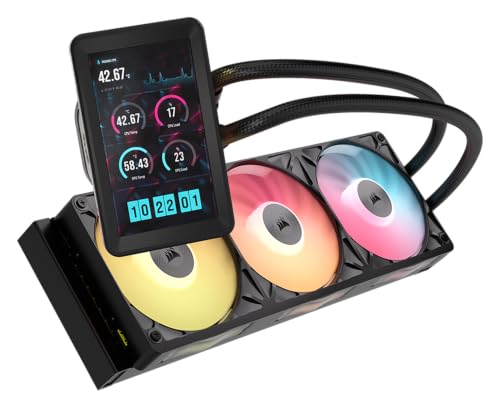
CORSAIR iCUE LINK TITAN II 360 RX LCD — The showcase flagship
The headline is on the pump block: a 5-inch IPS LCD screen, fed over DisplayPort, large enough to show system readouts, images or animations at a size the whole desk can read. Around it sits CORSAIR’s iCUE LINK architecture, in which the RX II RGB fans connect through a unified linking system rather than a nest of individual cables, and the whole loop is administered from CORSAIR’s software. This is the most ambitious object in the guide, and it knows it.
Strip the screen away for a moment and consider what it is actually for, because the answer decides whether this pick is a toy or a tool. A pump-block display earns its space when it shows information you would otherwise open software to see — coolant or processor temperature, fan behaviour, load — glanceable while a game or render owns the monitor. Used that way it is a dashboard. Used as a looping animation it is jewellery. Both uses are legitimate, but they justify the flagship tier differently, and buyers should know which one they are purchasing. The unified fan cabling, meanwhile, is unambiguously practical: three fans that link together simplify the least enjoyable hour of any liquid install, and in a showcase build the clean cable runs are half the aesthetic battle.
Plan the screen’s diet before the loop arrives. The most satisfying setups cycle a small set of readouts — processor temperature, coolant behaviour, fan speeds — at a calm refresh, with a static image reserved for photographs. The least satisfying chase novelty weekly and end up as visual noise the owner filters out entirely. CORSAIR’s software makes both paths easy, which is precisely why the choice belongs to the buyer rather than the default settings. A flagship feature used with intent stays a feature; left on defaults it becomes a screensaver with a power draw.
- Display: 5-inch IPS LCD on pump block, DisplayPort connection
- Fans: RX II RGB, unified iCUE LINK connection
- Radiator: 360mm class, three fans
- Ecosystem: CORSAIR iCUE software control
Strengths
- Largest pump-block screen in this guide, genuinely readable
- Linked fan cabling cleans up the install considerably
- Single software ecosystem for fans, lighting and display
Trade-offs
- Flagship pricing reflects the screen and ecosystem
- Full value depends on committing to iCUE software
- DisplayPort feed is one more cable to route neatly
Best for: a showcase build that will use the screen as a working dashboard. Not suited for: a build whose owner will never open the control software after day one.

Antec Luna 360 ARGB — The design statement
Antec put its effort where the eye lands: the Luna 360’s pump head carries an infinity mirror design, the layered mirror effect that creates the illusion of lights receding into depth inside a compact block. Around that centrepiece sit three 120mm PWM ARGB fans on the 360mm radiator. Where CORSAIR’s flagship competes on information, the Luna competes on sculpture — it is the pick for a builder who has decided the pump block should be the visual anchor of the whole socket area.
The PWM detail matters more than it might appear in a design-led product. Plenty of decorative coolers treat fan control as an afterthought; here the fans are pulse-width controlled, so the motherboard’s curve governs them like any serious cooler’s, and the lighting rides on addressable control rather than a fixed pattern burned into a controller. That combination — a pump head that performs visually and fans that behave properly — is what separates a design statement from a novelty.
The infinity mirror effect also interacts with case lighting in a way worth anticipating: it borrows its depth illusion from the lighting within the block, so it reads best when the rest of the build’s lighting is coordinated rather than competing. A Luna surrounded by three other lighting dialects becomes one voice in an argument; a Luna in a build tuned around it becomes the room’s focal point. Builders choosing this pick should treat it as the theme’s anchor and let the case fans and memory take their cues from it.
Antec’s long history in cases shows in the priorities: the Luna is styled like a component of a considered build, not like a peripheral that wandered in from a gaming desk accessory catalogue.
- Pump head: infinity mirror design
- Fans: 3 × 120mm PWM ARGB
- Radiator: 360mm
- Lighting: addressable, paired with PWM fan control
Strengths
- Infinity mirror pump head is a genuine visual centrepiece
- PWM control keeps fan behaviour motherboard-managed
- ARGB fans coordinate with the pump head’s lighting
Trade-offs
- No display for system information on the block
- Mirror finish will show dust and fingerprints readily
- Design-led pricing over plain 360mm loops
Best for: a themed windowed build that wants the pump block as its centrepiece. Not suited for: a closed case, where the mirror would perform for nobody.

Thermaltake TH360 ARGB Sync V2 — The motherboard’s friend
The TH360 ARGB Sync V2 is the traditionalist of the six, and its listing reads like a checklist from the era when liquid cooling proved itself: three 120mm fans with a published PWM range of 500 to 2000 RPM, a mirror-finished waterblock, and lighting designed to sync with the motherboard’s own ARGB control rather than through a separate ecosystem. That last choice is the product’s whole philosophy. If your board already orchestrates your case fans and memory lighting, this loop simply joins the orchestra.
The published fan range deserves attention because it is the widest span of behaviour described in this guide. A floor of 500 RPM is a fan that can turn slowly enough to disappear during desktop work; a ceiling of 2000 RPM is headroom for the hottest sustained loads. Range is what fan curves are made of, and a cooler that publishes its range is inviting you to use all of it. The mirror waterblock, meanwhile, gives the socket area a finished look without committing to a screen or an effect — the design equivalent of a well-cut suit rather than a costume. For builders upgrading an existing lit build, the sync-first approach also avoids the small tyranny of a second lighting application fighting the first.
There is a longevity angle to the sync philosophy that rarely gets mentioned: motherboard lighting standards change slowly, and a loop that speaks the board’s language ages with the platform rather than with a vendor’s software roadmap. When the machine is eventually rebuilt around a new board, the TH360’s lighting simply joins the new board’s scheme. In a guide full of ecosystems, the pick with no ecosystem of its own may be the one that survives the most rebuilds — a quietly radical position for a product with a mirror on it.
- Fans: 3 × 120mm, PWM 500–2000 RPM as listed
- Waterblock: mirror finish
- Lighting: ARGB, motherboard sync
- Radiator: 360mm
Strengths
- Wide published fan range suits quiet and performance curves
- Motherboard sync avoids a second lighting ecosystem
- Mirror block looks finished without a screen’s cost
Trade-offs
- Lighting features depend on your board’s ARGB support
- No pump-block display or proprietary extras
- Top fan speeds will be audible when a curve allows them
Best for: an existing motherboard-lit build that wants the loop to join its current scheme. Not suited for: a motherboard without addressable RGB headers to sync with.

Thermalright FW 360 White ARGB — The white build’s screen
White builds are unforgiving: every component either commits to the theme or becomes the grey smudge in every photograph. The FW 360 White ARGB commits completely — white radiator, white fans with ARGB lighting, and a pump block carrying an IPS LCD screen at 320 × 240 resolution. The listing names support for AMD AM4 and AM5 plus Intel LGA platforms, placing the current sockets within reach of the most theme-conscious corner of the market.
The screen invites comparison with the CORSAIR flagship, and the honest reading is that they serve different masters. At 320 × 240 the Thermalright display is a readout and accent — temperatures, a logo, a compact graphic — rendered at a scale suited to a glance, while the 5-inch CORSAIR panel aims to be read across a desk. Neither is the correct size in the abstract; the question is whether your screen is instrumentation or furniture. What the FW 360 undeniably does is bring the screen feature down from the flagship tier and into a colour theme the flagship does not offer, and for the white-build community that combination — display, ARGB, full white finish, Thermalright’s value instincts — is a shortlist of one.
White-build veterans will also appreciate a detail the listing implies rather than states: keeping the radiator white matters more than keeping the block white, because the radiator is the largest surface. Many nominally white coolers ship a black radiator and betray the theme at its biggest canvas. Here the whole loop commits, fans included, so the build’s photographs show one colour story from the front mount to the socket. In a niche where aesthetics are the specification, completeness is a feature, not a garnish.
- Display: IPS LCD, 320 × 240 resolution
- Finish: full white, radiator and fans
- Fans: ARGB, three on a 360mm radiator
- Sockets named in listing: AM4/AM5 and Intel LGA platforms
Strengths
- Complete white finish including the radiator
- Pump-block screen below flagship pricing tiers
- ARGB fans match the themed-build brief
Trade-offs
- Smaller screen resolution limits it to readouts and accents
- White finishes show dust sooner than black ones
- Only makes sense inside a committed white theme
Best for: a white-themed build that wants a pump-block display without flagship pricing. Not suited for: a black build, where its finish would fight every other component.
Where Should a 360mm Radiator Live in Your Case?
The roof is the default answer for good reason: hot coolant rises to the top of the case, the fans exhaust straight out, and the processor’s heat never joins the air your graphics card breathes. Roof mounting also keeps the tubes on a short, natural run in most layouts. Its constraints are clearance — tall motherboard heatsinks and thick radiators can crowd each other — and case design, since not every chassis offers a 360mm roof mount.
Front mounting is the alternative with one genuine advantage: the radiator breathes the coolest air available, straight from the room, which flatters coolant temperatures. The costs are that the exhaust warms the case interior slightly, the tube run lengthens, and a thick front radiator can consume drive bays or press against a long graphics card. Measure the card before committing. Whichever position you choose, orient the pump block so the tubes leave it without sharp bends, keep the radiator’s highest point above the pump where the layout allows, and dry-fit everything before paste touches the processor. Ten patient minutes at this stage are the difference between a loop that looks engineered and one that looks survived.
Fan direction deserves the same deliberateness. Radiator fans can push air through the fins or pull it through, and in most cases the practical difference is small enough that builders should choose by housekeeping: fans mounted so the radiator’s case-facing side collects the dust are easier to clean than fins clogged on their hidden face. What matters more is that all three fans agree — a radiator with one fan reversed against its neighbours is a small, expensive turbulence machine — and that the case’s other fans support the chosen direction rather than fighting it.
How Do You Install and Tune a Liquid Loop?
Mount the radiator first, while the case is empty and forgiving, and route its fan cables to their headers before the block goes on. Fit the cold plate with the same discipline as any cooler: correct backplate for your socket, a pea-sized dot of paste, even pressure in alternating corners. Then connect the pump to a header your motherboard can monitor and set that header to run the pump at a constant, full or near-full speed — pumps are happiest steady, and it is the fans, not the pump, that your curve should modulate for noise.
Tuning is where a loop becomes yours. Set the radiator fans against coolant or processor temperature with a gentle slope and generous hysteresis, so brief spikes do not produce audible surges. Run your heaviest real workload for twenty minutes and listen: a well-tuned 360 should sound like weather in another room. If the pump itself is audible as a hum or whine at idle, a small reduction in its fixed speed often removes the tone without costing measurable cooling, because at idle there is barely any heat to move. Finish by checking temperatures again after a few days of heat cycles, once the paste has settled into its final film.
Keep a simple log for the first month: idle temperature in the morning, temperature at the end of your heaviest regular task, and a note of anything audible. That log is your baseline, and baselines are what turn future troubleshooting from guesswork into comparison. A loop that slowly warms over a season is asking for a dust clean; one that changes overnight is asking for a fan or pump check. Owners who keep the baseline rarely meet a cooling problem they cannot name in a sentence.
How Does a Radiator Change the Rest of the Build?
A 360mm loop rearranges a build’s internal geography, and the consequences reach beyond the processor. The graphics card is the first beneficiary or victim depending on placement: a roof-exhausted radiator removes processor heat from the case entirely, so the card breathes air unheated by the CPU’s work, while a front-intake radiator feeds the card slightly warmed air in exchange for the coolest possible coolant. Neither effect is dramatic, but in small cases with marginal airflow both are measurable, and builders chasing quiet graphics cards should count the roof mount as a point in liquid’s favour.
Storage and cabling feel the change too. Front radiators can occupy the bays and grommets that once routed drive cables, pushing builders toward M.2 storage — which most were choosing anyway. The socket area, freed from a tower, exposes the motherboard’s design and the memory, which is why liquid builds photograph so cleanly and why the pump block’s face carries such visual weight. Even maintenance changes shape: dust concentrates at the radiator, a single surface at the case’s edge, instead of distributing itself through a fin stack buried in the middle of the board. Cleaning a loop build is a radiator-and-filters job measured in minutes.
The one genuine loss is internal access. A roof radiator can crowd the top of the motherboard, making EPS power cables and the upper fan headers a knuckle-scraping exercise, and a front radiator lengthens every tube and cable run that crosses it. Builders who swap components frequently should weigh that friction honestly; builders who assemble once and close the panel for years will never pay it. As with most of this guide’s questions, the answer is in your habits, not in the hardware.
How Should You Decide Between Two Loops That Look Identical on Paper?
Work through four questions in order, and stop when one of them answers decisively. First: does your build have a lighting plan, and whose software runs it? A motherboard-led plan points at the Thermaltake; a CORSAIR-led plan at the TITAN II; no plan at all at the plain ARCTIC. Second: will a screen do a job? Name the readout you will check weekly. If you cannot name one, the screens are decoration, and decoration should be bought knowingly — the Luna’s mirror or the FW 360’s compact display as deliberate jewellery, at jewellery’s honest price.
Third: what colour is the build, really? Not the colour of the case alone, but of the finished interior under its lighting. The FW 360 exists because white builds cannot borrow black components and stay white; conversely, a black build gains nothing from it. Fourth: how long will you keep the machine, and through how many rebuilds? Loops with standard mounting, standard fans and platform-agnostic control — the ARCTICs and the Thermaltake in different ways — travel between builds most gracefully, while ecosystem flagships repay their commitment inside one coherent, long-lived build.
Notice what is not among the questions: which loop cools best. At 360mm with three fans, the honest answer is that all six cool flagship processors properly, and the differences that survive contact with real rooms are the ones above — light, screens, colour, longevity. Buyers who internalise that stop shopping for a winner and start shopping for a fit, which is a shorter and happier errand.
How Do the Six Loops Compare Side by Side?
| Pick | Radiator | Pump block | Lighting route | Defining trait |
|---|---|---|---|---|
| ARCTIC Pro 360 (plain) | 360mm, 3 fans | Plain | None | Performance-first, broad socket list |
| ARCTIC Pro 360 A-RGB | 360mm, 3 fans | Plain | ARGB fans | Lit version of the same loop |
| TITAN II 360 RX LCD | 360mm, 3 fans | 5-inch IPS LCD | iCUE LINK ecosystem | Dashboard-grade display |
| Luna 360 ARGB | 360mm, 3 fans | Infinity mirror | ARGB fans | Design-led pump head |
| TH360 ARGB Sync V2 | 360mm, 3 fans | Mirror finish | Motherboard sync | 500–2000 RPM fan range |
| FW 360 White ARGB | 360mm, 3 fans | IPS LCD 320 × 240 | ARGB fans | Full white finish with screen |
The table makes the category’s real structure visible: capacity is a constant, and identity lives in the pump block and the lighting route. Two picks sell restraint, two sell screens at different scales, one sells sculpture and one sells integration with the board you already own. Choosing well means deciding which of those identities matches the build on your desk — and being suspicious of any ranking that pretends the radiator sizes differ when they do not.
One column deserves a second look: the lighting route predicts your software drawer a year from now. “None” means no drawer at all. “Motherboard sync” means the application you already use for the board. “ARGB fans” on the ARCTIC and the Thermalright typically means the same board-level control, with the fans as participants. Only the CORSAIR asks you to adopt a second, full ecosystem — a fair trade for its screen and linked cabling, but a trade to make with open eyes, especially if the rest of the build already answers to another system.
Should Your Fan Curve Follow the Processor or the Coolant?
Owners of air coolers never face this question, because a heatsink’s temperature and the processor’s rise together. A liquid loop separates the two: the processor can spike for seconds while the coolant, carrying far more thermal mass, barely notices. If your radiator fans chase the processor’s temperature directly, they will surge at every spike — opening a large file, loading a game level — and the machine develops a nervous acoustic habit that has nothing to do with actual heat. The coolant is the calmer signal, and curves that follow it produce the steady behaviour this format is bought for.
Not every motherboard exposes a coolant sensor input, and not every loop reports one to the board, so the practical fallback is a processor-based curve with heavy smoothing: a delay of several seconds before the fans respond, and a slope gentle enough that brief spikes pass underneath it. Most modern fan software offers exactly these controls under names like hysteresis, step delay or smoothing. The setting matters more than the brand of loop attached to it, which is a useful truth for buyers: an afternoon spent here improves any of the six picks equally.
There is one exception to file under safety rather than comfort. If your workload holds the processor at its limit for hours — the render farm pattern — a coolant-based curve should include a processor-temperature override at the top end, so an unexpected heat event still gets full fan speed immediately. Comfort tuning is for the ordinary range; the ceiling should always belong to the silicon.
How Quiet Is a Pump, Really?
Fan noise dominates cooling discussions because fans are easy to measure and easy to market, but a liquid loop has a second voice: the pump, humming at a fixed tone from the centre of the motherboard. In a quiet room at idle, when the radiator fans have slowed to near-silence, the pump is the sound that remains — and its character matters more than its volume. A smooth, low hum disappears into a room’s background within minutes. A pump with a tonal edge, or one whose speed wanders because it was wired to a fan curve, stays noticeable for years.
The defences are procedural. Run the pump at a constant speed, as the tuning section advises, because constancy is what lets your hearing file the sound under “room” rather than “machine”. Keep air out of the pump: a loop mounted so that the pump sits at the system’s high point collects bubbles there, and bubbles make pumps gurgle and wear faster, which is why radiator position guidance insists the radiator’s top should sit above the block where the layout allows. And give a new loop a day of running before judging it — freshly installed loops often carry small air pockets that work themselves into the radiator over the first heat cycles, quieting as they go.
Judged with those defences in place, the modern 360mm loop is a genuinely quiet device, competitive with the best air coolers at idle and calmer than most under sustained load, because its noise is spread across three slow fans and a steady pump rather than concentrated in two fans working hard above a socket. That, more than any temperature chart, is why the format keeps winning converts among people who work within earshot of their machines.
What Are the Most Common Mistakes When Buying an AIO?
The expensive mistake is measuring the case by its marketing name instead of its mount list. A case described as liquid-ready may offer 360mm at the front only, or a roof mount too shallow for a radiator plus fans above the motherboard. Confirm the exact position, then confirm the graphics card length against a front mount. The second mistake is pump neglect: connecting the pump to a header governed by an aggressive fan curve, so it surges and idles like a fan, shortening its life and adding a wandering tone to the room.
Third, buyers chase screen size without a job for the screen. A display showing a looping animation you stopped seeing in week two is the most expensive blank panel in the build; decide what yours will display before paying for the privilege. Fourth, mixing lighting ecosystems carelessly — a motherboard-synced loop, an iCUE graphics card and a third controller for the case fans can coexist, but each adds software, and the builders who enjoy their lighting are the ones who chose a primary ecosystem deliberately. Finally, forgetting that a loop is also three fans and a radiator to keep dust-free: a clogged radiator quietly converts a flagship loop into a mediocre one over a single dusty year.
A quieter mistake is ordering before checking the socket list against your exact processor platform. The listings here name LGA1851 and LGA1700 on the Intel side and AM4 and AM5 on the AMD side, but brackets and backplates differ between generations that sound alike, and a loop that almost mounts is a loop that does not mount. The check takes one minute on the product page and saves a return; do it even when — especially when — you are confident.
Final Recommendation
For most builders the decision lands on one of the ARCTIC pair: the plain Pro 360 if the case is closed or the build is a workstation, its A-RGB twin if the radiator fans are meant to carry the build’s lighting. Choose the CORSAIR TITAN II when the screen will work for its living as a dashboard, the Thermalright FW 360 when a white theme wants that feature for less, the Antec Luna when the pump block is the build’s visual anchor, and the Thermaltake TH360 when your motherboard already runs the lighting show. Six radiators of identical size, six different answers — the right one is the one whose extras you will still be using in year three, whose pump still hums at the same steady note, and whose fans you have had to think about exactly never since the week you tuned them. Cooling bought that way stops being a component and becomes part of the room’s furniture, which is the highest compliment a working machine can pay its loudest potential part.
Frequently Asked Questions
Is a 360mm AIO better than a big air cooler?
For sustained loads, generally yes: the radiator’s surface area and its position at the case wall let it shed heat with slow fans for hours. For bursty everyday work the two approaches feel similar, and air keeps the simplicity crown. The deciding factors are your workload’s duration, your case’s mounts and your memory clearance, in roughly that order. If two of those three point toward liquid, follow them; if only one does, a good twin-tower air cooler will probably serve you as well for less fuss.
How long does an all-in-one liquid cooler last?
The fans and pump are the wear components; the sealed coolant needs no attention. A quality loop should serve across several years and often across a platform change, provided its mounting kit covers the new socket. Monitoring pump speed in software gives you an early warning long before performance suffers. Treat any new noise — a gurgle that persists, a hum that changes pitch week to week — as information rather than ambience, and a loop will rarely surprise you.
Can the pump-block screens show temperatures?
Yes — that is their most defensible job. The CORSAIR TITAN II’s 5-inch IPS panel and the Thermalright FW 360’s 320 × 240 display can both present system readouts such as temperatures and speeds through their control software, alongside images or animations if you prefer decoration. Owners who run a single monitor find the readout genuinely useful during full-screen work, when the usual monitoring overlay would either intrude on the game or demand a second screen the desk does not have.
What happens if a fan on the radiator fails?
The loop keeps working at reduced capacity, because two remaining fans still move air across most of the radiator, and temperatures rise rather than collapse. Radiator fans are standard 120mm parts, so a replacement is inexpensive and the swap takes minutes — one of the format’s underappreciated ownership advantages. Your monitoring software will usually spot the failure before you do, since a fan reporting zero speed against its curve is unambiguous; check the fan tach readings whenever temperatures drift upward for no obvious reason.
Do I need a special case for a 360mm cooler?
You need a case with a 360mm radiator mount, at the front or the roof, and enough depth for the radiator plus its fans. Most current mid towers offer at least one such position, but check the mount list and the graphics card clearance rather than trusting a case’s general liquid-cooling claims. If your case offers only a front mount, measure the longest graphics card you might ever install against the radiator’s thickness before the loop goes in, not after.
Should the pump run at full speed all the time?
A steady high speed is the common recommendation, because pumps are designed for constant duty and the noise difference between high and moderate pump speeds is usually smaller than the wear difference caused by constant surging. Let the radiator fans handle the dynamic work; they are better at it and cheaper to replace. If your board lets you set the pump header to a fixed duty cycle rather than a curve, use that option and record the speed it settles at, so a future change in the reported figure tells you the pump’s story at a glance.
Related Guides
Liquid is one route to a cool, calm machine; the others live in the neighbouring guides, and the honest builder weighs both before spending, because a tower that fits and a loop that fits are both better than a favourite that does not. AMD builders comparing both worlds should read Best CPU Air Coolers Ryzen, small-case owners will find their format at Best ITX Low Profile CPU Coolers, and anyone whose real target is silence above all should weigh the towers in Best Quiet CPU Air Coolers before committing to a pump.


