What's inside
- Key Takeaways
- Quick Picks
- How We Chose These Picks
- How Much Height Does Your ITX Case Actually Give You?
- Why Does Down-Draft Airflow Matter More in a Small Case?
- The Best ITX Low Profile CPU Coolers, Pick by Pick
- Why Not a Small Liquid Cooler in an ITX Case?
- How Do You Match a Low-Profile Cooler to a Processor?
- How Do You Install a Cooler in a Case With No Room?
- How Do the Six Coolers Compare on Height and Hardware?
- How Should You Tune a Slim Fan in a Case This Small?
- How Does a Low-Profile Cooler Age Inside a Small Case?
- What Are the Most Common Mistakes in ITX Cooling?
- Final Recommendation
- Frequently Asked Questions
- Related Guides
As an Amazon Associate I earn from qualifying purchases. This post may contain affiliate links at no extra cost to you.
widgetverdict.com is reader-supported. When you buy through links on our site, we may earn an affiliate commission.
Where to buy: the six low-profile coolers below link to checked Amazon listings, and their heights — the only number that truly matters in this category — run from a remarkable 36mm up to a still-modest 65mm.
Small-form-factor building is an exercise in millimetres, and no component feels that more than the cooler. A sandwich-style ITX case may offer less vertical room above the socket than a stock Intel cooler needs, which is why the search for the best itx low profile cpu coolers begins with a tape measure rather than a benchmark chart. In this category, height is not a specification among many; it is the gate through which every other virtue must pass. A cooler 3mm too tall is not 95% as good — it is a returned parcel and a build postponed by a week.
The six picks below are organised by that gate. At the extreme end sits a 36mm Thermalright for the slimmest sandwich cases; two 53mm siblings — one aluminium-finned, one full copper — serve the middle; a 57mm IS-55 brings a larger 120mm slim fan to the format; Noctua’s 65mm NH-L9x65 tops the height range with the brand’s usual polish; and be quiet!’s Pure Rock Low Profile states a 100W TDP rating for buyers matching a cooler to a processor class. Every height quoted is the figure in the product’s own listing, because in this category a borrowed number is a broken build, and a broken build in a four-litre case is a weekend nobody gets back.
Key Takeaways
- Height decides everything: the picks run 36mm, 53mm, 53mm, 57mm, 65mm, plus be quiet!’s compact low-profile entry.
- The AXP90 X36, at 36mm tall, serves sandwich cases that exclude nearly everything else.
- Thermalright’s AXP90-X53 comes in a standard black version with 4 heat pipes and a Full Copper variant with AGHP technology.
- The IS-55 stands 57mm tall yet fits a 120 × 120 × 15mm slim fan and 5 heat pipes.
- Noctua’s NH-L9x65 is the tall option at 65mm, for ITX cases with a little more headroom.
- be quiet! states a 100W TDP rating and 3 heat pipes of 6mm for its Pure Rock Low Profile.
Quick Picks
| Pick | Badge | Why it earns its place |
|---|---|---|
| Thermalright AXP90 X36 | The 36mm miracle | At 36mm tall with a TL-9015 slim PWM fan, it fits sandwich cases nothing else in this guide can enter. |
| Thermalright AXP90 X53 Black | The balanced 53 | Four heat pipes and a 90mm low-profile PWM fan at 53mm, the middle height most ITX cases allow. |
| Thermalright AXP90-X53 Full Copper | The copper upgrade | A full copper heatsink with AGHP technology and a 92mm slim PWM fan at the same 53mm class. |
| Noctua NH-L9x65 | The premium 65 | At 65mm it is the tallest pick here, with Noctua’s mounting polish for ITX and SFF builds. |
| ID-COOLING IS-55 | The big-fan exception | Five heat pipes and a 120mm slim fan in a 57mm frame, with LGA1851 and LGA1700 named in its listing. |
| be quiet! Pure Rock Low Profile | The rated 100W | A stated 100W TDP and three 6mm heat pipes in a compact design for restrained processors. |
How We Chose These Picks
Selection in this category is an exercise in honest measurement, and the honesty has to run in both directions: the case’s clearance figure must be trusted only after it is understood, and the cooler’s height figure must come from the maker’s own listing rather than from a retailer’s summary or a forum post written about a different revision. Every pick’s height comes from its own listing — 36mm, 53mm, 57mm, 65mm — and the shortlist was built to place at least one credible cooler inside each of the clearance bands real ITX cases actually offer: the sub-40mm sandwich band, the low-50s band of most mainstream small cases, and the 60mm-plus band of roomier ITX towers. A guide that recommended six coolers of similar height would be a guide that fit one reader in six.
Beyond the gate, three qualities separated the picks. Heat pipe counts and materials were weighed because a low-profile heatsink has so little fin volume that every path for heat matters — hence the presence of both a full copper variant and a five-pipe design. Fan format mattered next: most of these coolers use slim 90mm-class fans, and the one that fits a 120mm slim fan earns attention for the acoustic possibilities a larger, slower fan opens. Finally, socket honesty: the IS-55 names Intel LGA1851 and LGA1700 in its listing, and every pick was checked for a mounting story a buyer can verify before the case is opened. In ITX, a cooler that requires a second order for brackets is a build delayed by a week.
We also excluded, deliberately, the tall end of “low profile” marketing — coolers that wear the label at heights belonging to small towers. The phrase has drifted in catalogues until it means almost anything under a flagship, and a guide that repeated the drift would fail its only job. Every pick here is low-profile by the strict, tape-measure sense: it fits a case whose cooler allowance is measured in the tens of millimetres, and its listing states the figure that proves it or the rating that frames it.
How Much Height Does Your ITX Case Actually Give You?
Case specifications quote cooler clearance as a single number, but the number hides three decisions. It is measured from the processor’s heatspreader to the side panel or PSU bracket, whichever intrudes first. It assumes a standard motherboard and standard memory, neither of which may describe your build. And it leaves no allowance for the fan cable, the side panel’s own flex, or the human preference for a build that does not require force. Experienced ITX builders treat the quoted clearance as a ceiling to stay a few millimetres beneath, which is why the picks here cluster at heights that leave a breath of room inside each band.
The layout of the case decides which band you live in. Sandwich cases, with the graphics card behind the motherboard on a riser, are the strictest: their cooler space is whatever the spine allows, often in the high 30s to low 50s of millimetres. Console-style cases trade a little more height for length. Cube and tower ITX cases relax toward the 60s, where the NH-L9x65 becomes possible and the whole category breathes easier. Identify your band from the case manual before reading another word of any cooler guide, including this one — the best cooler in the wrong band is simply the wrong cooler.
Adjustable-spine sandwich cases add a wrinkle worth knowing: some let the builder trade graphics card thickness against cooler height, sliding the motherboard tray to favour one chamber or the other. Owners of such cases should make that trade deliberately, with the cooler chosen first — a flagship graphics card is wasted if its purchase forces the processor under a heatsink too small for it, and the reverse is equally true. The spine is a budget of millimetres, and like every budget in this article, it rewards being spent on paper before it is spent in aluminium.
Do not forget the second clearance, the one nobody prints: the space around the socket. Low-profile coolers spread horizontally instead of vertically, and their fins reach toward memory slots, VRM heatsinks and the rear I/O cluster. A cooler can pass the height gate and still foul a tall VRM shroud. The detailed sections note each pick’s footprint character, and a few minutes with your motherboard’s dimensions will tell you more than any photograph.
A word about how to measure when the manual is missing or mistrusted. Seat the processor, then measure from its heatspreader upward to the first obstruction with the side panel fitted — a stack of coins or a marked card makes a serviceable gauge — and subtract a few millimetres for the fan cable and your own sanity. Builders restoring second-hand cases do this routinely, and the discipline generalises: in ITX, every dimension you verify yourself is a return you will never have to make. The category’s veterans are not more talented than its newcomers; they are simply people who measure before the parcel arrives instead of after.
Why Does Down-Draft Airflow Matter More in a Small Case?
Every cooler in this guide blows air down through its fins toward the motherboard, and in a tower case that would be a footnote. In ITX it is a system design. The components crowded around an ITX socket — voltage regulation, memory, chipset, M.2 storage — live in a case with very little spare air, and most of them have no fan of their own. The low-profile cooler’s exhaust wash is, in practice, their cooling system. Owners who move from a tower to a low-profile cooler sometimes watch motherboard temperatures improve even as the processor’s own numbers stay similar, and the wash is the reason.
The wash has a direction worth managing. Air leaves the fin stack on all four sides, so the case’s exhaust path decides where the heat goes next: toward a vented panel and out, ideally, rather than into a sealed pocket beside the power supply. Sandwich cases with perforated side panels are natural partners for down-draft coolers, because the wash escapes through the panel it was blown toward. In a case with solid panels, the builder must give that air a route — a case fan, a vent path — or the cooler ends up stirring its own warmth. Matching the cooler to the case’s breathing is the unglamorous half of ITX cooling, and it is the half that separates quiet small builds from loud ones with identical parts lists.
It also explains a result that puzzles newcomers: the same cooler, in the same case, running differently when the case moves from a desk’s open air to a shelf’s enclosed cubby. The wash needs somewhere to go after it leaves the panel, and a cubby returns the cooler’s own exhaust to its intake within minutes. Small machines are honest about their environment in a way towers, with their larger air reserves, can afford not to be. Give the little case open air and it will repay you in the only currency it deals in — slower fans.
The Best ITX Low Profile CPU Coolers, Pick by Pick

Thermalright AXP90 X36 — The 36mm miracle
Thirty-six millimetres. The listing states the AXP90 X36’s height without apology, and it is the number that defines an entire class of build: the slimmest sandwich cases, the ones whose whole interior volume would embarrass a shoebox, can house exactly this category of cooler and nothing taller. A TL-9015 slim PWM fan sits within that height, blowing down through a compact fin stack onto the socket — the classic low-profile arrangement, executed at a scale that still surprises people who have only built in towers.
Honesty about physics is this pick’s companion. A 36mm heatsink has a fraction of a tower’s fin volume, and its natural partners are the efficient processors — the mainstream chips run at sensible power limits that dominate sensible ITX builds. Paired that way, the X36 is not a compromise but a correct tool: it cools the chip it was matched to, cools the motherboard around it with its down-draft airflow, and leaves the case’s graphics card chamber untouched. Paired with a flagship run at raised power limits, it would be a mismatch of ambitions, and this guide will not pretend otherwise.
What makes it a pick rather than a curiosity is that nothing about it feels like a toy. PWM control means the motherboard governs its fan like any other cooler’s. The mounting is a real mounting system, not an adhesive hope. For the builder whose case offers 40mm and whose processor is chosen with the same discipline, the X36 is not the cooler you settle for — it is the cooler the entire build was planned around, and it rewards the planning.
Its fan deserves a specific note, because at this scale the fan is most of the product. A slim 90mm-class PWM unit has a narrower band of well-behaved speeds than a big tower fan, and the curve should be drawn inside that band: gentle at the desktop, decisive under load, and capped before the pitch turns thin. Owners who tune that way describe the X36 as near-silent in ordinary work, which, from 36mm of metal, is a small engineering compliment worth recording.
- Height stated in listing: 36mm
- Fan: TL-9015 slim PWM
- Layout: down-draft low-profile heatsink
- Role: slimmest sandwich-case builds
Strengths
- 36mm height fits cases closed to everything else
- Down-draft airflow also cools the motherboard
- PWM fan control like a full-size cooler
Trade-offs
- Fin volume limits it to efficient processors
- Slim fan must spin faster under load than larger fans
- No headroom for raised power limits
Best for: the slimmest sandwich cases running efficient mainstream processors. Not suited for: a flagship processor run at raised power limits.

Thermalright AXP90 X53 Black — The balanced 53
If the X36 is the extreme, the AXP90 X53 Black is the centre of gravity: 53mm of height, four heat pipes, and a 90mm TL-9015B low-profile PWM fan. Fifty-three millimetres is the height a large share of mainstream ITX cases can actually offer, which makes this the pick most likely to be the answer to a real buyer’s real tape measure. The four heat pipes double the X36-class plumbing in spirit, gathering heat from the cold plate and distributing it across a fin stack with meaningfully more volume to shed it from.
The black finish is functional as well as aesthetic in this category. ITX cases are often windowed or vented on the side the cooler faces, and the heatsink is the largest visible object in the build; a blacked-out unit recedes, where a bare aluminium one announces itself. The fan’s low-profile design keeps the whole assembly honest to its stated height — a detail worth checking on any low-profile cooler, since a fan that stands proud of the fins spends millimetres the specification pretended were free.
Against its full copper sibling, the X53 Black is the value expression of the same idea: same height class, same fan format, less exotic material. Buyers should choose between them by processor ambition, a comparison the next section takes up directly. For the mainstream ITX gaming build — efficient processor, capable graphics card on the riser, case in the low-50s band — this is the balanced answer the category keeps returning to.
The X53 Black also benefits from being the size its category converged on, because convergence creates knowledge: build logs, clearance photographs and mounting notes for 53mm-class coolers fill the forums for every popular ITX case. A buyer can usually find their exact case and this exact height class documented by a stranger who made the mistakes first. That community evidence is an unlisted specification, and it belongs to the mainstream sizes in a way the extremes can never claim.
- Height stated in listing: 53mm
- Heat pipes: 4
- Fan: 90mm TL-9015B low-profile PWM
- Finish: black
Strengths
- 53mm height matches the most common ITX band
- Four heat pipes spread heat across the stack
- Black finish suits vented and windowed cases
Trade-offs
- Still a low-profile ceiling on processor ambition
- Footprint reaches toward memory and VRM areas
- Copper sibling offers more for hotter chips
Best for: mainstream ITX cases in the low-50mm clearance band. Not suited for: a case in the sub-40mm sandwich band.

Thermalright AXP90-X53 Full Copper — The copper upgrade
The Full Copper version of the AXP90-X53 makes one material argument and makes it completely: where the standard model uses copper where it counts and aluminium fins above, this variant builds the heatsink from copper throughout, adding AGHP technology and a 92mm TL-9015R slim PWM fan, all inside the same 53mm height class. Copper conducts heat faster than aluminium, and in a heatsink with this little volume, the speed at which heat leaves the cold plate and reaches the furthest fin is a meaningful share of total performance.
The honest framing is that copper buys margin, not miracles. It buys the ability to hold a somewhat hotter processor, or to hold the same processor with the fan turning somewhat slower — and in an ITX case on a desk, slower is the currency owners actually spend. The variant exists for the builder who measured 53mm, wants the most cooling that height can physically contain, and accepts that the most is priced accordingly. It is also, not incidentally, a beautiful object in the way dense metal is: noticeably heavier in the hand than its sibling, with the gravity of a part machined rather than assembled.
Choose between the two X53s by being honest about the processor’s sustained draw and the room the machine will live in. A bedroom gaming build on an efficient chip gains little from copper; a small workstation that renders on a stronger processor, in a case that cannot grow, gains exactly what copper sells. The height is identical, the fan format is identical, and the decision is a clean referendum on how much margin your workload needs.
One practical consequence of the copper construction deserves planning attention: density. A full copper heatsink concentrates more mass over the socket than an aluminium-finned one, and in a build that travels — LAN events, a machine that moves between rooms — the mounting should be fitted with the care the manual describes and the case transported on its side. Stationary, it is a non-issue; mobile, it is a two-sentence precaution that protects the most expensive square inch in the machine.
- Height class: 53mm
- Construction: full copper heatsink, AGHP technology
- Fan: 92mm TL-9015R slim PWM
- Role: maximum cooling inside the 53mm band
Strengths
- Full copper construction moves heat faster
- Same 53mm gate as the standard model
- Margin converts to slower, quieter fan behaviour
Trade-offs
- Premium pricing over the aluminium-finned sibling
- Copper’s weight is real in a small build
- Margin is wasted on the most efficient processors
Best for: a 53mm-band build running the strongest processor the case can feed. Not suited for: an efficiency-first build that will never spend the margin.
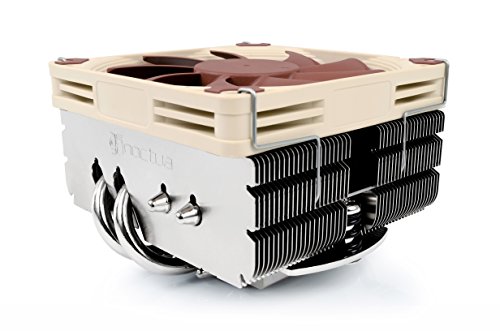
Noctua NH-L9x65 — The premium 65
At 65mm the NH-L9x65 is the tall option in this guide, and that relative altitude is its superpower: in an ITX case that can offer it, the extra height over the 53mm class buys fin volume that the whole category below can only envy. The listing describes a quiet, high-performance low-profile cooler for ITX and SFF builds, with support across Intel and AMD platforms — Noctua’s usual completeness, applied to the format where mounting quality matters most because everything is reached through everything else.
Small cases magnify installation quality. There is no room to improvise, no slack for a bracket that almost aligns, and no appetite for removing the motherboard twice. Noctua’s mounting systems are the industry reference precisely because they remove improvisation from the process, and in a 65mm build that methodical character is worth as much as the fin stack above it. The brand’s long support horizon matters here too: ITX builders keep cases for years and swap platforms inside them, and a cooler whose maker supplies future brackets is a cooler that survives the swap.
The buyer should be clear about the gate, though. Sixty-five millimetres excludes the sandwich cases that define this category’s hardest problems, and no amount of polish changes a measurement. The NH-L9x65 is the pick for the roomier ITX tower, the console case with headroom, the build whose owner measured twice and found the generous band. Inside that band it is the most complete low-profile cooler in this guide; outside it, it is a photograph of one.
The 65mm height also buys the category’s most forgiving fan behaviour. More fin depth means the fan can be drawn from a larger, slower-turning design philosophy, and the NH-L9x65’s acoustic character at working loads is the calmest in this list — the sound of a cooler that is not straining against its own dimensions. Owners of desk-bound ITX workstations, who hear their machines for eight hours a day, consistently rank that calm above every other specification, and this is the pick that understands them.
- Height stated in listing: 65mm
- Layout: low-profile, down-draft
- Positioning: quiet, high-performance, ITX/SFF
- Platforms: Intel and AMD named in listing
Strengths
- Most fin volume in this guide’s height range
- Reference-grade mounting for tight builds
- Long support horizon suits case-keeping builders
Trade-offs
- 65mm excludes slim sandwich cases entirely
- Premium pricing at the top of the category
- Footprint still demands socket-area clearance checks
Best for: roomier ITX cases that can offer 65mm above the socket. Not suited for: a sandwich case in the sub-55mm band.

ID-COOLING IS-55 — The big-fan exception
The IS-55 breaks the category’s pattern in one deliberate way: at 57mm tall it fits a 120 × 120 × 15mm slim fan — a full-size fan diameter in slim depth — above five heat pipes. Every other pick here spins a 90mm-class fan, and the difference is acoustic philosophy. A 120mm fan moves the same air at lower speed, and lower speed is where quiet lives. For an ITX machine that sits on a desk beside its owner, that trade — four millimetres more height than the 53mm class, in exchange for a larger, slower fan — is the most interesting bargain in this guide.
Its listing is also the most socket-explicit of the six, naming support for Intel LGA1851 and LGA1700 among its platforms. Current-socket clarity matters disproportionately in ITX, where the build is assembled once, in tight quarters, and a bracket surprise costs an evening rather than a minute. Five heat pipes in a 57mm frame complete a specification that reads as though ID-COOLING listed the category’s compromises and declined each one in turn: height spent only where it buys fan diameter, pipes where they buy spreading, and print where it buys certainty.
The checks are the category’s usual ones, sharpened: the 120mm fan’s footprint is the widest here, so memory and VRM clearance around the socket need a ruler’s confirmation, and 57mm still excludes the slimmest cases. Within its band, though, the IS-55 is the pick for the owner who has decided that the ITX machine will be quiet first and small second — a defensible ordering that this cooler serves better than any rival in the list.
The slim 120mm fan carries one more advantage that only appears at upgrade time: it is a standard size in a standard depth class, so when the fan eventually tires, the replacement market is wide and the swap is a four-screw operation. In a category where several rivals use proprietary-feeling slim fans, that ordinariness is a form of insurance — the cooler can be kept at its best for the price of a common part, years after the build.
- Height stated in listing: 57mm
- Heat pipes: 5
- Fan: 120 × 120 × 15mm slim
- Sockets named in listing: Intel LGA1851/1700 among others
Strengths
- 120mm slim fan turns slower for the same air
- Five heat pipes in a 57mm frame
- Current Intel sockets named in the listing
Trade-offs
- Widest footprint here; check socket surroundings
- 57mm still too tall for slim sandwich cases
- Taller than the 53mm band some cases cap at
Best for: a desk-bound ITX build prioritising quiet within a 57mm allowance. Not suited for: a motherboard with tall VRM heatsinks crowding the socket.

be quiet! Pure Rock Low Profile — The rated 100W
be quiet!’s entry speaks the language of matching rather than maximising: a stated 100W TDP rating, three high-performance heat pipes of 6mm diameter, and a compact design for AMD and Intel platforms. That rating is the most honest sentence in the category, because low-profile cooling is precisely where buyers overbuy fantasy and underbuy fit. A 100W envelope describes the efficient mainstream processors that most ITX machines actually run, and the cooler is engineered to serve them quietly rather than to gesture at flagships it cannot house.
The brand’s tuning philosophy follows the same line. In a small case, the cooler is inches from the owner’s ear and often the loudest remaining component once the graphics card idles; a fan chosen and tuned for quiet behaviour at the loads a 100W-class processor produces is worth more than a specification sheet’s worth of unused ceiling. The compact frame also respects the socket’s neighbourhood, spreading less aggressively across the board than the wider picks — a real consideration on ITX motherboards, where the socket’s surroundings are the most contested real estate in computing.
Buy it as a matched pair with an efficient processor and it is the most grown-up purchase in this guide: no surplus promised, none needed, everything within its stated envelope done calmly. Buy it for a processor that will live at raised power limits and the rating has already told you, in print, what will happen. Few products in any category are that courteous.
It is worth adding that be quiet!’s restraint travels well across the guide’s other categories — the same brand’s towers appear in the quiet and mid-tower shortlists — and a builder standardising on one maker’s fan character across machines gets a household of computers that all sound like relatives. That is a soft benefit, unmeasurable and real, and in the low-profile category where the cooler is the machine’s voice at closest range, it counts for more than usual.
- Rating stated in listing: 100W TDP
- Heat pipes: 3 × 6mm
- Layout: compact low-profile design
- Platforms named in listing: AMD and Intel
Strengths
- Stated 100W rating makes processor matching unambiguous
- Quiet-first tuning for desk-distance machines
- Compact footprint respects crowded ITX sockets
Trade-offs
- 100W envelope excludes hotter processors outright
- Three pipes is the fewest in this guide
- No headroom for future processor upgrades
Best for: an efficient-processor ITX build matched honestly to a 100W envelope. Not suited for: a processor run above that envelope or at raised limits.
Why Not a Small Liquid Cooler in an ITX Case?
It is a fair question, because a 120mm or 240mm radiator promises tower-class surface area without tower height. Some ITX cases are designed for exactly that, with radiator mounts where a tower would never fit, and in those cases liquid is a legitimate answer this guide does not cover because its question is specifically about air. But the general ITX case argues back: a radiator consumes the same scarce volume the build is short of, its tubes need bend radius a sandwich case begrudges, and its pump block still has to clear the same socket neighbourhood — while adding a pump’s fixed tone to a machine that sits at ear level.
Air’s ITX case rests on three legs. The down-draft wash cools the motherboard as a by-product, which no pump block does. The whole cooler is one object with one moving part, serviceable with the panel off and a screwdriver. And the height figures in this guide — 36mm at the extreme — describe a class of fit that no radiator achieves in the cases that need it most. Builders whose cases offer a genuine radiator mount should read the AIO guide and weigh it honestly; builders in the slim bands this article serves will find their answer is already on this page, measured in millimetres.
How Do You Match a Low-Profile Cooler to a Processor?
Start with the processor’s sustained behaviour at the power limits you will actually run, not its badge. ITX building rewards owners who set sensible limits: an efficient chip held at its standard envelope loses little real performance and gains an enormous amount of cooling feasibility, which is the trade this entire category is built on. Match the cooler to that envelope — the Pure Rock’s stated 100W is the model of how the conversation should go — and leave the flagship-at-any-cost thinking to cases with room for it.
Do the arithmetic in the right order and the shortlist shortens itself. Case band first, which in this guide means choosing among the 36, 53, 57 and 65mm rows and their two unheighted companions. Envelope second, which eliminates whichever of the survivors promises less than your processor’s sustained draw. Everything after that — copper or aluminium, 90mm or 120mm fan, black or silver — is preference, and preference is the pleasant part of the decision that the measurements were protecting all along.
Then weigh the machine’s second jobs. A gaming ITX box that also encodes video or compiles will spend its weekends at sustained loads its weekday self never sees, and the cooler must be matched to the weekend. This is where the copper X53’s margin and the IS-55’s five pipes earn their places in the guide: not as trophies, but as the difference between a machine that does its second job quietly and one that announces it. Finally, remember the graphics card shares the case’s air. A low-profile cooler’s down-draft design pushes warm air across the motherboard; in a sandwich case that air has somewhere to go, and confirming the case’s exhaust path is part of matching the cooler to the system, not just to the chip.
There is a matching subtlety unique to this format: the cooler and the case are a system in a way tower builders never experience. A 53mm cooler in a case with excellent side venting will outperform its paper self, because its exhaust leaves immediately; the same cooler behind a solid panel recirculates. When a build runs warmer than its parts suggest, ITX veterans check the panel and the vent path before they blame the heatsink — and they are usually right, which is why this guide keeps returning to the case as a co-author of every result.
How Do You Install a Cooler in a Case With No Room?
Assemble outside the case, always. An ITX motherboard on the bench accepts its cooler, memory and M.2 storage in comfort; the same operations inside a sandwich case are watchmaking. Fit the cooler before the board goes in, route its fan cable while every header is reachable, and photograph the assembly before it disappears into the chassis — that photograph is your future reference for every cable you will ever need to find again.
Paste and pressure follow the usual discipline, with one ITX sharpening: check the cooler’s footprint against the board’s VRM heatsinks and memory slots with the actual components seated, because low-profile fins spread exactly where those parts live. Connect the fan to CPU_FAN, confirm PWM mode, and — before the side panel closes the question forever — run a sustained load with the case open and confirm temperatures level off. Then close it and run the same load again, because the closed case is the real test and the difference between the two runs is your case’s airflow verdict. In small-form-factor building, that second run is not paranoia; it is the hobby.
Cable discipline deserves its paragraph in a case this size. A fan cable draped across a low-profile fin stack costs airflow and can tick against a blade; route it along the board’s edge and secure it where the case provides ties. The same applies to the front-panel and USB headers that share the socket’s neighbourhood on ITX boards. Ten minutes of routing at the bench is invisible in the finished machine, which is exactly the point — in a case measured in litres, tidiness is a cooling specification.
How Do the Six Coolers Compare on Height and Hardware?
| Pick | Height | Heat pipes | Fan | Defining trait |
|---|---|---|---|---|
| AXP90 X36 | 36mm | — | TL-9015 slim PWM | Slimmest sandwich fit |
| AXP90 X53 Black | 53mm | 4 | 90mm TL-9015B PWM | The common band, balanced |
| AXP90-X53 Full Copper | 53mm class | — | 92mm TL-9015R slim PWM | Full copper margin |
| NH-L9x65 | 65mm | — | Low-profile PWM | Premium, most volume |
| IS-55 | 57mm | 5 | 120 × 120 × 15mm slim | Big fan, quiet intent |
| Pure Rock Low Profile | Compact | 3 × 6mm | Low-profile PWM | Stated 100W rating |
Read down the height column first, because your case already has. The table’s real message is that this category contains no bad heights, only mismatched ones — a 36mm cooler in a 65mm case wastes the case, and a 65mm cooler in a 40mm case wastes everyone’s afternoon. Match the band, then choose within it by pipes, fan size and the honesty of the rating.
Notice, too, how the fan column changes character as height grows: slim 90mm-class units at the strict end, a 92mm in the copper middle, and a full 120mm slim fan once 57mm is available. Fan diameter is the category’s quiet reward for every millimetre a case surrenders, because diameter converts directly into slower, calmer operation. A buyer choosing between two cases — not two coolers — should know that the taller case’s real gift is not the heatsink it admits but the fan that heatsink can carry.
How Should You Tune a Slim Fan in a Case This Small?
Slim fans have a narrower comfort zone than their tower-sized cousins, and the curve should respect it. At the bottom of their range they can be inaudible; a few hundred RPM higher the pitch thins out and carries through a quiet room in a way a 120mm tower fan’s lower note never does. The tuning goal in ITX is therefore to keep the fan in its low register for everything except genuine sustained loads — which, given the efficient processors this category serves, is most of the machine’s life.
Practically, that means a curve with a long, flat beginning: minimum speed held across the whole desktop temperature band, a deliberate climb through the gaming band, and the ceiling reserved for the temperatures of a long render. Add response delay so brief spikes — and small processors spike constantly — expire beneath the flat section without moving the fan at all. The down-draft wash helps here more than owners expect: because the cooler’s air also serves the motherboard, a steady low fan speed keeps the whole board’s neighbourhood fresher than an aggressive curve that surges and idles.
Tune with the panel on and the case in its real home, not on the bench. A shelf, a desk’s corner and the space beneath a monitor all return different air to the intake, and the curve that was silent on the workbench can hunt in the cubby. ITX tuning is environmental tuning; the last five percent of quiet is in the furniture, and the builders who find it are the ones who test where the machine will actually live.
How Does a Low-Profile Cooler Age Inside a Small Case?
Small cases concentrate everything, including dust. A low-profile fin stack sits close to a vented panel in most ITX layouts, breathing room air with very little filtration between the desk and the fins, and its shallow stack clogs faster than a deep tower’s because there is less fin depth to share the burden. The maintenance rhythm that suits this category is a short one: a blast of compressed air through the fins every few months, fan held still, panel off. Owners who keep that rhythm never meet the slow temperature creep that owners who skip it eventually diagnose as a failing cooler.
Upgrades inside a kept case follow a pattern unique to the format. The processor changes; the case, by definition of the hobby, stays; and the cooler question reopens with each platform because mounting and clearance both shift. This is where the makers in this guide earn their keep a second time — Thermalright and Noctua and be quiet! all maintain mounting ecosystems across generations, so a cooler bought for one socket has a documented path to the next. In ITX the cooler is rarely the part that forces a rebuild, and keeping it that way is a purchasing criterion, not an accident.
Travel is the last ageing factor, and the small machine’s owners travel with their PCs more than tower owners do. A low-profile cooler is inherently kind to a moving build: its mass sits low and close to the board, its centre of gravity hugs the socket, and there is no tall fin stack levering against the mounting under every bump in the road. The copper variant’s density asks for the side-lying transport noted in its section; the rest of the list asks for nothing but a padded bag and ordinary care.
What Are the Most Common Mistakes in ITX Cooling?
The first is measuring once, optimistically. Clearance quoted by a case maker assumes their reference build; your memory, your cable routing and your panel’s tolerances are yours. Measure your own stack — board, processor, and the space to the panel — and choose a cooler a few millimetres inside it. The second is forgetting the horizontal: a low-profile cooler that clears the panel can still collide with a VRM heatsink or overhang a memory slot that needs its clearance for the sticks you already bought.
Third is matching the cooler to the processor’s reputation instead of its power envelope at your settings, which produces either a screaming slim fan under a flagship or a copper monument idling over an efficient chip. Fourth, closing the case before testing: small cases punish assumptions about airflow, and the open-case versus closed-case comparison is the only honest measurement of whether the build breathes. Fifth, treating the cooler’s fan as the end of the acoustic story — in ITX, case fans and the graphics card share a tiny volume of air, and a system tuned as a whole is quieter than any single component optimised alone.
A sixth mistake appears in second builds, when confidence outruns the tape measure: reusing a beloved cooler from a previous ITX case without re-checking the new case’s band. Bands differ by millimetres that matter, and yesterday’s perfect fit is today’s panel that will not close. The veterans this guide keeps citing are not immune to the mistake; they are simply people who built the re-measuring habit after making it exactly once.
Final Recommendation
Let the tape measure decide the shortlist and the processor decide within it, and let the fan curve have the final word once the panel is on and the machine settles into its real home on the desk. In the sub-40mm band the AXP90 X36 stands alone. In the low-50s, the AXP90 X53 Black is the balanced default and its Full Copper sibling the margin upgrade. At 57mm the IS-55’s big slim fan makes the quietest argument in the category, at 65mm the NH-L9x65 is the premium complete package, and be quiet!’s Pure Rock Low Profile is the honest match for an efficient processor with its 100W envelope printed plainly on the box for anyone to check before money changes hands. Small cases forgive many things, but they never forgive a cooler chosen by reputation instead of by ruler — and every pick above was chosen to reward the ruler, to fit the band it claims, and to leave its owner with a machine whose smallest component was selected with the most care and measured twice before ordering.
Frequently Asked Questions
How do I measure my case’s cooler clearance?
Small-form-factor cases publish their cooler clearance as a single height figure, measured from the processor’s surface to the panel or bracket. Cross-check it against the height in the cooler’s listing — 36mm, 53mm, 57mm and 65mm are the figures for four picks here — and keep a few millimetres of margin for cables and panel flex rather than planning to the exact figure. If the manual is lost, measure the physical stack yourself with the processor seated and the panel fitted, and treat your own number as the authority; case revisions change clearances quietly, and your case is the only one that has to fit.
Can a low-profile cooler handle a gaming processor?
Yes, when the two are matched by power envelope rather than by reputation. Efficient gaming processors at their standard limits sit comfortably inside what the stronger picks here — the copper X53, the IS-55, the NH-L9x65 — can shed. The mismatch to avoid is a flagship run at raised limits under the slimmest heatsinks. Most ITX gaming builds are, in practice, models of this matching: the case constrains the processor choice, the processor choice constrains the cooler, and the finished machine is coherent because each decision respected the one before it.
Why do these coolers blow air down toward the motherboard?
Because in a low-profile format there is nowhere else for the air to go, and the down-draft turns a constraint into a benefit: the airflow washes over the VRM circuitry and memory around the socket, cooling components that tower coolers and liquid blocks leave to fend for themselves. In a small case, that wash is a meaningful part of system cooling. It is also why these coolers pair so well with passively inclined motherboards whose heatsinks were designed expecting exactly this breeze.
Is full copper worth it in a low-profile cooler?
It is worth it when the build needs margin inside a fixed height — a stronger processor in a 53mm case, or the same processor with the fan turning slower. Copper moves heat to the fins faster, and in a heatsink with little fin volume that speed is a real share of performance. On an efficient chip with room to spare, the margin goes unspent. The cleanest test is the weekend workload: if the machine’s heaviest regular job leaves the standard model calm, copper buys nothing you will ever hear or measure; if that job pushes the fan to its ceiling, copper is the only upgrade the case still allows.
What if my cooler clears the panel but hits the memory?
That is the category’s second clearance problem: low-profile coolers spread horizontally over the socket’s neighbourhood. Check the cooler’s footprint against your board’s layout — memory slot position, VRM heatsink height — before ordering, and prefer standard-height memory in ITX builds, since low-profile coolers and tall heatspreaders compete for the same few millimetres. If a collision is marginal, some builds rotate the cooler where the mounting allows it, trading clearance on one side for clearance on the other; check the maker’s guidance before improvising, because fin orientation also steers the exhaust wash.
Should I set power limits to help a small cooler?
It is one of the smartest moves in ITX building. Modern processors lose very little real-world performance at their standard or slightly trimmed limits while shedding far less heat, and a cooler matched to that envelope runs slower and quieter. The Pure Rock Low Profile’s stated 100W rating is a good model: choose the envelope first, then the cooler that declares it can hold it. Apply the limit in the BIOS, verify with your heaviest regular workload that performance is where you expect it, and the machine will keep that shape permanently — no software babysitting required.
Related Guides
Small cases are one end of the cooling spectrum; the neighbouring guides cover the rest of it. Owners who outgrow the format or build a second, larger machine should read Best Quiet CPU Air Coolers for the calm end of tower design, and check dimensions against Best CPU Coolers That Will Fit Mid Tower before ordering anything taller. When the build is done and the desk is clear, the machine in the car deserves the same care and the same measuring habit, starting with Best Car Chargers.


