What's inside
- Where to Buy
- Key Takeaways
- Quick Picks
- How We Chose These Picks
- The Six at a Glance
- How to Choose a Laptop for Minecraft Java
- Why Does Java Edition Run So Well on Integrated Graphics?
- What Settings Should a New Java Player Tune First?
- Java or Bedrock: Does the Edition Change the Laptop You Need?
- How Do Versions, Snapshots and Backups Shape the Storage You Need?
- What Does a Server Habit Do to the Specification You Need?
- How Long Will a Java Laptop Stay a Java Laptop?
- Slip-Ups Java Buyers Keep Making
- Final Recommendation
- Frequently Asked Questions
- Related Guides
As an Amazon Associate I earn from qualifying purchases. This post may contain affiliate links at no extra cost to you.
widgetverdict.com is reader-supported. When you buy through links on our site, we may earn an affiliate commission.
Where to Buy
The six machines below are sold through their own Amazon pages, where each figure lives. The NIMO 15.6 Light Gaming listing is where its current cost sits, so check price on Amazon there and re-read its Radeon 680M line in the title while you visit. KAIGERR’s page for its Ryzen 7430U gaming laptop displays that smaller brand’s delivered price. The MALLRACE 2026 laptop keeps its figure on its own product page, as does the unbranded Ryzen 7430U gaming laptop with Windows 11 Pro. CHUWI’s 14-inch gaming laptop publishes its cost on its listing, and the HP Victus 15 — the one famous badge in this guide — shows its price on its own page, where its 2022 model year is printed for anyone who looks.
Here is the liberating truth that shapes this entire guide: Minecraft Java Edition does not need a gaming laptop. The Java edition is an old, processor-led game whose rendering demands are modest by modern standards, and the integrated graphics inside current AMD Ryzen chips — the Radeon 680M class and its relatives — run it genuinely well at sensible settings. Anyone hunting for the best laptops to run minecraft java is therefore not shopping for power. They are shopping for the right balance: a processor with brisk cores for the game’s simulation, enough memory for the game and its companions, enough storage for worlds that grow, and a screen and keyboard pleasant enough for the thousands of hours this game quietly consumes. Graphics badges, the usual stars of a laptop guide, are supporting actors here.
That is why this shortlist looks so different from its siblings. Five of the six machines are integrated-graphics laptops, several from small brands most readers will not know — KAIGERR, MALLRACE, an unbranded listing, CHUWI, NIMO — and the guide describes them as what they are: specification-led purchases whose support and warranty experience will not resemble HP’s. The sixth machine, the HP Victus with its RTX 3050, is present for one specific reader: the Java player who also runs demanding shader packs, where a discrete card reclaims its relevance. Everyone else can save their money, and this guide’s job is to help them spend the savings wisely.
The honesty rules are the series standard. No title below mentions Minecraft, none quotes a frame rate, and no pick is promised a number. The titles do print processors, graphics arrangements, memory, storage and displays, and those facts — read against how Java Edition is known to load a system — carry every verdict. Where a title leaves the graphics arrangement vague, as several small-brand listings do, the spec box records the vagueness rather than laundering it into a specification.
Key Takeaways
- Java Edition rewards processor speed and memory over graphics badges; modern Radeon integrated graphics run the base game well.
- Three picks share the same Ryzen 7430U processor family, so their differences are screen size, software and brand — not speed.
- Memory divides the guide: the headline NIMO carries only 8GB and a 256GB drive, while four rivals carry 16GB and 512GB.
- The HP Victus is the deliberate upgrade pick, present for shader-heavy players rather than for the base game.
- Small brands dominate this category; their specifications are strong for the money and their support networks are not, and both facts are printed in every review.
- CHUWI’s 14-inch machine carries the sharpest screen here, a 2160×1440 panel, in the most portable body.
Quick Picks
| Pick | Badge | Why it is here |
|---|---|---|
| NIMO 15.6 Light Gaming | Strongest Integrated Graphics | A Ryzen 7 with Radeon 680M — the best iGPU here — held back by 8GB of RAM and 256GB of storage. |
| KAIGERR Gaming Laptop | Balanced Small-Brand Pick | Ryzen 7430U, 16GB and 512GB with a webcam cover and a full port list. |
| MALLRACE 2026 Laptop | Biggest Screen of the Trio | The same 7430U recipe stretched to a 16-inch display. |
| Gaming Laptop Ryzen 7430U | Pro Software, No Badge | Windows 11 Pro and a named Vega 7 GPU from an unbranded listing. |
| CHUWI Gaming Laptop 14 | Sharpest and Smallest | A 2160×1440 screen in a 14-inch body from the best-known small brand here. |
| HP Victus 15 | The Shader Upgrade | An RTX 3050 for players whose Java life includes demanding shader packs. |
How We Chose These Picks
The admission test began with the processor, because Java Edition’s world simulation — chunk loading, entity ticking, redstone contraptions — leans on CPU work more than on rendering. Every admitted machine carries a modern Ryzen chip with credible clock speeds printed in its title, from the 7430U trio to the NIMO’s eight-core Ryzen 7. Memory was the second gate: 16GB was treated as the comfortable figure for the game plus launcher, browser and voice, and the one 8GB machine was admitted only because its integrated graphics are the strongest here — with its memory named as the compromise in every place its review touches.
Graphics were judged by Java’s real appetite, not by gaming-guide habit. The base game at FHD with sensible render distances is well within modern integrated Radeon capability, so iGPU machines were admitted without apology. The discrete-card Victus was admitted for the shader scenario specifically, and its review confines its advantage to that scenario rather than letting an RTX badge imply a general superiority it does not possess for this title.
Storage was weighed against how Java players actually live: multiple worlds, multiple versions, snapshots and backups. Five hundred and twelve gigabytes is comfortable; the NIMO’s 256GB is the guide’s tightest figure and is flagged as such. Brand reality formed the final, explicit layer: five of these six badges are small, their prices reflect it, and their reviews repeat the support caveat because a reader deserves to hear it at the moment of decision, not in a footnote.
Readers should also know how the three 7430U machines were kept separate in the analysis, since near-identical specifications invite lazy reviewing. They were not ranked by invented performance differences — the silicon is the same — but by the facts that genuinely differ in their titles: screen size and type, the naming or silence around graphics, the operating system edition, and the extras each maker chose to print, from a webcam cover to an NVMe callout. Where titles tied, the reviews say they tie. A guide willing to write “these are the same machine in different coats, choose by coat” is more useful than one that manufactures a podium.
One category of machine was excluded entirely: the ultra-cheap toy and netbook class that litters this search term. Machines built around ancient dual-core chips or a few gigabytes of memory can technically install Java Edition and technically open a world, in the way a bicycle can technically enter a motorway. This guide’s floor is a machine that plays the game well, and every pick clears it by specification rather than by technicality.

NIMO 15.6 Light Gaming — Strongest Integrated Graphics
NIMO’s light-gaming machine leads on the strength of the two components Java cares about in their best form here: an eight-core AMD Ryzen 7, which the title benchmarks against a strong Intel rival and clocks up to 4.75GHz, and the Radeon 680M, the most capable integrated graphics in this guide. That pairing is, for unshadered Java Edition, close to ideal — fast cores for the simulation, a genuinely competent iGPU for the rendering, and none of the cost, heat or weight of a discrete card the base game will barely wake. Add 100W fast charging over USB-C and a backlit keyboard, and the outline of an excellent Minecraft machine is all here.
Then the title delivers its two cold showers: 8GB of DDR5 memory and a 256GB SSD. Eight gigabytes runs Java Edition — the game itself is content there — but it leaves little for the ecosystem of launcher, browser guides, voice chat and recording that surrounds real play, and it caps the memory allocation available to larger modded instances, a real consideration for readers arriving from the heavily modded guide. The 256GB drive holds the game and a few worlds comfortably and a growing archive reluctantly. Neither figure disqualifies the machine; both define it. This is the pick for the player whose Java life is the game itself, played lean, on the strongest integrated hardware in the guide.
NIMO’s brand caveat applies — a smaller badge with a thinner support story than the giants — though this machine’s specification suggests a maker aiming at enthusiasts who read titles closely. Buyers who multitask heavily should look at the 16GB machines below and accept their slightly older processor family as the trade. Buyers who play the game and little else at the same time have found their headline.
Consider the specific evenings this machine serves best. A survival world with a few friends on a small server, voice chat open, a wiki in one browser tab — the Ryzen 7’s cores absorb the game’s simulation and the chatter without drama, and the 680M renders the world with a smoothness that would have required a discrete card not many years ago. The strain appears only when the evening grows extra limbs: a recording suite, a stream, a second instance for testing a farm design. That is the 8GB ceiling announcing itself, politely but firmly. Players whose evenings stay lean will never meet it; players whose evenings sprawl should read the KAIGERR review twice. Knowing which evening is yours is the entire decision this pick asks for.
- Display: 15.6-inch FHD as stated
- Processor: AMD Ryzen 7, eight cores, up to 4.75GHz as stated
- Graphics: Radeon 680M integrated
- Memory: 8GB DDR5
- Storage: 256GB SSD
- Charging in title: 100W fast PD
- Keyboard: Backlit
Strengths
- Radeon 680M is the strongest integrated graphics in the guide
- Eight-core Ryzen 7 is the fastest processor family here
- 100W USB-C fast charging suits a bag-friendly life
Trade-offs
- 8GB of RAM is the guide’s lowest figure
- 256GB of storage is the guide’s smallest drive
- Small brand, with support depth to match
Best for: a lean player who wants the best integrated hardware and runs little beside the game.
Not suited for: a multitasker or modded-instance player, because 8GB of memory and 256GB of storage are the two ceilings that lifestyle meets first.

KAIGERR Gaming Laptop — Balanced Small-Brand Pick
KAIGERR is not a name with a service centre on your high street, and this review will not pretend otherwise. What the title offers instead is the guide’s most balanced small-brand specification: an AMD Ryzen 7430U clocked up to 4.3GHz, 16GB of DDR4 memory, a 512GB SSD, a 1920-pixel FHD display, Wi-Fi 6, USB 3.2, USB-C and a webcam with a physical cover slide. For Java Edition, that is the comfortable configuration in full — the memory the NIMO lacks, the storage the NIMO lacks, and a processor whose fast cores suit the game’s simulation-led load.
The 7430U deserves a clarifying sentence, because it appears three times in this guide wearing different badges. It is a proven, efficient Ryzen design whose integrated Radeon graphics handle the base game at FHD respectably; its “gaming laptop” framing in these listings is marketing warmth rather than a discrete-card promise, and buyers should read it as a strong everyday chip that plays Java well. The webcam cover is a small, genuinely thoughtful inclusion for a machine likely to live in a student’s room. DDR4 rather than DDR5 memory is a generation note, not a practical concern for this workload.
The ownership terms are the small-brand terms stated throughout this guide: verify the warranty on the listing, keep the documentation, and expect to be your own first line of troubleshooting, with the specification as your compensation. For a Java player, whose game asks so little of exotic hardware, that exchange is more rational than it would be for a flagship-chasing buyer — the machine’s job is simple, its parts are mainstream, and its spec sheet does the job in print.
There is a quiet argument for this machine as the guide’s default recommendation, and it is worth making explicitly. Java Edition’s demands are known, stable and modest; the KAIGERR meets them with the comfortable configuration and spends nothing on theatre. Its risks are administrative rather than technical — a warranty honoured through a marketplace rather than a high street — and administrative risks can be managed with screenshots, saved confirmations and a day-one verification pass. Technical risks cannot be managed at all; they can only be returned. A buyer who understands that distinction is exactly the buyer small brands reward, and this machine rewards them with the guide’s most sensible sheet of numbers.
- Display: FHD, 1920-pixel class as stated
- Processor: AMD Ryzen 7430U, up to 4.3GHz as stated
- Graphics: Integrated Radeon (arrangement per processor; not separately named in the listing title — verify with the manufacturer documentation)
- Memory: 16GB DDR4
- Storage: 512GB SSD
- Wireless: Wi-Fi 6
- Ports and extras in title: USB 3.2, USB-C, webcam cover slide
Strengths
- 16GB and 512GB are the comfortable Java figures the headline pick lacks
- Physical webcam cover is a thoughtful privacy touch
- Full modern port and wireless set for a small-brand machine
Trade-offs
- Unknown brand with no established service network
- DDR4 memory is the older generation
- Screen size is not stated in the listing title — verify with the manufacturer documentation
Best for: a value-led Java player who wants the comfortable configuration without a gaming badge’s price.
Not suited for: owners who will need a walk-in warranty centre, because KAIGERR’s footprint is a listing page, not a service network.

MALLRACE 2026 Laptop — Biggest Screen of the Trio
MALLRACE takes the same recipe as the KAIGERR — Ryzen 5 7430U up to 4.3GHz, 16GB of RAM, a 512GB SSD, Radeon graphics, Wi-Fi 6 and USB-C — and stretches it across a 16-inch FHD display, the largest screen among the three 7430U machines. For Minecraft, screen size is not vanity: the game’s interfaces, from inventory to enchanting to a map wall’s worth of item frames, all read better with room, and long building sessions are kinder on a bigger canvas. The title’s “2026” model-year claim and “student work laptop” framing describe its intended life honestly — a general machine that plays Java well, rather than a gaming rig in costume.
Differentiation within the trio is genuinely thin, and this guide will not manufacture any. The processor, memory and storage match; the graphics are the same integrated arrangement; the software is Windows 11 in both cases. What MALLRACE adds is the display size and a webcam mention; what it asks is the same small-brand leap of faith. A buyer choosing among the three should choose by screen preference and by whichever listing’s warranty terms and current figure — check the pages — read best on the day. That is a less exciting verdict than a fabricated hierarchy, and a more useful one.
The 16-inch format carries one practical consequence worth naming: it is the least bag-friendly of the trio, a machine for a desk and a sofa rather than a daily commute. For a game so often played in long, settled sessions, that trade will suit many readers precisely. Java Edition does not reward portability; it rewards the chair you settle into.
The big screen earns one more paragraph, because Java is secretly a reading game. Quest text in modded instances, enchantment glyphs, server rules, chat scrolling during a community event, the tiny print on a villager trade — a 16-inch panel at FHD renders all of it at a size that does not ask the eyes to work. Older players and glasses-wearers consistently underrate this until they try it. Set against that, the same panel makes the machine a piece of furniture: it will live where it is put. If your Minecraft life happens at one desk in one room, the MALLRACE’s furniture quality is not a compromise at all. It is the correct shape of the tool.
- Display: 16-inch FHD as stated
- Processor: AMD Ryzen 5 7430U, up to 4.3GHz as stated
- Graphics: AMD Radeon Graphics (integrated)
- Memory: 16GB RAM
- Storage: 512GB SSD
- Wireless: Wi-Fi 6
- Ports and extras in title: USB-C, webcam
- Operating system: Windows 11
Strengths
- 16-inch screen gives Java’s interfaces the most room of the trio
- Comfortable 16GB and 512GB configuration
- Honest general-purpose framing in its own title
Trade-offs
- Small unknown brand with thin support infrastructure
- Specification is near-identical to two rivals, so the badge is the risk
- 16-inch body is the least portable of the 7430U machines
Best for: a settled, desk-and-sofa Java player who values screen room over portability.
Not suited for: a daily commuter, because a 16-inch small-brand machine spends its size on the desk, not the bag.

Gaming Laptop Ryzen 7430U — Pro Software, No Badge
The fourth machine does not even offer a brand to caveat — its listing is simply a description, “Gaming Laptop with AMD Ryzen 7430U”, and the guide presents it in that spirit: the purest specification purchase in the shortlist. What the title specifies is respectable: the same 7430U up to 4.3GHz, 16GB of RAM, a 512GB NVMe SSD, a 15.6-inch FHD display, Radeon RX Vega 7 graphics named outright — the only one of the trio to name its integrated GPU — plus Windows 11 Pro, Wi-Fi 6 and Bluetooth 5.2.
The Vega 7 naming is worth pausing on, because it quietly dates the platform: the 7430U’s integrated graphics belong to the Vega generation rather than the newer RDNA designs in the NIMO’s 680M. For Java Edition that distinction is smaller than it sounds — the base game is well within Vega 7 competence at FHD — but it is real, and it makes this machine’s graphics the most modest of the six despite the “gaming” lead in its title. Windows 11 Pro is its counterweight flourish, useful to the player whose laptop doubles as a managed work machine.
Buying an unbranded listing is the guide’s furthest step into specification-led shopping, and it should be taken with the full ritual: read the listing’s warranty and returns terms as carefully as its title, screenshot the configuration you ordered, and verify the delivered machine’s system information on day one. The hardware described is mainstream and the game it must run is undemanding; the risk being priced is not performance but recourse. Readers comfortable with that arithmetic get a Pro-software machine at an unbranded figure. Readers who are not have five badged alternatives above and below.
Windows 11 Pro, on reflection, is this listing’s most interesting line, because it reveals its intended buyer. Pro is the edition of managed machines — the laptop a small business issues, the one a school IT department images, the one whose updates and encryption an administrator controls. An unbranded machine wearing Pro is aiming at bulk, practical buyers who spec by spreadsheet. A Java player who shares that temperament — who would rather have drive encryption and update control than a logo — is precisely its audience, and for that reader the absence of a badge is not a risk tolerated but a cost refused. The guide respects the position; it simply insists the position be taken knowingly, terms read and configuration screenshotted, rather than by accident.
- Display: 15.6-inch FHD as stated
- Processor: AMD Ryzen 7430U, up to 4.3GHz as stated
- Graphics: Radeon RX Vega 7 integrated
- Memory: 16GB RAM
- Storage: 512GB NVMe SSD
- Wireless: Wi-Fi 6, Bluetooth 5.2
- Operating system: Windows 11 Pro
Strengths
- Names its Vega 7 graphics honestly, unlike its vaguer rivals
- Windows 11 Pro is unique among the small-brand picks
- Comfortable 16GB and NVMe storage configuration
Trade-offs
- No brand at all — warranty and support rest entirely on the listing’s terms
- Vega-generation integrated graphics are the oldest GPU design here
- Resale value of an unbranded machine is minimal
Best for: a specification-led buyer who wants Pro software and is fluent in marketplace self-protection.
Not suited for: a gift purchase, because an unbranded laptop offers the recipient no support path if anything goes wrong.
CHUWI Gaming Laptop 14 — Sharpest and Smallest
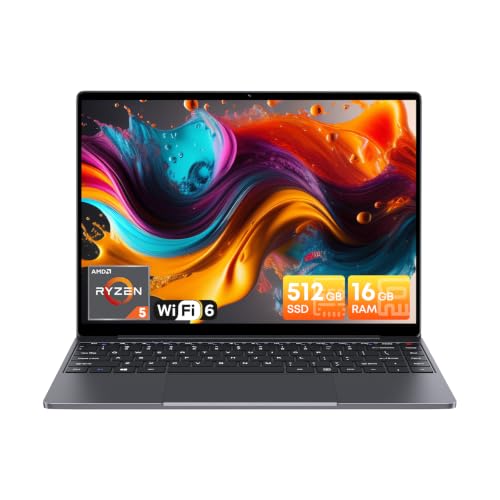
CHUWI is the closest thing this guide has to a known quantity among the small brands — a maker with a genuine track record in compact laptops — and its machine is the guide’s charmer. The title specifies 16GB of RAM, a 512GB SSD, an AMD Ryzen 5 the listing benchmarks against an Intel i7-1355U, and a 14-inch IPS display at 2160×1440, by far the sharpest panel here. Add a backlit keyboard, Wi-Fi 6, Bluetooth 5.2 and 4K-at-60Hz external output, and the picture is a premium-feeling compact that happens to play Java Edition beautifully.
The sharp screen deserves a Java-specific note. Minecraft’s blocky aesthetic does not need resolution the way a photo editor does, but its text, interfaces and distant terrain all gain legibility, and the desktop life around the game — wikis, videos, schoolwork — gains it everywhere. At 14 inches the machine is also the guide’s true traveller, the one that goes to the library and the friend’s house without a negotiation. Its integrated graphics are unnamed in the title beyond the processor, so treat the exact arrangement as a documentation check; the base game’s demands make that a footnote rather than a fear.
CHUWI’s support story sits between the giants and the unknowns: a real brand with real channels, thinner on the ground than HP’s but with a history buyers can research. For the player who wants the small-brand value without the no-name gamble, and who values a beautiful screen over a big one, this is the guide’s sweet spot.
The 4K external output line, easy to skim past, quietly extends this little machine’s life. A 14-inch laptop that can drive a large 4K monitor at a desk becomes two machines: the traveller and the battlestation, with the same worlds and saves living on both. Java players who build at scale often graduate to a big external screen for planning sessions, and the CHUWI is the only small-brand pick here to promise that path in print. Combined with the sharpest built-in panel in the guide, it makes the CHUWI the easiest of the five integrated machines to imagine owning for four years rather than two — the screen, in both its forms, is what an owner actually lives with.
- Display: 14-inch IPS, 2160×1440 as stated
- Processor: AMD Ryzen 5 (listing compares it with an i7-1355U)
- Graphics: Integrated; model not named in the listing title — verify with the manufacturer documentation
- Memory: 16GB RAM
- Storage: 512GB SSD
- Wireless: Wi-Fi 6, Bluetooth 5.2
- Output in title: 4K at 60Hz external display support
- Keyboard: Backlit
Strengths
- 2160×1440 panel is the sharpest screen in the guide
- 14-inch body is the most portable here
- Best-established small brand in the shortlist
Trade-offs
- Integrated graphics model goes unnamed in the title
- 14-inch screen gives sprawling builds less canvas than the 16-inch pick
- Support network remains thinner than the major brands’
Best for: a mobile player who wants a sharp, compact machine and a brand with a track record.
Not suited for: a big-screen builder, because 14 inches is the smallest canvas in the guide.

HP Victus 15 — The Shader Upgrade
The Victus closes the guide as the deliberate exception. Its title — a 2022 model, printed openly — specifies an RTX 3050 discrete card, a 12th-generation Core i5-12500H, 8GB of RAM, a 512GB SSD and a Full HD display, with a backlit keyboard and enhanced thermals. For vanilla Java Edition, nearly everything about that specification is beside the point: the integrated machines above run the base game well, and this one’s 8GB of memory actually trails their 16GB. The Victus earns its seat for exactly one reader — the shader player.
Shader packs transform Java Edition’s lighting into something that genuinely loads a graphics card, and at that moment the RTX 3050 stops being a badge and becomes the tool the integrated machines cannot match. The i5-12500H is also a strong simulation processor, a genuine step up in sustained multi-core work from the 7430U family. So the upgrade logic is real but narrow: shaders, plus the comfort of HP’s support network, parts shelf and resale page — the ownership infrastructure none of the small brands can offer.
Buy it with the caveats printed in its Fortnite review and repeated here because they matter more in this guide: the panel’s refresh rate is unstated, the memory is 8GB in a guide where 16GB is the comfort figure, and the design dates from 2022. A shader-loving player who accepts those terms gets the only discrete-graphics machine in the shortlist and the only famous badge. Everyone else should let the integrated picks keep the money.
One more Victus consideration, because its buyers often arrive with a second game in mind. A household machine rarely serves one title, and the RTX 3050 that Java barely consults becomes genuinely useful the moment the library widens — the shooters, racers and action games a growing player discovers next. That is a legitimate reason to buy this machine, provided it is named honestly: you are not buying it for Minecraft, you are buying it for the library Minecraft leads to, and accepting its 8GB memory and 2022 panel as the toll. Named that way, the purchase is coherent. Bought as a “Minecraft laptop” at a premium over the integrated picks, it is a badge tax — and this guide exists, in large part, to help readers tell those two purchases apart.
- Display: Full HD; refresh rate not stated in the listing title — verify with the manufacturer documentation
- Processor: Intel Core i5-12500H, 12th generation
- Graphics: NVIDIA GeForce RTX 3050
- Memory: 8GB RAM
- Storage: 512GB SSD
- Cooling note in title: Enhanced Thermals
- Keyboard: Backlit
- Operating system: Windows 11 Home
- Model year stated: 2022 (15-fa0025nr)
Strengths
- Only discrete graphics card in the guide — the shader scenario’s tool
- HP support, parts and resale infrastructure
- i5-12500H is a strong sustained-performance processor
Trade-offs
- 8GB of RAM trails the integrated picks’ 16GB
- 2022 design with an unstated panel refresh rate
- For unshadered Java, its advantages mostly go unused
Best for: a shader-pack player who also wants a major brand’s ownership safety net.
Not suited for: a vanilla Java player, because the 16GB integrated machines serve that game better for less.
The Six at a Glance
| Pick | Panel | Graphics | Processor | Memory | Storage |
|---|---|---|---|---|---|
| NIMO 15.6 Light Gaming | 15.6″ FHD | Radeon 680M integrated | Ryzen 7, eight cores | 8GB DDR5 | 256GB SSD |
| KAIGERR Gaming Laptop | FHD, size not stated | Integrated Radeon | Ryzen 7430U | 16GB DDR4 | 512GB SSD |
| MALLRACE 2026 | 16″ FHD | Radeon integrated | Ryzen 5 7430U | 16GB | 512GB SSD |
| Gaming Laptop 7430U | 15.6″ FHD | Radeon RX Vega 7 | Ryzen 7430U | 16GB | 512GB NVMe SSD |
| CHUWI Gaming Laptop 14 | 14″ 2160×1440 IPS | Integrated, not named | Ryzen 5 | 16GB | 512GB SSD |
| HP Victus 15 | FHD, refresh not stated | RTX 3050 | Core i5-12500H | 8GB | 512GB SSD |
Notice, too, what the table does not contain: a single machine that fails the game. Every row here plays Java Edition well by specification, which is a statement no other guide in this series can make about its six. The differences that remain are differences of life — how much else the machine holds, how far it travels, whose badge stands behind it, how sharp its screen renders the wiki you will read beside the game. That is a pleasant kind of shopping, and it rewards the reader who shops for their life rather than for a benchmark. The reviews above were written in that spirit, and the table, read by its boring columns, agrees with every one of them.
The table’s lesson is that this category rewards a different literacy. In a normal gaming guide the graphics column decides; here it is the least informative column on the page, and the memory and processor columns carry the verdicts. A reader who learns to read a laptop table that way — for this game — has learned the guide’s whole argument in one glance.
How to Choose a Laptop for Minecraft Java
Budget the peripherals with the same honesty as the machine. Java is a keyboard-and-mouse game at its core, and a comfortable mouse will improve more evenings than any specification difference among the integrated five. A headset matters for server life, where voice carries the social game. None of the titles here bundle either worth planning around, so hold a little of the savings — and there will be savings, in this integrated category — for the tools your hands actually touch. The laptop renders the world; the peripherals are how you live in it.
Decide your shader life first, because it is the only fork that changes the category. No shaders, or light ones: buy integrated, pocket the difference, and spend your attention on processor, memory and screen. Heavy shaders as a default: the Victus is your machine in this guide, and its caveats are the price of the card. There is no third answer, and any guide that sells a discrete card to a vanilla player is selling a badge.
Keyboard and trackpad deserve a sentence in a Java guide, because this game is played with the hands for hours at a stretch and its building mechanics are keyboard-native in a way controller-first games are not. No title here prints key travel or trackpad dimensions, so the guide scores nothing — but buyers with strong preferences should treat the listing photographs and the return window as their test bench, and should know that every machine here accepts an external mouse and keyboard without ceremony for the settled desk setup most long sessions become. Comfort is not a specification in this category; it is a habit of setup, and it is free.
Within the integrated field, choose by the life around the game. Heavy multitaskers and future modders need the 16GB machines. Settled players should take the 16-inch screen; travellers, the CHUWI’s 14-inch sharpness; the specification-confident, the unbranded Pro machine with its listing-terms ritual. Brand posture is the last dial: every step from HP toward the unknowns trades support for specification, and the right exchange rate is a personal fact about your own troubleshooting temperament.
Why Does Java Edition Run So Well on Integrated Graphics?
Because of when and how it was built. Java Edition’s rendering is comparatively simple — its world is cubes, its lighting model is modest, and its engine spends its budget on simulation rather than on the photorealistic rendering that discrete cards exist to accelerate. Modern integrated graphics, meanwhile, have become genuinely capable: the Radeon 680M in the headline NIMO is a far stronger GPU than the discrete cards Java players used happily a decade ago. The two trends meet in the middle, and the meeting point is this guide — a category where the honest recommendation is often the machine without the famous graphics badge, bought with the savings spent on memory, storage and screen.
What Settings Should a New Java Player Tune First?
Render distance is the master dial: it decides how much world the machine simulates and draws, and lowering it a few chunks is the single most effective comfort adjustment on any hardware in this guide. Simulation distance, particle settings and fancy-versus-fast graphics toggles follow. The practical method is to start from the game’s defaults, play in your busiest world — not a fresh one — and adjust one dial at a time until the experience feels composed. Players arriving from the modded guide should also set their memory allocation deliberately in the launcher, since Java’s defaults are conservative and the 16GB machines have room to share.
Java or Bedrock: Does the Edition Change the Laptop You Need?
Only at the margins, and this guide is written for Java because the search was. Java is the edition of mods, of the long-running community servers, of the original PC experience — and the more processor-led of the two. Bedrock is engineered for consistency across phones and consoles and is generally gentler still. A laptop that serves Java well, as all six here do by specification, will not be troubled by Bedrock; the reverse is not always true, because Java’s modding ecosystem and simulation habits ask more of memory and CPU. Buy for Java and you have bought for both.
How Do Versions, Snapshots and Backups Shape the Storage You Need?
Java players live across time in a way other gamers do not. The launcher happily keeps multiple game versions installed — the current release for the community server, an older one for the world begun three years ago, a snapshot for experimenting with next year’s features — and each world keeps its own folder, its own backups, its own screenshots and resource packs. None of it is huge alone. Together, across the years this game is played, it compounds into the kind of archive that makes a 256GB drive feel like a corridor and a 512GB drive feel like a house. That compounding is the practical meaning of this guide’s storage column, and it is why the reviews keep returning to a figure that looks, on the shop floor, like the dullest number on the page.
The backup habit deserves the same emphasis it received in the modded guide, because Java worlds are irreplaceable in a way save files rarely are: a world is years of evenings, built block by block, often with other people. All six picks can hold the game; the ones with room to spare make protecting it automatic rather than aspirational. Keep rolling backups, keep one copy off the laptop, and the storage you bought becomes the difference between a corrupted world being an anecdote and being an ending. Players choosing between the 256GB headline machine and a 512GB rival should weigh that sentence at full value — it is, across a decade of play, the most consequential difference between them.
What Does a Server Habit Do to the Specification You Need?
Many Java players eventually stop merely visiting worlds and start hosting them, and hosting quietly rewrites the shopping list. A small server for a household or a handful of friends is a second simulation living beside the game — modest in its demands, but constant, and hungry in exactly the places this guide already prizes: memory for the world and its players, processor cores for ticking, storage for the world folder and its backups. The 16GB machines absorb a small server with grace; the 8GB NIMO can host one at the cost of everything else closing. Players who suspect a hosting future — and the game’s social gravity makes it likely — should buy the memory headroom now, because a world your friends live in cannot be paused while you upgrade. The heavily modded guide takes this logic to its extreme; here it is simply worth planting the seed before the till, not after the first friend asks for the server address.
How Long Will a Java Laptop Stay a Java Laptop?
Possibly longer than any other machine in this series of guides, because Java Edition’s demands evolve at the pace of a beloved classic rather than a graphics arms race. Mojang has kept the game playable across an extraordinary range of hardware for over a decade, and its updates add content far more often than they add rendering burden. A Ryzen machine bought today with 16GB of memory is therefore a plausible five-to-eight-year Java instrument — an almost unheard-of lifespan in gaming hardware — provided the rest of the laptop’s life cooperates: battery, hinges, keyboard, and the owner’s own wandering eye. That longevity reframes the small-brand question, too. A support network matters more across eight years than across two, which is a genuine argument for CHUWI’s track record or HP’s infrastructure among readers who keep machines until they stop, rather than until they bore.
It also reframes the memory decision. The 8GB NIMO is the strongest integrated machine today and the likeliest to feel its ceiling soonest, not because Java will outgrow it, but because everything around Java — browsers, launchers, recording tools, the operating system itself — grows a little heavier every year. Buying the 16GB configuration is buying insurance against the ecosystem’s appetite, and in a machine expected to serve this long, that insurance is cheap at the price.
Slip-Ups Java Buyers Keep Making
Paying for a discrete graphics card to play unshadered Java is the category’s defining waste — money spent on the one component the game barely consults, usually at the expense of the memory and storage it consults constantly. The Victus is in this guide for shader players; for everyone else it is the cautionary tale with a famous badge.
Trusting a small brand’s title without reading its terms is the second slip-up, and it is about recourse rather than performance. These machines’ specifications are real, but their warranty handling is a listing-page promise, so screenshot the configuration, confirm the terms, and verify the delivered machine in its first days. The third slip-up is underbuying memory for a multitasking life: the game is light, the evening around it is not, and 8GB is a ceiling that Discord, a browser and a recording tool will find together. And the last is buying the toy class — the novelty mini-laptops and ancient netbooks that haunt this search — which can open Java Edition the way a puddle can host a regatta. The floor of this guide exists because that floor needed stating.
Final Recommendation
For most Java players, the KAIGERR or the MALLRACE — chosen by screen size — is the sensible centre: the comfortable 16GB and 512GB configuration on a proven Ryzen platform, at a small-brand figure, with the support caveat understood. The CHUWI is the traveller’s upgrade in sharpness and portability, the unbranded machine is the specification purist’s Pro-software bargain, and the NIMO is the best integrated hardware wearing the guide’s tightest memory and storage. The Victus stands apart, correctly, for shader players and brand loyalists.
Java Edition is the rare game that rewards buying the boring rows of the spec sheet. Honour that, and it will repay you for a decade — this game’s worlds have a habit of outliving the laptops they were born on, which is the finest argument for the bigger drives and the careful backups this guide keeps recommending.
And keep the arrival ritual, especially in this small-brand category: paperwork beside machine, system information open, one busy evening of play inside the return window. The integrated six were chosen because their titles told the truth in print. The ritual exists to confirm the truth survived shipping — and in a category built on trust in listings, that confirmation is not pedantry. It is the hobby’s whole method, practised one laptop at a time.
One closing calibration for the reader who arrived expecting a gaming guide and found a guide about restraint. Nothing here is a compromise in the pejorative sense: these are machines matched to a workload with unusual precision, by a guide that refused to sell the workload’s least important component as its most expensive one. If your library grows toward heavier games, the savings banked today are tomorrow’s upgrade fund. If it does not — if Java is, as it is for millions, the whole hobby — then the machine you buy from this page may be the last gaming purchase you need to think about for years. Either way, the thinking was the point.
Frequently Asked Questions
Do I really not need a graphics card for Minecraft Java?
For the base game, a modern integrated Radeon — the 680M above all — is genuinely sufficient at sensible settings, because Java’s demands are processor- and memory-led. A discrete card earns its place when demanding shader packs become your default way to play.
How much RAM does Java Edition want?
The game itself is modest, but 16GB is the comfortable system figure once the launcher, browser, voice chat and recording join in. The 8GB machines here play the game well and multitask tightly; the guide flags that trade wherever it appears.
Are KAIGERR and MALLRACE real laptops or a gamble?
Real laptops with mainstream Ryzen hardware and honestly printed specifications — and brands without the service networks of HP or the track record of CHUWI. The gamble is not performance but recourse, which is why their reviews prescribe the listing-terms and verification ritual.
Which pick is best for a child or student?
The CHUWI for its portability, sharp screen and comparatively established brand, or the KAIGERR for its balanced configuration and webcam cover. For a gift, weigh the support path as heavily as the specification — the unbranded machine is the one to avoid for someone else’s child.
What is the single best specification to prioritise if I can only pick one?
Memory, at 16GB, because it is the figure that governs the whole evening — game, launcher, browser, voice and the allocation a growing world will ask for — and because it is the hardest figure to change later on machines whose upgrade paths are undocumented. Processor second, storage third, graphics a distant fourth for this title.
Is a Chromebook or a tablet a sensible Java machine?
No — Java Edition is a desktop program for Windows, macOS and Linux, and it belongs on a real laptop of the kind this guide lists. Browser workarounds and cloud streaming exist as curiosities, but a player choosing a machine for years of Java should choose from proper laptops with the memory and storage the game and its archive deserve.
Can these laptops run modded Java as well?
Lightly to moderately, with the 16GB machines ahead. Truly heavy modpacks are a different workload with memory at its centre — the companion heavily modded guide exists for exactly that step up, and its value pick offers 32GB for a reason.
What should I check on a small-brand laptop in its first week?
Run the verification ritual while the return window is wide open: confirm the processor, memory and storage in the system information against the listing you ordered from, check the display’s resolution in its settings, and play your busiest world for a full evening. Small-brand machines earn trust by surviving exactly this week; a unit that matches its paperwork and plays well has told you most of what ownership will feel like.
Does screen resolution matter for a blocky game?
For the blocks, barely; for everything around them, noticeably. Text, menus, maps and the desktop life of wikis and videos all sharpen with resolution, which is why the CHUWI’s 2160×1440 panel earns its praise despite the game’s low-resolution aesthetic. Buy resolution for your eyes’ whole day, not for the cubes.
Why is a 2022 HP in a guide of current machines?
Because it holds the only discrete graphics card and the only major-brand support network in the shortlist, and shader players need the first while cautious buyers want the second. Its age and its 8GB of memory are printed in its review rather than hidden.
Buy the processor, the memory and the screen; let the graphics badge go. It is the only guide in this series that gets to give that advice, and Java Edition — patient, processor-led, immortal — has earned it.
A final word to the parent, partner or friend buying from this guide on someone else’s behalf, because Java laptops are so often gifts. The recipient will not measure your love in graphics tiers; they will measure it in whether the world loads, the server connects and the machine is still playing happily at the next birthday. Every pick above passes that test by specification. Choose the one whose brand you would want answering the phone if the hinge ever complains, and you have bought well.
Related Guides
The younger crowd’s favourite is covered by our best Roblox laptops roundup, which separates real Windows machines from the toys that cannot run that game properly. Life-sim players with ever-growing mod folders will find their own storage-and-memory story told in our guide to the best laptops for Sims 4 mods, where a content library quietly becomes the whole hardware argument. And readers whose shopping list turns from play to work may find our survey of the best police body cameras a useful change of pace — another category where the printed specification, read carefully, is the only honest guide.


