What's inside
- Where to Buy
- Key Takeaways
- Quick Picks
- How We Chose These Picks
- The Six at a Glance
- How to Choose a Laptop for Sims 4 Mods
- How Big Does a Mods Folder Actually Get, and How Do You Keep It Healthy?
- Do You Need a Gaming Laptop for The Sims 4 with Mods?
- What Should You Do When a Mod Breaks the Game?
- How Do Loading Screens Connect Hardware to Patience?
- Buying Errors the Mods Folder Punishes
- Final Recommendation
- Frequently Asked Questions
- Related Guides
As an Amazon Associate I earn from qualifying purchases. This post may contain affiliate links at no extra cost to you.
widgetverdict.com is reader-supported. When you buy through links on our site, we may earn an affiliate commission.
Where to Buy
Each machine below is sold through its own Amazon page, where its figure and full title can be checked together. The NIMO 15.6 Ryzen 5 with 32GB listing shows what that configuration costs today, so check price on Amazon there. NIMO’s AI Ready student laptop keeps its delivered price on its own product page, as does its sibling, the NIMO R5 AI student laptop with the 4TB expansion claim worth re-reading in its title. The fourth NIMO, the 15.6 Ryzen 5 with 16GB, publishes its figure on its listing. HP’s little Stream 11 shows its cost on its own page, and the Acer Nitro V — the one gaming machine here — displays the RTX 4050 build’s price on its product page.
The Sims 4 is a gentle game with an immoderate hobby attached. The base game and its expansions ask little of a laptop; the Mods folder asks everything. Custom content accumulates the way sediment becomes rock — a hair pack here, a furniture set there, a gameplay overhaul, a folder of poses — until one day the folder is measured in tens of gigabytes, the game’s loading screens have lengthened into coffee breaks, and the laptop’s drive is performing triage between the Sims library and everything else the machine owns. Anyone searching for the best laptops for sims 4 mods is really shopping for two specifications above all: storage, because the folder only ever grows in one direction, and memory, because the game, its content index and the browser full of download pages all draw from the same pool.
That axis produces an unusual shortlist, and this guide leans into it. Four of the six machines are NIMO student laptops — a small brand whose configurations happen to aim squarely at this workload’s needs, up to a headline machine with 32GB of memory and a terabyte of storage. One is an Acer gaming laptop, present for the player whose modded game leans on heavy graphics content and high-resolution ambitions. And one is the HP Stream 11, included as the guide’s honest contrast: a charming little machine whose 64GB of storage is, for a mods library, not a limitation but a verdict, stated in its review without varnish.
The standard honesty rules govern the whole piece. No title below mentions The Sims or mods, none quotes a loading time or a frame rate, and no pick is promised either. The titles print processors, memory, storage and screens, and those facts — read against how a modded Sims installation is known to grow — carry every verdict. Two titles claim their storage is “expandable to 4TB”, and the reviews treat that phrase carefully: it is a claim about a ceiling, printed by the maker, not a description of the drive in the box, which in both cases is 128GB.
Key Takeaways
- Storage is the headline specification for a mods library: this guide spans 64GB to 1TB, and the ranking follows that column more than any other.
- The HP Stream 11’s 64GB is named as a genuine problem for mods, not a quirk — it is the guide’s contrast pick, bought only with eyes open.
- Two NIMO titles claim expansion headroom to 4TB while shipping 128GB drives; the guide reads the claim as a ceiling, not a capacity.
- Memory spans 4GB to 32GB, and the 32GB headline NIMO pairs the guide’s best memory with its best storage in one machine.
- The Acer Nitro V is the upgrade pick for players whose content leans graphical — high-resolution textures and reshade-style ambitions — not a requirement for the base hobby.
- Four of six picks come from one small brand, so support expectations are set accordingly in every NIMO review.
Quick Picks
| Pick | Badge | Why it is here |
|---|---|---|
| NIMO 15.6 Ryzen 5 32GB | Top Choice | 32GB of RAM and a 1TB drive — the two specifications a Mods folder dreams about. |
| NIMO 15.6 AI Ready | Expansion Claim Pick | A tidy student machine whose title promises room to grow to 4TB, starting from 128GB. |
| NIMO 15.6 R5 AI | Fast-Charge Twin | The same expansion story with 65W fast charging, for the bag-and-library life. |
| NIMO 15.6 Ryzen 5 16GB | Middle NIMO | 16GB of memory and 256GB of storage — the balanced point of the family. |
| HP Stream 11 | The Contrast | A famous badge and a 64GB drive that a Mods folder will defeat; included to be warned about fairly. |
| Acer Nitro V RTX 4050 | Graphics Upgrade | A discrete card and a 165Hz screen for the content-heavy, high-resolution player. |
How We Chose These Picks
Storage led the admission test, in a way no other guide in this series has needed. A mods library’s size is a one-way ratchet — nobody deletes the good furniture set — so drives were read as timelines: 1TB is years of comfortable growth, 512GB is a healthy runway, 256GB is a managed life, 128GB is a starting point with a plan required, and 64GB is a warning. Memory followed, because the game’s content indexing and the player’s download ecosystem share it; 16GB was set as the comfort figure and 32GB as the luxury that this particular hobby genuinely uses.
Processor and graphics were deliberately demoted, with one exception. The Sims 4’s engine is old and kind; integrated graphics of the modern class run the game itself respectably, and the four NIMO picks rest on that fact. The exception is the content-heavy player — high-resolution texture packs, lighting overhauls and screenshot artistry — for whom a discrete card becomes a real tool, and the Nitro V was admitted for that reader alone, with its review confining its advantage to that use.
Brand reality is this guide’s open sore, and it is addressed rather than dressed up. Four picks from NIMO means four helpings of the small-brand caveat: specifications that outrun the giants’, support that does not. The HP and the Acer are present partly as the counterweight — the machines whose badges come with networks — and the Stream’s inclusion, despite its storage verdict, is partly so that the counterweight’s own failure mode is shown honestly too. A famous badge does not rescue a 64GB drive from a Mods folder.
Finally, the two “expandable to 4TB” claims were admitted as claims. Expansion headroom is genuinely useful in a storage-led category — a machine that can grow is worth more than one that cannot — but the guide scores the drive in the box first and the ceiling second, and any reader comparing those two NIMOs against the 1TB headline machine should do the same.

NIMO 15.6 Ryzen 5 32GB — Top Choice
The headline machine of this guide is a student laptop, and that is the point. Its title specifies a four-core AMD Ryzen 5 up to 3.7GHz, 32GB of RAM and a 1TB SSD, with 65W Type-C fast charging, a fingerprint reader and a backlit keyboard, behind a 15.6-inch IPS FHD screen. For a modded Sims life, that is the wish list in order: a terabyte for the folder that never shrinks, double the comfort figure of memory for the game and its download ecosystem to share, and a processor entirely adequate for an engine of The Sims 4’s vintage and temperament. No gaming badge in this price territory offers that pairing, because gaming badges spend their budgets on graphics this game barely consults.
Think of the ownership experience across two years of enthusiastic collecting. The Mods folder grows from a folder into a library with its own organisation system; the drive absorbs it without the quarterly purge that smaller machines demand. Loading a content-heavy save draws on memory the 32GB pool supplies without negotiation, while a browser of download queues, a Discord of creator updates and the game itself coexist. The fingerprint reader and fast charging serve the student life the machine was designed for, which for many Sims players is the same life.
The caveats are brand and ceiling. NIMO is a small badge, with the support depth this series always attaches to that fact — verify warranty terms on the listing and keep the paperwork. And the four-core processor, while well matched to this game, is the component a future, heavier library of other games would question first. For the modded Sims player pure and simple, neither caveat outweighs the central fact: this is the only machine in the guide whose two headline specifications are both the guide’s best.
There is a subtler dividend to the big memory pool that only long-session players will notice, and it deserves its paragraph. A modded Sims session rarely stays inside the game: it alt-tabs to check a creator’s page, to compare a build against a gallery screenshot, to look up which pack a piece of furniture came from, to answer the chat that is also a social life. Every one of those switches is a memory event, and on a tight machine each return to the game carries a small toll of reloading and hesitation that players learn to feel as “my laptop is getting old”. On 32GB, the toll largely vanishes; the game waits, fully resident, while the rest of the evening happens around it. That quality — the absence of a thousand small waits — is what a memory figure actually buys in this hobby, and it is why this guide ranks the axis second only to the drive itself.
- Display: 15.6-inch IPS FHD as stated
- Processor: AMD Ryzen 5, four cores, up to 3.7GHz as stated
- Graphics: Integrated; not separately named in the listing title — verify with the manufacturer documentation
- Memory: 32GB RAM
- Storage: 1TB SSD
- Charging in title: 65W Type-C fast charging
- Extras in title: Fingerprint reader, backlit keyboard
Strengths
- 1TB drive is the guide’s best answer to a growing Mods folder
- 32GB of memory is double the comfort figure for game plus downloads
- Fast charging and fingerprint reader suit the student life around the game
Trade-offs
- Small brand with a thinner support network
- Four-core processor is matched to this game, not to heavier ones
- No discrete graphics for the high-resolution content scenario
Best for: a committed modded player whose library grows every week and whose laptop is also a student machine.
Not suited for: a screenshot artist running high-resolution texture overhauls, because integrated graphics are the ceiling that hobby reaches.

NIMO 15.6 AI Ready — Expansion Claim Pick
The second NIMO tells a story in its title that this guide insists on reading slowly. The machine in the box is a 15.6-inch student laptop with a four-core Ryzen 5 up to 3.7GHz, 8GB of RAM and a 128GB SSD, a backlit keyboard and a fingerprint reader, running Windows 11. The story is the phrase “expandable to 4TB” — a promise that the storage can grow enormously beyond the drive fitted. For a storage-led hobby, that promise is genuinely relevant: a Mods folder that outgrows 128GB is not a hypothetical but a schedule, and a machine with a growth path is worth more than one sealed at its starting figure.
But the order of facts matters. One hundred and twenty-eight gigabytes is a small starting line for this hobby — the game, its expansions and a young Mods folder will make themselves at home in it quickly — and 8GB of memory is the guide’s tight tier for game-plus-browser multitasking. The expansion claim should therefore be read as part of the purchase price: the buyer is committing to the upgrade, in money or in an external drive habit, on a known timeline. Bought that way, knowingly, this is a sensible starter machine with a future. Bought as though “4TB” described the box, it is a misunderstanding with a keyboard.
Against its sibling below, this version’s title does not claim the 65W fast charging, and against the headline NIMO it concedes memory and storage in exchange for its lower figure on the listing. Its constituency is the new modded player: light folder, growing ambitions, a plan for the drive. The guide respects the plan — provided the plan is real.
One more consideration belongs to this pick, because its buyers are often buying their first “real” laptop for the hobby and deserve the full picture. A starter machine’s job is not to be the final machine; it is to teach its owner what their hobby actually weighs. Six months on this NIMO will tell its player exactly how fast their folder grows, how heavy their multitasking is, and whether the expansion path gets used or merely admired. That knowledge is worth money at the second purchase, and it is an honourable role for a modest machine. The guide asks only that the first purchase be made with the schedule in view — 128GB is a semester’s runway for an enthusiastic collector, not a degree’s worth — so that the lesson arrives as information rather than as a full-drive error mid-download.
- Display: 15.6-inch as stated
- Processor: AMD Ryzen 5, four cores, up to 3.7GHz as stated
- Graphics: Integrated; not separately named in the listing title — verify with the manufacturer documentation
- Memory: 8GB RAM
- Storage: 128GB SSD; title claims expandability to 4TB
- Extras in title: Backlit keyboard, fingerprint reader
- Operating system: Windows 11
Strengths
- Printed expansion headroom suits a folder that grows on a schedule
- Fingerprint reader and backlit keyboard are grown-up touches at this tier
- Same comfortable Ryzen platform as the headline pick
Trade-offs
- 128GB starting drive is small for this hobby’s core use
- 8GB of memory is the tight tier for multitasking
- The 4TB figure is a ceiling claim, not the fitted capacity
Best for: a new modded player buying a starter machine with a genuine storage growth plan.
Not suited for: an established collector with a large existing folder, because 128GB will be full before the first download session ends.
NIMO 15.6 R5 AI — Fast-Charge Twin
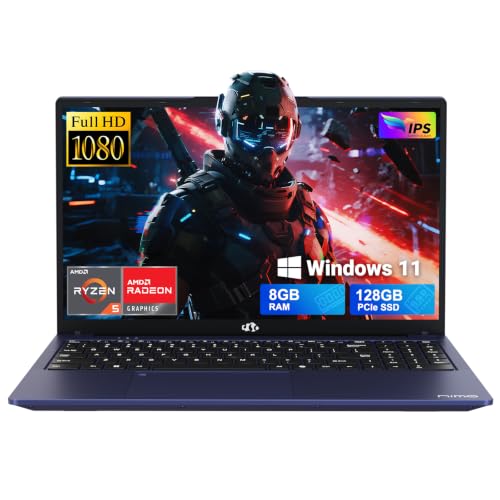
The third NIMO is the second one’s twin with a different flourish. Its title again specifies a four-core Ryzen up to 3.7GHz, 8GB of RAM and a 128GB SSD with expansion claimed to 4TB, behind a 15.6-inch FHD screen — and adds 65W fast PD charging alongside the fingerprint reader and backlit keyboard. The reviews of twins should not manufacture differences, so here is the honest one: this machine is the same storage story and the same memory tier, wearing the faster charger, aimed at the player whose laptop lives in a bag between lectures, cafés and the desk where the Sims sessions happen.
For the modded brief, everything said about its sibling applies with equal force. The 128GB drive is a starting line with a schedule attached; the expansion claim is a ceiling to plan around, not a capacity to enjoy on day one; the 8GB of memory serves the game and a modest entourage. Where the twins diverge in a player’s life is logistics: 65W fast charging over the same USB-C ecosystem as a phone charger means the machine tops up in library gaps and travels with one fewer brick. Small mercies compound across a student year.
Choosing between the twins is therefore a lifestyle question, and choosing either over the headline NIMO is a budget question with a known cost: memory and storage, the two things this hobby eats. The guide’s advice is to make that trade only with the expansion plan actually intended — a drive upgrade or a disciplined external library — because a Mods folder does not respect intentions that exist only at the till.
The twin’s fast charger invites one more honest observation about how these small-brand families work, because a reader choosing between near-identical listings deserves to understand the shelf they are shopping from. Makers like NIMO build a platform — one chassis, one processor family, one screen — and then vary the memory, the drive, the charger and the marketing line across a family of listings. That is not a criticism; the giants do the same with more polish. It means the shopper’s job is to ignore the adjectives, which are redecorated per listing, and compare the four numbers that are not: memory, fitted storage, processor and screen. By those numbers this twin is a known quantity — the family’s entry configuration with the better charger — and a buyer who reads it that way will get exactly the machine they think they bought.
- Display: 15.6-inch FHD as stated
- Processor: Four cores, up to 3.7GHz as stated (listing compares it with an i5-1135G7)
- Graphics: Integrated; not separately named in the listing title — verify with the manufacturer documentation
- Memory: 8GB RAM
- Storage: 128GB SSD; title claims expandability to 4TB
- Charging in title: 65W fast PD
- Extras in title: Fingerprint reader, backlit keyboard
Strengths
- 65W fast charging suits a bag-and-library student life
- Same expansion headroom claim as its twin for a growing folder
- FHD screen at the full 15.6-inch size
Trade-offs
- 128GB fitted drive is the joint-smallest workable figure here
- 8GB of memory caps the download-and-play multitasking
- Near-identical to its sibling, so the badge risk is bought twice over
Best for: a mobile student player who values fast charging and accepts the storage plan.
Not suited for: a desktop-bound collector, because the fast charger buys nothing and the 128GB drive costs everything.
NIMO 15.6 Ryzen 5 16GB — Middle NIMO
The fourth NIMO is the family’s middle child and, for many readers, its most sensible member. The title specifies the same four-core Ryzen 5 platform, now with 16GB of RAM and a 256GB SSD, 65W Type-C fast charging, a fingerprint reader and a backlit keyboard behind a 15.6-inch IPS FHD screen. Read against this guide’s axes, that is the comfort memory figure paired with a managed-life storage figure — the configuration for the player whose Mods folder is a curated collection rather than an archive, and whose multitasking is the full modern shape of game, browser, chat and downloads.
Two hundred and fifty-six gigabytes deserves its honest paragraph. It holds the game, every expansion and a respectable Mods folder with room to breathe, and it will not hold all of that plus a second gaming life plus a photo library plus next year’s collecting at this year’s pace. The player it suits keeps a tidy folder — most players, honestly, since the community’s own curators preach pruning — and gains, in exchange for the discipline, the family’s balanced machine at a middle figure on its listing.
Against the headline NIMO, this pick concedes half the memory and three-quarters of the storage; against the twins, it doubles the memory and the drive and drops the expansion claim, which many buyers will experience as a relief — the capacity is in the box, not in a promise. Small-brand caveats apply as throughout the family. As the middle of a well-aimed range, it earns its place without a single exaggerated word.
The middle machine also carries the family’s best argument against buyer’s remorse, which is worth articulating for the reader torn between it and the headline. The headline’s advantages — double memory, quadruple storage — are advantages a player grows into over years; the middle’s adequacy is something a player feels, or does not feel, in the first month. A curated collector will not feel it at all: their folder fits, their sessions are smooth, and the money saved is real. An archivist will feel it by spring. The difference between those two players is not budget or taste but habit, and habit is the one specification no listing can print. Know your habit — the folder on your current machine, measured honestly, will tell you — and the choice between these two NIMOs makes itself.
- Display: 15.6-inch IPS FHD as stated
- Processor: AMD Ryzen 5, four cores, up to 3.7GHz as stated
- Graphics: Integrated; not separately named in the listing title — verify with the manufacturer documentation
- Memory: 16GB RAM
- Storage: 256GB SSD
- Charging in title: 65W Type-C fast charging
- Extras in title: Fingerprint reader, backlit keyboard
Strengths
- 16GB of memory is the comfort figure for the full session shape
- Capacity is fitted in the box rather than promised as a ceiling
- Fast charging and fingerprint reader keep the family conveniences
Trade-offs
- 256GB storage is a managed life for a growing folder
- Four-core processor remains the family’s shared ceiling
- Small brand support story, as with all four NIMOs
Best for: a curated collector who keeps a tidy folder and multitasks fully.
Not suited for: an archive-everything hoarder, because 256GB will impose the purge ritual within a couple of enthusiastic years.

HP Stream 11 — The Contrast
Now the contrast, stated as plainly as this guide can state anything. The HP Stream 11 is a well-known, genuinely likeable little laptop: an 11.6-inch HD anti-glare screen, an Intel Celeron N4020, 4GB of RAM, a thin and portable body, long battery life and a year of Microsoft 365 in the box, from the deepest support network in this guide. As a homework-and-browsing machine for a young student, it has earned its fame. As a laptop for Sims 4 mods, its title contains the whole review in one figure: 64GB of storage.
Sixty-four gigabytes must hold Windows itself, the game, its expansions and the Mods folder — and the arithmetic defeats the machine before the hobby begins. The operating system and the base game consume the majority of the drive; the folder that defines this entire category gets what remains, which is a rounding error. Add 4GB of memory — half the guide’s tight tier — and a Celeron processor, and the picture completes itself: this is a machine that can install The Sims 4 the way a thimble can hold a drink. It is included because its badge and its price make it the single most tempting wrong purchase in this category, and a guide that omitted it would leave its readers to discover the arithmetic alone, at the till, in front of a hopeful child or a hopeful self.
Who should buy it anyway? The player whose Sims life is genuinely base-game-only, portable above all, and content to treat mods as a someday that will arrive with a different laptop. That player exists, and for them the Stream’s battery, size and support are real virtues. Everyone whose search included the word “mods” — which is to say, everyone reading this guide — should let the little HP go with respect and buy storage instead.
Why this little machine tempts so many buyers deserves a moment, because the temptation is rational everywhere except on the one axis that matters here. The Stream is inexpensive in spirit, beautifully portable, backed by the brand a parent trusts from their own school days, and sold beside school supplies in a way that makes it feel like the official laptop of childhood. Every one of those signals is honest — for the job the machine was designed for. The failure is a mismatch, not a fraud: a homework appliance was asked to be a collecting hobby’s home. This guide’s warning is therefore aimed at the match, not the machine, and it extends to every future version of the same shape: any laptop, from any badge, whose total storage is measured in tens of gigabytes is a homework appliance, whatever the game on its box art.
- Display: 11.6-inch HD anti-glare as stated
- Processor: Intel Celeron N4020
- Graphics: Integrated; not separately named in the listing title — verify with the manufacturer documentation
- Memory: 4GB RAM
- Storage: 64GB
- Battery note in title: Long battery life
- Bundled software in title: Microsoft 365 included
- Operating system: Windows 11
- Model year stated: 2021 (11-ak0040nr, Diamond White)
Strengths
- HP’s support network and a genuinely portable 11.6-inch body
- Long battery life suits a machine that travels daily
- Microsoft 365 in the box serves the homework life
Trade-offs
- 64GB of storage cannot hold the game, its expansions and a Mods folder
- 4GB of memory is half the guide’s tight tier
- Celeron processor is the weakest in the guide
Best for: a base-game-only player who values portability and battery above the entire mods hobby.
Not suited for: anyone with a Mods folder, because 64GB of total storage is consumed by Windows and the game before the first download arrives.

Acer Nitro V RTX 4050 — Graphics Upgrade
The Nitro V closes the guide as the exception that defines the rule. Its title specifies an Intel Core i5-13420H, an NVIDIA RTX 4050, a 15.6-inch FHD IPS panel at 165Hz, 8GB of DDR5, a 512GB fourth-generation SSD, Wi-Fi 6 and a backlit keyboard — a real gaming laptop, from a major brand, at the guide’s graphics summit. For the majority of modded players, its card is surplus: The Sims 4’s engine will not tax it, and its 8GB of memory actually trails the headline NIMO’s 32GB on this hobby’s second axis. Its constituency is specific and real.
That constituency is the content maximalist: the player whose game wears high-resolution texture packs, lighting and reshade-style overhauls, and who plays partly to photograph the result. That workload genuinely loads a graphics card, favours a strong processor for the game’s simulation at scale, and turns the 165Hz panel into a smoothness the base game never asks for but the eye enjoys anyway. For that player, the Nitro V is not the exception — it is the only pick in the guide actually built for their version of the hobby, with Acer’s support network behind it.
Its storage, 512GB, is the healthy runway tier — a serious folder fits, with the purge ritual postponed rather than abolished. Its memory is the figure its buyer should plan around, since the content ecosystem’s browsers and tools will share those 8GB with the game. Buy it for the graphics life, knowingly, and it is the right machine. Buy it because a Sims laptop “should” have a gaming badge, and the headline NIMO — quieter, roomier, cheaper to run — will spend years being the purchase you describe to friends as the one you should have made.
The Nitro V also quietly wins on lifespan among the six, in a way its review should acknowledge even while confining its headline advantage to the graphical niche. Acer’s support depth, the model’s mainstream parts, and a specification with a genuine discrete card give it the widest second life here: when the Sims years end, this machine becomes a general gaming laptop without apology, while the NIMOs become what they always were — excellent student machines. A buyer whose interests are visibly widening beyond the life-sim shelf may rationally pay for that future today. The guide’s only insistence is that the purchase be named correctly: it is a widening-library purchase with a Sims present, not a Sims purchase, and its 8GB of memory will be the widening library’s first negotiation as surely as it is the folder’s.
- Display: 15.6-inch FHD IPS, 165Hz as stated
- Processor: Intel Core i5-13420H
- Graphics: NVIDIA GeForce RTX 4050
- Memory: 8GB DDR5
- Storage: 512GB Gen 4 SSD
- Wireless: Wi-Fi 6
- Keyboard: Backlit
- Operating system: Not stated in the listing title — verify with the manufacturer documentation
Strengths
- Only discrete graphics card in the guide, for the content-heavy player
- i5-13420H is the strongest conventional processor here
- 512GB drive is the healthy runway tier, with Acer support behind it
Trade-offs
- 8GB of memory trails the headline pick’s 32GB on this hobby’s axis
- For the base modded game, most of the card’s power goes unused
- Gaming chassis is heavier than the student machines it sits beside
Best for: a content maximalist whose high-resolution packs and screenshot artistry genuinely load a graphics card.
Not suited for: a folder-first collector, because its 8GB of memory and mid-tier storage serve this hobby worse than the headline NIMO at its own game.
The Six at a Glance
| Pick | Panel | Graphics | Processor | Memory | Storage |
|---|---|---|---|---|---|
| NIMO 15.6 32GB | 15.6″ IPS FHD | Integrated, not named | Ryzen 5, four cores | 32GB | 1TB SSD |
| NIMO AI Ready | 15.6″ | Integrated, not named | Ryzen 5, four cores | 8GB | 128GB SSD, expandable claim to 4TB |
| NIMO R5 AI | 15.6″ FHD | Integrated, not named | Four cores | 8GB | 128GB SSD, expandable claim to 4TB |
| NIMO 16GB | 15.6″ IPS FHD | Integrated, not named | Ryzen 5, four cores | 16GB | 256GB SSD |
| HP Stream 11 | 11.6″ HD anti-glare | Integrated, not named | Celeron N4020 | 4GB | 64GB |
| Acer Nitro V | 15.6″ FHD IPS 165Hz | RTX 4050 | Core i5-13420H | 8GB DDR5 | 512GB Gen 4 SSD |
Sort the table by storage and you have sorted it by this guide’s values, from the terabyte the hobby dreams about down to the 64GB it cannot survive. Sort it by brand fame and the order nearly reverses — the famous badge sits one row from the bottom on the only axis that matters here. That inversion is the guide in miniature, and it is why the reviews insisted on reading every machine, famous or not, by the same two columns.
How to Choose a Laptop for Sims 4 Mods
There is one more habit of the hobby that hardware quietly serves: the gallery life. Sims players do not only play their households; they photograph them, share builds, download other players’ creations and keep a local archive of everything. That archive — screenshots, tray files, saved households and lots — grows on the same drive and draws on the same patience at the same loading screens. It is one more reason the guide’s storage column reads like a timeline rather than a specification, and one more reason the player who expects to participate in the game’s creative community, rather than merely consume it, should buy the roomier machines with confidence rather than guilt. The folder is the hobby; the gallery is its public face; both live on the drive you are about to choose.
Measure your current folder before you measure any laptop. Its size today, and its growth over the last year, are the two most honest numbers in the entire purchase: buy a drive that holds today’s folder three times over and the machine will serve for years; buy one that holds it once and the purge ritual begins immediately. Then check memory against your session’s real shape — game alone, or game plus browser plus chat plus a download queue — and let 16GB be the line for the second shape. Graphics last, and only if your content leans graphical.
Screens deserve a short, honest paragraph in a life-sim guide, because this game is played in long, settled sessions at reading distance. The 15.6-inch FHD panels on the NIMOs and the Acer render the game’s interface-dense screens — build mode catalogues, family trees, gallery pages — at a comfortable size and sharpness. The Stream’s 11.6-inch HD panel is the outlier: charmingly portable, and genuinely cramped for build mode, where half the screen is catalogue. Players who build seriously should count screen room as a real specification in this category, ranked just below the drive and the memory it serves.
Brand is the final dial, and this guide is unusually honest about its setting: the roomiest specifications here wear the smallest badge. A buyer fluent in self-support buys the NIMOs and banks the capacity. A buyer who wants a network buys the Acer and accepts its memory figure, or waits for a roomier major-brand configuration rather than forcing the Stream’s arithmetic to work. What nobody should buy is 64GB of storage for a mods library, whatever badge is printed above it.
How Big Does a Mods Folder Actually Get, and How Do You Keep It Healthy?
Bigger than new players believe, faster than they expect. The folder grows by accretion — individual downloads are small, but they arrive weekly, they are rarely deleted, and the game’s own expansions and the player’s screenshot archive grow beside them. Seasoned players measure their folders in tens of gigabytes and their loading screens in minutes, and they treat organisation as part of the hobby: subfolders by category, a staging folder for new arrivals tested one at a time, and a backup of the whole library kept elsewhere, because a folder that took three years to curate deserves the same protection as a photo archive.
The hardware connection is direct. A roomy drive makes that hygiene effortless; a tight drive makes it a crisis performed under pressure, deleting first and regretting at leisure. Memory plays its part at the loading screen, where the game indexes what the folder holds. Buy the room, keep the ritual, and the hobby stays a pleasure. Skimp on either and the folder — the actual content of the hobby — becomes the enemy of the machine it lives on.
Do You Need a Gaming Laptop for The Sims 4 with Mods?
For the game and the folder, no — and the guide’s top pick, a student laptop, is the proof standing in the first position. The Sims 4’s demands are storage, memory and patience, and gaming badges spend their budgets elsewhere. The exception is the graphical edge of the hobby: high-resolution texture content, lighting overhauls and screenshot artistry, where the Nitro V’s discrete card stops being a badge and becomes a tool. Know which hobby you actually have. Most players have the folder; a few have the photo studio; the guide has a pick for each, and they are not the same pick.
What Should You Do When a Mod Breaks the Game?
It will happen, on any laptop, because mods are community software updated at community pace while the game patches on the publisher’s. The working method is unglamorous and universal: keep the folder organised in subfolders from the first day, add new content in small batches so a breakage has a short suspect list, keep the previous version of anything you update until the game has run cleanly with the new one, and back the whole folder up before every game patch. None of that is hardware — but the storage to keep those backups and versions is, which is the last time this guide will make its favourite point: in this hobby, the drive is not where the game lives. The drive is where the hobby lives.
How Do Loading Screens Connect Hardware to Patience?
Every Sims player knows the loading screen as the hobby’s toll booth, and its length is a hardware story told in two parts. The drive decides how fast the game’s files and the folder’s thousands of small content files can be read; the memory decides how much of what was read can stay ready when the player moves between lots, worlds and modes. A machine strong on both — the headline NIMO is this guide’s example — shortens the toll in a way players feel dozens of times a session, which is why veterans of the hobby talk about storage and memory the way shooter players talk about frame rates. It is also why the Stream’s failure compounds: a nearly full 64GB drive and a 4GB pool do not merely limit the folder, they stretch every transition the game makes, taxing the exact patience the hobby runs on. When a player says their laptop “feels slow at the Sims”, this is almost always the mechanism — and it is curable at the till, by the two columns this guide keeps pointing at.
Buying Errors the Mods Folder Punishes
Buying the famous badge with the tiny drive is the category’s signature mistake, and the Stream 11 is in this guide as its monument. Sixty-four gigabytes is not a small figure for this hobby; it is a disqualifying one, and no support network, battery life or bundled software changes the arithmetic. Read the storage column first, whatever the badge.
Reading a ceiling as a capacity is the second error, and the twin NIMOs exist to teach it: “expandable to 4TB” describes where the storage can go, not where it starts, and the 128GB in the box is the figure the first year of the hobby will actually meet. Buy the ceiling knowingly, with the upgrade planned, or buy the capacity outright in the headline machine.
Underbuying memory for a multitasking session is the third. The game alone is kind; the game plus the download ecosystem is not, and the stutter that arrives when the pool runs dry gets blamed on the processor that did not cause it. And the final error is neglecting the backup — a folder curated for years, living on one drive, in one laptop, with no second copy. The roomy machines make the backup effortless. Make it anyway, on any machine, before the patch that teaches the lesson.
Final Recommendation
The headline NIMO is the guide’s answer for the hobby as most people live it: a terabyte for the folder, 32GB for the session, a student machine’s manners for everything else. The middle NIMO serves the curated collector, the twins serve the starter with an expansion plan honestly intended, and the Nitro V serves the graphical maximalist with a major brand’s backing. The Stream 11 serves as the warning, bought only by the base-game player who never intends to join the hobby this guide is about.
The Sims 4 with mods is a collecting hobby wearing a game’s clothes, and collecting hobbies are won by the shelf, not the spotlight. Buy the shelf — storage first, memory second, everything else after — and the game will fill it with years of evenings.
Keep the arrival ritual, too, because this category’s machines reward it in a specific way: before the first download, check the delivered memory and storage against the listing, install the game, and copy the existing folder over while the old machine still holds its untouched twin. Migrations in this hobby go wrong exactly once per player, and the ritual exists so that yours goes wrong on a copy, inside a return window, with the original still safe — rather than the other way around.
One last calibration, for the reader who arrived expecting a gaming guide and found a treatise on shelves. Nothing in this shortlist is a compromise in the pejorative sense; the machines are matched to a workload whose centre of gravity genuinely sits in the drive and the memory pool. If your Sims life later widens into heavier gaming, the Nitro V is already waiting at the guide’s end with its card and its network. If it deepens instead — bigger folder, longer saves, a screenshot archive — the headline NIMO’s terabyte will look, in retrospect, less like a specification and more like a prophecy. Either way, the thinking at the till is what the hobby rewards, and the thinking is mostly arithmetic: measure the folder, honour the arithmetic, buy the shelf.
Frequently Asked Questions
How much storage does a modded Sims 4 player really need?
More than the game suggests. The base game and expansions are only the foundation; the Mods folder grows weekly and is never pruned back to zero. A 512GB drive is a healthy runway and 1TB is years of comfort, while 128GB is a starting point and 64GB — the Stream’s figure — cannot hold the hobby at all.
Can integrated graphics run The Sims 4 with mods?
Yes, for the game and its typical content — the engine is old and kind, and the four NIMO picks rest on exactly that fact. High-resolution texture packs and lighting overhauls are the exception that rewards the Nitro V’s discrete card.
What does “expandable to 4TB” actually mean on the two NIMO listings?
It is the maker’s claim about the storage ceiling the machine can grow to, printed in the title — not the capacity fitted. Both machines ship with 128GB drives, and the guide scores the fitted figure first and the claim second. Plan the upgrade as part of the purchase.
Is 8GB of RAM enough for Sims 4 with mods?
For the game alone, workably. For the real session shape — game, browser of downloads, chat, perhaps a recording tool — it is the tight tier, and heavier folders lengthen loading in ways memory headroom softens. The 16GB middle NIMO is the comfort line and the 32GB headline machine the luxury.
Why is a famous HP the guide’s warning instead of its recommendation?
Because on this hobby’s deciding axis it fails outright: 64GB of storage cannot hold Windows, the game, its expansions and a Mods folder. The badge, battery and support are genuine virtues pointed at a different job, and the review says so with respect — and without budging.
Four NIMOs in one guide — is that a problem?
It is an honest reflection of this category’s shelf: in the storage-and-memory-first segment, this small brand’s configurations simply outnumber the giants’, whose budgets chase graphics. The guide weighs each on its printed figures and repeats the support caveat in every review. A reader who prefers a network behind the badge has the Acer — and the Stream’s warning about what a badge cannot fix.
How do I move my Mods folder to a new laptop safely?
Copy the entire folder, not a selection, and keep the old machine’s copy untouched until the new installation has run the game cleanly through several sessions. Back the folder up to a second location during the move. The folder is the hobby’s archive; treat the migration with the ceremony a photo library would get, because the regret profile is identical.
What is the first thing to do when the new laptop arrives?
Verify the memory and storage against the listing in the system information, install the game, and only then copy the Mods folder across — keeping the old machine’s copy untouched until the new one has run several clean sessions. The folder is years of curation; the migration deserves the same care as the purchase.
Does the processor matter at all for this game?
At the margins. The Sims 4’s simulation is kind to modern chips, and every Ryzen and Intel processor here except the Stream’s Celeron serves it without drama; the Nitro V’s i5 is the strongest and the most surplus. Buy the processor last in this category, after storage and memory — the reverse of almost every other gaming guide, and the correct order for this one.
Should I keep my Mods folder on an external drive instead?
As a backup, absolutely — a second copy is the cheapest insurance in the hobby. As the live home of the folder, an external drive adds a cable, a failure point and a speed question to every session; the roomy internal drives in this guide exist so the folder can live where the game expects it.
Measure the folder, honour the arithmetic, buy the shelf. Three clauses of method that will serve a Sims player longer than any single machine in this guide — and the standard against which each of the six was chosen.
And a word to the player buying for a household rather than a person, because Sims laptops are so often shared. A shared machine’s folder belongs to everyone and is curated by no one, which means it grows faster and is backed up less than any other kind. On a shared machine, buy the roomiest drive in reach and set the backup ritual on the first day, while the intention is fresh. The headline NIMO was, in a sense, built for exactly that household — the one where the shelf must be bigger than any single player’s habits, because it is holding all of them.
Finally, a note of reassurance for the reader who has measured their folder, done the arithmetic and felt a small pang at how much of the budget the boring columns consume. That pang is the hobby telling the truth about itself. The players who love this game longest are not the ones with the most dramatic hardware; they are the ones whose libraries survived every patch, whose saves outlived two laptops, whose folders were backed up on the day it mattered. Storage and memory are how a laptop keeps faith with that kind of player. Buy them without apology, and let the spotlight specifications go to games that need them.
Related Guides
Readers equipping a workplace next may find our survey of the best police body cameras a useful change of pace — another category where storage capacity, read honestly, decides everything. The best small body cameras roundup applies the same title-first evidence method at miniature scale. And for the civilian end of that shelf, our guide to the best small civilian body cameras covers the compact recorders built for everyday carriers.