What's inside
- Where to Buy
- Key Takeaways
- Quick Picks
- How We Chose These Picks
- The Six at a Glance
- How to Choose a Laptop for Heavily Modded Minecraft
- How Do You Allocate RAM to a Modpack in the Launcher?
- Do Shader Packs Change Which Laptop You Should Buy?
- Why Does a Modded World Get Heavier the Longer You Play It?
- Should You Run the Server and the Game on the Same Laptop?
- How Should You Protect a World That Took a Year to Build?
- Where Modded-Minecraft Buyers Go Wrong
- Final Recommendation
- Frequently Asked Questions
- Related Guides
As an Amazon Associate I earn from qualifying purchases. This post may contain affiliate links at no extra cost to you.
widgetverdict.com is reader-supported. When you buy through links on our site, we may earn an affiliate commission.
Where to Buy
Six listings carry this guide, each with its figure published only on its own page. The ASUS ROG Strix G18 page shows what the 64GB and 4TB configuration costs at the moment you read it, so check price on Amazon there first. NIMO’s flagship, the NIMO 16 with Ryzen AI Max+ 395, displays its delivered cost on its own listing, where its remarkable memory figure can be re-read in the title. MSI’s Raider A16 HX keeps the RTX 5080 build’s pricing on its product page. The shorter-titled Strix G18 RTX 5070 listing likewise shows its figure there — and needs the visit for configuration details as much as for cost. The MSI Cyborg 15 page publishes its own number, as does the second NIMO, the NIMO 15.6 Ryzen 5, whose 32GB configuration is the value story of this guide.
Vanilla Minecraft runs on almost anything, which is exactly why shopping for the best laptops for heavily modded minecraft confuses people. A heavily modded game is a different workload wearing the same blocky face. A large modpack loads hundreds of mods into memory, generates worlds through altered terrain code, keeps vast numbers of chunks and entities active, and writes constantly to disk as it autosaves a world that grows heavier every session. The bottleneck trio for that workload is not the one gaming marketing usually sells. It is memory first — modpacks eat RAM allocation the way browsers eat tabs — storage second, because worlds, backups, shader packs and multiple pack instances accumulate relentlessly, and processor third, because Java’s simulation thread rewards fast cores. A discrete graphics card, the usual hero of a gaming guide, matters here mainly when shader packs enter the picture.
That inversion shapes every verdict below. The most extreme machine in this guide is extreme in memory, not graphics: a NIMO holding 128GB of RAM behind an integrated Radeon GPU. The two flagships from the Elden Ring shelf reappear with their roles reinterpreted — here, their 64GB and 32GB memory figures matter more than their RTX cards. The value pick is a modest NIMO whose 32GB of RAM and 1TB drive outrank flashier machines with half the memory. And the guide’s honesty rules hold throughout: no title mentions Minecraft or modpacks, no title quotes a frame rate, and no machine is promised a number. What follows is reasoning from printed hardware against a workload this guide understands well enough to explain in its own how-to section.
Readers arriving from ordinary gaming guides should recalibrate one instinct before continuing: in this category, the size of the numbers matters more than the fame of the badges. A memory figure is a memory figure whether ASUS or a small brand prints it, and a modpack cannot tell whose logo is on the lid. What the badges change is everything around the numbers — the warranty experience, the parts shelf, the resale page, the forum full of owners who solved your exact problem last year. This guide therefore scores the numbers as numbers and the badges as badges, in separate sentences, and lets the reader decide the exchange rate between them. That separation is the only honest way to write about a shortlist where a student laptop out-memories a flagship.
One more framing note before the picks. Modded Minecraft is not one workload but a spectrum: a kitchen-sink pack with three hundred mods and a world a year old is a heavier citizen than a fresh lightweight pack, and shader packs redraw the graphics equation entirely. The reviews name which end of that spectrum each machine serves, because a laptop that is perfect for a moderate pack can be the wrong answer for the player whose save file has its own gravity.
Key Takeaways
- RAM is the headline specification for modpacks: this guide spans 16GB to an extraordinary 128GB, and the ranking follows memory more than graphics.
- Storage is the second axis — worlds, pack instances and backups grow for years, which is why the 4TB and 2TB machines earn genuine praise here.
- The NIMO AI Max+ 395 machine pairs the guide’s largest memory with an integrated Radeon 8060S GPU, proof that this workload’s hero is not always a discrete card.
- Allocating memory inside the launcher matters as much as owning it; the how-to section below explains the allocation habit every modded player needs.
- Shader packs are the exception that re-empowers graphics cards, which is where the RTX 5080 Raider and RTX 5070 Strix machines justify themselves.
- The value pick, a 32GB NIMO with a 1TB drive, beats several gaming-branded machines on the two specifications this workload cares about most.
Quick Picks
| Pick | Badge | Why it is here |
|---|---|---|
| ASUS ROG Strix G18 64GB | Flagship All-Rounder | 64GB of RAM, 4TB of storage and an RTX 5070 — every modded axis covered at once. |
| NIMO 16 Ryzen AI Max+ 395 | Memory Extremist | 128GB of LPDDR5x and 4TB of storage behind a strong integrated Radeon GPU. |
| MSI Raider A16 HX | Shader Player’s Pick | 32GB of RAM plus the guide’s strongest graphics card for shader-heavy packs. |
| ASUS ROG Strix G18 RTX 5070 | Verify-Me Pick | A flagship badge and card with a title too short to judge — the listing page decides. |
| MSI Cyborg 15 Ryzen 9 | Moderate-Pack Centre | A strong Ryzen 9 and RTX 5060, held to 16GB of RAM and 512GB of storage. |
| NIMO 15.6 Ryzen 5 32GB | Value Headline | 32GB of RAM and a 1TB drive in a student-priced machine from a small brand. |
How We Chose These Picks
The admission test for this guide was rewritten around the workload. Memory led: 16GB was set as the floor for serious packs, with every figure above it earning escalating credit, because a modpack’s appetite is set by its mod count and world age rather than by the player’s wishes. Storage followed, with 1TB treated as the comfort line for a multi-pack, multi-world life and 512GB as the figure that demands housekeeping. Processor strength was read for single-thread character as much as core count, since Java’s world simulation leans on fast individual cores even when a machine offers many.
Graphics were deliberately demoted — and then partially reinstated, for one reason. Without shaders, modded Minecraft’s rendering is comparatively light, and integrated graphics of the modern Radeon class can carry it respectably; with shaders, the load transforms and discrete cards reclaim the argument. Picks were therefore judged on which of those two games they serve, and their reviews say which. A guide that ranked these six by graphics card alone would have buried the machine this workload actually crowns.
Brand posture was weighed as ownership reality. ASUS and MSI bring deep support networks. NIMO is a smaller brand selling specification aggressively — both of its machines here are memory-rich bargains on paper — and its reviews carry the same caveat as any small-badge pick in this series: the hardware printed is real, the service story behind it is thinner, and buyers should purchase with that exchange understood.
Finally, one listing was admitted as a teaching case rather than a specification: the short-titled Strix G18, whose title names a family and an RTX 5070 and stops. In a guide about a workload defined by memory and storage, a listing that prints neither is a genuine hazard, and its review treats verification as the product being sold.
A note on what was excluded, briefly, because exclusion is also information. Machines with 8GB of memory were not admitted at any graphics tier — for this workload that pool is a promise of frustration — and neither were machines whose titles hid their storage behind bundles and accessories. Several famous gaming laptops failed the memory floor while wearing flagship graphics badges, which is the category’s whole pathology in miniature: the industry sells the axis this game ignores and rations the axes it runs on. The six survivors are simply the listings whose priorities, by design or by accident, match the game’s own.

ASUS ROG Strix G18 64GB — Flagship All-Rounder
On the Elden Ring shelf this machine was a buy-once monument; on this shelf it is something rarer — a flagship whose excesses point in the right direction. Its 64GB of RAM is double the comfortable allocation for even a heavy pack, leaving the operating system, a browser of wikis, voice chat and a second instance of the game all fed at once. Its 4TB SSD swallows years of worlds, backups, pack instances and shader libraries without a single housekeeping session. The RTX 5070 stands ready for the shader packs that turn this game’s water and light into a postcard, and the 24-core Ultra 9 275HX brings fast cores for the simulation thread alongside a crowd of spares for everything else.
The 18-inch 2560×1600 panel at 240Hz serves the game in an unexpected way: modded Minecraft is an interface-heavy game, all inventories, machine GUIs, quest books and minimaps, and a large high-resolution screen gives that interface room to breathe while the world stays legible behind it. Windows 11 Pro suits the player who also works on the machine. Nothing in the printed specification is pointed the wrong way for this workload, which cannot be said of most flagships, whose budgets usually chase graphics alone.
The caveats are the familiar flagship ones, sharpened by context. This is a desk-bound 18-inch machine bought at a flagship figure — check the listing — for a game whose base version runs on a school laptop. The justification is never Minecraft alone; it is Minecraft plus shaders plus a decade of everything else, all installed simultaneously. Buyers whose modded life is one moderate pack should take the hint from the value pick below and spend the difference on literally anything else.
There is a modded-specific pleasure to the big drive that deserves naming: parallel lives. Serious players keep several instances alive at once — the long-term survival world, the creative test world where machines are prototyped, the hardcore world, the server world downloaded for offline tinkering — each with its own pack version and its own backups. On a 512GB machine those lives compete; on 4TB they coexist, and the player stops performing the quiet triage that slowly strangles a hobby. Add the 64GB allocation pool and the Strix becomes the machine where a modded ecosystem, not just a modded game, can live. That is the honest flagship pitch for this workload, and it has almost nothing to do with frame rates.
- Display: 18-inch 2560×1600, 240Hz, 100% DCI-P3 as stated
- Processor: Intel Ultra 9 275HX, 24 cores
- Graphics: NVIDIA GeForce RTX 5070
- Memory: 64GB RAM
- Storage: 4TB SSD
- Operating system: Windows 11 Pro
Strengths
- 64GB of RAM doubles the heavy-pack comfort figure
- 4TB of storage ends world and backup management entirely
- RTX 5070 covers the shader-pack scenario with headroom
Trade-offs
- Flagship size and cost for a game that scales down to almost anything
- 18-inch chassis is a desk fixture, not a travelling companion
- Most of the processor’s 24 cores will spectate rather than play
Best for: a shader-loving, pack-hoarding player buying one machine for a decade of modded worlds.
Not suited for: a single-pack player on the move, because an 18-inch flagship spends its budget on capacities a moderate pack never touches.

NIMO 16 Ryzen AI Max+ 395 — Memory Extremist
Here is the machine this guide exists to notice. NIMO’s title specifies a 16-core AMD Ryzen AI Max+ 395, 128GB of LPDDR5x memory, a 4TB SSD and a Radeon 8060S GPU, behind a 165Hz display, with a 99Wh battery and 230W DC charging also printed. One hundred and twenty-eight gigabytes is not a gaming specification; it is a workstation’s memory pool, and for heavily modded Minecraft it is close to a cheat code. A player can allocate generously to a giant pack, keep a second instance open for a test world, run a local server for friends on the same machine, and still leave the operating system breathing room most laptops never see. The modded workload’s first bottleneck simply does not exist here.
The graphics question deserves an honest paragraph. The Radeon 8060S is an integrated GPU — but it is the flagship integrated design of its generation, built into AMD’s halo mobile platform, and for Minecraft’s rendering without heavy shaders it is a serious piece of hardware rather than a compromise. Where it will meet its ceiling is exactly where this guide said discrete cards reclaim the argument: aggressive shader packs at high resolution. The 165Hz panel and the big battery suit the machine’s second life as an AI and multitasking flagship, which the title openly advertises.
NIMO is a small brand, and the caveat from the guide’s method section applies in full: support, parts and resale run thinner than ASUS’s or MSI’s, and a buyer should confirm warranty terms on the listing. But judged as a modded-Minecraft instrument, this is the purest specification in the guide — memory and storage bought to a degree no gaming brand attempts, in a machine that also happens to be a local-AI flagship. For the player whose packs are enormous and whose shaders are modest, it is arguably the correct top pick, full stop.
The local-server scenario deserves its own spotlight, because it is where this machine stops being a curiosity and becomes a category of one. Running a modded server for a household or a small friend group traditionally means a second computer or a paid host. With 128GB of memory and sixteen cores, this NIMO can host the server, play on it, and keep a browser, voice chat and a recording suite open simultaneously — three machines’ jobs on one desk, with memory to spare for the world folder’s growth. No other pick in this guide can make that claim at any price, because no other pick’s memory figure is in the same sport. Players whose modded life is social should weigh that paragraph heavily; it may be the most consequential one in this guide.
- Display: 165Hz as stated; size 16-inch by model name
- Processor: AMD Ryzen AI Max+ 395, 16 cores, up to 5.1GHz as stated
- Graphics: Radeon 8060S (integrated platform GPU)
- Memory: 128GB LPDDR5x
- Storage: 4TB SSD
- Battery and charging in title: 99Wh battery, 230W DC
- Panel resolution: Not stated in the listing title — verify with the manufacturer documentation
Strengths
- 128GB of memory abolishes the modpack RAM bottleneck outright
- 4TB of storage matches the flagship Strix at the workload’s second axis
- Strong integrated Radeon suits unmodded-shader play without a discrete card
Trade-offs
- Heavy shader packs will find the integrated GPU’s ceiling
- Small brand with a thinner support and parts story
- Much of the specification is aimed at AI work a Minecraft player may never use
Best for: a mega-pack player who also runs a local server or test instance on the same machine.
Not suited for: a shader maximalist, because the integrated Radeon 8060S is not a substitute for a flagship discrete card under heavy shader loads.
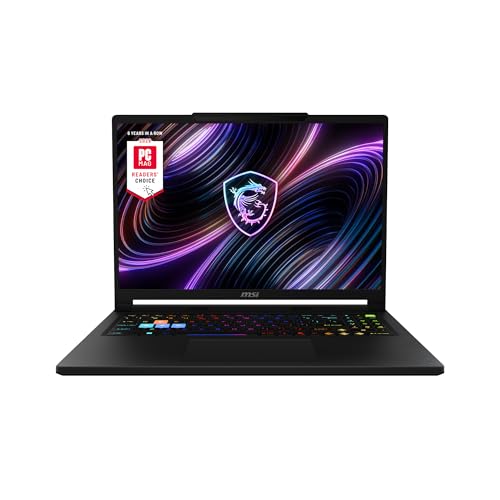
MSI Raider A16 HX — Shader Player’s Pick
The Raider’s role in this guide is precise: it is the machine for the modded player whose packs come with shader packs attached. Its RTX 5080 is the strongest graphics card here by a tier, and shaders are the one corner of this workload where graphics muscle converts directly into beauty — volumetric light, waving water, shadows with depth. Behind the card sit 32GB of DDR5, double the comfort floor for pack allocation, and a 2TB NVMe SSD that holds a serious multi-pack library. The Ryzen 9-8940HX brings HX-class core strength for the simulation thread and for the chunk generation that new worlds demand.
The 16-inch QHD+ 240Hz panel suits the shader life particularly well: shaders are a resolution-hungry luxury, and a card this strong can feed a high-resolution panel while carrying them. Without shaders, frankly, this machine is asleep — vanilla-style modded play will use a fraction of its graphics capacity, and its review in the Elden Ring guide already confessed the overkill. The difference here is that the modded ecosystem contains a switch, the shader toggle, that wakes the whole machine up. Players who live with that switch on are this pick’s constituency.
Ownership notes mirror its flagship status: MSI’s Raider line is its no-compromise series, with the support depth of a major brand, at a flagship figure on the listing. Thirty-two gigabytes rather than sixty-four is the one place it yields to the big Strix, and for this workload that yield is theoretical — 32GB allocates generously to any pack in common circulation with room for the ecosystem around it.
One more shader-era consideration belongs here: resolution discipline. Shader packs multiply the cost of every pixel, so the Raider’s QHD+ panel is both its glory and its negotiation — the card is strong enough to carry shaders at that resolution where lesser cards would force a retreat to FHD. That headroom is precisely what a flagship graphics purchase is for in this workload: not higher numbers in a benchmark, but the freedom to keep the panel’s native beauty and the shader’s light at the same time. Players who have watched a sunset over a modded ocean through a good shader pack understand why people pay for that freedom. It is the most cinematic version of a famously uncinematic-looking game.
- Display: 16-inch QHD+ 240Hz as stated
- Processor: AMD Ryzen 9-8940HX
- Graphics: NVIDIA GeForce RTX 5080
- Memory: 32GB DDR5
- Storage: 2TB NVMe SSD
- Wireless: Wi-Fi 7
- Operating system: Windows 11 Home
Strengths
- RTX 5080 is the guide’s strongest answer to shader packs
- 32GB of RAM doubles the pack-allocation comfort figure
- HX processor feeds chunk generation and simulation strongly
Trade-offs
- Without shaders, most of the graphics card is idle capacity
- 2TB storage yields to the 4TB pair for pack hoarders
- Windows 11 Home on a flagship specification
Best for: a modded player who runs demanding shader packs as their default way to play.
Not suited for: a shader-free player, because the RTX 5080’s premium buys nothing the workload will use.

ASUS ROG Strix G18 RTX 5070 — Verify-Me Pick
The short title returns: ASUS ROG Strix G18 RTX 5070 Gaming AI Laptop, seven words that name a family and a graphics card and withhold everything this particular guide is about. For Elden Ring, the missing rows were important. For heavily modded Minecraft, they are the entire ballgame — memory and storage are the workload’s first two axes, and this title prints neither. A buyer cannot tell from the title whether this machine holds 16GB or 64GB, 512GB or 4TB, and the difference between those configurations is the difference between the guide’s centre and its summit.
What can be said honestly is still worth saying. The Strix G18 is ASUS’s flagship 18-inch line, the RTX 5070 is a strong card for the shader scenario, and if the listing page reveals a configuration anywhere near the fully specified sibling in this guide, this listing could be its value twin. If it reveals a lean base configuration, it is a flagship badge wrapped around centre-tier hardware, priced by the badge. The listing page, read line by line, is the only arbiter — and in this guide’s workload, the two lines to hunt first are the memory figure and the drive figure, before the processor, before the panel, before anything.
Consider this pick the guide’s homework assignment. It is included because real stores are full of listings like it, and because the Strix family’s ceiling is genuinely high. It is ranked fourth because a guide that rewarded silence with a higher place would be teaching its readers to shop badly.
To make the verification concrete, here is the arithmetic a buyer should perform on that page. Find the memory figure and ask whether it doubles the pack you play, with the ecosystem’s share left over. Find the storage figure and ask whether your current worlds, packs and backups — which you can measure on your present machine in two minutes — occupy less than half of it, leaving the growth this guide keeps warning about. If both answers are yes, the badge and the RTX 5070 do the rest, and this listing joins the guide’s summit honestly. If either answer is no, the fully specified sibling above is the machine this listing is pretending to be, and the pretence is not worth paying for.
- Display: 18-inch class by model name; resolution and refresh not stated in the listing title — verify with the manufacturer documentation
- Processor: Not stated in the listing title — verify with the manufacturer documentation
- Graphics: NVIDIA GeForce RTX 5070
- Memory: Not stated in the listing title — verify with the manufacturer documentation
- Storage: Not stated in the listing title — verify with the manufacturer documentation
- Operating system: Not stated in the listing title — verify with the manufacturer documentation
Strengths
- Flagship family and a confirmed RTX 5070 in print
- Could match the guide’s top pick closely if the page reveals a rich configuration
- 18-inch format suits an interface-heavy modded game when specs check out
Trade-offs
- The two specifications this workload prizes most are both unprinted
- Value is unknowable until the listing page is fully read
- Variation selectors on family listings can quietly change the machine
Best for: a patient verifier who reads configuration pages for sport and may catch a flagship at a centre-tier figure.
Not suited for: anyone buying quickly, because memory and storage — this game’s whole argument — are exactly what its title hides.

MSI Cyborg 15 Ryzen 9 — Moderate-Pack Centre
The Cyborg arrives in this guide with its strengths and limits rearranged by the workload. Its Ryzen 9 270 — an eight-core chip MSI’s title benchmarks against a former Intel flagship — is a genuinely excellent modded-Minecraft processor, strong in the fast-core work the simulation thread demands. Its RTX 5060 covers the shader scenario respectably at FHD. Its 15.6-inch FHD IPS 144Hz panel is sharp enough at the size and easy to feed. On three of the guide’s axes, this is a centre machine with flagship manners.
On the two axes this guide ranks first, it is merely adequate — and adequate, here, has a specific meaning. Sixteen gigabytes of RAM is the comfort floor for a serious pack, not headroom above it: allocate generously to a big pack and the ecosystem around the game starts negotiating for what remains. Five hundred and twelve gigabytes of storage holds the game, a few packs and a few worlds, and then begins the rotation ritual that the 4TB machines abolish. A moderate-pack player will feel neither limit for a long time. A kitchen-sink player with a year-old world will meet both within a season.
That is the honest shape of this pick: the best processor-per-expectation in the guide, wearing the guide’s joint-smallest memory and storage. Windows 11 Pro and MSI’s support depth widen its life beyond the game. Buy it for the pack you actually play, not the pack you daydream about, and it will serve with distinction. Buy it for a mega-pack future and the ceiling is already visible from the shop floor.
The Cyborg’s position improves if its owner is handy. Mid-tier gaming laptops from major brands are the most upgradeable machines in this guide’s world — memory and storage are the classic owner-serviceable rows, though this title prints nothing about slots, so treat upgradability as a documentation question for this exact model rather than a promise. If the answer is favourable, the Cyborg’s two ceilings become postponements rather than verdicts: buy the strong processor and graphics now, feed it memory and storage in a later year when the pack outgrows them. That path, where available, is how centre machines become five-year machines, and it is worth the five minutes of documentation-reading it costs to confirm.
- Display: 15.6-inch FHD IPS, 144Hz as stated
- Processor: AMD Ryzen 9 270, eight cores
- Graphics: NVIDIA GeForce RTX 5060, GDDR7 as stated
- Memory: 16GB DDR5
- Storage: 512GB SSD
- Keyboard: Four-zone RGB backlit
- Operating system: Windows 11 Pro
Strengths
- Ryzen 9 is the strongest mainstream processor in this guide
- RTX 5060 handles the FHD shader scenario respectably
- MSI support depth and Pro software widen its working life
Trade-offs
- 16GB of RAM is the floor for heavy packs, not headroom
- 512GB storage forces rotation on a multi-pack library
- 15.6-inch screen gives modded interfaces less room than the 18-inch picks
Best for: a moderate-pack player who values processor strength and brand support over capacity.
Not suited for: a mega-pack hoarder, because 16GB of memory and 512GB of storage are the two ceilings that playstyle hits first.

NIMO 15.6 Ryzen 5 32GB — Value Headline
End with the machine that proves this guide’s thesis. NIMO’s student laptop specifies a Ryzen 5 with four cores up to 3.7GHz, 32GB of RAM and a 1TB SSD, with 65W Type-C fast charging, a fingerprint reader and a backlit keyboard — and no discrete graphics card named anywhere in its title. In a normal gaming guide that absence ends the conversation. In this guide, the conversation starts there: for modded Minecraft without heavy shaders, 32GB of memory and a terabyte of storage are worth more than a famous GPU badge, and this modest machine offers double the RAM and double the storage of the gaming-branded Cyborg above it.
Frame the rest honestly. The four-core Ryzen 5 is the weakest processor in the guide, and a truly enormous pack’s simulation load will find its limits before it finds the memory’s. Graphics are integrated and unnamed in the title beyond the processor’s own Radeon family — verify the exact arrangement in the manufacturer documentation — so shader packs are a modest-settings affair at best. The brand is small, with the support caveats that follow small brands through this whole series. None of that dents the central fact: on this workload’s first two axes, a student laptop just out-specced a gaming laptop, and its price on the listing will not be a gaming laptop’s price.
Who it suits is the player this guide was secretly written for — the one whose modded world matters more than their settings menu, whose packs are large but whose shaders are light, and whose budget is a fact. For that player, this unassuming NIMO is not the consolation pick. It is the correct one, and the gaming badges above it are the consolation.
Picture its natural habitat and the specification makes even more sense. This is a student’s machine — lectures by day, a long-lived modded world by night, a battery and a Type-C charger that suit a bag, a fingerprint reader that suits a shared house. The modded world does not care that the laptop took notes at noon; it cares that 32GB is waiting at midnight, and that the world folder has a terabyte to grow into. Players sometimes apologise for buying the sensible machine in a hobby that celebrates excess. This guide declines to apologise on their behalf: on the axes this game actually measures, the sensible machine is the strong one.
- Display: 15.6-inch IPS FHD as stated
- Processor: AMD Ryzen 5, four cores, up to 3.7GHz as stated
- Graphics: No discrete graphics card named in the listing title — verify with the manufacturer documentation
- Memory: 32GB RAM
- Storage: 1TB SSD
- Charging in title: 65W Type-C fast charging
- Extras in title: Fingerprint reader, backlit keyboard
Strengths
- 32GB of RAM doubles the gaming-branded centre pick’s allocation pool
- 1TB drive doubles that same pick’s storage
- Type-C fast charging and a fingerprint reader suit student life
Trade-offs
- Four-core processor is the weakest simulation engine here
- No discrete graphics card, so shaders stay a modest affair
- Small brand, with support depth to match
Best for: a pack-heavy, shader-light player who wants memory and storage per money spent.
Not suited for: a shader enthusiast or a mega-pack simulationist, because integrated graphics and a four-core chip are the ceilings both will meet.
The Six at a Glance
| Pick | Graphics | Processor | Memory | Storage | Panel |
|---|---|---|---|---|---|
| ASUS ROG Strix G18 64GB | RTX 5070 | Ultra 9 275HX | 64GB | 4TB SSD | 18″ 2560×1600 240Hz |
| NIMO 16 AI Max+ 395 | Radeon 8060S integrated | Ryzen AI Max+ 395 | 128GB LPDDR5x | 4TB SSD | 165Hz |
| MSI Raider A16 HX | RTX 5080 | Ryzen 9-8940HX | 32GB DDR5 | 2TB NVMe SSD | 16″ QHD+ 240Hz |
| ASUS ROG Strix G18 RTX 5070 | RTX 5070 | Not stated in the listing title | Not stated in the listing title | Not stated in the listing title | 18″ class, details not stated |
| MSI Cyborg 15 | RTX 5060 | Ryzen 9 270 | 16GB DDR5 | 512GB SSD | 15.6″ FHD IPS 144Hz |
| NIMO 15.6 Ryzen 5 | Integrated, not named in title | Ryzen 5, four cores | 32GB | 1TB SSD | 15.6″ IPS FHD |
Two cells in this table deserve a second look. The first is the NIMO flagship’s graphics entry, the only integrated line in a table of discrete cards, sitting beside the joint-largest memory and storage figures — the entire argument of this guide compressed into one row. The second is the value NIMO’s processor entry, the weakest in the table, sitting beside memory and storage figures that shame a gaming brand. Between those two rows lives the honest tension of the category: the numbers this game runs on are cheap to print and unglamorous to sell, so the market rations them exactly where players need them most. A reader who understands those two rows understands the guide.
Sort this table by the memory column and you have sorted it by this guide’s values — a sentence that would be absurd in any other gaming context and is simply true in this one. Sort it by graphics and the order inverts almost comically, which is the whole lesson: heavily modded Minecraft is the rare game where the spec sheet’s glamour column and its substance column trade places. Buy by the substance column, and let the glamour column be a bonus where it appears.
How to Choose a Laptop for Heavily Modded Minecraft
Start by sizing your actual modded life. Count your largest pack’s mod list, the age of your oldest world, and whether shaders are your default or your exception. A player under two hundred mods with fresh worlds lives comfortably in the guide’s centre. A player beyond that, or one whose world has a first birthday, should buy memory and storage first and graphics second. A shader-default player reverses the order again and lands on the Raider or the big Strix. The six reviews are three answers to those three profiles, wearing two badges each.
Processor choice deserves one more pass, because it is the axis where this guide’s readers most often misread the sheet. Core counts impress; the simulation thread cares about the speed of the fastest cores and the cache behind them. The HX chips and the Ryzen 9 bring both in abundance. The value NIMO’s four cores are its honest ceiling, not a hidden flaw — for a medium pack they suffice, and its memory carries the rest. Judge processors here the way the game does: one strong thread for the world, enough spares for the ecosystem, and no credit for a crowd of cores the workload will leave standing idle at the gate.
Then think in allocation, not just capacity. Owning 32GB only helps if the launcher is told to use a generous slice of it for the pack — the how-to below covers the habit — and owning 128GB helps most when the surplus is given jobs: a local server, a test instance, a recording suite. Capacity without allocation is a spec sheet; allocation is the experience. Finally, weigh brand the way this series always advises: the small brands here sell remarkable memory per money, and the large brands sell the network that stands behind the memory. Both are real goods. Choose which one your temperament can live without.
How Do You Allocate RAM to a Modpack in the Launcher?
This is the single most valuable habit in modded Minecraft, and it lives in the launcher rather than the laptop. In the standard launcher, open the Installations tab, select your modded profile, open its advanced options and find the JVM arguments line, where a memory flag sets how much RAM the game may use. Third-party launchers expose the same setting as a friendlier slider or field in their instance settings. The principle matters more than the clicks: a big pack starved at a small default allocation will stutter and crash no matter how much memory the machine owns, because the game was never told it may use it.
How much to allocate is a balance, not a maximisation. Give a large pack a generous allocation — well beyond the default — while leaving the operating system and your other programs a healthy remainder; allocating nearly everything can starve the system and make performance worse, a trap over-eager players fall into with big-memory machines like the 128GB NIMO. If a pack crashes on loading or stutters in a mature world, allocation is the first dial to check, before settings, before hardware, before despair. It costs nothing and it is remarkable how many “my laptop is too weak” stories end at this one line of text.
Do Shader Packs Change Which Laptop You Should Buy?
Completely, and the guide’s structure confesses it. Without shaders, the ranking follows memory, storage and processor, and integrated graphics of the modern class — the Radeon 8060S above all — hold their heads up. With shaders, the rendering load multiplies: real-time shadows, volumetric light and reflective water turn a light engine into a demanding one, and the discrete cards reclaim their thrones in proportion to their tier. The practical advice is to decide your shader life before your laptop, not after. A player who toggles shaders on for screenshots can buy by memory. A player who lives under them should buy the Raider’s RTX 5080 or the Strix’s RTX 5070 and treat their memory figures as the bonus, not the reason.
Why Does a Modded World Get Heavier the Longer You Play It?
Because the world accumulates. Every explored chunk is generated, stored and reloaded; every farm, machine array and storage system adds entities and tile entities the simulation must tick; every automation a pack enables keeps working while you are elsewhere in the world. A fresh world on a big pack can feel light on modest hardware while the same pack, six months in, brings that hardware to its knees — which is why this guide keeps asking about world age rather than pack size alone. Storage grows in parallel: the world folder, its backups, your screenshots and the neighbouring test worlds all compound. Players planning a long modded life should buy for the world they will have at Christmas, not the one they generate on the first evening.
Should You Run the Server and the Game on the Same Laptop?
For a household or a small circle of friends, increasingly yes — and memory is what changed the answer. A modded server is a second copy of the world’s simulation, with its own allocation appetite, and on a 16GB machine it competes with the game for the same small pool. On the 32GB machines it becomes feasible with discipline; on the 64GB Strix it becomes comfortable; on the 128GB NIMO it becomes casual, the kind of thing you leave running so a friend can drop into the world while you are making tea. The advantages are real — no hosting bill, total control over the mod list and the backups, a world that lives on your own drive — and so is the responsibility: the machine becomes infrastructure, and its uptime and backup habits become other people’s evening plans. Players who relish that role should buy memory like they mean it, which in this guide means the NIMO extremist first and the big Strix second.
How Should You Protect a World That Took a Year to Build?
Ask any long-term modded player for their saddest story and it involves a world folder: corrupted by a crash, eaten by a failed mod update, lost with a dead drive. The hardware connection is storage — not the size of it, but the habits it enables. A player with terabytes to spare keeps rolling backups without thinking; a player rationing 512GB deletes yesterday’s safety to make room for today’s pack, and discovers the cost exactly once. The practical ritual is simple: back up the world before every mod change, keep the last several backups rather than the last one, and let one copy live outside the laptop entirely. All six picks can hold the game; the big-drive machines make protecting it effortless, which across a year of play may be worth more than any other specification in this article.
There is a versioning habit worth adopting alongside the backups. Packs update, mods break, and a world that loaded yesterday can refuse today because one library mod changed its mind. Keeping the previous instance intact — a duplicate installation frozen at the versions the world was built under — turns a breaking update from a catastrophe into an inconvenience. That habit, too, is a storage habit, and it is the second reason this guide weighs drive capacity like a performance figure. Memory decides how the game runs tonight; storage discipline decides whether tonight’s world still exists next winter.
Where Modded-Minecraft Buyers Go Wrong
Buying the graphics card and starving the memory is the signature error of this category, imported from every other gaming guide the buyer has ever read. A flagship GPU behind 8GB or a tight 16GB pool will watch a big pack stutter for want of allocation while the card idles. In this one game, the unglamorous rows of the spec sheet are the performance rows.
Forgetting allocation is the free error — the one that costs nothing to fix and ruins more evenings than any hardware shortage. A player who upgrades laptops before checking the launcher’s memory flag has spent money to solve a settings problem. Check the flag first; it is this guide’s cheapest advice and possibly its most valuable.
Underestimating storage is the slow error. Worlds, packs, instances, backups and shader libraries compound quietly, and the 512GB machines begin their rotation ritual within a year of enthusiastic play. And the final error is trusting a flagship badge on a silent title: in a workload defined by two numbers, a listing that prints neither number has told you the most important thing about itself. Read the page, or choose a machine whose title did the reading for you.
Final Recommendation
For the purest modded brief — huge packs, no shader obsession — the NIMO AI Max+ 395 is this guide’s most interesting correct answer, a memory extremist that abolishes the workload’s first bottleneck. For the complete player, packs and shaders and everything else, the 64GB Strix G18 remains the buy-once summit. The Raider owns the shader-first profile, the Cyborg owns the moderate-pack centre with the best processor manners, the short-titled Strix owns the verifier’s lottery ticket, and the little 32GB NIMO owns the value argument outright.
Heavily modded Minecraft rewards the player who feeds it memory, room and patience, in that order. Buy those three things in whatever badge you trust, set the allocation flag before your first launch, and the game will repay you with worlds that outlast the laptop — which is why the backups, on that big drive, matter too.
A parting thought for the reader still torn between the gaming badge and the memory bargain: ask which failure you would rather explain to yourself in a year’s time. “My pack outgrew my graphics card” is a sentence almost no modded player has ever said. “My world outgrew my memory” and “my drive ate my backups” are sentences this hobby says constantly. The six machines above were ranked by a guide that listened to the second pair of sentences. Choose the failure you can live with — or better, choose the machine that makes both failures somebody else’s story.
Whichever machine you choose, the first evening’s ritual is the same and it is short. Install the launcher, set the allocation for your largest pack before the first launch rather than after the first crash, copy your existing worlds into their new home, and make the first backup before you change a single mod. Ten minutes of method at the start is the difference between a migration and a mystery, and it is the same discipline — verify, allocate, protect — that this guide applied to the laptops themselves.
Frequently Asked Questions
How much RAM should I allocate to a large modpack?
More than the default, less than the machine’s whole pool. Large packs commonly want a generous allocation in the launcher’s JVM settings while the operating system keeps a healthy remainder. The exact figure depends on the pack’s size, and the habit matters more than any single number: check the flag before blaming hardware.
Can integrated graphics really run heavily modded Minecraft?
Modern integrated graphics — the Radeon 8060S in the NIMO flagship above all — can carry modded play without shaders respectably, because the workload’s bottlenecks are memory, storage and processor. Heavy shader packs are the exception that still demands a discrete card.
Why does this guide rank a student laptop above a gaming laptop?
Because on this workload’s first two axes it is the stronger machine: the NIMO 15.6 offers 32GB of RAM and a 1TB drive against the Cyborg’s 16GB and 512GB. Where the gaming laptop wins — processor, graphics, support — the review says so plainly.
Is 512GB of storage enough for modded Minecraft?
For one pack and a disciplined library, yes. For multiple packs, several long-lived worlds, backups and shader libraries, it becomes a rotation chore within a year or so — which is why the 1TB, 2TB and 4TB machines earned their emphasis here.
Does the processor matter if RAM is the bottleneck?
Yes — it is the third axis, not an irrelevance. Java’s simulation leans on fast cores for chunk generation and entity ticking, which is why the Cyborg’s Ryzen 9 earns praise and the value NIMO’s four-core chip is named as its ceiling.
My pack stutters in an old world but flies in a new one. Is my laptop too weak?
Probably not — that pattern usually indicts the world, not the machine. Mature worlds accumulate entities, farms and loaded chunks that tax the simulation and the memory pool far beyond a fresh world’s demands. Check the allocation flag first, prune forgotten entity hoards second, and only then shop. Several laptops have been bought to solve what was actually a chicken farm.
Will a bigger laptop screen help with modded play?
More than players expect. Modded interfaces stack windows — inventories, machine controls, quest books, maps — and the 18-inch and high-resolution panels in this guide give that stack room to coexist with the world behind it. It is a quality-of-life advantage rather than a performance one, but across a thousand hours of play, quality of life is performance.
Do modpacks need a fast SSD, or just a big one?
Both, in that order of daily feel: capacity decides whether your instances and backups coexist, while solid-state speed decides how quickly worlds load, chunks stream and the game recovers from its own autosaves. Every pick in this guide uses solid-state storage as printed in its title; the differences that matter are the capacity figures in the table.
What should I verify before buying the short-titled Strix G18?
Memory and storage first, because this workload runs on them and its title prints neither. Then the processor and panel, on the listing page and again in the delivered machine’s system information, inside the return window.
Buy the memory, set the flag, guard the world. Three sentences of method that will serve a modded player longer than any single machine in this guide — and the standard against which each of the six was chosen.
Related Guides
The unmodded original has its own hardware logic, covered in our guide to the best laptops to run Minecraft Java, where integrated graphics fare even better. Younger players and their parents should read our best Roblox laptops roundup, which explains why toy laptops and Android netbooks were excluded on purpose. And players whose other home is a far heavier open world will find the best laptops for Sims 4 mods guide familiar territory — another game where a mods folder quietly becomes a storage strategy.


