What's inside
- Key Takeaways
- Quick Picks
- How We Chose These Picks
- Comparison
- How to Choose a Large Format Professional Printer
- Fine-Art Printer or Plotter: How Can a Buyer Tell Them Apart in a Listing?
- What Does Viewing Distance Have to Do With Choosing Between Them?
- Why Are Professional Listings So Terse, and How Should a Buyer Compensate?
- The Finishing Table: What Happens After a Large Print Comes Out
- Roll or Sheet: How Media Feeding Shapes a Large-Format Studio
- Editioning: Printing the Same Image Twenty Times, Identically
- The First Month With a Large Machine: A Working Calendar
- Selling the Print: What Changes When a Stranger Pays for the Wall
- Common Mistakes
- Final Recommendation
- Frequently Asked Questions
- Related Guides
As an Amazon Associate I earn from qualifying purchases. This post may contain affiliate links at no extra cost to you.
widgetverdict.com is reader-supported. When you buy through links on our site, we may earn an affiliate commission.
Width changes what a photograph is. Below a certain size a print is an object you hold; above it, the print becomes a place you stand in front of, and the best large format professional photo printers exist to serve that second experience — gallery walls, exhibition rooms, the studio where a photographer’s work is finally judged at the scale it was composed for. But the search term gathers two different tribes under one roof, and this guide’s first duty is to separate them in plain sight. Four of the six machines below are fine-art photo printers: Canon’s imagePROGRAF PRO-1100, PRO-2600 and PRO 2100, and Epson’s SureColor P9370, a 44-inch wide-format machine. The other two — HP’s DesignJet T630 and Canon’s imagePROGRAF TM-500 — are plotters: poster and CAD machines whose titles say so, built for line work, plans and display graphics rather than for the tonal depths of a photographic exhibition print.
Calling a plotter a photo printer without that distinction would be the easiest dishonesty in this category, because plotters do print large, do print in colour, and will happily produce a big photographic poster that looks impressive across a room. The difference declares itself at reading distance: in the smoothness of a dusk gradient, the depth of a black that must hold detail and darkness at once, the behaviour of the print on the matte fine-art papers photographers actually buy. Fine-art machines are engineered around those demands. Plotters are engineered around throughput, line precision and media logistics. Both are professional tools; they are professional at different jobs, and the reviews below keep the border visible in every verdict.
A second honesty runs through this page: several of these listing titles are strikingly terse. One gives a width and a job description and nothing else; one gives only a model name. Where a title is silent, the spec box records the silence in the guide’s fixed wording rather than borrowing specifications from a model’s reputation. Professional buyers, of all buyers, deserve that discipline — at this level, a purchase is a capital decision, and capital decisions should rest on documentation the buyer can inspect, not on a reviewer’s confidence.
Key Takeaways
- Four picks are fine-art photo printers (Canon PRO-1100, PRO-2600, PRO 2100; Epson SureColor P9370); two are plotters (HP DesignJet T630, Canon TM-500) and are reviewed as plotters.
- Stated widths span 17 inches (PRO-1100) to 44 inches (P9370) among the fine-art machines; the PRO-2600’s title states no width at all.
- The TM-500 is the only pick whose title states an ink configuration in detail: 24-inch, 5-colour, with media detection, colour calibration and 300 ml of ink shipped.
- The DesignJet T630’s title speaks the plotter language plainly: auto sheet feeder, media bin and stand — logistics for plans and posters.
- Terse titles are treated as terse: missing specifications are recorded as not stated, never filled from reputation.
- Fine-art versus plotter is decided by the print’s viewing distance and paper, not by width alone.
Quick Picks
| Pick | Badge | Why it earns its place |
|---|---|---|
| Canon imagePROGRAF PRO-1100 | 17-inch fine-art entry | A 17-inch professional wireless inkjet photo printer — the fine-art line’s most room-friendly width. |
| Canon imagePROGRAF PRO-2600 | The terse flagship listing | Listed by model name alone; a documentation-first purchase for buyers who know the line. |
| Canon PRO 2100 | 24-inch fine art, stated plainly | Its title says exactly what it is: a 24-inch wide-format fine art printer. |
| Epson SureColor P9370 | 44-inch gallery width | The widest fine-art machine here, for exhibition-scale photographic printing. |
| HP DesignJet T630 | 36-inch plotter | A plotter with auto sheet feeder, media bin and stand — plans and posters, honestly framed. |
| Canon imagePROGRAF TM-500 | 24-inch poster plotter | 5-colour poster and plotter work with media detection, calibration and 300 ml of ink shipped. |
How We Chose These Picks
The selection began with the category’s own confusion. A search for professional photo printing at large format returns fine-art machines and plotters interleaved, because both are large, both are professional and both are inkjets. Rather than pretend the mixture away, the guide keeps the mixture and labels it: four fine-art printers chosen as the photographic core, two plotters chosen as the honest alternative a buyer might actually need, each reviewed inside its own job description.
Within the fine-art four, the spread is width and temperament: a 17-inch machine that fits a serious home studio, two Canon professional models at and around the 24-inch class — one of whose listings is a study in terseness — and a 44-inch Epson for exhibition scale. A photographer can locate their practice on that line: the desk, the studio wall, the gallery.
The literal-reading rule matters most on this page. Professional machines accumulate folklore — generations of reviews, forum wisdom, inherited assumptions about what a model number implies. This guide’s spec boxes refuse the folklore. What the title states is printed; what it omits is marked as omitted, in fixed wording, and the buyer is directed to the manufacturer’s documentation for the capital-grade details. The prose then does the work prose should do: explaining what the stated facts mean for a working studio.

Canon imagePROGRAF PRO-1100 — 17-inch fine-art entry
Seventeen inches is the width at which fine-art printing comes home. The PRO-1100’s title states a 17-inch professional wireless inkjet photo printer, and every word of that earns its place: professional, because the imagePROGRAF PRO line is Canon’s photographic flagship family; wireless, because a studio machine should take files from the computer the photographer actually edits on, wherever in the room it sits; 17 inches, because that width covers the classic exhibition sheet sizes a home studio produces — the prints that get matted, framed and hung without needing a commercial lab’s calendar.
The buyer for this machine is recognisable: a photographer whose work has outgrown the 13-inch desktop class, whose walls and clients now ask for larger statements, and whose room can offer a serious printer a serious surface. At 17 inches, the machine remains a studio appliance rather than a facilities project — no stand logistics, no roll-media architecture to house — while crossing the threshold where a photograph stops being a page and becomes a presence.
Beyond its title, this guide claims nothing for the PRO-1100, and the buyer should treat that restraint as an instruction. Ink configuration, media handling, paper paths — the capital details of a professional purchase — belong to Canon’s documentation for this exact model, and a buyer at this level will read that documentation the way they read a lens’s optical diagram: before money, not after. What the title establishes is enough to place the machine: the fine-art line, the 17-inch class, the wireless studio.
Its competition inside this guide is instructive. Against the PRO 2100 it trades width for room-friendliness; against the P9370 it trades exhibition scale for domestic possibility. Photographers whose largest honest ambition is the framed 16-by-20-class print will find the PRO-1100’s width not a compromise but a match — and a matched machine, run weekly, outproduces a wider machine that intimidates its owner into idleness.
- Type: Professional wireless inkjet photo printer
- Width stated: 17 in.
- Line stated: Canon imagePROGRAF PRO
- Further specifications: Not stated in the listing title — verify with the manufacturer documentation
Strengths
- The 17-inch class brings fine-art widths into a home studio without stand logistics.
- Wireless design suits a studio where the editing computer is not beside the printer.
- It sits in Canon’s professional photo line, as its name and title state.
Trade-offs
- Its title is terse; ink and media specifics must come from Canon’s documentation.
- Seventeen inches is a ceiling — exhibition ambitions beyond it need a wider machine.
- A professional printer still claims a dedicated, stable surface in the studio.
Best for: photographers stepping up to framed, exhibition-sheet printing at home-studio scale. Not suited for: buyers needing stated roll-media or 24-inch-class width from the listing itself.
Studio-scale fine art begins at this width; review the PRO-1100’s current listing before reading its documentation: check price on Amazon.

Canon imagePROGRAF PRO-2600 — The terse flagship listing
This listing is the shortest in the guide: a brand, a line and a model number — Canon imagePROGRAF PRO-2600 — and nothing else. No width, no ink claim, no connectivity word. A lesser guide would fill the silence with the model’s reputation; this one treats the silence as the story, because how a professional buys from a terse listing is a skill worth teaching on the very page where it is needed.
What the name alone legitimately conveys is lineage. imagePROGRAF PRO is Canon’s professional photo line, the family to which the PRO-1100 on this page belongs, and a buyer fluent in that family will have expectations about the class this model occupies. Expectations, however, are not specifications, and at professional prices the difference between the two is measured in returned freight. The correct procedure is unglamorous: take the model number to Canon’s documentation, confirm width, ink system, media handling and footprint against the studio’s requirements, and let the listing serve merely as the purchasing door once the documentation has done the deciding.
Why include such a listing at all? Because the search this guide answers returns it, and buyers will meet it with or without guidance. A guide that silently skipped the terse flagship would leave its readers alone with exactly the listing most likely to be bought on folklore. Included and labelled, it becomes the guide’s standing lesson: the less a title says, the more the manual must.
For the buyer who does the documentation work and finds the machine matches their studio, the PRO-2600’s position in Canon’s professional line makes it a natural step for photographers standardising on one maker’s colour behaviour across widths. For the buyer who wants the listing itself to carry the argument, the PRO 2100 further down — whose title states its width and its fine-art purpose outright — is the more comfortable purchase. Both reactions are rational; they belong to different buying temperaments, and this guide serves both by refusing to blur the difference.
- Product stated: Canon imagePROGRAF PRO-2600
- Line stated: Canon imagePROGRAF PRO (professional photo line)
- Width, ink system and connectivity: Not stated in the listing title — verify with the manufacturer documentation
Strengths
- It belongs to Canon’s professional photo line, as its name states.
- Buyers who know the line can match it to a Canon-standardised studio.
- Its terseness forces the documentation-first buying this category deserves.
Trade-offs
- The listing states no width, ink or connectivity facts whatsoever.
- Any purchase made on reputation alone risks a class mismatch.
- Comparison shoppers get nothing to compare until they open the manual.
Best for: Canon-line professionals who buy from documentation and know the family. Not suited for: buyers who need the listing itself to state width and ink facts before shortlisting.
Treat this one as a door, not a description: the PRO-2600 listing is where the purchase happens after Canon’s documents have decided it: check price on Amazon.
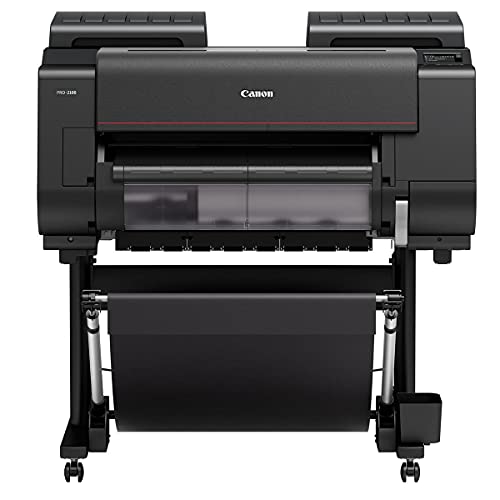
Canon PRO 2100 — 24-inch fine art, stated plainly
After the PRO-2600’s silence, the PRO 2100’s title is a relief of plain speech: Canon PRO 2100, 24 wide, format fine art printer. Twenty-four inches is the professional’s workhorse width — the class that covers the standard exhibition and portfolio sizes of a working studio, the class galleries and print-for-pay benches are furnished around — and the words fine art state the machine’s tribe without ambiguity. This is a photographic printer for art papers and considered output, not a plotter in disguise.
The 24-inch class changes a studio’s logistics in ways a buyer should price honestly. Sheets and rolls at this width need storage that keeps them flat or properly rolled; finished prints need a table large enough to inspect, mat and sleeve them; the machine itself graduates from furniture to installation. Studios that make those provisions gain the defining professional capability: producing, in-house and on demand, the sizes at which photographic work is exhibited and sold.
As with its Canon siblings, this guide builds no spec box beyond the title’s plain statement, and the capital details — ink configuration, media path, the rest — await the buyer in Canon’s documentation. The difference from the PRO-2600 is one of starting position: here the two facts a fine-art buyer shortlists by, width and tribe, are stated on the door. The manual still decides; it merely starts from firmer ground.
Against the Epson P9370, the PRO 2100 argues proportion: most studios’ real output lives at or below 24 inches, and a machine matched to the real distribution of work runs more often, with less theatre, than a 44-inch flagship bought for the annual exception. Against the PRO-1100 it argues headroom: the photographer whose exhibition ambitions are already concrete will not outgrow 24 inches soon. Between those arguments sits the buyer’s own print history, which should be consulted like a ledger before either is believed.
- Product stated: Canon PRO 2100
- Width stated: 24 in.
- Tribe stated: Wide-format fine art printer
- Further specifications: Not stated in the listing title — verify with the manufacturer documentation
Strengths
- Width and fine-art purpose are both stated plainly in the title.
- The 24-inch class covers the standard sizes of studio and exhibition work.
- It offers headroom above the 17-inch class without 44-inch logistics.
Trade-offs
- Ink and media specifics still require Canon’s documentation.
- At this width, paper storage and print-handling space become studio planning.
- Studios printing mostly small work will underuse its width.
Best for: working studios whose exhibition and portfolio output centres on the 24-inch class. Not suited for: occasional printers, for whom its width and footprint would sit idle.
Plain speech deserves a plain next step: the PRO 2100’s listing, then its manual: check price on Amazon.

Epson SureColor P9370 — 44-inch gallery width
Forty-four inches is not a bigger version of the other widths in this guide; it is a different profession. The SureColor P9370’s title states a 44-inch wide-format inkjet printer in Epson’s SureColor family — the line Epson builds for production and photographic wide-format work — and at this width a printer stops serving a studio and starts serving a programme: exhibitions, installations, the large statement pieces whose presence in a room is architectural. Prints at this scale are not examined; they are entered.
The ownership proposition scales with the width. A 44-inch machine presumes premises: a room or workshop bay where it can stand, media at widths that arrive as freight rather than post, a handling routine in which large prints are moved, inspected and finished by plan rather than by improvisation, and a workflow whose volume justifies keeping such capacity warm. Print studios, galleries producing their own shows, and photographers whose market is the large wall are the natural owners; the machine’s presence in a general guide is for their benefit and for the education of everyone scaling toward them.
The title, characteristically for this category, states width and family and stops. Everything a 44-inch buyer must verify — media handling at width, ink system, the physical and network particulars — lives in Epson’s documentation, and at this class the verification is not a chore but the purchase process itself, typically involving the dealer’s and the manufacturer’s specifications together. This guide’s role is placement: the widest fine-art option here, from the maker whose SureColor name anchors the professional wide-format shelf.
Its presence also disciplines the ambitions of the other reviews. A photographer tempted to buy the widest machine available should stand in front of the P9370’s proposition and ask the only question that matters at 44 inches: what, specifically, will I print at this width this year, and where will it hang? Answered concretely, the question either justifies the machine magnificently or redirects the budget to the 24-inch class and a year of paper. Both outcomes are victories for the question.
- Product stated: Epson SureColor P9370
- Width stated: 44 in.
- Family stated: Epson SureColor wide-format inkjet
- Further specifications: Not stated in the listing title — verify with the manufacturer documentation
Strengths
- The widest fine-art width here, serving exhibition and installation scale.
- SureColor is Epson’s professional wide-format family, as the name states.
- In-house 44-inch capacity removes the lab from a gallery’s critical path.
Trade-offs
- Premises, media freight and handling routines scale with the width.
- The title states width and family only; all else is documentation work.
- Underused 44-inch capacity is the most expensive idleness in this guide.
Best for: galleries, print studios and large-wall photographers with a concrete programme at 44 inches. Not suited for: studios whose real output lives at 24 inches and below.
Exhibition scale is a premises decision as much as a printer decision; begin with the P9370’s listing: check price on Amazon.

HP DesignJet T630 — 36-inch plotter
Now the border, drawn in a title that draws it itself: HP DesignJet T630, large format 36-inch plotter printer, with auto sheet feeder, media bin and stand. Plotter is the operative word. The DesignJet family serves the drawing office — architectural plans, engineering sheets, GIS maps, posters and presentations — and the T630’s stated accessories are that world’s furniture: a feeder for sheet work, a bin to catch finished output, a stand to hold the machine at working height. Nothing in the title claims fine-art photographic purpose, and this review claims none for it.
Why, then, does it belong in a photo-printer guide at all? Because buyers meet it in this search, and because for a real class of large colour work it is the right tool: the photographer’s studio poster, the exhibition’s explanatory graphics, the retail display, the presentation board — large colour output judged across a room, where line crispness and throughput outrank the last degree of tonal subtlety. A studio that prints its own signage and posters beside its fine-art work may rationally own a plotter for the former; what it must not do is mistake the plotter’s output for the fine-art machine’s when the photograph itself is the product.
The stated logistics deserve respect on their own terms. An auto sheet feeder plus a media bin describes unattended batch behaviour — load, print, collect — which is the plotter’s native rhythm and the opposite of the fine-art ritual of one considered sheet at a time. The stand completes a self-contained workstation for an office corner. Judged as a plotter, the T630’s title assembles a coherent, professional proposition at 36 inches, a width that covers the standard large sheets of the drawing office.
The buyer this review protects is the one who arrived wanting exhibition photographs and nearly bought 36 inches of drawing office. Keep the tribes separate: if the year’s large prints are photographs for walls and buyers, the fine-art four above are the shortlist. If they are plans, posters and presentation graphics, the T630 is not a compromise — it is the correct machine, and the fine-art four would be the extravagant error.
- Type: Large format plotter printer
- Width stated: 36 in.
- Accessories stated: Auto sheet feeder, media bin and stand
- Model stated: HP DesignJet T630 (5HB11D)
- Further specifications: Not stated in the listing title — verify with the manufacturer documentation
Strengths
- A complete plotter workstation in the title: feeder, bin and stand included in the proposition.
- 36 inches covers the drawing office’s standard large sheets and posters.
- Batch-friendly logistics suit plans, graphics and display work.
Trade-offs
- It is a plotter; fine-art photographic printing is not its stated purpose.
- Photographic buyers judging at reading distance belong with the fine-art picks.
- Its stand and width claim office floor space permanently.
Best for: offices and studios printing plans, posters and presentation graphics at 36 inches. Not suited for: exhibition photographic prints, which are the fine-art machines’ stated trade.
As a plotter, on a plotter’s merits, the T630’s listing is the place to judge it: check price on Amazon.

Canon imagePROGRAF TM-500 — 24-inch poster plotter
The TM-500’s title is the most informative on this page, and what it informs about is a plotter: Canon imagePROGRAF TM-500, 24-inch large format printer, a 5-colour poster and plotter printer with media detection, colour calibration, shipping with 300 ml of ink. Poster and plotter — Canon states the tribe twice, and the supporting features are a production machine’s features: media detection to know what is loaded, colour calibration to keep output consistent across a run, and a stated quantity of ink in the box so the machine starts work on arrival rather than on a second order.
That 300 ml detail is worth dwelling on, because it reveals the TM series’ intended habitat: offices, schools, retailers and print corners producing posters and graphics as a routine, where a machine that arrives ready and calibrates itself earns its floor space from the first week. Media detection similarly serves a multi-user habitat — the machine checks what the last person loaded, rather than trusting them — and calibration serves the poster specifically, where a brand colour must match across fifty copies and two months.
Photographically, the honest framing is the same border as the DesignJet’s, with a nuance: a poster is often a photograph’s cousin — a big photographic image for a wall, a window, an event — and at poster distance, on poster papers, a 5-colour production machine’s output can serve a business perfectly well. The border is crossed only when the poster is sold or exhibited as a fine-art photographic print, where paper, tonal depth and permanence expectations change the contract. Buyers should name which side of that contract their large prints live on, and buy the tribe that matches.
Within its tribe, the TM-500’s stated package is the most complete in this guide: width, colour count, purpose, detection, calibration and starting ink, all on the door. A poster-production buyer can shortlist from this title alone in a way no other pick here permits — a small lesson in how much easier honest titles make everyone’s work, plotters and photo printers alike.
- Type: Large format poster and plotter printer
- Width stated: 24 in.
- Colour system stated: 5-colour
- Features stated: Media detection, colour calibration
- Ink stated: Ships with 300 ml of ink
- Further specifications: Not stated in the listing title — verify with the manufacturer documentation
Strengths
- The most complete title here: width, colours, purpose and starting ink all stated.
- Media detection and colour calibration serve multi-user poster production.
- 300 ml of shipped ink means the machine starts producing on arrival.
Trade-offs
- Poster and plotter is its stated tribe; fine-art photographic work belongs to the PRO line.
- Five colours is a production configuration, not a fine-art tonal argument.
- Its calibration discipline is overhead a single-artist studio may not need.
Best for: offices, schools and retailers producing posters and graphics at 24 inches as a routine. Not suited for: fine-art photographic editions, where the PRO machines’ stated purpose governs.
Poster producers get the fullest title in the guide; the TM-500’s listing completes the picture: check price on Amazon.
Comparison
| Printer | Tribe | Width stated | Title also states |
|---|---|---|---|
| Canon imagePROGRAF PRO-1100 | Fine-art photo | 17 in. | Professional, wireless inkjet |
| Canon imagePROGRAF PRO-2600 | Fine-art photo line | Not stated in title | Model name only |
| Canon PRO 2100 | Fine art | 24 in. | Wide-format fine art purpose |
| Epson SureColor P9370 | Wide-format inkjet | 44 in. | SureColor family |
| HP DesignJet T630 | Plotter | 36 in. | Auto sheet feeder, media bin, stand |
| Canon imagePROGRAF TM-500 | Poster and plotter | 24 in. | 5-colour, media detection, calibration, 300 ml ink |
The tribe column is the table’s reason to exist. Sort by it first and the page becomes two shortlists of three and two — fine-art machines for photographic prints, plotters for graphics and plans — plus one listing, the PRO-2600, whose tribe is known by its line while every other fact awaits documentation. Width comparisons made across the tribal border are the category’s original sin; this table refuses to commit it.
How to Choose a Large Format Professional Printer
Decide the tribe before the width. Ask what the year’s large output actually is: photographs that will be framed, exhibited or sold as photographic prints — or graphics, plans and posters that communicate across rooms. The first answer shortlists the fine-art machines; the second shortlists the plotters and saves a great deal of money and disappointment. Mixed studios should decide which output is the product and which is the by-product, and buy the tribe of the product.
Within the fine-art tribe, size the width to the distribution of real work, not the single largest dream. Count last year’s prints by width, or the coming year’s commissions by promised size. The machine whose width covers the ninetieth percentile of that distribution, run constantly, beats the machine bought for the hundredth percentile and run rarely — in output, in familiarity, in the owner’s growing command of its behaviour on their papers.
Then audit the room before the machine: floor or bench space, media storage, a finishing surface, and the route from door to position for a machine at these sizes. Large-format ownership failures are usually architectural, not technical. Finally, at this level, buy through documentation: read the manufacturer’s full specification for the exact model, confirm media handling for the papers you actually use, and treat every listing title — including the honest ones — as a summary, not a contract.
Fine-Art Printer or Plotter: How Can a Buyer Tell Them Apart in a Listing?
The vocabulary betrays the tribe. Fine-art listings speak of photography: photo printer, fine art, the maker’s photographic line names — imagePROGRAF PRO, SureColor. Plotter listings speak of production: plotter, poster, CAD-adjacent furniture like sheet feeders and media bins, calibration and media detection for multi-user consistency. When a title says poster and plotter in so many words, as the TM-500’s does, believe it completely; manufacturers name their tribes accurately because the wrong buyer is expensive for them too.
The second tell is what the title boasts about. Photographic machines boast, when they boast, about colour and image. Production machines boast about logistics: ink volume shipped, detection, stands, feeders. A listing whose proudest details are a bin and a feeder is telling you its prints are expected in batches, judged at distance, in the service of communication — which is honourable work that simply is not the fine-art contract.
The third tell is the paper conversation. Fine-art printing lives on specific, often heavy art papers, and a photographic machine’s documentation dwells on media types and thicknesses. A plotter’s documentation dwells on sheet sizes, roll handling and throughput. A buyer unsure of a machine’s tribe should open the media chapter of its manual: the paper tells the truth about the printer.
What Does Viewing Distance Have to Do With Choosing Between Them?
Everything, because viewing distance sets the resolution and tonal demands a print must meet. A poster read from three metres needs bold colour, crisp shapes and consistency across its run; microscopic tonal smoothness is invisible at that range, and paying for it buys nothing the audience can perceive. A fine-art print examined from thirty centimetres — as gallery visitors do, leaning in — exposes every shortcut: banding in a sky, blocked shadows, a black that flattens into cardboard. The fine-art machine’s entire engineering premium is spent at that thirty centimetres.
Most studios produce both distances, which is why the tribal decision is about the product, not the premises. The print that is sold, signed or exhibited carries the close-distance contract; the graphics that support it — the wall text, the poster, the presentation — carry the room-distance contract. Buying one machine to serve the product and accepting humbler arrangements for the support material is the classic professional allocation, and this guide’s six machines divide along exactly that line.
A practical test for the undecided: take your most important large image and decide, in writing, the closest distance from which a stranger will judge it this year. If the answer is arm’s length, you are shopping in the fine-art tribe whatever the plotters’ widths promise. If the answer is across the room, the plotters’ logistics may serve you better and cheaper, and no one at that distance will ever know the difference.
Why Are Professional Listings So Terse, and How Should a Buyer Compensate?
Professional equipment is often sold to buyers who arrive already knowing the catalogue, and its listings decay into shorthand: a line name, a model number, a width if you are lucky. The PRO-2600’s name-only title is the extreme case on this page, but the PRO-1100 and the P9370 also state little beyond class and width. The terseness is not concealment; it is a market assuming expertise. The buyer without that expertise must supply the missing diligence personally, and the compensation routine is fixed: model number to manufacturer documentation, documentation to a written requirements list, requirements to a dealer conversation, and only then a purchase.
The requirements list deserves its paragraph, because it is where professional purchases are actually made. Write down the widths you will print, the papers you will print on, the volume per month, the space the machine may occupy, and the computer environment it must join. A machine that meets a written list can be defended when the first difficult print appears; a machine bought on a listing’s charisma cannot. Dealers and manufacturers’ representatives, confronted with a written list, become measurably more precise — the list tells them which of their statements will be checked.
Finally, price the whole installation, not the machine: delivery at these sizes, the stand or bench if not included, the first media stock, the finishing surface. Terseness in listings often hides the installation’s true extent, and the studio that budgets for the machine alone discovers the rest as surprises. None of this is a reason to avoid the category — it is the category’s normal professional weather, and buyers who dress for it buy well.
The Finishing Table: What Happens After a Large Print Comes Out
A large print is not finished when it leaves the machine; it is merely printed. It must dry or settle undisturbed, be inspected across its whole area under honest light, be trimmed or left full-bleed by intention, then matted, mounted, sleeved or framed before it meets its public. Each of those steps needs space proportional to the print — the finishing table is the large-format studio’s second machine, and it is bought with floor area rather than money.
This is why width decisions echo architecturally. The 44-inch owner needs a finishing surface a 44-inch print can lie on entirely, plus manoeuvring room around it; the 24-inch owner needs the same at their scale; even the 17-inch studio discovers that matting a large sheet on a desk crowded with the printer itself is a small weekly misery. Studios planning a purchase should pace the room with the print size in mind and find the table before they find the machine.
Handling discipline scales too. Large prints are moved by their edges, with clean dry hands or gloves, never dragged, never rolled tighter than their paper allows, and stored flat or properly rolled between outings. The finest printer in this guide cannot repair a crease acquired between its output slot and the portfolio. Professional output is a chain — file, machine, table, frame — and the chain’s reputation is set by its clumsiest link, which is rarely the printer.
Roll or Sheet: How Media Feeding Shapes a Large-Format Studio
Large photographs arrive on two kinds of supply — cut sheets, handled one by one, and rolls, drawn continuously — and the balance between them quietly designs a studio’s week. Sheets suit the considered end of the craft: one image, one chosen paper, a print inspected before the next begins. Rolls suit editions and programmes: a series printed in sequence, a show’s worth of images emerging in order, the machine working through the night shift of an exhibition deadline. A buyer whose work is mostly singular should not pay a premium for roll architecture they will admire and bypass; a buyer producing editions should not accept a sheet-only routine that turns every series into a vigil.
The plotter tribe, characteristically, wears its feeding arrangements in its titles — the DesignJet’s auto sheet feeder and media bin are exactly this conversation, conducted in the dialect of batch production. Fine-art listings, terser by habit, leave the feeding story to documentation, which is one more reason the manual matters more than the listing at this level. The question to carry into that documentation is concrete: for each paper you actually use, how does it enter the machine, how many sheets or how much roll can wait loaded, and what does changing media mid-week cost in time and in wasted leader?
Storage follows feeding. Rolls want vertical, dry, dust-free keeping; sheets want flat, interleaved, unhurried shelves. Studios routinely discover that their media cupboard, not their printer, sets the ceiling on their ambitions — a 44-inch roll stored badly prints its storage history onto every image. Budget the cupboard with the machine, and the machine will repay the courtesy for years.
Editioning: Printing the Same Image Twenty Times, Identically
The edition is where large-format printing stops being a craft of singles and becomes a discipline of sameness. Twenty prints of one image, made across a week, must match — in colour, in density, in the paper’s own batch behaviour — closely enough that a buyer of print fourteen never suspects prints one through thirteen exist. Achieving that sameness is a system, not a setting: the same paper stock reserved for the whole edition, the machine’s state checked before each session, test strips judged under the same light, and records kept of every variable the studio controls.
It is here that the tribes’ virtues redistribute themselves interestingly. The plotter world’s stated habits — the TM-500’s colour calibration and media detection — exist precisely to defend sameness across runs and operators, and fine-art studios borrow that production mindset even when their machines wear photographic badges. Calibration is not a plotter’s apology; it is a discipline the fine-art studio practises with its own tools, on its own schedule, because editions forgive nothing.
The practical routine is unglamorous and decisive. Reserve the edition’s paper before the first print. Print a reference and keep it out of the light. Begin each session by comparing, not by trusting. Number and record as you go, so that a later question — which session, which settings, which paper batch — has an answer written down rather than a memory offered. An edition documented that way can be continued, corrected or honestly closed; an undocumented one can only be hoped about, and hope is not a medium collectors pay for.
The First Month With a Large Machine: A Working Calendar
Week one belongs to installation and humility: the machine placed, levelled and joined to the studio’s computers; a first print made not to judge but to celebrate, then judged anyway, honestly, under the room’s real light. The temptation to begin with the masterpiece should be resisted in favour of the test image the studio knows best — the file whose every gradient and shadow is already memorised — because a known file turns a new machine’s behaviour into readable news rather than vague impression.
Week two belongs to paper. Each stock the studio intends to use gets its trial: a representative image, the manufacturer’s own guidance followed to the letter, the result labelled and filed as that paper’s reference. By the week’s end the studio owns a small, priceless library — this paper flatters portraits, that one deepens landscapes, the third is for the annual black-and-white series — and future arguments about media are settled by pointing at the shelf.
Weeks three and four belong to production with the training wheels still visible: the first real commission or exhibition batch, printed with records kept, sessions compared, and the finishing table’s routine rehearsed until it is boring. Boredom is the goal. A large-format studio has matured when its processes bore the people running them, because excitement in a print room is usually a symptom of something going interestingly wrong. The machine that reaches boring reliability by its second month will still be earning its floor space in its fifth year — which is, at this level, the only verdict that compounds.
Selling the Print: What Changes When a Stranger Pays for the Wall
A photograph printed for one’s own wall answers to one critic; a photograph sold answers to a contract. The buyer of a large print is purchasing, along with the image, an expectation of stability — that the colours they fell for will be the colours on their wall in ten years, that the paper will not cockle in its frame by spring, that the edition they bought into is the edition that exists. Professional printing at large format is therefore partly a materials discipline: papers and inks chosen for keeping, handling that leaves no evidence, and records that let the studio stand behind a print years after the sale.
This is the deepest reason the tribal border in this guide matters commercially. A poster is sold as a poster, priced as a poster and expected to live as a poster; nobody’s contract is broken when it behaves like one. A fine-art print sold from a plotter’s output tray carries expectations its materials were never contracted to meet, and the reckoning arrives slowly, in other people’s houses, beyond the studio’s power to repair. Studios protect their names by keeping the tribes’ outputs in the tribes’ markets — the plotter’s posters proudly posters, the fine-art machine’s prints proudly prints — and by letting each machine’s stated purpose, repeated throughout this guide, be the studio’s own policy.
There is a gentler corollary for the buyer who never sells. The same discipline, applied at home, is simply care: print the photographs that matter on the machines and papers contracted for permanence, and let the ephemera be ephemera, printed cheerfully and cheaply and replaced without grief. A household that knows which of its prints are heirlooms and which are decorations has understood the whole of this guide in one sentence.
One further habit separates studios that thrive at width from studios that merely own width: the scheduled unglamorous print. Large machines dislike idleness as much as small ones, and a studio that prints only when a commission lands will meet its machine’s worst behaviour at the commission’s deadline. A standing weekly session — a test image, a small edition print, the next show’s first proof — keeps the machine exercised, the papers familiar and the operators fluent. Fluency, at 24 inches and beyond, outweighs every specification in any title on this page, because the print that matters is always the next one, and it will be made by the habits the studio actually kept.
And spare a thought, before ordering, for the doorway. Machines at 36 and 44 inches have ended more purchase plans at a staircase turn than at any specification: measure the route from street to studio — doors, corners, the lift’s honest interior — with the same care given to widths and tribes. A printer that cannot reach its room is not a printer at all, merely a very large lesson in logistics, delivered to the pavement.
Finally, keep the studio’s oldest large print somewhere visible — not the best one, the oldest one. It is the room’s memory of what time does to materials and choices: how that paper aged, how those colours settled, whether the framing decision of five years ago still looks wise. Every new purchase in this category should be argued in front of that print. Machines are bought in a season; their output is lived with for decades, and the oldest print on the wall is the only reviewer who has actually completed the long-term test the rest of the room is still sitting.
Visitors to a print studio always ask which machine made the picture on the wall, and the truthful answer is almost never a model number. It was the file’s patience, the paper chosen on a Tuesday, the third proof rather than the first, and a machine whose width happened to fit the ambition. Buy the width that fits yours, keep its tribe’s contract, and the model number will take care of being forgotten — which is what great tools, at every width on this page, are ultimately for — quietly present, entirely understood, and judged only by the work still hanging straight and true above the desks of the people who trusted them.
Common Mistakes
Buying a plotter for fine-art photographs because the width and the word inkjet matched. Tribe first: the titles on this page state their tribes plainly, and the mistake survives only by not reading them.
Shortlisting from a terse listing’s reputation. The PRO-2600’s title states a name and nothing more; every other fact must be earned from documentation before it enters a decision.
Sizing width to the single largest dream print. The machine for the annual exception stands idle through the weekly rule; size to the distribution of real work.
Forgetting the finishing table, the media storage and the delivery route. Large-format failures are architectural more often than technical.
Judging a gallery print under studio neon alone. Inspect under light resembling the wall the print will hang on, at the distance strangers will stand.
Final Recommendation
Photographers should shortlist by width inside the fine-art tribe: the PRO-1100 for the home studio crossing into exhibition sheets, the PRO 2100 for the working 24-inch class with its purpose stated on the door, the SureColor P9370 for a genuine 44-inch programme, and the PRO-2600 for Canon-line buyers willing to let documentation — as it should at this level — make the decision its listing declines to make. Producers of posters, plans and graphics should take the plotters without a whisper of apology: the DesignJet T630’s feeder-bin-and-stand workstation at 36 inches, or the TM-500’s calibrated, ink-included poster production at 24. The only true error available on this page is crossing the border unknowingly — and a buyer who has read this far, tribes labelled and viewing distances measured, will not make it; the largest print of their year is in safer hands than most.
Frequently Asked Questions
Is a plotter good enough for photographic prints?
For posters and display graphics judged across a room, yes — that is its trade, and the T630 and TM-500 state it honestly. For prints exhibited or sold as fine-art photographs and examined closely, the fine-art machines exist precisely because plotter output is not contracted for that scrutiny.
Why does the PRO-2600 review state so few specifications?
Because its listing title states only the model name. Rather than borrow facts from the model’s reputation, the spec box records the silences and directs the buyer to Canon’s documentation — the correct source at this price class.
What width do most working studios actually need?
The 24-inch class covers the standard exhibition and portfolio sizes most studios produce weekly, which is why two tribes both offer it here. Buy wider — 36 or 44 inches — for a named programme of work at that scale, not for insurance.
Can one machine serve both fine-art and poster work?
A fine-art machine can print posters, at fine-art running discipline; a plotter cannot return the favour at exhibition standard. Studios with both needs usually buy the tribe of their product and let support graphics follow humbler routes.
What should I verify in documentation before buying any of these?
Width and media handling for your actual papers, ink configuration, footprint and delivery requirements, and the finishing space the prints will need. At this class, the manual is part of the product.
Does the TM-500’s shipped ink matter?
Its title states 300 ml of ink ships with the machine, which matters to production buyers: the printer can begin real work on arrival, and its running supply starts from a known quantity rather than a starter token.
Related Guides
Brand-focused buyers can continue with our roundup of Canon photo printers, where the PRO line’s smaller relatives live. The monochrome question at every scale is examined in our guide to b and w photo printers, and the pocket end of photographic printing is covered by our guide to mobile photo printers.


