What's inside
- Key Takeaways
- Quick Picks
- How We Chose These Picks
- Comparison
- What Makes a Print Giclée Rather Than Merely a Photo Print?
- How Do You Build an Editioning Workflow?
- How Should an Artist Choose Between 13 and 17 Inches?
- Why Does the Paper Matter as Much as the Printer?
- How Should an Artist Think About Colour Management Without Losing the Will to Live?
- Common Mistakes
- What Does the Studio Around the Printer Need?
- How Do Editions, Signing and Records Work in Practice?
- Final Recommendation
- Frequently Asked Questions
- Related Guides
As an Amazon Associate I earn from qualifying purchases. This post may contain affiliate links at no extra cost to you.
widgetverdict.com is reader-supported. When you buy through links on our site, we may earn an affiliate commission.
Giclée is a promise disguised as a process. The word — borrowed from the French for a sprayed jet — has come to mean a fine-art print made with pigment inks on archival media, produced carefully enough that an artist can sign it, edition it and sell it beside the original without apology. The best fine art giclee printers are therefore not simply good photo printers. They are the machines whose ink, format and discipline can carry that promise: pigment colour that will outlive its buyer, paper paths that respect heavy cotton-rag stock, and output consistent enough that print seven of an edition matches print one. This guide reads six machines against that standard, from the 17-inch professional class down to a 13-inch dye printer whose inclusion is argued honestly rather than assumed.
The field divides along the two axes that define giclée. The first is width: three machines here print 17 inches wide — Canon’s imagePROGRAF PRO-1100 and Epson’s SureColor P900 and P800 — and three print at 13 inches, the size at which editions for smaller work, portfolios and proofs are made. The second is ink: pigment is the giclée default, stated outright for the Canon PRO-310’s nine colours, carried by professional lineage in the SureColor and imagePROGRAF lines, and pointedly not the story of the PIXMA PRO-200S, an eight-colour dye machine included so this guide can have the dye conversation in the open, where artists actually have it. The Epson XP-15000, a six-colour wide-format machine, closes the list as the accessible route into large photographic printing from which many printmakers graduate to the professional lines.
Claims discipline, as always on this site: everything asserted about a machine comes from its listing title, reproduced in the source notes. Giclée invites romantic specification — ink counts, longevity figures, paper weights — and where a title does not state a figure, this guide does not invent it. Artist readers, of all readers, will understand: the edition is only worth what its documentation supports.
Key Takeaways
- Giclée rests on pigment ink and archival media; the professional lines here — Canon imagePROGRAF and Epson SureColor — are the field’s centre, with the PRO-310 stating a 9-colour pigment set outright.
- Seventeen inches is the edition width: the PRO-1100, SureColor P900 and SureColor P800 all print there, while the 13-inch machines serve smaller editions, proofs and portfolios.
- The SureColor P800 is the older generation beside the P900 — same 17-inch SureColor class, earlier model — and is reviewed as such, not disguised as its successor’s equal.
- The P900 listing here is a bundle: the printer plus cables and a cloth. The machine is one machine; the bundle is accessories, and the review prices it as such.
- The PIXMA PRO-200S is a dye printer in a pigment conversation — brilliant for colour-led work, and included so artists can weigh dye’s immediacy against pigment’s permanence with both on the table.
- Paper is half the print: cotton-rag and fine-art media support must be confirmed in each model’s documentation, since no title here states media weights.
Quick Picks
| Pick | Badge | Why it earns its place |
|---|---|---|
| Canon imagePROGRAF PRO-1100 | 17-inch Canon flagship route | Canon’s professional imagePROGRAF line at 17 inches — the edition-width machine for Canon-loyal printmakers. |
| Epson SureColor P900 Bundle | 17-inch SureColor, bundled | Epson’s 17-inch SureColor P900 supplied with Ethernet and USB cables and a fibre cloth — the printer is the story, the bundle is the bonus. |
| Canon imagePROGRAF PRO-310 | Stated 9-colour pigment | A professional 13-inch printer whose title states its 9-colour pigment ink set — giclée’s core recipe at the smaller width. |
| Epson SureColor P800 | Previous-generation 17 | The earlier SureColor 17-inch model — a proven edition machine for buyers who value a known quantity. |
| Canon PIXMA PRO-200S | Dye-ink colourist | An 8-colour dye printer at 13 inches, for colour-saturated work where permanence is weighed differently. |
| Epson Expression Photo HD XP-15000 | Accessible wide-format start | Six-colour wide-format printing at 13 x 19 inches — the entry route into large art printing. |
How We Chose These Picks
The selection began from giclée’s definition and worked outward. A machine belongs in this conversation if it can plausibly produce a signed, sellable fine-art print: professional photographic intent, a format of at least 13 inches, and an ink story an artist can defend. The verified pool for this site supplied six such machines, and they were kept in an order that teaches the field: the two current 17-inch flagships first, the explicitly pigment 13-inch machine at the centre, then the previous-generation 17, then the two machines — dye PRO-200S and six-colour XP-15000 — that mark the boundary where giclée shades into excellent photographic printing generally.
That boundary is deliberate and it is labelled wherever it appears. A guide that called every good photo printer a giclée printer would be flattering its list and misleading its readers, because the word carries a permanence promise that dye ink and entry ink sets do not make in the same way. Equally, a guide that excommunicated the dye machine would fail the many artists whose work is colour-drenched, contemporary and reprinted by design. The honest structure is a centre and a boundary, both signposted — which is what the reviews below maintain.
Verification discipline matches the rest of this site: ASINs from the verified pool only, facts from titles only. Where the giclée conversation needs numbers the titles do not contain — ink longevity ratings, maximum media thickness, roll support — the guide says the documentation holds them and sends the reader there, because an artist editioning a print needs the manufacturer’s own figures, not a guide’s paraphrase of a rumour.

Canon imagePROGRAF PRO-1100 — 17-inch Canon flagship route
The PRO-1100’s title is terse — a 17-inch professional wireless inkjet photo printer — and in the giclée context the terseness reads as confidence: the imagePROGRAF name and the format are the argument. Seventeen inches is where editions live. A 17-inch print mats to a substantial gallery piece, holds a wall without assistance, and gives a photographic or digital-painting original the physical presence that separates an art object from a reproduction of one. Canon’s imagePROGRAF line is its professional printing family, built for colour-managed, repeatable production — the two properties editioning cannot live without, since an edition is a promise that ten separately printed objects are, for the buyer’s purposes, the same object.
Because the title states neither ink count nor type, this review does not assign them; the artist considering this machine will read the full listing and documentation as a matter of professional habit, and the giclée-relevant specifics — ink configuration, media handling for heavy fine-art stock, borderless and roll provisions if any — live there. What the title establishes is enough to place the machine: Canon’s professional line, at the edition width, wireless for studio placement. For the printmaker already invested in Canon’s colour world — its papers, its profiles, its way of rendering — the PRO-1100 is the natural flagship, the machine the 13-inch PRO-310 below graduates to.
Working at 17 inches reorganises a studio in ways worth anticipating. Media arrives in larger, costlier sheets; a ruined print is a real expense, which disciplines the proofing ritual; finished prints need flat storage at a size domestic furniture rarely anticipates. None of this is hidden cost — it is the known price of the edition class, paid gladly by artists whose work sells at that scale. The PRO-1100 buyer is not purchasing a printer so much as admitting their work to a larger room, and the machine’s professional lineage is the assurance that the room’s standards can be met.
- Type: Professional wireless inkjet photo printer
- Format stated: 17 inches
- Line stated: Canon imagePROGRAF
- Ink configuration: Not stated in the listing title — verify with the manufacturer documentation
- Fine-art media handling: Not stated in the listing title — verify with the manufacturer documentation
- Display: Not stated in the listing title — verify with the manufacturer documentation
Strengths
- Seventeen-inch format is the edition width — prints that mat and hang as gallery objects.
- imagePROGRAF professional lineage suits colour-managed, repeatable edition production.
- Wireless operation lets a large machine sit where the studio’s workflow wants it.
Trade-offs
- The terse title leaves ink and media specifics to documentation — required reading before purchase.
- Working at 17 inches raises media, proofing and storage costs across the whole practice.
- Artists whose editions are small-format pay for width they will not use.
Best for: printmakers editioning at gallery scale within Canon’s professional ecosystem. Not suited for: artists whose work sells at 13 inches and below, where the PRO-310 delivers the same lineage at the right size.
Read the PRO-1100’s full Amazon listing: check price on Amazon.

Epson SureColor P900 Bundle — 17-inch SureColor, bundled
First, the bundle, because the title leads with it and honesty should too: this listing supplies the Epson SureColor P900 17-inch photo printer with an Ethernet cable, a USB cable and a fibre cloth. Those are accessories — useful, welcome, and entirely distinct from the machine. A buyer comparing listings should compare printer to printer and let the cables be a tiebreaker, never the headline. The headline is the printer itself: the P900 is Epson’s 17-inch SureColor, and SureColor is the line around which a generation of fine-art printmakers built their studios. The P900 is the current-generation machine of that line in this guide, successor in spirit and in fact to the P800 reviewed below.
Seventeen inches, in Epson’s world, is the professional’s standard carriage — the width of the classic edition sheet, of the portfolio that becomes a show. The SureColor reputation rests on the properties giclée demands: pigment printing as the line’s founding purpose, paper handling that respects fine-art media, and output consistency across an edition. This review states those as the line’s established character rather than as title claims, because the title here is mostly bundle; the artist’s verification path runs through the full listing and Epson’s documentation, where the P900’s ink set and media provisions are specified in the manufacturer’s own words.
The bundled Ethernet cable deserves one practical nod: a studio printer of this class is often best run wired, fixed on the network at a known address, immune to wireless weather during a long edition run — and the bundle quietly equips exactly that arrangement, with the USB cable as the direct-connection fallback and the cloth for the unglamorous duty of keeping a precision machine’s surfaces clean. It is a thoughtfully assembled package around a serious printer. Buy it for the P900; enjoy the cables as the previous owner’s good habits, supplied in advance.
- Type: Photo printer, 17-inch class
- Model stated: Epson SureColor P900 (C11CH37201)
- Bundle stated: Ethernet cable, USB cable, fibre cloth
- Line stated: Epson SureColor professional photo line
- Ink configuration: Not stated in the listing title — verify with the manufacturer documentation
- Fine-art media handling: Not stated in the listing title — verify with the manufacturer documentation
Strengths
- The P900 is the current 17-inch SureColor — the fine-art line’s present tense.
- Edition-width format with the SureColor reputation for pigment fine-art production behind it.
- The bundle equips the wired studio setup this class of machine prefers.
Trade-offs
- The bundle is accessories; buyers must compare the printer itself against rival listings, not the cables.
- The title states almost nothing technical — documentation carries the entire specification burden.
- Seventeen-inch ownership brings the format’s media and storage economics with it.
Best for: printmakers standardising on Epson’s current 17-inch fine-art platform for editioned work. Not suited for: the buyer who needs the specification settled by the listing page alone — this title makes them work for it.
Examine the P900 bundle listing on Amazon: check price on Amazon.

Canon imagePROGRAF PRO-310 — Stated 9-colour pigment
In a guide where several titles keep their ink stories to themselves, the PRO-310’s title says the essential thing out loud: a professional 13-inch wireless inkjet photo printer with a 9-colour pigment ink set and a 3-inch colour LCD. Pigment, nine colours — that is giclée’s core recipe stated in the manufacturer’s own words. Pigment particles rest on the media surface, which on matte fine-art papers and cotton rag gives the medium its depth: blacks with body, shadow detail that survives the paper’s thirst, and the lightfast temperament that lets an artist sign an edition without crossing their fingers. Nine colours extend the gamut so the pigment discipline does not cost the colourist their range.
Thirteen inches is this machine’s honest scale, and it is a more important giclée size than flagship thinking admits. Small editions, portfolio prints, proofs for 17-inch work, the intimate print that a collector holds rather than hangs — a great deal of fine-art life happens at 13 inches, at media costs that let an artist proof generously. The PRO-310’s imagePROGRAF lineage brings the professional production habits — consistency, colour management, a photographer’s 3-inch display for working at the machine — down to that scale intact. For many printmakers this is not the compromise machine. It is the machine, with the 17-inch question deferred until the work itself demands it.
The dye-versus-pigment argument that runs through this guide finds its clearest terms here, because the PRO-310’s Canon sibling, the PRO-200S, fields the same format and display with eight dye colours. Same family, same width, opposite chemistry: Canon has conveniently built the giclée debate as two products. The artist whose editions are promises chooses this one. The review of the PRO-200S below makes the other case as strongly as it can be made — but in a guide with giclée in its title, the PRO-310 is the centre the rest of the list orbits.
- Type: Professional wireless inkjet photo printer
- Format stated: 13 inches
- Ink stated: 9-colour pigment ink
- Display stated: 3-inch colour LCD
- Line stated: Canon imagePROGRAF
- Fine-art media handling: Not stated in the listing title — verify with the manufacturer documentation
Strengths
- Nine pigment colours state giclée’s core recipe in the title itself — no documentation hunt for the headline fact.
- Matte and cotton-rag depth is pigment’s home ground, and editions gain its permanence.
- A 3-inch colour LCD and imagePROGRAF discipline suit proofing-driven studio work.
Trade-offs
- Thirteen inches caps edition size; larger work needs the PRO-1100 or P900 class.
- Pigment’s matte depth can look restrained beside dye’s saturation on glossy, vivid work.
- Media specifics beyond the ink story still require the documentation check.
Best for: artists editioning pigment prints at 13 inches, and any printmaker whose first giclée machine must be right rather than big. Not suited for: the artist whose market is 17-inch gallery pieces — width, not ink, is their binding constraint.
Study the PRO-310’s Amazon listing here: check price on Amazon.
Epson SureColor P800 — Previous-generation 17
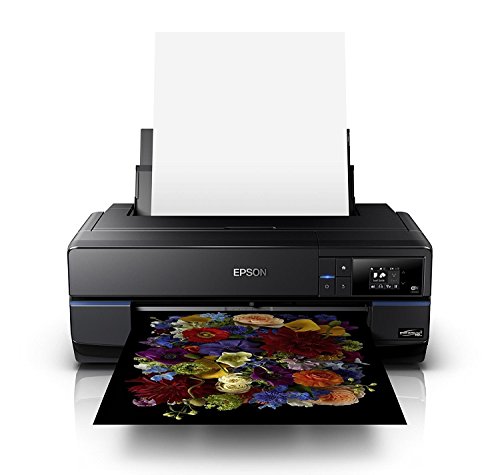
The P800’s title is the plainest here — Epson SureColor P800 17-inch inkjet colour printer — and its review must begin with the fact the guide’s key takeaways already declared: the P800 is the older generation. The P900 above is its successor in Epson’s SureColor line. That sentence is not a dismissal; it is a description, and for a certain buyer it is practically a recommendation. A previous-generation professional machine is a known quantity in a way a new model cannot be: its behaviour on fine-art media has been mapped by years of working printmakers, its quirks are documented by a community rather than discovered by pioneers, and its place in the ecosystem of papers and profiles is settled knowledge.
What the P800 offers a giclée artist is the SureColor proposition at 17 inches without the newest model’s premium of novelty: pigment-line printing at edition width, from the family that defined the desktop fine-art category. Studios running a P800 already know its value; artists buying in should weigh the generational facts soberly. Successors usually refine media handling, interfaces and ink arrangements; predecessors usually answer with availability and a community’s accumulated wisdom. Neither consideration is imaginary, and different studios will weigh them differently — a production studio standardising for a decade leans P900, an artist equipping a first 17-inch room on a careful budget leans here.
One discipline applies with special force to an older model: verify the listing’s exact contents and the machine’s supply situation — inks, maintenance parts, current support — in the full listing and documentation, because a long-lived model’s ecosystem is part of its specification. The P800 earned its reputation in working studios; the buyer who confirms its present-day support story inherits that reputation with the machine.
- Type: Inkjet colour printer, 17-inch class
- Model stated: Epson SureColor P800
- Generation note: Predecessor of the SureColor P900 in this guide
- Line stated: Epson SureColor professional photo line
- Ink configuration: Not stated in the listing title — verify with the manufacturer documentation
- Fine-art media handling: Not stated in the listing title — verify with the manufacturer documentation
Strengths
- Seventeen-inch SureColor printing from the line that defined desktop fine-art production.
- A previous-generation machine is a thoroughly mapped quantity — behaviour, media, community knowledge.
- Edition-width output without paying the newest model’s novelty premium.
Trade-offs
- It is the older generation; the P900 refines the formula and carries the line forward.
- Supply and support for an older model must be verified as part of the purchase.
- The title is bare of technical claims — documentation does all the work.
Best for: artists equipping a 17-inch giclée room who value a proven, community-mapped machine. Not suited for: studios standardising for the long term, who should buy the current generation and grow with it.
Look at the P800’s current listing on Amazon: check price on Amazon.

Canon PIXMA PRO-200S — Dye-ink colourist
Here is the guide’s honest argument with itself, in product form. The PRO-200S is a professional 13-inch wireless inkjet photo printer with an 8-colour dye ink system and a 3-inch colour LCD. Dye. In a giclée guide. The case for its inclusion is the case thousands of working artists actually live by: dye ink dissolves into the media’s coating and produces colour of a saturation and smoothness that pigment, for all its virtues, renders differently — glowing reds, seamless skies, the contemporary photographic look at its most seductive. Work that is colour first, that lives in bright rooms and current interiors, that may be reprinted as an artist’s style evolves, is dye’s legitimate territory, and a guide that pretended otherwise would be preaching rather than informing.
The case against is the definition this guide opened with. Giclée’s promise is permanence — pigment on archival media, an edition as an heirloom. Dye’s lightfastness story is weaker, and an artist selling dye prints under giclée’s banner owes buyers candour about what the word is being asked to cover. The professional resolution of the argument is not to banish dye but to label it: the PRO-200S artist describes the work accurately, prices it as the vivid contemporary object it is, and keeps the pigment machines for the editions sold on endurance. Both practices are honourable. Confusing them is not.
As a machine, the PRO-200S mirrors its pigment sibling’s virtues — professional line, 13-inch format, the photographer’s 3-inch display — which makes the pair the cleanest buying decision in this guide: identical in shape, opposite in chemistry, chosen by the work’s destiny. Artists who print both ways exist, and for them the PRO-310 and PRO-200S are not rivals but colleagues. For the artist choosing one, the question is not which is better. It is which promise their prints are making.
- Type: Professional wireless inkjet photo printer
- Format stated: 13 inches
- Ink stated: 8-colour dye ink
- Display stated: 3-inch colour LCD
- Finish stated: Black
- Fine-art media handling: Not stated in the listing title — verify with the manufacturer documentation
Strengths
- Eight dye colours deliver saturation and gradation smoothness that vivid work feeds on.
- Professional 13-inch format and a 3-inch display match its pigment sibling’s working discipline.
- Suits contemporary, colour-led editions that are reprinted as readily as they are kept.
Trade-offs
- Dye is not giclée’s permanence chemistry — editions sold on endurance belong to pigment.
- Thirteen inches is the ceiling, as with the PRO-310.
- Artists must label dye work candidly when selling; the machine cannot do that part.
Best for: colour-led artists whose prints promise brilliance now, described and sold as exactly that. Not suited for: editions marketed on archival permanence — that promise is the PRO-310’s to keep.
View the PRO-200S listing on Amazon: check price on Amazon.

Epson Expression Photo HD XP-15000 — Accessible wide-format start
The XP-15000 closes the list as the threshold machine: a wireless wide-format inkjet with six-colour photo printing up to 13 x 19 inches, up to 9.2 ppm, auto 2-sided printing, aimed at photographers and home studios. Six colours is the classic photographic ink recipe — the traditional route to smooth gradation — and 13 x 19 is the full photographic sheet, the largest paper in the 13-inch class. For the artist whose giclée ambitions are still forming, this machine offers the essential experience at the gentlest commitment: real wide-format printing, real photographic colour, real fine-art papers run through a real machine, while the artist learns whether editioning is their practice or their passing enthusiasm.
Its place in this guide is the boundary’s lower marker, and the boundary should be drawn kindly but clearly. The professional lines above — SureColor, imagePROGRAF — exist because editioning demands things a home-studio machine is not built around: pigment systems as a founding purpose, media paths engineered for heavy fine-art stock, production consistency as a design brief. The XP-15000’s title claims none of that, and this guide claims none of it for the machine. What it claims is wide-format photographic competence, and in the ecology of a developing practice that competence has a precise use: proofs, studies, portfolio pieces, the prints an artist makes while becoming the artist who will one day need a P900.
There is also a division-of-labour argument for owning it beside a professional machine later: the XP-15000’s auto 2-sided document ability and general photographic duty can absorb a studio’s everyday printing, sparing the fine-art machine for fine-art work. Many mature studios run exactly such a two-tier arrangement. Bought first and understood honestly, the XP-15000 is not the machine an artist apologises for. It is the machine in the acknowledgements.
- Ink stated: 6-colour photo ink
- Format stated: Wide-format, up to 13 x 19 inches
- Type: Wireless photo inkjet
- Duplex stated: Auto 2-sided printing
- Speed stated: Up to 9.2 ppm
- Fine-art media handling: Not stated in the listing title — verify with the manufacturer documentation
Strengths
- Genuine wide-format photographic printing at 13 x 19 inches from a home-studio machine.
- Six-colour ink is the classic recipe for smooth photographic gradation.
- An accessible threshold for artists learning whether editioning is their practice.
Trade-offs
- Not a professional-line machine: pigment editioning is the SureColor and imagePROGRAF brief, not this one’s.
- Six colours trail the eight- and nine-colour sets of the PRO machines.
- Heavy fine-art media support must be confirmed in documentation before it is assumed.
Best for: photographers and emerging printmakers who want wide-format art printing now and professional questions later. Not suited for: editioned giclée sold on permanence — that work starts at the PRO-310 and rises from there.
Check the XP-15000’s listing on Amazon: check price on Amazon.
Comparison
| Printer | Format | Ink as stated | Line | Giclée role |
|---|---|---|---|---|
| Canon imagePROGRAF PRO-1100 | 17 in | Not stated in title | imagePROGRAF | Canon flagship edition width |
| Epson SureColor P900 (bundle) | 17 in | Not stated in title | SureColor | Current Epson edition platform |
| Canon imagePROGRAF PRO-310 | 13 in | 9-colour pigment | imagePROGRAF | Stated pigment core recipe |
| Epson SureColor P800 | 17 in | Not stated in title | SureColor | Previous-generation edition width |
| Canon PIXMA PRO-200S | 13 in | 8-colour dye | PIXMA PRO | Dye colourist — labelled boundary |
| Epson XP-15000 | 13 x 19 in | 6-colour | Expression Photo | Accessible wide-format threshold |
One pattern in the table merits a second look: the two machines whose titles state their ink outright — the PRO-310’s pigment, the PRO-200S’s dye — are also the two whose giclée position can be settled from the listing page alone. The rest ask the artist to read documentation before the ink question is answered, which is normal in this class and no disqualification, but it does mean the 13-inch Canon pair offers the fastest honest decision in the guide: same shape, opposite chemistry, both declared. Artists who value that clarity know who they are.
The comparison below has a centre and an edge. The centre is pigment at professional scale: PRO-310 at 13 inches, PRO-1100 and the SureColors at 17. The edge — dye brilliance, six-colour accessibility — is mapped and labelled rather than hidden, because artists buy honestly when guides write honestly. Your position on the map is set by two facts about your work: the size your editions sell at, and the promise they make about time.
What Makes a Print Giclée Rather Than Merely a Photo Print?
Three ingredients, and the printer is only one of them. The first is the ink: pigment, whose particles and chemistry give the print its claim on decades. The second is the media: acid-free, archival fine-art paper — cotton rag is the classic — whose own ageing behaviour matches the ink’s promise; pigment on acidic paper is a chain with a paper link, and the chain metaphor is exact. The third is the process: a colour-managed workflow, proofed and consistent, in which the print that ships is the print that was approved. A giclée edition is the three together, documented. This is why the guide keeps sending readers to documentation: the media provisions and ink specifics that complete the triangle live in the manufacturers’ pages for each model, and an artist’s edition records should be built from those primary sources.
Photographers arriving from darkroom traditions sometimes ask where the craft went — the dodging, the burning, the chemistry’s slow negotiations. It went into the file and the proof. The modern printmaker’s darkroom skills are the soft-proof, the test strip rendered as a small print, the paper chosen the way a darkroom worker chose a grade, the edition logged the way a careful printer always logged exposures. The machines in this guide are the enlargers of that darkroom: some built for the master’s hand, some for the student’s, all of them honest instruments when their claims are read as carefully as this guide has tried to read them. The craft did not vanish. It changed its tools, and it kept its conscience.
The word’s looseness in the marketplace deserves one firm paragraph. Because giclée has no single certifying authority, it is used to sell everything from museum-grade editions to ordinary inkjet prints with a French accent. Artists protect themselves and their buyers the same way: by describing the actual triangle — this ink, this paper, this process — in the edition’s documentation, and letting the word follow the facts rather than precede them. A buyer who asks those three questions of any seller, including the sellers of the machines in this guide, will learn more in a minute than a season of reading badges.
How Do You Build an Editioning Workflow?
Begin with calibration of expectations, then of equipment. The workflow’s spine is consistency: the same file, the same paper, the same settings, producing the same print on Tuesday as on the previous Thursday. Everything in a serious studio serves that spine — the proofing ritual under consistent light, the log that records media batches and settings, the discipline of approving one master proof and printing the edition against it rather than against memory. The professional machines in this guide earn their positioning inside such a workflow; outside one, even the finest printer produces expensive approximations.
Proof at final size on the final paper before an edition is declared. Small proofs lie about scale — a composition’s breathing room, a shadow’s weight, a colour’s insistence all change at 17 inches — and paper proofs on cheaper stock lie about the media, whose surface is half the print’s character. The economics are stern but simple: one full-size proof on the real cotton rag costs less than an edition of regrets. Then print the edition in one session where possible, number and sign in pencil as tradition dictates, and record the session in the log while the details are still in the room.
Handle finished prints like the objects they are. Cotton-rag prints rest flat, interleaved, away from light and handling until they are matted, framed or shipped; their surfaces are tougher than a photograph’s and still not invulnerable. The studio that treats the output slot as the finish line loses prints to the last metre. The studio that treats it as the halfway point — drying, resting, inspecting, storing — ships editions that arrive as they were approved.
How Should an Artist Choose Between 13 and 17 Inches?
By the work’s market and the room’s walls, in that order. Thirteen-inch prints mat into the sizes that apartments, studies and first collections absorb easily; they are the prints that sell at fairs, hang in clusters, and travel as portfolios. Seventeen-inch prints are statements — fewer, larger, dearer, demanding the wall and the buyer’s commitment to match. An artist whose market is the first description and whose machine is the second owns a capability their buyers never exercise, at media prices that tax every proof. An artist selling statement pieces from a 13-inch machine is turning away their own market at the feed slot.
There is a craft argument beneath the commercial one. Printing large is a skill separable from printing well: composition reads differently, flaws scale, paper handling becomes physical work. Artists commonly grow into the width — the XP-15000 or PRO-310 teaching the eye at 13 inches, the PRO-1100 or P900 admitting the matured work to 17. The guide’s ordering quietly endorses that growth path, while noting the exception that proves it: the artist who already sells large, whose constraint is the machine and not the eye, should buy the width today and skip the apprenticeship their portfolio has already served.
Why Does the Paper Matter as Much as the Printer?
Because the print is a marriage, and marriages fail from either side. Cotton-rag paper is made from cotton fibres rather than wood pulp, which gives it its archival character: no lignin to yellow, no acidity to embrittle, a surface with a soft tooth that receives pigment the way a wall receives fresco. When an artist says a print will last a century, the claim is mostly about this — the ink’s stability riding on a substrate that does not undermine it. Print pigment onto cheap acidic stock and the century becomes a decade; the paper was the promise, and it broke.
The paper also writes half the image’s character. A smooth rag renders detail with a quiet precision; a textured rag turns the same file painterly, breaking fine detail into the paper’s own grain. Weight changes the object’s physical rhetoric — a heavy sheet feels like an artefact in the hand, a light one like a page — and buyers read that rhetoric before they read the image. Artists standardise on one or two papers not from poverty of imagination but because each paper is an instrument that must be learned: its thirst, its colour cast, its behaviour in the shadows. The printer’s documentation, which this guide keeps citing, is where the marriage is licensed — the manufacturer states which media weights and types the paper path handles, and heavy rag through a path that resents it is how feed mechanisms and prints are ruined together.
Handling completes the paper story. Fine-art sheets are touched by their edges, stored flat and interleaved, kept from the studio’s coffee and the framer’s haste alike. A cotton-rag print’s surface, for all its archival chemistry, marks under a careless thumbprint in its first hours. The artists whose editions arrive immaculate are not luckier than the rest; they have simply extended the workflow’s discipline past the output slot to the shelf, the portfolio and the tube — the same discipline, in the end, that separates an edition from a stack of prints.
How Should an Artist Think About Colour Management Without Losing the Will to Live?
As a translation problem with a practical solution. The file speaks one colour language, the screen another dialect, the printer and paper a third — and colour management is the set of interpreters, called profiles, that keep the conversation honest. The artist does not need to love the theory. The artist needs three habits. First, edit on a screen whose brightness is set for print rather than for cinema, because a glowing monitor makes every print look like a disappointment. Second, use the paper’s profile — the interpreter specific to that paper on that class of machine — rather than a generic one, because paper is half the colour. Third, soft-proof: let the editing software simulate the print’s narrower world on screen, and adjust the file for the print’s reality instead of discovering it on a finished sheet.
The professional machines in this guide exist inside that discipline. Their lines — imagePROGRAF, SureColor — are built for profiled, repeatable output, and their communities have mapped the common papers thoroughly, which is one of the unglamorous reasons to buy into a professional line: the interpreters already exist, tested by thousands of studios. The artist on a threshold machine can still work colour-managed, but will lean harder on test prints, because fewer of the path’s stones have been turned by others.
And keep the master proof. When an edition is approved, one physical print becomes the reference object — stored flat, in the dark, brought out to judge reprints and later sessions. Screens drift, memories drift faster, profiles update; the master proof is the edition’s constitution, the fixed point against which consistency is measured. It costs one sheet. It settles every argument. Print it, sign it as the proof, and keep it like the legal document it functionally is.
Common Mistakes
Calling any inkjet print giclée. The word promises pigment, archival media and process. An artist who applies it to dye prints on ordinary paper — however beautiful — is spending credibility the work may need later. The PRO-200S review above models the honest alternative: print dye proudly, label it accurately, and let pigment carry the permanence editions.
Buying the printer and improvising the paper. Media is half the triangle; an edition planned around a fine-art paper the chosen machine handles reluctantly will fight its maker at every sheet. Confirm the exact papers in the model’s documentation, proof on them, and standardise. Paper-hopping mid-edition is how print three comes to differ from print one.
Proofing small and cheap, then editioning large and dear. Every variable that matters — scale, surface, shadow weight — changes between the proof and the edition when the proof is not the real thing. The full-size, real-paper proof is not an extravagance. It is the edition’s insurance, priced at one sheet.
Ignoring the previous generation’s ecosystem, or romanticising it. The P800 is a serious machine with a mapped community; it is also an older model whose supplies and support must be verified in the present tense. Both errors — dismissing it as obsolete, buying it as if time had stopped — are failures of the same verification habit this guide keeps prescribing.
Treating the bundle as the product. Cables and a cloth are pleasant; the P900 is the purchase. Artists comparing listings should strip every bundle to the machine, compare machines, and let accessories break only genuine ties. Editioning is a discipline of seeing the object clearly; it starts at the purchase.
What Does the Studio Around the Printer Need?
A giclée printer is the centre of a small physical system, and the system fails at its edges more often than at its centre. Light comes first: prints are judged under the light they will live in, ideally a consistent, neutral viewing arrangement — the same corner, the same lamp, every time — because an artist chasing colour under changing daylight is chasing weather. The master proof judged at noon and the reprint judged at dusk are being judged by two different studios, and only one of them is lying deliberately.
Flat space comes second, and it is the requirement studios chronically underbuild. A 17-inch print needs somewhere to land, rest, dry, be inspected and be stored — at each stage, flat, clean and undisturbed — and the square footage of those somewheres exceeds the printer’s own footprint several times over. The artist equipping a room should plan the landing before the machine arrives: a clean table that is never used for anything else during a session, a flat file or portfolio large enough for the format, interleaving tissue in stock. None of it is glamorous. All of it is the difference between editions that ship immaculate and editions that carry the studio’s fingerprints, literally, forever.
Air and patience complete the system. Inkjet prints continue to settle after they feel dry, and the studio habit of resting finished sheets before handling, stacking or shipping them is cheap insurance bought with nothing but time. Dust is the other quiet enemy; a machine kept covered, a room kept reasonably clean, and media stored in its packaging until the moment of printing will together prevent most of the specks and fibres that otherwise appear, magnified by the print’s own stillness, in the middle of a sky. The printer is the expensive part of giclée. The studio around it is the part that decides whether the expense shows.
How Do Editions, Signing and Records Work in Practice?
An edition is a contract the artist makes with strangers: this image, in this size, on this paper, will exist this many times, and no more. The conventions are old and worth keeping because they are the trust the price rests on. Prints are numbered in pencil — pencil, because it does not fade or bleed and because tradition is itself a signal — as a fraction, 3/25, beside the artist’s signature, usually in the lower margin where matting will honour rather than hide it. Artist’s proofs exist outside the numbered run, marked as such, few in number, and documented with the same rigour, because an edition whose proofs multiply quietly is an edition whose fraction lies.
Records are the contract’s paperwork. For each edition: the file and its version, the printer, the paper and its batch, the date of printing, the destination of each numbered print. The log sounds bureaucratic until the day a collector asks whether print 14 can be replaced after a flood, or a gallery asks what remains of an edition, or the artist, three years on, must match a reprint to a master proof made on a paper whose name they have forgotten. Then the log is the practice’s memory, and its absence is amnesia at the exact moment memory has a price.
The machines in this guide support the contract at different levels of comfort, which is the final lens for choosing among them. Consistency across a session — print twelve matching print one — is the professional lines’ home ground. Economy across a long edition favours no one machine universally; it depends on size, paper and pace. What no machine supplies is the discipline, and what every artist learns is that the discipline is the actual product: the printer makes prints, but the edition — numbered, logged, promised — is made by the artist’s habits around it.
Final Recommendation
For the artist equipping a giclée practice from this list, the decision resolves into width and allegiance. At 13 inches, the Canon imagePROGRAF PRO-310 is the guide’s clearest answer — pigment stated, nine colours, professional discipline — and it will carry most artists’ editions entire. At 17 inches, choose your house: the Canon imagePROGRAF PRO-1100 for Canon’s professional world, the Epson SureColor P900 for Epson’s current platform, the P800 if a proven previous generation suits your budget and your temperament, after verifying its support story. Take the PRO-200S for dye’s brilliance with your labelling honest, and the XP-15000 as the threshold machine while the practice finds its feet. Whichever name you sign your editions beside, build the triangle — pigment, archival paper, documented process — and the prints will keep the promise the word makes.
Frequently Asked Questions
Can I print other artists’ work, or only my own?
Both practices exist, and the second is a profession of its own: the master printer who produces editions for other artists, whose value is precisely the workflow discipline this guide describes — profiling, proofing with the artist, logging, consistency across years. The machines here serve either practice. What changes is the paperwork: printing for others adds agreements about files, proofs, edition records and who holds the master proof. The printer is the same; the trust is the product.
Is a dye print ever acceptable as giclée?
That is the field’s longest-running argument, and this guide’s position is labelling over law: giclée’s market meaning is pigment permanence, so dye work sold under the word owes buyers an explicit description of what they are getting. Many artists print dye for colour-led work and describe it accurately as such. The dishonesty to avoid is not dye — it is silence about dye.
What paper should a giclée artist start with?
A matte cotton-rag fine-art paper from a reputable maker is the classic starting point: it flatters pigment, handles like the tradition expects, and its behaviour is documented by a generation of printmakers. Confirm that your chosen machine’s documentation supports the paper’s weight and type, proof on it, and standardise on one or two papers rather than sampling forever — consistency is an edition’s first virtue.
P900 or P800 — how should I decide?
By generation and by support. The P900 is the current 17-inch SureColor, the platform that will be supported longest and refined furthest. The P800 is its predecessor: proven, community-mapped, and dependent on a present-day check of supplies and support. A studio standardising for years leans P900; an artist equipping carefully today, having verified the P800’s ecosystem, buys a known quantity with confidence.
How should I price a giclée edition?
From the whole object outward: paper, ink, proofing waste, the printer’s share of its own cost across its working life, the artist’s time at a rate they would accept from an employer, and the scarcity the edition size creates. Artists chronically omit the second and fifth items and then wonder why a sold-out edition left them poorer. The machines here span a range of running economies precisely so a practice can align its costs with its prices — but no machine sets the price. The edition’s documentation, its consistency and its honesty do.
Do I need a 17-inch printer to sell fine-art prints?
No. Thirteen-inch editions are a complete fine-art practice — the PRO-310 exists precisely for them — and many artists’ markets live entirely at that scale. Seventeen inches becomes necessary when the work and its buyers demand statement size. Buy the width your market has demonstrated, not the width your ambition imagines, and let sales argue for the upgrade.
How many prints should an edition be?
Small enough to be honest, large enough to be worth the proofing. Tiny editions manufacture scarcity an artist’s market has not yet earned; enormous ones dilute the promise that makes editioning meaningful. Many working printmakers settle in the range of a few dozen for a strong image, print them in sessions against a master proof, and close the edition when the run is done — the file retired, the records kept. The right number is the one the artist can produce consistently and sell through in a reasonable season, and it is a business judgement wearing an aesthetic hat.
What does the P900 bundle actually add?
An Ethernet cable, a USB cable and a fibre cloth, per the listing title. Useful, and sensibly chosen for a studio machine — wired networking is this class’s preferred arrangement — but they are accessories around the printer, not part of its printing specification. Compare the P900 as a printer against its rivals, and count the bundle as a small, genuine convenience.
Related Guides
Artists whose printing extends to canvas will find the companion discussion in our guide to printers for Mac, iPhone and iPad useful for the everyday machines that share a studio network. The wider-format world continues in our roundup of ultrawide monitors for content creators, where the editing screens for large work are compared. And for the displays that complete a colour-managed studio, our selection of daisy chain monitors covers multi-screen setups built for serious image work.
Related guides
- Best 3D Mechanical Engineering Laptops: Certified Workstations for CAD and Simulation
- Best Tattoo Printers: Thermal Stencil Machines for Clean, Lasting Transfers
- Best 14-Inch High-End Laptops: Flagships From Apple, Lenovo, ASUS and LG
- Best 15 Laptops Under $1000: Six 15-Inch Machines That Spend the Budget Honestly


