What's inside
- Key Takeaways
- Quick Picks
- How We Chose These Picks
- Where True Monochrome Photo Printing Actually Lives: The Converted Inkjet
- Comparison
- How to Choose a Monochrome Laser for a Photographic Household
- What Can a Laser Proof Actually Tell a Photographer?
- Why Do Photographers Still Print Black and White at All?
- The Contact Sheet: Photography’s Oldest Proof, Still Doing Its Job
- Toner, Drums and the Quiet Economics of the Pages Pile
- Setting Up the Studio’s Two-Machine Truce
- Paperwork as a Photographic Practice: Labels, Releases and the Archive’s Spine
- Reading a Monochrome Photograph on Paper: A Short Course for the Proof Table
- Common Mistakes
- Final Recommendation
- Frequently Asked Questions
- Related Guides
As an Amazon Associate I earn from qualifying purchases. This post may contain affiliate links at no extra cost to you.
widgetverdict.com is reader-supported. When you buy through links on our site, we may earn an affiliate commission.
This guide begins with a correction, because the search for the best b and w photo printers rests on a premise the current catalogue does not support: there is no dedicated black-and-white photo printer in the present-day listings. No manufacturer in the results below — and none in the wider current catalogue this search draws on — sells a machine built solely to print monochrome photographs. What the search actually returns, and what the six picks in this guide therefore are, is a shelf of monochrome laser printers: Brother, Canon and HP machines whose titles promise black-and-white output, wireless convenience and speeds between 19 and 35 pages per minute. They print documents superbly. They print contact sheets, proof pages, text-and-image drafts and the paperwork of a photographic life. What they do not do — and what no honest guide should let a buyer believe they do — is produce a fine monochrome photograph, with the tonal depth that phrase implies.
So this page does two jobs, and keeps them visibly separate. Its ranked job is to guide the buyer who genuinely needs black-and-white printing — including photographers printing proofs, worksheets, invoices, exhibition paperwork and readable drafts of images — to the right monochrome laser among six honest candidates. Its educational job is to explain where true monochrome photographic printing actually lives: in inkjet systems converted to dedicated black-and-white ink sets, a specialist practice described in prose further down, deliberately without product picks, because no such machine appears in the current listings this guide is built from.
Read the laser reviews for what they are — a comparison of compactness, duplexing, speed and wireless manners among monochrome document machines, several of which will serve a photographer’s studio admirably in every role except the final print. Read the prose sections for the photograph itself. A buyer who finishes this page knowing which of those two needs is theirs has been served better than any ranking of imaginary B&W photo printers could serve them.
Key Takeaways
- Correction first: no dedicated B&W photo printer exists in the current catalogue; all six picks are monochrome laser printers.
- The six serve black-and-white documents, proofs, contact sheets and photographic paperwork — not fine monochrome photographic prints.
- Stated speeds run from 19 ppm (Canon LBP6030w) to 35 ppm (Canon LBP172dw); duplexing is stated on three of the six titles.
- True monochrome photo printing lives in converted inkjet systems with dedicated grey ink sets — explained in prose, with no picks, because no such machine is in the current listings.
- Every pick is wireless with mobile printing in its title; the differences are speed, duplex and intended room.
- A photographer’s correct purchase may be one of these lasers for the studio’s paperwork plus an inkjet route for the prints themselves.
Quick Picks
| Pick | Badge | Why it earns its place |
|---|---|---|
| Brother HL-L2405W | Compact home mono laser | Wireless monochrome printing with mobile support and a Refresh trial, in a compact body. |
| Canon imageCLASS LBP6030w | The small white Canon | Single-function wireless mono laser at a stated 19 ppm, with a one-year limited warranty. |
| Canon imageCLASS LBP122dw | Duplex for the home | Wireless monochrome duplex printing at a stated 30 ppm, mobile ready. |
| HP LaserJet M110w | Minimalist mono | Fast black-and-white laser printing with mobile and wireless, in HP’s smallest-footprint style. |
| Canon imageCLASS LBP172dw | Fastest here | Monochrome duplex wireless printing at a stated 35 ppm for the home office. |
| HP LaserJet Pro 3001dw | Office-grade mono | A wireless black-and-white LaserJet Pro positioned, in its title’s words, as best for office. |
How We Chose These Picks
Selection began with a refusal: the search term’s flattery. Candidates were drawn from what the current catalogue actually offers under this query — monochrome laser printers — and the guide states that substitution on its first page rather than burying it. Within the laser shelf, the six places were spread across the real axes of difference: three Canons spanning the compact, duplex and fastest positions; a Brother representing the home mono mainstream; two HPs dividing the minimalist and office-grade poles. Speeds, duplexing and warranties enter the spec boxes only where titles state them.
Photographic relevance was assessed honestly rather than hopefully. A monochrome laser earns its place in a photographer’s life through proofs, contact sheets, documents and draft prints — roles the reviews argue concretely — and loses no marks for failing at the fine print it never claimed to make. The guide’s prose sections carry the photographic thread: what a laser proof can and cannot tell a photographer, and where the real monochrome print is made.
As throughout this cluster, no specification has been imported from reputation. Where a title omits a detail — monthly volume, paper handling beyond the basics — the spec box records the omission in fixed wording, and the buyer is sent to documentation for the office-grade particulars.

Brother HL-L2405W — Compact home mono laser
Brother’s compact monochrome laser is the mainstream answer to home black-and-white: wireless, mobile-printing ready, Alexa-compatible, with a Refresh subscription trial included in its title’s terms. In a photographer’s house its job description writes itself — the studio’s paper engine. Contracts, invoices, model releases, exhibition labels, shipping documents, and the printed worksheets of a photographic practice all flow through a machine like this, at laser pace and laser indifference to volume, while the inkjet across the room is reserved for images.
Compactness is its stated character, and in a home studio that matters disproportionately: the paper engine must fit the shelf the studio can spare, which is rarely the shelf the studio would choose. Wireless and mobile printing complete the domestic brief — the release form printed from a phone in the doorway, the label run off from the laptop in the darkroom corner — without a cable deciding where the machine lives.
The Refresh trial introduces Brother’s subscription answer to toner: a household can test whether toner arriving on a plan suits its rhythm before committing. Studios with spiky volume — silent months, then a paperwork blizzard before a show — should do that arithmetic honestly at the trial’s end; steady printers usually find the plan calming. Either way, the trial converts an abstract decision into an experienced one, which is the best kind.
Printing your monochrome photograph as a photograph is the one thing it will not do, and this guide’s introduction has already served that notice for the whole shelf. What it will do, tirelessly and cheaply in spirit, is everything else a photographic household prints in black and white — which, counted honestly, is most of the pages. Buy it as the paper engine and it will never disappoint; that is the highest praise a laser in this guide can earn.
- Type: Wireless compact monochrome laser printer
- Output stated: Black and white
- Mobile stated: Mobile printing; works with Alexa
- Offer stated: Includes Refresh subscription trial
- Further specifications: Not stated in the listing title — verify with the manufacturer documentation
Strengths
- Compact wireless design fits the shelf a home studio can actually spare.
- Mobile printing and Alexa compatibility suit doorway-and-phone workflows.
- A subscription trial lets the household test planned toner before committing.
Trade-offs
- It is a document laser; fine monochrome photographic prints are not its trade.
- No duplex claim appears in its title, unlike three rivals here.
- Subscription toner suits steady rhythms better than spiky studio volume.
Best for: home studios needing a compact paper engine for documents and proofs. Not suited for: printing the final monochrome photograph itself — no laser in this guide is.
The paper-engine role is an honourable one; check the Brother’s current listing for its terms: check price on Amazon.

Canon imageCLASS LBP6030w — The small white Canon
The LBP6030w is the shelf’s elder simplicity: a monochrome, single-function, wireless compact laser printer, stated at 19 pages per minute, finished in white, carrying a one-year limited warranty. Single-function deserves rehabilitation as a virtue. This machine does one thing — print, in black and white — and its design, its price class and its desk footprint all reflect that monastic focus. In a studio where scanning and copying already live elsewhere, a printer that only prints is not a compromise; it is the correct tool refusing to be three mediocre ones.
Nineteen pages per minute is the slowest stated speed in this guide, and the review should be precise about what that means: for documents, proofs and contact sheets, the difference between 19 and 35 pages per minute is the difference between a short wait and a shorter one, across jobs that rarely exceed twenty pages. Speed crowns are won in offices printing hundreds of pages a day. A home studio printing a photographer’s paperwork will never feel this machine’s pace as a ceiling, and may feel its compactness and simplicity as a daily kindness instead.
The white finish, stated in the title, is a habitat decision: this is a laser meant to be seen in a home rather than hidden in an office, sitting on a light desk in a bright room without visual complaint. Combined with wireless connection, the machine can live where the room wants it rather than where a cable dictates — the spare room, the studio’s bright corner, the household office that doubles as a guest room.
Its warranty, stated outright where rivals’ titles stay silent, is a small lesson in reading listings: a one-year limited warranty is not a differentiator until the day it is the only thing that matters. Buyers choosing between near-identical compact lasers should let such stated certainties weigh more than unstated assumptions — a principle this whole cluster is built on, visible here in miniature.
- Type: Monochrome single-function wireless compact laser printer
- Speed stated: 19 ppm
- Function stated: Print only
- Warranty stated: 1 year limited warranty
- Colour stated: White
- Further specifications: Not stated in the listing title — verify with the manufacturer documentation
Strengths
- Single-function focus keeps the machine compact, simple and honestly priced in spirit.
- A stated one-year limited warranty gives the buyer a certainty rivals leave unstated.
- White, wireless design lives gracefully in bright home rooms.
Trade-offs
- At a stated 19 ppm it is the slowest here, though home volumes rarely notice.
- Print only: scanning and copying must live elsewhere in the house.
- No duplex is stated, so two-sided documents are a manual affair.
Best for: studios and homes wanting the simplest possible wireless mono printing. Not suited for: buyers needing duplexing, scanning or office-day speeds.
Simplicity, stated plainly, is this Canon’s whole case; view it at the LBP6030w listing: check price on Amazon.

Canon imageCLASS LBP122dw — Duplex for the home
The LBP122dw adds the feature home document printing feels most: duplex. Its title states a wireless monochrome duplex laser printer, print only, mobile ready, at 30 pages per minute, positioned for home. Automatic two-sided printing changes a household’s paper life out of proportion to its modest description — contracts that collate themselves, worksheets and proof booklets that come out as documents rather than as stacks, paper consumption halved on the jobs that dominate a studio’s paperwork.
For the photographer specifically, duplex is the contact-sheet and proof-book feature. A shoot’s proofs printed two-sided become a booklet that can be carried, marked up, filed and handed to a client; the same pages single-sided become a drift of paper that migrates across the studio and dies in piles. Thirty pages per minute keeps those booklets brisk. Mobile readiness means the booklet can be summoned from the phone where the shoot’s notes live.
Print only, again, is a focus rather than a lack: no scanner pretending, no copier lid adding height. The machine’s whole body serves the paper path, and in the home Canon positions it for, that leanness is the appeal. Studios with an all-in-one elsewhere — or with a phone that scans adequately for their purposes — lose nothing and gain a duplexing specialist.
Against its faster sibling, the LBP172dw, the 122dw trades five pages per minute for its home positioning; against the 6030w it adds duplex and pace at the cost of the elder’s simplicity and stated warranty. These are the real decisions inside the Canon mono shelf — not which is best, but which mixture of pace, duplex and simplicity matches a household’s paper weather. This one is the balanced mixture, and balance is a defensible crown.
- Type: Wireless monochrome duplex laser printer
- Function stated: Print only
- Speed stated: 30 ppm
- Mobile stated: Mobile ready
- Positioning stated: For home
- Further specifications: Not stated in the listing title — verify with the manufacturer documentation
Strengths
- Automatic duplex turns proofs and paperwork into finished, book-like documents.
- A stated 30 ppm keeps studio paperwork brisk.
- Print-only leanness keeps the body compact and the purpose clear.
Trade-offs
- No warranty period is stated in its title, unlike the LBP6030w.
- Scanning and copying live elsewhere by design.
- Its sibling offers more speed for home-office buyers who want it.
Best for: home studios printing two-sided proof books, worksheets and documents weekly. Not suited for: buyers needing an all-in-one, or the shelf’s maximum stated speed.
Duplex is the feature a household feels daily; the LBP122dw’s listing states its full case: check price on Amazon.
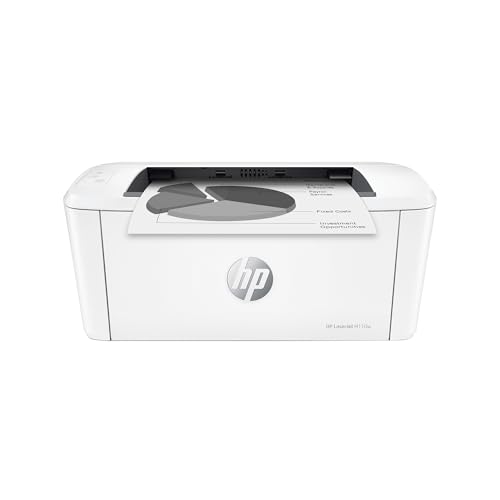
HP LaserJet M110w — Minimalist mono
HP’s M110w states its case in a string of monochrome certainties: monochrome, laser, fast black-and-white printing, mobile printing, wireless printing, fast printing — the title repeats speed twice, as if to make sure the minimalist machine is not mistaken for a slow one. The proposition is small-footprint efficiency: a LaserJet for the desk corner, the studio shelf, the small room, where black-and-white pages are needed without ceremony or square footage.
In the photographer’s household, this is the utility player: the release form before the shoot, the call sheet, the price list, the exhibition’s wall-text drafts, the contact sheet printed to be written on. Laser output’s virtues are exactly utility’s virtues — crisp text, indifference to damp fingers, pages that emerge dry and stay legible in a folder for a decade. Nobody frames a LaserJet page, and the M110w’s title never suggests they should; within this guide’s corrected premise, that honesty is the baseline of respectability.
Mobile and wireless printing, both stated, are the features that decide whether a utility printer gets used. The form printed from the phone in the car, the document sent from a laptop in another room — utility printing lives on such moments, and each cable or driver hurdle converts them into postponements. HP builds this class of machine around removing those hurdles, and the title’s emphasis suggests it knows where its machine will be judged.
Its trade-offs are the minimalist’s usual: no duplex is stated, no warranty is stated, and the spec box is a study in how much a buyer must take to documentation. Buyers who need those certainties in writing before purchase should extract them from HP’s documents or choose a rival whose title volunteers them. Buyers who need a small, fast, wireless mono laser and are content to verify the rest will find the M110w’s proposition the most distilled on the page.
- Type: Monochrome laser printer
- Output stated: Fast black-and-white printing
- Mobile stated: Mobile printing
- Connectivity stated: Wireless printing
- Further specifications: Not stated in the listing title — verify with the manufacturer documentation
Strengths
- A distilled proposition: small, wireless, mobile-ready mono printing.
- Speed is emphasised twice in its own title — utility pace is the point.
- Laser crispness serves the forms, lists and drafts of a photographic practice.
Trade-offs
- Its title states neither duplex nor warranty; both need documentation.
- Utility is the ceiling — no photographic-print pretensions, honestly.
- Feature-minimal design gives the buyer fewer stated certainties to compare.
Best for: small rooms and studios needing frictionless black-and-white utility printing. Not suited for: buyers who want duplexing or warranty terms stated before shortlisting.
Minimalism is a feature when the room is small; the M110w’s listing completes its brief case: check price on Amazon.

Canon imageCLASS LBP172dw — Fastest here
The LBP172dw takes the Canon mono formula and turns the pace up: monochrome duplex, wireless, single function, home office positioning, mobile ready, a stated one-year limited warranty, a stated 35 pages per minute — the fastest title in this guide — in white. Assemble those stated facts and a clear machine emerges: the home office’s serious paper engine, duplexing as standard, warranted in writing, quick enough that paperwork stops being an event.
Thirty-five pages per minute matters at a specific threshold: the multi-copy job. The studio printing twenty sets of exhibition paperwork, the teacher-photographer printing a class’s worth of worksheets, the small business whose invoices travel with every order — these jobs are where five or fifteen pages per minute compound into minutes saved daily. Below that threshold the pace is a comfort; above it, a tool. Buyers should locate their own paperwork honestly on that scale before paying the pace much reverence.
The warranty’s return is worth noting: Canon states it on this title as on the little 6030w, and its presence converts the 172dw into the shelf’s most completely stated proposition — speed, duplex, warranty, positioning, all on the door. In a guide built on reading titles literally, completeness of statement is itself a recommendation: the manufacturer has told you what it is selling, and a buyer can decide without a documentation expedition for the headline facts.
White, again, signals the home office rather than the server room; single function keeps the body honest. The machine it does not suit is the one-machine household needing scans and copies, and the photographer — all photographers — must remember the guide’s premise: this engine’s excellence is paperwork excellence. As the studio’s document heart, though, the 172dw is the strongest stated case Canon makes on this page.
- Type: Monochrome duplex wireless laser printer, single function
- Speed stated: 35 ppm
- Warranty stated: 1 year limited warranty
- Mobile stated: Mobile ready
- Positioning stated: Home office
- Colour stated: White
- Further specifications: Not stated in the listing title — verify with the manufacturer documentation
Strengths
- The fastest stated speed here, with duplex included.
- Speed, duplex and warranty are all stated — the shelf’s most complete title.
- Home-office positioning matches the serious paperwork household.
Trade-offs
- Single function: no scanning or copying aboard.
- Its pace is wasted on households whose jobs never exceed a few pages.
- White finish and office build claim a permanent desk position.
Best for: home offices and studios with multi-copy paperwork as a weekly rhythm. Not suited for: light users, whose volumes make its pace and duplexing idle virtues.
The complete title deserves a complete look; the LBP172dw’s listing is here: check price on Amazon.

HP LaserJet Pro 3001dw — Office-grade mono
The Pro badge closes the shelf: a wireless black-and-white LaserJet Pro, positioned in its title’s own words as best for office. Where the M110w distils, the 3001dw institutionalises — this is the machine for the small office’s shared paperwork, the studio that has become a business, the desk where black-and-white printing is infrastructure rather than convenience. The dw suffix, in HP’s naming habits, travels with duplex-and-wireless machines; this guide notes the title states wireless outright and lets documentation confirm the rest, as its method requires.
Office-grade, as a claim, is really about indifference: indifference to volume spikes at month-end, to multiple users sending jobs in the same hour, to being the machine nobody thinks about because it never gives them a reason to. A photographer’s growing practice reaches this machine at the moment printing stops being personal — assistants printing, clients’ paperwork flowing, a second desk appearing. The Pro is bought for that moment, or slightly before it, by buyers who have learned that outgrowing a printer mid-season is more expensive than arriving early.
Its title is the tersest of the six — a name, a technology, a positioning — and the office buyer is the buyer best equipped for terseness, since offices buy through specifications, quotes and documentation as a matter of routine. This guide’s spec box accordingly records the essentials and the silence in equal measure; the Pro’s real dossier lives in HP’s documents, where office buyers will read it with professional pleasure.
For the home studio still printing its own paperwork at a domestic rhythm, the Pro is headroom without a present job — respectable, but the Brother and the Canons above will feel better matched. For the practice that has become a workplace, it is the only pick here whose title speaks the workplace’s language, and matching language, in this guide’s experience, usually means matching engineering.
- Type: Wireless black and white laser printer
- Line stated: HP LaserJet Pro
- Positioning stated: Best-for-office
- Model stated: 3001dw (3G65OF)
- Further specifications: Not stated in the listing title — verify with the manufacturer documentation
Strengths
- Pro positioning suits shared, growing, business-scale paperwork.
- Wireless design serves a multi-desk office’s sending habits.
- Headroom now prevents an outgrown printer mid-season later.
Trade-offs
- Its title is terse; speed and duplex particulars require HP’s documentation.
- Domestic rhythms will underuse office-grade capacity.
- No photographic-print role is stated — the guide’s premise applies in full.
Best for: studios-become-businesses and small offices standardising on one mono engine. Not suited for: purely domestic buyers, for whom the home-positioned picks fit better.
Office buyers buy on documents; start the dossier at the 3001dw’s listing: check price on Amazon.
Where True Monochrome Photo Printing Actually Lives: The Converted Inkjet
Since the catalogue offers no dedicated monochrome photo printer to rank, this section describes — in prose, without picks or links — where the practice actually resides. Serious black-and-white photographic printing today is done on inkjet printers whose colour ink sets have been replaced, by conversion, with dedicated monochrome ink sets: multiple dilutions of black and grey pigment, loaded across the machine’s channels, so that a photograph’s tones are built from several true greys rather than simulated by dithering colour inks into neutrality. The difference is visible to any eye that has seen both: converted monochrome prints hold shadow detail and highlight delicacy simultaneously, with a smoothness in the long greyscales — fog, skin, weathered wood — that colour-ink black-and-white modes approximate and converted sets simply inhabit.
The conversion world is a specialist ecosystem: ink sets formulated for the purpose, profiles built per paper, practitioners who treat a printer as a darkroom instrument to be calibrated rather than an appliance to be unboxed. It is reached through specialist suppliers and communities, not through the mainstream catalogue, which is precisely why this guide describes it without naming products — the listings this page is built from contain no such machine, and inventing recommendations beyond them would break the rule every other page in this cluster keeps.
Two neighbouring routes deserve honest mention in the same prose spirit. First, a good colour inkjet’s own black-and-white mode — particularly on pigment machines of the kind reviewed in this cluster’s Canon guide — produces monochrome prints that satisfy many photographers entirely; the converted set is the summit, not the entry fee. Second, the traditional darkroom remains alive in its niche, for photographers whose monochrome practice is inseparable from film. The laser shelf ranked above belongs to neither route, and its honest work — proofs and paperwork — supports both: the converted-inkjet studio still needs its contracts printed, and the darkroom still needs its contact sheets.
Comparison
| Printer | Stated speed | Duplex stated | Warranty stated | Positioning stated |
|---|---|---|---|---|
| Brother HL-L2405W | Not stated in title | Not stated in title | Not stated in title | Compact; Refresh trial |
| Canon LBP6030w | 19 ppm | Not stated in title | 1 year limited | Compact, single-function |
| Canon LBP122dw | 30 ppm | Yes | Not stated in title | For home |
| HP LaserJet M110w | Not stated in title | Not stated in title | Not stated in title | Fast black-and-white |
| Canon LBP172dw | 35 ppm | Yes | 1 year limited | Home office |
| HP LaserJet Pro 3001dw | Not stated in title | Not stated in title | Not stated in title | Best-for-office |
The table’s gaps are information. Canon states speeds and warranties where Brother and HP, in these titles, prefer positioning words — which tells a literal reader less about the machines than about the listings, and sends the careful buyer to documentation for the missing columns on four of six rows. What the stated columns do settle: the duplex shortlist is two Canons deep, the speed crown is stated at 35 ppm, and the office pole is HP’s Pro by its own declaration.
How to Choose a Monochrome Laser for a Photographic Household
Begin by separating your black-and-white printing into its two true piles: pages and photographs. The pages pile — documents, proofs, worksheets, labels, drafts — is the laser’s kingdom, and its size decides the machine. A few pages a week crown the compact minimalists; daily paperwork with two-sided jobs crowns the duplex Canons; multi-copy, office-shaped volume crowns the Pro. The photographs pile is not the laser’s at all, and no feature on this page changes that — budget for it separately, through the inkjet routes the prose section describes.
Duplex is the second decision, and it is closer than it looks. Households underestimate how much of their printing is naturally two-sided until a duplex machine arrives and their paper shelf begins lasting twice as long. If the pages pile includes anything booklet-shaped — proof books, worksheets, contracts, scripts — treat duplex as required rather than nice, and let the shortlist narrow itself.
Speed comes third and matters least at home. The stated range here, 19 to 35 pages per minute, spans waits that differ by seconds on domestic jobs. Buy speed for the multi-copy threshold described in the 172dw review, or do not buy it at all. Warranty, conversely, is worth buying whenever it is stated: a written year is a certainty in a category where much is left unsaid.
Finally, place the machine where the pages are born. Paperwork is generated at desks and in doorways, not in studios’ photographic corners; a laser exiled to the far room will be bypassed by the phone’s share sheet and a colleague’s printer. Wireless freedom exists in all six titles precisely so the machine can live at the paperwork’s address.
What Can a Laser Proof Actually Tell a Photographer?
More than sceptics admit, and less than sellers imply — in specific, learnable proportions. A laser proof tells the truth about composition: the balance of masses, the crop’s wisdom, the distracting bright corner, the horizon’s honesty. It tells the truth about sequence: spread a shoot’s proofs on a table and the edit assembles itself in a way screens, with their one-image-at-a-time tyranny, resist. It tells an approximate truth about tonal placement — where the deep shadows and bright highlights sit in the frame’s geography — sufficient for deciding which files deserve the inkjet’s expensive attention.
What it cannot tell is the photograph’s tonal quality: the smoothness of a gradient, the separation inside a shadow, the delicacy of a highlight rolling off. Laser rendering builds tones by pattern, and its proofs flatten exactly the subtleties a monochrome photographer prints for. The disciplined workflow therefore reads proofs for structure and reserves judgement of tone for the real print — a division of labour as old as the contact sheet, which never pretended to be the exhibition print either, and was indispensable anyway.
Practically: print proofs at the size you will edit at, mark them with a pencil without mercy, and file the marked set with the shoot. Months later, when a file is revisited, the marked proof reconstructs the photographer’s thinking faster than any software history. The laser’s gift to photography is not the print; it is the thinking the proof makes physical.
Why Do Photographers Still Print Black and White at All?
Because monochrome is not colour with something removed; it is a different seeing. Stripped of colour’s information, a photograph must survive on structure — light, form, texture, gesture — and the images that survive that stripping often outlive their colour siblings, which date by their palettes as surely as by their fashions. The photographer printing black and white is choosing the longer conversation: with the subject, whose character must carry the frame, and with time, whose effects on a monochrome print are gentler and more forgiving.
Then there is attention itself. A room hung with monochrome prints rests the eye differently; a portfolio sequenced in black and white asks to be read as an argument rather than admired as a spectrum. None of this requires romanticising the medium — plenty of weak photographs hide in monochrome’s dignity, and the proof table exposes them as ruthlessly as it exposes weak colour work. It requires only recognising that the demand behind this guide’s search term is real and honourable, even though the catalogue’s answer to it is a shelf of office lasers and a prose description of a specialist conversion world.
That mismatch, finally, is worth a buyer’s gratitude rather than resentment. A market that will not sell you a dedicated monochrome photo printer is a market telling you, accurately, that the practice has become artisanal — and artisanal practices reward the practitioners who enter them knowingly, through the specialist door, over those who buy an office machine under a photograph’s name.
The Contact Sheet: Photography’s Oldest Proof, Still Doing Its Job
Before screens, photographers judged a shoot from a contact sheet — every frame, small, in order, on one page — and the laser printer has quietly inherited that sheet’s job. Printed from a folder of images in minutes, a laser contact sheet restores what the scrolling screen abolished: simultaneity. The whole shoot visible at once, the eye free to compare frame nine with frame twenty-nine, the edit emerging from adjacency rather than from memory. Photographers who adopted the habit describe the same small shock: sequences they had scrolled past for months suddenly resolve into an order, because the table shows what the timeline hid.
The laser’s limitations, catalogued honestly elsewhere in this guide, barely touch the contact sheet’s work. Tonal subtlety is not the sheet’s business; selection is. A frame chosen from a contact sheet has survived comparison, which is a sterner test than the solo screen viewing most files receive. And the sheet’s physicality invites the pencil — circles, crosses, arrows, the ancient notation of editors — turning judgement into a document that can be filed with the shoot and consulted when the files are revisited for a book, a show or a client’s second thoughts.
Studios building the habit need only a routine: proofs printed the day after the shoot, at a size the table can hold, marked in one sitting, filed before the week turns. The six machines above differ in how gracefully they serve that routine — duplex for booklet-style sheets, pace for long shoots, compactness for the shelf beside the desk — but all of them serve it, which is why a monochrome laser, correctly understood, remains photographic equipment even though it will never make a photographic print.
Toner, Drums and the Quiet Economics of the Pages Pile
A laser’s running story is told in two consumables rather than one ink system, and households new to the tribe should learn the distinction before the first surprise. Toner is the powder that becomes the page; the drum is the surface that places it, wearing on its own slower schedule. Some machines combine them in one cartridge, some separate them — the titles in this guide do not specify, and the buyer comparing total commitment should extract the arrangement from each manufacturer’s documentation rather than assuming the shelf is uniform.
The economic character that results is the opposite of the inkjet’s: lasers sip when idle and spend in proportion to pages, with no penalty for a quiet month and no reward for anxious small jobs. A studio’s pages pile — spiky, deadline-driven, unglamorous — suits that character perfectly, which is one more reason the laser and the inkjet divide a photographic household’s labour so naturally. The inkjet is kept exercised for images; the laser waits, patient and dry, for paperwork’s weather.
Subscription toner, trialled in the Brother’s title, enters this economy as a smoothing device: pages counted, supplies dispatched, the spiky pile’s cost flattened into a rhythm. Studios whose paperwork arrives in blizzards should model the subscription against their biggest month rather than their average one, since plans are judged at the moment of maximum need. The arithmetic takes ten minutes and one honest count of last quarter’s pages — the same count, not coincidentally, that the how-to-choose section above asks for.
Setting Up the Studio’s Two-Machine Truce
Households that follow this guide’s logic end with two printers, and the truce between them should be negotiated on installation day. The laser takes the paperwork’s address: near the desk, stocked with plain paper, named in every device’s print menu as the default. The inkjet takes the images’ address: near the light and the finishing surface, stocked with photo paper, chosen deliberately per job rather than by default. Most two-machine misery comes from a contested default — photographs dribbling out of the laser, contracts emerging glossy from the inkjet — and a default is a setting, which means the misery is optional.
Supplies observe the same border. Plain paper lives by the laser; photo paper lives by the inkjet; neither stock migrates, because the wrong paper in the wrong machine is the two-machine household’s signature accident. Labels on the shelves, applied once, prevent it forever. The truce’s final clause concerns guests and partners: the household’s other humans should know which machine is which in one sentence each — “black and white, fast, for paper” and “colour, slow, for photographs” — because a printing system only its owner can operate is a hobby, not a household service.
Kept, the truce produces a small daily pleasure that owners of either machine alone never meet: every print job in the house has an obvious right destination, and the destination is always ready. That readiness, compounded over years of paperwork and photographs alike, is what this guide’s corrected premise finally purchases — not a mythical monochrome photo printer, but a household whose black-and-white pages and whose photographs are each printed by the machine that was actually built for them.
Paperwork as a Photographic Practice: Labels, Releases and the Archive’s Spine
Near the end of a guide that began by denying its own title, a pattern deserves noticing: how much of photography’s permanence is paperwork. The print in the frame survives by talent; the print in the archive survives by its label — the caption, the date, the negative’s or file’s address, the edition’s record — and labels are laser work. So are the releases that make a portrait publishable, the invoices that make a practice solvent, the condition reports that travel with a sold print, and the inventories that tell an insurer, an executor or a gallery what the boxes in the studio actually contain. A photographic life produces a paper shadow exactly its own size, and the shadow is printed in black and white.
Studios that honour the shadow print it well: consistent templates, legible type, duplexed booklets for the records that travel, plain paper stocked like a material rather than scavenged like an afterthought. Studios that neglect it discover the cost at the worst moments — the sale without paperwork, the archive without a map, the heirs without a clue. The six unglamorous machines ranked in this guide are, in that light, not a disappointing answer to a glamorous search. They are the spine of the archive, and spines are allowed to be plain.
Reading a Monochrome Photograph on Paper: A Short Course for the Proof Table
Since this guide sends its readers to inkjet routes for the real print, it owes them a way to judge what comes back. Lay the monochrome print under the light it will live in and read it in a fixed order. First the extremes: is there a true black somewhere the image wants one, and a clean, unprinted white where it wants paper to speak? A monochrome print without either anchor reads as weather rather than as a statement. Then the middle: faces, fog, stone, water — the greys where the photograph’s information lives — should separate into distinct, legible steps rather than merging into a single dignified murk.
Then read for intention. The photographer chose what the brightest and darkest things in the frame would be; a good print makes that choice feel inevitable, guiding the eye to the subject by tonal rank as surely as by composition. If the eye wanders to a bright distraction the composition never authorised, the print — not the file — may need its tones re-ranked at the next attempt. This is the judgement a laser proof cannot rehearse and a screen, with its glowing blacks, actively distorts, which is why the monochrome tradition insists on paper: the print is the only version of the photograph that tells the whole truth about itself.
Keep the judged prints, good and failed alike, in the shoot’s folder with the marked proofs. Together they form the photographer’s education in permanent form — what this paper does to shadow, what that setting did to skin — and an education that can be re-read is worth more than a talent that must be re-guessed. The laser printed the syllabus’s first half. The inkjet, chosen knowingly after this guide’s correction, prints the examination itself.
One more small truth belongs in this guide’s ledger, because it decides real purchases quietly: a monochrome laser is the only printer in a photographic household that other people can be trusted with unsupervised. Assistants, partners, interns and teenagers can be turned loose on the paperwork engine without a briefing about papers, profiles or precious inks. That trustworthiness has economic value — the photographer’s attention is the studio’s scarcest supply — and it is a further reason the pages pile deserves a machine of its own rather than borrowed time on the instrument reserved for prints.
And when the paperwork engine finally retires — years of releases, labels and contact sheets behind it — its replacement decision will be the easiest in the studio, because the pages pile will have kept its own records. Count them, and the next machine chooses itself: same tribe, right-sized, duplex where the pile is booklet-shaped. A household that buys its second laser from its own ledger has graduated from shopping to stewardship, which is where every guide in this cluster has been trying to lead its readers all along.
Stewardship has one more exhibit worth naming: the marked proof, kept. Years from now, the folder with the laser proofs — circled, crossed, argued over in pencil — will reconstruct how a body of work was chosen more faithfully than the finished prints alone ever could. Photographers throw away their thinking and keep their conclusions, then wonder why the archive feels mute. The humble laser, printing the thinking at nineteen to thirty-five pages per minute, is the archive’s memory of itself. Keep its output, and the work remembers how it was made.
That memory, finally, is the answer to give anyone who asks why a guide to black-and-white photo printers spends its length on office machines and a prose description of a conversion most readers will never perform. Because the photograph was never only the print. It is the proof that selected it, the label that names it, the release that frees it and the record that finds it again in twenty years — and every one of those is black-and-white printing, done daily, by the machines this page had the honesty to rank as themselves.
Buy the pages their engine, pursue the print through its proper door, and the search that began with a mistaken premise ends with a studio better organised than most that started with the right one, its paperwork humming, its proofs pencilled, its real prints planned with open eyes and a pencil behind one ear, ready for the next shoot’s first contact sheet, hot from the little laser that earned, page by honest page, its shelf — which is, in the end, the only ranking this page ever promised to deliver.
Common Mistakes
Buying a monochrome laser expecting photographic prints. The guide’s first page corrects the premise; a buyer who skips to the rankings and misses it will be disappointed by six honest machines for one dishonest expectation.
Judging a photograph’s tones from a laser proof. Proofs testify about composition and sequence; tone must be judged on the inkjet print itself.
Paying for speed a household cannot use. Below the multi-copy threshold, 19 and 35 pages per minute are the same wait wearing different numbers.
Skipping duplex for a paperwork-heavy studio. The pages pile halves itself on the shelf the day duplex arrives; few features repay so visibly.
Assuming a converted monochrome inkjet can be bought off this shelf. The conversion world is specialist and prose-described here for exactly that reason; enter it through its own suppliers and communities.
Final Recommendation
For the photographic household’s paperwork, the balanced crown goes to the Canon LBP172dw — the fastest stated speed, duplex, a stated warranty, a complete title — with the LBP122dw as its gentler home-priced sibling in spirit and the little LBP6030w as the patron saint of small rooms and single purposes. Brother’s HL-L2405W serves the compact home mainstream with its subscription trial, HP’s M110w serves the minimalist’s corner, and the LaserJet Pro 3001dw waits, correctly, for the practice that has become a business. And for the photograph itself — the reason this search exists — let the last word be the guide’s first one, repeated without embarrassment: it will not come from any laser on this page, but from the inkjet world, converted or capable, where monochrome is a tonal art rather than an output colour; buy the laser for your pages, and you will finally be free to pursue the print properly.
Frequently Asked Questions
Is there really no dedicated black-and-white photo printer?
Not in the current catalogue this search draws on. The results are monochrome laser printers for documents. Dedicated monochrome photographic printing exists as a specialist practice — inkjet machines converted to dedicated grey ink sets — described in prose in this guide, without product picks, because no such product appears in the current listings.
Can a monochrome laser print a decent photograph?
It can print a legible, useful photographic proof — excellent for composition, sequencing and paperwork. It cannot render the smooth tonal gradation a photographic print is judged by. Treat its photographic output as drafts and contact sheets, and it will serve you honestly.
Which of these is best for a photographer’s studio paperwork?
The Canon LBP172dw states the most complete package: 35 ppm, duplex and a one-year limited warranty. Studios with lighter paperwork will be equally well served by the LBP122dw’s duplex balance or the Brother HL-L2405W’s compact mainstream design.
What is a converted monochrome inkjet?
An inkjet printer whose colour channels have been fitted with a dedicated set of black and grey pigment inks at several dilutions, so monochrome tones are printed from true greys. It is a specialist conversion, sourced through specialist suppliers, and profiled per paper.
Should I just use my colour inkjet’s black-and-white mode?
For many photographers, yes — especially on pigment machines, the mode produces monochrome prints of real quality. Conversion is the summit for practitioners who print monochrome as their primary art; it is not an entry requirement.
Do any of these lasers scan or copy?
None of the six titles states scanning or copying; they are printers, several explicitly single-function. Households needing those functions should pair a laser with an all-in-one or buy the all-in-one instead.
Related Guides
The inkjet side of the monochrome story continues in our guide to mobile photo printers for the pocket end of printing, and in our surveys of short throw 4k projectors and ust projectors for readers equipping the room where the prints will hang and the films will play.


