What's inside
- Key Takeaways
- Quick Picks
- How We Chose These Picks
- Comparison
- How to Choose Within the Canon Range
- Dye or Pigment: What Actually Changes Between the Two PRO Machines?
- Where Do the SELPHY and the Ivy Belong in a Serious Photographer’s House?
- What Does a 3-Inch Colour LCD on a Printer Actually Do All Day?
- The Proofing Loop: How a Canon PRO Earns Its Desk in a Fortnight
- Canon’s Ladder: When Should a Buyer Skip a Rung?
- Paper Loyalty: Why Canon Owners Should Marry a Stock and Date Others
- Voice, Apps and AirPrint: The Invisible Half of the Modern Canon
- The Second Canon: Why Brand Households End Up Owning Two
- A Note on Finishes: Black Machines, Pink Machines and the Rooms They Live In
- Common Mistakes
- Final Recommendation
- Frequently Asked Questions
- Related Guides
As an Amazon Associate I earn from qualifying purchases. This post may contain affiliate links at no extra cost to you.
widgetverdict.com is reader-supported. When you buy through links on our site, we may earn an affiliate commission.
A single brand’s photo range, read whole, is a map of what that brand believes photographs are for. The best canon photo printers gathered here span the entire belief system: two 13-inch professional machines that disagree with each other about ink — one dye, one pigment, eight colours against nine — a compact SELPHY that prints 4×6 photographs from a matched ink-and-paper set, a MegaTank all-in-one built for families who print in batches, a pocketable Ivy 2 that makes sticky-backed 2×3 mini prints, and an office all-in-one whose title lists photo among a working week’s worth of other duties. Six machines, one badge, and at least four different answers to the question of what a photograph should be when it leaves the printer.
Brand guides earn their keep differently from open-category guides. The buyer here has already decided on Canon — for the colour behaviour they know, the ecosystem they own, the recommendation they trust — and needs the internal map: which Canon for the studio wall, which for the family album, which for the teenager’s journal, which for the home office that also prints the holiday photographs. This page draws that map from the listing titles alone, keeping two distinctions in the foreground that Canon’s own naming blurs. The Ivy 2 is a mini printer making small sticky-backed prints, not a 4×6 machine. And the PIXMA TR8620a is an office all-in-one with photographic ability, not a photo printer with office ability — its review says so in terms.
Read the dye-versus-pigment contrast between the two PRO machines first if you are a serious printer; it is the most consequential fork in the range. Read the SELPHY and Ivy reviews first if the photographs in your life are social objects. And read the G620 and TR8620a against each other if one machine must serve a household — the difference between a photo-first tank and an office-first all-in-one is the difference between two kinds of family contentment.
Key Takeaways
- The two 13-inch professionals split by ink: PRO-200S with 8-colour dye, PRO-310 with 9-colour pigment — the range’s central decision.
- Both PRO machines state a 3-inch colour LCD, wireless design and black finish in their titles.
- The SELPHY CP1500 bundle includes the RP-108 ink/paper set for 108 sheets of 4×6 prints — a complete starting system.
- The Ivy 2 is a mini printer: sticky-back prints from phones, in Blush Pink — a journal and gift tool, not a 4×6 machine.
- The PIXMA TR8620a is an office all-in-one (copier, scanner, fax, document feeder) that also prints photographs; it is reviewed as such.
- The PIXMA G620 remains the family’s tank answer: MegaTank ink with print, copy and scan.
Quick Picks
| Pick | Badge | Why it earns its place |
|---|---|---|
| Canon PIXMA PRO-200S | 13-inch dye professional | 8-colour dye ink and a 3-inch colour LCD in Canon’s wireless 13-inch photo class. |
| Canon imagePROGRAF PRO-310 | 13-inch pigment professional | 9-colour pigment ink for the same 13-inch class, aimed at prints that must keep. |
| Canon SELPHY CP1500 bundle | Compact 4×6 system | The CP1500 in black with the RP-108 set: ink and paper for 108 sheets of 4×6 prints. |
| Canon PIXMA G620 MegaTank Photo | Family tank all-in-one | Refillable MegaTank photo printing with copy and scan, plus Alexa compatibility. |
| Canon Ivy 2 Mini Photo Printer | Pocket sticky prints | Blush Pink mini printer making sticky-back prints from iOS and Android phones. |
| Canon PIXMA TR8620a | Office all-in-one, photo-capable | Copier, scanner, fax and document feeder for the office; photo printing among its duties. |
How We Chose These Picks
A brand guide’s selection is an act of cartography: the six places were given to the six territories Canon’s photo range actually occupies. The professional 13-inch class takes two, because its internal fork — dye against pigment — is a real decision buyers face and a single representative would conceal it. The compact and mini classes take one each, because the SELPHY’s 4×6 system and the Ivy’s sticky minis serve different social worlds that a merged entry would blur. The household classes take two: the photo-first tank and the office-first all-in-one, the pair between which most family buyers are really choosing.
Every fact in the spec boxes comes from the listing titles, with silences recorded in the fixed wording this cluster uses. Brand familiarity is a temptation to assume — that a PIXMA PRO implies a paper path, that a MegaTank implies a yield — and the guide resists it uniformly, because a brand-loyal buyer is the reader most likely to be ambushed by an assumption the badge invited.
Judgement, as distinct from fact, is exercised on fit: which desk, which album, which working week each machine serves. Canon’s range is unusually legible once its territories are named, and the reviews below name them pick by pick.

Canon PIXMA PRO-200S — 13-inch dye professional
The PRO-200S states its proposition with unusual completeness: a professional 13-inch wireless inkjet photo printer, a 3-inch colour LCD, an 8-colour dye ink system, in black. Begin with the dye. Dye inks dissolve into their coating and are beloved for the way they render colour photographs’ living surfaces — saturated, glossy-capable, with the luminous quality that makes a colour print glow under good light. Eight colours widen the palette beyond the basic set, buying smoothness in the gradients and hues where four-colour printing shows its working. For the photographer whose output is colour, glossy or luscious, and framed behind glass, the dye system is not the cheaper option; it is the aesthetic one.
Thirteen inches is the serious amateur’s and the semi-professional’s home width: large enough for the framed print that anchors a wall or a portfolio review, small enough for a desk in a room that also does other things. The colour LCD, stated in the title, matters more than its size suggests — a screen on the machine itself means settings, ink states and print management can be handled standing at the printer, without ferrying every adjustment through a computer in another mood or another room.
Wireless completes the studio picture: the editing machine sends the file, the printer stands where its output can be handled, and the photographer’s proofing loop — print, pin, live, adjust, reprint — runs at the speed of judgement rather than the speed of cables. The PRO-200S’s natural owner prints colour work regularly, exhibits or sells modestly, and wants the 13-inch class’s authority without stepping into the wide-format world’s premises.
Its sibling is its sharpest context. The PRO-310, next, offers pigment ink and nine colours at the same width for buyers whose first question is permanence. The 200S answers a different first question — how beautiful can this colour photograph look tonight — and answers it with the dye system’s particular radiance. Choose by the question you actually ask of your prints, not by counting colours as though more were simply better.
- Type: Professional wireless inkjet photo printer
- Width stated: 13 in.
- Ink system stated: 8-colour dye ink
- Display stated: 3-inch colour LCD
- Colour stated: Black
- Further specifications: Not stated in the listing title — verify with the manufacturer documentation
Strengths
- Eight-colour dye ink serves colour photography’s saturated, luminous surfaces.
- An on-machine colour LCD keeps setup and ink management at the printer.
- The 13-inch class balances wall presence with desk-scale ownership.
Trade-offs
- Dye is the beauty-first choice; permanence-first buyers should weigh the PRO-310.
- Thirteen inches is a ceiling for photographers headed toward wide format.
- Eight ink colours are eight supplies to steward.
Best for: colour photographers printing glossy, vivid 13-inch work for walls and portfolios. Not suited for: buyers whose first requirement is the pigment system’s keeping qualities.
Colour-first printing has a clear flagship here; the PRO-200S listing carries its current terms: check price on Amazon.

Canon imagePROGRAF PRO-310 — 13-inch pigment professional
The PRO-310 mirrors its sibling’s frame — professional 13-inch wireless inkjet photo printer, 3-inch colour LCD, black — and changes the heart: 9-colour pigment ink. Pigment sits on the paper’s surface as microscopic solid particles rather than dissolving into it, and that physical difference buys the quality archivists and sellers care about: resistance. A pigment print shrugs at light and time in a way dye, for all its radiance, does not promise to the same degree. Nine colours extend the palette in the service of that permanence, covering the tonal range with a system designed for prints that must look the same at a buyer’s silver anniversary as at the sale.
The imagePROGRAF name, which the PRO-200S’s PIXMA badge does not carry, signals the line’s professional-production heritage — the same family name worn by the large-format machines elsewhere in this cluster. For the photographer building a practice — selling editions, supplying galleries, printing a portfolio that must survive years of handling — that lineage and that ink system describe a tool chosen for the long contract rather than the vivid evening.
Matte and fine-art papers are pigment’s natural companions, and the photographer whose aesthetic lives on those surfaces — the soft, deep, unglossy print that reads as an art object — will find the PRO-310’s system pointed at their taste as precisely as the 200S’s dye is pointed at gloss and saturation. Blacks on matte, in particular, are pigment’s home ground, a fact the monochrome-inclined reader of this cluster should file away: at the serious end of Canon’s range, black-and-white ambition and pigment ink keep company.
The decision between the siblings is therefore not a ranking but a self-portrait. Glossy colour for the wall tonight: the dye machine. Matte editions for the decade: the pigment machine. Buyers who print both ways must choose which work is the product and which is the pleasure, and let the product’s ink win. Canon, to its credit, makes the fork clean — same width, same screen, same wireless ease, two philosophies of ink.
- Type: Professional wireless inkjet photo printer
- Width stated: 13 in.
- Ink system stated: 9-colour pigment ink
- Display stated: 3-inch colour LCD
- Colour stated: Black
- Line stated: Canon imagePROGRAF
- Further specifications: Not stated in the listing title — verify with the manufacturer documentation
Strengths
- Nine-colour pigment ink is the permanence-first system for prints that are sold or kept for decades.
- Pigment partners naturally with matte and fine-art papers.
- The imagePROGRAF name places it in Canon’s professional production line.
Trade-offs
- Buyers chasing maximum glossy radiance may prefer the dye sibling’s character.
- Nine pigment colours are a professional supply cupboard to maintain.
- Its virtues compound over years; a casual printer may never collect them.
Best for: photographers selling or archiving 13-inch work, especially on matte and fine-art papers. Not suited for: occasional printers, whose volume will never cash the pigment premium.
Permanence is a slow virtue with a fast decision; examine the PRO-310’s listing to make it: check price on Amazon.

Canon SELPHY CP1500 bundle — Compact 4×6 system
The SELPHY line is Canon’s longest-running argument that a photograph should be an object you hand over. This bundle pairs the CP1500 compact photo printer in black with the RP-108 high-capacity colour ink/paper set — 4×6 prints, 108 sheets — which means the box contains a complete printing system: machine, ink and paper in matched supply for a hundred and eight photographs. Bundle completeness is a genuine design philosophy here. The SELPHY’s owner never faces the mismatched-consumable puzzle, because ink and paper arrive as one set, sized to each other, exhausted together.
Compact is the second word of the proposition. The CP1500 class of machine lives on a shelf, travels to family occasions, and sets up on a kitchen table without rearranging the room — the social printer’s footprint. Its prints are the social size: 4×6, the rectangle that fills albums, frames and envelopes, produced by the dye-sublimation method whose sealed, lab-like finish this cluster has praised wherever it appears. A SELPHY print feels like a photograph from the chemist’s envelope of memory, and that feeling is the product.
The buyer profile writes itself: the family archivist who prints the year’s photographs in an evening; the grandparent-supplier; the crafter whose projects consume photographs by the dozen; the traveller who wants the holiday’s prints to exist before the flight home. For these owners, the 108-sheet starting set is not a bonus but a season’s supply, and the matched-set system removes the only friction — consumable arithmetic — that ever stood between intention and album.
Against the rest of this page, the SELPHY concedes scale and versatility with a clear conscience: no documents, no enlargements, no scanning — a photograph machine, entire. Households needing those things buy them elsewhere in the Canon range; households needing photographs, reliably and beautifully at 4×6, have been buying SELPHY’s answer for generations of the line. The bundle under review is that answer in its most complete retail form.
- Type: Wireless compact photo printer
- Colour stated: Black
- Bundle stated: RP-108 high-capacity colour ink/paper set
- Size stated: 4×6 in. prints
- Bundle quantity stated: 108 sheets
- Further specifications: Not stated in the listing title — verify with the manufacturer documentation
Strengths
- Machine plus matched ink/paper for 108 prints makes a complete, friction-free system.
- Compact form travels to the occasions where photographs are given away.
- The SELPHY method produces sealed, lab-feeling 4×6 prints.
Trade-offs
- 4×6 is the whole format; enlargements live in other machines.
- Matched sets mean consumables come from the SELPHY ecosystem only.
- No document, scan or copy role is stated or intended.
Best for: family archivists and gift-printers who want a season of 4×6 photographs in one box. Not suited for: buyers needing any size above 4×6 or a household all-in-one.
A system in a box is a rare courtesy; confirm the bundle’s current contents at the SELPHY listing: check price on Amazon.

Canon PIXMA G620 MegaTank Photo — Family tank all-in-one
Within Canon’s own range, the G620 is the answer to a specific household: the one that prints photographs in waves. Its title — Wireless MegaTank Photo All-in-One, print, copy, scan, black, works with Alexa — assembles the family’s whole brief in one line. MegaTank ink removes the per-print anxiety from batch sessions; the all-in-one functions cover the scanning of shoebox photographs and the copying of school forms; Alexa compatibility lets the household’s quick prints be summoned by voice from the kitchen.
Read against the PRO machines above, the G620’s philosophy is throughput over theatre. No colour count is stated in its title, and this guide claims none; its photographic case rests on the MegaTank system and the Photo in its name — Canon’s positioning of it as the tank machine for photo-printing families. The household that prints two hundred photographs a year, in four great batches after holidays and birthdays, will feel the tank’s economics in its bones: ink bought by the bottle, sessions unmeasured by cartridge dread.
Against the TR8620a below, the G620 is the photo-first sibling: where the Canon office machine leads with copier, fax and feeder, the G620 leads with its ink system and its photo name, and offers scan and copy as supporting functions rather than headlines. Families whose printer exists mainly for images, with documents as the supporting act, belong here; families whose printer exists mainly for the working week belong one review down.
Its ownership disciplines are the tank disciplines: keep bottles ahead of batches, run the machine regularly enough to keep an inkjet content, and give it the permanent desk position its all-in-one role implies. Met, those terms buy the household a calm, capable photographic centre — the Canon that turns the holiday backlog into an album in an evening, and then copies the permission slip before bed.
- Type: Wireless MegaTank photo all-in-one printer
- Functions stated: Print, copy, scan
- Ink system stated: MegaTank (refillable tank)
- Colour stated: Black
- Smart feature stated: Works with Alexa
- Further specifications: Not stated in the listing title — verify with the manufacturer documentation
Strengths
- MegaTank ink suits the batch rhythm of family photo printing.
- Print, copy and scan let it serve as the household’s single machine.
- Alexa compatibility fits voice-first household routines.
Trade-offs
- No colour count is stated, so no gradient claims are made for it here.
- Office machinery like a document feeder is not its headline; see the TR8620a.
- Tank value requires the regular printing its target family does.
Best for: families printing photographs in batches who want one Canon for images, scans and copies. Not suited for: a document-heavy home office, whose feeder and fax needs point down the page.
The family’s tank decision is an arithmetic one; run it at the G620’s listing: check price on Amazon.
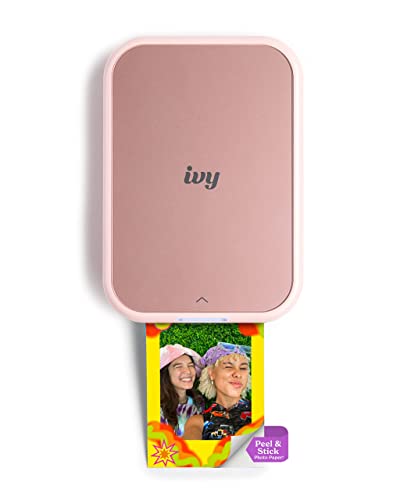
Canon Ivy 2 Mini Photo Printer — Pocket sticky prints
Precision about size first, because this guide promised it: the Ivy 2 is a mini photo printer. It prints small, sticky-back photographs from compatible iOS and Android devices — prints measured for journals, laptops, phone cases and lockers, not for frames. The listing here is the Blush Pink finish. Anyone shopping for 4×6 album prints should be reading the SELPHY review above; anyone whose photographic life is decorative, diarised and stuck onto things has arrived at their machine.
The sticky back is the whole idea, and it is a better idea than it first sounds. A photograph that adheres needs no frame, no album, no pin and no permission; it goes where its owner decides in the second of deciding. For the journal-keeper, the student, the teenager documenting a year in a notebook’s margins, that immediacy converts printing from an event into a habit — and habit, as every guide in this cluster keeps discovering, is the variable that decides whether a printer lives or gathers dust.
Phone-native is the second idea: the Ivy prints from the devices its owners photograph with, in the places they photograph — the café, the campus, the train home. Its colour, Blush Pink, is not a frivolous detail but a habitat marker: this is an object meant to be seen on a desk and carried in a bag without embarrassment, a piece of personal kit rather than office equipment. Gifts in this class succeed or fail on exactly that quality of personal rightness.
Its limits are the honest shadow of its size. Mini prints cannot carry a family’s archival ambitions, group photographs lose faces at journal scale, and the sticky format is a one-way door — a print stuck is a print placed. Buy the Ivy as the diary’s printer and it is perfect at its post. Buy it as the household’s photo printer and everyone will be disappointed by a machine that never applied for the job.
- Type: Mini photo printer
- Compatibility stated: Print from compatible iOS and Android devices
- Print format stated: Sticky-back prints
- Colour stated: Blush Pink
- Further specifications: Not stated in the listing title — verify with the manufacturer documentation
Strengths
- Sticky-back minis go straight onto journals, laptops and lockers with no framing step.
- Phone-native printing matches where its owners’ photographs live.
- A personal, giftable object in Blush Pink rather than office equipment.
Trade-offs
- Mini prints are not 4×6; albums and frames need the SELPHY class.
- Group photographs and fine detail shrink beyond legibility at mini scale.
- Sticky placement is permanent by design.
Best for: journal-keepers, students and gift-givers whose photographs are decorations and diary entries. Not suited for: family album printing or any framed-photograph duty.
The diary’s printer comes in Blush Pink at this listing: check price on Amazon.

Canon PIXMA TR8620a — Office all-in-one, photo-capable
The final review keeps the promise the introduction made: the TR8620a is an office machine that prints photographs, and its title says so in its own ordering — All-in-One Printer Home Office, copier, scanner, fax, auto document feeder, and then, among the duties, photo and document. AirPrint and Android support and Alexa compatibility complete a specification aimed at the working week. A guide that ranked this machine as a photo printer first would mislead exactly the buyers it suits best, so let the record be plain: buy it for the office, and enjoy its photographs as the office’s bonus.
That bonus is real. A home office that can print a handsome photograph — for a card, a presentation, a frame on the office wall — without a second machine is a genuinely better-equipped office, and PIXMA’s photo heritage means the bonus is not token. The household whose photographic printing is occasional, whose scanning arrives in stacks, whose week includes forms, copies and the odd fax-shaped relic, will find the TR8620a’s priorities identical to its own.
The auto document feeder is the tell of the tribe: feeders serve paper in piles, and piles are the office’s native weather. Combined with fax — a feature surviving in exactly the niches, legal, medical and administrative, where it remains compulsory — the machine describes a desk where documents are processed, not contemplated. Its photograph printing happens in that desk’s spare moments, competently and without ceremony.
Against the G620, the fork is philosophical: tank ink and photo-first design against feeder, fax and office-first design. Households should choose by counting their last month honestly — photographs in batches, or documents in stacks — and letting the count, not the badge, decide. Both machines wear PIXMA; only one of them is a photo printer that offices, and the other is the reverse, and this guide’s whole usefulness to Canon buyers lives in not confusing the two.
- Type: All-in-one printer for home office
- Functions stated: Copier, scanner, fax, auto document feeder
- Work stated: Photo and document printing
- Compatibility stated: AirPrint, Android; works with Alexa
- Colour stated: Black
- Further specifications: Not stated in the listing title — verify with the manufacturer documentation
Strengths
- A full office suite — copy, scan, fax and a document feeder — in one machine.
- Photo printing is a stated capability, making it the office’s bonus talent.
- AirPrint, Android and Alexa cover the household’s ways of sending work.
Trade-offs
- It is office-first; photo specialists will find no photo ink system stated.
- No tank system is stated for batch photo economics.
- Its feeder-and-fax talents are wasted on a purely photographic desk.
Best for: home offices processing document stacks that also print the occasional photograph well. Not suited for: photo-first households, whose machine is the G620 or a PRO above.
Offices should judge it as an office; the TR8620a’s listing makes that case in full: check price on Amazon.
Comparison
| Printer | Canon territory | Ink or system stated | Print size stated | Also stated |
|---|---|---|---|---|
| PIXMA PRO-200S | Professional photo | 8-colour dye | 13 in. | 3-inch colour LCD |
| imagePROGRAF PRO-310 | Professional photo | 9-colour pigment | 13 in. | 3-inch colour LCD |
| SELPHY CP1500 bundle | Compact photo | RP-108 ink/paper set | 4×6 in. | 108 sheets in bundle |
| PIXMA G620 | Family all-in-one | MegaTank | Not stated in title | Print, copy, scan; Alexa |
| Ivy 2 Mini | Mini photo | Sticky-back mini prints | Mini format | iOS and Android; Blush Pink |
| PIXMA TR8620a | Home office | All-in-one system | Not stated in title | Fax; document feeder |
One brand, six territories, and a table that sorts them by the only question that matters inside a single range: not which Canon is best, but which Canon’s job description matches the desk it will sit on. The ink column carries the professional fork; the size column carries the social one, from mini stickers to 13-inch portfolio sheets; the final column carries the household’s tie-breakers — a feeder, a fax, a voice assistant, a hundred and eight sheets ready to go.
How to Choose Within the Canon Range
Start at the territory, not the badge. Photographers printing for walls and buyers start at the two PRO machines and settle the ink question. Families start at the G620 and the SELPHY and settle the format question — batches at home sizes, or 4×6 by the hundred. The diarist starts and ends at the Ivy. The home office starts at the TR8620a and checks whether its photographic bonus covers the household’s modest ambitions. Territory-first choosing prevents the range’s classic error: buying a superb machine from the wrong territory and spending a year resenting its excellence at someone else’s job.
The ink question, for professionals, deserves a decision procedure rather than a taste. List the papers you print on most: glossy and luscious points to dye; matte and fine-art points to pigment. List the prints’ destinations: tonight’s wall points to dye; a buyer’s decade points to pigment. If both lists split evenly, follow the money — the work that is sold or commissioned outranks the work that is loved, because the loved work can be reprinted and the sold work cannot be recalled.
Households should run the same procedure at family scale. Count a normal month’s printing by kind — photographs, documents, copies, scans — and buy the territory that owns the largest pile. The second-largest pile is the tie-breaker, not the headline. A household honest about its piles will find Canon has built its machine; a household that buys for its smallest, most romantic pile will spend years apologising to the largest one.
Dye or Pigment: What Actually Changes Between the Two PRO Machines?
The physics first, because the aesthetics follow from it. Dye ink is colour dissolved in liquid; it soaks into the paper’s coating and produces colour from within the surface, which is why dye prints can glow — light interacts with the colourant through the coating’s gloss. Pigment ink is colour as solid particles suspended in liquid; the particles rest on the surface, which is why pigment prints hold their colour against light and handling and why they sit so naturally on matte papers, where there is no gloss for dye to perform through.
The working consequences sort photographers reliably. Glossy colour work — the saturated landscape, the luminous portrait — flatters dye. Matte fine-art work — the soft portrait, the deep-toned still life, the black-and-white print discussed elsewhere in this cluster — flatters pigment. Selling and archiving flatter pigment’s resistance; exhibiting under glass tonight flatters dye’s radiance. Neither system is the professional one; both are, which is why Canon sells the same 13-inch class twice.
One more consequence is practical rather than aesthetic: stewardship. Eight dye colours and nine pigment colours are both serious cupboards, and a photographer should enter either with the same discipline — stocks checked before the big session, the machine exercised weekly, the first print of a series treated as the reference every later print must match. Ink philosophy decides the look; ink discipline decides whether the look survives contact with a deadline.
Where Do the SELPHY and the Ivy Belong in a Serious Photographer’s House?
Beside the serious machine, not instead of it — and the pairing is more thoughtful than it sounds. The PRO on the desk makes the prints that are judged; the SELPHY in the kitchen makes the prints that are given. A photographer’s household contains both economies: the portfolio, where a print is an argument, and the family, where a print is a gift. Serving the second economy with the first economy’s machine — firing up the 13-inch professional to make grandma’s 4×6 — is how serious printers acquire a reputation for never printing anything.
The Ivy extends the logic downward to the diary. Not every photograph wants judging or even framing; some want sticking next to the day they happened, at the size of a memory rather than a document. A household with a diarist and a SELPHY and a PRO is not over-equipped; it is correctly equipped at three scales of photographic meaning, and each machine’s use protects the others from the jobs that would make them resented.
The general principle travels beyond Canon: match each printing machine to one economy of prints, and let it be excellent there. The guides in this cluster return to that principle at every scale because its violation — one machine, every economy, mediocrity everywhere — is the most common way households fall out of love with printing altogether.
What Does a 3-Inch Colour LCD on a Printer Actually Do All Day?
Both PRO machines state one, and it is easy to file as decoration. In practice the screen is where the printer stops being a peripheral and becomes an appliance: ink levels read at a glance while passing with coffee; paper settings confirmed standing at the machine, where the paper actually is; maintenance and alignment routines run without summoning a computer; errors explained in sentences rather than in blink codes memorised by nobody. Each of those is a small friction removed from the proofing loop, and the proofing loop is where professional printing time actually goes.
The screen also changes who can operate the machine. A partner, an assistant, a studio visitor can be talked through a reprint by phone — “the screen will show the paper menu; choose the matte one” — in a way that driver-dialogue instructions never survive. For the one-person studio that is occasionally a two-person studio, that operability is worth real money across a year.
None of this makes a screen a reason to choose one PRO over the other, since both carry it. It makes the screen a reason the 13-inch professional class feels like a different species from the desktop printers below it in this range — a machine designed to be stood at, worked at and answered back, in the room where the prints are judged.
The Proofing Loop: How a Canon PRO Earns Its Desk in a Fortnight
A professional printer’s first fortnight decides its reputation in its owner’s mind, and the wise owner scripts that fortnight deliberately. Begin with the photograph you know best — the file whose shadows and skin tones you can recite — and print it on the paper you will use most. Live with that print where you will live with all of them: pinned above the desk, seen in morning and evening light, glanced at while doing other things. The print that survives a week of glances has passed the only review that matters; the print that begins to argue with you has told you exactly what to adjust, which is what proofs are for.
Week two widens the evidence: one print on the second paper — matte if the first was glossy, or the reverse — one print at the largest size the machine offers, one deliberately difficult file with deep shadow or violent colour. By the end of the fortnight the owner owns something more valuable than any single print: a calibrated intuition for the machine, a sense of what it will do to a file before the file is sent. Every subsequent print is faster and surer for that intuition, and the machine’s cost per good print — the only cost that matters — falls every week it is exercised.
Keep the fortnight’s prints, labelled with paper and date, in a folder that lives beside the machine. That folder becomes the studio’s memory: the reference against which a new paper, a changed setting or a fading supply announces itself months later. Studios run on such folders. The photographer who skips the fortnight owns a printer; the one who keeps it owns a printing practice, and the difference shows in every frame on every wall thereafter.
Canon’s Ladder: When Should a Buyer Skip a Rung?
Ranges like this one tempt buyers to climb politely — mini this year, compact next, all-in-one after that, professional eventually — and the ladder metaphor deserves suspicion. Each territory in the Canon map serves a different economy of prints, and economies do not mature into one another; a journal-keeper does not graduate into a portfolio photographer by buying bigger machines. The right purchase is the territory your prints already live in, bought at the depth your volume justifies, and the ladder should be climbed only when the work itself changes address.
That said, two genuine progressions run through the range. The family whose SELPHY output has grown from gift prints to framed walls has a real reason to look at the PRO class — not because the SELPHY failed, but because the prints’ destination changed. And the G620 household whose batches have become a small business has a real reason to study the pigment machine, because prints that are sold carry the permanence contract discussed throughout this cluster. In both cases the trigger is a change in the prints’ contract, not a birthday, a sale season or a reviewer’s enthusiasm.
The reverse journey is equally honourable and less discussed. The professional who no longer exhibits does not need the 13-inch class’s stewardship; a SELPHY’s cheerful 4×6 economy may serve the remaining decades of family printing better than a pigment cupboard maintained out of habit. Canon’s range, read whole, permits both directions without shame — which is perhaps the strongest argument for buying inside a range one trusts: whichever way the work moves, the next right machine is already on the map.
Paper Loyalty: Why Canon Owners Should Marry a Stock and Date Others
Every printer in this range meets paper as a stranger until the owner teaches it otherwise, one stock at a time. The teaching is empirical: a given paper drinks ink its own way, dries at its own pace and renders the file’s colours with its own accent. Owners who chop between six papers in a month never finish teaching any of them, and their results wobble for reasons they blame on the machine. Owners who marry one stock — print on it for a season, learn its behaviour in shadow and skin, keep its reference prints — extract from even the range’s humblest machine a consistency that impresses professionals.
Marriage, here, is a method rather than a vow. Date other papers deliberately: one new stock per project, trialled on the known test file, its reference print filed beside the incumbent’s. Some dalliances become promotions — the matte stock that transforms the portrait series, the glossy that makes the landscapes sing — and the household standard changes by evidence rather than by restlessness. The SELPHY system enforces a version of this discipline by design, marrying its owners to matched sets; the PRO and PIXMA machines leave the discipline to the owner, which is why it deserves stating in a brand guide: Canon sells the engines, but the consistency is home-made.
Store the marriage certificate properly: papers flat, dry, away from light, in their wrappers until the session. More prints are ruined by cupboard conditions than by any engine in this range, and the ruin is always discovered at the worst moment — the night before the frame is due. A household that stores paper like the valuable it is will find every Canon on this page performing closer to its brochure than households with grander machines and damper shelves.
Voice, Apps and AirPrint: The Invisible Half of the Modern Canon
Three of these six titles mention the machinery of summoning prints rather than making them — Alexa on the G620 and the TR8620a, AirPrint and Android on the TR8620a, device printing on the Ivy — and the pattern deserves a moment’s respect. The modern printer’s hardest problem is not quality but invocation: the print that requires a desk, a driver and a free ten minutes is a print that happens next week, which is to say at a funeral’s pace, never. Voice commands, phone-native protocols and app-driven minis all attack the same enemy — the gap between wanting a print and having one — from different sides.
Judge these features by your household’s actual summoning habits rather than by novelty. A kitchen that already talks to its lights will genuinely print by voice; a studio that lives in one editing application will never touch any of it. The professional machines’ silence on the subject in their titles is its own statement: at the PRO desk, invocation is a considered act performed standing at the machine, screen in front of you, proof in hand. Neither philosophy is behind the times. They are answers for different rooms, and Canon, characteristically, sells both without insisting they meet.
The Second Canon: Why Brand Households End Up Owning Two
Talk to households deep in one brand’s ecosystem and a pattern repeats: there is the Canon that works, and the Canon that delights. The working machine — a G620 absorbing the family’s batches, a TR8620a processing the office — earns its place by reliability across a hundred small duties. The delighting machine — a SELPHY appearing at gatherings, an Ivy living in a school bag, a PRO reserved for the prints that matter — earns its place by being reached for with pleasure. Neither machine resents the other; each protects the other from the jobs that would dull it.
The economics of the second Canon are kinder than buyers fear, because the second machine is bought with knowledge. The household already knows its true volumes, its real papers, its actual summoning habits — everything the first purchase had to guess. Second machines therefore fit better than first ones, territory for territory, and their owners report the strange satisfaction of a printing household that has stopped arguing with itself. If this guide leaves a Canon buyer with one ambition beyond the immediate purchase, let it be that: buy the territory the work demands now, and trust the range to furnish the second territory when the prints themselves ask for it.
One closing discipline applies to every territory equally: name the machine’s job in the household, out loud, on the day it arrives. “You are the album printer.” “You are the office.” “You are the diary’s.” Machines with named jobs get used for them, maintained for them and replaced in kind when their years are done. Machines bought as general improvements drift into general neglect, whatever badge they wear — and Canon, which has built a territory for nearly every photographic purpose a household can name, deserves owners who do the naming.
And if the naming reveals a gap — a job the household needs that no machine on the desk owns — that gap, honestly stated, is the most useful sentence in home printing. It converts the next purchase from a reaction into a plan, and plans are how a range like Canon’s gets used at its best: one territory at a time, each machine fluent in its own work, the whole household’s photographs flowing to the printer that was waiting for exactly them.
A Note on Finishes: Black Machines, Pink Machines and the Rooms They Live In
It would be easy to mock the colour question, and a mistake. Four of these six machines state black; the Ivy states Blush Pink; the SELPHY bundle’s printer is black while its purpose is festive. Finishes are habitat signals in Canon’s range: black for the machines that must disappear into studios and offices, pink for the machine that must be found in a bag and welcomed on a café table. A printer’s colour decides whether it is treated as furniture or as kit, and kit gets carried while furniture gets walked past. Buyers furnishing a room where the printer must vanish should honour the black machines’ discretion; buyers furnishing a life that happens in public should honour the Ivy’s refusal to vanish. The range, once again, has already had the argument — the finishes are its conclusions, printed in plastic.
There is a small, practical postscript to the finish question: visible machines get maintained. The printer seen daily gets its ink checked in passing, its paper tray noticed empty before the deadline, its dust wiped by the same hand that wipes the shelf. The printer hidden in a cupboard for discretion’s sake must be remembered, and memory is the least reliable peripheral in any house. Choose the finish — and the placement it implies — with the maintenance you will actually perform, and the machine will last long enough for its territory to become a tradition.
Tradition, in a printing household, looks like this: the same machine, on the same shelf, printing the same family’s year for the fifth time, its quirks known and forgiven, its output pinned in a line that now reaches across a wall. Ranges endure because households let them. Pick the territory, keep the paper honest, run the machine weekly — and the Canon bought this year becomes the reference point every future printer, Canon or otherwise, will be judged against, usually in the same sentence that admits nothing since has quite printed a grandmother’s birthday the same way — a compliment no specification sheet can buy and no rival badge can argue with.
Common Mistakes
Treating the Ivy 2 as a small 4×6 printer. It is a mini printer making sticky-back prints for journals and objects; the SELPHY is the range’s 4×6 machine, and confusing them disappoints both purposes.
Buying the TR8620a as a photo printer. Its title leads with copier, scanner, fax and feeder because it is an office all-in-one; its photo printing is a bonus, and photo-first households belong with the G620 or above.
Choosing between the PRO machines by colour count alone. Eight dye and nine pigment are philosophies, not scores; papers and destinations decide.
Assuming the badge guarantees a feature. Canon’s range spans too many territories for any feature to be range-wide; the title and documentation of the exact model govern.
Letting the family machine and the studio machine fight. Households with both economies print happier with a territory for each than with one compromise resented by both.
Final Recommendation
Inside Canon’s range the recommendations draw themselves once territories are named. Selling or archiving at 13 inches: the PRO-310 and its nine pigment colours. Glossy colour for the wall: the PRO-200S and its eight dye colours. A season of family 4×6 photographs in one box: the SELPHY CP1500 bundle. Batch-printing households that scan and copy besides: the G620. Diaries, journals and gifts: the Ivy 2 in Blush Pink. Document stacks with photographs as the bonus: the TR8620a, bought proudly as an office machine. Canon’s badge is unusually honest once its map is drawn — and the buyer who picks by territory rather than by badge will find, perhaps a year from now, that the machine on the desk has quietly become the one member of the range the whole household would buy again.
Frequently Asked Questions
Which Canon is best for professional photo printing at home?
Either 13-inch PRO, chosen by ink: the PRO-310’s 9-colour pigment for prints that are sold, archived or printed on matte fine-art papers; the PRO-200S’s 8-colour dye for glossy, saturated colour work. Both state wireless design and a 3-inch colour LCD.
Is the Ivy 2 a real photo printer?
Yes, of the mini kind: it prints small sticky-back photographs from iOS and Android phones for journals and objects. It is not a substitute for a 4×6 printer — within this range, that job belongs to the SELPHY CP1500.
What is the difference between the G620 and the TR8620a?
Priority. The G620 is photo-first: MegaTank ink, a Photo name, with print, copy and scan. The TR8620a is office-first: copier, scanner, fax and an auto document feeder, with photo printing among its stated duties. Count your month’s piles and follow the larger one.
Why does the SELPHY use ink and paper sets?
Its RP-108 set pairs ink and paper in matched supply — 108 sheets with the ink to print them — so the owner never runs out of one mid-photograph or puzzles over compatibility. The bundle reviewed here includes that set with the printer.
Can the PRO machines print larger than 13 inches?
Their titles state the 13-inch class, and this guide claims no more for them. Canon’s wider professional work lives in the imagePROGRAF large-format line covered by the large-format guide in this cluster.
Which Canon should a household buy as its only printer?
The G620 if photographs lead the household’s printing, the TR8620a if documents do. Both scan and copy; the fork is whether the month’s biggest pile is images or paperwork.
Related Guides
The monochrome thread that runs through the PRO-310 review is followed honestly in our guide to b and w photo printers. The Ivy’s pocket territory is mapped fully in our guide to mobile photo printers, and the projector crossover in the linkmap leads onward to our guide to short throw 4k projectors for readers furnishing the whole media room.


