What's inside
- Key Takeaways
- Quick Picks
- How We Chose These Picks
- Why Does a Lap Desk Beat a Cushion or a Tray Table?
- What Cushion Designs Are There, and Which Suits You?
- How Does Heat Travel Through a Lap Desk, and Why Does It Matter?
- Which Lap Desk Suits Which Seat in the House?
- The Six Lap Desks, Reviewed One by One
- Can a Lap Desk Work for Gaming?
- How Do You Store a Lap Desk in a Small Home?
- How Do Lap Desks Compare With Bed Tables and Sofa Arm Trays?
- What About Lap Desks for Tablets, Books and Everything Else?
- How Do the Six Compare Side by Side?
- How Do You Use a Lap Desk Without Wrecking Your Posture?
- What Should You Check in the First Week of Owning One?
- What Are the Most Common Mistakes When Buying a Lap Desk?
- How Long Should a Lap Desk Last, and What Wears Out First?
- Who Should Skip a Lap Desk Entirely?
- How Do You Choose Between Two LAPGEAR Models That Look So Similar?
- What Is the Right Way to Sit With a Lap Desk for a Whole Film or Match?
- Do Lap Desks Work Outdoors, in Cars and in Hospital-Style Beds?
- What Makes a Lap Desk a Good Gift for Students and New Remote Workers?
- Final Recommendation
- Frequently Asked Questions
- Related Guides
As an Amazon Associate I earn from qualifying purchases. This post may contain affiliate links at no extra cost to you.
widgetverdict.com is reader-supported. When you buy through links on our site, we may earn an affiliate commission.
Where to buy: you can order any of the six lap desks below from Amazon — follow the name of the one you like in the Quick Picks table or in its review further down the page. Lap desks are light, flat and easy to return if the fit is wrong, so the practical move is to order the one that matches your laptop’s size, try it on your own sofa for an evening, and let your knees deliver the verdict.
The best lap desks turn the two least ergonomic seats in the house — the sofa and the bed — into places where a laptop can be used for hours without the slow punishment of a hot base on your thighs and a screen sinking to cushion level. A lap desk is a simple invention: a flat, stable surface on top, a cushion underneath that moulds to your legs, and enough width that the laptop stops sliding toward your knees every time you shift. But within that simplicity the six designs below diverge sharply, and the divergence is the whole guide.
Some lap desks are workstations in miniature, with mouse pads, phone slots and wrist rests built in, designed for people who genuinely work from the sofa. Some are reading-and-browsing trays with storage wells for the remote and the paperback. One is a wide pillow desk with arm rests, sized for sprawling. One folds and tilts like a bed table, because for some buyers the lap desk’s real job is breakfast-adjacent email in bed. Choosing between them is not about which is best in the abstract; it is about where you sit, what you do there, and how large your laptop is.
Size is the first honesty check. Four of the six picks are built around 15.6-inch laptops, the most common size in homes, and they say so in their names. A larger gaming laptop will overhang them and cook its own vents; a small ultrabook will rattle around pleasantly enough. Measure your machine’s width, compare it with the surface described in each review, and let that arithmetic eliminate candidates before taste gets a vote.
Key Takeaways
- Four of the six picks are sized for 15.6-inch laptops; check your machine’s width before anything else.
- The LAPGEAR Home Office Pro is the sofa-worker’s pick, with a built-in mouse pad, phone slot and wrist rest.
- The OPTIXCELL is the sprawler’s desk: a 23.7-inch surface, arm rests and side pockets.
- The FoldWise Pro tilts and adjusts in height, suiting bed-based work better than any flat tray.
- Cushion design decides comfort: dual-bolster microbead cushions vent heat and hold the surface level.
- A device ledge or anti-slip strip is a small feature that prevents the daily slide toward your knees.
Quick Picks
| Pick | Badge | Why it earns its place |
|---|---|---|
| LAPGEAR Home Office Pro Lap Desk | Best for sofa working | Mouse pad, phone slot and a wide wrist rest on a cushioned base built for 15.6-inch laptops. |
| HUANUO Laptop Lap Desk with Cushion | Best simple cushioned tray | A woodgrain surface, pillow cushion, anti-slip strip and storage touches without feature overload. |
| OPTIXCELL Lap Desk Pillow with Arm Rests | Best for bed and sprawling | A wide 23.7-inch pillow surface with arm rests and side pockets for long, relaxed sessions. |
| LAPGEAR MyDesk Lap Desk | Best organised tray | Device ledge, dual storage wells and an airflow cushion under a 15.6-inch surface, with a carry handle. |
| FoldWise Pro 2-in-1 Bed & Lap Desk | Best adjustable | Adjustable height and tilt, a wrist rest and an iPad holder in a foldable design for bed or lap. |
| LAPGEAR Designer Lap Desk | Best looking | Arrow-stripe styling over a conforming microbead cushion, with phone slot, device ledge and carry handle. |
How We Chose These Picks
We filtered first on the surface. A lap desk’s top must be genuinely flat, rigid enough not to flex under a laptop’s corners, and sized honestly for the laptop class it claims. Four picks here centre on 15.6-inch machines; the OPTIXCELL goes wide for sprawlers and larger devices; the FoldWise Pro trades some flatness for tilt. Any design whose surface read as a cushion with ambitions was set aside — a lap desk that sags in the middle defeats its own purpose.
The cushion was the second filter, because it is the half of the product your body actually meets. Microbead cushions conform to legs and hold the surface level on uneven thighs; dual-bolster designs add an air channel that keeps heat from pooling where the laptop’s warmth conducts through. Pillow cushions trade that engineering for softness. We kept both philosophies, labelled them clearly, and let the reviews argue each case on its merits.
Third came the furniture of the surface: ledges, strips, pads and slots. These details sound like garnish until the first time a laptop slides off a cushion-topped tray into your lap. A device ledge or anti-slip strip is close to essential; a phone slot is a genuine convenience for sofa workers; a mouse pad matters only if you truly use a mouse on the sofa, which some people do daily and others never. We scored each pick on whether its extras matched a real sitting habit rather than a feature list.
Finally, portability. A lap desk that lives on one sofa needs no handle; a lap desk that travels between bed, sofa and garden chair earns one. Two LAPGEAR models carry handles for exactly that migrant life, and the FoldWise folds for storage in homes where a rigid tray would have nowhere to live.
Why Does a Lap Desk Beat a Cushion or a Tray Table?
The cushion alone fails on heat and angle: a laptop resting directly on fabric insulates its own underside, its vents sip hot air, and the screen sits wherever your knees decide. A rigid lap desk lifts the machine onto a ventilated surface, holds it level, and puts the keyboard at a consistent height your wrists can learn. Over a month of evening sessions, that consistency is the difference between a habit that works and one that quietly aches.
The folding tray table fails differently: it is stable but socially and spatially clumsy, a piece of furniture that must be fetched, unfolded and stored, with legs that fight the sofa’s arms and the bed’s duvet. A lap desk lives where you sit, stores in a cushion’s depth beside the sofa, and asks nothing of the room. It is the difference between equipment and an accessory, and accessories get used.
There is also the matter of the mouse. Sofa workers who use a real mouse need a flat, hard mousing surface at the same level as the laptop, which is why the Home Office Pro’s built-in pad exists. Trackpad users can ignore that whole consideration, which is why half this guide does. Know which kind of sofa worker you are before the feature lists start persuading you.
What Cushion Designs Are There, and Which Suits You?
Microbead cushions — the LAPGEAR approach — behave like a firm beanbag: they pour into the shape of your legs, then hold that shape, keeping the surface level even when you cross your ankles. Dual-bolster versions split the cushion into two humps with a valley between, and the valley is an air channel that lets heat escape and gives the desk a self-levelling streak on soft seating. If your sessions run long and your laptop runs warm, this is the engineering to buy.
Pillow cushions — the HUANUO and OPTIXCELL approach — behave like the sofa itself: soft, forgiving, immediately comfortable, and more prone to letting the surface tilt as the filling shifts. For reading, browsing and shorter laptop sessions that softness is a pleasure rather than a flaw. The FoldWise sidesteps the question with a soft cushion under an adjustable frame, betting that angle control matters more than cushion science for its bed-based buyers. None of these is the correct answer for everyone; each is the correct answer for a posture.
How Does Heat Travel Through a Lap Desk, and Why Does It Matter?
A working laptop is a small heater with opinions. Its underside vents push warm air down and out, and whatever sits beneath the machine decides where that heat goes next. On a duvet or a bare cushion, the heat goes nowhere: the fabric seals the vents, the machine’s fans work harder, performance quietly throttles, and your legs become the heatsink of last resort. A rigid lap desk interrupts that chain at the first step, giving the vents an air gap and the heat a hard surface to spread across instead of a thigh to soak into.
The cushion design then decides the second half of the journey. A single pillow cushion absorbs warmth into its filling and holds it against your legs — pleasant in January, oppressive in July. A dual-bolster microbead cushion leaves a channel of moving air between the bolsters, so conducted heat has somewhere to go that is not you. This is why the LAPGEAR models suit warm-running laptops and long sessions, and why the pillow designs are happiest with cooler machines and shorter ones. Match the desk to the laptop’s temperament and the whole question of hot legs simply stops arising.
Your own habits complete the picture. A laptop used for browsing and documents barely warms any desk; the same machine rendering video or gaming will test the best cushion here. If your evening sessions mix both, size your choice for the hot hours, not the cool ones.
Which Lap Desk Suits Which Seat in the House?
The sofa rewards width and levelling. Sofa cushions are soft, uneven and sloped, so a bolstered microbead base that self-levels — MyDesk, Home Office Pro, Designer — earns its keep there, and the sofa worker’s extras (mouse pad, phone slot, wrist rest) all assume a long, seated, upright session. The sofa is also where the carry handle matters least and the surface furniture matters most, because the desk tends to live beside one seat permanently.
The bed rewards angle and softness. Propped on pillows, your lap is a slope, and a flat tray on a slope is a negotiation; the FoldWise’s tilt settles it by meeting your posture halfway, while the OPTIXCELL’s arm rests settle it by supporting the sprawl that bed reading actually is. Bed users should also weight the desk’s off-duty bulk honestly, since it will share the room with sleep.
The floor — cushions, gaming chairs without arms, children’s homework headquarters — rewards the pillow designs, whose softness conforms to crossed legs and shifting positions better than a bolstered tray tuned for a chair-shaped lap. The armchair, finally, rewards narrow discipline: measure the chair’s inside width, because a tray that fits a sofa can bridge an armchair’s arms and teeter there, which no cushion design can rescue.
The Six Lap Desks, Reviewed One by One

LAPGEAR Home Office Pro Lap Desk — Best for sofa working
The Home Office Pro is built for the person who has stopped pretending the sofa is not their office. Its surface fits 15.6-inch laptops and spends the remaining width on the tools of actual work: a built-in mouse pad on one side, a phone slot that keeps the phone upright and visible instead of lost in the cushions, and a wide cushioned wrist rest along the front edge that supports typing posture over hours rather than minutes. The black carbon finish keeps the whole thing looking like equipment rather than bedding.
Underneath, the dual-bolster microbead cushion does the quiet work: two bolsters with an air channel between them, conforming to your legs while letting the laptop’s conducted warmth escape instead of soaking into your thighs. That channel is why this desk suits long sessions better than a single pillow cushion — heat management is a comfort feature that only announces itself by its absence elsewhere.
The honest limits are size and specialisation. A laptop larger than the 15.6-inch class will crowd the mouse pad out of usefulness, and left-handed mousers should note the pad’s fixed side. If your sofa work is trackpad-only, you are paying for a pad you will use as a coaster. For the mouse-using sofa worker it was designed for, though, nothing else in this guide assembles the whole kit in one tray.
- Surface sized for: laptops in the 15.6-inch class
- Surface extras: built-in mouse pad, phone slot
- Comfort: wide cushioned wrist rest
- Cushion: dual-bolster microbead
- Finish: black carbon
Strengths
- A complete sofa workstation in one piece, mouse included.
- Dual-bolster cushion vents heat during long sessions.
- Wrist rest supports real typing, not just browsing posture.
Trade-offs
- Mouse pad side is fixed; left-handed mousers lose out.
- Oversized laptops squeeze the pad into uselessness.
- Work-focused looks will not charm every living room.
Consider the phone slot’s quiet brilliance for a moment: on a sofa, a phone laid flat disappears into cushions, vibrates against upholstery and slides toward the floor. Parked upright in its slot, it becomes a second small screen — messages visible, calls answerable, the laptop’s screen left alone. It is the feature owners mention most after a month, ahead of the pad it shares the surface with.
Best for: a genuine sofa worker with a mouse habit and a 15.6-inch laptop. Not suited for: trackpad-only browsers, who are buying a mouse pad to rest a mug on.
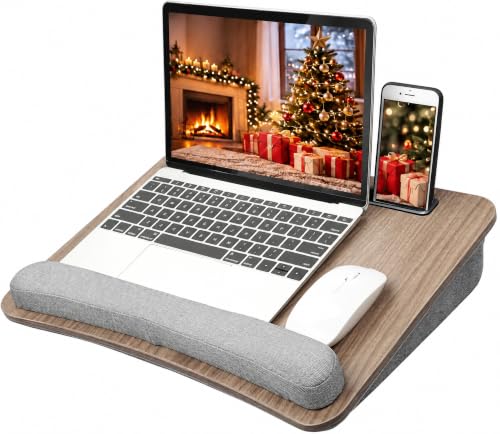
HUANUO Laptop Lap Desk with Cushion — Best simple cushioned tray
The HUANUO is the straightforward member of this roundup: a woodgrain surface for laptops up to 15.6 inches, a pillow cushion beneath, an anti-slip strip to hold the machine in place, and a modest storage function for the small items that accompany a session. It does not attempt the Home Office Pro’s workstation act. It attempts to be the tray you reach for without thinking, and its simplicity is a considered design position rather than a missing feature list.
The anti-slip strip deserves its sentence, because it solves the lap desk’s most frequent small accident — the slow forward creep of a laptop on a smooth surface as your legs settle. The woodgrain finish, meanwhile, makes the desk presentable on a coffee table or a bed in a way the gaming-styled surfaces are not; this is the lap desk a household can share across homework, browsing and the occasional working evening without it belonging to anyone’s setup in particular.
Its pillow cushion trades the microbead models’ levelling discipline for immediate softness, which suits shorter and medium sessions best. Marathon workers should look at the bolstered LAPGEARs; everyone else gets a lighter, friendlier tray that stores easily and offends no room it enters.
- Takes laptops: up to the popular 15.6-inch size
- Surface: woodgrain finish
- Holding: anti-slip strip, storage function
- Cushion: pillow style
Strengths
- Anti-slip strip stops the laptop’s slow forward creep.
- Woodgrain look suits shared household use and visible storage.
- Simple, light and easy to live with day to day.
Trade-offs
- Pillow cushion can tilt more on restless legs.
- No mouse pad or phone slot for full workstation duty.
- Less heat channeling than dual-bolster designs.
The HUANUO also travels well between generations: it is the desk a grandparent borrows for the crossword tablet and a teenager borrows for revision, because nothing about it needs explaining. In shared houses, the products that survive are the ones nobody has to be taught, and this tray’s entire interface is a flat top and a strip that says where the laptop goes.
Best for: a household all-rounder for homework, browsing and light work on any lap. Not suited for: eight-hour sofa shifts, where bolstered cushions and wrist rests earn their keep.

OPTIXCELL Lap Desk Pillow with Arm Rests — Best for bed and sprawling
The OPTIXCELL answers a different question from the others: not how to work on a sofa, but how to be comfortable for a long evening with a laptop, a book or a tablet in bed or stretched out on the couch. Its surface runs a generous 23.7 inches, the pillow body includes arm rests that support your elbows while you read or type, and side pockets take the remote, the phone and the glasses that otherwise vanish into bedding. The listing states a sturdy 44-pound capacity, so the surface is built to be leaned on, not merely rested upon.
Arm rests are the feature to interrogate, because they define the posture this desk creates: elbows supported, shoulders down, the device held at a settled distance. Readers and film-watchers feel the benefit immediately; touch-typists working at speed may find the supported sprawl too relaxed for productivity, which is a matter of matching the desk to the evening rather than a flaw in the desk.
Size is the practical cost. A 23.7-inch pillow desk is furniture, and it needs a home beside the bed or the sofa rather than in a drawer. Households with the space gain the most comfortable pick in this guide; households without it should measure the storage spot before falling for the sprawl.
- Surface: 23.7 inches wide
- Capacity stated in the listing: 44 lbs
- Comfort: pillow body with arm rests
- Storage: side pockets
- Aimed at: bed and couch use
Strengths
- The widest, most relaxed surface in the roundup.
- Arm rests support long reading and viewing sessions.
- Side pockets end the lost-remote archaeology in the cushions.
Trade-offs
- Biggest storage footprint here; it lives out, not away.
- Relaxed posture suits leisure better than fast typing.
- Pillow format offers less rigid levelling than bolstered trays.
Breakfast is the use case nobody lists and everybody discovers: a wide, sturdy, pillow-based surface that holds a laptop, a mug at the edge and a plate without drama, while the household wakes up around it. The side pockets take the phone that would otherwise sit in the bedding. If your mornings start with email and tea in bed, this desk was designed by someone living your exact routine.
Best for: bed-based readers, streamers and sprawlers who want elbows supported for hours. Not suited for: a small flat with nowhere to keep a pillow the size of a suitcase.

LAPGEAR MyDesk Lap Desk — Best organised tray
The MyDesk is the organiser’s lap desk. Its 15.6-inch surface is bordered by a device ledge that keeps the laptop from wandering, and two storage wells that hold the session’s small cargo — phone, pen, remote, earbuds — in defined places instead of in the sofa’s creases. Underneath sits the airflow version of LAPGEAR’s dual-bolster microbead cushion, and a carry handle on top turns the whole tray into something you transport between rooms one-handed, coffee in the other.
The wells are the detail to think about, because they express a philosophy: a lap desk session generates small objects, and small objects need addresses. Households where the lap desk serves homework will feel the benefit in pencils that stay found. The cool gray finish keeps it neutral enough for any room, and the ledge-plus-cushion combination makes it the most level-headed general-purpose tray in the guide — less specialised than the Home Office Pro, more organised than the HUANUO.
What it lacks is the Pro’s mouse pad and wrist rest, so committed sofa workers should still step up. For everyone whose lap desk life is laptop, phone and notebook, the MyDesk is the balanced default this category keeps pointing toward.
- Built around: 15.6-inch laptops
- Surface extras: device ledge, dual storage wells
- Cushion: airflow dual-bolster microbead
- Portability: carry handle
- Finish: cool gray
Strengths
- Storage wells give session clutter a fixed address.
- Airflow cushion manages heat on long evenings.
- Carry handle makes it the natural house-shared tray.
Trade-offs
- No mouse pad or wrist rest for workstation duty.
- Wells tempt accumulation if never emptied.
- Gray finish is neutral to a fault for style-led buyers.
The wells also make the MyDesk the tidiest travel companion inside the house: load the wells, lift by the handle, and the whole session — laptop, phone, pen, earbuds — relocates from sofa to bed to garden chair as one object. Lap desks without handles travel in two trips or not at all, and the sessions that require two trips are the sessions that quietly stop happening.
Best for: a shared household tray for homework, browsing and laptop evenings. Not suited for: a mouse-and-wrist-rest sofa professional, who wants the Home Office Pro instead.

FoldWise Pro 2-in-1 Bed & Lap Desk — Best adjustable
The FoldWise Pro is the only pick here that refuses to be a flat tray. It adjusts in height and tilts, carries a wrist rest and a stopper to keep devices from sliding off the tilted surface, includes an iPad holder, and folds away when the session ends. The leather-finished surface and soft cushion aim it squarely at bed use, where a flat lap desk’s fixed angle fights the pillows and loses. Tilt changes the bed equation entirely: the screen rises to face you instead of the ceiling, and the keyboard angle stops punishing your wrists.
The 2-in-1 name reflects its double life as a bed desk and a lap desk, and the adjustability makes it the natural pick for anyone recovering from an injury, working from bed by preference, or sharing the desk between a reader and a typer whose ideal angles differ. Adjustment mechanisms ask a small toll — a moment of setup per session, and moving parts that reward gentle handling — but for bed-based users that toll buys the only genuinely ergonomic geometry in this guide.
Tablets deserve a mention: the iPad holder and stopper make this the strongest pick for tablet-and-keyboard combinations and for reading devices at breakfast-table angles. Laptop users with 15.6-inch machines should confirm the fit against the listing’s dimensions, since tilting designs carry their size differently from flat trays.
- Design: foldable, adjustable height and tilt
- Surface: leather finish, wrist rest, device stopper
- Extras: iPad holder
- Cushion: soft cushion base
- Aimed at: bed and lap use
Strengths
- Tilt and height adjustment fix the bed-angle problem outright.
- Stopper and iPad holder suit tablet users best in class.
- Folds away, solving storage for a full-featured desk.
Trade-offs
- Moving parts need a setup moment each session.
- Tilting surface is less ideal for a loose mouse.
- Mechanisms reward careful handling over years.
Recovery and convalescence deserve a direct mention: anyone spending weeks in bed with a laptop for company — after surgery, during illness, through a long winter of working gently — needs angle control more than any other feature in this guide, and the FoldWise is the only pick that provides it. For that buyer this is not the adjustable option; it is the only option, and the rest of the roundup is a list of flat compromises.
Best for: bed workers, bed readers and tablet users who need angle control. Not suited for: a sofa mouser, whose flat, fixed surface the LAPGEAR Pro provides better.

LAPGEAR Designer Lap Desk — Best looking
Most lap desks look like office equipment that wandered into the living room. The Designer model starts from the opposite end: an arrow-stripe patterned surface that reads as a home accessory, over the same conforming microbead cushion architecture LAPGEAR builds its reputation on. It fits 15.6-inch laptops, includes a phone slot and a device ledge, and carries a handle for room-to-room duty — the full practical kit, dressed for the room it lives in.
The pattern is not a trivial extra. A lap desk spends its off-duty hours visible — on the sofa, beside it, on the bed — and an object that looks intentional gets left out happily, while an ugly one gets exiled to a cupboard and fetched with decreasing enthusiasm until the habit dies. If your lap desk will live in view, its appearance is a usability feature, and this is the pick that treats it as one.
Functionally it sits between the MyDesk and the Home Office Pro: ledge and phone slot, but no storage wells, mouse pad or wrist rest. Buyers choosing within the LAPGEAR family should decide by furniture, not by brand: wells for organisers, pad and rest for workers, pattern for the design-conscious. All three share the cushion thinking that makes the family coherent.
- Sized for: the 15.6-inch laptop class
- Surface extras: phone slot, device ledge
- Cushion: conforming microbead
- Portability: carry handle
- Finish: arrow stripes pattern
Strengths
- Looks like a home accessory, so it can live in view.
- Full ledge-and-slot practicality under the pattern.
- Microbead cushion conforms and levels like its siblings.
Trade-offs
- No wells, pad or wrist rest for heavier-duty sessions.
- Patterned finish is a taste statement not everyone shares.
- Shares the family size limit of the 15.6-inch class.
There is a gift-buying angle here too: the Designer is the one lap desk in this guide that can be given without the recipient feeling they have been handed office supplies. It reads as a home piece, works as a proper tray, and its pattern survives being left on the sofa when guests arrive — which, in the end, is the test every living-room object must pass.
Best for: a style-conscious living room where the lap desk lives on show. Not suited for: a buyer who wants every workstation extra and cares nothing for looks.
Can a Lap Desk Work for Gaming?
Console and cloud gaming suit lap desks naturally: the screen is the television, the controller needs no surface, and the desk becomes a stand for snacks, a headset and the laptop streaming the game. PC gaming on the lap is a sterner test. A mouse needs a hard, level pad at elbow height, which is precisely the Home Office Pro’s layout, and keyboard-heavy games sit happily on any rigid tray. What no lap desk provides is the planted stability of a real desk under fast mouse work, so competitive players should treat lap gaming as the casual mode it is — entirely enjoyable, honestly limited.
Heat returns as the deciding factor: gaming laptops are the warmest machines a lap desk will ever host, and the bolstered, channelled cushions are the only designs here that should carry one for a long session. A gaming laptop on a sealed pillow cushion will make its displeasure known through its fans within the half hour.
How Do You Store a Lap Desk in a Small Home?
Storage is the lap desk’s second life, and it deserves planning before purchase rather than after. Flat rigid trays slide into the slot beside a sofa, under a bed, or upright in a wardrobe’s end — measure that slot and compare it with the tray’s width, because a desk that stores in the room it serves gets used, and one that stores in another room gets forgotten. The MyDesk and Designer handles help here too, since a tray that carries like a briefcase tends to be put away rather than left as clutter.
Pillow designs store differently: they are soft furniture, happiest on the bed or in a basket, and the OPTIXCELL’s size makes it a resident rather than a visitor wherever it lands. The FoldWise folds, which collapses the storage question to a shelf or a drawer gap. In the smallest homes, that fold is not a convenience but the deciding feature, and buyers in studios should weight it accordingly.
How Do Lap Desks Compare With Bed Tables and Sofa Arm Trays?
Three rival products compete for the same evenings, and each wins somewhere. The bed table — legs, a tilting top, a breakfast-tray silhouette — beats a lap desk for long bed sessions with meals involved, because its legs carry the weight your legs would rather not. It loses on storage, on sofa use, and on the small ceremony of setting it up, which is why the FoldWise, a lap desk borrowing the bed table’s tilt, is such an interesting hybrid.
The sofa arm tray, a small mat that drapes over the armrest, beats everything on compactness and loses on scope: it holds a mug, a remote, a phone, and nothing with a keyboard. It is a companion to a lap desk rather than a rival to one. The honest household often ends with a lap desk for the laptop and an arm tray for the drink, because the one unforgivable lap-desk accident is a mug on the same surface as a keyboard — every design in this guide keeps drinks at the surface’s edge or off it entirely, and your own discipline should finish the job.
What About Lap Desks for Tablets, Books and Everything Else?
Not every lap session involves a laptop, and the surfaces here moonlight well. Tablets sit happily on any rigid tray, with the FoldWise’s holder and stopper making it the reading-and-streaming specialist and the OPTIXCELL’s arm rests making it the long-novel specialist. Paper books prefer the lighter trays; a hardback on a pillow desk sinks charmingly and needs re-levelling, while the LAPGEAR surfaces hold a book, a notebook and a pen in the wells like a school desk remembered fondly.
Board games, craft projects, jigsaws and the household’s eternal form-filling all borrow these surfaces too. That second life matters when judging value: a lap desk bought for laptop evenings that also hosts homework, hobbies and breakfasts earns its storage space several times over, and the most versatile designs — flat, rigid, with somewhere for small pieces to live — are the ones that accumulate those second lives fastest.
How Do the Six Compare Side by Side?
| Lap desk | Laptop fit / size | Cushion type | Signature extra | Handle |
|---|---|---|---|---|
| LAPGEAR Home Office Pro | 15.6 in | Dual-bolster microbead | Mouse pad and wrist rest | No |
| HUANUO Lap Desk | 15.6 in | Pillow | Anti-slip strip | No |
| OPTIXCELL Lap Desk Pillow | 23.7 in surface | Pillow with arm rests | Side pockets | No |
| LAPGEAR MyDesk | 15.6 in | Airflow dual-bolster microbead | Dual storage wells | Yes |
| FoldWise Pro 2-in-1 | Bed and lap sizes | Soft cushion, adjustable frame | Tilt, height, iPad holder | Folds flat |
| LAPGEAR Designer | 15.6 in | Conforming microbead | Patterned surface | Yes |
Read the cushion column first if your sessions are long, the extras column first if they are task-specific, and the size column before either if your laptop is not a 15.6-inch machine. The table also shows the family’s shape honestly: three LAPGEAR variants divided by furniture, two pillow designs divided by scale, and one adjustable outlier that plays by different rules entirely.
How Do You Use a Lap Desk Without Wrecking Your Posture?
The lap desk fixes the laptop’s height relative to your legs; your job is the rest of the chain. Sit back into the sofa or bedhead rather than perching forward, let the cushion settle for a few seconds before placing the laptop, and keep your feet supported — dangling legs tilt the pelvis, tilt the lap, and tilt the desk in a chain no cushion can fully correct. If the screen still sits low, a cushion under the lap desk is a legitimate raise, provided the base stays stable.
Work in sessions with edges. Lap desks make the sofa so usable that the working day can leak across the whole evening, and posture degrades with fatigue long before discomfort announces it. Stand between tasks, move the desk aside deliberately when the session ends, and let the furniture mark the boundary your office door used to provide. The desk is a tool for chosen sessions, not a licence to work from the sofa forever.
What Should You Check in the First Week of Owning One?
Run three small tests while returns are still easy. First, the level test: place the desk on your lap in your usual seat, put the laptop on it, and type a paragraph — the surface should stay level without your knees performing constant corrections. Second, the heat test: work for an hour at your heaviest typical load and notice whether your legs are uncomfortably warm and whether the laptop’s fans sound strained. Third, the living test: leave the desk where it stores, fetch it for an unplanned session, and notice whether the fetching felt effortless. A lap desk that passes all three has integrated into your life; one that fails the third will fail the year, however well it passes the first two.
Adjust before you judge. Cushions settle and redistribute over the first days, posture adapts to a new surface height, and a desk that feels foreign on Monday can feel inevitable by Friday. Give it the week, run the tests at the end of it, and decide with evidence rather than first impressions.
What Are the Most Common Mistakes When Buying a Lap Desk?
The first is size optimism: assuming a 15.6-inch rating swallows a 17-inch gaming laptop because the difference sounds small. It does not; the machine overhangs, the cushion’s levelling is defeated, and the vents hang over the edge. Measure your laptop’s footprint and compare it with the surface before ordering.
The second mistake is buying features for a user you are not. A trackpad user with a mouse pad, a minimalist with storage wells, a fast typist on a sprawler’s pillow — each mismatch is small, daily and permanent. The third is ignoring heat: a warm-running laptop on a solid pillow cushion in summer will throttle and cook gently, where a bolstered cushion with an air channel was designed for exactly that machine. Match the cushion to the laptop’s temperament as well as to your own.
Fourth, forgetting where the desk will live when idle. Rigid trays need a slot beside the sofa or under the bed; the OPTIXCELL needs a small territory of its own. A lap desk with no home migrates around the room until it becomes the clutter it was bought to organise.
How Long Should a Lap Desk Last, and What Wears Out First?
A lap desk has no motor and no battery, so its lifespan is written in its materials. The surface ages slowest — a rigid top will outlast several laptops. The cushion ages fastest: microbeads gradually compress and redistribute, pillow fillings flatten where legs press daily, and fabrics fade where sunlight from the sofa-side window finds them. None of this is failure; it is the patina of a used object, and a cushion that has moulded itself to its owner’s legs over two years is arguably better fitted than the day it arrived.
What actually ends a lap desk’s life is usually a hinge, a handle fixing or a cracked corner from a drop onto a hard floor — the mechanical points, not the soft ones. Treat the FoldWise’s joints gently, lift the handled models by the handle rather than by one corner of the surface, and keep any lap desk out of the washing machine’s ambitions. Cared for that way, every pick in this guide should serve for years of evenings, which is a long life for an object whose entire job is to be sat with.
Who Should Skip a Lap Desk Entirely?
Honesty requires a paragraph for the people this category will not serve. If your laptop work involves long spreadsheets, a second screen or hours of sustained typing at speed, a lap desk is a supplement to a real desk, never a substitute, and buying one as a substitute postpones the ergonomic reckoning rather than solving it. If your sofa is deep and low and your knees sit far below your hips, no cushion here will raise a screen to eye level — that geometry needs a table, not a tray. And if your household’s laps are mostly occupied by children, pets or the remote control, the desk will spend its life stored, and a folding tray table that serves the whole room may be the wiser purchase. Everyone else — the evening browser, the sofa worker, the bed reader, the homework supervisor — is exactly who these six designs were built for.
How Do You Choose Between Two LAPGEAR Models That Look So Similar?
Three of these six picks share a surname, and the family tree is simpler than the catalogue makes it look. Start with the cushion: all three use microbead thinking, so the base comfort is a shared inheritance rather than a deciding factor. The decision lives on the surface. If your sessions involve a mouse and long typing, the Home Office Pro’s pad and wrist rest make it the worker’s model. If your sessions involve several small objects that need corralling — pens, remotes, earbuds, a child’s homework kit — the MyDesk’s twin wells make it the organiser’s model. If the desk will live in view in a room you care about, the Designer’s patterned surface makes it the decorator’s model, with the ledge and phone slot keeping it fully practical.
Price them against your actual evenings rather than against each other’s feature lists. The wrong LAPGEAR is still a good lap desk; it is simply good at a session you do not have. The right one disappears into your routine within a week, which is the family’s shared design goal and the reason three variants of one idea can all be worth listing in a single guide.
What Is the Right Way to Sit With a Lap Desk for a Whole Film or Match?
Long passive sessions make different demands from working ones: nobody types, everybody settles, and the desk’s job becomes holding the screen steady at a kind angle while legs change position underneath it. Bolstered cushions forgive that movement best, re-levelling as you shift; pillow cushions join the sprawl and need the occasional plump and reset. Angle the screen away from window and lamp reflections before the film starts, park the remote in a well or pocket rather than on the surface, and keep drinks on a side table as a house rule that survives every design in this guide.
For households that share the screen, the wide OPTIXCELL earns its bulk on film nights: two viewers’ worth of elbows find support, and the laptop sits centred like a small cinema. For solo viewing, any rigid tray here does the job, and the choice falls back to cushion temperament and where the desk will live when the credits roll.
Do Lap Desks Work Outdoors, in Cars and in Hospital-Style Beds?
The garden chair test flatters most of this guide: a rigid tray with a conforming cushion handles a deckchair or a camping chair happily, and the handled models travel to the bottom of the garden without a second trip. Sunlight is the only enemy — dark surfaces grow hot, and a laptop in direct sun needs no extra encouragement — so shade the setup and the lap desk becomes a legitimate outdoor office for the length of a battery.
In cars, as a passenger, a lap desk turns motorway hours into reading or tablet time, with the wells and ledges earning their keep against every roundabout. In raised hospital-style beds and recliners, the geometry resembles the bed case: tilt wins, which points again to the FoldWise, whose adjustable angle meets a raised backrest halfway instead of fighting it. The category travels better than its living-room reputation suggests; only its bulkiest member, the OPTIXCELL, is a committed homebody.
What Makes a Lap Desk a Good Gift for Students and New Remote Workers?
A lap desk is one of the few genuinely useful objects a student or new home worker rarely buys for themselves, because the need announces itself slowly — a warm laptop here, a lost phone in the sofa there — while the solution is a single, modest purchase. For a student leaving for a small dorm room, the MyDesk’s wells and handle suit a life lived between bed, desk and library floor. For a new remote worker whose office is a sofa by necessity, the Home Office Pro upgrades the arrangement they already have rather than demanding a room they do not. Either way, the gift lands because it meets the recipient’s actual evenings, and the sizing question — the 15.6-inch class covers most laptops in the wild — makes it a safer present than most tech accessories.
Final Recommendation
For most people, the LAPGEAR MyDesk is the balanced buy: level-headed cushion, a ledge that keeps the laptop honest, wells for the small cargo, and a handle for the room-to-room life most lap desks actually lead. Sofa professionals should step up to the Home Office Pro for its mouse pad and wrist rest; bed-based users should choose between the FoldWise Pro’s tilt for working and the OPTIXCELL’s arm-rested sprawl for relaxing, and the HUANUO remains the friendly household tray that asks the least and suits the many. Buy for the seat you really use and the laptop you really own, and the humble lap desk becomes the most-used surface in the house — chosen by posture rather than by photograph, it disappears into the evening exactly the way good furniture should.
Frequently Asked Questions
Will a lap desk stop my laptop overheating?
It helps meaningfully: a rigid surface lets the underside vents breathe, unlike a cushion or duvet that seals them. Bolstered cushions with an air channel help further by moving heat away from your legs. A lap desk is not a cooling pad, though — a genuinely hot-running machine still needs its vents kept clear and its workload respected.
Can I use a lap desk for writing by hand?
Yes, and the flat rigid models do it well: the surface is a portable writing slope for notebooks, crosswords and forms. The tilting FoldWise is arguably the best handwriting pick here, since a slight angle suits pen work. Pillow models flex a little under a heavy hand, so rest the notebook on the firmest part of the surface.
What size lap desk do I need for a 17-inch laptop?
A wider surface than the 15.6-inch class offered by most of this guide — the OPTIXCELL’s 23.7-inch surface is the comfortable fit among these picks. Whatever you choose, compare the laptop’s full footprint, including its depth, with the desk’s surface dimensions on the listing.
Are lap desks suitable for children doing homework?
Very much so: they turn a sofa or bed into a homework station with the book and laptop held level, and the storage wells on the MyDesk corral pencils and calculators. Supervise younger children with heavier laptops, and choose the lighter trays for small laps.
Can I use a lap desk with a separate keyboard?
Yes — a compact keyboard on the surface with the laptop raised behind it is a comfortable arrangement on the wider trays, and it is how many sofa workers improve their typing posture without leaving the sofa. Keep the keyboard compact so the mouse or notebook still has somewhere honest to sit.
How do I clean a microbead or pillow cushion?
Follow the care guidance on the product’s listing; in general, spot-cleaning the fabric and keeping the cushion dry preserves the fill’s behaviour. Avoid soaking microbead cushions, and let any cleaned cushion dry fully before use so the surface stays level and the fill stays free-flowing.
Related Guides
Best Desks for Triple Monitor Setups


