What's inside
- Key Takeaways
- Quick Picks
- How Did We Rank NVIDIA Cards for Editing Rather Than Gaming?
- Why Do VRAM, NVENC and CUDA Decide an Editing Card?
- Which NVIDIA Card Fits the Editing You Actually Do?
- How Does Your Footage Change the Card You Need?
- Should an Editor Choose the GeForce Line or the Professional Line?
- How Do Timeline Habits Change Which Specification Matters Most?
- What Should an Editor Check in the First Week with a New Card?
- How Do the Six Editing Picks Compare Side by Side?
- How Should You Set Up an NVIDIA Card for Editing Work?
- How Should an Editor Plan the Upgrade Path Between These Cards?
- What Mistakes Do Editors Make When Choosing a Graphics Card?
- What Else in the Workstation Can Masquerade as a Card Problem?
- How Should an Editor Think About a Second Monitor and Colour Work?
- Final Recommendation
- How Does an Editing Card Earn Its Keep on Deadline Day?
- What Is the Shortest Honest Advice in This Guide?
- Why Does This Guide Rank a Previous Generation Above a Newer Card?
- How Should You Spend the First Evening with a New Editing Card?
- What Is the One-Sentence Version of This Guide?
- Frequently Asked Questions
- Related Guides
As an Amazon Associate I earn from qualifying purchases. This post may contain affiliate links at no extra cost to you.
widgetverdict.com is reader-supported. When you buy through links on our site, we may earn an affiliate commission.
Where to buy: all six cards below are sold through Amazon, linked from the quick picks table to the verified listings. Two of them share a chip and two share a name across generations — check the exact board title before ordering.
Video editing asks a graphics card three questions that gaming never does, and the best nvidia graphics cards for video editing are the ones that answer all three in the right order. First: how much VRAM do you carry, because a timeline’s frames, effects and previews live in that memory, and when it fills, the editing experience degrades in the specific, maddening way of stuttering playback and renders that crawl. Second: what does your NVENC hardware encoder do, because the dedicated encoding block on an NVIDIA card is what turns export from a processor-bound wait into a background task, and its generation decides which modern codecs it can accelerate. Third: how much CUDA compute stands behind the effects — the colour work, scaling, noise reduction and transitions that editing applications hand to the graphics card to accelerate. Gaming guides rank cards by frame rates; this guide ranks by those three answers, which is why its ordering will look unfamiliar to anyone arriving from a gaming page.
The ranking that follows puts capacity first. The RTX 5060 Ti 16GB leads because it is the only card here that pairs the largest frame buffer with the newest NVENC generation and GDDR7 bandwidth. The two RTX 3060 12GB boards follow as the value heart of the guide — a previous generation whose unusually generous 12GB memory system remains a genuine editing asset, and whose NVENC block, while older, still hardware-accelerates the exports most editors actually make. The RTX 5060 brings current-generation silicon and encoder to an 8GB card, suiting lighter timelines at a lower tier. PNY’s RTX A400 represents the professional line — modest memory, a single-slot low-profile body, and the workstation brief of driving displays and CUDA-assisted work in a small machine. And the RTX 3050 6GB closes the list as the entry point: real NVENC, real CUDA, a small buffer, priced for editors whose timelines are short and whose footage is forgiving.
Key Takeaways
- VRAM is the first specification in editing: 16GB at the top of this guide, 12GB in its value heart, 8GB and below for lighter timelines.
- NVENC is a separate hardware block from the gaming cores — its generation decides which export codecs get hardware acceleration.
- The RTX 5060 Ti 16GB pairs the biggest buffer here with the newest encoder generation and GDDR7 bandwidth.
- Both RTX 3060 boards carry 12GB across a 192-bit bus, which is why a previous-generation card anchors an editing guide.
- PNY’s RTX A400 is the professional option: 768 CUDA cores stated in its title, single-slot and low profile.
- CUDA acceleration rewards the effects stack, not the timeline’s existence — know which of your tools actually use the card.
Quick Picks
| Pick | Badge | Why it is here |
|---|---|---|
| ASUS Dual GeForce RTX 5060 Ti 16GB | Best Overall for Editing | 16GB of GDDR7, the newest NVENC generation and current CUDA hardware in one compact board. |
| GIGABYTE GeForce RTX 3060 Gaming OC 12G | Best Value VRAM | 12GB across 192 bits under a three-fan cooler — the editing bargain of its generation. |
| MSI GeForce RTX 3060 Ventus 2X 12G OC | Best Compact 12GB | The same 12GB memory system and a stated 1807MHz boost in a twin-fan board. |
| ASUS TUF Gaming GeForce RTX 5060 8GB | Best Current-Gen 8GB | Newest encoder and GDDR7 for editors whose timelines stay light enough for 8GB. |
| PNY NVIDIA RTX A400 4GB | Best Professional Small-Form | A single-slot, low-profile workstation card with 768 CUDA cores for compact editing machines. |
| MSI GeForce RTX 3050 Ventus 2X 6G OC | Best Entry Point | Real NVENC and CUDA assistance for short timelines and forgiving footage. |
How Did We Rank NVIDIA Cards for Editing Rather Than Gaming?
The ranking method was to score each card on the three editing questions in order and let gaming performance go hang. VRAM capacity came first because it is the constraint that cannot be settings-managed away: an editor can lower a preview resolution, but a complex 4K timeline with layered effects either fits in the frame buffer or begins swapping, and swapping is the experience every editor recognises as the card being “too small” regardless of its gaming speed. NVENC generation came second, because exports are the deadline-shaped part of editing, and the encoder block is independent hardware whose capability is set by its generation, not by the card’s gaming tier. CUDA capacity came third, as the accelerator for the effects and processing that editing applications delegate to the card. Cooler quality, size and maker broke ties, as they do throughout this site.
Specifications are drawn from the verified listing titles: memory size, type and bus width, the MSI 3060’s stated 1807MHz boost clock, the A400’s stated 768 CUDA cores, slot formats and interface generations. This guide deliberately prints no benchmark figures and no per-application promises. Editing performance depends on the footage codec, the timeline’s complexity and the software’s own use of the hardware in ways no honest single number captures — so the sections below argue from architecture, capacity and encoder generation, which are the facts a buyer can verify on the listing itself.
Why Do VRAM, NVENC and CUDA Decide an Editing Card?
VRAM first, in more detail. An editing session holds decoded frames, rendered previews, effect intermediates and the composited timeline in graphics memory simultaneously. High-resolution footage multiplies each of those, and effects multiply them again. The lived symptom of insufficient VRAM is rarely a crash; it is the slow tax of stuttering scrubbing, previews that render at reduced quality, and exports that take the long path. This is why the guide’s value heart is a pair of 12GB cards from a previous generation over several faster 8GB gaming cards that exist in the wider market: for editing, the bigger buffer is the bigger feature.
NVENC second. NVIDIA’s encoder is a dedicated block of silicon that does one job — turning finished frames into delivery codecs in hardware — and it does it without borrowing the cores the timeline needs. Its generation matters because codec support is generational: newer blocks accelerate newer delivery formats that older blocks must hand to the processor. An editor exporting daily will feel their NVENC generation in deadlines; an editor exporting monthly may never think about it, which is why this guide ranks it below VRAM but refuses to omit it. CUDA third: the general compute platform that editing applications use to accelerate the work that is neither decoding nor encoding — colour processing, scaling, stabilisation, noise handling and the long tail of effects. More capable CUDA hardware shortens those operations; it does not change whether they are possible, which is precisely why it ranks third of the three.
Which NVIDIA Card Fits the Editing You Actually Do?

ASUS Dual GeForce RTX 5060 Ti 16GB — Best Overall for Editing
The 5060 Ti 16GB leads this guide because it is the only card that answers all three editing questions at full strength simultaneously. The frame buffer is the largest here — 16GB of GDDR7, the fastest memory in the line-up, giving complex timelines and layered effects room to exist without the swapping tax. The NVENC block is the current generation, which means the newest delivery codecs get hardware acceleration rather than a trip to the processor. And the CUDA hardware is current-generation compute behind the effects stack. Editors working in 4K as their native habitat — multicam timelines, colour work, effects that stack — are the buyers this card was effectively designed for, and its gaming reputation as a 1440p card is, from an editing desk, simply beside the point.
ASUS’s Dual board keeps the physical side modest: a 2.5-slot twin-fan format that fits the mid-tower editing workstations most creators actually use, with HDMI 2.1b and DisplayPort 2.1b outputs for a high-resolution primary monitor and a second screen for scopes, bins or a full-screen preview. The PCIe 5.0 interface will not be the bottleneck in any current build. If the card has an editing caveat, it is shared with every GeForce in this guide: it is a gaming-line card doing professional work superbly, without the professional line’s certification story — the A400 below exists for buyers whose environment requires that story. For the independent editor, the 5060 Ti 16GB is the complete answer in one slot.
- Memory: 16GB GDDR7
- Encoder: current-generation NVENC hardware
- Interface: PCIe 5.0
- Outputs: HDMI 2.1b and DisplayPort 2.1b
- Format: 2.5-slot Dual twin-fan board
Strengths
- The largest and fastest frame buffer in the guide.
- Newest NVENC generation for hardware-accelerated exports.
- Current CUDA hardware behind the effects stack.
Trade-offs
- The most expensive card here by a clear margin.
- A gaming-line card — no professional certification story.
- Its power is wasted on genuinely light, short-form timelines.
Best for: 4K editors with layered timelines who export regularly. Skip it if your work is short, simple and occasional — the 3060 pair below was priced for exactly that desk.
GIGABYTE GeForce RTX 3060 Gaming OC 12G — Best Value VRAM
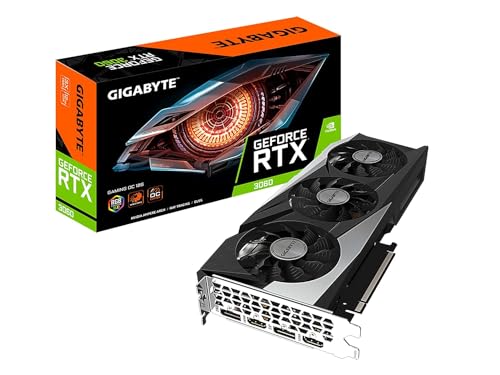
The RTX 3060 12GB is the editing market’s favourite accident. NVIDIA gave this card 12GB of GDDR6 across a 192-bit bus — more memory, on a wider path, than several of its own successors — and editors noticed what gamers initially shrugged at: for timeline work, that buffer is the feature. Twelve gigabytes holds 4K timelines of ordinary complexity without the swapping tax, gives effects room to breathe, and keeps preview quality where the editor set it. GIGABYTE’s Gaming OC version adds the three-fan Windforce cooler, the most substantial thermal solution on any 3060 in this guide, which matters during the long renders and exports where a card works at full tilt for extended stretches rather than in gaming’s bursts.
The generational terms are clear-eyed. Its NVENC block belongs to its era — fully hardware-capable for the delivery codecs of that period and still the workhorse behind countless daily exports, without the newest formats the current generation accelerates. Its CUDA hardware is likewise a generation behind the 5060 cards, which shows in effects-heavy work as a difference of degree, not of kind. Neither point disturbs the buying case, which is arithmetic: previous-generation pricing for a 12GB frame buffer from a major board partner. An editor whose footage is 4K but whose timelines are honest — cuts, colour, titles, a sensible effects stack — will find this card refuses to be the problem, and that is the highest praise an editing card can earn at its price.
- Memory: 12GB GDDR6, 192-bit bus
- Encoder: NVENC hardware of its generation
- Cooling: 3X WINDFORCE fan system
- Revision: REV2.0 board (GV-N3060GAMING OC-12GD)
Strengths
- 12GB across 192 bits is the value VRAM specification of its generation.
- Three-fan cooling suits long renders and export sessions.
- Previous-generation pricing for a still-complete editing toolset.
Trade-offs
- NVENC of its era lacks the newest codec accelerations.
- CUDA performance trails the current-generation cards here.
- Large cooler needs a case with the length for it.
Best for: 4K editors with ordinary-complexity timelines and a value brief. Skip it if your exports depend on the newest delivery codecs in hardware — that requirement points to the 5060 Ti.

MSI GeForce RTX 3060 Ventus 2X 12G OC — Best Compact 12GB
Everything said about the 3060’s memory system applies here unchanged — 12GB of GDDR6, with MSI’s listing stating 15Gbps memory across the 192-bit bus and a boost clock of 1807MHz — because the silicon and its frame buffer are the shared heart of both boards. What changes is the body around it. The Ventus 2X is MSI’s twin-fan, no-frills execution: shorter, simpler, and aimed at the smaller workstation cases and compact editing builds where GIGABYTE’s three-fan board cannot go. Editing machines live in odd places — under desks in home studios, in small towers carried between locations — and a 12GB card that fits those places is not a lesser 3060, it is the available one.
The trade is thermal headroom, stated plainly: two fans move the same silicon’s heat with less margin than three, so under the longest renders the Ventus will run its fans harder to hold the same clocks. For the editing workloads this card is bought for — timelines, colour, exports of ordinary length — that margin rarely becomes the story. The NVENC and CUDA profile matches its GIGABYTE sibling exactly, being a property of the chip rather than the cooler. Choose between the pair the way this site always advises with shared silicon: measure the case, weigh the maker’s support, check the week’s prices, and do not pay a premium hunting a performance difference the shared chip does not contain.
- Memory: 12GB GDDR6, 15 Gbps, 192-bit bus
- Boost clock: 1807MHz (as stated in the listing title)
- Encoder: NVENC hardware of its generation
- Cooling: Ventus 2X twin-fan design
- Outputs: HDMI and DisplayPort
Strengths
- The full 12GB editing buffer in a compact twin-fan board.
- Stated memory speed and boost sit at the healthy end of the range.
- Fits the small workstation cases its sibling cannot.
Trade-offs
- Less thermal margin than the three-fan GIGABYTE under long renders.
- Same generational NVENC and CUDA limits as every 3060.
- No-frills finish, in line with the Ventus brief.
Best for: compact editing builds that still need a real 12GB buffer. Skip it if your case fits the GIGABYTE and your renders run for hours — the third fan earns its keep there.

ASUS TUF Gaming GeForce RTX 5060 8GB — Best Current-Gen 8GB
The RTX 5060 makes an editing case built on currency rather than capacity. Its NVENC block is the current generation — the newest codec accelerations, available in hardware — and its CUDA hardware is likewise current, with 8GB of GDDR7 whose bandwidth is the fastest per gigabyte in this guide. For an editor whose timelines are short-form and whose resolution is 1080p or light 4K — social content, event highlights, straightforward single-camera work — that combination is arguably better matched than the 3060 pair’s larger, older buffer: the exports are current, the effects acceleration is current, and the 8GB ceiling never enters a light timeline’s life.
The ceiling is nonetheless the section’s duty to state. Eight gigabytes is where complex 4K timelines begin their negotiations, and an editor whose work grows — more cameras, more layers, heavier colour — will meet it sooner on this card than on the 12GB boards above, let alone the 16GB leader. ASUS’s TUF construction is the heavy-duty entry in this line-up, a 3.1-slot cooler with the line’s durability-first component choices, which suits a workstation that renders daily and is expected to do so for years; it also demands a case with room for it. Read this pick as the present tense of editing hardware at a mid tier: newest tools, honest capacity, and a clear instruction to buy the tier above if your timelines are already outgrowing the description in this paragraph.
- Memory: 8GB GDDR7
- Encoder: current-generation NVENC hardware
- Interface: PCIe 5.0
- Outputs: HDMI and DisplayPort 2.1
- Format: 3.1-slot TUF Gaming OC Edition board
Strengths
- Current NVENC generation for the newest export codecs.
- GDDR7 bandwidth is the fastest memory here per gigabyte.
- TUF construction suits daily-render workstation duty.
Trade-offs
- 8GB is the ceiling complex 4K timelines will find.
- A 3.1-slot cooler excludes compact workstation cases.
- Costs more than the 12GB pair while carrying less memory.
Best for: short-form and light-4K editors who value current encoder hardware. Skip it if your timelines are already layered and growing — capacity, in the 3060 pair or the 5060 Ti, is the wiser spend.
PNY NVIDIA RTX A400 4GB — Best Professional Small-Form
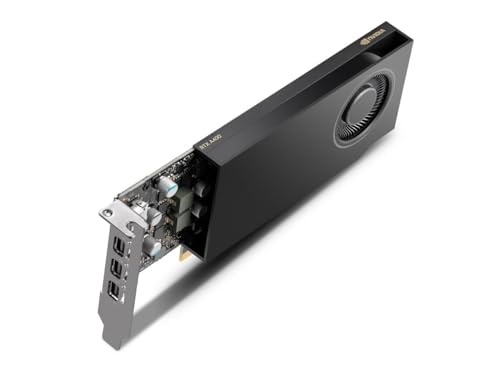
The A400 is the one card in this guide that was born in the professional line, and its specification reads like a different profession’s priorities — because it is. PNY’s board carries 4GB of GDDR6 and 768 CUDA cores, both stated in the listing title, in a single-slot, low-profile body. That body is the headline: a card that occupies one slot and half a height fits the compact workstations, rack-adjacent machines and small towers where no gaming board in this guide can physically go, and it sips the kind of power those machines are built around. For an editing brief defined by the machine — a small office workstation that cuts straightforward footage, drives professional displays and must simply exist within a tight chassis — the A400 is not the weak card in the list. It is the only applicable one.
Its editing terms need the same honesty as every pick here. Four gigabytes is a light timeline’s buffer: 1080p work and modest 4K projects of low complexity are its territory, and layered effects will find its ceiling quickly. The 768 CUDA cores accelerate what editing applications delegate, at a scale proportioned to that same light brief. What the professional line offers in exchange is its own ecosystem — PNY is NVIDIA’s professional board partner, and the card is built and supported as workstation equipment rather than gaming hardware. Buyers whose environment values that provenance, or whose case admits nothing larger, are this card’s constituency, and for them the comparison with gaming boards is not unflattering — it is irrelevant.
- Memory: 4GB GDDR6
- CUDA cores: 768 (as stated in the listing title)
- Format: single slot, low profile
- Maker: PNY professional workstation board (VCNRTXA400-SB)
- Interface: PCI Express
Strengths
- Single-slot, low-profile body fits machines nothing else here can.
- Professional-line provenance and support through PNY.
- Modest power appetite suits compact workstation supplies.
Trade-offs
- 4GB limits it to light timelines and modest projects.
- CUDA capacity is the smallest in this guide.
- Its value case collapses if a gaming board fits the machine.
Best for: compact professional workstations cutting straightforward footage. Skip it if your case fits a GeForce — the 3060 pair offers three times the memory for the general editing brief.

MSI GeForce RTX 3050 Ventus 2X 6G OC — Best Entry Point
The RTX 3050 6GB closes the guide as the honest floor of NVIDIA editing: a card whose NVENC block and CUDA hardware are genuinely present and genuinely useful, attached to a frame buffer that defines its territory. Six gigabytes of GDDR6 — MSI’s listing states 14Gbps memory on a 96-bit bus and a 1492MHz boost clock — serves the editing of 1080p timelines and light 4K projects without drama: cuts, titles, ordinary colour work, and hardware-accelerated exports of the codecs its encoder generation covers. For a first editing machine, a student build, or a second workstation that handles overflow and proxies, that is a complete and respectable brief.
The limits arrive with ambition, and they arrive as the guide’s framework predicts: VRAM first. Layered 4K timelines will find 6GB quickly, and no encoder quality compensates for a buffer that cannot hold the work. The card’s gaming-line origins also show in its narrow memory bus, which keeps its CUDA assistance at entry scale. None of this makes the pick a compromise to apologise for — it makes it a priced instrument, the cheapest seat in this guide at the table where NVENC and CUDA do the serving. Editors who outgrow it will do so for exactly one reason, capacity, and the upgrade path up this page is written in memory sizes: 12GB, then 16GB, as the timelines demand.
- Memory: 6GB GDDR6, 14 Gbps, 96-bit bus
- Boost clock: 1492MHz (as stated in the listing title)
- Encoder: NVENC hardware of its generation
- Cooling: Ventus 2X twin-fan design
Strengths
- Real NVENC exports and CUDA assistance at the guide’s entry price.
- Compact board fits small and older workstation cases.
- Entirely sufficient for 1080p timelines and light projects.
Trade-offs
- 6GB is the first ceiling a growing 4K practice will meet.
- A 96-bit bus keeps its assistance at entry scale.
- Its encoder generation predates the newest codec support.
Best for: first editing machines, students and light 1080p workflows. Skip it if 4K timelines are already your daily work — start at the 3060 pair and save yourself the intermediate purchase.
How Does Your Footage Change the Card You Need?
Editors do not edit “video” in the abstract; they edit specific footage, and the footage’s character moves the right card up and down this guide’s table. Start with resolution, the obvious axis: 1080p timelines are the gentle brief every card here accepts, 4K timelines are where the memory tiers begin their sorting, and multicam 4K — several angles held live at once — is the workload that makes the 5060 Ti’s 16GB stop looking like headroom and start looking like the specification. Then consider the codec the camera delivered. Heavily compressed delivery-style codecs ask the machine to work hard simply to show each frame, and while that burden falls across the whole system, a card with modern media hardware and a buffer that can hold decoded frames generously will make scrubbing feel like a different activity from the same timeline on a starved card.
Effects change the answer again. A timeline of cuts and titles is mostly a memory-and-playback problem, which is why the 12GB pair serves it so well. A timeline carrying colour work on every clip, stabilisation, scaling between resolutions and stacked effects is a compute problem wearing a memory problem’s coat — the CUDA side of the guide’s framework — and it rewards the current-generation cards disproportionately. The practical method is to describe your own timeline honestly in one sentence before shopping: resolution, camera count, effects density, export frequency. That sentence, matched against the sections above, picks the card. An editor who cannot write the sentence yet — a beginner whose work is still forming — should buy toward capacity, because timelines grow in exactly the directions that tax memory first.
Export patterns complete the picture. The editor who renders a final master once a week experiences NVENC as a convenience. The editor who exports daily — versions for clients, platforms, archives, each with its own delivery format — experiences the encoder’s generation as billable time, and for that editor the current-generation NVENC in the 5060 cards may outweigh a memory tier, provided the timelines themselves fit the buffer. This is the one place the guide’s ranking order legitimately inverts: capacity first for the timeline you have, encoder first only when the exports are the business. Both orders are printed in this guide deliberately, because both editors are real.
Should an Editor Choose the GeForce Line or the Professional Line?
NVIDIA sells two families that an editor will meet, and the A400’s presence in this guide makes the comparison unavoidable. The GeForce line, five of the six cards here, is built for the consumer market and priced by its brutal competition: enormous capability per unit of money, gaming-first marketing, and hardware that editing applications exploit thoroughly. The professional line, represented by PNY’s A400, is built for workstation environments: compact and specialised form factors, a support and certification ecosystem aimed at professional deployments, and pricing that reflects that world rather than the gaming market’s. Neither family is the “editing” family. They are answers to different organisational questions.
The independent editor’s arithmetic usually lands on GeForce, and this guide’s table shows why: the frame buffers and encoder generations that editing actually consumes are larger and newer, per unit of money, in the gaming line. The professional card wins its specific contests — the compact workstation that admits only a single-slot, low-profile board; the environment where the professional support story is a requirement rather than a preference; the machine whose job is driving professional displays with light editing attached. A buyer should therefore start from the machine and the timeline, not the family name. If a GeForce fits the case and the work, its value case is overwhelming. If it does not fit, the A400 is not a consolation — it is the only card in the conversation, which is the strongest position any product can hold.
How Do Timeline Habits Change Which Specification Matters Most?
Two editors can own the same footage and need different cards, because their habits tax different hardware. The editor who builds timelines in long, layered passes — colour first, then effects, then titles, previewing constantly — lives inside the frame buffer, and for that editor the guide’s capacity ranking is not advice but description: the 16GB and 12GB tiers are where their working style physically fits. The editor who cuts fast and flat, assembling from selects with minimal layering and exporting many small versions, lives inside the encoder instead, and can rationally trade a memory tier for the current NVENC generation in the RTX 5060 — provided the timelines stay as flat as the habit promises. The colourist’s cousin, the effects-heavy editor, lives in the CUDA column, stacking the operations that the card accelerates, and should read the guide’s third-ranked specification as their first.
None of these habits is more professional than the others; they are simply different distributions of the same three taxes. The diagnostic value of naming yours is that it converts the guide’s table from a ranking into a mirror. An editor who recognises their week in the layered-preview description should not be talked into the 8GB current card by its newer encoder, and an editor who exports forty versions a week should not be shamed out of prioritising NVENC by a capacity-first table. The framework’s order — VRAM, NVENC, CUDA — is the average editor’s order. Your order is the one your timeline keeps. Buy for the tax you actually pay.
What Should an Editor Check in the First Week with a New Card?
Verify the three promises the purchase made, in the order the guide ranked them. First, the buffer: open the largest real project you own, not a test file, and work it the way you work — scrub the dense sections, stack the effects you actually use, and watch whether the stutter that prompted the purchase has left. Second, the encoder: export a finished piece twice, once through the software path and once with hardware encoding selected, and confirm the hardware path is both faster and engaged — the checkbox archaeology in the setup section exists because this verification so often reveals the encoder was never switched on. Third, the compute: render the effects-heavy passage that used to make you reach for a drink, and time it against your memory of the old card, because that passage is the honest benchmark of your practice.
Two quieter checks complete the week. Watch the card’s behaviour across a long render for the thermal story — a workstation that grows louder and slower across an hour is reporting a case airflow question while it is still cheap to answer. And confirm the displays: both screens driven from the card, the colour-critical monitor on the primary output, no mixed-path oddities in the preview. A card that passes its project’s test, engages its encoder, shortens its render passage and drives its screens without theatre has justified its tier. The rest of its review will be written by the next two years of deadlines, which is the only peer review an editing card ultimately answers to.
How Do the Six Editing Picks Compare Side by Side?
| Pick | VRAM | NVENC generation | Format | Honest role |
|---|---|---|---|---|
| ASUS Dual RTX 5060 Ti | 16GB GDDR7 | Current | 2.5-slot Dual | Layered 4K timelines, regular exports |
| GIGABYTE RTX 3060 Gaming OC | 12GB GDDR6, 192-bit | Its generation | 3X WINDFORCE | 4K timelines of ordinary complexity |
| MSI RTX 3060 Ventus 2X | 12GB GDDR6, 192-bit | Its generation | Twin-fan Ventus | The same brief in compact cases |
| ASUS TUF RTX 5060 | 8GB GDDR7 | Current | 3.1-slot TUF | Short-form and light 4K, current codecs |
| PNY RTX A400 | 4GB GDDR6 | Professional line | Single slot, low profile | Compact workstation, light projects |
| MSI RTX 3050 Ventus 2X | 6GB GDDR6, 96-bit | Its generation | Twin-fan Ventus | 1080p timelines, entry editing |
The table is ordered the way the guide argues: by the frame buffer, with the encoder’s generation as the second column because exports are the second deadline in an editor’s life. Two patterns deserve a look. The 3060 pair sits above the newer RTX 5060 despite its age, because 12GB serves timelines in a way 8GB cannot argue with — capacity outranks currency until the timeline is light enough that currency wins, which is the 5060’s exact brief. And the A400’s row is not a failed GeForce row; it is a different profession’s answer, sized for machines the other five cannot enter.
How Should You Set Up an NVIDIA Card for Editing Work?
Begin with the driver branch decision, because NVIDIA maintains the distinction for a reason: creators are generally served by the driver line aimed at creative applications, whose releases are validated against the editing and production tools rather than the week’s games. Install the current release of the appropriate branch from NVIDIA directly, reboot, and then tell your editing application to use the card — most applications expose hardware acceleration settings for both the timeline’s processing and the export path, and the NVENC encoder only accelerates exports when the export settings actually select hardware encoding. That last checkbox is the most commonly missed step in the whole setup: the encoder can sit idle for months behind a software-export default while its owner blames the card.
Memory hygiene is the second discipline. A timeline’s appetite grows with every layer, so give the card its best chance: keep the editing application’s preview settings honest rather than maximal, close the browser’s hardware-accelerated tabs during heavy renders, and if a large project begins to stutter, render previews in sections instead of demanding the whole timeline at full quality at once. None of these habits substitute for VRAM — the table above exists because they do not — but they stretch a given buffer further than most editors expect. Finally, connect the primary monitor to the card, not the motherboard, and if a second screen serves as a full-screen preview display, drive it from the card as well; mixed display paths complicate exactly the colour-critical work the second screen was bought for.
How Should an Editor Plan the Upgrade Path Between These Cards?
Editing hardware is rarely bought once; it is climbed, and the rungs of this guide were ordered with the climbing in mind. The natural first rung is capacity adequacy for today’s footage — for most editors beginning in 1080p or light 4K, that is the RTX 3050’s honest floor or, more durably, one of the 12GB 3060 boards, whose buffer postpones the next purchase the longest per unit of money. The second rung is reached when the timelines themselves announce it: scrubbing that stutters despite honest preview settings, effects that force rendering before they can be judged, a frame buffer the software reports full. Those symptoms, not a calendar and not a launch event, are the upgrade signal, and they point at the 5060 Ti’s combination of the largest buffer and the current encoder.
Two habits make the climbing cheaper. The first is buying the case and power supply one size beyond the current card, so that the next card is a card purchase rather than a rebuild — the 3.1-slot TUF and the three-fan GIGABYTE in this guide both reward a buyer who left them room. The second is keeping the retired card in service: an editor’s previous NVIDIA card remains a perfectly good citizen in a second machine, a render-and-export box, or a streaming PC, because NVENC and CUDA do not expire when a newer card arrives. The workstation that grows this way spends its money in the order the work demands — capacity, encoder, compute — which is, not coincidentally, the order this guide ranked the cards in the first place.
What Mistakes Do Editors Make When Choosing a Graphics Card?
The governing mistake is shopping with a gaming ranking. Gaming tables sort by frame rates in titles the editor may never open, and they systematically undervalue the two things editing lives on — frame buffer capacity and encoder generation — because games stress them less. The second mistake is the reverse snobbery: assuming a professional-line card is automatically the better editor’s card, when the A400 in this very guide carries a third of the memory of a cheaper GeForce. Professional provenance answers professional requirements; it does not enlarge a frame buffer. Third is ignoring the export path — buying CUDA strength and then exporting through a software default that never touches NVENC.
Fourth, editors underestimate their own growth: the card bought for 1080p short-form work meets next year’s 4K client project without negotiation, and capacity is the specification that growth taxes first. Fifth is blaming the card for a bottleneck that lives in storage or system memory — a timeline starved of fast footage storage stutters identically to a VRAM-starved one, and the honest diagnostic is to watch which resource actually saturates. Buy for the work, measure the work, and let the gaming tables govern the gaming machines.
What Else in the Workstation Can Masquerade as a Card Problem?
Editors blame graphics cards for three other components’ sins often enough that a buyer’s guide should name them. Storage is the first: a timeline reading footage from slow or nearly full storage stutters in a rhythm indistinguishable from VRAM starvation, and the diagnostic is to watch which resource saturates during the stutter — if the card’s memory is half empty while the drive is pinned, the card is innocent. System memory is the second: editing applications hold their own caches in RAM, and a machine starved there will page and crawl no matter what card it carries. The processor is the third, owning the tasks no card accelerates — much of the interface, many effects’ setup work, and any export path the user forgot to switch to hardware encoding.
The reason this section belongs in a card guide is sequencing. A workstation upgraded in the wrong order teaches its owner that upgrades do not help. Check the footage storage’s speed and fullness, confirm the system memory is proportioned to the projects, and verify the export settings actually engage NVENC, before concluding the card is the ceiling. If those three pass inspection and the timeline still stutters under its own weight, the diagnosis really is the frame buffer — and the table above, ordered by exactly that specification, becomes the shopping list it was designed to be.
How Should an Editor Think About a Second Monitor and Colour Work?
The graphics card’s least discussed editing job is feeding the screens the editor judges by, and at the level this guide serves it deserves its paragraph. A two-screen editing desk — timeline and bins on one display, full-screen preview on the other — asks the card for two clean, stable outputs and nothing exotic, and every card in this guide answers that ask through the HDMI and DisplayPort sockets in its spec box. What matters is the discipline of the arrangement: both screens on the card rather than split across the motherboard, the colour-critical display on the primary output, and the operating system’s display settings confirming each panel at its native resolution. Mixed paths and a preview screen fed from integrated graphics are reliable sources of the small inconsistencies — a preview that lags the timeline, a colour shift nobody can source — that editors waste afternoons hunting through their software.
Colour work raises the stakes on the same arrangement without changing its rules. The card’s role in colour is transport and acceleration: it carries the image to the panel and accelerates the processing the application performs, while the panel itself and its calibration own the truth of what the colours are. A buyer tempted to spend a card tier on colour grounds alone should redirect that money at the monitor first — the finest card in this guide cannot correct a panel that cannot show the work — and then return for the card whose buffer fits the timelines the colour work lives in. In that order, the desk becomes an instrument. In the reverse order, it becomes an expensive rumour.
Final Recommendation
Rank your own work the way this guide ranked the cards: capacity, encoder, compute. If your timelines are 4K and layered, the RTX 5060 Ti 16GB is the complete answer and the card we would put in a new editing workstation first. If they are 4K and honest, the RTX 3060 pair — GIGABYTE for roomy cases, MSI for compact ones — remains the value purchase of this entire category, a generation after its launch, on the strength of 12GB that newer cards forgot to match. The RTX 5060 serves the current-codec, light-timeline desk; the A400 serves the small professional machine; the RTX 3050 serves the beginning. An editing card is judged in the exports it shortens and the stutters it prevents, and on that evidence the 5060 Ti’s combination of the biggest buffer and the newest encoder is where this guide’s own workstation money goes.
How Does an Editing Card Earn Its Keep on Deadline Day?
Every specification in this guide becomes biography on the day a client is waiting. The frame buffer is the difference between a final revision rendered calmly at full quality and a timeline that must be simplified before it can be exported at all. The encoder is the difference between an export that finishes while the editor writes the delivery email and one that holds the machine hostage past the hour it was promised. The CUDA hardware is the difference between a colour pass judged in real time and one judged in renders, with the client’s patience as the rendering queue. Editors who have lived a deadline on an undersized card do not need this guide’s framework explained — they have felt each of its three taxes collected in a single afternoon, in order.
That is why the guide’s closing advice to working editors is to buy for deadline day rather than for the average Tuesday. The average day forgives every tier in this table; the deadline audits them. A card one tier above the average day’s needs is not indulgence — it is the insurance the schedule pays out in the only currency clients accept, which is the work arriving when it was promised. Size the buffer for the largest timeline you plausibly owe anyone this year, keep the encoder current if versions are your business, and let the average Tuesdays enjoy the headroom. They will not complain.
What Is the Shortest Honest Advice in This Guide?
Describe your timeline in one sentence — its resolution, its layers, its export rhythm — and buy the smallest card in this table whose frame buffer holds that sentence without negotiation, with the newest encoder your remaining budget reaches. Editors who shop by that sentence rarely return cards. Editors who shop by gaming charts return them on deadline day, which is the most expensive classroom in computing. The sentence costs a minute. The classroom costs a client.
Why Does This Guide Rank a Previous Generation Above a Newer Card?
Because editing is the discipline where the generational script flips. Gaming rewards the newest architecture almost without exception, so a 5060 outranking a 3060 is that market’s reflex. Editing rewards the resource the timeline consumes, and NVIDIA’s own history handed the older card the larger helping of it: twelve gigabytes on a wide bus, against the newer mid-tier’s eight. The result — a previous-generation pair sitting above a current-generation card in an honest editing table — looks like an error only to eyes trained by gaming rankings. To an editor who has watched a timeline stutter on a fast, small-buffered card while a slower, larger one sailed, the table reads as simple reportage. Buy the resource your work consumes. In editing, that resource is memory, and memory does not care what year it was soldered in.
How Should You Spend the First Evening with a New Editing Card?
Install the creator driver branch, reboot, open your largest real project, and perform the three verifications from the first-week section while the return window is still a formality: scrub the dense passage, export the finished piece through the hardware path, and render the effects stack that used to send you for coffee. Record the settings that worked — driver version, acceleration toggles, export preset — in the project folder where future-you will look for them at midnight. An editing card verified against real work in its first evening becomes part of the studio’s furniture, trusted and unthought-of, which is the highest state a tool can reach. An editing card installed on hope becomes a recurring meeting. Choose the furniture.
What Is the One-Sentence Version of This Guide?
An editing card is bought in the order the work taxes it — frame buffer first, because timelines live there; encoder second, because deadlines leave through it; compute third, because effects are accelerated by it — and the six cards above are simply that sentence at six budgets, from the 5060 Ti’s complete answer down to the 3050’s honest floor and the A400’s specialised one. Every section in this guide is an unfolding of those three taxes: the footage that levies them, the habits that weight them, the workstations that masquerade as them, and the deadlines that collect them. An editor who can name which tax their own week pays most heavily does not need this guide’s ranking at all — they need its table, a tape measure for the case, and the discipline to buy the tax they actually owe.
Frequently Asked Questions
How much VRAM does video editing actually need?
For 1080p timelines of ordinary complexity, 6 to 8GB serves well. For 4K timelines, 12GB is the comfortable working figure and 16GB is the size that stops entering the conversation. Layered effects, multicam work and heavy colour stacks push every one of those figures upward, which is why this guide ranks capacity first and treats it as the growth-proofing specification.
What does NVENC do that the main card does not?
NVENC is a dedicated hardware block whose only job is encoding finished video into delivery formats. Because it is separate silicon, exports accelerated by it do not compete with the timeline for the card’s main compute — the export proceeds in hardware while the machine stays usable. Its generation decides which codecs it can accelerate, which is why newer blocks matter to editors who export in current formats daily.
Is a professional card like the RTX A400 better for editing than a GeForce?
For the right machine, yes; as a general claim, no. The A400 brings professional-line provenance and a single-slot, low-profile body that fits compact workstations nothing else here can enter. But it carries 4GB of memory, and a 12GB GeForce will serve a complex timeline better in an ordinary tower. Match the card to the machine and the timeline, not to the prestige of the line.
Why do two RTX 3060 cards appear in an editing guide?
Because board partners are a real purchasing variable and the 3060’s 12GB memory system is this category’s value centre. The GIGABYTE and MSI boards share the chip and the buffer; they differ in cooler size and case fit. Listing both, with the difference stated, reflects the decision an editor actually faces at checkout.
Can I edit 4K video on the RTX 3050 6GB?
Yes, within limits that are worth naming: light 4K projects — single camera, modest layers, ordinary colour — are within its brief, and its NVENC block still accelerates the export. Layered or multicam 4K work will find its 6GB ceiling quickly. It is an entry point with an honest horizon, and the guide’s 12GB pair is the step up when the horizon arrives.
Related Guides
Pair the card with a quiet desk from Best Low Power Graphics Cards for Gaming if the workstation shares a room with its editor, cool the build with Best Aftermarket CPU Coolers, or plan the full tower with Best CPU AIO Coolers.
Related guides
- Best 3.0 Qualcomm Quick Chargers: QC 3.0 Adapters That Still Earn Their Outlet
- Best 3D Mechanical Engineering Laptops: Certified Workstations for CAD and Simulation
- Best Tattoo Printers: Thermal Stencil Machines for Clean, Lasting Transfers
- Best Battery NiMH Chargers: Six Units That Understand the Chemistry



[…] to Best NVIDIA Graphics Cards for Video Editing to see what the next tier up does for creator work, drop the power requirements with Best Low Power […]