What's inside
- Key Takeaways
- Quick Picks
- How Did We Sort These 4K Gaming Cards into Two Groups?
- What Does Native 4K Actually Demand from a Card?
- Which Cards Render 4K Natively, and Which Upscale to It?
- How Does Ray Tracing Change the 4K Calculation?
- How Should You Choose Between the Three RX 9070 XT Boards?
- What Should the Rest of a 4K Build Look Like?
- How Do Native and Upscaled 4K Cards Compare Directly?
- How Do DLSS and FSR Differ When the Target Is a 4K Screen?
- How Should You Set Up a PC for 4K Gaming?
- What Mistakes Do 4K Graphics Buyers Keep Making?
- How Long Will a 4K Card Stay a 4K Card?
- Which 4K Display Are You Actually Feeding?
- What Should You Verify in the First Week with a 4K Card?
- Final Recommendation
- How Should a 4K Buyer Read Reviews Without Being Misled by Them?
- What Is the One-Sentence Version of This Guide?
- Frequently Asked Questions
- Related Guides
As an Amazon Associate I earn from qualifying purchases. This post may contain affiliate links at no extra cost to you.
widgetverdict.com is reader-supported. When you buy through links on our site, we may earn an affiliate commission.
Where to buy: the six cards below are Amazon listings, each linked from the quick picks table to the verified listing itself. At this end of the market, check the exact board name on the listing before ordering — one word separates very different cards.
Most guides to the best graphics cards 4k gaming quietly commit a fraud, and this one begins by refusing it. Not every card with 16GB of memory and a DisplayPort 2.1 socket is a 4K card. The six listings in this guide divide into two honest groups, and the division is stated here, in the introduction, rather than buried in a footnote. In the first group stand four genuine native-4K cards: MSI’s RTX 5080 and three Radeon RX 9070 XT boards from ASUS, ASRock and GIGABYTE. These render games at 3840×2160 as their home resolution, with settings headroom to spare. In the second group stand two excellent 1440p cards — the RTX 5060 Ti 16GB and the RX 9060 XT 16GB — whose route to a 4K screen runs through upscaling: DLSS on the NVIDIA card, FSR on the AMD one, rendering internally at a lower resolution and reconstructing a 4K image. That route is legitimate, often beautiful, and sometimes the smart purchase. It is not the same product as a native 4K card, and it is not sold as one anywhere in this guide.
Why include the second group at all? Because a large share of 4K displays are televisions, and a large share of 4K gaming happens from a couch, at distances where a well-upscaled image and a native one are genuinely hard to separate — while the price difference between the groups is not hard to separate at all. A buyer building for a desk monitor at arm’s length should stay in the first group and treat the second as a category error. A buyer building for a living-room TV, whose library leans on the many titles with good upscaling support, may rationally choose the second group and spend the difference elsewhere. What neither buyer should do is purchase across the boundary by accident, which is what happens when guides call everything a 4K card. Read your group first; the picks within it are ranked for you.
Key Takeaways
- Native 4K in this guide means four cards only: the RTX 5080 and the three RX 9070 XT boards.
- The RTX 5060 Ti 16GB and RX 9060 XT 16GB are 1440p cards that reach a 4K screen through DLSS or FSR upscaling — a valid route, honestly labelled.
- All six cards carry 16GB of memory; at 4K, capacity stops being the question and rendering power becomes it.
- The RTX 5080’s GDDR7 at 30Gbps is the fastest memory system here and suits high-refresh 4K monitors.
- The three 9070 XT boards differ mainly in cooler and stated clocks — pick on those, not on imagined silicon differences.
- Viewing distance decides the upscaling question: couch and TV forgive, desk and monitor interrogate.
Quick Picks
| Pick | Badge | Why it is here |
|---|---|---|
| MSI GeForce RTX 5080 16G Gaming Trio OC | Best Native 4K Overall | GDDR7 bandwidth, the TRI FROZR cooler and the strongest native 4K headroom in the guide. |
| ASUS Prime Radeon RX 9070 XT 16GB | Best Native 4K Value | RDNA 4 power in a 2.5-slot Prime board with Axial-tech cooling and current display outputs. |
| ASRock Radeon RX 9070 XT Challenger 16GB | Highest Stated Boost | A 2970MHz stated boost clock headline on the same RDNA 4 foundation. |
| GIGABYTE Radeon RX 9070 XT Gaming OC 16G | Best 9070 XT Alternative | GIGABYTE’s Gaming OC treatment of the 9070 XT for buyers who prefer that board family. |
| ASUS Dual GeForce RTX 5060 Ti 16GB | Best Upscaled 4K — NVIDIA | A 1440p card whose DLSS path to a 4K TV is the strongest in its class. |
| ASUS Dual Radeon RX 9060 XT 16GB | Best Upscaled 4K — AMD | The FSR counterpart: 16GB, a compact Dual cooler and an honest 1440p heart. |
How Did We Sort These 4K Gaming Cards into Two Groups?
The grouping rule was rendering, not marketing. A card belongs to the native group if its design target — the resolution its silicon, memory bandwidth and cooling were balanced around — is 2160p itself, so that a buyer can set a current game to native 4K with high settings and treat upscaling as an optional extra rather than a structural necessity. The RTX 5080 clears that bar with room to spare; the RX 9070 XT clears it as the defining purpose of AMD’s RDNA 4 flagship-class design. A card belongs to the upscaling group if its design target is 1440p — which both the RTX 5060 Ti and RX 9060 XT state plainly by their position in their own manufacturers’ ranges — so that 4K output depends on reconstructing the image from a lower internal resolution. Both techniques, DLSS and FSR in their current forms, are mature and often excellent. The distinction is about what you are owed: a native card owes you the pixels; an upscaling card owes you a convincing reconstruction, and in fast motion, fine detail and interface text, the debt occasionally shows.
Specifications in this guide come from the verified listing titles: memory size and generation, the RTX 5080’s stated 30Gbps GDDR7 speed and 256-bit bus, the ASRock card’s stated 2970MHz boost clock, slot widths, interface generations and output standards. Where partners do not state a figure for their board, we do not import one from a sibling product. Three of the native cards share one chip, and we say so openly in their sections: the choice among them is a choice of cooler, clocks as stated, size and maker, and pretending otherwise would be its own small fraud.
What Does Native 4K Actually Demand from a Card?
Four times the pixels of 1080p is the arithmetic everyone quotes; the lived reality is that 4K punishes three systems at once. The rendering cores must shade four times the fragments. The memory system must feed textures sized for the larger frame — which is why every card in this guide carries 16GB, and why the RTX 5080’s GDDR7 speed matters as much as its capacity. And the cooling must sustain all of it indefinitely, because 4K sessions in heavy games are marathons in which a card that boosts brilliantly for ten minutes and then throttles has told you its real specification. This is also why the upscaling group exists as more than a budget footnote: rendering internally at 1440p and reconstructing relieves all three systems at once, which is precisely why it works — and precisely why it is a different engineering proposition from doing the full work natively.
Refresh rate sharpens the demand further. A 4K television at 60Hz asks a card for sixty finished frames a second; a 4K gaming monitor at high refresh asks for well over double that, and at that point even the native group separates — the RTX 5080’s bandwidth advantage stops being a specification and becomes the experience. Buyers should name their display before their card: resolution, refresh rate, and the distance they sit from it. Those three facts, honestly stated, pick the group; the group then picks the shortlist of two or three boards, and the decision becomes small and manageable.
Which Cards Render 4K Natively, and Which Upscale to It?

MSI GeForce RTX 5080 16G Gaming Trio OC — Best Native 4K Overall
The RTX 5080 is the card in this guide that treats 4K the way lesser cards treat 1080p: as the default, not the achievement. Its 16GB of GDDR7 runs at a stated 30Gbps across a 256-bit bus, the widest and fastest memory arrangement here, and that bandwidth is the foundation of its native 4K authority — textures stream, frames complete, and the card’s substantial rendering hardware is fed rather than waited on. On top of the raw capability sits NVIDIA’s current software stack at full strength: the latest DLSS generation available as a bonus rather than a crutch, ray tracing hardware capable of carrying full lighting workloads at this resolution, and frame generation for the high-refresh 4K monitors that define the current top of the market. A buyer who wants one card to drive a 4K display through this console generation’s worth of PC releases starts, and very possibly ends, here.
MSI’s Gaming Trio treatment is the company’s established performance line, and the TRI FROZR cooler named in the listing title is a three-fan design built for exactly the sustained loads 4K imposes. Cards of this class are large and draw serious power by the standards of the rest of this site — the practical duties are case clearance, a power supply with genuine headroom, and airflow that gives a three-fan cooler something to work with. None of that is a criticism; it is the admission price of the native group, and the 5080 is simply its most complete expression in this guide. The OC in the name denotes MSI’s factory overclock over reference behaviour, the honest way to read every such badge: a modest, warrantied nudge, not a different card.
- Memory: 16GB GDDR7, 30Gbps, 256-bit bus
- Interface: PCIe 5.0
- Cooling: TRI FROZR three-fan design
- Role: native 4K, including high-refresh 4K monitors
Strengths
- The strongest native 4K headroom here, with bandwidth to match its cores.
- DLSS and ray tracing at full current-generation strength.
- A cooler designed for sustained loads rather than benchmark bursts.
Trade-offs
- The largest power and case demands in this guide.
- Its price sits in a different conversation from the other five cards.
- High-refresh 4K buyers must also budget for the monitor that justifies it.
Best for: desk-based 4K gaming at high settings, including high-refresh panels. Skip it if your 4K screen is a television used from a couch — the upscaling group may serve you identically for visibly less.

ASUS Prime Radeon RX 9070 XT 16GB — Best Native 4K Value
AMD built the RX 9070 XT as the RDNA 4 generation’s answer to a specific question — how much native 4K can be delivered before the price leaves the mainstream — and ASUS’s Prime board is the straightforward expression of that answer. Sixteen gigabytes of GDDR6, a 2.5-slot footprint that fits cases the flagship-class boards crowd out, Axial-tech fans from ASUS’s established cooler vocabulary, and HDMI and DisplayPort 2.1 outputs for current 4K displays. In traditional rasterised rendering, which still describes the majority of game libraries, the 9070 XT’s native 4K case is strong: this is not an upscaling card with ambitions, it is a card whose design resolution is 2160p, with FSR available on top for the heaviest titles or for chasing higher frame rates.
The Prime line is ASUS’s value tier, and the honest reading of that is component and finish choices a step below the company’s TUF and ROG boards — not a different GPU. The silicon is the same RDNA 4 design ASRock and GIGABYTE build on below, so the comparison among the three is about the cooler in front of you, the physical fit, and the maker you prefer to deal with. Two RDNA 4 notes deserve plain statement. AMD’s ray tracing improved markedly in this generation over its predecessors, narrowing a gap that used to decide this contest by itself. And FSR’s current upscaling is a genuine tool at 4K, where the reconstruction has the most source detail to work with. Buyers whose libraries centre on raster performance and who want native 4K without the 5080’s admission price will find this board the centre of the guide’s value argument.
- Memory: 16GB GDDR6
- Architecture: AMD RDNA 4
- Interface: PCIe 5.0
- Outputs: HDMI and DisplayPort 2.1
- Format: 2.5-slot, Axial-tech fan design
Strengths
- Genuine native 4K design at a mainstream-adjacent price.
- 2.5-slot format fits a wider range of cases than flagship boards.
- RDNA 4 closes much of the historical ray tracing gap.
Trade-offs
- GDDR6 bandwidth trails the RTX 5080’s GDDR7 arrangement.
- Prime-tier finish is functional rather than luxurious.
- Shares its silicon with two rivals here — differentiation is cooler-deep.
Best for: native 4K players who want the resolution without the flagship tax. Skip it if maximum ray tracing and the highest 4K frame rates are the goal — that brief belongs to the RTX 5080.

ASRock Radeon RX 9070 XT Challenger 16GB — Highest Stated Boost
ASRock’s Challenger edition of the 9070 XT leads its listing with a number the other two 9070 XT boards in this guide do not state: a 2970MHz boost clock. Boost clocks deserve their usual health warning — they describe the silicon’s willingness under favourable thermal and power conditions, not a guaranteed constant, and the differences between partner boards of one chip are measured in single-digit percentages. But the figure does tell you how ASRock has tuned this board: assertively, as an OC edition, on the same RDNA 4 architecture and the same 16GB of GDDR6 that define the card’s native 4K competence. The Challenger name is ASRock’s performance-value line, and the proposition matches the Prime above — the flagship-class chip, a serious cooler, and the savings taken in finish rather than in silicon.
Choosing among the three 9070 XT boards is therefore an exercise in reading coolers and dimensions rather than spec sheets. This card’s case is for buyers who like ASRock’s tuning choices and find the Challenger’s physical design the one that fits their build — physically, since these are substantial cards, and aesthetically, since a windowed case makes the choice visible for years. What no buyer should do is pay a large premium for any one of the three on a theory of hidden performance; the silicon ceiling is shared, and the honest differences are acoustic behaviour, size, stated clocks and the board partner standing behind the warranty. On those terms the Challenger is a fully credible native 4K purchase, and its stated boost headline is the most quotable of the three.
- Memory: 16GB GDDR6
- Architecture: AMD RDNA 4
- Boost clock: 2970MHz (as stated in the listing title)
- Interface: PCIe 5.0
- Edition: Challenger OC board
Strengths
- The highest stated boost clock among the guide’s 9070 XT boards.
- Same native 4K silicon and memory as its two same-chip rivals.
- ASRock’s value tuning keeps the flagship chip within reach.
Trade-offs
- Boost figures are ceilings under good conditions, not constants.
- Performance separation from the other 9070 XTs is small by design.
- GDDR6, like its siblings, concedes bandwidth to the RTX 5080.
Best for: native 4K buyers who favour ASRock’s tuning and fit. Skip it only if another 9070 XT board’s cooler or dimensions suit your case better — the silicon will not notice the difference.

GIGABYTE Radeon RX 9070 XT Gaming OC 16G — Best 9070 XT Alternative
GIGABYTE’s Gaming OC completes the trio of RDNA 4 boards, and its presence in this guide is a deliberate editorial choice: when three partners sell the same native-4K chip, a buyer’s guide that lists only one of them has hidden the actual decision. The Gaming OC line is GIGABYTE’s mainstream performance family — the same lineage as the Windforce coolers that appear elsewhere on this site — and the board carries the defining specification of its class: 16GB of GDDR6, PCIe 5.0, and the RX 9070 XT’s native 4K rendering brief. Its factory overclock, signalled by the OC in the name, follows the pattern of its rivals: a modest warrantied lift over reference behaviour, worthwhile and unglamorous in equal measure.
The practical case for this specific board is the case for GIGABYTE as a maker: a builder who has run Windforce or Gaming OC cards before knows the cooler’s acoustic character, the software that controls it, and the support channel behind it. In a three-way tie on silicon, those are not soft factors — they are the whole decision, and pretending a spec sheet can settle it would be dishonest. One shared caution applies to all three AMD boards here and belongs in this section as much as any: check the physical dimensions on the listing against your case, because native-4K coolers are built for sustained thermal work and are sized accordingly. The card that fits, from the maker you trust, at the price that is live this week, is the right 9070 XT; this GIGABYTE is one of three correct answers to the same question.
- Memory: 16GB GDDR6
- Architecture: AMD RDNA 4
- Interface: PCIe 5.0
- Edition: Gaming OC factory-overclocked board
- Role: native 4K gaming
Strengths
- Full native 4K silicon in GIGABYTE’s established Gaming OC dress.
- Cooler lineage with predictable behaviour for returning buyers.
- Completes a genuine three-way choice on the same chip.
Trade-offs
- No spec-sheet separation from the Prime or Challenger boards.
- Factory overclocks in this class are modest by nature.
- Large-cooler dimensions demand the same case check as its rivals.
Best for: native 4K buyers loyal to GIGABYTE’s cooler family. Skip it if a rival 9070 XT is meaningfully cheaper the week you buy — the experience will be the same silicon either way.

ASUS Dual GeForce RTX 5060 Ti 16GB — Best Upscaled 4K, NVIDIA Route
Now the boundary, crossed openly. The RTX 5060 Ti is a 1440p card — that is its design resolution, its place in NVIDIA’s range, and the resolution at which this guide recommends it without qualification. What earns it a seat in a 4K guide is the combination of its 16GB of GDDR7 and the current DLSS generation: render at 1440p or below, reconstruct to 2160p, and on a television viewed from a couch the result in supported games is frequently difficult to distinguish from native rendering, at a card price from a different world than the RTX 5080’s. The 16GB capacity matters enormously to this trick’s longevity, because upscaling does not shrink texture memory — the assets are still 4K assets — and the 16GB version of this card is the one that will not strangle on them.
ASUS’s Dual board is a compact 2.5-slot, twin-fan design with HDMI 2.1b and DisplayPort 2.1b outputs, sized for the smaller cases that living-room PCs often live in — which is exactly the habitat this pick imagines. The honesty conditions bear repeating in the pick’s own section: fine detail in fast motion, small interface text at desk distance, and titles with weak or absent DLSS support are where the reconstruction shows its seams. A competitive player on a 4K desk monitor should not buy this card for that desk. A player whose 4K screen is the family television, whose library is rich in DLSS titles, and whose alternative is not gaming at 4K at all, is looking at the most rational card in this entire guide — provided the purchase is made with both eyes on what it is.
- Memory: 16GB GDDR7
- Interface: PCIe 5.0
- Outputs: HDMI 2.1b and DisplayPort 2.1b
- Format: 2.5-slot Dual twin-fan board
- Role: native 1440p; 4K via DLSS upscaling
Strengths
- 16GB of GDDR7 gives upscaled 4K the texture room it requires.
- DLSS in its current form is the most mature upscaling here.
- Compact Dual format suits living-room and small-case builds.
Trade-offs
- Not a native 4K card — reconstruction seams show at desk distance.
- Games without DLSS support fall back to plain lower-resolution rendering.
- Its ray tracing at 4K output depends heavily on upscaling assistance.
Best for: couch-and-television 4K gaming in DLSS-supported libraries. Skip it for a desk monitor at arm’s length — the native group above is your shelf, and this card will not pretend to be on it.
ASUS Dual Radeon RX 9060 XT 16GB — Best Upscaled 4K, AMD Route
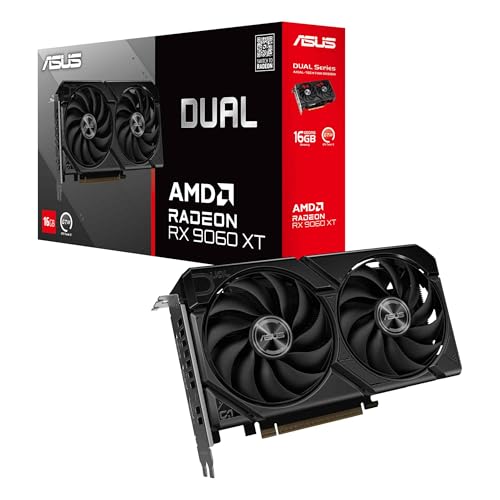
The RX 9060 XT is the AMD mirror of the pick above, and it deserves the same two-part description: a genuine 1440p card, and a credible upscaled route to a 4K screen. Its RDNA 4 architecture brings AMD’s current FSR upscaling and a much-improved ray tracing story over earlier Radeon generations, its 16GB of GDDR6 gives reconstructed 4K the texture capacity the technique demands, and ASUS builds it as a Dual — a 2.5-slot, Axial-tech twin-fan board with HDMI 2.1b and DisplayPort 2.1a outputs, compact enough for the small cases and living-room builds where a 4K television is the display. Within its own class, judged as a 1440p card, this is one of the strongest boards on the site; our 1440p monitor guide ranks it on exactly those terms.
The FSR-versus-DLSS question is the live one for this pick, and it deserves a straight answer rather than a tribal one. FSR’s advantage is breadth: it appears in a wide spread of titles and does not ask which brand of card you own. DLSS’s advantage, in its current generation, is reconstruction polish in the hardest scenes. At couch distance on a television, in the kinds of games this pick is bought for, the practical gap narrows considerably — which is why this card and the 5060 Ti sit side by side as equals of route, differing in ecosystem rather than in honesty. The same boundary condition applies with full force: this is not the card for native 4K at a desk, and no sentence in this section should be read as claiming otherwise.
- Memory: 16GB GDDR6
- Architecture: AMD RDNA 4
- Interface: PCIe 5.0
- Outputs: HDMI 2.1b and DisplayPort 2.1a
- Format: 2.5-slot Dual design with Axial-tech fans
- Role: native 1440p; 4K via FSR upscaling
Strengths
- 16GB capacity built for the texture load upscaled 4K carries.
- FSR support reaches a broad spread of game libraries.
- Compact Dual board fits the living-room builds this route suits.
Trade-offs
- Upscaled, not native — the distinction is visible at close range.
- GDDR6 bandwidth is a step below the 5060 Ti’s GDDR7.
- Ray tracing at 4K output leans on FSR assistance.
Best for: television-based 4K gaming and superb native 1440p from one card. Skip it if your 4K display is a desk monitor — the 9070 XT boards render that screen’s pixels outright.
How Does Ray Tracing Change the 4K Calculation?
Ray tracing is the workload that separates the native group internally, because traced lighting multiplies the cost of every pixel — and 4K has four times the pixels to multiply. In traditional rasterised rendering, the four native cards in this guide are close cousins in spirit: all render 2160p fluently, and the choice among them turns on bandwidth, cooler and price. Switch on full ray-traced lighting in a demanding title and the family resemblance fades. NVIDIA’s current hardware carries the longest ray tracing pedigree, and the RTX 5080 handles traced 4K with a composure the AMD boards match only with FSR’s help engaged. RDNA 4 narrowed this gap more than any previous Radeon generation — the 9070 XT is a genuinely capable ray tracing card, which its predecessors were not always able to claim — but narrowed is not closed, and a buyer whose library is a tour of ray-traced showcases should weight that in the 5080’s favour.
For the upscaling group, ray tracing rearranges the arithmetic again. A 5060 Ti rendering internally at 1440p traces a 1440p-sized problem, then lets DLSS carry the result to the 4K screen — which is why the upscaled route can produce ray-traced images that a native card at the same price could not attempt at all. This is the strongest version of the couch buyer’s case: not that reconstruction equals native rendering in the abstract, but that reconstruction plus ray tracing, at television distance, can be the more beautiful image per unit of money spent. The honest guide holds both truths at once. Native rendering is the higher fidelity. Upscaling is the higher leverage. Your seating distance and your library’s ray tracing habits decide which truth is yours.
Frame generation, the companion technology both ecosystems now offer in their own forms, deserves a measured sentence in the same discussion. By inserting generated frames between rendered ones, it raises the displayed frame rate — a genuine benefit for high-refresh 4K panels — at the cost of a small latency addition and occasional artefacts in fast motion. Competitive players, for whom latency is the product, tend to disable it. Story-driven players, for whom smoothness is the product, tend to love it. At 4K the technology matters more than at any other resolution because the rendered frames it multiplies are the most expensive ones in gaming. Treat it as a feature to audition in your own library rather than a specification to count, on any card in this guide that offers it.
How Should You Choose Between the Three RX 9070 XT Boards?
Since the silicon is shared, the choice is a reading exercise in everything except silicon — and it is worth doing slowly, because the card will be in your case for years. Begin with dimensions, the least exciting and most decisive figures: length, thickness in slots, and the clearance your case offers around both. The ASUS Prime states its 2.5-slot format in its title; the other two boards’ listings carry their own measurements, and a card that requires a case modification to install has failed its first test regardless of its cooler. Continue with the cooler designs themselves. All three are multi-fan performance coolers, but their fan counts, shroud designs and acoustic tuning differ in ways that show up across a long evening rather than a short benchmark — a buyer sensitive to noise should weight the cooler reviews of the specific board, not the chip.
Stated clocks are the third reading, with the health warning from the ASRock section kept in view: the Challenger’s stated 2970MHz boost is a ceiling under favourable conditions, and the practical difference between partner tunings of one chip is small enough that it should break ties, not make decisions. Fourth comes the maker’s ecosystem — the control software you will live with, the warranty process you hope never to use, the support reputation among owners of previous boards from the same line. These are soft factors with hard consequences in month twenty. Fifth and last comes price on the week you buy, which in a three-way tie on silicon is not a vulgar consideration but the rational one: a meaningful saving on one board is real money that the identical silicon in another box cannot argue with.
What this five-step reading refuses to do is manufacture a hierarchy the hardware does not contain. Review culture loves a winner; a buyer’s guide owes you a method instead. Run the three boards through dimensions, cooler, clocks, maker and price, in that order, and the board that survives is your 9070 XT — with the confidence that the other two would have served you nearly identically, because underneath the shrouds, they are the same RDNA 4 heart beating at the same 16GB of GDDR6. The relief in that is real: this is the rare purchasing decision in the guide that cannot be gotten badly wrong.
What Should the Rest of a 4K Build Look Like?
A 4K card exposes every weakness downstream of it, so the build around it deserves the same honesty as the card choice. The processor’s job at 2160p is often described as easy — the graphics card is so busy that the CPU coasts — and that is true in GPU-bound showcases and false in the simulation, strategy and open-world titles where the processor must build the world the card then draws four times over. A balanced 4K machine pairs its native-group card with a processor from a recent generation, not necessarily a flagship, and treats a genuinely old CPU as the next upgrade rather than a permanent foundation. System memory and storage follow the same proportionality: modern releases assume fast storage the way they assume 16GB of VRAM, and a 4K build reading its textures from elderly spinning disks will stutter in a rhythm its owner will misdiagnose as a card problem for months.
The power supply and case complete the picture, and at this tier they stop being accessories. Native 4K cards are the most demanding components in consumer PCs; the supply must be a quality unit with genuine headroom rather than a label’s optimism, and the case must move air in a straight, unobstructed line past a long, hot card. Builders sometimes resent this paragraph, because it converts a card purchase into a platform purchase. The resentment is understandable and the arithmetic is unmoved: the flagship experience is a system property. The upscaling group, it should be noted, relaxes every one of these demands by a step — one more entry in the ledger of what the couch buyer’s saving actually buys, and one more reason the two groups in this guide are a genuine choice rather than a ranking.
Finally, the display’s own settings belong to the build. A 4K television’s gaming mode, its per-input enhancement settings, and the console-era habit of leaving motion smoothing enabled can each quietly tax or smear the image the card worked to produce. Ten minutes in the panel’s menus — game mode on, processing off, the correct input labelling — is the cheapest image-quality upgrade in the entire 4K endeavour, and it is available to owners of every card in this guide equally, from the RTX 5080 down to the RX 9060 XT. The card renders the pixels; the display decides what the room sees. A serious 4K setup attends to both ends of the cable.
How Do Native and Upscaled 4K Cards Compare Directly?
| Pick | Memory | 4K route | Format | Display outputs |
|---|---|---|---|---|
| MSI RTX 5080 Gaming Trio OC | 16GB GDDR7, 256-bit | Native rendering | TRI FROZR three-fan | Current-generation HDMI/DP |
| ASUS Prime RX 9070 XT | 16GB GDDR6 | Native rendering | 2.5-slot | HDMI / DP 2.1 |
| ASRock RX 9070 XT Challenger | 16GB GDDR6 | Native rendering | OC edition board | Current-generation HDMI/DP |
| GIGABYTE RX 9070 XT Gaming OC | 16GB GDDR6 | Native rendering | Gaming OC board | Current-generation HDMI/DP |
| ASUS Dual RTX 5060 Ti 16GB | 16GB GDDR7 | DLSS upscaling from 1440p class | 2.5-slot Dual | HDMI 2.1b / DP 2.1b |
| ASUS Dual RX 9060 XT 16GB | 16GB GDDR6 | FSR upscaling from 1440p class | 2.5-slot Dual | HDMI 2.1b / DP 2.1a |
The table’s middle column is the whole guide in miniature. Four cards render the frame; two cards reconstruct it. Everything else — memory generation, slot width, output revision — is refinement. Note also what the table cannot show: the three 9070 XT rows are one silicon wearing three coolers, and the two upscaling rows are separated less by hardware than by which upscaling ecosystem your library already speaks. Choose the route column first, from your chair’s distance to your screen. The rows sort themselves after that.
How Do DLSS and FSR Differ When the Target Is a 4K Screen?
Both technologies answer the same question — how to show a 4K image without paying the full 4K rendering cost — and they answer it with different philosophies that matter at the margins. DLSS is NVIDIA’s proprietary system, tied to its own hardware, and in its current generation it reconstructs with the polish of a technology that has been refined across several hardware revisions; its temporal stability in difficult scenes — fences, foliage, fine geometry in motion — is its signature strength. FSR is AMD’s open answer, running across a wide range of hardware and appearing in a broad spread of titles, and its current form has closed much of the quality distance while keeping the reach advantage. At 4K output specifically, both systems enjoy their best working conditions, because reconstructing to 2160p from a healthy internal resolution gives the algorithms rich source material — the seams that show at lower output resolutions fade as the target grows.
The practical differences for a buyer in this guide are three. Support: check your own library, because the best upscaler is the one your games actually implement, and a title with only one of the two technologies settles the card question by itself. Motion: in the fastest scenes, reconstruction artefacts — a shimmer here, a softened edge there — remain the honest price of the technique on both systems, more visible the closer you sit. And roadmap: both technologies are still improving through driver and game updates, which quietly favours the upscaling group’s longevity, since a card bought for its reconstruction today may reconstruct better next year without a hardware change. None of this rescues the distinction this guide opened with. Upscaling at its best is a superb reconstruction; native rendering is the thing itself. The guide’s two groups stand.
How Should You Set Up a PC for 4K Gaming?
Start at the display cable, because 4K is where cable generations stop being trivia. Use the HDMI or DisplayPort cable that matches your display’s input standard — the current outputs on these cards assume current cables, and an elderly HDMI lead can silently cap a 4K television at a lower refresh rate while every menu insists the card is at fault. In the display settings, confirm the operating system is actually running the panel at its native 3840×2160 and at the refresh rate you paid for; both are settings, not automatic consequences of plugging in. Then, in each game, make the native-versus-upscaling decision deliberately rather than accepting a preset: native-group cards should start at native resolution with upscaling off, and add it only if frame rates ask; upscaling-group cards should start with DLSS or FSR in its quality mode, which at 4K output has the richest source material and is where both techniques look their best.
Thermals deserve a paragraph of their own at this resolution. A native 4K card under sustained load is among the hardest-working components a consumer PC contains, and case airflow that was adequate for a 1080p build may not be adequate now. Give the card unobstructed intake air, keep its exhaust path clear of cable bundles, and treat a rising noise level over a long session as information — the cooler is reporting that the case, not the card, has become the limit. Finally, match the rest of the machine to the ambition: a processor several generations old can hold back a 4K card in simulation and strategy titles even at this resolution, and no graphics purchase fixes a bottleneck that lives elsewhere.
What Mistakes Do 4K Graphics Buyers Keep Making?
The governing mistake is the one this guide opened with: buying an upscaling-class card on a native-4K assumption, usually because a listing or a lazier guide used the phrase “4K ready” as decoration. The second mistake is its mirror — paying native-4K prices for a couch-and-television setup where reconstruction would have been indistinguishable, and starving the rest of the build to do it. Third is ignoring the display’s refresh rate: a 60Hz television and a high-refresh monitor are different sports, and the card that aces one brief may be wasted or wanting at the other. Fourth is the case and power supply afterthought; flagship-class coolers are long, and flagship-class appetites are real, and both facts are printed on listings that buyers scroll past.
Fifth, buyers of the three 9070 XT boards sometimes pay a premium hunting a performance difference the shared silicon does not contain — the money belongs in the monitor, or nowhere. And sixth, quietly: forgetting the cable. More than one “underperforming” 4K card has been a perfect card behind a cable from a decade ago, capped at the wrong refresh rate by a standard nobody checked.
How Long Will a 4K Card Stay a 4K Card?
Longevity at this resolution is a tale of two declines. Rendering demands climb with each release cycle, and a native card’s headroom is the fund those climbs draw against: the RTX 5080 begins with the deepest fund, the 9070 XT boards with a healthy one, and both groups of owners will watch the same slow conversion of “high settings by default” into “high settings with judgement” across the card’s years. Memory, the second decline, is kinder here than at any other tier — 16GB is a generous endowment for 2160p textures, and every card in this guide carries it, which is precisely why the guide admitted no card with less. A buyer at this level is not purchasing this year’s performance alone; they are purchasing the rate at which it decays, and on that measure the native group’s bandwidth and the upscaling group’s improving algorithms are the two competing hedges.
The upscaling cards decay by a different curve, and it is only fair to say so. Their native ceiling is fixed, but their reconstruction is software, and software improves in the owner’s hands through driver and game updates. A 5060 Ti bought today may well upscale better in two years than it does this evening. Set against that, the titles that decline to support its upscaling will age it the old-fashioned way. Neither curve can be scheduled, and this guide will not pretend to a forecast. What can be said is structural: at 4K, buy the most rendering or the most reconstruction your budget honestly reaches, hold the 16GB line without exception, and expect the card to serve the display for the display’s own lifespan — because at this resolution, uniquely, the monitor and the card retire together more often than apart.
Which 4K Display Are You Actually Feeding?
The phrase “4K display” hides at least three different machines, and the right card changes with each. The first is the 4K television: large, viewed from metres away, typically refreshed at rates the panel’s gaming mode handles well, and connected by HDMI. For this display the upscaling group’s case is at its strongest — viewing distance forgives reconstruction, the screen’s size rewards the sheer presence of a 2160p image, and the television’s own processing is part of the picture. The second is the 4K desk monitor at conventional refresh: viewed from arm’s length, merciless to fine detail, and the natural home of the native group, because at that distance the eye audits every pixel the card was paid to render. The third is the high-refresh 4K gaming monitor, the most demanding display in consumer gaming, which asks for the pixel count of the second machine at frame rates beyond the first — and which only the RTX 5080 in this guide was built to satisfy outright.
Connection standards follow the display, and the outputs in the spec boxes were quoted for this reason. Current HDMI and DisplayPort revisions, as listed on these boards — 2.1-class sockets on the ASUS cards, DisplayPort 2.1b on the 5060 Ti — exist to carry 4K at high refresh without compromise, and the cable in the box or the drawer must match the socket’s generation for the link to deliver it. Variable refresh support, present across modern displays and both card makers’ ecosystems, is the third leg: enable it in the panel’s menu and the driver, because at 4K the frame rate will wander under load and synchronisation is what makes the wandering invisible rather than tearing. A buyer who names their display honestly — type, refresh, distance, connection — has effectively chosen their card group before reading a single pick, and the rest of this guide becomes confirmation rather than persuasion.
What Should You Verify in the First Week with a 4K Card?
Verify the chain, link by link, because 4K failures hide in the joints. Confirm the operating system reports the panel at its native resolution and full refresh rate, with the cable you intend to keep — then confirm it again after a reboot, since display negotiations occasionally reset themselves. In your most demanding game, run the configuration you actually bought the card for: native rendering on a native-group card, quality-mode upscaling on the other group, and play past the opening area into the game’s heaviest scenery, because first levels are liars. Listen across a long session for the cooler’s character and watch for the slow thermal sag that separates a card at home in its case from a card merely visiting. Finally, sit at your real distance, in your real chair, and judge the image with the only instrument the purchase was ever for. If the picture at that distance does not justify the group you bought, the return window — not the settings menu — is where that discovery belongs.
Final Recommendation
Let your chair decide. If you game at a desk, close to a 4K monitor, buy a card that renders the pixels: the RTX 5080 if the budget reaches, a 9070 XT — Prime, Challenger or Gaming OC, chosen on cooler and fit — if it does not. If you game from a couch at a television, the RTX 5060 Ti 16GB and RX 9060 XT 16GB offer a reconstruction good enough that the honest difference is the price, and that money can go to the screen, the storage or nowhere at all. Our single strongest recommendation in this guide is the ASUS Prime RX 9070 XT for the native buyer, because native 4K at its price is the proposition this generation will be remembered for — but it is a recommendation with an address, and the address is a desk.
How Should a 4K Buyer Read Reviews Without Being Misled by Them?
Read the test conditions before the results, because at 4K the conditions are the results. A review’s native-resolution figures and its upscaled figures describe different products wearing one name, and a chart that mixes them — native for one card, upscaled for another — is advertising wearing a lab coat. Check whether ray tracing was on, which upscaling mode was selected, and whether the frame rates shown are averages across a benchmark run or the heavier scenes where cards actually struggle. Then translate the review’s display into your own: a result measured on a high-refresh desk monitor informs the couch buyer only loosely, and a television-based test tells the desk buyer little about fine detail. The reviewers worth trusting are the ones whose methodology sections read like this guide’s introduction — the route to every number stated before the number itself. Cards do not deceive. Charts, occasionally, do, and the defence is reading the small print with the same suspicion you would bring to a listing.
What Is the One-Sentence Version of This Guide?
Four of these cards render 4K and two reconstruct it beautifully, and the entire purchase is deciding — from your chair, at your distance, with your library open — which of those two verbs you are paying for. Everything else in this guide is commentary on that sentence: the bandwidth that makes the rendering possible, the coolers that sustain it, the upscaling that makes the reconstruction convincing, and the displays that reveal the difference between them. Buyers who hold the sentence firmly will find every section above confirming a decision they have, in truth, already made.
Frequently Asked Questions
Is upscaled 4K as good as native 4K?
At television distance, in supported games, current DLSS and FSR quality modes come close enough that many players cannot reliably separate them. At desk distance the reconstruction’s seams — fine detail, small text, fast motion — remain findable by a viewer who looks. Neither answer is universal, which is why this guide groups the cards by route and lets your seating pick the group.
Why are there three RX 9070 XT cards in one guide?
Because ASUS, ASRock and GIGABYTE all build boards on the same RDNA 4 chip, and buyers genuinely choose among them. The silicon, memory and native 4K capability are shared; the coolers, stated clocks, dimensions and makers differ. Listing all three, openly, is more useful than pretending one board partner’s version is a different product.
Do I need 16GB of memory for 4K gaming?
For a card bought to serve a 4K display over years, yes — 4K texture sets are sized for the larger frame, and upscaling does not reduce that load, since the assets remain 4K assets. Every card in this guide carries 16GB for that reason. Cards with less can visit 4K; they cannot settle there.
Can the RTX 5060 Ti really not do native 4K?
It can output native 4K and will run lighter or older games there respectably. What it cannot do is carry current heavy releases at native 4K with the settings and frame rates its price implies — its design resolution is 1440p, and DLSS is the intended bridge to a 4K screen. The distinction is about demanding games, not about the output socket.
Which card suits a high-refresh 4K monitor?
The RTX 5080, and it is not close within this guide. High-refresh 4K multiplies the frame demand on top of the pixel demand, and the 5080’s combination of rendering power and 30Gbps GDDR7 bandwidth is the only specification here built for both at once. The 9070 XT boards drive high-refresh 4K in lighter titles, with FSR helping in heavier ones.
Related Guides
Step down a resolution with Best Graphics Cards to Run a 1440 Monitor for the native home of two of these cards, review the budget end in Best Graphics Cards Under 200 Dollars, or look at the same silicon from a creator’s angle in Best NVIDIA Graphics Cards for Video Editing.