What's inside
- Key Takeaways
- Quick Picks
- How Did We Sort Genuine Aggregation From Fast Ports?
- What Does Aggregation Actually Do — and What Does It Refuse to Do?
- The Picks With Aggregation in Writing
- The Multi-Gig Routers Where Bonding Must Be Verified
- The Neighbouring Answer: Multi-WAN Instead of Bonding
- How Do You Plan a Bonded Link That Actually Works?
- Aggregation Contenders Side by Side: What Each Listing Actually Claims
- Where Do Aggregation Buyers Usually Trip Up?
- Final Recommendation
- Frequently Asked Questions
- How Does the Router Decide Which Flow Takes Which Cable?
- A Worked Example: Bonding a Router to a Home NAS
- Aggregation or a Faster Single Port: A Decision Framework
- Where Does a Switch Fit Into an Aggregated Network?
- How Do You Diagnose a Bond That Is Not Performing?
- What Changes When the Household’s Traffic Changes?
- What Should You Record and Revisit After the Bond Is Running?
- A Short, Practical History of Why Bonding Exists
- Your Pre-Purchase Checklist for This Category
- A Final Word on Reading Port Diagrams
- The Two-Minute Version for Readers in a Hurry
- Related Guides
As an Amazon Associate I earn from qualifying purchases. This post may contain affiliate links at no extra cost to you.
widgetverdict.com is reader-supported. When you buy through links on our site, we may earn an affiliate commission.
Where to buy: these routers are sold through Amazon, the manufacturers’ stores and specialist networking retailers, and each pick below links to its checked listing. Aggregation is a feature where the exact model revision matters — product families reuse names across hardware versions — so match the full model name on the listing to the one in the heading before ordering, and keep the box until the bonded link is actually running in your rack.
The best routers with port aggregation serve a narrow, knowledgeable audience: people whose wired network has outgrown a single cable. Port aggregation — bonding two Ethernet links so they behave as one fatter pipe, most often under the 802.3ad or LACP standard — shows up in two places in a home or small-office network. WAN aggregation joins two ports to a modem or gateways that offer bonded output, chasing internet speeds past one gigabit. LAN aggregation joins the router to a NAS or a switch, so several devices can pull from storage at once without queueing behind a single gigabit straw. The routers below were chosen because their listings put the relevant hardware on the table — dual multi-gig ports, explicit WAN or link aggregation, 10G sockets, or, in one case, a multi-WAN load-balancing design that answers a neighbouring problem — and this guide is careful, pick by pick, about which of those claims a listing actually makes.
That care matters because aggregation is the most casually overstated feature in router marketing. Two fast ports do not automatically bond; a router can carry a pair of 2.5G sockets and still treat them as entirely separate doors. So the spec boxes below divide the six picks honestly. Where the listing title states aggregation outright — the ASUS GT-AX6000’s WAN aggregation, the TP-Link C5400X’s link aggregation — the guide says so and builds on it. Where a title lists fast ports without naming aggregation, the spec box carries a verification line instead of an assumption, and the analysis discusses what those ports do unquestionably deliver. Readers who bond links for a living will recognise the discipline; readers new to the idea should keep it, because it is the difference between a network that aggregates and a receipt that merely suggested one.
Key Takeaways
- Aggregation bonds two cables into one logical link; it raises total throughput for multiple flows, not the speed of a single flow.
- Two picks state aggregation in their listing titles outright; the others offer multi-gig ports or multi-WAN designs where bonding must be verified per model.
- WAN aggregation only helps if your modem or gateways support bonded output — the router is half of the handshake.
- LAN aggregation pays off first at the NAS: several clients reading storage at once is the classic home use case.
- A 10G port is a different answer to the same problem — one fast pipe instead of two bonded ones — and sometimes the simpler one.
- The ER605 plays a neighbouring role: multi-WAN load balancing across connections rather than link bonding.
Quick Picks
| Pick | Badge | Why it is here |
|---|---|---|
| ASUS ROG Rapture GT-AX6000 | Stated WAN aggregation | Dual 2.5G ports and WAN aggregation named in the listing, on a Wi-Fi 6 gaming platform with VPN Fusion. |
| ASUS ROG Rapture GT-AX11000 Pro | 10G flagship route | 10G and 2.5G ports on a tri-band Wi-Fi 6 flagship; aggregation support to verify against the current documentation. |
| TP-Link Archer AXE300 (AXE16000) | Dual 10Gb port route | Two 10Gb ports plus a 2.5G WAN/LAN on a quad-band Wi-Fi 6E platform; bonding to verify per documentation. |
| TP-Link Archer AX80 (AX6000) | Single multi-gig entry | A 2.5 Gbps WAN/LAN port on an AX6000 router; the modest end of this guide, aggregation to verify. |
| TP-Link Archer C5400X (AC5400) | Stated link aggregation | Link aggregation named in the listing, with a quad-core processor and 16GB of storage on a gaming platform. |
| TP-Link ER605 VPN Router | Multi-WAN load balancing | A wired Omada VPN router with up to three WAN ports and load balancing — resilience across connections, not bonding. |
How Did We Sort Genuine Aggregation From Fast Ports?
The method was textual before it was technical: read each listing title as a contract. If the title says aggregation, the pick is treated as an aggregation router. If the title lists port speeds and nothing more, the pick is treated as a multi-gig router whose bonding behaviour must be confirmed in the manufacturer’s current documentation for that exact model — firmware revisions have added and occasionally reshaped such features, and a guide that asserts bonding from a port count alone will eventually send a reader home with the wrong box. The ER605 was included under a third rule: it does not bond links, but its multi-WAN load balancing answers the question many aggregation shoppers are really asking — how do I get more from my connections — by spreading sessions across separate WANs instead, and the comparison is instructive enough to earn its place with the distinction stated plainly.
Underneath the textual rule sat a hardware one: an aggregation candidate needs somewhere useful for the bonded link to go. A NAS with dual ports, a switch with an uplink pair, a modem offering bonded gigabit outputs — the router is one end of a two-ended feature. Picks were favoured when their wider specification (storage, VPN handling, gaming traffic systems, 10G sockets) suggested the rest of the network such a reader typically runs. Readers arriving here from a coverage problem rather than a throughput one may find Best Routers for Basements the better starting point; aggregation assumes the wired core already exists and wants widening.
What Does Aggregation Actually Do — and What Does It Refuse to Do?
An aggregated link behaves like a road widened from one lane to two. Total traffic capacity doubles, but each individual car still travels at one lane’s speed: a single file transfer from one device uses one member link, while two transfers, or many clients at once, spread across both. This is why aggregation shines at a NAS serving a household — four people streaming different files from storage can each draw near-gigabit service — and why it disappoints the buyer who expected one download to run twice as fast. Hashing decides which flow takes which link, based on addresses and ports, so real-world balance is statistical rather than perfect; a busy network smooths it out, a quiet one may lean on one member for long stretches.
WAN aggregation adds a second handshake to the story. The modem or optical terminal must itself offer two bonded outputs, a feature found on some higher-end cable modems and gateways, and both devices must agree on the protocol. Where that support exists, a plan sold above gigabit speeds can finally arrive whole instead of being capped at a single port. LAN aggregation is more forgiving: managed switches and dual-port NAS units speak LACP widely, and the router’s job is simply to show up with the feature enabled and the ports to spare. The third pattern, multi-WAN load balancing, is not bonding at all — separate connections stay separate, and sessions are distributed between them — which buys resilience and aggregate capacity for many-session environments while leaving any single session on one connection. Keeping those three ideas separate is most of what there is to know before buying anything in this guide.
The Picks With Aggregation in Writing
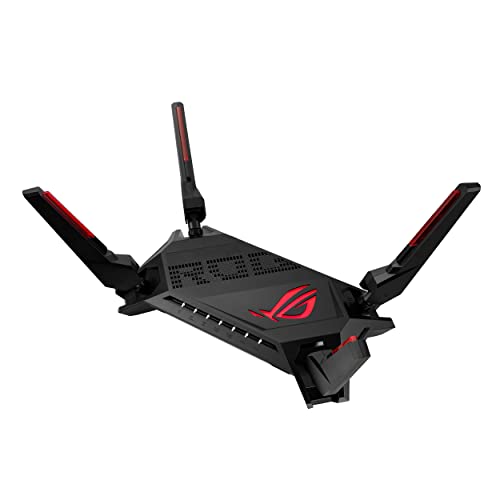
ASUS ROG Rapture GT-AX6000 — Stated WAN aggregation
The GT-AX6000 leads this guide because its listing does the one thing this category demands: it says WAN aggregation in plain words, next to the dual 2.5G ports that make the feature physically plausible. The machine around that feature is a dual-band Wi-Fi 6 gaming router rated up to 6000Mbps, with what ASUS calls enhanced hardware and its VPN Fusion capability — the ability to run different devices through different VPN arrangements simultaneously, a feature that pairs naturally with a reader whose network is already segmented by purpose. For the aggregation shopper, the shape of the offer is clear: bond the dual 2.5G ports toward a modem that supports it and the internet side stops being the narrow point, while the gaming platform underneath handles the household’s traffic discipline.
Two honest qualifications belong with the praise. First, WAN aggregation is a partnership — your modem or gateway must offer bonded output, and many ISP-supplied boxes do not, so the feature’s value is conditional on the device one shelf below it. Second, the listing states WAN aggregation specifically; readers whose need is LAN-side bonding toward a NAS should confirm the current documentation’s position on LAN aggregation for this model rather than assuming symmetry between the directions. Neither qualification dims the pick’s standing here. It is the guide’s clearest answer to the keyword as written: a mainstream gaming router whose maker puts the aggregation claim in the title, where claims can be checked.
- Wireless: Wi-Fi 6 dual-band 802.11ax, up to 6000Mbps
- Ports: dual 2.5G ports
- Aggregation: WAN aggregation stated in the listing title
- Extras: VPN Fusion, gaming platform
- LAN-side bonding: confirm the current manufacturer documentation for this model’s LAN aggregation position
Strengths
- The aggregation claim is explicit in the listing, not inferred from a port count.
- Dual 2.5G ports give the bonded WAN real width to work with.
- VPN Fusion suits segmented households that route different devices differently.
Trade-offs
- WAN aggregation needs a modem that offers bonded output; many ISP boxes do not.
- Dual-band Wi-Fi 6 is a mature radio set rather than a current-generation one.
- LAN aggregation intent should be verified in documentation rather than assumed.
Best for: a household on an above-gigabit plan whose modem supports bonded output and wants the router to match it.
Not suited for: a renter stuck with a basic ISP gateway that offers a single gigabit port and no bonding mode.

TP-Link Archer C5400X (AC5400) — Stated link aggregation
The C5400X is the veteran of this guide — a tri-band AC5400 gaming router from the Wi-Fi 5 era — and it earns its place the same way the ASUS does: its listing says Link Aggregation outright. Around that claim sits period hardware that still reads respectably: a 1.8GHz quad-core 64-bit processor, MU-MIMO radios, a game-first priority system, airtime fairness, and an unusual 16GB of onboard storage that hints at the machine’s original flagship ambitions. For a reader whose aggregation need is LAN-side — bonding toward a dual-port NAS or a managed switch — a stated link-aggregation feature on a router with this much wired-era engineering is a legitimate, often overlooked answer, particularly in the used and remaining-stock market where this generation circuls.
The age must be priced in honestly. AC-class radios will not serve Wi-Fi 6 or 6E clients at their best, the security and firmware horizon of an older platform is shorter than a current model’s, and a household buying its main router for the next five years should weigh that horizon heavily. But aggregation shoppers are frequently solving a wired problem with a wireless afterthought — the NAS bond matters, the radios serve phones adequately — and for that reader the C5400X’s explicit feature, strong processor and storage make it a rational specialist purchase rather than a compromise.
- Wireless: Wi-Fi 5 tri-band AC5400, MU-MIMO
- Processor: 1.8GHz quad-core 64-bit CPU, as listed
- Aggregation: Link Aggregation stated in the listing title
- Storage: 16GB onboard, as listed
- Extras: game-first priority, airtime fairness
Strengths
- Link aggregation is claimed explicitly, suiting NAS and switch bonding on the LAN side.
- A quad-core processor and generous storage reflect genuine flagship-era engineering.
- Tri-band radios keep household wireless service respectable despite the platform’s age.
Trade-offs
- Wi-Fi 5 radios leave newer clients below their potential.
- An older platform carries a shorter remaining firmware-support horizon.
- Stock is from an earlier generation; check the exact unit and revision when ordering.
Best for: a storage-centred household that wants stated LAN link aggregation and treats wireless as a secondary duty.
Not suited for: a buyer choosing a primary router to carry a household through the next two Wi-Fi generations.
The Multi-Gig Routers Where Bonding Must Be Verified

ASUS ROG Rapture GT-AX11000 Pro — 10G flagship route
The GT-AX11000 Pro approaches the aggregation problem from the far side: instead of two bonded lanes, it offers a 10G port — one very wide pipe — alongside a 2.5G port, on a tri-band Wi-Fi 6 extendable gaming platform with RangeBoost Plus, triple-level game acceleration, subscription-free network security and AiMesh compatibility. For many real networks, that is the better engineering answer. A single 10G link to a switch or a workstation needs no hashing, no partner negotiation and no flow-balancing luck; everything simply goes faster. The aggregation question still matters for specific topologies — bonding the 2.5G and gigabit tiers toward particular devices — and on that question this guide follows its rule: the listing title names ports, not aggregation, so the spec box below carries the verification line.
Read the pick, then, as a flagship whose certain virtues are capacity and flexibility: 10G for the backbone that deserves it, 2.5G for the next tier down, AiMesh membership for coverage growth, and a gaming stack with three levels of acceleration for the household’s interactive traffic. If your design specifically requires an LACP bond — a NAS that bonds rather than carries a 10G card, a switch uplink pair — verify the current documentation before ordering, and if the documentation confirms it, the Pro becomes arguably the strongest all-round machine in this guide. If it does not, the 10G port will very likely let you redesign around the requirement entirely.
- Wireless: Wi-Fi 6 tri-band, extendable, AiMesh compatible
- Ports: 10G and 2.5G ports named in the listing
- Aggregation: the listing title does not name port aggregation — check the manufacturer’s current documentation before planning a bonded link on this model
- Gaming: triple-level game acceleration, RangeBoost Plus
- Security: subscription-free network security named in the listing
Strengths
- A true 10G port answers the throughput problem without bonding complexity.
- AiMesh compatibility lets the flagship anchor a growing coverage system.
- Security without a subscription fits the buy-once ethos of this category.
Trade-offs
- Bonding intent requires a documentation check the port list alone cannot settle.
- 10G value depends on owning or buying 10G-capable partners — switch, NAS or workstation.
- Flagship pricing for a Wi-Fi 6 platform in a Wi-Fi 7 market needs a deliberate buyer.
Best for: a performance household ready to step its wired backbone to 10G rather than bond gigabit lanes.
Not suited for: a network whose every device is gigabit and likely to stay that way for years.

TP-Link Archer AXE300 (AXE16000) — Dual 10Gb port route
The Archer AXE300 is the most port-rich machine in this guide: a quad-band Wi-Fi 6E router in the AXE16000 class carrying two 10Gb ports, a 2.5G WAN/LAN port and four gigabit LAN ports, with VPN client support named in the listing. Two 10Gb sockets change the design space — one can face a fast NAS or workstation while the other feeds a switch, or one takes a multi-gig modem with width to spare. As with the ASUS Pro, the aggregation question is handled by this guide’s standing rule: the title enumerates ports rather than claiming bonding, so verify the current documentation if an LACP pair is central to your plan; what is not in doubt is the raw wired capacity, which exceeds every other pick here.
The quad-band Wi-Fi 6E radios deserve their sentence: four bands including 6 GHz give a device-dense household unusual airtime structure, and one band can be dedicated to backhaul duties in mesh-style arrangements. This is, in short, the pick for the reader whose network diagram has a rack in it. Its size in every dimension — ports, bands, price class — makes it absurd for a simple home and exactly right for the small office, the content-creation studio or the home lab that has quietly become both. Readers building that kind of core often pair it with a router chosen for VPN throughput at the edge, a combination explored in Best WireGuard Routers.
- Wireless: Wi-Fi 6E quad-band, AXE16000 class
- Ports: two 10Gb ports, 2.5G WAN/LAN, 4 x gigabit LAN
- Aggregation: bonding is not claimed in the listing title — consult TP-Link’s current documentation for this model before designing around an aggregated pair
- Extras: VPN client support named in the listing
- Role in this guide: maximum wired capacity
Strengths
- Two 10Gb ports give the wired core more headroom than any other pick here.
- Quad-band 6E radios match the wired ambition on the wireless side.
- Port variety lets one box serve modem, NAS, switch and desk without triage.
Trade-offs
- Aggregation shoppers must verify bonding in documentation; ports alone are not the feature.
- Far more router than a typical home can use, at a matching price class.
- Exploiting 10Gb requires partner hardware throughout the chain.
Best for: a home lab or small studio whose wired core already runs, or is about to run, at multi-gig speeds.
Not suited for: an apartment whose entire wired world is one console and a laptop dock.
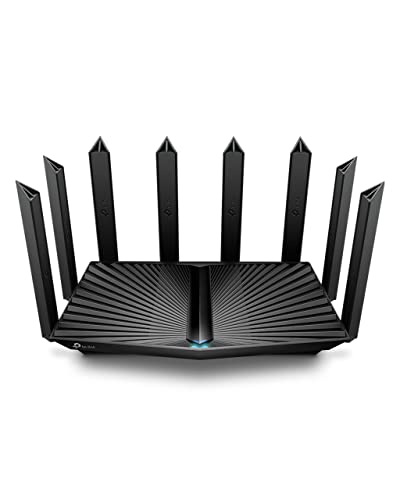
TP-Link Archer AX80 (AX6000) — Single multi-gig entry
The Archer AX80 is this guide’s modest doorway: an AX6000 dual-band Wi-Fi 6 router with a 2.5 Gbps WAN/LAN port, positioned for 8K streaming households, with OneMesh and access-point modes, long-range coverage, WPA3 and beamforming in the listing. Its presence here is a deliberate reality check. Many readers who search this keyword need exactly one thing — a WAN port that does not cap an above-gigabit plan — and the AX80’s 2.5G socket answers that need without aggregation entering the picture at all. Where bonding is concerned, the guide’s rule applies in full: the title names a port speed and no aggregation feature, so the spec box carries the verification line and the analysis claims nothing further.
Judged on its certain merits, the AX80 is a sensible mainstream router with a modern front door: AX6000 radios for the household, WPA3 security, OneMesh membership if coverage later needs a satellite, and an AP mode that lets it retire gracefully into a secondary role when the network eventually upgrades. It is the pick for the reader who suspects aggregation is more machinery than their problem requires — which, for a single fast internet line and no NAS, it usually is.
- Wireless: Wi-Fi 6 dual-band, AX6000
- Ports: 2.5 Gbps WAN/LAN port named in the listing
- Aggregation: not mentioned in the listing title — the manufacturer’s current documentation is the authority if a bonded link is part of your design
- Modes: OneMesh and AP mode named in the listing
- Security: WPA3, beamforming named in the listing
Strengths
- A 2.5G WAN/LAN port solves the common above-gigabit plan problem in one step.
- OneMesh and AP modes give the unit a second life when the network evolves.
- Mainstream pricing and complexity for a household that wants the subject closed.
Trade-offs
- One multi-gig port only; the LAN side stays gigabit throughout.
- Aggregation is unverified from the listing and must not be assumed.
- Dual-band radios are the leanest wireless set in this guide.
Best for: a household whose only multi-gig problem is the internet line itself arriving faster than gigabit.
Not suited for: a NAS owner who needs bonded or 10G links on the LAN side today.
The Neighbouring Answer: Multi-WAN Instead of Bonding

TP-Link ER605 VPN Router — Multi-WAN load balancing
The ER605 is not a Wi-Fi router at all, and it is not an aggregation device — it is a wired gigabit VPN router for small businesses, with up to three WAN Ethernet ports plus a USB WAN option, an SPI firewall, Omada SDN integration, load balancing and lightning protection, per its listing. It closes this guide because a share of aggregation shoppers are actually resilience shoppers: a shop, a clinic or a home office that cannot afford downtime, holding two internet connections and asking how to use both. Load balancing is that answer. Sessions distribute across the WANs, a failed line stops being an outage, and total capacity for a many-session workplace rises — while any single session still rides one connection, the distinction this guide has maintained throughout.
Paired with separate access points for wireless — the Omada ecosystem exists for exactly that architecture — the ER605 anchors networks that have outgrown the all-in-one box entirely. Its VPN-router brief also suits branch-style setups linking a small office to another site. What it will not do is bond two ports into one pipe for a NAS, and it offers no radios; buy it for the multi-WAN job it describes, in the environment it describes, and it is one of the most cost-effective pieces of network insurance in this entire series. Gaming households eyeing it should note the absence of gaming traffic systems — the gaming desk’s router is a different pick in this series, in Best WiFi 6 Gaming Routers.
- Type: wired gigabit VPN router, no Wi-Fi radios
- WAN: up to 3 WAN Ethernet ports plus 1 USB WAN, as listed
- Load balancing: named in the listing — sessions spread across connections; this is not link bonding
- Aggregation: link aggregation is not claimed in the listing title — treat bonding as a documentation question for TP-Link, not a feature of this pick
- Platform: Omada SDN integrated, SPI firewall, lightning protection named in the listing
Strengths
- Multi-WAN failover turns an ISP outage into a slowdown instead of a closure.
- Omada integration suits managed, multi-access-point small-business networks.
- A focused wired appliance at a fraction of flagship-router cost.
Trade-offs
- No wireless at all; access points are a separate purchase and project.
- Load balancing does not raise single-session speed the way a wider pipe does.
- Gigabit ports cap each connection at gigabit class.
Best for: a small business or serious home office running two internet connections for resilience.
Not suited for: a household expecting one box to provide Wi-Fi, gaming features and bonded NAS links together.
How Do You Plan a Bonded Link That Actually Works?
Start at the far end. Identify the partner device — modem, NAS or switch — and establish its bonding support from its own documentation before the router enters the conversation, because aggregation fails silently when one end assumes a static bond and the other expects LACP negotiation. Match the mode on both ends, use two cables of the same category and similar length, and configure the bond before moving traffic onto it. Then test with the right workload: a single speed test will underwhelm by design, so run two transfers simultaneously from different clients and watch the pair carry both. If the combined figure doubles while each stream holds its single-link speed, the bond is healthy; if one stream starves, the hashing or the partner’s distribution needs attention.
Cabling discipline is unglamorous and decisive. Label both members at both ends — an aggregated pair separated during a tidy-up becomes a loop risk and a troubleshooting riddle — and keep the pair on adjacent ports where the hardware allows, which simplifies every future inspection. Document the bond in the same note where you keep the network’s other decisions: which ports, which mode, which partner, which firmware. Aggregation is infrastructure, and infrastructure outlives memory.
Aggregation Contenders Side by Side: What Each Listing Actually Claims
| Pick | Fastest ports | Aggregation position | Wireless | Natural partner |
|---|---|---|---|---|
| ASUS GT-AX6000 | Dual 2.5G | WAN aggregation stated | Wi-Fi 6 dual-band | Bonding-capable modem |
| TP-Link C5400X | Gigabit class | Link aggregation stated | Wi-Fi 5 tri-band | Dual-port NAS or switch |
| ASUS GT-AX11000 Pro | 10G + 2.5G | Verify in documentation | Wi-Fi 6 tri-band | 10G switch or workstation |
| TP-Link Archer AXE300 | Two 10Gb + 2.5G | Verify in documentation | Wi-Fi 6E quad-band | 10G NAS and switch |
| TP-Link Archer AX80 | 2.5G WAN/LAN | Verify in documentation | Wi-Fi 6 dual-band | Above-gigabit modem |
| TP-Link ER605 | Gigabit multi-WAN | Load balancing, not bonding | None — wired only | Two ISP connections |
The middle column is the one to shop by. It separates what listings promise from what ports merely suggest, and it is the column most router marketing would prefer you skimmed. Everything else in the table — port speeds, radio classes — is genuine but secondary to whether the feature you searched for is actually on the box.
Where Do Aggregation Buyers Usually Trip Up?
The defining error is inferring bonding from abundance: two fast ports, therefore aggregation. This guide exists in its present shape because that inference fails often enough to matter. The second error is expecting a single flow to double in speed across a bond, then returning a working router as faulty. The third is bonding toward a partner that cannot answer — a single-port NAS, a modem without a bonded mode — which reduces the exercise to expensive cabling. The fourth is forgetting the switch: in many homes the correct aggregation point is router-to-switch or switch-to-NAS, and a mid-network bond may serve the house better than any change at the router itself. Finally, firmware amnesia: features in this corner of networking shift between revisions, so a forum post from three years ago is a lead, not an authority — the current documentation for your exact model is the only source that counts.
Final Recommendation
Match the pick to the claim you can verify. If your modem bonds and your plan exceeds gigabit, the GT-AX6000 is the guide’s cleanest answer, with WAN aggregation stated in writing and dual 2.5G ports to carry it. If the bond you need faces a NAS, the C5400X’s stated link aggregation makes it the honest LAN-side choice despite its vintage. If your network has outgrown bonding arithmetic altogether, step past it: the GT-AX11000 Pro’s 10G port or the AXE300’s pair of them will move more traffic with less negotiation, subject to the documentation check this guide insists on. The AX80 covers the common case where one 2.5G WAN port was the whole requirement, and the ER605 covers the different, equally legitimate job of surviving an ISP failure. Buy the claim in the title, verify the claim that is not, and cable both ends like you mean it.
Frequently Asked Questions
Will port aggregation double my download speed?
Not for a single download. Aggregation doubles the link’s total capacity across multiple simultaneous flows — two devices transferring at once, a household pulling from a NAS together — while each individual flow remains capped at one member link’s speed. If your goal is one faster pipe to one device, a 10G port, where both ends support it, is the technology that delivers it.
What is the difference between WAN aggregation and LAN aggregation?
Direction. WAN aggregation bonds the router’s internet-facing ports toward a modem or gateway that supports bonded output, raising the ceiling on an above-gigabit plan. LAN aggregation bonds ports inside the network, typically toward a NAS or a switch, raising total local throughput. A router may offer one, both or neither, and the listing or documentation for your exact model is the only reliable source for which.
Does my modem need to support aggregation too?
For WAN aggregation, yes — bonding is a two-ended agreement, and the modem or optical terminal must offer a bonded mode for the router’s feature to engage. Many ISP-supplied units do not. Check the modem’s documentation first; if it cannot bond, a router with a single 2.5G or 10G WAN port may serve an above-gigabit plan better.
Is load balancing the same thing as aggregation?
No. Aggregation merges links into one logical pipe shared by many flows. Load balancing, as on the ER605, keeps separate internet connections separate and distributes sessions among them — excellent for resilience and for many-user capacity, but a single session still travels on one connection at that connection’s speed.
What cables should I use for an aggregated pair?
Two identical, good-quality Ethernet cables of the category your ports assume — Cat6 is the sensible default for multi-gig runs — kept to similar lengths and labelled at both ends. Aggregation is unforgiving of a marginal cable in one member: the bond may hold while quietly favouring the healthy link, which masquerades as a hashing problem until the cable is swapped.
How Does the Router Decide Which Flow Takes Which Cable?
Inside an aggregated link sits a small, tireless traffic policeman: the hash. When a flow begins, the switch or router examines some combination of source and destination addresses — MAC addresses at the simplest setting, IP addresses and port numbers at richer ones — and hashes them into a choice of member link. That flow then stays on its link for its lifetime, which is why a bond behaves so predictably for many-flow workloads and so stubbornly for single ones. The practical consequence for home networks is that the hash policy is a setting worth one minute of your attention: address-only hashing can pin most of a household’s traffic to one member when a single gateway address dominates, while IP-and-port hashing spreads sessions far more evenly. If your bond’s utilisation graph shows one cable working and one resting, the hash policy, not the hardware, is the first suspect.
Failure behaviour is the bond’s quiet virtue. If one member cable is unplugged, damaged or connected to a port that dies, a properly negotiated LACP bond degrades to the surviving link instead of failing outright — traffic rehashes onto the remaining member and the network stays up at half width. For a NAS holding a household’s photo library or a small office’s shared drive, that graceful degradation is worth as much as the speed: the bond is simultaneously a wider pipe and a spare tyre. It is also why the earlier cabling advice matters — a bond whose members wander into different switches during a tidy-up stops being either.
A Worked Example: Bonding a Router to a Home NAS
Picture the household that motivates most LAN aggregation purchases. A dual-port NAS in a cupboard holds the photo archive, the media library and the backups. In the evening, one person streams a film from it, another’s laptop runs a backup to it, and a third is copying a camera card across — three honest gigabit appetites queueing behind one gigabit cable, each getting a third of what it wants. The router is the other end of that cable, and if both devices offer link aggregation, a second cable between them changes the evening: the three flows hash across two members, the stream stops stuttering when the backup starts, and the copy finishes in something closer to its single-user time.
The same household also teaches the limit. When one person alone copies a single huge file at midnight, the bond offers that flow one member’s gigabit and no more — the second cable idles, correctly. That reader’s upgrade is not a third cable but a faster single pipe: a NAS with a 2.5G or 10G interface facing a router port to match, which is precisely the redesign the GT-AX11000 Pro and AXE300 sections above keep gesturing toward. Knowing which of those two households you are — many simultaneous appetites, or one enormous one — is the entire purchasing skill this category demands, and it is a question about your evenings, not about specifications.
Aggregation or a Faster Single Port: A Decision Framework
Choose aggregation when the partner device already speaks it and replacing that partner is not on the table: the dual-gigabit NAS with years of service left, the managed switch with paired uplinks, the modem whose bonded mode is its party trick. Choose it also when resilience matters as much as throughput, since the surviving-member behaviour comes free with the bond. Choose a faster single port when you are buying the partner device in the same season — a new NAS with a 10G card, a workstation with a multi-gig NIC — because one wide pipe is simpler to cable, simpler to reason about, and faster for the single-flow workloads that dominate desks. Choose multi-WAN, the ER605’s pattern, when the scarce resource is not width but certainty: two mediocre connections that fail independently beat one excellent connection that fails completely, for any household or business whose income rides on being reachable.
Budget sequencing follows the same logic. Cables and configuration for a bond cost almost nothing once both ends support it, so an available bond should simply be switched on and measured before money moves. A 10G step, by contrast, is a chain purchase — port, partner interface, sometimes a switch between them — and should be planned as a chain rather than discovered link by link. The readers who get this category right tend to draw the diagram first: every device, every port speed, every cable they wish were wider. The diagram, almost without exception, points at one bottleneck and names the correct pick from this guide on its own.
Where Does a Switch Fit Into an Aggregated Network?
Many aggregation designs quietly relocate once a managed switch enters the picture, and it is worth understanding why. A household with one fast router port and eight wired devices does not have a router problem; it has a distribution problem, and a managed switch with a multi-gig or bondable uplink solves it at the centre of the star rather than at its edge. In that topology the router’s job narrows to routing, NAT and the internet handshake, while the switch handles device-to-device traffic — including the NAS flows that never needed to touch the router at all. Readers whose diagram shows most heavy traffic flowing between local devices, rather than between devices and the internet, should price a switch before a flagship router; the picks in this guide with 10G ports shine brightest exactly when they are feeding such a switch at full width.
This is also where the ER605’s world and the gaming routers’ world stop overlapping. A small office built around an ER605, a managed switch and ceiling access points has separated every function into its own appliance, and aggregation in that world lives between switch and server, switch and uplink — planned, documented, boring in the best sense. A performance home built around a GT-AX11000 Pro keeps the functions fused and accepts the router as the centre. Neither architecture is the grown-up version of the other; they are answers to different scales of the same questions, and the honest guide says so.
How Do You Diagnose a Bond That Is Not Performing?
Begin by proving the bond exists. Both ends should report the aggregated interface as active with two members; a bond silently running on one member — because the second cable sits in the wrong port, or the partner’s mode mismatches — produces exactly the “aggregation did nothing” complaint that fills forums. Next, test with the workload the bond is for: two simultaneous transfers from two clients, watching per-member counters if the interface exposes them. A healthy bond shows both members carrying traffic; a lopsided one points back to the hash policy discussion above. Then test the failure mode on purpose, once, during a quiet hour: pull one member cable and confirm the link degrades instead of dying. A bond that has never been failure-tested is a hope, not a design.
If both members carry traffic and the totals still disappoint, look one layer down. A NAS whose disks or CPU cannot feed two gigabits will cap the bond from the storage side; a client on a congested Wi-Fi hop will cap it from the edge. Aggregation widens exactly one link in a chain, and chains report their narrowest remaining link with complete honesty. That is not a defect of the feature — it is the feature finishing its job and handing you the next diagram to draw.
What Changes When the Household’s Traffic Changes?
Aggregation needs are not static, and the network that justified a bond can quietly stop needing one — or the reverse. The arrival of a home server is the classic trigger in one direction: suddenly the router-to-storage path carries backups, media and file shares simultaneously, and the bond that seemed like enthusiast decoration becomes the household’s hardest-working cable. The arrival of cloud storage is the trigger in the other: when the photo library migrates to a provider’s data centre, the NAS goes quiet, the bond idles, and the household’s real bottleneck moves to the WAN side, where an above-gigabit plan and a 2.5G port — the AX80’s entire proposition — matter more than any LAN topology.
Working from home rearranged many readers’ diagrams in a third direction: the important flows became one person’s video calls and file sync, upstream-heavy and latency-sensitive, for which aggregation does almost nothing and queue management does almost everything. That reader’s money follows the gaming-router logic of traffic discipline rather than the storage logic of width. The durable lesson is that “aggregation” names a solution to a specific shape of congestion — many simultaneous wired flows across one link — and the shape of a household’s congestion deserves re-asking whenever its life changes shape. The routers in this guide were chosen to cover the shapes that recur: the bonding modem, the busy NAS, the 10G backbone, the single fast line, and the twin-connection insurance policy. Name your shape first, and the shortlist writes itself.
Can I aggregate ports toward a switch and a NAS at the same time?
Only if the router offers enough ports and the feature on the relevant interfaces — which is exactly the kind of model-specific detail the verification lines in this guide keep pointing at. In practice, most homes bond one link and give the other device a fast single port; designs that truly need two simultaneous bonds usually graduate to a managed switch as the aggregation centre, with the router feeding it through its widest single port.
Does aggregation help Wi-Fi devices at all?
Indirectly, when the bottleneck is wired. A wireless client streaming from a NAS benefits if the NAS-to-router leg was the constraint, because the bond widens the shared road its traffic travels after leaving the air. Aggregation does nothing for the wireless hop itself — airtime, band choice and placement govern that leg, and no cable at the router changes them.
What Should You Record and Revisit After the Bond Is Running?
An aggregated network deserves the same small documentation habit as any infrastructure: a note, kept with the router’s other settings, recording which ports form the bond, which mode both ends negotiated, the partner device and its firmware, and the date the failure test was last performed. That note pays for itself the first time a cable is moved during cleaning and the network quietly halves — the difference between a five-minute restoration and an evening of rediscovery is whether the intended topology was written down while it was still obvious.
Revisit the bond when anything at either end changes: a router firmware update, a NAS replacement, a switch added to the chain. Features in this corner of networking are exactly the kind that firmware revises, and a bond that survives an update should be re-verified rather than assumed — check the member count, run the two-flow test, glance at the counters. Twice a year is a sane cadence for a household; a small business riding an ER605-style multi-WAN design should fold the same check into its failover drill, pulling the primary line briefly to watch sessions migrate. Networks, like the houses around them, reward owners who inspect the load-bearing parts on a schedule rather than after the sag becomes visible.
A Short, Practical History of Why Bonding Exists
Link aggregation was standardised for a world where Ethernet speeds jumped in tenfold steps and budgets did not. When gigabit was the fast standard and 10-gigabit hardware cost serious money, bonding two or four gigabit links was how a busy server room bought width without buying a new tier of everything. That economics lesson still echoes through this guide’s picks: the C5400X’s stated link aggregation is a feature from exactly that era’s flagship playbook, and the NAS units it bonds to are its contemporaries. What changed is the price of the next tier. With 2.5G ports now ordinary and 10G ports appearing on consumer flagships like the GT-AX11000 Pro and the AXE300, the single faster pipe has eaten much of bonding’s old territory — one cable, one negotiation, full speed for every flow.
Yet bonding survives, and not merely as legacy. It survives because installed bases are real: the dual-gigabit NAS with five good years left, the switch with paired uplinks already cabled, the modem whose bonded mode unlocks a plan already being paid for. It survives because of the spare-tyre property no single pipe offers at any speed — a 10G link cut is a network down, while a bond cut is a network at half width and a maintenance ticket. And it survives because the marginal cost, when both ends already speak the protocol, is one cable. The mature way to hold the subject is neither nostalgia nor dismissal: bonding is a tool with a defined job, sitting in this guide beside its two modern rivals — the wider single port and the second connection — and the reader’s diagram, not fashion, should arbitrate between them.
Your Pre-Purchase Checklist for This Category
Before ordering any pick in this guide, answer five questions in writing. One: which link in my network is actually saturated — name the cable, not the feeling. Two: what sits at the far end of that link, and what does its documentation say about bonding or port speed? Three: is my congestion many-flowed or single-flowed, judged by what the household does at its busiest hour? Four: if I choose a faster single port instead, which other links in the chain must also be upgraded before the speed arrives? Five: if I choose resilience, is it link resilience I need, or connection resilience — the bond or the second WAN? A reader who can answer those five owns the category; the six picks above then sort themselves, because each was included as the answer to a distinct combination of them.
A Final Word on Reading Port Diagrams
Product photographs hide the back panel for a reason: it is the least photogenic and most honest part of the machine. Train yourself to shop from it. Count the ports, read their individual speeds rather than the panel’s fastest inhabitant, and ask of each socket the only question that matters — what in my network will live here, and at what speed will it speak? A router whose back panel matches your diagram port for port is the right router even when its headline number trails a rival’s, because networks are lived at their connections, not at their aggregates. The six picks in this guide were chosen by that reading discipline; whichever of them reaches your shelf, let its back panel be the last thing you check and the first thing you cable.
The Two-Minute Version for Readers in a Hurry
If the rest of this guide must collapse into one paragraph, it is this. Aggregation widens a link for many simultaneous flows and does nothing for one flow alone; it exists only where both ends agree to it, which is why two of these listings state it, three require a documentation check, and one pick solves a neighbouring problem instead. A 10G port is the alternative when a single flow is the point. Draw your network, name the saturated cable, check the far end’s paperwork, and the correct purchase is whichever of the six matches the claim you could verify — everything else in these pages is the working-out of those four steps.
And if the diagram refuses to name a single bottleneck — if every link looks adequate and the evenings still feel narrow — suspect the internet connection itself before the LAN: aggregation organises the house’s internal roads, but the motorway out of the street belongs to the provider, and no router in this guide can widen another company’s highway.
Related Guides
Continue building the wired core with Best WiFi 6 Gaming Routers, Best Routers for Basements and Best WireGuard Routers.


