What's inside
- Key Takeaways
- Quick Picks
- How We Chose These Picks
- Comparison Table
- How Do You Work Out Which Printer Is Cheapest for Your Household?
- Why Does Colour Printing Decide the Argument?
- How Do You Keep a Cheap Printer Cheap After Buying It?
- What Do “Years of Ink” Claims Actually Promise?
- How Does the First Year of Ownership Differ Between the Two Economies?
- What Hidden Costs Surprise Printer Buyers Most?
- Which Habits Separate Households That Print Cheaply From Those That Merely Bought Cheaply?
- Common Mistakes
- Final Recommendation
- Frequently Asked Questions
- Related Guides
As an Amazon Associate I earn from qualifying purchases. This post may contain affiliate links at no extra cost to you.
widgetverdict.com is reader-supported. When you buy through links on our site, we may earn an affiliate commission.
The best cheapest inkjet printers cannot be ranked by the number on the box, and this guide refuses to try. “Cheap” in printing has two meanings that point at opposite machines: cheap to buy, and cheap to run. A cartridge printer with a small shelf price can become the most expensive object in a home office within a year of school projects, while a refillable tank printer that costs more on day one can print for years on bottles that feel like stationery money. So this guide measures cheapness the honest way — by running cost: the ink a machine ships with, the ink it drinks per page, and the system that ink arrives in — and it assigns no static prices to any product, because a price that changes with the season cannot carry an argument about years.
A click on any pick opens its Amazon listing, where you can check the price and weigh today’s figure against the running-cost evidence assembled here. Every specification credited to a pick comes from its listing title, verified through this site’s Creators API pool — included-ink claims only where a title prints them, speeds only where a title states them, and duplexing or borderless claims likewise.
Two economies run through the six picks. Four are refillable tank machines — Epson’s EcoTank ET-2800 and ET-2900, Canon’s MegaTank G3270 and HP’s Smart Tank 5003 with its three-years-of-ink bundle — against two cartridge all-in-ones, Canon’s PIXMA TS7720 and Epson’s XP-4250, whose cheapness is real but differently located: low commitment up front, thrift through features like automatic two-sided printing. Which economy is “cheapest” depends entirely on how much you print, and the sections below are built to help you count.
Key Takeaways
- Cheapness here is measured by running cost — ink included in the box, ink system, and cost per page over years — never by a static product price, which this guide does not assign.
- HP’s Smart Tank 5003 states three years of ink included in its title, and Epson’s EcoTank ET-2900 states up to three years — the two most explicit running-cost head starts in the guide.
- Epson’s EcoTank ET-2800 is the tank class’s entry point: cartridge-free print, scan and copy at a stated up to 10 ppm, with borderless photos for everyday home use.
- Canon’s MegaTank G3270 brings the same refillable economics in a compact desktop design with print, copy and scan for home and office.
- Canon’s PIXMA TS7720 is the low-commitment cartridge route: print, copy, scan, auto duplex and a stated 15/10 ppm, cheapest when your volume stays modest.
- Epson’s XP-4250 attacks the other consumable — automatic 2-sided printing halves paper use, a saving cartridge households feel on every long document.
Quick Picks
| Pick | Badge | Why it earns its place |
|---|---|---|
| Epson EcoTank ET-2800 | The tank that ends cartridge bills | Cartridge-free print, scan and copy at a stated up to 10 ppm with borderless photos — bottle economics from the class’s entry model. |
| Canon MegaTank G3270 | Canon’s low-cost-per-page route | Print, copy and scan from a refillable MegaTank system in a compact desktop design for home and office. |
| Canon PIXMA TS7720 | The low-commitment starter | Print, copy and scan with auto duplex, a stated 15/10 ppm and a 2.7-inch touchscreen — cheap to start, sensible at modest volume. |
| Epson Expression Home XP-4250 | The paper-thrifty cartridge pick | Automatic 2-sided printing and borderless photos with scan and copy — attacks paper cost as well as ink. |
| HP Smart Tank 5003 | The three-years-included bundle | Three years of ink included per its title, in a wireless cartridge-free all-in-one built for low-cost printing. |
| Epson EcoTank ET-2900 | The generous-ink family tank | Up to three years of ink, refillable tanks, 11 ppm and a colour screen with a built-in scanner. |
How We Chose These Picks
The first decision was the metric. Every pick had to make a documented running-cost argument, not merely a low shelf price: a refillable tank system, a stated included-ink endowment, or — for the cartridge machines — features that measurably cut consumable use, like automatic two-sided printing against the paper bill. Machines whose only claim to “cheap” was a small number on a listing were excluded, because that number is a season’s promotion wearing an argument’s clothes.
The second decision was to keep both economies in the room. A guide that listed only tanks would be preaching to households whose volume genuinely makes cartridges cheaper for years; a guide that listed only cartridge bargains would betray the heavy printers for whom tanks are a rescue. So the shortlist carries four tank machines across three brands — Epson EcoTank twice, Canon MegaTank, HP Smart Tank — and two cartridge all-in-ones whose thrift is located in low commitment and paper discipline. The reader’s monthly page count, counted honestly, is the judge between them.
The third decision was documentary: included-ink figures appear in this guide exactly as titles state them — HP’s “3 Years of Ink Included,” Epson’s “up to 3 Years of Ink” — with their qualifiers intact and their nature as manufacturer estimates explained rather than laundered into promises. Cost-per-page thinking only works when the inputs are honest, and a cheapness guide has a special duty to keep them so.

Epson EcoTank ET-2800 — The tank that ends cartridge bills
The ET-2800 is the cheapest printer in this guide in the way that compounds: by the page, over years. Epson’s listing describes a wireless colour all-in-one supertank printer in white — cartridge-free print, scan and copy, a stated up to 10 ppm, borderless photo printing, for home and everyday use. “Cartridge-free” is the whole economic argument in one word. Ink arrives in bottles and lives in refillable tanks, so the cost of a page collapses toward the cost of the paper it lands on, and the recurring household emergency — the cartridge light during deadline week, the full-price replacement bought in a panic — leaves the family’s life.
The behavioural dividend is the part brochures understate. When pages are cheap, printing stops being rationed: the colour version of the worksheet, the full-page recipe photograph, the second draft printed for proofreading instead of squinted at on screen. Households consistently discover that their “low volume” was partly suppressed demand — printing they avoided because cartridges felt precious. A running-cost guide should count that honestly: the ET-2800 does not merely cheapen the pages you already print; it un-taxes the pages you currently do without, which for many families is the larger half of its value.
Borderless photo printing extends the economics to snapshots, where cartridge costs are at their most punishing — a handful of photographs can drink a visible fraction of a colour cartridge. On tank economics, a dozen prints to choose one becomes a normal afternoon rather than an extravagance. The stated up to 10 ppm is an everyday pace, adequate for home volume; no feeder or automatic duplex claim appears in the title, so paperwork stacks and two-sided runs are manual affairs. Those are the honest boundaries of the class’s entry model.
The comparison that matters for this pick is against your own cartridge history. Add up a year of cartridge purchases — most households have never done this sum, and it is routinely a shock — and set it against the tank proposition: a higher starting commitment, then bottles. If the sum surprises you, the ET-2800 is your exit. Check price on Amazon, note what ink the listing says is in the box, and let your own arithmetic, not this guide’s adjectives, close the argument.
- Functions, per its listing: cartridge-free print, scan, copy
- Ink system: refillable EcoTank bottles — the running-cost mechanism
- Speed, as titled: up to 10 ppm
- Borderless photos: claimed in the title
- Included-ink duration: not stated in listing title
- Colour: white
Strengths
- Bottle-refill economics cut cost per page to a fraction of cartridge printing.
- Borderless photos make the cheap pages usable for snapshots, not just text.
- Front-visible tank levels replace cartridge surprise with a glanceable gauge.
Trade-offs
- The tank proposition costs more commitment up front than a cartridge starter.
- No included-ink duration is stated in the title, unlike the HP 5003 and ET-2900.
- No feeder or automatic duplex is claimed for paperwork-heavy homes.
Best for: a household whose cartridge spending over a year would shock it — steady, colourful, everyday printing that a tank turns into a minor expense.
Not suited for: a very light printer of a few pages a month, whose cartridge costs are already trivial and whose money should stay uncommitted.

Canon MegaTank G3270 — Canon’s low-cost-per-page route
Canon’s G3270 proves the cheap-running idea is a class, not a brand. Canon lists it as a wireless colour all-in-one — print, copy, scan — built on a refillable MegaTank system, in a compact desktop design meant for home and office desks. MegaTank is Canon’s word for the same bottle-and-reservoir economics Epson calls EcoTank: ink bought by the bottle, stored in visible tanks, spent by the page at a rate that makes cartridge pricing look like a toll road. A household loyal to Canon loses nothing of the cheapness argument by staying loyal.
Compactness is this pick’s second economy — of space rather than money, though the two are cousins in small homes. Tank machines carry reservoirs and tend toward substance; a model advertising a compact desktop design addresses the home office that is a corner of a bedroom, where every machine must justify its footprint monthly. The G3270’s proposition is the full cheap-running package — tank economics, the print-copy-scan trio — in the smallest documented frame in this guide’s tank contingent.
The title’s silences set the homework. No speed figure is stated, no included-ink duration is headlined, no borderless claim is made — so the listing page must supply pace and ink endowment before the running-cost arithmetic can be completed for this specific machine. That is a fair errand, and this guide flags it rather than borrowing figures from other MegaTank models. What the title does guarantee is the mechanism itself, and in a cheapness guide the mechanism is the headline: refillable tanks are where the savings live, whatever the fine numbers.
Choose the G3270 when the decision runs Canon-shaped: familiarity with Canon’s software and habits, a compact desk to satisfy, and a volume that makes bottle economics sing. Set against the ET-2800, the documented contest is Epson’s stated speed and borderless claim versus Canon’s stated compactness — a fair fight between honest titles. Check price on Amazon, read the included-ink position on the listing, and complete the comparison with your own page count in hand.
- Functions, per its listing: print, copy, scan
- Ink system: refillable Canon MegaTank — the running-cost mechanism
- Form factor, per title: compact desktop design
- Speed, as titled: not stated in listing title
- Included-ink duration: not stated in listing title
- Aimed at, per title: home and office use
Strengths
- MegaTank bottle economics deliver the class’s low cost per page in Canon form.
- A compact desktop design suits the corner-desk homes where space is also money.
- Print, copy and scan cover the whole home brief without office hardware.
Trade-offs
- Pace and included ink must be confirmed on the listing; the title states neither.
- Photo buyers should note the title claims no borderless printing, a claim the ET-2800’s title does make.
- Heavy paperwork households get no feeder here, as with the other home tanks.
Best for: a Canon-comfortable household with real monthly volume and a small desk, wanting bottle-priced pages without changing brands.
Not suited for: anyone determined to judge running costs from titles alone — the HP 5003 and ET-2900 headline theirs.

Canon PIXMA TS7720 — The low-commitment starter
The TS7720 represents the other honest meaning of cheap: cheap to start, cheap to own at modest volume, and free of the larger commitment a tank demands. Canon’s listing describes a wireless all-in-one colour inkjet — print, copy, scan — with automatic duplex printing, a stated 15/10 ppm, a 2.7-inch touchscreen and a compact home photo brief with easy setup. For a household printing a few dozen pages a month, the arithmetic can genuinely favour this machine for years: cartridge costs at low volume are small sums, and money not committed to a tank is money still in the household’s pocket.
The touchscreen and duplexing are thrift features in disguise. Automatic two-sided printing halves paper consumption on long documents — and paper, unlike ink, is a cost cartridge households often forget to count, bought by the ream and burned by the school project. The 2.7-inch screen prevents a different waste: the misprints, botched copies and repeated setup attempts that screenless machines inflict on households, each one paid for in ink and paper. A cheap printer that wastes less is cheaper than its consumables table claims, and the TS7720’s documented features attack waste from both sides.
The stated 15/10 ppm — the briskest headline pace in this guide — has an economic reading too: time is a cost, and a machine that clears a document quickly gets switched off and forgotten, while slow printing breeds the double-printing and impatience waste of busy evenings. None of this rescues the cartridge model at high volume; the crossover is real, and the tank picks above exist beyond it. The TS7720’s honest territory is the wide country below the crossover, where most households actually live.
Buy this pick with a volume promise to yourself: if the household’s printing grows — a home business, a teacher’s classroom overflow, a crafting habit — revisit the tank arithmetic at the first cartridge that feels expensive, rather than the fifth. Until then, the TS7720 is cheapness correctly located for light-to-moderate homes: low commitment, low waste, no rationing anxiety at ordinary volumes. Check price on Amazon and let your counted pages, not a headline, arbitrate between this and the tanks.
- Functions, per its listing: print, copy, scan (all-in-one)
- Ink system: cartridges — cheap at modest volume, costly at high volume
- Speed, as titled: 15/10 ppm
- Automatic duplex printing: yes, per listing title
- Display: 2.7-inch touchscreen
- Aimed at, per title: compact home photo printer, easy setup
Strengths
- The lowest-commitment route into capable home printing in this guide.
- Automatic duplexing halves paper spend on the documents that dominate home volume.
- A touchscreen reduces the misprints and fumbled copies that quietly waste ink.
Trade-offs
- Cartridge economics punish growth — heavy months cost far more per page than any tank.
- Colour-heavy printing, especially photos, drinks cartridges at the class’s worst rate.
- No included-ink endowment beyond starter cartridges should be assumed.
Best for: a light-to-moderate household — dozens of pages a month, mixed documents and snapshots — that wants capability without committing to tank money.
Not suited for: a household already spending noticeably on cartridges each quarter, which is the tank class’s exact definition of its customer.
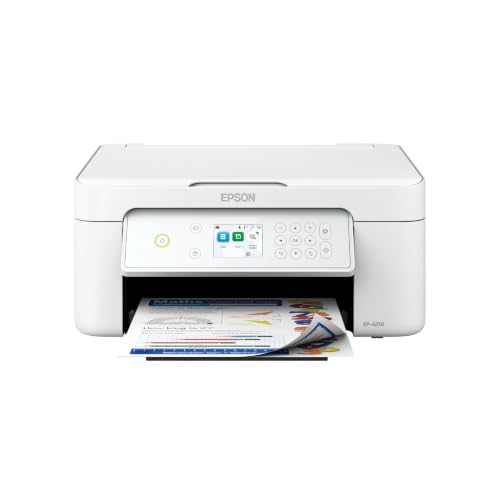
Epson Expression Home XP-4250 — The paper-thrifty cartridge pick
The XP-4250 makes the cartridge economy’s most intelligent argument: if ink is the expensive consumable, attack the other one too. Epson’s listing describes a wireless all-in-one with scan and copy, automatic 2-sided printing, borderless photos and a 2.4-inch colour display. The duplexing is the economic headline. Paper is bought by the ream and consumed by the document, and a household printing reading packets, drafts and school materials on both sides automatically halves that spend without a single behavioural resolution — the machine simply never offers the wasteful default.
Borderless photos belong in the same ledger. A home photograph printed with borders often gets reprinted — cropped by scissors, judged unsatisfying, done again at full quality on the good paper — and every reprint is ink spent twice on one memory. Borderless output that looks finished the first time is a running-cost feature wearing a photograph’s clothes. The 2.4-inch colour display supports the same discipline at the machine: settings visible before the job starts are pages not wasted discovering them.
The title states no speed, and none is claimed here; the XP-4250’s cheapness case does not need one, resting as it does on consumption rather than pace. Its honest territory matches the TS7720’s — the wide land of modest volume — with a different emphasis: Canon’s pick spends its thrift on interface and pace, Epson’s on paper discipline and photo finish. Households whose waste is paper-shaped — long documents, reprinted photos — will feel the XP-4250’s savings in the ream drawer, which empties half as fast and tells the story without a spreadsheet.
The cartridge caveat applies with the same force as its sibling’s: growth in volume moves any household toward the tank crossover, and colour-heavy months remain the cartridge system’s expensive season. Within its territory, though, the XP-4250 is cheapness by discipline rather than by mechanism — a machine that spends less of everything it touches. Check price on Amazon, and if your paper bin has been filling with one-sided drafts, let that evidence vote.
- Functions, per its listing: print, scan, copy
- Ink system: cartridges — disciplined by features rather than replaced
- Two-sided printing: automatic, per title
- Borderless photos: claimed in the title
- Display: 2.4-inch colour display
- Speed, as titled: not stated in listing title
Strengths
- Automatic two-sided printing halves the paper bill on long documents automatically.
- Borderless photos reduce the reprint waste that quietly doubles snapshot ink costs.
- A colour display keeps settings visible at the machine, preventing fumbled jobs.
Trade-offs
- Cartridge ink remains the running cost; discipline slows the spend without transforming it.
- No speed is stated in the title for households that print in bursts.
- Heavy colour volume still belongs to the tank picks, whatever the paper savings.
Best for: a modest-volume household whose printing is long documents and family photos, and whose waste arrives as paper and reprints rather than raw page count.
Not suited for: a high-volume colour printer, for whom paper discipline cannot rescue cartridge ink economics.

HP Smart Tank 5003 — The three-years-included bundle
HP’s Smart Tank 5003 states its cheapness claim in the largest type the class allows: “3 Years of Ink Included,” printed at the front of its title. The listing continues with all-in-one functions, low cost printing, a cartridge-free refillable ink system, wireless connectivity and print, scan and copy for the home. Read as a running-cost document, the title is a small masterpiece of the genre: the endowment is quantified, the system is named, the purpose — low cost printing — is declared. A buyer can begin the arithmetic from the title alone, which is more than most cheapness claims in any category permit.
The claim deserves its honest frame, and this guide supplies it wherever the figure appears: a years-of-ink statement is a manufacturer’s estimate at an assumed monthly volume. Print less than the assumption and the bundle stretches beyond three years; print more and it ends sooner. Neither direction makes the claim dishonest — it makes it a measuring unit, most useful comparatively: against machines whose titles state no endowment at all, the 5003’s documented generosity is a fact, and against Epson’s “up to 3 years” on the ET-2900 it is a rival unit from a rival brand, to be weighed with your own page count as the exchange rate.
After the bundle, the economics continue on bottles, because Smart Tank is HP’s refillable system — the same class as EcoTank and MegaTank under a third name. The machine’s documented brief beyond ink is home-shaped: print, scan, copy, wireless, no feeder or duplex claims, no stated speed. Its cheapness is therefore one-dimensional in the best way — it is not trying to be an office machine or a photo machine; it is trying to make the ink line of a household budget disappear for years at a time, and its title says exactly that.
For the buyer whose anxiety is specifically the recurring cartridge bill — the subscription they never signed — the 5003’s proposition is the most legible in this guide: years of ink settled at purchase, bottle prices thereafter. Check price on Amazon, read how the listing defines its three-year estimate, and translate it into your household’s months with your counted volume. That translation, done honestly, is the whole decision.
- Functions, per its listing: print, scan, copy (all-in-one)
- Included ink: 3 years of ink included, per listing title (manufacturer estimate)
- Ink system: cartridge-free refillable, HP Smart Tank
- Speed, as titled: not stated in listing title
- Feeder: the title does not mention one
- Aimed at, per title: low cost printing, ideal for home
Strengths
- Three included years of ink, stated in the title, is the guide’s clearest endowment claim.
- Refillable bottle economics continue the low running cost after the bundle ends.
- The all-in-one home brief covers family duties without office hardware costs.
Trade-offs
- The three-year figure is an estimate at assumed volume — heavy households finish sooner.
- No speed is stated in the title, so pace must be judged from the full listing.
- No duplex claim appears, leaving paper savings to the XP-4250 and TS7720.
Best for: households printing a steady home volume of documents and colour pages, with the ink question settled for years at the moment of purchase.
Not suited for: a paper-heavy office-leaning home, which will miss duplexing and a feeder more than it values the ink bundle.

Epson EcoTank ET-2900 — The generous-ink family tank
The ET-2900 is Epson’s entry in the endowment contest, and its title plays the same strong card as HP’s with one honest qualifier more: a wireless all-in-one colour supertank printer with up to 3 years of ink, refillable tanks, 11 PPM, a 1.44-inch colour screen and a built-in scanner, in white, pitched for the home. The “up to” is worth respecting rather than rounding away — it is the manufacturer marking its own estimate as an estimate — and it makes the ET-2900’s claim the most carefully worded of the guide’s two big ink endowments.
Beyond the ink, the specification is a small step up from the ET-2800 on every documented axis: a stated 11 ppm against up to 10, a colour screen where the entry model claims none in its title, the same refillable tank mechanism underneath. The screen matters to running cost in the unglamorous way this guide keeps noting: walk-up copying and setup done correctly at the machine are pages not wasted, and a family machine used by everyone benefits from controls everyone can read. White styling suits the family-room and kitchen placements these machines actually occupy.
The ET-2900 against the HP 5003 is the guide’s cleanest head-to-head: two titles, two endowment claims — three years against up to three years — two tank systems, two brands. The honest method is to read both listings’ definitions of their estimates, set them against your counted monthly pages, and let the translation decide; brand familiarity and the Epson’s stated screen and pace are legitimate tiebreakers. What neither household should do is treat either figure as a diary appointment. Bundles end when your volume says they end, and both machines continue on cheap bottles afterward — which is why the contest matters less than the class decision beneath it.
No feeder, fax or duplex claim appears in this title, keeping the ET-2900 in the home tier where its endowment competes. For a family that has decided on tank economics and wants the generous version of Epson’s home offer — ink headlined, screen included, pace stated — this is the pick. Check price on Amazon, compare its bundle definition with HP’s, and buy the translation that favours your household’s arithmetic.
- Functions, per its listing: all-in-one with built-in scanner
- Included ink: up to 3 years of ink, per listing title (manufacturer estimate)
- Speed, as titled: 11 ppm
- Display: 1.44-inch colour screen
- Colour: white
- Feeder: the title does not mention one
Strengths
- Its title quantifies the included ink — up to three years — so the bundle’s size is a fact, not a teaser.
- A stated 11 ppm and a colour screen edge out the ET-2800’s documented basics.
- Refillable tanks keep costs low long after the included ink is spent.
Trade-offs
- The “up to” qualifier means lighter endowment certainty than the headline suggests.
- No duplex or feeder is stated, so paper and paperwork savings go unclaimed.
- Its screen is small beside the TS7720’s touchscreen.
Best for: a family committed to tank economics that wants Epson’s generous-ink home model, with walk-up controls a whole family can read and a pace figure printed in its own title.
Not suited for: a duplex-dependent document household, which should take the TS7720’s or XP-4250’s paper savings instead.
Comparison Table
| Pick | Ink system | Included-ink claim in title | Stated speed | Paper-saving note |
|---|---|---|---|---|
| Epson EcoTank ET-2800 | Refillable tank (EcoTank) | Not stated in listing title | Up to 10 ppm | Borderless photos reduce reprints |
| Canon MegaTank G3270 | Refillable tank (MegaTank) | Not stated in listing title | Not stated in listing title | Not stated in listing title |
| Canon PIXMA TS7720 | Cartridges | Not stated in listing title | 15/10 ppm | Automatic duplex halves paper on long runs |
| Epson Expression Home XP-4250 | Cartridges | Not stated in listing title | Not stated in listing title | Automatic 2-sided printing; borderless photos |
| HP Smart Tank 5003 | Refillable tank (Smart Tank) | 3 years of ink included | Not stated in listing title | Not stated in listing title |
| Epson EcoTank ET-2900 | Refillable tank (EcoTank) | Up to 3 years of ink | 11 ppm | Not stated in listing title |
How Do You Work Out Which Printer Is Cheapest for Your Household?
Count three numbers, all yours. First, your monthly pages — honestly, over a representative school-and-work term, including the colour pile counted separately because colour is where ink systems diverge. Second, your current annual ink spend, from receipts or order history; households that have never summed it should prepare for information. Third, the time horizon you expect from a printer — three years is a fair planning unit — over which the purchase commitment and the running costs will be weighed together.
Then run the two economies against those numbers. The cartridge route: a lower commitment now, ink bought in small expensive units, paper discipline available from duplexing picks. The tank route: a higher commitment now, an included endowment whose size two of these titles state outright, then ink bought in bottles at a per-page cost that barely registers. Below a modest monthly volume, the cartridge route’s total over three years is frequently the smaller number — the tank’s advantage needs pages to work on. Above it, the tank route pulls away and keeps pulling, because every additional page widens a gap that runs in only one direction.
The crossover is personal, which is why this guide refuses to name a universal winner and why any guide that does should be distrusted. What can be said universally is where the burden of proof lies: a household spending real money on cartridges several times a year has already received its answer from its own receipts, and a household buying a cartridge set annually should keep its commitment low and its options open. Cheap is a measurement, not a mood, and your receipts are the measuring instrument.
Do the count this week, while the guide is open. It asks for one representative month’s pages, one year’s ink receipts and ten honest minutes — a smaller investment than any printer in this guide, and the only one guaranteed to save money regardless of which machine it finally points at. Keep the tally somewhere you will find it again next year, because the household that counts once tends to keep counting, and a counted printing habit is the cheapest accessory in this entire category — cheaper than any bottle, any bundle and any bargain, because it improves the economics of whichever machine it touches, this year and every year after, without ever needing a replacement, a refill, a firmware update or a long, wet and entirely avoidable Saturday trip across town in the pouring rain to buy one.
Why Does Colour Printing Decide the Argument?
Because black pages are cheap under every system and colour pages are where the economies separate. A text page draws modestly on one supply; a colour page — the worksheet diagram, the presentation chart, the photograph — draws on three or four at once, and under cartridge pricing each draw is from a small, dear vessel. This is why two households with identical page counts can need opposite printers: the monochrome household’s ink bill stays civilised on cartridges indefinitely, while the colour household’s bill is the tank class’s founding document.
Photographs are the extreme case, and both economies know it. On cartridges, a run of family photos is a visible event in the ink gauge; on a tank, it is an afternoon. The ET-2800 and XP-4250 both claim borderless photo printing, from opposite economies, and the difference in what that feature costs to use is the whole argument in miniature. If your household’s colour pile is mostly photographs, weigh it at more than its page count — weigh it at its ink draw, which is several pages’ worth per print.
There is a behavioural corollary worth stating in a cheapness guide: expensive colour suppresses useful printing. The proofread draft not printed, the large-print version not made for a grandparent, the child’s project kept greyscale — these are costs too, paid in usefulness rather than money. A household that recognises its own suppressed list should count its liberation as part of the tank return, because a printer’s cheapness is ultimately measured in what it lets you do without thinking.
How Do You Keep a Cheap Printer Cheap After Buying It?
Feed it honestly. Use draft settings for internal documents — the ink saving is real and the audience for a draft is you — and reserve full quality for what leaves the house. Print web pages through a preview, deleting the advertisement-bearing final page that has consumed more household ink than any other single artefact of the internet age. Batch photo printing into sessions on proper photo paper, where the results justify the ink, rather than dribbling photographs onto plain paper at maximum quality, which is the most expensive way known to produce a disappointing print.
Maintain it lightly and regularly. A small print every fortnight keeps any inkjet’s nozzles honest and prevents the cleaning cycles that spend ink to repair neglect; on a cartridge machine, one deep cleaning can cost a visible fraction of a cartridge, which makes prevention the cheapest consumable in this entire guide. Store paper dry and flat so jams — each one a wasted sheet and sometimes a wasted page of ink — stay rare.
And buy consumables like a planner, not a hostage. The expensive cartridge is the one bought at full price, at night, mid-deadline; the same cartridge bought calmly, in a planned multi-pack when your usual seller offers value, is a different economic object. Tank owners escape most of this by design — bottles are bought rarely and at leisure — but the principle survives the class change: in printing, urgency is the most expensive ink of all, and every habit in this section is a way of never paying for it.
One more quiet economy belongs here: the printer’s own lifespan as a cost divisor. A machine kept printing for five years spreads its purchase across five years of pages; the same machine neglected into an early grave — dried nozzles, a jam cleared by force, a season in a damp garage — charges its full price to a fraction of the work. Cheapness is therefore partly custody. The fortnightly page, the dry shelf and the gentle hand are not fussiness; they are the longest lever on cost per page that any owner, of any machine in this guide, will ever pull.
What Do “Years of Ink” Claims Actually Promise?
Less than a date and more than a slogan — they promise a quantity, expressed in time at an assumed pace. When HP’s title states three years of ink included and Epson’s states up to three years, each manufacturer has filled its machine’s box with an ink endowment sized against an average household’s expected consumption. Your household is not the average household, in either direction, and the translation is your job: find the assumption described on the listing, compare it with your counted monthly pages, and the claim becomes your months rather than their years.
The comparative use is the reliable one. A stated endowment — of whatever size — is a documented fact about what ships in the box, and it legitimately separates the 5003 and ET-2900 from picks whose titles state none. Between the two stated claims, the difference between “3 years” and “up to 3 years” is a difference in wording confidence that the listings’ definitions will clarify. What neither figure can do is survive being read as a guarantee; a household printing a small business’s volume will finish any bundle early, and should price its first refill bottles into year one from the start.
None of this makes the claims useless — it makes them inputs. Cheapness arithmetic needs the size of the starting endowment the way a journey needs the size of the fuel tank, and titles that state it are doing buyers a measurable favour. This guide quotes both claims exactly as printed, qualifiers intact, and invites you to do the translation rather than trust the calendar. That invitation, honestly, is the difference between a cheapness guide and a cheapness advertisement.
How Does the First Year of Ownership Differ Between the Two Economies?
Picture two households with identical printing — a few hundred pages a month, colour-rich — opening different boxes. The cartridge household’s year is punctuated: a colour set in the second month, black soon after, a panicked full-price purchase during the school-project crunch, another set before the holidays. Each event is small; the year’s sum is not, and none of it was budgeted because none of it felt like a decision. The tank household’s year is uneventful by design: levels sinking slowly in visible tanks, a bottle bought calmly at some point, the school crunch passing without a consumables incident. The difference between the two years is not only money — it is the number of times printing interrupted life to demand some.
Now picture the same year at a tenth of the volume. The cartridge household buys perhaps one set, late in the year, and its total spend stays modest; the tank household’s larger opening commitment sits mostly unamortised, its tanks still near full, its savings theoretical. Both households bought correctly for a volume they did not have. The first year is where the crossover stops being an abstraction: it is the year your receipts describe, and reading last year’s — if a printer already lives in your home — is the most reliable forecasting tool this guide can hand you.
One asymmetry deserves naming. The cartridge household can migrate upward at any moment — buy the tank when the receipts convince — while the tank household has prepaid for economy it may not use. That asymmetry argues for honesty at the count, not for timidity: households clearly past the crossover lose money every month they delay, and households clearly below it lose nothing by waiting with a low-commitment machine like the TS7720. Cheapness rewards the accurate, in both directions.
What Hidden Costs Surprise Printer Buyers Most?
The starter-ink surprise is the classic: machines across the industry ship with introductory ink — enough to set up, prime the system and print a modest beginning — and buyers who mistook the box for a full supply meet their first purchase sooner than expected. Tank bundles with stated endowments, like the two headlined in this guide, are the honourable exception that proves the rule, and even they should be read by their definitions. Whatever you buy, open the listing’s account of what ink is included and write the figure into your arithmetic; surprise is a cost with no defenders.
Paper is the second hidden line. It feels too ordinary to budget, yet a document household consumes reams yearly, and the difference between one-sided and two-sided habits — the duplexing on the TS7720 and XP-4250 — is half of that line, every year, forever. Photo paper is the premium cousin: a household printing snapshots at home should count sheets alongside ink, because the photograph’s cost is the marriage of the two, and plain-paper photo printing is the false economy that produces a bad print and then a reprint.
Time and failure complete the ledger. A jam cleared badly can cost a print head’s alignment; a deadline missed to a dry cartridge costs more than ink; a printer abandoned for a dried-out season and replaced early converts its whole price into waste. The cheapness habits in this guide — preview before printing, a fortnightly page, calm planned consumable purchases — are really insurance policies with premiums of nearly zero. The most expensive printer is reliably the one whose owner never thought about it at all.
Which Habits Separate Households That Print Cheaply From Those That Merely Bought Cheaply?
The deliberate preview is the first. Cheap-printing households look at the print dialog the way careful drivers look at mirrors — briefly, habitually, every time — and catch the twelve-page document set to print single-sided in full colour when a two-sided draft was wanted. The dialog is the cheapest room in the house: every error caught there costs nothing, and every error caught at the tray costs a page. Machines help — the TS7720’s touchscreen makes settings tangible, duplexing defaults can be set once and forgotten — but the habit is the owner’s.
The second habit is matching the tool to the job inside the home. A household with both a printer and a long memory routes jobs intelligently: photographs batched onto photo paper, drafts onto the backs of already-printed sheets where the audience allows, the big colour run planned rather than dribbled. None of this requires a second machine; it requires treating printing as a small domestic economy with a manager. Households that appoint one — even informally, even themselves — spend visibly less than households where printing is weather.
The third habit is buying consumables before they are needed, on the household’s schedule rather than the cartridge’s. A spare set bought calmly is cheaper in money and always cheaper in temper than the emergency purchase; a refill bottle ordered when the tank dips, not when it empties, converts a potential crisis into a delivery. Cheapness, in the end, is mostly this: the refusal to let urgency set prices. The machines in this guide set the exchange rates — the habits decide how often you pay the worst one.
Common Mistakes
Judging cheapness by the shelf price alone is the founding error, and it is expensive in both directions. The buyer of the cheapest cartridge machine who prints heavily has purchased a small down payment on years of premium ink; the buyer of a tank machine who prints twenty pages a month has prepaid for ink their grandchildren will inherit. Both errors come from measuring the wrong number. The right number is your own three-year total at your own volume, and it takes ten minutes with your receipts to know which machine owns it.
The second mistake is letting a “years of ink” headline end the comparison. The claims on the HP 5003 and Epson ET-2900 are estimates with definitions attached, and the household that reads neither definition has bought a number it cannot translate. Worse is comparing the two headlines as if they were measured identically — one carries an “up to,” both carry assumptions — and choosing on the strength of typography. Read the definitions, translate with your page count, and let the arithmetic choose.
The third mistake is buying cheap and printing expensive. Draft-worthy documents printed at maximum quality, photographs dribbled onto plain paper, web pages printed with their advertising tails, cleaning cycles run to repair months of idleness — these habits can double a household’s real cost per page on any machine in this guide, tank or cartridge. The cheapest printer is the one whose owner prints deliberately; the machine merely sets the exchange rate at which deliberation pays.
Final Recommendation
Let your receipts decide, because they already know. If a year of your cartridge spending is a number that makes you wince, join the tank economy: the HP Smart Tank 5003 and Epson EcoTank ET-2900 headline their included years for households that want the endowment documented, the ET-2800 is the class’s straightforward entry with borderless photos aboard, and Canon’s MegaTank G3270 keeps Canon households in the same economics at a compact size. If your volume is genuinely modest — dozens of pages, mostly documents — keep your commitment low and your paper disciplined with the TS7720’s duplexing and touchscreen, or the XP-4250’s two-sided, borderless thrift. Both answers are cheap; they are cheap for different households, and this guide declines to blur that difference. Count your pages, translate the ink claims into your months, and the printer you choose will still be proving itself the cheap one three years from now — in the only ledger that matters, the one your household actually keeps, where the ink line has quietly become too small to argue about.
Frequently Asked Questions
Is a tank printer always cheaper than a cartridge printer?
No — it is cheaper per page, which only becomes cheaper overall when there are enough pages. At a few dozen pages a month, a cartridge machine’s lower commitment can keep its three-year total below a tank’s for years. At several hundred pages a month, especially in colour, the tank’s bottle economics win decisively. This guide includes both economies — four tank picks and two cartridge picks — precisely because the honest answer is a page count, not a technology.
What does “3 years of ink included” really mean?
It means the box contains an ink endowment the manufacturer estimates at three years for an assumed average household — HP states it for the Smart Tank 5003, and Epson states up to three years for the ET-2900. Your mileage is your volume: lighter households stretch it further, heavier ones finish sooner and continue on inexpensive refill bottles. Read the estimate’s definition on the listing and translate it with your own monthly page count before comparing.
How can I estimate my household’s printing volume?
Count a representative month rather than guessing a year: school and work documents, forms, photographs and the colour pile tallied separately, since colour draws far more ink per page. Then check a year of ink purchases in your order history — the two numbers together tell you which economy you live in. Add back the printing you currently avoid because cartridges feel precious; suppressed demand is real volume that a tank will release.
Do cheap inkjets print acceptable photos?
Acceptable snapshots, yes — the ET-2800 and XP-4250 both state borderless photo printing, and the TS7720 carries a home photo brief. The running cost of those photos differs by economy: an extravagance on cartridges, an ordinary afternoon on a tank. For prints destined for frames and walls at larger sizes, the dedicated machines in the art and photo printers guide are built to a different standard and budget.
When does it make sense to switch from cartridges to a tank?
At the moment your cartridge spending becomes a recurring line you notice — several sets a year, colour running dry mid-project, printing decisions being rationed. That is the crossover announcing itself in your own accounts. The tank picks in this guide then repay their higher commitment steadily; the ET-2800 and G3270 are the plain entries, while the 5003 and ET-2900 add documented ink endowments on top.
Can I make a cartridge printer cheaper to run?
Partly, and the XP-4250 and TS7720 show how: automatic two-sided printing halves paper spend, draft settings cut ink on internal documents, previewing kills the wasted final page of web printouts, and a fortnightly small print prevents ink-hungry cleaning cycles. What discipline cannot do is change the price of the ink itself — at high volume, only the tank mechanism does that, which is why both economies appear in this guide.
Related Guides
Cheap printing is one corner of a household’s whole print life, and the neighbouring guides cover the rest. For the youngest members’ screens on the same budget, our Android tablets for kids roundup applies the same total-cost honesty to age-banded tablets. For grandparents setting up a simple home, the Android tablets for seniors guide favours legibility and low fuss over raw specification. And for the reading habit that paper still serves best, the Android tablets for reading books guide compares paper-like screens for long sessions — the digital alternative to printing the long documents this guide has been pricing.


