What's inside
- Key Takeaways
- Quick Picks
- How We Chose These Picks
- Side-by-Side Comparison
- How Big a Screen Does an Older Reader Really Need?
- What Should a Family Member Set Up Before Handing the Tablet Over?
- How Can You Make Text and Menus Easier on Tired Eyes?
- What Makes a Video Call Feel Easy Instead of Awkward?
- How Long Will a Tablet Like These Stay Useful?
- Which Accessories Actually Earn Their Money for Senior Owners?
- Should the Tablet Match the Phone the Owner Already Uses?
- How Do You Keep Passwords and Accounts From Becoming the Hardest Part?
- What About Hearing Aids, Tremor and Other Real-World Details?
- What Goes Wrong When People Buy a Tablet for an Older Relative
- Final Recommendation
- Frequently Asked Questions
- Related Guides
As an Amazon Associate I earn from qualifying purchases. This post may contain affiliate links at no extra cost to you.
widgetverdict.com is reader-supported. When you buy through links on our site, we may earn an affiliate commission.
The product names in this guide take you straight to their Amazon listings, where you can check the price and confirm the configuration before ordering. Shoppers looking for the best android tablets for seniors are rarely chasing performance figures. The real brief, whether the buyer is choosing for themselves or for a parent, is a tablet that stays legible across a long morning of news and email, loud enough for a video call with grandchildren without a hunt for headphones, light enough to hold through a chapter of a book, and calm enough in its menus that nobody needs to phone a younger relative to ask where the photos went. The best android tablets for seniors are the ones that respect those priorities, and this guide ranks six of them by exactly that standard.
One absence deserves explaining before the picks themselves. Samsung’s Galaxy Tab A9+ would normally anchor a list like this, but the listings we could verify for it were renewed units rather than new ones, so it is not linked here; Samsung’s current standard-bearer in this guide is the newer Galaxy Tab A11+, which leads the list. Around it sit two Lenovos at different sizes, two TCL models that take legibility seriously, and Samsung’s smaller Tab A9 for readers who find ten-inch tablets unwieldy. Nothing here requires technical confidence to use well. Every pick runs ordinary Android, works with the apps a senior is most likely to want — video calling, news, books, photos, email — and can be set up once, properly, and then simply enjoyed.
Key Takeaways
- The Samsung Galaxy Tab A11+ is the current Samsung pick: 6GB of memory, 128GB of storage with expansion, Dolby Atmos speakers and a two-year warranty in its listing.
- The Galaxy Tab A9+ is deliberately not linked in this guide — the verifiable listings for it were renewed units, not new tablets.
- Lenovo covers both ends of the size question: the 10-inch Tab M10 Plus (3rd Gen) for a full-size reading and calling screen, and the 8.7-inch Tab One for one-handed holding.
- TCL’s Tab 10 Gen 2 stands out for legibility, with a 10.4-inch 2K screen, while the newer Tab 10 Gen 4 brings Android 15 and a metal body.
- Screen size is the first decision for senior buyers: roughly ten inches for reading and calls at a table, roughly nine inches or under for holding in one hand in an armchair.
- Setup help matters more than specifications — font size, home-screen layout and call shortcuts configured once will decide whether the tablet gets used daily.
Quick Picks
| Pick | Badge | Why it earns a place |
|---|---|---|
| Samsung Galaxy Tab A11+ | Current Samsung standard | 6GB memory, 128GB expandable storage, Dolby Atmos speakers and a two-year warranty in the listing. |
| Lenovo Tab M10 Plus (3rd Gen) | Full-size value | A 10-inch FHD screen with 8MP cameras front and rear for clear video calls. |
| Lenovo Tab One | Light in the hand | An 8.7-inch lightweight tablet with a folio case included and up to 12.5 hours of YouTube streaming per charge in the listing. |
| TCL TAB 10 Gen 2 | Sharpest text | A 10.4-inch 2K screen and 128GB of storage in a slim body, with a 6000mAh battery. |
| TCL TAB 10 Gen 4 | Newest software | Android 15, a 10.1-inch FHD metal-body design and dual speakers. |
| Samsung Galaxy Tab A9 8.7 | Compact Samsung | Samsung’s smaller 8.7-inch tablet with 64GB of storage for readers who dislike large slabs. |
How We Chose These Picks
Legibility came before everything. A senior tablet can have a fine processor and still fail its owner every morning if text renders small and grey, so we favoured picks whose listings promise genuinely useful screen traits: a 2K panel on the TCL Tab 10 Gen 2, full HD panels on the Lenovo M10 Plus and the TCL Gen 4, and screen sizes matched to realistic holding positions rather than to marketing. Sound came second, because video calls are the feature that most often justifies the purchase. Speakers named in a listing — Dolby Atmos on the Tab A11+, dual speakers on the TCL Gen 4 — counted for more than vague promises, and the Lenovo M10 Plus earned credit for stating 8MP cameras front and rear, since the front camera is the one a grandparent’s face depends on.
Weight and simplicity shaped the rest of the shortlist. Two picks sit at 8.7 inches because a full-size tablet is genuinely too much device for some hands, and both Lenovo and Samsung offer credible small options rather than toy-like ones. Storage of 128GB was treated as the comfortable mark for a tablet that will accumulate years of family photos, with the Tab A11+ adding expandable storage for buyers who never want to think about space again. We also valued signs of longevity in the listings themselves: the Tab A11+ carries a two-year warranty, the TCL Gen 4 runs the newest Android version named anywhere in this guide, and the Lenovo Tab One states a streaming endurance figure — up to 12.5 hours of YouTube — that translates directly into how a senior actually spends tablet time.
The renewed-listing decision needs a plain statement. When we checked the Galaxy Tab A9+, the listings available were renewed rather than new. A renewed tablet can be a sensible purchase for a confident buyer, but recommending one as the flagship pick of a guide for seniors — readers who deserve the full warranty and the cleanest first setup — would have been careless. So the A9+ is absent, the A11+ carries the Samsung flag, and anyone who specifically wants an A9+ should read its listing’s condition wording very carefully before ordering.

Samsung Galaxy Tab A11+ — The Current Samsung, Built for Long Days
The Tab A11+ leads this guide because its listing reads like a checklist written by someone who understood the assignment. Six gigabytes of memory keeps apps open between uses, so the news app has not forgotten its place when its owner returns after lunch. Storage is 128GB and expandable, which quietly removes the most common long-term frustration with tablets: the slow accumulation of family photographs until the device starts refusing new ones. Samsung describes the battery as long lasting without printing a figure, so we will not invent one; the honest reading is that this is a tablet designed to be charged occasionally rather than nursed.
Sound is where this pick separates itself for callers. Dolby Atmos speakers are named in the listing, and for video calls that matters more than any camera figure: a grandchild’s voice arriving clearly, at a volume that fills a kitchen, decides whether calls become a weekly pleasure or a strain to be endured. The listing also mentions an AI assistant, which some owners will use for quick questions and reminders and others will ignore entirely — both relationships with it are fine. The body is described as slim and light, and the colour is a quiet gray that does not shout gadget.
The two-year warranty deserves emphasis because it is unusual in this company and it changes the ownership maths. A tablet bought for a parent often becomes that parent’s main window on the family; a longer warranty means a longer period in which a fault is Samsung’s problem rather than a source of household stress. Combined with Samsung’s familiar interface — the one most likely to match a Samsung phone already in the family, with the same account and photo services — the A11+ is the pick we would hand to a parent who wants one good tablet, set up once, and then years of uncomplicated use.
Setup advice specific to this model: spend the first session on text size and the home screen, not on apps. Enlarge the system font, place the calling, photos, news and book apps in a single row, and remove everything else from the first screen. The hardware headroom means the tablet will still feel responsive years from now; a calm home screen means its owner will still feel in charge of it, which is the quality that actually determines whether a senior’s tablet gets used or gets left in a drawer.
- Memory and storage: 6GB RAM, 128GB storage, expandable
- Speakers: Dolby Atmos
- Assistance: AI Assist named in listing
- Body: slim and light, Gray
- Warranty: 2 years, per listing
- Battery: described as long lasting; no figure stated in listing title
Strengths
- Dolby Atmos speakers serve the video-call use case that matters most.
- Expandable 128GB storage postpones the full-tablet problem for years.
- Two-year warranty is the strongest cover in this guide.
Trade-offs
- The listing does not state the screen size beyond calling it large, so check the page if an exact diagonal matters.
- No battery figure is printed, so endurance claims rest on the class, not a number.
- Samsung’s interface carries some pre-installed extras a family helper may want to tidy away at setup.
Best for: a senior after one full-size Samsung tablet for calls, photos, news and reading, set up once and kept for years.
Not suited for: anyone who finds a large tablet heavy in the hands — the 8.7-inch picks below exist for exactly that reader.

Lenovo Tab M10 Plus (3rd Gen) — The Sensible Ten-Inch All-Rounder
Lenovo’s Tab M10 Plus, in its third generation, is the pick for buyers who want the classic ten-inch tablet experience without paying for flagship trimmings. The listing specifies a 10-inch FHD screen, which at this size is the comfortable threshold for reading: newspaper columns, large-print book settings and video all sit naturally on it. It also states something quietly important — front and rear cameras of 8MP each. The rear camera will take the occasional photograph of a document or a garden; the front camera is the one that matters weekly, and 8MP is a respectable figure for being seen clearly on a family call.
Memory and storage are 4GB and 64GB, honest mid-range figures that suit the senior workload well. Video calling, browsing, email, books and photo viewing do not strain that combination; what they strain is patience when a tablet is cluttered, and 64GB fills more slowly than buyers fear when the main content is photographs rather than downloaded films. The listing describes long battery life without a figure, and the tablet runs Android 12 or later, so app compatibility for the mainstream services a senior uses is not a concern.
This model’s appeal is its lack of surprises. It is a 2022 design that has had years to accumulate cases, stands and familiarity, and its plain gray finish keeps it looking like household equipment rather than a fragile toy. For a family buying for a parent who is nervous about technology, there is real value in a tablet whose every behaviour is well documented and whose price position — check price on Amazon — leaves room in the budget for a good stand and a simple case, the two accessories that will shape daily comfort far more than another gigabyte of memory would.
There is a social virtue to this model worth mentioning: it is unintimidating in company. Owners who feel their device looks complicated often hide it when visitors come; a plain, book-sized tablet on a stand invites people to look at photographs together, which is half the reason it was bought. If the relative you are buying for talks about showing pictures of grandchildren, weight that heavily — a tablet that comes out of the drawer proudly will be used, and one that feels like homework will not.
One practical note: because this tablet’s strengths are the screen and the cameras, set it up around them. A stand that holds it at reading angle on a table turns it into a small television for calls and news; the front camera then frames its owner properly instead of pointing at a ceiling. Owners who hold it in their hands for everything tend to tire of any ten-inch tablet, this one included, and the fix is furniture, not a different purchase.
- Display: 10-inch FHD
- Cameras: 8MP front and 8MP rear, per listing
- Memory and storage: 4GB, 64GB
- Software: Android 12 or later
- Battery: described as long life; no figure stated in listing title
- Colour: Gray
Strengths
- Stated 8MP front camera supports clear, flattering video calls.
- Ten-inch FHD screen hits the comfortable size for reading and news.
- A mature, widely owned model with plenty of cases and stands available.
Trade-offs
- 64GB is the smallest storage among the full-size picks here.
- Android 12-era software is older than the newest picks in this guide.
- No speaker system is named in the listing, so call volume rests on the class norm.
Best for: a parent or grandparent whose tablet life centres on table-top video calls, news and reading, with a stand doing the holding.
Not suited for: a keen photographer planning to store a decade of pictures on the tablet itself, or a devoted reader chasing the sharpest text available.

Lenovo Tab One — The Lightweight One-Hand Companion
Some seniors do not want a smaller version of a big tablet; they want a different kind of object entirely — something closer to a hardback book in the hand. The Lenovo Tab One is that object. It is described in its listing as lightweight, with an 8.7-inch HD display, 4GB of memory, 64GB of storage and a MediaTek Helio G85 processor, and it arrives with a folio case included, which for this size of tablet doubles as both protection and a prop-stand for the kitchen counter. The listing’s one endurance figure is telling: up to 12.5 hours of YouTube streaming, a number aimed at exactly the way this tablet will actually be used.
An HD screen at 8.7 inches will not render text as finely as the 2K TCL below, and pretending otherwise would be dishonest. What it does render is large. At this size, interface elements and book text at comfortable settings fill the screen generously, and many readers with tired eyes prefer big, bold and slightly soft to small and razor sharp. For video — the use its battery figure is built around — HD at armchair distance is entirely satisfactory, and the tablet’s lightness means it can be held through a whole programme without the slow arm-ache that sends larger tablets back to their chargers.
The folio case in the box is worth more than it sounds. Senior tablets live hard lives in soft places: slid under cushions, carried room to room, propped against teapots. A case that is present from the first hour prevents the scratches and corner knocks that make a device feel old before its time, and a folio that folds into a stand gives the Tab One its second posture, upright for calls and recipes. Buyers choosing between this and the Samsung Tab A9 at the same screen size are really choosing between Lenovo’s included case and streaming figure, and Samsung’s ecosystem familiarity — both respectable answers.
Travelling owners rate this pick highly for a reason that rarely makes listings: it disappears into a bag. A tablet that comes on the train, to the hospital waiting room and on holiday gets used ten times as much as one that lives at home, and the Tab One’s size and weight are an invitation to carry it. The folio case earns its keep most on exactly those journeys, where the tablet is set down on unfamiliar surfaces and slid into bags beside keys and bottles.
Skip it if your main use is reading small print for hours — the larger, sharper screens serve that reader better — and anyone who wants a tablet to be the family’s photo archive, since 64GB shared with apps fills steadily. As a personal, portable, mostly-video-and-books companion that an older person can genuinely hold in one hand, though, the Tab One is the most coherent small pick in this guide.
- Display: 8.7-inch HD
- Memory and storage: 4GB, 64GB
- Processor: MediaTek Helio G85
- Endurance figure in listing: up to 12.5 hours of YouTube streaming
- Included: folio case
- Positioning in listing: lightweight tablet
Strengths
- Lightweight build and 8.7-inch size suit one-handed holding in an armchair.
- Folio case included from day one, doubling as a stand.
- A stated streaming endurance figure that matches real senior usage.
Trade-offs
- HD resolution is the softest text rendering in this guide.
- 64GB storage asks for occasional tidying if photos accumulate.
- Small screen makes split tasks and shared viewing cramped.
Best for: an older reader or viewer who holds a tablet in one hand for programmes, books and browsing, and values lightness over screen size.
Not suited for: long sessions of small-print reading, or two people watching one screen together.

TCL TAB 10 Gen 2 — The Sharpest Text in the Line-Up
If one complaint unites senior tablet owners, it is small, faint text — and the TCL Tab 10 Gen 2 attacks that complaint directly with resolution. Its listing specifies a 10.4-inch 2K Full HD screen, the sharpest panel in this guide, and sharpness is a kindness: at a given font size, a higher-resolution screen draws each letter with cleaner edges, which tired eyes register as comfort long before they register it as a specification. Paired with the larger text settings in Android, this is the tablet we would put in front of a keen reader who has been squinting at a phone for years.
The rest of the listing supports the reading brief. Storage is 128GB, double the Lenovo M10 Plus, so a library of books and a growing photo collection coexist without argument. The battery is stated at 6000mAh — a capacity figure rather than a promised number of hours, and we report it as such. The body is described as slim, the design is a 2023 release and a US version, and it runs Android 13, comfortably current for the mainstream apps. In Space Gray it looks like a appliance rather than a toy, which matters to buyers who dislike being marketed at as a demographic.
Where does it sit against the newer Gen 4 below? The Gen 2’s argument is the screen; the Gen 4’s argument is newer software and a metal body. A reader who spends three hours a day in books and newspapers should take the resolution. A buyer who expects to keep the tablet for many years and wants the freshest Android should look one pick down. Both are defensible, and the deciding question is simply which the owner will notice daily: letter edges, or software vintage. Most seniors, if we are honest, will notice the letters.
Evening reading is this tablet’s home ground. A high-resolution screen at moderate brightness, with the book app set to a warm page colour, can be read for the length of a novel chapter without the glitter and glare that make cheaper panels tiring; owners who read in bed should still prop it rather than hold it above their faces, a rule whose wisdom becomes clear the first time tired arms relax. A simple pillow stand or a case that folds into a wedge turns the Gen 2 into bedside furniture, and at that point the sharp screen stops being a specification and becomes a nightly pleasure.
Practical setup for this one: resist the temptation to shrink text to fit more on the beautiful screen. The resolution earns its keep at generous font sizes, where the extra pixels go into smoothness rather than density. Set the book app and the browser to the largest comfortable text, enable bold text system-wide if the owner prefers it, and let the 2K panel do the quiet work it was bought for.
- Display: 10.4-inch 2K Full HD
- Storage: 128GB
- Battery: 6000mAh, per listing
- Software: Android 13
- Body: slim design, Space Gray; US version, 2023 release
- Memory: not stated in listing title
Strengths
- 2K screen renders the cleanest, most comfortable text here.
- 128GB storage holds books and photos without early tidying.
- Slim body keeps a full-size tablet manageable.
Trade-offs
- No speaker or camera figures are named in the listing.
- Memory size is not stated in the listing title.
- Android 13 is a step behind the newest pick in this guide.
Best for: an avid reader of books, newspapers and long articles, chasing the sharpest, kindest text a tablet in this class can draw.
Not suited for: version-chasers who need the newest Android on day one, or a stickler for camera figures in writing before ordering.

TCL TAB 10 Gen 4 — Newest Android in a Metal Body
The Tab 10 Gen 4 is TCL’s newer answer, and its listing leads with the things that age well. Android 15 is the freshest software named anywhere in this guide, which matters for a purchase meant to serve for years: newer Android means a longer runway of app compatibility and security updates ahead of it. The screen is a 10.1-inch FHD display — a step below its Gen 2 sibling in resolution, a step that most video and browsing will never reveal — inside a metal body that feels sturdier in the hand than plastic and shrugs off the knocks of household life with more dignity.
Storage and memory are listed as 4+128GB, an octa-core processor does the work, and the battery matches its sibling at 6000mAh. Dual speakers are named in the listing, which returns us to the video-call test: two speakers place voices more naturally than one, and for an owner who calls family weekly, that is a daily quality rather than a specification. TCL positions the model for students, young adults and families as well as general users, which explains its all-round balance — nothing about it is specialised, and that is precisely its pitch to a senior buyer who wants one device for everything.
Against the Gen 2, the choice is a genuine fork rather than an upgrade path. This model trades some screen sharpness for newer software, a metal shell and stated dual speakers. Against the Samsung A11+, it trades the warranty length and expandable storage for a simpler proposition at — check price on Amazon — typically a gentler point in the range. A family equipping a parent who will be helped remotely will appreciate the newer Android most; a family equipping a reader will not miss it.
One more honest note: a metal body is slightly less forgiving of drops onto hard floors than a plastic one with a good case, and it can feel cooler and heavier in the hand than its dimensions suggest. Budget for a case with this one, as with any full-size tablet, and the concern disappears. What remains is the most future-proofed pick in the guide, and the one we would choose for a confident senior who keeps devices for a long time.
- Display: 10.1-inch FHD
- Memory and storage: 4GB + 128GB
- Processor: octa-core CPU, per listing
- Battery: 6000mAh, per listing
- Software: Android 15
- Body and sound: metal body, dual speakers, Wi-Fi
Strengths
- Android 15 gives the longest software runway in this guide.
- Dual speakers are named in the listing, a plus for calls and programmes.
- Metal body feels durable and grown-up in daily handling.
Trade-offs
- FHD screen is a step below the Gen 2’s 2K panel for fine text.
- Metal shell deserves a case for drop protection.
- No warranty length is highlighted in the listing, unlike the Samsung.
Best for: a senior who keeps a tablet for many years and wants the newest Android, a sturdy body and clear dual speakers for calls.
Not suited for: the sharpest-text seeker — that reader belongs with the Gen 2 above — or a buyer for whom expandable storage is non-negotiable.
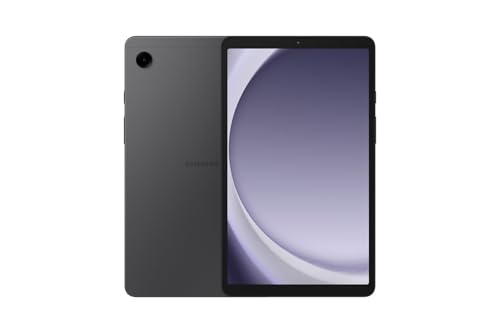
Samsung Galaxy Tab A9 8.7 — Samsung Simplicity at Book Size
The Tab A9 answers a specific and common request: “I want a Samsung, but smaller.” Its listing describes an 8.7-inch (22.1 cm) tablet with 64GB of storage, 4GB of memory and Wi-Fi 5 (802.11ac) in Graphite. That is the whole pitch, and for the right owner it is enough. Samsung’s interface is the one most likely to already be familiar from a family member’s phone, the size suits one-handed reading and handbag or coat-pocket carrying in a way no ten-inch tablet can, and the whole thing feels like a book that happens to make video calls.
Set expectations by the size. An 8.7-inch screen shows books, messages, news and video perfectly well for one person; it is not a shared screen, and split-screen tasks feel like a compromise rather than a feature. The 64GB of storage suits a reader whose media mostly streams, and the Wi-Fi 5 radio is entirely adequate for home networks — the absence of newer Wi-Fi standards in the listing is a footnote for this audience, not a flaw. What the A9 offers over the Lenovo Tab One at the same size is the Samsung ecosystem: the same account, the same photo library behaviour, the same settings layout as the phones much of the family already uses.
This is also the pick most likely to be bought by a senior for themselves, unassisted, because it asks the fewest questions. There is no case in the box, so add one at the same time — at this size a folio that props the tablet upright turns it into a bedside clock, a recipe screen and a call station in rotation. Owners who later want more screen can move up to the A11+ without relearning anything, which makes the A9 a gentle first step into the Samsung world rather than a dead end.
Grandparents who receive this tablet as a gift tend to adopt it fastest when the giver resists demonstrating everything at once. Show the call, the photographs and the books; let the news, the weather and the games be discovered across the following weeks, ideally by the owner, who will remember discoveries far longer than demonstrations. A small notebook page of handwritten steps for the two or three core tasks outperforms any printed manual, because it is written in the family’s own words and sits beside the chair where it is needed.
Honesty requires one boundary: buyers who read for hours daily in small print should test their comfort at this size first, ideally on a similar screen in the family. The A9’s virtues are portability and familiarity, and for a long-form reader those virtues can be outweighed by the TCL Gen 2’s bigger, sharper page. For the message-checker, the programme-watcher and the one-handed reader, though, this compact Samsung is often the tablet that actually gets carried — and a carried tablet beats a larger one left at home.
- Screen: 8.7-inch panel (22.1 cm)
- Onboard storage: 64GB
- RAM: 4GB
- Wireless: Wi-Fi 5 (802.11ac)
- Exterior: Graphite
- Case: none bundled — buy separately
Strengths
- Samsung familiarity in the most portable size in this guide.
- Book-like proportions suit one-handed reading and carrying.
- A gentle entry point that scales up to the A11+ without relearning.
Trade-offs
- Small screen limits shared viewing and split tasks.
- 64GB storage assumes mostly streamed media.
- No case included, so protection is an extra purchase.
Best for: a senior after Samsung’s familiar world in a tablet light enough to carry everywhere and hold in one hand.
Not suited for: two viewers sharing one screen, or a reader after the largest, sharpest page available.
Side-by-Side Comparison
| Pick | Screen | Memory / storage | Sound and calls | Defining trait |
|---|---|---|---|---|
| Samsung Galaxy Tab A11+ | Large display (exact size not stated in listing title) | 6GB / 128GB, expandable | Dolby Atmos speakers; AI Assist | 2-year warranty in listing |
| Lenovo Tab M10 Plus (3rd Gen) | 10-inch FHD | 4GB / 64GB | 8MP front and rear cameras | Full-size value all-rounder |
| Lenovo Tab One | 8.7-inch HD | 4GB / 64GB | Up to 12.5 hours of YouTube streaming per listing | Lightweight; folio case included |
| TCL TAB 10 Gen 2 | 10.4-inch 2K | Not stated / 128GB | Speakers not specified in listing title | Sharpest text; 6000mAh battery |
| TCL TAB 10 Gen 4 | 10.1-inch FHD | 4GB / 128GB | Dual speakers | Android 15; metal body |
| Samsung Galaxy Tab A9 | 8.7-inch | 4GB / 64GB | Wi-Fi 5 (802.11ac) | Compact Samsung familiarity |
How Big a Screen Does an Older Reader Really Need?
The answer depends on where the tablet will spend its life. On a table, propped by a stand, a ten-inch screen is pure gain: bigger text without more scrolling, video calls that feel like conversation, newspapers that resemble newspapers. In a hand, the same screen becomes a weight to be managed, and by the end of a long programme the wrist has an opinion. This is why the guide splits at roughly nine inches. Readers who mostly sit at a table or use a stand should buy the larger picks without hesitation. Readers who hold their tablet in bed, in an armchair or on a train should take the 8.7-inch models seriously — a slightly smaller picture that stays comfortable beats a bigger one that gets put down.
There is a middle habit worth copying: whichever size you buy, set the text size once, generously, and then leave it alone for a month. Many new owners keep text small out of a feeling that large text is an admission, then quietly stop reading on the device. Large text on a tablet is not a concession; it is the entire point of owning a screen bigger than a phone’s.
What Should a Family Member Set Up Before Handing the Tablet Over?
An hour of setup by a patient relative is worth more than any specification sheet can promise. Connect the Wi-Fi and the owner’s account. Install the handful of apps that will actually be used — video calling, email, news, books, photos, perhaps a weather app — and arrange them on one home screen in large, labelled positions. Set the system font and display size up a step or two. Add the calling app’s favourite contacts as shortcuts, so reaching a grandchild is one tap rather than a search. Turn on automatic updates, set a simple unlock the owner can manage confidently, and write the account password down in the household’s agreed safe place.
Then do the step everyone skips: sit together for the first video call, the first photo, the first chapter, and let the owner drive. Confidence with a tablet is mostly the memory of having done each thing once, successfully, with help nearby. A tablet configured in private and handed over with a wave tends to return to its box; a tablet introduced like a new kitchen appliance — demonstrated, practised, written down in a notebook by the phone — becomes furniture in the owner’s day within a week.
How Can You Make Text and Menus Easier on Tired Eyes?
Android gives you three levers, and they are worth using together rather than one at a time. Font size scales the words themselves. Display size scales everything — icons, buttons, menus — and is the lever that transforms usability for owners who find touch targets fiddly. Bold text adds weight to letterforms for readers who find thin fonts faint. Beyond the settings, habits help: raise screen brightness indoors rather than straining, choose book apps that offer warm page tones for evening reading, and prefer the TCL Gen 2’s high-resolution approach if fine print is the daily diet, because cleanly drawn letters stay comfortable at sizes where a softer screen turns to mush.
Glasses-wearers should also think about distance. A tablet on a stand at arm’s length often matches reading glasses better than a phone held close, which is one reason the ten-inch picks with a stand suit so many owners. If the tablet will be used with varifocals, a stand that tilts — rather than fixing one angle — lets the owner find the zone of their lenses instead of nodding at the screen like a polite bird.
What Makes a Video Call Feel Easy Instead of Awkward?
Three things: being heard, being seen, and starting the call without a expedition through menus. Being heard is a speaker and microphone matter — the reason this guide flags Dolby Atmos on the Samsung A11+ and the dual speakers on the TCL Gen 4 — but it is also a room matter; calls from a quiet room with the tablet propped at face height succeed where calls shouted at a tablet lying flat on a table fail. Being seen is the front camera’s job, and the Lenovo M10 Plus’s stated 8MP front camera is the strongest explicit promise here, though lighting does more than megapixels: a window or lamp in front of the face, never behind it.
Starting easily is pure setup. Put the calling app on the home screen, sign in once, add the family as favourites, and test the whole path before the first real occasion. Families who rehearse a call the week the tablet arrives report that the owner starts calling independently; families who leave the app buried discover the tablet used for everything except the purpose it was bought for. The hardware in this guide can all carry a good call. The difference is whether anyone built the doorway.
How Long Will a Tablet Like These Stay Useful?
Realistically, years — provided the purchase starts from the right end. The limiting factors are rarely speed. A tablet used for calls, news, books and photographs does not outgrow 4GB of memory quickly; what ages a tablet is software support ending, a battery that no longer holds a day’s charge, and storage filled to the point of complaint. That is why this guide weighted the signals it did: the newest Android on the TCL Gen 4, the expandable storage and two-year warranty on the Samsung A11+, the generous 128GB on the TCL Gen 2. Each is a different hedge against a different kind of old age.
Owners can extend the run with two habits. Keep some storage free — a tablet with a fifth of its space empty stays responsive — and let updates install rather than postponing them forever. And when a tablet does finally slow, demote it gracefully: a former main tablet makes an excellent dedicated photo frame, recipe screen or radio. A device with a second life planned is a better purchase than one expected to be everything forever.
Which Accessories Actually Earn Their Money for Senior Owners?
A stand first, before anything else, for every ten-inch pick: it converts the tablet into a call station, a television and a reading slope, and it removes the holding problem that quietly limits sessions. A folio case second, unless the pick includes one as the Lenovo Tab One does, because tablets are dropped in kitchens and bathrooms, not in the padded environments of advertisements. A longer charging cable third — the distance between the nearest socket and the favourite chair has ended more tablet habits than any technical fault — and a simple stylus fourth, for owners whose fingertips the touchscreen occasionally ignores; a basic capacitive stylus makes tapping deliberate and is kind to arthritic hands.
What can wait: extra storage, elaborate keyboard cases and screen protectors fitted in a panic. Buy the comfort kit with the tablet, live with the combination for a month, and let the owner’s actual routine nominate anything else. Accessories bought for an imagined routine usually end up in the same drawer as the tablet would have, if the setup had been skipped.
Should the Tablet Match the Phone the Owner Already Uses?
Where possible, yes, and the reason is transfer of confidence. A senior who has spent three years learning a Samsung phone already knows where Samsung puts its settings, how its photo gallery behaves and what its notifications sound like; the Tab A11+ and Tab A9 in this guide extend that knowledge instead of replacing it. The same logic applies in reverse for households standardised on other brands, though within this guide Samsung is the brand with the direct phone-to-tablet bridge. Familiarity compounds: every skill learned on one device pays rent on the other, and every support question a relative answers by phone is easier when both people can picture the same screens.
Matching is a preference, not a law. The Lenovo and TCL picks ask their owners to learn a lightly different arrangement of the same Android ideas, and most people manage that in a week with a notebook of their own notes beside the chair. What should be avoided is a household split across three different systems for phone, tablet and computer, where no one’s experience helps anyone else. If the tablet is the first smart device in an older person’s life, choose on screen and sound alone, and let the tablet become the reference everything else later matches.
How Do You Keep Passwords and Accounts From Becoming the Hardest Part?
More senior tablet projects die on a forgotten password than on any hardware fault. The defence is boring and total: one account, created for the owner, with its password written in the household’s chosen safe place — a notebook kept with important papers suits many families better than any app. Turn on the account’s recovery options while a relative is present to help, using a phone number that will still be answered in three years. Resist creating extra accounts for every service; each app that can sign in with the main account is one fewer password to lose.
Unlocking deserves the same calm planning. A fingerprint or face unlock, where the owner finds it reliable, removes the daily password entirely and is the single change most likely to keep a tablet in use. A short PIN that the owner chooses and rehearses beats a long password they fear mistyping. And write down, on paper, the three things a future helper will need: the account name, where the password lives, and which relative holds the recovery phone. Tablets are replaced every few years; a family’s written map of its accounts is permanent infrastructure.
What About Hearing Aids, Tremor and Other Real-World Details?
Tablets are unusually forgiving devices for bodies that no longer match the assumptions of product designers, provided the setup acknowledges them. For owners with hearing aids, speaker clarity at moderate volume matters more than maximum loudness, and a tablet propped near the listener beats a phone across the room; every pick here can also pair with Bluetooth hearing accessories and headsets, and captions can be switched on system-wide so programmes and many calls carry text as well as sound. An owner who has never tried live captions often finds them transformative for television accents alone.
For hands with tremor or arthritis, the levers are touch accommodations: lengthen the touch-and-hold delay so a resting finger is not read as a command, enlarge display size so targets grow, and consider the basic stylus mentioned earlier as a deliberate pointer. Weight returns as a medical matter here, not a preference — an 8.7-inch tablet held for an hour is a genuinely different proposition from a ten-inch one, and nobody should feel they have failed by choosing the smaller screen. The right tablet is the one whose owner forgets they are holding it.
What Goes Wrong When People Buy a Tablet for an Older Relative
The classic error is buying the tablet you would want yourself — the fastest, the thinnest, the one with the most impressive listing — and presenting it unconfigured. The second error is the opposite: buying down so far that the screen is small and dim and the owner concludes, unfairly, that tablets are not for them. A third is choosing a renewed or unfamiliar-brand bargain for a parent who will blame themselves when it misbehaves; condition wording on listings deserves careful reading, and it is exactly why the renewed-only Galaxy Tab A9+ does not appear as a linked pick in this guide.
Two process mistakes complete the set. Families set everything up under the helper’s account rather than the owner’s, tangling photos and messages for years. And families teach by taking the tablet out of the owner’s hands to “just do it quickly”, which is efficient and corrosive: the owner learns that the device is operated by other people. Guide the hands, never replace them, and the tablet will still be in daily use when the helper’s own phone has been replaced twice.
Final Recommendation
Start with the Samsung Galaxy Tab A11+ if the owner wants one full-size tablet to do everything, with strong speakers for calls, storage that will not fill, and a two-year warranty behind it. Choose the TCL Tab 10 Gen 2 instead when reading dominates and text sharpness is the daily comfort that matters. Take the TCL Tab 10 Gen 4 for the longest software life, the Lenovo Tab M10 Plus for table-top calls with a stated front camera, and drop to the Lenovo Tab One or Samsung Tab A9 when the honest priority is a light tablet held in one hand. Whichever you choose, check price on Amazon, add a stand and a case to the same order, and reserve an hour to set it up together — that hour is the real product.
Frequently Asked Questions
Why is the Galaxy Tab A9+ not in this guide?
Because the listings we could verify for it were renewed units rather than new tablets. Renewed devices can suit confident buyers, but this guide will not anchor a senior’s purchase on one: the Tab A11+ is Samsung’s current model here, with a two-year warranty in its listing. If you specifically want an A9+, read the condition wording on its listing carefully before ordering.
Is a bigger screen always easier for older eyes?
Not always. A bigger screen allows bigger text, but it also adds weight, and a tablet that tires the hand gets used less. Resolution matters as much as inches: the TCL Tab 10 Gen 2’s 2K panel draws cleaner letters than a larger low-resolution screen would. Match the size to where the tablet will be used — table or hand — and then set the text generously.
How much storage does a senior actually need?
For calls, news, books and a growing but ordinary photo collection, 64GB is workable and 128GB is comfortable. Photographs are the appetite that grows; video downloads are the other. The Tab A11+ removes the question with expandable storage, while the two 128GB TCL models give years of headroom before any tidying is needed.
Can these tablets make video calls to family on iPhones?
Yes. Mainstream calling apps work across Android and Apple devices, so a grandparent on any tablet in this guide can call family members whatever phone they carry. What matters is setup: the app installed, the account signed in, the favourites one tap away, and a practice call made before the first real occasion.
Does the owner need to be “good with technology”?
No. Every pick here runs standard Android with the same mainstream apps. The difference between a tablet that gets used and one that gets shelved is almost never the owner’s talent; it is whether someone configured the font size, the home screen and the call shortcuts at the start, and sat through the first uses together.
Should I buy the tablet, or let the owner choose it?
Involve the owner in the size decision at minimum, even if you handle everything else. Hands differ, eyes differ, and a person who has held two sizes in a shop — or even weighed in on photographs of relatives holding them — starts ownership with a feeling of authorship that a surprise rarely matches. The surprise tablet is a generous impulse; the chosen tablet is the one still in use at Christmas. If the purchase must be a gift, keep the receipt path simple and say plainly that swapping sizes is expected, not a failure.
What is the first thing to adjust when the tablet arrives?
Text and display size, before any app is opened for real. Raise both a step, turn on bold text if the owner finds standard type faint, and arrange the home screen around the four or five things the owner actually does. Specifications fade into the background within a day; a screen that is easy to read and a home page that makes sense are felt every single hour.
Related Guides
Many of the same households are also choosing a first tablet for a child, and the thinking about age-appropriate simplicity transfers surprisingly well, as our guide to tablets for children shows from the other end of the age range. For owners whose tablet time is mostly books, the reading-tablet roundup with paper-like screens goes deeper on long-session comfort, and anyone weighing these full-size picks against a tighter spend should compare them with the tablets that stay under a $200 budget before deciding.


[…] picks with real parental controls. And when the portable kit grows up into a family workspace, the Android tablets for seniors guide handles the other end of the household’s simplicity […]