What's inside
- Key Takeaways
- Quick Picks
- How We Chose These Picks
- What Does “AIO PC Case” Actually Mean?
- How Does Living With a Screen in Your Case Change the Desk?
- What Should You Know About AIO Cooler Sizes Before Choosing?
- How Do the Six Compare Side by Side?
- How Should You Budget for the Screen Ambition?
- Which Questions Should You Ask Before Buying Into This Category?
- How Do You Add a Sensor Display to a Case That Lacks One?
- What Are the Most Common Mistakes in This Category?
- Is an Integrated Screen Worth It Over a Second Monitor?
- Final Recommendation
- Frequently Asked Questions
- Related Guides
As an Amazon Associate I earn from qualifying purchases. This post may contain affiliate links at no extra cost to you.
widgetverdict.com is reader-supported. When you buy through links on our site, we may earn an affiliate commission.
Where to buy: the two genuine screen-integrated cases in this guide are covered as prose-only picks because we could not verify pool listings for them; the four linked cases are clearly labelled nearest substitutes, each with a verified Amazon link, for builders who decide the substitute route is the sensible one.
This is the guide where we owe you the truth before the recommendations: the best aio pc cases form one of the narrowest, strangest categories in PC building, and most roundups of it are quietly dishonest. A true AIO PC case — a chassis that integrates the display into the build itself, the way an all-in-one desktop from a big manufacturer does, with the screen built into or mounted as part of the case — barely exists as a retail product. What does exist is a handful of screen-bearing cases from a couple of makers, a larger set of cases with room to mount a small internal display yourself, and an ocean of ordinary towers that listicles relabel as “AIO cases” because they can fit an all-in-one liquid cooler. Those are three different products wearing one keyword, and this guide separates them rather than laundering the difference.
So here is the honest shape of the six picks. Two are the genuine article: cases with an integrated touchscreen or a factory-fitted secondary display, covered in prose because we could not verify listings for them. Four are linked cases from our verified pool, and each is labelled a nearest substitute, with the specific gap stated in its section — what it does instead of integrating a screen, why a builder drawn to this category might still choose it, and what you give up. If you came here wanting a screen in your case, you will leave knowing exactly which products truly offer one. If you came here because “AIO” on your parts list meant a liquid cooler, the substitutes are all excellent radiator hosts, and the guide explains that reading too.
Key Takeaways
- True AIO PC cases with an integrated display are a niche of a niche — essentially the HYTE Y70 Touch line and screen editions of Jonsbo’s D31.
- Most “AIO case” roundups actually mean cases that fit an all-in-one liquid cooler; that is a different and much larger category.
- The four linked picks here are labelled nearest substitutes: big glass, room for a DIY sensor display, and generous radiator support.
- An integrated screen adds a second display to your graphics card’s workload of cables and configuration — budget setup time, not just money.
- A DIY sensor panel inside a glass case achieves most of the AIO-screen effect with ordinary, replaceable parts.
Quick Picks
| Pick | Badge | Why it earns its place |
|---|---|---|
| HYTE Y70 Touch Infinite | The Genuine Article (prose-only) | A case with a real integrated touchscreen in its corner panel — the closest thing to a DIY all-in-one that money can buy. |
| Jonsbo D31 (Screen Edition) | Genuine, Smaller (prose-only) | A compact case with a factory secondary display mounted in the front — the other true member of this category. |
| NZXT H7 Flow | Nearest Substitute: Radiator Room | 420mm front radiator support and perforated panels; no screen, but the strongest AIO-cooler host here. |
| Corsair Frame 4000D RS ARGB | Nearest Substitute: DIY Display Space | Modular panels and a glass side that make mounting your own sensor display straightforward. |
| Lian Li LANCOOL 217 | Nearest Substitute: Premium All-Rounder | Five fitted fans, back-connector support and a clean glass view for a tidy, screen-ready build. |
| Fractal Design North XL | Nearest Substitute: Big-Canvas Build | An enlarged North with the internal volume to combine a large radiator, a big card and a display panel. |
How We Chose These Picks
The first pass was a truth pass. We listed every case we could find that integrates a display at the factory — not a case with a transparent side, not a case with an LCD on its bundled cooler, but a chassis where the screen is part of the case product. The list came back with essentially two names on it, and both are in this guide as prose-only picks because our verified pool holds no listing for either. Rather than padding the category with fiction, we then selected substitutes by a stated standard: a substitute must serve at least one of the real desires underneath this keyword. Those desires are three — a screen as part of the machine, a build organised around an all-in-one liquid cooler, and a clean all-in-one aesthetic where the PC reads as one designed object rather than a pile of parts.
We should also record what we excluded and why, because the exclusions define the category’s true borders. Cases with an LCD on a bundled liquid cooler were excluded: the screen belongs to the cooler, not the case, and it leaves with the cooler at upgrade time. Cases with a transparent LCD side panel concept or a display sold as a separate accessory were excluded for the same reason in reverse — the screen is an accessory, however elegant. And the many competent towers that appear in rival roundups purely because they fit a 360mm radiator were excluded unless they served a second desire from our list; radiator support alone would make this guide a duplicate of every airflow roundup we publish.
Each linked substitute was checked against those desires and against ordinary case virtues: radiator support in millimetres, graphics card clearance, glass quality and viewing angles for anyone planning a DIY internal display, and fan complements sufficient for the radiator-first layouts this category favours. We also weighed honesty of fit — a substitute that serves the liquid-cooling desire brilliantly and the screen desire not at all is labelled exactly that way in its section. No pick in this guide is described as something it is not; in a category built on a blurred term, that labelling is the guide’s main service.
What Does “AIO PC Case” Actually Mean?
It means two things in the wild, and search results mix them freely. In its literal sense, borrowed from all-in-one desktops, it means a case that merges the computer and its display into one unit — for a self-builder, a chassis with a screen integrated into its structure, into which you install your own motherboard, card and storage. That product category is real but tiny, because it fights the entire logic of PC building: displays and components age at different speeds, and a case that marries them asks you to replace both on one schedule. The makers who attempt it do so as a design statement, and price it as one.
A third, smaller usage deserves a footnote so nobody is ambushed by it: some builders use “AIO build” to describe a machine built around an all-in-one’s tidy minimalism generally — few cables, no reservoir, no visible plumbing — regardless of screens or specific coolers. That sensibility is real, and it is the one the substitutes in this guide serve best: back-connector boards, disciplined cable channels and composed interiors are the aesthetic of the sealed cooler translated into a whole machine. If that is the feeling your parts list is chasing, you are a substitute buyer, and a well-served one.
In its second, looser sense, “AIO” refers to all-in-one liquid coolers — the sealed radiator-and-pump units most gaming PCs now use — and an “AIO case” is simply a case with the radiator mounts and clearances to host one well. By that definition almost every modern tower qualifies, which is why the term misleads: a shopper picturing a screen-integrated machine lands on pages about radiator brackets. This guide covers the literal category first and treats the second sense as the substitute path, because the literal shopper is the one nobody else is serving honestly.
HYTE Y70 Touch Infinite — The Genuine Article (prose-only)
We could not verify a pool listing for the Y70 Touch Infinite, so it carries no link — but it is the case this keyword is actually about. HYTE took its Y70 panoramic-glass chassis and replaced the angled corner panel with a genuine touchscreen: a high-resolution display, built into the case at the factory, that connects to your system as a real second monitor and runs HYTE’s Nexus software for widgets, system readouts, media and touch controls. The result is the closest a self-builder can get to an all-in-one PC — the screen is not perched on the desk next to the machine; it is a face of the machine itself, and the effect in person is closer to an appliance from a design studio than to a gaming tower.
The case underneath the screen is a serious dual-chamber design with vertical graphics card presentation and room for substantial radiators, so the touchscreen is not propping up a compromised chassis. But the honest costs are real. The screen is a second display to configure, feed with a cable run inside the build, and keep in software — it draws its signal from your graphics card like any monitor, which means a spare output and a few evenings of widget arrangement. It is also the component most likely to date the machine: panels and touch standards evolve faster than steel boxes, and this screen is not a part you will swap in five years. Buy it as you would buy an all-in-one desktop — for the integrated object, with eyes open about the integration.
Who is it for, then? The builder whose desk is a display in itself, who streams or monitors a system constantly, and who values the single-object aesthetic over the upgrade purity of separate parts. For that builder there is no substitute on this page, and we will not pretend the linked cases below are one. For everyone else, the Y70 Touch is best read as the category’s proof of concept: it shows what “AIO case” means when a maker means it literally, and it sets the standard the substitutes are measured against.
One under-discussed virtue: the touchscreen is genuinely useful during the moments a PC is least cooperative. Boot sequences, BIOS visits and operating system installs all happen on the main display as usual, but once the system is up, the case screen becomes the place where monitoring lives permanently — no window to arrange, no overlay fighting your game for a corner. Owners tend to describe it less as a feature they use and more as a surface they would miss, which is the signature of a design idea that works even when its category stays small.
- Display: integrated touchscreen in the corner panel
- Layout: dual-chamber, panoramic glass
- Graphics card: vertical presentation supported
- Software: maker’s widget and monitoring suite
- Availability note: prose-only — no verified pool listing
Strengths
- The only kind of product that truly satisfies the literal keyword: screen and case as one object.
- The underlying chassis is a capable, modern design, not a novelty shell.
- A working second display for monitoring, chat or controls without desk space.
Trade-offs
- The screen will age faster than the case around it, and it is not replaceable.
- Setup includes display configuration and internal signal cabling most builds never face.
- Premium, design-object pricing for what is partly a monitor purchase.
Best for: design-led builders who want a genuine screen-integrated PC and accept the all-in-one bargain knowingly.
Not suited for: upgraders who keep a case for a decade, or anyone who dislikes configuring a second display.
Jonsbo D31 (Screen Edition) — Genuine, Smaller (prose-only)
The D31’s screen edition takes the other honest route into this category: a compact micro-ATX case with a secondary display fitted into its front, offered by the maker as a factory option rather than a mod. The screen serves as a system monitor and media panel — temperatures, clocks, artwork, whatever you assign it — and because it is a discrete panel in a defined mount, the concept is a degree less married than HYTE’s touchscreen: the case remains a compact, conventionally laid-out box that happens to have a display in its face. In a category of two genuine products, the D31 is the smaller, quieter-spoken one.
Its compromises are the compromises of compact cases generally — check graphics card length carefully, plan the build order, expect cables to need persuasion — plus the screen’s own: a front display wants the case on the desk facing you, which not every room allows, and the panel’s usefulness depends on software you will spend time arranging. We could not verify a pool listing for the screen edition specifically, and the standard D31 without the display is a different product, so no link appears here; if you shop for one, confirm the listing is the screen version by its title and photographs, because the two are confused in marketplaces with some regularity.
As with the HYTE, the right buyer is specific: a compact-build enthusiast who keeps the machine on the desk, enjoys a monitoring panel, and understands they are buying a display and a case in one transaction. For that buyer the D31 is arguably the most rational genuine AIO case made — the screen is useful rather than theatrical, and the case beneath it wastes nothing. For a builder who would rather keep the two purchases separate and replaceable, the substitutes below exist precisely for you.
The D31 also makes an interesting argument about where a case screen belongs. HYTE puts its display in the corner, as a face of the object; Jonsbo puts its in the front, as an instrument. The instrument placement is the more conservative and, for monitoring, arguably the more legible — it faces the user squarely, at the angle a dashboard should. Builders choosing between the two genuine picks are really choosing between theatre and instrumentation, and should notice that the price gap between them roughly equals the difference in ambition.
- Display: factory-fitted secondary screen in the front panel (screen edition)
- Form factor: compact micro-ATX
- Role of screen: system monitoring and media display
- Layout: conventional compact interior
- Availability note: prose-only — verify the screen edition carefully if shopping
Strengths
- A genuine integrated display in a compact, sensibly priced class of case.
- The screen’s monitoring role is useful every day, not just decorative.
- Smaller footprint than the HYTE suits real desks better.
Trade-offs
- Listings confuse screen and non-screen editions; buying requires care.
- Compact interior demands the usual small-case build discipline.
- Front display only earns its keep if the case sits facing you on the desk.
Best for: compact-build fans who want the genuine integrated-screen experience at the category’s saner end.
Not suited for: floor placement, or builders who want their display budget spent on the main monitor.

NZXT H7 Flow — Nearest Substitute: Radiator Room
Label first, as promised: the H7 Flow has no screen, integrated or otherwise. It is here because it serves the keyword’s second meaning better than anything else in our pool — if your “AIO” is an all-in-one liquid cooler, this is a case that treats radiator hosting as a first principle. The front accepts radiators up to 420mm, the top is perforated and radiator-ready, and the all-over perforation pattern means whichever wall you mount a radiator against, it breathes like it means it. A builder planning a large AIO for the processor and air for everything else will find no wasted motion in this chassis.
It also serves the third desire under this keyword — the single designed object — better than most towers. NZXT’s design language is the most appliance-like in the mainstream market: clean planes, disciplined cable channels with straps fitted, nothing shouting. What it will not do is show you your temperatures on its face. The increasingly popular workaround suits it well, though: a small standalone sensor display mounted inside the glass, fed by USB and a spare video output, gives you the monitoring-panel effect of the genuine picks with parts you can replace individually. In the H7 Flow’s airy interior that panel can sit without cooking, which is more than can be said for sealed showpiece cases.
Judge it, then, as the rationalist’s answer to this keyword. It declines the integrated screen entirely, hosts the liquid cooler the term usually refers to, and leaves a clean stage for a DIY display if you want one. Builders who arrived wanting HYTE’s object should not be talked into it — the previous sections are yours. Builders who arrived with a 360mm or 420mm cooler in their cart have found the most honest case on the page for their actual build.
There is a resale and reuse angle that favours this substitute strongly. A case with no integrated electronics is a case with nothing to orphan: when the H7 Flow eventually leaves your desk, it leaves as a fully current product for its next owner, every feature intact. Screen cases carry their software dependency into every future transaction. For builders who rotate hardware through a household or a second-hand market, the substitute’s dumbness is a durable asset, and it compounds with every year the case stays in service.
- Form factor: ATX mid-tower
- Radiator support: up to 420mm front, plus top mounting
- Panels: perforated front, top and bottom; tempered glass side
- Screen: none — supports a DIY internal sensor display
- Notable feature: bottom intake positions for the graphics card
Strengths
- The strongest AIO-cooler hosting in this guide, front and top.
- Perforation everywhere keeps radiator exhaust from recycling inside.
- Clean, appliance-like design suits the all-in-one aesthetic.
Trade-offs
- No integrated display of any kind; the screen desire goes unserved.
- A DIY sensor panel is an extra purchase and an extra cable plan.
- Industrial styling is plainer than the genuine picks’ theatre.
Best for: builders whose AIO means a big liquid cooler, and who may add a sensor display later.
Not suited for: anyone whose heart is set on a factory-integrated touchscreen.

Corsair Frame 4000D RS ARGB — Nearest Substitute: DIY Display Space
Again, the label: no screen is built into this case. What the Frame 4000D offers the AIO-curious builder is the easiest stage for the do-it-yourself version of the idea. Its modular design — swappable front panels, fans on sliding InfiniRail mounts, a tempered glass side with a clear view of the interior — means a small sensor display can be mounted inside, repositioned as the build changes, and removed without a trace when you tire of it. Three RS ARGB fans are fitted from the factory, back-connector motherboards are supported for an unusually clean interior, and an anti-sag arm keeps a heavy card level behind the glass your display will share.
The DIY route deserves a fair statement of its merits, because for many builders it beats the genuine article. A standalone sensor panel is a standard small display: cheap to replace, free to move to your next case, and driven by mature monitoring software. Mounted on the Frame’s rails or against its glass, it delivers the temperatures-and-clocks face that most AIO-screen buyers actually use daily, without welding a monitor into a steel box. What you lose is the touchscreen theatre and the single-object purity of the HYTE; what you keep is every part’s independence. In a hobby built on swapping parts, that trade wins more often than the design studios admit.
Radiator support is present and correct rather than class-leading — this is a mid-tower of the classic school — so a builder whose priority is a 360mm cooler plus the display project will be well served, while the 420mm enthusiast should take the NZXT above. As a substitute, it is the most adaptable object on this page, and adaptability is the quality the AIO category’s genuine products most conspicuously lack.
The Frame also suits the undecided, which in this category is most people. A builder can buy it today as an excellent ordinary case, live with it for a month, and add the sensor panel only if the bare glass starts to feel unfinished — or skip the panel forever and have lost nothing. The genuine picks demand the decision at purchase, at full price, in advance. Optionality has a value that specification tables never capture, and this case is where that value lives in this guide.
- Chassis type: modular ATX mid-tower frame
- Factory fans: three RS ARGB units fitted
- Mounting system: InfiniRail sliding rails — handy for display placement too
- Screen: none — interior space and glass suit a DIY sensor display
- Notable feature: swappable panels; graphics card anti-sag arm
Strengths
- Modularity makes mounting and later removing a sensor display trivial.
- Back-connector support keeps the display’s backdrop — your build — cable-free.
- Every component of the screen effect stays separately replaceable.
Trade-offs
- The display itself is on you: purchase, mounting and software.
- Radiator ceiling is a class below the H7 Flow’s 420mm front.
- No touchscreen; the DIY panel is for looking, not touching.
Best for: tinkerers who want the AIO-screen effect as a project, with replaceable parts.
Not suited for: buyers who want the screen fitted, wired and warranted by the factory.
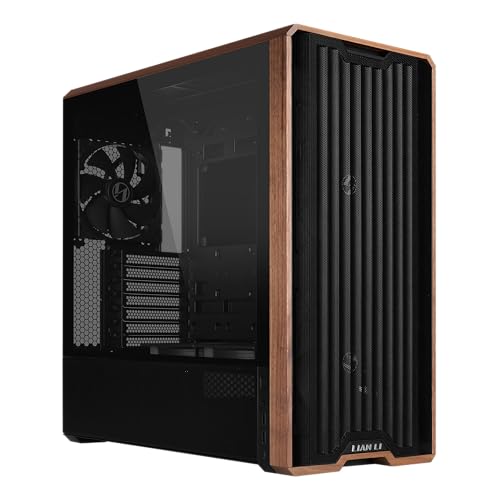
Lian Li LANCOOL 217 — Nearest Substitute: Premium All-Rounder
The 217’s claim on this list is the all-in-one aesthetic, executed in the traditional materials: five fans fitted from the factory, walnut-trimmed front, back-connector motherboard support that leaves the main chamber almost cable-free, and a glass view of an interior that looks designed rather than assembled. No screen is integrated — the label stands — but of the linked substitutes, this is the one that most closely reproduces the feeling the genuine picks sell: a single composed object on the desk, everything in its place, nothing trailing. For a builder whose attraction to “AIO” is really an attraction to that composed, appliance-like completeness, the 217 answers the desire more directly than a touchscreen would.
Practically, it is also a strong radiator host in the 360mm class with filtered intakes and a flexible power supply mount, so the liquid-cooling reading of the keyword is served respectably. A DIY sensor display sits happily in its clean chamber if you want the monitoring face as well, and the back-connector layout gives that display an uncluttered backdrop. The walnut deserves its sentence: in a room, it moves the machine from equipment toward furniture, which is the same journey the genuine AIO cases are making from the other direction.
It is the premium substitute and prices like one. The builder cross-shopping it against the HYTE should notice the philosophical difference: the 217 spends its premium on materials, fans and finish that will not date, while the HYTE spends its on a screen that will. Neither is the wrong answer; they are answers to different questions that happen to share a keyword, and this guide’s job is to make sure you know which question you are asking.
Ownership details reinforce the positioning. The 217’s filters are reachable, its panels come off without a fight, and its fan set leaves no day-one shopping list — the ownership experience of a finished appliance rather than a project. That completeness is precisely the emotional product the AIO category sells, delivered here without a single integrated electronic component to support, update or orphan. If the touchscreen is the desire, it will not do. If the desire is a machine that feels resolved, it does that job better than the genuine picks do.
- Chassis type: ATX mid-tower
- Factory fans: five fitted, the front pair being 170mm units
- Front: mesh panel trimmed in genuine walnut
- Motherboard support: includes back-connector designs
- Screen: none — clean chamber suits an optional DIY display
Strengths
- The most composed, single-object presence among the linked substitutes.
- Five fitted fans and filtration make it complete on day one.
- Premium materials will not date the way an integrated screen can.
Trade-offs
- No display, touch or otherwise — the aesthetic is served, the screen is not.
- Premium pricing overlaps the genuine picks’ territory.
- Its charms are wasted in a build that lives under a desk.
Best for: builders drawn to the all-in-one look who prefer timeless materials to an integrated screen.
Not suited for: anyone who needs the display itself, or who is budgeting tightly.

Fractal Design North XL — Nearest Substitute: Big-Canvas Build
The North XL is the substitute for the builder who wants everything in one large, calm enclosure: a full-size radiator for the processor, a flagship graphics card at full length, and — the AIO-category flourish — internal room to mount a proper small display panel without crowding either. It is the North design scaled up, walnut slats and all, with the interior volume that the standard model politely lacks. No screen is integrated; the label, one final time, stands. What the XL sells is canvas.
That volume changes the DIY display proposition qualitatively. In a mid-tower, a sensor panel competes with the card for sightlines and air; in the XL it can occupy its own territory, angled for the desk, with its cable run hidden by the case’s generous management space. The same volume makes it the most relaxed radiator host here after the NZXT — big coolers fit without the shoehorn, and the build can grow into a custom loop later without a case change. Fractal’s panel fit and finish keep the big box from feeling like a filing cabinet, which at this size is an achievement in itself.
Choose it if your AIO ambition is really a grand, unified build — screen project, liquid cooling, top-tier card, one composed wooden-fronted object. Skip it if your desk or your room cannot give a full-size tower its space, and skip it, as with every substitute here, if the factory touchscreen is the thing itself you want. The genuine picks are at the top of this page, and they are not interchangeable with this one’s considerable virtues.
It is worth noting what the XL’s size does for the liquid-cooling reading of this keyword, too. Large radiators in mid-towers often fit on paper and fight in practice — tube bends against memory, fans against the top of the board. The XL’s extra headroom turns those fights into clearances, which matters for a builder whose AIO ambitions may grow from a sealed unit toward a custom loop. A case bought for a screen project that ends up hosting a full loop has not been wasted money; it has been a platform, and platforms are what big, honest towers are for.
- Form factor: enlarged ATX tower (North XL)
- Front panel: walnut slats over open intake
- Interior: volume for large radiators, long cards and a display panel
- Screen: none — space provided for a DIY panel
- Side panel: tempered glass (this version)
Strengths
- Room for the radiator, the flagship card and the display project simultaneously.
- Fractal finish keeps a large case looking like furniture, not storage.
- Upgrade headroom for years, including a later custom loop.
Trade-offs
- Its size is a commitment of desk or floor space.
- No integrated screen; the display remains a DIY project.
- Overkill for a modest build, which will rattle around inside it.
Best for: grand unified builds — big cooler, big card, display panel, one calm wooden case.
Not suited for: small desks, modest builds, or touchscreen purists.
How Does Living With a Screen in Your Case Change the Desk?
More than the product photographs suggest, starting with placement. A normal tower can live under the desk, sideways in a cubby, anywhere its cables reach; a screen case has a face it wants you to look at, which means desk space, at eye level, angled toward your chair. That single requirement rearranges more desks than any other in PC building, and it is worth pacing out with a tape measure before the purchase rather than after. The reward for the rearrangement is real: system information, media controls and a small always-on canvas become part of the room’s furniture rather than windows competing on your main display.
There is a lighting consequence, too, that rarely appears in reviews. A case screen is a light source in the room’s periphery, and in a dark room it will be the second-brightest object after your monitor. Most owners tame it with a dim evening face or a dark theme and find the result companionable; a few find any peripheral glow intolerable and end up disabling the panel at night, which quietly converts their integrated case into a substitute with a dark window. Try to know which person you are before the purchase — a week of leaving a small tablet glowing beside your monitor is a fair rehearsal.
The second change is behavioural. Owners of screen cases report checking the panel the way people check a thermostat — glances, all day, mostly unnecessary and entirely pleasant. Load graphs become ambient information; a temperature creeping over weeks gets noticed at the glance stage instead of the shutdown stage. Whether that ambient awareness is worth a rearranged desk and a coupled upgrade cycle is the genuine question of this category, and it is a question about your habits rather than about any specification. The specifications are all fine. The habit is the purchase.
What Should You Know About AIO Cooler Sizes Before Choosing?
Since half the readers of this keyword mean the cooler, its sizing rules deserve a straight summary. Radiators are named by their fan count multiplied: a 240 takes two 120mm fans, a 360 takes three, a 420 takes three 140mm fans and is the size that separates generous cases from ordinary ones. The processor’s heat decides the sensible size — a mid-range chip is honestly served by a 240 or a good air cooler, while flagship processors under sustained all-core loads justify the 360 and 420 classes. Bigger is not automatically better; an oversized radiator on a modest chip buys silence at low loads, not performance, and costs case compatibility everywhere else.
Placement interacts with the rest of the build. A front-mounted radiator gets the coolest air and hands warmed air to the graphics card; a top-mounted one exhausts the processor’s heat directly and leaves the front intake pure for the card. In the cases in this guide, the H7 Flow’s 420mm front support makes it the natural front-mount choice, while the North XL’s volume makes top-mounting a large radiator unusually painless. Tubes and pump clearance deserve a check against tall memory and the motherboard’s top edge — the dimensions that collide are rarely the headline ones, and every maker publishes a radiator compatibility diagram that is worth the four minutes it takes to read.
How Do the Six Compare Side by Side?
| Case | Integrated screen? | Link status | What it actually offers |
|---|---|---|---|
| HYTE Y70 Touch Infinite | Yes — touchscreen | Prose-only | The genuine screen-integrated AIO case |
| Jonsbo D31 (Screen Edition) | Yes — front display | Prose-only | The genuine article, compact class |
| NZXT H7 Flow | No | Linked | Best radiator hosting; DIY panel possible |
| Corsair Frame 4000D RS ARGB | No | Linked | Easiest DIY sensor-display stage |
| Lian Li LANCOOL 217 | No | Linked | All-in-one aesthetic, premium finish |
| Fractal Design North XL | No | Linked | Biggest canvas for cooler + card + panel |
How Should You Budget for the Screen Ambition?
Three budgets cover the three routes, and laying them side by side clarifies the category better than any review. The genuine route costs a premium case price, of which a substantial share is really a monitor purchase wearing a case’s clothing — compare it honestly against the price of the case you would otherwise buy plus a good small display, and the integration premium stands revealed as the price of the single-object design itself. The DIY route costs an ordinary case plus a modest panel and an hour of mounting; it is the cheapest path to a screen that shows your temperatures, by a wide margin. The aesthetic route — a composed case like the 217 with no screen at all — costs a premium for materials and fans, and returns it in longevity rather than features.
None of the three is the “smart” choice in the abstract, because they buy different goods: integration, information, and permanence, respectively. The budgeting mistake is paying for one and expecting another — paying the integration premium and then resenting the coupled upgrade cycle, or buying the DIY panel and then resenting that it looks fitted rather than born there. Decide which good you are purchasing, and the correct line item in this guide selects itself; the prices, within each route, are all defensible for what they deliver. One budgeting trap spans all three routes: the accessories that follow the case home. The genuine picks invite a vertical-mount kit or matching fans; the DIY route invites a better panel, a longer cable, a second panel; the aesthetic route invites the back-connector motherboard that completes the look. None of these is compulsory, all of them are real, and a budget that ends exactly at the case’s price is a budget that will be renegotiated within the month.
Which Questions Should You Ask Before Buying Into This Category?
Ask first which of the three desires is actually yours. If it is the integrated screen, only the two prose-only picks answer, and your research should go deep on their displays: resolution, the software that drives them, what happens to the screen’s usefulness if the maker abandons that software, and whether the case beneath the screen suits your parts. If it is the liquid cooler, reverse the process — shop for radiator support and airflow as you would for any build, and let the word AIO go. If it is the composed, single-object look, judge the substitutes here on materials and interior cleanliness, and consider whether a DIY panel closes the remaining gap for you.
Ask second about time. An integrated screen couples the replacement cycles of a display and a chassis, and both are items builders normally keep for very different spans. A case can serve a decade; a small touchscreen’s software ecosystem may not. That is not an argument against the genuine picks — all-in-one desktops live with the same bargain happily — but it should be a conscious bargain, priced into the decision. Ask third about your graphics card’s outputs: a screen-integrated or DIY display consumes one, and on a multi-monitor desk that output may already have a job.
How Do You Add a Sensor Display to a Case That Lacks One?
The DIY version of the AIO screen is a well-trodden project. You need a small USB or HDMI display panel of the size your case can host — the Frame 4000D and North XL in this guide have the friendliest interiors for it — a mount or bracket to hold it against the glass or an interior panel, and one spare video output or a USB display connection. Monitoring software then turns the panel into the familiar temperatures, clocks and load graphs, or into artwork if the machine’s vitals bore you. Route the panel’s cable with the same care as any other lead; the whole effect collapses if a cable drapes across the display it serves.
Software choice shapes the result more than panel choice. The mature monitoring suites let you design the panel’s face — gauges, graphs, a single large temperature, artwork with a clock — and save layouts you can carry to your next build and your next panel. Spend the first evening with the software rather than the hardware: a well-composed face at modest brightness looks integrated, while a default dashboard at full glare looks like a phone taped inside a case, which is, mechanically, close to what it is. The difference between the genuine AIO effect and the DIY effect is mostly this evening of arrangement, and it is an evening the genuine picks’ owners spend too, inside their makers’ software.
Two practical warnings from builders who have done it. Heat first: a display panel is electronics, and mounting it directly against a graphics card’s exhaust path shortens its life and can wash out its image — choose a spot in the intake’s neighbourhood, which the perforated NZXT and the roomy Fractal both offer. Brightness second: an internal panel behind tinted glass needs more brightness than the same panel on a desk, so check the panel’s rating against your case’s glass before ordering. Get those two right and the result is ninety percent of the genuine AIO experience, assembled from parts that can each be replaced for the price of a modest dinner.
What Are the Most Common Mistakes in This Category?
The first is buying the wrong meaning. Every month, builders order a case from an “AIO” roundup expecting a screen and receive a radiator bracket with good marketing; the fix is the thirty seconds it takes to ask which sense of the term the listing means, a question this guide has tried to answer on every pick’s behalf. The second mistake is the mirror image: buying a screen-integrated case for a build that will outgrow it, then discovering the screen’s software, size or standard has become the machine’s ceiling. Integration is a commitment, and it should be made by people who keep whole systems, not by people who keep cases.
A sixth mistake belongs to the research stage: trusting renders. Screen cases are photographed with their displays showing beautiful, content-rich faces that the shipping software may approximate only loosely, and substitute cases are photographed with sensor panels that are not included at any price. Before ordering anything in this category, separate what the photograph shows into what ships, what the software provides, and what the previous owner of the photograph added. That three-way sort, applied ruthlessly, prevents most of this category’s disappointments.
Third is neglecting the second display’s practicalities — the consumed graphics output, the internal cable, the widget software’s updates — until they surface mid-build. Fourth is assuming the genuine picks’ cases are as upgrade-friendly as ordinary towers: check card length and radiator support on the HYTE and Jonsbo with the same rigour as any case, because the screen earns them attention, not exemptions. And fifth, for substitute buyers: forgetting that a DIY panel needs a home in the layout from the start. Retrofitting one into a finished, cable-managed build is a small afternoon of regret that a five-minute plan prevents.
Is an Integrated Screen Worth It Over a Second Monitor?
For information display, honestly, the second monitor wins on size, price and flexibility almost every time — which is why the genuine AIO cases should not be bought as information appliances. Their value is different in kind: the screen is part of the machine’s body, always on with it, occupying no desk, and turning the PC into a single designed object in a way no arrangement of separate parts achieves. People who light up at that description are the market, and for them the premium is rational. People who read it and shrug should buy the substitute, add a sensor panel if they fancy one, and spend the difference on the monitor they actually look at.
There is a middle testimony worth hearing: streamers and system-watchers who keep monitoring visible constantly report that a case screen earns its place by being glanceable without window-switching, in a way a second monitor crowded with chat and timelines is not. If your second display is already full, the case screen is not redundant — it is the dedicated instrument panel. That is the strongest functional case for the genuine picks, and it is a good one; it simply applies to a narrower set of desks than the marketing suggests.
Resale tells the same story from the other end. A used screen case sells to the same narrow audience that bought it new, and its value leans on the maker’s software still being maintained; a used substitute case sells to anyone building a PC. None of that should stop the right buyer — the right buyer is purchasing years of daily pleasure in a designed object, not an investment — but it completes the honest picture this category’s marketing usually crops.
Final Recommendation
Decide which keyword you meant, and this category resolves itself. If you meant the screen: the HYTE Y70 Touch Infinite is the genuine article and the Jonsbo D31’s screen edition is its compact counterpart — buy either with the all-in-one bargain understood, and buy nothing else under the impression that it integrates a display, because nothing else here does. If you meant the cooler: the NZXT H7 Flow is the finest radiator host on this page and the honest destination for most readers. And if you meant the feeling — one composed object, quietly complete — the LANCOOL 217 delivers it in walnut and steel that will outlast any screen, with the Frame 4000D and North XL waiting for builders who want to add the display themselves. The narrow truth about AIO cases is that there are two of them; the useful truth is that everything the category promises can be assembled, honestly labelled, from the six picks above. Whichever route you take, buy it for the desire you actually have — the screen, the cooler, or the composed object — and this strange little category will reward you instead of surprising you.
Frequently Asked Questions
Are there any true all-in-one PC cases for builders?
Very few. The category amounts to HYTE’s Y70 Touch line, with its factory touchscreen, and screen editions of Jonsbo’s D31 with a fitted front display, plus occasional limited designs. Both are covered above as prose-only picks because we could not verify pool listings for them. Everything else sold under the term is either a case with room for a DIY display or a case that fits an all-in-one liquid cooler. If a listing for a supposed screen case does not show the display in its own photographs, powered and fitted, assume the display is not part of the product and read the specification until it proves otherwise; in this category the burden of proof sits with the screen.
What does AIO mean when a normal case uses it?
Almost always the liquid cooler: an all-in-one sealed water-cooling unit. A case described as AIO-ready or AIO-friendly is claiming radiator mounts and clearance, nothing about a screen. The two meanings share three letters and nothing else, and checking which one a listing intends is the single most valuable habit in this category.
Can I put a screen inside a regular case myself?
Yes — that is the DIY sensor display route detailed above. A small USB or HDMI panel, a mount, a spare output and monitoring software reproduce the temperatures-and-clocks face of the genuine picks inside cases like the Frame 4000D or North XL. You lose the touchscreen and the factory integration; you gain replaceable parts and a much lower total cost.
Does an integrated case screen use much graphics power?
The display itself is light work for any modern graphics card — it is a small second monitor. The real costs are an output port, a little configuration, and the widget software’s background appetite, which is modest. It will not meaningfully affect game performance; it may affect a multi-monitor setup that was already using every output. One related comfort: because the panel is a standard display to the operating system, it behaves predictably — it can be blanked, dimmed or reassigned like any monitor, and unplugging it harms nothing. The integration is physical, not a proprietary lock on your graphics pipeline.
Will a screen-integrated case become outdated faster than a normal case?
The case part will not; the screen part can. Displays, touch standards and the maker’s widget software all evolve faster than steel and fan mounts, and the screen is not a replaceable module. This is the same bargain an all-in-one desktop offers, and it suits buyers who replace systems whole rather than builders who carry a case across three component generations.
Which substitute is best if I mainly want a big liquid cooler?
The NZXT H7 Flow, for its 420mm front radiator support and perforated panels that let a radiator breathe from either main mounting position. The North XL is the alternative if you also want maximum internal room and the wooden-front design; the LANCOOL 217 covers the 360mm class with the most complete stock fan setup of the three.
Related Guides
Builders whose interest in this category is really about cooling should continue with our roundup of the best airflow cases for a PC, where radiator support and mesh fronts are compared across the full-size field. If compact is more your direction, our guide to mini-ITX cases with proper dust filtration covers the small cases that protect a build properly, and our guide to setting up a sensor display in a PC case walks through the DIY panel project in full.


