What's inside
- Key Takeaways
- Quick Picks
- How We Chose These Picks
- Comparison
- Transfer Paper or Sublimation: How Do You Choose for Your Wardrobe?
- What Does a Complete Transfer Setup Include Beyond the Printer?
- How Do You Get a Transfer Right the First Time on a New Design?
- How Should Transfer Paper Be Chosen and Stored?
- What Makes a Transfer Design Print Well?
- How Do You Price a Transfer Shirt Without Losing Money Quietly?
- How Should a First Transfer Workspace Be Arranged?
- When Should a Transfer Hobbyist Consider Adding the Second Process?
- How Long Do Transfer Prints Last, and How Should Customers Care for Them?
- What Should the First Month of Transfer Printing Teach?
- How Do You Handle One-Off Custom Orders Profitably?
- Why Does Ink Coverage Make Tank Printers the Transfer Default?
- How Should Designs Be Prepared Differently for Light and Dark Garments?
- What Separates a Hobby Setup From a Small Garment Business?
- How Do You Keep Colours Honest From Screen to Shirt?
- What About Sleeves, Pockets and Other Awkward Placements?
- How Should Finished Shirts Be Stored and Shipped?
- Common Mistakes
- Final Recommendation
- Frequently Asked Questions
- Related Guides
As an Amazon Associate I earn from qualifying purchases. This post may contain affiliate links at no extra cost to you.
widgetverdict.com is reader-supported. When you buy through links on our site, we may earn an affiliate commission.
The best printers for t-shirt transfer are ordinary inkjets chosen for an extraordinary second job: printing a design onto heat-transfer paper, which is then laid on a garment and pressed with heat, carrying the image across onto the fabric itself. That two-step nature defines everything in this particular guide. The printer never touches the shirt; the paper does that. So the machines below are judged as partners to transfer paper — refillable tank inkjets whose ink economics survive a hobby measured in full-coverage designs, plus one deliberate counterpoint kept in view throughout. Five picks are Epson EcoTank and Canon MegaTank models, because bottled ink changed this craft’s arithmetic beyond recognition. The sixth is Epson’s SureColor F170, a sublimation printer included specifically so the two processes can be separated in plain sight: transfer paper and sublimation are cousins, not twins, and confusing them is the most expensive beginner mistake in garment printing, paid for in ruined shirts and refunded orders.
The distinction, stated once here and used throughout: heat-transfer paper carries a coating that releases under heat onto almost any fabric, including cotton and dark colours, with the design sitting on the surface where a hand can feel it. Sublimation dye becomes gas and bonds inside polyester, working only on polyester and light colours, with the design becoming part of the fabric itself, permanently and invisibly. Cotton shirts and dark shirts belong to the transfer-paper process; polyester athletic wear belongs to sublimation. A wardrobe audit — fibre, colour, quantity — therefore precedes every sensible purchase in this category, and it costs nothing but honesty about the garments actually waiting to be printed. Nothing in this guide claims any printer includes transfer paper — paper is a separate purchase, matched to your fabric and colour, and the listings are where you can check price on Amazon for both machine and ink. Read that sentence twice if you are new to the craft, because the gap between a printer and a working transfer setup is exactly where first budgets go wrong.
Key Takeaways
- Transfer printing is a paper process: any good inkjet prints the design, and the heat-transfer paper performs the move onto the shirt under the press.
- The printer is only one third of the setup — a heat press and the correct paper for your fabric colour complete a kit no printer box contains.
- Epson’s EcoTank ET-4800 is the balanced starter — a cartridge-free all-in-one with ADF and Ethernet at a stated up to 10 ppm, ready to double as the household’s everyday printer between pressing sessions and design experiments.
- The EcoTank ET-2900 is the simple, borderless-photo member of the family for smaller, design-led transfer work at a craft desk.
- The EcoTank ET-4950 steps up to a stated up to 18 ppm with auto 2-sided printing for sellers producing shirts in batches.
- The EcoTank ET-15000’s 13 x 19 inch output prints oversized designs and gang layouts of smaller transfers on one wide sheet.
- The SureColor F170 is the sublimation counterpoint — a different process for polyester, included so buyers choose consciously between the two chemistries.
Quick Picks
| Pick | Badge | Why it earns its place |
|---|---|---|
| Epson EcoTank ET-4800 | The balanced transfer starter | A cartridge-free all-in-one with ADF and Ethernet for design work plus household duty. |
| Epson EcoTank ET-2900 | The simple design printer | A cartridge-free all-in-one with borderless photo printing for vivid transfer artwork. |
| Epson EcoTank ET-4950 | The batch producer | A stated up to 18 ppm with ADF and auto 2-sided printing for sellers working in runs. |
| Epson EcoTank ET-15000 | The oversized-design machine | Wide-format 13 x 19 inch printing for large designs and ganged transfer sheets. |
| Epson SureColor F170 | The sublimation counterpoint | A dedicated dye-sublimation printer with a starter kit — the polyester process, for comparison. |
| Canon PIXMA G620 | The photo-first MegaTank | A refillable photo all-in-one whose image quality flatters photographic transfer designs. |
How We Chose These Picks
Transfer printing consumes ink like a photo hobby and patience like a production run, so the shortlist was built on ink economics first. Tank printers dominate because a transfer design is typically a full sheet of saturated colour, and a cartridge machine meters that sheet at a price that turns experimentation into anxiety. All five inkjet picks refill from bottles. Format came second: most transfer work is letter-size, but the ET-15000’s wide sheet earns its place for oversized designs and for ganging several small transfers onto one sheet to cut paper waste. Office features — ADF, Ethernet, duplex — were credited where titles state them, because transfer printers live double lives as household and small-business machines between press sessions.
The F170’s inclusion needs its own defence, since it cannot use transfer paper at all. It is here because a large share of shoppers researching this topic are actually deciding between processes, often without knowing it. A guide that listed only inkjets would answer the question they typed and betray the one they meant. The F170’s review therefore teaches the fork in the road — and readers who discover their garments are polyester should follow it to the dedicated sublimation guide in this series, where that process gets its own full treatment.
Honesty about the consumable completes the method. No pick here is sold with transfer paper as a stated inclusion, and none is credited with any: the paper is chosen separately for light or dark fabric, bought in packs, and consumed one sheet per garment plus the inevitable learners. Any guide implying the printer purchase completes the kit is setting its readers up for a box-opening disappointment, and this one declines.

Epson EcoTank ET-4800 — The balanced transfer starter
The ET-4800 is the transfer beginner’s most defensible first machine, and its title shows why: a cartridge-free colour all-in-one — print, scan, copy, fax — with a stated up to 10 ppm, an ADF and Ethernet, positioned for home and small offices. Translate that into garment terms. The tanks make full-colour transfer sheets affordable to produce in the plural, including the test sheets every new design deserves. The scanner digitises hand-drawn artwork and the family-photo archive that half of all personalised shirts begin as. The ADF and Ethernet are office furniture, admittedly — but a transfer printer that also runs the household’s documents earns its desk space on the days no shirts are pressing, which for most owners is most days.
Ten pages per minute is a document figure and should be read as temperament rather than transfer pace: a full-coverage design prints at the machine’s careful photo pace, not its memo pace, on every inkjet ever made. What matters for transfers is that the output be even, saturated and predictable, and a mainstream EcoTank’s colour behaviour is a known quantity with a large community printing exactly this work on exactly this family of machines. Their accumulated settings knowledge — which paper type setting, which quality level — is an unofficial manual no beginner should undervalue.
The ET-4800’s ceiling is size and speed of ambition. Letter-size sheets cap single-piece designs at letter-size dimensions, so oversized back prints need tiling or the ET-15000 below. Sellers graduating to daily batch production will feel the document-class pace and look at the ET-4950’s stated 18 ppm. Neither limit diminishes the starting case: for a first transfer setup that must also be a family printer, this is the guide’s default recommendation, and its balance of talents is precisely what “first” should mean.
The community factor deserves its final word here. EcoTank owners printing transfers form one of the largest informal support networks in home crafting — paper settings, press timings and troubleshooting for this exact family of machines are documented across years of other people’s mistakes. A beginner buying the ET-4800 inherits that library on day one. No specification table captures it, but the first time a print emerges banded at 11 p.m. before a birthday deadline, the library is the feature that matters, and it comes free with the mainstream choice.
- Functions per listing title: print, scan, copy, fax — cartridge-free supertank
- Stated speed per title: up to 10 ppm
- Extras per title: ADF, Ethernet
- Sheet ceiling: standard sizes (no wide format claimed)
- Transfer paper: not included — purchased separately
Strengths
- Tank ink makes full-colour transfer sheets and test prints affordable habits.
- Scanning built in for the artwork and photographs designs begin as.
- A complete household all-in-one between pressing sessions.
Trade-offs
- Letter-size ceiling rules out single-piece oversized designs.
- Document-class pace will slow sellers producing daily batches.
- Fax hardware is a passenger most garment crafters never use.
Best for: first transfer setups that must also serve as the household printer.
Not suited for: oversized-design sellers or high-volume daily production.

Epson EcoTank ET-2900 — The simple design printer
The ET-2900 is the family’s minimalist: a cartridge-free colour all-in-one in black — print, scan, copy — with a stated up to 10 ppm and borderless photo printing, aimed at home and everyday use. Borderless is the word a transfer designer should circle. Designs that bleed to the sheet’s edge print without a white frame to trim around, which matters more in transfer work than in documents: a borderless print can be cut to the design’s own shape, while a bordered one carries its rectangle into every placement decision. For stickers-adjacent work, pocket prints and chest logos, that edge freedom quietly expands what a letter-size sheet can do.
Simplicity is this model’s second argument. It omits the ADF, fax and Ethernet of its ET-4800 sibling and keeps the essentials — tanks, scanning, copying, wireless everyday printing — which suits the crafter whose printer lives beside the press rather than in a home office. Fewer office features means fewer things to configure and a machine whose whole personality is “print my design well”. For a dedicated craft-corner setup, where documents are somebody else’s problem, that focus is a feature the spec sheet undersells.
Expectations should match the positioning. This is an everyday machine, and its transfer work will be exactly as good as its photo printing — pleasing, saturated, home-grade — rather than the six-colour smoothness the G620 below reaches for. Production sellers will outgrow its pace; oversized work will outgrow its sheet. But as the printer a hobbyist buys when the craft is the point and the budget is honest, the ET-2900 makes the fewest promises and keeps all of them, which is a rarer virtue than it should be.
There is a design discipline this machine quietly teaches: letter-size, borderless, everyday colour. Working inside those walls forces a designer to compose for the garment rather than for the screen — bold shapes, honest contrast, text sized to be read across a room. Many beloved shirt designs are exactly that, and the ET-2900’s constraints turn out to be a curriculum. Crafters who master composition here and later buy width or photographic range carry the discipline with them; crafters who start with every capability often design shirts only a printer could love.
- Functions per listing title: print, scan, copy — cartridge-free
- Stated speed per title: up to 10 ppm
- Photo feature per title: borderless photo printing
- Finish per title: black
- Transfer paper: not included — purchased separately
Strengths
- Borderless printing frees designs from the white-frame trim problem.
- A focused, simple machine for a craft corner rather than an office.
- Tank refills keep per-sheet design costs low and predictable.
Trade-offs
- No ADF or Ethernet for households wanting office completeness.
- Everyday colour sits below photo-specialist machines for gradients.
- Letter-size ceiling, like its sibling, caps design dimensions.
Best for: hobbyists printing design-led transfers at a craft desk, in modest volume.
Not suited for: batch sellers or offices needing document machinery in the same box.
Epson EcoTank ET-4950 — The batch producer
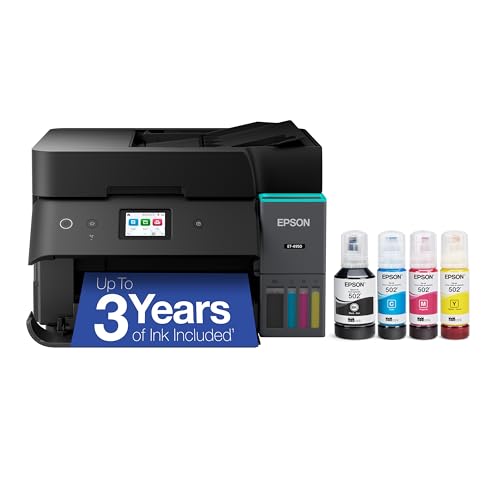
When transfer printing turns from hobby to order book, the constraint becomes throughput of everything around the print — and the ET-4950 is the EcoTank shaped for that turn. Its title states up to 18 ppm, the briskest document pace in this EcoTank cluster, with an ADF, auto 2-sided printing, and the full print, scan, copy, fax set in black. The 18 ppm does not make a transfer sheet emerge faster in photo quality — nothing does — but it transforms the machine’s other life: the invoices, packing slips, care cards and shipping documents that a garment micro-business generates in direct proportion to its shirt volume. Sellers feel that pace daily, in the paperwork tail of every order.
Auto 2-sided printing belongs in the same commercial paragraph. Care instructions, price lists and double-sided inserts are the printed ephemera of a small brand, and duplexing halves their paper cost automatically. The ADF earns its place when a stack of supplier documents or signed wholesale forms needs scanning into the business’s records. None of these features prints a better shirt; all of them run a better shirt business, which is why this model, rather than a second design-focused machine, is the upgrade path the guide recommends for sellers whose bottleneck has moved from the press to the desk.
The transfer fundamentals remain the family’s: cartridge-free tanks feeding full-colour sheets at bottled-ink prices, letter-size output, home-and-small-office colour quality. A seller whose designs are photographic and whose customers judge gradients should weigh the G620’s photo-first engine against this machine’s business pace, because the two optimise different halves of the same enterprise. But for the seller whose week is thirty shirts and their accompanying paper trail, the ET-4950 is the pick that respects both halves of the workload.
Growth changes what “the printer” means in a small business, and this model marks the change honestly. At hobby scale the printer is a design tool; at the ET-4950’s scale it is infrastructure, judged on whether the whole operation — printing, scanning, paperwork, reordering — flows without the owner becoming its full-time operator. Sellers interviewing this machine should therefore test the unglamorous jobs during their first week: scan the supplier stack, duplex the care cards, run the invoice batch. A machine that shines at those has earned its place in a business; the transfer sheets, on tank ink, were never going to be the problem.
- Functions per listing title: print, scan, copy, fax — cartridge-free
- Stated speed per title: up to 18 ppm
- Extras per title: ADF, auto 2-sided printing
- Finish per title: black
- Transfer paper: not included — purchased separately
Strengths
- The fastest stated document pace in this EcoTank group for order paperwork.
- ADF and duplex serve the scanning and ephemera load of a micro-business.
- Tank economics keep the transfer sheets themselves cheap to produce.
Trade-offs
- Its advantages are business-side; the transfer print itself matches its siblings.
- Photographic gradients still trail a photo-specialist machine.
- Letter-size output caps single-piece design dimensions.
Best for: sellers whose shirt volume has grown a paperwork tail that needs managing.
Not suited for: pure hobbyists, who would pay for office pace they never use.

Epson EcoTank ET-15000 — The oversized-design machine
Design size is the ET-15000’s entire argument, and it is a strong one: a cartridge-free supertank all-in-one printing up to 13 x 19 inches, at a stated up to 17 ppm, with scan, copy, fax and Ethernet in its title. On a letter-size machine, a large back print or a full-front design for bigger garments must be tiled across sheets and aligned on the fabric — a fiddly, failure-prone ritual. On a 13 x 19 inch sheet, that same design prints in one piece, presses in one motion, and aligns by eye rather than by hope. Sellers whose catalogue includes oversized graphics, big-and-tall garments or full-coverage designs will feel the difference on the first order.
The wide sheet pays a second dividend in the opposite direction: ganging. Several small transfers — chest logos, sleeve prints, a run of children’s designs — can be nested across one wide sheet and cut apart after printing, turning the transfer paper’s cost per garment down and the cutting table into the production line. Paper is a per-garment consumable in this craft, and sheet efficiency is margin. Add the tanks’ bottled-ink economics and the ET-15000 becomes the volume-and-size answer in a family of letter-size machines, with a full office all-in-one wrapped around it for the business’s other paper.
Its cautions are practical. Wide transfer paper is bought in smaller quantities at higher per-sheet prices than letter packs, so the ganging discipline matters — a wide sheet used for one small logo is an expensive coaster. The machine’s footprint is a wide-format footprint, claiming craft-room real estate that a spare bedroom may begrudge. And a note of category hygiene: this is the same model that conversion communities fill with sublimation ink, discussed in the sublimation guide — here it is reviewed strictly as a standard-ink transfer-paper machine, which is its intended, supported use, and the two roles should never be confused or combined in one unit.
One more production habit separates wide-format sellers from wide-format owners: the cutting session. A ganged sheet is not finished when it prints; it becomes inventory at the cutting table, where a rotary cutter, a ruled mat and a steady quarter-hour convert paper efficiency into garments ready to press. Sellers should time that session as honestly as the printing, because a gang layout that saves paper and costs an hour of fiddly cutting has traded one currency for another at a poor rate. The layouts that pay are the simple grids — rows of identical or mirrored pieces — and the ET-15000 rewards sellers who design their small transfers in grid-friendly sizes from the start.
- Functions per listing title: print, scan, copy, fax — cartridge-free supertank
- Largest sheet per title: 13 x 19 in
- Stated speed per title: up to 17 ppm
- Networking per title: Ethernet; wireless all-in-one
- Transfer paper: not included — purchased separately, including wide sizes
Strengths
- Single-piece oversized designs replace the tiling ritual entirely.
- Gang layouts cut transfer-paper cost per garment on small designs.
- A full office all-in-one surrounds the wide-format craft capability.
Trade-offs
- Wide transfer paper costs more per sheet and demands layout discipline.
- Wide-format footprint claims serious craft-room space.
- Letter-size-only sellers pay for width their catalogue never uses.
Best for: sellers printing oversized designs or ganging small transfers efficiently.
Not suited for: letter-size hobbyists with limited room and no wide designs planned.
Epson SureColor F170 — The sublimation counterpoint
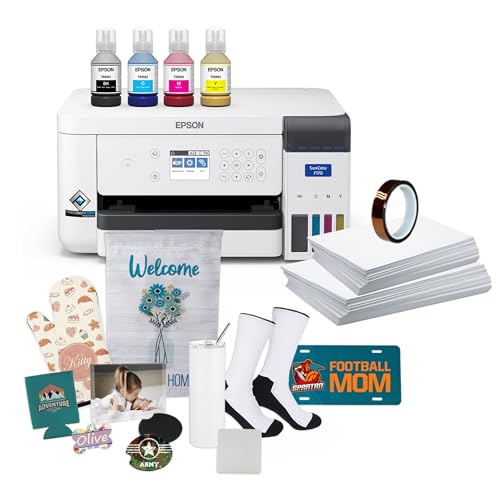
This pick cannot print a heat-transfer sheet, and it is in the guide precisely because of what it does instead. The F170 is a dedicated dye-sublimation printer — this listing bundles a full ink set, a user guide, a power cable, a sublimation starter kit, thermal tape and sublimation paper in 8.5 x 11 and 8.5 x 14 inch sizes. Its process needs no transfer coating: the printed dye turns to gas under the press and bonds into polyester fibres, so the finished design has no surface film, no hand-feel and wash durability that comes from being inside the fabric rather than on it. For polyester garments — sportswear, performance tees, sublimation-ready blanks — it is not an alternative to transfer printing but a categorically better result.
The boundaries are absolute and symmetrical. Sublimation does nothing on cotton — the dye has no polyester to bond with and washes away — and it cannot print white or light designs onto dark garments, because the dye is translucent and the fabric’s colour becomes part of the image. Transfer paper owns exactly that territory: cotton, blends and dark shirts, at the cost of a surface film the hand can feel and a lifespan set by the coating rather than the fabric. A garment printer’s real first decision is therefore a wardrobe audit: what are the shirts actually made of, and what colours are they? The F170 serves one answer completely; the inkjets above serve the other.
Note, for readers comparing across this site, that the sublimation guide reviews a different F170 listing as its dedicated starter; this bundle’s starter kit and paper inclusions make it the garment-focused doorway into that process. What both listings share is the dedicated machine’s support position — Epson’s own ink, Epson’s own purpose — with none of the conversion caveats that surround tank machines repurposed for sublimation ink. If your audit says polyester, buy into the process properly with a machine like this; if it says cotton and dark colours, close this section and choose among the transfer inkjets with a clear conscience.
A final clarification protects beginners from the marketplace’s vocabulary: “sublimation blanks” and “sublimation paper” exist because the process needs polyester-rich garments and coated hard goods, and a seller’s early orders should come from that labelled shelf rather than from the general clothing rack. A random polyester-feeling shirt with unknown fibre content is a gamble dressed as a bargain. The F170 will print beautifully regardless; the garment decides whether the beauty survives the wash, and garments keep their secrets until the water tells them.
- Process per listing title: dye-sublimation — not transfer paper
- Bundle per title: full ink set, starter kit, thermal tape, 8.5 x 11 and 8.5 x 14 in sublimation paper
- Fabric requirement: polyester and polymer-coated blanks only
- Dark garments: not suitable — dye is translucent
- Support position: dedicated machine with genuine Epson ink
Strengths
- Designs bond inside polyester — no surface film, nothing to crack or peel.
- A starter kit with paper and tape makes the first press a same-day event.
- Dedicated support and genuine ink, with no conversion compromises.
Trade-offs
- Useless on cotton and on dark garments — the boundary is chemical, not settings.
- Letter and legal sheet sizes cap design dimensions in this bundle class.
- It answers a different question from transfer printing; buying both processes doubles the kit.
Best for: polyester garment work — sportswear and light blanks — where permanence matters most.
Not suited for: cotton shirts, dark garments, or any transfer-paper workflow.

Canon PIXMA G620 — The photo-first MegaTank
Some transfer designs are logos; others are photographs — the family portrait on a reunion shirt, the pet’s face on a tote-turned-tee, the watercolour a customer photographed and wants wearable. The G620 is this guide’s machine for the second kind: a wireless MegaTank photo all-in-one — print, copy, scan — that works with Alexa, built around refillable tanks and a photo printer’s colour manners. MegaTank economics give it the same experimentation freedom as the EcoTanks, while its photo-first output gives photographic designs the gradient behaviour and colour care that office-bred machines treat as optional.
Scanning closes the photographic loop neatly: the print on the fridge, the grandparent’s portrait, the child’s drawing all enter through the same machine that will print their transfer, keeping a photo-shirt workflow in one cabinet. For crafters whose transfer work is gift-led — birthdays, reunions, memorial shirts, the whole tender catalogue — that single-machine loop and photo temperament are the product. The G620 also serves the household between commissions as a genuinely good photo printer, which cannot be said of every specialist in this series.
Its limits are the photo class’s limits. No wide format, so oversized designs go elsewhere; no office extras like ADF or fax, so a paperwork-heavy micro-business should look at the ET-4950; and no stated speed in the title, so batch planners must test rather than assume. Within its brief — photographic transfers, gift work, photo-led craft at letter size — it is the most sympathetic machine here, and sympathy, when the design is somebody’s grandmother, is a technical specification of its own.
Photo transfers carry one technical warning the G620’s owner should heed early: skin tones expose every weakness in a paper-and-press combination, because viewers forgive a logo’s colour drift and never forgive a face’s. Test photographic designs on the exact paper and fabric of production, judge them in daylight rather than craft-room light, and keep the winning settings recorded beside the press. The machine supplies the colour; the workflow supplies the fidelity, and reunions are unforgiving critics of the difference.
- System per listing title: MegaTank refillable photo all-in-one
- Functions per title: print, copy, scan
- Voice support per title: works with Alexa
- Sheet ceiling: standard photo and letter sizes
- Transfer paper: not included — purchased separately
Strengths
- Photo-first colour flatters photographic and watercolour transfer designs.
- Scanning and printing in one machine closes the gift-work loop.
- MegaTank refills keep full-coverage design sheets affordable.
Trade-offs
- No wide format for oversized single-piece designs.
- No ADF or office extras for paperwork-heavy sellers.
- Speed is unstated in the title — batch timing must be tested.
Best for: photo-led transfer work — reunion, memorial and portrait garments and gifts.
Not suited for: oversized production or office-heavy micro-business workflows.
Comparison
| Pick | Process | Largest sheet (title) | Stated speed |
|---|---|---|---|
| Epson EcoTank ET-4800 | Transfer paper (inkjet) | Standard sizes | Up to 10 ppm |
| Epson EcoTank ET-2900 | Transfer paper (inkjet) | Standard sizes | Up to 10 ppm |
| Epson EcoTank ET-4950 | Transfer paper (inkjet) | Standard sizes | Up to 18 ppm |
| Epson EcoTank ET-15000 | Transfer paper (inkjet) | 13 x 19 in | Up to 17 ppm |
| Epson SureColor F170 | Sublimation (polyester) | 8.5 x 14 in (bundle paper) | Not stated |
| Canon PIXMA G620 | Transfer paper (inkjet) | Standard sizes | Not stated |
Transfer Paper or Sublimation: How Do You Choose for Your Wardrobe?
Audit the garments, not the printers. Cotton and cotton-rich blends — the classic tee, the hoodie, the tote — take transfer paper and refuse sublimation. Polyester and high-polyester blends — sportswear, performance shirts, many modern blanks — take sublimation beautifully and also accept transfers, though the transfer’s surface film sits oddly on athletic fabric. Dark colours of any fibre belong to transfer paper made for darks, because sublimation dye cannot lighten a garment. Light polyester belongs to whichever process you prefer, judged by feel: sublimation leaves nothing on the surface, transfer leaves a film whose quality varies with the paper. Most home garment printers eventually own a leaning rather than a monopoly — transfer for the cotton-and-dark majority of requests, sublimation for the polyester work — and this guide’s six picks are arranged so that either leaning starts with a defensible machine.
What Does a Complete Transfer Setup Include Beyond the Printer?
A heat press is the non-negotiable partner: even heat, firm even pressure and a timer, sized to your largest design. Transfer paper follows, bought for light or dark fabric as the garment demands — they are different products, and the wrong one is a ruined shirt. A cutting method for trimming designs, heat-resistant tape or a positioning habit for keeping sheets still, and a stock of sacrificial garments for first presses complete the honest kit. Note what is absent from that list: nothing in it ships with any printer in this guide, whatever a bundle’s photographs imply. The F170’s starter kit is the exception that proves the rule, and it belongs to the sublimation process. Budget the press beside the printer, because a superb print pressed with a household iron is a rumour of a shirt.
How Do You Get a Transfer Right the First Time on a New Design?
Print a test on the cheapest blank you own, at the paper maker’s stated time and temperature, and keep notes like a lab technician: paper type, fabric, seconds, pressure, result. Mirror the design before printing whenever the paper’s instructions require it — the classic transfer heartbreak is a perfect print of backwards text. Peel according to the paper’s direction, hot or cold as specified, because peel timing is chemistry, not preference. Then wash the test garment before selling its siblings; a transfer that survives its first wash has told you the truth about the whole batch, and one that fails has saved you a refund queue.
How Should Transfer Paper Be Chosen and Stored?
By garment, in this order: fibre first, colour second, size third. Cotton and blends take standard transfer papers; dark garments of any fibre take the opaque dark-fabric variant, whose white backing carries the design — and which is not mirrored the way light-fabric paper usually is, a distinction that has ruined more first shirts than any other in this craft, so read each pack’s own instructions as law. Store paper flat, sealed and away from the press’s heat, because a curled or dust-dusted sheet prints its storage conditions onto somebody’s chest. Buy paper in quantities matched to a month of real work rather than a year of optimism; coatings age, and a bargain pallet of last year’s paper is a false economy that expresses itself one failed press at a time.
What Makes a Transfer Design Print Well?
Designs that survive the journey from screen to shirt share habits: contrast that does not depend on subtle screen gradients, text large enough to read at conversational distance, and colours chosen with the garment as a participant — a mid-grey design on a heather-grey shirt is a disappearing act. Saturated blocks print and press more forgivingly than photographic subtlety, which is why beginners should earn their confidence on bold work before attempting portraits. And every design deserves a printed proof at final size, because a shirt is viewed whole, at distance, in motion — none of which a zoomed screen preview simulates. The printers in this guide will faithfully reproduce a design’s weaknesses at exactly the same fidelity as its strengths; the proof is where weaknesses are still cheap.
How Do You Price a Transfer Shirt Without Losing Money Quietly?
Count the whole shirt: the blank, the transfer sheet, the ink in a full-coverage design — which tank owners can finally estimate without dread — the press minutes, and the failure allowance that every honest production run carries. Beginners price the blank and the sheet and donate the rest; the donation compounds across a market season into a business that is busy and broke. Test garments belong in the price too, amortised across the design’s life, because a design that needed four tests to perfect cost four shirts before it sold one. None of the machines in this guide changes that arithmetic’s shape — the tanks change its ink term from frightening to manageable, which is their entire economic argument — and a seller who runs the full sum once, on paper, will set prices that survive contact with reality.
How Should a First Transfer Workspace Be Arranged?
In a triangle: printer, cutting space, press, close enough that a sheet travels between them without crossing the room, far enough apart that the press’s heat never warms the paper stock. Keep the garments’ staging separate from the finished pile, and the finished pile flat rather than folded until prints have fully cooled and settled. Lighting deserves a thought — colour judgements made under a yellow craft lamp will be re-judged by customers in daylight — and so does ventilation, since a press running all afternoon makes its presence known. None of this requires a dedicated room; it requires intention, and a spare-bedroom setup arranged intentionally will out-produce a studio arranged by accident.
When Should a Transfer Hobbyist Consider Adding the Second Process?
When the order book asks for it by name — polyester team kits, performance wear, all-over light-colour designs — and not before. A second process means a second machine, a second paper stock, a second set of timings to keep straight, and a bench that must keep the two chemistries from contaminating each other’s workflows. The sellers who add sublimation successfully usually share a trait: their transfer operation is already boring, its notes kept, its pricing sound, so the new process lands on a stable business rather than on a hobby still negotiating with its first one. Readers at that point should continue to this site’s dedicated sublimation guide, where the F170’s sibling listing and the wide F570 are reviewed as the main event rather than as a counterpoint.
How Long Do Transfer Prints Last, and How Should Customers Care for Them?
A well-pressed transfer on the right paper is a durable consumer product, not a novelty: it should survive seasons of ordinary washing when the pressing was correct and the care is sane — garments turned inside out, washed cool, and kept from the hottest dryer settings, because the coating that carries the design is a film and films dislike heat after their one appointed heating. Sellers should print those care instructions and include them with every order, both as customer service and as insurance: a transfer killed by a hot dryer is indistinguishable from a transfer that failed, and the care card is the difference between a complaint and a compliment. Hobbyists gifting shirts can tuck the same card into the fold; it reads as professionalism and quietly doubles as a washing lesson the recipient actually needed.
What Should the First Month of Transfer Printing Teach?
Four lessons, in order. The mirror check, learned on a sacrificial shirt rather than a customer’s. The timing notebook, built one recorded press at a time until your paper-fabric pairs have known-good settings. The wash test, which converts optimism into evidence about your whole chain — printer settings, paper, press, garment. And the cost sheet, which prices a finished shirt honestly while the numbers are still small enough to forgive. A beginner who graduates the first month with those four artefacts — a habit, a notebook, a washed sample and a spreadsheet — owns a process, and processes scale. A beginner who spent the month printing production shirts owns inventory and anecdotes. The machines in this guide are all capable of supporting the first month properly; none of them can substitute for it.
How Do You Handle One-Off Custom Orders Profitably?
One-offs are where transfer printing beats every rival process — no screens to burn, no minimum run — and where beginners most often give the profit away. The discipline is templating: a set of design frames, fonts and placements proven on your machine and press, inside which a customer’s name, date or photograph becomes a variation rather than an invention. Proofing moves to a screen mock-up for approval, reserving physical tests for new fabrics or papers. Batch the week’s one-offs into a single printing and pressing session so the press heats once and the cutting table is set once. Handled that way, the single custom shirt carries the margin its uniqueness deserves; handled as a fresh expedition each time, it consumes an afternoon and teaches the seller to dread the most charming work in the catalogue.
Why Does Ink Coverage Make Tank Printers the Transfer Default?
A transfer design is not a document with a picture on it; it is a sheet of ink with a design in it. Full-bleed backgrounds, saturated illustrations and photographic panels cover most of the page, and coverage is what consumable pricing actually charges for. Cartridge systems price that coverage punitively, because their economics assume text pages with a logo. Tank systems price it by the bottle, which is why the transfer community standardised on them and why every inkjet in this guide refills rather than clicks. The practical consequence is behavioural: tank owners proof at full size, print the second colourway, and test the new paper the day it arrives — the three habits that separate improving garment printers from stagnant ones — while cartridge owners ration exactly those experiments. Choose the ink system and you have quietly chosen the learning curve.
How Should Designs Be Prepared Differently for Light and Dark Garments?
Light-fabric transfer paper is translucent where no ink falls, so the garment’s own colour becomes the design’s white — plan artwork knowing that a pale yellow motif on a cream shirt is a whisper, not a statement. Dark-fabric paper carries an opaque white backing, which restores the full palette on black garments but adds a cut border around every element, rewarding designs composed as single shapes rather than scattered fragments. The same artwork therefore needs two preparations — one exploiting transparency, one exploiting opacity — and sellers offering both should keep both files, clearly named, beside the press. Printers render either faithfully; the preparation is where dark-shirt quality is decided, long before the sheet is loaded.
What Separates a Hobby Setup From a Small Garment Business?
Records and repeatability. The hobbyist’s knowledge lives in memory and mood; the business’s lives in the timing notebook, the cost sheet, the named design files and the washed samples pinned by the press. That paperwork is what lets a second pair of hands produce the same shirt, lets last season’s bestseller be reprinted identically, and lets a customer complaint be diagnosed rather than debated. The hardware transition is almost anticlimactic by comparison — sellers usually discover their existing EcoTank was business-capable all along, once the records arrive. Readers standing at that threshold should therefore buy the notebook before the upgrade, and let a month of records, rather than a week of frustration, specify what the business actually needs next.
How Do You Keep Colours Honest From Screen to Shirt?
Expect the shirt to argue with the screen, and referee in advance. Screens emit light; garments absorb ink under a coating, and the same file will render warmer, duller or deeper depending on the paper and fabric beneath it. The working method is a printed colour chart on your actual transfer paper, pressed onto your actual garment fabric, kept as the palette every design is chosen from. Pick colours from the pressed chart rather than the glowing monitor and the surprises mostly stop. Rebuild the chart when paper or blank supplier changes, because the chart is a property of the combination, not of the printer alone. This single artefact — cheap, unglamorous, decisive — is the difference between sellers who apologise for colour and sellers who promise it.
What About Sleeves, Pockets and Other Awkward Placements?
Small and awkward placements are transfer printing’s home turf — a screen printer’s setup cost makes a sleeve logo absurd, while a transfer seller prints one in minutes. The technique is preparation: a pressing pillow or pad slipped inside the garment to raise the target area level, seams and zips arranged outside the press’s pressure zone, and the design trimmed close so its carrier does not mark the surrounding fabric. Pocket prints reward a test on the bulkiest seam arrangement you sell, because pressure that is even on a flat chest is a lottery across a pocket’s topography. Master the awkward placements and a catalogue opens that larger processes cannot economically touch — personalisation lives in the awkward places, and personalisation is where the margin is.
How Should Finished Shirts Be Stored and Shipped?
Flat, cool and unhurried. A freshly pressed transfer benefits from resting before it is folded, because the coating that felt set at the press continues to settle as it cools; folding a warm print against itself is how designs acquire a faint twin of themselves on the facing fabric. Interleave tissue or clean paper between stacked prints for storage and posting, keep inventory away from the press’s heat and the room’s sunny corner, and ship in packaging that does not crease the design zone. These are postman’s details, beneath a printer review’s usual notice — and they decide the condition in which a customer’s first impression arrives, which is the only impression a mail-order garment ever gets to make twice.
Common Mistakes
Forgetting to mirror text-bearing designs is the rite of passage nobody escapes entirely — build the check into the template, not into memory. A second error is pressing sublimation prints onto cotton, or transfer prints with a sublimation timetable, because the two processes share a press and nothing else. Third, assuming the printer purchase included transfer paper, and discovering the omission on pressing day. Fourth, judging a transfer straight off the press: some papers settle as they cool and after the first wash, so verdicts belong to the washed test garment. And the economy error — printing production shirts before a test one, converting a paper or fabric change directly into inventory risk.
Two process confusions round out the catalogue, both born from the two crafts sharing a press. The first is storing transfer paper and sublimation paper together and grabbing the wrong stack in a hurry; label the shelves as if a tired stranger will work there at midnight, because that stranger is you in December. The second is assuming a design that worked as a transfer will work as a sublimation print unchanged — colours render differently when they must survive gasification into polyester, and each process deserves its own proof. Keep the processes’ materials, notes and expectations in separate drawers, literal and mental, and the shared press stops being a source of cross-contamination stories.
Final Recommendation
Begin with the process your garments dictate, then pick the machine. Cotton and dark-colour work means transfer paper: the ET-4800 for the balanced first setup, the ET-2900 for a focused craft corner, the ET-4950 when orders bring a paperwork tail, the ET-15000 when designs go oversized or gang up, and the G620 when the designs are photographs. Polyester and light colours mean considering sublimation seriously, and the F170 bundle is the supported doorway into it. Check price on Amazon for the machine — and price the press and the first packs of the right transfer paper in the same sitting, because the setup is the purchase, not the printer alone.
One sentence of parting discipline: whatever you buy, press a test shirt in the first week and wash it before a single production garment is printed. That one laundered shirt is the cheapest consultant in garment printing, and every recommendation in this guide assumes its advice has been taken.
Frequently Asked Questions
Does any of these printers come with transfer paper?
No. None of the five inkjet listings states transfer paper as an inclusion, and this guide credits none of them with any. Transfer paper is bought separately, in light-fabric and dark-fabric versions matched to your garments. The F170 bundle does include sublimation paper — a different material for a different process.
Can I use the same printer for transfer paper and everyday documents?
Yes — that double life is the EcoTank and MegaTank picks’ everyday reality, and it is why their office features are reviewed seriously here. The printer does not know or care that a sheet is transfer paper; it prints the design, and the paper plus press do the rest. Keep transfer sheets stored flat and clean between sessions.
Why did my transfer crack or fade after washing?
Usually a pressing variable: insufficient time, temperature or pressure leaves the coating under-bonded, while scorching excess does the opposite damage. Paper quality and fabric mismatch contribute too. The washed test garment exists to surface these causes on a sacrificial shirt — adjust one variable at a time and retest before production.
Is sublimation better than transfer printing?
On polyester, for permanence and feel, yes — the design becomes part of the fabric. On cotton or dark garments, sublimation is not better or worse; it is impossible. The processes partition the wardrobe between them, and the skilled garment printer chooses per garment rather than pledging allegiance to one.
Do I need special ink for transfer printing?
No — that is the process’s founding convenience. The inkjets here use their standard bottled inks; the transfer paper supplies the magic coating that moves the image. This is also why the same machine serves documents all week and garments all weekend. Sublimation, by contrast, is the special-ink process, which is why it has dedicated machines and why converting a standard printer to it is a decision with warranty consequences, covered in the sublimation guide.
Can I print on hoodies, totes and baby clothes too?
Yes — the process follows the fabric, not the garment category, so cotton hoodies, canvas totes and infant garments all take transfers, with thickness and seams as the practical challenges: bulky seams under the press create uneven pressure, which shows as patchy bonding. Pressing pillows and pads that level the print area are the standard remedy, and a test on the bulkiest garment style you sell is worth more than a dozen on flat tees.
What size designs can I print?
Letter-size machines cap a single-piece design at letter dimensions, with tiling as an imperfect workaround. The ET-15000’s 13 x 19 inch sheet removes the cap for most garment work. Match the machine to the largest design you will print regularly, and gang smaller designs across whatever sheet you own.
Related Guides
Garment sellers often grow into content and product photography, and three neighbouring guides serve that growth: cameras for astrophotography for the night-sky designs niche, cameras for live streaming for sellers demonstrating presses on camera, and cameras for wedding photography for the event businesses that order garments in batches. The dedicated sublimation process, meanwhile, has its own roundup elsewhere in this site’s printer coverage.


