What's inside
- Key Takeaways
- Quick Picks
- How We Chose These Picks
- Comparison
- Laser or Inkjet: Which Engine Suits Your Mailing?
- How Do You Run a Clean Mail Merge to Envelopes?
- How Do You Choose Envelope Stock That Prints Well?
- What Does a Small Business Mailing Day Actually Look Like?
- How Should Return Addresses and Postage Be Handled?
- How Do Invitation Suites Change the Calculation?
- How Do You Keep a Household’s Mailing Life Organised?
- What Changes When the Envelopes Are Dark or Coloured?
- What Are the Common Mistakes When Printing Envelopes?
- Final Recommendation
- Frequently Asked Questions
- Related Guides
As an Amazon Associate I earn from qualifying purchases. This post may contain affiliate links at no extra cost to you.
widgetverdict.com is reader-supported. When you buy through links on our site, we may earn an affiliate commission.
Two hundred wedding invitations, each needing a printed envelope. A small firm’s monthly invoices. A holiday-card list that has outgrown handwriting and a wrist that has outgrown patience. Envelope printing looks like a footnote in a printer’s specification until the afternoon you actually face a stack of them — and then it becomes the whole job. The best envelope printers are ordinary printers judged by an unforgiving test: can they take a narrow, thick, oddly-sized piece of stationery, feed it straight, print the address where the address belongs, and repeat that two hundred times without chewing the two hundredth envelope or smearing the first?
Here is the complication this guide refuses to hide: envelope capacity and feed details are barely mentioned in printer listing titles. Manufacturers headline speed, wireless and duplex; the tray figures that decide a mailing run live in manuals. So the six picks below are assessed on what their titles do state — print technology, duplex, functions, mobile printing — and every envelope-specific line in their spec boxes reads “Not stated in the listing title” rather than an invented tray count. That honesty is the spine of the guide. A mono laser that feeds envelopes through a manual slot one at a time may still be the right purchase; you simply deserve to know that is the arrangement before the invitations arrive.
The field divides by engine. Three Brother monochrome lasers bring toner consistency and duplex document printing to the mailing task. Two full-colour all-in-ones — an HP OfficeJet Pro and a Canon PIXMA — add scanning, copying and, in the Canon’s case, a document feeder. And one light-duty HP DeskJet closes the list as the honest occasional machine: right for a weekly handful of envelopes, wrong for a mail merge, and described that way in its own section.
One more thing before the details: every linked name below leads to the machine’s Amazon listing, where the present-day offer and bundle can be checked in a moment. Listings in this category change their trial offers and included extras more often than their hardware, so a quick look at the current page is worthwhile even when the model decision itself is already made. The reviews that follow concentrate on the durable questions — engine, functions, workflow fit — because those are the parts of the purchase you will still be living with long after any introductory offer has expired.
Key Takeaways
- Envelope tray capacities are not stated in any of these six listing titles — every pick’s spec box says so instead of inventing a sheet count.
- The three Brother lasers print monochrome only; addresses, invoices and printed postage labels are their natural envelope work.
- The HP OfficeJet Pro 9125e and Canon PIXMA TR8620a add colour, scanning and copying for households that mail in colour throughout the year.
- The Canon is the only pick whose title names an auto document feeder, genuinely useful when the mailing starts life as a stack of paper.
- The HP DeskJet 2923 is a light-duty home unit: a modest weekly stack of envelopes suits it, a mail-merge run does not.
- Duplex printing, stated for the HL-L2460DW and the DCP-L2640DW, serves the letters that go inside the envelopes — and a twenty-envelope test on your own stock settles more than any specification sheet ever published for this category of machine.
Quick Picks
| Pick | Badge | Why it is here |
|---|---|---|
| Brother HL-L2460DW | Mono Laser Pick | A wireless monochrome laser with duplex and mobile printing for address-and-invoice households. |
| Brother DCP-L2640DW | Laser All-in-One Pick | Brother’s compact mono multi-function with copy, scan, duplex and mobile printing in one unit. |
| Brother HL-L2405W | Simple Laser Pick | A straightforward wireless mono laser for black-and-white output and mobile printing. |
| HP OfficeJet Pro 9125e All-in-One Printer | Colour Office Pick | A colour inkjet all-in-one with fax for home and office mailing in colour. |
| Canon PIXMA TR8620a All-in-One Printer | Feeder-Equipped Pick | A colour all-in-one whose title names an auto document feeder, AirPrint and Android support. |
| HP DeskJet 2923 Color Inkjet Printer | Light-Duty Pick | A compact colour all-in-one for homes that print a modest stack of envelopes at a time. |
How We Chose These Picks
Envelope work rewards boring virtues: a feed path that takes thick stock without drama, output that does not smudge when envelopes are stacked, and a driver that understands envelope sizes so the address lands in the postal zone rather than across the flap. Since listing titles decline to specify feed hardware, the selection leaned on engine type and stated functions. Laser toner earns its prominence here because toner is dry the instant it leaves the machine — a stack of freshly printed envelopes can be stuffed and sealed immediately, with no drying interval and no offset onto the envelope beneath.
Colour inkjets earned their places for the other kind of mailing: the household or studio whose envelopes carry a logo, a coloured return design or a photograph, and whose printer must also scan the signed form and copy the school document. Within that group, the Canon’s stated document feeder and the HP’s stated fax separate them by workflow rather than by quality. The DeskJet was included as a deliberate control on ambition — many homes print fifteen envelopes a month, and for them the lightest machine in the guide is not a compromise but a correct sizing.
Every pick is wireless with mobile printing stated or implied by its title’s mobile compatibility language, because envelope jobs increasingly begin on a phone: the address list in a contacts app, the label in an email, the invitation list in a shared note. A printer that cannot hear the phone is a printer the modern mailing has to walk around.

Brother HL-L2460DW — Mono Laser Pick
Brother’s HL-L2460DW is the shape of sensible mailing for a household or micro-office: a wireless compact monochrome laser with duplex printing, mobile printing and black-and-white output, sold with a Refresh subscription trial and Alexa compatibility per its title. Strip the envelope question down to its essentials and this machine answers most of them. Toner gives you addresses that survive rain on the doorstep and friction in the post bag. Wireless and mobile printing put the address list — wherever it lives — within one command of the envelope. Duplex handles the letter, the invoice or the enclosure sheet that goes inside.
Monochrome is the boundary to accept with open eyes. Return-address designs in colour, a logo with a coloured mark, photographic cards — none of that is this machine’s language, and its title says so twice. What it prints, it prints with the consistency that makes a two-hundred-envelope run a supervision task rather than a vigil: load, print, glance occasionally, stack. The Refresh trial in the title is Brother’s toner subscription offer; whether a subscription suits your volume is a decision to make with your real monthly page count in hand, since a household printing seasonally may prefer simply ordering toner when the low warning appears.
On the envelope specifics, discipline applies: the title does not state an envelope capacity or a manual feed arrangement, so this guide prints neither. Before committing a large invitation run, confirm the feed arrangement in Brother’s documentation and run twenty test envelopes of your actual stock — thickness and flap style vary enough that your envelopes, not a reviewer’s, are the meaningful test. That twenty-envelope rehearsal is the cheapest due diligence in this entire category.
- Print type: Monochrome laser, black-and-white output
- Connectivity: Wireless, mobile printing, works with Alexa
- Duplex: Stated in the title
- Included offer: Refresh Subscription Trial (1)
- Envelope capacity: Not stated in the listing title — verify with the manufacturer documentation
- Manual feed slot: Not stated in the listing title — verify with the manufacturer documentation
Strengths
- Toner output is dry instantly, so printed envelopes stack and seal at once.
- Duplex printing covers the letters and invoices inside the envelopes.
- Wireless plus mobile printing reaches address lists on any device.
Trade-offs
- Monochrome only — colour return designs are outside its brief.
- Print-only machine; scanning a signed enclosure needs another device.
- Envelope feed details require a documentation check before a big run.
Best for: households and micro-offices mailing black-and-white correspondence in steady volume. Not suited for: colour invitation suites — the engine is monochrome by design, and no setting changes that.
Households leaning toward this Brother can open the HL-L2460DW listing to review the current Refresh trial terms alongside the machine itself.
A practical rhythm makes this laser a mailing appliance rather than a printer that occasionally mails. Keep a small stock of your standard envelopes beside it, store them flat so they feed straight, and build the address list as a maintained document rather than retyping it each season — the second run of any mailing is where a laser’s consistency pays, because the setup already exists. When a run finishes, leave the machine’s remaining envelopes out of the paper tray; mixed stock in a shared tray is how a letter ends up printed on an envelope at the worst possible moment.

Brother DCP-L2640DW — Laser All-in-One Pick
The DCP-L2640DW takes the same Brother mono laser core and wraps it in a multi-function body: print, copy and scan, with duplex and mobile printing, per its title. For mailing work, the additions change the shape of the job. The letter to be enclosed can be copied for your records as it leaves; the signed contract that arrived by post can be scanned and returned while its envelope is being printed; the whole correspondence cycle — in, out, archived — happens on one compact machine instead of a relay between devices.
That consolidation is the argument, and it suits a particular household: the one running a small business, a rental property, a club or a family office from a desk that also does everything else. Scanning quality for documents is the relevant measure here, not photo scanning; this is a mono machine to its bones, and its scanner serves paper administration rather than image work. Copies emerge in black and white, which for forms, letters and records is nearly always sufficient.
Envelope specifics follow the guide’s rule: capacity and feed arrangement are not in the title, so they are not invented here — Brother’s documentation holds them, and a test run on your own envelope stock remains the deciding experiment. What the title does support is a clear positioning: of the three Brothers in this guide, this is the one for a desk where mailing is one strand of a wider paper workload, and where giving up colour buys laser consistency across all of it.
- Functions: Print, copy and scan, per the listing title
- Print type: Monochrome laser
- Duplex: Stated in the title
- Connectivity: Wireless, mobile printing
- Envelope capacity: Not stated in the listing title — verify with the manufacturer documentation
- Colour printing: None — monochrome output only
Strengths
- Scan and copy complete the correspondence cycle on one machine.
- Laser consistency for both the envelope and its contents.
- Compact multi-function footprint for a working desk.
Trade-offs
- Monochrome across every function, scanning included in spirit of the range.
- No fax is named, unlike the HP colour pick below.
- Envelope feed arrangement needs confirming in the documentation.
Best for: home offices where mailing mixes with copying and scanning all week. Not suited for: colour mailings or photo enclosures — a mono engine governs everything this machine produces.
Desks that recognise that workload can look over the DCP-L2640DW’s listing to confirm the function set matches the current offer.
Owners get the most from this machine by treating it as the desk’s paper clerk. Set the scan destination once — the folder or email where records belong — and correspondence archiving becomes a button rather than a project. Keep the copy function for the pre-mailing record: one copy of every important letter, filed by month, has rescued more small offices than any filing cabinet. The envelope printing then becomes the last step of a tidy pipeline instead of a standalone scramble, which is exactly the temperament a multi-function machine is meant to create.

Brother HL-L2405W — Simple Laser Pick
The HL-L2405W is the minimalist of the Brother trio: a wireless compact monochrome laser with mobile printing and black-and-white output, a Refresh subscription trial and Alexa compatibility in its title — and, notably, no duplex in the title’s list. Read that absence honestly. This is the straightforward machine: envelopes and single-sided letters, printed crisply in toner, from any device on the network, without a feature list to configure or a menu tree to learn. For a household whose mailing is addresses on envelopes and the occasional form, simplicity is not a downgrade; it is the specification.
Simplicity also disciplines expectations. A double-sided letter run means manual re-feeding, which is a chore at fifty pages and a non-event at five. There is no scanner and no copier, so the machine assumes the rest of your digital life is handled elsewhere — by a phone camera for the odd receipt, by another device in the house for real scanning. Households that genuinely live that way will never miss the missing functions; households that only think they do will discover otherwise within a month.
As with its siblings, envelope capacity and feed details are absent from the title and therefore absent from this review’s claims; the documentation and a twenty-envelope test on your own stock settle the question. What can be said from the title is that the essentials of laser mailing are all present: toner-dry output, wireless reach, mobile printing. If your envelope work is black addresses on standard stock, printed in modest runs, the HL-L2405W is the trio’s argument that you should not buy machinery your mailing never uses.
- Print type: Monochrome laser, black-and-white output
- Connectivity: Wireless, mobile printing, works with Alexa
- Included offer: Refresh Subscription Trial (1)
- Duplex: Not stated in the listing title — verify with the manufacturer documentation
- Envelope capacity: Not stated in the listing title — verify with the manufacturer documentation
- Functions: Print only, per the title
Strengths
- The simplest laser route to toner-dry envelope printing.
- Wireless and mobile printing cover the modern address list.
- Compact body suits a shelf or a small desk.
Trade-offs
- No scan or copy functions for the wider correspondence cycle.
- Duplex is not stated, so plan on single-sided letters.
- Monochrome only, like both of its Brother siblings here.
Best for: households mailing modest black-and-white runs who value simplicity. Not suited for: double-sided letter production at volume — duplex is not among its stated features.
If the simple brief fits, the HL-L2405W’s Amazon page is the place to verify the trial offer and current bundle details.
There is a quiet pleasure in a machine with one job, and owners of simple lasers tend to keep them for years because nothing about the weekly routine changes. Set it up once, learn the one feed habit your envelope stock prefers, and the machine recedes into the household furniture — noticed only during the holiday-card run, when its toner-dry stack of finished envelopes is ready to seal while an inkjet household is still fanning its output dry. That seasonal moment, repeated yearly, is the entire case for this pick, and for many homes it is case enough.
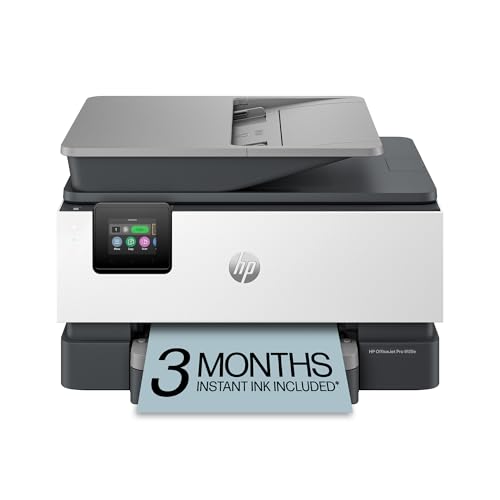
HP OfficeJet Pro 9125e All-in-One Printer — Colour Office Pick
The OfficeJet Pro 9125e changes the mailing conversation from addresses to presentation. Its title describes a colour inkjet all-in-one — print, scan, copy and fax — with wireless connection and mobile compatibility, aimed at home and office. Envelopes from this machine can carry a coloured logo, a designed return address, a seasonal motif in the corner; for a small business whose envelope is its first impression in a client’s hand, that colour is not decoration but branding, and it is the reason to choose an inkjet over the lasers above.
The full function set supports the office around the mailing. Fax persists in the title because some institutions still demand it; scanning and copying handle the enclosures and records; colour document printing covers the invoices and letters with charts or coloured letterheads that a mono laser would flatten into grey. The trade is inkjet physics: printed envelopes should be given their moment before stacking, since inkjet output on absorbent envelope stock can offset if piled instantly, and heavy colour coverage on thin envelopes may cockle the paper. Print the mailing, let it rest in small piles, and the results hold up well.
Envelope capacity, again, is a documentation figure rather than a title claim, and this guide prints none. What the title supports is the positioning: a colour office machine whose mailing work is part of a broader document life. Judge it against your ratio — if most of your printing is correspondence with colour in it, the 9125e’s breadth is the point; if your output is ninety percent black text, the Brothers above will serve the same envelopes with toner economy.
- Functions: Print, scan, copy and fax, per the listing title
- Print type: Colour inkjet
- Connectivity: Wireless, mobile compatibility stated
- Positioning: Home and office use
- Envelope capacity: Not stated in the listing title — verify with the manufacturer documentation
- Ink system: Cartridge-based (the title names no tank system)
Strengths
- Colour envelopes with logos and designed return addresses.
- Four functions cover the office around the mailing.
- Fax retained for institutions that still require it.
Trade-offs
- Inkjet output wants a rest before stacking in big piles.
- Cartridge costs follow colour coverage on every envelope.
- Heavy colour on thin envelope stock can cockle the paper.
Best for: small businesses and home offices mailing colour-branded correspondence. Not suited for: a toner-volume mailing operation — hundreds of text-only envelopes belong on a laser’s economics.
Businesses weighing the colour route can examine the 9125e listing to see how the current package describes its ink arrangements.
Colour mailing rewards a template. Build the envelope design once — logo placed, return address set, the recipient block positioned to your postal service’s preferred zone — save it, and every future mailing becomes a merge rather than a design session. Keep a proof envelope pinned near the machine: the first print of any new batch gets compared against it before the run proceeds, a ten-second habit that catches a shifted margin or a swapped stock size while the mistake still costs one envelope. Small rituals like that are what separate an office that mails confidently from one that reprints anxiously.

Canon PIXMA TR8620a All-in-One Printer — Feeder-Equipped Pick
Canon’s PIXMA TR8620a brings a feature none of the other titles in this guide names: an auto document feeder, listed alongside copier, scanner and fax functions, photo and document printing, AirPrint, Android support and Alexa compatibility. The feeder’s relevance to mailing is upstream of the envelope itself. Mailings often begin as paper — the sign-up sheets from an event, the returned forms, the list that exists as handwriting — and a feeder turns a stack of pages into scans without the page-by-page ritual of a flatbed. Digitise the list, clean it up, merge it, print the envelopes: the TR8620a covers that whole arc in one body.
As a PIXMA, it also prints photographs, which positions it for the household mailing with enclosures: the holiday envelope carrying a family photo, the thank-you card with a picture inside. Photo printing and envelope printing are different crafts sharing one machine, and owners should expect document-and-envelope work to be the daily driver with photos as the seasonal delight. AirPrint and Android support together cover the mixed-device household — the list on an iPhone, the addresses on a Chromebook, the merge on a Windows laptop — without any device feeling like a second-class citizen.
The envelope specifics observe the guide’s standing rule: no capacity figure appears in the title, so none is claimed, and your own stock test decides fitness for a long run. What distinguishes the Canon within this guide is breadth with a feeder, and for households whose mailing is entangled with scanning stacks of paper, that single named feature can outweigh every other consideration on this page.
- Functions: Print, copy, scan and fax, per the listing title
- Document feeder: Auto document feeder stated
- Print type: Colour inkjet, photo and document
- Connectivity: AirPrint, Android, works with Alexa
- Envelope capacity: Not stated in the listing title — verify with the manufacturer documentation
- Colour: Black unit, per the title
Strengths
- The only stated document feeder here — paper lists become digital lists fast.
- Photo printing covers enclosures and cards, not just envelopes.
- AirPrint plus Android support suits mixed-device households.
Trade-offs
- Inkjet rest-before-stacking applies to long envelope runs.
- Breadth means more machine to learn than a print-only laser.
- Envelope feed details require the documentation and a stock test.
Best for: households whose mailings start as paper stacks and include photo enclosures. Not suited for: pure text mailing at volume, where a mono laser’s running costs win the year.
Households with paper lists to digitise can read through the TR8620a’s listing for the feeder and function details in full.
The feeder quietly changes household administration beyond mailing. School forms, medical letters, warranty cards — the paper that accumulates in a kitchen drawer becomes searchable scans in an afternoon, and once a family has lived with that habit, the printer that enabled it becomes difficult to replace with anything narrower. Buy the Canon for the envelopes if you like; expect to keep it for the archive it builds while the envelopes print. Machines that serve two household eras at once tend to be the ones still on the desk five years later.

HP DeskJet 2923 Color Inkjet Printer — Light-Duty Pick
Every guide needs its honest small machine, and the DeskJet 2923 is this one’s. HP’s title describes a colour inkjet all-in-one — print, scan and copy — with wireless and mobile compatibility, for easy home printing and ideal home use. Translate that positioning into envelope terms: this is the printer for the household that mails a weekly handful — a few bills that still go by post, birthday cards, the occasional returned form — and prints its holiday envelopes in an unhurried evening rather than a production run. For that household, the DeskJet’s compactness and simplicity are exactly right.
Now the boundary, stated as plainly as the brief for this guide demands: the DeskJet 2923 is wrong for a mail-merge run. A two-hundred-envelope wedding mailing asks for feed patience, cartridge endurance and duty headroom that a light-duty home unit was never built to give; the job would crawl, the cartridges would empty mid-list, and the afternoon would curdle. That is not a defect in the machine — it is a mismatch between tool and task, and this guide would rather name it here than let a couple discover it with the invitations half done. The Brothers above exist for that afternoon.
Within its true brief, the DeskJet’s virtues are real. Colour covers the card-and-envelope combination a family actually sends; scanning and copying handle the school-and-home paperwork; wireless mobile printing means the address on a phone becomes an envelope without a computer ceremony. Envelope capacity is, per the standing rule, unstated in the title and unclaimed here. Buy the 2923 for the mailing life you actually have, and it will feel well chosen every week of the year except the one week you attempt a production run on it.
- Functions: Print, scan and copy, per the listing title
- Print type: Colour inkjet
- Connectivity: Wireless, mobile compatibility stated
- Positioning: Home use, light duty
- Envelope capacity: Not stated in the listing title — verify with the manufacturer documentation
- Duty level: Light home use, per the title’s positioning
Strengths
- Compact colour all-in-one for ordinary home mailing.
- Wireless mobile printing suits phone-held address lists.
- Scan and copy cover everyday household paperwork.
Trade-offs
- Mail-merge runs exceed its light-duty design.
- Cartridge endurance limits long envelope sessions.
- No fax and no document feeder are stated.
Best for: homes mailing a modest weekly stack of envelopes and cards. Not suited for: wedding-scale mail merges — the run length itself is the disqualifier, whatever the envelope size.
Families matching that modest brief can glance at the DeskJet 2923 listing to confirm the current home bundle on offer.
Light-duty machines reward light-duty habits. Keep the envelope stock small and fresh rather than buying a thousand of a size you use twice a year; print the week’s mailing in one short session instead of single envelopes scattered across days, since inkjets prefer a little regular exercise to long sleeps followed by marathons; and let the holiday-card evening be an event rather than a deadline, with the list checked the week before. Sized honestly and used gently, the smallest machine in this guide may be the one its owners think about least — which, for a home printer, is close to praise of the highest order.
Comparison
| Pick | Engine | Functions | Mailing character |
|---|---|---|---|
| Brother HL-L2460DW | Mono laser | Duplex letters, toner-dry envelopes | |
| Brother DCP-L2640DW | Mono laser | Print, copy, scan | Full correspondence cycle in mono |
| Brother HL-L2405W | Mono laser | Simplest laser mailing | |
| HP OfficeJet Pro 9125e | Colour inkjet | Print, scan, copy, fax | Colour-branded business mailing |
| Canon PIXMA TR8620a | Colour inkjet | Print, copy, scan, fax | Feeder-equipped, photo enclosures |
| HP DeskJet 2923 | Colour inkjet | Print, scan, copy | Light weekly home mailing |
Envelope capacity is not stated in any listing title above, so the table compares engines and functions — the facts available — rather than tray figures this guide will not invent.
Two patterns in the table deserve a moment. The first is the Brother block: three machines sharing one engine philosophy, separated only by the functions wrapped around it, which tells you that Brother expects the mono mailing desk to choose by workload rather than by print quality. The second is the colour pair’s symmetry — the HP and the Canon both offer four functions, and they separate on a single named feature, the Canon’s document feeder, against the HP’s office positioning. When a comparison narrows to one feature, the purchase becomes pleasantly simple: decide whether that feature is in your weekly life, and you have decided the machine.
Laser or Inkjet: Which Engine Suits Your Mailing?
The engine question resolves most envelope purchases, so take it seriously. Laser toner is fused dry: envelopes can be stacked, stuffed and sealed the moment they emerge, addresses shrug off a wet doorstep, and long runs hold identical quality from first envelope to last. Those virtues map exactly onto correspondence mailing — invoices, letters, invitations with black text — and they explain why three of the six picks are mono lasers. Toner’s weakness is equally clear: no colour, and a machine that does nothing else well if your printing life is varied.
Inkjet answers with colour and breadth. A designed envelope, a photo enclosure, a scanned archive — the colour all-in-ones fold the mailing into a wider household practice. The costs are patience and cartridges: output that wants a brief rest before stacking, running costs that follow coverage, and light-duty models whose brief ends where a mail merge begins. Neither engine is better; each is better at a mailing. Name your mailing honestly — its volume, its colour, its frequency — and the engine chooses itself, after which the model choice is a matter of functions.
Households that cannot decide usually discover they are describing two mailings, not one: the correspondence stream, which is laser-shaped, and the celebration stream, which is inkjet-shaped. When both streams are real and regular, the two-machine household is not an extravagance but a division of labour — the mono laser living by the desk for the year’s letters and invoices, the colour machine handling cards, invitations and photographs. Many of the homes this guide is written for already own one half of that pairing; the useful purchase is the half that is missing, sized to the stream it will actually carry.
How Do You Run a Clean Mail Merge to Envelopes?
Begin with the list, because merges fail on data before they fail on hardware. One field per column — name, street, town, postcode — with no merged cells and no decorative formatting, and a scan for the duplicates and the recently moved that every real list contains. Print the merge to plain paper first and read it: misaligned fields and truncated long addresses announce themselves cheaply on paper and expensively on your good envelopes. Then run twenty envelopes of the actual stock, checking feed behaviour, print position and dryness, before the full run is allowed to start.
During the run, work in batches you can inspect. Print twenty-five, glance at the top and bottom of the pile, then continue; a feed problem caught at envelope thirty costs five envelopes, while the same problem caught at the end costs the run. Keep the printed stack’s order aligned with the list’s order if enclosures vary by recipient, and stuff envelopes in the same session while the correspondence between pile and list is fresh in your mind. End by counting: envelopes printed, enclosures inserted, stamps applied — three numbers that should match, and whose mismatch is far easier to fix at the desk than at the post box.
How Do You Choose Envelope Stock That Prints Well?
Start with the surface. Matte, uncoated envelopes are the cooperative citizens of every feed path: toner fuses to them predictably, inkjet ink settles into them evenly, and addresses read with the contrast postal sorting appreciates. Heavily coated, metallic or textured stocks are the divas — beautiful in the hand, capable of refusing toner, repelling ink or feeding at a slant — and they should be auditioned in small quantities before any are ordered in bulk. The audition is cheap; the bulk order of an unprintable envelope is a story told at dinner parties for years.
Weight and construction matter next. Very light envelopes can wrinkle under feed rollers and show the enclosure’s outline through the paper, which cheapens the mailing’s feel; very heavy stock tests the bend of the paper path and the patience of light-duty machines. Flap style changes feeding more than newcomers expect — a pointed invitation flap, a square commercial flap and a wallet flap each present a different leading edge to the printer — and gummed flaps that will later be moistened should be kept away from any process involving heat until the test run clears them. Store the stock flat, in its wrapper, in the room where it will be printed; paper that has curled in a damp cupboard feeds like it remembers the cupboard.
Finally, match the stock to the engine you chose. Laser households should favour envelopes whose makers describe them as laser-suitable and keep plastic windows out of the fuser’s path unless the documentation blesses them. Inkjet households should avoid stocks so smooth that ink beads, and should expect deep colour coverage to need drying time. None of this requires expertise — only the habit of buying twenty before buying two hundred, which is the envelope version of measuring twice.
What Does a Small Business Mailing Day Actually Look Like?
It begins the night before, in any well-run version: the list exported, cleaned and merged, the enclosure printed and stacked, the envelope stock counted against the list with a margin for spoilage. Morning is for printing, in inspected batches, while the office is quiet; a laser household will have its stack sealed by mid-morning, an inkjet household will rotate piles so each rests before stuffing. The rhythm is unglamorous and entirely deliberate — mailing day fails in the imagination long before it fails at the printer, usually because somebody pictured it as pressing Print once.
The middle of the day belongs to assembly, and assembly is where organisation outruns machinery. Envelopes in list order, enclosures in the same order, one workstation, one direction of travel: the stuffed envelope goes to the right, the finished pile grows in order, and a mid-list interruption costs nothing because the system remembers what the human forgets. Businesses that mail monthly build this into muscle memory and stop fearing the run; businesses that improvise it quarterly re-learn the same lessons at the same prices.
The end of the day is accounting. Printed, stuffed, stamped and posted counts reconciled; the spoiled envelopes counted without self-deception, because that number is next month’s margin; the leftover stock returned to its wrapper and shelf. A mailing day run this way is boring in the best sense, and the printer — Brother, HP or Canon — is a supporting actor in a process the office owns. That, more than any specification, is what the right envelope printer buys a small business: a mailing day nobody talks about afterwards.
How Should Return Addresses and Postage Be Handled?
The return address is the envelope’s quiet workhorse: it rescues the mailing that cannot be delivered, identifies the sender before opening, and — handled consistently — becomes part of a business’s visual identity. Print it in the same session as the recipient address whenever your design allows, so every envelope leaves complete; a two-pass workflow, recipients today and returns tomorrow, doubles the feeding and halves the confidence. Households often prefer a printed return for legibility even when the recipient side is handwritten, a hybrid that keeps the personal feel while guaranteeing the rescue route home.
Postage is a workflow question disguised as a stamp. Printed labels, meter marks and online postage each move the fiddly part of mailing onto the printer, and any of the six machines here can produce a label sheet — though the envelope printer itself should stay an envelope printer, with labels run on plain stock through the normal tray. Keep the two jobs separate in your mind and your settings: an envelope profile and a label profile, each tested, each named, so the morning’s invoices do not emerge addressed to the envelope stock.
One caution belongs to design rather than machinery: keep the recipient block in the clear zone your postal service expects, free of logos, motifs and return-address wanderings. Machines sort modern mail by reading that block, and an envelope that decorates its way into a manual sort has added days to its own journey. Beauty belongs on the rest of the envelope — and, with the colour picks in this guide, there is plenty of rest to beautify.
How Do Invitation Suites Change the Calculation?
A wedding or celebration mailing is the envelope job with the highest stakes per sheet, because the envelope is part of the gift: guests judge the event’s care by the stationery that announces it. That changes the buying logic in two ways. First, the design ambition rises — calligraphy-style fonts, coloured return designs, liners and motifs — which pulls the choice toward the colour inkjets and toward test prints judged in daylight, in the hand, at arm’s length, the way a guest will meet them. Second, the tolerance for failure falls to zero on the day, which pulls the schedule the other way: the run should happen a fortnight before it must, on a machine already rehearsed with the exact stock.
Rehearsal deserves emphasis because invitation envelopes are rarely standard. Square formats, deep pointed flaps, lined interiors and heavy cotton stocks all wander away from the correspondence sizes the feed path dreams about, and some postal services charge differently for unusual shapes — a design decision with a postage consequence worth checking before the suite is finalised. The couple who test early can change stock, adjust the design’s ink coverage, or move the recipient block; the couple who test late can only worry, expensively.
There is also a division-of-labour answer many couples land on: print the envelopes at home on a rehearsed machine, and keep a local print shop as the declared fallback for the outer envelopes while the home machine handles the reply envelopes and the thank-you mailing that follows for months. The DeskJet warning from earlier applies with full force to the main run, but a light machine earns genuine gratitude across the long tail of a wedding’s correspondence. Big events have many small mailings hiding inside them, and each deserves the machine sized to it.
How Do You Keep a Household’s Mailing Life Organised?
The households that mail well share a shelf, literal or digital, where the mailing system lives. Physically: the envelope stock in its sizes, stamps or postage supplies, the printed proof envelope for position checks, and a pen for the hybrid touches. Digitally: the address list as one maintained document, the envelope template as a saved file with the printer profile named in it, and a note of which settings flattered which stock. None of this takes an afternoon to build, and all of it converts each mailing from a fresh expedition into a repetition — and repetition, in printing, is where quality comes from.
The address list deserves its own sentence of respect. It is the asset; the printer is replaceable. Keep it backed up, update it at the moment you learn of a move rather than at the next mailing, and mark the households whose names have changed, whose members have grown, whose circumstances make a card welcome or a card complicated. A list maintained with that kind of attention makes the holiday mailing an act of connection instead of an archaeological dig, and it makes the printer’s job — the small mechanical part — almost incidental.
Review the system once a year, ideally just after the biggest mailing, while its lessons are warm. Which stock misbehaved, which setting drifted, which machine showed its limits and which coasted? Write the answers into the note, adjust the supplies, and let next year’s run inherit the wisdom. Envelope printing will never be the most exciting work a printer does. Done this way, it becomes the most reliable — and reliability, in the correspondence of a household or a business, is a form of courtesy to everyone on the list.
What Changes When the Envelopes Are Dark or Coloured?
Design ambition eventually meets a navy envelope, and physics attends the meeting. Standard inks and toners are not opaque: black text on a dark envelope disappears, and ordinary colour inks darken into the stock’s own shade, which is why the striking dark-envelope invitations in stationery shops are usually printed in metallic or white processes that home and office machines in this guide do not offer. The honest home route to a dark envelope is a printed label — crisp, opaque, and capable of carrying the design — or a light address panel designed into the suite from the start.
Coloured envelopes in mid-tones are more forgiving. Black addresses read well on pastels and mid-shades, colour designs shift in predictable directions, and a test envelope reveals the whole story in one print. Keep the design’s critical element — the recipient block — in the darkest, plainest treatment available, and let the decoration live where legibility is not at stake. Postal sorting reads contrast, not taste, and the most beautiful envelope in the guide is the one that also arrives.
What Are the Common Mistakes When Printing Envelopes?
Skipping the test run leads everything else astray. Envelope stock varies in thickness, coating and flap geometry, and a setting that flatters one brand can wrinkle another; the twenty-envelope rehearsal on your own stock is the only review that counts. A close second is trusting the screen’s preview for position — drivers and envelope sizes disagree quietly, and the address that looked centred in software can sit across the flap seam in life. Print one, hold it, look at it, then commit.
Overloading the feed is the third classic: a stack wedged tight invites double feeds and skew, whatever the machine, so feed in modest piles and let the printer breathe between them. Fourth, ignoring the inside of the job — printing beautiful envelopes for letters the machine cannot duplex, or designing colour returns for a mono laser — a mismatch usually discovered mid-run. And finally, leaving the mailing to the last day. Envelope printing is calm work at a week’s distance and miserable work at an hour’s; every machine in this guide performs better for an owner who starts early.
Final Recommendation
Let your mailing’s true shape decide. Steady black-and-white correspondence belongs on the Brothers: the HL-L2460DW for duplex letters, the DCP-L2640DW when scanning and copying share the desk, the HL-L2405W when simple is the whole requirement. Colour-branded business mail points to the OfficeJet Pro 9125e; paper-heavy households with lists to digitise and photos to enclose point to the PIXMA TR8620a; and the honest weekly handful belongs to the DeskJet 2923, which asks only that you never mistake it for a production machine. Whichever you choose, run the twenty-envelope test on your own stock before the real mailing — and when the first finished stack comes off the machine straight, dry and correctly addressed, you will understand why this humble job has ended more printer honeymoons than any photograph.
Frequently Asked Questions
How many envelopes can these printers hold?
The listing titles for all six picks are silent on envelope capacity, so this guide does not print a figure for any of them. The number lives in each manufacturer’s documentation, and it is worth reading before a large run — then confirming with a test batch of your own envelopes, since stock thickness changes real-world behaviour as much as any tray specification.
Will a laser printer damage envelopes?
Laser heat can soften some envelope adhesives and window materials, which is why envelope stock varies in laser suitability and why the test run matters. Use envelopes in good condition, avoid heavily glued or plastic-windowed stock if your documentation advises against it, and let the twenty-envelope rehearsal on your actual stationery settle the question for your combination of machine and stock.
Can I print addresses directly from my phone contacts?
Every pick here states wireless and mobile printing or mobile compatibility, so the phone-to-envelope path exists across the guide. The practical route usually runs through a document or label app that formats the address block; set the envelope size there, print one test envelope, and check position before merging the whole list.
Is colour worth it for envelopes?
For a business, colour on an envelope is branding that arrives before the letter is opened; for a family, it is the difference between a printed address and a designed card. If neither speaks to your mailing, mono laser economy will serve you better across a year of correspondence. The honest answer is in your out-tray: look at what you actually send.
What envelope sizes do these machines take?
Sizes are another detail the listing titles leave to documentation, and they vary by model. Standard correspondence sizes are the common ground across home and office printers, but confirm your specific size — particularly invitation and card sizes, which stray from the standard — in the manual for the model you choose, before the stationery is ordered.
Should I print the return address in the same run?
Whenever the design allows, yes. A single pass that completes the envelope halves the feeding, guarantees the two blocks share the same alignment logic, and removes the risk of a second run printing returns onto envelopes already addressed to somebody else. If your design tool makes the combined layout awkward, print all the returns first as a separate batch, count them, and only then merge the recipients — never interleave the two jobs envelope by envelope.
How far ahead should I print a big mailing?
Far enough that a failure is an errand, not an emergency: a week for a business run, a fortnight for a wedding suite. Early printing buys the right to re-order stock, change a design element, or move the job to a different machine in this guide’s range without drama. The envelopes themselves keep perfectly well stored flat in their wrappers, so there is no freshness argument for leaving the run late — only a procrastination one.
Why does my printed envelope smudge?
On an inkjet, the usual cause is stacking or handling before the ink has settled on the envelope’s surface; print in small piles and give them a rest. On any engine, coated or glossy envelope stock can resist the print process, which is why matte, printer-friendly stationery and a test run on your real stock prevent most smudging stories.
Related Guides
The neighbouring print guides continue from here: film work for screens is covered in the best printers for printing transparencies for screen printing, the school-and-home computer question is answered by the best chromebook compatible printers, and shared high-volume printing is the subject of the best printers for classrooms.


