What's inside
- Key Takeaways
- Quick Picks
- How We Chose These Picks
- What Separates a Real Full Tower From a Tall Mid-Tower?
- The Six Towers, Examined One by One
- How Do the Six Towers Stack Up Against Each Other?
- Which Cooling Layout Should a Full Tower Run?
- What Mistakes Do Full-Tower Buyers Keep Making?
- How Should You Plan the Build Inside a Case This Size?
- How Does Radiator Placement Change the Temperatures You Actually See?
- What Does Owning a Full Tower Involve After the Build Weekend?
- Which Kind of Builder Does Each Tower Really Suit?
- How Should Power, Storage and Cabling Be Planned at This Scale?
- How Long Should a Case Like This Stay in Service?
- How Do You Keep a Large Case Quiet Without Cooking the Build?
- What Should You Check in the First Hour After the Case Arrives?
- Does a Full Tower Make Sense in a Small Room?
- What About Vertical GPU Mounting in a Tower This Size?
- Final Recommendation
- Frequently Asked Questions
- Related Guides
As an Amazon Associate I earn from qualifying purchases. This post may contain affiliate links at no extra cost to you.
[widgetverdict.com] is reader-supported. When you buy through links on our site, we may earn an affiliate commission.
Where to buy: each of the six towers below links to its checked Amazon listing, and between them they cover the honest versions of a big gaming build — a rugged ASUS transport case, two darkFlash dual-chamber showpieces, a wooden-fronted Antec, a HYTE with a working touchscreen, and an ROG flagship with a curved glass wall.
The best full tower gaming pc cases earn their desk space by doing things a mid-tower physically cannot. They swallow E-ATX motherboards without a fight, they give a graphics card room to breathe past the 400mm mark, and they mount two large radiators at once so a CPU loop and a GPU loop stop competing for the same intake air. That extra volume is not vanity. A full tower lets you separate hot components, route cables behind a deep tray, and add storage or a second loop later without rebuilding the whole machine around a new chassis.
It also changes the ownership experience in quieter ways. Fans can spin slower because there are more of them moving air through a larger cavity. Maintenance stops being surgery: a dust filter you can reach, a side panel that swings clear, a power supply shroud that hides the cable tangle you never quite finished. The six picks here were chosen for those practical differences first, and for their looks second — although, as the darkFlash and HYTE Y70 entries show, a big case that hides its own hardware has missed the point of being big.
One warning before the shortlist. Several cases marketed with panoramic glass and the word “full” in the title are mid-towers wearing a taller hat. Every pick in this guide is a genuine full-tower or E-ATX-capable chassis with the radiator and card clearance to prove it, and the buying-guide sections explain how to check that claim on any case you meet elsewhere.
Key Takeaways
- True full-tower value shows up in three numbers: E-ATX support, radiator mounts of 360mm in two positions at once, and graphics card clearance at or beyond 400mm.
- The ASUS TUF GT501 is the only pick here built to be carried, with handles rated into its steel frame rather than clipped on as decoration.
- Dual-chamber designs from darkFlash and HYTE hide the power supply and cables behind the motherboard, which is why their glass looks so clean in photographs.
- The Antec C8 Wood ships with no fans at all, so its real cost includes the cooling you add yourself — plan that before comparing it with fan-loaded rivals.
- A built-in screen, whether the HYTE’s touchscreen or the ROG Cronox’s 9.2-inch LCD, is a monitoring tool first and a toy second; buy it for sensor readouts, not novelty.
- Measure your desk depth and door swing before ordering: a full tower is furniture, and it arrives in a box roughly the size of a small refrigerator.
Quick Picks
| Pick | Badge | Why it earns its place |
|---|---|---|
| ASUS TUF Gaming GT501 | The armoured workhorse | Steel E-ATX tower with three front RGB fans, a rear 140mm PWM fan, dual 360mm radiator support and clearance for 420mm graphics cards. |
| darkFlash DY470 | The dual-chamber showcase | Four PWM ARGB fans, back-plug motherboard support, vertical GPU mounting and panoramic glass over a dual-chamber layout. |
| Antec C8 Wood | The quiet timber build | Wooden front panel, seamless tempered glass front and side, 360mm radiator support and Type-C — with fans left for you to choose. |
| darkFlash DY460 | The wraparound view | 330-degree panoramic glass, four INF34 ARGB fans, back-connect ATX support and a top 360mm radiator mount. |
| HYTE Y70 Touch Infinite | The touchscreen tower | Integrated 2.5K LCD touchscreen, dual-chamber layout, ten-fan capacity and a luxury PCIe 4.0 riser cable in the box. |
| ASUS ROG Cronox | The curved-glass flagship | Curved tempered glass, dual 360mm radiators, 400mm card clearance, BTF motherboard support and a 9.2-inch LCD screen. |
How We Chose These Picks
We began by policing the category itself. A case only entered this shortlist if its listing supports E-ATX or full ATX boards with genuine working room, mounts radiators of 360mm in at least one position with a credible second cooling zone, and clears modern flagship graphics cards without removing drive cages or fans. That filter removed a long tail of tall mid-towers whose listings borrow full-tower language while offering mid-tower volume.
From the survivors we looked for spread rather than sameness. This guide deliberately mixes a steel transport case, two glass dual-chamber designs at different angles of view, a wood-fronted tower that ships bare, a touchscreen chassis, and a curved-glass ROG flagship. A buyer comparing any two of them is making a real decision about airflow philosophy, desk presence and how much of the build they want on display. Six versions of the same glass box would have been easier to write and useless to read.
Finally, we weighted the details listings actually state: included fans and their control type, radiator positions, card clearance in millimetres, front-panel connectors, and whether features like vertical GPU mounting or back-connector motherboard support are present. Where a listing is silent — fan counts on the Antec, for instance — the pick section says so plainly instead of filling the gap with a guess.
What Separates a Real Full Tower From a Tall Mid-Tower?
Height is the least reliable clue. A mid-tower can stand tall on decorative feet and still offer a cramped interior, while a well-planned full tower gives you three concrete things: motherboard room, cooling room and working room. Motherboard room means E-ATX boards fit with their right-hand connectors accessible rather than buried under a cable grommet. Cooling room means a 360mm radiator can live in the roof while another lives in the front, each with its own airflow path. Working room means your hands, not just your components, fit inside during the build.
Graphics card clearance is the quickest single check. Current flagship cards run long, and a case claiming full-tower status should clear 400mm without eviction notices for front fans. The GT501 clears 420mm; the ROG Cronox and the DY460 both state 400mm. Storage tells a similar story: full towers traditionally carry more 3.5-inch bays, although glass showcase designs trade some of that capacity for their clean second chamber.
If you are still deciding between sizes, the honest question is what you will add in year two. A second radiator, a capture card, a stack of archive drives, a custom loop — each is a small job in a full tower and a rebuild in a mid-tower. Readers weighing that trade-off will find the best mid tower gaming pc cases guide useful, because it covers the compact end of the same decision with cases that make the opposite compromises.
The Six Towers, Examined One by One
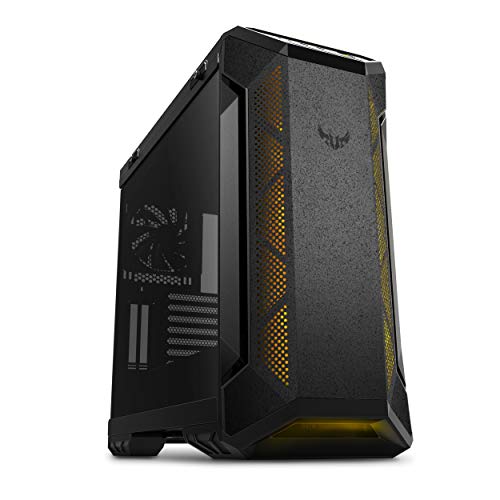
ASUS TUF Gaming GT501 — The armoured workhorse
The GT501 is the elder statesman of this list and the only one that looks like it was designed by people who move computers for a living. Its steel body carries woven handles integrated into the frame, and ASUS built the whole chassis around a military-inspired brief: E-ATX support, room for dual 360mm radiators, and clearance for graphics cards up to 420mm long. Three 120mm RGB fans sit behind the front panel and a single 140mm PWM fan handles exhaust, so the case arrives with a complete, controllable airflow path rather than a starter suggestion.
What owners tend to praise is the build experience. The interior is deep enough that cable routing stops being a negotiation, and the tempered glass side panel shows the components without turning the case into a fish tank on every face. For a gaming rig that also does workstation duty — long renders, big storage, a card that needs its 420mm — the GT501 behaves like equipment rather than furniture. Its cooling headroom also suits air builders: the wide cavity and strong front intake feed large tower coolers without the choked feeling smaller cases develop under sustained load.
The trade-offs are honest ones. Steel and size make it heavy even before components go in, so the handles are less a style choice than a necessity. Its design language is angular and tactical, which will either suit your desk or clash with everything on it. And while the included fan set is complete, builders chasing a silent machine will eventually replace the front trio with slower-spinning alternatives tuned to their own curve.
- Form factor: E-ATX full-tower, steel construction
- Included fans: three front 120mm RGB, one rear 140mm PWM
- Radiator support: dual 360mm mounts
- Graphics card clearance: up to 420mm
- Distinctive feature: integrated carry handles in the frame
Strengths
- Genuine working room for E-ATX boards and long cards
- Complete factory fan set with PWM exhaust control
- Handles make a heavy, fully built system movable by one person
Trade-offs
- Heaviest style of case here once a full build is installed
- Tactical styling divides opinion in living-room setups
- Front RGB fans favour airflow and light over silence
Best for: builders who transport their rig, run E-ATX boards, or want a steel case that shrugs off years of hardware swaps. Skip it if your desk aesthetic runs minimalist, or if the machine will live somewhere its weight makes every upgrade a two-person job.

darkFlash DY470 — The dual-chamber showcase
The DY470 takes the opposite philosophy from the GT501: instead of armouring the build, it exhibits it. A dual-chamber layout pushes the power supply and cable mass behind the motherboard tray, leaving the visible chamber for the board, the card and the cooling — all of it framed by panoramic glass. Four PWM ARGB fans are fitted from the factory, the case supports back plug-in motherboards whose connectors hide on the rear of the board, and a vertical GPU mount lets a graphics card face the glass instead of hiding its backplate against the floor of the case.
Cooling capacity matches the showmanship. The listing supports up to two 360mm radiators, and it is rated for RTX 40-series cards, which tells you the internal length was planned around current flagship dimensions rather than the shorter cards of a few years ago. Back-connector motherboard support matters more than it first appears: moving power and fan headers behind the tray removes most of the visible cable runs, which is precisely what makes panoramic glass builds look effortless in photographs and messy in cases that lack the feature.
Consider the daily reality, though. Panoramic glass shows fingerprints, dust and every cable you failed to hide, so the DY470 rewards tidy builders and quietly exposes everyone else. Dual-chamber cases are also wider than conventional towers of similar height — measure your desk footprint, not just its clearance to the shelf above. Vertical GPU mounting, finally, is a display decision with a thermal side: check your card’s cooler orientation behaves in that position before committing to the riser layout.
- Form factor: full-tower ATX, dual-chamber layout
- Included fans: four PWM ARGB
- Radiator support: up to two 360mm radiators
- Motherboard features: back plug-in (rear-connector) support
- Distinctive feature: vertical GPU mounting with panoramic glass
Strengths
- Cleanest possible view of the build thanks to the hidden second chamber
- Four controllable ARGB fans included from the factory
- Rear-connector boards keep visible cabling close to zero
Trade-offs
- Wide dual-chamber footprint needs a deeper desk than a classic tower
- Glass on multiple faces demands regular cleaning to look its best
- Vertical mounting suits some card coolers better than others
Best for: display builds with rear-connector motherboards and owners who enjoy the ritual of a spotless interior. Skip it if your PC lives under the desk out of sight, where the glass premium buys nothing you will ever look at.

Antec C8 Wood — The quiet timber build
The C8 Wood is the introvert of the six. Its front panel is genuine wooden slatting over a full-tower E-ATX frame, paired with seamless tempered glass on the front-adjacent and side faces so the interior still reads as a modern build rather than a retro cabinet. Antec rates it for 360mm radiators and RTX 40-series graphics cards, and a Type-C port sits in the front I/O where it belongs on a current case.
The detail that shapes every buying decision here is in the listing title itself: no fans. The C8 Wood arrives as a shell, which is either a flaw or the entire point. Buyers who already own fans they like, or who plan a specific radiator and fan combination for a custom loop, pay nothing for bundled spinners they would have removed. First-time builders, by contrast, must budget and plan for a full fan set on top of the case, and should think about fan control — a hub or a motherboard with enough headers — at the same time.
In a room, the wood front does something none of the glass rivals can: it lets a powerful PC sit in a living space without announcing itself as gaming hardware. The glass keeps the build visible to its owner while the timber faces the room. That balance, plus the E-ATX interior, makes the C8 Wood a strong home for a workstation that games after hours — provided the person buying it walks in knowing the cooling is a do-it-yourself chapter.
- Form factor: full-tower E-ATX
- Included fans: none — cooling is buyer-supplied
- Radiator support: 360mm
- Front panel: wooden slats with tempered glass front and side
- Front I/O highlight: USB Type-C
Strengths
- Wood front softens a big gaming build for shared living spaces
- No bundled fans means no paying twice for cooling you would replace
- E-ATX room with current-generation card and radiator support
Trade-offs
- Total build cost must include a complete fan set and control plan
- Nothing to test airflow with on day one unless fans arrive alongside
- Wood finish narrows the colour schemes it sits comfortably beside
Best for: experienced builders with fans already on the shelf and a room that rewards timber over RGB. Skip it if this is your first build and you want the case to handle cooling decisions for you out of the box.
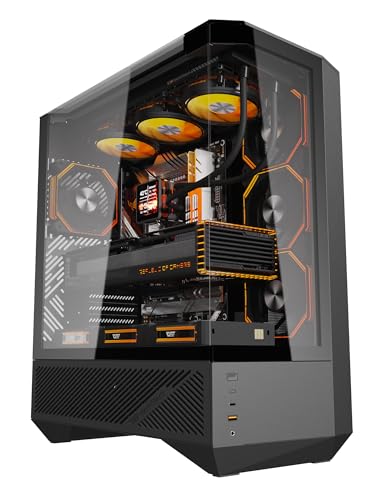
darkFlash DY460 — The wraparound view
If the DY470 exhibits the build, the DY460 surrounds you with it. Its headline figure is a 330-degree panoramic glass treatment, wrapping the view around the front corner so the interior reads from a desk chair at angles where a flat side panel would already have gone dark. Four INF34 ARGB PWM fans are pre-installed, the layout is dual-chamber with back-connect ATX motherboard support, and the top mounts a 360mm radiator. Graphics card clearance is stated at 400mm, and the front I/O includes USB-C at 10Gbps.
Two darkFlash cases in one guide invites the obvious question, and the answer is the glass geometry and the cooling layout. The DY470 centres on vertical GPU display and dual 360mm radiator capacity; the DY460 centres on the wraparound corner view and a top-radiator layout with its four infinity-style fans doing visual work as well as airflow work. Choosing between them is choosing which photograph of your own desk you prefer — the card presented face-on, or the whole build visible from the corner of the room.
Practically, the 400mm clearance covers current flagship cards, the back-connect support keeps the panoramic view free of cable crossings, and the 10Gbps Type-C port is genuinely useful for fast external drives rather than a spec-sheet garnish. The cautions mirror its sibling: a wide footprint, glass that reports every fingerprint, and a look that commits your whole setup to the showcase style. Within that style, though, the DY460 is the more theatrical of the two.
- Form factor: ATX full tower, dual-chamber layout
- Included fans: four INF34 ARGB PWM
- Radiator support: top 360mm mount
- Graphics card clearance: 400mm
- Front I/O highlight: USB-C at 10Gbps
Strengths
- 330-degree glass keeps the build visible from most desk angles
- Back-connect motherboard support protects the clean view
- Fast front Type-C suits external SSD workflows
Trade-offs
- Single stated 360mm radiator position versus two in the DY470
- Wraparound glass is the most cleaning-intensive surface in this guide
- Showcase width demands a deliberate desk plan
Best for: corner desks and streamers whose PC sits inside the camera frame. Skip it if the tower will face a wall, because the wraparound view is the product and a wall hides it completely.

HYTE Y70 Touch Infinite — The touchscreen tower
The Y70 Touch Infinite builds its identity around a screen that is part of the case itself: an integrated 2.5K LCD touchscreen set into the front corner panel, driven by HYTE’s software so it can show system monitoring, media, or whatever widget arrangement you settle on. Around that screen sits a dual-chamber ATX chassis with capacity for ten fans and a luxury PCIe 4.0 riser cable included for vertical graphics card mounting, finished here in Pitch Black.
Treat the screen as an instrument and the case makes sense. A glanceable readout of temperatures, fan speeds and load — without opening an overlay on your main monitor mid-game — is a real convenience for anyone who tunes fan curves or watches a loop’s behaviour. The touchscreen input matters too: it is a control surface, not just a display, so interacting with it does not require reaching for the mouse. The dual-chamber layout keeps the build behind the glass tidy enough to deserve being next to a screen that draws the eye.
The honest cautions are about commitment. The display is part of the chassis, so the case’s software becomes part of your system maintenance, and the Y70’s aesthetic — tall, sculpted, unmistakably a HYTE — dominates any desk it joins. Ten-fan capacity is headroom, not a requirement; filling every mount is a budget and noise decision, not an obligation. Buyers who want the screen will find nothing else here interchangeable with it. Buyers indifferent to the screen should spend the difference on cooling or storage instead.
- Form factor: dual-chamber ATX desktop chassis
- Display: integrated 2.5K LCD touchscreen
- Fan capacity: up to ten fans
- Included extra: luxury PCIe 4.0 riser cable for vertical GPU mounting
- Colour of this listing: Pitch Black
Strengths
- Touchscreen gives live system readouts without covering your game
- Riser cable included, so vertical mounting needs no extra purchase
- Dual-chamber interior keeps the displayed build genuinely tidy
Trade-offs
- Screen and software become part of your long-term system upkeep
- Strong styling will not blend into a conservative office desk
- Ten fan mounts tempt overspending on cooling a build may not need
Best for: tuners and streamers who will actually glance at live telemetry every session. Skip it if you know you would set the screen to a static image in week one and never touch it again.
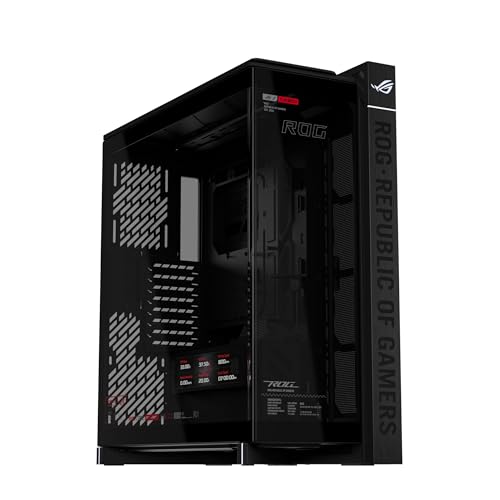
ASUS ROG Cronox — The curved-glass flagship
The Cronox is ASUS aiming its ROG line at the very top of the full-tower market. Its signature is a curved tempered glass panel — glass that bends around the build rather than meeting it at flat angles — paired with a 9.2-inch LCD screen for system information. Underneath the theatre, the engineering list is serious: E-ATX support including BTF rear-connector motherboards, dual 360mm radiator mounts, and 400mm of graphics card clearance.
BTF support deserves a sentence of its own, because it changes what the curved glass shows. With power and data connectors on the back of the motherboard, the visible chamber holds almost no cables at all, so the curve becomes a lens on components alone. Dual 360mm radiator support gives a custom loop separate circuits for processor and graphics card, and 400mm of card room covers the largest current gaming cards with space for front-mounted cooling hardware beside them.
Flagship pricing logic applies even without naming figures: this is the case for a builder whose components already sit at the top of their categories and who wants the chassis to match. The curved panel is also the most fragile-feeling part of any build in this guide — glass that bends is a manufacturing achievement and a handling warning in equal measure, so the Cronox belongs in a permanent home rather than a case that travels. Positioned once, in a setup built around it, it is the most striking object in this guide.
- Form factor: E-ATX full-tower, BTF motherboard support
- Panel: curved tempered glass
- Display: 9.2-inch LCD screen
- Radiator support: dual 360mm mounts
- Graphics card clearance: 400mm
Strengths
- Curved glass and cable-free BTF builds produce an unmatched display
- Dual 360mm mounts support a true two-loop custom cooling plan
- Built-in LCD covers monitoring without third-party panels
Trade-offs
- Curved glass demands careful handling during every build and move
- Its value only shows with high-end components inside it
- BTF benefits require a BTF motherboard to fully materialise
Best for: flagship builds with rear-connector boards and a permanent, prominent desk position. Skip it if the PC will be moved between rooms or venues, where the GT501’s steel and handles are the wiser flagship spend.
How Do the Six Towers Stack Up Against Each Other?
| Case | Board support | Radiator headline | Card clearance | Signature feature |
|---|---|---|---|---|
| ASUS TUF Gaming GT501 | E-ATX | Dual 360mm | 420mm | Frame-integrated carry handles |
| darkFlash DY470 | ATX, back plug-in | Up to two 360mm | RTX 40-series ready | Vertical GPU in a dual chamber |
| Antec C8 Wood | E-ATX | 360mm | RTX 40-series support | Wooden front, fans buyer-supplied |
| darkFlash DY460 | ATX, back-connect | Top 360mm | 400mm | 330-degree panoramic glass |
| HYTE Y70 Touch Infinite | ATX dual chamber | Ten-fan capacity | Vertical via included riser | 2.5K touchscreen in the panel |
| ASUS ROG Cronox | E-ATX, BTF | Dual 360mm | 400mm | Curved glass and 9.2-inch LCD |
Read the table by columns that match your build. A custom-loop plan lives or dies on the radiator column. A flagship card purchase lives on the clearance column. The signature column is about the room the PC will sit in: handles for a travelling rig, timber for a lounge, a touchscreen for a tuner, curved glass for a showpiece that never moves.
Which Cooling Layout Should a Full Tower Run?
Start with the physics the big case gives you. A full tower’s volume lets intake and exhaust occupy different neighbourhoods, so the classic arrangement — front intake, roof exhaust through a radiator, rear exhaust assisting — keeps the graphics card fed with air that has not already passed through a hot radiator. With dual 360mm mounts, as on the GT501, DY470 and Cronox, a custom loop can give the CPU and GPU separate radiators, and each component’s temperature stops dictating the other’s fan curve.
Air builders should not feel like second-class citizens in these cases. The GT501’s strong front intake and the general width of full towers suit the largest dual-tower air coolers, and a big cavity means the cooler’s exhaust has somewhere to go. What matters is completing the path: intake, component, exhaust, with no fan fighting another. Glass-fronted designs rely on side or bottom intake paths, which is why their fan counts run higher — the air takes a longer route to the same components.
Whichever layout you choose, set fan curves against the component that suffers first. In most gaming builds that is the graphics card, whose temperature governs both noise and sustained boost behaviour. A full tower running slowly-turning large fans will usually beat a smaller case at full fan speed on both temperature and noise, which is the entire acoustic argument for buying big.
What Mistakes Do Full-Tower Buyers Keep Making?
The first is buying the footprint before measuring it. Full towers are wide, deep and tall in combinations that defeat alcoves, desk shelves and the space under many desks. Measure all three dimensions of the intended home, add room for rear cable bend and top exhaust, and only then fall in love with a design.
The second is treating included fans as a footnote. The C8 Wood ships with none and the GT501 ships with a complete set; comparing their listings without pricing the Antec’s cooling produces a false saving. Count fans, fan control and any hub you need as part of the case decision, every time.
The third is filling the space because it is there. Ten fan mounts do not require ten fans, and a second radiator only helps a loop that exists. Overspending on case cooling theatre while the graphics card sits a tier lower is the classic full-tower misallocation. Buy the volume for the upgrades you genuinely foresee — which, for glass inspiration, is exactly the question explored in the best glass pc cases shortlist — not for hypotheticals that flatter the build log.
The fourth is ignoring the move. A finished full-tower gaming PC is heavy, awkward and, in the glass models, fragile. Decide who lifts it, through which doors, before the build is complete and the box is in the recycling.
How Should You Plan the Build Inside a Case This Size?
Assemble in an order that uses the room. Fit the power supply and route its cables first while the motherboard tray is empty. Mount radiators and their fans before the motherboard goes in, because roof access is never easier than at that moment. Install the motherboard, then the graphics card last among the major parts, so its length never blocks your hands during cable work.
Use the second chamber or deep cable channels as they were intended: one route for power, one for front-panel and fan wiring, with slack coiled where the panel hides it rather than where the glass shows it. In back-connector builds, connect everything you can before the board is fixed down, because rear headers are easiest to reach while the tray is still open. Finish with a photograph of the interior before the glass goes on; in three months, when you add a drive, that photograph is the map of where every cable went.
How Does Radiator Placement Change the Temperatures You Actually See?
Builders argue about radiator position with a confidence the physics only partly supports, so it helps to separate the effects that matter from the ones that fill forum threads. A roof-mounted radiator exhausting case air runs its coolant a few degrees warmer than a front-mounted radiator drinking fresh air, because the roof unit breathes air the graphics card has already heated. In exchange, the roof layout keeps the card itself cooler, since the card is no longer downstream of a warm front radiator. In a full tower you can often have both virtues at once: the front radiator gets outside air, the roof radiator exhausts, and the sheer volume of the case dilutes the heat each stream carries.
The dual 360mm support on the GT501, the DY470 and the Cronox exists for the builder who refuses the compromise entirely. Two radiators in a single loop, or one radiator per component, spread the heat load so widely that fan speeds can fall to near-inaudible levels under gaming load. The practical limit becomes pump noise and coil whine rather than airflow, which is a pleasant problem and the real luxury a full tower sells. If you are planning that class of loop, buy the case around the radiator plan: check that roof and front mounts can be occupied simultaneously with your chosen motherboard, because a tall memory kit or an oversized VRM heatsink can steal the roof radiator’s clearance on some layouts.
Air-cooled builds have their own version of the same question. A large dual-tower cooler exhausts toward the rear fan, and the case’s job is simply to keep fresh intake arriving faster than the cooler recirculates its own output. The GT501’s three front fans do that work directly. In glass-fronted dual-chamber cases the intake path bends around the side or floor of the chamber, so fan count rises to compensate for the longer route. Neither approach is wrong; they are different plumbing for the same river, and the full tower’s gift is that the river is wide in both designs.
What Does Owning a Full Tower Involve After the Build Weekend?
Month-to-month ownership is where big cases quietly repay their price. Dust filters on a full tower are usually large, reachable and washable without removing a single component, and the interior volume means a cleaning session is a wipe and a vacuum rather than an excavation. Component swaps follow the same pattern: adding a drive, reseating a card or changing a cooler happens with elbow room, good light and both hands free, which reduces the small accidents — the dropped screw into the power supply shroud, the connector bent by a blind reach — that plague compact builds.
Noise behaviour also changes with age in your favour. Fans in a large case start slower and can stay slower as dust accumulates, because the system has thermal headroom to spare. A mid-tower running near its cooling limit gets audibly worse across a dusty summer; a full tower with the same components mostly shrugs. The counterweight is immobility. Once a full tower is populated, plumbed and cabled, it tends to define the room layout rather than adapt to it, and any change of house, desk or country becomes a logistics exercise involving the original box, which is worth keeping if you have storage space for it.
Glass models add one recurring chore the steel GT501 avoids: fingerprints and dust show on every panel, and the curved Cronox panel and the DY460’s wraparound glass are large canvases. A microfibre cloth kept in the desk drawer is the entire maintenance programme, but it is a programme. Owners who know they will never wipe a panel should choose steel and mesh with clear eyes, because a neglected showcase looks worse than a plain case ever can.
Which Kind of Builder Does Each Tower Really Suit?
Picture the workstation gamer first: long renders on weekdays, long sessions on weekends, a card that earns money and a desk that must look professional on video calls. The GT501 fits that life without discussion — steel, complete cooling, handles for the occasional relocation, and no light show unless the front RGB is invited. The C8 Wood fits a neighbouring life, the lounge workstation, where the machine shares a room with people who did not choose to live beside gaming hardware; its timber front is a social feature as much as an aesthetic one, and its missing fans are a minor tax on a builder who already owns good ones.
Now picture the exhibitor, whose PC is part of the room’s design and possibly part of a stream’s backdrop. The DY470 serves the builder who thinks in components: a vertical card, a rear-connector board, cables abolished. The DY460 serves the builder who thinks in sightlines: the corner view, the wraparound glass, the build visible from the sofa as well as the chair. Neither is better; they are answers to different questions asked by people who both, correctly, want their hardware seen.
Finally, picture the instrument lover, the owner who tunes. The Y70 Touch Infinite puts telemetry on the case itself, within reach of a finger, and the Cronox wraps the same impulse in flagship materials with a curved panel and a screen of its own. Both cases assume an owner who interacts with the machine as a system rather than an appliance. If that description sounds exhausting rather than delightful, the honest pick is the GT501 and a software overlay — the guide will not pretend otherwise, because a case you resent maintaining is a case you bought for someone else’s desk.
How Should Power, Storage and Cabling Be Planned at This Scale?
A full tower tempts builders to postpone decisions, because there is always another bay, another grommet, another inch of tray. Resist that. Choose the power supply for the build you will own in three years, not the one on the bench today: flagship graphics cards have grown hungrier across generations, and a full tower is precisely the case class where a future card upgrade should not drag a power supply replacement behind it. Mount the supply, route the 24-pin and EPS cables, and only then measure what remains — in dual-chamber designs like the DY470, DY460 and Y70, the hidden chamber forgives generous cable lengths, while conventional layouts reward exact ones.
Storage planning has inverted over the years. The full towers of a decade ago were bought for stacks of spinning drives; today’s gaming build usually lives on motherboard M.2 slots, and the case’s drive cages matter mainly to the hybrid builder who keeps a media archive or a backup volume inside the same machine. If that is you, count the 3.5-inch bays on the specific listing before ordering, because glass showcase cases trade bay count for their clean chambers, while the steel GT501 keeps more of the traditional layout. Everyone else should treat extra bays as future insurance rather than a headline feature.
Cabling deserves a plan on paper, even a rough one. List every run — motherboard power, EPS, graphics card power, fan headers or a hub, front-panel connectors, any radiator pump and screen cables on the Y70 or Cronox — and assign each a route through the tray before the first component is fitted. The builders whose interiors look effortless in photographs are not tidier people; they are people who decided the routes in advance. In back-connector builds the plan shrinks dramatically, which is the unglamorous reason BTF and back plug-in support keeps appearing in these listings: it deletes most of the list.
How Long Should a Case Like This Stay in Service?
Longer than anything inside it. Motherboard standards change slowly, the ATX layout has survived decades, and a well-made steel or aluminium chassis can carry three full platform generations if its front I/O keeps pace. That is the lens for judging the differences in this guide. USB-C at useful speeds, as the DY460 and C8 Wood provide, is not a garnish; it is the feature that stops a case feeling old in year four. Radiator support is the same kind of insurance, because cooling hardware outlives the processors it was bought for.
What dates a case fastest is a fixed gimmick nobody uses, which is why this guide keeps returning the screen-equipped models to a single test: will you look at it weekly? A monitoring display that becomes furniture is dead weight in the budget; one that becomes your tuning dashboard justifies itself for the case’s whole life. Panels and mounts are the other longevity factor. Tempered glass survives years if it is handled rarely and stored flat when removed, while frequently-swapped panels argue for the GT501’s more forgiving construction.
Buy, in other words, for the second and third builds, not the first photograph. The first build flatters every case on this page. The third build — new platform, inherited drives, a card two generations newer — is where the GT501’s room, the C8’s radiator support, the DY470’s rear-connector layout and the Cronox’s dual mounts stop being specifications and start being the reason you are not shopping for another case at midnight.
How Do You Keep a Large Case Quiet Without Cooking the Build?
Silence in a full tower is a fan-curve problem wearing a hardware costume. The volume gives you the raw material — more fan positions, larger radiators, slower-moving air — but the curve decides whether you hear it. Set intake fans to follow graphics card temperature where your motherboard allows it, let radiator fans follow coolant or CPU temperature, and give every curve a lazy slope below the temperatures your machine sees while browsing. Most noise complaints trace back to a fan that ramps aggressively in response to a two-second temperature spike the coolant never felt.
Placement helps too. A tower on a desk transmits vibration straight into the furniture, and a hard floor reflects fan noise back at the room; a mat or a solid stand under a heavy case like the GT501 is a cheap acoustic upgrade. Glass panels, for all their cleaning demands, are acoustically decent because they are dense and seal well, while perforated panels trade a little noise escape for their airflow. None of this requires buying the quietest model on paper — it requires setting up whichever model you bought as if noise were a setting, because it is one.
What Should You Check in the First Hour After the Case Arrives?
Inspect before you build. Tempered glass should be examined under a bright light for edge chips, especially the Cronox’s curved panel and the DY460’s wraparound piece, because a chipped edge discovered after the build is a warranty conversation held at the worst possible moment. Test every included fan by hand-spinning it gently and, once the system first powers on, confirm each one reports and responds to control — the DY470’s four PWM ARGB fans and the GT501’s rear PWM exhaust included. A dead fan found on day one is a replacement; the same fan found in month three is an argument.
Check the front I/O with the same seriousness: every USB port, the Type-C port on the C8 Wood and DY460, the audio jack, the power and reset switches. Front-panel faults are rare and miserable to chase after cable management is finished. Finally, dry-fit the graphics card and any radiator before committing to the loop or the cable plan. Five minutes with the card held in place confirms the clearance figure on the listing against the card in your hands, and there is no cheaper moment to learn that a front radiator and a flagship card want the same centimetres.
Does a Full Tower Make Sense in a Small Room?
It can, provided the room’s problem is floor space rather than air. A full tower has a footprint not much larger than a mid-tower’s — the growth is mostly vertical and in width for dual-chamber models — so a corner that fits a mid-tower often fits a full tower, and the taller case can actually free desk surface by moving the machine to the floor with its exhaust unobstructed. What a small room cannot forgive is heat with nowhere to go: a gaming PC returns every watt it consumes to the room as warmth, and a big case with a big build will warm a small, closed room across a long session regardless of how good its internal temperatures look.
The practical answers are mundane. Keep the tower out of direct sun, leave the top exhaust a clear path to the room rather than a shelf underside, and crack a door during marathon sessions in summer. Dual-chamber models need their intake side away from the wall by a hand’s breadth. None of these cases is disqualified by a small room, but the room becomes part of the cooling system, and pretending otherwise is how owners end up blaming a good case for a hot flat. Choose the model whose exhaust direction suits your corner — roof-exhausting layouts forgive a wall behind them, rear-exhausting ones want space at the back — and the size will stop being the issue it first appears to be.
What About Vertical GPU Mounting in a Tower This Size?
Two of these cases build vertical mounting into their identity — the DY470 with its mount and the Y70 with its included PCIe 4.0 riser — and the option deserves a clear-eyed paragraph. A vertical card displays its cooler design instead of its backplate, which is the entire aesthetic argument, and in a dual-chamber case the card draws air from the chamber rather than from a cramped slot above the power supply shroud. The cautions are clearance and compatibility: a thick card mounted vertically sits closer to the glass, so check the gap against your cooler’s depth, and confirm the riser cable’s PCIe generation matches your platform, because a mismatched riser can force a slot to a slower mode until settings are corrected in firmware. Handled with those two checks, vertical mounting is a legitimate layout rather than a compromise, and in a full tower there is finally room to do it without suffocating the card.
Final Recommendation
Choose by the life the machine will lead. The GT501 remains the sensible flagship: steel, handles, complete fans, 420mm of card room and dual radiators, ready for work and travel alike. The DY470 and DY460 split the showcase vote between vertical-card presentation and wraparound glass, the C8 Wood serves the room-conscious builder who owns good fans, and the Y70 Touch Infinite and ROG Cronox turn the case itself into an instrument panel for owners who will use it daily. If your taste runs toward the front panel as the centrepiece — glass ahead of the fans rather than beside them — the best pc cases with tempered glass front guide takes that single idea and tests six cases against it. A full tower is the longest-lived part of a gaming PC, outlasting two or three generations of the components inside it, so buy the one whose compromises you will still enjoy explaining to nobody at all on an ordinary Tuesday, three years from now, when it simply works.
Frequently Asked Questions
Is a full tower worth it for a single-GPU gaming PC?
It can be, if the value you want is quiet operation, easy maintenance and upgrade room rather than raw necessity. A single card fits in a mid-tower; a full tower gives that same card cooler air, slower fans and space for whatever you add next.
How much clearance does a modern flagship graphics card need?
Plan around 400mm to be safe with current flagship designs and their power-cable bend. The GT501’s 420mm is the most generous figure in this guide, and the DY460 and Cronox both state 400mm.
Do dual-chamber cases cool worse than conventional towers?
Not inherently. The power supply and drives leave the main chamber, and intake paths are designed around the glass. What matters is that the intake fans have a genuine air source — side or bottom vents — and that you keep those vents unobstructed.
Should I choose a case with a built-in screen?
Only if you will use it for monitoring or control regularly. The HYTE and ROG screens earn their place as telemetry displays for tuned systems. As static decoration they are the most expensive wall art in the build.
Why would a case ship with no fans at all?
The Antec C8 Wood assumes its buyer already owns fans or plans a specific loop. That lowers waste for experienced builders and raises the planning burden for everyone else, so budget the cooling before comparing its listing with fan-included rivals.
Can these cases fit under a standard desk?
Some can and some cannot — full towers vary widely in height and width, and dual-chamber models run wide. Measure your space, allow clearance for top exhaust and rear cables, and check the listing dimensions for the specific model before ordering. Remember that under-desk placement also hides glass panels and screens, so a showcase model like the DY460 or the Y70 earns less of its keep down there; if the tower must live under the desk, the GT501’s steel practicality is the better-matched spend, and its handles make hauling it out for upgrades a one-person job.
Related Guides
Size is only one axis of the case decision. The guides above cover the mid-tower alternative, the all-glass showcase category and the glass-front specialism in the order this article promised them, so you can narrow the footprint, the view and the front panel one deliberate step at a time.
Related guides
- Best 3D Mechanical Engineering Laptops: Certified Workstations for CAD and Simulation
- Best Tattoo Printers: Thermal Stencil Machines for Clean, Lasting Transfers
- Best 15 Laptops Under $1000: Six 15-Inch Machines That Spend the Budget Honestly
- Best Battery NiMH Chargers: Six Units That Understand the Chemistry


