What's inside
- Key Takeaways
- Quick Picks
- How Were These NAS Chassis Selected?
- The Six NAS Cases, Compared on What Counts
- How Do You Size a NAS Case for the Next Decade?
- Why Do Drives Die in Pretty Cases?
- Which Mistakes Shorten a NAS Build’s Life?
- Final Recommendation
- What Does Always-On Ownership Actually Demand?
- How Should the Drives Themselves Be Chosen and Arranged?
- What Happens on the Day a Drive Fails?
- How Should the NAS Be Wired Into the House?
- What About the Computer Half of the Machine?
- A Word on Enterprise and Second-Life Drives
- How Loud Is a Room Full of Hard Drives?
- When Should a NAS Case Be Replaced Rather Than Filled?
- Does the Case Care Which NAS Software You Run?
- Frequently Asked Questions
- Related Guides
As an Amazon Associate I earn from qualifying purchases. This post may contain affiliate links at no extra cost to you.
widgetverdict.com is reader-supported. When you buy through links on our site, we may earn an affiliate commission.
Where to buy: Amazon sells all six NAS cases in this guide, and the names in the Quick Picks table link to their listings — check the drive-bay count and power supply format on the listing itself, because NAS chassis are revised quietly and the bay configuration is the whole purchase.
The best nas pc cases are not really computer cases in the gaming sense; they are small warehouses with a motherboard attached. Everything about them is organised around hard drives — how many fit, how they are cooled, how they can be swapped when one fails at the worst possible moment — and the six picks below span the category’s real range: a twelve-drive JONSBO flagship with a wood-veneer face and room for multiple graphics cards, two compact hot-swap ITX designs for the home media library, a five-plus-one-bay aluminium cube, a nine-bay micro-ATX hot-swap case, and a full-tower Rosewill workstation chassis that treats NAS as a department rather than a shelf.
A note on scope before the shortlist, because this category attracts impostors: rackmount enclosures and bare drive cages are not NAS cases, and none appear here. Every pick below is a true chassis that houses drives, a motherboard and a power supply as one machine. If your project is a rack, it is a different project; if it is a home or small-business server that lives on a shelf or under a desk, you are in the right guide.
One more expectation is worth setting before the reviews: a NAS case will never be the exciting line in a build list, and it should not try to be. Its virtues are the slow ones — a tray that still slides in year seven, a backplane that has never dropped a drive, a fan that has turned a billion times without complaint. Read the six reviews below with that timescale in mind, because the case that wins a NAS comparison is usually the one its owner stops thinking about first.
Key Takeaways
- Drive bays are the headline spec: the picks run from four hot-swap bays to the JONSBO N5’s twelve 3.5-inch bays plus four SSD mounts.
- Hot-swap backplanes matter more than raw count for most homes — a failed drive should be a two-minute job, not a rebuild.
- The compact ITX picks (AUDHEID, the 4-bay case, JONSBO N2) suit media libraries; the N5, N6 and Rosewill Thor NAS Pro suit growing archives and workstations.
- Power supply format varies by pick — SFX, Flex and ATX all appear — and must be matched before ordering.
- Drive cooling is the quiet killer in NAS builds; every pick here was chosen partly for a deliberate airflow path across the bays.
- A NAS case is a ten-year purchase: buy bays for the archive you will have, not the one you have today.
Quick Picks
| Pick | Badge | Why it earns its place |
|---|---|---|
| JONSBO N5 | Most bays, most ambition | Twelve hard-drive bays plus four SSD mounts, E-ATX support and room for multiple GPUs, wrapped in a solid-wood-veneer case that can live in a lounge. |
| AUDHEID 8 Bay NAS Case | Best compact hot-swap | Eight hot-swap bays for 3.5 and 2.5-inch drives in a Mini-ITX or micro-ATX case with dual independent air channels for the drive bank. |
| 4 Bay NAS Case | Smallest true NAS chassis | Four 3.5-inch hot-swap bays plus a 2.5-inch mount in a Mini-ITX case that accepts SFX, SFX-L or Flex power supplies. |
| JONSBO N2 Black | Aluminium shelf piece | A five-plus-one bay Mini-ITX NAS case in aluminium with a built-in 12cm fan, for a quiet media server that looks like hi-fi equipment. |
| JONSBO N6 | Hot-swap micro-ATX middle ground | Nine hot-swap drive bays, three possible power supply positions and 240mm AIO support in a micro-ATX NAS case with two fans pre-installed. |
| Rosewill Thor NAS Pro | The workstation tower | A full-tower server chassis with eight 3.5-inch hot-swap bays, E-ATX support and USB 3.2 Type-C for a NAS that is also a working machine. |
How Were These NAS Chassis Selected?
The first filter was the definition given in the introduction: a NAS case houses drives, board and supply as one standalone machine. Rack enclosures, disk shelves and cages that need a host case were excluded regardless of quality, because they answer a different question. What remained was judged on the three things that decide a NAS case’s decade: the drive system, the cooling path and the service experience.
The drive system means more than a bay count. Hot-swap trays on a backplane turn a drive failure into a two-minute, no-tools event; fixed internal mounts turn it into a shutdown, a screwdriver session and a cable excavation. Both approaches appear in this guide, and each review states plainly which its pick uses, because for an always-on machine that difference is operational, not cosmetic. Bay counts are quoted from the listings exactly as assigned, including the N5’s twelve-plus-four arrangement and the N2’s five-plus-one.
Cooling was judged by path rather than fan count: does air enter, cross the drive bank, and leave, without first being warmed by the processor? The AUDHEID’s dual independent air channels are the clearest expression of that principle in the six. Finally, each case had to suit a recognisable household or small-business role — media shelf, growing archive, office server, workstation — so that the reader’s life, not the spec sheet, does the choosing.

JONSBO N5 — twelve bays and a wood veneer
The N5 is what happens when a NAS case refuses to choose between a server room and a living room. Its drive system is the largest in this guide — twelve 3.5-inch hard-drive bays plus four SSD mounts — behind a case finished with a solid wood veneer that lets it sit in furnished space without apology. The motherboard support runs to E-ATX at 330mm, the power supply is ATX format, three fans are built in, there are eight PCI slots, and the listing states support for as many as four graphics cards, which moves the N5 out of pure storage and into home-server-with-ambitions territory: a media server that transcodes, a workstation that archives, a virtualisation host with a serious disk estate.
That breadth is the review’s honest headline and its caution in one. A buyer who fills even half the N5’s bays owns a machine that wants server habits — a considered drive layout, airflow kept clear across the bank, a backup philosophy that treats twelve drives as twelve future failures to plan around rather than twelve slots to fill and forget. The wood veneer is not a gimmick on a case this size; it is an admission that a machine with this much storage will live somewhere visible for a decade, and JONSBO has dressed it accordingly. For the household archive that has outgrown two successive smaller cases, the N5 is the purchase that ends the outgrowing.
- Drive bays: 12x 3.5-inch HDD plus 4x SSD
- Motherboard: E-ATX up to 330mm
- Power supply: ATX format
- Fans: 3 built in
- Expansion: 8 PCI slots; multi-GPU support per listing
- Finish: solid wood veneer
Strengths
- The largest drive estate in this guide, with SSD mounts alongside the spinning bays.
- E-ATX and multi-GPU support let it grow from NAS into a full home server.
- The wood veneer makes a very large case acceptable in furnished rooms.
Trade-offs
- Twelve bays invite twelve drives’ worth of cost, heat and failure planning.
- It is a substantial piece of furniture; measure its home before ordering.
- Small households will never use its ceiling and pay for it in size daily.
The N5 is for the archive that keeps doubling and the owner who is done rebuying cases; a four-drive media library should take its smaller guide-mates and spend the difference on drives.

AUDHEID 8 Bay NAS Case — hot-swap done properly, in miniature
The AUDHEID case is the compact NAS builder’s argument in physical form: eight hot-swap drive bays, accepting 3.5-inch and 2.5-inch drives, in a chassis for Mini-ITX or micro-ATX boards — and, the detail that separates it from most small NAS boxes, dual independent air channels, so the drive bank’s cooling is its own system rather than whatever air the processor has finished with. For a home media server or a small business’s backup target, that architecture is exactly right: drives are the components that run for a decade and die of heat and vibration, and this case treats them as the point of the machine.
Hot-swap at this size changes the ownership experience completely. A drive that reports errors on a Tuesday evening is pulled from the front and replaced while the array rebuilds, with the case never opened and the household’s film night never cancelled. The board flexibility — ITX for the compact build, micro-ATX for the builder who wants the extra slots — keeps the case useful across a platform change, and the whole machine stays small enough for a shelf or a cupboard with ventilation. Its limits are the compact class’s own: no room for a graphics card habit, a power supply to be chosen in the format the case expects, and eight bays as a hard ceiling. Within those fences, it is the most completely thought-through small NAS case in this guide.
- Drive bays: 8 hot-swap, 3.5-inch and 2.5-inch
- Motherboard: Mini-ITX or micro-ATX
- Cooling: dual independent air channels
- Role: home media server, small-business backup
- Service: front-access drive replacement
- Character: storage-first, no gaming ambitions
Strengths
- Eight genuinely hot-swappable bays at a shelf-friendly size is a rare combination.
- Separate air channels keep drive temperatures independent of processor load.
- Two board sizes supported, so the case survives a platform upgrade.
Trade-offs
- Eight bays is the ceiling — archives growing past it will migrate again.
- No meaningful graphics card room; transcoding muscle must come from the CPU.
- Compact internals reward planned cabling and punish improvisation.
Buy the AUDHEID when eight drives is the honest size of your next five years and the server lives where people can hear it; archivists already counting past eight bays should start at the N5 or N6 instead.
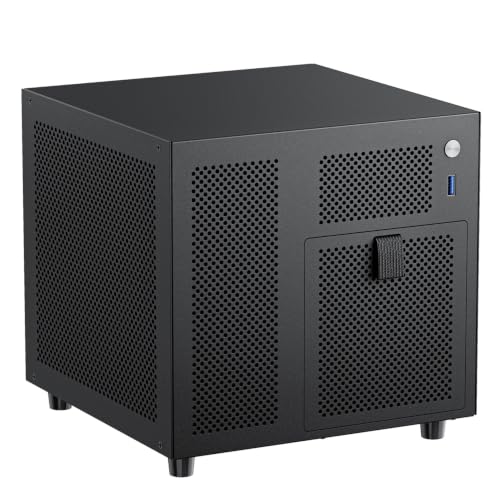
4 Bay NAS Case — the smallest honest NAS
Some NAS cases are small servers; this one is a small appliance, and that is its virtue. Four 3.5-inch hot-swap bays plus a 2.5-inch mount, in a Mini-ITX chassis that accepts SFX, SFX-L or Flex power supplies, with a 70mm CPU cooler ceiling and a 120mm fan position — the specification reads like a checklist for the household media library that most families actually need. Four bays is the size of the classic home array: a mirrored pair today, a four-drive pool tomorrow, and a hard ceiling that forces the healthy habit of deleting or archiving rather than hoarding by default.
The power supply flexibility deserves emphasis, because it is unusual and practical. A case that accepts SFX, SFX-L and Flex units lets the builder use what is available, what is quiet, or what the parts bin already holds, and in the small-NAS world — where the supply is often the noisiest component — that freedom is a sound-quality feature as much as a budget one. The 70mm cooler ceiling fences the processor choice toward efficient chips, which suits an always-on machine’s electricity bill and its acoustics in equal measure. This is not the case for a growing archive or a transcoding workload with ambitions; it is the case for the household that wants its photos, films and backups on real hardware, quietly, in a box smaller than a shoebox’s ambitions.
- Drive bays: 4x 3.5-inch hot-swap plus 1x 2.5-inch
- Motherboard: Mini-ITX
- Power supply: SFX, SFX-L or Flex formats
- CPU cooler ceiling: 70mm
- Cooling: 120mm fan position
- Role: home media library and backup appliance
Strengths
- Three accepted power supply formats make the build cheaper and quieter to spec.
- Proper hot-swap bays at the four-drive size, where many rivals use fixed mounts.
- The compact footprint fits the shelves and cupboards NAS boxes actually live in.
Trade-offs
- Four bays is a firm ceiling; fast-growing archives will outgrow it.
- A 70mm cooler cap limits the build to efficient processors.
- No expansion story beyond the board’s own — it is an appliance, by design.
This is the NAS case for the household buying its first real storage; if your drive count is already five, the honest move is to skip a size and start with the AUDHEID or the N2 below.

JONSBO N2 Black — the aluminium NAS that looks like hi-fi
The N2 is the NAS case for the shelf that is seen. Its aluminium body, five-plus-one disk bays — five main bays and a sixth drive position, as the listing’s “5+1” describes — a built-in 12cm fan and an integrated upper cover that lifts away for access, all compose a machine that sits beside a receiver or on a study shelf without looking like a server that escaped. The board is Mini-ITX, the power supply is SFX up to 150mm long, and the CPU cooler ceiling is 65mm, which together describe the build: efficient, quiet, storage-led.
Five-plus-one is a thoughtful capacity for a media household — a four-drive array plus a spare bay is a common and sensible end-state, and the extra position gives the array somewhere to grow or a failing drive somewhere to be replaced into. The aluminium construction is more than cosmetic in a NAS: it sheds heat from the case’s own skin and it ages without the fan-grille rust and plastic yellowing that mark cheaper boxes in year five. The removable upper cover makes the occasional internal job — a memory upgrade, a dust pass — a lift rather than a disassembly. Its constraints are the class’s: SFX supply to budget for, a 65mm cooler ceiling to respect, and a capacity that a serious archive will eventually test. For the media server that lives in the open, it is the best-looking honest answer in this guide.
- Drive bays: 5+1 disk bays
- Motherboard: Mini-ITX
- Construction: aluminium, integrated removable upper cover
- Fan: 12cm fan built in
- Power supply: SFX up to 150mm long
- CPU cooler ceiling: 65mm
Strengths
- Aluminium construction looks and ages like hi-fi equipment, not like a server.
- The 5+1 bay layout matches how home arrays actually grow.
- A built-in 12cm fan and lift-off cover make it easy to live with.
Trade-offs
- SFX power supply required, at the format’s usual premium.
- A 65mm cooler ceiling keeps processors firmly in the efficient class.
- Capacity tops out where the AUDHEID and N6 are just getting started.
Choose the N2 when the server will be seen daily and five-ish drives is the true size of the library; archive-keepers should let the N6’s nine bays tempt them before the N2’s aluminium does.
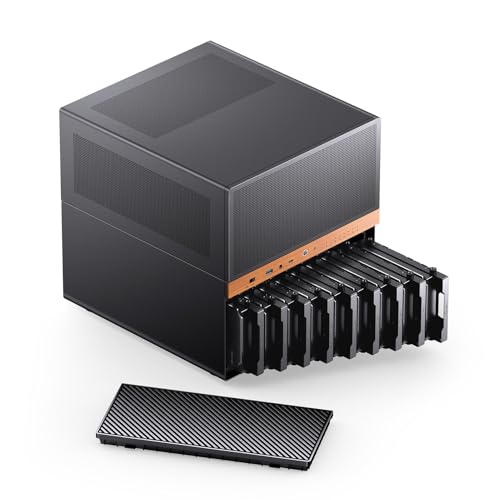
JONSBO N6 — nine hot-swap bays, three ways to power them
The N6 occupies the guide’s most contested ground — bigger than a media appliance, smaller than a server — and equips itself for the argument. Nine hot-swap HDD/SSD bays, a micro-ATX board, support for three different power supply installation positions across ATX and SFX formats, two fans pre-installed, graphics cards up to 305mm, multiple fan positions and support for a 240mm AIO: read as a list, it is the most flexible specification in this guide. Read as a machine, it is a NAS that can also be a workstation, for the small business or the serious household whose server transcodes, hosts and occasionally computes.
The three-position power supply support is the detail builders will feel. It lets the case adapt to the build rather than the reverse — an ATX supply for a workstation-grade machine, an SFX unit when the layout wants the room — and flexibility like that is what keeps a case in service across two platforms. Nine hot-swap bays is the other grown-up figure: enough for a serious array with a spare, on a backplane that makes the inevitable drive swap a front-panel event. The 240mm AIO support and 305mm card room are unusual in a NAS case and should be read as headroom for the hybrid role, not as an invitation to build a gaming rig in a storage box. As the middle of this guide, the N6 is where most growing archives should probably land.
- Drive bays: 9 hot-swap HDD/SSD
- Motherboard: micro-ATX
- Power supply: ATX or SFX, three installation positions
- Fans: 2 pre-installed, multiple further positions
- Graphics support: cards up to 305mm
- Radiator support: 240mm AIO
Strengths
- Nine hot-swap bays is the capacity sweet spot for growing home and office archives.
- Three power supply positions across two formats adapt the case to the build.
- Card and radiator headroom lets one machine serve storage and workstation duty.
Trade-offs
- Its flexibility means a longer planning session — layouts must be chosen, not defaulted.
- Micro-ATX boards only; ITX builders and E-ATX owners both look elsewhere here.
- A hybrid build can drift into doing two jobs adequately instead of one well.
The N6 is the pick for the archive that has outgrown appliances but not yet earned a tower; if your count is heading past nine drives with momentum, the N5 and the Rosewill are waiting at either end of this guide.

Rosewill Thor NAS Pro — the full tower that works for a living
Rosewill’s Thor NAS Pro is the guide’s heavyweight: a full-tower workstation and server chassis with eight 3.5-inch hot-swap bays supporting SATA and SAS drives, plus two 2.5-inch SSD mounts, E-ATX compatibility, a 140mm PWM fan and USB 3.2 Type-C on the front. Where the compact picks miniaturise the NAS idea, the Thor professionalises it — this is a chassis for a machine that is a NAS and a workstation and possibly a small office’s entire server estate, in a tower that stands on the floor and gets on with it.
The SAS support in the listing is the tell of its intended audience: it speaks to builders using enterprise drives, whether new or retired from datacentre service, and to offices whose storage is infrastructure rather than hobby. Eight hot-swap bays in a full tower means the drives are the beginning of the machine, not its entirety — there is room and power headroom for the compute that a working server accumulates: virtualisation, a serious transcoding card, capture or networking hardware in the slots an E-ATX board provides. The trade-offs are the tower’s own: it is large, it is a floor object, and its fan story is a starting point the builder will extend. For a home media shelf it is far too much case; for a small business buying one machine to be everything, it is the only pick in this guide actually sized for the job.
- Drive bays: 8x 3.5-inch hot-swap (SATA/SAS) plus 2x 2.5-inch SSD
- Motherboard: E-ATX compatible
- Fan: 1x 140mm PWM included
- Front I/O: USB 3.2 Type-C
- Role: workstation and small-business server chassis
- Format: full tower
Strengths
- Hot-swap bays with SAS support serve enterprise drives and office duty properly.
- E-ATX room and tower volume make it a workstation as well as a store.
- USB 3.2 Type-C on the front keeps a workhorse chassis current.
Trade-offs
- A full tower is a floor commitment no shelf will accommodate.
- One included fan is a beginning; a loaded build will add its own cooling.
- Its capacity and seriousness are wasted on a four-drive media library.
Buy the Thor NAS Pro when the machine is infrastructure — an office server, a workstation with an archive attached — and let the households keep the compact picks; scale, honestly matched, is the whole art this category teaches.
The Six NAS Cases, Compared on What Counts
| Case | Drive bays | Board | Hot-swap | Supply format |
|---|---|---|---|---|
| JONSBO N5 | 12 HDD + 4 SSD | E-ATX | Drive-bank design | ATX |
| AUDHEID 8 Bay | 8 bays | Mini-ITX / mATX | Yes | Per listing |
| 4 Bay NAS Case | 4 + 1 | Mini-ITX | Yes | SFX / SFX-L / Flex |
| JONSBO N2 | 5+1 bays | Mini-ITX | Drive-bay design | SFX up to 150mm |
| JONSBO N6 | 9 bays | Micro-ATX | Yes | ATX or SFX, 3 positions |
| Rosewill Thor NAS Pro | 8 + 2 SSD | E-ATX | Yes, SATA/SAS | Full-tower formats |
Read the table from the bays column rightwards and it tells one story — capacity bought at the price of size — and from the board column leftwards it tells the opposite one. The useful reading is diagonal: find the bay count your archive needs in five years, then check that the same row’s board and supply columns match the parts you can actually buy and house. A row that agrees with your life on all five columns is your case; there will usually be exactly one.
If two rows survive that test, let the room break the tie: the case that can live where the network cable and the household’s ears both allow is the one that will still be in service when the other has been exiled to a garage it was never cooled for.
How Do You Size a NAS Case for the Next Decade?
Start with the data, not the drives. Add up what the household or business stores now, then be honest about its growth: photo libraries grow at the rate of phone cameras, video archives at the rate of resolution, and business records at the rate of regulation. A case bought for today’s total is a case replaced at the next doubling, and NAS migration — moving an array, rebuilding parity, re-sharing a household’s digital life — is enough of a project that buying one size up is the cheapest decision in the whole build.
There is a second sizing question hiding inside the first: not how many bays, but how many drives on day one. The disciplined answer is fewer than the case holds. An array that starts with three drives in an eight-bay AUDHEID can grow by addition, which modern NAS platforms handle gracefully, and it keeps a spare bay free for the replacement-drive manoeuvre described later in this guide. An array that starts by filling a case has spent its flexibility on day one and will meet its first failure with nowhere to put the rescue drive. Buy the case for the decade, populate it for the year, and let the empty bays stand as the cheapest insurance in the building.
That logic is why this guide contains a twelve-bay case in a category where most homes run four drives: the N5 is not for today’s library, it is for the library’s third doubling.
Then decide the failure philosophy, because it chooses between fixed mounts and hot-swap more surely than any budget does. Drives fail; the only question is whether the failure is a front-panel, two-minute, array-rebuilding-itself event or an evening with the case open. Households that treat the NAS as an appliance should pay for hot-swap and never think about it again. Tinkerers who enjoy maintenance can save the money — but should be honest that they are volunteering for every future failure personally.
Finally, place the machine in the plan. A NAS that lives in a lounge must be quiet and presentable, which points at the N2 or the AUDHEID. A NAS in a cupboard, garage or office can be the N6 or the Thor and spend its budget on bays instead of manners. The case is the one part of a NAS that cannot be upgraded in place, so its size, noise and looks are decade-long commitments; the drives inside it will be replaced twice over while it serves.
Why Do Drives Die in Pretty Cases?
Heat and vibration are the two slow killers of hard drives, and a NAS case is where they are either managed or multiplied. Heat first: a bank of spinning drives is a bank of small heaters, and a case that routes the processor’s warm exhaust across them — or gives them no routed air at all — shortens every drive’s life while reporting nothing wrong until the failures cluster. That is why the AUDHEID’s separate air channels earned their place in its review, and why the fan positions across a drive bank matter more in this category than any other specification after bay count.
Vibration is subtler. Drives spinning in a shared cage excite one another, and a flimsy chassis can turn eight drives into a sympathetic orchestra that wears bearings and, in bad cases, audibly hums through the furniture. Solid construction — the N2’s aluminium, the Thor’s workstation steel — is partly an acoustic feature and partly a longevity one. The practical habits help too: fill bays evenly rather than clustering drives at one end of a bank, keep the case on a surface that does not resonate, and treat a new hum from an old NAS as information, not atmosphere. A NAS is a machine for preserving things; the case’s job is to preserve the preservers.
Which Mistakes Shorten a NAS Build’s Life?
- Buying bays for today’s library. Data doubles; cases do not grow. One size up is the cheapest migration you will ever not do.
- Treating the NAS as the backup. A NAS is storage, not a copy. The case protects availability; a separate backup protects existence. Both are needed.
- Ignoring the power supply format until it arrives. SFX, Flex and ATX all appear in this one guide. The wrong format is a build stopped dead by a box that cannot close.
- Parking the drive bank in still air. A NAS in a sealed cupboard cooks its drives slowly. Ventilation for the room the case lives in is part of the case purchase.
- Mixing drive ages across the whole array. Identical drives bought together can fail together. Stagger replacements and keep one bay’s worth of foresight.
- Filling every bay on day one. An array with no spare bay has no graceful way to replace a dying drive. Leave room for the future to happen in.
Final Recommendation
Most households should start at the AUDHEID 8 Bay or the JONSBO N2: the AUDHEID for the most completely engineered small NAS in the guide, with hot-swap bays and drive-first cooling; the N2 when the server lives in the open and aluminium manners matter. First-time buyers with a modest library will be served for years by the little 4 Bay case and its flexible power supply options. Growing archives belong in the N6, the guide’s flexible middle, and the two giants divide the top between them — the N5 for the home server with a lounge to furnish and an archive to grow into, the Rosewill Thor NAS Pro for the office machine that works for a living. A NAS case is bought once and trusted for a decade, so choose the one whose bays, noise and looks you can still defend in year nine — the drives will change, the data will grow, and the case will be the constant everything else depends on.
What Does Always-On Ownership Actually Demand?
A NAS is the only computer in most homes that never sleeps, and that single fact rewrites its priorities. Electricity becomes a specification: an efficient processor under a 65mm cooler in an N2, idling for years, costs a fraction of a workstation-class machine doing the same filing, and the difference compounds across the decade the case will serve. Heat becomes a chronic condition rather than an event — a gaming PC is hot for an evening, a NAS is warm for ten years — which is why this guide keeps returning to airflow paths and drive temperatures. And noise becomes a household negotiation, because a machine that hums at 3 p.m. also hums at 3 a.m., through the wall, into the bedroom.
The ownership habits follow from those physics. Keep the firmware and the NAS software updated on a schedule rather than on a whim, because an always-on machine is an always-available target. Watch the drive health reports the way you would watch a car’s dashboard — the machine is telling you about its next failure months in advance, and a hot-swap case turns that warning into a planned, ten-minute replacement instead of a crisis. And keep one printed note with the machine: what the array is, which bay holds what, and where the separate backup lives. The person who needs that note is usually you, in two years, at midnight.
How Should the Drives Themselves Be Chosen and Arranged?
The case holds the drives, but the array design decides whether the data survives them. The working principles are few and unforgiving. Use drives intended for NAS duty — they are built for continuous operation, vibration-rich neighbours and the error-recovery behaviour arrays expect — because a desktop drive in a NAS is a false economy that announces itself at the worst time. Mirror or parity the array according to how much loss the household can tolerate: a mirrored pair for the small cases, a parity array with a spare bay’s headroom in the larger ones. And never let the array be the only copy of anything that matters; the case protects against a drive dying, not against fire, theft, ransomware or a deleted folder, which is why the backup conversation in the mistakes section is not decoration.
Arrangement inside the case matters more than most builders expect. In a large bank like the N5’s or the Thor’s, spread the array’s drives across the bank rather than clustering them, so heat and vibration are distributed and no single hot corner ages half the array early. Keep one bay conceptually reserved — the spare position the N2 builds in as its “+1” is the philosophy made metal — because a replacement drive needs somewhere to go while the dying one still occupies its slot. Label every drive with its bay and purchase date on a sticker the day it is installed. In year four, when one drive in eight starts reporting errors, that sticker is the difference between pulling the right tray and playing roulette with the household archive.
What Happens on the Day a Drive Fails?
It is worth rehearsing the event this entire category exists for. The NAS reports a degrading drive — by email, by dashboard, by a light on the tray. In a hot-swap case, the owner’s whole job is mechanical: order or fetch the replacement, pull the failing tray from the front, seat the new drive, and let the array rebuild while the machine keeps serving the house. The AUDHEID, the 4 Bay case, the N6 and the Thor all turn the event into that paragraph. In a fixed-mount case the same event includes a shutdown, an opened chassis, cables moved aside in a warm dark box, and the small but real risk of disturbing the wrong connector — which is why the guide prices hot-swap as an operational feature rather than a luxury.
The rebuild hours that follow are the array’s most dangerous, because the surviving drives work at full stretch with no redundancy left. Two habits protect them: do not postpone replacements (a degraded array is a debt, not a state), and do not fill the machine with same-age drives that can fail in sympathy — the staggering advice in the mistakes list again. Owners who rehearse this day once, calmly, on paper, find that the real day is boring. Boring is the highest achievement available to storage, and the case is where boring is bought.
How Should the NAS Be Wired Into the House?
A NAS is only as good as its network path, and the case’s placement decides that path. Wire it, always, if the house allows: a NAS on Wi-Fi is a library at the end of a corridor that keeps moving, and the whole point of central storage is that every device reaches it as if it were local. Put the case within a cable run of the router or a switch, which usually means the cupboard, office or shelf nearest the network’s heart rather than the room where it looks best — one more reason the quiet, presentable picks earn their place, since they widen the set of rooms where the wiring is possible. Multi-gigabit households should confirm the board they choose carries the network port to match; the case will happily house it, but no chassis can upgrade a slow port, and a fast array behind a slow connection is a sports car in a traffic jam.
Power deserves the same forethought. An always-on machine belongs on a circuit that is not shared with a kettle or a space heater, and a small uninterruptible supply between the wall and the NAS is the cheapest data insurance in the entire build — it turns a power cut from an array-corrupting event into an orderly shutdown. None of that is sold with any case in this guide, and all of it decides whether the case’s contents survive the decade the case itself will.
What About the Computer Half of the Machine?
It is easy, in a guide about bays, to forget that a NAS is also a computer, and the board side has its own shopping list. Memory matters more than processor glamour: file systems that protect data properly like generous RAM, and a board maxed on memory serves longer than a board with a faster chip and starved slots. Transcoding — converting video on the fly for the household’s devices — is the workload that separates the picks by role: the compact ITX cases rely on an efficient processor’s integrated hardware, while the N6, N5 and Thor can host a graphics card for the job, which is exactly the headroom their reviews describe. Expansion follows the same split: a small business that may add a fast network card or a storage controller should buy the micro-ATX or E-ATX rows of the comparison table, not the ITX ones.
The discipline is to spec the computer half for the services the machine will actually run in year three, not the file-serving it does on day one. NAS machines accrete duties — photo management, media serving, a home automation hub, a backup target for every laptop in the house — and each duty is cheap to host if the board, memory and expansion were chosen with slack. The case, once again, is the commitment: every pick here was chosen partly because its board support leaves that slack in the direction its role implies.
A Word on Enterprise and Second-Life Drives
The Thor NAS Pro’s SAS support raises a question worth answering plainly: should a home or small-office NAS run retired enterprise drives? The honest answer is “sometimes, knowingly”. Enterprise drives are built for continuous duty and are often sold off in quantity when datacentres refresh, which makes them tempting for a big-bay case like the Thor or the N5. Their costs are noise, power draw and unknown mileage — a drive retired at five years of continuous service has lived a full life already, whatever its health report says. The working compromise used by many serious home archivists is to run such drives in arrays with genuine redundancy and a spare bay’s discipline, never as single copies of anything, and to keep the backup — the real one, elsewhere — as if the drives were already gone. Treated as capacity with a warning label, they are a legitimate tool; treated as a bargain without one, they are how archives end.
How Loud Is a Room Full of Hard Drives?
A NAS makes two noises, and they have different remedies. The first is fan noise, which the builder controls: quality fans, sane curves, and a case whose airflow path does not demand heroics. The compact picks are ahead here by design, since efficient parts make little heat; the N2’s single built-in 12cm fan moving air across five drives is the category’s quiet ideal. The second noise is the drives themselves — the seek chatter and idle hum of spinning platters, multiplied by the bay count and transmitted through whatever the case stands on. Twelve drives in an N5 will be audible in a quiet room no matter what the fans do, which is a placement fact, not a defect: big-bay machines belong in cupboards, offices and garages, and the small-bay machines earn their lounge positions precisely by having fewer voices in the choir.
The remedies for drive noise are humble and effective. Stand the case on something that does not resonate — a solid shelf rather than a hollow one, the case’s own feet intact. Keep the bank’s screws and trays snug, because a loose tray is a drum. And if the machine must live in a bedroom’s orbit, choose SSDs for the always-active volumes and let the spinning array sleep when the house does; several households run exactly that hybrid, which the mixed bay counts in this guide — the N5’s SSD mounts, the Thor’s 2.5-inch positions — are quietly designed to allow.
When Should a NAS Case Be Replaced Rather Than Filled?
Cases outlive drives, boards and sometimes their owners’ houses, but they do reach an end, and recognising it saves money. Replace the case when the archive has outgrown its bays with no spare position left — migration is a weekend, and it is better done planned than forced by a failure in a full machine. Replace it when its power supply format or board size has become the obstacle to every upgrade, because a case that vetoes the parts list has stopped serving the build. And replace it when its cooling can no longer keep a fuller, hotter bank in the safe zone, since drive temperatures are a debt that collects itself.
Keep the case — and this is the more common correct answer — when the only complaint is fashion. The N2’s aluminium and the N5’s veneer were chosen partly to make that answer easy, but even the plainest steel box in a cupboard is doing its job invisibly, and storage money is almost always better spent on drives, memory or the backup that does not exist yet. A NAS case is infrastructure. Infrastructure is replaced when it constrains, not when it bores.
Does the Case Care Which NAS Software You Run?
No — and that indifference is a freedom worth using well. Every pick here is a standard PC chassis, so the machine inside can run any of the usual NAS operating systems, from the polished appliance-style platforms to a general server OS with storage duties added. The case’s contribution is purely physical: bays, cooling, board room, supply format. That separation means the software decision can be made on its own merits — interface, app ecosystem, how it handles the household’s users — and revisited later without touching the hardware, since a platform change is a reinstallation, not a rebuild. Buyers sometimes shop for a “case for” a specific platform; the truer statement is that any of these six houses any of them, and the deciding factors remain the ones this guide has used throughout: how many drives, how quiet, how big a board, and where in the house the machine will spend its decade.
One software-adjacent hardware note does belong here: if the chosen platform uses a USB boot drive or a small system SSD, the mixed bay layouts — a 2.5-inch mount beside the main bank, as in the 4 Bay case and the Thor — give that system drive a home that does not consume a data bay. It is a small thing, and small things are what separate a case that was designed for NAS duty from a box that merely fits the drives.
Frequently Asked Questions
How many drive bays do I actually need for a home NAS?
For most households, four to eight. Four bays run the classic mirrored or parity array for a media and photo library; eight covers a growing archive with a spare bay for replacements. Count your current data, assume it doubles, and buy the case that holds the doubled figure with one bay spare. The guide’s twelve-bay N5 exists for archives that have already doubled twice.
What is the difference between a NAS case and a normal PC case with many drives?
Design intent. A NAS case is organised around the drive bank — hot-swap access, a cooling path that serves the drives first, and a form meant for always-on, often headless service. A gaming case with drives added treats storage as a passenger. The difference shows up at the first drive failure: in a NAS case it is a two-minute front-panel job; in a converted tower it is a rebuild.
Do I need hot-swap bays, or are fixed mounts fine?
Fixed mounts are fine for a builder who enjoys maintenance and a machine that can be taken offline. Hot-swap earns its cost the first time a drive fails during a busy week: the replacement happens from the front, in minutes, while the array stays up. For an appliance-style household NAS, this guide’s advice is to pay for hot-swap once and never reconsider it.
How long should a NAS case last?
Plan on a decade. Drives will be replaced two or three times inside it, the board perhaps once, and the case — having no moving parts but its fans — simply continues. That lifespan is why this guide weighs construction and format flexibility so heavily: an aluminium or steel chassis with a board size and supply format that still make sense in nine years is worth more than a cheaper box that fits only today’s parts. Buy the case as infrastructure and it will repay the compliment.
Can a NAS case also be a workstation or gaming machine?
Two picks here are built for the hybrid role: the JONSBO N6, with its 305mm card room and 240mm AIO support, and the Rosewill Thor NAS Pro, a full workstation tower. The N5’s multi-GPU support points the same way. The compact ITX cases are storage appliances by design and should not be asked to game. Decide which job is primary, because a hybrid always compromises one of them slightly.
Should a NAS use SSDs instead of hard drives?
For the active, everyday volumes, increasingly yes — SSDs are silent, fast and sip power, and several picks here include dedicated SSD mounts for exactly that role. For bulk archive capacity, hard drives remain the economical medium by a wide margin, and their noise and heat are the manageable costs this guide discusses. Most mature home servers end up hybrid: SSDs for the system and the working library, spinning drives for the deep archive, each medium doing the job it is good at.
Where should a NAS live in the house?
Somewhere ventilated, wired to the network, and boring. A shelf or cupboard with airflow, near the router or switch, away from heat sources and direct sun. Lounge placement is fine for the quiet, good-looking picks like the N2; a garage or office suits the N6 and the Thor. Avoid sealed cabinets entirely — a NAS breathes for a living, and its drives’ lifespans are the rent it pays for still air.
Related Guides
A storage build touches two neighbouring categories, and both are worth a read before the parts are ordered. Builders who find themselves wanting the drives in the open for bench work — testing, cloning, recovering — should look at the best open frame pc cases guide, where test benches make drive handling a bare-hands job. The retro-minded will find the FLP01’s other career in the best sleeper pc cases roundup, where a quiet modern build hides behind an unassuming front. And when the NAS shrinks to a single small machine on a desk, the best mini itx cases pc guide covers the compact cases that share these picks’ boards and power supplies.
Related guide: Best RGB PC Cases


