What's inside
- Key Takeaways
- Quick Picks
- How We Chose These Picks
- What Is the Real Difference Between Fixed RGB and ARGB?
- How Much Light Is Enough, and When Does It Become the Enemy?
- How Does RGB Change the Way a Case Cools and Sounds?
- What Happens to an RGB Build When the Next Upgrade Arrives?
- The Six RGB Cases in Detail
- How Should You Read an RGB Case Listing Without Being Fooled?
- Where Do the Six RGB Cases Stand Side by Side?
- How Do You Set Up an RGB Case So It Still Looks Good in a Year?
- What Do RGB Case Buyers Most Often Get Wrong?
- Should Your Motherboard or a Hub Run the Light Show?
- Final Recommendation
- Frequently Asked Questions
- Related Guides
As an Amazon Associate I earn from qualifying purchases. This post may contain affiliate links at no extra cost to you.
widgetverdict.com is reader-supported. When you buy through links on our site, we may earn an affiliate commission.
Where to buy: every case below is linked to the exact listing whose title supplied its fan count and features, because in this corner of the market the difference between fixed RGB and addressable ARGB is the difference between two products wearing similar names.
Choosing among the best pc cases rgb builders can buy is really choosing a lighting architecture, and only secondarily a box. One case arrives with six fixed-colour fans that will glow in unison forever and never be reprogrammed. Another arrives with addressable fans whose every diode can be choreographed, provided your motherboard and software agree to conduct. A third bets on restraint — a tinted glass panel and a Scandinavian badge, with lighting as an accent rather than a headline. The steel underneath matters, but the decision you live with nightly is the light: how it is controlled, how it ages, and how much of it there is.
This guide therefore sorts its six by lighting system first and size second. Two Fractal Design Pop models represent the tasteful end, where RGB is fitted to a design that would still look right with the lights off. Three cases — from MUSETEX, MOROVOL and GAMDIAS — compete on bundled ARGB fan counts and mesh. The MONTECH X3 Mesh stands apart as the fixed-RGB value play, honest about what fixed means. Read the control column before the fan column; it predicts your satisfaction better than any other line in the tables.
Key Takeaways
- Fixed RGB and ARGB are different commitments: fixed fans glow in set colours together, while ARGB fans are addressable per diode through the motherboard or a controller.
- The Fractal Design Pop Air RGB and Pop XL Air RGB bring lighting to restrained, tinted-glass designs; the XL stretches the same idea for larger builds.
- The MUSETEX NN8 bundles six PWM ARGB fans behind a polygonal mesh front — the fullest lighting-and-airflow package here.
- The MONTECH X3 Mesh includes six fixed RGB fans with three 140mm intakes, 305mm GPU support and dust filters — value, with the fixed caveat in plain sight.
- The GAMDIAS case fits four 120mm ARGB fans and leaves mounts for six, with 340mm GPU room and 360mm radiator support.
- Every case here uses a tempered glass side panel; the light show is meant to be seen, so placement and dust discipline matter.
Quick Picks
| Pick | Badge | Why it earns its place |
|---|---|---|
| Fractal Design Pop XL Air RGB | The big, tasteful one | The Pop formula stretched to XL size, in black with a clear-tint tempered glass panel and RGB fitted to a restrained design. |
| Fractal Design Pop Air RGB | Restraint, with colour | Fractal’s airflow Pop design with RGB, black finish and clear-tint glass — the grown-up end of the RGB market. |
| MUSETEX ATX Case with 6 ARGB Fans | Six ARGB fans, fitted | Pre-installed six PWM ARGB fans, polygonal mesh front, opening tempered glass side and dual USB 3.0 in the NN8. |
| MOROVOL ATX Gaming Case | Diamond mesh, four fans | Four pre-installed RGB fans behind a diamond-shaped mesh front, with tempered glass and USB 3.0 in a mid-tower. |
| MONTECH X3 Mesh | The fixed-RGB value play | Six fixed RGB fans including three 140mm intakes, swivel tempered glass, dust filters and 305mm GPU support. |
| GAMDIAS ATX Mid Tower Case | ARGB with headroom | Four built-in 120mm ARGB fans, airflow mesh front, mounts for up to six fans, 340mm GPU room and 360mm radiator support. |
How We Chose These Picks
We required verified listings with the lighting hardware named in the title, then built the shortlist to span the three real philosophies of the category: designed-in RGB from a premium maker, bundled ARGB fan arrays from value brands, and fixed RGB sold honestly at a keen tier. Fan counts, GPU allowances and radiator ceilings are quoted only where the listing title states them; where a title is terse — the Fractal listings are famously so — the spec boxes record the silence in this guide’s own wording instead of importing figures from other models or regions.
Two neighbouring guides frame the choice. The Best NZXT PC Cases roundup shows the hub-and-software route to the same destination, with lighting run by a fitted controller, while the Best Cooler Master PC Cases guide shows airflow-first cases where lighting is a passenger. This guide sits between those poles: here the lighting is the reason for the purchase, and the question is whose system you want to live inside.
We also judged the lights-off test. An RGB case spends its days unlit in many homes, and the designs that survive that test — clean fronts, honest materials, glass with a considered tint — age better than those that depend on the glow to justify their styling. That test is why the Fractal pair leads the ordering despite publishing the fewest numbers: they are cases first and light shows second, in a category where the reverse is common.
What Is the Real Difference Between Fixed RGB and ARGB?
Fixed RGB fans light in colours, but the array behaves as one instrument: the fans share colours and effects as a group, with no per-diode or per-fan choreography. ARGB — addressable RGB — gives the control system individual command of diodes, which is what enables gradients that travel across a fan, effects that ripple from component to component, and colours matched precisely to a theme. The MONTECH X3 Mesh states its six fans are fixed RGB, plainly, in its title. The MUSETEX and GAMDIAS cases state ARGB. That single word in a listing is worth more than any photograph.
Neither system is a defect. Fixed RGB is simpler, usually cheaper, and impossible to misconfigure; for a build that will glow one colour for five years, addressability is a feature paid for and never used. ARGB earns its premium when the owner actually composes with light — seasonal themes, game-linked effects, a two-colour scheme split across the case. The mistake is buying one while imagining the other, and it happens constantly, because product photography makes fixed and addressable arrays look identical. Read the title, not the picture.
Control path is the second half of the distinction. ARGB fans need something to address them: a motherboard header and its software, or a controller. Bundled-fan cases differ in how much of that path they include, and the listings here vary — which is why each pick section names what the title promises and flags what it leaves to you. A case can be an excellent lighting purchase with a header-dependent design, provided your board has the headers. The check takes two minutes before ordering and saves a return.
How Much Light Is Enough, and When Does It Become the Enemy?
The six designs spread from the Fractal pair’s accent lighting to arrays of six and seven lit fans, and the right amount depends on the room and the glass. A case on a desk in a dim room reaches visual saturation quickly; beyond it, extra fans add brightness without adding beauty, and they add fan noise and cabling in the bargain. Buyers planning a display build should also read the Best PC Cases with Dual Glass Sides guide, because two glass faces double the audience for every lighting decision — and for every untidy cable.
There is also a working-life consideration. Lit fans in a home office share your eyeline through every call and deadline, and the owners who stay happy with RGB cases are the ones whose systems let them dim, fix or extinguish the light from software in seconds. Before buying, picture the case at midnight, at a morning meeting and during a film. If one setting has to serve all three, choose the system whose control you trust, and prefer cases whose glass tint flatters the light rather than merely transmitting it.
How Does RGB Change the Way a Case Cools and Sounds?
It is easy to assume the lighting is electrically decorative and thermally irrelevant, but bundled RGB changes a case’s cooling character in two real ways. First, the fans are the cooling system: when a case ships with four or six lit fans, those fans’ sizes, speeds and positions are the airflow design, not an accessory to it. A six-fan PWM array like the MUSETEX NN8’s is a serious cooling instrument; a fixed-speed array trades that adjustability for simplicity, and its temperatures under sustained load should be part of the buying decision, not a surprise after it.
Second, lit fans are usually chosen partly for their light, which means ring designs, blade shapes and motor choices serve two masters. The practical consequence is not that RGB fans cool badly — the arrays in this guide are generously sized for their cases — but that fan curves matter more, not less, in a lit build. Set them deliberately, tie them to temperature, and the light show and the cooling system stop competing. Leave them at a fixed enthusiastic speed and you will own a case that is simultaneously the brightest and the loudest object in the room.
Glass completes the triangle. Every case here shows its interior through tempered glass, and glass reflects fan sound toward the user while blocking the side exhaust paths older steel panels allowed. The mesh fronts on the MUSETEX, MOROVOL, MONTECH and GAMDIAS designs are therefore doing double duty — they are the intake and the acoustic relief — which is why this guide treats mesh area as a first-order specification in a category that markets itself on diodes.
What Happens to an RGB Build When the Next Upgrade Arrives?
Upgrades test lighting systems in ways first builds never do. A new graphics card arrives with its own lighting, in its own colour dialect; a replacement cooler brings a different fan design; a second storage drive changes nothing visually and a new motherboard can change everything, including which software governs the case. Builds whose lighting lives on one deliberate control path absorb these changes gracefully — the new part is adopted into the scheme. Builds assembled from whatever lit parts were on offer accumulate dialects until the case looks like a conference rather than a composition.
That is the long-game argument for the philosophies in this guide. The Fractal pair sidestep dialect problems by keeping case lighting as a calm foundation other parts join. The bundled ARGB cases solve it by making the case array itself the standard the rest must match. The fixed X3 solves it by refusing to negotiate at all. Any of the three outlasts improvisation — which is why this guide keeps returning to the same advice in different words: decide the lighting system, then buy the case that embodies it.
The Six RGB Cases in Detail

Fractal Design Pop XL Air RGB — The big, tasteful one
The Pop XL Air RGB takes Fractal Design’s Pop formula — airflow-minded design, clean lines, a tempered glass panel with a clear tint — and stretches it to XL size, in black, with RGB fitted as part of the design rather than appliqué. The listing title is terse to the point of elegance: it promises the model, the size, the colour and the glass, and leaves the detailed figures to the manufacturer’s documentation, a confidence this guide respects by not inventing them.
What the XL format buys is composure. A large build behind clear-tint glass, lit by a designed-in RGB system, reads as a single object rather than a crowd of components competing for attention. For a high-end system that will sit visibly in a living space or studio, that composure is the product. Buyers who want fan counts and radiator ceilings printed in the listing should look at the bundled-array cases below; buyers who want the room to look considered should start here.
The XL size changes the ownership story in one practical way: internal room stops being a negotiation. Long cards, tall coolers and a radiator stop competing for the same cubic inches, and the lighting has space to read as design rather than as a crowded glow. Owners stepping up from compact cases consistently describe the XL as the first case that made cable dressing feel optional to get right — there is simply enough volume to be tidy without origami.
Choose it when the build list is already written and visibly large; the XL exists so that the case stops being the constraint on every other decision.
In five years the XL will still look like furniture, which is the deepest compliment available to a case with RGB in its name.
Think of the XL as the answer to a sequencing problem. Large builds accumulate parts over months — the card first, the radiator later, storage as it fills — and a case that must be replaced mid-journey taxes every step. The Pop XL’s room lets the lighting design stay settled while everything inside it changes, which is a form of value spec sheets never capture: the case stops appearing in the upgrade budget, year after year.
Finally, judge the XL by the company it keeps in this guide: it is the only pick whose lighting cannot be counted from its listing, and it leads the ordering anyway. That is the design-first argument in its purest form — when a case is this considered, the absence of a fan-count headline is information, not evasion.
- Model: Pop XL Air RGB
- Colour: black
- Side panel: tempered glass, clear tint
- Format: XL version of the Pop Air design
- Detailed fan and radiator figures: the listing title leaves these unspecified — consult the manufacturer documentation for this exact model
Strengths
- Designed-in RGB within a restrained, furniture-grade design
- XL room removes case size as a constraint on large builds
- Clear-tint glass shows the build honestly rather than through a dark filter
Trade-offs
- Listing title publishes few figures, so spec-driven buyers must consult manufacturer documentation
- Premium design-first positioning in a category full of fan-count bargains
- Accent-level lighting will not satisfy a builder seeking a maximal light show
Best for: a large, visible build in a living space or studio, lit with intent and finished like furniture
Not suited for: a spec-sheet-driven purchase, or a build planned around the largest possible bundled fan count
If the XL’s restraint suits your room, check the Pop XL Air RGB listing on Amazon and review the manufacturer documentation linked there for full dimensions.

Fractal Design Pop Air RGB — Restraint, with colour
The Pop Air RGB is the standard-size expression of the same idea: Fractal’s airflow Pop design in black, a clear-tint tempered glass panel, and RGB integrated by the people who designed the case rather than bundled by the people who priced it. As with its XL sibling, the listing title keeps its counsel on detailed figures, and this guide follows suit — the case’s argument is design coherence, not a spreadsheet.
That coherence makes it the RGB case for people who thought they did not want one. The lighting serves the design; the design survives with the lighting off; the whole object sits comfortably in rooms where a diamond-mesh light cannon would start an argument. It is the pick for the mainstream build — one good GPU, one good cooler, a desk in a room with other purposes — that wants colour as a pleasure rather than a project.
The Pop Air RGB rewards owners who light a room rather than a component. Its glow is the ambient kind — colour washing a wall corner, a desk edge — and it pairs naturally with a lit keyboard and a bias light behind the monitor to make a coherent evening setup. Builders chasing a centre-stage light show should look further down this guide; builders furnishing a room that happens to contain a fast computer have found their case.
It is also the easiest recommendation in this guide to give to someone who says they hate RGB cases: this is the one that changes the sentence to a preference.
Fractal’s restraint also future-proofs the build socially: this is the RGB case that can sit in a shared living space without negotiating with the room.
There is a resale and hand-me-down virtue here as well. A tasteful case passes to a sibling, a partner or a second room without embarrassment, and the Pop Air’s design language — black, glass, restraint — survives the transfer intact. Light-cannon cases date like the fashions they follow; this one was never in fashion, which is precisely why it will not fall out of it.
Owners who work from home give the Pop Air a specific compliment: it is the RGB case that survives video calls. Its lighting reads as ambience on camera rather than as a gaming broadcast, and the black, tinted design stays professional at noon and becomes personal at eight. Few products in this category manage both registers.
- Model: Pop Air RGB
- Colour: black
- Side panel: tempered glass, clear tint
- Format: standard Pop Air size
- Detailed fan and radiator figures: the listing title leaves these unspecified — consult the manufacturer documentation for this exact model
Strengths
- RGB integrated into a clean, airflow-minded design
- Looks composed with the lighting off as well as on
- Clear-tint glass flatters components without darkening them
Trade-offs
- Few published figures in the listing title — verification homework required
- Lighting is an accent, not an array; fan-count shoppers should look below
- Design-first cases rarely win on bundled extras per purchase
Best for: a mainstream build in a shared room, where the PC should look good lit and unlit alike
Not suited for: a maximal bundled-fan brief, or a buyer who wants every figure printed in the listing
Room-first builders can check the Pop Air RGB listing on Amazon and pair it with the manufacturer documentation for exact dimensions.

MUSETEX ATX Case with 6 ARGB Fans — Six ARGB fans, fitted
The MUSETEX NN8 makes the bundled-array argument at full strength: six PWM ARGB fans pre-installed, a polygonal mesh front, an opening tempered glass side panel, dual USB 3.0 ports and a mid-tower ATX format in black. Everything a lighting-first builder would otherwise buy separately arrives fitted, wired and matched, and the mesh front means the array is an airflow system as well as a light show.
Its completeness is the point and the caveat. Completeness, because a first build lights up correctly on night one with PWM control across all six fans. The caveat, because six matched fans are a commitment to this fan ecosystem and this look; owners who later fall for another fan design start over. For the builder who knows they want the full array — and in this category, that builder is common and honest about it — the NN8 is the most direct route on this page.
PWM control on all six fans is the detail that elevates the NN8 from a lighting bundle to a cooling system: fan speed can follow temperature properly across the whole array, so the case can be quiet at idle and serious under load instead of merely lit at both. Owners should spend their first evening on curves rather than colours; the polygonal mesh gives the array an easy intake path, and a well-tuned NN8 is calmer than its fan count suggests.
Note the opening tempered glass side panel when planning the desk: a case you can swing open invites quick dust care and component swaps, and it deserves clearance on its glass side.
For streamers, the NN8’s combination of mesh airflow and a full lit array solves the two on-camera problems at once — thermals under long sessions and a background that looks intentional.
One caution belongs with the praise: six fans mean six cables and a control path that must be planned before the motherboard goes in, not discovered after. The NN8 rewards a builder who dry-runs the fan layout on paper — which fans intake, which exhaust, where the lighting lead lands — with a build that closes up cleanly the first time. Improvised, the same hardware produces the cable thicket its glass will faithfully display.
The NN8’s dual USB 3.0 front ports are a small, telling detail: this is a case specced by people who expect peripherals, drives and headsets to live at the front of the machine. Bundled-fan cases sometimes skimp there; this one does not, and the completeness extends the same logic as the fan array — nothing essential left for a second order.
- Model: NN8, ATX mid-tower
- Included fans: 6 PWM ARGB, pre-installed
- Front: polygonal mesh
- Side panel: opening tempered glass
- Ports: USB 3.0 x 2
Strengths
- Six PWM ARGB fans fitted — lighting and airflow complete on day one
- Polygonal mesh front feeds the full array with little restriction
- Opening glass panel makes dust care and upgrades genuinely quick
Trade-offs
- Six-fan commitment ties the look to this fan ecosystem
- Fan array this size needs a control path planned — headers or controller
- Mesh openness passes sound as freely as it passes air
Best for: a lighting-first gaming build that wants the complete ARGB array fitted at the factory
Not suited for: a quiet home-office brief, or a builder loyal to a different fan ecosystem
Array-first builders can check the MUSETEX NN8 listing on Amazon to confirm the six-fan configuration.
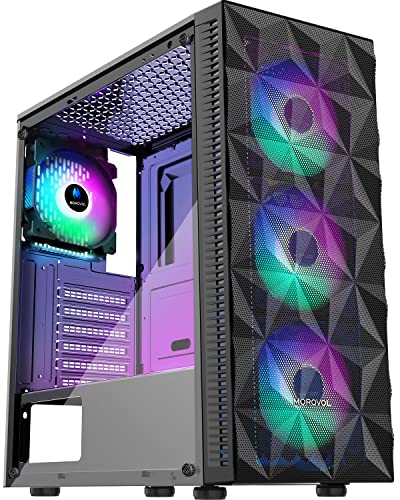
MOROVOL ATX Gaming Case — Diamond mesh, four fans
The MOROVOL mid-tower pre-installs four RGB fans behind a diamond-shaped mesh front, adds a tempered glass side panel and USB 3.0, and presents the result as an airflow gaming case — which is exactly what it is. The diamond mesh is its signature: a front with enough pattern to be recognised across a room, feeding four lit fans whose glow textures the mesh in a way flat fronts cannot.
Position it as the balanced bundle. Four fans cover a mainstream gaming build’s intake and exhaust needs without surplus, the glass shows the result, and the price of entry to a fitted RGB build stays at the friendly end of this guide. Owners planning a flagship GPU or a radiator should verify dimensions against their parts with care, since the listing title is lighter on figures than the GAMDIAS below; owners planning the classic single-GPU build the case was drawn for can proceed with confidence.
The MOROVOL’s four-fan start suits a build that will grow into its lighting. A first-time builder can run the included array, learn what their board’s lighting control actually does, and add fans later with knowledge instead of guesswork. That learning path is a genuine virtue in a category where overbuying fans on day one is the most common waste, and the diamond mesh ensures the case looks complete at every stage of the journey.
Budget one later fan purchase into the plan and the MOROVOL’s value sharpens further — its included four cover a mainstream build, and the fifth is a choice, not a rescue.
The diamond mesh gives the MOROVOL a face that reads as gaming hardware without shouting; in mixed-use rooms that middle register is harder to find than it should be.
The MOROVOL also deserves credit for proportion. Many value RGB cases overspend on the light array and underspend on the structure around it; here the specification reads balanced — mesh where air needs to enter, glass where eyes want to look, four fans where four fans suffice. For the enormous class of builds that will never host a flagship card, balance is not a compromise. It is the correct engineering.
There is a first-apartment logic to the MOROVOL: one purchase that makes a build look finished in a room that serves as office, cinema and games space in rotation. Its diamond mesh and lit fans give the PC a defined presence in all three roles without demanding the budget or the desk footprint of the array-heavy alternatives above and below it.
- Format: ATX mid-tower (model 621)
- Included fans: 4 RGB, pre-installed
- Front: diamond-shaped mesh
- Side panel: tempered glass
- Ports: USB 3.0
Strengths
- Four fitted RGB fans cover a mainstream build without surplus cost
- Diamond mesh front gives the lighting a distinctive texture
- Tempered glass and mesh combine display with real intake area
Trade-offs
- Listing title states fewer figures — GPU and radiator limits need verification before ambitious builds
- Four fans is a starting array for high-heat components
- RGB fan control path depends on the rest of your build, as with most bundles
Best for: a mainstream gaming build that wants fitted RGB and a distinctive mesh face at a friendly tier
Not suited for: a flagship-card or radiator build whose dimensions must be guaranteed by the listing itself
Mainstream builders can check the MOROVOL listing on Amazon for the current configuration and dimensions.

MONTECH X3 Mesh — The fixed-RGB value play
The X3 Mesh is the most honestly labelled case in this guide: six fixed RGB fans, three of them 140mm intakes, a high-airflow mesh design, swivel tempered glass, dust filters, USB 3.0, and published limits of 305mm for graphics cards and 240mm for radiators. MONTECH puts the word fixed in the title, and this guide honours that honesty by making it the headline rather than the footnote.
Fixed, here, is a philosophy with real advantages: the array lights as one, needs no addressing, and the larger 140mm intakes move air at calmer speeds than 120mm units. The published limits define its build class — mainstream cards and a 240mm radiator fit; flagship-length cards do not — and within that class the X3 is a remarkably complete package. Buy it knowing exactly what fixed means and it will never disappoint you; buy it imagining per-fan choreography and no case could save the purchase.
Fixed RGB also has a reliability argument that rarely gets aired: there is no addressing chain to fail, no software dependency for the basic effect, and the fans behave identically on any board with power. In a family room or a first build for a younger gamer, that simplicity is a feature with real value. The X3’s swivel glass and dust filters show the same philosophy applied to the hardware — conveniences you feel monthly, not features you configure once and forget.
Check your graphics card against the 305mm allowance with its power cables fitted; that figure, not the fan array, is the X3’s one hard gate.
There is a gift-build argument here too: fixed RGB cannot be misconfigured by its recipient, so the X3 lights up correctly in someone else’s home without a support call.
Ownership conveniences compound quietly in the X3’s favour: dust filters that actually get cleaned because they are reachable, a swivel panel that opens without tools or a second pair of hands, and intakes sized generously enough that the filters do not strangle them. None of that photographs as well as the RGB array, and all of it will be appreciated more often. MONTECH clearly designed this case with its second year in mind.
Do the arithmetic the X3 invites: six fans, three of them larger 140mm units, filters, swivel glass and published limits, at the value end of this guide. The fixed lighting is the trade that funds the rest, and it is printed on the box. As a piece of consumer honesty in a hype-heavy category, that deserves the recommendation it gets here.
- Format: ATX mid-tower
- Included fans: 6 fixed RGB (3 x 140mm intake)
- GPU support: up to 305mm
- Radiator support: up to 240mm
- Extras: swivel tempered glass, dust filters, USB 3.0
Strengths
- Six fans included with larger 140mm intakes for calmer airflow
- Swivel glass and dust filters are genuine ownership conveniences
- Published GPU and radiator limits make planning unambiguous
Trade-offs
- Fixed RGB cannot be reprogrammed per fan or per diode — ever
- 305mm GPU ceiling excludes the longest flagship cards
- 240mm radiator cap limits liquid-cooling ambitions
Best for: a mainstream build that wants a full lit array with zero lighting configuration, in a case with honest limits
Not suited for: per-fan ARGB choreography, or a graphics card longer than the published allowance
Value-first builders can check the MONTECH X3 Mesh listing on Amazon to confirm the fixed-RGB fan set.

GAMDIAS ATX Mid Tower Case — ARGB with headroom
The GAMDIAS mid-tower builds its case on growth: four built-in 120mm ARGB fans behind a front airflow mesh, mounts for up to six 120mm fans, 340mm of GPU room, 360mm radiator support and a 160mm CPU cooler ceiling, all behind tempered glass. The figures are published in the listing, and they describe a case with no low ceilings — a builder can start sensibly and expand in every direction the hobby usually takes.
That makes it the planner’s pick in this guide. The four ARGB fans light the first build properly; the two spare mounts wait for the radiator or the extra intake the second year brings; the GPU and cooler allowances cover the upgrade classes owners actually buy. Where the MUSETEX sells completeness now, the GAMDIAS sells completeness eventually, at a gentler start. Both are respectable answers; the difference is whether your build is finished or merely begun.
The GAMDIAS case is best understood as a chassis with a lighting starter kit and room to finish the job. Its ceiling of six 120mm fan mounts, 340mm GPU allowance and 360mm radiator support describe a mid-tower with no obvious growth blocker, and the four included ARGB fans mean the expansion, when it comes, extends an existing system rather than starting one. For a builder planning a second phase — a radiator next season, two more fans after that — that continuity is exactly right.
The 160mm CPU cooler ceiling in the listing is the figure air-cooling builders should verify first, since tall tower coolers are the one component class that can outgrow this case.
GAMDIAS bundles four ARGB fans where rivals at similar tiers often fit three or none; that head start is the core of its value case.
Consider the GAMDIAS as insurance against your own future enthusiasm. The builder who starts with a mid-range card and four fans is often the builder shopping for a radiator and a longer card within eighteen months; this chassis absorbs both without a case swap, and its ARGB system simply extends to meet them. Cases are the hardest component to upgrade casually — everything must move — so headroom here is worth more than headroom anywhere else in the parts list.
GAMDIAS also earns a note for publishing its cooler ceiling. Many listings hide the 160mm-class limit that decides whether a tall air cooler fits; this one states it alongside the GPU and radiator figures. A maker that prints its constraints in the title is a maker whose other numbers can be planned around with confidence.
- Format: ATX mid-tower
- Included fans: 4 x 120mm ARGB
- Fan capacity: up to 6 x 120mm
- GPU allowance: 340mm; radiator support: 360mm; CPU cooler: up to 160mm
- Front: airflow mesh; side: tempered glass
Strengths
- Published ceilings — GPU, radiator, cooler — are generous and unambiguous
- Four ARGB fans included with mounts for two more
- Mesh front and full fan capacity suit a build that will grow hotter over time
Trade-offs
- Completing the six-fan array is a later purchase, not included
- Mid-tower scale is ordinary beside the XL and flagship formats
- ARGB control still depends on your board or a controller, as with all bundles here
Best for: a build planned in phases, starting with four ARGB fans and growing toward radiators and a full array
Not suited for: a builder who wants every fan fitted on day one — that is the MUSETEX brief
Planners can check the GAMDIAS listing on Amazon to verify the fan capacity and clearances against their parts list.
How Should You Read an RGB Case Listing Without Being Fooled?
Start with the fan sentence and parse it like a contract. How many fans, what size, fixed or addressable, PWM or not, pre-installed or merely supported — five distinct facts that listings compress into one glowing phrase. The titles in this guide show the whole spectrum: MONTECH states fixed outright, MUSETEX states count, type and PWM, GAMDIAS states count and capacity, and Fractal states almost nothing, which is itself a reading: the numbers live in the documentation, and a buyer who needs them should fetch them from there rather than from a review, including this one.
Next, distrust the photograph’s colour. Every RGB case is photographed at maximum effect in a dark room with the exposure set for drama; the same case at noon in a bright room is a different, quieter object. The listings that serve buyers best are the ones whose text survives the photograph being ignored — published ceilings, named fan systems, stated port counts. Where the text is silent, as in several cells of the comparison table below, treat the silence as a task, not as permission to assume the generous interpretation.
Finally, read for the control path. A listing that names its fans but not their control is telling you the control is yours to provide; a listing that names a hub or a software ecosystem is selling you its own answer. Neither is a trick — but only one of them matches a builder with no spare headers and no desire to buy a controller, and the listing will not make that match for you. Two minutes with your motherboard’s header list is the highest-value research in this entire category.
Where Do the Six RGB Cases Stand Side by Side?
| Case | Lighting system | Fans included | GPU allowance | Character |
|---|---|---|---|---|
| Fractal Pop XL Air RGB | Designed-in RGB | Not stated in the listing title | Not stated in the listing title | XL, furniture-grade |
| Fractal Pop Air RGB | Designed-in RGB | Not stated in the listing title | Not stated in the listing title | Restraint, clear-tint glass |
| MUSETEX NN8 | ARGB, PWM | 6 | Not stated in the listing title | Complete array, mesh |
| MOROVOL | RGB | 4 | Not stated in the listing title | Diamond mesh value |
| MONTECH X3 Mesh | Fixed RGB | 6 (3 x 140mm intake) | 305mm | Honest limits, filters |
| GAMDIAS | ARGB | 4 (mounts for 6) | 340mm | Growth headroom |
Read the lighting column first, the character column second and the numbers last — the reverse of a normal case guide, and deliberately so. In this category the system you live with nightly outranks the specification you use once, and the table is honest about the many figures these listings simply do not publish: where a cell says the title is silent, the manufacturer documentation for that model is the authority, not a neighbouring product.
How Do You Set Up an RGB Case So It Still Looks Good in a Year?
Begin with one colour decision and let everything else obey it. Pick a primary colour the room can live with, set the array to it, and resist the demo-mode rainbow that every system ships with — the builds that still look intentional in year two are almost always running a restrained scheme, often a single colour with a contrasting accent on one component. Then set brightness for the evening, not the showroom: a dim, even glow reads as expensive, while full brightness through clear glass reads as effort.
Second, wire for the light you bought. Route fan cables so the glass shows components rather than looms, keep the array on one control path where the case allows it, and label nothing — instead, photograph the wiring before closing the panel, because the first fan you replace in year two will make you grateful. Finally, schedule the glass: a monthly wipe keeps tinted and clear panels equally honest, and an RGB case with dusty glass advertises neglect in colour. The systems in this guide make all of this easy; none of them make it automatic.
What Do RGB Case Buyers Most Often Get Wrong?
The defining error is the fixed-versus-addressable mix-up: buying fixed RGB while imagining ARGB effects, usually because photography hides the difference. The second error is header blindness — an ARGB array with nowhere to plug its lighting lead, discovered on build night. Third is scale: a six-fan array bought for a small, bright room, overwhelming the desk it was meant to decorate. Fourth is ignoring the published ceilings on the honest cases; the X3’s 305mm GPU limit is printed in its title, and a longer card will not negotiate.
The quieter error is treating the fans as the lighting plan. Keyboard, monitor bias light, GPU and cooler all contribute, and a case array that cannot dim or synchronise with the rest turns a setup into a competition. Decide the control centre of the whole desk first — board software, a hub, or the case’s own simplicity — and buy the case that belongs to that centre.
Should Your Motherboard or a Hub Run the Light Show?
This is the decision underneath every pick in the guide, so it deserves its own answer. Motherboard control costs nothing extra, keeps the case fans in the same software as the board, cooler and memory lighting, and suits owners who enjoy one dashboard for the whole machine. Its limits are headers — count them against the array — and the variability of board software, which ranges from excellent to an evening of frustration. A dedicated hub or controller adds a box and a wiring job, and in return gives capacity, uniformity and independence from any single board; it is the natural choice for arrays of six or more and for builders who change motherboards more often than cases.
The fixed-RGB route, represented here by the MONTECH X3 Mesh, is the honest third answer: neither. No dashboard, no hub, no synchronisation — and for a large class of owners, no regret either. The mistake is not choosing any of the three; it is drifting into one. This guide has named the control path in every pick section precisely so the choice stays deliberate, because the owners who complain about RGB cases in year two are almost never complaining about the light. They are complaining about the control they never chose.
Final Recommendation
For a room-first build, the Fractal Pop Air RGB is the case this guide would put on most desks, with the XL reserved for genuinely large systems. For a lighting-first gaming build finished on day one, the MUSETEX NN8’s six PWM ARGB fans are the complete answer; for the same build planned in phases, the GAMDIAS is the smarter start. The MOROVOL holds the friendly middle, and the MONTECH X3 Mesh is the value pick for anyone who hears ‘fixed RGB’ and thinks — correctly, for them — good.
Light is the one specification you will evaluate every single evening, so choose the system whose behaviour at midnight you like best.
Frequently Asked Questions
Can fixed RGB fans be upgraded to ARGB effects later?
No — fixed and addressable are hardware properties of the fans themselves. A fixed-RGB case like the MONTECH X3 Mesh can gain ARGB only by replacing its fans. If per-diode effects matter to you, choose an ARGB case such as the MUSETEX NN8 or the GAMDIAS from the start.
Do I need a controller for the bundled ARGB cases?
It depends on your motherboard. If the board offers the right addressable headers and software you are comfortable with, bundled ARGB fans can run from it directly. A dedicated controller is the fallback for boards without suitable headers — check your board’s header list against the case’s fan count before ordering.
Why do the Fractal listings publish so few figures?
Their titles are simply terse; the specifications exist in the manufacturer’s documentation for each model. This guide quotes only what the listing titles state, which is why the Fractal spec boxes direct you to that documentation for dimensions and fan details rather than borrowing numbers from other Pop variants.
Is a six-fan array louder than a four-fan array?
Not necessarily. More fans sharing the same airflow work can each run slower, and PWM control — fitted across all six fans in the MUSETEX NN8 — lets the array follow temperature properly. A four-fan array at high speed is usually the louder system under load.
Does tempered glass tint change how RGB looks?
Yes. A clear tint, like the Fractal pair’s panels, shows colours close to their true values and reveals the interior in daylight. Darker tints mute both light and interior detail. Choose the tint for the room: bright rooms forgive clear glass; dim gaming rooms often prefer it.
Which of these cases suits a first build?
The MONTECH X3 Mesh for zero lighting configuration, or the MUSETEX NN8 for a complete fitted array. Both publish or provide what a first builder needs without a second purchase, and both make their one big caveat — fixed RGB on the X3, ecosystem commitment on the NN8 — easy to understand before ordering.
Will these cases work with a motherboard that has no RGB headers?
The fixed-RGB MONTECH X3 Mesh lights without any addressing header, which is one of its quiet virtues. The ARGB cases need a control path — a suitable motherboard header or a separate controller — so a headerless board means budgeting for the controller. Check before ordering; it is the cheapest check in the entire build.
How do I stop an RGB build from looking messy?
One colour scheme, cables routed out of the glass’s sightline, and brightness set for the evening rather than the product photo. The cases here all help — mesh hides front cabling, glass rewards tidiness — but the discipline is the owner’s, and it takes twenty minutes at build time to save years of visual noise.
A last word on taste, since this category provokes stronger opinions than any other in the case market. The argument between the Fractal owner and the MUSETEX owner is not really about fans; it is about whether a computer is furniture that computes or a machine that performs. Both positions are honourable, both are served by name in this guide, and neither is advanced by pretending the other does not exist. Buy for the room and the evenings you actually have, and the light will take care of itself.
And a practical coda: whatever you choose, keep the fan and lighting wiring photograph from build day, and keep the case’s documentation with the motherboard manual rather than in the box in the attic. RGB systems are the part of a build most likely to be revisited — a fan replaced, a scheme changed, a controller added — and the owner who can see how it was wired, two years later, in one photograph, is the owner whose upgrade takes twenty minutes instead of a weekend.
If you take one habit from this guide into the wider market, let it be this: screenshot the fan sentence of any RGB case you consider, and make the seller’s own words answer the five questions — how many, what size, fixed or addressable, speed-controlled or not, fitted or merely supported. Listings that answer all five in their titles, as several here do, have earned a presumption of good faith. Listings that answer none have told you something too, and it is not about the fans.
And when the boxes arrive, build the lighting before the components. Fit the board, run the fan and lighting leads while the case is still empty, and test the array with a first power-on before the graphics card hides half the wiring. Every RGB regret in this category is easier to fix at that moment than at any later one — a swapped header, a reversed lead, a cable rerouted out of the glass’s view. Ten unglamorous minutes, in exchange for a case that looks deliberate from its first evening to its last.
Related Guides
Compare the hub-controlled and glass-first approaches in the neighbouring guides: Best NZXT PC Cases, Best Cooler Master PC Cases, and Best PC Cases with Dual Glass Sides.


