What's inside
- Key Takeaways
- Quick Picks
- How Were These Cubes Chosen?
- Six Cubes, Four Philosophies: The Comparison
- How Do You Keep a Glass Cube Cool?
- Why Did Cubes Become the Showcase Shape?
- Which Mistakes Ruin Cube Builds?
- Final Recommendation
- How Much Desk Does a Cube Really Take?
- ARGB, FRGB and the Lighting Decision You Make Once
- What Order Should a Dual-Chamber Build Go Together In?
- How Do You Live With Glass Long-Term?
- What Should You Verify on the Listing Before Ordering?
- Why Do Streamers and Desk Photographers Keep Choosing Cubes?
- What Happens When the Build Inside the Cube Gets Upgraded?
- How Does a Cube Behave in a Shared Room?
- A Note on Tempered Glass, Handled Properly
- Frequently Asked Questions
- Related Guides
As an Amazon Associate I earn from qualifying purchases. This post may contain affiliate links at no extra cost to you.
widgetverdict.com is reader-supported. When you buy through links on our site, we may earn an affiliate commission.
Where to buy: Amazon carries all six cube cases in this roundup; the product names inside the Quick Picks table link to the matching listing, which is where you should double-check the fan count and glass configuration, because several of these designs are sold in more than one trim.
The best cube style gaming pc cases start from a simple refusal: a gaming PC does not have to be a tall, thin tower that hides its own hardware. A cube trades height for width, and that single exchange buys three things tower builders struggle for — a graphics card that sits in open air rather than against a wall, a power supply and cable mass that can be hidden in a second chamber or a lower deck, and glass on more than one face, so the build becomes something the room looks at. The six picks below range from panoramic dual-chamber showcases with fans already fitted, through a full-ATX steel cube from the category’s earlier wave, to a mesh cube small enough to qualify as a desktop appliance.
One honesty note belongs at the top, because it shapes the shortlist: the first and last picks, the YEAH MAGIC cube in black and in white, are two colour variants of the same case, listed separately. They are reviewed as a pair of listings for one design, not dressed up as two different products, and the comparison table treats them that way. Everything else here is a genuinely distinct answer to the same question — how much glass, how much air, how much desk.
Key Takeaways
- Cube cases spend their volume on width, which buys dual-chamber cable hiding and graphics cards that breathe from an open side.
- The YEAH MAGIC black and white listings are one design in two colours — pick the colour, not a different case.
- The Apevia Prism-WH arrives with five ARGB PWM fans already fitted, the most complete out-of-box lighting package here.
- The AZZA Cube 802 is the only full-ATX design in the six, an older steel cube for builders with big boards and spare drives.
- The JONSBO C6 is the airflow dissenter: all mesh, no glass, and the only pick that takes an ATX power supply up to 185mm.
- Glass showcases need their fans planned; a panoramic case with weak airflow cooks the hardware it displays.
Quick Picks
| Pick | Badge | Why it earns its place |
|---|---|---|
| YEAH MAGIC Cube Gaming PC Case — Black | Panoramic showcase pick | A 270-degree tempered glass wrap, three ARGB fans included and USB-C front I/O make it the display-first cube for micro-ATX and Mini-ITX builds. |
| Apevia Prism-WH | Most fans in the box | Five ARGB PWM fans, dual tempered glass panels and a dual-chamber layout in white, with 340mm of graphics card room and 240mm radiator support. |
| AZZA Cube 802 | The full-ATX cube | A black SPCC steel cube that swallows a full ATX board — the veteran option for builders whose hardware outgrew the micro-ATX brief. |
| Zalman CUBIX-G | Compact glass tower-cube | Three 120mm FRGB fans, panoramic tempered glass and USB Type-C in a micro-ATX mini-tower footprint for desks that cannot host a wide cube. |
| JONSBO C6 Black | Airflow over theatre | A mesh micro-ATX cube with tool-free panels and room for an ATX power supply up to 185mm — the cube for builders who distrust glass thermals. |
| YEAH MAGIC Cube Gaming PC Case — White | The same cube, in white | The identical 270-degree glass design with three ARGB fans, finished in white for light-themed builds; choose it on colour alone. |
How Were These Cubes Chosen?
The first requirement was that the case be a cube in fact, not in marketing: roughly as wide as it is tall in spirit, with the internal layout arranged around that width. That ruled in dual-chamber designs, squat single-chamber designs and the mesh cube, and ruled out ordinary mini towers wearing a geometric name. The second requirement was gaming intent — glass or mesh arranged for a discrete graphics card, fan positions that can feed it, and front I/O a gamer would actually use, which is why USB-C on the front panel appears in the spec boxes wherever the listing states it.
Included fans were weighed as real value, not decoration. A case that arrives with three or five ARGB fans fitted has already spent part of the build budget for you, and it guarantees the fan frames match the glass story the case is telling. Where a listing states radiator support or a graphics card limit, those numbers anchor the review; where a listing is quiet about a figure — the AZZA’s page is a product of a less spec-forward era — the review says what the design implies and flags the gap rather than inventing a number.
Finally, the six were arranged to disagree with each other. A shortlist where every pick is the same dual-chamber glass box in a different logo would waste the reader’s evening. Here, the disagreements are the content: glass against mesh, micro-ATX against full ATX, factory-lit against BYO fans, wide against merely squat. Find the argument your own build is having, and the pick resolves itself.
Availability shaped the list at the margins in one way worth disclosing: cube variants multiply quickly, with the same design appearing in several colours, fan counts and panel trims across separate listings. Where that happened — most visibly with the YEAH MAGIC design — the guide kept the listings that best represent the design’s range and said plainly that they are variants, rather than padding the six with near-duplicates pretending to be distinct engineering. A shortlist’s job is to widen a reader’s real choices, and six genuinely different arguments about glass, air and desk space serve that job better than nine photographs of the same box.

YEAH MAGIC Cube Gaming PC Case — Black — the 270-degree display case
The YEAH MAGIC cube is built around a single visual idea executed thoroughly: tempered glass that wraps 270 degrees around the front and side, so the motherboard, card and lighting are visible from almost any seat in the room. It is a dual-chamber-style showcase for micro-ATX and Mini-ITX boards, with the power supply and cable runs banished behind the motherboard tray, three ARGB fans included to give the glass something to show on day one, and USB-C on the front I/O panel alongside the usual ports. In black, the case reads as a dark aquarium until the lighting comes on, which is precisely the effect most of its buyers are shopping for.
The building experience follows the showcase logic. Because the visible volume is a stage, cable management is not tidiness for its own sake here — every stray lead is on display, and the case’s routing channels and rear chamber exist to keep the stage empty of everything except components. The listing emphasises easy building, and the wide footprint genuinely helps: two hands and a graphics card fit through the opening in a way tower builders will find unfamiliar and pleasant. Thermally, three fans is a starting point rather than a cooling system; a hot card in a glass cube wants the remaining fan positions filled and a curve set with intent, a theme this guide returns to in the mistakes section.
Who is it for, in one breath? A builder whose PC lives on the desk, in frame, as part of the room — streamers, RGB hobbyists, anyone who has ever chosen a component partly for its lighting. The black finish is the safer long-term choice of the two colours this design comes in, hiding dust and cable shadows better than the white reviewed last in this guide.
- Form factor: micro-ATX and Mini-ITX
- Glass: 270-degree tempered glass panoramic wrap
- Fans included: 3 ARGB fans
- Front I/O: USB-C included
- Layout: dual-chamber style with hidden cable volume
- Finish: black (white variant reviewed as pick six)
Strengths
- The wraparound glass shows the build from angles a single side panel cannot reach.
- Three ARGB fans in the box mean the case looks finished the evening it is built.
- The wide chamber makes the actual assembly unusually roomy for a compact case.
Trade-offs
- Glass on three faces shows dust and fingerprints with the same enthusiasm it shows lighting.
- Three fans will not be the final cooling answer for a high-power graphics card.
- The design’s stage must stay empty — sloppy cabling is uniquely visible here.
In black, this is the cube for a build that is meant to be watched; anyone planning to park the machine under a desk is paying for glass that will spend its life facing a wall.

Apevia Prism-WH — dual chamber, five fans, no homework
Apevia’s Prism-WH is the pick for the builder who wants the dual-chamber showcase look without a second shopping trip for fans. Five ARGB PWM fans come fitted, driven through a lighting system with 366 RGB modes, behind dual tempered glass panels that open the build from the front and the side. The white dual-chamber layout keeps the power supply and storage in the rear compartment, and the working clearances are properly grown-up for a micro-ATX case: graphics cards up to 340mm and radiator support up to 240mm, which between them cover the overwhelming majority of real gaming builds rather than just the modest ones.
PWM control on the included fans is a detail worth pausing on, because it separates a lighting toy from a cooling system. Fans that answer to the motherboard’s temperature curves can idle near-silently at the desktop and still move serious air under load, and five of them give the Prism enough positions to run intake and exhaust in balance instead of relying on one heroic fan. The front panel carries one USB 3.0 and two USB 2.0 ports plus HD audio — a slightly dated mix next to the USB-C fronts elsewhere in this guide, and the one place the design’s priorities show. White, as always, is the finish that makes lighting colours read true and dust read obvious; owners should budget a microfibre cloth into the desk drawer.
Set against the YEAH MAGIC black cube, the Prism is the more complete cooling purchase and the less extreme piece of glass. Set against the Zalman below, it is wider, whiter and more generous with fans. It is, in short, the centre of the shortlist — the cube a reader with no strong prior should probably buy.
- Form factor: micro-ATX, dual chamber
- Fans included: 5 ARGB PWM fans, 366 RGB light modes
- Glass: dual tempered glass panels
- Graphics support: cards up to 340mm
- Radiator support: up to 240mm
- Front I/O: 1x USB 3.0, 2x USB 2.0, HD audio
Strengths
- Five PWM fans fitted from the factory is the strongest cooling start in this guide.
- 340mm card room and 240mm radiator support cover flagship-adjacent builds, not just starters.
- The dual-chamber layout keeps the white interior looking as clean as the marketing photos.
Trade-offs
- No USB-C on the front panel, which dates the I/O against newer rivals here.
- A white interior shows every dust speck and every slightly grey cable sleeve.
- Five fans of lighting is a commitment to the aesthetic; it does not do subtle.
The Prism-WH is the recommendation for a white build that must also be a cool one; a buyer who needs front USB-C for a fast external drive habit should look at the YEAH MAGIC or the Zalman instead.

AZZA Cube 802 — the steel veteran for full-ATX hardware
Every young category has an elder that reminds you where it came from, and in this guide that is AZZA’s Cube 802: a black SPCC steel cube for full ATX boards, from the era when a cube case meant a LAN-party hauler rather than a glass showcase. The listing is terse by modern standards — no fanfare of radiator figures or lighting modes — and the review will not invent numbers the maker does not publish. What the design itself tells you is substantial enough: a wide steel chassis with the board lying in a spacious chamber, room around it for the drive cages and long cards of its period, and construction that shrugs off being moved, stacked on and knocked in a car boot.
That durability is the actual product. A modern glass cube is a display object; the 802 is equipment. Builders with a full-ATX board, a stack of spinning drives or a workshop machine that gets reconfigured monthly will find its honest steel more useful than any panoramic panel, and its black anonymity suits rooms where the PC is not decor. The compromises are equally of its era: expect to bring your own fans and your own lighting ideas, expect front I/O from a simpler time, and check the listing’s current specification carefully before ordering, because long-lived listings accumulate small revisions. Judged as a cube-shaped toolbox for big hardware, it remains oddly without rivals in this six — nothing else here takes an ATX board at all.
It is also, quietly, the historian’s pick: the cube category began as a practical shape for carrying powerful machines between desks and venues, and only later became a theatre for lighting. The 802 still serves the original purpose, and for a minority of builders that purpose never went away.
- Form factor: full ATX cube
- Construction: SPCC steel
- Finish: black
- Character: pre-glass-era practical cube, drive and board room prioritised
- Fans and lighting: bring your own — the listing makes no showcase claims
- Best context: workshops, LAN hauling, drive-heavy builds
Strengths
- The only full-ATX board support in this guide, in a genuinely cube-shaped chassis.
- Steel construction tolerates transport and reconfiguration that glass cubes should avoid.
- A blank canvas: no factory lighting scheme to fight when planning your own.
Trade-offs
- The listing publishes few modern specifications, so verify clearances on the page before buying.
- No included showcase fans or lighting — the finished cost is case plus your cooling plan.
- Its looks are industrial; it will not serve as the room’s light show.
Choose the Cube 802 when the hardware list starts with an ATX board or a pile of drives and the word “cube” means shape, not spectacle; showcase builders should stay with the glass picks above and below.
Zalman CUBIX-G — panoramic glass, mini-tower manners
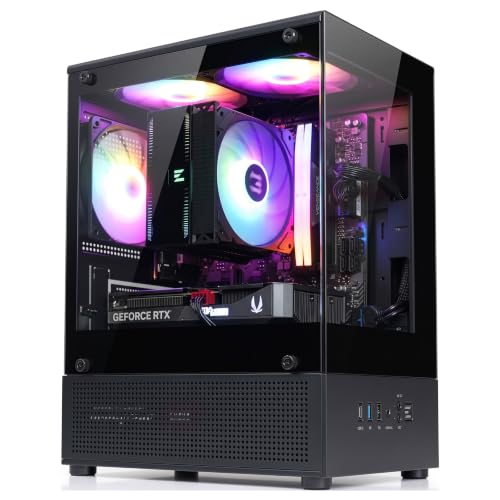
Zalman’s CUBIX-G cheats the cube brief in an interesting direction: it is a compact micro-ATX mini tower wearing the cube family’s panoramic tempered glass, for desks where a true wide cube simply will not fit. Three 120mm FRGB fans are included, the front panel offers USB Type-C, and graphics cards up to 280mm are supported — a figure that covers the mainstream of gaming cards while honestly excluding the longest flagship coolers. The result is a case for the large group of builders who love the fish-tank look, discovered it needs a fish-tank-sized desk, and went looking for the same light in a narrower box.
The FRGB designation deserves a translator’s note: fixed RGB fans light in their colours without the addressable per-fan control the ARGB picks in this guide offer. For many buyers that is a feature — the case glows correctly the moment it is powered, with no software, no headers to argue about and no rainbow configuration session. Builders who choreograph lighting will feel the ceiling quickly. Thermally, the panoramic glass follows the family rule: the three included fans are a foundation, and the intake path should be planned rather than assumed, especially with a card near the 280mm limit filling the chamber.
Against its own guide-mates, the CUBIX-G’s argument is footprint honesty. It concedes the dual-chamber width, concedes the longest cards, and in exchange fits the desks the others cannot. A great many real rooms are exactly that trade.
- Form factor: micro-ATX compact mini tower with panoramic glass
- Fans included: 3x 120mm FRGB fans
- Graphics support: cards up to 280mm
- Front I/O: USB Type-C included
- Glass: panoramic tempered glass panels
- Finish: black
Strengths
- The panoramic look in a footprint narrow desks can actually accommodate.
- USB Type-C on the front panel, which several wider rivals here omit.
- Fixed RGB fans light correctly with zero software or header configuration.
Trade-offs
- The 280mm card limit excludes the longest flagship graphics cards outright.
- Fixed RGB cannot be re-choreographed; the colour show is the colour show.
- Glass thermals still apply — the included fans are a start, not a system.
The CUBIX-G is the cube look for a tower-sized space and a mainstream card; measure a flagship card against that 280mm line before the heart commits, because no amount of glass makes a long card shorter.

JONSBO C6 Black — the mesh cube that trusts air
The JONSBO C6 is this guide’s dissenting opinion, and the guide is better for it. Where the other compact picks wrap the build in glass, the C6 wraps it in mesh: a simple, compact micro-ATX cube whose panels open tool-free, whose processor cooler can stand up to 75mm, whose graphics card window runs from 200 to 255mm depending on configuration, and — the spec that makes parts-bin builders sit up — whose power supply bay accepts an ATX unit up to 185mm long. No lighting is included, no glass is offered, and no apology is made. The case is a bet that airflow and access beat theatre, and for a certain kind of owner it wins that bet every day.
The 75mm cooler ceiling defines the build: low-profile air coolers, efficient processors, a mid-range card in the 200–255mm band, and a machine that runs cool because every panel is a vent rather than because fans force the issue. The tool-free opening matters more in this class than in a tower, because a compact case gets opened for dust duty far more often, and the C6’s panels make that a thirty-second habit instead of a screwdriver errand. It shares a name and a philosophy with the handled C6-ITX in the Mini-ITX guide, but note carefully that this C6 is the micro-ATX model — a different, larger case for a different board size.
As a gaming case it serves the performance-per-decibel crowd: the players who would rather have a quiet, cool, invisible box under the desk than a light show on it. In a guide full of glass, it is the control group that proves the category’s shape works even when nobody is watching.
- Form factor: micro-ATX (Mini-ITX boards also fit the tray class)
- Panels: mesh, tool-free opening upper cover and side panel
- CPU cooler clearance: up to 75mm
- Graphics support: 200–255mm depending on configuration
- Power supply: ATX units up to 185mm long
- Lighting: none included — performance-first design
Strengths
- Full mesh skin gives components direct air without a fan-pressure fight.
- An ATX power supply bay up to 185mm rescues supplies most small cases reject.
- Tool-free panels turn dust cleaning into a habit instead of a project.
Trade-offs
- A 75mm cooler cap and 255mm card ceiling fence it into efficient, mid-range builds.
- No glass and no lighting — the build inside is entirely private.
- Mesh passes sound as freely as air, so fan quality still matters.
Buy the C6 when the machine’s job is to be cool, quiet and occasionally carried to a different room — and when an existing ATX supply is part of the budget; spectacle-seekers have five other names in this guide calling them.

YEAH MAGIC Cube Gaming PC Case — White — the same cube, honestly labelled
This review exists because the listing does, and it will not pretend otherwise: the white YEAH MAGIC cube is the black cube from the top of this guide in a white finish. Same 270-degree tempered glass wrap, same three ARGB fans included, same micro-ATX and Mini-ITX support, same USB-C front I/O and the same easy-building dual-chamber layout. Nothing about the engineering changes, and any guide that wrote six hundred fresh words implying otherwise would be padding. What genuinely changes is the build it belongs in — and that change is bigger than it sounds.
White cases are a lighting decision before they are a colour decision. A white interior reflects and multiplies the fans’ glow, so three ARGB fans in the white cube read brighter than the same three in the black one, and component colours — a white graphics card, pale cable sleeves — compose into the all-white builds that currently dominate desk photography. The costs are the familiar ones, amplified: dust shows sooner, cable shadows print through the glow, and a single black component stands out like a wrong note. Buy the white variant when the whole parts list commits to the theme; buy the black when the build is a mixture, because black forgives a mixture and white prosecutes one.
Treat the two listings as a colour selector on one product, choose with the room and the parts in front of you, and the pair of them together give this design the widest audience of any pick in the guide.
- Form factor: micro-ATX and Mini-ITX
- Glass: 270-degree tempered glass panoramic wrap
- Fans included: 3 ARGB fans
- Front I/O: USB-C included
- Layout: dual-chamber style with hidden cable volume
- Finish: white — colour variant of the black pick above
Strengths
- The white interior amplifies the included ARGB lighting more than any black case can.
- Identical engineering to the black variant means the guide’s top review applies in full.
- It completes all-white builds that the black version would visually interrupt.
Trade-offs
- It is not a different case — buyers wanting variety should look at the Prism or Zalman.
- White shows dust, cable shadows and mismatched components without mercy.
- The same three-fan cooling starting point as the black model; hot cards need more.
Choose white when the build is a committed light theme from motherboard to mouse mat; choose its black twin when even one major component breaks the theme, because the glass will put that component on stage either way.
Six Cubes, Four Philosophies: The Comparison
| Case | Board size | Panels | Fans included | Card limit |
|---|---|---|---|---|
| YEAH MAGIC Cube — Black | mATX / Mini-ITX | 270° tempered glass | 3 ARGB | Compact showcase class |
| Apevia Prism-WH | Micro-ATX | Dual tempered glass | 5 ARGB PWM | 340mm |
| AZZA Cube 802 | Full ATX | Steel | Bring your own | Verify on listing |
| Zalman CUBIX-G | Micro-ATX | Panoramic tempered glass | 3x 120mm FRGB | 280mm |
| JONSBO C6 | Micro-ATX | Mesh, tool-free | Bring your own | 200–255mm |
| YEAH MAGIC Cube — White | mATX / Mini-ITX | 270° tempered glass | 3 ARGB | Compact showcase class |
The table’s most important column is the one with no numbers: panels. Glass picks and the mesh pick are not better and worse versions of one another; they are answers to different questions about what the machine is for. Decide the panel question first, honestly, and the table narrows to two or three names, at which point the card-limit column can finish the job.
How Do You Keep a Glass Cube Cool?
A glass cube’s thermal problem is geometry: the panels that display the build do not breathe, so all the air must enter and leave through the mesh strips, floor and rear that the design leaves open. The working method is to treat fan positions as a budget and spend all of it. Fill the intake positions first, give the graphics card a direct supply of outside air wherever the layout allows, and set exhaust to match rather than exceed intake, so the case runs at a slight positive pressure and dust arrives through filtered intakes instead of every seam. Then tune the curves against a real gaming load, not the desktop: a curve that is silent in a menu and adequate in a firefight is the entire goal.
Radiator placement follows the same logic. In the Prism-WH, the 240mm support lets a liquid-cooled processor dump its heat straight out of the case, leaving the internal air to the card — the single most effective layout available to a glass build. Air-cooled builders should favour cards whose coolers exhaust thoughtfully and keep the chamber’s centre empty; in a showcase case, the cable discipline that looks like vanity is actually airflow engineering, because every bundle parked in the middle of the chamber is a baffle nobody designed.
The mesh C6 plays by simpler rules — air goes everywhere, so direction matters less than fan quality — and the steel AZZA plays by the oldest rules of all: big volume forgives. It is only the glass middle of the category that must be deliberate, and deliberateness, fortunately, is a one-evening investment that pays out for the life of the build.
Why Did Cubes Become the Showcase Shape?
The tower’s glass side panel started the display era, but it shows the build in profile only, like a picture hung on a wall. The cube’s wraparound glass — 270 degrees on the YEAH MAGIC pair, panoramic panels on the Zalman, dual panels on the Prism — turns the PC into an object in the round, visible from the sofa, the doorway and the desk chair alike. That is why the shape took over desk photography: it is the first case format designed for a room with people in it rather than a user sitting in one chair. The dual-chamber layout is the enabling trick, moving the power supply, drives and cable mass behind the tray so the visible volume contains nothing but the photogenic hardware. When you buy a cube, you are really buying that hidden second room and the discipline it imposes — which is why the builders who love cubes describe them as furniture, and the builders who do not describe them as fish tanks, and both are describing the same glass.
Which Mistakes Ruin Cube Builds?
- Counting the included fans as the finished cooling system. Three fans in a glass cube is a starting grant, not a solution. Fill the remaining positions before blaming the case for temperatures.
- Buying the card before checking the limit. The Zalman’s 280mm and the C6’s 255mm ceilings are hard walls. A flagship card and a compact cube are a plan that fails at the fitting stage.
- Treating the two YEAH MAGIC listings as different cases. They are one design in black and white. Compare colours, not specifications — the specifications are identical.
- Parking a mesh cube in a closed stand. The C6 breathes through every panel; a shut cabinet door converts its best feature into a recirculation loop.
- Mixing one black component into an all-white showcase. Wraparound glass is merciless about visual exceptions. Commit to the theme or choose the black case.
- Skipping the rear chamber until the end. In dual-chamber cubes the cable work is the build. Route as you go, or the final hour becomes an excavation.
Final Recommendation
Start with the Apevia Prism-WH if your build has no strong prior: five PWM fans, dual glass, 340mm of card room and a 240mm radiator option make it the most complete cube here out of the box. Take the YEAH MAGIC in whichever colour your parts list wears when the wraparound glass is the point of the whole machine, and the Zalman CUBIX-G when the look is right but the desk is narrow. The AZZA Cube 802 serves the full-ATX and drive-heavy builds nobody else in this guide can house, and the JONSBO C6 remains the thinking builder’s rebuke to all of it — proof that the cube shape was always about air and access before it was about theatre. A cube puts your build on stage, so choose the stage that fits the play: glass for the performance, mesh for the long quiet tour.
How Much Desk Does a Cube Really Take?
Cube dimensions deceive in a specific way: the footprint is wider than a tower’s but the machine is shorter, so the honest comparison is not floor area but the rectangle of desk the case commands and the vertical space it returns. A dual-chamber cube like the Prism-WH or the YEAH MAGIC pair will occupy a patch of desk roughly square — plan for the full width including the glass’s breathing clearance on the vented faces, and remember that a case exhausting sideways wants a hand’s width before a wall or a monitor arm. What the cube gives back is the airspace above it: no tower looming at monitor height, sight lines across the desk stay open, and the top panel becomes usable territory for a headset stand or a controller dock in a way a sloped tower top never is.
The Zalman CUBIX-G exists for the desks where that square patch is unavailable — a shelf unit, a student desk with a hutch, a corner where width is rationed. Its mini-tower stance asks for the traditional rectangle instead. And the AZZA, being a full-ATX cube, should be measured like furniture: it will fit wherever a small side table fits, and pretending otherwise is how cubes end up on the floor they were bought to escape. Measure the desk with the monitor, keyboard and speakers already placed, because the cube competes for the leavings, and the leavings decide which of these six is even eligible before a single specification is compared.
ARGB, FRGB and the Lighting Decision You Make Once
Three of the six picks make their lighting choices in different dialects, and the dialect matters more than the brightness. The YEAH MAGIC pair and the Apevia Prism speak ARGB — addressable lighting, where each fan’s glow can be driven by the motherboard’s software, synchronised with the card and memory, and re-themed whenever the room changes. That flexibility is the current standard for showcase builds, and it is why those cases dominate the photographs. The Zalman’s FRGB fans speak the older dialect: fixed colours, lit correctly at power-on, immune to software updates, header shortages and sync arguments. There is a real audience for that simplicity — a machine built for a child, a lounge, or an owner who has configured lighting software once in their life and filed the experience under “never again”.
The two silent picks, the AZZA and the JONSBO C6, leave the dialect to you entirely, which suits builders who already own fans they trust. Whichever dialect the case speaks, the practical advice is the same: decide the lighting ecosystem before the parts list, because mixing addressable and fixed fans in one glass cube produces a build that looks undecided from across the room. The glass, as established, prosecutes indecision. A single coherent glow — even a single static colour — reads as design; three competing rainbows read as inventory.
What Order Should a Dual-Chamber Build Go Together In?
Dual-chamber cubes reward a specific assembly sequence, and learning it from this paragraph is cheaper than learning it from a half-built machine. Begin with the power supply in its rear chamber and route its cables through the grommets before the motherboard arrives, because the supply’s leads are the bulkiest traffic the hidden room will ever carry. Fit the motherboard next with its front-panel and fan leads connected while the chamber is still empty enough to see your own fingers. Storage goes into the rear after that, cabled back to the board in runs that stay behind the tray line.
The graphics card is fitted last among the components, and deliberately so: it is the largest object in the display chamber, and every cable routed before it stays routed, while every cable routed after it must negotiate around it. Fans and any radiator follow the plan you made from the cooling section — intake positions populated first, exhaust to balance — and the lighting leads are connected as each fan is mounted rather than in a final bundle, because ARGB daisy chains are far easier to verify one link at a time. Close the case only after a first power-on with the glass off: a showcase build that fails to post is annoying, but a showcase build that fails to post behind four glass panels and a finished cable job is a parable.
How Do You Live With Glass Long-Term?
Ownership of a glass cube settles into two habits. The first is dust discipline: the same panels that display the build display its dust, and a monthly pass with a microfibre cloth on the outside plus a quarterly blow-out inside keeps the machine looking like its first week. The Prism’s white interior shortens that interval whether its owner plans it or not. The second habit is thermal honesty — checking temperatures after any hardware change, because a new card in a glass case is a new thermal system, not an upgraded old one. Builders who keep both habits report the peculiar satisfaction of a machine that still turns heads in year three; builders who keep neither end up, quietly, shopping for a mesh case, which is why the C6 sits in this guide as the standing alternative rather than a footnote.
What Should You Verify on the Listing Before Ordering?
Cube cases are sold in more trims than their names suggest, and the listing page — not the review, including this one — is the final authority on the box that will arrive. Check the fan count first: several showcase designs are photographed fully populated and sold partially populated, and the difference between three fans and five is the difference between the Prism’s position and the YEAH MAGIC’s. Check which panels are glass and which are acrylic on the exact variant, check whether the front I/O on the shipped trim includes the USB-C the photographs show, and check the stated graphics card limit against your card’s full length including its connector shroud. On the AZZA, whose listing belongs to an older and terser school, treat every figure as needing that verification, and use the seller’s current specification table rather than any secondary source.
One more verification belongs uniquely to this category: measure the desk, then read the case’s width, then measure the desk again. Cube buyers are surprised by width more than by any specification inside the case, because product photography shoots cubes alone against white and the eye files them as “compact”. The machine’s width is printed plainly on every listing here; the only way it surprises anyone is by being read after the purchase instead of before it.
Why Do Streamers and Desk Photographers Keep Choosing Cubes?
The cube’s second career is as a backdrop. On camera, a tower reads as a dark slab at the edge of frame; a lit cube reads as a deliberate set piece, its wraparound glass visible to a lens that is rarely square-on to the desk. The YEAH MAGIC pair and the Prism-WH are bought for exactly this duty as often as for private enjoyment, and their ARGB ecosystems matter in that context because the case’s colours can be matched to the room’s lighting scheme per session. Even the Zalman’s fixed glow has a role here — a predictable light that never needs reconfiguring between streams. None of this is frivolous: for a creator, the PC is on-screen furniture for thousands of hours, and a case that earns its place in frame is equipment, not decoration. The honest corollary is that if the machine will never be photographed, streamed or even looked at from the side, the cube premium buys nothing a mesh tower does not — which is, for the last time in this guide, the C6’s entire argument.
What Happens When the Build Inside the Cube Gets Upgraded?
A cube’s second build is where its layout either proves itself or gets found out. Graphics card swaps are the commonest upgrade, and the dual-chamber picks handle them gracefully: the card is the most accessible component in the display chamber, the rear chamber’s cables never need to move, and the only figure to re-check is the new card’s length against the case’s limit — 340mm in the Prism, 280mm in the Zalman, the configuration-dependent band in the C6. Processor platform swaps are the deep intervention, since the board anchors everything; here the wide cube footprint pays an unexpected dividend, because there is room to work around the tray without removing the supply from its chamber, a mercy no slim tower offers.
The AZZA plays the long game differently: a full-ATX cube accepts board generations as they come, and its steel shell will outlast several platforms without a scratch that matters. The YEAH MAGIC pair sit between the two philosophies — board swaps are easy enough, but the glass means every upgrade is also a visual decision, since a new card’s lighting either joins the existing scheme or restarts it. Owners who plan the lighting ecosystem as a long-term standard, rather than a per-build improvisation, find cube upgrades noticeably cheaper in fans alone. That is the unglamorous truth under the theatre: a showcase case is a commitment to a look across years, and the builders who treat it that way are the ones still pleased with the purchase at the third graphics card.
How Does a Cube Behave in a Shared Room?
A gaming PC in a family room is a negotiation, and cubes negotiate from an unusual position: they are too visible to hide and too attractive to resent. The lighting that delights a bedroom can glare in a lounge at film time, so the showcase picks earn their place in shared space only when their glow can be dimmed or switched from the software the ARGB ecosystems provide — one more reason the addressable picks outrank the fixed-glow Zalman for lounge duty, since a light that cannot be turned down will eventually be turned against. Fan noise carries the same logic: a cube on a media shelf sits at ear height for the whole room, and the PWM discipline praised in the Prism review is what separates a machine the household forgets from one it comments on. Chosen and tuned with the room in mind, a cube becomes the rare gaming PC that other people in the house describe as “the nice-looking one”, which is a diplomatic achievement no tower has ever managed.
A Note on Tempered Glass, Handled Properly
Tempered glass is strong in the face and fragile at the edges, and cube cases carry more of it than any other format, so the handling rules are worth printing once. Remove panels over a bed, carpet or sofa rather than a hard floor; lay them flat on something soft, never leaned against a wall where a sliding edge meets tile; and never tighten a panel screw against a corner that is already carrying the panel’s weight. A panel being carried should be held by its faces with both hands, the way you would carry a picture frame you liked. None of the six picks here is unusually fragile — the steel AZZA and mesh C6 opt out of the question entirely — but the wraparound designs ask their owners to treat three panels with the respect ordinarily reserved for one, and the builders who learn that in print rather than in person keep their glass, and their temper, intact.
Cleaning follows the same gentleness: a dry microfibre for routine dust, a barely damp one for fingerprints, and no solvent sprays anywhere near the panel edges, where liquid can creep between glass and frame. The white Prism rewards this routine most visibly, since its interior shows the difference between a wiped case and a neglected one at a glance — owners describe it less as maintenance than as keeping a promise the build made on its first evening.
Frequently Asked Questions
Are cube cases better for cooling than towers?
They are different rather than better. A cube’s width gives the graphics card open air and lets dual-chamber designs hide the hot power supply behind the tray, which helps card temperatures. But glass cubes breathe through fewer faces than a mesh tower, so their fans must be planned. The mesh JONSBO C6 cools effortlessly; a glass cube cools well only when its fan positions are filled with intent.
Is the white YEAH MAGIC cube a different case from the black one?
No. They are two colour variants of a single design — same 270-degree glass, same three ARGB fans, same board support and front I/O — sold as separate listings. This guide reviews them as a pair and flags the relationship in both reviews and the comparison table. Choose between them purely on the colour theme of your build and room.
Can a cube case fit a full ATX motherboard?
Only one pick here can: the AZZA Cube 802, a steel cube from the category’s earlier, more practical era. The glass showcases and the mesh C6 are micro-ATX and Mini-ITX designs. If your board is full ATX and your heart is set on a cube, the AZZA is the shortlist of one — verify its current listing details before ordering, as its page publishes fewer specifications than modern rivals.
How many fans does a glass gaming cube actually need?
Enough to fill the case’s designed intake and exhaust positions in balance — for the showcases here, that means treating the three included fans as a foundation and adding until intake slightly exceeds exhaust. The Prism-WH’s five factory PWM fans are the closest any pick comes to a finished answer. Judge by temperatures under a real game load after curves are set, not by fan count alone.
Is a cube case a sensible choice for a first-ever build?
Surprisingly, yes — arguably more sensible than a slim tower. The wide chamber gives a beginner’s hands room, the dual-chamber layout files the confusing cables out of sight, and the build order is forgiving. The cautions are the glass panels, which want careful handling, and the temptation to buy fans for looks before temperatures. A first builder who reads the cooling section of this guide before ordering will end up with a machine that looks expert and behaves like it too.
Can I put a cube case on the floor instead of the desk?
You can, and the steel AZZA and mesh C6 will not mind, but a glass showcase on the floor is a stage at ankle height: it collects kicks, vacuum strikes and the worst of the room’s dust while showing its lighting to the skirting board. If floor placement is the plan, the honest picks are the practical two. Glass cubes earn their price only where eyes actually are.
Do dual-chamber cases make cable management genuinely easier?
Yes, in the specific sense that the mess has somewhere legal to live. The rear chamber swallows the power supply, its cable bundle and the storage, leaving the display volume empty. It does not shorten the work — the cables still must be routed — but it changes the standard from “invisible” to “filed”, which most builders find the difference between an evening of frustration and an evening of satisfaction.
Related Guides
Cube decided, the neighbouring shapes deserve a hearing before the order goes in. Builders whose room suits a machine that lies down rather than stands should browse the best horizontal pc cases selection, where HTPC designs trade the stage for the shelf. Anyone whose “cube” is really a storage server in disguise will find the honest version of that idea in the best nas pc cases roundup, built around drive bays instead of glass. And for the builder who wants the components entirely out in the open, the best open frame pc cases guide covers test benches and open-air frames where there is no panel left to hide behind at all.
Related guide: Best Retro Style Pc Cases
Related guide: Best Boutique-Style PC Cases


