What's inside
- Key Takeaways
- Quick Picks
- How Did These Flat Cases Make the Cut?
- How the Six Flat Cases Stack Up
- How Do You Plan a Build That Lies Flat?
- Why Does the Living Room Keep Winning Computers Back?
- Which Mistakes Do Horizontal Builds Punish?
- Final Recommendation
- How Does a Flat PC Join an AV Stack Without Causing Trouble?
- How Does Air Move Through a Case With No Chimney?
- What Is It Like to Work at a Desk With a Horizontal PC?
- How Do Flat Cases Age, and What Breaks First?
- Slim or Full-Size: Which Horizontal Family Fits Your Parts?
- How Quiet Is Quiet Enough for a Room You Sit In?
- Three Rooms, Three Answers: Worked Examples
- The Small Print: Front Panels, Feet and Other Daily Touches
- What Should You Do in the First Week With a Flat PC?
- Frequently Asked Questions
- Related Guides
As an Amazon Associate I earn from qualifying purchases. This post may contain affiliate links at no extra cost to you.
widgetverdict.com is reader-supported. When you buy through links on our site, we may earn an affiliate commission.
Where to buy: Amazon lists every horizontal case in this guide; the names in the Quick Picks table link to the individual listings, where you should confirm what is in the box — one pick here arrives with a power supply already fitted, and that changes its value completely.
The best horizontal pc cases solve a problem towers created: most rooms are organised around low, wide furniture, and a computer that lies flat belongs in those rooms in a way a standing box never will. A horizontal case slides onto a TV stand shelf, stacks under a monitor, or sits on a desk like a hi-fi separate, and the six picks below cover the shape’s whole modern range — a full-size ATX home theatre case with a faux-aluminium face, two slim SilverStone designs for quiet shelves, an 11.5-litre InWin with its power supply included, a retro-styled ATX desktop that wears its 1980s ancestry proudly, and a compact Antec that treats horizontal as a space-saving decision rather than a style.
There is also a social consequence worth naming: a flat PC is a PC the whole household can see, reach and use, and that changes what it gets used for. Towers under desks belong to one person; a machine on the media shelf becomes the family’s photo viewer, music player and film library by default. Several picks below were chosen with that shared life in mind, because a case bought for one user and adopted by five needs manners as much as it needs vents.
Horizontal is a layout with real engineering consequences, and this guide treats them honestly. A graphics card in a flat case hangs or stands in orientations tower designers never planned for, drive bays share air with the processor in a shallow deck, and the whole machine lives at ear height in the room it serves. The picks were chosen for how gracefully they handle those consequences, not merely for lying down.
Key Takeaways
- Horizontal cases fit the furniture people actually own: TV stands, monitor stacks, shallow desks and hi-fi shelves.
- The SilverStone GD09 is the full-size option, taking ATX and micro-ATX boards behind a home-theatre face.
- The InWin BL040 is the only pick with a power supply included — a 450W TFX unit pre-installed in an 11.5-litre case.
- Slim cases like the Milo ML05B trade expansion for silence and shelf manners; plan the build around low-profile parts.
- The SilverStone FLP01 is the retro statement: an ATX desktop case styled after the home computers of a previous era, with modern USB Type-C.
- Measure the shelf before the case — height including feet, and depth for cables behind, are the two dimensions that bite.
Quick Picks
| Pick | Badge | Why it earns its place |
|---|---|---|
| SilverStone GD09 | Best full-size HTPC case | A home theatre case for ATX and micro-ATX boards with a faux-aluminium front that belongs beside an AV receiver, and room inside for a serious living-room build. |
| SilverStone Milo ML05B | Quietest shelf citizen | A slim Mini-ITX HTPC case designed around silence, for a media PC that must be heard only through the speakers it feeds. |
| InWin BL040 | Power supply included | An 11.5-litre slim desktop for micro-ATX and Mini-ITX boards with a 450W TFX supply pre-installed and four low-profile expansion slots. |
| SilverStone ML08B-H | Slim case with a handle | A slim Mini-ITX case with a carry handle in the listing, built for a small machine that moves between rooms, desks or venues. |
| SilverStone FLP01W | The retro desktop | An ATX horizontal case in a deliberate retro style with USB Type-C — the beige-era silhouette rebuilt for current hardware. |
| Antec VSK2000-U3 | Compact office horizontal | A mini-tower-shaped micro-ATX case that works flat or upright, with a 92mm temperature-controlled fan and USB 3.0 for space-saving desks. |
How Did These Flat Cases Make the Cut?
The first test was orientation honesty: each pick had to be designed to run horizontally, with feet, vents and internal layout arranged for flat operation, rather than being a tower photographed on its side. That sounds obvious, yet the market is full of towers whose side panels happen to be flat. A designed-horizontal case puts its intake where a shelf allows air, keeps its drive mounts from hanging drives by their connectors, and presents a front panel composed for viewing from a sofa rather than from a desk chair.
The second test was role clarity across the home-theatre spectrum. The living room asks for three different machines — a silent media player, a full gaming-capable HTPC, and a general family PC that happens to live by the television — and a shortlist that served only one of them would be a buying guide for a third of its readers. The six split across those roles deliberately, and each review states its role in the first paragraph so a reader can self-eliminate quickly.
The third test was parts realism. Slim horizontal cases live and die by low-profile expansion cards, SFX or TFX power supplies and short coolers, so each review names the constraint that governs its pick rather than leaving it to the fitting stage. Where a listing includes something unusual — a pre-installed supply, a carry handle — the review weighs it as the headline it is.
A fourth, quieter test ran underneath the others: could this case still be bought, built and lived with by someone who does not enjoy homework? Horizontal PCs skew toward shared rooms and shared households, where the machine’s owner is often also its only technician and its audience includes people who never asked for a computer in the lounge at all. Cases that demanded exotic parts, fragile handling or constant tuning were marked down for it, however elegant their engineering. The six that remain each ask for exactly one kind of homework — furniture measuring, parts discipline, or theme commitment — and a reader who knows which homework they tolerate has effectively already chosen.

SilverStone GD09 — the HTPC case that matches the receiver
The GD09 is the case that understands its room. Its front is a faux-aluminium home-theatre face, wide and low, designed to sit in a stack of AV equipment without announcing that a Windows machine has joined the hi-fi. Behind that face is the most accommodating interior in this guide: support for ATX and micro-ATX motherboards, which means a horizontal build does not have to begin with a Mini-ITX compromise, and the internal volume that a full-width HTPC deck provides for drives, a proper graphics card and cooling that does not have to whisper because it is starved.
That combination — receiver manners, tower-class board support — is why the GD09 anchors the category. A living-room gaming PC built in one can run a real card and a real processor, serve as the household’s media hub, and still pass the only test that matters in a shared room: nobody asks what it is. Building in a wide flat deck is its own pleasure, with the board laid out like a workbench and cables routed along the floor of the case rather than folded into a tower’s chimney. The cautions are the shape’s own: it is wide, it is deep, and the shelf or stand must be measured for both, including the cable bend room behind. It is also unapologetically a home-theatre object; on a desk it looks like equipment that wandered in from the lounge, which for some desks is exactly the charm.
- Form factor: ATX and micro-ATX HTPC desktop
- Front: faux-aluminium home-theatre design
- Role: full-capability living-room PC, gaming included
- Layout: wide flat deck, workbench-style build access
- Model: SST-GD09B
- Placement: TV stand or AV stack, measured for depth
Strengths
- Full ATX board support removes the Mini-ITX tax from a living-room build entirely.
- The AV-style front lets it live in a hi-fi stack without visual argument.
- A wide deck is genuinely easier to build and service than a slim case’s layers.
Trade-offs
- Its width and depth demand a stand shelf measured honestly, cables included.
- It is a large object for a desk; its natural home is the lounge.
- Buyers wanting a near-silent slimline will find it more case than their build needs.
The GD09 is the pick when the horizontal PC is a main machine — games, media, everything — and the room is a lounge; slimline buyers should keep reading, because their cases are smaller in every sense.

SilverStone Milo ML05B — slim, black and deliberately quiet
The Milo ML05B comes from SilverStone’s long-running Milo line of slim HTPC cases, and its listing makes its promise in its name: a slim, silent Mini-ITX computer case in black. Everything about the design serves a media PC that lives within earshot of its audience. The shallow deck forces a build of low-profile parts — a Mini-ITX board, a short cooler, low-profile expansion where fitted — and in exchange the finished machine occupies about the shelf presence of a Blu-ray player and makes about as much noise as one, which is to say the room hears the film, not the fan.
That discipline is the review’s main point: the ML05B is not a small gaming case and should not be bought as one. Its expansion is modest, its cooling is designed around efficient components, and its power supply expectations are slim-format. Within those fences, it is superb — a case for the household media library, the streaming box, the quiet download-and-playback machine that runs for years under the television. Builders should plan the whole parts list around the case’s slimness rather than discovering it component by component: low-profile card if any card at all, a cooler chosen by height first, and storage on the board. Do that planning and the ML05B disappears into its job, which is the highest compliment a media case can be paid.
- Form factor: Mini-ITX slim HTPC
- Design intent: silent operation for media duty
- Profile: slim deck, low-profile parts required
- Finish: black
- Model: SST-ML05B
- Role: quiet media player and library machine
Strengths
- Slim proportions give it the shelf presence of a disc player rather than a computer.
- The silent design brief suits rooms where the PC is heard at arm’s length.
- A mature, long-running design with a build process the community knows well.
Trade-offs
- Low-profile everything: standard-height cards and tall coolers are simply excluded.
- Gaming ambitions beyond modest parts will outgrow it quickly.
- The shallow deck makes cable tidiness a requirement, not a preference.
Buy the ML05B for a media machine whose success is measured in silence; a builder who wants the lounge PC to also be the gaming PC should step up to the GD09 and accept its larger footprint as the price of power.
InWin BL040 — the slim desktop with the supply already inside
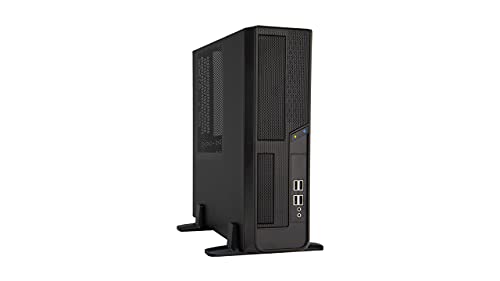
The BL040’s headline is the one in its listing title: a 450W TFX power supply, pre-installed. In the slim-case world that is a genuinely simplifying act, because the TFX format is the part first-time slim builders most often get wrong — buying an ATX supply for a case that cannot hold it, or a bargain unit of mysterious provenance. InWin removes the question. Around that supply sits an 11.5-litre slim desktop case for micro-ATX and Mini-ITX boards, with USB 3.0 front ports and four low-profile expansion slots, aimed squarely at the office, the study and the family PC that lives flat under a monitor or on a shelf.
Four low-profile slots is a quietly generous figure for the class — slim cases often offer two — and it keeps options like a low-profile graphics card, extra networking or capture hardware open across the machine’s life. The build it suits is the sensible mainstream: an efficient processor with integrated or low-profile graphics, storage on the board or in the case’s modest bays, and years of undemanding service. The included supply’s 450W rating fences the build in the same direction; this is not the chassis for a flagship card, and the review will not pretend a pre-installed TFX unit is a gaming supply. Judged as a complete, honest package for a flat desktop PC, though, the BL040 is the easiest purchase in this guide: case and correct power supply, one box, no compatibility homework.
- Form factor: micro-ATX and Mini-ITX slim desktop
- Volume: 11.5 litres
- Power supply: 450W TFX, pre-installed
- Expansion: 4 low-profile slots
- Front I/O: USB 3.0 ports
- Role: office, study and family flat PCs
Strengths
- The pre-installed TFX supply removes the slim format’s commonest buying mistake.
- Four low-profile slots give it expansion headroom rare in an 11.5-litre case.
- Micro-ATX board support keeps the motherboard budget mainstream.
Trade-offs
- The 450W supply defines the ceiling: efficient parts only, no flagship graphics.
- Low-profile slots still exclude standard-height expansion cards.
- Replacing the supply later means shopping the TFX format specifically.
The BL040 is the flat PC for a household that wants it bought, built and forgotten; enthusiasts who enjoy speccing their own supply should take the same money to the GD09 or the FLP01 and do the homework gladly.
SilverStone ML08B-H — the slim case that travels
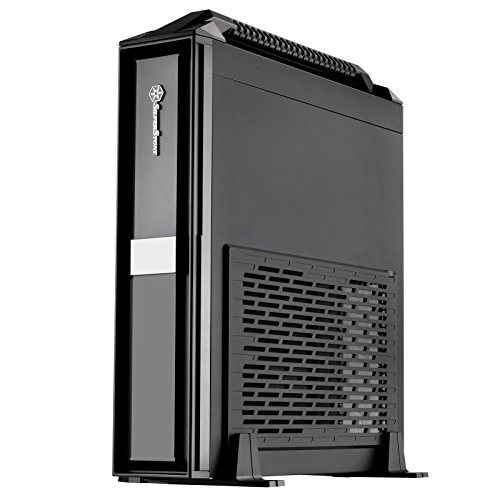
The ML08B-H takes the slim Mini-ITX formula and adds the detail its listing calls out: a handle. That one feature rearranges the case’s whole life. A slim horizontal machine with a carry handle is a PC that can work the lounge during the week and a bedroom, a friend’s house or a small venue at the weekend, sliding into the spaces a tower cannot — a shelf, a TV bench, the footwell of a car — and arriving with its dignity intact. The ML08 line was designed around that portable-console idea, a flat box with a real graphics card inside, and the handled variant is the honest expression of it.
The build discipline is the slim family’s usual one: Mini-ITX board, low-profile thinking, a graphics card chosen against the case’s stated limits rather than by ambition. In return the finished machine does something no other pick in this guide does — it treats the PC as a movable feast. Media library at home, game library away, one machine, no cloud required. The handle also changes ownership psychology in a smaller way: a case that gets carried gets opened, cleaned and upgraded more willingly, because it never becomes furniture. Buyers should still respect the slim rules — this is a case for efficient parts, planned cables and a cooler picked by the numbers — but within them, the ML08B-H is the horizontal case for people whose rooms, plural, all want a turn.
- Form factor: Mini-ITX slim small form factor
- Carry: handle fitted (ML08B-H variant)
- Profile: slim flat deck for shelves and TV benches
- Role: portable media and gaming machine
- Layout: console-style horizontal
- Build style: efficient parts, planned low-profile cooling
Strengths
- The handle makes it the only pick here designed to change rooms routinely.
- Slim horizontal proportions fit shelves and benches wherever it lands.
- A real graphics card in a console-shaped box remains a rare and useful trick.
Trade-offs
- Slim-case parts discipline applies in full — low-profile, efficient, planned.
- Carried machines meet dust and knocks; it needs an owner’s care, not a cupboard’s.
- Expansion is the slim class’s usual modest allowance, not a tower’s open field.
Choose the ML08B-H when the PC has more than one room in its life; a machine that will be installed once and never moved is paying for a handle it will hold exactly twice.

SilverStone FLP01W — the retro desktop, rebuilt honestly
The FLP01W is a love letter with a parts list. SilverStone styled this ATX horizontal case after the desktop machines of the home-computer era — the wide, low silhouette that once held a family’s first PC — and then fitted it with current expectations, USB Type-C on the front among them. In white, lying flat, it reads instantly as retro to anyone who grew up with the originals, and as a calm, unusual piece of equipment to anyone who did not. Crucially, the nostalgia is only skin deep: the board support is full ATX desktop, so the machine inside can be entirely modern.
This is also the case that anchors this guide’s sleeper-PC conversation from the horizontal side — the same FLP01 appears in the sleeper guide, where the angle is the retro front panel as a disguise for modern power. Here the angle is placement: it is the horizontal case for a desk or a media unit where the owner wants the machine seen and wants it saying something specific. The practical notes are the wide-case ones: measure the surface, plan for a full-size build’s cooling, and expect the retro face to be a conversation with every visitor. Performance-wise it asks nothing exotic of its builder beyond the usual desktop discipline, which is precisely its charm — the past, with none of the past’s limitations fitted as standard.
- Form factor: ATX horizontal desktop
- Style: retro home-computer silhouette
- Front I/O: USB Type-C included
- Finish: white on this listing (FLP01W)
- Role: desk or media-unit centrepiece with full-size internals
- Also appears in: the sleeper-PC guide, for its retro front panel
Strengths
- A faithful retro silhouette that no other current ATX desktop case attempts.
- Full ATX internals mean the nostalgia costs nothing in capability.
- USB Type-C on the front keeps the period costume honest about the present.
Trade-offs
- The retro look is a strong flavour; it will dominate any room it sits in.
- Wide and flat means a full desktop’s worth of surface must be surrendered.
- Its charm is wasted inside a closed cabinet — this case is bought to be seen.
The FLP01W is for the builder who wants the machine to tell a story on sight; in a household that prefers its technology invisible, the Milo or the GD09 will make the same room happier.
Antec VSK2000-U3 — the pragmatic flat-or-upright compact
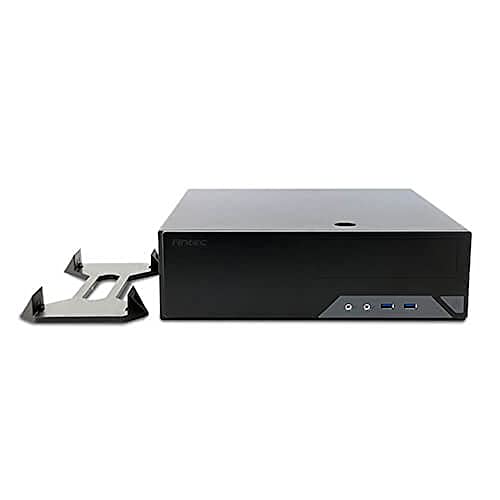
Antec’s VSK2000-U3 is the pragmatist of the six: a compact micro-ATX mini tower case that works in a space-saving footprint, with USB 3.0 connectivity and a 92mm temperature-controlled fan included. It earns its place in a horizontal guide because its compact, boxy proportions and flat panels let it serve desks where the machine must fit a tight slot — under a monitor riser, in a cubby, flat in a shallow unit — while remaining, at heart, a straightforward small tower that any builder already knows how to work in. No retro costume, no theatre face, no slim-case parts diet beyond the micro-ATX board itself.
The temperature-controlled fan is a small detail with a long shadow: it ties the case’s one included fan to the machine’s actual heat, so an office or family PC idles near silence and only speaks up under load. For the VSK2000’s natural habitats — studies, reception desks, small offices, student rooms — that behaviour is worth more than a spec-sheet of lighting. The honest limits are its compactness: this is a case for mainstream parts, sensible cards and storage that lives on the board or in modest bays, and its mini-tower soul means it lacks the designed-for-flat refinements of the SilverStone decks. What it offers instead is the easiest ownership in the guide: a known quantity from a veteran case maker, in a shape that fits where towers cannot.
- Form factor: micro-ATX mini tower, compact footprint
- Fan included: 92mm temperature-controlled fan
- Front I/O: USB 3.0 connectivity
- Role: space-saving office and family PCs
- Orientation: compact box suited to tight flat placements
- Character: conventional build process, no exotic parts rules
Strengths
- The most conventional build experience here — no slim-case homework at all.
- A temperature-controlled fan keeps office duty quiet by default.
- Its compact box fits slots and cubbies that reject both towers and wide decks.
Trade-offs
- It is a compact tower by design, so flat use lacks the HTPC decks’ polish.
- Mainstream parts only; the compact interior is not a gaming flagship’s home.
- No included power supply and no retro or theatre styling to sell the room.
Take the VSK2000-U3 when the requirement is a competent PC in a small flat space and nothing more theatrical is wanted; it is the guide’s reminder that sometimes horizontal is not a lifestyle, just a measurement.
How the Six Flat Cases Stack Up
| Case | Board support | Defining feature | Power supply note | Natural room |
|---|---|---|---|---|
| SilverStone GD09 | ATX / micro-ATX | AV-style front, full-size deck | Standard desktop formats | Living room |
| SilverStone Milo ML05B | Mini-ITX | Slim and silent by design | Slim-format supply | Media shelf |
| InWin BL040 | Micro-ATX / Mini-ITX | Supply included, 4 low-profile slots | 450W TFX pre-installed | Study or office |
| SilverStone ML08B-H | Mini-ITX | Carry handle, slim console shape | Slim-format supply | Several rooms |
| SilverStone FLP01W | ATX | Retro desktop styling, USB-C | Standard desktop formats | Desk or media unit |
| Antec VSK2000-U3 | Micro-ATX | Compact box, temperature-controlled fan | Standard compact formats | Tight desks |
The honest way to read this table is by the room column. Horizontal cases are bought for a specific surface in a specific room, and a case that is perfect for the media shelf is usually wrong for the study desk. Fix the room first, then let the board-size column confirm that your existing parts — or your planned ones — can come along.
Note also what the table does not contain: a single ranking. The GD09 is not “better” than the ML05B in any sense its buyer would recognise, because they are answers to different rooms. Comparison tables in this category are maps, not league standings, and the reader who uses this one to find their room’s row will choose better than the reader who simply buys the top line.
How Do You Plan a Build That Lies Flat?
Start with the surface, because in this category the furniture is a specification. Measure the shelf or desk area three ways: width for the case, height for the case plus the air gap its top vents want, and depth for the case plus the cable bends behind it — power, HDMI and network leads all need a gentle radius, and a case pushed flush against a wall strangles both its cables and its exhaust. TV stands are the usual trap, built for the depth of a disc player rather than a desktop; the GD09 and FLP01 in particular deserve a tape measure before a purchase.
Then plan the build around gravity’s new direction. In a flat deck, the graphics card either lies along the board or stands on a riser depending on the design, expansion cards sit in low-profile slots in the slim picks, and nothing should hang from a connector that was designed to be supported. Choose the cooler by the case’s height figure, not by its reputation, and choose storage that mounts flat — M.2 on the board is the natural citizen of a horizontal build. Finally, think about the audience: a horizontal PC usually lives at ear and eye level, so fan quality and curve tuning matter more here than in a tower under a desk. Budget the quiet fans as part of the case purchase, because in the lounge, the case’s acoustics are a feature the whole room experiences.
Why Does the Living Room Keep Winning Computers Back?
The largest screen in most homes is the television, and every few years the PC rediscovers it. What changed this time is that the cases stopped looking like office equipment that had been rotated ninety degrees. A GD09 sits in an AV stack as a peer of the receiver; an FLP01 turns the media unit into a deliberate retro statement; an ML05B disappears under the screen entirely. The horizontal case is the enabling object for all three, because it respects the room’s existing grammar — low, wide, quiet, front-facing — instead of importing the office’s. Builders who tried a tower beside the television in a previous decade and retreated will find the current generation of flat cases a genuinely different proposition, and the difference is mostly manners.
Which Mistakes Do Horizontal Builds Punish?
- Measuring the case and forgetting the cables. A flat case needs depth for the box plus the bend radius of everything plugged into its back. Shelves fail builds at the rear panel, not the front.
- Buying standard-height expansion cards for slim cases. The Milo, BL040 and ML08 live on low-profile cards. Check the slot type in the spec box before the card goes in the basket.
- Expecting the BL040’s included supply to run a flagship card. A 450W TFX unit is a mainstream supply for an efficient build. It is a virtue used correctly and a limit ignored at your cost.
- Closing the cabinet door on a working HTPC. Flat cases breathe into the shelf space around them. A shut door turns a media unit into a slow oven.
- Treating the FLP01 as a joke purchase. Its retro face covers a full ATX build with full ATX cooling needs. Style does not reduce the airflow homework.
- Skipping the fan-curve setup in a lounge machine. A horizontal PC sits at ear height. Ten minutes of curve work is the difference between a media hub and a household complaint.
Final Recommendation
For a living-room machine with real power, the SilverStone GD09 is the guide’s centre of gravity: full ATX support, a front that belongs in the AV stack, and a deck that builds like a workbench. For silence above all, the Milo ML05B is the disciplined choice, and for a flat family or office PC with the least possible homework, the InWin BL040’s included supply makes it the easiest recommendation here. The ML08B-H owns the portable niche outright, the FLP01W is the desk statement nothing else in the category can make, and the Antec VSK2000-U3 covers the tight, practical corners. A horizontal case succeeds when the room forgets it is a computer — or, in the FLP01’s case, remembers exactly which computer it is pretending to be.
How Does a Flat PC Join an AV Stack Without Causing Trouble?
A horizontal PC rarely lives alone; it joins a receiver, a console, perhaps a disc player, all sharing one shelf system and one pool of air. The integration rules are mostly thermal courtesy. Give the PC its own shelf rather than stacking it directly on the receiver, because AV amplifiers vent upward through their top panels and a case parked on that vent cooks both machines politely and thoroughly. If stacking is unavoidable, the PC goes on top of the stack, never underneath a heat source, and the slim silent picks like the ML05B — which generate little heat of their own — tolerate shared shelves better than a gaming GD09 at full load.
Control is the second integration question. A lounge PC earns its place when it can be driven from the sofa: a wireless keyboard with a trackpad, a media remote the household already understands, and power settings that let the machine wake for a film and sleep after it. None of that lives in the case, but the case decides whether it is possible — front USB for a receiver dongle that is not buried behind the unit, a power button reachable without standing, and a front panel whose lights can be forgiven in a dark room. The GD09’s theatre face and the Milo’s discretion both pass that test; a case with a carnival front would not, which is why this guide’s lounge picks all dress soberly.
Cabling deserves one unglamorous paragraph. Behind an AV stack, the PC’s leads join the receiver’s, and the flat case’s rear panel sits closer to the wall than a tower’s ever did. Leave the shelf a few centimetres forward while you cable, label the PC’s HDMI at both ends, and only then slide everything home. The ten minutes this takes is repaid the first time anything in the stack needs attention, which in a living room is always during a film night, in the dark, with an audience.
How Does Air Move Through a Case With No Chimney?
A tower cools by convection’s favourite trick: heat rises through a vertical channel and fans merely assist. A horizontal deck gives that up, so its airflow must be designed rather than inherited. The wide picks — GD09, FLP01 — solve it with volume and fan positions spread across a broad floor plan, letting intake and exhaust be separated by distance even without height. Air crosses the deck in a shallow river, and because the components lie in one plane, no part sits downstream of another’s exhaust for long. It is a genuinely good arrangement, and one reason full-size HTPC cases run cooler than their reputations suggest.
The slim picks solve it with discipline instead of volume. In an ML05B or BL040, the air path is short and the parts are efficient, so the case needs only to avoid trapping what little heat is made: vents placed where the shelf allows air to arrive, a cooler that exhausts toward a vent rather than into a wall of cables, and no decorative objects parked on the top panel. That last point is the slim case’s standing vulnerability — a flat, warm, shelf-level surface attracts books, remotes and game cases the way a radiator attracts cats, and every object on the lid is a vent closed. The ML08B-H’s handle, whatever else it does, at least keeps its top honest.
Across all six, the working rule is identical to the tower rule, translated: decide where air enters, decide where it leaves, and make sure nothing you own is sitting on either decision.
What Is It Like to Work at a Desk With a Horizontal PC?
On a desk, a flat case changes the ergonomics in ways owners tend to love quietly. The classic arrangement puts the monitor on top of the case, raising the screen to a healthier height while the machine disappears into the furniture — the FLP01W and GD09 both have the stance for it, and the BL040 was practically designed for the monitor-above life of an office desk. The cautions are mechanical: confirm the case’s top can bear the monitor’s weight as the maker intends, keep the combined height comfortable rather than heroic, and remember that a monitor on the case means the case gets opened less often, so internal dust builds on a slower, more forgetful schedule.
The alternative desk arrangement — case beside the monitor, like a hi-fi separate — suits the retro FLP01 best, since its whole face is a design statement that a monitor stand would hide. Either way, the flat machine returns something a tower never does: the desk’s vertical space. Shelves above the desk stay usable, the sight line to a window survives, and the PC stops being the tallest object in the room’s working half. For small rooms and shared desks, that returned airspace is not a styling preference but a daily quality-of-life difference, and it is the reason a measurable slice of tower owners who go flat never go back.
How Do Flat Cases Age, and What Breaks First?
A horizontal case’s enemies are dust and fashion, in that order. Dust arrives from above and settles into top vents with gravity’s help, so flat cases want their blow-outs on a calendar rather than on a whim; the wide decks at least make the job easy, opening like a workbench with everything reachable. Fans are the first mechanical wear item in any case, and the slim picks’ small fans work harder for their air than a big deck’s do — another reason the ML05B’s silence should be maintained with clean vents rather than assumed. The Antec’s temperature-controlled fan, tying its effort to actual heat, ages the most gracefully of the included fans here.
Fashion is the slower enemy, and the six split by their exposure to it. The sober black decks — Milo, GD09, BL040, Antec — look like equipment, and equipment does not date. The FLP01 is the fascinating exception: a retro design cannot go out of fashion in the usual way, because it was never in fashion — it is a quotation, and quotations age at the speed of the era they quote. Owners of the retro case should expect it to be a conversation piece in year one and year ten alike, which is either its best feature or a reason to buy the GD09, depending entirely on the household’s appetite for explaining the computer to guests.
Slim or Full-Size: Which Horizontal Family Fits Your Parts?
The six picks divide into two families that barely overlap, and naming the divide saves most readers most of the guide. The full-size family — GD09 and FLP01W — begins from the parts: standard boards, standard supplies, real graphics cards, cooling with headroom. The case is furniture-sized because the build is desktop-class, and the buyer’s homework is furniture homework: shelf dimensions, cable depth, room manners. If your parts list already exists and is powerful, you are in this family, and the only question is whether the room prefers the GD09’s theatre face or the FLP01’s retro one.
The slim family — ML05B, BL040, ML08B-H, and the compact Antec at its edge — begins from the space: the shelf is shallow, the slot is low, the machine must be quiet or portable or both. Here the homework is parts homework: low-profile cards, height-checked coolers, slim-format supplies, efficient processors. The slim family’s builds are not lesser machines; they are machines whose ambitions were chosen to fit a physical life, and a media library or family PC built slim will do its job for a decade. The mistake is crossing the families — powerful parts bought for a slim case, or a slim machine expected to grow into a gaming rig. Decide which family your life is in, and the guide’s six becomes an honest two or three.
How Quiet Is Quiet Enough for a Room You Sit In?
Noise is the horizontal category’s home-field specification, because these machines live at ear height in furnished rooms rather than under desks in studies. The practical standard is not silence in the laboratory sense but inaudibility at the seat: from the sofa or the desk chair, during a quiet film scene or a call, the machine should not announce itself. Three habits get any of these six there. First, choose parts whose heat the case can shed at low fan speeds — efficiency is an acoustic feature before it is an electrical one. Second, set fan curves against the room’s real use, with the steep part of the curve placed above the temperatures media playback ever reaches. Third, isolate the case from the furniture’s resonance: a flat case on a hollow shelf can turn the shelf into a sounding board, and the humble fix — the case’s own feet intact, nothing rattling in the deck — is the one most often skipped.
Judged against that standard, the picks rank themselves by design intent. The Milo was drawn for this test and passes it with the least effort. The BL040 and the Antec, with mainstream parts and a temperature-aware fan respectively, pass it in office and family duty. The GD09 and FLP01 pass it when their builders respect their size with quality fans. And the ML08B-H passes it in whichever room it currently occupies — which, given the handle, may be a different room by the weekend.
Three Rooms, Three Answers: Worked Examples
Room one is a lounge with a wide TV stand, a receiver, and a household that games on the big screen twice a week. The stand’s shelves are deep, the audience sits three metres away, and the PC must run current games without being heard during dialogue. That brief walks straight to the GD09: ATX board, a proper card, fans chosen for quality, and a face that lets the stack look like a stack. Nothing slimmer survives the games; nothing louder survives the films.
Room two is a small flat where the television sits on a shallow unit and the PC’s whole job is the media library, streaming and the household’s photo archive, always on and never noticed. Depth is the binding constraint and silence the binding requirement, which is the ML05B’s exact silhouette — or the BL040’s, if the household would rather have micro-ATX economics and a power supply that arrives already fitted. The choice between them is a temperament choice: the SilverStone for the purist silent build, the InWin for the family that wants it done by Friday.
Room three is not one room. It is a student house, then a parents’ lounge at holidays, then a first flat — a PC with an itinerary. That is the ML08B-H’s handle earning its keep, with the Antec as the answer for the years when the itinerary settles into one tight desk. Notice that in all three rooms the decision was made by the furniture and the calendar before a single component was discussed; horizontal cases are chosen by lives first and specifications second, and the guides that pretend otherwise are why shelves are full of almost-right PCs.
The Small Print: Front Panels, Feet and Other Daily Touches
A case is interacted with at its front panel, and horizontal cases put that panel at a room’s eye level, so its details compound. The FLP01’s USB Type-C is the modern touch its retro face needs, sparing its owner a cable run to the back for a phone or a fast drive. The BL040’s USB 3.0 ports and the Antec’s USB 3.0 connectivity cover the mainstream peripherals most households actually plug in. Power buttons on a flat case should be pressable in the dark by feel — a detail every pick here manages, and one worth testing during the first week rather than assuming. Feet matter out of proportion to their size: they set the gap the bottom vents breathe through and decide whether the case hums against the shelf, so keep them fitted and keep the shelf honest. None of these details sells a case in a photograph, and all of them are still being appreciated in year five, which is the correct timescale for judging a piece of furniture that computes.
What Should You Do in the First Week With a Flat PC?
The first week decides whether a horizontal build settles or nags. Spend one evening on the unglamorous essentials while the build is fresh in memory: set the fan curves against a real film and a real game, confirm the machine wakes and sleeps the way the household expects, and check temperatures with the cabinet arranged exactly as it will live — doors, neighbouring receiver, objects on lids all in place, because a temperature taken on an open bench is a promise the shelf never made. Label the rear cables while they are still distinguishable. Put the case’s spare screws and the manual in one envelope in the media unit, not in a drawer in another room. And take one photograph of the finished stack from the sofa: it is the view the purchase was for, and it is the honest record against which the room’s slow drift — a plant here, a stack of discs there — can be judged before it starts closing vents.
Frequently Asked Questions
Can a horizontal case handle gaming, or is it only for media?
The full-size picks handle gaming properly. The GD09 takes ATX boards and a serious graphics card, and the FLP01W is a full ATX desktop in a flat shape. The slim picks are the media specialists: the Milo ML05B and ML08B-H are built around efficient, low-profile parts, and the BL040’s included 450W supply sets a mainstream ceiling. Match the case to the ambition and a flat PC games as well as it streams.
What power supply does a slim horizontal case need?
Usually a slim format — SFX or TFX depending on the case — rather than a standard ATX unit. The InWin BL040 removes the question by including a 450W TFX supply. For the SilverStone slim picks, check the listing’s stated supply format before ordering, because a standard ATX supply will not physically fit a slim deck no matter how good its specifications are.
Will a horizontal case fit on my TV stand?
Measure three dimensions before deciding: the shelf’s width, its height including room above the case for air, and its depth plus at least a hand’s width behind for cable bends. AV-width cases like the GD09 fit stands designed for receivers; slim cases like the ML05B fit shelves designed for disc players. The stand’s stated depth is the figure that most often disappoints, so measure the actual shelf, not the catalogue.
Is the retro FLP01 actually a modern case inside?
Yes. The FLP01’s styling is a deliberate tribute to the desktop home computers of an earlier era, but its board support is full ATX and its front panel includes USB Type-C. It is a current desktop case wearing a period silhouette — which is also why it appears in the sleeper-PC guide, where the same front panel serves as a disguise for a fast modern build.
Can I stand a horizontal case upright instead, or lay a tower flat?
Cases are vented and footed for the orientation they were designed for. The picks here are designed flat, with panels, feet and drive mounts arranged accordingly; standing one on its side can block vents and leave drives hanging at angles their mounts did not intend. The reverse is equally true — a tower laid on its side is a tower with a blocked panel. Buy the orientation you intend to live with; the Antec is the one pick here whose compact tower design legitimately straddles both worlds.
Which of these cases suits a PC that stays on all the time?
Always-on duty favours the efficient slim builds and the sober full-size ones in different ways. The ML05B and BL040 sip power with mainstream parts and were designed for quiet, continuous media service. A GD09 left running as a household server should be built with the same efficiency discipline — an modest processor, storage that spins down, fan curves set for the night hours. The case matters less than the parts philosophy, but a slim, quiet design makes the philosophy easier to keep.
Do horizontal cases run hotter than towers?
Not inherently. A wide flat deck gives components room and short air paths, and the full-size picks cool like the desktops they are. Slim cases run warmer by design because their parts are chosen for efficiency rather than power. Heat problems in flat builds almost always trace to a closed cabinet door or a blocked rear — placement faults, not shape faults.
Related Guides
Flat cases sit in a family of alternative shapes, and three neighbouring guides complete the map. When the horizontal machine’s real job is storing the household’s media library, the best nas pc cases roundup covers chassis built around drive bays and quiet, always-on duty. Builders who want no case walls at all should look at the best open frame pc cases selection of benches and open-air frames. And the FLP01’s other life — as a retro disguise for modern hardware — is explored properly in the best sleeper pc cases guide, where the beige-era look is the entire point.


