What's inside
- Key Takeaways
- Quick Picks
- How did we judge compactness without a single published measurement?
- What does the compact comparison table show when listings stay silent on size?
- How do you measure a shelf for a compact laser properly?
- Should a small room choose scanning or color when it cannot have both cheaply?
- What does wireless freedom actually change for a small-space printer?
- How do you keep a compact printer from colonising a small room?
- When is a compact printer the wrong answer entirely?
- How do small rooms handle the heat, noise, and dust of a laser printer?
- What should the first print jobs in a small room be?
- Which compact-printer mistakes do small rooms punish fastest?
- Final Recommendation
- Frequently Asked Questions
- Related Guides
As an Amazon Associate I earn from qualifying purchases. This post may contain affiliate links at no extra cost to you.
widgetverdict.com is reader-supported. When you buy through links on our site, we may earn an affiliate commission.
The best compact laser printers are not small versions of office machines; they are a different social species. A compact laser lives where printing actually happens in small homes — on a bookshelf, a kitchen worktop’s far end, a wardrobe top, the corner of a desk that also hosts homework, dinner, and a laptop fighting for the same socket. Its success is measured in centimetres and in tolerance: whether the room still feels like a room with the printer in it, and whether the printer still feels like a printer when the room asks it to work.
Honesty about size comes first in this guide. None of the six listings below publishes dimensions or weight, so we will not recite invented measurements. What the listings do say is instructive: Brother calls two of its picks compact outright, Xerox uses the phrase compact design for both of its entries, and Canon’s entry is a print-only color machine whose simplicity keeps its silhouette low. Compact, in this guide, is a class judgement — machines designed for small surfaces and small rooms — and the buying sections will teach you to verify the fit with a tape measure, including the space a tray, a lid, and a stack of finished pages actually need.
The six split three ways by appetite. Two Brother mono printers and a Xerox mono engine serve text-only households in the smallest shapes. A Brother color all-in-one and a Xerox mono all-in-one prove that scanning and copying can survive in compact bodies when a household needs them. And Canon’s color print-only machine serves the renter or student whose documents need color but whose room cannot host a multifunction tower. Every pick is wireless, because a compact printer that demands a cable to a fixed computer has misunderstood its own assignment.
Duplex printing runs through the group as well, and in small homes it matters beyond paper savings: two-sided documents are thinner in the folder, lighter in the school bag, and less likely to colonise the limited shelf space that made a compact printer necessary in the first place. Small rooms reward machines that reduce paper as well as produce it, and that quiet arithmetic sits behind several of the choices below.
A final thought on scale before the picks. Compact is not a apology a printer makes; it is a decision a household makes about what its rooms are for. The six machines below were chosen for homes that refuse to surrender a room to paperwork — and each of them, in its own balance of color, scanning, pace, and simplicity, prints as if the refusal were entirely reasonable.
Key Takeaways
- No listing here publishes dimensions or weight, so treat compact as a design class and verify your shelf with a tape measure, including tray and lid clearance.
- Two Xerox picks state 36 ppm and Canon’s color entry states 26 ppm — pace survives in small bodies when the engine is the priority.
- Scanning survives compactness too: the Brother HL-L3290CDW and Xerox B225 DNI both fold print, scan, and copy into small-room machines.
- Text-only households get the smallest shapes of all — the two Brother mono compacts and the Xerox B230 ask the least of a room.
- Wireless is the compact printer’s enabling feature: a machine this size should live wherever the shelf is, not wherever a cable reaches.
- A compact printer’s territory includes its paper store and its output landing; plan a lidded box and a folder beside the machine, or the shelf will improvise both, badly.
- Every pick here is wireless, because a small room’s printer must live where the shelf is.
Quick Picks
| Printer | Badge | Why it made the cut |
|---|---|---|
| Brother HL-L2460DW | The shelf-friendly mono benchmark | Brother’s compact wireless mono laser with duplex and mobile printing. |
| Brother HL-L2405W | The smallest-commitment Brother | A compact wireless mono laser for rooms where even a printer must earn its corner. |
| Xerox B230 | Compact body, 36 ppm engine | Xerox states 36 ppm and compact design together, with mobile print readiness. |
| Brother HL-L3290CDW | Color, scanning, still compact | A compact digital color all-in-one: print, scan, copy, duplex, Alexa-ready. |
| Canon imageCLASS LBP646Cdw | Print-only color, 26 ppm | Canon’s wireless color laser: duplex, 26 ppm, print only, in white. |
| Xerox B225 DNI | The compact mono all-in-one | 36 ppm 3-in-1 printing with scan and copy, compact design, guided setup. |
How did we judge compactness without a single published measurement?
We began with the listings’ own language. When Brother titles a machine a wireless compact printer, and Xerox titles its design compact, those are manufacturer claims about intended habitat, and they held up against the rest of each specification: modest function sets, home-scale trays, and wireless-first connection lists. Machines whose listings described departmental appetites — ream-sized trays, feeder towers — were excluded even when a seller’s photograph made them look small, because photographs lie about scale and listings, read carefully, usually do not.
Function discipline came next. Every added function costs height, depth, or lid mechanics, so each pick had to justify its bulk in a small room. The two all-in-ones here justify theirs by replacing a separate scanner that would have needed its own shelf. The print-only picks justify their simplicity by serving rooms where a scanner’s shelf simply does not exist. There is no universal winner in that trade — there is only your room, your paper flow, and an honest count of how often a lid would open.
We weighted wireless and mobile printing more heavily than in any other printer guide, because compact machines migrate. They move from desk to shelf at exam time, from spare room to kitchen during a house project, from one rental to the next at the end of a lease. A printer that rejoins a network gracefully and accepts jobs from any phone survives migration; a printer married to one computer’s driver gets left behind, sometimes literally, in the old flat’s cupboard.
Finally, we kept a place for color in small rooms, because smallness and colorlessness are not synonyms. Two picks print color — Brother’s compact all-in-one and Canon’s print-only machine — for the student whose diagrams matter, the crafter whose labels sell the product, and the household whose single printer must handle the school project as gracefully as the tax letter. A compact guide that ignored color would be solving yesterday’s small-room problem.
One more filter deserves naming: repairability of the decision itself. A compact purchase is unusually easy to get right on the second attempt — the machines are light, the rooms are measurable, the workloads are countable — but we weighted picks whose listings state their class and functions plainly, because a buyer working from honest titles can self-correct. The six below state what they are. Rooms differ; honesty travels.

Brother HL-L2460DW — The shelf-friendly mono benchmark
In the mono compact class, this Brother is the reference shape: a wireless monochrome laser, titled compact by its maker, with duplex printing and mobile printing in a body meant for home surfaces. Its virtues in a small room are cumulative rather than dramatic. It asks for one shelf, one socket, and a network password; in return it prints the household’s text — essays, letters, forms, tickets — two-sided, from any device, without occupying the desk’s working centre.
Small rooms expose printers that demand attention, and the HL-L2460DW’s talent is needing almost none. Paper loads, jobs arrive from phones and laptops, output waits in its tray. The Refresh subscription trial named in the listing offers automatic toner replenishment for owners happy to have even the cartridge errand removed, while Alexa compatibility lets a print start by voice from the kitchen — a sentence that sounds like a novelty until the morning a parent’s hands are full and a consent form is not.
Treat this as the default against which the other five justify themselves. The Xerox compacts beat it on stated pace, the all-in-ones beat it on functions, the Canon beats it on color. If none of those victories answers a need your room actually has, the Brother’s balance of size, duplex, and wireless manners is the compact mono purchase in its purest form.
There is a seasonal rhythm this Brother handles gracefully. Term time brings essays and forms; holidays bring tickets, itineraries, and the occasional enormous document a relative emails at midnight. A compact wireless mono absorbs both rhythms from the same shelf, asking only that its paper store — kept beside it, as any sane small room arranges — be topped up when the ream runs low. Owners tend to stop describing it as a printer within a month and start describing it as where printing happens, which is the compact category’s definition of success.
Flat-shares discover this Brother’s diplomacy quickly. It belongs to no one, sits in the hall, prints everyone’s essays and tenancy documents without a host computer to negotiate with, and asks the house only for paper and the occasional cartridge conversation. Shared houses run on such neutral infrastructure, and a compact mono is the most neutral printer ever made.
- Engine: mono laser output, no scanner
- Maker’s class: wireless compact printer
- Sides: two-sided printing as standard
- Connections: wireless with mobile printing; works with Alexa
- Supplies note: Refresh subscription trial in listing
Strengths
- Compact class body suits shelves, worktops, and wardrobe tops
- Duplex output halves the paper a small room must store
- Mobile printing serves every device a small household owns
Trade-offs
- Mono only — color work must go elsewhere
- Print-only, so scanning needs a phone or another machine
- Small-room trays refill more often during long jobs
Best for: small homes printing text from several devices and one modest shelf
Not suited for: rooms where a scanner or color output is part of the weekly routine

Brother HL-L2405W — The smallest-commitment Brother
If the HL-L2460DW is the benchmark, the HL-L2405W is the distillation. Brother titles it a wireless compact monochrome laser with mobile printing, and the listing’s economy of features mirrors the economy of the rooms it suits: a student cell, a studio’s single table, a grandparent’s sideboard, a spare room that is also a nursery, an office, and a guest room in rotation. In such rooms a printer must be nearly furniture-neutral, present when needed and ignorable the rest of the month.
The machine’s social design is its specification. Wireless means it can live on whichever surface the room can spare — it does not negotiate for the desk. Mobile printing means a visitor, a flatmate, or a teenager can use it without installing anything. Alexa compatibility, named in the listing, adds voice-start convenience for households already speaking to their lights. Nothing here asks the room to reorganise itself around printing, which is the entire point.
Choose between the two Brother mono compacts by temperament. This one is for the buyer whose brief is minimal and final: text, wirelessly, from a small box, for years. The Refresh trial mentioned in its listing can automate even the toner thought away. What you give up — scanning, color, departmental appetite — you were never going to use in the room this printer is for.
Think of the rooms this Brother will outlast. The halls room gives way to a first flat, the first flat to a spare room in a shared house, and at each move the compact wireless box is the item that needs no discussion: it fits the new shelf because it fits almost any shelf. Technology that survives moves accumulates a particular trust, and mono lasers — dry-tonered, cable-light, driver-simple — are built for exactly that itinerant early-adult decade.
There is a case for this Brother as a household’s second printer, bought without guilt. The main machine handles color and scanning in the study; the HL-L2405W handles overflow text in a bedroom or a teenager’s room, ending the queue arguments on homework nights. Second printers should be simple, cheap to feed, and small — a description this pick appears to have been written from.
- Output class: mono laser printing only
- Maker’s class: wireless compact printer
- Connections: wireless with mobile printing; works with Alexa
- Supplies note: Refresh subscription trial in listing
- Role in this guide: the minimal-footprint mono option
Strengths
- Minimal feature set matches minimal rooms honestly
- Wireless placement freedom — any shelf with a socket qualifies
- Phone-first printing suits students and casual households
Trade-offs
- No color, no scanning, no copying — by deliberate design
- Modest appetite for long, shared print queues
- Sibling models offer richer connections for busier desks
Best for: studio flats, student rooms, and relatives’ desks with a text-only brief
Not suited for: households whose single printer must cover every document type

Xerox B230 — Compact body, 36 ppm engine
Xerox refuses the assumption that compact means slow. The B230’s listing pairs compact design with a stated 36 ppm black-and-white engine — a pace many full-sized home printers would happily claim — plus easy wireless setup and mobile print readiness. In a small room, pace has a hidden benefit: the machine’s work is brief. It wakes, prints, and returns the room to silence quickly, which matters when the printer shares air with a sleeper, a studier, or a video call.
The listing also claims low running costs, and in a compact mono machine that claim lands where it should: on students printing reading packets, on solo traders printing invoices from a corner desk, on anyone whose small room is also their whole business. One cartridge, a fast engine, a small body — the B230 is the compact pick for people whose volume is real but whose space is not, a combination more common than printer ranges usually admit.
Against the Brother mono compacts, the Xerox argues with numbers its rivals’ listings leave unstated: a published speed and an economy claim. Against the bigger machines in other guides, it argues with its silhouette. If your constraint is square footage but your workload is genuine, this is the compact that refuses to make you choose between them.
A small trading business makes a telling test for the B230. Invoices in the morning, packing slips at noon, a returns label at four — none of it color, all of it wanted quickly, from a desk that is also the packing bench. The stated pace keeps the queue imaginary, the compact body leaves the bench usable, and the running-cost claim stops being a brochure phrase and becomes the quarter’s quiet arithmetic. Machines earn their keep in such rooms by never being the reason a parcel waited.
Coursework printing reveals pace differently from office printing. A student prints nothing for a week, then two hundred pages of readings the night before a seminar. The B230’s stated engine turns that binge into an hour of background noise rather than an evening of attendance, and its compact body means the binge happens in the same small room where the reading will occur.
- Engine: mono laser, printing only
- Listing pace: 36 ppm mono
- Maker’s class: compact design
- Links: wireless joining, phone-print ready
- Running costs: listing claims they stay low
Strengths
- Stated 36 ppm pace inside a compact body
- Running-cost focus suits students and solo businesses
- Quick jobs keep noise brief in shared small rooms
Trade-offs
- Print-only — incoming paper needs another route
- No color for diagrams, labels, or school projects
- Compact trays pause long runs for refills
Best for: small rooms with genuine text volume and no space to spare
Not suited for: single-printer homes where scanning and color both occur monthly
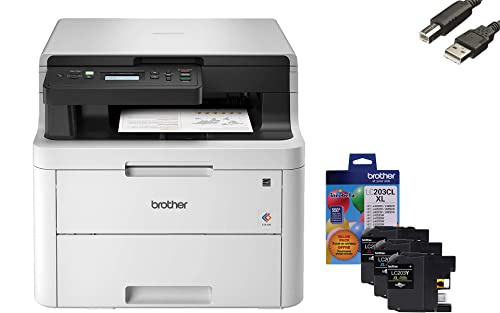
Brother HL-L3290CDW — Color, scanning, still compact
Brother titles this machine a wireless compact digital color all-in-one, and each word of that earns discussion in a small room. Compact and all-in-one rarely share a sentence, because scanning beds and lids cost the height that small rooms begrudge. The HL-L3290CDW spends that height deliberately: print, scan, and copy in color, with duplex printing, for the household whose single shelf must perform the entire paperwork triangle — out, in, and duplicated.
The listing adds two specifics worth reading carefully. Duplex printing resolution is stated at 600×2400 dpi, a print-quality figure aimed at documents with fine detail — small type, charts, worksheet diagrams. And the listing is a bundle that includes a printer cable, a small mercy for the desk that does wire its machine. Alexa compatibility rounds out a profile aimed at busy small homes: color for the school project, scanning for the returned form, copying for the lost permission slip, all from one shelf.
Buy this Brother when the room is small but the paperwork is not. A studio-dwelling teacher, a market trader printing color labels and scanning receipts at one table, a family whose only office is a landing — these are its people. The trade is height and a four-cartridge future, accepted knowingly in exchange for never leaving the flat to find a scanner.
The color all-in-one’s best trick in a small home is temporal. School projects print in color on Sunday night; a passport page gets copied on Monday; a signed form scans back on Tuesday — three different machines’ jobs, one shelf, one network address, one set of habits for the whole family to learn. Consolidation is the compact category’s deepest value, because every device not bought is a shelf not consumed, a cable not routed, a password not forgotten.
Craft sellers should linger on this Brother. Color labels, thank-you cards, and packaging inserts print in-house; receipts and supplier invoices scan into the same workflow; a returned form copies in seconds. A one-table business runs its entire paper life through this single compact shelf, and the business’s professionalism rises with every crisp, color, two-sided page.
- Output: digital color laser all-in-one
- Functions: print, scan, and copy
- Maker’s class: wireless compact printer
- Print detail stated: duplex printing at 600×2400 dpi
- Bundle note: printer cable included in listing; works with Alexa
Strengths
- Full paperwork triangle inside a compact-class body
- Color output covers school, craft, and label work
- Duplex printing keeps small-room paper stores lean
Trade-offs
- Scanner lid makes it the tallest silhouette among these six
- Four color toners join the household budget
- Feeder-free scanning means multi-page originals go sheet by sheet
Best for: small homes needing color printing plus scanning from a single shelf
Not suited for: rooms with strict height limits under low shelves or bunks
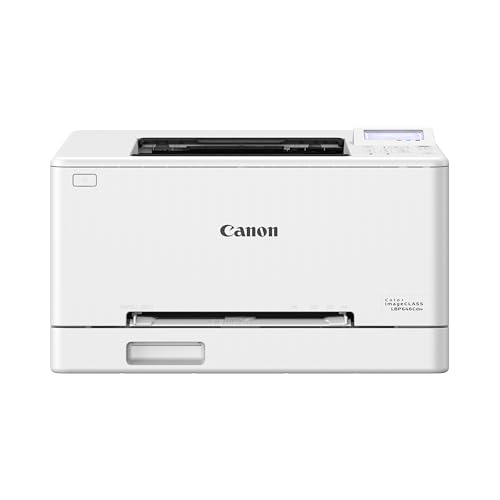
Canon imageCLASS LBP646Cdw — Print-only color, 26 ppm
Canon’s entry makes the compact argument through subtraction. A wireless color laser, print only, with duplex printing at a stated 26 ppm — no scanner lid, no feeder tower, nothing above the paper path but clean air. The listing even names the finish, white, which in small rooms is not vanity: a pale machine on a pale shelf visually disappears in a way a black office block never does, and in a bedroom-study that disappearance is a genuine quality of life.
Print-only discipline suits a recognisable modern workflow. The phone scans; the cloud stores; the printer prints — in color, two-sided, at a pace that clears a presentation or a set of party invitations without a queue. Students in rented rooms, crafters printing color labels from a kitchen table, and home workers whose documents arrive digitally all live inside that workflow already. For them the Canon is not a reduced all-in-one; it is the correct shape of their actual habits.
Set it against Brother’s color all-in-one above and the compact question becomes precise: is your missing shelf for a scanner, or is your missing feature color itself? If paper never arrives physically at your home, the Canon’s lower, simpler profile is the smarter spend of centimetres. The 26 ppm engine ensures the subtraction never feels like slowness.
Renters should appreciate a subtler Canon virtue: reversibility. A print-only wireless machine in a light finish leaves a room exactly as it found it — no scanner lid demanding a permanent alcove, no installation beyond a shelf and a socket. When the lease ends, the printer leaves in one trip and the room forgets it was ever an office. For tenancies measured in months, that lightness is worth as much as any engine figure.
The Canon’s discipline suits the digital household’s conscience as well. Owning exactly the functions used — printing, in color, two-sided — and renting the rest from the world is a defensible philosophy for small homes, and this machine is that philosophy with a power cable. Its 26 ppm pace ensures the philosophy never feels like deprivation.
- Output: color laser, print only
- Stated speed: 26 ppm
- Duplex work: two-sided as standard
- Networking: wireless, nothing wired promised
- Finish named in listing: white
Strengths
- Low, lid-free profile suits shelves and bedroom-studies
- Color duplex output at a stated 26 ppm
- White finish blends into light, small rooms
Trade-offs
- No scanning or copying hardware at all
- Color toner set joins the running-cost picture
- Print-only value collapses if a scanner is bought months later
Best for: renters and students whose documents need color and whose scanning lives on a phone
Not suited for: households receiving paper forms that must be digitised at home
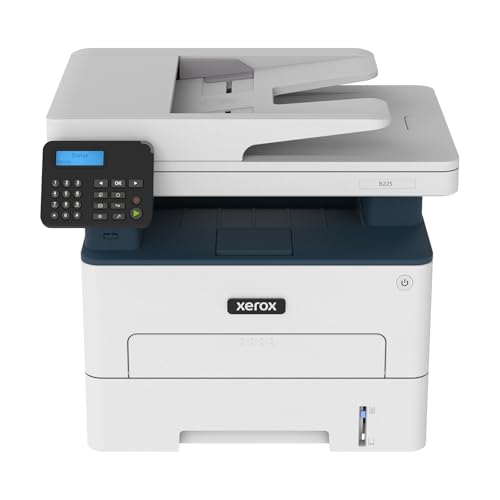
Xerox B225 DNI — The compact mono all-in-one
Xerox’s B225 DNI answers the compact all-in-one question in monochrome: a stated 36 ppm engine with 3-in-1 printing, scanning, and copying, inside what the listing calls a compact design, with built-in Wi-Fi and mobile printing. Where Brother’s color all-in-one spends compactness on color, the Xerox spends it on pace — the fastest stated engine in this guide, sharing a body with a scanner. Small offices that live in black and white get both halves of the paperwork loop without surrendering the corner.
Guided setup, named in the listing, deserves more respect than it gets. Compact printers are disproportionately bought by people without an office manager — flatmates, solo traders, families — and a machine that walks its owner through connection and configuration converts the scariest evening of ownership into a supervised half hour. Mobile printing then keeps the machine democratic: every phone in the home is a print source, every scanned form can start from the shelf rather than a desk pilgrimage.
Choose the B225 when the room is small, the documents are mono, and paper moves in both directions. A letting agent in a box room, a tutor scanning worksheets at home, a club secretary with a landing for an office — the profile fits. Color households should look at the Brother above; text households that scan will find this Xerox the most complete compact in the six.
Box-room offices run on this Xerox’s combination more than on any single figure. The tutor scanning worksheets, the agent copying tenancy pages, the treasurer printing statements — each uses a different third of the machine in the same afternoon, and the compact body lets the room remain a room between sessions. Guided setup matters here too, because box-room offices rarely have a second pair of technical hands; the machine that onboards itself respectfully respects the solo worker’s evening.
Home tutors live inside this Xerox’s triangle. Worksheets print in the morning, completed pages scan to parents by evening, and a lost handout copies from the one surviving original. The stated pace keeps a multi-student day moving, while the compact body leaves the teaching table clear for the actual teaching — a division of territory that box-room professionals will recognise as the whole game.
- Output: black-and-white laser all-in-one
- Functions: 3-in-1 print, scan, and copy
- Title pace: 36 ppm in mono
- Maker’s class: compact design
- Setup: guided setup and mobile printing in listing
Strengths
- Fastest stated pace here, with scanning included
- Compact all-in-one shape replaces a separate scanner shelf
- Guided setup lowers the first-evening barrier
Trade-offs
- Mono only — color originals scan but documents print in black
- All-in-one lid needs clearance above the shelf
- No fax function appears in its listing
Best for: small offices and box rooms where mono paper flows in both directions
Not suited for: color-dependent work or shelves with no lid clearance at all
What does the compact comparison table show when listings stay silent on size?
| Printer | Output | Functions | Stated speed | Compact claim in listing |
|---|---|---|---|---|
| Brother HL-L2460DW | Mono | Print only | Not stated | Wireless compact printer |
| Brother HL-L2405W | Mono | Print only | Not stated | Wireless compact printer |
| Xerox B230 | Mono | Print only | 36 ppm | Compact design |
| Brother HL-L3290CDW | Color | Print, scan, copy | Not stated | Wireless compact all-in-one |
| Canon imageCLASS LBP646Cdw | Color | Print only | 26 ppm | Print-only low profile |
| Xerox B225 DNI | Mono | Print, scan, copy | 36 ppm | Compact design |
The empty spaces in this table are the lesson. Where a brand states a speed, we print it; where a listing is silent, we leave the silence visible rather than borrowing a number from a sibling. Compactness itself is claimed in words, not centimetres, across all six listings — which is why the measuring ritual in the guide below matters more for this category than for any other. Bring your shelf’s three dimensions, plus the swing of a lid and the slide of a tray, to the decision; the table narrows the six to your function and color needs, and the tape measure finishes the job.
How do you measure a shelf for a compact laser properly?
Measure four spaces, not one. The footprint is the easy one — width and depth of the shelf, with a margin for the machine’s cables to bend without kinking. The second space is vertical: print-only machines need only output clearance, but all-in-ones need their lids to rise fully, and a lid that stops at forty degrees against a shelf above will turn every scan into a wrestling match. The third space is in front: trays slide, paper loads, and output stacks toward the user, so a shelf flush with a wall of books steals the machine’s working envelope.
The fourth space is the one nobody measures — the paper’s home. A compact installation still needs a ream within reach, a landing zone for finished pages, and somewhere for originals awaiting scanning. Budget a shoebox’s worth of territory beside the machine for its supplies, or accept that the printer will slowly annex the surrounding shelf by accumulation. Small rooms punish annexation; planned territory prevents it.
Bring the measurements to the listings, not the other way round. Sellers’ photographs use wide lenses and empty rooms; your shelf is the only honest studio. If a chosen machine’s class — all-in-one, feeder-free, print-only — cannot fit your four spaces, the correct move is down the function ladder, not into a bigger room you do not have. The six picks here span that ladder deliberately, from the lid-free Canon to the scanning Xerox, so a fit exists at every shelf size.
Should a small room choose scanning or color when it cannot have both cheaply?
This is the compact category’s central fork, embodied by two picks: Brother’s HL-L3290CDW offers color with scanning in a taller body, Canon’s LBP646Cdw offers color without scanning in a lower one, and Xerox’s B225 offers scanning without color at the fastest stated pace. The fork is decided by paper’s direction in your home. Paper arriving physically — forms, letters, children’s artwork, receipts — votes for scanning. Documents born digital and printed for display, sale, or school vote for color printing. Paper that does neither votes for the mono print-only compacts and a quieter life.
Count honestly over a month rather than imagining a year. Most small households discover a lopsided answer: scanning twice a month and color twice a term, or color weekly and scanning never. The lopsidedness is the decision. Near-ties break toward the phone test — phone scanning has become genuinely good, while phone printing in color does not exist — so a household torn evenly should usually buy the color printer and let the phone carry the scanning, unless originals are fragile, bound, or numerous.
Remember also that the loser of the fork is rented, not lost forever. Copy shops, library scanners, and a friend’s all-in-one cover rare needs without consuming a shelf. Compact buying is the art of owning the frequent and renting the rare, and these six machines cover the frequent in every combination a small room plausibly repeats.
What does wireless freedom actually change for a small-space printer?
It changes the printer’s address from the computer’s neighbourhood to the room’s spare geography. A wired compact must live within cable reach of a desk that may already be the most contested surface in the home. A wireless compact can live on the landing, the wardrobe top, the kitchen’s far counter — wherever a socket and a shelf coincide — and still serve every laptop and phone in the building. In small homes, that relocation is often the difference between a printer that fits and a printer that dominates.
It also changes the printer’s social reach. Flatmates print without borrowing a desk; children print homework without a parent’s laptop as gatekeeper; a guest prints a boarding pass from the sofa. The guided setup on the Xerox B225 and the mobile printing across the Brother range exist for exactly this democracy. Keep the machine on the main household network rather than a guest band, or the democracy quietly fails for every visitor who needs it.
There is one discipline wireless freedom demands: the network becomes part of the printer’s maintenance. A router moved, a password changed, a band renamed — each is now a printer event. Households that change routers yearly should prefer machines whose setup is painless, and should rehearse reconnecting during the calm first week rather than during a deadline. The compact printer’s freedom is real, but it is rented from the Wi-Fi, and the rent is a little attention.
How do you keep a compact printer from colonising a small room?
Colonisation happens by accessories, not by the machine. First a ream leans against it, then the envelopes migrate, then a folder of awaiting-scan originals takes up residence, and within a season the printer owns the shelf and its neighbours. Prevention is architectural: assign the printer a territory with borders — its shelf section, its paper store in a lidded box beside it, its output landing in a single tray or folder — and defend the borders weekly. Small rooms stay calm when every object has an address, and printers, left unaddressed, become landlords.
Cable discipline is the second front. A wireless machine needs exactly one cable, and that cable should drop behind the shelf rather than wander across it. Keep the spare socket free for the laptop charger wars, route nothing across the output path, and the installation looks intentional rather than accumulated. Visitors should see a shelf with a printer on it, not a printing shrine with a shelf somewhere underneath.
Finally, schedule the printer’s tiny maintenances into the room’s existing rhythms. Paper refills with the weekly shop’s unpacking, a dusting pass when the shelf gets its monthly wipe, a test print after holidays when the room has been shut. Compact machines ask very little; asking it on schedule, rather than in emergencies, is what keeps a small room’s printer invisible for years.
When is a compact printer the wrong answer entirely?
When the workload is departmental in disguise. A compact bought for a five-person practice, a mail-order business in its growth spurt, or a household running a newsletter empire will spend its life being refilled, waited on, and apologised for. The category’s trays and engines are honest about their scale, and the mono and enterprise guides exist for appetites that have outgrown the shelf. Recognising that your printing has become a department is a compliment to your enterprise, not a failure of the compact idea.
It is also the wrong answer when the room’s real problem is not space but placement politics. A compact in a shared flat still needs an agreed home, agreed supplies, and an agreed answer to the 1 a.m. print job. Machines do not solve household negotiation; they merely give it a smaller footprint. Settle the politics first, in whichever room the printer will live, and even the category’s simplest pick will feel like a luxury.
And occasionally the wrong answer is any printer at all. A household printing six pages a month, all of them available at a library or workplace, may be buying storage problems disguised as convenience. Compact machines minimise that folly better than any other class — but the honest count of a month’s printing, recommended throughout this guide, remains the first measurement to take, before the tape measure even leaves the drawer.
How do small rooms handle the heat, noise, and dust of a laser printer?
A laser’s physics are modest but non-negotiable: toner fuses with heat, fans move that heat out, and paper dust accumulates wherever paper travels. In a small room these facts argue for placement with breathing room — a hand’s width of air around the vents, no bedding or curtains against the exhaust side, and a surface that will not mind a faint warmth during long jobs. None of the six picks is a space heater in disguise; all of them prefer not to be entombed.
Noise follows a kinder pattern than most buyers fear. A printing laser is briefly audible — rollers, fan, the soft percussion of pages — and then silent, sometimes for days. Small rooms notice the brief chorus more than big offices do, which is why stated pace has a domestic virtue: a 36 ppm Xerox finishes its song sooner than a slower engine. Schedule long runs outside a flatmate’s call or a baby’s nap when you can, and the machine’s acoustic footprint stays as compact as its physical one.
Dust is the slow tax. A monthly wipe of the machine’s top and tray area, folded into the shelf’s ordinary cleaning, keeps paper dust from becoming a grey felt on everything nearby. Keep the paper store lidded for the same reason. These are thirty-second habits, and they are the entire maintenance liturgy a compact laser asks of a small home — one more reason the category suits rooms without a utility cupboard to hide chores in.
What should the first print jobs in a small room be?
Begin with the jobs that reveal placement, not quality. Print a long document and watch where your hands go: is the output reachable from the chair, does the tray slide clear the books, does the warm exhaust drift across the desk’s working area or harmlessly into the room? Placement flaws announce themselves in the first long job, while moving the machine still costs nothing. Adjust the shelf, the angle, and the paper store’s position now, and the installation hardens into a habit nobody questions again.
Next, rehearse each household member’s real job — the child’s homework from a phone, the partner’s report from a laptop, a copied page on the all-in-ones, an envelope if envelopes happen in your home. Small rooms concentrate a household’s devices, and a compact printer earns its shelf by serving all of them without a gatekeeper. Any device that cannot print by the end of the first evening becomes next month’s support call, scheduled at the worst possible hour.
Finish by printing the room’s emergency page: the document you would need at 7 a.m. with a taxi outside — a ticket, a form, a label. Time it, honestly, from phone in hand to page in hand. That number, not any brochure figure, is your printer’s real speed in your real room, and if it satisfies you on a calm evening, the compact has earned its place on the desk.
Which compact-printer mistakes do small rooms punish fastest?
Measuring only the footprint is the champion error. The machine arrives, fits the shelf beautifully, and then its lid meets the shelf above, its tray meets the books in front, and its output lands on the floor. Small rooms have no slack for the unmeasured second and third dimensions; the four-space ritual in this guide exists because every compact owner learns it eventually, and the fortunate ones learn it before ordering.
Buying functions for a bigger life is the second error. A compact all-in-one bought for hypothetical scanning stands taller forever in exchange for a lid opened twice. The reverse — a print-only machine bought by a household drowning in incoming paper — generates copy-shop trips that dwarf the saving. Compact categories punish fantasy in both directions because the room pays for the fantasy daily, in centimetres.
Third, shoppers assume compact means quiet and cool in every respect. Lasers vent warm air and cycle fans during jobs wherever they live; a compact machine entombed in a closed cabinet or a bedding-adjacent nook will make its presence known. Give even the smallest pick moving air and a little distance from pillows, and its manners will match its size.
Finally, buyers forget that small rooms grow into their printers. The student becomes a freelancer; the spare-room desk becomes a business. A compact bought with one step of headroom — the Xerox’s pace, the Brother all-in-one’s functions — survives the growth; a machine bought at the exact size of a first term gets replaced by the third. Choose for the room you have, with a nod to the workload you are honestly becoming.
One more quiet error: forgetting the output’s landing zone in a room where every surface is spoken for. Pages that land on a bed, a chair, or the floor get sat on, lost, and reprinted, quietly doubling the household’s paper use. A single folder or tray, permanently parked beside the machine, is the cheapest accessory in this entire guide and the one small rooms benefit from most.
Shoppers also misjudge by photograph. Compact machines are shot in empty white studios at flattering angles, and the same machine on a real shelf beside real books looks larger, because reality has scale references and studios do not. Read the listing’s stated class, check the model’s published dimensions on the listing page against your tape measurements, and let arithmetic — never a photograph — sign the purchase.
Final Recommendation
Start with the Brother HL-L2460DW if your small room prints text and nothing else: it is the compact mono idea at its most balanced. The HL-L2405W trims the same idea further for the smallest commitments, while the Xerox B230 adds a stated 36 ppm engine and a running-cost focus for small rooms with real volume. When scanning joins the brief, the Xerox B225 DNI keeps the pace and adds the lid; when color joins it, Brother’s HL-L3290CDW folds color, scanning, and copying into one compact shelf.
Canon’s LBP646Cdw closes the set for the color household whose scanning lives on a phone and whose shelf has no height to give. Measure your four spaces, count your paper’s direction for one honest month, and the six resolve into one. Compact printing done well is invisible twice over — the machine disappears into the room, and the room disappears from the printing.
Give the chosen machine its four measured spaces, its box of paper, and its place on the main network during the first evening, and a compact laser repays the courtesy by vanishing — into the shelf, into the routine, into the background of a small home that prints far above its size.
Whichever of the six you bring home, unpack it with the tape measure still in hand and the room’s other occupants present. Compact printing is a household agreement as much as a purchase, and an agreement witnessed at installation rarely needs renegotiating at midnight before a deadline.
Frequently Asked Questions
How compact is compact when no listing gives dimensions?
Treat the word as a design class rather than a measurement. These six are built for home surfaces — shelves, worktops, small desks — rather than office floor stands or departmental tables, and their listings say so in terms like compact design. Your tape measure remains the authority: confirm footprint, lid swing, tray slide, and output space against the specific model’s published dimensions on its listing page before ordering, since this guide asserts only what the titles state.
Can a compact laser really handle a home business?
Within its appetite, yes. The Xerox B230 and B225 state 36 ppm engines, which is working pace by any small-business standard, and mono text is mono text at any volume. The limits appear in tray refills and monthly stamina rather than print quality: a business printing hundreds of pages daily should step up to the capacity-led machines in the mono guide, while a business printing dozens daily will find these compacts entirely sufficient.
Do the all-in-one compacts scan well enough for documents?
For the document scanning small homes actually do — forms, letters, receipts, certificates — yes. The Brother HL-L3290CDW adds color scanning to its color printing, and the Xerox B225 covers mono paperwork at pace. Bound books, fragile originals, and photo archives are the honest limits of any flatbed in this class; multi-page stacks go sheet by sheet on feeder-free models, which suits occasional paperwork and tries the patience of archive projects.
Will a white printer like the Canon stay presentable in a kitchen?
The Canon LBP646Cdw’s white finish, named in its listing, suits light rooms visually and shows dust honestly, which is its own maintenance prompt. Lasers in kitchens should sit beyond flour and steam range regardless of color, on a shelf where cooking weather does not reach. Given that placement, a pale machine in a small bright room genuinely disappears better than a black one — a small mercy that compact buyers are entitled to weigh.
Is duplex printing slower on compact machines?
Two-sided printing takes a return path through any printer, compact or not, so real-world duplex pace sits below headline figures across the category. The saving is in paper, storage, and bag weight rather than seconds, and for small rooms those savings compound: thinner folders, lighter school bags, fewer reams stored in scarce cupboards. Set duplex as the default and let the machine’s manners halve your paper footprint automatically.
Which compact pick suits a student best?
It depends on the course. Text-heavy degrees point to the Xerox B230 for its stated pace and running-cost claim, or the Brother HL-L2405W for the smallest commitment in a halls room. Diagram-heavy and design-adjacent courses point to Canon’s color LBP646Cdw. Students who must scan readings and forms regularly should look at the B225 or the Brother color all-in-one — and every student should confirm the machine fits the room’s actual shelf before term begins.
Can a compact laser live in a bedroom without disturbing sleep?
Between jobs, yes — a laser in standby is silent furniture, and all six picks return to that state when the queue empties. During jobs there is a brief chorus of fan and rollers, so light sleepers should site the machine beyond the pillow’s immediate neighbourhood and avoid scheduling long runs overnight. For the ordinary pattern — a page before bed, tickets in the morning — a bedroom shelf serves perfectly well.
Should a compact printer sit on the floor if no shelf exists?
A sturdy floor corner beats a wobbling stool, but a shelf is kinder: floors collect dust, kicks, and vacuum collisions, and printers prefer to be above all three. If the floor is the only option, choose a corner outside traffic, keep the paper store off the ground, and give the machine the same ventilation clearance you would give it anywhere. Compact machines forgive many placements; they forgive elevated ones longest.
Do compact lasers sacrifice print quality for size?
Not for documents. Text from every machine here is proper laser output — fused, crisp, and durable — because the print engine’s quality does not shrink with the cabinet around it. What compact designs economise on is capacity, feeder hardware, and expansion room, not the darkness of a letter. A compact’s pages will file beside an office machine’s pages without embarrassment, which is precisely why the category thrives.
How often does a compact laser need attention in a small home?
Very little, and on a forgiving schedule: paper when the tray empties, a cartridge when the warning appears, a dusting when the shelf gets one. There are no ink rituals and no weekly exercise prints. A compact laser’s maintenance fits inside the room’s ordinary tidying, which is a large part of why small households keep them for years.
Related Guides
A compact machine solves the space problem; the guides below solve the problems that arrive once space is no longer the question in your home. full color all-in-ones for busier home offices mono lasers with departmental paper capacity color lasers picked for gentler toner economics May your shelf fit on the first try, your lid swing free, and your smallest room print like a proper office always.


