What's inside
- Key Takeaways
- Quick Picks
- How We Chose These Picks
- What Does Compact Actually Cost an ATX Build?
- Why Do Included Fans Matter More in a Small Case?
- The Six Compact ATX Cases, Pick by Pick
- How Do the Six Compare Side by Side?
- How Should You Measure a Graphics Card for a Compact Case?
- Where Does the Radiator Go When the Case Shrinks?
- What Mistakes Do Compact ATX Buyers Keep Making?
- In What Order Should a Compact Case Be Built?
- How Does Cable Management Change When Space Runs Out?
- How Do Dust and Maintenance Behave in a Smaller Box?
- Which Power Supply Suits a Compact ATX Build?
- Final Recommendation
- Frequently Asked Questions
- Related Guides
As an Amazon Associate I earn from qualifying purchases. This post may contain affiliate links at no extra cost to you.
[widgetverdict.com] is reader-supported. When you buy through links on our site, we may earn an affiliate commission.
Where to buy: all six cases below are sold through their linked listings; five are airflow-first designs and one is a glass showcase, so decide which family you belong to before comparing fan counts.
The best compact atx pc cases exist because of a simple frustration: a full-size ATX motherboard does not actually need a full-size tower standing beside it. The ATX board is a fixed rectangle, and everything around it — the power supply, the drive cages, the empty air that older towers carried like ballast — can be rearranged, shrunk or deleted entirely. Compact ATX design is that rearrangement done well. The board stays standard, with its full set of expansion slots and memory channels, while the box around it gives up the dead volume that made mid-towers of a decade ago mostly furniture.
Nothing about that bargain is free, and this guide will keep returning to the price. Shrinking the shell squeezes the two clearances that modern hardware cares about most: radiator room and graphics card length. A flagship GPU that fits a sprawling tower with centimetres to spare may meet a compact case’s front fan with millimetres to spare, or not meet it at all. A thick radiator that a big case swallows at the front may only fit in a compact case once the card shortens. The six picks below were chosen because each one negotiates that squeeze openly — stating its GPU ceiling, its radiator support and its fan provision in its listing title, so the negotiation happens before money moves rather than during the build.
The field splits into two temperaments. Five picks chase airflow: mesh or perforated fronts, fans included in meaningful numbers, radiator support declared up front. One pick, the MOROVOL G4, chases the opposite virtue — a 270-degree glass display in a slim shell, with air cooling only and a short GPU ceiling stated plainly in its title. Neither temperament is wrong. They answer different desks: the machine that works hard and the machine that is looked at while it works. What matters is that the buyer knows which temperament they are paying for, because a glass showcase asked to cool a flagship card in silence will disappoint exactly as predictably as a mesh box disappoints someone who wanted a display piece.
Key Takeaways
- Compact ATX keeps the full-size board and its expansion slots; what shrinks is the empty volume around it, not the platform.
- GPU length is the clearance that bites first: ceilings here run from 267mm on the glass MOROVOL to 410mm on the LANCOOL 207.
- Five of the six picks state 360mm radiator support in their titles; the MOROVOL G4 is air-cooling only and says so.
- Included fans vary from a single pre-installed fan on the DARKROCK and MOROVOL to five reverse-blade fans on the O11D Mini V2 Flow.
- The ASUS Prime AP303 is the only pick whose title states its PSU ceiling — 180mm — and a 20Gbps front USB-C port.
- Measure your graphics card before ordering any compact case; the card, not the motherboard, decides which of these six fits.
Quick Picks
| Pick | Badge | Why it earns its place |
|---|---|---|
| NZXT H5 Flow Compact ATX Case | The straightforward airflow start | Two included 120mm fans and 360mm front radiator support in a compact glass mid-tower that asks few questions. |
| Lian Li O11D Mini V2 Flow ATX Case | The panoramic airflow build | Five reverse-blade fans and an angled intake behind panoramic glass, for ATX, M-ATX and Mini-ITX boards. |
| Lian Li LANCOOL 207 Compact ATX Case | The long-card answer | Four pre-installed fans including two aimed at the GPU, plus a 410mm card ceiling and 360mm radiator support. |
| ASUS Prime AP303 ATX Case | The declared-spec mesh case | Mesh panels, a 360mm GPU ceiling, a stated 180mm PSU limit and 20Gbps USB-C, all named in the title. |
| DARKROCK EC2 ATX Mid Tower Case | The fan-expansion project | Room for up to eight 120mm fans and a 360mm radiator, with one fan fitted and the rest left to the builder. |
| MOROVOL G4 Compact ATX Case | The glass display piece | A slim 270-degree glass shell for modest air-cooled builds, with its 267mm GPU ceiling stated honestly. |
How We Chose These Picks
We began with the definition, because the compact ATX shelf is crowded with cases that are compact only in the marketing. A pick had to accept a full ATX board — that is the entire premise of the keyword — and then earn the adjective by genuinely trimming the enclosure rather than by simply being a mid-tower with a hopeful name. Cases that quietly restricted the buyer to micro-ATX were set aside, however small and pretty they were; they belong to a different guide and a different motherboard.
Next we required the clearances to be declared. In a full tower, an unstated GPU ceiling is an inconvenience; in a compact case it is the difference between a build and a return. Every pick below states at least its radiator support or its card ceiling in its title, and most state both, along with the fan provision the buyer starts with. That last figure matters more than newcomers expect: a case arriving with four or five fans fitted is a finished cooling system, while a case arriving with one fan and eight empty mounts is a project with homework, and the two should never be priced in the buyer’s head as equivalents.
Finally we balanced the temperaments described above — five airflow designs against one glass showcase — and spread the included-fan counts deliberately, from one pre-installed fan to five, so that the guide contains a genuine choice about how much cooling the buyer wants fitted at the factory and how much they want to specify themselves.
What Does Compact Actually Cost an ATX Build?
The honest answer is: clearance, in three currencies. The first is graphics card length, already introduced. Flagship cards have grown long and thick, and a compact case spends its saved centimetres exactly where those cards need them. The second currency is radiator placement. A 360mm radiator needs a long, unobstructed run of case wall, and in a shortened shell that run usually competes with the card for the same space — front radiator and long GPU are frequently an either-or, not a both. The third currency is working room: cable runs are shorter and tighter, fingers fit in fewer places, and the order in which parts are installed starts to matter in a way it never does in a big tower.
Against those costs, compact buys back things builders genuinely feel. The machine takes less desk, less floor, less visual weight in the room. It is easier to move to a friend’s house, easier to lift onto the desk for maintenance, and it tends to push the builder toward tidier cable work simply because there is nowhere to hide a mess. Many builders also find that a smaller internal volume, fed by fans close to the components, cools more directly than a vast tower where air wanders. Compact is not a compromise category; it is a trade with terms, and the terms are printed in each pick’s title for anyone who reads them.
Why Do Included Fans Matter More in a Small Case?
In a large tower, a missing fan is a minor gap in a big ventilation plan. In a compact case, every fan position sits close to a component that needs it, and an empty mount is a hole in the plan rather than spare capacity. The intake fans feed the graphics card almost directly; the exhaust decides how quickly the whole small volume exchanges its air. That is why this guide treats the pre-installed count as a headline specification rather than a footnote: the difference between the LANCOOL 207’s four fitted fans — two of them aimed at the GPU — and the DARKROCK EC2’s single fitted fan is the difference between a case that cools on arrival and a case that cools after a second purchase.
There is also a noise dimension. A compact case typically sits on the desk, near ear height, rather than under it. Fans that are included and matched by the maker tend to be chosen with that proximity in mind, while a builder filling eight empty mounts with whatever was on offer may assemble a louder machine than the shell deserves. None of this argues against the project-style case; it argues for buying it knowingly, with the extra fans budgeted and chosen, rather than discovering the homework on build day.
The Six Compact ATX Cases, Pick by Pick

NZXT H5 Flow Compact ATX Case — The straightforward airflow start
The H5 Flow is the pick that behaves the way a first compact build hopes everything will behave. NZXT’s title makes three promises and keeps them plainly in view: two 120mm fans are included, a 360mm radiator is supported at the front, and the side is tempered glass so the finished machine can be seen. There is no exotic intake geometry and no fan count that reads like a dare. It is a perforated-front airflow case in a compact ATX footprint, black, from a maker whose cable channels and mounting points have been refined across several generations of the H series.
Two included fans is a modest starting provision, and the pick should be judged with that modesty understood. It is enough to establish the front-to-back airflow path on day one — intake through the perforated front, exhaust at the rear — and the case leaves room for the builder to add fans as the hardware demands. A mid-range graphics card and an air cooler will live happily on the stock provision; a hotter card or a front radiator will want the mounts filled further. The honest way to read the H5 Flow is as a well-sorted shell with a working baseline, priced and specced as a starting point rather than a finished cooling system.
The front radiator support deserves a word about the compact squeeze, because this is where H5 Flow buyers should plan rather than hope. A 360mm radiator at the front consumes the very space a long graphics card wants to occupy. Shorter cards coexist with the radiator; the longest flagship cards will force a choice between liquid cooling at the front and air cooling with the card given the room. NZXT states the radiator figure in the title; the card-length side of that equation is the buyer’s measurement to make, and the FAQ below walks through how to make it before ordering.
- Form factor: compact ATX mid-tower, black, tempered glass side panel
- Included fans: 2 x 120mm
- Radiator support: 360mm at the front, per the listing title
- Maximum GPU length: the listing title does not give a figure — measure your card and confirm the clearance on the full listing
- Front panel: perforated airflow design
Strengths
- A perforated front and two fitted fans give a working airflow path from the first boot.
- Declared 360mm front radiator support leaves a clear liquid-cooling path for shorter cards.
- The compact footprint trims the tower without touching the ATX board’s expansion slots.
Trade-offs
- Two fans is a baseline, not a finished provision, for hot graphics cards.
- Front radiator and a very long GPU compete for the same internal run of space.
- The title states no GPU ceiling, so the card measurement is entirely the buyer’s homework.
Best for: a first compact ATX build around a mid-length graphics card, where a perforated front and a sensible baseline matter more than spectacle. Not suited for: a flagship card at the long end of the market paired with a front radiator, or a builder who wants every fan mount filled at the factory.
Builders with a card longer than the mid-range norm should open the H5 Flow listing and check its stated GPU clearance against their card’s exact length before ordering.
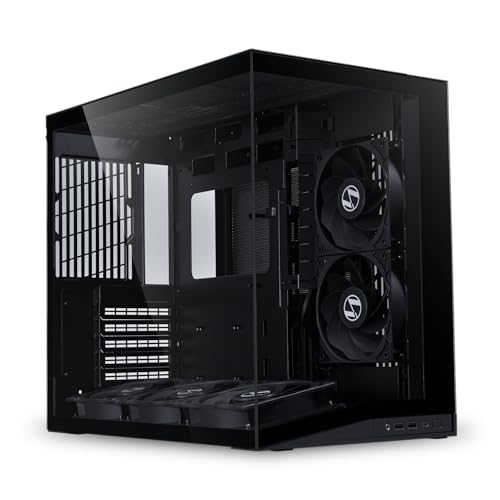
Lian Li O11D Mini V2 Flow ATX Case — The panoramic airflow build
The O11D Mini V2 Flow is Lian Li taking its panoramic glass formula — the case as a display window for the components — and disciplining it with airflow. The title’s details repay attention: five 120mm reverse-blade fans are included, the intake is angled at ten degrees, and the glass wraps the build panoramically. Reverse-blade fans exist precisely for glass cases: they let the attractive side of the fan face the viewer while still pulling air in the right direction, so the showcase does not have to choose between looking right and breathing right. Five of them fitted at the factory is the most complete cooling provision in this guide.
The angled intake is the detail that separates this from a glass box with fans bolted on. Angling the intake stream aims air toward the graphics card rather than letting it wash straight past, and in a compact interior that aim matters — the card is the hottest component and the one most starved by lazy airflow geometry. Combined with board support spanning ATX, M-ATX and Mini-ITX, the Mini V2 Flow is the flexible pick of the six: it can host a compact board now and a full ATX board later, or the reverse, without the case itself becoming the reason for a rebuild.
The temperament warning from the introduction applies in softened form. This is still a glass-forward design, and glass asks for a tidy build and components worth looking at; a rats’ nest of cables behind panoramic glass is a confession, not a build. But unlike the MOROVOL later in this guide, the Flow variant does not trade cooling away for the view — the five fans and the angled intake are a serious ventilation system wearing a showcase’s clothes. Buyers should note the fans are the non-RGB version per the title: the lighting, if wanted, must come from the components themselves.
- Form factor: compact ATX with panoramic tempered glass, black
- Included fans: 5 x 120mm reverse-blade, non-RGB
- Intake: angled at 10 degrees, aimed toward the graphics card zone
- Motherboard support: ATX, M-ATX and Mini-ITX, per the listing title
- Radiator and GPU ceilings: the listing title does not state figures — confirm both on the full listing against your parts
Strengths
- Five fitted reverse-blade fans are the fullest factory cooling provision in this guide.
- The angled intake directs air at the graphics card instead of past it.
- Support for three board sizes lets the case survive a platform change in either direction.
Trade-offs
- Panoramic glass exposes untidy cabling; the build has to earn the window.
- The included fans are non-RGB, so lighting must come from components if it is wanted at all.
- Its title leaves radiator and GPU figures unstated, adding two checks to the buyer’s list.
Best for: a builder who wants the glass showcase look without surrendering airflow, and who may swap between board sizes across the case’s life. Not suited for: a buyer who wants a solid side panel and zero concern for how the interior looks, or one who needs stated radiator figures before committing.
Showcase builders should open the O11D Mini V2 Flow listing to confirm radiator support and card clearance for their exact parts list.

Lian Li LANCOOL 207 Compact ATX Case — The long-card answer
The LANCOOL 207 leads with the number that decides compact builds: 410mm of graphics card clearance, stated in its title alongside 360mm radiator support. That ceiling is the longest in this guide by a wide margin, and it changes the character of the purchase. The flagship card that forces compromises everywhere else simply fits here, with room to spare, while the case still calls itself compact and still takes a full ATX board. For the builder whose card is already bought and already long, this is the pick that ends the measuring anxiety.
The fan arrangement is the second half of the argument, and it is unusually thoughtful. Four fans are pre-installed: two 140mm ARGB fans at the front and two 120mm fans dedicated to the GPU. Fans aimed at the graphics card are a LANCOOL signature — the card gets its own supply of fresh air rather than whatever drifts down from the front intake after the CPU cooler has taken its share. In a compact interior where the card sits close to the bottom of the case, that dedicated feed is the difference between a card that breathes and a card that recycles its own exhaust. The ARGB front pair also gives the build its lighting without extra purchases.
Read the two headline numbers together and the design intent is clear: this is the compact case for a powerful, hot, long-card build that refuses to apologise for itself. The radiator support means the CPU can be liquid-cooled while the card is fed by its own fans, and the clearance means neither has to shrink to accommodate the other. What the LANCOOL does not chase is smallness for its own sake — it is compact in footprint discipline rather than in minimal volume, and buyers measuring a tiny desk niche should confirm its external dimensions rather than assume the smallest shell in the guide.
- Form factor: compact ATX, black
- Included fans: 4 — two 140mm ARGB at the front, two 120mm dedicated to the GPU
- Maximum GPU length: 410mm, per the listing title
- Radiator support: 360mm, per the listing title
- Lighting: ARGB front fans fitted as standard
Strengths
- The 410mm GPU ceiling is the roomiest in this guide and swallows flagship cards whole.
- Two fans dedicated to the graphics card feed the hottest component directly.
- Radiator support and card clearance coexist instead of competing to exclusion.
Trade-offs
- Compact here means disciplined, not tiny — check external dimensions against a small desk niche.
- Four fans is a strong start, but the hottest builds may still fill the remaining mounts.
- The GPU-fan layout rewards a conventional card position; exotic layouts gain less from it.
Best for: a builder with a long flagship graphics card who wants compact ATX without the clearance gamble, plus direct airflow to that card. Not suited for: the smallest possible desk footprint, where a shorter-card case like the MOROVOL G4 trims more volume.
Owners of long cards can open the LANCOOL 207 listing to verify the 410mm ceiling against their card’s published length, backplate included.

ASUS Prime AP303 ATX Case — The declared-spec mesh case
The AP303’s title reads like a specification sheet that wandered into a headline, and that is its charm. ASUS states the mesh panel design, the pre-installed fan, GPU support up to 360mm, 360mm radiator support, a 180mm ceiling for the ATX power supply, a 20Gbps USB Type-C port and a two-year warranty — nearly every figure a compact buyer needs, declared before the click. In a category where unstated clearances are the main source of returned cases, a maker that prints its limits in the title is making the buyer’s decision measurably easier.
The 360mm GPU ceiling sits in the sensible middle of this guide: shorter than the LANCOOL’s 410mm, far longer than the MOROVOL’s 267mm, and enough for the great majority of current cards including most flagship models in their standard trims. The stated PSU ceiling matters in the same practical way — compact cases route the power supply into a shortened bay, and a long modular unit with stiff cables can be the part that quietly refuses to fit. ASUS naming 180mm lets the buyer check the unit already on their shelf instead of discovering the conflict with the side panel off.
The 20Gbps USB Type-C front port is the quiet differentiator. Front-panel ports on many cases are wired for modest speeds whatever the connector’s shape, and a Type-C port that actually runs at 20Gbps turns the front of the case into a genuinely fast connection for external drives — the sort of detail a creator moving footage daily will feel every week. Add the mesh-first panel design and the Prime line’s restrained styling, and the AP303 emerges as the engineer’s pick of the six: not the flashiest, not the longest, but the one whose paperwork is in order.
- Form factor: ATX with mesh panel design
- Maximum GPU length: 360mm, per the listing title
- Radiator support: 360mm, per the listing title
- Power supply: ATX units up to 180mm, per the listing title
- Front connectivity: USB Type-C at 20Gbps; a fan is pre-installed (count not broken down further in the title)
- Warranty: two years, stated in the listing title
Strengths
- Nearly every deciding figure — GPU, radiator, PSU, port speed — is declared in the title.
- The 360mm card ceiling covers most current graphics cards without drama.
- A genuinely fast 20Gbps front Type-C port serves external-drive workflows properly.
Trade-offs
- The pre-installed fan provision is modest next to the Lian Li picks’ four and five.
- Cards beyond 360mm are excluded outright — the longest flagship trims need the LANCOOL.
- Mesh restraint will not satisfy a builder shopping for a panoramic display piece.
Best for: a methodical builder who wants the clearances in writing and a fast front port, around a card of 360mm or under. Not suited for: an over-360mm graphics card, or a buyer who wants the cooling system fully populated from the factory.
Specification-first buyers can open the AP303 listing to match its declared PSU ceiling against the power supply already on their shelf.

DARKROCK EC2 ATX Mid Tower Case — The fan-expansion project
The EC2 should be bought with its nature understood: it is a shell with capacity, not a cooling system with a shell around it. DARKROCK’s title advertises room for up to eight 120mm fans and a 360mm radiator, support for current 50-series graphics cards, a tempered glass side panel and Type-C readiness — and then, honestly, one pre-installed fan. Seven of the eight mounts arrive empty. For the right buyer that is an invitation; for the wrong buyer it is a second shopping trip they did not budget for, and the difference between the two buyers is simply whether they read the title carefully.
The right buyer is real, and this pick exists for them. A builder with strong opinions about fans — a preferred model, a matched set carried over from a previous build, a noise curve they trust — gains nothing from factory fans they would immediately replace. The EC2 gives that builder a glass-sided ATX shell with the mounts, the radiator room and the modern front connectivity, and lets the fan budget go entirely toward the fans they actually want. Eight matched 120mm fans chosen as a set will outperform, in noise if not in raw flow, a factory assortment assembled to a price.
The 50-series support line in the title is worth translating: it signals that the interior clearance and layout were designed with the current generation of large graphics cards in mind. It is not a millimetre figure like the LANCOOL and ASUS ceilings, so the careful buyer still measures — but the intent is declared, and combined with the 360mm radiator support it marks the EC2 as a shell aimed at current hardware rather than a legacy design still clearing stock. Bought knowingly, with fans budgeted alongside, it is the customiser’s route into compact ATX.
- Form factor: ATX mid tower, tempered glass side panel
- Fan capacity: up to 8 x 120mm mounts; 1 fan pre-installed
- Radiator support: 360mm, per the listing title
- Graphics cards: current 50-series support stated in the title (exact millimetre ceiling not given there)
- Front connectivity: Type-C ready, per the listing title
Strengths
- Eight fan mounts and 360mm radiator room give the builder a genuinely open canvas.
- Nothing is wasted on factory fans a customiser would replace anyway.
- Glass side and Type-C readiness keep the shell current while the cooling is specified by hand.
Trade-offs
- One fitted fan means the cooling budget is unfinished at purchase — fans are a second cost.
- GPU support is stated as a generation, not a measurement, so the card check remains manual.
- A first-time builder gets no guidance from a factory fan layout about how airflow should run.
Best for: an experienced builder with a preferred fan model or a matched set to carry over, who wants the mounts and the radiator room without paying for fans twice. Not suited for: a first build that should cool properly the day it is assembled, with no second purchase.
Customisers can open the EC2 listing to map its eight fan mounts against the fan set they plan to install before committing.

MOROVOL G4 Compact ATX Case — The glass display piece
The G4 is the temperament outlier of this guide and it knows it. MOROVOL’s title describes a slim, lightweight compact ATX case wrapped in 270 degrees of panoramic glass, with one pre-installed RGB fan, three USB ports, support for ATX, M-ATX and ITX boards — and two limits stated without flinching: air cooling only, and a graphics card ceiling of 267mm. No radiator will ever live in this case. No long card will ever fit. The G4 is a display enclosure for a modest build, and its honesty about that is precisely why it earns a place here instead of a warning.
Consider what the right build for it looks like. A mid-range or compact graphics card under that 267mm ceiling, a sensible air cooler, a tidy cable job and components chosen partly for how they present — that machine, wrapped in glass on two and a half sides, is a genuinely attractive object on a desk, in a way no mesh box in this guide attempts to be. The single RGB fan provides the accent lighting the glass is there to show off. For a living-room-adjacent desk, a studio backdrop or a build that appears on camera, the G4’s priorities are not a compromise; they are the point.
The discipline the buyer must bring is thermal honesty. Air cooling only, in a glass shell, with one fan fitted, means the components must be chosen for the enclosure: a power-hungry flagship processor under a tower cooler it barely clears, or a card at the ceiling’s edge running at its thermal limit, will make the pretty case into a loud, hot one. The PSU ceiling of 160mm in the title is the other measurement to respect. Stay within the stated limits with margin, add fans where mounts allow if the listing confirms them, and the G4 does its one job — showing off a modest build beautifully — very well.
- Form factor: compact ATX, slim and lightweight, 270-degree panoramic glass, black
- Cooling: air cooling only — no radiator support, stated in the listing title
- Maximum GPU length: 267mm, per the listing title
- Power supply: units up to 160mm, per the listing title
- Included fan: 1 x pre-installed RGB fan; front ports: 3 x USB
- Motherboard support: ATX, M-ATX and ITX
Strengths
- The 270-degree glass wrap makes a modest build into a genuine desk display piece.
- Its limits — air only, 267mm card, 160mm PSU — are declared in the title, not buried.
- Slim and lightweight, it suits desks where a deep tower would dominate the room.
Trade-offs
- No liquid cooling path exists at any point in this case’s life.
- The 267mm ceiling excludes most high-end graphics cards outright.
- One fitted fan is an accent, not a cooling system; the build’s parts must run cool by nature.
Best for: a style-led build around a short graphics card and air cooling, where the machine is part of the room’s furniture. Not suited for: any liquid-cooled plan, any card over 267mm, or high-wattage components that need serious exhaust.
Display-minded builders should open the G4 listing and confirm their chosen card and power supply sit comfortably inside its stated 267mm and 160mm ceilings.
How Do the Six Compare Side by Side?
| Case | Included fans | GPU ceiling | Radiator support | Defining trait |
|---|---|---|---|---|
| NZXT H5 Flow | 2 x 120mm | Check listing | 360mm front | Perforated-front baseline |
| Lian Li O11D Mini V2 Flow | 5 x 120mm reverse | Check listing | Check listing | Panoramic glass, angled intake |
| Lian Li LANCOOL 207 | 4 (2 x 140mm ARGB, 2 x GPU) | 410mm | 360mm | Longest card clearance |
| ASUS Prime AP303 | Pre-installed fan | 360mm | 360mm | Fully declared spec sheet |
| DARKROCK EC2 | 1 (8 mounts total) | 50-series stated | 360mm | Builder-specified cooling |
| MOROVOL G4 | 1 x RGB | 267mm | None — air only | 270-degree glass display |
Read the table by your constraint, not by preference. If the graphics card is already on your desk, its length eliminates rows before taste gets a vote: over 360mm leaves the LANCOOL standing alone among the measured picks; under 267mm keeps all six alive. If liquid cooling is planned, the MOROVOL leaves the table immediately and the radiator column becomes the filter. Only after those eliminations should the pleasant questions — glass or mesh, lighting or restraint — be allowed to decide.
How Should You Measure a Graphics Card for a Compact Case?
Start with the manufacturer’s published length for your exact card model, not the reference design’s figure — partner cards with larger coolers run longer than the cards they are based on, and the difference is routinely the margin that decides fit. Measure or look up the length from the bracket face to the far end of the shroud, including any protruding backplate or cable that exits the card’s end rather than its top. Then compare that figure against the case’s stated ceiling and demand a working margin: a card that fits with two millimetres to spare fits, but its power cables and the builder’s fingers may not, and a front fan or radiator not yet installed will claim space the empty case currently shows as free.
Thickness deserves the same discipline. Compact cases place the card near the side panel or the power supply shroud, and a card occupying more than two slots can fit by length while suffocating by proximity — its intake fans pressed close to glass or steel, recycling warm air. Height matters too where the power cables exit the card’s top edge toward a close side panel. The three dimensions together, checked against the case’s stated limits and the photos in its listing, take ten minutes and prevent the single most common compact-build failure: a finished machine, one part that does not fit, and a returns label.
Where Does the Radiator Go When the Case Shrinks?
In most of these six, the honest answer is the front — and the front is also where the graphics card lives, which is the compact squeeze in its purest form. A 360mm radiator plus its fans occupies a thick slab of the case’s front interior; whatever length remains behind it is the card’s true ceiling, which can be notably shorter than the ceiling quoted for an air-cooled configuration. This is why the guide keeps pairing the two figures: radiator support and GPU length are not independent specifications in a compact case, they are two claims on the same run of space, and a build plan must fund both from the one budget.
The planning order that avoids trouble runs as follows. Choose the card first and note its length. Decide whether the processor genuinely needs liquid cooling or whether a good air cooler — which asks for height clearance instead of length — serves it as well; in compact cases, air cooling the CPU often frees the front entirely for intake fans feeding the card, a trade many gaming builds come out ahead on. If liquid is chosen, subtract the radiator and fan thickness from the case’s interior run and check the remainder against the card before ordering either. The LANCOOL 207’s dedicated GPU fans exist precisely because its maker expects the front of the case to be busy; designs that feed the card independently forgive more radiator ambition than designs that do not.
What Mistakes Do Compact ATX Buyers Keep Making?
The first mistake is shopping by motherboard alone — confirming the board fits and assuming the rest follows. In compact ATX the board is the one part guaranteed to fit; the card, the power supply and the cooler are where builds fail, and each has its own ceiling in these listings waiting to be checked. The second mistake is reading a radiator figure as a promise that a radiator and a flagship card coexist. As the section above explains, they share one run of space, and the arithmetic must be done by the buyer. The third mistake is treating the included fan count as a detail. One fitted fan and five fitted fans describe different purchases at different total costs once the empty mounts are filled, and comparing the two cases on shelf price alone flatters the emptier one.
The fourth mistake is buying the glass showcase for a hot build — choosing the MOROVOL’s 267mm, air-only enclosure for components chosen without reference to it, then blaming the case for temperatures its title predicted. The fifth is the mirror image: buying the project shell, the EC2, for a first build and discovering on the day that cooling is a second project. Both mistakes are reading failures, not product failures. Every limit that matters in this guide is printed in a listing title; the compact category punishes buyers who do not read titles and rewards, with genuinely smaller and tidier machines, the ones who do.
In What Order Should a Compact Case Be Built?
Build order is a courtesy in a large tower and a necessity in a compact one, because parts installed early can physically block parts installed later. The sequence that respects the small interior runs roughly as follows. Fit the power supply first, with its cables attached if it is modular, while the bay is still reachable from every side. Mount the motherboard with the processor and its cooler already fitted where the cooler’s size allows — installing a tall air cooler after the board is in the case means working around its fins in a space that was tight before they arrived. Route the front-panel and power cables while the graphics card is still in its box, because the card, once seated, covers the very headers and channels those cables need.
The graphics card goes in late, and in radiator builds the radiator’s position should be test-fitted before anything is finalised: hold the card’s length against the front run with the radiator and fans in place, confirm the margin with your own eyes, and only then commit. Storage and the final cable dressing come last. Builders coming from full towers often find this choreography fussy for exactly one build; by the second compact build it is simply how cases are assembled, and the tidiness it forces — cables routed because they must be, not because a guide suggested it — is a large part of why finished compact machines so often look better than the big towers they replaced.
How Does Cable Management Change When Space Runs Out?
In a big tower, cable management is cosmetic: the mess hides behind a deep tray and the machine runs the same either way. In a compact case the cables share airspace with the components, and an unmanaged bundle is not merely ugly — it is an obstruction sitting in the intake path, a blanket over a drive, a plug straining against a fan blade. The compact builder manages cables for thermal reasons first and aesthetic ones second, which is why the glass picks in this guide are less forgiving than they look: the O11D Mini V2 Flow and the MOROVOL G4 display whatever the builder did, and what they display in a careless build is also what the components breathe through.
Practically, three habits carry a compact build. Use the shortest cables that comfortably reach, because surplus length has nowhere to go. Route along the tray edges and behind the motherboard’s plane wherever the design offers a channel, keeping the central airspace — the run between the front intake and the card — empty. And connect the awkward cables, the front-panel headers and the lower motherboard plugs, before the graphics card claims the space above them. None of this requires talent; it requires doing things in the order the previous section describes, and checking the result against the simple test of whether air can travel from the front fans to the exhaust without negotiating a nest.
How Do Dust and Maintenance Behave in a Smaller Box?
A compact case exchanges its entire internal volume of air far more often than a large tower does, which is good for temperatures and demanding for dust. The same airflow that keeps a card cool pulls the room’s dust through the intake path at a proportionally higher rate, and a small interior has less spare surface for that dust to settle on harmlessly — it lands on the components themselves. The practical consequence is a shorter cleaning interval: where a big tower might be opened twice a year, a compact machine on a carpeted floor earns a look every couple of months, and the perforated fronts on picks like the H5 Flow make that look easy, because the dust announces itself on the mesh before it reaches the card.
The maintenance itself is lighter than the tower owner’s, which balances the account. The machine lifts onto a desk without a grunt, the panels come off in a space the size of a placemat, and the whole interior is reachable without the torch-and-mirror work a deep tower demands. Filters, where a design includes them, should be treated as the first line and cleaned before the interior needs attention at all. Builders who keep a compact case on the desk rather than the floor will find the interval stretches considerably — height above the carpet is the cheapest dust control in the category, and a compact case is the first size of machine where the desk can actually offer it.
Which Power Supply Suits a Compact ATX Build?
The power supply is the component compact buyers most often carry over from an old build without a thought, and the one most likely to punish the assumption. Two of this guide’s titles state the bay’s terms directly — 180mm on the ASUS AP303, 160mm on the MOROVOL G4 — and those figures should be read as the length of the unit’s body, before its cables ask for their share. A modular supply at the stated limit still needs room for its plugs and the first bend of each cable, and stiff sleeved cables bend wide. Where the old unit measures close to a case’s ceiling, the honest options are a shorter supply or a different case; forcing the fit stores up heat, strained connectors and a side panel under pressure.
Beyond length, compact builds reward modularity more than big towers do. Every unused cable in a fixed-cable supply must be stored somewhere inside a small interior, where it competes with airflow for the same few litres. A fully modular unit lets the builder attach only the cables the build uses and leave the rest in the box. Wattage, by contrast, needs no special compact thinking: the supply is chosen for the components exactly as in any tower, and the case neither adds to nor subtracts from that arithmetic. Length and modularity are the compact questions; capacity remains the platform’s question.
Final Recommendation
For most builders, the LANCOOL 207 is the compact ATX case that removes the most risk: the 410mm ceiling ends the card-length question, the GPU fans feed the component that needs feeding, and the radiator support leaves the liquid path open. The AP303 is the recommendation when paperwork matters more than extremes — every limit declared, a fast front port, a ceiling that covers most cards. The H5 Flow serves the first build that wants a sensible baseline; the O11D Mini V2 Flow serves the showcase that refuses to suffocate; the EC2 serves the customiser with fans already chosen; and the G4 serves the modest build that wants to be looked at. Of the six, the case that stays on our own desk is the LANCOOL — not because it is the smallest, but because it is the one compact case here that never once asked its builder to buy a shorter graphics card. Whichever of the six you choose, measure the card on your desk before the case reaches your door, and the compact bargain will keep its side of the deal.
Frequently Asked Questions
Does a compact ATX case limit the motherboard’s features?
No — that is the point of the category. The board is a standard full-size ATX board with its full expansion slots and memory channels; the case trims the enclosure around it. What shrinks is clearance for other parts — card length, radiator room, power supply length — not the platform itself. Buyers who need to step down to a smaller board are shopping in the micro-ATX category, a different guide entirely.
Will my existing power supply fit a compact ATX case?
Check its length against the case’s stated ceiling. Two picks here declare one: the ASUS AP303 accepts ATX units up to 180mm, and the MOROVOL G4 up to 160mm. Long modular supplies with stiff cable bundles are the usual casualties of compact bays. Where a title states no ceiling, the figure will be on the full listing — and it is worth the minute it takes to find before the build, not during it.
Is a 360mm radiator worth it in a compact case?
Only when the processor’s heat genuinely justifies it and the graphics card’s length leaves the front run free after the radiator and its fans take their share. Many compact gaming builds cool better overall with an air cooler on the processor and the front given to intake fans feeding the card. Decide the card first, then do the subtraction the radiator section describes, and let the arithmetic — not the specification’s impressiveness — make the call.
How many included fans should a compact case have?
Enough to establish the airflow path on day one: at minimum an intake and an exhaust working in the same direction. The H5 Flow’s two fans meet that baseline; the LANCOOL’s four and the O11D Mini’s five exceed it and feed the graphics card more directly. A single fitted fan, as on the EC2 and G4, is a starting accent rather than a system — fine when the buyer knows it and budgets accordingly, a disappointment when they do not.
Can a compact ATX case stay quiet?
Yes, with the discipline the category always asks for: components chosen within the enclosure’s thermal means, fans of decent quality running at sensible speeds, and airflow that reaches the card without obstruction. A compact case on the desk sits nearer the ear than a tower beneath it, so fan quality shows more — one more reason the factory-fitted sets on the Lian Li picks, chosen as matched systems, tend to behave better than a random assortment filling empty mounts.
Which of these six takes the longest graphics card?
The LANCOOL 207, at a stated 410mm — the longest ceiling in this guide and enough for flagship cards that exclude themselves from most compact cases. The AP303 follows at 360mm. At the other end, the MOROVOL G4’s 267mm ceiling is a deliberate part of its design as a slim display case for shorter cards, and the H5 Flow and O11D Mini V2 Flow leave their figures to the full listing, where they should be checked against your exact card model.


