What's inside
- Key Takeaways
- Quick Picks
- How We Chose These Picks
- Where Does PC White Noise Actually Come From?
- Why Does Moving the Converter Change the Sound of Silence?
- Which Headphones Reveal Hiss, and Which Hide It?
- What Should Gamers and Streamers Expect From the Switch?
- How Do the Six External Cards Compare Side by Side?
- How Should You Diagnose Your Noise Before and After Buying?
- What Mistakes Do Buyers Make When Chasing Silence?
- Final Recommendation
- Frequently Asked Questions
- Related Guides
As an Amazon Associate I earn from qualifying purchases. This post may contain affiliate links at no extra cost to you.
widgetverdict.com is reader-supported. When you buy through links on our site, we may earn an affiliate commission.
Where to buy: Amazon stocks every adapter and external card in this guide, from the pocket-sized USB dongles to the aluminium desktop unit with a full surround output set.
The best sound cards to get rid of white noise share one working principle, and it is worth understanding before any product names appear, because it explains both what these devices can do and what they cannot. The hiss most people hear through PC headphones is usually born inside the computer: the motherboard’s audio stage converts digital audio to analogue while sitting in an electrically frantic neighbourhood of graphics cards, voltage regulators and data buses, and some of that frantic energy leaks into the sound as a faint, constant wash. An external sound card moves that delicate conversion step outside the case, onto a USB cable, into a box whose whole job is audio. For the large family of problems caused by noisy onboard conversion, that move genuinely works — the background goes quiet because the converter is no longer living inside the noise.
Now the honesty this keyword demands, stated early so nothing later can overpromise it. No sound card can guarantee the end of white noise in every setup, and any guide that promises silence outright is selling you something. Some hiss is a ground loop — a low hum or buzz tied to how your equipment shares mains power — and it travels along cables in ways a new converter may not cure. Some noise arrives through the USB power itself, from a strained port or a hub shared with hungry devices, and an external card powered by that same dirty supply can inherit the problem it was bought to escape. Some hiss lives in the headphones, the recording, or the game itself. What the six picks here can do is remove the most common cause — the motherboard’s conversion stage — and, in the Andrea pick’s case, add noise-reduction technology designed for exactly this fight. Diagnose first, buy second; the how-to section further down walks through telling the causes apart before you spend anything.
One more framing note. White noise in this guide means the unwanted background hiss listeners complain about — behind music, in game menus, under a voice call — not the deliberate sleep-aid sound that shares the name. If your machine’s background wash rises and falls as you move the mouse or launch a game, that behaviour is a clue, and it points squarely at the interference family these external cards address best.
Key Takeaways
- External cards help because conversion moves outside the electrically noisy PC case — the single most common source of headphone hiss.
- No card can promise total silence: ground loops, dirty USB power and noise inside a recording itself can all survive a new converter.
- The Andrea USB-SA-1 is the specialist pick, with noise reduction technology stated in its own listing title.
- The Cubilux 7.1 and StarTech adapters add surround outputs and, in the StarTech’s case, a digital SPDIF connection that hands conversion to another device entirely.
- The SABRENT AU-UCMA’s microphone input is mono, per its listing — a fact that matters for recording and not at all for quiet listening.
- Diagnose before buying: the test in the how-to section separates motherboard hiss from ground loops and USB power noise in a few minutes.
Quick Picks
| Pick | Badge | Why it is here |
|---|---|---|
| Andrea Electronics USB-SA-1 External Sound Card | Best purpose-built noise fighter | A high-fidelity external digital sound card whose listing names noise reduction technology outright. |
| Cubilux 7.1 USB Surround Sound Card | Best conversion specification | Sample rates from 48KHz to 384KHz in a full aluminium body, with line-in and stereo microphone input. |
| StarTech 7.1 USB Audio Adapter (ICUSBAUDIO7D) | Best for a digital escape route | Up to 7.1 surround with digital SPDIF alongside analogue 3.5mm, so conversion can move to a receiver. |
| VENTION USB Sound Card with Volume Control | Best simple desk adapter | A stereo external card with a physical volume control, for the machine whose front jack hisses. |
| SABRENT USB-C to 3.5mm Audio Adapter (AU-UCMA) | Best for USB-C laptops | 24-bit/96kHz conversion in aluminium, with stereo output and a mono microphone input. |
| MEIRIYFA External USB 2.0 Sound Card (Virtual 7.1) | Best virtual-surround dongle | A plug-and-play USB 2.0 adapter with volume control and virtual 7.1 surround for headphones. |
How We Chose These Picks
The first filter was the mechanism itself: every pick converts outside the case, because that relocation is the entire therapeutic idea behind this keyword. Beyond that, we favoured picks that give the noise fewer places to hide — the Andrea’s stated noise reduction technology, the StarTech’s digital output that can bypass analogue conversion on the PC side altogether, the Cubilux’s aluminium enclosure and wide sample-rate range. Simpler dongles earned their places honestly at the other end: for a laptop whose only audio socket crackles and hisses, a plain stereo adapter on a different electrical path is often the whole cure, and pretending otherwise to sell bigger boxes would betray the reader this guide is written for. We also kept the limits visible. Sample rates are quoted from listings and describe conversion ceilings, not quietness; a 384KHz figure does not mean a quieter background than a 96kHz one, and this guide will not pretend the bigger number wins the noise fight by itself.
Where Does PC White Noise Actually Come From?
Start with the most common birthplace: the analogue stage of the motherboard. Digital audio is immune to interference while it travels as numbers; the vulnerability begins at the moment of conversion into the electrical signal your headphones receive. On a motherboard, that moment happens millimetres from components switching heavy currents — the graphics card under load, the processor’s power delivery, memory traffic — and traces and shared grounds can carry a whisper of that activity into the audio path. The symptom has a recognisable signature: the hiss changes character when the machine works. Scroll a page and it chatters; launch a game and it rises; sit idle on the desktop and it settles. Noise that follows the computer’s activity is interference, and interference is what moving conversion outside the case treats.
The second birthplace is the ground loop. When two mains-powered devices in an audio chain take different paths to earth — a PC and powered speakers are the classic pair — a small current can circulate through the audio cable’s screen, arriving in your ears as hum or buzz rather than hiss, often at a steady pitch that ignores what the computer is doing. An external USB card sometimes breaks a loop by changing the chain, and sometimes does nothing for it at all, because the loop lives between other devices. This is why the diagnosis section matters more than the product list: hum that stays identical when the computer idles is telling you the cure is in your power and cabling arrangement, not in a converter.
The third source is the USB supply itself. An external card is powered by the port it plugs into, and a port on a strained hub, or one sharing power with a fast-charging phone, can deliver a less clean supply than the card’s designer assumed. The practical defences are unglamorous — a direct motherboard port rather than a hub, a different port entirely, distance from charging cables — and they are free, which is why this guide insists on trying them before concluding that any particular card has failed. Finally, some hiss is simply in the material: an old recording, a game’s ambient layer, a microphone preamp in someone else’s voice call. No hardware at your end can remove noise that was recorded into the source, and recognising that saves real money.
Why Does Moving the Converter Change the Sound of Silence?
Distance and discipline. Distance, because every centimetre of cable between the conversion stage and the graphics card weakens the interference that stage can pick up; a converter sitting on the desk lives in a far quieter electrical neighbourhood than one soldered beside a GPU. Discipline, because a device built only for audio can be engineered around that single task — its own small circuit board, its own grounding arrangement, sometimes a metal enclosure like the Cubilux’s aluminium body — rather than sharing a motherboard with a dozen competing priorities. Neither factor is magic, and neither rewrites the physics of a ground loop happening elsewhere in the chain. Together, though, they explain the experience so many buyers report on the first plug-in: the desktop falls quiet, game menus stop fizzing, and the silence between tracks becomes the flat, empty thing it was in the studio.
There is a subtler benefit that follows. Once the background is quiet, volume habits change. Listeners unconsciously raise levels to mask hiss, then wonder why long sessions fatigue them; with the wash gone, comfortable listening sits lower, detail at quiet levels becomes audible without effort, and the dynamic range of films and music — the distance between a whisper and a crescendo — returns to something like its intended shape. The purchase is sold as removing a noise, but what it actually restores is everything the noise was standing in front of.

Andrea Electronics USB-SA-1 External Sound Card — Best purpose-built noise fighter
Most picks in this guide fight noise by relocation — they move conversion somewhere quieter and let geography do the work. The Andrea USB-SA-1 adds a second weapon, and its listing says so in plain words: this is a high-fidelity external digital sound card with noise reduction technology. Andrea’s background is in headsets and speech, where the enemy is exactly this — background interference standing between a voice and its listener — and the USB-SA-1 is that expertise packaged as a general-purpose external card for a PC whose own audio cannot be trusted.
That specialisation shapes who should buy it. If your hiss problem travels with voice work — calls where your microphone feed carries the machine’s buzz into meetings, dictation sessions polluted by the computer’s own electrical weather, a headset whose combined jack forces you through the noisiest socket on the laptop — a card designed around noise reduction speaks to your problem more directly than a surround dongle does. The high-fidelity wording in the listing covers the listening direction too; this is not a microphone-only accessory but a complete external conversion path for both ears and voice.
Balance requires noting what the listing does not publish: no sample-rate figures, no surround configuration, no output list appears in the title quoted here. A buyer choosing on specification tables will find this pick quiet in every sense. Its case rests on the one claim its maker chose to headline — noise reduction — and on the fit between that claim and the keyword you searched. If your problem is interference and voice clarity rather than surround gaming, that trade is the right way round.
Set expectations the way this guide promised at the top. Noise reduction technology and external conversion together address the interference family of problems about as directly as any product in this category can. They do not reach a ground loop humming between your amplifier and your wall sockets, and they cannot clean hiss that was recorded into a podcast before it reached you. Within its intended territory, though, the USB-SA-1 is the most honestly aimed pick on this page.
- Form: external digital sound card over USB, per the listing title
- Headline feature: noise reduction technology, stated in the listing title
- Positioning in the listing: high fidelity external sound card
- Model designation in the listing: USB-SA-1, item C1-1021450-1
- Conversion figures: the listing title publishes no sample rates — the manufacturer documentation is where the confirmed specification lives
- Surround configuration: nothing in the title claims a surround layout, so check the maker documentation if multichannel output is on your list
One habit makes this card’s strengths easiest to judge: test it against your worst noise moment, not your average one. Every setup has a worst moment — the game launch, the video render, the call that starts while a backup runs — when the motherboard’s hiss peaks. Plug the Andrea in before that moment and live through it. A card bought for noise should be auditioned against noise, and the difference between a before and after recorded in the same hostile conditions is the only review of it that will ever fully convince you.
Strengths
- The only pick whose listing names noise reduction technology as its purpose.
- External conversion and active noise fighting address interference from two directions.
- Suits voice work — calls and dictation — where machine buzz is most embarrassing.
Trade-offs
- The listing title publishes no sample rates or output configuration to compare.
- It cannot cure a ground loop rooted in other mains-powered equipment.
- Gamers wanting surround processing should look at the Cubilux or StarTech instead.
Best for: a voice-heavy desk — calls, dictation, streaming — where the machine’s own hiss rides into both your ears and your microphone.
Not suited for: a surround-sound gaming setup, or a hum traced to powered speakers sharing a mains circuit.
Try the USB-SA-1 on Amazon against your loudest electrical moment, and judge it by the silence in that moment.

Cubilux 7.1 USB Surround Sound Card — Best conversion specification
The Cubilux is the engineer’s answer in this guide. Its listing describes a 7.1 USB surround sound card for headphones with a sample-rate range running from 48KHz to 384KHz, a full aluminium alloy body on a USB A connection, and support for line-in and a stereo microphone input. Each of those details earns a sentence. The aluminium enclosure is not jewellery: a metal shell is a harder place for stray interference to reach the circuitry than a plastic one, and in a guide about noise, shielding is a feature, not a finish.
The sample-rate range needs the honest reading this guide applies everywhere. A ceiling of 384KHz describes what the converter can handle, including high-resolution music files, and the 48KHz floor is the rate the world’s video and game audio actually uses. Neither number measures quietness. What the wide range tells a buyer is that this converter will never be the reason a file plays at the wrong rate or a hi-res library gets resampled carelessly — headroom, again, rather than a promise about hiss. The noise benefit of this pick comes from the familiar mechanism, done thoroughly: conversion outside the case, inside a shielded metal body.
Line-in and a stereo microphone input separate the Cubilux from the pure output dongles further down the page. A stereo microphone input matters more than it first appears — several adapters in this category quietly offer mono microphone paths, including the SABRENT below, and anyone recording a stereo source, an instrument or a binaural setup will hit that wall immediately. The Cubilux’s inputs make it a small recording front end as well as a quiet listening device, which suits the creator whose hiss problem lives on both sides of the cable.
Its 7.1 surround is for headphones, delivered over the USB connection the listing describes; set it up as such, rather than expecting a rack of speaker outputs from a device this size. Within that understanding, the Cubilux is the most completely specified external card here for the listener who reads datasheets before breakfast.
- Form: external USB A sound card in a full aluminium alloy body, per the listing
- Surround: 7.1 for headphones, stated in the listing title
- Sample rates: 48KHz to 384KHz, as published in the listing
- Inputs: line-in and stereo microphone input, both supported per the listing
- Intended host in the listing: laptop and PC
- Noise-specific processing: the title claims no dedicated noise-reduction feature — look to the manufacturer documentation if that distinction decides your purchase
The Cubilux also suits the tidiest version of this upgrade: one device, permanently on the desk, handling headphones, microphone and the occasional line-level guest, with the motherboard’s audio retired entirely. Owners who consolidate like that report the side benefit nobody advertises — every application, game and call finally agrees about where sound lives, because there is only one conversion path left to choose. In a category where half the troubleshooting is really device-selection chaos, a single well-shielded box that does everything is a quieter life in both senses.
Strengths
- Aluminium enclosure gives the conversion stage a shielded home outside the case.
- Stereo microphone input and line-in make it a recording front end, not just an output.
- A 48KHz–384KHz range covers everything from game audio to hi-res libraries.
Trade-offs
- Its noise benefit is relocation and shielding, with no stated noise-reduction feature.
- Headphone surround should not be mistaken for a multi-speaker output set.
- USB A connection may need an adapter on a USB-C-only laptop.
Best for: a desk that wants one shielded box for headphones, a stereo microphone and line-level sources, with the motherboard retired.
Not suited for: a voice-work desk whose core problem is transmitted buzz — that fight belongs to the Andrea’s noise reduction.
Inspect the Cubilux on Amazon if a metal shell and a stereo mic input sound like the version of quiet you had in mind.
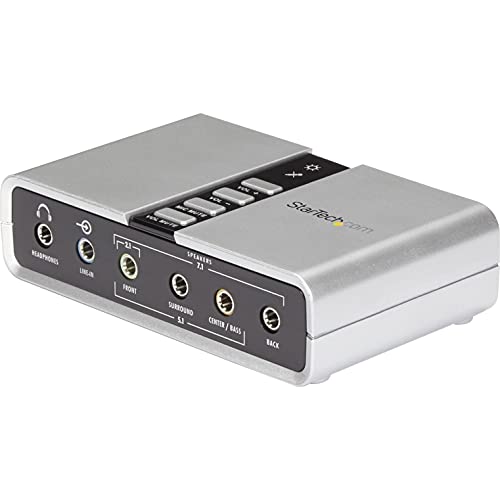
StarTech 7.1 USB Audio Adapter (ICUSBAUDIO7D) — Best for a digital escape route
The StarTech adapter has been solving PC audio problems since long before this guide, and its listing describes the toolkit plainly: an external sound card for laptop and PC offering up to 7.1 surround sound, with digital SPDIF and analogue 3.5mm connections. The SPDIF socket is the reason it belongs in a noise guide, and the logic is the purest in this entire article. A digital output carries audio as numbers; numbers cannot hiss. Feed that stream to an AV receiver or an external DAC across the room, and the analogue conversion — the vulnerable step — happens in a device that has never shared a chassis with a graphics card at all.
That arrangement suits a particular room: the PC that doubles as a media machine, already connected to a receiver or a soundbar with an optical input. For that reader, the StarTech is less a sound card than a bridge, letting the computer hand its audio to equipment that was built for listening. The analogue 3.5mm outputs remain for headphones and simpler speakers, converted inside the adapter itself, outside the case, by the usual relocation logic.
The 7.1 support deserves its plain reading: this is a surround-capable adapter with the output set to match, which distinguishes it from headphone-virtualised dongles. A small speaker system around a desk can be driven as actual channels rather than as a processed illusion. StarTech’s long presence in the adapter market also counts for something unglamorous — this is a connectivity company, and the ICUSBAUDIO7D’s endurance in its catalogue reflects a product that simply does its job for office and home users year after year.
What the listing does not publish is conversion figures — no sample rates appear in the title — and the adapter’s utilitarian design makes no audiophile gestures. Judge it as infrastructure: a reliable, surround-capable bridge out of the noisy box, with a digital exit for the systems that can use one.
- Form: external USB audio adapter for laptop and PC, per the listing title
- Surround: up to 7.1, stated in the listing title
- Digital output: SPDIF, named in the listing
- Analogue connection: 3.5mm, named in the listing
- Model designation in the listing: ICUSBAUDIO7D
- Sample rates: not published in the listing title — the manufacturer documentation holds the confirmed figures, so consult it before matching against a hi-res library
There is a diagnostic bonus built into the SPDIF route that deserves naming. If the hiss vanishes over the digital connection while remaining on the adapter’s own analogue outputs, you have learned something precise: the noise was entering at an analogue stage, and your chain beyond the PC is clean. If hum persists even over digital into a receiver, suspicion moves to the receiver’s own power arrangement and the speakers. Few products in this price territory double as measuring instruments; the StarTech’s two output families make it one, and a troubleshooter can extract real information from it before deciding where the next fix belongs.
Strengths
- SPDIF output moves conversion entirely out of the PC’s electrical neighbourhood.
- Genuine surround-capable outputs, not only headphone virtualisation.
- A long-running adapter from a connectivity maker, with both digital and analogue paths.
Trade-offs
- Conversion figures are absent from this listing title — see the manufacturer documentation.
- The digital escape needs a receiver or DAC with an optical input to escape to.
- Its working-adapter design makes no concession to desk aesthetics.
Best for: a PC feeding an AV receiver or DAC over optical, where the cleanest fix is to stop converting inside the computer’s world at all.
Not suited for: a laptop-and-headphones desk with nothing for the SPDIF output to connect to.
Check the StarTech adapter on Amazon if your receiver has an optical input sitting empty behind the television.

VENTION USB Sound Card with Volume Control — Best simple desk adapter
The VENTION adapter represents the honest bottom rung of this guide, and it deserves defending rather than apologising for. Its listing describes an external stereo sound card with volume control, connecting over USB to a 3.5mm jack, for Windows, Mac, PC, laptop, desktop, headset and Switch among others. That is the whole proposition: your existing audio path hisses or has failed, so here is a different path, on a different electrical route, with a knob.
The knob is not a triviality. A physical volume control on the adapter itself lets a listener set the analogue level at the device rather than deep inside software, and it answers the most common daily friction of external audio — the call that starts too loud, the game that shouts over the video — without a settings window being opened. For the shared family computer and the work laptop, that small wheel or button cluster is the feature the owner will touch every single day, long after the hiss that justified the purchase has been forgotten.
Stereo is the correct word to hold onto in its listing, because stereo is what this class promises and all it should promise. The VENTION will not process surround, will not publish conversion figures in its title, and will not pretend to be a hi-fi component. What it can do — and for a great many hiss sufferers this is the entire cure — is take conversion out of a noisy laptop chassis and put it at the end of a USB cable, where the background interference that plagued the built-in jack is simply not present in the same strength.
Choose it with clear eyes about the remaining risk this guide has repeated deliberately: if your noise turns out to be a ground loop through powered speakers, or hiss printed into the recordings themselves, a simple adapter will not save you, and the diagnosis section below is the cheaper first step. If your noise follows the computer’s activity and lives in the headphones, this modest box is very often the end of the story.
- Form: external stereo USB sound card with a 3.5mm jack, per the listing title
- Control: volume control on the device, stated in the listing
- Platforms named in the listing: Windows, Mac, PC, laptop, desktop, headset and Switch use
- Conversion figures: none appear in the listing title — if a stated sample rate matters to you, the manufacturer documentation is the place it will be confirmed
- Surround: the listing describes a stereo card; no surround processing is claimed there
- Microphone path detail: the title does not characterise it, so verify the arrangement in the maker documentation before recording anything important
There is a second, quieter job this adapter class performs in many households: resurrection. Laptops with a damaged or worn headphone jack — one channel dropping, a crackle when the plug turns — are routinely retired from media duty years before their screens and keyboards give up. A USB adapter bypasses the wounded socket entirely and returns the machine to service for the price of a cable. The hiss cure and the resurrection are the same purchase seen from two angles, and both are honest reasons for a device this simple to exist in a guide beside far grander hardware.
Strengths
- A physical volume control answers the daily friction other adapters ignore.
- Relocates conversion out of a noisy or damaged laptop audio path in one plug.
- Broad stated platform support, from desktops to the Switch.
Trade-offs
- Stereo only, with no conversion figures published in the listing.
- No stated defence against ground loops or noise inside the source material.
- Its microphone arrangement needs confirming on the full listing before voice work.
Best for: a laptop or family PC whose built-in jack hisses or crackles, where a knob and a quiet stereo path solve the day.
Not suited for: surround listening, hi-res specification shopping, or a hum already traced to powered speakers.
Look at the VENTION adapter on Amazon when the problem is ordinary and the cure should be too.

SABRENT USB-C to 3.5mm Audio Adapter (AU-UCMA) — Best for USB-C laptops
The AU-UCMA is the modern laptop’s version of this cure, and its listing is admirably specific: a USB-C to 3.5mm audio adapter and external sound card with 24-bit/96kHz conversion, stereo output and a mono microphone input, in aluminium, plug and play, for Windows, macOS and Linux. Every clause there carries information. USB-C is the only socket many current laptops offer. The 24-bit/96kHz figure is a published conversion specification — modest beside the Cubilux’s ceiling, and more than sufficient for the games, calls and streaming that fill a laptop’s day. The aluminium body echoes the Cubilux’s shielding logic in miniature.
The mono microphone input is the clause to read twice, because it defines this pick’s boundary. For voice — calls, meetings, dictation, in-game chat — a mono microphone path is not a compromise at all; voices are mono sources, and headsets have recorded them that way forever. For recording a stereo source through the microphone socket — an instrument with width, a stereo microphone, a line-level feed adapted into the wrong hole — mono is a genuine limitation, and that reader should take the Cubilux’s stereo input instead. The listing states the fact plainly, which is exactly what a buyer needs; the failure mode would be discovering it after the session.
For the noise question specifically, the AU-UCMA applies the standard remedy in the smallest available form: conversion leaves the laptop chassis, where fan controllers and charging circuitry make the built-in audio’s life difficult, and takes place in a metal shell at the end of the USB-C port. On ultraportable machines whose headphone output hisses audibly against sensitive earphones — a common pairing, since efficient earphones reveal noise floors that larger headphones forgive — that relocation is frequently the difference between a background and an absence.
Plug and play, stated in the listing, completes the picture: no driver project, no software suite, a device that can move between a laptop, a tablet and a borrowed machine in a coat pocket. It is the least committal cure in this guide, and for the traveller whose hiss lives in one laptop, commitment was never the point.
- Form: USB-C to 3.5mm external sound card in aluminium, per the listing title
- Conversion: 24-bit/96kHz, stated in the listing title
- Output: stereo out, as described in the listing
- Microphone input: mono — stated plainly in the listing title, and decisive for recording plans
- Setup: plug and play, per the listing
- Platforms named in the listing: Windows, macOS and Linux
One pairing note belongs with this pick. Sensitive in-ear monitors are the headphones most likely to expose a laptop’s noise floor, and therefore the pairing where an adapter like this shows its largest audible gain. Owners of efficient earphones who have concluded their laptop simply sounds bad should test that conclusion here before replacing either the earphones or the machine. Conversely, a listener using insensitive full-size headphones may hear a smaller difference, because the hiss was already buried below what those headphones reveal at normal levels — the adapter still tidies the path, but expectations should scale with how audible the problem was to begin with.
Strengths
- Published 24-bit/96kHz conversion in a pocketable aluminium USB-C body.
- The mono microphone limitation is stated in the listing, not hidden from buyers.
- Plug-and-play across Windows, macOS and Linux suits a travelling laptop.
Trade-offs
- Mono microphone input rules it out for stereo recording through that socket.
- Its conversion ceiling sits below the Cubilux’s for hi-res library owners.
- A USB-C-only design needs an adapter for older USB A machines.
Best for: a USB-C laptop paired with sensitive earphones, where the built-in output’s hiss is the daily irritation.
Not suited for: stereo microphone recording, or a desktop surround setup of any kind.
See the AU-UCMA on Amazon if your laptop has one port type, sensitive earphones and a background that will not sit still.

MEIRIYFA External USB 2.0 Sound Card (Virtual 7.1) — Best virtual-surround dongle
The MEIRIYFA closes the guide at the gaming-dongle end of the family. Its listing describes an external USB 2.0 sound card with virtual 7.1 surround sound, a volume control, and a USB to 3.5mm jack adapter cable that is plug and play for PC. The word virtual is the honest centre of that description: the surround here is processing applied to headphones, widening the perceived field of a game’s stereo mix, not a set of discrete speaker channels. Understood that way — and this guide insists on understanding it that way — it is a legitimate feature for the player who wants positional flavour without a receiver or a multi-output adapter.
For the noise problem, the MEIRIYFA works by the founding mechanism of this entire article: it is an external converter, so the conversion that used to happen beside your graphics card now happens in a dongle on a cable. A desktop whose front-panel jack is the worst offender — front jacks are frequent villains, wired through the case’s interior on an unshielded run — can be transformed by nothing more exotic than moving the headphone connection to this adapter on a rear USB port. That specific scenario, front-panel hiss cured by a rear-port dongle, is one of the most reliably happy endings in PC audio.
The volume control on the cable earns its mention for the same reason the VENTION’s did: control at the hand beats control in a menu, mid-game above all. USB 2.0, meanwhile, is no limitation for stereo and virtual-surround audio; the bandwidth this class of device needs is a small fraction of what that connection provides, and buyers should not let a version number talk them out of a working solution.
Restraint, as ever, about the rest: the listing publishes no conversion figures and claims no noise-specific processing, and the surround is a headphone effect to be switched off for serious music listening, where it will smear the stereo image it flatters in games. As an inexpensive relocation of a gaming headset’s entire audio world — output, microphone path and volume — it is a coherent little answer.
- Form: external USB 2.0 sound card adapter cable to 3.5mm, per the listing title
- Surround: virtual 7.1 — processing for headphones, as the listing’s own wording states
- Control: volume control on the adapter, stated in the listing
- Setup: plug and play for PC, per the listing title
- Conversion figures: the title publishes none, so the manufacturer documentation is the source to consult for any stated sample rate
- Noise-specific features: none are claimed in the listing title — its remedy is external conversion itself, and the maker documentation would confirm anything beyond that
A final scenario gives this pick its clearest home. The gaming PC sits under the desk; its front jack hisses and its rear panel is a expedition. A dongle like this one, on a short USB extension from the rear, puts a quiet socket and a volume wheel exactly where the player’s hand already rests, and the headset that used to plug into the noisy front panel never goes back. Not every audio upgrade is about fidelity in the abstract; some are about the geography of a desk, and the MEIRIYFA understands its geography perfectly.
Strengths
- Moves a headset off a hissy front-panel jack to a rear USB conversion path.
- Virtual 7.1 gives gaming headphones positional processing without a receiver.
- Inline volume control suits mid-game adjustment better than any menu.
Trade-offs
- Virtual surround is a headphone effect, and should be off for music.
- No conversion figures or noise-specific features are claimed in the listing.
- USB 2.0 dongle form offers no digital output for a receiver-based system.
Best for: a gaming headset exiled from a noisy front-panel jack, wanting volume at the fingertips and processing in games.
Not suited for: a hi-res music desk, a receiver-based surround system, or stereo microphone recording.
Check the MEIRIYFA on Amazon if your front jack fizzes every time the graphics card wakes up.
Which Headphones Reveal Hiss, and Which Hide It?
The same computer can sound silent to one listener and unbearably fizzy to another, and the difference usually sits on their heads. Efficient headphones and in-ear monitors produce their full volume from very little electrical power, which means the listener’s comfortable setting sits low in the output’s range — close to the noise floor, where the hiss lives. A faint background that a power-hungry full-size headphone buries beneath its own demands becomes plainly audible through a sensitive earphone at the same desk. This is why two owners of identical machines argue about whether a hiss problem exists at all, and why reports about any of these adapters vary so wildly between readers.
It also explains a pattern worth knowing before you buy: the more sensitive your earphones, the more an external card tends to help you, because your listening happens exactly where motherboard noise does its damage. Owners of demanding headphones sometimes find the problem smaller than expected — not because their machine is cleaner, but because their headphones ask for so much power that the hiss falls far below the music at working volume. Neither listener is wrong. They are simply standing at different distances from the same noise floor, and an honest guide should tell you which listener you are before predicting how dramatic your improvement will feel.
Volume architecture plays a supporting role here. When a system’s level is set very high in software and controlled down at the last analogue step, hiss generated upstream gets controlled down with the music — one reason the physical volume wheels on the VENTION and MEIRIYFA adapters are more than conveniences. Experimenting with where your chain sets its levels, before and after an adapter arrives, is free and occasionally reveals that part of the hiss was a gain-staging accident rather than a hardware verdict. The external card remains the structural fix; sensible levels are how you hear all of it.
What Should Gamers and Streamers Expect From the Switch?
Games are where motherboard hiss performs its most annoying trick, because game audio is not continuous. Menus sit near silence, loading screens drop to nothing, dialogue scenes leave long pauses — and into every one of those gaps, the interference pours. A player may never notice hiss under a firefight and yet hear it forty times an evening in the quiet between sounds. That is why gamers so often describe this upgrade in emotional rather than technical language: the game did not get louder or clearer, it got calmer. External conversion delivers that calm by removing the gap-filling wash, and the virtual-surround picks here — the Cubilux, the StarTech and the MEIRIYFA — layer their positional processing on top of a quieter foundation than the motherboard was offering.
Streamers carry the problem in both directions at once. Their own monitoring inherits the machine’s hiss, and their microphone path can carry a related buzz out to an audience that hears it more clearly than the streamer does, because the audience is listening on different equipment in a quiet room. This is the scenario where the guide’s ordering matters most: a listening-only dongle may delight the streamer’s ears while leaving the transmitted buzz untouched, whereas the Andrea’s noise-reduction brief and the Cubilux’s proper stereo microphone input address the outward direction too. Anyone whose voice leaves the house should choose for the microphone first and let the listening benefits follow, because an audience forgives a modest headphone compromise far sooner than a buzz under every sentence.
How Do the Six External Cards Compare Side by Side?
| Pick | Connection | Headline feature from the listing | Stands out for |
|---|---|---|---|
| Andrea USB-SA-1 | USB external card | Noise reduction technology | Purpose-built noise fighting and voice work |
| Cubilux 7.1 | USB A | 48KHz–384KHz, aluminium body | Stereo microphone input and line-in |
| StarTech ICUSBAUDIO7D | USB adapter | Up to 7.1, digital SPDIF | A digital escape route to a receiver |
| VENTION with Volume Control | USB adapter | Stereo with volume control | The simple, knob-equipped cure |
| SABRENT AU-UCMA | USB-C | 24-bit/96kHz, mono mic | Modern laptops and sensitive earphones |
| MEIRIYFA Virtual 7.1 | USB 2.0 | Virtual 7.1, volume control | Gaming headsets leaving the front jack |
Read the table by your diagnosis, not by the size of any number in it. Interference that rides along with voice work points to the Andrea; a receiver with an optical input points to the StarTech; a stereo recording habit points to the Cubilux; and the three simpler adapters divide the everyday cases by connector and context — a knob on the desk, a USB-C laptop, a gaming headset fleeing the front panel. Every row shares the founding mechanism of external conversion; the rows differ in what they add around it, and the addition your situation needs is the row you should buy.
How Should You Diagnose Your Noise Before and After Buying?
Begin with the activity test, which costs nothing and identifies the family your noise belongs to. Put on your headphones, play nothing, and listen. Move the mouse in circles, scroll a long page, then launch the most demanding game or render you own. If the background changes with the activity — chattering, rising, following the machine’s effort — your noise is interference from inside the computer, and external conversion is aimed directly at it. If the background is a perfectly steady hum or buzz through all of that, suspect a ground loop or the power arrangement instead, and read the mistakes section before spending.
Next, the source test. Play a recording you trust completely, then a silent moment in a familiar game, then a voice call. Noise that appears in only one source lives in that source. Noise that appears in all three, at the same level, lives in your hardware path. Then the port test: if you already own any USB audio device, however humble, try it in a rear motherboard port, away from hubs and charging cables. A change in the noise — better or worse — confirms the electrical path is involved and tells you an external card is working on the right problem.
After the card arrives, repeat the activity test under the worst conditions you found, at the same volume settings you used before. Judge the result there, not in a quiet idle moment where even the motherboard behaved. If a hum survives unchanged through every test, work the ground-loop checklist: powered speakers and PC on the same power strip, audio cables separated from power cables, one device at a time unplugged to find the pair that loops. The card has done its part when interference dies; a loop is a wiring conversation between your other devices, and it is settled with arrangement, not with a better converter.
Keep notes as you test, even three lines on paper. Noise problems are diagnosed by comparison — before and after, this port and that one — and memory is a poor instrument for comparing faint sounds across days. The listener who writes down what changed, and when, is the listener whose hiss actually gets solved instead of merely shopped for.
What Mistakes Do Buyers Make When Chasing Silence?
The first is buying before diagnosing, then blaming a good card for failing to cure a ground loop it never claimed to reach. The second is the opposite despair — assuming hiss is simply what PCs sound like, and raising the volume to live above it for years. Third is reading sample rates as quietness scores: a 384KHz ceiling describes file compatibility, and the quietest background in this guide might belong to the pick with no published figure at all. Fourth is plugging the new external card into the same strained hub that powered the problem, then concluding external conversion does not work. Fifth is forgetting the microphone direction — a card can quiet what you hear while your own transmitted buzz, on a call, needs the Andrea’s kind of attention or a different port. Finally, there is the mono surprise: buying an adapter for stereo recording without reading that its microphone input is mono, a fact the SABRENT states honestly and hurried buyers discover rudely.
Final Recommendation
Start where the evidence points. If the activity test showed interference and your days are full of calls, the Andrea USB-SA-1 is the pick this guide would buy first, because it is the only one that names noise reduction as its purpose and pairs it with external conversion. If your PC feeds a receiver, let the StarTech hand the whole problem to the digital domain. If you record as well as listen, the Cubilux’s stereo input and shielded body make it the complete desk answer. And if your case is the ordinary one — a hissing laptop jack, a front panel that fizzes under load — the VENTION, SABRENT and MEIRIYFA adapters divide that territory by connector and habit, any of them capable of ending the story in a single plug. Buy for the noise you actually diagnosed, keep the ground-loop checklist for the hum that may remain, and enjoy the first quiet menu screen more than any specification in this guide — that small, flat silence is the sound of the whole purchase working.
Frequently Asked Questions
Will an external sound card definitely remove my white noise?
No honest guide can promise that. If your hiss is interference from the motherboard’s audio stage — the most common cause, recognisable because it changes as the computer works — external conversion usually removes or greatly reduces it. Ground loops, dirty USB power and noise recorded into the source itself are different problems with different cures.
How can I tell whether my noise is a ground loop?
A ground loop usually presents as a steady hum or buzz that stays identical whether the computer idles or works hard, and it often involves powered speakers or an amplifier sharing the chain. Try the PC and speakers on one power strip, separate audio cables from power cables, and disconnect devices one at a time to find the pair involved.
Does a higher sample rate mean a quieter background?
No. Sample-rate figures such as the Cubilux’s 384KHz ceiling or the SABRENT’s 24-bit/96kHz describe the audio formats a converter can handle. Quietness comes from where conversion happens and how the device is built and powered, not from the size of that number.
Which pick is best if my microphone feed buzzes on calls?
The Andrea USB-SA-1 is the natural first look, because its listing names noise reduction technology and the maker’s background is speech and headsets. Also test a different USB port — microphone buzz that changes between ports is electrical, and port choice is a free fix.
Can I use one of these adapters for recording music?
Some, within limits. The Cubilux offers line-in and a stereo microphone input, making it a small recording front end. The SABRENT AU-UCMA’s microphone input is mono, per its listing — fine for voice, wrong for a stereo source. The simpler dongles are listening cures first and recording tools a distant second.
My hiss only appears through the front headphone jack. What should I do?
That pattern points at the front panel’s internal wiring run, a classic interference path. Any external adapter here bypasses it — the MEIRIYFA on a rear USB port is the gaming-shaped version of that fix, and the diagnosis is confirmed the moment the rear-port connection runs quiet.
Related Guides
- Best Sound Cards for Gaming and Music
- Best Sound Cards for Making Music
- Best Sound Cards for Video Editing


