What's inside
- Key Takeaways
- Quick Picks
- How We Chose These Picks
- What Actually Separates a Gaming Card From Motherboard Audio?
- Which Connections Should You Count Before Buying?
- How Does Headphone Drive Change What You Hear?
- When Is the External DAC the Better Answer?
- What Should Music Listeners Check That Gamers Can Ignore?
- How Do the Six Picks Compare Side by Side?
- How Should You Install and Set Up a Sound Card for Games and Music?
- How Long Will a Card Like These Stay Relevant?
- What Mistakes Do Buyers Make With Gaming Sound Cards?
- Final Recommendation
- Frequently Asked Questions
- Related Guides
As an Amazon Associate I earn from qualifying purchases. This post may contain affiliate links at no extra cost to you.
widgetverdict.com is reader-supported. When you buy through links on our site, we may earn an affiliate commission.
Where to buy: Amazon stocks every card and converter in this guide, from the full-length PCIe flagships down to the small USB box that sits beside a console controller.
The best sound cards for gaming and music have to satisfy two audiences who rarely agree: the player who wants footsteps placed precisely in a dark corridor, and the listener who wants a familiar album to sound like the room it was recorded in. This guide treats those as one job rather than two, because the hardware that does either job well shares the same foundations — a clean digital-to-analogue conversion stage, enough headphone drive for demanding cans, and a noise floor low enough that quiet passages stay quiet. Five of the six picks here are Creative cards or converters, and that concentration is honest rather than lazy: Creative is the one maker still shipping a full ladder of internal PCIe gaming cards alongside a portable gaming DAC, so a guide about this category in this decade is largely a guide to choosing within that ladder.
Form factor is the first real decision, and it is not a cosmetic one. A PCIe card lives inside the case, draws power from the motherboard, and disappears from your desk entirely; it suits a fixed gaming tower that never travels. A USB DAC and amplifier such as the Sound BlasterX G6 sits outside the machine, works with consoles as well as PCs, and moves between rooms in a jacket pocket — but it is not an internal card, and this guide will not pretend otherwise. Between those poles sit the budget PCIe cards, which trade the flagship conversion stage for surround outputs and a friendlier upgrade path for older machines.
One discipline applies to every figure quoted below. Signal-to-noise ratios and sample rates come from the listing titles themselves, and they describe the conversion hardware’s ceiling, not a promise about what any particular game or recording will sound like. A 32-bit/384 kHz specification tells you the DAC will not be the bottleneck; it does not upgrade a compressed game stream or a poorly mastered track. Read the numbers as headroom, and choose on connections, headphone drive and fit for your machine.
Key Takeaways
- Four of the six picks are PCIe cards that install inside a desktop; the Sound BlasterX G6 is an external USB DAC and headphone amplifier, and the LICAEVEY is a PCIe card from a smaller maker.
- The Sound BlasterX AE-5 Plus tops the internal ladder with a SABRE32-class DAC, up to 122dB SNR and a discrete headphone bi-amp, per its listing.
- The G6 answers a different question — console and laptop gaming — with 130dB SNR, 7.1 surround and Dolby Digital support in a portable box.
- The Audigy Fx Pro and Audigy FX V2 serve older or tighter builds that need a real card without flagship ambitions.
- Choose the internal cards for a fixed tower; choose the G6 if the same headphones must serve a PC, a console and a laptop.
- Every sample rate and SNR figure in this guide is quoted from the product’s own listing title.
Quick Picks
| Pick | Badge | Why it is here |
|---|---|---|
| Creative Sound BlasterX AE-5 Plus PCIe Sound Card | Best internal card overall | SABRE32-class conversion at 32-bit/384 kHz, a discrete headphone bi-amp and Dolby Digital plus DTS support. |
| Creative Sound Blaster Audigy Fx Pro PCIe Sound Card | Best straightforward upgrade | A hi-res PCIe card promising surround sound and clean audio for a machine still running motherboard sound. |
| Creative Sound Blaster AE-X PCIe Sound Card | Best software-supported newcomer | 32-bit/384kHz hi-res playback with desktop app support for listeners who like to tune their output. |
| Creative Sound BlasterX G6 USB DAC Amp | Best external DAC for consoles | A portable hi-res DAC and headphone amp with 7.1 surround, Dolby and stated console support. |
| Creative Sound Blaster Audigy FX V2 PCIe Sound Card | Best value internal card | Up to 24-bit/192kHz playback and a 120dB DNR DAC in Creative’s entry PCIe line. |
| LICAEVEY PCIe Sound Card (Dual DAC) | Best dual-DAC alternative | Dual DAC architecture with an ES9018K2M chip and optical plus coaxial digital outputs. |
How We Chose These Picks
A gaming-and-music card earns its place on conversion quality first, because both halves of the keyword pass through the same DAC. After that we weighed headphone drive — a card that cannot move a demanding pair of headphones wastes its own clean output — then surround and format support for games and films, then the practicalities: slot requirements, external versus internal fitting, and whether the listing states its headline specifications plainly enough to quote. We kept one portable DAC in the six because a large share of gaming now happens on machines with no free PCIe slot at all, and a guide that ignored that reality would fail the laptop and console players searching this term. The smaller-maker LICAEVEY card stays because its dual-DAC design and digital outputs offer a genuinely different route for music-first listeners.
What Actually Separates a Gaming Card From Motherboard Audio?
Three things, and only the first is about fidelity. The conversion stage on a dedicated card sits away from the electrically busy neighbourhood around a modern GPU, and it is built to a stated SNR figure rather than to a motherboard cost target; quiet game scenes and the tail of a piano note are where that difference lives. The second is headphone amplification: motherboard outputs are frequently an afterthought, while the AE-5 Plus carries a discrete bi-amp design whose whole job is driving headphones properly. The third is processing — surround virtualisation, Dolby Digital and DTS decoding on the flagship, and the scout-style enhancements gaming lines build their names on.
Music listening exposes a card differently from gaming. Games forgive a slightly forward, exciting tuning; a well-known recording does not, because you bring twenty years of memory to it. That is why this guide quotes resolution figures carefully and treats them as ceiling rather than character. A card can measure superbly and still present music with a gloss you may or may not enjoy; the honest claim is narrower — these cards remove the conversion stage as the weak link, so what you hear is your headphones and your source material, arguing between themselves.
Surround deserves a cooler head than marketing gives it. Virtual surround over headphones is a processing trick that widens the perceived field and can help positional reading in competitive titles, at the cost of tonal naturalness that music listeners notice immediately. The sensible workflow on any of these cards is to engage surround for games and bypass it for albums, and the better software suites make that a profile switch rather than a settings excavation.
Which Connections Should You Count Before Buying?
Start at the back of your case. A PCIe card needs a free slot — usually a short x1 slot is enough, but a graphics card with a thick cooler can swallow the neighbouring slot entirely, so look before you order. Then count what you plug in: analogue outputs for speakers, an optical or coaxial output if an AV receiver or external DAC already owns your music chain, and a headphone connection you can reach without crawling behind the tower. The LICAEVEY card’s optical and coaxial outputs matter precisely here, letting the card act as a digital transport into hi-fi equipment. Console players should skip the slot question altogether: no internal card fits a PlayStation, which is the entire reason the G6 exists in this guide.
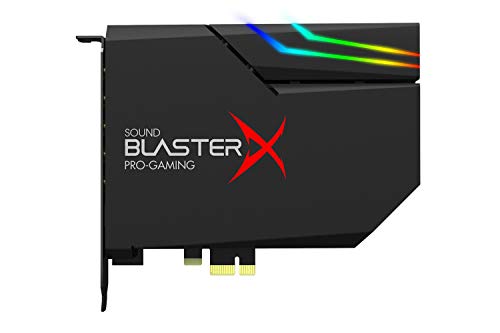
Creative Sound BlasterX AE-5 Plus PCIe Sound Card — Best internal card overall
The AE-5 Plus is the card this category is measured against, and its listing explains why in one long breath: a SABRE32-class DAC running hi-res 32-bit/384 kHz audio, up to 122dB SNR, a discrete headphone bi-amp called Xamp, Dolby Digital and DTS support, and an RGB lighting system for windowed cases. Strip the lighting away and the remaining list is a serious specification — the SABRE name belongs to ESS conversion chips with a long audiophile pedigree, and a discrete bi-amp means each channel of your headphones gets its own amplification rather than sharing a single stage designed down to a price.
In game terms, that headroom buys composure. Busy scenes — rain, engines, six teammates, a soundtrack — stay separated instead of collapsing into loudness, and the quiet end of the dynamic range is where the 122dB figure earns its keep: a footstep at distance is a small signal, and small signals are what a high noise floor eats first. For music, the same composure reads as ease. Dense orchestral passages and layered electronic production hold their shape at volume, and the Dolby and DTS decoding extends the card’s usefulness to film nights on the same machine.
The RGB lighting will divide the room. In a glass-sided tower it completes the build’s look; in a closed case it is a feature you paid for and will never see, which is worth a moment’s honesty before purchase. Either way it does not touch the audio path. What might matter more is slot planning: this is a card for a considered build, with room around the graphics card and an owner who will actually use the software suite’s profiles rather than installing and forgetting.
Its limitation is simply scope. It does nothing for a laptop, nothing for a console, and its talents are wasted on a machine whose owner listens through basic earbuds. It is the peak of the internal ladder in this guide, priced and specced accordingly in spirit, and the right answer for a fixed, serious gaming tower.
- Form: PCIe internal sound card
- DAC: SABRE32-class, hi-res 32-bit/384 kHz, per the listing
- Signal-to-noise ratio: up to 122dB, as stated in the listing title
- Headphone stage: Xamp discrete headphone bi-amp
- Format support named in the listing: Dolby Digital and DTS
- Lighting: RGB lighting system
Ownership of the AE-5 Plus rewards a small amount of deliberate setup. The software suite lets you store distinct profiles, and the flagship makes the strongest case in this guide for using them: one profile with surround processing and a slight presence lift for competitive play, another running direct and unprocessed for albums, a third taming the dynamic range for late-night film. Owners who skip that work still get the conversion quality, but they leave the card’s defining convenience unclaimed. It is also the pick whose headphone stage most clearly invites an upgrade path — buy demanding headphones later, and the bi-amp will already be waiting for them.
Strengths
- The strongest conversion specification of any internal card in this guide.
- A discrete bi-amp headphone stage that treats demanding headphones as the main event.
- Dolby Digital and DTS support carries the card beyond games into film duty.
Trade-offs
- Internal only — laptops and consoles cannot use it at all.
- The RGB system adds nothing audible and nothing visible in a closed case.
- Its headroom is wasted on basic earbuds or undemanding listening.
Best for: a fixed gaming tower with a free PCIe slot, good headphones and an owner who splits time between competitive titles and serious listening.
Not suited for: a desk where the gaming machine is a laptop or console, or a build with every slot already occupied.
Check the AE-5 Plus on Amazon if your tower is the permanent home of both your games and your record collection.

Creative Sound Blaster Audigy Fx Pro PCIe Sound Card — Best straightforward upgrade
The Audigy name has served Creative’s sensible middle for years, and the Fx Pro’s listing keeps that character: hi-res audio, surround sound, clean audio, pitched plainly as a PC upgrade. Where the AE-5 Plus is a flagship with a lighting rig, this card is the answer to a narrower and very common question — the motherboard audio on an ageing or budget tower has started to hiss, crackle or simply sound flat, and the owner wants a real card from a known maker without entering flagship territory.
That framing matters because it defines success. The Fx Pro does not need to beat the AE-5 Plus; it needs to beat the integrated audio it replaces, decisively, in the machine it actually lands in. A dedicated conversion stage on its own card, away from the motherboard’s traces, plus proper surround output for a speaker set, accomplishes that for the typical upgrade case: a mid-life gaming PC whose owner has added better headphones or speakers and discovered the onboard output is now the weakest component in the chain.
Its listing is notably terse beside the flagship’s — no SNR figure is quoted in the title, no amplifier design is named — and this guide will not invent the missing numbers. What the title does promise is the shape of the product: hi-res playback, surround capability, and Creative’s software ecosystem behind it. Buyers who enjoy tuning will find less published hardware to reason about here than with the AE-5 Plus, and should weigh that against the simplicity of the proposition.
Think of the Fx Pro as the card for the second PC, the family tower, the older rig that still plays nightly — machines that deserve clean sound but not a flagship’s budget or slot ceremony.
- Form: PCIe internal sound card
- Audio: hi-res, per the listing title
- Surround sound: stated in the listing title
- Positioning stated in the listing: clean audio, PC upgrade
- Headphone amplifier design: the listing title does not name one — check the full listing before assuming drive for demanding headphones
- Signal-to-noise ratio: not quoted in the listing title — consult the manufacturer’s specification page for the figure
There is a quieter virtue to a card like the Fx Pro that flagship reviews rarely mention: it asks almost nothing of its owner. No lighting to configure, no amplifier modes to reason about, no published specification arms race to keep score in. For the family tower that plays games on weeknights and films on Sundays, that absence of ceremony is a feature. The card also suits the diagnostic moment — when onboard audio develops faults that might be drivers, might be interference, might be a dying codec chip, a known-brand card settles the question in one installation, because everything downstream of it is new.
Strengths
- A known maker’s card aimed squarely at replacing tired motherboard audio.
- Surround sound support suits a desk with a multi-speaker set, not just headphones.
- Simple proposition: install, select as output, hear the difference.
Trade-offs
- The listing title publishes no SNR or amplifier details to compare against flagships.
- Internal only, like every PCIe pick here — no laptop or console use.
- Music-first listeners may outgrow it toward the AE-X or AE-5 Plus.
Best for: an ageing gaming tower whose onboard audio hisses or sounds flat, where the goal is a clean, known-brand replacement.
Not suited for: a build whose owner wants published flagship conversion figures and a named discrete amplifier stage.
Look at the Audigy Fx Pro on Amazon when the machine is sound in every way except the sound.

Creative Sound Blaster AE-X PCIe Sound Card — Best software-supported newcomer
The AE-X arrives with the specification music listeners read first — hi-res playback at 32-bit/384kHz, matching the flagship’s headline resolution — and one phrase in its listing title that the older cards do not carry: desktop app support. That phrase signals where Creative sees this card’s life being lived. Modern sound cards are steered from software: equaliser profiles per game, surround engaged for one title and bypassed for the next, microphone and output routing handled from a panel rather than a nest of cables. A card designed around its app suits listeners who actually enjoy that steering.
For gaming and music in the same evening, app-driven profiles are more than convenience. The tonal balance that flatters a competitive shooter — lifted presence, surround processing, compressed dynamics so quiet cues survive — is close to the opposite of what a jazz trio wants. Switching between those worlds should take two clicks, and a current-generation card with maintained desktop software is the realistic way to get that behaviour in 2026, as older cards’ utilities age out of operating system updates.
The listing is otherwise disciplined: it claims hi-res PCIe audio for PC and names no SNR figure, no lighting system and no amplifier architecture in its title. That restraint cuts both ways. The resolution figure matches the AE-5 Plus, but this guide cannot promise the flagship’s published 122dB SNR or its Xamp bi-amp from a title that does not state them, and headphone drive for very demanding models should be confirmed on the full listing before purchase.
Position the AE-X as the contemporary choice: flagship-grade resolution on paper, a software-first ownership experience, and a specification sheet you should finish reading on the product page rather than in this summary.
- Form: PCIe internal sound card for PC
- Resolution: hi-res 32-bit/384kHz playback, per the listing title
- Software: desktop app support, stated in the listing title
- Signal-to-noise ratio: not given in the listing title — read the manufacturer’s page for the confirmed number
- Headphone amplifier design: unnamed in the listing title — verify drive capability against your headphones’ requirements
- Lighting: no lighting system is mentioned in the listing title
The AE-X also raises a question worth answering honestly: how much does the software matter after month six? Cards live for years, and a current model with an actively supported desktop app is more likely to survive the next operating system revision gracefully than a legacy utility carried forward out of habit. That is a probabilistic judgement, not a guarantee, and this guide presents it as one. What is concrete today is the resolution figure and the app’s existence; what is likely, given the card’s generation, is a longer supported life. Buyers who keep machines for five or six years should weight that likelihood more heavily than buyers who rebuild annually.
Strengths
- 32-bit/384kHz resolution matches the flagship’s headline figure.
- Desktop app support suits profile-based switching between games and music.
- A current-generation card, with software maintained for current systems.
Trade-offs
- Key figures such as SNR are absent from the listing title and need confirming.
- Headphone drive for demanding models is not described in the title.
- Internal PCIe fitting rules out laptops and consoles entirely.
Best for: a PC listener who runs per-game and per-genre profiles and wants the card’s software kept current.
Not suited for: a set-and-forget build whose owner never opens audio software, or any machine without a free slot.
Check the AE-X on Amazon if your listening changes shape several times an evening and you want the card to keep up.

Creative Sound BlasterX G6 USB DAC Amp — Best external DAC for consoles
Let the record be plain: the G6 is not a sound card in the internal sense at all. It is a USB DAC and headphone amplifier in a small external box, and it earns its place in a sound card guide because it solves the problem internal cards cannot touch — the gaming machines with no slot. Its listing claims hi-res conversion with 130dB SNR, the highest figure quoted anywhere in this guide, plus 7.1 surround, Dolby Digital, console support and portability. A PlayStation, an Xbox, a gaming laptop and a desktop can all take turns feeding it, which no PCIe pick here can claim.
That portability changes how the device gets used. The G6 becomes the one piece of audio equipment that travels with the headphones: plug into the tower for a ranked session, carry it to the living room console for a story game, lend the whole arrangement to a laptop at a friend’s place. The headphone amplifier is built into the same box, so demanding headphones receive proper drive at every stop rather than only at the main desk.
For music, an external converter carries a structural advantage worth naming: it performs the delicate analogue conversion outside the PC case entirely, physically removed from the graphics card and power supply noise that internal cards must engineer their way around. Combined with the stated 130dB SNR, that is a credible recipe for the black background behind quiet recordings — the sense that silence between tracks is actually silent.
The trade is equally structural. A box on the desk is a box on the desk: another cable, another object to knock off, no tidy invisibility of the internal card. It also depends on USB power and host compatibility in ways a slot card does not. Players whose gaming happens in exactly one chair should compare it honestly against the AE-5 Plus; players whose gaming happens in three rooms will not need persuading.
- Form: external USB DAC and headphone amplifier — not an internal card
- Signal-to-noise ratio: 130dB, as stated in the listing title
- Surround: 7.1, with Dolby Digital named in the listing
- Console support: stated in the listing title
- Portability: described as portable in the listing
- Installation: USB connection, no PCIe slot required
One usage pattern deserves emphasis because it is the G6’s home turf: the shared household. A single G6 beside a living-room console serves the parent’s evening session and a teenager’s afternoon one with the same pair of good headphones, then migrates to a study laptop for a music hour without any reinstallation ritual. Internal cards bind their quality to one machine and one chair; the G6’s quality follows the listener. The listing’s mention of portability is easy to skim past, but in practice it is the difference between equipment that gets used everywhere and equipment that gets used where it was installed.
Strengths
- The only pick that serves consoles and laptops as well as desktops.
- 130dB SNR is the strongest figure quoted in this guide.
- Conversion happens outside the noisy interior of a gaming case.
Trade-offs
- It occupies desk space and adds a cable run an internal card avoids.
- USB hosts vary; console feature access depends on the platform’s audio rules.
- A single fixed desk may be better served by the AE-5 Plus’s integration.
Best for: headphones that rotate between a PC, a console and a laptop, with one amplifier travelling alongside them.
Not suited for: a tidy single-desk build where an external box and its cable are pure clutter.
See the G6 on Amazon if your gaming is spread across machines that no internal card could ever fit.

Creative Sound Blaster Audigy FX V2 PCIe Sound Card — Best value internal card
The Audigy FX V2 states its case in numbers, which this guide always prefers: up to 24-bit/192kHz high-resolution playback and a DAC rated at 120dB DNR. Those figures sit a clear rung below the AE-5 Plus’s 32-bit/384 kHz and 122dB — and a clear rung above what motherboard audio typically publishes, when it publishes anything at all. That is the honest shape of a value card: not the ceiling of the category, but a documented floor comfortably above the integrated alternative.
Who lands here? The player rebuilding a mid-range tower who has allocated the serious money to a graphics card and refuses to leave audio to chance; the music listener whose collection is mostly streaming and well-mastered downloads, where 24-bit/192kHz headroom already exceeds the source material; the owner of an older machine whose onboard sound has developed the classic hum that follows the mouse. For all three, the FX V2’s published DAC figure is the point — it converts a vague hope of improvement into a specification you can hold the purchase to.
Games will not expose this card’s limits the way they would expose onboard audio’s. Positional cues, dialogue clarity and soundtrack separation are all conversion-and-amplification questions long before they are resolution questions, and a 120dB DNR DAC answers them credibly. The gap to the flagship appears in the extremes: the most demanding headphones, the quietest hi-res recordings, the listener who has trained on better and listens for it.
As with its Fx Pro sibling, the title keeps some counsel — surround details and amplifier specifics are not spelled out there — so treat the listing page as required reading. What the title does publish, the resolution and the DAC rating, is exactly the pair of numbers a value buyer most needs.
- Form: PCI-E internal sound card
- Playback: up to 24-bit/192kHz high resolution, per the listing title
- DAC rating: 120dB DNR, as stated in the listing title
- Model designation in the listing: SB-AFXV2
- Surround configuration: the listing title does not detail it — confirm the channel layout on the product page
- Headphone amplifier: no design is named in the listing title — check before pairing with high-impedance headphones
The FX V2 rewards a particular kind of buyer: the one who reads specification sheets before breakfast. Its published figures let you plan the whole chain — you know the conversion ceiling, so you can judge whether your headphones or your source files will be the limiting factor, and spend accordingly. That transparency is rarer in the value tier than it should be, where listings often substitute adjectives for numbers. There is also a longevity argument: a card bought against documented figures ages predictably, because you can compare it honestly against whatever replaces it years from now, rather than against a memory of how it was described.
Strengths
- Published 120dB DNR DAC figure — a checkable promise, not a mood.
- 24-bit/192kHz playback covers streaming and hi-res libraries comfortably.
- The natural upgrade for a build whose budget went to the graphics card.
Trade-offs
- A rung below the AE-5 Plus on both resolution and noise figures.
- Surround and amplifier details need confirming on the full listing.
- PCIe only — nothing here for laptops or consoles.
Best for: a mid-range tower that needs documented, honest conversion without flagship spending.
Not suited for: a listener chasing the category’s ceiling figures, or high-impedance headphones needing a named amplifier stage.
Check the Audigy FX V2 on Amazon when you want the improvement in writing: 24-bit/192kHz, 120dB DNR, in the slot.

LICAEVEY PCIe Sound Card (Dual DAC) — Best dual-DAC alternative
Every guide benefits from one pick that argues with the others, and the LICAEVEY card argues from architecture. Its listing describes a professional hi-fi design with dual DACs and dedicated headphone drivers, built around a CM108AH master controller and an ES9018K2M DAC chip, with optical and coaxial digital outputs. The ES9018K2M is a known quantity from the ESS Sabre family — the same lineage the flagship AE-5 Plus trades on — and the dual-DAC arrangement aims at channel separation, the quality that keeps a stereo image stable and centred in music.
The digital outputs redirect this card’s whole purpose. With optical and coaxial connections, the LICAEVEY can serve as the digital front end for an existing hi-fi chain — feeding an AV receiver or a beloved external DAC — while its own conversion and headphone drivers handle direct listening. That dual identity suits the music-first reader whose gaming PC shares a room, and a rack, with real audio equipment. No other pick in this guide talks to hi-fi separates in their own language.
Balance requires naming the unknowns. LICAEVEY is a smaller maker than Creative; the listing title publishes no SNR figure and no surround or Dolby claims, and long-term driver and software support from a small brand is a judgement the buyer makes with less track record to consult. The gaming half of the keyword is served here by clean stereo rather than by gaming processing — players who lean on virtual surround for competitive cues should weigh the Creative cards first.
Read this pick as the hi-fi hobbyist’s route into the category: named silicon, a dual-DAC layout, digital outputs for the rack, and stereo purity over gaming effects.
- Form: PCIe internal sound card
- Architecture: dual DACs with dedicated headphone drivers, per the listing
- DAC chip named in the listing: ES9018K2M
- Controller named in the listing: CM108AH master controller
- Digital outputs: optical and coaxial, stated in the listing title
- Signal-to-noise ratio: the listing title gives no figure — look to the manufacturer’s documentation for the measured specification
For gaming specifically, set expectations with care. The LICAEVEY will render a game’s stereo mix cleanly and with strong channel separation, which benefits the many titles whose audio is fundamentally stereo with in-engine positioning. What it will not do is apply a gaming house’s virtual surround processing or scout-style enhancement layer, because its listing promises hi-fi rather than gaming features. Players who split their time between single-player adventures and music — where the mix is stereo anyway — may never miss the processing. Competitive players who rely on it should treat the Creative cards as the main list and this one as the music room’s option.
Strengths
- Dual-DAC design with a named ESS chip aims squarely at stereo music quality.
- Optical and coaxial outputs let it feed an AV receiver or external DAC.
- A genuinely different architecture from the five Creative picks around it.
Trade-offs
- No SNR or surround figures are published in the listing title.
- A smaller maker’s software support carries less track record than Creative’s.
- Gaming processing such as virtual surround is not part of its stated offer.
Best for: a music-first desk where the PC feeds hi-fi separates over optical or coaxial, and stereo purity outranks gaming effects.
Not suited for: competitive play built on virtual surround processing, or a buyer who wants a flagship brand’s published figures.
Look at the LICAEVEY card on Amazon if your gaming PC and your hi-fi rack have been waiting for a translator.
How Does Headphone Drive Change What You Hear?
Headphones are not interchangeable loads. A sensitive earbud reaches full volume from almost any output, while a high-impedance studio headphone or a planar magnetic design asks for voltage and current that modest outputs cannot supply, and answers their absence with thin bass, compressed dynamics and a general sense that the music is happening in the next room. This is why amplifier design appears in this guide alongside DAC figures: the conversion can be flawless and the result still disappointing if the stage after it cannot move the drivers. The AE-5 Plus’s discrete bi-amp and the G6’s built-in headphone amplifier exist precisely to close that gap, and the LICAEVEY’s dedicated headphone drivers make the same promise in its own vocabulary.
The practical test is your own shelf. If your headphones are mainstream gaming headsets or efficient consumer models, every pick here will drive them adequately and the DAC figures should dominate your choice. If you own, or plan to own, demanding headphones, the amplifier stops being a footnote: favour the picks whose listings name their headphone stage, and treat silence on the subject — as with the Audigy cards — as a prompt to check the full specification before pairing them with a difficult load. Getting this pairing right matters more to the final sound than any single resolution number in any listing in this guide.
When Is the External DAC the Better Answer?
Three situations, each common. First, the machine has no slot: laptops, consoles, small-form-factor builds with the graphics card against the only usable PCIe position. Second, the listening happens in several places, and re-buying quality for each room offends both budget and sense. Third, electrical noise inside a particular case proves stubborn — some combinations of graphics card and motherboard produce interference that follows internal cards around, and moving conversion outside the chassis on a USB cable sidesteps the entire problem rather than fighting it component by component. The G6 is this guide’s answer to all three, and its stated console support means the sidestep works for the machines under the television as well as the one on the desk.
The counter-case deserves equal clarity. A fixed tower with a free slot gains nothing from portability, pays for it in desk clutter, and gives up the tidy integration of a card that draws power internally and vanishes behind a side panel. Neither form is the advanced one; they are answers to different floor plans. The most common buying error in this category is not choosing the wrong tier — it is choosing the wrong shape for the rooms the listening actually happens in.
What Should Music Listeners Check That Gamers Can Ignore?
Start with the noise floor in quiet material. A game’s soundscape rarely sits near silence for long, but a solo piano recording, the fade of a film score or the room tone between spoken-word chapters all live exactly where a mediocre converter hisses. This is the practical meaning of the SNR figures scattered through this guide: 130dB on the G6, up to 122dB on the AE-5 Plus, 120dB DNR on the Audigy FX V2. You will not hear those numbers as loudness; you will hear their absence as a faint electronic weather behind quiet passages, and once noticed it cannot be unnoticed. Listeners whose collections lean quiet — classical, acoustic, ambient — should rank these figures first.
Second, check the stereo discipline of the whole chain. Music is mixed for two channels and a stable centre image; anything that smears that image — sloppy channel separation, processing left engaged from a gaming profile — costs more than any resolution shortfall. The LICAEVEY’s dual-DAC layout speaks directly to this concern, and every pick benefits from a direct or pure mode for album listening if its software offers one. Third, consider where the music physically lives. A collection on a hi-fi rack’s territory argues for the LICAEVEY’s digital outputs; a collection on the gaming tower argues for the flagship internal card; a collection that follows you argues for the G6. The keyword joins gaming and music, but the tiebreaker is usually geography.
Finally, be honest about source quality. These cards will faithfully reproduce whatever they are fed, including the limitations of low-bitrate streams and elderly rips. A listener whose library is mostly convenience streaming will still gain from clean conversion and proper headphone drive — those benefits apply to every source — but should not expect a flagship card to perform restoration work. Spend first on the card that fits the machine, second on the headphones, and let the library upgrade itself over time.
How Do the Six Picks Compare Side by Side?
| Pick | Form | Headline figure from the listing | Stands out for |
|---|---|---|---|
| Sound BlasterX AE-5 Plus | PCIe card | 32-bit/384 kHz, up to 122dB SNR | Discrete Xamp headphone bi-amp, Dolby Digital and DTS |
| Sound Blaster Audigy Fx Pro | PCIe card | Hi-res audio, surround sound | The plain PC-upgrade brief |
| Sound Blaster AE-X | PCIe card | Hi-res 32-bit/384kHz | Desktop app support |
| Sound BlasterX G6 | External USB DAC/amp | 130dB SNR, 7.1 surround | Console support and portability |
| Sound Blaster Audigy FX V2 | PCI-E card | 24-bit/192kHz, 120dB DNR DAC | Documented value |
| LICAEVEY Dual DAC | PCIe card | ES9018K2M dual-DAC design | Optical and coaxial outputs |
Read the table by form first and figures second. The G6’s 130dB leads the numbers, but it answers the multi-machine question; the AE-5 Plus remains the internal flagship; the two Audigy cards divide the sensible middle by whether their listings publish figures; the AE-X bets on software; and the LICAEVEY bets on architecture and digital outputs. A buyer who sorts by living situation — one tower, several machines, or a hi-fi rack — will land on the right row faster than a buyer who sorts by the biggest number.
How Should You Install and Set Up a Sound Card for Games and Music?
Power the machine fully down and unplug it before opening the case; PCIe slots are not hot-swappable in any way that ends well. Seat the card in a free slot — ideally with a gap from the graphics card’s fans — and secure the bracket. On first boot, install the maker’s current driver and software before opening a game, then set the card as the default output in both the operating system and the game itself, because games are notorious for remembering the old device. Disable the motherboard audio in the BIOS if your board allows it; two live audio devices invite confusion you do not need.
Then build two profiles. For games: engage surround processing if you use it, set the output to match your headphones rather than a speaker layout you do not own, and check that chat and game audio route to the same device. For music: bypass surround, flatten any excitement the gaming profile added, and set the sample rate to match your library rather than the card’s maximum — upsampling everything to 384 kHz adds nothing but warmth to the case. Save both profiles, label them honestly, and the card will serve both halves of its brief at a click. G6 owners skip the slot work but not the profiling: the same discipline applies, repeated per machine.
How Long Will a Card Like These Stay Relevant?
Longer than almost any other component in the build. Graphics cards age against new games; processors age against new software; a converter ages against connection standards and driver support, both of which move slowly. A PCIe card bought today will fit the next motherboard in all likelihood, and its conversion quality will not be embarrassed by next year’s model in any way your ears can prosecute. That longevity cuts two ways in the buying decision. It justifies stepping up a tier when the budget allows, because the flagship’s cost spreads across many years and several builds. It also justifies the value picks: the Audigy FX V2’s documented figures will still describe an honest converter half a decade from now.
The ageing risk sits in software rather than silicon. Profile suites, surround processing and app support depend on the maker’s maintenance, which is why this guide notes the AE-X’s desktop app support and treats Creative’s long presence in the category as a soft asset. A smaller maker’s card such as the LICAEVEY leans more heavily on standard drivers, which historically age gracefully precisely because they promise less. Either way, the hardware in this guide is the slow-moving kind, and the reader choosing carefully now is unlikely to revisit the decision soon — which is exactly how a sound card purchase should feel.
Finish with a listening check you can repeat after any change. Pick one game scene you know by heart and one track you have heard a hundred times, and play both at the same volume you used before the upgrade. The improvement from a good card rarely announces itself as a single dramatic moment; it accumulates as fatigue that does not arrive, quiet details that were always in the recording and are now simply audible, and dialogue that stays intelligible when the soundtrack swells. If none of that materialises, work through the routing and profile checks above before blaming the hardware — in this category, configuration errors outnumber defective cards by a wide margin.
Keep the packaging and the old onboard setup in mind for the first week, too. If a driver misbehaves after an operating system update, switching the default output back takes ten seconds while you sort it out, and that safety net makes the whole upgrade feel reversible rather than like a commitment you must defend.
What Mistakes Do Buyers Make With Gaming Sound Cards?
The classic error is buying the card before checking the slot — thick graphics cards routinely annex the neighbouring PCIe slot, and a sound card with nowhere to sit is an expensive paperweight. The second is leaving the old device in charge: the card is installed, the headphones are plugged into it, and the game is still rendering through the motherboard output because nobody changed the default. Third comes expectation inflation around resolution figures; 384 kHz capability does not remaster a compressed stream, and disappointment aimed at the card usually belongs to the source. Fourth, music listeners forget to bypass gaming processing, then blame the card for a hollow midrange that their own surround profile created. Finally, headphone mismatch: a card with a modest output stage paired with demanding planar headphones will sound underwhelming for reasons that have nothing to do with its DAC.
Final Recommendation
One more consideration before the verdict: none of these purchases needs to be the last word. Sound cards and DACs hold their usefulness across several PC builds, because the connection standards change slowly and a good converter stays a good converter. Buying the card that fits your present machine and your actual headphones, rather than a hypothetical future rig, is the approach that survives contact with reality — and it is why this guide keeps returning to fit, slots and rooms instead of crowning a single winner for everyone.
For the single serious tower, the Sound BlasterX AE-5 Plus is the card this guide would install: the published conversion figures, the discrete headphone bi-amp and the format support cover both halves of the keyword without compromise. For the multi-machine life, the G6 is not a compromise but the correct tool, and its 130dB figure leads the guide. Between those poles, the Audigy FX V2’s documented 120dB DAC serves the value build, the AE-X serves the profile tinkerer, the Fx Pro serves the ageing tower, and the LICAEVEY serves the hi-fi rack. If your evenings alternate between a ranked queue and a favourite album on the same pair of headphones, start with the AE-5 Plus and let everything else be a variation on that theme.
Frequently Asked Questions
Is a sound card still worth it for gaming in 2026?
For a desktop with decent headphones, yes — the gains are a lower noise floor, proper headphone drive and processing, none of which motherboard audio prioritises. For a laptop or console, the same money belongs in an external DAC such as the G6, since no internal card can be fitted.
Does a higher sample rate make games sound better?
Not directly. Game audio ships at fixed rates far below these cards’ ceilings. The high figures describe conversion headroom and music-library compatibility; they prevent the DAC from limiting you rather than improving the game’s own audio assets.
Can one card serve both surround gaming and stereo music well?
Yes, with profiles. Use surround processing for games, bypass it for music, and keep the two configurations separate. The cards with maintained desktop software, such as the AE-X, make that switching painless.
Will a sound card fix hiss from my motherboard audio?
Usually, because the conversion moves to a card designed around a published noise figure. If the hiss follows the headphones to every device, suspect the headphones or cable instead, and if it comes from a ground loop, an external USB DAC changes the equation again.
What if my graphics card covers the only free slot?
Then the internal half of this guide is closed to you, and the G6 is the intended answer — external conversion over USB, with console support as a bonus. Check slot clearance before ordering any PCIe pick.
Do I need Dolby or DTS support on the card?
Only if films and surround-encoded content share the machine. The AE-5 Plus carries both, per its listing. Pure game-and-music listeners can live happily without either, since games generate their own positional audio.


