What's inside
- Key Takeaways
- Quick Picks
- How Did We Rank Six Routers That All Fit in a Coat Pocket?
- What Does a Travel Router Do That a Phone Hotspot Cannot?
- Which Networks Will You Actually Meet, and What Do They Demand?
- Which Portable Router Matches Your Kind of Trip?
- How Does Power Work When the Router Leaves the Desk?
- What Separates a Good Travel Network From a Merely Working One?
- Pocket by Pocket: How the Travellers Differ Where It Counts
- How Should You Pack and Configure a Portable Router Before Departure?
- What Mistakes Do Portable Router Buyers Make?
- Which Traveller Are You, Honestly?
- How Will Portable Routers Change in the Next Few Years?
- Final Recommendation
- Frequently Asked Questions
- Related Guides
As an Amazon Associate I earn from qualifying purchases. This post may contain affiliate links at no extra cost to you.
widgetverdict.com is reader-supported. When you buy through links on our site, we may earn an affiliate commission.
Where to buy: each traveller below links to its Amazon listing; before you order, weigh your current travel kit honestly, because a portable router earns its place in grams and cubic centimetres as surely as in megabits.
The hotel room problem has not changed in a decade: a network you do not control, a sign-in page designed by nobody, a dozen of your devices wanting to join it, and work that cannot wait for the lobby’s advice. The best portable routers exist to make that room yours in five minutes — one box joins the venue’s network, every device you own joins the box, and a VPN tunnel wraps the whole arrangement before the kettle in the corner has boiled. Six of them are compared here: four from GL.iNet, the company that effectively invented the modern category, plus TP-Link’s tiny N300 nano router and a Wi-Fi 6 traveller sold under the Roam name.
Portability turns out to be a spectrum rather than a size. At one end sits the GL.iNet Mango, a mini router so small it disappears into a cable pouch. At the other, the GL.iNet Slate 7 carries Wi-Fi 7 radios and a touchscreen, and the Beryl AX carries a 2.5G WAN port — capabilities that would shame a home router, in boxes still honestly described as pocketable. Between them sit the Opal, the category’s value all-rounder, and the two non-GL.iNet picks: the TL-WR802N, an older, simpler multi-mode nano router, and the Roam 6, a Wi-Fi 6 travel router built around USB-C power and phone tethering.
The right question is therefore not which is smallest, but which matches your travelling life: how fast are the networks you meet, how many devices travel with you, whether a VPN is a preference or a condition of your employment, and whether the router must also serve at home between trips. This guide takes those questions in order, and each review states plainly where its pick’s ceiling sits — because every portable router has one, and the honest ones in this list make theirs easy to find.
Key Takeaways
- The Beryl AX is the capability benchmark: Wi-Fi 6 radios, a 2.5G WAN port, OpenWrt and VPN support in travel format.
- The Slate 7 is the newest generation — Wi-Fi 7 with a touchscreen that toggles VPN or AdGuard on the device itself.
- The Opal is the value centre: AC1200 dual-band, three gigabit ports, OpenWrt with OpenVPN and WireGuard, at a stated 145 grams.
- The Mango is the minimalists’ pick — a mini OpenWrt VPN router with two Ethernet ports for the lightest possible kit.
- The TP-Link TL-WR802N and Roam 6 cover different niches: simple multi-mode nano networking, and USB-C powered Wi-Fi 6 with phone tethering.
Quick Picks
| Pick | Badge | Why it earns its place |
|---|---|---|
| GL.iNet Opal (GL-SFT1200) Travel Router | Value all-rounder | AC1200 dual-band with three gigabit ports and OpenWrt VPN support, in a 145-gram pocket format. |
| GL.iNet Mango (GL-MT300N-V2) Mini Travel Router | Featherweight classic | A portable mini VPN router with two Ethernet ports, USB 2.0 and OpenWrt, built for hotel and public Wi-Fi. |
| GL.iNet Beryl AX (GL-MT3000) Travel Router | Capability benchmark | Wi-Fi 6 travel routing with a 2.5G WAN port, gigabit LAN, USB 3.0 and VPN over OpenWrt. |
| GL.iNet Slate 7 (GL-BE3600) Travel Router | Touchscreen Wi-Fi 7 | A Wi-Fi 7 travel router whose touchscreen toggles VPN or AdGuard, aimed at hotels, cruises and RVs. |
| TP-Link N300 Wireless Portable Router (TL-WR802N) | Simple multi-mode nano | A pocket TP-Link offering bridge, range extender, access point and client modes on N300 Wi-Fi. |
| Roam 6 AX1500 Travel Router | USB-C tethering pick | A portable Wi-Fi 6 travel router with USB-C, public Wi-Fi sharing, phone tethering and OpenVPN and WireGuard support. |
How Did We Rank Six Routers That All Fit in a Coat Pocket?
By grading the travelling life rather than the spec sheet alone. A portable router’s real specification is the sum of its radio class, its wired ports, its VPN competence, its power arrangements and the physical truth of its size and weight — and those five pull against one another. The Mango wins the fifth and concedes the first; the Beryl AX nearly wins the first three and concedes a little of the fifth. Titles were our evidence throughout: where a listing states a weight, a port speed or a protocol, the review credits it; where it stays silent — several of these titles never mention power delivery at all — the spec box records the silence in this guide’s own wording and sends you to the listing’s detail section.
We also insisted on a distinction the category blurs. Some of these products are travel routers in the full modern sense — they join an upstream network, rebroadcast a private one, and tunnel it. Others, the TP-Link nano foremost, are multi-mode pocket network tools whose talents include repeating, bridging and adapting networks, with a different and simpler relationship to VPN. Both kinds earn a traveller’s money; they simply solve different evenings. Each review names its pick’s kind before praising its degree.
Finally, we weighted the ecosystem a traveller actually lives in. GL.iNet’s four picks share an interface philosophy and an OpenWrt foundation, so experience with one transfers to the others — a real consideration for readers who may start with an Opal and graduate to a Beryl. The TP-Link and Roam picks were judged as the standalone tools they are.
What Does a Travel Router Do That a Phone Hotspot Cannot?
Three things, and they compound. First, it joins networks a phone joins awkwardly: the wired Ethernet port in a hotel room or rental, the venue Wi-Fi behind a sign-in page, the conference network with one credential per attendee. The router completes that ritual once and shares the result with every device you carry, including the phone itself. Second, it holds the VPN for the whole room. Laptops, tablets, e-readers, handheld consoles and the travel streaming stick all inherit the tunnel without each running — or being able to run — VPN software.
Third, it makes your network identical everywhere. Your devices remember one network name and one password, from home to hotel to rental, so the laptop finds the travel drive, the phone finds the laptop, and nothing needs re-pairing in a strange room at midnight. A phone hotspot, by contrast, drains the phone, counts against mobile data, and turns every arrival into a small ceremony of reconnections. Travellers who work from the road stop thinking of the router as an accessory within a month; it becomes the piece of kit the rest of the bag is organised around, beside the charger it shares.
There is a fourth, quieter service: separation. Your devices sit behind your own router’s firewall and address space rather than exposed directly on a venue network shared with strangers. Combined with the tunnel, that is the difference between using public Wi-Fi and merely visiting it — a distinction anyone whose employer has a security policy will recognise, and anyone handling client work from rentals should adopt as their own.
Which Networks Will You Actually Meet, and What Do They Demand?
Hotel Wi-Fi remains the category’s home turf: a captive portal, middling speeds, and a room far from the access point. It demands portal-handling grace and a radio that makes the most of a mediocre signal — every pick here is designed for the ritual, with the GL.iNet line the most practised. Wired room ports, where they survive, are the connoisseur’s option: plug the router into the wall and the venue’s wireless congestion becomes somebody else’s problem, which is where the Beryl’s fast WAN port and the Opal’s gigabit ports quietly shine.
Rentals and serviced apartments present the opposite profile — often a fast, modern connection and a home router of unknown configuration. A travel router there is about privacy and sameness rather than rescue. Cruise ships, motorhomes and trains, named in the Slate 7’s title, add motion and rationed bandwidth: connections that drop and return, where a router that reconnects its tunnel automatically and presents one stable network to your devices earns its passage. Phone tethering, the Roam 6’s headline trick, covers the final case — no venue network at all, just a phone with signal, asked to feed a laptop properly. Readers building the home end of these journeys will find the permanent counterpart in best flashed vpn routers, where the same GL.iNet family anchors the house these travellers keep returning to.
Which Portable Router Matches Your Kind of Trip?

GL.iNet Opal (GL-SFT1200) Travel Router — The sensible centre of the range
The Opal is where most travellers should start, and a good number should finish. Its title assembles the essentials without excess: AC1200 dual-band Wi-Fi, three gigabit ports, OpenWrt carrying OpenVPN and WireGuard with support for more than thirty VPN services, and a pocket format at a stated 145 grams. Three wired ports is a quietly generous provision in this category — one to join a wired room, one for a laptop that must never drop, one spare for whatever the trip invents — and gigabit speed on all of them means the Opal never apologises to a fast rental connection.
Its compromises are generational rather than conceptual. AC1200 is Wi-Fi 5-class dual-band, a step behind the Beryl’s Wi-Fi 6 radios and two behind the Slate 7, and in a venue with a genuinely fast modern network the Opal’s radios become the ceiling. On the networks travellers actually meet — hotel systems and ordinary rentals — that ceiling is rarely the binding one, which is why the Opal’s value endures. Buy it as a first travel router, and the family’s shared interface means the experience transfers intact if a faster sibling ever joins the bag.
- Wireless: AC1200 dual-band Wi-Fi
- Ports: three gigabit Ethernet ports
- System: OpenWrt with OpenVPN and WireGuard; over 30 VPN services supported, per the title
- Weight: 145 grams, as stated by the manufacturer
- Format: pocket travel router
- USB provision: the listing title does not advertise a USB port — confirm on the listing if storage sharing is part of your plan
Strengths
- Three gigabit ports give wired flexibility its travel rivals mostly skip.
- Full OpenWrt VPN competence — the category’s core skill, complete.
- A stated pocket weight that keeps the promise the format makes.
Trade-offs
- Wi-Fi 5-class radios cap what a fast modern venue can deliver.
- No multi-gig port for the rare wired connection that could use one.
- Its talents stop at the room’s edge — it is not a home system in waiting.
Best for: a first-time travel-router buyer wanting the complete core skill set without flagship pricing of any kind.
Not suited for: travellers whose venues regularly offer fast Wi-Fi 6 or better and who would feel the older radios nightly.
Start here and upgrade only on evidence — see the Opal listing on Amazon for its current detail.
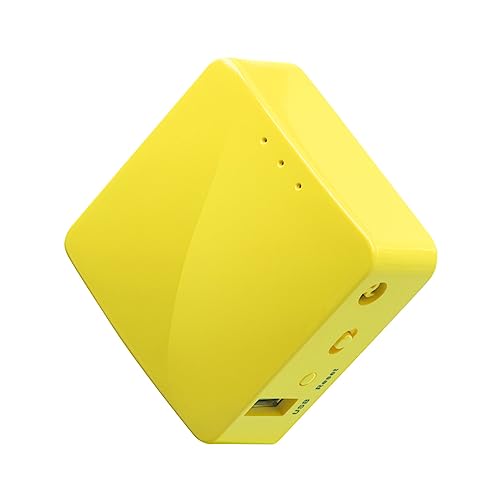
GL.iNet Mango (GL-MT300N-V2) Mini Travel Router — The one that disappears into the bag
The Mango is the category’s founding argument in physical form: a portable mini travel wireless pocket VPN router, in its title’s own enthusiastic pile-up, with two Ethernet ports, USB 2.0, OpenWrt, and OpenVPN and WireGuard for public and hotel Wi-Fi, configured through an easy admin panel. It is the router for the traveller whose kit philosophy is subtraction — the one who counts grams, flies with a single bag, and needs the tunnel and the private network without a flagship’s radio ambitions.
Honesty about its tier is the price of recommending it. The Mango belongs to an older, simpler wireless generation than the Wi-Fi 6 and 7 picks in this guide, and its title does not pretend otherwise — no radio class is headlined at all. On hotel networks, which are the Mango’s natural habitat and rarely fast, that modesty is mostly theoretical; the venue is the bottleneck and the little router keeps up. Ask it to serve a fast modern rental to several devices at once and its age shows. As a second router — the permanent resident of the travel bag while a Beryl serves at home, or the spare that rescues a failed trip — it has few equals anywhere in networking.
- Role: portable mini travel VPN router
- Ports: two Ethernet ports
- USB: USB 2.0 port stated
- System: OpenWrt with OpenVPN and WireGuard
- Setup: admin panel configuration, pitched at public and hotel Wi-Fi
- Radio class: the listing title headlines no Wi-Fi generation — treat it as a modest-wireless, venue-paced device and verify speeds on the listing
Strengths
- Genuinely mini — the travel router most likely to be carried on every trip rather than the important ones.
- The full GL.iNet VPN workflow in the smallest shell the family sells.
- An ideal permanent spare: cheap space, complete skills, no ceremony.
Trade-offs
- Wireless performance belongs to an earlier generation than its siblings here.
- Two ports is the minimum viable wired provision.
- Fast venues and many-device rooms will find its ceiling quickly.
Best for: a minimalist traveller whose venues are ordinary and whose bag is small.
Not suited for: anyone planning to live behind it for months in a fast modern rental.
Gram-counters can check the Mango on Amazon — it is the easiest purchase in this guide to justify carrying.

GL.iNet Beryl AX (GL-MT3000) Travel Router — The benchmark travels well
The Beryl AX is the pick for travellers who refuse to let “portable” mean “compromised”. Its title reads like a home router’s: Wi-Fi 6 dual-band at 574 Mbps on 2.4GHz and 2402 Mbps on 5GHz, a 2.5G WAN port, gigabit LAN, USB 3.0, VPN and OpenWrt. Wired into a good connection, it will move data at rates the venue’s other guests cannot approach through the house system; over the air, its Wi-Fi 6 radios handle the crowded evening spectrum of a conference hotel with noticeably better manners than older generations.
That capability makes the Beryl the natural home-away router for longer stays — the month in a rental, the season in a serviced apartment, the work assignment where the network is infrastructure rather than amenity. It is also the heaviest commitment in the GL.iNet travel line short of the Slate 7, in size, in price tier and in the simple sense that a traveller with a Beryl in the bag notices it. For trips measured in nights rather than weeks, the Opal or Mango may be the proportionate tool. For trips measured in deadlines, the Beryl is the one this guide’s writers would pack, and its presence in our VPN guide’s home-and-road pairing reflects the same judgement from the other direction.
- Wireless: Wi-Fi 6 dual-band, 574 Mbps plus 2402 Mbps
- WAN: 2.5G port; LAN: gigabit
- USB: USB 3.0
- System: OpenWrt-based, VPN support named in the title
- Role: full-capability travel router for longer stays
- Weight: the listing title does not state a figure — check the listing if every gram is budgeted
Strengths
- A 2.5G WAN port that treats fast wired venues as an opportunity, not a ceiling.
- Wi-Fi 6 radios with the throughput to serve a working traveller’s whole kit.
- The family’s mature travel platform, with nothing essential trimmed.
Trade-offs
- The largest travel commitment here short of the Slate 7 — overkill for overnight stops.
- Its speed is only as usable as the venue’s connection allows.
- Wi-Fi 7 exists a shelf above it now, for buyers who chase generations.
Best for: a working traveller on longer stays who needs the room’s network to behave like the office’s.
Not suited for: overnight minimalists who would carry its capability without once using it.
Long-stay travellers should review the Beryl AX listing on Amazon as the category’s reference point.

GL.iNet Slate 7 (GL-BE3600) Travel Router — The interface is the feature
Every travel router in this guide can raise a VPN tunnel; the Slate 7 is the one that lets you do it with a fingertip on the box. Its touchscreen toggles VPN or AdGuard directly, which sounds like a flourish until the first late arrival in an unfamiliar room, when the tunnel becomes a glance and a touch rather than a laptop, a login and a menu. Around that screen, the specification is the travel line’s newest: Wi-Fi 7 radios, 2.5G connectivity, and a mini format its title aims squarely at hotels, cruises, RVs, business trips and plane connectivity.
The Wi-Fi 7 question, asked of a travel box, deserves the answer this guide gave it in the VPN roundup and repeats without embarrassment: the newest radios pay where venues are new — renovated hotels, modern rentals, conference centres with current infrastructure — and wait politely where venues are old. What the Slate 7 indisputably buys is time: it will still be the current-generation traveller when the Wi-Fi 6 picks begin to feel dated. Buyers who travel constantly and hate admin rituals are its natural owners; buyers whose trips are annual should let the Opal’s value argue with them first.
- Wireless: Wi-Fi 7 travel router
- Interface: touchscreen toggling VPN or AdGuard
- Connectivity: 2.5G stated in the title
- Format: mini size for hotel, cruise, RV, business trip and plane use
- System: GL.iNet’s OpenWrt-based travel platform
- Radio speed figures: the listing title leads with the interface rather than throughput numbers — consult the listing for the full wireless specification
Strengths
- The touchscreen removes the admin-page ritual from every arrival and departure.
- Wi-Fi 7 makes it the longest-lived travel purchase in this guide.
- AdGuard on the same switch quiets the whole room’s devices at once.
Trade-offs
- Newest-generation pricing for capability many venues cannot yet feed.
- Deep configuration still lives in the full interface, as it should.
- Its screen and radios are wasted on travellers who go twice a year.
Best for: a constant traveller who values the tunnel being one touch away in every new room.
Not suited for: occasional holidaymakers whose trips would never repay its generation.
Frequent flyers can look at the Slate 7 on Amazon and judge the touchscreen by their own midnight arrivals.

TP-Link N300 Wireless Portable Router (TL-WR802N) — The pocket Swiss tool
The TL-WR802N comes from a different branch of the family tree: not a VPN travel router in the GL.iNet sense, but a pocket multi-mode network tool. Its title lists bridge, range extender, access point and client modes on N300 Wi-Fi, in a nano format TP-Link pitches as mobile in your pocket. Each mode is a small, real job: extend a weak hotel signal into the room’s far corner, turn a wired port into a wireless network, bridge a device that only speaks Ethernet onto a wireless network, or present a printer to a network it could not otherwise join.
Judged as those jobs’ tool, it is excellent value and genuinely tiny. Judged as a modern travel router, its limits must be stated without flinching: N300 is Wi-Fi 4-class wireless, a generation behind everything else here, and the title makes no VPN claim at all — travellers whose requirement is a tunnel should stop reading this review and return to the GL.iNet picks or the Roam. What the TP-Link offers instead is simplicity, a mainstream maker’s polish, and a decade-proven answer to the odd networking errands that travel and small homes generate. Many a kit bag carries one beside a VPN router, the way a toolbox carries both a drill and a screwdriver.
- Model: TP-Link TL-WR802N
- Wireless: N300 Wi-Fi
- Modes: bridge, range extender, access point and client, per the title
- Format: nano travel router, pocket-sized
- VPN: the listing title states no VPN function — this is a modes tool, not a tunnel endpoint
- Ports and power detail: beyond the title’s scope — the listing’s specification section carries the full schedule
Strengths
- Four genuinely useful modes in a box smaller than a matchbox’s ambitions.
- Mainstream simplicity — the pick for travellers who want no platform to learn.
- Superb as a companion tool for bridging and extending odd connections.
Trade-offs
- N300 wireless belongs to an older generation and feels it on busy networks.
- No VPN story in the title — the tunnel-seeking traveller is not its customer.
- Its modes solve errands, not the whole hotel-room problem.
Best for: a traveller or home user needing a tiny multi-mode adapter for bridging, extending and sharing connections.
Not suited for: anyone whose travel router must, above all, raise a VPN tunnel.
Errand-runners should find the TL-WR802N on Amazon, where its mode diagrams explain its talents at a glance.

Roam 6 AX1500 Travel Router — Built around the phone in your pocket
The Roam 6 starts from the observation that the most reliable network on many trips is the phone. Its title describes a portable Wi-Fi 6 travel router, dual-band, with USB-C 3.0, easy public Wi-Fi sharing, hotel, RV and travel approval, phone Wi-Fi tethering as a headline feature, multiple modes in one unit, and OpenVPN and WireGuard support — the model code in the title, TL-WR1512X, hinting at its hardware lineage. Tethering through a dedicated router rather than the phone’s own hotspot is the point: the phone lends its connection while the router does the distributing, the tunnelling and the remembering of your network.
USB-C power is the other modern touch, aligning the router with the charger ecosystem travellers already carry, though buyers should confirm the exact power arrangement on the listing since the title celebrates the port without detailing draw. The Roam’s AX1500 Wi-Fi 6 class sits sensibly in the range — above the Opal’s radios, below the Beryl’s wired ceiling — and its multi-mode flexibility echoes the TP-Link’s versatility with a newer generation’s speed. As a relative newcomer against GL.iNet’s deep travel catalogue, it asks buyers to value its phone-centric design and modern power story over the incumbents’ longer track record; for tether-heavy travellers, that trade is honestly argued.
- Wireless: AX1500 Wi-Fi 6, dual-band
- Power and data: USB-C 3.0 stated in the title
- Tethering: phone Wi-Fi tether headline feature
- VPN: OpenVPN and WireGuard named in the title
- Modes: multi-mode in one unit; public Wi-Fi sharing pitched as easy
- Model code: TL-WR1512X, as printed in the manufacturer’s title
Strengths
- Phone tethering treated as a first-class input, not an afterthought.
- USB-C alignment with the chargers travellers already pack.
- Wi-Fi 6 radios and both major VPN protocols in a modern travel format.
Trade-offs
- A newer name against GL.iNet’s long travel-router track record.
- Power specifics need the listing’s detail beyond the title’s USB-C headline.
- Its AX1500 class yields the throughput argument to the Beryl AX.
Best for: a traveller whose phone is often the only network available and who wants it shared properly.
Not suited for: shoppers who prefer the longest-established travel platform over newer phone-centric design.
Tether-first travellers can inspect the Roam 6 listing on Amazon and confirm its power arrangement against their charger kit.
How Does Power Work When the Router Leaves the Desk?
Portable routers live or die by their power arrangements, and the subject deserves more respect than listings give it — several titles in this guide never mention power at all. The travelling reality is a small set of scenarios. The hotel desk scenario is kind: a socket near the router’s perch, the supplied adapter, no thought required. The scarcity scenario is the real test — one reachable socket behind the bed, a phone and a laptop already competing for it — and it rewards routers that sip power and chargers that consolidate. This is the soil the Roam 6’s USB-C alignment grows from: one modern charging ecosystem for phone, laptop and router alike.
The outage scenario separates the prepared. A modest power bank can keep a small travel router alive through a venue’s flickering evening, holding the room’s network — and its tunnel — steady while televisions reboot around it. Not every model here will run happily from every bank, and output ratings matter, so treat the pairing as a home experiment rather than a travel discovery. The Mango-class minimalists hold an edge in this scenario, as in every scenario where electricity and space are rationed: small routers ask little.
Finally, the vehicle scenario: RVs and cars offer power that is plentiful but idiosyncratic, and the Slate 7’s title names RV use outright. Whatever the source, the rule of the road is the same as the rule of the hotel — the router, its supply and its cable live together in one pouch, tested as a unit, so that power is a solved problem rather than the evening’s first negotiation.
What Separates a Good Travel Network From a Merely Working One?
Reliability of ritual. A merely working travel network is rebuilt nightly: passwords re-entered, portals re-fought, devices re-paired, the tunnel raised on the laptop but forgotten on the tablet. A good one is a ceremony of under a minute — router out, power on, venue joined, tunnel verified — after which the room behaves like home so completely that the travellers stop noticing the machinery. Every design choice in this guide’s stronger picks points at that ceremony: the GL.iNet line’s practised portal handling, the Slate 7’s physical tunnel switch, the Opal’s ports waiting for the laptop that must not drop.
Consistency of identity is the second separator. Because your devices always meet the same network name, the small collaborations of modern kit — the phone handing a call to the laptop, the tablet finding the travel drive, the streaming stick remembering its place — survive the journey intact. Travellers underestimate how much of travel fatigue is micro-friction of this kind, dozens of tiny reconnections a day, until a router removes them all at once and the trip feels strangely calmer.
The third separator is graceful degradation. Venue networks fail in the middle of things; tunnels drop; power flickers. A good travel setup reconnects without being asked, restores its tunnel without being reminded, and fails closed on the traffic its owner marked as sensitive. Test those behaviours at home, where failure is funny, rather than abroad, where it is expensive — a sentence this guide has now aimed at every section, because it is the closest thing travel networking has to a universal law.
Pocket by Pocket: How the Travellers Differ Where It Counts
| Pick | Wireless class | Wired highlight | Defining talent |
|---|---|---|---|
| GL.iNet Opal | AC1200 dual-band | Three gigabit ports | Value with full OpenWrt VPN |
| GL.iNet Mango | Earlier-generation mini | Two Ethernet ports | Smallest complete VPN traveller |
| GL.iNet Beryl AX | Wi-Fi 6 dual-band | 2.5G WAN, gigabit LAN | Capability benchmark |
| GL.iNet Slate 7 | Wi-Fi 7 | 2.5G connectivity | Touchscreen VPN toggle |
| TP-Link TL-WR802N | N300 | Nano format | Bridge, extender, AP and client modes |
| Roam 6 | AX1500 Wi-Fi 6 | USB-C 3.0 | Phone tethering, modern power |
Read down the defining-talent column and the guide’s advice writes itself: the six are less a ladder than a set of answers to six different trips. The Opal and Beryl bracket the GL.iNet mainstream by generation and wired ambition; the Mango and the TP-Link nano serve the two kinds of minimalism — VPN-first and modes-first; the Slate 7 sells interface and currency; the Roam sells the phone-as-network lifestyle. Travellers who also maintain a home base for the return journey should pair these thoughts with best business class routers if the home end is a workplace, since the discipline of a network that follows you pairs naturally with one that behaves while you are away.
How Should You Pack and Configure a Portable Router Before Departure?
Set it up at home a week early. Join it to your home network as its upstream, complete one full rehearsal of the travel routine — private network up, VPN tunnel raised, exit verified on a device behind the router — and only then pack it, with its cable and power supply coiled together in the pouch it will live in permanently. Label the power supply; travel bags accumulate anonymous black bricks, and the router whose charger can be identified at midnight in a strange room is the router that gets used. Record its admin password in your password manager and its network name somewhere the travelling party can find without you.
Decide the failure policy while calm. If the tunnel drops, should traffic stop or flow openly? For work travel, the answer is usually stop, and every platform here can be configured toward that end — find the setting at home, not in the departure lounge. Update the firmware in the same calm week, then leave it alone; a travel router updated on departure morning is a small act of optimism this guide has warned against before and will again. Finally, pack the understudy: a phone hotspot plan and the venue’s front-desk phone number have rescued more trips than any spare router.
What Mistakes Do Portable Router Buyers Make?
Buying by radio class alone leads the list — paying for Wi-Fi 7 to serve hotel networks that would flatter a decade-old radio, while neglecting the VPN competence and portal manners that decide actual evenings. The second mistake is the reverse snobbery: assuming the smallest box is the smartest purchase, then discovering that a month-long rental deserved the Beryl’s wired ceiling. Match the router to the longest, hardest trip of your year, not the shortest. The third mistake is forgetting power — arriving with a router whose supply is in another bag, or discovering a power arrangement that does not match the chargers you carry; the Roam’s USB-C story exists because this mistake is so common.
Expecting a pocket travel unit to permanently take over household routing duties ranks fourth among common errors, setting both jobs up to disappoint. These are room-scale instruments; the household that tries to run a family home on an Opal will blame the product for the buyer’s geography. Keep the categories separate — a home system at home, a traveller in the bag — and let each be judged on its own map. The fifth mistake is travelling without the rehearsal described above: the first captive portal you meet should not also be the first time you have seen your own router’s admin page. Gamers packing for a tournament trip, incidentally, may want to weigh the very different machines in best gaming routers asus for the home venue they will return to — travel kit and home rig are separate budgets for a reason.
Which Traveller Are You, Honestly?
The consultant lives in three-night stands and measures trips in billable hours. Their router is configured once, brutally well, and their failure policy is strict: the tunnel or nothing. For them the Beryl AX or the Slate 7 is not a purchase but a uniform — the capability is carried because the one night it is needed, it is needed completely. They should also be the readers most resistant to this guide’s generation talk: their question is never which radio is newest, but which box has never once embarrassed them in front of a client.
The slow traveller — a month here, a season there — lives the opposite rhythm. Their router is furniture, unpacked first and packed last, and their venues are rentals with real connections that reward the Beryl’s wired ceiling or even expose the Opal’s limits. They benefit most from the guide’s home-network thinking: named devices, a remembered configuration, a spare Mango in the bag against the day the main unit meets a staircase. For this traveller the router’s job is not rescue but residence.
The family coordinator travels with a small crowd and a large invisible staff of devices. Their metric is the midnight test: can one adult, in a strange rental, get every tablet, console and monitor onto a protected network before the children mutiny? The Opal’s ports and simplicity, the GL.iNet line’s shared interface, and a rehearsed routine matter more to this traveller than any radio generation. And the minimalist — one bag, one charger, no spare anything — has the Mango waiting, as it has waited for a decade of travellers who pack like they mean it.
How Will Portable Routers Change in the Next Few Years?
The direction is visible inside this very list. Wi-Fi 7 has reached the travel format within a generation of reaching flagships, which suggests the travel category’s historical lag is closing; the next travellers will treat current-generation radios as standard rather than as the Slate 7’s distinction. Touchscreens and physical VPN controls point the second direction: the interface is moving onto the box, because travel is precisely where opening a laptop to configure the thing that connects the laptop feels most absurd. Expect status, tunnel state and venue signal to become glanceable hardware features across the category.
The third direction is power convergence. As USB-C becomes the default expectation for every device in the bag, routers that demand a proprietary brick will feel increasingly like the one uncivilised object in the kit. The Roam 6 is this guide’s early citizen of that world. What will not change is the category’s founding problem — strange networks, sign-in pages, and work that cannot wait — nor its founding answer: one small box, owned by you, standing between your devices and the world’s hospitality. Buy for that answer, in whichever generation’s clothing, and the purchase ages well.
Final Recommendation
Let the trip choose. For most travellers, most of the time, the Opal is the purchase this guide would defend in any company: complete VPN skills, three gigabit ports, an honest weight, no generation-chasing. Step up to the Beryl AX when stays lengthen and wired connections deserve respect, and to the Slate 7 when you travel constantly enough that a touchscreen tunnel and Wi-Fi 7 currency repay themselves in saved rituals. The Mango remains the connoisseur’s minimum and the perfect spare; the TP-Link nano is the modes tool every kit eventually needs; the Roam 6 is the phone-tethered traveller’s modern answer. The best portable routers are not the ones with the longest titles — they are the ones still being carried, trip after trip, because they made the strange room feel like the home network within five minutes of arrival.
Frequently Asked Questions
Will a portable router work on a cruise ship or in an RV?
The Slate 7’s title names both settings explicitly, and the category generally serves them well: one purchased connection or one park network can be shared across your devices behind your own private network. Respect the venue’s terms — some cruise packages price by device — and expect the upstream connection, not the router, to set your speed. A router that reconnects its tunnel automatically after dropouts is worth prioritising for moving vehicles.
Can a travel router replace my phone’s hotspot entirely?
For venue networks, yes — that is its main job, and it spares the phone’s battery and data allowance. Where no venue network exists, the relationship reverses: the Roam 6 is built to distribute a phone’s connection properly, and any of these routers can sit behind a hotspot. The pair together — phone as last-resort upstream, router as the room’s network — is the seasoned traveller’s arrangement.
How many devices can one portable router handle?
Comfortably, the travelling kit of one or two people on any pick here; family and team loads favour the stronger radios. The category’s explicit capacity claims appear in our VPN guide’s Slate AX entry; within this six, the Beryl AX and Slate 7 carry the most headroom, while the Mango and the N300 nano are happiest serving a handful of devices on venue-paced connections.
Do I need to know what OpenWrt is to use a GL.iNet router?
No. GL.iNet’s own interface sits on top and handles the travel workflow — joining networks, raising tunnels — in plain steps. OpenWrt matters because it is the foundation that makes the VPN competence and flexibility possible, and because advanced owners can go deeper when they wish. Treat it as the reason the product works, not as homework the product assigns.
What power supply should I pack?
The one supplied or specified for your model, labelled, in the same pouch as the router. Several titles in this guide do not detail power arrangements, so confirm your pick’s requirements on its listing before departure — and note the Roam 6’s USB-C alignment if your kit is standardised on one charger. A power bank that can run a small router through a venue outage is the veteran’s optional extra.
Is a portable router allowed on planes and in hotels?
Routers are ordinary electronics for baggage purposes, and hotels overwhelmingly tolerate them; the Slate 7’s title even pitches plane connectivity among its uses. Venue terms vary on sharing a connection across devices, so travellers on restrictive corporate or cruise networks should check the conditions they agreed to. In-flight use follows the aircraft network’s own rules, like any other device.
A note on buying two, because this category invites it more than any other in the batch. A main traveller and a permanent spare is not duplication; it is the recognition that the travel router’s failure mode is absence — left in the last hotel, lent to a colleague, crushed by a suitcase wheel — rather than malfunction. The Mango exists at the size and tier where a spare is a rounding error in the kit budget, and the traveller who has once watched a work trip wobble for want of a pocket router rarely travels single again. Buy the main unit for capability and the spare for continuity, and let each do the job it is shaped for.
Between trips, give the traveller a home duty so its firmware stays current and its configuration stays familiar: a guest-room network, a workshop link, a test bench for the home lab. A router that works monthly is a router whose passwords are remembered and whose quirks are known; a router that sleeps eleven months a year is a stranger you meet in a hotel at midnight, which is precisely the encounter this entire guide exists to prevent.
Security deserves one more paragraph at the level of habit rather than hardware. Change the travel router’s admin password from its default before the first trip, and make its private network’s password different from the one you use at home — the travel network gets typed into strange televisions and shared with travelling companions, and it should not be the key to anything else you own. Turn off any feature that exposes the admin interface to the venue side, a setting the travel platforms here handle sensibly by default but which deserves a deliberate check. The tunnel protects your traffic; these small disciplines protect the protector.
And when a trip ends, let the router keep its memories. Wiping it back to factory between journeys feels tidy and costs you the rehearsed configuration that made the last trip smooth. The seasoned pattern is the opposite: the travel network’s name, passwords and tunnel settings persist for years, amended occasionally at home, so that every arrival in every new room begins from a position of deep familiarity. Portable routers reward continuity exactly as home networks do — the ceremony gets shorter every time it is repeated unchanged.
One more venue deserves its paragraph: the home of friends and family, where the travel router solves a social problem as neatly as a technical one. Rather than asking for the household Wi-Fi password — and joining a network where your work laptop sits beside their children’s tablets — the traveller who plugs in their own router keeps their devices in their own small country, tunnelled home, leaving the hosts’ network exactly as they found it. Hosts appreciate not being asked; employers appreciate the separation; and the visiting worker appreciates never having to explain either appreciation. It is the category’s politest use case, and for remote workers who migrate between relatives for months at a time, it alone can justify the purchase.
Finally, a word about expectations at the extremes. On the finest modern connection, in a renovated business hotel with wired ports in the wall, the strongest picks here will make the room feel like a small office and the workday will proceed as if geography had been abolished. On the weakest connection — a rural guesthouse sharing one modest line among every guest — the same router will organise the scarcity fairly, keep the tunnel intact, and make the best of an evening that no hardware could have rescued. Judge the category by how it handles the whole range between those poles, not by either end alone; a portable router’s character, like a traveller’s, is what it does on the bad days.
Keep a pocket inventory, too, the way pilots keep checklists: router, its labelled supply, one short Ethernet cable for the wired room port that appears more often than pessimists expect, and one longer cable for the room where the port hides behind the television. Those two cables, weighing almost nothing, convert the Beryl’s and Opal’s wired talents from theory into the trip’s best evenings, and their absence converts the same evenings into a lesson bought at full price. The whole philosophy of this category fits in that pouch: small, owned, rehearsed, and ready before the door of the strange room has even closed behind you.
There is a small etiquette of shared venues worth observing with any of these six: your private network is a good neighbour when its signal is no stronger than the room requires, its name is inoffensive to the venue’s other guests, and its existence does not become a reason the house network’s own support desk gets a puzzling call. Travel routers are welcome almost everywhere precisely because their owners have historically been discreet; keep the tradition, and the category’s welcome will outlast the current generation of hardware.
And if the whole category still sounds like one gadget too many, run the experiment cheaply: take the Mango-class minimum on one real trip, with one real deadline in it, and count the moments the room’s network stopped being your problem. Most travellers who run that experiment once do not run the control version — a trip without one — ever again, which is why this small category keeps growing while so many travel gadgets fade into the drawer of good intentions.
One last check before any of these six earns its pouch space: set it up a second time, a week after the first, from memory alone. If the routine comes back to your hands without the instructions, the kit is ready; if it does not, the rehearsal was the cheapest tuition the trip will ever charge you, and the routine — not the router — was the thing that needed upgrading.
Travellers sharing a room with a colleague should agree the router’s rules in advance, the way flatmates agree kitchen rules: whose tunnel, whose streaming hours, whose devices get the wired port on deadline night. The little box will enforce whatever is agreed without taking sides, which is more diplomacy than most shared itineraries manage on their own.
Pack it last, on top, where the first five minutes of the room can reach it — a travel router buried under the week’s clothes is a solution that arrives an hour after it was needed.
Related Guides
Companion reading for the two ends of the journey: the tunnel-first philosophy in full at best flashed vpn routers, the workplace network these trips depart from in best business class routers, and the home gaming rig awaiting your return in best gaming routers asus.


