What's inside
- Key Takeaways
- Quick Picks
- How Did We Compare Six ASUS Gaming Routers Without a Lab?
- What Does Wi-Fi 7 Actually Do for a Game?
- When Does Mesh Beat a Single Mighty Router?
- Which ASUS Gaming Router Fits Which Player?
- How Does the 6GHz Band Change the Evening Rush?
- What Happens When the Whole Household Plays at Once?
- How Long Will a Gaming Router Bought Today Stay Sensible?
- Ports, Bands and Radios: Reading the ASUS Gaming Line-Up at a Glance
- How Should You Set Up an ASUS Gaming Router for the Lowest Latency?
- What Mistakes Do Buyers Make With Gaming Routers?
- What Should Competitive Players Check That Casual Players Can Skip?
- How Do Streaming and Gaming Share One Router Without a Feud?
- Why Do Some Players Swear Their Old Router Felt Faster?
- Final Recommendation
- Frequently Asked Questions
- Related Guides
As an Amazon Associate I earn from qualifying purchases. This post may contain affiliate links at no extra cost to you.
widgetverdict.com is reader-supported. When you buy through links on our site, we may earn an affiliate commission.
Where to buy: each model below links to its Amazon listing; before ordering, measure the shelf or desk corner where it will live, because ASUS’s flagship gaming routers are physically large objects with antenna arrays that refuse to be tucked apologetically behind a television.
There is a particular kind of frustration reserved for losing a ranked match to your own hallway. The shot was lined up, the opponent was slower, and the router — two rooms away, behind a chimney breast, sharing airtime with a sibling’s video call — delivered the packet late. The best gaming routers asus sells exist to end that specific argument, and this guide compares six of them: three Wi-Fi 7 flagships and upper-tier models from the ROG Rapture and ROG Strix lines, a Wi-Fi 6 veteran that refuses to retire, a gaming mesh system for houses where one box cannot reach, and a TUF Gaming model that brings Wi-Fi 7 down to a more modest tier.
ASUS splits its gaming range by temperament as much as by speed. ROG Rapture is the maximalist line — quad-band radios, 10-gigabit ports, coverage claims measured in thousands of square feet. ROG Strix packages similar thinking in a design meant to be seen in a living room rather than a server corner. TUF Gaming is the durability-branded sibling, trading some flagship excess for a leaner port count and a dual-band layout. Underneath the styling, though, the recurring technologies are the same: Game Boost for low-latency gaming and streaming, mesh compatibility so a router can grow into a system, VPN support, and wired ports fast enough that the serious machines in the house never touch Wi-Fi at all.
That last point deserves emphasis before any radio figures are quoted. Every router in this guide will happily serve a console over Wi-Fi, and every one of them will serve it better over a cable. The honest hierarchy of gaming networking is: wire the fixed machines, mesh the awkward houses, and let Wi-Fi carry the devices that move. The picks below are ranked for the whole job — radios, ports, mesh behaviour and gaming software together — not for the biggest number on the box.
Key Takeaways
- Three picks are Wi-Fi 7 flagships — the GT-BE98 Pro, GS-BE12000 and GT-BE19000AI — with 10G or plentiful 2.5G ports and the range claims expected of flagship hardware.
- The GT6 is the mesh answer: a Wi-Fi 6 gaming mesh system whose title describes a two-pack covering up to 5,800 square feet.
- The GT-AX11000 is the Wi-Fi 6 holdout, kept relevant by a 2.5G port, a quad-core processor and lifetime internet security included.
- The TUF Gaming BE6500 is the restrained Wi-Fi 7 route: dual-band, four 2.5GbE ports, Multi-Link Operation and subscription-free security.
- Game Boost appears across the Wi-Fi 7 picks; wired backhaul and wired play remain the lowest-latency choices regardless of model.
Quick Picks
| Pick | Badge | Why it earns its place |
|---|---|---|
| ASUS ROG Rapture GT-BE98 Pro WiFi 7 Router | Quad-band flagship | 30Gbps-class Wi-Fi 7 with a pair of 10G ports alongside four at 2.5G, and a 3,500 sq. ft. coverage rating. |
| ASUS ROG Strix GS-BE12000 WiFi 7 Gaming Router | Port-rich living-room flagship | Tri-band 12Gbps Wi-Fi 7 with eight 2.5G ports for households that wire almost everything. |
| ASUS ROG Rapture GT-BE19000AI WiFi 7 Router | AI-badged top tier | Tri-band Wi-Fi 7 with dual 10G ports, four 2.5G ports and Game Boost, rated for 3,500 sq. ft. of coverage. |
| ASUS ROG Rapture GT-AX11000 WiFi 6 Router | Veteran with a 2.5G port | Tri-band Wi-Fi 6, a 1.8GHz quad-core CPU, WTFast support and lifetime internet security included. |
| ASUS ROG Rapture GT6 WiFi 6 Mesh (1-pack) | Gaming mesh system | AX10000 tri-band mesh whose listed two-pack covers up to 5,800 square feet, with triple-level game acceleration. |
| ASUS TUF Gaming BE6500 WiFi 7 Router | Lean Wi-Fi 7 entry | Dual-band Wi-Fi 7 up to 6.5 Gbps with MLO, four 2.5GbE ports and a game accelerator. |
How Did We Compare Six ASUS Gaming Routers Without a Lab?
By holding every claim to its listing title and refusing to launder marketing into measurement. When a title says 30Gbps, that is an aggregate class figure across bands — the sum of theoretical maxima no single device will ever see — and this guide treats it as a tier label, not a promise. When a title quotes a coverage area in thousands of square feet, that is a manufacturer’s open-plan estimate, useful for comparing siblings and useless as a guarantee for a brick-walled terrace. What titles do state reliably, and what we weighted, are the structural facts: bands, port speeds and counts, mesh compatibility, the presence of Game Boost, VPN support and the security model — subscription-free or lifetime-included.
We also weighted the wired story unusually heavily for a wireless roundup, because gaming is where wired still wins arguments. A flagship with two 10G ports and four 2.5G ports can feed a PC, a console, a network drive and a mesh node without a single gigabit bottleneck; a dual-band model with four 2.5GbE ports covers most real houses at a lower tier. Radio generations matter — Wi-Fi 7’s Multi-Link Operation is a genuine latency tool — but a Wi-Fi 7 router asked to serve a wired-everything household through one gigabit port would be a sports car on a farm track.
One listing quirk must be flagged before the reviews: the GT6 pick’s title describes the two-pack system and its 5,800-square-foot coverage, while this guide’s pick is sold as the 1-pack. Read its review with that distinction held firmly in mind — a single GT6 node is a strong router; the coverage figure belongs to the pair.
What Does Wi-Fi 7 Actually Do for a Game?
Less than the box suggests and more than cynics admit. Raw throughput is nearly irrelevant — a game sends tiny packets and cares about when they arrive, not how wide the road is. Wi-Fi 7’s relevant gift is Multi-Link Operation, named in the TUF BE6500’s title and inherent to the Wi-Fi 7 flagships: a compatible device can use multiple bands together, so a packet delayed on one link can travel on another, trimming the latency spikes that players experience as rubber-banding. The wider channels and denser modulation of the standard help crowded airtime too, which matters in apartment blocks where forty networks contest the same evening hours.
Game Boost, printed across the Wi-Fi 7 picks’ titles, is ASUS’s prioritisation layer: gaming traffic is recognised and moved ahead of the household’s background noise — the cloud backup, the sibling’s stream, the phone uploading photographs. Prioritisation cannot create bandwidth, and on an idle network it changes nothing, which is why its value appears precisely at 8 p.m. when everyone is home. The GT-AX11000 adds a different flavour of help in WTFast, a service aimed at optimising the route between your router and the game server across the public internet — a reminder that some latency lives beyond your walls entirely, in the path your provider’s traffic takes, where no home hardware can fully follow.
The honest summary: buy Wi-Fi 7 for MLO, for the 6GHz band’s emptier air, and for a router that will still be current when your next phone and console arrive. Do not buy it expecting a slow internet plan to feel fast, and do not buy any router in this guide before checking whether a cable can reach your main machine — the cheapest latency upgrade ever sold is still a length of Ethernet.
When Does Mesh Beat a Single Mighty Router?
When the building wins. Radio signals lose to brick, foil-backed insulation, metal staircases and distance in ways no antenna array fully redeems, and a flagship placed where the internet line enters — usually a corner, usually the worst possible spot — will serve the far bedroom poorly no matter its class figure. Mesh answers by moving the radios: nodes sit where people actually play, and a wired or dedicated-band backhaul carries traffic between them. That is the GT6’s entire argument, and in a long or tall house it is a stronger argument than any single-box specification in this guide.
Single routers answer back with simplicity and ports. The flagships here carry port counts no mesh node attempts, one management surface instead of several, and no backhaul tax on airtime when nodes are wired. A hybrid deserves naming, because many readers will land on it: a flagship single router now, placed as centrally as the line’s entry allows, with one mesh node added in the season when the far room’s complaints become undeniable. The Wi-Fi 7 picks’ mesh compatibility exists for this staged approach, converting the mesh-versus-single question from one irreversible bet into a sequence of smaller, evidence-led purchases. The GT6 inverts the same logic for houses already certain of their shape: system first, no flagship detour. The practical dividing line is layout, not budget: a flat or open-plan home under one roof plane belongs to a single flagship; a house with a dead far end, a garden office or a teenager in the converted attic belongs to mesh — or to a flagship from this list with mesh expansion planned, since the Wi-Fi 7 picks advertise mesh compatibility and can grow a node later rather than demanding the decision today. Buyers whose priority is the office rather than the arena should also weigh the contrasting philosophy in best business class routers, where segmentation outranks frame rates.
Which ASUS Gaming Router Fits Which Player?

ASUS ROG Rapture GT-BE98 Pro WiFi 7 Router — Quad-band without apology
The GT-BE98 Pro is what happens when a specification meeting never hears the word enough. Quad-band Wi-Fi 7 in the 30Gbps aggregate class, a coverage rating in the flagship class, two 10G ports and four 2.5G ports, mesh capability, Game Boost and VPN support — the title reads like a checklist completed by someone determined to leave no rival a talking point. The fourth band is the substantive item in that list: an extra radio gives the network somewhere to put backhaul traffic or a dedicated slice for demanding devices, so the gaming machine is not negotiating with the household’s streaming habits on shared air.
Who feels the difference? The household running a wired gaming PC on a 10G port, a console on 2.5G, a network drive for captures, and a mesh node — simultaneously, at prime time — while somebody streams a match in the next room. That household exists, and for it the BE98 Pro is not excess but fit. For a single player in a flat with a gigabit line, the same money buys capabilities that will never once be exercised, and the TUF model further down waves from the sensible end of the shelf. Size is the other honest cost: flagships of this class dominate a desk corner, antennas and all, and their styling announces itself.
- Wireless: Wi-Fi 7, quad-band, 30Gbps aggregate class
- Coverage: up to 3,500 square feet, per the manufacturer’s title
- Wired: two 10G ports and four 2.5G ports
- Gaming: Game Boost for low-latency gaming and streaming
- Expansion: mesh compatible; VPN support stated
- Antenna count and dimensions: the listing title does not publish them — check the ASUS specification page if your shelf space is tight
Strengths
- Port wealth at two speeds lets every fixed machine in the house be wired without a switch.
- The fourth band gives backhaul or dedicated traffic a home away from the gaming links.
- Mesh compatibility means the flagship can become a system’s head rather than a replaced mistake.
Trade-offs
- Its capabilities presume a fast internet plan and wired devices; on gigabit service much of it idles.
- Flagship physical presence — this is furniture-grade networking hardware, visually.
- Wi-Fi 7 client devices are still the minority in most homes, so MLO benefits arrive gradually.
Best for: a multi-machine gaming household wiring a PC, console and storage into one uncompromising centre.
Not suited for: a single-room setup on a modest broadband plan, where its headroom would never be touched.
Households ready to wire everything should study the GT-BE98 Pro listing on Amazon with their port census in hand.

ASUS ROG Strix GS-BE12000 WiFi 7 Gaming Router — Eight fast ports in living-room clothes
The Strix GS-BE12000 makes a different flagship argument: not the widest radio count, but the deepest wired bench. Its tri-band Wi-Fi 7 runs in the 12Gbps aggregate class with coverage rated to 3,300 square feet, and behind it sit eight 2.5G ports — the largest count of multi-gig wired connections in this guide. Eight ports is a household philosophy: PC, two consoles, a streaming box, a network drive, a work laptop dock, a mesh node and a spare, all wired, all at 2.5G, no switch, no daisy-chained compromises.
The Strix badge also signals placement intent. This is the flagship designed to sit in the living room near the television and the consoles — historically where wired gaming devices cluster — rather than exiled to the hallway cupboard where the line enters. That placement is technically virtuous as well as aesthetic: the router lives beside the machines that matter most, on short cables, with its radios near the room where evening traffic concentrates. Buyers whose internet enters at the opposite end of the home should plan the cable run or a mesh pairing honestly, because a beautiful router in the wrong room is still in the wrong room.
- Wireless: Wi-Fi 7, tri-band, 12Gbps aggregate class
- Coverage: up to 3,300 square feet, per the title
- Wired: eight 2.5G ports — no 10G port is claimed in the title
- Gaming: Game Boost for low-latency gaming and streaming
- Expansion: mesh compatible; VPN support stated
- USB provision: the listing title is silent on USB ports — confirm on the ASUS product page if drive sharing matters to you
Strengths
- Eight 2.5G ports retire the add-a-switch conversation for most wired households.
- Living-room placement beside consoles shortens cables and centres the radios where play happens.
- Tri-band Wi-Fi 7 with Game Boost keeps wireless devices prioritised at busy hours.
Trade-offs
- No 10G port is advertised, so a single ultra-fast wired link tops out at 2.5G.
- Its aggregate radio class sits below the quad-band flagship’s, by design.
- All eight ports only pay off if devices actually gather where the router lives.
Best for: a console-centred living room where nearly every device can and should be cabled.
Not suited for: a home whose one prized wired link is a 10G workstation or server.
Living-room generals can inspect the GS-BE12000 on Amazon and count their HDMI-corner devices against its eight ports.

ASUS ROG Rapture GT-BE19000AI WiFi 7 Router — The AI-badged sibling
Positioning the GT-BE19000AI requires care, because on paper it stands shoulder to shoulder with the BE98 Pro: tri-band Wi-Fi 7 rather than quad, the same generous coverage rating, the same wired wealth of two 10G ports and four 2.5G ports, Game Boost, and an AI designation in its name that ASUS attaches to its current top tier. The practical differences live in band structure and in whatever on-device intelligence the AI branding denotes — the title claims the badge without itemising the features, and this review will not invent an itemised list for it.
Treat the choice between the two Rapture flagships as a question about your airtime. The quad-band BE98 Pro offers an extra radio for households that know exactly which traffic they want to isolate — a dedicated backhaul or a separate band for a streaming-heavy room. The BE19000AI’s tri-band arrangement is the conventional flagship shape, simpler to reason about, with identical wired generosity. Either anchors a serious network for years; neither will be the bottleneck in any home this guide’s readers plausibly run. What should actually decide it is which unit’s current listing, firmware notes and physical design suit the room it must live in — a refreshingly unglamorous verdict for two very glamorous boxes.
- Wireless: Wi-Fi 7, tri-band
- Coverage: up to 3,500 square feet, per the title
- Wired: 10G ports — two; 2.5G ports — four
- Gaming: Game Boost stated in the title
- Designation: AI gaming router, per the manufacturer’s naming
- Itemised AI feature list: the listing title does not enumerate one — read ASUS’s current product page before buying for a specific AI function
Strengths
- Wired provision matches the quad-band flagship port for port.
- Tri-band simplicity suits buyers who will not manage a fourth radio’s assignments.
- Coverage rating and Game Boost keep it a full flagship for large, busy homes.
Trade-offs
- The AI badge is unexplained at title level, so its value must be verified rather than assumed.
- One fewer band than the BE98 Pro for households planning elaborate traffic separation.
- Flagship size and presence, again — measure the intended home for it.
Best for: a large household wanting flagship wired depth in the conventional tri-band shape.
Not suited for: a buyer shopping specifically for a named AI feature the title never promises.
Compare the siblings directly — open the GT-BE19000AI listing on Amazon beside the BE98 Pro’s and let band structure decide.

ASUS ROG Rapture GT-AX11000 WiFi 6 Router — The veteran that kept its port
Every generation leaves one model standing, and in ASUS’s gaming line it is the GT-AX11000. Its title lists tri-band Wi-Fi 6 in the ten-gigabit aggregate class, a 1.8GHz quad-core processor, WTFast, AiMesh compatibility, Aura RGB lighting, lifetime internet security included — and the detail that keeps it in this guide: a 2.5G port, at a time when most of its Wi-Fi 6 contemporaries shipped gigabit-only. That port lets a wired gaming PC or a fast internet line breathe beyond gigabit, which is precisely the bottleneck that retires lesser routers of its era.
Age shows in two places. There is no 6GHz band, so in dense apartment air the GT-AX11000 fights for the same 5GHz space as every neighbour, and there is no Wi-Fi 7 MLO to smooth the spikes. Against that, its platform is mature — years of firmware refinement stand behind it — and the included lifetime security removes a subscription line its newer TUF sibling also avoids but some rivals do not. For a buyer on a gigabit-or-slower plan, in a house rather than a tower block, wiring the main machine to that 2.5G port, this veteran remains a rational purchase rather than a nostalgic one. The RGB, meanwhile, remains a matter of taste on which this guide takes no position.
- Wireless: Wi-Fi 6, tri-band, ten-gigabit aggregate class
- Processor: 1.8GHz quad-core CPU, per the title
- Wired highlight: one 2.5G port among its connections
- Extras: WTFast support; AiMesh compatible; Aura RGB
- Security: lifetime internet security included, per the title
- 6GHz band: none — this is a Wi-Fi 6 design working the 2.4 and 5GHz bands
Strengths
- The 2.5G port removes the gigabit ceiling for the one wired machine that matters most.
- Lifetime security included means no annual renewal guarding the network.
- A mature platform with AiMesh expansion if coverage later demands a node.
Trade-offs
- No 6GHz band leaves it contesting crowded 5GHz air in dense housing.
- No Wi-Fi 7 features — MLO’s spike-smoothing is a newer generation’s gift.
- A single multi-gig port means choices: the PC or the fast line, not both at full speed.
Best for: a gigabit-plan household wiring one prized machine and valuing platform maturity.
Not suited for: an apartment-block player who needs the empty 6GHz band above all else.
Veteran-hunters should check the GT-AX11000 listing on Amazon, where its included-security terms are spelled out.
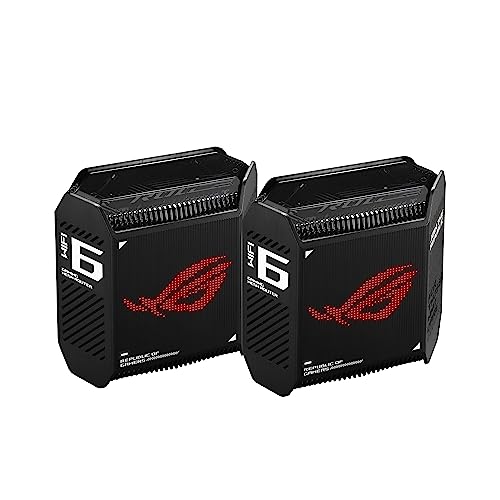
ASUS ROG Rapture GT6 WiFi 6 Mesh (1-pack) — Coverage as a system
The GT6 breaks the pattern of this guide: it is not a router with ambitions but a mesh system with gaming credentials. The listing title describes the two-pack — AX10000 tri-band Wi-Fi 6, coverage up to 5,800 square feet, a 2.5 Gbps port, triple-level game acceleration, the UNII 4 band and free lifetime internet security — while the pick here is the 1-pack, a single node. That distinction governs everything honest that can be said: one node is a capable tri-band gaming router for a modest floor plan; the system’s coverage story only begins when the second node joins, whether bought as the pair or added later.
As a system, the GT6’s argument is placement. Nodes live in the rooms where people play rather than where the line enters, the dedicated tri-band architecture gives backhaul its own road, and triple-level game acceleration is ASUS’s mesh-aware prioritisation. Houses that defeat single routers — long, tall, stone-walled, or simply with a gaming teenager at the far end of an L-shape — are its natural habitat. The costs are the mesh costs: more hardware to place and power, per-node ports far leaner than the flagships’, and a total outlay that climbs with every added node. Start with the pack size your floor plan actually needs; the system’s mercy is that under-buying can be corrected later.
- System: Wi-Fi 6 gaming mesh, AX10000 tri-band — this pick is the 1-pack
- Coverage: up to 5,800 square feet for the two-pack configuration described in the title
- Wired: 2.5 Gbps port stated
- Gaming: triple-level game acceleration
- Security: free lifetime internet security, per the title
- Band note: UNII 4 support stated in the title
Strengths
- Nodes put radios in the rooms where games are actually played.
- Expandable by design — a second node corrects an under-bought first step.
- Lifetime security and game acceleration carry across the whole system.
Trade-offs
- The headline coverage belongs to the two-pack, not to this single node.
- Per-node wired ports cannot rival the Strix’s eight or the flagships’ 10G pairs.
- Total system cost grows with each room that demands its own node.
Best for: a house whose far rooms defeat any single router, starting with one node and growing.
Not suited for: a compact flat, where a mesh system’s second node would have nothing to do.
Measure your dead zones first, then look at the GT6 listing on Amazon to choose between the single node and the pair.

ASUS TUF Gaming BE6500 WiFi 7 Router — The disciplined Wi-Fi 7
The TUF BE6500 is the pick for buyers who want Wi-Fi 7’s actual mechanics without flagship theatre. Its title promises dual-band Wi-Fi 7 up to 6.5 Gbps aggregate, a game accelerator, Multi-Link Operation by name, four 2.5GbE ports, mesh and VPN compatibility, and subscription-free network security. Read that list slowly: MLO — the latency feature — is present; four multi-gig ports cover a PC, a console, a spare and a node; the security carries no subscription. What is absent is equally clear: no 6GHz band in a dual-band design, and no 10G ports.
Build character separates TUF from ROG in ways the title hints at rather than states. The TUF brand is ASUS’s durability line across its whole catalogue, and while this review will not invent drop tests the listing never claims, the positioning is consistent: fewer decorative elements, a plainer shell, engineering budget spent on the port count and the radio rather than on presence. Buyers who keep networking hardware for six or seven years tend to prefer exactly that allocation, and the subscription-free security extends the same philosophy to running costs — the router’s lifetime bill is its purchase price and its electricity.
The dual-band question deserves a straight answer. Without 6GHz, the BE6500’s MLO works across 2.4 and 5GHz, which still smooths spikes and still benefits from Wi-Fi 7’s wider 5GHz channels, but it cannot offer the empty-motorway experience of a 6GHz link in a dense block. In a house with modest neighbouring networks, that compromise is barely visible; in a tower block at 8 p.m., it is the whole ballgame, and the tri-band picks above earn their premium. For the large middle — suburban homes, gigabit plans, two or three wired machines — the TUF’s discipline looks less like compromise and more like aim.
- Wireless: Wi-Fi 7, dual-band, up to 6.5 Gbps aggregate
- Latency: Multi-Link Operation named in the title; game accelerator included
- Wired: four 2.5GbE ports
- Compatibility: mesh and VPN compatible, per the title
- Security: subscription-free network security
- 6GHz band: none — dual-band means 2.4 and 5GHz only
Strengths
- MLO and Wi-Fi 7 mechanics at a tier below the flagships’ excess.
- Four 2.5GbE ports wire the realistic gaming household completely.
- Subscription-free security keeps the running cost at zero after purchase.
Trade-offs
- No 6GHz band to escape into when 5GHz air is contested.
- No 10G port for the single fastest wired device or line.
- Dual-band airtime is shared by backhaul if a mesh node joins wirelessly.
Best for: a house on a gigabit-class plan wanting Wi-Fi 7 latency tools and four fast ports.
Not suited for: a dense apartment block where the 6GHz band is the main reason to upgrade.
Pragmatists can review the TUF BE6500 on Amazon — it is the shortest feature list here and, for many homes, the sufficient one.
How Does the 6GHz Band Change the Evening Rush?
To understand why tri-band Wi-Fi 7 models command their tier, stand in a dense apartment block at eight in the evening and imagine the air. Every neighbour’s router is awake, every television is streaming, and the 5GHz band — the workhorse band of the last decade — is a shared road at rush hour. The 6GHz band, available to the Wi-Fi 7 tri-band and quad-band picks here, is the newly opened parallel road: wider channels, far fewer travellers, and none of the legacy devices that slow mixed traffic. A gaming laptop or current console near the router on 6GHz experiences something close to a private lane.
The band’s weakness is physics. Higher frequencies fade faster through walls and floors, so 6GHz rewards proximity and punishes distance more sharply than 5GHz does. This is why the flagships pair it with strong 5GHz radios rather than replacing them, and why the GT6 mesh philosophy — radios placed in the rooms — complements the band so well in larger homes. It is also why the dual-band TUF, lacking 6GHz entirely, is a house pick rather than an apartment pick: where there are few neighbours, there is little traffic to escape from, and its 5GHz road runs nearly empty.
Practical consequence: if your gaming seat is in the same room as the router or one wall away, a tri-band Wi-Fi 7 flagship transforms the wireless experience. If your seat is two floors away, spend the same money on mesh nodes or a cable run, because no band rescues a signal that arrives as a whisper. Players routinely invert this logic, buying the widest radio for the longest distance, and then review the router harshly for obeying physics.
What Happens When the Whole Household Plays at Once?
Single-player latency tests flatter every router in this guide. The real examination begins when two people game in different rooms, a third streams a series in the fourth room, and the house’s background fleet — phones backing up, a console downloading tomorrow’s release, smart speakers idling — all share the same gateway. This is where aggregate design choices stop being specifications and start being outcomes: the extra band on the BE98 Pro gives the second player’s traffic somewhere to live; the Strix’s eight wired ports remove three devices from the air entirely; the GT6’s nodes shorten every wireless hop; Game Boost arbitrates what remains.
Processor headroom matters in this scenario too, quietly. Prioritisation, mesh management, VPN tunnels and security inspection all draw on the router’s CPU, and a gateway at its computational ceiling adds delay exactly when the household is busiest. The GT-AX11000’s title is the only one here to print its processor — a 1.8GHz quad-core — which is a useful reminder that the others’ silence on the subject is a documentation question, not evidence of weakness or strength. What a buyer can control is load: wire the fixed machines, schedule the big downloads for the small hours, and let the router arbitrate a fair fight instead of an impossible one.
There is also a social configuration worth making explicit. Most ASUS gaming routers let prioritisation favour one device class or one named machine. In a shared house, agree whose ranked evening takes precedence before the argument happens mid-match; the router will enforce the treaty without emotion, which is more than can be said for the participants.
How Long Will a Gaming Router Bought Today Stay Sensible?
Routers age along three clocks. The radio clock ticks when new standards and bands arrive — Wi-Fi 7’s current status means the BE-series picks have years of relevance, while the Wi-Fi 6 pair are already one generation back, albeit a generation most households’ devices still speak. The port clock ticks when internet plans and local storage outgrow wired speeds, which is why 2.5G provision has become this guide’s dividing line and 10G its insurance policy. The support clock ticks in firmware: security updates and feature support continue for a platform while the maker maintains it, and mature platforms like the GT-AX11000 trade newness for a long, stabilised update history.
A sensible buying rule follows. Match the radio generation to the devices you own or will own within two years, match the ports to the fastest plan you might plausibly buy within four, and prefer — at equal money — the model whose platform is still receiving active development. On that rule the Wi-Fi 7 picks justify themselves for most buyers despite higher prices, the TUF most efficiently of all, while the Wi-Fi 6 pair remain correct answers for the specific households their reviews describe: the wired veteran’s home and the mesh-shaped house.
Ports, Bands and Radios: Reading the ASUS Gaming Line-Up at a Glance
| Pick | Generation | Bands | Fastest wired provision |
|---|---|---|---|
| ROG Rapture GT-BE98 Pro | Wi-Fi 7 | Quad-band | 2× 10G plus 4× 2.5G |
| ROG Strix GS-BE12000 | Wi-Fi 7 | Tri-band | 8× 2.5G |
| ROG Rapture GT-BE19000AI | Wi-Fi 7 | Tri-band | 2× 10G plus 4× 2.5G |
| ROG Rapture GT-AX11000 | Wi-Fi 6 | Tri-band | 1× 2.5G |
| ROG Rapture GT6 (1-pack) | Wi-Fi 6 mesh | Tri-band | 2.5 Gbps port per system spec |
| TUF Gaming BE6500 | Wi-Fi 7 | Dual-band | 4× 2.5GbE |
The table’s story is generational. Wi-Fi 7 occupies both ends of the range — the maximalist flagships and the disciplined TUF — while Wi-Fi 6 survives in the two picks whose value is structural: the veteran with its 2.5G port and the mesh system with its nodes. Wired provision turns out to be the sharpest divider of all, sharper than radio class: the difference between one 2.5G port and eight, or between 2.5G and 10G, decides which households a router can serve long after the radio generation has stopped mattering. Buyers also building a tunnelled travel or remote-work setup alongside the gaming rig may find the VPN-centred models in best flashed vpn routers a revealing contrast in priorities.
How Should You Set Up an ASUS Gaming Router for the Lowest Latency?
Start with geography. Place the router high, central and unhidden — not in a cabinet, not behind the television’s metal back, not on the floor behind the sofa. Every obstacle between radio and player is paid for in retransmissions, and retransmissions are latency’s raw material. Then wire ruthlessly: the PC, the main console and anything fixed that plays or streams get cables, full stop. On the flagships, give the fastest wired device the 10G or first 2.5G port and let Wi-Fi serve only what genuinely moves around the house.
Channel selection deserves its own minute of the setup hour. Automatic channel choice is convenient and often adequate in a detached house; in shared air it can park your network on the same crowded channel as three neighbours because it surveyed once at installation, at noon. Re-survey on a weekday evening, and where the router allows manual assignment, take the emptiest channel your survey finds rather than the traditional default everyone else’s installer also chose. On 6GHz the problem mostly solves itself — the band’s width and emptiness leave room for all — which is one more reason the tri-band picks feel calm in apartment blocks.
In the settings, enable Game Boost and confirm your gaming devices are the ones being prioritised — automation misidentifies hardware often enough that five minutes of verification is the highest-value configuration time you will spend. Choose the 6GHz band for nearby Wi-Fi 7 devices and 5GHz for distance, since 6GHz trades range for emptiness. If you add a mesh node later, wire it if any cable path exists; a wired backhaul returns the node’s radios entirely to serving players. Finally, update the firmware before judging performance, and re-test at the hour you actually play — a network tuned at noon and tested at midnight has been tuned for a household that does not exist.
What Mistakes Do Buyers Make With Gaming Routers?
Chasing the aggregate number leads the list. The Gbps figure on a gaming router’s box sums every band’s theoretical ceiling; your console will use one band, at real-world rates governed by walls and distance. Buyers who pay for 30Gbps-class radios to serve a 300-megabit internet plan through two brick walls have purchased a specification, not an experience. The second mistake is placement by furniture rather than by signal — hiding a flagship in a media cabinet to keep the room tidy, then blaming the standard. The third is forgetting the internet plan itself: no router here can make a congested budget connection feel like fibre at peak hour, and the honest fix order is plan, placement, wiring, and only then hardware.
Remember, too, what a gaming router cannot do for a slow plan. It will make a modest connection behave at its best — stable, fairly shared, prioritised — but the ceiling stands, and money spent upgrading the connection outperforms money spent on hardware until the plan is adequate. Players on genuinely slow lines should sequence the spending honestly: connection first, then placement and wiring, then the router that decides how much of the improved plan reaches the gaming seat.
A subtler mistake is buying a single mighty router for a house that needed a system, or a mesh system for a flat that needed a router. Both errors come from shopping by reputation instead of by floor plan. Draw the home, mark the dead spots, mark where the line enters — the drawing chooses between the GT6 and the flagships more reliably than any review can. And when the household’s real bottleneck turns out to be the wired core rather than the radios, the plain workhorses in best gigabit wired routers deserve a look before another gaming flagship does.
What Should Competitive Players Check That Casual Players Can Skip?
Serious ranked play adds three checks to the ordinary buyer’s list. The first is jitter under load, not average ping at idle: run your speed and latency checks at the household’s busiest hour, with the evening’s streams running, because a router that holds its nerve then will hold it during a tournament. Every pick here has the prioritisation machinery to help, but only a loaded test tells you whether your particular mix of devices is being recognised and queued correctly.
The second check is the wired path’s weakest link. A 2.5G port feeding a gigabit switch, or a 10G port feeding an old cable run with a damaged pair, silently caps the chain at its slowest element. Competitive players should audit the whole path — router port, cable category, switch, console or PC network adapter — with the same suspicion they apply to the router itself. The flagships’ port wealth is only real when the chain behind it is equally honest.
The third check is the route beyond your walls. Tools in the WTFast family, supported on the GT-AX11000, exist because the path between your provider and a game server can wander through congested exchanges that no home hardware controls. If your in-game ping to a distant server is far worse than your line’s local latency suggests, the problem may live in that routing, and the fix is a service or a server region change rather than a router upgrade. Diagnose before you spend: the most expensive router in this guide cannot shorten a badly routed thousand miles.
How Do Streaming and Gaming Share One Router Without a Feud?
Many gaming households are also streaming households — the same connection carries a player’s match and, increasingly, the player’s broadcast of that match, plus the rest of the family’s viewing. Upload is the contested resource: a stream leaving the house consumes the same upstream the game needs for its own packets, and upstream capacity on many home plans is a fraction of downstream. Prioritisation earns its keep here more than anywhere, because the router must protect small, urgent game packets from the stream’s large, patient ones.
Configuration helps in specific ways. Wire the streaming PC, obviously. Give the game priority over the broadcast in the router’s queues when forced to choose, because viewers forgive a brief dip in picture quality more readily than a player forgives a death caused by a stall. Cap the broadcast’s bitrate below the plan’s real upstream ceiling rather than at it, leaving headroom the router’s queues can actually defend. And where the household’s creator ambitions are serious, this is the scenario that justifies the flagships’ port and processor depth over the TUF’s economy — not the game alone, but the game plus its audience.
Why Do Some Players Swear Their Old Router Felt Faster?
It is a common report after an upgrade, and it is rarely imaginary. A new router often arrives with defaults tuned for compatibility rather than performance: wider channel settings that invite interference, prioritisation switched off, a firmware version from the factory shelf, and placement wherever the old box sat — which may have been chosen for the old box’s antennas. The old router, by contrast, had years of accumulated adjustments behind it. The comparison is between a tuned veteran and an untuned newcomer, and it resolves within an evening of configuration.
There is also a subtler mechanism. Newer standards negotiate more conservatively with distant or legacy devices, and a Wi-Fi 7 router serving an ageing console at the far end of the house may settle on robust, slower link rates where the old router gambled on faster ones and retransmitted quietly. The counters that matter — in-game latency stability at your actual seat, at your actual playing hour — improve with the new hardware even when a speed test in the doorway flatters the old. Judge any pick here by a week of evenings, not by the first hour, and keep the old router until that week is done; retreat, again, is a legitimate strategy.
If the week genuinely disappoints, work the variables in order before concluding the hardware is wrong: firmware first, placement second, band assignment third, prioritisation fourth, and only then the box itself. Most “slow flagship” stories end at one of the first four steps, which is precisely why this guide spends as many words on geography and queues as on radios.
Final Recommendation
Let the building and the cable census decide. A wired-everything household in a large home takes the GT-BE98 Pro for its fourth band and twin 10G ports, or the GT-BE19000AI in the same spirit with a tri-band shape; a console corner that can wire eight devices takes the Strix GS-BE12000 and never thinks about switches again. A house with dead far rooms starts with the GT6 and grows node by node. The gigabit-plan pragmatist is genuinely well served by the TUF BE6500’s MLO and four fast ports, and the GT-AX11000 remains the thinking buyer’s veteran while its 2.5G port still outruns the plan feeding it. For the single most complete answer to the best gaming routers asus question — the one we would place at the centre of a serious gaming home — the GT-BE98 Pro’s combination of quad-band air, port wealth and mesh headroom earns the nod, with the caveat that its talents only pay in a home built to use them.
Whichever name survives your floor plan, resist judging it on installation night. Give the network a week of real evenings, matches, streams, downloads and arguments included, and keep a short note of when any stall happened and what else the house was doing at that moment. Patterns in that note are diagnostic gold: stalls coinciding with a particular device waking point to prioritisation, stalls in one room point to geography, and stalls at one hour point to the plan itself. A router tuned against a week of evidence stays tuned for years, while one tuned against first impressions gets replaced by another judged the same hasty way.
And a final note on households with two gaming generations under one roof: assign the newest devices to the newest bands deliberately rather than letting everything pile onto whichever signal looks strongest. Current phones and laptops belong on 6GHz near the router, older consoles and smart televisions are content on 5GHz, and the slow Internet-of-things fleet should be swept onto 2.4GHz where its chatter cannot interrupt anyone. Ten minutes of assignment at setup saves the prioritisation engine from arbitrating fights that need never happen.
Frequently Asked Questions
Is Wi-Fi 7 worth it for gaming if my console is wired?
Partly. A wired console ignores the radios entirely, so your gain comes from the router’s ports, processor and prioritisation — where the flagships still earn their keep — plus Wi-Fi 7 service for everything else in the house. If every gaming device is wired and the plan is gigabit-class, the TUF BE6500 or even the GT-AX11000 covers the job without flagship money.
What does Game Boost actually change?
It prioritises recognised gaming traffic over the household’s background flows when the network is busy. On an idle network it does nothing measurable; at prime time, with streams and uploads competing, it is the difference between your packets queueing behind a photo backup and jumping the queue. Verify your devices are correctly identified in the router’s interface after enabling it.
Can these routers work with my existing modem?
Yes — they connect to the modem or provider gateway by Ethernet and run the home network behind it. Where the provider’s box also routes, putting it in a pass-through or bridge arrangement avoids double layers; your provider’s help pages describe the setting for their hardware. The router choice itself is independent of which provider supplied the line.
How far will the flagship coverage figures really reach?
Treat the 3,300 and 3,500 figures as open-plan manufacturer estimates in square feet for comparing models, not as promises for your walls. Brick, concrete, foil insulation and metalwork all tax range heavily. In practice a centrally placed flagship covers most single floors comfortably; multi-floor or elongated homes should budget for the mesh route from the start.
Should I buy the GT6 as a single node or the pair?
Buy the pair when you already know a far room is dead — the title’s 5,800-square-foot coverage describes that two-pack system. Buy the single node when one strong tri-band router might suffice and your floor plan is borderline; the system’s design lets a second node join later without replacing anything.
Do I need a 10G internet plan to justify a 10G port?
No. A 10G port also serves local traffic — a network drive delivering game captures, a PC and server talking at full tilt — and it future-proofs the router against the plan upgrades of the next several years. But if neither local fast storage nor a faster plan is plausible in your home, 2.5G provision, as on the Strix or TUF, is the proportionate choice.
Related Guides
One closing piece of housekeeping applies whichever name you choose: keep the packaging and the old router for the first fortnight, photograph the cable layout you settle on, and save the working configuration file somewhere that is not the router itself. Gaming networks accumulate custom settings — port forwards, priority rules, band assignments — faster than any other home network, and the household that can restore its tuned state in ten minutes treats a hardware swap as maintenance, while the household that cannot treats it as a bereavement.
Three adjacent reads for three adjacent problems: the office-first view in best business class routers, routers chosen for their tunnels in best flashed vpn routers, and the wired core considered alone in best gigabit wired routers.
Related guides
- Best 17 Laptops: The Complete Tier-by-Tier Guide to Big-Screen Machines
- Best 4K Monitors for MacBook Pro: USB-C Panels With Real Power Delivery
- Best Routers for Remote Work: VPN Gateways, Travel Routers and Home Wi-Fi That Holds a Call
- Best Sim Racing Monitors: Ultrawide Cockpits From 34-Inch OLED Speed to the 49-Inch Wrap


