What's inside
- Key Takeaways
- Quick Picks
- How We Chose These Picks
- What Does Rugged Actually Protect Against — and What Does It Not?
- Comparing the Six Travel Drives Side by Side
- What Is the Right Nightly Routine for Travel Storage?
- What Mistakes Do Travellers Make With Their Drives?
- How Should a Travel Drive Be Packed, Powered and Protected En Route?
- What Happens to a Drive at Altitude, in Cold and in Heat?
- How Do You Hand Over, Ship or Store Travel Drives After the Trip?
- Which Drive for Which Journey? Four Trips, Four Answers
- How Does Travel Storage Fit the Archive Waiting at Home?
- What Should You Test Before the Drive Ever Leaves Home?
- Final Recommendation
- Frequently Asked Questions
- Related Guides
As an Amazon Associate I earn from qualifying purchases. This post may contain affiliate links at no extra cost to you.
widgetverdict.com is reader-supported. When you buy through links on our site, we may earn an affiliate commission.
Where to buy: all six drives below link to their Amazon listings; order early enough that the drive’s first job is a calm backup at home, not a midnight format in a departure lounge.
The best hard drives for travel are bought for a day their owners hope never happens — the day the laptop stays in a taxi, the camera bag takes the long way down a trail, or a hotel room’s contents rearrange themselves. Travel storage lives a harder physical life than any other category in this cluster: it is dropped, rained on, X-rayed, frozen in cargo holds and baked in parked cars, usually while carrying the only copy of photographs that cannot be taken again. That is why four of the six picks below wear armour of one kind or another, and why the two that do not are honest about being cabin-and-desk drives rather than expedition gear.
Every pick is also, deliberately, a spinning drive. Solid-state travel storage exists and shrugs off drops beautifully, but its cost per terabyte still rations exactly the thing travel produces most — data — and this guide’s readers told the category what they need by searching for hard drives: capacity that lets the whole journey come home. The rugged enclosures below exist to close the durability gap honestly, and the routine sections exist to close the rest.
The shortlist divides by journey. LaCie’s Rugged Mini is the veteran of the category, the orange-bumpered drive that defined travel storage. SanDisk Professional’s G-Drive ArmorATD appears at 5TB and 6TB for travellers whose libraries are measured in RAW files and video. Silicon Power’s Armor A60 covers the shockproof brief at 2TB and 5TB. And Maxone’s slim 500GB drive closes the list as the light, simple option for travellers whose cargo is documents and a photo stream rather than a production archive. Every pick is bus-powered and portable; the differences are capacity, armour and temperament.
Key Takeaways
- Travel drives earn their place on physical survival first and capacity second.
- LaCie Rugged Mini and SanDisk ArmorATD are the armoured picks; the ArmorATD reaches 6TB.
- Silicon Power’s Armor A60 brings shockproofing to 2TB and 5TB budgets of space.
- A travel drive should hold the trip’s second copy, never the trip’s only copy.
- Maxone’s 500GB slim drive suits document-and-photo travellers who pack light.
- The routine matters as much as the ruggedness: copy nightly, separate the drive from the laptop bag.
Quick Picks
| Pick | Badge | Why it earns its place |
|---|---|---|
| LaCie Rugged Mini 4TB | The category veteran | The orange-bumpered 4TB classic for PC, Mac, iPad and iPhone, with Data Rescue Service in its listing. |
| SanDisk Professional G-Drive ArmorATD 5TB | The pro field drive | Rugged, durable 5TB over USB-C for photographers and video travellers. |
| SanDisk Professional G-Drive ArmorATD 6TB | The big field archive | The ArmorATD formula at 6TB for trips that generate terabytes. |
| Silicon Power Armor A60 2TB | The shockproof two | Armor A60 shockproofing over USB 3.1 Gen1 for PC, Mac, Xbox and PS4. |
| Silicon Power Armor A60 5TB | The shockproof five | The A60’s rugged build at 5TB over USB 3.0 for long trips and big libraries. |
| Maxone Ultra Slim 500GB | The light document drive | A charcoal-grey slim 500GB over USB 3.0 for travellers packing documents, not productions. |
How We Chose These Picks
Travel rewrites the priorities of portable storage. At a desk, a drive’s enemies are time and capacity; on the road they are gravity, weather, vibration and opportunity — the bag dropped on tarmac, the downpour at the trailhead, the long bus ride’s rumble, the unattended hotel room. We therefore weighted stated physical protection heavily: the Rugged lines and Armor models in this guide headline drop, shock, dust or rain resistance in their listings, and those claims, from makers who build their reputations on them, anchored the list.
We also weighed the listings’ honesty about their own category. The rugged picks state resistances in plain words; the slim pick states dimensions and compatibility and claims nothing it does not attempt; the professional line names its model codes like equipment rather than luggage. In a category sold heavily on adventure imagery, that plainness is a quality signal, and drives whose listings promised everything were trusted with nothing.
Capacity came second, and it is trip-shaped rather than archive-shaped. A fortnight of photography in RAW, a season of video, a researcher’s field data — the picks span 2TB to 6TB across the armoured entries so the drive can hold the journey’s whole harvest with the second-copy discipline this guide preaches. The final pick deliberately breaks the pattern: many travellers carry documents and a phone’s photo stream, and for them a slim 500GB drive that vanishes into a jacket pocket serves better than armour they will never test.
We also thought about who carries the drive home. Travel storage is disproportionately bought by the household’s designated rememberer — the person who books, packs and backs up for everyone — and that person’s real requirement is a routine the whole travelling party can sustain without them. The picks favour drives whose operation is obvious to a tired companion: plug in, copy, separate, sleep. Any drive whose protection depended on proprietary rituals the rememberer alone understood would have failed this guide’s quietest and most important test.
Connections stayed simple. USB-C where the listing offers it, USB 3 generations elsewhere, bus power everywhere — a travel drive that needs a wall socket or a dongle has failed the trip before it starts.
What Does Rugged Actually Protect Against — and What Does It Not?
Rugged ratings describe a drive’s chances in the accidents travel specialises in: the fall from a tailgate, the bag swung against a door frame, the drizzle that becomes a storm on the walk back. Bumpers absorb impact energy, sealed and textured shells shed water and grip wet hands, and reinforced internals keep the delicate part — the spinning platter and its heads — isolated from the world’s enthusiasm. For a drive whose cargo is the day’s only copy of a shoot, that engineering is the difference between an anecdote and a catastrophe.
What armour does not protect against is loss and theft, the two statistically larger travel risks, nor does it make the data inside immortal: a rugged drive can still fail electronically, still be left in a rental car, still be confiscated by circumstance. That is why this guide pairs every rugged recommendation with a routine — the drive holds the second copy, the laptop or cards hold the first, and the two travel in different bags. Armour guards the copy; separation guards the data; confusing the two is how travellers lose both the drive and the story.
Insurance thinking helps calibrate how much ruggedness to buy. The question is never whether the drive can survive a fall in the abstract; it is what the fall would cost in the concrete — a hobbyist’s weekend photographs, a client’s wedding, a season of field data that funding will not repeat. As the cost of the cargo rises, the armour budget should rise with it, and the traveller should also rise through this guide’s other doctrines: more copies, wider separation, a recovery service named in the listing. Ruggedness is one layer of a policy, priced against the loss it prevents, and travellers who think of it that way stop asking whether the orange bumper is worth it and start asking which layer they are currently missing.
There is also a comfort dividend that spec sheets omit. A traveller carrying an armoured drive worries less, and worry is a real travel cost: the photographer who trusts the field copy shoots the extra location, the researcher ventures the extra day from base. Ruggedness, bought honestly and paired with routine, purchases peace of mind that behaves like extra itinerary.

LaCie Rugged Mini 4TB — The category veteran
The Rugged Mini is the drive that taught the market what travel storage looks like: a 2.5-inch portable wrapped in that famous orange bumper, listed here at 4TB for PC, Mac, iPad and iPhone, with Data Rescue Service named in the listing. Its longevity in the category is itself evidence — travel gear that disappoints gets replaced by the next season’s travellers, and this design has instead become the default against which newcomers are measured, carried by photographers, field researchers and location crews who replace it, when they replace it, with another one.
Four terabytes suits the classic travel archive: a long trip’s photography with room for the laptop’s backup alongside, or a video traveller’s working set for a single production. The Mini name marks it as the line’s straightforward member — the armour and the capacity without the larger Rugged family’s extra interfaces — which keeps it light enough to be the drive that actually gets packed, the first virtue of any travel tool.
The Data Rescue mention completes the proposition in the way this category respects most: the maker acknowledging, in its own listing, that travel drives meet accidents, and standing a recovery service behind the meeting. Combined with the two-bag routine this guide preaches, the Rugged Mini remains the answer it has been for years — the drive you throw in the bag precisely because throwing is what bags do.
- Size: 4TB
- Form in listing: 2.5-inch portable
- Platforms in listing: PC, Mac, iPad, iPhone
- Service in listing: Data Rescue Service
- Design: Rugged Mini armoured enclosure
Strengths
- The category’s proven design, refined over generations of travellers.
- Four terabytes covers a serious trip’s photography and a laptop backup.
- Rescue service named in the listing backs the armour.
Trade-offs
- The Mini keeps the family’s simpler connection story; check your port needs.
- Video-heavy travellers will fill 4TB faster than photographers do.
- Its fame means the orange bumper is not the discreet option.
There is a social detail worth mentioning: the orange bumper makes this drive findable. In a shared field kit, in a dark venue, in the bottom of a bag at midnight, the Rugged Mini announces itself, and that visibility prevents the small accidents — the drive left on a table, the copy never started because the enclosure could not be located in the clutter — that actually consume travel data. Expedition kit is brightly coloured for a reason, and this drive’s famous finish is expedition logic wearing a brand.
Verdict: the default travel drive for photographers and field workers who want the proven article; only the truly video-burdened need to look further down this list for more terabytes.

SanDisk Professional G-Drive ArmorATD 5TB — The pro field drive
SanDisk Professional builds for the production world’s field kits, and the ArmorATD’s listing reads accordingly: a rugged, durable portable hard drive at 5TB, over USB-C with USB 3.2 Gen 1, model SDPH81G-005T-GBA1D. The ArmorATD name is the promise — an enclosure designed to be knocked about by working travel rather than merely survive a commute — and the Professional badge places it in the kit bags of photographers and videographers whose clients are waiting on the footage.
Five terabytes is the working professional’s trip size. A wedding weekend’s RAW files, a documentary week’s footage with its audio and stills, a commercial shoot’s full harvest with the laptop’s own backup riding along — the drive absorbs a production without the mid-trip purge that endangers exactly the files nobody has reviewed yet. USB-C keeps it native to the current generation of field laptops, and bus power keeps the kit list to one cable.
Choose between this and its 6TB sibling by honest arithmetic about your harvest rate; choose between this and the LaCie by ecosystem affection and which enclosure’s manners you prefer in a bag. What the ArmorATD asks in return is the professional’s discipline it assumes: nightly copies, cards kept separate, and the drive riding in a different bag from the laptop it protects.
- Size: 5TB
- Connection in listing: USB-C, USB 3.2 Gen 1
- Build in listing: rugged, durable portable HDD
- Model code in listing: SDPH81G-005T-GBA1D
Strengths
- Production-grade rugged build with a professional kit pedigree.
- Five terabytes holds a full shoot trip without mid-trip purges.
- Native USB-C suits current field laptops directly.
Trade-offs
- Professional positioning prices above the consumer rugged tier.
- Bulkier than slim drives, as armour always is.
- Its talents are wasted on a documents-only traveller.
Data wrangling is a job title on professional shoots, and this drive is that job’s hardware made simple: one enclosure the wrangler trusts, checked in and out of the kit like a lens. The ArmorATD’s professional line also means its behaviour with the editing world’s laptops and docks is a known quantity on set — no surprises at the end of a shooting day, when the copy absolutely must complete before the cards can be cleared for tomorrow. Reliability of routine, even more than reliability of hardware, is what a production is buying here.
Verdict: the field drive for working photographers and video travellers whose trips generate real terabytes; the 6TB below is the same answer for longer hauls.
SanDisk Professional G-Drive ArmorATD 6TB — The big field archive
The 6TB ArmorATD, model SDPHE1G-006T-GBAND, is the largest armoured drive in this guide, and it exists for the trips that break smaller drives’ discipline: the month-long documentary, the expedition’s data wrangling, the research season whose harvest nobody can reshoot. Its listing repeats the formula — rugged, durable, USB-C with USB 3.2 Gen 1 — at the capacity where a single drive can be the trip’s whole second copy, which simplifies the nightly routine to one enclosure, one cable, one bag separation to maintain.
That consolidation cuts both ways, and the review should say so. A 6TB second copy is a magnificent thing until the traveller imagines it as the only copy, at which point it becomes the largest single point of failure in the expedition. The drive’s size argues for the mature version of the routine: cards or laptop hold the first copy, this holds the second, and a slim third copy of the irreplaceable subset — the interview audio, the once-only event — rides in a different pocket again. Armour plus arithmetic is the whole doctrine.
For travellers whose work justifies it, though, nothing else in this list substitutes. The per-trip capacity postpones the multi-drive juggling that introduces its own risks — mislabelled drives, a copy left half-finished — and the ArmorATD build means the consolidation travels in the enclosure designed for the journey. Expeditions are planned in margins, and six terabytes is a margin.
- Size: 6TB
- Connection in listing: USB-C, USB 3.2 Gen 1
- Build in listing: rugged, durable portable HDD
- Model code in listing: SDPHE1G-006T-GBAND
Strengths
- The guide’s largest armoured capacity for long productions.
- One enclosure simplifies the nightly copy routine.
- Professional build and native USB-C throughout.
Trade-offs
- Concentrates the second copy in one enclosure; routine must compensate.
- The heaviest commitment here in size and spend.
- Short trips will never touch its depth.
Expedition leaders should note the planning gift this capacity gives: the storage question closes. Trips fail logistically at their open questions — the resupply that might not come, the road that might be closed — and a drive that cannot fill up removes one entire category of nightly arithmetic from a tired team’s evenings. What remains is the simple discipline of copying and separating, which is sustainable for months in a way that capacity triage never is. Six terabytes is, in this sense, less a specification than a decision to stop negotiating with the harvest.
Verdict: the expedition drive — buy it when the trip is long, the harvest is huge and the reshoot is impossible, and run the two-bag discipline like the professional it assumes you are.
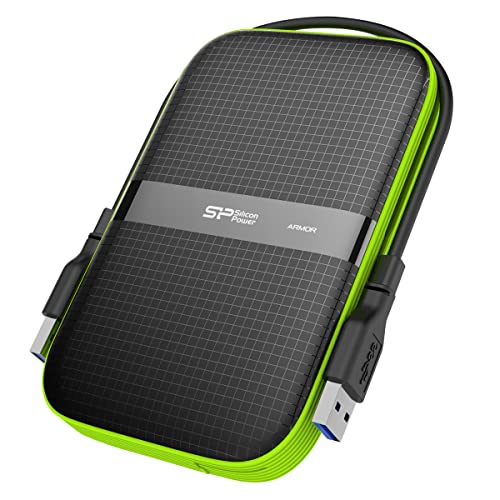
Silicon Power Armor A60 2TB — The shockproof two
Silicon Power’s Armor A60 is the rugged shelf’s value engineer: a shockproof portable enclosure, listed at 2TB in black with USB 3.1 Gen1 connection for PC, Mac, Xbox and PS4. The A60’s design language is grip and bumpers — a textured, shock-absorbing shell built for bags and desks that are not gentle — and at 2TB it addresses the traveller whose harvest is photographs and documents rather than cinema, but whose journeys are just as physical as the professional’s.
The console compatibility in its listing is a travel feature in disguise. A drive that serves the laptop on the road and the games machine at home earns its shelf space twice, and for younger travellers — students abroad, seasonal workers, anyone whose life fits in two bags — that doubling matters. Two terabytes holds the semester’s coursework, the photo stream and a respectable games library in rotation, provided the formatting conversation happens once, deliberately, when the drive changes jobs.
Set expectations by tier and the A60 pleases. Its listing promises shockproofing and connection, not recovery services or professional ecosystems, so the owner’s routine carries the protection plan — as, honestly, it always does. Within that contract, this is the rugged pick for travellers who need armour on a slimmer capacity and a slimmer commitment.
- Size: 2TB
- Build in listing: Armor A60 shockproof
- Connection in listing: USB 3.1 Gen1
- Compatibility in listing: PC, Mac, Xbox, PS4
- Finish in listing: black
Strengths
- Real shockproofing at the mainstream capacity.
- Console compatibility doubles its household usefulness.
- Grippy, bag-friendly build that shrugs at daily knocks.
Trade-offs
- Two terabytes is a trip drive, not an archive.
- No recovery service is headlined in the listing.
- USB generation trails the USB-C natives for newer laptops’ ports.
Backpackers form this drive’s quiet constituency. Two terabytes of shockproofed storage in a rucksack that crosses borders by bus absorbs the journey’s physical insults — the bag dropped from a luggage rack, the monsoon that found the hostel roof wanting — at a capacity that holds a season of photographs and the documents of a life in transit. It will not serve a film production, and it does not apply for that job; it serves the traveller whose archive is personal, growing and carried everywhere, which is a description of most of the people reading this guide.
Verdict: the shockproof pick for students, gamers and photo travellers whose journeys are rough but whose harvests are moderate; video producers should take the 5TB sibling below.
Silicon Power Armor A60 5TB — The shockproof five
The A60 at 5TB keeps the shockproof enclosure and stretches the capacity into production territory, with USB 3.0 connection for PC, Mac, Xbox and PS4 in its listing. It is the list’s bridge product: travellers who want the ArmorATD class of capacity and genuine ruggedness, in Silicon Power’s value-tier interpretation, will find this the natural comparison — same job description, different maker’s execution and ecosystem.
Five terabytes of shockproofed storage changes a long trip’s logistics. The drive can be the second copy for a month of photography, the media vault for a campervan’s entertainment shelf, and the games library’s overflow in the off-season, rotating roles as the year turns. That versatility is the A60 family’s quiet strength: the enclosure does not care which of its owner’s lives it is protecting this month, and its build suits all of them equally.
The connection generation is the honest caveat. USB 3.0 serves spinning drives perfectly well — the platter, not the port, sets the pace — but a traveller whose laptop speaks only USB-C should plan the cable or adapter in advance rather than discovering the mismatch at a trailhead. With that single preparation made, the A60 5TB is the rugged capacity pick for travellers who count value as a feature.
- Size: 5TB
- Build in listing: Armor A60 shockproof
- Connection in listing: USB 3.0
- Compatibility in listing: PC, Mac, Xbox, PS4
- Finish in listing: black
Strengths
- Production-class capacity inside a shockproof shell.
- Versatile across laptop, console and media duties.
- Value-tier route into the rugged 5TB class.
Trade-offs
- USB 3.0 connection needs a plan for USB-C-only laptops.
- No professional recovery ecosystem is promised in the listing.
- Armour adds bulk beside the slim drives.
Road-trip households discover a second talent in this drive: it is the campervan and cabin drive, the one that lives in the vehicle for a season holding films for rainy evenings, the photo archive growing by the day, and the laptop backups of everyone aboard. Shockproofing suits vehicular life precisely — vibration is the constant, drops are the punctuation — and a drive built for bags turns out to be built for glove boxes and seat-back pockets too. Seasonal travellers get a media vault and a backup target in a single enclosure, which is efficient packing by any measure.
Verdict: the rugged five for travellers who want ArmorATD-scale capacity on Silicon Power’s value terms; pack the right cable and it will not ask for anything else.

Maxone Ultra Slim 500GB — The light document drive
Not every traveller hauls a production. The Maxone’s listing is a study in lightness: an ultra-slim portable at 500GB in charcoal grey, USB 3.0, compatible with PC and laptop — the drive for the traveller whose cargo is a documents folder, a presentation deck, a photo stream and the laptop’s essential backup, and whose first packing priority is that the drive be forgotten until needed. It has no armour to speak of, and this guide will not pretend otherwise; its protection is its size, because the drive that lives in a jacket pocket or a document wallet travels in the safest neighbourhood a bag offers — against its owner’s body, in the compartment nothing heavy shares.
Five hundred gigabytes defines its honest itinerary. It is the conference drive, the research-trip drive, the drive a writer carries so the manuscript exists twice on every train. It is not a video archive, not a RAW library, not a games shelf, and buyers who need those should be reading the armoured entries above with their wallets open. Judged on its own brief — disappear into the luggage, hold the documents, be there at the presentation — it is exactly sized.
Its simplicity is also its service model: no software promises, no ecosystem, just storage that presents itself to the laptop and waits. Travellers who maintain their real archive at home and need the road copy to be light, cheap to replace and impossible to resent carrying will understand this drive immediately. It is the list’s reminder that travel storage is a spectrum, and the light end deserves a proper product too.
- Size: 500GB
- Form in listing: ultra slim portable HDD
- Connection in listing: USB 3.0
- Compatibility in listing: PC, laptop
- Finish in listing: charcoal grey
Strengths
- The lightest, slimmest carry in this guide.
- Perfectly sized for documents, decks and photo streams.
- Simple storage with no ecosystem overhead.
Trade-offs
- No armour; protection is placement, not engineering.
- 500GB excludes media-heavy travel outright.
- The listing names no recovery service and no locking features.
Journalists on assignment are this drive’s natural owners, though they rarely think of themselves as a storage market. The interview recordings, the notes, the documents photographed in archives — a working trip’s evidence fits easily in 500GB, and the slim drive rides in the same wallet as the press credentials, backed up nightly to the laptop and travelling separately from it by day. For cargo whose value is entirely in its content and not at all in its volume, lightness is not a compromise; it is the correct engineering, and this drive is its representative in the list.
Verdict: the jacket-pocket drive for document travellers and writers on trains; if your trip produces photographs by the thousand, start at the top of this list instead.
Comparing the Six Travel Drives Side by Side
| Drive | Capacity | Protection story | Connection | Trip it fits |
|---|---|---|---|---|
| LaCie Rugged Mini | 4TB | Rugged line armour, Rescue named | Portable standard | Photography trips, field work |
| ArmorATD 5TB | 5TB | Rugged, durable pro build | USB-C | Working shoots |
| ArmorATD 6TB | 6TB | Rugged, durable pro build | USB-C | Expeditions, long productions |
| Armor A60 2TB | 2TB | Shockproof shell | USB 3.1 Gen1 | Students, gamers, photo trips |
| Armor A60 5TB | 5TB | Shockproof shell | USB 3.0 | Long trips, media vaults |
| Maxone Ultra Slim | 500GB | Slim placement, no armour | USB 3.0 | Document and conference travel |
What Is the Right Nightly Routine for Travel Storage?
The routine that professionals actually keep has four beats, and none of them is optional. Copy nightly: the day’s cards or files move to the travel drive every evening, because a day is the largest unit of work a traveller should be able to lose. Verify briefly: open a sample of the copied files, because a copy that has never been opened is a rumour. Separate physically: the drive sleeps in a different bag from the laptop and cards, so one theft or one lost bag cannot take both copies. And label relentlessly: drive, cable and card wallets marked with the trip and the dates, because the exhausted traveller at midnight is not a reliable narrator of which enclosure holds what.
Photographers should adapt the beats to the card workflow specifically: cards are never formatted in the field until the travel drive’s copy has been verified and, on serious work, until a second copy exists somewhere — the card itself is a copy until that moment, and treating it as scratch space early is the field’s most expensive habit. The drive’s role in that system is to be the vault that lets cards stay honest; a drive with room for the whole trip’s cards, unformatted, is a drive that has removed the temptation entirely, which is one more argument for the capacities at the top of this list.
Two refinements separate veterans from beginners. The first is the mid-trip third copy: on long journeys, the irreplaceable subset — the interview recordings, the summit day, the wedding itself — gets copied to a slim drive or uploaded when bandwidth allows, and travels home in a different pocket or a colleague’s bag. The second is the homecoming protocol: the travel drive is not wiped at the airport of the mind; it is copied into the home archive, verified there, and only then returned to the drawer, because more travel data dies in the week’s enthusiastic cleanup than on any trail.
What Mistakes Do Travellers Make With Their Drives?
The canonical mistake is the single copy: the drive that holds the trip’s only version of anything, riding in the same bag as the laptop that made it, doubling the loss in every scenario that matters. Its twin is the postponed copy — three days of shooting riding on memory cards because the evenings were busy — which converts one accident into three days of grief. A third is formatting the travel drive in a departure-week panic and discovering, at the destination, an incompatibility with the machine it must serve; format and test at home, in calm, before every serious trip.
A further mistake is buying the drive at the airport of the schedule — the night before departure, unformatted, untested, its first copy attempted in a departure lounge. Travel gear earns trust through rehearsal, and a drive bought late has had none. The same traveller would not break in boots on the first day of a trek; the drive deserves the boot treatment, worn around the house until its manners are known, its cable is packed by habit and its routine has already happened successfully a dozen times.
Travellers also underrate the mundane hazards. The drive left on a sunny dashboard, the enclosure loose among keys and tools, the cable yanked rather than ejected in an airport rush — none of these feels like a data-loss event, and together they account for more lost trips than dramatic theft ever will. Travel storage fails at the margins of tired evenings, which is exactly why the routine, and the armour, exist.
How Should a Travel Drive Be Packed, Powered and Protected En Route?
Packing is a discipline of neighbourhoods. The travel drive belongs in the cabin bag, in a padded pouch, in a compartment it does not share with liquids, loose metal or the trip’s snacks — the small dignities that keep enclosures alive. Its cable coils beside it, never wrapped tightly around the enclosure, because cable strain at the connector is the quiet killer of portable drives and the easiest death to prevent. The laptop rides in a different bag or, at minimum, a different compartment with its own padding, so the separation doctrine survives contact with an actual suitcase.
Security lines and handling deserve one practical note: drives pass through scanners constantly and should simply be treated as the electronics they are, kept accessible in the cabin bag rather than buried, and never surrendered to checked baggage to save thirty seconds at a checkpoint. The traveller who keeps the drive in hand, in its pouch, through every transition of the journey has eliminated the largest single category of travel loss — the separation that nobody noticed until the destination.
Power en route is simpler than travellers fear. Every drive in this guide runs from the laptop’s port, so the nightly copy needs no socket diplomacy in foreign hotel rooms; a laptop charging is a backup charging station. What does deserve planning is the copy’s timing against the laptop’s battery on off-grid legs — boats, camps, long trains — where the evening copy should happen while power exists rather than at the battery’s last percent. The routine bends to the journey; it should never be cancelled by it.
Protection includes the digital kind, adapted for the road. A drive carrying client work or personal records should travel locked or encrypted, set up at home where passwords can be recorded properly, because a lost drive with a lock is a claim form and a lost drive without one is a disclosure. Add the traveller’s oldest trick — a label with a phone number on the enclosure — and you have done more for the drive’s safe return than any feature in any listing: most lost property is lost to anonymity, not to malice.
What Happens to a Drive at Altitude, in Cold and in Heat?
Travel exposes storage to climates its desk life never meets, and the physics are worth a traveller’s minute. Spinning drives are specified for operating ranges that ordinary journeys respect, but a cargo hold’s cold soak, a dashboard’s solar oven and a mountain lodge’s unheated night all push at the edges. The practical responses are habits rather than equipment: let a cold drive warm to room temperature before spinning it up, keep the working drive out of direct sun and parked-car interiors, and treat a drive that has endured an extreme as a copy-first device when it gets home — read its contents into the archive promptly, then let it rest.
Condensation is the traveller’s subtlest enemy, arriving when cold gear meets warm humid air at a destination. The field photographer’s countermeasure — seal the gear in a bag before coming indoors, let it warm slowly — protects drives exactly as it protects lenses, and it costs nothing but forethought. Drives in this guide’s rugged entries tolerate the journey’s ordinary insults by design; the climate courtesies above cover the extraordinary ones, and between the two, a travel drive’s environmental life is as managed as its owner can reasonably make it.
How Do You Hand Over, Ship or Store Travel Drives After the Trip?
Productions and research teams meet the drive again at the handover, and the handover deserves the same rigour as the capture. The travel drive’s contents move to the home archive with verification — sample opens at minimum, checksums where the workflow supports them — and the drive is not cleared until the archive’s copy has itself been backed up. A drive wiped on the strength of a single unverified copy is a coin flip dressed as tidiness, and the homecoming week, with its fatigue and enthusiasm, is precisely when such flips get called.
Shipping a drive — to a client, a lab, a collaborator — is travel by proxy and should be packed like it: the enclosure in its pouch, suspended in padding, in a box that assumes the courier network’s worst day, with the contents simultaneously existing somewhere else. A shipped drive whose data exists only inside the box is not a delivery; it is a wager. Professionals treat the shipment as the third copy’s journey, never the first copy’s, and insure accordingly.
Storage between trips closes the lifecycle. Travel drives rest best in a cool, dry drawer, labelled with the trips they hold until their contents are fully absorbed into the home archive, and even afterwards a retired travel drive makes a fine off-site vessel — the copy that lives at a relative’s house began many of its lives as exactly this, a proven enclosure with known manners. The category’s economics reward the cascade: buy the armoured drive for the expedition, and it will serve the household in quieter roles for years after the expedition becomes a story.
Which Drive for Which Journey? Four Trips, Four Answers
The wedding photographer shooting two celebrations a weekend, three seasons a year, should take the ArmorATD 5TB and never think about storage mid-season again: the nightly dump is one drive, one cable, one pouch in the second bag, and the capacity swallows a month of weddings between homecomings. If the studio grows to destination work with video, the 6TB sibling is the same habit with a longer leash — the point is that the routine, once built on a professional enclosure, scales without being relearned.
The gap-year traveller, eighteen months and four continents on buses, needs the A60 2TB’s specific virtues: shockproofing for the luggage rack, capacity for a personal archive that grows by the week, and a price of commitment low enough that the drive’s loss would sting rather than devastate — with the understanding, repeated throughout this guide, that its contents also live in a cloud folder or a second slim drive whenever the journey pauses somewhere with bandwidth. Mobility rewrites the doctrine’s details, never its shape: two copies, two bags.
The documentary team on a six-week expedition is the 6TB ArmorATD’s home crowd, with the Rugged Mini as the second enclosure in the rotation — two armoured drives alternating as the nightly target, so that even the second copy exists in two states, yesterday’s and today’s, in different tents. Expedition data management sounds elaborate until the first hard drive incident in a place without couriers; then it sounds like the only adult in the room.
The conference traveller, finally — decks, documents, a laptop backup, a photo stream — should take the Maxone and spend the saved weight on anything else. Not every trip is an expedition, and a guide that sells armour to a keynote speaker has confused the category. The light drive, the nightly plug-in, the manuscript in two places: that is the whole requirement, honestly met.
How Does Travel Storage Fit the Archive Waiting at Home?
The travel drive is a chapter, not the book. At home there should be an archive with its own redundancy — the NAS, the desktop drives, the off-site copy this site’s other guides describe — and the travel drive’s job ends by feeding it. Trips planned with that ending in mind go better from the first evening: file naming that the home archive will understand, folder structures by date and place, and a homecoming appointment in the calendar, because the week after a journey is when its data is most at risk, sitting in a travel drive in a hallway while ordinary life resumes around it.
That appointment has a checklist of its own. Copy the travel drive into the archive completely; verify by opening the journey’s highlights and a random sample of the rest; let the archive’s own backup absorb the new material before the travel drive is cleared; and only then return the drive to its drawer, empty and ready. Travellers who keep this appointment describe a particular pleasure years later: every journey findable, every harvest intact, the travel drives’ whole working lives justified in a single browsable archive. That pleasure, compounded over a lifetime of trips, is the product this category actually sells.
What Should You Test Before the Drive Ever Leaves Home?
A travel drive should make its first journey around your house. Format it for the machine it will serve, run a full real copy — the actual laptop backup or a day’s worth of photographs, not a token folder — and open files from it on every device it might meet en route, including the tablet and the spare laptop. That shakedown exposes the three failures that ruin trips quietly: the format the destination machine cannot write, the cable that almost fits, and the backup software that wanted a setting changed. All three are five-minute fixes at home and evening-ruining mysteries at a trailhead.
Then rehearse the routine itself once, at the kitchen table: the nightly copy, start to finish, timed. If the rehearsal takes longer than a tired traveller will honestly give it, the workflow — not the traveller — gets adjusted: a faster port, a leaner copy set, an earlier start while dinner cooks. Travel routines fail by friction long before they fail by hardware, and the rehearsal is where the friction is still free to fix.
Finally, pack the support kit the drive deserves: its own cable plus one spare where the connector allows, the pouch, a label with your contact details, and a note — physical or in your phone — recording the drive’s format and what its folders mean. Future you, standing in a foreign hotel at midnight, is a stranger who will be grateful for every one of those courtesies. Travel storage is a promise made by a rested person to a tired one; the testing is how the promise gets kept.
Final Recommendation
Match the drive to the journey’s harvest and hazards. Photographers and field workers should start with the LaCie Rugged Mini, the category’s proven article; working video travellers should take an ArmorATD — 5TB for the shoot trip, 6TB for the expedition — and students, gamers and photo travellers on slimmer budgets should take an Armor A60 at the capacity their harvest demands. Document travellers should pack the Maxone and enjoy forgetting it exists. Whichever you choose, run the nightly copy and the two-bag separation from the first evening — because the photograph you will care about in twenty years is being taken on a trip whose storage routine is being decided tonight, in a hotel room, by someone tired enough to postpone it, and the drive’s whole purpose is to make sure tiredness never gets the final vote.
Frequently Asked Questions
Should the travel drive be encrypted?
If it will carry client work, personal records or anything whose disclosure would outlast the trip’s inconvenience, yes — set up at home, with the password recorded in your password manager before departure. A lost locked drive is a replacement purchase; a lost unlocked drive can be a notification exercise. Travellers whose cargo is purely their own photographs can weigh the risk more lightly, but the setup costs one calm evening and the protection lasts the drive’s whole travelling life.
Can I take a portable hard drive in cabin baggage?
Yes — and you should. Portable drives belong in the cabin with you, where temperature and handling are gentlest and the drive stays in your custody; checked baggage adds cold, impact and separation risks that travel storage exists to avoid. Keep the drive in its pouch, in the bag that also holds your documents, and let the checked suitcase carry the things that cannot contain your only copy of anything.
Is a rugged drive waterproof?
Read the listing’s words precisely: the rugged picks here claim resistance to rain, dust and shock, which covers weather and accidents, not submersion. A drive that goes overboard or through a flood is a recovery-service conversation, not a spec-sheet one. Treat resistance as insurance for the ordinary hazards and keep the two-copy routine for the extraordinary ones.
How many drives should a photographer travel with?
One travel drive as the second copy is the minimum viable system; two, with the irreplaceable subset separated again, is the professional pattern on long trips. The cards or laptop hold the first copy until homecoming. What matters is not the count but the separation: copies in the same bag are, for travel’s purposes, one copy with extra weight.
Should I format the drive before a trip?
Yes, at home, in calm, matched to the machine it will serve — and then test it with a real copy and a real open of the files. Departure-week formatting without testing is how travellers meet a read-only wall at the destination. An already-working drive with old trips on it should be archived home first, verified, and only then cleared for the new journey.
One drive per trip, or one drive for every trip?
One drive for every trip, absorbed into the home archive after each journey, is the sustainable pattern for most travellers; productions that must hand over or archive per project are the exception that buys per trip. The deciding question is whether the drive is a vessel or a deliverable. Vessels get reused and labelled by trip in their folder structure; deliverables get labelled on the enclosure and shelved. Confusing the two produces the drawer of mystery drives every creative household eventually owns.
How long do travel drives last?
Plan on several seasons of journeys rather than a calendar figure, and judge by behaviour: a drive that starts clicking, stalling or disconnecting has announced its retirement regardless of age, while a quiet drive with clean health reports can serve for years of trips and then graduate to home duty. The rugged builds here extend the physical side of that life; the routine — copies verified, drive rested cool and dry between journeys — extends the rest.
SSD or HDD for travel?
SSDs shrug at drops better and cost more per terabyte; this guide covers hard drives, whose capacity economics still win for multi-terabyte harvests and whose rugged enclosures close much of the durability gap for ordinary travel hazards. Travellers whose cargo is small and whose drops are legendary may prefer flash; travellers feeding a 5TB library through a month of shooting will find the armoured spinners above are the practical tool.
What should I do if a travel drive fails mid-trip?
Stop writing to it, keep it powered down, and protect the remaining copies as if they were the only ones — because now they are. Do not run repeated recovery attempts on a clicking drive in a hotel room; each attempt spends the drive’s remaining life. Get the surviving copy home or to a recovery service — several listings in this guide name one — and let the incident rewrite your routine for the next trip rather than your whole evening in this one.
Can I use one of these drives as my only backup at home too?
You can, and many do between trips, but understand the compromise: a drive that travels cannot simultaneously be the stay-at-home copy, and the weeks it is away are weeks the household archive has one fewer layer. The tidy arrangement is a travel drive for the road and a home drive for the house, each occasionally visiting the other’s role — and the rugged entries here graduate to home duty gracefully when their travelling years end.
Related Guides
Travel is one chapter of the storage story, and its neighbouring chapters are worth packing too: settle the desk the drive returns to with best mac compatible hard drives, build the archive it feeds into with best hard drives for raid storage, and see the heavy end of the shelf in best enterprise grade hard drives.
Related guides
- Best Gaming Keyboard: Six Boards From Rapid-Trigger Esports Picks to Macro Flagships
- Best 3.0 Qualcomm Quick Chargers: QC 3.0 Adapters That Still Earn Their Outlet
- Best Time Machine Compatible Hard Drives: Mac-Ready and Reformatted Picks
- Best 3D Mechanical Engineering Laptops: Certified Workstations for CAD and Simulation



[…] worth reading about before the next purchase: the drives that guard data on the move are in best hard drives for travel, the Apple-flavoured end of the desk is covered by best mac compatible hard drives, and the array […]