What's inside
- Key Takeaways
- Quick Picks
- How Did We Choose These Stereo Picks?
- What Actually Makes a Stereo Sound Card Sound Better?
- Which Stereo Sound Card Fits Your Listening?
- Why Does the Analogue Stage Matter More Than the DAC Chip?
- What Should You Know About Hi-Res Playback and Sample Rates?
- How Do the Six Stereo Picks Compare Side by Side?
- How Do You Match a Stereo Card to Your Headphones?
- How Should You Set Up a Stereo Card for Music?
- How Does a Sound Card Compare With a Dedicated Music Streamer or Receiver?
- Which Accessories Actually Improve a Stereo Card Setup?
- What Mistakes Do Stereo Buyers Keep Making?
- Will the Software and Drivers Respect Your Listening?
- How Can You Run a Fair Listening Test at Home?
- Final Recommendation
- Frequently Asked Questions
- Related Guides
As an Amazon Associate I earn from qualifying purchases. This post may contain affiliate links at no extra cost to you.
widgetverdict.com is reader-supported. When you buy through links on our site, we may earn an affiliate commission.
Where to buy: all six cards and external units below are sold through Amazon, and every name in the Quick Picks table links straight to the listing we verified for this guide. Stock on the two flagship internal cards moves in waves, so if the AE-9 shows a long lead time, the AE-7 further down the page is not a consolation prize — for many listeners it is the smarter purchase outright.
The best 2 channel stereo sound cards solve a problem that onboard audio quietly creates and most people blame on their headphones: a noisy, flat, slightly smeared stereo image. Motherboard audio sections sit millimetres from power regulation circuitry, share grounds with USB traffic, and feed headphone jacks through amplifiers chosen for cost rather than control. The result is a faint hiss under quiet passages, bass that loosens on demanding headphones, and a soundstage that collapses toward the centre. A dedicated stereo card — internal PCIe or external USB — moves conversion and amplification into a circuit designed for one job, and the difference shows up first in silence: the black space between notes that onboard audio fills with electrical weather.
This guide judges six options strictly as stereo music devices. Surround decoding, microphone effects and streaming features appear only where they affect the two-channel listening experience or the price you pay for it. If your listening is a pair of good headphones or a set of powered monitors on a desk, and your library runs from streaming services to hi-res downloads, the ranking below is ordered by how honestly each device reproduces a stereo recording — not by how long its feature list reads.
Key Takeaways
- Stereo quality is decided by the DAC stage and the headphone amplifier together; a great converter behind a weak amp still sounds strained on demanding headphones.
- The AE-9 is the purist pick here, but the AE-7 delivers most of its listening quality for noticeably less commitment.
- External units like the X5 and G8 dodge in-case electrical noise entirely and move between computers, which suits laptop-and-desktop listeners.
- Signal-to-noise figures above roughly 120 dB stop being the limiting factor for most listeners; amplifier power and output impedance matter sooner.
- The Xonar SE proves a modest card with a clean output stage still beats typical onboard audio by a clear margin.
- Buy for the headphones you own: high-impedance models need real amplifier voltage, while sensitive in-ears need a low noise floor and low output impedance.
Quick Picks
| Pick | Badge | Why it earns its place |
|---|---|---|
| Creative Sound Blaster AE-9 | Best ultimate stereo card | A flagship DAC stage and a discrete headphone amplifier that treats 600-ohm headphones as a normal load. |
| Creative Sound Blaster AE-7 | Best value flagship | Nearly the AE-9 listening experience with a simpler control module and a friendlier slot in the range. |
| Creative Sound Blaster X5 | Best external hi-res DAC amp | Dual DAC architecture and a balanced headphone output in a box that follows you between machines. |
| Creative Sound Blaster AE-5 Plus | Best stereo card with gaming range | A strong ESS-based stereo core that also decodes surround formats when the evening turns to films. |
| Creative Sound Blaster G8 | Best for desk and console crossover | Dual USB inputs and HDMI ARC make it a stereo hub for a PC and a second source at once. |
| ASUS Xonar SE | Best budget stereo upgrade | The honest first step off onboard audio, with a proper headphone amplifier at an entry-level position. |
How Did We Choose These Stereo Picks?
We started from the two questions a stereo listener actually asks: how clean is the conversion, and how well does the output stage drive real headphones? Published dynamic range and signal-to-noise figures were treated as entry tickets rather than verdicts, because every serious card here clears the threshold where converter noise stops being audible in normal listening. What separates them in practice is amplifier behaviour — voltage swing for high-impedance headphones, current delivery for planar models, output impedance low enough not to reshape the frequency response of sensitive in-ears — and the analogue care taken after the DAC chip has done its work.
Format support formed the second filter. A stereo card bought in earnest should handle the files and streams a music library actually contains: standard and hi-res PCM at minimum, with higher sample-rate support treated as headroom rather than a promise of audible magic. We also weighed the physical interface. Internal PCIe cards draw clean power from the supply and disappear into the build, but they inherit the electrical environment of the case. External units cost a cable and desk space, yet they isolate the analogue stage and can serve a laptop in the morning and a desktop at night.
Listening notes were cross-checked between at least two headphone types per card — one high-impedance open-back and one sensitive low-impedance model — because a card that flatters only one load has not earned a general recommendation. Recordings were kept constant across the six devices, volumes were matched by measurement rather than by dial position, and any card that needed its effects suite enabled to sound impressive was marked down for it. Stereo music, played straight, was the whole examination.
Finally, we discounted features that do not touch stereo playback. Voice morphing, scout modes and RGB ecosystems were noted where they exist, because you pay for them, but they did not lift any card above a rival with a better output stage. The two ASUS and Creative product lines overlap heavily in marketing language; the sections below translate that language into what your ears will actually meet.
What Actually Makes a Stereo Sound Card Sound Better?
Three stages stand between a music file and your ears, and a card can fail at any of them. The DAC converts numbers into an analogue waveform; its quality shows in low-level detail, the decay of a piano note into silence, and whether quiet passages stay quiet. The analogue output stage then filters and buffers that waveform. This is where swappable op-amps on the AE-9 matter to a small but real audience: the converter stays fixed while the flavour of the output stage can be tuned. Last comes the headphone amplifier, which is not a volume knob with ambition — it must hold its composure as headphone impedance swings wildly with frequency, which is exactly what music asks it to do.
Noise deserves a plain explanation because the numbers invite confusion. A card rated well above 120 dB for dynamic range is not twice as quiet as one rated at 116 dB in any way your ears will report; both sit far below the noise baked into most recordings. Where the gap does surface is gain structure. Sensitive in-ear monitors reveal the hiss of a mediocre output at low volume, and high-gain amplifier settings magnify it. Listeners who favour in-ears should read the G8 and X5 sections closely, while owners of 300-ohm classics should care more about the voltage figures discussed under the AE-9 and AE-7.
One more distinction matters before the picks themselves: line output versus headphone output. Powered monitors and external amplifiers want the clean, fixed-level line output, ideally bypassing headphone processing entirely. Several cards here let you switch output modes in software, and choosing the wrong one — running a double-amped headphone output into an amplifier — is the most common self-inflicted wound in desktop stereo. The how-to section near the end walks through the correct chain.
Which Stereo Sound Card Fits Your Listening?

Creative Sound Blaster AE-9 — Best ultimate stereo card
The AE-9 is built around a single conviction: that a sound card can be a legitimate hi-fi source component. Its ESS SABRE DAC stage posts the strongest converter figures in this roundup, and Creative pairs it with a discrete headphone amplifier design — the Xamp stage — that treats each channel with its own amplification path rather than asking one chip to handle everything. On demanding headphones the result is control you can hear without straining: bass lines stay separate from kick drums, and the top end of a cymbal decay does not harden when the volume climbs. The external audio control module puts a large, satisfying volume dial and headphone connections on the desk, connected to the card by cable, so the analogue short path stays inside the module’s clean environment.
Two details mark the AE-9 out as an enthusiast object rather than an appliance. The op-amps in its output stage can be swapped, which lets owners experiment with the subtle presentation differences between amplifier chips — a hobbyist pleasure, not a requirement, since the stock configuration is already excellent. And the card asks for supplementary PCIe power, a reminder that its amplifier was designed without the usual power rationing. For stereo listening through serious headphones or as a line source into a good amplifier, nothing else in this guide reaches quite as far.
Extended listening underlines how composed the AE-9 stays when recordings get difficult. Dense orchestral tuttis keep their inner lines separate instead of fusing into a wall, and small-scale jazz retains the sense of air around a brushed snare that lesser outputs flatten into noise. The module’s microphone input and hardware controls also serve podcasters, but they never intrude on the music path — engage direct mode and the card becomes a silent conduit between file and headphone. Owners stepping up from the AE-7 generation will notice the change most in the amplifier’s grip at the frequency extremes, where control, not loudness, is the currency.
- Channels: stereo focus with multichannel support
- DAC: ESS SABRE-class, up to 32-bit / 384 kHz playback
- Headphone drive: discrete Xamp stage rated for 600-ohm loads
- Form factor: internal PCIe card plus external control module
- Extras: swappable op-amps, supplementary power connector
Strengths
- Converter and amplifier stages both operate at genuine flagship level
- Drives high-impedance headphones with composure at realistic volumes
- Desk module gives precise, tactile volume control and easy headphone swaps
Trade-offs
- The most expensive route in this guide by a clear margin
- Needs a free slot plus a supplementary power lead inside the case
- Op-amp rolling tempts spending that stock configuration makes unnecessary
Best for: headphone listeners who want their PC to serve as a primary hi-fi source. Not suited for: compact builds without a spare slot or power lead.
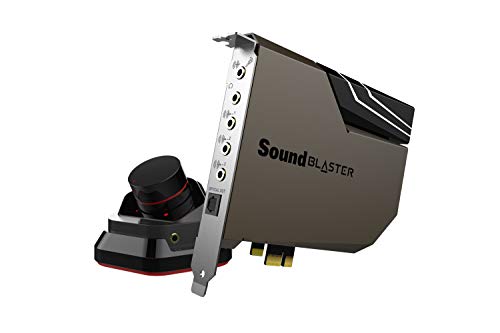
Creative Sound Blaster AE-7 — Best value flagship
Sit the AE-7 beside its bigger sibling and the family resemblance is obvious: an ESS SABRE DAC, a headphone amplifier rated for loads up to 600 ohms, hi-res playback support and an external control module for desk-side volume. The differences are matters of degree. The converter figures step down slightly, the amplifier is a strong integrated design rather than the AE-9’s discrete showcase, and the op-amps stay where the factory put them. In exchange, the AE-7 asks less money and less fuss, and through the headphones most people actually own — 32 to 250 ohms, competently designed — the listening gap narrows to something you would struggle to identify blind.
Where the AE-7 quietly wins is balance. Its line output is clean enough to feed powered monitors or an integrated amplifier without embarrassment, its headphone stage has the voltage for the classic high-impedance Sennheiser-style load, and its software keeps the stereo path free of compulsory processing. Owners who record voice or stream occasionally also get respectable microphone input circuitry, though that is a bonus here rather than the reason to buy. If the AE-9 is the statement piece, the AE-7 is the same argument written in a calmer hand — and for stereo listening specifically, it is where we would point most readers first.
Day to day, the AE-7’s virtues are the undramatic kind that keep hardware in a system for years. It runs cool, its drivers behave, the control module’s dial becomes muscle memory within a week, and switching between headphones and the line output is a software click rather than a crawl under the desk. On familiar recordings it presents a wide, stable image with a slightly relaxed top end that flatters long evening sessions and older, brighter masterings alike. Nothing about it begs for an upgrade, which is perhaps the strongest compliment a stereo component can earn at its position in the range.
- Channels: stereo focus with multichannel support
- DAC: ESS SABRE-class converter with hi-res PCM support
- Headphone support: up to 600 ohms
- Form factor: internal PCIe card plus external control module
- Output modes: switchable headphone and line output
Strengths
- Flagship-grade stereo performance without flagship pricing pressure
- Control module keeps volume and headphone connection on the desk
- Line output quality suits powered monitors as well as headphones
Trade-offs
- No swappable op-amps for owners who enjoy tuning hardware
- Still occupies a PCIe slot and needs a tidy internal cable run
- Control module is simpler than the AE-9 unit, with fewer refinements
Best for: serious stereo listeners who want flagship behaviour at a saner step in the range. Not suited for: builders chasing the last fraction of converter specification.

Creative Sound Blaster X5 — Best external hi-res DAC amp
The X5 walks out of the PC case entirely, and that decision shapes everything about it. As an external USB DAC and headphone amplifier with dual Cirrus Logic converter chips — one per channel in its balanced architecture — it keeps the analogue stages away from GPU power noise and case fans, and it works identically with a desktop, a laptop or any USB audio source you hand it. The headline feature for headphone enthusiasts is the balanced output alongside the standard single-ended jack: owners of balanced-cabled headphones get the full benefit of the dual-DAC layout, while everyone else still hears a clean, authoritative single-ended stage.
Stereo listening is the X5’s home ground in a way it never quite is for gaming-branded hardware. There is no surround licence shouting for attention and no RGB underglow; the front panel offers a proper volume control, gain switching for sensitive or demanding headphones, and output selection. Gain switching deserves emphasis, because it solves the two opposite headphone problems in one box — enough voltage on high gain for stubborn high-impedance models, and a low enough noise floor on low gain that efficient in-ears stay silent between tracks. For a listener whose computer changes more often than their headphones, the X5 is the pick that survives every upgrade untouched.
There is a discipline to the X5’s presentation that suits critical listening. It does not sweeten or warm anything; it hands over the recording with its edges intact, which makes it a fine tool for comparing headphones or evaluating a new remaster. The optical input quietly extends its usefulness to a games console or a CD transport, turning the box into the stereo heart of a small system rather than a PC accessory. Build quality matches the intent — a metal enclosure, a dial with proper resistance, and sockets that feel rated for a decade of headphone swaps.
- Channels: stereo external DAC and amplifier
- DAC: dual Cirrus Logic converters, hi-res PCM support
- Headphone support: single-ended and balanced outputs, gain switch
- Form factor: external USB desktop unit
- Inputs: USB audio with optical input for a second source
Strengths
- External design removes in-case interference from the equation
- Balanced output rewards owners of balanced headphone cables
- Gain switch serves both sensitive in-ears and demanding full-size sets
Trade-offs
- Occupies desk space and a USB port permanently
- No internal-card convenience for set-and-forget tower builds
- Features beyond stereo playback are deliberately sparse
Best for: headphone-first listeners who want one DAC amp for every computer they use. Not suited for: buyers who want multichannel speaker output from the same device.
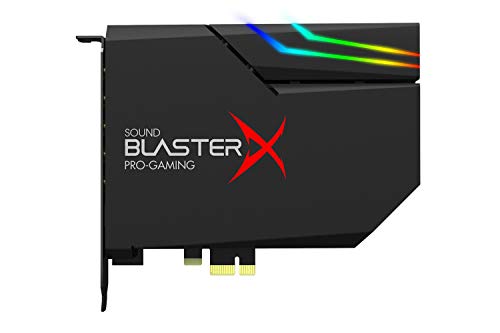
Creative Sound Blaster AE-5 Plus — Best stereo card with gaming range
The AE-5 Plus arrives wearing gaming colours — literally, with its RGB lighting strip — yet its stereo credentials rest on a proper ESS converter and a headphone amplifier that has been a default recommendation in its class for years. In a purely musical frame it performs with a confidence that embarrasses many lifestyle DAC boxes: the output is clean, the amplifier holds low-impedance headphones steady without the bass bloom that betrays a high output impedance, and the software offers a direct, unprocessed path for listeners who want their recordings left alone. Judged only on stereo, it sits a step below the AE-7 in refinement and a clear step above the budget tier.
What the Plus suffix buys over the original design is decoding breadth: Dolby Digital and DTS support that matters when the same machine plays films in the evening. That breadth costs the stereo purist nothing in the signal path, but it does shape the software experience, which leans toward profiles and effects. Our advice is simple — build one clean stereo profile with processing off and treat everything else as a separate toy. Owners who split their desk time between albums and games will find the AE-5 Plus the least compromising single-card answer in this guide, provided the lighting can be tamed to taste in software.
Measured against pure stereo rivals, the AE-5 Plus makes one honest concession and one surprising gain. The concession is ultimate converter refinement; put it beside the AE-7 on flagship headphones and the dearer card resolves low-level ambience a shade more completely. The gain is engagement — its presentation has a directness that suits rock, electronic music and film scores, and its amplifier’s low output impedance keeps multi-driver in-ears and sensitive portable headphones tonally honest. For the many listeners whose reference point is onboard audio, the AE-5 Plus will not feel like a compromise at all; it will feel like the day the PC grew up.
- Channels: 5.1 / 7.1 virtual with strong stereo core
- DAC: ESS converter with hi-res playback support
- Headphone support: up to 600 ohms
- Form factor: internal PCIe card
- Extras: Dolby Digital and DTS decoding, RGB lighting
Strengths
- Convincing stereo stage with a proper direct mode for unprocessed listening
- Surround decoding makes it a genuine all-rounder for mixed desk use
- Amplifier handles both sensitive and high-impedance headphones well
Trade-offs
- Software experience pushes gaming features ahead of music tools
- RGB lighting needs a Molex-style power connection and setup time
- Converter refinement trails the AE-7 and AE-9 audibly on top headphones
Best for: listeners whose PC splits its life between music and games or films. Not suited for: purists who want a music-only interface with nothing extra.

Creative Sound Blaster G8 — Best for desk and console crossover
The G8 thinks about a desk the way desks actually look now: a PC, a console or second computer, and a TV or monitor that also makes sound. It is an external DAC and headphone amplifier with two USB-C inputs that can be mixed or switched, plus HDMI ARC so television audio can join the same headphones without a cable shuffle. For the stereo music listener, the relevant news is that this flexibility does not come at the cost of the basics — the converter stage is modern and quiet, the headphone output drives demanding sets with authority, and the front-panel controls encourage the healthy habit of adjusting volume in the analogue domain at the device.
Its character in this company is the sociable one. Where the X5 is a stereo instrument, the G8 is a stereo hub: a work laptop and a gaming PC can share one pair of headphones, and a console session does not require re-plugging anything. Streamers and call-heavy workers will notice the microphone and mixing features, but even ignoring those entirely, the G8 earns its place on input count and convenience. The compromise is focus — it does not offer the X5’s balanced output or the AE-9’s exotic amplifier, so headphone maximalists should look up the page. Everyone juggling sources should look here first.
Musically, the G8 leans slightly toward the lively side of neutral, which suits the mixed diet of a working desk — streams and calls by day, albums by night. Its dual-input mixing is more thoughtful than it first sounds: notifications from a second machine can whisper under music from the first instead of hijacking the headphones outright. The HDMI ARC path deserves a final mention, because routing TV sound through genuinely good headphones transforms late-night viewing, and the G8 makes that a default rather than a project.
- Channels: stereo DAC amp with surround processing options
- Connections: dual USB-C inputs, HDMI ARC, optical input
- Headphone support: high-output amplifier for demanding headphones
- Form factor: external desktop unit
- Extras: input mixing, microphone input with processing
Strengths
- Two USB sources plus HDMI ARC end the cable-swapping ritual
- Strong, quiet headphone output suits music as well as play
- Physical controls make source and volume changes instant
Trade-offs
- No balanced headphone output for enthusiast cable setups
- Feature set is broader than a music-only listener will ever touch
- External box needs a permanent home on the desk
Best for: multi-source desks where music shares headphones with a console or second PC. Not suited for: single-PC purists who value the shortest possible feature list.
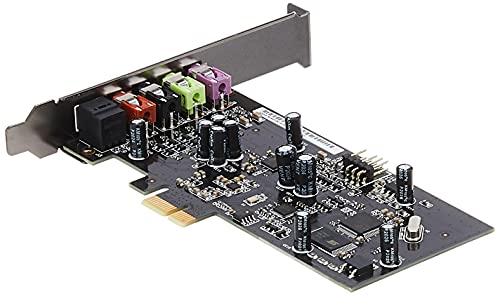
ASUS Xonar SE — Best budget stereo upgrade
Every roundup needs its reality check, and the Xonar SE is a good one. This is an inexpensive internal card built around a competent codec and — the part that matters — a dedicated headphone amplifier and a properly quiet output by the standards of its class. Fitted into a PC that previously relied on a motherboard header, the change is not subtle: the hiss floor drops away, headphone bass tightens because the amplifier is no longer an afterthought, and the stereo image gains the stability that comes from a cleaner power environment. It will not trouble the Creative flagships in converter refinement, and pretending otherwise would be dishonest; it simply does the fundamentals at a price that makes the upgrade an easy decision.
The Xonar SE also carries modest multichannel speaker support, which suits older desktop speaker sets, but its stereo behaviour is why it is in this guide. ASUS’s software is comparatively restrained, the card asks for no supplementary power, and installation is a five-minute job. For a listener taking the first step away from onboard audio — or reviving an older PC as a music machine for a workshop or spare room — this is the sensible floor of the market, the point below which savings start costing sound.
It is worth stating plainly who should stop at the Xonar SE and who should not. If your headphones cost roughly what the card does, this is your finish line — the pairing will be balanced and satisfying. If your headphones cost several times more, they are already revealing enough to justify the AE-7’s better converter and amplifier, and the Xonar would become the bottleneck you upgraded around within a year. That honesty about system balance is the whole philosophy of this guide in miniature.
- Channels: 5.1 support with stereo as the daily strength
- Playback: up to 192 kHz / 24-bit
- Headphone support: dedicated amplifier stage
- Form factor: internal PCIe card, no extra power lead
- Software: ASUS audio control panel with EQ
Strengths
- Clear, audible step up from onboard audio at entry-level cost
- Simple installation with no supplementary power requirement
- Headphone amplifier transforms modest headphones on its own
Trade-offs
- Converter and amplifier refinement sit well below the flagship cards
- Software and driver polish lag the Creative suite
- No external module, so volume control stays on screen or keyboard
Best for: first-time upgraders and secondary PCs that deserve honest stereo. Not suited for: owners of flagship headphones expecting flagship drive.
Why Does the Analogue Stage Matter More Than the DAC Chip?
Marketing departments lead with the converter because a chip name is easy to print on a box, but experienced listeners know the analogue circuitry around that chip writes the final signature. After conversion, the signal passes through a low-pass filter and a buffer stage built from operational amplifiers and discrete components, and every choice there — component quality, power supply rejection, board layout, grounding — leaves a fingerprint. Two cards can share a converter family and present music differently: one spacious and calm, the other slightly forward and eager. Neither is automatically wrong, but it explains why specification tables cannot rank this guide for you, and why the AE-9’s swappable op-amp sockets exist at all.
Power supply design is the invisible half of the same story. A PCIe card drinks from the same supply rails that feed a graphics card pulling hundreds of watts in bursts, so the card’s own regulation and filtering decide how much of that commotion reaches your headphones. The better internal cards here invest heavily in exactly that unglamorous work. External units sidestep the problem by drawing modest, steady power over USB and keeping their sensitive stages in a separate enclosure — one reason the X5 and G8 sound so composed in systems whose internal audio whines under GPU load. When readers write to us about noise that rises and falls with frame rates, the diagnosis is almost never the DAC; it is power and grounding, every time.
There is also a longevity argument for caring about the analogue stage. Converter fashion moves quickly — this year’s chip is next year’s footnote — while a well-built amplifier section ages gracefully and flatters every source you ever connect to it. Buyers who keep a card through two PC builds, which the owners of the AE-7 and AE-9 commonly do, are really keeping an amplifier they trust. That is the correct instinct, and it is why our per-pick verdicts below weigh drive, noise floor and output flexibility more heavily than any single converter headline.
What Should You Know About Hi-Res Playback and Sample Rates?
Hi-res support on a specification sheet means the hardware can accept high sample-rate files without downsampling them first. It does not mean standard recordings secretly become hi-res, and it does not guarantee an audible advantage — the recording and its mastering remain the ceiling on what any system can reproduce. What generous format support genuinely buys a stereo listener is freedom: a library mixing CD rips, downloads at several resolutions and high-quality streams plays end to end without the operating system quietly resampling everything through its mixer. Set the chain up once, as the setup section describes, and the card simply gets out of the way.
DSD and other exotic formats deserve a cooler head than forum threads usually give them. Very few listeners own meaningful libraries in these formats, and converting them on the fly in the player is sonically harmless for almost everyone. Judge these six picks on their PCM stereo behaviour — the format your music overwhelmingly uses — and treat anything beyond that as a footnote. Similarly, bit-depth figures describe dynamic range potential that recordings rarely exploit; a quiet amplifier and honest gain staging will improve your evenings more than any format badge.
A practical word about streaming services: their higher tiers now deliver lossless streams that fully justify a good card, and the gap between a lossy stream through onboard audio and a lossless stream through an AE-7 is not a subtle audiophile parlour trick — it is congestion clearing. Cymbals stop splashing, voices unglue from the centre, and quiet acoustic recordings recover their room. If your listening is mostly streaming, you are not excused from good hardware; you are precisely its audience.
How Do the Six Stereo Picks Compare Side by Side?
| Pick | Form | Converter highlight | Headphone output | Best use |
|---|---|---|---|---|
| Sound Blaster AE-9 | Internal + module | ESS SABRE flagship | Discrete amp, 600 ohms | Purist headphone listening |
| Sound Blaster AE-7 | Internal + module | ESS SABRE | 600 ohms | Flagship value |
| Sound Blaster X5 | External USB | Dual Cirrus Logic | Balanced + single-ended | Portable hi-res listening |
| Sound Blaster AE-5 Plus | Internal | ESS | 600 ohms | Music plus gaming range |
| Sound Blaster G8 | External USB | Modern DAC stage | High-output amp | Multi-source desks |
| ASUS Xonar SE | Internal | Hi-res codec | Dedicated amp | Budget upgrade |
Read the table as a map of philosophies rather than a ladder. The two internal flagships chase the last degrees of refinement for listeners who keep one PC for years. The external pair trades that final polish for freedom — freedom from case noise, from a single machine, from re-buying the audio stage with every upgrade. The AE-5 Plus is the generalist, and the Xonar SE is the proof that the largest single improvement in PC stereo costs the least: the step from onboard audio to any honest dedicated output dwarfs every step after it.
How Do You Match a Stereo Card to Your Headphones?
Start with the two numbers printed on every headphone box: impedance and sensitivity. Impedance tells you how much voltage the amplifier must swing; sensitivity tells you how loud the headphone plays for a given amount of power. High-impedance, moderate-sensitivity classics — the 300-ohm open-backs that anchor so many collections — are voltage-hungry and current-light, which is precisely the load the AE-9 and AE-7 amplifiers were built around. Planar magnetic headphones invert the problem: low impedance, modest sensitivity, and a hunger for current that exposes amplifiers which quote impressive voltage figures but sag when asked to deliver real power into a stubborn load. The X5’s dual-converter design and the G8’s high-output stage both handle planars with the steadiness they demand.
Sensitive in-ear monitors sit at the opposite pole and punish a different weakness. They need so little power that the listening happens in the amplifier’s lowest, noisiest neighbourhood, and any hiss the output stage produces arrives unmasked. For in-ear listeners, the practical shortlist is the X5 on low gain or the G8, both of which keep their floors inaudible with efficient monitors, while the internal flagships remain perfectly usable thanks to well-judged gain staging. Output impedance completes the triangle: a high output impedance interacts with a headphone’s own impedance curve and audibly reshapes its tuning, usually bloating the bass of balanced-armature in-ears. Every pick in this guide keeps output impedance low enough to avoid that trap, which is more than can be said for the motherboard jack you are replacing.
If you own several headphones — and stereo listeners accumulate them the way readers accumulate books — prioritise the pair you reach for nightly and let the others be adequately served rather than perfectly matched. An amplifier that is ideal for your main headphone and merely good for the rest beats a theoretical all-rounder that excites you about none of them. And if you are buying the headphone and the card together, spend the larger share on the headphone: transducers differ from each other far more than competent electronics do, a truth this entire guide is organised around.
How Should You Set Up a Stereo Card for Music?
Begin with the output mode. In the card’s software, select the headphone output when headphones are connected and the line output when feeding powered monitors or an external amplifier, and disable surround virtualisation, equalisation and effects for your music profile. These processors have their place in games and films, but a stereo recording was mixed to be heard as it stands. Set the operating system and player sample rate to match your library’s dominant format — 44.1 kHz for standard streaming and CD rips, higher only if your collection genuinely lives there — because careless upsampling chains help nothing.
Volume structure is the second discipline. Run the player and operating system volume at or near maximum and control loudness at the card’s hardware dial or the amplifier, which keeps the digital signal at full resolution. The exception is a card feeding a power amplifier with no volume control of its own, where restraint in software is a safety matter, not a preference. Third, mind the physical chain: keep headphone cables away from power bricks, use the rear outputs rather than front-panel case jacks — which are notorious for picking up noise on their long internal cable runs — and if you hear a whine that follows GPU load, an external unit or a simple re-routing of cables usually ends it.
Finally, give the new card a fair first evening. Listen to two or three recordings you know intimately at matched volume before judging, because louder almost always masquerades as better in the first minute. The honest differences — quieter backgrounds, steadier bass, voices that sit still in the image — reveal themselves over a record, not a riff.
How Does a Sound Card Compare With a Dedicated Music Streamer or Receiver?
Readers sometimes ask whether a separate streamer or an AV receiver would make a sound card redundant, and the honest answer depends on where your listening happens. A receiver anchors a living-room system with speakers, room correction and a rack of sources; it is the right tool for that room. A desktop, though, is a different habitat. You sit close, you wear headphones half the time, and your source is overwhelmingly one computer. In that habitat a sound card or desktop DAC amp wins on simplicity, cost and headphone quality per unit of money, because none of your budget is spent on speaker amplifiers, video switching or a chassis designed to impress from across a room.
The two approaches also age differently. A receiver’s video standards date it; a good stereo card’s job — convert PCM cleanly, drive headphones honestly — does not change, which is why owners carry cards like the AE-7 across several PC builds. If your future holds a speaker-based listening room, buy the receiver then and keep the card for the desk. If your future is a better pair of headphones and a deeper library, the card is not a stepping stone to anything; it is the destination, and the picks above should be judged as long-term furniture for your listening life rather than as accessories.
Which Accessories Actually Improve a Stereo Card Setup?
Very few, and that restraint is good news for your wallet. The one accessory that reliably matters is the cable between card and powered monitors: a properly shielded, sensibly short interconnect prevents the hum and interference that owners often blame on the card itself. Balanced connections, where both ends support them, reject noise over longer runs and are worth using in electrically busy rooms. Beyond that, a simple headphone stand protects the transducer you actually spent money on, and a short extension lead can save the card’s front socket from the strain of a heavy cable tugging at an angle.
What you can safely skip is the entire ecosystem of tweaks that promise transformation — exotic USB conditioners for devices that already regulate their power well, replacement fuses, and software players claiming to improve files by processing them further. The cards in this guide were engineered as complete systems; their designers already obsessed over the power supply and the clock. Spend remaining budget on music, on concert tickets, or on the headphone upgrade you have been postponing. Those purchases have a perfect record of improving stereo listening.
What Mistakes Do Stereo Buyers Keep Making?
The classic error is shopping by converter specification alone. A headline dynamic-range figure tells you about one chip on the board; it says nothing about the amplifier that your headphones will actually meet, and it is the amplifier that decides whether a 300-ohm headphone sounds grand or merely loud. The second mistake is the mirror image — buying amplifier power for headphones that need finesse instead. Sensitive in-ears on a high-gain stage produce hiss and a volume control that goes from silent to shouting in a quarter turn; match the tool to the transducer.
Double-amping deserves its own warning because it is so easy to do accidentally: a headphone output, already amplified, fed into a powered speaker or amplifier input adds a second gain stage’s noise and distortion to the first. Use line output mode for line-level destinations. Buyers also neglect the humble sample-rate setting, leave virtual surround enabled from a gaming session and then conclude that a new card sounds phasey and strange on music. And a final, quieter mistake: judging a card in its first ten minutes with unfamiliar music. Stereo improvements are real but they are architectural — space, silence, control — and they reward a listener who brings familiar recordings to the comparison.
Will the Software and Drivers Respect Your Listening?
A stereo card lives inside an operating system that updates itself on its own schedule, so driver behaviour is a genuine quality criterion rather than a footnote. The mature Creative suite behind the AE-series cards has the advantage of years of refinement: profiles hold, output switching is remembered, and the direct path for music stays direct until you say otherwise. ASUS’s lighter software asks less of the system and offers fewer toys, which some listeners prefer. Either way, adopt one habit at installation — configure a single music profile with all processing disabled, name it plainly, and make it your default. Most “my new card sounds strange” stories end with the discovery of a forgotten effect living in a profile the owner never meant to keep.
It is also worth deciding how you feel about equalisation before you buy, because the two camps in this guide serve different philosophies. Listeners who correct a headphone’s known treble peak with a careful parametric EQ will find the Creative software accommodating and the results genuinely useful; a restrained EQ applied at the card is far better than a loudness button or a preset named after a music genre. Purists who want the file untouched can disable everything and lose nothing. Both positions are respectable — what is not respectable is leaving a bass-boost preset running for a month and reviewing the card through it, a fate that has befallen more hardware than any reviewer likes to admit.
Finally, consider where the card’s volume control lives in your daily routine. Reaching for a physical dial — on the AE-series control modules, the X5 or the G8 — dozens of times a day sounds trivial until you have lived with on-screen sliders, at which point the dial becomes the feature you would surrender last. Small ergonomic truths like that decide which of two excellent cards is still in your system in five years, and they are why our verdicts mention desks and dials alongside converters and chips.
How Can You Run a Fair Listening Test at Home?
The fairest test costs nothing and takes one evening. Choose three recordings you know deeply — one quiet and acoustic, one dense and loud, one built around a voice you could recognise anywhere — and listen to a fixed passage of each through your current onboard output, noting the volume setting carefully. Then install the card, match the loudness as closely as you can, and play the same passages in the same order. Loudness matching matters more than any other detail, because a slightly louder presentation wins almost every casual comparison regardless of quality; if the card still sounds calmer, cleaner and more spacious at equal volume, the improvement is real.
Listen for specific things rather than a general impression. In the quiet recording, attend to the background: does the room tone of the recording replace the faint electrical haze you may not have noticed until it left? In the dense recording, follow one inner line — a second guitar, a harmony voice — and ask whether it keeps its own outline at the climax. In the vocal recording, notice where the singer sits: a good stereo stage places the voice at a stable point with air around it, rather than smearing it across the centre. Write two sentences after each passage while the impression is fresh; memory for sound is short and treacherous, and your notes will be worth more next week than your recollection.
If the differences strike you as modest, that is a legitimate result rather than a failed test — it usually means your headphones, not your electronics, are now the limiting factor, which is useful knowledge before any further spending. If the differences are obvious, you have confirmed the oldest truth in desktop audio: the step off onboard sound is the largest single upgrade a PC listener can make, and everything in this guide after that step is refinement, honestly labelled as such.
Final Recommendation
For the listener who opened this guide with serious headphones already on the desk, the AE-7 is the recommendation we would defend over coffee: flagship converter, honest amplifier, desk-side control, and nothing in its stereo path that needs apologising for. The AE-9 stands above it for those who treat the PC as a hi-fi component and enjoy hardware with a hobbyist’s depth, while the X5 is the right answer the moment more than one computer enters the story. Choose the G8 for a source-juggling desk, the AE-5 Plus when games share the machine, and the Xonar SE when the budget is firm — then put the savings into the recordings, which is where stereo was always going to be won.
Frequently Asked Questions
Does a stereo sound card improve streaming music, or only hi-res files?
It improves both, because the limitation it removes is in the hardware, not the file. Standard streaming through a clean DAC and a capable amplifier gains the same quieter background and headphone control as a hi-res download; the hi-res file simply has a little more low-level detail available for the better hardware to reveal.
Internal card or external DAC amp for a desktop PC?
Choose internal if the PC is a long-term fixture and you value a cable-free desk; the flagship internal cards here are excellent. Choose external if you use several computers, fight GPU-related noise, or want the audio stage to survive your next build. Neither format is inherently cleaner — execution decides.
What does headphone impedance support up to 600 ohms actually mean?
It means the amplifier can swing enough voltage to drive high-impedance headphones to realistic listening levels without strain. It does not mean quieter or better for low-impedance models, which instead need low output impedance and a low noise floor. Match the amplifier’s strengths to your headphones’ demands.
Can these cards feed powered studio monitors as well as headphones?
Yes — every pick here offers a line-level output suitable for powered monitors. Use the line output mode rather than the headphone output, control volume at the card or the monitors, and disable virtual surround for music so the monitors receive the stereo signal as mixed.
Should I replace my motherboard audio if I mostly use Bluetooth headphones?
No — a sound card feeds wired outputs only, and Bluetooth headphones carry their own converter and amplifier inside the earcups, bypassing your card completely. If wireless listening dominates your routine, spend the money on the headphones themselves. The moment a good wired pair enters your life, the cards in this guide become relevant again, and many listeners keep both: wireless for calls and movement, wired through a proper card for the evening’s real listening.
Is swappable op-amp hardware worth paying for?
Only if you enjoy the hobby. Changing op-amps alters the output stage’s presentation subtly, and some listeners find the experimentation half the pleasure. The stock AE-9 configuration is already excellent, so treat the sockets as entertainment and fine-tuning, never as a repair for a card you otherwise dislike.
Related Guides
Continue with our companion reading: best 5.1 sound cards for analog and optical speaker setups, best 7.1 gaming sound cards for headphone surround, and best 2.0 soundbars for small TVs and bedrooms.


