What's inside
- Key Takeaways
- Quick Picks
- How Did We Judge These Cards for Gaming?
- How Does Virtual Surround Over Headphones Actually Work?
- Why Does Microphone Processing Belong in a Sound Card Guide?
- Headset or Headphones Plus a Separate Microphone?
- Does Equalisation Belong in Competitive Audio?
- Which Gaming Sound Card Matches Your Setup?
- How Do the Six Gaming Picks Compare Side by Side?
- What About Latency, Connections and Console Quirks?
- Open-Back or Closed-Back: Which Headphones Suit Surround Processing?
- How Should You Configure a Gaming Card for Competitive Play?
- Competitive Clarity or Cinematic Immersion: Must You Choose?
- How Do You Keep Voice Chat From Ruining Your Own Audio?
- What Mistakes Do Gaming Audio Buyers Keep Making?
- How Can You Test Positional Audio Before You Commit?
- Final Recommendation
- Frequently Asked Questions
- Related Guides
As an Amazon Associate I earn from qualifying purchases. This post may contain affiliate links at no extra cost to you.
widgetverdict.com is reader-supported. When you buy through links on our site, we may earn an affiliate commission.
Where to buy: all six gaming cards and external units in this guide are listed on Amazon, each linked from the table below to the listing we verified. If you play on both PC and console, filter the page mentally for the external units — the G6, X4 and G8 travel between platforms in a way no PCIe card can.
The best 7 1 gaming sound cards earn their keep in the half-second before anything appears on screen: the footstep on the floor above, the reload behind the wall to your left, the vehicle approaching from the rear-right long before the minimap confesses. Games mix their audio in real time and in full surround, but the path from that mix to your ears decides whether positional information survives. Onboard audio smears it with noise and timid amplification; a stereo-only setup throws half of it away. A proper gaming sound card preserves the full 7.1 mix — either by feeding seven speakers and a subwoofer through discrete analog outputs, or, far more commonly, by folding the surround mix into a headphone image convincing enough that your brain files sounds under directions rather than under left and right.
This guide ranks six options for players, and it is honest about the category’s central truth: most gaming happens on headphones, so virtual surround quality, headphone amplification and microphone processing matter as much as the analog channel count on the box. Speaker players are served here too — two picks offer genuine discrete 7.1 analog output — but the ranking weights the headphone experience first, because that is where ranked matches are actually won and lost.
Key Takeaways
- For headphone players, virtual surround quality is the product; look for mature processing from Creative or ASUS rather than a generic checkbox.
- The Sound BlasterX G6 remains the benchmark external gaming DAC for PC and console cross-play.
- Discrete analog 7.1 output — offered by the Strix SOAR and the X4 — is the only route to true 7.1 speakers; everything else is virtualisation.
- Microphone processing (noise reduction, voice clarity) separates gaming cards from music DACs and matters in every squad session.
- Amplifier power decides whether your headset sounds as its maker intended; high-impedance headsets need the stronger stages found in the AE-5 Plus and G6.
- Keep a clean, processing-free profile for music and single-player immersion; competitive profiles and cinematic profiles are different tools.
Quick Picks
| Pick | Badge | Why it earns its place |
|---|---|---|
| Creative Sound BlasterX G6 | Best external gaming DAC | Reference-grade headphone surround, a serious amplifier and console compatibility in one small box. |
| Creative Sound Blaster AE-5 Plus | Best internal gaming card | A strong ESS core, discrete speaker outputs and decoding breadth for a dedicated gaming tower. |
| Creative Sound Blaster Z SE | Best value internal pick | Mature surround software, a beamforming microphone and analog 5.1 outputs at a calmer step in the range. |
| ASUS Strix SOAR | Best for true 7.1 speakers | Full discrete analog 7.1 output for the rare and glorious gaming room with eight boxes. |
| Creative Sound Blaster X4 | Best surround hub | Discrete 7.1 analog, optical and Super X-Fi headphone processing in an external unit. |
| Creative Sound Blaster G8 | Best for streamers and dual systems | Dual USB inputs, HDMI ARC and mixing controls for a PC-plus-console streaming desk. |
How Did We Judge These Cards for Gaming?
We began where matches are decided: positional accuracy under pressure. Test scenes were chosen for the information they carry — vertical cues in multi-storey maps, rear approaches in open-world games, and the small mechanical sounds (reloads, heals, ability charges) that skilled players react to before they consciously hear them. A card scored for how distinctly those cues separated in space, how stable the image stayed during frantic mouse movement, and whether the processing preserved the game’s own mix or repainted it with so much effect that everything sounded impressively vague.
The second examination was the amplifier. Gaming headsets span an awkward range — efficient 32-ohm models that hiss on noisy outputs, and audiophile-leaning 250- and 600-ohm headphones adopted by players who also listen seriously. Each card was driven with both families, checking for composure at realistic volumes, for bass control in explosions, and for a noise floor low enough that quiet stealth sections stay quiet. Third came the microphone path, because a gaming card is a communications device: we assessed noise suppression against a keyboard and a desk fan, voice clarity at natural speaking levels, and whether sidetone — hearing your own voice in the headset — was available to stop the universal habit of shouting.
We also lived with each card through the unglamorous routines that decide ownership satisfaction: joining a call mid-game, alt-tabbing to adjust a level, waking the PC from sleep with a match already queued. Cards that forgot their output device, reset their profiles or demanded a suite restart during these routines were marked down regardless of their peak performance, because a gaming card’s job includes disappearing. The picks that survived this domestic examination with their manners intact are the ones whose scores you are reading.
Finally, we weighed the software as a working tool rather than a brochure. Profiles must switch in seconds, equalisers must be usable by humans, and surround processing must be defeatable in one click for music and films. Cards whose suites demanded a tutorial video to perform a basic task lost marks to cards that simply obeyed.
How Does Virtual Surround Over Headphones Actually Work?
A headphone has two drivers, yet a good virtual surround system can place a sound behind you convincingly. The trick is borrowed from psychoacoustics: your brain locates sounds partly through the tiny timing and tonal differences between your ears, differences created by the shape of your head and outer ears. A surround processor takes the game’s 7.1 mix and applies those directional fingerprints — head-related transfer functions — to each channel before folding it down to stereo. Done well, the rear channels genuinely read as rear, and the centre channel anchors dialogue and on-screen action in front of you rather than inside your skull.
Quality varies enormously because the fingerprints are averaged from many heads, and your mileage depends on how average yours is. The mature implementations in this guide — Creative’s surround processing and Super X-Fi, ASUS’s Sonic Studio environment — represent years of tuning, and they share a restraint the cheap implementations lack: they preserve the game’s dynamics and detail instead of drowning cues in artificial reverb. Treat any “surround” mode that makes every game sound like it takes place in a swimming pool as a warning sign, and prefer the card whose processing you can tune — or disable — to taste.
One boundary deserves emphasis. Virtual surround processes a multichannel mix; it cannot invent one. Set your game to output 7.1 or its headphone-surround mode as its manual advises, confirm the operating system sees the card as a multichannel device, and only then judge the processing. Half the disappointment stories in this category are configuration stories wearing a disguise.
Why Does Microphone Processing Belong in a Sound Card Guide?
Because your squad hears you through it. A gaming card’s microphone input is a small recording studio with a brief: take a voice recorded inches from a headset boom, in a room containing a mechanical keyboard, a GPU fan and possibly a window open to traffic, and deliver it to four teammates as clean speech. The processing that does this — acoustic echo cancellation, background noise suppression, automatic gain and gentle compression — lives in the card’s software suite, and the better suites in this guide perform it startlingly well. The Z SE’s beamforming microphone hardware attacks the problem physically, using multiple capsules to favour the voice in front of them; the external units lean on refined software stacks.
Streamers should read this section twice. Your audience forgives a modest camera long before it forgives fatiguing audio, and a card that cleans a voice at the source saves the post-processing chain entirely. Look for sidetone control, per-application routing if you stream, and processing that can be auditioned before you go live. The G8’s mixing-oriented design speaks directly to this audience, while the G6 keeps the focus on the player’s own ears — a legitimate difference in philosophy that the verdicts below respect.
Headset or Headphones Plus a Separate Microphone?
The card you choose interacts with this older decision more than most players expect. An all-in-one gaming headset concentrates its budget on convenience — one cable, one boom, one product to charge or plug in — and a good card elevates it by cleaning the output and disciplining the microphone. The alternative path, audiophile headphones plus a separate microphone, spends the same money disproportionately on the drivers themselves and usually wins on raw sound quality, staging and long-session comfort. Its weakness is communications, which is precisely where this guide’s cards intervene: the Z SE’s beamforming microphone was practically designed for the headphones-plus-mic player, and the G8’s processed mic input flatters everything from a desk microphone to a modmic-style boom.
Impedance is the practical hinge. Headsets are almost always easy loads that any card here drives well. Serious headphones wander up to 250 or 600 ohms, where the amplifier differences between these picks stop being theoretical — the G6 and AE-5 Plus hold their composure, the budget paths begin to sound polite. If your roadmap includes a genuinely good headphone in the next year, buy the card for that headphone now; amplification is the part of the chain that punishes false economy longest.
Does Equalisation Belong in Competitive Audio?
Used surgically, yes; used as a flavour, no. Every headset has a frequency response with its own hills and valleys, and a modest EQ correction in the card’s suite — taming a treble spike that fatigues, lifting the presence region where cues live — can make a mid-priced headset perform a class higher. The discipline is subtraction before addition: cut the offending peak rather than boosting everything else, keep total adjustments small, and re-check with processing off so you know what you actually did. The suites behind the Creative cards here offer proper multi-band control; ASUS’s environment is comparably capable.
What EQ cannot do is rescue a bad positional mix or add information the game never sent. Players seduced by community presets with heroic bass boosts discover the cost in their first real match, when explosions swallow the sounds that matter. Treat shared presets as starting hypotheses, tune against your own games and your own ears, and remember that the flat profile is always one click away — the correct destination more often than the internet admits.
Which Gaming Sound Card Matches Your Setup?

Creative Sound BlasterX G6 — Best external gaming DAC
The G6 has held its position in this category for years by doing the essential things at an unusually high level. As an external USB DAC and amplifier it decodes hi-res audio, drives headphones up to the demanding 600-ohm class without strain, and applies Creative’s surround processing with a maturity that lesser implementations chase. In competitive play its presentation is notably uncluttered: footsteps separate from ambient wash, vertical cues survive, and the much-discussed Scout Mode — which emphasises exactly those positional sounds — is present for players who want the training wheels of an exaggerated cue mix, though most will graduate to the standard profile.
Console compatibility widens its lead. The G6 works with PlayStation and Switch-class sources over USB and takes optical input as well, so a single box can serve a PC on weeknights and a console on weekends with the same headphones and the same learned muscle memory. Physical controls are minimal and purposeful — a volume dial with a satisfying action, a button for the surround and Scout functions — and the unit disappears into a setup rather than demanding to be admired. For the player who asked this guide one question — what makes my headset sound its best everywhere I play — the G6 is the answer with the fewest footnotes.
Its limitations are the honest kind. There are no discrete speaker outputs, so surround-speaker ambitions belong to the SOAR or X4; and the feature set is player-focused rather than streamer-focused, with microphone handling competent rather than elaborate. Neither matters to its intended owner, who is buying ears, not a broadcast desk.
Long sessions reveal the G6’s other virtue: it is undemanding to live with. No lighting to configure, no suite demanding updates before a match, just a dial that is always where your hand expects it. Hardware that respects a player’s routine tends to stay in the setup for years, and the G6’s second-hand market — brisk, and priced accordingly — testifies that owners hold onto them.
- Channels: 7.1 virtual surround over headphones
- DAC: hi-res playback support up to 32-bit / 384 kHz
- Headphone drive: amplifier rated up to 600 ohms
- Connections: USB plus optical input
- Extras: Scout Mode, Dolby Digital decoding
Strengths
- Positional clarity that competitive players can genuinely exploit
- Amplifier quality flatters serious headphones as well as headsets
- PC and console compatibility in one compact unit
Trade-offs
- No discrete analog outputs for surround speakers
- Microphone feature set is functional, not streamer-grade
- Single USB device means one system at a time
Best for: headphone competitors who play across PC and console. Not suited for: surround-speaker rooms or elaborate streaming desks.
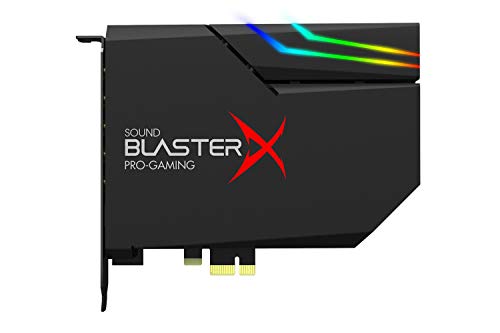
Creative Sound Blaster AE-5 Plus — Best internal gaming card
Inside a dedicated gaming tower, this is the card that asks for nothing further. Its ESS-based converter stage and capable headphone amplifier give virtual surround a clean canvas to work on — cues stay detailed rather than smeared, and the amplifier’s low output impedance keeps sensitive gaming headsets tonally honest. Discrete 5.1 analog outputs wait for the player who keeps speakers on the desk, Dolby Digital and DTS decoding cover film nights, and the whole installation vanishes into the build, powered and permanent, immune to the cable accidents that befall external boxes in busy desk ecosystems.
The gaming personality is worn openly: RGB lighting, a software suite organised around profiles and effects, and processing options that reward an hour of honest tuning. Our standing advice is to build two profiles — a competitive one with surround engaged and effects disciplined, and a clean one for music and story-driven games — and to resist the suite’s more theatrical presets, which impress for a trailer’s length and fatigue across an evening. Configured with that restraint, the AE-5 Plus delivers the internal-card experience at its most complete.
It is also the natural upgrade path for a player graduating from the Z SE’s generation: the same software philosophy, a better output stage, and decoding breadth that a media-heavy household will use weekly. The card asks for a supplementary power connection for its lighting; budget ten minutes for the cable and consider the matter closed.
Story-driven players should not skim past this card on the assumption that its talents are purely competitive. Its clean profile gives cinematic games the dynamic range their mixes deserve — whispered dialogue stays intelligible at midnight volumes, and a score’s low end arrives with control rather than bluster. The AE-5 Plus is the rare gaming card that treats a quiet game with the same respect as a loud one.
- Channels: discrete 5.1 analog, 7.1 virtual headphone surround
- Decoding: Dolby Digital and DTS supported
- DAC: ESS converter with hi-res playback
- Headphone drive: amplifier for demanding headsets
- Form factor: internal PCIe with RGB lighting
Strengths
- Complete internal package: surround, decoding and speaker outputs
- Clean output stage keeps positional detail intact
- Profile system rewards an hour of setup with years of convenience
Trade-offs
- Lighting needs an extra power lead and divides taste
- Software abundance can overwhelm a set-and-forget owner
- No console compatibility — this card belongs to one PC
Best for: dedicated gaming towers that also play films and music. Not suited for: players who split time across console and PC.

Creative Sound Blaster Z SE — Best value internal pick
The Z SE is the thinking player’s internal card: nearly the full gaming argument — mature surround processing, a strong headphone amplifier, discrete analog outputs for a speaker set, an optical escape route — delivered without the flagship’s price pressure or lighting ceremony. Its surround presentation over headphones is composed and legible, favouring clarity over spectacle, which competitive players consistently prefer once the novelty of theatrical modes fades. In the software, speaker and headphone configurations live as proper profiles, so the desk can swing from a 5.1 speaker session to a midnight headset session in one click.
The beamforming microphone deserves its headline. Supplied in the box, it uses multiple capsules to focus on the voice at the desk and reject the room around it — a physical solution to the noise problem that software-only rivals approximate. For players whose headsets have indifferent microphones, or who use audiophile headphones plus this microphone as a two-piece communications setup, the Z SE quietly solves voice chat better than cards costing more. That combination — honest surround, real outputs, and the best stock voice solution in this guide — is why it remains our value recommendation years into its life.
Age shows only in the margins: no onboard Dolby or DTS decoding of the AE-5 Plus kind, and a design language from a slightly earlier school of PC hardware. Neither touches a match result. If the budget has a hard ceiling and the PC is the only platform, this is where the money should stop.
There is an argument that the Z SE is the most honest product in this guide. It does not promise a broadcast studio or a cinema; it promises that your games will sound clear, your voice will sound clean and your speakers will be fed properly — and then it simply keeps that promise for years. In a category addicted to escalation, that steadiness is its own form of excellence.
- Channels: 5.1 discrete analog, 7.1 virtual over headphones
- Microphone: beamforming array included
- Outputs: analog speaker jacks plus optical
- Headphone drive: amplifier rated for high-impedance models
- Form factor: internal PCIe card
Strengths
- Beamforming microphone leads the guide for voice clarity
- Surround processing favours competitive clarity over effects
- Analog and optical outputs keep future options open
Trade-offs
- No built-in Dolby Digital or DTS decoding
- Styling belongs to an earlier hardware generation
- Headphone amplifier a step below the AE-5 Plus in refinement
Best for: PC-only players who want surround and voice quality on a budget. Not suited for: console cross-players or film-decoding households.

ASUS Strix SOAR — Best for true 7.1 speakers
Every other pick in this guide simulates or approximates seven channels for most owners; the SOAR simply outputs them. Its full bank of analog connections drives a genuine 7.1 speaker system — front, centre, subwoofer, sides and rears as separate amplified channels — and for the player with a room that can hold such a rig, no headphone processing, however clever, reproduces the physical envelopment of sound actually arriving from behind. Games mixed in 7.1 unfold as their designers intended, with rear and side cues occupying real space. The card’s ESS-based conversion and strong output stages keep all eight channels evenly voiced, which matters more as the channel count climbs.
Headphone players are not abandoned: the SOAR carries a dedicated headphone amplifier and ASUS’s Sonic Studio surround processing, so the same card serves the late-night headset session competently. The software’s profile routing is explicit and visual, suiting owners who like to see their signal path. The costs are physical — a full-size card, supplementary power, a shroud with gaming ambitions — and the honest observation that most desks cannot host eight speakers. Buy the SOAR for the room you have or are genuinely building; bought for a fantasy room, it is an expensive stereo card.
For the room that does exist, though, nothing else here competes. Film nights inherit the same discrete authority, and the card’s headroom across channels means action peaks arrive without the compression that betrays lesser output stages asked to drive eight loads at once.
Owners of the SOAR tend to become evangelists for physical surround, and one demonstration explains why: a helicopter pass in a flight game, tracked by ears rather than by processing, moving through actual air behind the listener’s head. If this paragraph made you glance at your room’s dimensions, the SOAR has found its reader.
- Channels: 7.1 discrete analog output
- DAC: ESS converter with hi-res playback support
- Headphone drive: dedicated amplifier with surround processing
- Form factor: full-size internal PCIe, supplementary power
- Software: Sonic Studio profiles and routing
Strengths
- The genuine article: eight real channels for speaker surround
- Even, powerful output voicing across every channel
- Headphone path remains strong for late sessions
Trade-offs
- Needs a room and speaker budget to justify its existence
- Full-size card and power lead exclude compact builds
- Most owners will use a fraction of its channel count
Best for: gaming rooms with a real 7.1 speaker installation. Not suited for: headphone-only desks paying for unused outputs.
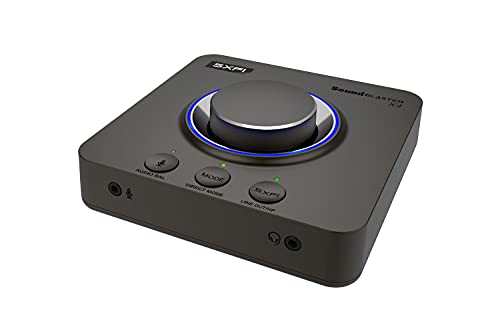
Creative Sound Blaster X4 — Best surround hub
The X4 is what happens when the G6’s external philosophy grows speaker ambitions. It offers discrete analog outputs up to 7.1 for a powered speaker system, optical connections in both directions, and headphone surround powered by Super X-Fi — Creative’s profile-based processing that maps the listener’s ears and head to personalise the surround image. That personalisation is the X4’s party piece: after a short setup with the companion app, headphone surround gains a speaker-like externalisation that generic processing rarely achieves, with sounds resting in the room rather than between your ears.
As a hub it is equally thoughtful. A console can arrive by optical while the PC connects by USB, the hardware dial keeps volume honest, and the whole unit moves to a laptop without a driver drama. Speaker players get true multichannel output without opening a case; headphone players get the most ambitious virtualisation in this guide. The compromises are size, price and a setup process that asks for ten engaged minutes before the magic is personal. Players who want one device to be the audio centre of a mixed PC-and-console life will find the X4 was designed by people who live that life.
Super X-Fi’s benefits vary with the listener, as all personalised processing does, and the X4 wisely keeps conventional surround available alongside it. Treat the profile setup as an experiment with a fallback rather than a leap of faith, and the card’s value stands on its hub flexibility even if your ears prefer the classic mode.
Families discover a secondary use for the X4 that its gaming branding undersells: it is a superb film-night bridge, feeding speakers with decoded multichannel audio while the household sleeps and switching to its personalised headphone image when the volume must fall. Versatility of that order is why the X4, alone among these picks, tends to be bought twice by the same household.
- Channels: 7.1 discrete analog output, optical in and out
- Headphone features: Super X-Fi personalised surround
- Connections: USB host plus optical for consoles
- Form factor: external desktop unit with hardware dial
- Compatibility: PC, laptops and consoles
Strengths
- True speaker surround and personalised headphone surround in one box
- Hub flexibility across PC, laptop and console
- Physical dial and accessible ports simplify daily use
Trade-offs
- Super X-Fi needs a profile setup before it shines
- Largest and dearest of the external options here
- Desk footprint suits a permanent station, not a travel kit
Best for: mixed speaker-and-headphone players across several devices. Not suited for: minimalists who play on one PC with one headset.

Creative Sound Blaster G8 — Best for streamers and dual systems
The G8 starts from a desk that most buying guides pretend does not exist: two computers, or a PC and a console, sharing one headset, with a stream or a call running through the middle of it. Its dual USB-C inputs can be switched or mixed, HDMI ARC brings a TV or console’s audio into the same chain, and the front panel is a small mixing desk — source selection, volume, microphone control — rather than a minimalist sculpture. Surround processing for games is present and capable, and the headphone amplifier drives demanding headsets with the authority this class now expects.
For streamers, the G8’s routing is the story: game audio, a second machine’s alerts or music, and a processed microphone can coexist under physical control, which is precisely the juggling act that software-only setups make fragile mid-broadcast. The microphone processing suite is the most elaborate in this guide, aimed at voices that earn money. Pure competitors may find the G6’s focus purer and its surround a shade more single-minded; the G8 trades that last degree of specialisation for a breadth that working desks will use every hour.
Judge it, then, as infrastructure. A G8 settles into a setup and quietly removes a category of daily friction — the unplugging, the re-routing, the “can you hear me now” at the top of every session. Players whose desks have outgrown a single source will recognise the value immediately; players with one PC and one headset should save the difference and buy the G6.
Remote workers keep finding the G8 as well, and the crossover makes sense: the same mixing that balances a game and a stream balances a work call and background music, with a microphone chain that flatters the voice on the call that matters. A device bought for Friday night that earns its desk space on Monday morning is a device that stays bought.
- Channels: surround processing over headphones, stereo speaker output
- Connections: dual USB-C inputs, HDMI ARC, optical input
- Microphone: processing suite with physical controls
- Form factor: external desktop unit
- Extras: input mixing for streaming workflows
Strengths
- Two USB sources plus HDMI ARC end input juggling
- Microphone and mixing controls suit streaming directly
- Strong headphone output serves games and music alike
Trade-offs
- No discrete multichannel analog outputs for speakers
- Breadth of features exceeds a single-PC player’s needs
- Surround focus is a step behind the G6’s single-minded tuning
Best for: streamers and dual-system desks sharing one headset. Not suited for: single-PC competitors who want the purest gaming DAC.
How Do the Six Gaming Picks Compare Side by Side?
| Pick | Form | Surround route | Speaker output | Best use |
|---|---|---|---|---|
| Sound BlasterX G6 | External | Virtual over headphones | Stereo | PC and console headphone play |
| Sound Blaster AE-5 Plus | Internal | Virtual + discrete 5.1 | 5.1 analog | Dedicated gaming tower |
| Sound Blaster Z SE | Internal | Virtual + discrete 5.1 | 5.1 analog | Value with voice quality |
| ASUS Strix SOAR | Internal | Discrete analog | 7.1 analog | True speaker surround |
| Sound Blaster X4 | External | Super X-Fi + discrete | 7.1 analog | Surround hub |
| Sound Blaster G8 | External | Virtual over headphones | Stereo | Streaming, dual systems |
The table exposes the category’s fork clearly. Down the left runs the headphone road — G6, G8 and the virtual modes of the internal cards — where processing quality and amplification decide everything. Down the right runs the speaker road, where only the SOAR and X4 offer the full discrete 7.1 destination and the AE-5 Plus and Z SE stop honestly at 5.1. Most players should buy for the road they actually travel nightly, and let the other column be a bonus rather than a justification.
What About Latency, Connections and Console Quirks?
Audio latency in this category is a solved problem wearing a scary name. A wired path through any of these cards adds a delay so small beside network ping and display response that no human reaction time will ever find it; where players genuinely suffer is in wireless headsets with high-latency codecs or in operating-system processing chains with every effect enabled at once. Keep the chain wired and the processing purposeful, and your card will never be the reason a cue arrived late.
Connections deserve a practical paragraph. USB external units are the travellers: one cable, immediate recognition, and a home on any machine including laptops that could never host a card. Optical input is the console bridge — it carries the console’s output into the G6 or X4 while USB handles chat and control on some platforms — and buyers should check their console’s current audio-output options, because platform policies on USB audio have shifted between generations. HDMI ARC, the G8’s speciality, suits the console-under-the-TV arrangement, pulling the display’s audio back into the headset chain without extra boxes.
Internal cards trade all that mobility for permanence and, usually, a lower price for equivalent conversion. They also inherit the PC’s electrical environment; in a build whose onboard audio whined under GPU load, a well-shielded card like the AE-5 Plus or Z SE normally ends the noise, but the truly paranoid — or the truly unlucky — will find the external units’ isolation definitive. Neither philosophy is a compromise; they are answers to different desks.
Open-Back or Closed-Back: Which Headphones Suit Surround Processing?
Open-back headphones, whose earcups breathe to the room, generally give virtual surround its most convincing stage: sounds externalise more naturally, the image widens, and long sessions stay comfortable in every sense. Their cost is isolation — the room hears your game, and you hear the room — which rules them out for shared spaces and late nights in thin-walled homes. Closed-back designs reverse the bargain, sealing in both the game’s world and your privacy at the price of a slightly more in-head presentation that good processing, particularly the X4’s personalised mode, works hard to open up.
Neither family is the “correct” partner for these cards; the deciding factors are your room and your hours. What does matter is consistency: tune your profiles on the headphone you actually compete in, because surround processing tuned on an open-back stage will misjudge distances on a closed-back one. Players who own both should save a profile per headphone — every suite in this guide allows it — and label them honestly.
How Should You Configure a Gaming Card for Competitive Play?
Before any of that, update the card’s software and firmware to the current release and restart once, so the profiles you are about to build rest on the version you will actually live with. Configuration done on stale software has a way of needing to be done twice.
Start in the game, not the card. Set the game’s audio to its surround or headphone mode as the developer intends, disable any in-game processing that duplicates the card’s job, and confirm the operating system reports the card as a multichannel device so the full mix is generated. Then, in the card’s suite, engage surround processing, set equalisation flat, and turn off every enhancement that smears transients — the footsteps you need live in the transients. Raise the game’s quiet sounds by lowering the loud ones: a gentle compression or a “night mode” dynamic setting in the game itself often helps more than any card feature, because explosions should never be allowed to mask the reload behind them.
Volume discipline protects both your ranking and your hearing. Set the card’s output so that competitive cues sit at a comfortable level without turning explosions into a physical event, and let the hardware dial — present on every external pick here — be the control your hand learns. Players who ride software sliders tend to creep louder across a session; a dial with a remembered position does not. Your ears are the only component in this entire guide that cannot be upgraded later.
Microphone setup deserves the same ten minutes. Position the boom a finger’s width from the corner of your mouth, set input gain so normal speech peaks without clipping, enable noise suppression, and add a touch of sidetone so you stop shouting by midnight. Test with a recording, not with a teammate’s patience. Finally, save the result as a named profile and build a second, clean profile for music and cinematic games. The discipline of two profiles — one for information, one for pleasure — is the closest thing this category has to a secret.
Competitive Clarity or Cinematic Immersion: Must You Choose?
Only within a single profile — and the profile system exists precisely so that you do not have to choose for the whole card. Competitive play rewards a lean presentation: surround engaged, dynamics controlled, bass disciplined so that information survives. Single-player and cinematic gaming reward the opposite virtues: full dynamic range, a warmer low end, processing that favours atmosphere over intel. The cards in this guide all support multiple saved configurations, and the players who get the most from them treat profile-switching the way photographers treat lenses — the right one for the scene in front of you, changed in seconds without sentimentality.
There is a middle path worth knowing about for mixed evenings. Many modern games ship with their own excellent headphone mixes and dynamic-range settings; running the card clean and letting a well-made game do its own spatial work can be the most immersive option of all, reserving the card’s processing for titles whose native audio is weaker. Judgement, in other words, beats doctrine. The card is a toolkit, and the growth curve of a gaming listener is learning which tool each game is quietly asking for.
How Do You Keep Voice Chat From Ruining Your Own Audio?
The communications half of a gaming setup sabotages the listening half more often than any hardware flaw. Voice chat arriving through the same processing chain as the game gets equalised, compressed and occasionally surround-processed into a strange, phasey intercom that fatigues everyone by the second hour. The better suites in this guide let you route and treat voice separately — clean, centred, and at a level that ducks the game politely rather than fighting it. Spend the setup minutes to establish that balance once: game forward during play, voices intelligible without effort, and your own sidetone present just enough to keep your voice at conversational level.
Push-to-talk discipline remains the cheapest audio upgrade in existence, and the cards support it gracefully with clean gating when it is used. For open-microphone households, the noise suppression in these suites is genuinely capable, but it is not magic: a microphone positioned correctly, at sensible gain, in a room whose loudest fan has been moved or muted, will always beat heroic processing applied to a badly captured voice. Your teammates cannot adjust your settings; the ten minutes you spend on them is a courtesy with compound interest.
What Mistakes Do Gaming Audio Buyers Keep Making?
Buyers also neglect the humble firmware and driver update that arrives a month after purchase, then judge the card forever by its launch-week behaviour. These suites are living software; the surround tuning and microphone processing in particular improve across a product’s life. Check for updates when you install, and once more after your first month, before writing any verdict of your own.
The first is stacking surround processing twice — the game generating a headphone mix while the card processes it again as if it were raw 7.1 — which produces a phasey, distant sound that owners then blame on the hardware. One processor, one job: either the game outputs multichannel and the card virtualises it, or the game outputs its own headphone mix and the card runs clean. The second mistake is judging a card by its most theatrical preset. Demo modes exaggerate; competitive clarity is quieter, flatter and far more useful, and it is the mode you will still be using in month six.
Another quiet mistake is leaving the operating system’s own spatial-sound layer enabled on top of everything, a leftover from a previous headset’s software. Windows and console platforms both offer their own processing, and it composes with a card’s surround about as gracefully as two translators speaking at once. Audit the whole chain once — game, operating system, card — and ensure exactly one stage is doing the spatial work you chose.
Third, players underrate the amplifier and overrate the badge. A headset’s rated sound and a card’s rated surround mean nothing if the output stage cannot drive the headset’s impedance with control; the result is thin bass and cues that blur at volume. Fourth, microphone gain set by enthusiasm rather than by test recording — clipping voices that no processing downstream can repair. And the eternal fifth: buying discrete 7.1 speaker hardware for a room that will never hold seven speakers, while the headphone path that decides every match goes underfunded. Buy for your actual arena.
How Can You Test Positional Audio Before You Commit?
A fair test takes one familiar game and twenty honest minutes. Choose a map or level you know by heart — knowledge removes the confound of learning — and find a spot where sounds arrive from several directions: a courtyard under walkways, a street with interiors above and below. Stand still, close your eyes if the game allows it, and rotate slowly, noting where your ears place footsteps, voices and machinery, and how confidently. Then swap only the processing mode — surround on, surround off, an alternative profile — and repeat at matched volume. The mode that lets you point, eyes closed, at sounds you cannot see is the mode your card and headset have earned.
Vertical cues deserve a dedicated check because they separate the serious implementations from the decorative ones. Multi-storey environments are now standard in shooters and open-world games alike, and the difference between “somewhere on the left” and “above me on the left” is the difference between a fair fight and an ambush. If a card’s processing collapses height entirely, competitive players will feel it within a week even if they cannot name it. The G6 and the X4’s personalised mode hold height best in our testing; the internal cards follow closely when their suites are configured with restraint.
Record your impressions immediately, because audio memory is the least reliable witness in any setup. Two sentences per mode — what separated, what smeared, what fatigued — will guide your tuning better than a month of vague impressions, and they make the second evening’s configuration session dramatically shorter.
Final Recommendation
One closing thought on value: a gaming sound card is among the longest-lived purchases in a setup, outlasting graphics cards, headsets and sometimes the games themselves. The price differences inside this guide, divided by the years these units serve, shrink to very little per season — which is why our recommendations keep pointing at the card that fits your platforms and your headphone ambitions, rather than the card that merely fits this month’s budget. Buy the fit, configure it once with care, and let it disappear into your play.
Most players should buy the G6 and stop reading: it makes any good headset sound like itself, places sounds where the game put them, and follows you from PC to console without a murmur. Build a dedicated tower instead and the AE-5 Plus is the internal card to beat, with the Z SE as the value answer whose microphone might be the best in the guide. Speaker rooms divide between the SOAR’s true discrete 7.1 and the X4’s flexible hub — the X4 also being the pick when headphones and speakers must share one brain — while the G8 owns the streaming desk outright. Whichever you choose, spend the first evening on configuration rather than gameplay; in this category, setup is the upgrade. When the configuration is finished, resist the urge to keep tuning it weekly. A gaming card reaches its best state when its owner forgets it exists — when footsteps simply arrive from the right direction, voices simply sound like your friends, and the only subject left in the room is the match itself. Every pick above can reach that invisibility; the right one reaches it on your desk, with your platforms, in your room.
And a word for the player still on onboard audio, wondering whether any of this is audible rather than theoretical: borrow the test from earlier in this guide, run it on your current setup, and write down what your ears report. Then make the same notes after any of these six cards is installed. The distance between those two sets of notes is the entire case for this category, and it has never once depended on taking a reviewer’s word for anything.
Frequently Asked Questions
Does 7.1 virtual surround really help in competitive games?
Yes, when it is fed a genuine multichannel mix and kept free of theatrical effects. The honest caveat is that the advantage compounds with familiarity: the first evening brings novelty, the second week brings instinct, as your brain finishes learning the processor’s spatial language and starts reacting to cues without deliberation. The benefit is not magic — it is information: rear and side cues arrive with directional fingerprints your brain can use, instead of being flattened into left-right stereo. Players consistently report earlier awareness of off-screen threats, which in a close match is the whole ballgame.
Can I use one of these cards with a console?
The external units can. The G6 connects to consoles over USB and optical, the X4 accepts optical input alongside its USB host connection, and the G8 adds HDMI ARC and a second USB input for exactly this dual life. Internal PCIe cards, by definition, belong to a single PC.
Should I choose Scout Mode or similar cue-emphasis features?
Try them as training tools. Emphasis modes raise the volume of footsteps and reloads relative to the mix, which teaches new players what to listen for. Most experienced players eventually prefer the standard surround profile, because exaggerated cues distort distance judgement — a loud footstep is not necessarily a near one.
Do I need discrete 7.1 speakers to benefit from a 7.1 card?
No. The majority of the benefit in this category arrives over headphones through virtual surround, which every pick provides. Discrete speaker output matters only if you own or are building a multichannel speaker system — in which case the SOAR and X4 are the relevant picks and the others’ analog outputs top out at 5.1 or stereo.
Is an internal card or an external unit better for a gaming laptop?
External, by necessity — laptops offer no PCIe slot — and the good news is that nothing is sacrificed. The G6, X4 and G8 were designed for exactly this life, deliver their full surround processing and amplification over USB, and move to a desktop later without becoming obsolete. For laptop players, the external units are not the alternative to the real thing; they are the real thing.
Will a gaming sound card improve my music listening too?
Generally yes — the same clean conversion and amplification that clarify game cues also serve music, provided you disable surround processing and effects for a dedicated music profile. The G6 and AE-5 Plus are the strongest music performers here; our stereo guide covers the music-first alternatives in depth.
Related Guides
Related reading: best 2.0 soundbars for compact TV audio, best 2.1 soundbars under 400 for systems with a separate subwoofer, and best 2.1 wireless soundbars with flexible subwoofer placement.


