What's inside
- Key Takeaways
- Quick Picks
- How We Chose These Picks
- Why Did the Recording World Leave Internal Cards Behind?
- How Many Inputs Do You Actually Need?
- What Do Preamps Actually Do to Your Sound?
- How Does Monitoring Shape a Performance?
- Which Software Will You Actually Live In?
- How Do the Six Interfaces Compare Side by Side?
- How Should You Set Up an Interface for Your First Sessions?
- What Should a Beginner Budget Around the Interface?
- What Mistakes Do New Recordists Make When Buying?
- Final Recommendation
- Frequently Asked Questions
- Related Guides
As an Amazon Associate I earn from qualifying purchases. This post may contain affiliate links at no extra cost to you.
widgetverdict.com is reader-supported. When you buy through links on our site, we may earn an affiliate commission.
Where to buy: Amazon carries all six interfaces in this guide, alongside the microphones and cables that turn any one of them into a working recording chain.
Here is the honest starting point for anyone searching the best sound cards for making music: the internal sound card, as a recording tool, is effectively finished. The product class that actually records musicians in this decade is the USB audio interface — a desktop box with microphone preamps, instrument inputs, phantom power for condenser microphones and a headphone output with its own volume knob. Every pick in this guide is such an interface, because recommending a PCIe playback card for recording would fail the keyword’s real intent. What you are choosing is not a card at all; it is the front door of your studio, the place where a voice or a guitar becomes a signal your software can keep.
That reframing clarifies what matters. Playback quality still counts — you mix on what the interface plays back — but the recording path is the purchase: how many microphone preamps, whether the inputs accept instruments directly, how much clean gain the preamps offer, and whether the unit protects a great take from clipping. The six interfaces below divide along exactly those lines, from the two-preamp Focusrite Scarlett 2i2 down to single-input budget boxes for one voice and one guitar.
Count your inputs before you admire anyone’s specifications. A singer-songwriter recording one microphone and one guitar, never simultaneously, needs one good preamp and one instrument input. The same writer recording voice and guitar together in a single live take needs two. A duo, a stereo microphone pair, a keyboard in stereo — each steps the requirement up. Interfaces cannot grow inputs later, so this count, made honestly at the start, decides which third of this guide is yours.
Key Takeaways
- For recording, the living product class is the USB audio interface; internal sound cards are playback devices and appear here not at all.
- The Focusrite Scarlett 2i2 4th Gen leads with two mic preamps, two Hi-Z instrument inputs, 120dB dynamic range, Auto Gain and Clip Safe, per its listing.
- The Scarlett Solo halves that formula to one preamp and one instrument input for the single-source recordist.
- The M-Audio M-Track Duo and PreSonus AudioBox 96 are the established two-input alternatives from the other big home-studio names.
- The PIYONE 2×2 adds monitor mix and loopback for streamers who also record; the XTUGA Q-12 is the budget doorway.
- Decide by simultaneous inputs first, preamp quality second, software bundle third.
Quick Picks
| Pick | Badge | Why it is here |
|---|---|---|
| Focusrite Scarlett 2i2 4th Gen USB Audio Interface | Best two-input interface | Two mic preamps, two Hi-Z inputs, 120dB dynamic range and take-protecting Auto Gain plus Clip Safe. |
| M-Audio M-Track Duo USB Audio Interface | Best value two-input route | Dual XLR, line and DI inputs with a bundled software suite for recording, streaming and podcasting. |
| PreSonus AudioBox 96 USB Audio Interface | Best for the PreSonus ecosystem | The long-running AudioBox line in its 25th Anniversary edition, from a maker built around its own recording software. |
| Focusrite Scarlett Solo 4th Gen USB Audio Interface | Best single-input interface | One XLR preamp and one Hi-Z input with the 4th generation’s 120dB dynamic range and Air modes. |
| PIYONE 2×2 USB Audio Interface | Best streamer-friendly 2×2 | 24-bit/192kHz recording with XLR/TRS combo input, monitor mix and loopback in an alloy red shell. |
| XTUGA USB Audio Interface | Best budget entry point | A plug-and-play XLR interface for a first recording setup, sold as the Q-12. |
How We Chose These Picks
Recording interfaces are chosen on the input stage, so that is where our weighting sits: preamp count and quality first, instrument input provision second, conversion figures third, and the practical layer — direct monitoring, loopback, bus power, platform support — after that. We favoured listings that publish their numbers: the Scarlett 4th generation’s stated 120dB dynamic range can be compared and held to account, while a listing that offers only adjectives asks for trust. The established studio brands anchor the guide because driver support over years is a real feature in a category where an abandoned driver can orphan the hardware. Two smaller-name interfaces stay in the six because the entry tier is where many readers genuinely shop, and pretending otherwise would make the guide less useful — but they are presented with their evidential limits stated plainly.
Why Did the Recording World Leave Internal Cards Behind?
Because recording is a physical act that happens outside the computer. A microphone needs a preamp with real gain, a connector that locks, and a volume knob within arm’s reach while an instrument is in your hands; a guitar needs a high-impedance input that does not load its pickups down. Cramming those into a PCIe card puts the connectors at the back of a tower, under a desk, beside a fan — the worst possible ergonomics — and puts delicate analogue circuitry inside the electrically noisiest box in the room. The USB interface solved both problems at once by moving the analogue work onto the desk and sending only digits down the cable. Once laptops became the default studio machine, the argument ended: a laptop has no slot for a card to live in.
What replaced the card is therefore a small mixing desk’s worth of functions in one box. Understanding an interface means reading it as four devices sharing a case: the preamps that raise microphone signals, the converters that digitise them, the outputs that feed your monitors and headphones, and the monitoring path that lets you hear yourself while you record without the round-trip delay of the computer. Every pick below performs all four jobs; they differ in how many channels, how much polish, and how much protection against your own mistakes.
How Many Inputs Do You Actually Need?
Count simultaneous sources, not instruments owned. A guitarist who records guitar, then voice, then a keyboard line in three passes needs one input at a time and can live happily with the Scarlett Solo. A performer who sings while playing — and wants the take live, bleed and all — needs two, one for the microphone and one for the guitar’s DI or a second microphone. Stereo sources double their footprint: a keyboard’s left and right outputs, a stereo pair over a drum kit or a piano. Podcast conversations with two local voices need two preamps; a guest arriving over the internet needs none, but may need loopback, which is a different feature entirely and appears on the PIYONE in this guide.
Buy for the session you will actually run this year, with one eye on the session you keep promising yourself. The step from one preamp to two is the cheapest future-proofing in home recording, which is why the two-input models dominate this guide’s upper half. Beyond two, the honest advice is to plan a bigger interface deliberately rather than discovering the limit mid-project — none of the six here pretends to be an eight-channel studio core, and none should be bought as one.

Focusrite Scarlett 2i2 4th Gen USB Audio Interface — Best two-input interface
The Scarlett 2i2’s fourth generation reads like Focusrite answering a decade of home-studio complaints in order. Its listing states two mic preamps and two Hi-Z instrument inputs, conversion at 24-bit/192kHz, a 120dB dynamic range, and then the two features that reveal the design brief: Auto Gain and Clip Safe. Those last two are aimed at the defining tragedy of home recording — the perfect take ruined by a level set wrong — and they address it from both directions, one setting the gain for you after hearing you play, the other guarding the recording when a chorus arrives louder than the verse you rehearsed.
The 120dB dynamic range figure deserves its place in the headline because it describes the recording path’s usable span, the distance between the noise floor and the loudest clean signal. In practice it buys forgiveness: quiet sources can be recorded at sensible levels without hiss becoming part of the arrangement, and loud sources leave headroom instead of demanding surgical gain staging from an engineer who is also the performer. Air modes, Focusrite’s presence-boosting preamp colour, add a sheen that flatters vocals and acoustic guitars — taste-dependent, switchable, and part of why this generation of Scarlett became the default recommendation in project studios.
Two preamps define its working shape. Voice and guitar together, a stereo pair on a piano, two podcast hosts in the same room, a microphone on a guitar amp with a DI running alongside for later re-amping — the classic two-channel sessions all fit. USB-C connection keeps it native to current laptops, and bus power means the whole studio front end runs from the machine it records into, no wall socket hunted for at a writing session in someone else’s kitchen.
Its limits are the honest edges of the two-input class. A full drum kit, a live band, a string quartet — anything past two simultaneous sources — belongs to a larger interface, and no feature list changes that arithmetic. It is also priced as the reference product it is; the budget picks below exist because not every reader’s first year of recording justifies the reference. But as the answer to “what should a serious beginner or a working songwriter buy,” the 2i2’s listing makes the most complete case in this guide.
One more consideration belongs to the performer-engineer specifically. When you are both, every control you must reach mid-take competes with the performance itself. Auto Gain’s real gift is not technical but attentional: set it during the soundcheck, trust it during the song, and spend the take thinking about the song. That division of labour is what project studios actually buy when they buy this box.
- Inputs: 2 mic preamps and 2 Hi-Z instrument inputs, per the listing
- Conversion: 24-bit/192kHz
- Dynamic range: 120dB, as stated in the listing title
- Take protection named in the listing: Auto Gain and Clip Safe
- Preamp colour: Air modes
- Connection: USB-C
- Phantom power: the listing title does not spell it out — confirm 48V provision on the product page if a condenser microphone is your main source
Strengths
- Two full preamps plus two instrument inputs cover the classic project-studio sessions.
- Auto Gain and Clip Safe defend the take you cannot perform twice.
- A published 120dB dynamic range gives quiet sources room to breathe.
Trade-offs
- Two simultaneous sources is the ceiling — bands and drum kits need a bigger box.
- It carries the reference product’s positioning, not a budget one.
- Phantom power details need confirming on the full listing for condenser owners.
Best for: a songwriter or duo recording voice and instrument together, who wants the take protected and the specification published.
Not suited for: sessions with three or more simultaneous microphones, or a studio built around a large-format console workflow.
Check the Scarlett 2i2 on Amazon if your songs are written with a guitar in your lap and a microphone already standing.
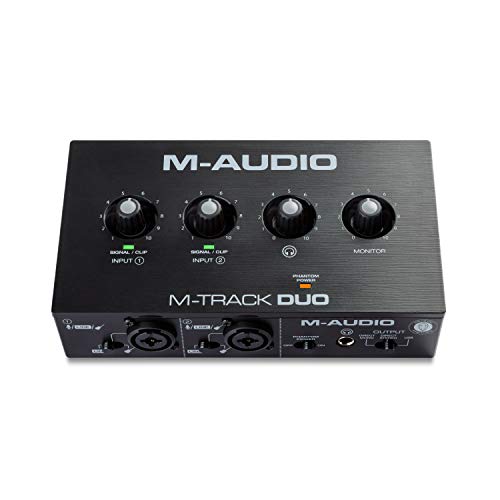
M-Audio M-Track Duo USB Audio Interface — Best value two-input route
M-Audio built its name on the first generation of affordable computer recording, and the M-Track Duo’s listing carries that DNA plainly: dual XLR, line and DI inputs, and a professional software suite aimed at recording, streaming and podcasting. The input description is the substance. Dual XLR covers two microphones; line inputs take keyboards and outboard gear at their own level; DI inputs accept a guitar or bass directly. One box, three kinds of source, no adapter improvisation — that is the working definition of a home-studio front end.
The software suite matters more at this tier than reviewers admit. A first interface is rarely bought by someone who already owns a mature recording setup; the bundled suite is frequently the buyer’s first DAW environment, first instruments, first effects. M-Audio’s pitch bundles that starting kit with the hardware, and the listing’s own framing — recording, streaming, podcasting in one breath — tells you the Duo expects to serve a creator’s whole output rather than a single album project. A unit that records your songs on Saturday and carries your stream on Sunday earns its desk space twice.
Set against the Scarlett 2i2, the Duo’s listing is quieter about its conversion figures: no dynamic range number is published in the title, and no gain automation or clip protection is claimed there. That does not make it a poor recorder — it makes it a simpler one, where levels are set by hand and the engineer’s attention does the work the Focusrite automates. Experienced recordists raised on manual gain staging may not miss the automation at all; beginners recording alone should weigh how often they will be both performer and engineer.
The Duo is the guide’s value anchor for two-input recording: the established brand, the flexible inputs, the starter software, and a specification sheet you should finish on the product page, where the figures the title omits will be waiting.
It also suits a particular household pattern — the shared creative desk. One partner podcasts, the other records demos, a teenager streams. A two-input interface with a broad software bundle serves all three without anyone reconfiguring the room, and the dual inputs mean a two-voice podcast needs no mixer in front of it. Versatility of that kind rarely headlines a review, but it decides which box is still plugged in three years later.
- Inputs: dual XLR, line and DI inputs, per the listing title
- Software: a professional software suite is bundled, per the listing
- Stated uses in the listing: recording, streaming and podcasting
- Conversion figures: the listing title publishes no sample-rate or dynamic-range number — the product page carries the detailed specification
- Gain automation: none is claimed in the listing title — levels are set manually
- Form: desktop USB audio interface
Strengths
- XLR, line and DI coverage handles microphones, keyboards and guitars without adapters.
- The bundled suite gives a first-time recordist a working software start.
- Two inputs serve both a songwriter’s sessions and a two-voice podcast.
Trade-offs
- The title states no conversion figures, so there is nothing to compare directly here.
- No Auto Gain or clip protection is claimed — manual levels, manually watched.
- Two channels remains the ceiling, as with every pick here.
Best for: a first two-input setup that must cover songs, streams and a podcast from one desk.
Not suited for: a recordist who wants published conversion figures and automated gain protection in the headline spec.
Look at the M-Track Duo on Amazon when the studio has to be a podcast rig and a streaming rig in the same week.
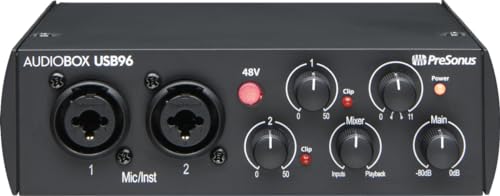
PreSonus AudioBox 96 USB Audio Interface — Best for the PreSonus ecosystem
The AudioBox 96’s listing title is the shortest in this guide — a name, an edition, a category — and that brevity forces an honest review to work differently. What can be said from the title is real: this is the 25th Anniversary edition of the AudioBox USB line, which makes it a current pressing of one of home recording’s longest-running designs, from PreSonus, a maker whose identity is bound up with its Studio One recording software. Longevity of that kind is itself evidence; interfaces with fatal flaws do not get anniversary editions.
The AudioBox line’s historical proposition is sturdiness and ecosystem. PreSonus built its following among project studios that wanted the interface and the DAW to come from one house, with the integration and the upgrade path that implies. A buyer already inside Studio One, or intending to be, reads this pick differently from a buyer comparing raw figures: the interface is the hardware half of a matched pair. The anniversary framing also signals a maker still investing in the line’s support — drivers, documentation, a user community large enough that any problem you meet has been met before, in public, with answers.
What this guide will not do is furnish the AudioBox with specifications its listing title withholds. Input counts, conversion figures and feature lists belong to the product page, and the reader comparing this pick against the Scarletts should pull those numbers directly rather than accept a summary’s invention. That discipline is the price of an honest guide, and the AudioBox’s case — ecosystem, longevity, a maker’s name — does not need invented numbers to stand.
Consider who this pick serves best: the recordist choosing a platform, not just a box. If your next five years of songs will live in Studio One, the AudioBox is the natural front door, and its long production run means the door will still be supported when the songs are finished. If you are DAW-agnostic and shopping purely on published figures, the Focusrite listings state more of their case up front.
There is also a temperament match worth naming. Some buyers love a specification duel; others want the tool their peers already use, with the forum threads and tutorial videos that follow. The AudioBox has always been the second kind of purchase — the known quantity in school music rooms and first studios — and the anniversary edition keeps it in that role for another cohort.
- Form: USB audio interface, desktop
- Edition: 25th Anniversary, per the listing title
- Maker’s ecosystem: PreSonus, the company behind the Studio One recording software
- Input configuration: the listing title does not enumerate inputs — read the channel layout on the product page before ordering
- Conversion specification: not stated in the listing title — the manufacturer’s page holds the figures
- Lineage: a long-running AudioBox design, refreshed for this edition
Strengths
- A long-running line reaching an anniversary edition signals durable support.
- The natural hardware partner for a Studio One-centred studio.
- A large installed base means troubleshooting knowledge is easy to find.
Trade-offs
- The listing title states almost no specifications — homework is required.
- Its strongest argument is ecosystem fit, which DAW-agnostic buyers may not value.
- Feature comparisons against the Scarletts must be finished on the product page.
Best for: a project studio standardising on PreSonus software and wanting the matching hardware front end.
Not suited for: a buyer who wants the full specification argued in the listing itself before any further reading.
Check the AudioBox 96 on Amazon if your songs already live, or will live, inside the PreSonus world.

Focusrite Scarlett Solo 4th Gen USB Audio Interface — Best single-input interface
The Scarlett Solo asks a disarmingly simple question: what if you only ever record one thing at a time? Its listing states one XLR mic preamp and one Hi-Z instrument input, 24-bit/192kHz conversion, the same 120dB dynamic range as its two-input sibling, Air modes, and compatibility spanning PC, Mac and iPad. That is the 2i2’s recording quality with the second preamp honestly amputated — and for the voice-over artist, the podcaster, the guitarist who overdubs everything one pass at a time, the amputation removes cost and desk clutter without touching the sound of the channel that remains.
The one-at-a-time workflow is more common than gear culture admits. Most home recording is sequential: a guitar pass, a vocal pass, a bass pass, each tracked alone while the previous ones play back. The Solo serves that workflow completely, and its single preamp carries the same fourth-generation design language as the flagship of the range — the dynamic range figure in its listing matches the 2i2’s, which is the detail that elevates this pick above a merely cheaper box. You are buying one channel of the good stuff rather than two channels of the lesser stuff.
iPad compatibility in the listing widens the Solo’s habitat. A songwriter can track a demo into a tablet at a kitchen table, a voice artist can run a portable booth from a laptop-class setup, and the interface remains the same familiar front end in each place. Portability plus a single excellent channel is the voice-worker’s whole brief, and this is the pick that answers it most completely in the guide.
The limitation is written into the concept: the day you want voice and guitar in one live take, or a guest across the table with their own microphone, the Solo has no second preamp to offer. Buying it is a bet on your own process — a bet many solo recordists should happily place, and duos should not.
Treat the choice between Solo and 2i2 as a question about your best songs. If they were built in layers, the Solo is the rational purchase and the savings belong in a better microphone. If they were captured in single performances, the second preamp is not a luxury but the whole point, and the 2i2 above is your row of this guide.
- Inputs: 1 XLR mic preamp and 1 Hi-Z instrument input, per the listing
- Conversion: 24-bit/192kHz
- Dynamic range: 120dB, as stated in the listing title
- Preamp colour: Air modes
- Compatibility named in the listing: PC, Mac and iPad
- Connection: USB-C
- Phantom power: not detailed in the listing title — condenser owners should confirm the provision on the product page
Strengths
- Fourth-generation Focusrite channel quality without paying for a second preamp.
- The stated 120dB dynamic range matches its two-input sibling.
- iPad compatibility suits portable voice and demo work.
Trade-offs
- One microphone at a time, permanently — no live voice-plus-second-mic sessions.
- Voice and guitar together in a single take exceed its design.
- Phantom power provision needs confirming on the full listing.
Best for: voice-over work, solo podcasting and layered one-pass-at-a-time recording on PC, Mac or iPad.
Not suited for: a duo recording together, or any session needing two microphones at once.
See the Scarlett Solo on Amazon if your track sheet reads like a diary — one honest entry at a time.

PIYONE 2×2 USB Audio Interface — Best streamer-friendly 2×2
The PIYONE 2×2 announces its priorities in its listing: 24-bit/192kHz recording, an XLR/TRS combo input, monitor mix and loopback functions, one-cable setup, and an alloy shell finished in red. Two of those phrases separate it from the studio establishment above. Monitor mix is the control that blends your live input against the computer’s playback while you record — the difference between hearing yourself naturally and hearing yourself a beat late. Loopback routes the computer’s own audio back into the recording or stream, which is how a streamer plays a clip, a guest call or a game soundtrack into their broadcast without a second machine or a tangle of virtual cables.
That feature pair reframes who this interface is for. The Scarletts are recording instruments first; the PIYONE is a creator’s hub that records well — a unit for the person whose output is split between songs, streams and videos, and who needs the routing tricks of a broadcast desk more than a second matched preamp. The combo input accepts either an XLR microphone or a quarter-inch instrument or line source in the same socket, which keeps the front panel simple for a desk that changes jobs hourly.
The 2×2 designation and the stated conversion figures put its recording ambitions in the same bracket as the guide’s mainstream picks on paper. What the listing cannot convey — and what a buyer should weigh — is the support horizon of a smaller brand: driver maintenance, documentation depth and community knowledge all run thinner than Focusrite’s or M-Audio’s. The alloy construction and one-cable setup speak to a unit designed to be carried and used rather than installed and forgotten.
Judge this pick by your routing, not your reverence. If loopback has been the missing feature in your streaming setup and your recording is one voice plus one instrument, the PIYONE’s listing answers your actual problem. If you have never wanted loopback, the establishment picks above spend their budgets on the recording path instead.
A word on the red alloy shell, since it will be the most visible object on the desk: streaming is a visual medium, and gear that looks deliberate on camera is doing real work for a creator. That is not a frivolous consideration at this tier — it is part of the product’s honest design brief, and buyers who stream on camera may reasonably count it.
- Configuration: 2×2 USB audio interface, per the listing
- Conversion: 24-bit/192kHz, stated in the listing title
- Input: XLR/TRS combo input
- Monitoring: monitor mix function, named in the listing
- Loopback: stated in the listing title — routes computer audio into the recording or stream
- Setup: one-cable, with PC, Mac and iOS named in the listing
- Second preamp detail: the listing title describes the combo input in the singular — verify the exact two-channel layout on the product page
Strengths
- Loopback and monitor mix solve the streamer’s two classic routing problems.
- Combo input keeps a multi-role desk simple and uncluttered.
- Published 24-bit/192kHz figures match the guide’s mainstream bracket on paper.
Trade-offs
- A smaller brand’s driver and support horizon is thinner than the majors’.
- The exact second-channel arrangement needs confirming on the product page.
- Recording purists may prefer budget spent on preamps over routing features.
Best for: a streamer-recorder who needs loopback for calls and clips, plus one flexible combo input for voice or instrument.
Not suited for: a two-microphone recording session as the main use, or a studio standardising on a major brand’s support.
Check the PIYONE 2×2 on Amazon if your desk broadcasts as often as it records.

XTUGA USB Audio Interface — Best budget entry point
Every category needs its doorway, and the XTUGA — sold as the Q-12 — is this guide’s. Its listing describes a USB audio interface for PC recording with an XLR input, plug-and-play operation and an ultra-low latency claim, aimed at the home recording studio. Read that claim in the manufacturer’s own terms: latency language in budget listings is a promise of intent rather than a measured figure, and this guide repeats it as the maker’s wording, not as a tested number. What is concrete is the shape of the offer — an XLR-equipped box that connects a real microphone to a computer without mixer mathematics.
Who is the doorway for? The singer who has been recording into a phone and wants a proper microphone; the podcaster graduating from a USB mic to an XLR one and discovering an interface is now required; the student whose course demands recorded assignments. For those readers, the first interface’s job is to exist, work, and teach the workflow — gain staging, monitoring, track arming — on which all later gear decisions depend. A simple plug-and-play unit that gets a microphone recorded this week teaches more than a flagship admired in a wishlist for a semester.
The listing also mentions a small microphone jack dimension alongside the XLR input, a reminder that budget interfaces sometimes serve headset-style microphones as well as studio ones; the exact arrangement belongs to the product page, and buyers with a specific microphone should confirm the match there. Similarly, phantom power for condenser microphones is not stated in the title — dynamic microphone users can proceed untroubled, condenser owners must check before ordering.
Frame the XTUGA honestly as a first step with an upgrade path behind it. It will not be the last interface its buyer owns if the hobby takes hold, and it does not pretend otherwise. Its value is that it starts the clock: songs get recorded, podcasts get published, and the limitations a user discovers in it become the specification of their second purchase.
That educational role deserves respect rather than condescension. Nearly every working engineer started on whatever was affordable and learned its edges by hitting them. A doorway interface bought with open eyes — knowing the figures are unpublished and the claims are the maker’s — is a legitimate start, and this guide includes it so that readers at that budget are choosing knowingly rather than guessing.
- Form: USB audio interface for PC, model Q-12 per the listing
- Input: XLR, per the listing title
- Operation: plug and play, as described in the listing
- Latency: described by the maker as ultra-low — a qualitative claim, not a published measurement
- Conversion figures: the listing title states none — detailed specifications sit on the product page
- Phantom power: not mentioned in the listing title — condenser microphone owners must verify before buying
Strengths
- A real XLR input at the entry tier, for a first proper microphone.
- Plug-and-play simplicity suits a first recording setup.
- Starts the workflow learning every later upgrade depends on.
Trade-offs
- No conversion or dynamic-range figures are published in the listing title.
- The latency claim is the maker’s qualitative wording, not a measurement.
- Serious hobbyists will outgrow it — that is the doorway bargain.
Best for: a first XLR microphone setup for songs, podcasts or coursework on a PC.
Not suited for: condenser microphone owners who have not confirmed phantom power, or multi-source sessions.
Look at the XTUGA Q-12 on Amazon when the goal is to record something real this week and learn from there.
What Do Preamps Actually Do to Your Sound?
A microphone’s raw output is vanishingly small, and the preamp’s job is to raise it by a large amount without adding audible noise or distortion of its own. That is why preamp quality, more than any converter figure, is what experienced recordists shop for in an interface. A quiet microphone in a quiet room exposes a weak preamp immediately: turn the gain up for a soft singer and the hiss rises with the voice, printed into the take forever. The fourth-generation Scarlett listings answer this concern with their dynamic range figure, which describes how much clean span the design offers between its floor and its ceiling.
Gain range matters in the opposite direction as well. A loud source — a guitar amplifier close-miked, a drummer’s snare, a belting vocalist — needs a preamp that can turn down gracefully, with pad options or enough headroom to accept the level without clipping at minimum gain. Home recordists meet this less often than the quiet-source problem, but the first time a perfect loud take distorts at the preamp, the lesson sticks. When a listing publishes gain information, read both ends of it; when it does not, as with several picks here, the product page and manual are where the truth lives.
The Air modes on the Focusrite picks deserve a plain explanation, since they are a colour rather than a correction. Air adds a high-frequency presence lift at the preamp stage, the sort of sheen engineers historically chased with particular console designs. On vocals and acoustic instruments it can save a dull microphone; on an already bright source it can be too much. It is switchable, so treat it as seasoning available at the point of recording — and remember that, unlike a plug-in, anything printed at the preamp stage is part of the take permanently.
How Does Monitoring Shape a Performance?
Recording asks a performer to sing or play while hearing a version of themselves, and the quality of that experience changes the performance. If the monitored voice arrives late — delayed by the computer’s processing — the brain stumbles over its own echo and timing drifts. Direct monitoring solves this by routing the input straight to the headphones inside the interface, before the computer is involved, and every serious interface in this guide is built around that idea. The PIYONE names its version monitor mix, which adds the balance control between the live input and the returning playback.
That balance control is quietly one of the most-used features in home recording. Tracking a vocal over a dense mix, you want yourself loud; overdubbing a subtle harmony, you want the existing tracks forward and yourself tucked under them. A single knob that trades between those worlds, reachable without leaving the microphone, is worth more in a session than a specification point or two. When you compare interfaces, ask how the monitoring blend is controlled and whether it can be reached mid-take with an instrument in your hands.
Headphone output quality belongs in the same conversation. The performer hears the session through that output, and a weak headphone stage means the singer is compensating for a mix that is not really there. Drive your actual headphones from the interface during your first session and judge whether the level arrives with room to spare; straining at maximum volume is a sign the pairing, not the performance, needs attention.
Which Software Will You Actually Live In?
An interface purchase quietly chooses your software neighbourhood. Bundles such as the M-Track Duo’s suite give a beginner a DAW, instruments and effects to start with, and the PreSonus pick makes the strongest version of the ecosystem argument: hardware and Studio One from one maker, designed to meet without friction. None of this locks you in — every interface here will work with the major recording programs — but the first year of learning happens inside whatever you start with, and starting friction is the enemy of finished songs.
Drivers are the invisible half of the same question. The interface’s driver decides how small a buffer your computer can run, how gracefully the unit survives operating system updates, and whether it is still supported when your machine is replaced. Established makers maintain drivers as a matter of reputation; smaller brands vary. This is a genuine, unglamorous reason the guide’s upper rows are occupied by the names they are, and it should weigh alongside preamps for any buyer planning to keep the unit for years.
How Do the Six Interfaces Compare Side by Side?
| Pick | Inputs from the listing | Headline figure | Stands out for |
|---|---|---|---|
| Scarlett 2i2 4th Gen | 2 mic preamps, 2 Hi-Z | 120dB dynamic range, 24-bit/192kHz | Auto Gain and Clip Safe |
| M-Track Duo | Dual XLR, line and DI | Software suite bundled | Recording, streaming, podcasting in one pitch |
| AudioBox 96 | See product page | 25th Anniversary edition | PreSonus ecosystem fit |
| Scarlett Solo 4th Gen | 1 XLR preamp, 1 Hi-Z | 120dB dynamic range, 24-bit/192kHz | PC, Mac and iPad compatibility |
| PIYONE 2×2 | XLR/TRS combo | 24-bit/192kHz | Monitor mix and loopback |
| XTUGA Q-12 | XLR | Plug and play | The budget doorway |
The table sorts itself by the input count you settled earlier. Two-preamp recordists live in the top three rows and choose among automation, software bundle and ecosystem. One-at-a-time recordists live in the Solo’s row and should not apologise for it. Creators who broadcast read the PIYONE row first, and beginners read the last row as a beginning rather than a compromise. Conversion figures, where listings publish them, favour the Focusrites; where they do not, the honest move is the product page, not a guess.
How Should You Set Up an Interface for Your First Sessions?
Connect in this order: interface to computer by USB, microphone to input one with an XLR cable, headphones to the interface — never to the computer — because you will monitor from the interface itself. In your recording software, select the interface as both input and output device; half of all first-session failures are a program still listening to a laptop’s built-in microphone. Set the software’s session to 24-bit recording, and choose a sample rate your whole project will keep — consistency matters more than the number.
Then learn gain staging on a sacrificial take. Sing or play the loudest moment of the song, not the average moment, and set the preamp gain so that peak lands comfortably below the ceiling with room to spare; the Scarletts’ Auto Gain and Clip Safe exist because this step is where home recordings die. Engage direct monitoring so you hear yourself without delay, keep the microphone closer than feels polite — proximity is the cheapest acoustic treatment there is — and record thirty seconds before judging anything. Condenser owners: confirm phantom power is switched on for the microphone and off for anything that should not receive it, and re-check that habit every session.
Finally, build the room you have rather than mourning the studio you do not. A duvet behind the singer, a wardrobe of clothes as a vocal booth, recording at the quiet hour of the house — these free decisions shape a recording more than the gap between any two interfaces in this guide. The interface’s job is to not be the problem; the room’s job is everything else.
What Should a Beginner Budget Around the Interface?
The interface is the centre of the purchase, not the whole of it, and planning the surrounding spend prevents the classic stranded-gear outcome. A microphone comes first — the interface exists to serve one — and the pairing logic runs through this whole guide: a condenser needs phantom power confirmed, a dynamic needs healthy preamp gain. An XLR cable of sensible length, a stand that holds the microphone where your voice actually is, and headphones you can wear for an evening complete the working kit. Monitor speakers can wait; most home rooms flatter headphones’ honesty anyway, and a beginner’s mixes translate better from a known pair of cans than from speakers exciting an untreated room.
Sequence the spending by what prints onto recordings. The microphone and the room print permanently; the interface prints its noise floor and its gain; everything else is workflow. That ordering is why this guide keeps steering single-input buyers toward the Solo plus a better microphone rather than two inputs they will not use — the audible difference lives in the microphone long after the specification difference between interfaces has faded into the mix.
One session habit separates improving recordists from frustrated ones: keep a notebook, physical or digital, of what worked. Microphone distance, gain setting, which input, whether Air was on — thirty seconds of notes after a good take turns luck into method. Interfaces reward this because their controls are few and repeatable; the singer who can recreate last Tuesday’s vocal chain starts every session ahead. None of the six picks here can take those notes for you, and all of them will sound better in the hands of someone who does.
And keep perspective on the whole enterprise. The recordings that move people were very often made through equipment humbler than everything in this guide, by performers who understood their tools completely. The interface you choose this week becomes invisible exactly when you stop thinking about it — when gain staging is habit, monitoring is trusted, and the song is the only thing in the room demanding attention. Buying toward that invisibility, rather than toward the longest feature list, is the real skill this category rewards.
There is one more upgrade path worth understanding before you buy, because it changes how long the first interface stays useful. Many recordists eventually add a dedicated microphone preamp or a channel strip in front of their interface, chasing a particular colour. That works only if the interface accepts line-level inputs gracefully — one reason the M-Track Duo’s line inputs and the PIYONE’s combo socket matter beyond their day-one use. An interface with flexible inputs becomes the permanent converter and monitoring core of a growing studio, even as the gear in front of it changes. Buy the front door with the hallway in mind, and the first purchase stops being a sunk cost the moment your ambitions grow.
What Mistakes Do New Recordists Make When Buying?
The expensive mistake is counting instruments instead of simultaneous sources and buying a two-input box for a four-microphone dream — or its mirror, buying inputs that will never be used while starving the microphone budget. The second is ignoring the monitoring path and discovering that hearing yourself late makes singing in time nearly impossible. Third, buyers chase sample-rate ceilings while recording at whatever the software defaulted to, in a room whose echo prints onto every take. Fourth, condenser microphones get ordered without confirming phantom power on the chosen interface — a pairing check that takes one minute on the product page. And fifth, the software bundle gets overlooked entirely, though for a beginner it may be half the purchase’s real value.
Final Recommendation
Most readers should land on the Scarlett 2i2: two proper preamps, published figures, and protection for the takes that matter make it the reference answer for making music at home. The Solo is the smarter buy when your process is honestly one source at a time, and it funds a better microphone with the difference. The M-Track Duo serves the multi-role creator desk, the AudioBox 96 the PreSonus household, the PIYONE the streamer, and the XTUGA the very first step. Whichever you choose, remember what the purchase actually is — not a sound card, but the front door of every recording you are about to make — and doors are worth choosing carefully.
A closing practical note on cables, because beginners reliably underrate them: the XLR cable between microphone and interface carries a tiny signal through a room full of interference, and a damaged or badly shielded one will donate buzz to every take. One decent cable, treated kindly, outlasts several interfaces. Keep it untangled, keep it out from under chair wheels, and if a session ever develops a mystery hum, swap the cable before you suspect anything in this guide.
Store the interface’s box and registration details somewhere findable, and register the bundled software the week the unit arrives rather than the month you finally need it. Bundles are part of what you paid for, licences occasionally change, and the recordist who activates everything while the purchase is fresh never loses value to an expired welcome offer or a misplaced code.
Small rituals compound: label your inputs with tape if cables move often, keep one known-good spare cable in the drawer, and export a finished mix the same day you record the parts, even a rough one. Momentum is a studio feature no interface ships with, and every habit that protects it is worth more than the next specification.
Frequently Asked Questions
Can I record music with an internal sound card instead?
Playback, yes; recording, poorly. Internal cards lack accessible preamps, instrument inputs and phantom power, and they place analogue circuitry inside a noisy case. The interfaces in this guide exist because that gap never closed.
What does phantom power do, and do I need it?
It sends 48V up the microphone cable to power condenser microphones, which cannot work without it. Dynamic microphones do not need it. If your microphone is a condenser, confirm the provision on your chosen interface’s product page before ordering.
Is 24-bit/192kHz necessary for home recording?
No recording requires the ceiling; 24-bit depth is the genuinely useful part, giving headroom for sensible gain staging. The 192kHz figure describes capability. Record at a consistent project rate and spend your attention on performance and room.
What is loopback, and should I care?
Loopback feeds the computer’s own audio back into your recording or stream — a guest call, a clip, a backing track. Streamers and podcasters with remote guests care deeply; pure music recordists may never use it. The PIYONE lists it; the studio majors here do not headline it.
Can these interfaces work with an iPad?
The Scarlett Solo’s listing names iPad compatibility explicitly. For the others, check the product page — tablet use also depends on power delivery, since the interface draws from the host.
When should I buy more than two inputs?
When a real session demands it: a drum kit, a live band, a string section, a panel podcast in one room. Until that session is scheduled rather than imagined, two inputs cover most home music-making.


