What's inside
- Key Takeaways
- Quick Picks
- How We Chose These Picks
- Why Does a Drum Module Need Line Inputs Rather Than a Microphone Input?
- Should You Play Through a Drum Library or Monitor the Module Directly?
- How Many Inputs Does a Drum Recording Really Use?
- How Do the Six Drum Interfaces Compare Side by Side?
- How Should You Set Up an Interface to Record an Electronic Kit?
- What Mistakes Do Drummers Make When Choosing an Interface?
- What Changes When the Kit Becomes a Hybrid Rig?
- Final Recommendation
- Frequently Asked Questions
- Related Guides
As an Amazon Associate I earn from qualifying purchases. This post may contain affiliate links at no extra cost to you.
widgetverdict.com is reader-supported. When you buy through links on our site, we may earn an affiliate commission.
Where to buy: Amazon carries every interface in this guide, from the compact two-input boxes that sit beside a practice pad to the rackmount unit built for a full acoustic kit.
The best sound cards for electronic drums are, in practice, USB audio interfaces, and the reason sits inside the drum module itself. An electronic kit already contains its sounds; what it needs from a computer is a clean road in and a fast road back. The module’s stereo output has to reach your recording software without picking up hiss on the way, the MIDI notes you play have to travel to the computer so a drum library can be triggered later or instead, and the sound coming back to your headphones has to arrive close enough to the strike of the pad that your hands do not feel the delay. An internal gaming card does none of that work — it has no line inputs worth the name, no MIDI sockets, and no microphone preamps for the day an acoustic kit enters the picture. Every pick here is therefore an interface, judged on the three roads a drummer actually uses: line-in, MIDI, and the return path to your ears.
Two recording jobs hide inside this one keyword, and they want different hardware. The first job is the electronic kit alone: a stereo pair from the module, perhaps split into a handful of channels on the larger interfaces, plus MIDI captured alongside so the performance can be re-voiced in software months later. Two good line inputs and a MIDI port cover that job completely. The second job is the acoustic kit, or the hybrid rig where electronic pads stand next to real cymbals and a miked snare. That job eats inputs the way drummers eat sticks — one microphone per drum, a pair overhead, a room microphone if the space deserves it — and it is why the Tascam US-16×08, with eight XLR inputs and drum recording written into its own listing title, anchors the upper end of this guide.
Latency deserves a paragraph of honesty before any product names appear. Every interface here involves a digital conversion on the way in and another on the way out, and that round trip takes time. How much time depends on your computer, your driver settings and your buffer size far more than on which badge is printed on the box, so this guide will not print invented millisecond figures for any pick. What can be said truthfully is qualitative: interfaces with mature drivers and sensible buffer settings can be played through a virtual drum library comfortably by most drummers, direct monitoring removes the round trip from your headphones entirely while you record the dry signal, and a drummer who is unusually sensitive to delay should test the feel at low buffer settings before committing to a library-driven workflow. The Jolgoo listing uses the words low latency; treat that as the maker’s description of intent, not as a measurement anyone has handed you.
Key Takeaways
- Every pick is a USB audio interface, because an electronic drum module needs line inputs and MIDI, not a gaming card’s outputs.
- The Behringer UMC404HD, Focusrite Scarlett 4i4, Tascam US-16×08 and Behringer UMC1820 all carry MIDI in their listing titles — the four picks that can capture a performance as notes as well as audio.
- The Tascam US-16×08 is the multi-microphone answer: eight XLR and eight quarter-inch inputs, with drum recording named in its own title.
- The UMC1820 stretches furthest, at eighteen inputs and twenty outputs with ADAT expansion, for hybrid rigs and growing studios.
- A stereo module recording needs only two honest line inputs — the M-Track Duo and the Jolgoo 2×2 cover the practice-room end of the guide.
- Latency is discussed qualitatively throughout, because no listing here publishes a measured round-trip figure to quote.
Quick Picks
| Pick | Badge | Why it is here |
|---|---|---|
| Behringer U-PHORIA UMC404HD Audio/MIDI Interface | Best all-round drum interface | Four inputs and four outputs at 24-bit/192 kHz, Midas preamps and MIDI for capturing a module both ways at once. |
| Focusrite Scarlett 4i4 4th Gen USB Audio Interface | Best for module plus MIDI libraries | Four line inputs, MIDI in and out, Auto Gain and Clip Safe on the newest Scarlett generation. |
| Tascam US-16×08 Rackmount Audio/MIDI Interface | Best for miking an acoustic kit | Eight XLR inputs in a rackmount body, with drum recording stated in the listing itself. |
| Behringer UMC1820 Audio/MIDI Interface | Best for expanding rigs | Eighteen inputs, twenty outputs and ADAT I/O for the studio that keeps adding microphones. |
| Jolgoo 2×2 USB Audio Interface | Best compact practice interface | A small 24-bit/192kHz box with phantom power for the module-and-a-microphone desk. |
| M-Audio M-Track Duo USB Audio Interface | Best simple stereo route in | Dual XLR, line and DI inputs that take a module’s stereo output without ceremony. |
How We Chose These Picks
We started from the connections a drummer touches, not from headline conversion figures. First came line inputs, because the module’s main output is a line-level stereo signal and recording it through a microphone input is a category error that costs headroom and adds noise. Second came MIDI, counted as a genuine feature only where the listing title states it, because capturing the note data beside the audio is what turns a take into an editable performance. Third came input count for the acoustic end of the keyword: a kit cannot be close-miked through two inputs, so the guide needed at least one interface whose title honestly promises eight XLR sockets. Conversion quality still mattered — every pick here works at 24-bit, and most state 192 kHz — but it ranked below the plumbing, because a drum recording fails at the socket long before it fails at the converter.
Why Does a Drum Module Need Line Inputs Rather Than a Microphone Input?
Because the module is not a microphone. Its outputs deliver a finished, line-level signal — the same strength as the output of a keyboard or a media player — and a microphone preamp expects something far weaker, which it then amplifies hard. Feed a line signal into a microphone input without padding it down and the loudest hits clip; turn the gain down to compensate and you are working at the awkward bottom of the preamp’s range, where its behaviour is least graceful. A proper line input accepts the module’s output at face value. That is why the Scarlett 4i4’s four line inputs matter to a drummer even though the same buyer might never plug a microphone into it, and why the M-Track Duo’s listing calling out line inputs alongside its XLR sockets is more relevant to this keyword than its software bundle.
Stereo discipline matters just as much. A drum module pans toms, cymbals and effects across a stereo image the maker designed carefully. Record that image through two matched line inputs, panned hard left and right in your software, and the kit arrives intact. Record it through a single combined input, or through a cheap adapter that sums to mono, and the kit collapses into the centre with its cymbals stacked on top of its snare. Every pick in this guide takes a true stereo pair at minimum; the four-input models let you go further and split the module’s output — kick and snare on their own channels, the rest in stereo — on kits whose modules offer assignable outputs.
The third road, MIDI, is the one beginners skip and regret. Audio alone freezes the kit sound you chose on the day. MIDI recorded alongside lets you keep the performance — every ghost note and flam exactly as played — while changing the kit underneath it later, fixing a cracked cymbal sample, or quietening one over-eager tom in the mix. The four MIDI-equipped picks here let you lay both down in a single pass, which is the working method this guide recommends whenever the sockets exist.
Should You Play Through a Drum Library or Monitor the Module Directly?
Both, at different moments, and the distinction decides how much latency you will ever feel. When you monitor the module directly — headphones fed from the interface while it passes the module’s own sound straight through — your ears hear the kit’s internal sounds with no computer round trip involved. The recording software still captures everything; you simply are not listening through it. That is the zero-drama setup for practice and for laying down takes, and it is available in some form on interfaces across this guide.
Playing through a virtual drum library is the more ambitious arrangement: your pads send MIDI to the computer, the library renders its sampled kit, and the sound returns to your headphones. Now the round trip is in your ears, and its length is set by buffer size, driver quality and machine load. Smaller buffers feel tighter and strain the computer harder; larger buffers relax the machine and loosen the feel. Drummers differ in sensitivity — a player raised on acoustic kits often notices a delay that a producer who programmes parts would never feel — so the honest advice is to rehearse the workflow at home before relying on it for a session that matters, and to keep direct monitoring as the fallback that always works. No interface in this guide can repeal that trade-off; the better ones simply give you drivers stable enough to run small buffers without crackling.

Behringer U-PHORIA UMC404HD Audio/MIDI Interface — Best all-round drum interface
The UMC404HD is the pick that covers the most drumming situations without asking you to predict the future. Its listing describes a 4×4 interface — four inputs, four outputs — running at 24-bit/192 kHz over USB, with Midas microphone preamplifiers and MIDI as part of its name rather than an accessory. For an electronic kit, that shape is close to ideal: two inputs take the module’s stereo output, the MIDI sockets capture the same performance as notes, and the remaining inputs stand ready for the microphone on a real hi-hat or the vocalist who wanders into the session.
The Midas name on the preamps deserves a word of context. Midas built its reputation on live-sound mixing consoles, and Behringer puts the badge on the preamp design across this U-PHORIA line. For a drummer, preamp quality shows up in two places: how cleanly a quiet dynamic microphone on a snare is raised to working level, and how gracefully a loud hit is handled at the top. Four of those preamps in one box means a hybrid kit — module in stereo, plus a miked snare and a miked kick around an acoustic shell pair — can be tracked in one pass without borrowing hardware.
Four outputs, the half of the specification people skim, quietly matter for drummers who play with others. One pair feeds your monitors or headphones; the second pair can carry a click track to a different destination, or a backing track to a small PA while your own mix stays in your ears. That routing flexibility is exactly what separates a 4×4 interface from a 2×2 in a rehearsal room, and it is why this model, rather than a smaller Behringer, carries the all-round badge here.
Its limits are the limits of its size. Four inputs will not close-mike an acoustic kit — the Tascam further down exists for that job — and the listing title does not describe per-channel niceties such as auto gain or clip protection, which the Scarlett 4i4 states outright. Buy the UMC404HD for breadth at a sane scale: the electronic kit recorded properly, MIDI captured beside it, and enough spare sockets that the next idea does not need a new interface.
- Format: 4×4 USB audio and MIDI interface, per the listing title
- Conversion: 24-bit/192 kHz, stated in the listing title
- Preamps: Midas microphone preamplifiers, as named in the listing
- MIDI: included — the interface is sold as an audio/MIDI model in its own title
- Separate Auto Gain or clip-protection features: the title is silent on these, so check the manufacturer’s documentation before counting on them
- Phantom power detail: not spelled out in the listing title — confirm the arrangement in the maker documentation if condenser microphones are planned
One working habit suits this interface particularly well: record the module twice, in effect, every time. Keep the stereo audio as the take of record and the MIDI as the insurance policy, and store both in the same project folder with the same take number. Months later, when a mix reveals that the module’s ride cymbal was too polite, the MIDI track lets you swap the sound without asking the drummer — who may be you, with a sprained wrist by then — to reproduce a performance that had exactly the right feel. The UMC404HD’s socket layout makes that belt-and-braces method a default rather than a project, which is the highest compliment a mid-sized interface can earn.
Strengths
- Four inputs and MIDI cover the electronic kit, a hybrid rig and a spare microphone at once.
- Four outputs allow a separate click or backing-track feed for rehearsal use.
- Midas preamps give the acoustic odds and ends a respectable path in.
Trade-offs
- Four inputs stop well short of a fully miked acoustic kit.
- The listing title names no auto-gain or clip-safe assistance for setting levels.
- Its breadth is wasted on a drummer who only ever records a stereo module pair.
Best for: an electronic kit recorded as audio and MIDI together, with a microphone or two joining on hybrid sessions.
Not suited for: a full acoustic kit that needs a microphone on every shell — that session belongs to the eight-XLR Tascam below.
Hear the UMC404HD’s four-input layout against your own kit list on Amazon, and count your channels before it ships.

Focusrite Scarlett 4i4 4th Gen USB Audio Interface — Best for module plus MIDI libraries
The Scarlett 4i4 is the interface this guide would hand to the drummer whose real instrument is a drum library. Its listing is unusually complete: four inputs and four outputs, two microphone preamps, two high-headroom instrument inputs, four line inputs, MIDI in and out, Auto Gain, Clip Safe, Air modes and 24-bit/192kHz conversion over USB-C. Read that list through a drummer’s eyes and each item finds a job — the line inputs take the module, the MIDI pair drives the library and records the performance, and Clip Safe stands guard over the loudest thing in any drummer’s vocabulary, which is the unexpected flam that arrives two decibels hotter than the soundcheck promised.
Auto Gain and Clip Safe are worth separating, because they solve different halves of the drummer’s level problem. Setting gain on drums is notoriously awkward: play softly while you adjust and the peaks clip later; play at full force while reaching for a knob and the take is ruined anyway. Auto Gain listens to your playing and sets the preamp level itself. Clip Safe watches for the overload that still slips through and protects the recording from the harsh digital clipping that cannot be repaired afterwards. Neither feature appears anywhere in the titles of the two Behringer picks, and for a solo drummer recording without an engineer, they are the strongest argument in this entire guide.
The four line inputs also change what a module recording can be. Many mid-range and flagship modules offer assignable outputs; with four line inputs free, kick and snare can travel on their own channels while toms and cymbals ride the stereo pair, giving the mix separate control over the two drums that most often need it. The two instrument inputs, meanwhile, are the quiet bonus for the drummer who also tracks guitar or bass between kit sessions.
Where the 4i4 stops is scale and price of ambition: two preamps will not mike an acoustic kit beyond a minimal recorderman-style pair, and its talents are pointed at the considered home studio rather than the rack. Within that room, though, it is the most completely specified pick here for the electronic drummer who records alone.
- Format: 4-in, 4-out USB-C audio interface, per the listing title
- Inputs: 2 mic preamps, 2 Hi-Z instrument inputs and 4 line inputs, as listed
- MIDI: MIDI in and out, stated in the listing title
- Level assistance: Auto Gain and Clip Safe, both named in the listing
- Conversion: 24-bit/192kHz, stated in the listing title
- Air modes: included, per the listing title
A library-focused workflow benefits from one more of this interface’s traits: consistency. Because the same box handles the module’s audio, the MIDI stream and your headphone feed, a drummer can build one session template — tracks armed, library loaded, monitoring path set — and open it identically every day. The 4i4’s completeness is what makes that template possible without a second box for MIDI or a separate headphone solution.
Strengths
- Auto Gain and Clip Safe directly answer the solo drummer’s level-setting problem.
- MIDI in and out plus four line inputs suit library playing and split module outputs.
- The fullest specification published in any listing title in this guide.
Trade-offs
- Only two microphone preamps — an acoustic kit gets a minimal pair, not close miking.
- Its assistance features reward the home studio, not the rack-and-touring workflow.
- Drummers who never use MIDI libraries pay for capability they will not touch.
Best for: the electronic drummer who plays virtual kits through MIDI and records alone, setting levels without a second pair of hands.
Not suited for: an acoustic session needing more than two microphone channels at once.
Compare the Scarlett 4i4 on Amazon if Clip Safe sounds like the feature your last three ruined takes were asking for.
Tascam US-16×08 Rackmount Audio/MIDI Interface — Best for miking an acoustic kit
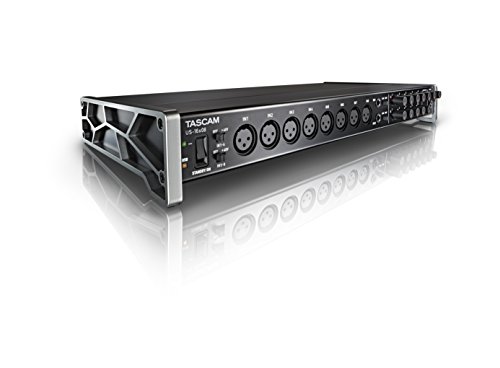
Most interfaces in this guide serve the electronic kit first. The US-16×08 reverses the priority, and says so in its own listing title, which names drum recording outright alongside eight XLR inputs, eight quarter-inch inputs, eight outputs and control software, all in a rackmount body. Sixteen inputs is not a number a solo electronic drummer needs; it is the number a real kit consumes without apology — kick, snare top, snare bottom if you are particular, a microphone per tom, two overheads, a hi-hat microphone, and a room microphone standing back to capture the space the close microphones cannot hear.
The rackmount form is part of the point. A kit session involves cables arriving from every direction, and a box that lives in a rack, with its connections organised and its body screwed down, survives that traffic better than a desktop unit being dragged by a tom cable. The control software named in the listing matters for the same practical reason: with sixteen channels in play, routing and setup happen on screen, where a mistake can be seen, rather than by reaching around a warm box between takes.
Eight outputs, like the input count, serve the band rather than the soloist. A drummer tracking with a guitarist and a singer can send different mixes to different headphones — the click-heavy balance the drummer wants, the click-free balance everyone else prefers — without a separate headphone distribution system doing the work. In the electronic context, those outputs also suit the hybrid stage rig, where pads and playback tracks leave the interface on separate lines for the front-of-house engineer to balance.
Restraint is required about what the title does not say. It publishes no sample rate in the text quoted here and names no preamp design, so this guide claims neither. What the title does establish — the channel count, the drum-recording intent, the rackmount form and the control software — is exactly the set of facts the acoustic drummer is shopping for, and on those facts this pick stands alone in the guide.
- Format: rackmount USB audio and MIDI interface, per the listing title
- Inputs: 8 XLR and 8 quarter-inch inputs, as stated in the listing
- Outputs: 8 outputs, stated in the listing title
- Intended use named in the listing: drum recording
- Setup: control software included, per the listing title
- Conversion figures: the quoted title text gives no sample rate, so consult the manufacturer documentation for the confirmed specification
There is also a growth argument for starting a kit-recording habit on a box like this rather than a two-input interface and a prayer. Drummers add microphones one at a time — an overhead pair this year, a kick microphone next — and each addition to a small interface forces a compromise about what gets unplugged. Sixteen inputs end that negotiation for a long while. The electronic kit does not get forgotten in the arrangement either: its stereo output simply becomes two more line-level citizens among the quarter-inch inputs, and the MIDI in the model’s name keeps the note-capture workflow alive beside the acoustic microphones.
Strengths
- Eight XLR inputs cover a close-miked kit with overheads and a room microphone.
- Rackmount build and control software suit a permanent kit-recording setup.
- Eight outputs feed separate headphone mixes for a tracking band.
Trade-offs
- A rackmount sixteen-input box is immovable overkill for a practice corner.
- The quoted listing text states no conversion figures to compare on paper.
- An electronic-only drummer would leave most of its channels empty forever.
Best for: the drummer who records a real acoustic kit regularly and wants every shell on its own track.
Not suited for: a bedroom electronic setup with two cables and no rack to screw anything into.
Look at the US-16×08 on Amazon when your microphone count, not your module, is what keeps outgrowing the interface.

Behringer UMC1820 Audio/MIDI Interface — Best for expanding rigs
If the Tascam is the acoustic kit’s finished answer, the UMC1820 is the growing studio’s open door. Its listing describes an 18×20 USB audio and MIDI interface — eighteen inputs, twenty outputs — with Midas microphone preamplifiers and ADAT I/O, positioned for recording microphones and instruments. The ADAT connection is the detail to underline: it is a digital expansion port, so a further bank of preamps can be added later over a single optical cable, and the interface you buy today becomes the centre of a larger system rather than a ceiling you eventually hit.
Twenty outputs sound like a typographical error until a hybrid drummer starts routing. Separate lines for the electronic kit’s kick, snare and stereo remainder; a playback track; a click that only the band hears; monitor mixes for two rooms — a live-leaning electronic rig consumes outputs the way an acoustic kit consumes inputs. The UMC1820 is the one pick here that can run a small stage setup and a recording session from the same rack, which is a real pattern among working drummers who teach, gig and track in the same week.
The Midas preamps return here from the UMC404HD, scaled up. For drum work their job is identical — clean gain for dynamic microphones on shells, graceful behaviour on loud hits — simply multiplied across a kit’s worth of channels. And MIDI remains in the model’s name, so the electronic side of a hybrid rig keeps its note-capture path even inside this much larger audio system.
Honesty about fit matters more with this pick than any other. Eighteen inputs in a spare bedroom recording one electronic kit is not headroom, it is furniture. The interface earns its place when there is a plausible list of things that will plug into it — the acoustic kit, the band, the teaching room, the ADAT expander already being eyed — and it should be skipped without regret when that list does not exist. Bought at the right moment in a studio’s growth, it is the last interface purchase for a long time; bought early, it is an expensive way to record two channels.
- Format: 18×20 USB audio and MIDI interface, per the listing title
- Preamps: Midas microphone preamplifiers, named in the listing
- Expansion: ADAT I/O, stated in the listing title
- Positioning in the listing: recording microphones and instruments
- Conversion figures: not quoted in the listing title — the manufacturer documentation carries the confirmed numbers, so read them there before purchase
- Per-channel assistance such as auto gain: the title makes no mention of it; verify against the maker’s documentation if that workflow matters to you
One scenario shows the shape of its value clearly. A drummer-teacher records student kits during the day — a few microphones, nothing exotic — then tracks their own band in the evening with the full close-miked array, then plays a weekend hybrid gig where the same rack feeds the desk. Three interfaces could do those jobs separately, each with its own drivers and habits. The UMC1820’s proposition is that one high-channel-count box, learned once, does all three, and ADAT stands behind it for the day even eighteen inputs stop being enough.
Strengths
- Eighteen inputs and twenty outputs cover kits, bands and hybrid stage rigs.
- ADAT I/O lets the system grow without replacing the interface itself.
- Midas preamps and MIDI keep both the acoustic and electronic workflows intact.
Trade-offs
- Far more interface than a single electronic kit can justify.
- The listing title publishes no conversion figures for paper comparison.
- Its scale belongs in a rack in a working room, not on a practice desk.
Best for: a teaching or gigging drummer whose channel count grows every season and who wants expansion without replacement.
Not suited for: a single electronic kit in a spare room, where sixteen of its inputs would sit permanently empty.
Check the UMC1820 on Amazon if your plans already include the microphones its sockets are waiting for.
Jolgoo 2×2 USB Audio Interface — Best compact practice interface
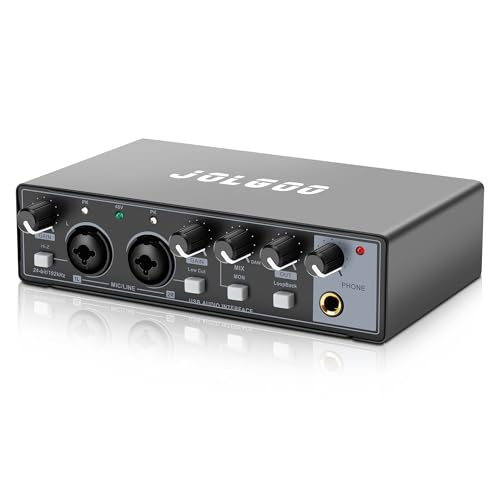
The Jolgoo brings the guide back down to the practice desk. Its listing describes a 2×2 interface — two inputs, two outputs — at 24-bit/192kHz, with phantom power, described by its maker as low latency and aimed at recording and podcasting. For the electronic drummer whose entire requirement is the module in stereo, recorded cleanly, plus perhaps a microphone for spoken practice notes or a condenser over a practice pad, that is the whole shopping list in one small box.
Phantom power is the specification to notice, because it decides which microphones the second input can serve. A dynamic microphone needs no power; a condenser — the type usually chosen for a detailed overhead or a room recording — needs the 48-volt supply the listing states this box provides. A drummer building a hybrid practice setup, module in stereo on some days and a single condenser over an acoustic kit on others, gets both from this modest interface, which is more versatility than the 2×2 label suggests at first glance.
The low-latency wording needs the treatment this guide promised at the start. It is the maker’s qualitative description, printed in the listing, and no measured figure accompanies it. What a buyer can reasonably expect is the standard modern arrangement — drivers that allow small buffers, and direct monitoring for the moments when even a small buffer feels loose under the sticks. Judge the Jolgoo on that realistic basis rather than on the adjective, and it stands as a sensible small interface rather than a miracle.
Its boundaries are plain. Two inputs means the module’s stereo output uses the whole interface; there is no socket left for MIDI — the listing does not claim any — and no channel for a microphone while the module is connected in stereo. Drummers who want the note-capture workflow should step up to the UMC404HD or the Scarlett 4i4. Drummers who simply want last night’s practice, and this morning’s groove idea, captured faithfully, are this pick’s people.
- Format: 2×2 USB audio interface, per the listing title
- Conversion: 24-bit/192kHz studio quality, as described in the listing
- Phantom power: included, stated in the listing title
- Latency: described as low by the maker in the listing — a qualitative claim, with no figure published there
- MIDI: the listing title claims no MIDI connection, so treat this as an audio-only route and confirm in the manufacturer documentation if your plans change
- Stated uses in the listing: recording and podcasting
Small interfaces earn a kind of loyalty that big ones rarely do, because they are the box that was simply always there — plugged in beside the module, ready before the idea cooled. The Jolgoo fits that role: no rack, no ceremony, a stereo pair and a phantom-powered input in a footprint a practice room can absorb. Drummers at the start of their recording habit often overbuy the interface and underbuy the microphones and stands that actually shape a recording; this pick is the corrective, sized to the job most practice rooms actually present.
Strengths
- A true stereo line path for the module, in the smallest format in this guide.
- Phantom power keeps condenser microphones available on the spare input.
- 24-bit/192kHz conversion matches the headline figures of far larger boxes.
Trade-offs
- No MIDI is claimed, so library playing and note capture are off the menu.
- The module in stereo consumes both inputs, leaving nothing connected alongside.
- Its latency claim is the maker’s adjective, not a published measurement.
Best for: a practice room where the module’s stereo output, recorded cleanly, is the entire requirement.
Not suited for: a drummer who wants MIDI captured beside the audio, or a microphone live while the module plays.
See the Jolgoo 2×2 on Amazon if your recording habit is about to start and two honest channels will start it.
M-Audio M-Track Duo USB Audio Interface — Best simple stereo route in
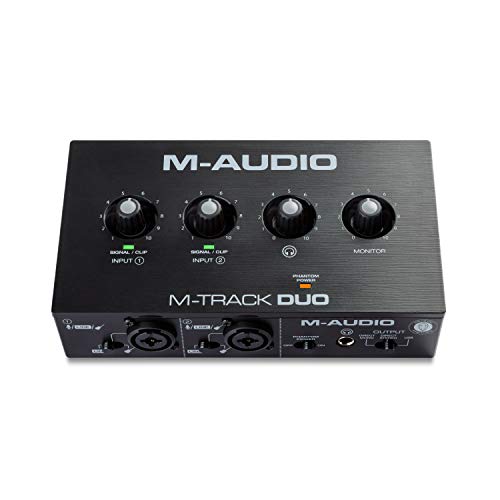
The M-Track Duo closes the guide at its most straightforward. Its listing describes dual XLR sockets with line and DI inputs, and a professional software suite for recording, streaming and podcasting. Translated into drum terms: the line inputs take the module’s stereo pair, the DI inputs take a bass or guitar on the days the drummer is writing rather than practising, and the XLR sockets take microphones when a simple two-microphone acoustic recording — a matched pair over the kit, or kick and overhead — is the day’s ambition.
That combination-input flexibility is the Duo’s real character. Many small interfaces force a choice of input personality; a socket that accepts XLR, line and instrument signals as the listing describes lets one small box follow a musician through a week of different tasks. For the electronic drummer specifically, the line setting is the one that matters daily, and it is present in the title rather than buried in a manual — a small honesty this guide appreciates, because recording a module through the wrong input type is the most common beginner error in this whole category.
The bundled software suite, which the listing emphasises, deserves a measured word. Starter software lowers the barrier for a drummer who has never opened a recording program, and for that reader it is a genuine part of the value. An experienced recordist with an established setup will ignore it entirely, and should judge the Duo purely as hardware: two flexible inputs, a clean stereo path, a known maker’s name on the box.
What the listing does not give you is equally clear: no MIDI is claimed, no conversion figures are published in the title, and no phantom-power arrangement is stated there. A drummer whose plan includes note capture, or who needs a condenser microphone’s power confirmed before ordering, should verify those points in the manufacturer’s documentation or step to the Scarlett 4i4, whose title answers more questions outright. As a simple, honest stereo door into recording, the Duo needs no apology.
- Format: USB audio interface with dual XLR inputs, per the listing title
- Input types named in the listing: XLR, line and DI
- Included: a professional software suite for recording, streaming and podcasting, as described in the listing
- MIDI: no MIDI connection is mentioned in the listing title — the maker documentation is the place to confirm before assuming one exists
- Conversion figures: none are published in the listing title, so check the manufacturer’s documentation for the stated resolution rather than guessing
- Phantom power: the title leaves the arrangement unstated — verify it in the maker documentation if a condenser microphone is part of the plan
There is a social use for a box like the Duo that specification sheets never mention: collaboration at the simplest level. A drummer and a guitarist in a room, the module in stereo or the guitar on DI, one laptop, one small interface — songwriting demos have been built on less for decades. The Duo’s lack of ceremony is its contribution; nobody’s evening disappears into routing menus. When the songs outgrow two channels, this guide’s four-input and sixteen-input picks are waiting further up the page, in the order a recording habit usually grows.
Strengths
- Line inputs are named in the title — the module connects the correct way from day one.
- XLR, line and DI flexibility covers drums, microphones and writing sessions in one box.
- Bundled software lowers the first step for a drummer new to recording.
Trade-offs
- No MIDI is claimed in the listing, ruling out the note-capture workflow.
- The title publishes no conversion figures or phantom-power detail.
- Two channels are a hard ceiling for anything beyond a stereo source or a mic pair.
Best for: a drummer making first recordings — module in stereo, the occasional microphone pair, a guitar on writing days.
Not suited for: MIDI library playing, split module outputs, or any kit session beyond two simultaneous channels.
Open the M-Track Duo’s page on Amazon if the goal is to press record tonight rather than redesign the studio.
How Many Inputs Does a Drum Recording Really Use?
Count the sources, not the drums. An electronic kit, however many pads it wears, usually leaves the module as one stereo source — two inputs — or as a handful of assignable outputs on the models that offer them. That is why two and four inputs dominate the sensible end of this guide. An acoustic kit inverts the arithmetic: each microphone is a source, and a modest close-miked setup reaches eight channels before anyone has been extravagant. The hybrid rig sits between, adding the module’s pair to however many acoustic microphones the room justifies. The buying mistake is purchasing for the kit you daydream about; the discipline is counting the cables you actually own and the sessions you actually run, then allowing one step of growth — which is precisely the distance between the Duo and the UMC404HD, or between the UMC404HD and the Tascam.
Outputs deserve the same honest counting. Headphones alone use two. Add a pair of studio monitors and the same pair usually serves. Outputs beyond four start earning their keep only with click routing, separate mixes or stage work — the territories of the UMC1820 and the US-16×08. A drummer who records alone at home will never miss the extra sockets, and should not pay the size and complexity tax for them out of a fear of missing out.
How Do the Six Drum Interfaces Compare Side by Side?
| Pick | Inputs | MIDI in the listing | Stands out for |
|---|---|---|---|
| Behringer UMC404HD | 4 in, 4 out | Yes — audio/MIDI model | Midas preamps and balanced all-round coverage |
| Focusrite Scarlett 4i4 4th Gen | 4 in, 4 out | Yes — in and out | Auto Gain, Clip Safe and four line inputs |
| Tascam US-16×08 | 16 in, 8 out | Yes — audio/MIDI model | Eight XLR inputs for a miked acoustic kit |
| Behringer UMC1820 | 18 in, 20 out | Yes — audio/MIDI model | ADAT expansion and stage-scale routing |
| Jolgoo 2×2 | 2 in, 2 out | Not claimed | Phantom power in the smallest box here |
| M-Audio M-Track Duo | 2 in | Not claimed | XLR, line and DI flexibility with bundled software |
Read the table by session, not by size. The electronic kit recorded as audio plus MIDI points to the first two rows; the acoustic kit points to the Tascam; the growing or gigging rig points to the UMC1820; the practice desk points to the last two rows, divided by whether phantom power or input flexibility matters more. Channel count is the loudest number in the table and, for most readers of this keyword, the least important one — a stereo module uses two channels on any row here, and the difference between the rows is everything that happens around those two channels.
How Should You Set Up an Interface to Record an Electronic Kit?
Begin with the module’s own settings, because the interface can only record what the module sends. Set the module’s output level so its loudest hits sit comfortably below maximum, choose the kit you actually intend to keep, and decide before recording whether effects printed by the module are part of the sound or whether you would rather add space later in software — the printed version cannot be removed. Connect the module’s main outputs to line inputs, not microphone inputs, with balanced cables where the sockets allow, and create a stereo track in your software panned hard left and right.
If your interface has MIDI, connect it in the same session even if you think you will never use it. Set the software to record the MIDI stream onto its own track alongside the audio, muted in the monitor path if you are listening to the module directly. Check your levels against your loudest realistic playing — not a polite soundcheck pattern, but the fill you play when the chorus lands — because drum peaks are exactly where polite setups clip.
For playing through a library, work through the feel methodically. Start with a moderate buffer, play patterns you know intimately, and lower the buffer step by step while the computer stays free of crackles and dropouts. Stop at the setting where your hands stop noticing the machine, and write that setting down; it is your machine’s honest working point, worth more than any figure quoted in a forum. Keep direct monitoring one switch away for the days a heavy project pushes the computer too hard to play through comfortably.
Finally, label everything as you go: tracks named for their source, takes numbered, the module’s kit name noted in the project. Drum recordings multiply faster than any other kind — every idea arrives as six takes of a groove — and the drummer who labels in the moment is the only one who can find last Tuesday’s best chorus in March.
What Mistakes Do Drummers Make When Choosing an Interface?
The first is recording the module through a microphone input or a laptop’s combined headset jack, then blaming the kit for the noise and distortion that follow; the line input exists precisely to prevent that. The second is ignoring MIDI at purchase time and discovering, a year into a library habit, that the interface cannot capture notes — the four MIDI-equipped picks here exist to keep that door open cheaply. Third is buying channel count as insurance: sixteen inputs do not improve a stereo module recording by one decibel. Fourth is the mirror error — buying two channels, then meeting an acoustic kit, a band and a teaching practice all in the same year. Fifth is chasing latency adjectives instead of testing buffer settings on your own machine, where the truth about feel actually lives.
What Changes When the Kit Becomes a Hybrid Rig?
A hybrid kit — acoustic shells and cymbals with electronic pads and a module woven through them — is where this keyword’s two halves finally share one interface, and it rewards planning the channels before the first rehearsal. The module still arrives as a stereo line pair. The kick and snare microphones take two preamps. An overhead or a single room microphone takes one more. Suddenly the four-input models are full, and the drummer who bought two channels is negotiating which part of the kit goes unrecorded. This is the honest moment to look again at the UMC404HD as the minimum, and at the Tascam or UMC1820 if the band records in the same room.
Hybrid rigs also change the monitoring question. The acoustic half of the kit reaches your ears through the air, instantly and for free; only the electronic half travels through the interface. Keep that half on direct monitoring and the two halves stay glued together in time. Route the pads through a library instead, and even a small round-trip delay makes the electronic snare feel detached from the acoustic cymbals around it — a subtle wrongness other musicians in the room will feel before anyone can name it. For hybrid recording, then, the module’s own sounds are usually the tracking sounds, and library re-voicing belongs to the mix stage, where the recorded MIDI can be rendered without anyone’s hands depending on it.
One more hybrid habit is worth adopting early: decide which instrument owns the low end. A miked acoustic kick and a module’s electronic kick layered together can either reinforce each other magnificently or turn the bottom of the mix into weather. Record them on separate channels from the first take — another argument for input headroom — and the decision can be made calmly in the mix, fader by fader, instead of being baked into a stereo recording where the two kicks can never be separated again.
Final Recommendation
Everything in this guide reduces to a single question: what, besides the module, will you record in the next two years? If the honest answer is nothing, the M-Track Duo or the Jolgoo will capture your playing faithfully and disappear into the practice routine, which is all a practice interface should do. If the answer includes a library habit and solo sessions where nobody else can ride the gain knob, the Scarlett 4i4 is the most complete tool here, and its Clip Safe alone will repay it the first time a take survives an unexpected flam. If microphones are coming — a hybrid rig, a first acoustic kit, a band — the UMC404HD buys the next stage of growth, the Tascam owns the full acoustic session, and the UMC1820 waits at the point where the studio and the stage become the same rig. Choose for the sessions already in your diary, let the module play in stereo tonight, and may every take you love be the one where the MIDI track was quietly recording too.
Frequently Asked Questions
Do I need a special sound card for electronic drums, or will my computer’s input work?
A computer’s built-in input is usually a combined headset socket designed for speech, and it will add noise and often sum your kit to mono. A basic interface with proper line inputs — the M-Track Duo or Jolgoo in this guide — is the real starting point for a recording you would keep.
Should I record the module’s audio, its MIDI, or both?
Both, whenever the interface offers MIDI. The audio is the finished sound of the take; the MIDI is the performance itself, which can be re-voiced through a different kit or library later. Recording both costs one extra cable and one extra track.
Can I play a virtual drum library without the delay bothering me?
Most drummers can, at low buffer settings on a healthy machine, but sensitivity varies and no honest guide can promise a number. Test the workflow at home, lower the buffer until your hands stop noticing, and keep direct monitoring of the module as the fallback for heavy sessions.
How many inputs do I need for an acoustic kit?
A minimal pair gives you an overhead picture of the whole kit. Close miking — kick, snare, toms, overheads and a room microphone — reaches eight channels quickly, which is the territory of the Tascam US-16×08 with its eight XLR inputs.
What does phantom power have to do with drums?
Condenser microphones, the usual choice for overheads and room positions, need phantom power to work at all. The Jolgoo states it in its listing; where a title is silent, as with the M-Track Duo, confirm the arrangement in the manufacturer’s documentation before ordering a condenser.
Is a bigger interface better for an electronic kit?
Not for the kit itself — a module’s stereo output uses two channels on any interface here. Bigger interfaces earn their size from microphones, bands, stage routing and expansion, not from improving a stereo recording.
Related Guides
- Best Sound Cards to Get Rid of White Noise
- Best Sound Cards for Gaming and Music
- Best Sound Cards for Making Music
Related guides
- Best 3D Mechanical Engineering Laptops: Certified Workstations for CAD and Simulation
- Best Tattoo Printers: Thermal Stencil Machines for Clean, Lasting Transfers
- Best 14-Inch High-End Laptops: Flagships From Apple, Lenovo, ASUS and LG
- Best 15 Laptops Under $1000: Six 15-Inch Machines That Spend the Budget Honestly