What's inside
- Key Takeaways
- Quick Picks
- How We Chose These Picks
- What Does Glass Actually Change About Living With a PC?
- Six Ways to Build Around Glass
- The Six Glass Approaches, Compared
- How Do You Keep a Glass Case Looking Like Its Photographs?
- What Mistakes Do Glass Case Buyers Keep Making?
- How Does Lighting Design Change Inside a Glass Case?
- What Should You Check About a Glass Panel Before You Build?
- How Does Glass Interact With Noise, Heat and Room Light Over a Long Evening?
- Which Glass Build Suits Which Kind of Owner?
- How Should You Plan a Build That Will Be Seen From Every Angle?
- What Happens to a Glass Case at Resale, Upgrade and Moving Time?
- Does Glass Belong in a Work-From-Home Setup?
- How Do Tinted, Clear and Curved Panels Change the Choice?
- What Should a First Glass Build Buy Alongside the Case?
- How Much Should the Room Influence the Panel You Choose?
- Final Recommendation
- Frequently Asked Questions
- Related Guides
As an Amazon Associate I earn from qualifying purchases. This post may contain affiliate links at no extra cost to you.
[widgetverdict.com] is reader-supported. When you buy through links on our site, we may earn an affiliate commission.
Where to buy: all six cases below link to checked Amazon listings, and they approach glass from six directions — a seamless front-and-side Sword V, Thermaltake’s dual-glass View 380 with hidden-connector support, a Fractal Design North included deliberately as the wood-fronted contrast, a six-fan MUSETEX behind polygonal mesh, ASUS’s ProArt PA602 Wood with its dust indicator, and a diamond-mesh MOROVOL that keeps glass only where it counts.
The best glass pc cases treat the panel as the point of the product. Glass is not a window added to a case; in this category it decides the case’s whole architecture, because a builder who can see everything must also hide everything — cables, drives, the power supply — somewhere the glass is not. That is why glass cases drove the industry’s cable-management revolution, why rear-connector motherboards exist, and why the interiors in this guide look less like machines and more like exhibits.
This guide judges glass as a general showcase material: side panels, front panels, wraparound corners, the whole visual programme. It is deliberately different from the narrower question of cases whose front panel specifically is tempered glass, which has its own shortlist elsewhere on the site. One pick here, the Fractal Design North, is included as an honest contrast — its front is genuine walnut wood and only its side is glass — because a guide about glass should show what choosing partly against glass looks like when it is done beautifully.
Expect candour about the costs. Glass shows dust, fingerprints and bad cable work without mercy. It breathes indirectly and asks its fans to work a longer path. Every pick section below weighs the view against those costs for that specific case, because the right answer depends on where the machine will sit and how its owner actually behaves around a microfibre cloth.
Key Takeaways
- Glass as a category means showcase design in general — side, front or wraparound panels — and the six picks spread across all three treatments.
- The Sword V and the Thermaltake View 380 both pair tempered glass fronts with glass sides for the full aquarium effect.
- The Fractal Design North is the contrast pick: a walnut wood front with a glass side, included to show the refined alternative, not counted as a glass-front case.
- Hidden-connector motherboard support, as on the View 380, is the feature that makes a glass interior look the way its photographs promise.
- The MUSETEX NN8 and MOROVOL keep mesh fronts and glass sides, trading some view for a direct intake path.
- The ASUS ProArt PA602 Wood is the professional entry: E-ATX room, a front-panel dust indicator and a power lock under its tempered glass.
Quick Picks
| Pick | Badge | Why it earns its place |
|---|---|---|
| YEAH MAGIC Sword V | The seamless showcase | Seamless tempered glass front and side panels with 360mm radiator support in a mid-tower ATX case made for gaming display. |
| Thermaltake View 380 TG ARGB | The dual-glass all-rounder | Front and side dual tempered glass, four 120mm ARGB fans included and hidden-connector motherboard support. |
| Fractal Design North | The wooden contrast | Genuine walnut front, dark tempered glass side, two 140mm Aspect PWM fans and Type-C in an airflow mid-tower. |
| MUSETEX ATX Case NN8 | The six-fan mesh-and-glass | Six pre-installed PWM ARGB fans, polygonal mesh front and an opening tempered glass side panel. |
| ASUS ProArt PA602 Wood | The creator’s E-ATX | Tempered glass, front-panel IR dust indicator, power lock, 440mm GPU and 420mm radiator support with three pre-installed fans. |
| MOROVOL PC Case | The diamond-mesh value | Four pre-installed RGB fans, a diamond-shaped mesh front and a tempered glass side in an airflow mid-tower. |
How We Chose These Picks
We required each case to make glass a structural part of its design rather than a token window, and we required the listing to state the supporting facts: which panels are glass, what fans are included, what radiator support exists, and what the case does about the cables the glass will expose. Cases that showed a glass panel in photographs while describing a different product in text did not survive the filter.
We also curated for contrast on purpose. A guide with six identical aquariums teaches nothing, so this six includes two full front-and-side glass showcases, one wood-fronted contrast with a glass side, two mesh-front cases that keep glass to the side panel, and one E-ATX professional design where glass is a single element in a working tool. Reading across them shows the whole spectrum of what glass can mean in a case, from the entire point to a restrained accent.
Finally, we weighted the ownership features that glass makes important: fan provision, since glass fronts breathe indirectly; cable-hiding architecture, since glass hides nothing; and panel practicality, since a panel you cannot open easily is a panel you will stop opening, dust and all.
What Does Glass Actually Change About Living With a PC?
Visibility changes behaviour. Owners of glass cases clean more often, cable-manage more carefully and notice a failing fan or a dust-choked filter weeks earlier, because the evidence is on display at desk height. That is a genuine functional benefit disguised as vanity. The counterweight is that glass is an unforgiving material to live beside: it reflects room light and monitor glare, it records fingerprints from every interaction, and a dark room turns a bright interior into a second light source whether you wanted one or not.
Thermally, glass redirects the engineering rather than ruining it. A glass front cannot intake air across its face, so showcase cases pull air through side vents, bottom intakes or rear-adjacent paths, and they compensate with fan count and layout. Done well — and the better picks here do it well — component temperatures land close to mesh equivalents at somewhat higher fan speeds. Done badly, a glass case is a greenhouse. The pick sections distinguish the two by looking at where each case’s air actually enters.
There is also a placement consequence that runs through this whole category. A glass case under a desk is a mesh case with extra weight, because nobody sees the panel it was bought for. Readers still deciding how much glass their build deserves will find the narrower front-panel question treated separately in the best pc cases with tempered glass front guide, which judges six cases purely on the front face.
Six Ways to Build Around Glass

YEAH MAGIC Sword V — The seamless showcase
The Sword V’s listing leads with the word seamless, and that is the right word to interrogate. Its tempered glass front and side panels are designed to read as one continuous surface, so the build inside appears to float in a glass volume rather than sit behind two windows. It is a mid-tower ATX case with 360mm radiator support, positioned squarely at gaming display builds. In this guide’s terms, the Sword V is the purest expression of the category: glass as the architecture, everything else arranged to serve the view.
That purity sets the ownership terms. A seamless showcase has no mesh front to forgive a dusty month and no solid panel to hide a lazy cable run, so the build inside must be planned as an exhibit from the first component: cable routes decided before the motherboard lands, lighting kept coherent, components chosen partly for how they read through glass. Builders who enjoy that discipline get a case that makes an ordinary parts list look curated. Builders who do not will find the Sword V an honest mirror held up to habits they did not plan to change.
Its 360mm radiator support gives the showcase a credible cooling centrepiece, and a radiator’s fans behind glass are part of the visual programme rather than hidden machinery. Note for cross-readers: this same case appears in the tempered-glass-front guide, where it is judged on its front panel specifically. Here the judgement is wider — the whole glass envelope and the build culture it demands.
- Form factor: mid-tower ATX
- Panels: seamless tempered glass front and side
- Radiator support: 360mm
- Design intent: gaming showcase, glass as the architecture
- Build demand: exhibit-grade cable planning
Strengths
- Continuous glass surfaces give the cleanest showcase look here
- 360mm radiator support anchors a serious cooling centrepiece
- Mid-tower size keeps the aquarium on an ordinary desk
Trade-offs
- No mesh anywhere to forgive dust or lazy cabling
- The view is only as good as the build discipline behind it
- Glass-front breathing relies on indirect intake paths
Best for: display builders who plan a build like an exhibit and keep it like one. Skip it if your maintenance style is annual and your cable style is improvised, because this case will publish both facts to the room.

Thermaltake View 380 TG ARGB — The dual-glass all-rounder
Thermaltake’s View 380 TG ARGB pairs front and side tempered glass panels with the two things a glass build most needs from the factory: fans and a cable plan. Four 120mm ARGB fans are included, and the case supports hidden-connector motherboards, so the power and data runs that usually cross a glass interior can retreat behind the board. Thermaltake also backs the case with a three-year warranty, a detail worth noticing in a category where the panel is the product and the maker’s confidence matters.
The hidden-connector support is the feature that separates a glass case that photographs well from one that merely could. In a conventional build, the 24-pin cable, front-panel wires and fan leads all cross the visible chamber somewhere; behind glass, somewhere is everywhere. A hidden-connector board removes most of those crossings at the source, and the View 380 was designed to receive exactly that class of board. Owners with conventional boards still get the dual-glass view and the four-fan start, but the interior will show its wiring honestly.
Against the Sword V, the View 380 is the more provisioned package: fans included, a warranty stated, a brand with a long case-making history behind it. Against mesh rivals it makes the usual glass argument and accepts the usual glass terms. For a buyer who wants the front-and-side aquarium without sourcing every supporting part separately, it is the most complete answer in this six.
- Form factor: ATX, black
- Panels: front and side dual tempered glass
- Included fans: four 120mm ARGB
- Motherboard support: hidden-connector designs
- Warranty: three years, per the listing
Strengths
- Four ARGB fans included — the showcase is lit from day one
- Hidden-connector support delivers the clean interior glass promises
- A stated three-year warranty backs the glass investment
Trade-offs
- The cleanest results require a hidden-connector motherboard
- Dual glass means dual fingerprint and dust surfaces
- ARGB administration becomes part of the build’s upkeep
Best for: builders pairing a rear-connector board with a full glass presentation and wanting fans included. Skip it if your board is conventional and your budget has no room for the parts that make glass interiors look effortless.

Fractal Design North — The wooden contrast
Let the record be plain: the North is not a glass-front case, and this guide does not pretend otherwise. Its front panel is genuine walnut wood, its side panel is dark tempered glass, and it earns its place here as the deliberate contrast — the case for the reader who wants to see their build but wants the room to see furniture. Two 140mm Aspect PWM fans are included, the front I/O carries Type-C USB, and Fractal positions it as an airflow mid-tower, which its ventilated wooden slats genuinely are.
The North demonstrates something the full-glass cases cannot: restraint as a design material. The dark-tinted glass side keeps the interior visible but subdued, so lighting reads as a glow rather than a broadcast, and the walnut front lets the machine sit in a lounge, a studio or a Scandinavian-leaning office without negotiating with the furniture. For many owners this is the correct amount of glass — one panel, tinted, showing the build to its owner and nobody else.
Its inclusion also disciplines the rest of the guide. If, reading the Sword V and View 380 sections, you felt the maintenance and exposure terms were too high, the North is what the alternative looks like when a serious maker designs it: real airflow, real materials, a glass side for the owner’s eye. Choosing it is not failing the glass category; it is answering the category’s question with “one panel, darkly”.
- Form factor: ATX airflow mid-tower
- Front panel: genuine walnut wood — not glass
- Side panel: dark tempered glass
- Included fans: two 140mm Aspect PWM
- Front I/O highlight: USB Type-C
Strengths
- Walnut front integrates a gaming PC into furnished rooms
- Tinted glass side shows the build without broadcasting it
- Genuine airflow design with quality 140mm fans included
Trade-offs
- Only one glass panel — showcase builders will want more
- Two fans is a start that hotter builds will extend
- Wood finish commits the desk to a warmer palette
Best for: owners who want their build visible to themselves and their room to see furniture instead. Skip it if the entire point of your purchase is a front-to-side glass aquarium, because the North politely refuses to be one.

MUSETEX ATX Case NN8 — The six-fan mesh-and-glass
The MUSETEX NN8 splits the difference that defines this category’s middle ground. Its front is a polygonal mesh, so intake air arrives directly; its side is an opening tempered glass panel, so the build is on show; and six PWM ARGB fans come pre-installed, the largest factory fan set in this guide. Two USB 3.0 ports sit in the front I/O. If the Sword V is glass as architecture, the NN8 is glass as a window in a case that still thinks like an airflow design.
Six included fans change the build-day equation completely. There is no second order, no fan hub maths beyond what the case provides, and the airflow path is established in every position the maker intended. PWM control keeps that army governable — six fans at full speed would be a weather event, but six fans turning slowly move generous air quietly, which is the actual point of having so many. The opening glass side, hinged rather than screwed, also makes this the easiest interior in the guide to reach for a quick dust pass or a drive swap.
The trade is front view: the mesh that feeds the build hides the front fans’ light behind its polygonal pattern, so the NN8 glows rather than displays from the front. Owners who want the full aquarium should look at the Sword V or View 380. Owners who want glass where it is cheapest to keep — one side panel — and airflow where it matters most will find the NN8 the most pragmatic balance in this six.
- Form factor: ATX mid-tower, black
- Front panel: polygonal mesh
- Side panel: opening tempered glass
- Included fans: six PWM ARGB pre-installed
- Front I/O: USB 3.0 × 2
Strengths
- Six PWM ARGB fans included — cooling and light fully provisioned
- Mesh front keeps the direct intake path glass cases give up
- Opening side panel makes maintenance genuinely convenient
Trade-offs
- Mesh front glows rather than displays the fans behind it
- Six fans mean six sets of wiring to manage at setup
- Glass coverage is one panel, not a wraparound statement
Best for: pragmatic builders who want the side view, the airflow and the fans all settled by one purchase. Skip it if the front of the case is where your build’s visual identity has to live.

ASUS ProArt PA602 Wood — The creator’s E-ATX
The ProArt PA602 Wood Edition is the professional in the room. It is an E-ATX case with tempered glass, three pre-installed fans, support for graphics cards up to 440mm and radiators up to 420mm — figures that belong to the full-tower class — and two features no gaming case in this guide offers: a front-panel infrared dust indicator that tells you when the filter needs attention, and a power lock. The wood edition finish keeps it in the furniture-friendly register the North opened, at a larger and more serious scale.
The dust indicator deserves more than a passing nod, because it answers the glass category’s central maintenance problem with engineering instead of guilt. Glass shows you the build; the PA602 also shows you the filter’s condition, turning cleaning from a calendar guess into a prompted task. The power lock serves the case’s actual audience — studios, shared workspaces, render stations — where a machine that must not be switched off accidentally is a business tool, and the two-year warranty in the listing underlines that positioning.
Choose the PA602 when the PC earns money and the glass is there to make a large, quiet, professional machine pleasant to sit beside. It is oversized for a simple gaming build and priced in spirit accordingly, and its wood-and-glass restraint will disappoint anyone shopping for a light show. For the creator who wants E-ATX room, enormous card and radiator support, and a case that manages its own maintenance reminders, nothing else in this six is really competing with it.
- Form factor: E-ATX, modern black wood edition
- Panel: tempered glass side
- Included fans: three pre-installed
- Support: 440mm graphics cards, 420mm radiators
- Distinctive features: IR dust indicator, power lock, two-year warranty
Strengths
- Dust indicator converts glass-case maintenance into a prompted task
- Full-tower-class card and radiator support in the guide’s pro entry
- Power lock suits shared studios and unattended rendering
Trade-offs
- E-ATX scale is more case than a simple gaming build needs
- Restrained styling will not satisfy light-show shoppers
- Three fans start a big case that hot builds will extend
Best for: creators and studios running large cards and long renders who want glass with professional manners. Skip it if your build is a single mid-range card in a bedroom, where its scale and seriousness buy capacity you will never open.
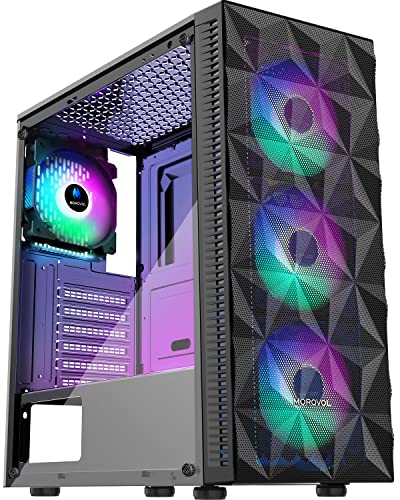
MOROVOL PC Case — The diamond-mesh value
The MOROVOL closes the list at the accessible end of the glass idea. Four RGB fans come pre-installed, the front panel is a diamond-shaped mesh that gives the case a recognisable face while feeding those fans directly, the side panel is tempered glass, and USB 3.0 sits in the front I/O. It is an airflow mid-tower that includes the glass side as part of a value package rather than as a luxury material, and that positioning is its honesty: this is glass for a first build, not for a magazine shoot.
The diamond mesh does double duty worth appreciating. A plain mesh front can look like an appliance grille; the diamond pattern gives the MOROVOL an identity from the front while keeping the intake path as direct as the MUSETEX’s. With four fans fitted and the glass side showing the interior, a first-time builder gets the complete modern recipe — airflow, light, view — without a second purchase or a fan-wiring project on day one.
The limits are the expected ones at its end of the market: the listing is sparing with deeper specifications, so radiator plans and exact clearances deserve a careful check against the product page before ordering, and the finish and fittings will not match the ProArt’s professional grade. Judged as what it is — an entry ticket to the mesh-and-glass formula — it is a coherent one, and it keeps the guide honest about the fact that glass does not have to mean flagship money.
- Form factor: ATX airflow mid-tower
- Front panel: diamond-shaped mesh
- Side panel: tempered glass
- Included fans: four RGB pre-installed
- Front I/O: USB 3.0
Strengths
- Complete mesh, light and glass recipe with four fans included
- Diamond mesh gives a value case a genuine visual identity
- Direct front intake keeps cooling simple for a first build
Trade-offs
- Listing detail is thin — verify radiator and clearance plans carefully
- Finish sits below the professional grade of the ProArt entry
- RGB set is simpler than the ARGB systems elsewhere here
Best for: first-time builders who want the modern glass-side look with cooling already handled. Skip it if your build plan includes a large radiator or an exacting clearance requirement that the listing does not confirm.
The Six Glass Approaches, Compared
| Case | Where the glass is | Fans included | Front character | Defining idea |
|---|---|---|---|---|
| YEAH MAGIC Sword V | Front and side, seamless | Check listing | Tempered glass | The pure aquarium showcase |
| Thermaltake View 380 TG ARGB | Front and side | Four 120mm ARGB | Tempered glass | Dual glass with hidden-connector support |
| Fractal Design North | Side only, dark tint | Two 140mm PWM | Genuine walnut wood | The furniture-first contrast |
| MUSETEX NN8 | Side, opening panel | Six PWM ARGB | Polygonal mesh | Maximum provision, pragmatic view |
| ASUS ProArt PA602 Wood | Side | Three pre-installed | Wood edition with dust indicator | The professional E-ATX tool |
| MOROVOL | Side | Four RGB | Diamond mesh | The value entry to the formula |
The first column is the whole guide in miniature. Two cases put glass at the front, four keep it at the side, and one of the six fronts its build with wood instead. Where you want the glass decides which rows are even candidates; everything after that is fans, size and budget.
How Do You Keep a Glass Case Looking Like Its Photographs?
Three habits do nearly all the work. First, build slowly: route cables as if the photograph were tomorrow, because behind glass it effectively is. Second, clean on the case’s schedule rather than your guilt’s — a two-minute wipe of the panels and a filter check monthly keeps a showcase at its best with less total effort than an annual deep clean, and the PA602’s dust indicator exists to prompt exactly that rhythm. Third, control the light: a glass interior lit by one coherent colour or a soft white reads as designed, while competing colours from every component read as a fairground.
Placement finishes the effect. A glass case wants a wall or a dark backdrop behind it, a desk surface that does not reflect its lighting back as glare, and enough distance from the room’s main seating that its glow is ambience rather than a lamp. Owners who set those conditions once will find the case keeps its showroom look with surprisingly little ongoing effort — which, for readers whose machines travel instead of posing, is the opposite priority from the portable world of the best lan pc cases, where the case is judged by its handle rather than its panels.
What Mistakes Do Glass Case Buyers Keep Making?
The first is buying the view and skipping the build discipline it requires, then blaming the case for showing the result. The second is sealing the intake: pushing a glass-front case flush against a wall or into a closed cabinet starves the side and bottom intakes these designs depend on. The third is treating fan provision as a detail — behind glass, the fans are both the cooling system and the lighting design, so a case with too few included fans is unfinished in two ways at once.
The fourth mistake is category confusion: expecting a mesh-front case with a glass side to deliver the aquarium look, or expecting an aquarium to match a mesh case’s fan speeds. The fifth is buying glass for a machine that will live under a desk, in a server corner, or anywhere the panel faces a wall — contexts where the racked and rackmount world covered by the best server pc cases guide, or a plain steel case, serves better. Glass is a placement decision before it is a product decision.
How Does Lighting Design Change Inside a Glass Case?
In a steel case, lighting is an accent. Behind glass, lighting is the interior’s entire visual system, and it deserves the same planning as the cooling. The principle that separates designed builds from decorated ones is hierarchy: one dominant light source, usually the fans or a radiator’s fan set, with everything else — memory, a card’s logo, a motherboard strip — playing support at lower intensity. The View 380’s four ARGB fans and the MUSETEX’s six both provide that dominant layer from the factory, which is why fan-included glass cases photograph so coherently: the light was planned as a set, not accumulated as a pile.
Colour discipline matters more than colour count. A single hue, or a deliberate two-colour scheme held across every device, reads as intention; the rainbow default that most ARGB software opens with reads as a showroom demo, because it is one. White light deserves special mention in glass builds: it reveals the actual colours and materials of the components, flatters wood-adjacent designs like the North and the PA602, and ages better than any fashionable hue. Owners who set one considered scheme and leave it alone will find their case looks more expensive than owners who change effects weekly, because consistency is what the eye reads as design.
Brightness is the third lever, and the one most often set wrong. A glass case on a desk in a dim room needs surprisingly little output to glow; maximum brightness flattens the interior into glare and turns the panel into a mirror of the room. Dim the set, let the components’ shapes carry the view, and the case becomes ambience. The glass did not change — the judgement did, and judgement is the real product this category sells.
What Should You Check About a Glass Panel Before You Build?
Inspect the panel the way you would inspect a screen, because functionally it is one. Under a bright light, look for edge chips, scratches in the viewing area and any bow or warp that would stop it seating flush; check the mounting holes or hinge, on the opening MUSETEX panel especially, for clean machining. Tempered glass fails at its edges and its holes, so those are the places a delivery-day inspection earns its ten minutes. A flaw found now is a replacement panel; the same flaw found after the build is an argument conducted with a finished PC sitting open beside you.
Then think about removal, because you will remove this panel more than any other part of the case. How many screws, what kind of tool, does it lift off or swing open, and where will you put it while you work? The honest answers shape maintenance behaviour for years: a panel that opens on a hinge gets opened, dusted and closed monthly, while a panel that needs four screws and a flat storage surface gets opened when something has already gone wrong. If two cases are otherwise equal on your shortlist, choose the one whose panel you will actually take off.
Finally, plan the panel’s safe place before build day. A towel on a bed, a leaning spot against a wall on carpet — anywhere except a hard floor or a chair someone will sit on. Most glass losses in this hobby are not manufacturing stories; they are furniture stories, told by owners who put the panel down “for a second” in the wrong room.
How Does Glass Interact With Noise, Heat and Room Light Over a Long Evening?
A glass case is a room object for the whole evening, not just a machine for the session, and its long-evening behaviour differs from a steel case’s in ways worth predicting. Acoustically, a sealed glass panel is a fair sound barrier: it contains the high-frequency content of fan and coil noise better than a perforated side does, which is one reason glass builds can feel quieter than their fan speeds suggest. The intake paths are where the noise escapes, so a glass case placed with its intake side toward a wall will sound different from the same case turned ninety degrees — placement is an acoustic control, free of charge.
Thermally, the long evening is where indirect intakes prove themselves or don’t. A showcase that holds its temperatures in a twenty-minute benchmark may drift upward across four hours as the room itself warms and the case’s side intakes begin recycling the system’s own exhaust. The defences are boring and effective: space around the intakes, a top or rear exhaust with a clear path out, and fan curves that respond to sustained temperature rather than spikes. The mesh-front picks sidestep most of this by breathing directly, which is their long-evening argument in one sentence.
And then there is the light the case returns to the room. A bright interior in a dark room is a lamp, and whether that lamp is welcome depends on the room’s other occupants and the hour. Tinted glass, the North’s approach, is the built-in compromise; dimmable ARGB sets are the adjustable one. Owners who share their evenings should treat the case’s glow as a household negotiation, settled once, kindly, rather than relitigated nightly.
Which Glass Build Suits Which Kind of Owner?
Consider the curator first: the owner who enjoys the build as an ongoing composition, swaps a component and re-dresses the cables, keeps the cloth in the drawer and uses it. The Sword V and the View 380 were made for this person, and they will be kept at their best by exactly the habits this owner already has. Consider next the professional: the PA602’s owner, whose machine is a tool that happens to be beautiful, whose maintenance is prompted by an indicator rather than performed as a ritual, and whose glass exists so a large system can sit in a studio without looking like a server.
Consider the pragmatist, who wants the modern look to arrive finished: the MUSETEX NN8, six fans fitted, mesh breathing, glass where it is easy to live with. Consider the newcomer, for whom the MOROVOL’s complete and forgiving package is the right first taste of the category. And consider the reluctant aesthete, who suspects the whole glass idea is slightly too much and discovers in the North that one dark panel and a walnut front is the amount of display their life actually wanted.
None of these owners is the correct one. The category’s only real failure mode is the mismatch — the curator’s case bought by the annual-cleaning owner, the aquarium placed under a desk, the professional tool bought as a light show. Match the case to the behaviour you already have, not the behaviour the photographs inspire, and glass stops being a gamble and becomes what it should be: the most enjoyable surface in the build.
How Should You Plan a Build That Will Be Seen From Every Angle?
A glass build is judged in the round, so plan it in the round. Start with the components’ backs and undersides, the surfaces a steel case never shows: the graphics card’s backplate becomes a billboard, the power supply’s label becomes visible through lower glass, and cable colours stop being a private matter. Builders who choose components for a showcase should look at photographs of each part installed, not at its retail box shot, because the installed view — the card’s edge, the cooler’s top, the memory’s profile — is the view the case will actually present.
Sequence the build for the camera that is your own eye. Fit and route the hidden side first, while access is total. Install the components in the order of their visual depth: motherboard, then cooling, then the card, dressing each layer’s cables before the next layer covers the routes. Photograph the interior under room light before the glass goes on, and look at the photograph rather than the build — the lens finds the stray cable and the crooked run that familiarity has made invisible to you. That single habit explains most of the gap between showcase photographs and real desks.
Leave the lighting decision for last, when the physical build is complete. Light reveals whatever it is given: set against a tidy interior it produces the floating-component effect every glass case promises, and set against a rushed one it produces a very well-lit account of the rush. The cases in this guide supply the glass and, in several instances, the fans; the composition between them is the builder’s contribution, and it is the part no listing can sell you.
What Happens to a Glass Case at Resale, Upgrade and Moving Time?
Glass cases hold their appeal unusually well in the second-hand market of your own household: the panel that sold the case to you sells the hand-me-down build to a sibling, a partner or a second room, provided it has survived unchipped. That survival is mostly a moving story. A glass case should travel in its original box with its panels protected, or, failing that, with the panels removed, wrapped and carried separately from the steel. The one journey glass should never make is loose in a car boot against the case’s own frame, because vibration plus an edge is the whole recipe for a panel loss.
Upgrades inside a glass case carry a small tax and a small dividend. The tax is care: every component swap happens under the discipline of the panel coming off and going somewhere safe. The dividend is diagnosis: through glass, you see the dust, the sagging card that wants a support, the fan that has stopped, long before any of them becomes a temperature problem. Owners who upgrade often tend to conclude the dividend pays the tax with interest, which is why so many second builds stay behind glass even when their owners swore the first was an experiment.
At the end of its service, a glass case also ages more gracefully as furniture than a gaming-styled steel box does. The North becomes a wooden cabinet’s sibling, the PA602 a studio fixture, the Sword V a display case for whatever replaces the PC. Choosing glass is, among its other consequences, choosing a second career for the object — and for a product bought to be looked at, that is a fitting final argument.
Does Glass Belong in a Work-From-Home Setup?
Increasingly, yes — with the brightness governed. The home office is where the glass category quietly won its largest audience, because the same machine that renders, compiles or edits all day sits inside the owner’s living space all evening, and a case that looks like an exhibit earns its place in a way a beige tower never did. The View 380’s clean interior and the PA602’s studio manners both suit a desk that appears on video calls, where the PC behind you is part of the room your colleagues see. A tidy glass build in that frame reads as care; a glowing fairground reads as a hobby leaking into a meeting, which is again an argument for one colour, set low.
The working cautions are practical. Reflections on a glass panel can mirror a window into your eyes across a long day, so angle the case rather than facing it squarely. Fan noise carries differently in a quiet flat than in a gaming room, and glass builds’ higher fan counts ask for curves set during the working day, not only during play. None of this disqualifies glass from the office; it merely asks the office buyer to set the case up as office equipment — dim, angled, quiet — and keep the showmanship for the hours when the desk is a stage rather than a workplace. The North, unsurprisingly, needs none of these negotiations, which is precisely why it keeps appearing in this guide as the answer to questions the full-glass cases raise.
How Do Tinted, Clear and Curved Panels Change the Choice?
Panel tint is the quiet specification nobody lists prominently and everybody lives with. Clear glass, as on the Sword V and View 380, shows the build exactly as it is — colours true, details sharp, dust honest. Tinted glass, the North’s dark panel being this guide’s example, forgives: it dims a slightly mismatched build into coherence, softens lighting into a glow, and hides the faint cable shadow that clear glass would publish. Builders with a perfectly colour-matched parts list should choose clear and take the credit; builders with a beloved but motley collection of components will find tint the cheapest visual upgrade in the entire build.
Curved and wraparound treatments sit beyond this guide’s six — they headline the full-tower flagship world — but their logic begins here: every additional angle of glass multiplies both the view and the exposure. The step from a side panel to front-and-side glass, which the Sword V and View 380 represent, is the largest single jump in that logic, because it removes the last opaque face the build could hide behind. Take that step when the interior is ready for it. A build assembled behind a side panel and then transferred into a dual-glass case will show every habit the side panel concealed, which is why experienced showcase builders assemble in the glass case from the first screw rather than graduating into it.
What Should a First Glass Build Buy Alongside the Case?
Very little, if the case was chosen well — but four small things separate a smooth first showcase from a frustrating one. A fan hub or controller, if the case’s included fans outnumber your motherboard’s headers, because a glass build’s fans are its lighting and its cooling at once and they must all answer together. Cable extensions or a fully modular power supply with tidy stock leads, because the visible chamber will grade your cables daily. A graphics card support, discreet in black or clear, because a long card’s slow sag is the one flaw glass will show you developing in real time. And the cloth — microfibre, kept where the case lives, bought before the first fingerprint rather than after the fiftieth.
What not to buy alongside is more lighting by default. Live with the included fans’ light for a fortnight before adding strips, rings or lit cables, because most glass interiors need less light than their owners first add, and removing an adhesive strip from a finished build is nobody’s idea of an upgrade. The case, the components and one coherent colour will carry the view; everything else is garnish that the glass, merciless as ever, will also display.
How Much Should the Room Influence the Panel You Choose?
More than the parts list does. A north-facing room with soft, even light flatters clear glass all day; a room with a low western sun will turn any panel into a mirror for an hour each evening, and tinted glass or a repositioned desk solves what no component choice can. Dark rooms amplify every lumen the build produces, bright rooms wash the interior out and argue for stronger, simpler lighting shapes — fan rings and bold forms over subtle strips. Even the wall behind the desk participates: a pale wall reflects the case’s glow back as ambience, a dark wall swallows it and leaves the build floating. Walk the room before you order, note where the sun lands at the hour you play, and let that survey — not a product photograph taken in a studio — set the panel, the tint and the brightness you will live with.
Final Recommendation
Decide where the glass belongs and the shortlist resolves itself. Front and side together: the Sword V for seamless purity, the View 380 for the provisioned package with hidden-connector support. Side only, with airflow first: the MUSETEX NN8 for its six fans, the MOROVOL for its value. One tinted panel inside a piece of furniture: the Fractal North. A professional E-ATX tool that happens to wear glass beautifully: the ProArt PA602. The category’s real question was never whether glass is worth it, but how much of your build’s life you want on display — answer that honestly, keep a cloth in the drawer, and the case will keep its side of the bargain for years.
Frequently Asked Questions
Do glass cases run hotter than mesh cases?
Glass-front designs breathe through side or bottom paths and typically need slightly higher fan speeds for the same temperatures. Mesh-front cases with glass sides, like the MUSETEX and MOROVOL here, keep the direct intake and largely avoid the question. In practice the gap shows up as fan noise before it shows up as throttling, which is why this guide treats fan provision and curve-setting as part of the glass decision rather than as an afterthought left to the first hot evening.
Is the Fractal North a glass case or not?
Partly, and this guide labels it as the contrast pick for exactly that reason. Its side panel is tempered glass; its front is genuine walnut wood. It belongs in a glass guide as the refined alternative, not as a glass-front example.
What is a hidden-connector motherboard, and why do glass cases want one?
It is a board whose power and data connectors sit on the back, so cables route behind the tray instead of crossing the interior. Behind glass, where every cable is visible, that architecture is the difference between a tidy exhibit and an honest tangle, as the View 380’s design assumes.
How fragile is a tempered glass panel in daily use?
Tempered glass is strong across its face and vulnerable at its edges. Handled by its centre, stored flat when removed, and kept away from tile floors during builds, it lasts the life of the case. Most panel losses happen in the first build hour, not the fifth year. It also helps to know that tempered glass, when it does fail, fails completely and safely into small blunt fragments rather than into shards — dramatic, certainly, and a full stop to that evening’s building, but a failure mode the material was designed to make survivable. The practical lesson stands: the panel is at risk while it is off the case and in your hands, and almost never while it is mounted and doing its job.
Can a glass case work in a dusty home with pets?
Yes, with the maintenance rhythm this guide describes and a preference for the mesh-front picks, whose filters are easy to reach. The PA602’s dust indicator is the most pet-owner-friendly feature in the six, because it replaces guessing with a prompt.
Should I choose glass if the PC goes under my desk?
Generally no. The panel’s value is visibility, and under-desk placement spends it on a view of the floor. A steel or mesh case serves that spot better, and the money saved buys components you will actually experience. There is one exception worth naming: the owner who pulls the machine out regularly for upgrades and cleaning may still enjoy the diagnostic view glass gives during those sessions, because a stopped fan or a dust mat is visible at a glance. Even then, the honest recommendation is to buy the glass for a future desk placement you genuinely intend, not for a floor-bound present you are dressing up — the panel will wait patiently in its box of justifications, but the build will not move itself onto the desk.
Related Guides
The linked guides take the three neighbouring questions in turn: the front panel as a glass specialism, the rackmount world where panels disappear entirely, and the portable cases built to be carried rather than admired. Each starts where this one’s judgement ends.
Related guide: Best NZXT PC Cases
Related guide: Best Cooler Master PC Cases


