What's inside
- Key Takeaways
- Quick Picks
- How We Chose These Picks
- What Makes a PC Genuinely Portable, Rather Than Merely Small?
- Tier One: Four Chassis Built to Be Carried
- Tier Two: Two Bags for Towers You Already Own
- Both Tiers on One Table
- How Should You Prepare a PC for the Journey Itself?
- What Mistakes Do LAN Travellers Keep Making?
- How Do You Choose Components for a Machine That Must Travel?
- What Is the Venue’s Half of the Bargain?
- How Does Travelling Change a PC’s Maintenance Life?
- Which Traveller Are You? Matching the Six to Real Journeys
- How Should You Pack the Car for a Machine Like This?
- What Should You Check in the First Ten Minutes at the Venue?
- Does a Portable PC Make a Good Only PC?
- What Should You Inspect When a Portable Case or Bag Arrives?
- How Much Weight Is Too Much for a Carried PC?
- Final Recommendation
- Frequently Asked Questions
- Related Guides
As an Amazon Associate I earn from qualifying purchases. This post may contain affiliate links at no extra cost to you.
[widgetverdict.com] is reader-supported. When you buy through links on our site, we may earn an affiliate commission.
Where to buy: the six listings below divide honestly into two kinds of product, and this guide will keep them separate from the first line to the last — four are computer cases built to be carried, with handles and compact frames, and two are transport bags for a tower you already own, which are not cases at all and are judged here as luggage, not as chassis.
The best lan pc cases answer a question the rest of the case market ignores: how does the machine get there? A LAN party, a tournament, a friend’s house, the office across town — every one of those journeys turns a desktop PC from furniture into cargo, and cargo has requirements furniture never faces. It must be liftable by one person, grippable without a prayer, compact enough for a car seat or a boot, and tough enough that the journey is the least interesting part of the evening.
So this guide is really two shortlists wearing one title, and it labels them as such. Tier one is the carryable chassis: the Metalfish T40, the darkFlash WD200, the Mechanic Master C34 and the Shiny Snake G300 — small-form-factor cases with handles or carry-first designs, into which you build the machine itself. Tier two is the transport gear: a rolling carrying case with spinner wheels and a travel backpack, both designed to swallow an existing ATX or mid-tower build and move it. Calling the bags “cases” would be a category error, so this guide does not; it judges them on padding, wheels, straps and fit, the way luggage deserves to be judged.
Choose your tier before you choose your pick. If you are building a machine that will travel from birth, tier one is your list. If you already own a tower you love and it occasionally needs to leave the house, tier two solves your problem without a rebuild. Confusing the two is the one true mistake in this category, and the pick sections keep the boundary bright.
Key Takeaways
- Four picks are carryable chassis with handles; two picks are transport bags for existing towers — different products, judged by different rules.
- The Metalfish T40 is the smallest true case here: Mini-ITX, SFX power, a 70mm cooler limit, a 206mm GPU limit and a detachable handle.
- The Mechanic Master C34 performs the category’s best trick — a full ATX build in a near-mini-ITX footprint, with a handle on top.
- The Shiny Snake G300’s 16.8 litres accept an ATX power supply and a 340mm GPU, the roomiest carryable specification here.
- The darkFlash WD200 wraps its portability in walnut and mesh, with a built-in handle and 240mm AIO support.
- The rolling bag and the backpack solve transport for towers you already own — wheels and telescoping handle versus straps and shoulders.
Quick Picks
| Pick | Badge | Why it earns its place |
|---|---|---|
| Metalfish T40 | The true mini (chassis) | Mini-ITX small-form-factor case with a detachable handle, SFX/SFX-L support, 70mm cooler and 206mm GPU limits. |
| darkFlash WD200 | The walnut traveller (chassis) | Portable Micro-ATX case in walnut with high-airflow mesh, a built-in carry handle, 335mm GPU support and 240mm AIO readiness. |
| Mechanic Master C34 | The ATX illusion (chassis) | Ultra-compact case with a handle that fits a full ATX build at near-mini-ITX size, with 240 AIO readiness. |
| Shiny Snake G300 | The roomy 16.8L (chassis) | 16.8-litre mesh SFF chassis with 340mm GPU support, ATX power supply fit and 240/280 AIO compatibility. |
| Rolling PC Carrying Case | The wheeled mover (bag) | Rolling tower bag for ATX/M-ATX with spinner wheels, a telescoping handle, padded protection and storage pockets. |
| PC Travel Case Backpack | The shoulder solution (bag) | Padded backpack carrying case for ATX mid-tower desktops, with adjustable straps for LAN parties and office moves. |
How We Chose These Picks
For the chassis tier, we required portability to be structural rather than decorative: a handle designed into the case, a volume a person can genuinely carry, and a listing that states the constraints travel imposes — cooler height, card length, power supply format — because a portable build is a negotiation with millimetres and the listing must show its side of the bargain. All four chassis here publish those numbers, and their pick sections treat the numbers as the product.
For the bag tier, we required the listings to describe luggage honestly: what size tower fits, how it is protected, and how it moves — wheels and a telescoping handle on one, padded straps on the other. Bags that promise to fit everything usually fit nothing well, so stated fit ranges mattered more than padding adjectives.
We kept the tiers in one guide because buyers genuinely cross-shop them at the moment of decision — build small, or carry big — and a guide that showed only one tier would hide half the answer. But the tiers are never blended in the judging: a bag is never praised as a case, and a case is never forgiven a weak handle because a bag exists.
What Makes a PC Genuinely Portable, Rather Than Merely Small?
Three things, and smallness is only the third. The first is the grip: a handle positioned over the machine’s centre of mass, attached to structure rather than to a panel, so a fully built system — which is far heavier than the empty case — can be lifted one-handed through a doorway without the case flexing or the owner’s wrist filing a complaint. The second is the envelope: a shape without protrusions, glass kept to a minimum or protected, corners that survive a car boot’s other contents. The third is volume, and here the listings speak in litres and limits — the G300’s 16.8 litres, the T40’s 206mm card ceiling — because a portable build is designed backwards from what fits.
Cooling is the hidden fourth requirement. A small case at a LAN party runs in a warm room full of other machines, often for twelve hours straight, and its airflow cannot be an afterthought borrowed from a desk build. Mesh earns its keep in this category — the WD200’s high-airflow mesh, the G300’s mesh construction — because a carried machine has no desk position to optimise and must breathe wherever it lands.
And there is a social requirement nobody lists: setup speed. The portable PC that takes forty minutes of cable archaeology at each end of the journey will stop travelling by its third event. The chassis here concentrate their I/O sensibly — Type-C appears on the WD200 and the G300’s front — because a machine that plugs in fast is a machine that gets invited again.
Tier One: Four Chassis Built to Be Carried

Metalfish T40 — The true mini (chassis)
The T40 is the purest portable in this guide: a Mini-ITX small-form-factor case from Metalfish, in black, with a detachable handle, support for SFX and SFX-L power supplies, a CPU cooler limit of 70mm and a graphics card limit of 206mm. Every one of those numbers is a travel decision. The handle detaches because a carried case sometimes needs to become a plain box — in a bag, in a boot, under an airline seat’s worth of scrutiny — and the limits define a build class: low-profile cooling and compact cards, the components that make a PC genuinely hand-portable rather than merely luggable.
Build inside those limits and the T40 rewards you with the thing LAN veterans actually want, which is a machine you can carry in one hand with your peripherals in the other and your dignity intact. The SFX supply keeps the weight where it belongs — absent — and the 70mm cooler ceiling pushes the build toward the efficient, quiet low-profile coolers that suit a machine destined to sit on a shared table among other people’s elbows and drinks.
The honesty paragraph: 206mm excludes most of the graphics card market’s long three-fan designs, so this case chooses its owner’s card, not the other way round. Buy the T40 when the build is designed around portability from the first component — a compact card, a low cooler, an SFX supply — and it will be the easiest machine you have ever taken anywhere. Buy it hoping a full-size build will squeeze, and the limits will educate you at the worst moment.
- Form factor: Mini-ITX small form factor, black
- Handle: detachable carry handle
- Power supply: SFX and SFX-L
- CPU cooler limit: 70mm
- GPU limit: 206mm
Strengths
- The smallest, lightest brief in the guide — true one-hand portability
- Detachable handle adapts the case to bags and boots
- Limits are stated plainly, so the build can be planned exactly
Trade-offs
- 206mm GPU ceiling excludes long flagship-style cards
- 70mm cooler limit rules out tower air cooling entirely
- SFX power supply is a purchase the build must include
Best for: a purpose-built travel rig designed around compact components from the start. Skip it if your existing card is a long three-fan model, because no handle in the world makes that combination close.

darkFlash WD200 — The walnut traveller (chassis)
The WD200 is the portable case for people whose destination is a room, not a battlefield: a Micro-ATX chassis in a premium walnut wood design, finished here in white, with high-airflow mesh, a built-in carry handle, support for graphics cards up to 335mm, readiness for a 240mm AIO, USB-C, and one ARGB PWM fan included. The walnut is not a joke at a LAN party’s expense — plenty of portable PCs travel to offices, studios, family homes and second desks, where a machine that looks like furniture is welcome in a way a tactical box is not.
Its specifications are the most relaxed of the chassis tier so far. Micro-ATX boards cost less and offer more than Mini-ITX, 335mm of card support admits serious gaming cards rather than only compact editions, and the 240mm AIO option gives the build a real cooling ceiling for a warm room full of machines. The built-in handle — fixed, part of the design, always there when the journey starts — suits the regular traveller better than a detachable one, because the trip this case makes is weekly, not annual.
Choose the WD200 for the commute pattern: the split-week worker, the student between home and term-time rooms, the gamer whose party is a friend’s living room where the machine will sit visibly for two days. Its mesh keeps it honest as a computer, its walnut keeps it welcome as an object, and its handle keeps the whole arrangement to one trip from the car.
- Form factor: Micro-ATX portable case, white with walnut
- Handle: built-in carry handle
- GPU support: up to 335mm
- Cooling: 240mm AIO ready, high-airflow mesh
- Included: one ARGB PWM fan, USB-C
Strengths
- 335mm card support — real gaming cards, not only compact ones
- Walnut finish makes the travelling PC welcome in furnished rooms
- 240mm AIO readiness gives portable cooling a proper ceiling
Trade-offs
- Larger and heavier than the Mini-ITX T40 by design
- One included fan starts a build that will add more
- White and walnut show travel scuffs sooner than black steel
Best for: regular travellers whose destination is a desk in a nice room, weekly. Skip it if your journeys are rough, crowded and annual, where the T40’s minimalism or a padded bag takes the knocks better.

Mechanic Master C34 — The ATX illusion (chassis)
The C34 performs the neatest trick in this guide, and its listing states it without blushing: a full ATX build in a mini-ITX size, with a handle, in yellow. Read the fine print the listing itself provides — 240 AIO ready with an SFX power supply recommended, memory under 44mm, a switchable 5/7-slot arrangement, and 162mm of air cooling — and the trick’s method appears. By rethinking the interior layout entirely, Mechanic Master fits the big-board ecosystem into a carryable volume, for builders who refuse to choose between their ATX components and a handle.
That refusal is more practical than it sounds. A builder with an ATX board, a full-size card ecosystem and years of parts invested faces a real bill to shrink into Mini-ITX; the C34 offers the portability without the platform change, and the handle on top turns the result into the party trick of any LAN — the smallest case in the room holding the least compromised build. The switchable slot arrangement and the generous 162mm air-cooling figure show the design was argued over by people who build, not merely styled by people who draw.
The constraints are the price of the illusion and they are stated in the listing itself: memory must be low-profile under 44mm, the SFX supply is recommended despite the ATX board, and a build this dense rewards patience and punishes improvisation. Treat the C34 as a kit for an experienced builder with ATX parts and portable ambitions, assembled slowly, photographed often, and carried everywhere with justified pride.
- Form factor: ultra-compact, full ATX at near-mini-ITX size
- Handle: integrated carry handle, yellow finish
- Cooling: 240 AIO ready, 162mm air cooling
- Memory limit: under 44mm height
- Notes: SFX power supply recommended, 5/7-slot switchable
Strengths
- Full ATX platform without the full ATX footprint
- 162mm air-cooling room is remarkable at this volume
- Lets an existing ATX parts collection travel unchanged
Trade-offs
- Memory height limit excludes tall RGB memory kits
- Dense layout rewards experienced, patient builders
- SFX supply recommendation adds a purchase to an ATX build
Best for: ATX owners who want portability without a platform transplant. Skip it if your memory is tall, your patience is short, or your build changes too often for a dense interior’s diplomacy.
Shiny Snake G300 — The roomy 16.8L (chassis)
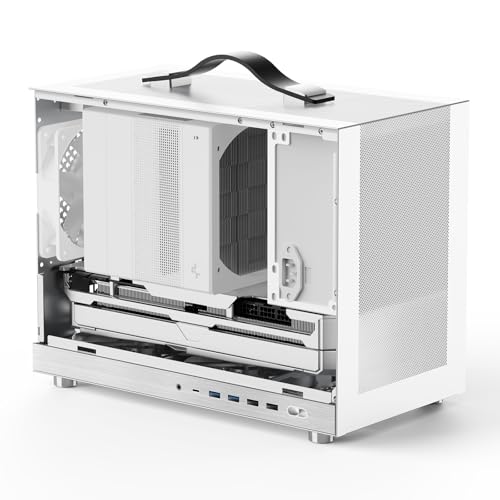
The G300 is the chassis tier’s pragmatist: 16.8 litres of white mesh SFF chassis that accepts a 340mm graphics card, a 164mm air cooler, an ATX power supply, and 240 or 280mm AIO cooling, with three fan slots and front Type-C and USB 3.0. Its listing even names its audience — builders downsizing their PC — and that is exactly its role here: the portable case that asks the fewest sacrifices, because it was designed as a destination for full-size parts rather than as a test of compact ones.
The ATX power supply support is the detail veterans will nod at. SFX supplies are excellent and priced like it; the G300 lets a downsizing builder keep the supply they own, along with a genuinely long card and a tower cooler of real substance. Mesh construction keeps the whole arrangement breathing in the warm rooms portable PCs work in, and 16.8 litres remains a one-hand, car-seat, under-desk-at-the-venue volume despite the hospitality inside.
Against the T40, the G300 trades ultimate smallness for near-total component freedom; against the C34, it trades the ATX-board trick for a simpler, roomier layout on the smaller platforms. It is the chassis this guide hands to the builder whose brief is “my current PC, but it comes with me” — the downsizer, the student, the competitor whose backup machine must not be a compromise. If the parts already exist and the journey is the only problem, the G300 is where those two facts meet.
- Volume: 16.8 litres, white mesh SFF
- GPU support: up to 340mm
- CPU cooler: up to 164mm air
- Cooling: 240/280 AIO compatible, three fan slots
- Power supply: ATX, front Type-C and USB 3.0
Strengths
- Full-size parts hospitality: ATX supply, 340mm card, tall cooler
- Mesh construction breathes in warm, crowded venues
- The natural destination case for downsizing an existing build
Trade-offs
- 16.8 litres is portable, not pocketable — the T40 is smaller
- No handle is headline-listed, so carrying is by the chassis itself
- White mesh shows travel grime and asks for regular cleaning
Best for: downsizers moving an existing parts set into a carryable home. Skip it if ultimate compactness is the brief, where the T40’s smaller envelope is the honest answer.
Tier Two: Two Bags for Towers You Already Own
Everything above this line is a computer case. Everything below it is luggage. The distinction is not pedantry: these two products hold no motherboard, mount no components and cool nothing — they protect and transport a finished tower, and they are judged here on fit, padding, carrying method and honesty of sizing, exactly as a suitcase would be.

Rolling PC Carrying Case — The wheeled mover (bag)
The rolling carrying case is a tower bag for ATX and M-ATX machines, built around spinner wheels, a telescoping handle, padded protection, multiple storage pockets, a detachable base and water-resistant, ergonomic design. Translated from listing language into travel language: your existing tower goes inside, the bag rolls behind you through the car park and the venue like a suitcase, and the pockets take the cables, peripherals and small misery of a PC on the move.
Wheels change the LAN equation for anyone whose tower is heavy, whose venue is large, or whose back has opinions. A full ATX build in a steel case is a genuinely awkward carry across a long car park; on spinner wheels with a telescoping handle it becomes luggage, with the effort moved from the owner’s arms to the bag’s bearings. The detachable base and the padding address the two moments bags fail — the lift into the car and the knock in transit — and the water resistance covers the rainy hundred metres that every LAN veteran has in their biography.
Judge it as luggage and its questions are luggage questions. Measure your tower against its stated ATX/M-ATX fit before ordering, because a bag’s protection only works at the size it was cut for. Remember it protects against knocks and weather, not against being dropped down stairs or left in a hot car. And remember what it is not: it adds no handle to your case, no cooling, no portability to the machine itself — it is a way of moving the PC you have, and for the owner whose tower travels twice a year, that is precisely the right product.
- Type: rolling transport bag — not a computer case
- Fit: ATX and M-ATX towers
- Movement: spinner wheels, telescoping handle
- Protection: padded, water resistant, detachable base
- Storage: multiple pockets for cables and peripherals
Strengths
- Wheels remove the carry from tower transport entirely
- Pockets swallow the cables and peripherals a trip involves
- Lets an existing full-size build travel without a rebuild
Trade-offs
- It is luggage: no mounting, cooling or case functions at all
- Fit is everything — measure your tower before ordering
- Wheeled bags and stairs remain natural enemies
Best for: owners of heavy towers travelling to venues with lifts, ramps and long corridors. Skip it if your route is all stairs and cobbles, where the backpack below carries the same tower more honestly.

PC Travel Case Backpack — The shoulder solution (bag)
The travel backpack is the second piece of luggage: a large padded carrying case in backpack form, sized for an ATX mid-tower desktop, with adjustable straps, sold for exactly the journeys in its listing’s own words — LAN parties and office moves. Where the rolling bag suits the venue with corridors, the backpack suits the journey with stairs, public transport, crowded doors and the walk from the station: the tower rides on your back, your hands stay free, and the padding stands between your machine and the world’s doorframes.
Carrying a mid-tower on your back is a serious physical proposition and this guide will not pretend otherwise. It is, however, a proposition with real advantages: no wheels to defeat on gravel, no bag to lift separately at every kerb, and a silhouette that passes through a crowd like a hiker rather than a removal firm. The adjustable straps are the feature to interrogate — fit them properly, load the tower snugly so it cannot shift, and keep the journey’s walking distance honest, because a backpack carry is measured in hundreds of metres, not miles.
As with its wheeled sibling, the backpack’s honesty is its category: it is a padded bag, and its protection is padding, not armour. It will serve the student moving between home and halls, the office worker whose machine relocates with them, and the LAN regular whose venue is up two flights of stairs. It will not make a mid-tower light. Nothing in tier two can; what it makes the tower is carryable, by a method as old as walking, and for the right journey that is the whole requirement.
- Type: backpack transport bag — not a computer case
- Fit: ATX mid-tower desktops
- Movement: adjustable shoulder straps, hands-free
- Protection: padded construction
- Stated journeys: LAN parties and office moves
Strengths
- Hands-free carrying suits stairs, crowds and public transport
- Padded fit protects a mid-tower through a walking journey
- No rebuild: the existing tower travels as it is
Trade-offs
- Your back is the vehicle — distance is honestly limited
- Padding protects against knocks, not drops or weather extremes
- Mid-tower fit excludes larger full-tower machines
Best for: walking journeys — halls of residence, office moves, stair-rich venues. Skip it if the walk is long or the tower is a full-size flagship, where wheels or a purpose-built chassis carry the load better.
Both Tiers on One Table
| Pick | Kind | What travels | Key limit or fit | Carry method |
|---|---|---|---|---|
| Metalfish T40 | Chassis | A Mini-ITX build inside it | 206mm GPU, 70mm cooler | Detachable handle |
| darkFlash WD200 | Chassis | A Micro-ATX build inside it | 335mm GPU, 240mm AIO | Built-in handle |
| Mechanic Master C34 | Chassis | A full ATX build inside it | Memory under 44mm | Integrated handle |
| Shiny Snake G300 | Chassis | An SFF build, full-size parts | 340mm GPU, ATX PSU | Compact chassis carry |
| Rolling Carrying Case | Bag | Your existing ATX/M-ATX tower | Tower fit per listing | Wheels and telescoping handle |
| Travel Backpack | Bag | Your existing ATX mid-tower | Mid-tower fit per listing | Shoulder straps |
The “Kind” column is the guide’s conscience. Four rows house a computer; two rows carry one. Any comparison that ignores that column is marketing, and this guide has declined to write it.
How Should You Prepare a PC for the Journey Itself?
The machine needs the same care whichever tier carries it. Power it down properly and let a liquid-cooled build settle; a tower that travels immediately after a hot session travels with its coolant expanded and its fans’ bearings warm. Consider the graphics card, the heaviest cantilevered object in any build: a support or a careful orientation — case on its side, card’s weight resting rather than hanging — is the difference between arriving with a PC and arriving with a diagnosis. Many veterans remove the card for long journeys and carry it in its own padding; in the small chassis here, where cards are short and snug, the risk shrinks but the habit of thinking about it should not.
Pack the journey’s other half with the same seriousness: the cables, the power lead everyone forgets, the peripherals, a network cable of unfashionable length, and the small tools of arrival. The rolling bag’s pockets exist for exactly this kit; the backpack carrier should keep a matching pouch; the chassis builders should adopt the LAN bag as a permanent piece of luggage rather than a scramble on the day. And photograph your desk’s cable arrangement before you unplug it, because the return journey’s last metre — your own setup, rebuilt at midnight — is the leg of the trip nobody plans and everybody takes.
For readers whose machines never travel and whose idea of a big case is a permanent one, the contrast is instructive: the best full tower gaming pc cases guide covers machines that assume a fixed address, while the standard desk build in the best mid tower gaming pc cases guide is the very tower tier two’s bags exist to move.
What Mistakes Do LAN Travellers Keep Making?
The first is tier confusion — ordering a bag and expecting a case, or building into a compact chassis and expecting it to fit a card it never promised to hold. The listings here state their limits; the mistakes happen when the limits are read after the order. The second is the maiden voyage with no rehearsal: the first carry should be around your own home, handle tested, straps fitted, car boot measured, not across a rainy car park with an audience.
The third is forgetting the venue’s half of the bargain — power strips, network, a chair-side surface the machine can breathe on. A portable PC on a carpeted floor behind a curtain is a cooling incident with a timetable. The fourth is travelling with a glass-heavy build unprotected, which is why this category leans on mesh and steel, and why readers devoted to the showcase look should browse the best glass pc cases guide with a traveller’s scepticism: glass and journeys can coexist, but only with padding, planning and a bag from tier two doing honest work.
How Do You Choose Components for a Machine That Must Travel?
Backwards, from the case’s limits, and the chassis tier’s listings are written in exactly that spirit. Start with the envelope — the T40’s 206mm card ceiling and 70mm cooler, the C34’s 44mm memory limit, the G300’s generous 340mm and 164mm — and let those numbers strike whole product families from the list before affection forms. A portable build designed forwards, from a dream parts list toward a case that might forgive it, ends in returns and compromises; designed backwards, it ends in a machine where every component was chosen knowing the journey it would take.
Weight is the second filter, and it is cumulative in a way desktops never teach. The power supply choice is the classic example: the SFX units the T40 and C34 favour cost more per watt and repay it in kilograms not carried, while the G300’s ATX support lets a downsizer keep a supply whose weight they have already accepted. Storage has quietly solved itself — M.2 drives on the board weigh nothing and fear no vibration, which is one reason the modern portable build is so much hardier than its spinning-disk ancestors. Spend the weight budget where it performs: the card, the cooler, the case’s own structure.
Reliability is the third filter, and it argues for boring excellence. A travel machine should use the components its owner trusts rather than the ones they are curious about, because the venue is the worst laboratory in computing — no spare parts, no quiet bench, an audience. The build that goes to the LAN is the build that has run at home for a month without an opinion. Novelty can live in the home machine; the traveller ships the proven team.
What Is the Venue’s Half of the Bargain?
Every LAN journey ends at a table somebody else provided, and the portable PC’s second design problem begins there. Power at a venue is a shared resource with a etiquette: bring your own strip, never unplug a stranger to charge a phone, and know your machine’s draw well enough to be a good citizen of the circuit. Network is the same — a cable of your own, longer than feels necessary, because the switch is never where the diagram promised. The chassis in tier one concentrate their ports and power inlets with this arrival in mind, and the bags in tier two carry the cables in their pockets, but the planning is the owner’s either way.
Air at the venue is the third shared resource, and the least discussed. A hall of gaming PCs is a warm room by midnight, and a small case’s cooling margins are spent there faster than at home. Set the machine where its intakes face the room rather than a wall or a neighbour’s exhaust, keep its mesh clear of the inevitable jacket and bag pile, and let the fan curves run a little more generously than the home profile. The owners whose machines throttle at events are rarely the owners of bad cases; they are the owners of good cases placed in bad air by a late arrival and an optimistic corner.
Security finishes the venue’s list. A portable PC is, by design, easy to carry — including by someone else. Keep it in sight or in company, mark it, know its serials, and treat the hall the way you would treat any crowd around valuable equipment: friendly, and not naive. The handle that makes the machine yours to move makes it movable, full stop, and a moment’s thought at setup is the whole price of that convenience.
How Does Travelling Change a PC’s Maintenance Life?
It accelerates the honest parts of it. Connectors that sit undisturbed for years in a desk build are seated and reseated by every journey’s vibration, so the travelling machine rewards a builder who fitted everything firmly and punishes the one who left a cable “resting” in its socket. A monthly habit suits the traveller: open the case — the small chassis here make this a two-minute job — confirm the card is seated, the cooler’s mounts are snug, the handle’s fixings are tight, and the filters are clear. That inspection, done at home in daylight, is the difference between a machine that travels for years and one that fails at a venue in front of the exact audience it was built to impress.
Dust also travels differently. A carried case breathes car boots, hall air and the floor of rooms not its own, and its filters gather a more varied harvest than a desk machine’s do. The mesh designs in this guide clean easily, which is not a coincidence but a category requirement: a portable case whose maintenance is a project is a portable case that will be maintained annually, at the venue, by its temperatures. Buy the case you will actually open, clean and reseat — the traveller’s version of the glass guide’s oldest lesson.
And keep the home base honest. The portable machine deserves a defined place in its own house — not the floor of a hallway between trips, but a dock-like spot where it lands, plugs in and runs, so that its life is a rhythm of journeys and returns rather than a slow exile in a bag. Machines that live somewhere get maintained; machines that live nowhere get forgotten until the morning of the event, which is when every neglected connector chooses to speak.
Which Traveller Are You? Matching the Six to Real Journeys
The weekly commuter — split weeks, two desks, one machine — is the WD200’s person: a real build in a handsome case with a handle that is always attached, travelling by car between two homes it is equally welcome in. The student’s machine, carried between halls and home at term’s ends and to friends’ rooms in between, is the T40 if built small or the backpack if the tower already exists, because student journeys are walking journeys and the tier should follow the feet. The competitor, whose machine must not be the reason a match is lost, builds into the G300 or the C34 — proven parts, generous cooling, a case that treats the event as the machine’s home turf.
The office mover, whose tower relocates as their work does, is tier two’s natural citizen: the rolling bag for the lift-served building, the backpack for the walk-up, and no rebuild tax on a machine that was never meant to travel and travels anyway. The downsizer, finally — the owner whose big build has become a burden in a smaller life — is the G300’s stated audience, moving a full-size parts collection into 16.8 litres and discovering the machine they loved is still in there, handle-ready.
None of these travellers is hypothetical, and none of the six picks is the answer to more than two of their stories. That is the sign of a category drawn honestly: the journeys differ, so the products do, and the guide’s only insistence is that you name your journey before you name your case.
How Should You Pack the Car for a Machine Like This?
Like the machine is the most fragile and most valuable thing in the vehicle, because it is both. The case or the bag rides on a seat or a flat boot floor, never stacked under luggage, never loose to slide at the first roundabout. Orientation follows the build: a machine travels best on its side, motherboard down, so the graphics card’s weight rests on its slot rather than hanging from it and the cooler’s mass presses into the board instead of levering at it. The handle cases were designed to be lifted, not to be the bottom of a pile, and the bags’ padding assumes the knocks of handling rather than the crush of a suitcase stack.
The rest of the kit packs around that principle. Peripherals in their own bag, cables coiled rather than stuffed, the monitor — if it travels — screened and faced against something soft and flat, never against the case’s corners. Leave the car a machine’s width of nothing on every side of the PC, because the journey’s risks are mostly other objects in motion. Arrive, and lift with the same ceremony: handle tested with a small lift before the full one, bag straps taken properly rather than by one loop, and the machine set down on the venue’s table before anything is plugged into it. Journeys fail at their transitions, and transitions are a technique.
What Should You Check in the First Ten Minutes at the Venue?
That the journey did no harm, in a fixed order that becomes a ritual. Open the case or the bag and look before you power: card seated, cooler firm, no cable walked out of its socket, no screw rolling free in the chassis — the loose screw being travel’s favourite practical joke and the one you most want to find with your eyes rather than with a short circuit. Power up and listen for the fan that sounds wrong, because a bearing disturbed by the road announces itself immediately and behaves itself never.
Then check the thermals in the room’s real air, not the benchmark’s: ten minutes of ordinary load tells you whether the venue’s warmth and your placement are a working combination, while there is still time to move the machine, open a path for its intakes or adjust its curves. Finish with the network and the peripherals, in that order, because a machine that is cool, whole and connected has completed its journey — everything after that is just the event it travelled for, which was the point of every handle, strap and wheel in this guide.
Does a Portable PC Make a Good Only PC?
For a growing number of owners, it is the only PC that makes sense, and this category’s rise follows the life that produces it: smaller homes, split weeks, hybrid work, games played in other people’s houses as a social habit rather than an expedition. A portable build that performs at home — and the WD200, C34 and G300 all house builds with nothing apologetic about them — removes the two-machine compromise entirely. There is no home rig and travel rig drifting out of sync, no save file on the wrong machine, no second set of components ageing in a cupboard. There is the computer, and it goes where its owner goes.
The honest costs of the single portable are the ones this guide has catalogued all along: component limits chosen by the envelope, cooling that must be arranged rather than assumed, and a machine whose every journey is a small risk a desk PC never takes. Owners for whom those costs are hypothetical — the card already fits, the rooms are kind, the journeys are careful — should not let a category boundary talk them out of the arrangement. Owners whose dream build is a dual-radiator flagship should build that instead and let tier two’s bags handle its rare outings. The portable-as-only-PC is not a compromise position between those lives; for the right life, it is the destination.
What Should You Inspect When a Portable Case or Bag Arrives?
For a chassis, start with the handle, because it is the component your whole machine will hang from. Lift the empty case, then lift it again with one hand while opening a door with the other — the exact manoeuvre the LAN will demand — and feel for flex, creak or any sense that the handle is trim rather than structure. Check the T40’s detachable mechanism through several cycles, the WD200’s built-in handle at its roots, the C34’s fixings where they meet the frame. Then dry-fit your longest component against the stated limit with a ruler in your other hand, because the time to learn a card fouls its ceiling is before the motherboard is mounted, not during the argument at midnight.
For a bag, the inspection is a fitting. Put the tower in — the actual tower, not a tape-measure’s promise of it — zip or close it fully, and carry it the length of your home by its wheels and then by its straps. A fit that only closes under force will not survive a year of journeys, and padding that leaves the tower free to shift is decoration. Check the zips, the wheel bearings’ smoothness and the strap stitching under load, because luggage fails at its moving parts and its seams, in transit, at distance from any remedy. Ten minutes of this on delivery day is the cheapest insurance in the whole category.
How Much Weight Is Too Much for a Carried PC?
Less than pride suggests, and the honest test is not the lift but the journey: the full carry, from desk to car to venue table, with doors, kerbs and one flight of something in between, performed at the end of the day rather than the start. A machine that passes that test at your actual fitness is portable; a machine that passes only the doorstep lift is a machine that will be left at home by the third event, whatever its litres claim. This is why the tier system in this guide is really a weight system in disguise — the T40 asks the least of its carrier, the C34 and G300 ask more and repay it in component freedom, and the bags exist because some towers should never be asked of a person’s arms at all, only of wheels or of shoulders properly strapped for a short walk. Weigh the finished build, walk it around the block, and let that evidence — not a product page, not this guide — cast the deciding vote.
Final Recommendation
Decide whether you are building a traveller or moving a resident, and this guide splits cleanly in two. Building: the T40 for the purpose-designed mini, the WD200 for the walnut regular commute, the C34 for the ATX collection that refuses to stay home, and the G300 for the downsizer who wants full-size parts in 16.8 litres. Moving: the rolling bag where the route has wheels’ worth of corridor, the backpack where it has stairs. Either way, the machine that arrives working, sets up in minutes and comes home intact is the one whose journey was designed — handle, limits, padding and all — before the car door ever closed on it.
Frequently Asked Questions
Are the last two picks actually PC cases?
No, and this guide labels them as bags throughout. The rolling carrying case and the travel backpack transport an existing tower; they mount no components and cool nothing. They are included because “how do I move my PC” is the question this category answers, and for many owners a bag is the honest answer. Keeping the label straight protects the buyer twice: once at the order, when nobody should receive luggage expecting a chassis, and once at the venue, when nobody should expect a bag to have solved the cooling, mounting or protection problems that belong to the case inside it.
What graphics cards fit the truly small chassis here?
Read each limit as law: 206mm in the Metalfish T40, up to 335mm in the darkFlash WD200 and 340mm in the Shiny Snake G300. Measure your card including its power connector clearance, because a card that fits on paper and fouls its cable in the case has not fit. Measure twice, in fact — once against the listing’s figure and once against the physical card in your hand with its connector bent at the angle the build will demand — because portable cases forgive nothing in either direction.
Can a full ATX build really travel?
Two ways, both in this guide. Build it into the Mechanic Master C34, which fits an ATX platform at near-mini-ITX size with a handle, or carry the finished tower in the rolling bag if it is an ATX or M-ATX machine. The backpack’s stated fit is mid-tower, so full towers should take the wheels.
Should I remove my graphics card before travelling?
For long or rough journeys with a heavy card, it is the cautious classic — carried separately in padding, reinstalled at the venue. In the compact chassis here, short cards sit snugly and the risk is lower, but orientation still matters: travel with the card’s weight supported, never hanging across a bumpy road. If you do remove it, treat the empty slot and the card’s connector with the same care as the journey itself — a protective cover or the card’s original box, an anti-static bag rather than a jumper pocket — and rehearse the reinstallation once at home, so the venue version of the job is a repetition and not an improvisation performed over someone else’s carpet.
Is a handle enough, or do I need a bag as well?
For a short, careful trip, a good handle on a compact chassis is enough, and that is the T40, WD200 and C34 proposition. For weather, crowds, public transport or a tower with glass, add the bag tier’s padding and protection — the two tiers combine as happily as they compete. A compact chassis riding inside a padded bag is not a contradiction but the category’s belt-and-braces answer for the longest journeys, and many regulars settle there: the handle for the venue’s corridors and the car’s boot, the bag for the road between, each doing the half of the work it was shaped for.
How do these small cases cool at a crowded, warm venue?
By mesh and by honesty about fan provision. The WD200’s high-airflow mesh and the G300’s mesh construction breathe wherever they land, and AIO support on both gives a cooling ceiling for long sessions. Give any portable build clear air on all sides at the venue; a small case in a corner is a small oven. It also helps to arrive with the machine already clean — filters washed at home, interior dusted — because a portable PC’s cooling margin is spent by the venue’s warmth whether or not its owner spent some of it in advance on a month of household dust. The travellers whose machines run coolest at events are rarely the ones with the most exotic cooling; they are the ones whose ordinary maintenance happened before the journey rather than being postponed by it.
Related Guides
The linked guides mark the two ends of the spectrum this one travels between: the full towers that never move, the mid-towers that tier two’s bags exist to carry, and the glass showcases whose owners should read this guide’s travel warnings twice.


