What's inside
- Key Takeaways
- Quick Picks
- How We Chose These Picks
- What Do Rack Units and Bay Counts Actually Decide?
- Six Rackmount Chassis, Compared by Job
- The Six Chassis on One Rack Shelf
- How Should You Plan Power, Cooling and Noise in a Rack?
- What Mistakes Do First-Time Rack Buyers Keep Making?
- How Should You Plan the Drives Themselves, Not Just the Bays?
- What About Rails, Shelves and the Physical Rack Itself?
- How Does a Home Lab Grow Into This Category, Step by Step?
- What Should Desktop Builders Unlearn Before Buying a Server Chassis?
- How Do You Keep a Rack Server Healthy Across Years of Service?
- Where Should a Small Organisation Put Its First Rack?
- What Does It Cost to Run a Rack Like This, Beyond the Chassis?
- How Should You Choose Between Two Chassis That Look Identical on Paper?
- What Should Arrive on the Same Order as the Chassis?
- Does a Home Rack Need a UPS, and Where Does It Sit?
- Final Recommendation
- Frequently Asked Questions
- Related Guides
As an Amazon Associate I earn from qualifying purchases. This post may contain affiliate links at no extra cost to you.
[widgetverdict.com] is reader-supported. When you buy through links on our site, we may earn an affiliate commission.
Where to buy: each chassis below links to a checked Amazon listing, and the set is honest about the market it describes — five of the six are Rosewill rackmount cases, because Rosewill is where affordable rackmount choice actually lives, joined by one RackChoice 2U alternative for shallow, small-board builds.
The best server pc cases are not desktop towers lying on their sides, and the difference starts with the rack itself. A server chassis is measured in rack units, mounts on rails or a shelf in a 19-inch rack, breathes from front to back in a straight line, and counts its worth in drive bays rather than in looks. Nobody buys one for a desk. They buy one because a home lab, a small office, a media archive or a growing business has reached the point where stacked towers stop being charming and start being a liability.
Let this guide say plainly what its shortlist shows: five of these six chassis are made by Rosewill. That is not laziness and it is not sponsorship; it is the shape of the affordable rackmount market, where Rosewill’s RSV line offers the spread of heights and bay counts that other brands either price as enterprise equipment or do not offer at all. The sixth pick, from RackChoice, earns its place by serving the shallow-depth, small-board corner Rosewill’s own 2U does not aim at. The honest axis of this guide is therefore not brand — it is the two numbers that decide a rack build: how many units of height, and how many 3.5-inch bays.
Read the picks with your rack, your board and your drive count in hand. A 4U case that swallows fifteen drives is a storage server waiting to happen; a 2U case with four bays is a compute node that happens to hold its own system disk. Confusing those two jobs is the most expensive mistake in this category, and the pick sections are written to keep them separate.
Key Takeaways
- Five of the six picks are Rosewill chassis — stated openly, because the affordable rackmount market genuinely looks like that.
- The deciding numbers are rack height and bay count: 2U cases here hold four to seven drives, 4U cases hold seven to fifteen.
- The Rosewill RSV-L4500U’s fifteen 3.5-inch bays make it the storage-density pick; nothing else in the six comes close.
- Front panel locks appear across the Rosewill line, a reminder that these cases are built for shared spaces, not bedrooms.
- Board support varies by model — E-ATX on the big 4U cases, Micro-ATX on the 2U pair — and must be matched to your motherboard before ordering.
- The RackChoice 2U is the shallow-depth alternative at 15.7 inches, for racks and cupboards the deeper chassis cannot enter.
Quick Picks
| Pick | Badge | Why it earns its place |
|---|---|---|
| Rosewill 4U Server Chassis RSV-R4100U | The balanced 4U | Seven 3.5-inch bays plus two 5.25-inch devices, ATX and CEB support, three PWM fans and a locking front panel. |
| Rosewill 4U Server Chassis RSV-L4500U | The fifteen-bay store | Fifteen 3.5-inch HDD bays, E-ATX support and eight fans across front and rear for serious storage builds. |
| Rosewill 2U Server Chassis RSV-Z2600U | The compact node | Four 3.5-inch bays, Micro-ATX support and three 80mm PWM fans in a 2U rackmount height. |
| Rosewill 4U Server Chassis RSV-R4000U | The flexible 4U | Eight 3.5-inch bays plus three 5.25-inch devices, ATX and CEB support and a locking front panel. |
| Rosewill 4U Server Chassis RSV-R4200U | The modern-I/O 4U | Eleven 3.5-inch bays plus three 5.25-inch devices, with USB-C 3.1 joining the front panel connections. |
| RackChoice 2U Rackmount Chassis | The shallow alternative | Micro-ATX and Mini-ITX support, up to seven 3.5-inch bays and a 15.7-inch depth for tight racks. |
How We Chose These Picks
We started from the listings a home-lab or small-office buyer can actually purchase and verify, and we required each chassis to state its deciding facts: rack height, bay counts by size, motherboard support, included fans and front-panel connections. In a category where enterprise catalogues hide everything behind a sales call, a listing that publishes its bay count and board support is already performing a service.
The Rosewill weighting followed from that filter rather than preceding it. Rosewill’s RSV line simply occupies the affordable rackmount shelf — the heights and bay counts a home lab needs, at the end of the market where an individual can buy one without a procurement department. Rather than disguise that by padding the list with obscure alternatives, this guide presents the Rosewill spread as what it is — a range to choose within — and adds the RackChoice 2U where a genuinely different design brief, shallow depth, appears.
Within the six, the ordering follows the jobs: the balanced 4U first, the storage flagship second, the compact 2U third, the two flexible 4U variants next, and the shallow alternative last. A reader who knows their bay count can enter the list at the right row and ignore the rest with confidence.
What Do Rack Units and Bay Counts Actually Decide?
Almost everything. A rack unit is 1.75 inches of vertical rack space, and the chassis height governs what fits inside it: 2U cases constrain cooler height, board size and bay count in exchange for density — more machines in the same rack — while 4U cases accept larger boards, taller cooling and the deep rows of drive bays that storage servers are built around. Choosing height is choosing the machine’s future: a 2U node can be replicated, a 4U store can be expanded, and neither converts into the other.
Bay count is the second decision, and it should be made from the data backwards. Count the drives the machine must hold on its hungriest plausible day — the array, its parity, a hot spare, the backup target — and buy the chassis that holds that number with one bay of grace. The spread in this guide runs from four bays in the Rosewill 2U to fifteen in the L4500U, which is not a quality gradient; it is a menu of appetites. The 5.25-inch bays on several 4U models are the older generation’s flexibility — optical drives, tape, bay devices — still useful in labs that inherit media, irrelevant in those that do not.
Front-to-back airflow is the third fact, and it is non-negotiable in a rack. These chassis pull air in at the front and exhaust it at the rear so that stacked machines do not breathe each other’s heat, which is why their fan walls sit mid-chassis and their front panels lock rather than glow. A server case is infrastructure, and this guide judges it as infrastructure throughout.
Six Rackmount Chassis, Compared by Job
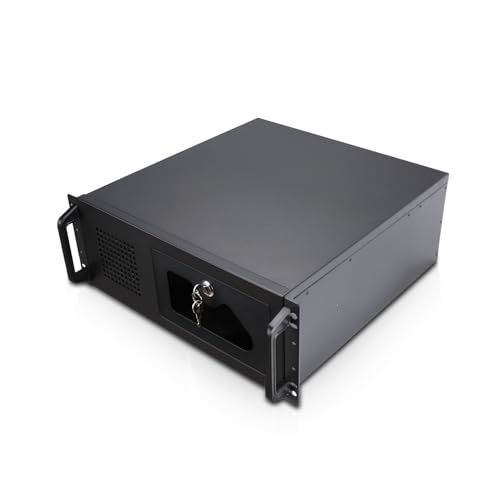
Rosewill 4U Server Chassis RSV-R4100U — The balanced 4U
The RSV-R4100U is the sensible centre of the Rosewill range: a 4U rackmount chassis holding seven 3.5-inch bays and two 5.25-inch devices, supporting ATX and CEB motherboards, cooled by one 120mm PWM fan and two 80mm PWM fans, with two USB 3.0 ports and a front panel that locks with a key. For a first rack build — a home lab’s main server, a small office’s file and application host — that combination covers the job without forcing the buyer into either the density obsession of the fifteen-bay model or the constraints of 2U.
Seven bays is a considered number. It holds a parity array with a spare and room to grow, which is the storage shape most small servers actually take, while the 5.25-inch pair keeps a bay device or an optical drive available for the legacy tasks labs inherit. ATX and CEB support means ordinary desktop-class boards fit, so the chassis pairs with the motherboard ecosystem a home-lab builder already knows, rather than demanding server-board money as an entry fee.
The locking front deserves its sentence: in a shared office, a garage rack or any space with curious hands, a keyed front panel over the drives and power switch is the difference between infrastructure and a suggestion. Buyers whose racks live in locked rooms may never turn the key; buyers whose racks live anywhere else will understand the feature the first week.
- Height: 4U rackmount
- Bays: seven 3.5-inch, two 5.25-inch devices
- Board support: ATX, CEB
- Fans: one 120mm PWM, two 80mm PWM
- Front panel: lock and key, two USB 3.0
Strengths
- Bay count matches the classic small-server array shape
- ATX and CEB support keeps motherboard choice mainstream
- Locking front suits shared and semi-public spaces
Trade-offs
- Three fans is a modest wall for a fully loaded bay stack
- Seven bays will ceiling a fast-growing archive
- 4U height spends rack space a node build would save
Best for: first rack builds and small-office servers that mix storage with general duties. Skip it if your drive count is already in double figures, because the L4500U below exists precisely for you.
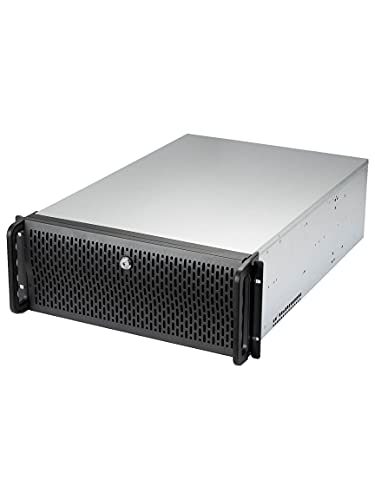
Rosewill 4U Server Chassis RSV-L4500U — The fifteen-bay store
Fifteen 3.5-inch hard drive bays. That is the RSV-L4500U’s entire argument and it is a compelling one: a 4U rackmount chassis, E-ATX compatible, with six front 120mm fans and two rear 80mm fans moving air across the drive stack, two USB 3.0 ports, and a front panel lock and key, finished in silver and black. For the media archive, the backup target, the surveillance recorder or the home data hoard that has outgrown every tower it has lived in, this is the chassis the rest of the category is compared against.
The fan provision tells you Rosewill understands the assignment. Fifteen spinning drives are fifteen small heaters in a row, and the six-fan front wall exists to keep air moving across every one of them; a storage chassis that skimps on its fan wall is a slow warranty claim. E-ATX support widens the motherboard menu to boards with the port counts a fifteen-drive build demands, because the bays are only half the storage equation — the other half is having somewhere to plug fifteen drives in, and buyers should plan the controller or HBA at the same time as the chassis.
The cautions scale with the capacity. Fifteen bays invite fifteen drives, and fifteen drives mean power, heat, noise and a backup strategy for the array itself, because a chassis this size stops being a purchase and becomes a small utility. Rack it where its fan wall can breathe and its noise will not be a colleague. For the buyer whose data has genuinely reached this scale, though, there is no substitute in this guide — the L4500U is the storage pick, full stop.
- Height: 4U rackmount
- Bays: fifteen 3.5-inch HDD
- Board support: E-ATX compatible
- Fans: six front 120mm, two rear 80mm
- Front panel: lock and key, two USB 3.0
Strengths
- Fifteen bays — the storage ceiling of this entire guide
- Six-fan front wall sized for a full drive stack’s heat
- E-ATX support reaches boards with serious port counts
Trade-offs
- A full build is heavy, warm and audible — site it accordingly
- Demands a controller plan; bays alone do not connect drives
- Capacity this large tempts archives beyond the backup plan
Best for: media archives, backup targets and storage-first servers whose drive count is the headline. Skip it if your server holds four drives and dreams, because you will pay in rack space, noise and power for bays that stay empty.

Rosewill 2U Server Chassis RSV-Z2600U — The compact node
The RSV-Z2600U is the density play: a 2U rackmount chassis with four 3.5-inch HDD bays, Micro-ATX motherboard support, three 80mm PWM fans and two USB 3.0 ports. Halving the height halves almost everything else, and that is the point — a 2U node is built to be one of several, stacked in a rack where vertical space is the budget. A virtualisation host, a network services box, a firewall or a build server: the classic node jobs fit this chassis the way a key fits its lock.
Four bays suit a node’s real storage shape — a mirrored pair for the system, room for a data pair — because a node’s bulk storage usually lives elsewhere, on the fifteen-bay sibling down the rack. Micro-ATX support keeps the board budget mainstream, and the three 80mm PWM fans are the honest cooling of the 2U world: smaller fans, turning faster, in a straight front-to-back line. Expect a working voice from a loaded 2U; the format trades quiet for density everywhere on Earth, and this chassis is no exception.
Choose the Z2600U when the rack is the unit of planning and this machine is one citizen of it. Choose against it when the machine must grow — more drives, a bigger board, a taller cooler — because 2U is a promise to stay small, and breaking that promise means replacing the chassis rather than upgrading it.
- Height: 2U rackmount
- Bays: four 3.5-inch HDD
- Board support: Micro-ATX
- Fans: three 80mm PWM
- Front panel: two USB 3.0
Strengths
- Half the rack height of the 4U picks — true node density
- Micro-ATX support keeps the build’s board budget ordinary
- Four bays match a node’s mirrored-system storage shape
Trade-offs
- Growth ceiling is fixed by the format, not by the budget
- 80mm fans work harder and louder than 120mm walls
- No room for the bay devices or big boards of the 4U line
Best for: rack citizens — virtualisation hosts, network services and appliances built to be one of several. Skip it if this machine is your only server and its future is unwritten, because 2U forgives no expansion.
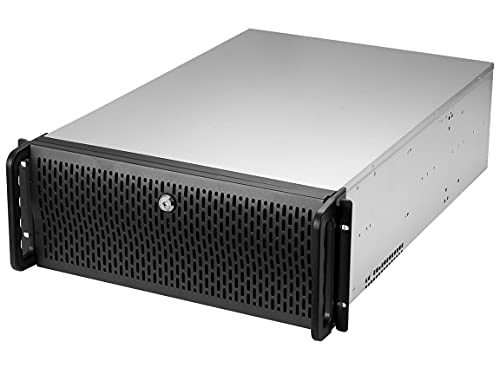
Rosewill 4U Server Chassis RSV-R4000U — The flexible 4U
The RSV-R4000U sits one step up the Rosewill ladder from its R4100U sibling: a 4U chassis with eight 3.5-inch bays and three 5.25-inch devices, ATX and CEB support, two front 120mm PWM fans and two rear 80mm fans, two USB 3.0 ports and a locking front panel. The extra bay and the extra 5.25-inch device slot are its identity — this is the 4U for builds that still use the old bays: an optical drive for a media-ripping station, a tape device, a hot-swap bay accessory, the inherited hardware that labs accumulate.
Comparing it with the R4100U is the guide’s most instructive exercise, because the two are close enough that the choice must be made on evidence. The R4000U offers one more hard drive bay and one more 5.25-inch device, and a four-fan arrangement split evenly between front and rear. The R4100U offers one fewer of each bay and a three-fan set. If your build uses bay devices, the R4000U is the answer; if it does not, the pair are near-interchangeable and the decision can fall to availability on the day. Guides that invent a grand distinction here would be lying to you, and this one declines.
As with its sibling, the locking front and the ATX/CEB board support mark it as shared-space infrastructure built from mainstream parts. It is a workhorse specification, and its buyer is the lab or office that knows exactly which devices occupy those 5.25-inch bays — because if the answer is “none, ever”, the bays are just doors into dust.
- Height: 4U rackmount
- Bays: eight 3.5-inch, three 5.25-inch devices
- Board support: ATX, CEB
- Fans: two front 120mm PWM, two rear 80mm
- Front panel: lock, two USB 3.0
Strengths
- Three 5.25-inch bays serve optical, tape and bay devices
- Eight hard drive bays clear the classic array-plus-spare shape
- Even front-rear fan split suits mixed storage and compute loads
Trade-offs
- Near-twin of the R4100U — choose on bay devices, not habit
- Unused 5.25-inch bays are openings that gather dust
- Still a 4U commitment of rack height
Best for: labs and offices whose builds genuinely use 5.25-inch bay devices alongside a solid drive array. Skip it if your bay devices count is zero, where its sibling or the denser models divide the same money better.

Rosewill 4U Server Chassis RSV-R4200U — The modern-I/O 4U
The RSV-R4200U is where the Rosewill 4U line grows both denser and more current: eleven 3.5-inch bays plus three 5.25-inch devices, ATX and CEB support, two 120mm PWM fans and two 80mm fans, and a front panel carrying two USB 3.0 ports plus a USB-C 3.1 connection, behind a lock. Eleven bays is the guide’s second-highest count, and the USB-C is the line’s handshake with the present — a small thing on a server, and a telling one about which generation of the range you are buying.
Position it honestly between its neighbours. Against the R4000U it adds three hard drive bays and the USB-C port; against the L4500U it surrenders four bays and the six-fan wall. That makes the R4200U the growth compromise: the chassis for the archive that is past eight drives but not yet at fifteen, or for the buyer who wants the modern front connection and the bay devices together. Compromise picks are often a guide’s weakest entries; here it is arguably the range’s sweet spot, because most real storage builds live between the extremes it sits between.
The fan count deserves the same honesty as the bays: four fans for eleven drives is a lighter wall than the L4500U’s eight for fifteen, so a fully populated R4200U in a warm room should be monitored in its first summer and given the rack airflow its stack deserves. With that condition kept, it is the 4U this guide would hand to the widest range of storage-leaning buyers.
- Height: 4U rackmount
- Bays: eleven 3.5-inch, three 5.25-inch devices
- Board support: ATX, CEB
- Fans: two 120mm PWM, two 80mm PWM
- Front panel: lock, two USB 3.0 plus USB-C 3.1
Strengths
- Eleven bays — the range’s growth sweet spot
- USB-C 3.1 on the front, unique among these Rosewill picks
- Keeps the three 5.25-inch bays for legacy devices
Trade-offs
- Four fans is a lighter wall than its bay count ideally wants
- Buyers at fifteen drives should step up to the L4500U instead
- Like all 4U picks, it spends rack height freely
Best for: growing archives and mixed servers that have outgrown eight bays but not yet fifteen. Skip it if your count is already at the ceiling, where the fifteen-bay flagship is the honest destination.

RackChoice 2U Rackmount Chassis — The shallow alternative
The RackChoice entry breaks the Rosewill run with a different brief: a 2U rackmount chassis for Micro-ATX and Mini-ITX boards, holding up to seven 3.5-inch bays, with USB 3.0 (and a 2.0 adapter), support for an ATX power supply mounted top or side, and — the headline — a depth of just 15.7 inches. Depth is the specification that decides whether a chassis can live in a network cupboard, a shallow wall rack or the short rack under a desk, and 15.7 inches opens doors that the deeper Rosewill line cannot enter.
Seven bays in a 2U shallow chassis is a denser trick than it first appears, and it reframes the small-chassis choice: against the Rosewill Z2600U’s four bays, the RackChoice offers the storage-leaning small build a real array while keeping the 2U height and adding Mini-ITX support for the smallest boards. The ATX power supply support matters too, because it lets the build use a standard, quiet, easily replaced supply rather than a proprietary or server-style unit — a meaningful comfort in a home or small-office setting.
The trade is ecosystem depth. Rosewill’s line offers the ladder of siblings, the known quantities, the replacement parts story of a big range; RackChoice offers this specific, well-aimed box. For the shallow-rack buyer that aim is everything. Measure your rack’s usable depth before ordering anything in this category — and if the tape says the deep cases cannot come home with you, this is the pick that can.
- Height: 2U rackmount
- Depth: 15.7 inches — the shallow option
- Bays: up to seven 3.5-inch
- Board support: Micro-ATX, Mini-ITX
- Power: ATX PSU, top or side mounting
Strengths
- Shallow depth fits cupboards and wall racks others cannot
- Seven bays in 2U out-stores the Rosewill 2U
- Standard ATX power supply keeps replacements simple
Trade-offs
- A single-model story versus Rosewill’s deep range
- Shallow depth constrains internal layout and cooling paths
- Small-board support caps the build’s expansion from the start
Best for: shallow racks, network cupboards and small-board storage builds where depth is the binding constraint. Skip it if your rack is full-depth and your board is full-size, where the Rosewill ladder offers more room for the same height.
The Six Chassis on One Rack Shelf
| Chassis | Height | 3.5-inch bays | 5.25-inch | Board support |
|---|---|---|---|---|
| Rosewill RSV-R4100U | 4U | 7 | 2 | ATX, CEB |
| Rosewill RSV-L4500U | 4U | 15 | — | E-ATX |
| Rosewill RSV-Z2600U | 2U | 4 | — | Micro-ATX |
| Rosewill RSV-R4000U | 4U | 8 | 3 | ATX, CEB |
| Rosewill RSV-R4200U | 4U | 11 | 3 | ATX, CEB |
| RackChoice 2U | 2U | Up to 7 | — | Micro-ATX, Mini-ITX |
The table is the guide’s argument in one view: height down the side, appetite across the top. Find your bay count, check the board column against your motherboard, and the shortlist has usually narrowed itself to one chassis and one alternative.
How Should You Plan Power, Cooling and Noise in a Rack?
Together, because in a rack they are the same system. Every drive and every board returns its watts to the room as heat, and a rack concentrates several machines’ worth of that heat into one column of air. The chassis fan walls in these picks move air front to back; the rack’s job is to honour that direction — cool air available at the fronts, a genuine exit path at the rear, blanking panels over empty units so the column does not short-circuit. A fifteen-bay L4500U at full populate is a space heater with opinions, and it belongs where that is acceptable.
Noise planning is placement planning. Rackmount fans are small, fast and unembarrassed, and a rack of them in a living space is a household decision, not a technical one. Garages, utility rooms, cupboards with ventilation and offices with doors exist in this guide’s imagination for a reason. Power planning, finally, means counting the whole rack — supplies, switches, the inevitable second machine — against the circuit that feeds it, before the rack is full and the breaker starts offering its opinion.
Readers arriving here from the desktop world should also know the rack’s neighbours differ: the machines built to be carried between venues live in the best lan pc cases guide, and they solve the opposite problem — one PC, moved often — where these chassis solve permanence at scale.
What Mistakes Do First-Time Rack Buyers Keep Making?
The first is buying bays without a controller plan: fifteen bays and a motherboard with six SATA ports is a sculpture, not a server. The second is ignoring depth — rack depth, rail depth, the cupboard’s door swing — which is why the RackChoice’s 15.7 inches earned its own pick. The third is treating the rack as furniture and forgetting it is a chimney: fronts starved by a closed cupboard door will cook a stack of healthy chassis.
The fourth is under-buying height for a growing machine or over-buying it for a finished one; the 2U and 4U decisions in this guide are really growth decisions wearing metal. The fifth is forgetting the human factors the Rosewill line quietly encodes — the locking fronts, the front USB for the crash-cart keyboard — until the first time the rack sits in a shared space and a stranger’s hand finds the power switch. And the sixth, for desktop converts, is expecting a gaming case’s manners: these chassis will not be quiet, pretty or light, and the desktop categories — the best full tower gaming pc cases for scale, the best mid tower gaming pc cases for the standard build — remain the right home for a machine that lives beside its user.
How Should You Plan the Drives Themselves, Not Just the Bays?
A bay is a promise; the array is the fulfilment, and the two should be planned in the same sitting. Start with the failure you are insuring against. A parity array survives a dead drive at the cost of one or two drives’ worth of capacity, a mirror survives at the cost of half, and a chassis full of independent drives survives nothing at all — it merely stores more. The bay counts in this guide map onto those choices concretely: four bays is a mirrored system with a data pair, seven or eight is a parity array with a hot spare, eleven is that array grown, and fifteen is an archive that expects to keep eating.
Buy the drives for the duty, too. A server chassis runs its drives around the clock in close company, cheek by jowl, vibrating together — the environment NAS and enterprise-rated drives are built for and desktop drives tolerate only politely. Mixing a bargain desktop drive into a fifteen-bay stack is the classic false economy of this category, because the array’s reliability is set by its least comfortable member and the rebuild after a failure stresses every survivor. The chassis decision and the drive decision are one decision wearing two hats, and the buyers who treat them separately usually meet the reason during a rebuild at 2 a.m.
Leave the grace bay. Whatever count your plan produces, the chassis that holds one more than that is the chassis you will thank during the migration, the expansion or the failure swap, because every one of those operations wants a free bay to work into. This is the quiet argument for stepping one model up the Rosewill ladder when your count sits exactly on a model’s ceiling — the R4200U over the R4000U, the L4500U over the R4200U — and it is cheaper insurance than almost anything else in the build.
What About Rails, Shelves and the Physical Rack Itself?
The chassis is only the middle of the physical story. A loaded 4U storage server is heavy in a way that surprises desktop converts — drives are dense, steel is honest, and a fifteen-bay build at full populate is a two-person lift that wants rails rated for it, not a shelf chosen by optimism. Decide the mounting before the chassis arrives: sliding rails if the machine will be serviced in place, a fixed shelf if it will be lifted out for work, and in both cases a rack whose depth and post style match the hardware. The shallow RackChoice exists because this physical layer, not the electronics, is where many small installations are actually decided.
Cable the rack as infrastructure while you are there. Power and network should arrive at the rear, where these chassis exhaust, with enough slack to slide a machine out on its rails without unplugging it — service loops are the difference between maintenance and archaeology. Label both ends of everything. The person who thanks you is you, eighteen months later, tracing a cable by torchlight while a room full of people wait for the file server to return.
And respect the rack’s own growth. A first chassis is rarely the last: a switch, a UPS, a second node join most racks within a couple of years, and the height budget you spend today is the budget they will ask for tomorrow. This is the systemic argument for 2U nodes where nodes suffice — the Z2600U and the RackChoice leave the rack’s scarcest resource, its vertical space, available for the machines you have not thought of yet.
How Does a Home Lab Grow Into This Category, Step by Step?
Almost nobody starts with a rack. The usual path runs from a desktop tower pressed into server duty, through the realisation that it cannot hold the drives, breathe in its corner or be serviced without disturbing the desk it shares, to the first chassis in this guide. That first purchase is usually the balanced one — the R4100U shape, a 4U with a sane bay count — because the lab’s needs are still hypotheses and the 4U’s forgiveness suits hypotheses. The mistake at this stage is buying the extreme in either direction: the fifteen-bay flagship for an archive that may never exist, or the sealed 2U for a machine whose job has not finished changing.
The second stage is specialisation, and it is where this guide’s spread earns its keep. The storage migrates into the L4500U or R4200U, where bays are the point. The services split into 2U nodes that can be replicated, rebuilt or replaced without touching the data. The rack acquires a switch, a UPS and opinions about airflow. Owners who planned the first chassis with the second stage in mind find the migration a weekend; owners who did not find it a rebuild, and the difference was never money — it was the bay count and the height, chosen once, with the future allowed a vote.
The third stage is the one nobody plans and everybody reaches: the rack becomes boring. It sits in its ventilated space, locked fronts outward, doing its work unobserved for months at a time. That boredom is the category’s definition of success, and it is worth naming in a guide, because a buyer choosing between these six chassis is really choosing the shape of that eventual boredom — how many drives it hums with, how much rack it occupies, and how gracefully it will accept the one more machine that stage two always eventually demands.
What Should Desktop Builders Unlearn Before Buying a Server Chassis?
Three habits, mainly. The first is judging by appearance: a server chassis’s front is a locked door with vents, its beauty is the beauty of a well-run utility, and the buyer who needs it to look like something should return to the desktop categories where looks are a legitimate axis. The second is expecting silence. These fans are specified for a straight line of air through a metal box in a room set aside for it; the desktop art of the inaudible idle simply does not apply, and chasing it with replacement fans fights the design’s whole intent.
The third habit is treating the power supply as an afterthought. Server builds run continuously, often for years between shutdowns, and the supply’s efficiency and reliability are operating costs and uptime, not specifications. The RackChoice’s support for a standard ATX supply is a genuine convenience here, and across the Rosewill line the same principle holds: buy the supply like the infrastructure it is. Unlearn those three habits and the category becomes refreshingly simple — height, bays, board, airflow — which is exactly the simplicity this guide has been selling since its first paragraph.
How Do You Keep a Rack Server Healthy Across Years of Service?
With a rhythm as plain as the hardware. Quarterly, walk the rack with your eyes before your tools: every front’s indicators behaving, every fan’s note unchanged, dust on the intakes telling you how the room’s air has been. A server chassis announces its troubles early and quietly — a fan whose pitch has shifted, a drive bay warmer than its neighbours, a filter grey a month sooner than usual — and the owner who visits quarterly catches those announcements while they are still cheap. The locking fronts across the Rosewill line make the complementary habit possible: the rack can live in a real building, among real people, without its drives and switches being public property.
Annually, give the stack its service hour. Power down in the planned order, blow the dust out along the airflow’s own direction rather than against it, reseat the drive connections that thermal cycling slowly worries loose, and confirm every fan still spins freely before the fronts close again. Fifteen drives in an L4500U vibrate as a community, and communities loosen things; the annual hour is when that loosening is found by you rather than by the array, at its convenience rather than yours.
Keep the spares the category quietly demands: one drive of the array’s own model, a fan of each size your chassis uses, the keys to the fronts in two places. None of this is expensive, and all of it converts the failures that will certainly happen across a long service life from emergencies into errands. A server case is bought for years; the owners who get those years are the ones who maintain the machine like the infrastructure they bought, rather than like the appliance they replaced.
Where Should a Small Organisation Put Its First Rack?
The honest answer is: somewhere boring with a door. A utility room, a ventilated cupboard, a garage corner in a kind climate, the far end of a store room — anywhere the fan note will not colonise a workspace and the heat will not colonise a bedroom. The location decision outranks every specification in this guide, because a perfectly chosen chassis in a hot, sealed, occupied room will fail its owners socially before it fails them technically, and social failures get unplugged.
Run the location’s own checklist before the rack arrives. A circuit with headroom for the whole stack, not just the first chassis. Network that reaches the spot without a cable across a doorway. Air that can enter cool and leave warm without passing through the room’s occupants. Physical access for the two-person lift a loaded 4U demands, on delivery day and on every service day after. And a lock or a locked room, to match the locked fronts the chassis already provide.
Small organisations often discover that the cupboard under the stairs or the rack in the corner of the stock room becomes, quietly, the most important square metre they own. Treat its selection with that foresight — measure its depth for the RackChoice’s sake or the deep Rosewills’, count its units for the growth you can already foresee — and the first rack will be the last one you have to apologise for.
What Does It Cost to Run a Rack Like This, Beyond the Chassis?
The chassis is the cheap part of a rack’s life, and a guide that pretended otherwise would send its readers into the category under-budgeted. The recurring costs are electricity, drives and time. Electricity first: a populated storage chassis draws power around the clock, and a rack of three machines plus a switch is a small but permanent load whose annual cost deserves one honest calculation before the rack is built, not one surprised bill after. Efficient power supplies and drives that spin down when idle are the two levers, and both are cheaper to choose at purchase than to retrofit.
Drives second: an array is a population with a mortality rate, and a sensible budget holds a replacement drive in reserve and expects to buy another every year or two across a large stack. The fifteen-bay L4500U’s real price includes the statistical certainty that some of its fifteen citizens will die in service; the four-bay node’s includes the same certainty at a smaller scale. Time third, and most underrated: the quarterly walk and the annual service hour this guide describes are the subscription the category charges, and owners who will not pay it should buy a managed appliance instead and pay someone else’s subscription in money.
None of this argues against the rack. It argues for entering it as infrastructure, budgeted like infrastructure, in the way a small business budgets a van rather than a bicycle. The chassis in this guide are the affordable end of that world — that is their virtue and Rosewill’s — but affordable infrastructure is still infrastructure, and the buyers who thrive with it are the ones who knew the whole bill before the first unit was racked.
How Should You Choose Between Two Chassis That Look Identical on Paper?
This guide contains a genuine near-tie — the R4100U and the R4000U — and the method for breaking such ties generalises across the category. First, return to the one specification your build actually exercises: bay devices, in that pair’s case, where a single optical or tape device settles the question instantly. Second, count the fans against the drives you will really install, not the maximum the bays allow, because cooling is bought for the populated machine. Third, look at the front panel’s connections against the peripherals your rack life actually uses — the R4200U’s USB-C is decisive only for the owner whose crash-cart gear needs it, and trivia for everyone else.
If the tie survives all three tests, it is not a tie that matters, and the decision should be made on availability, on the seller, and on which box can be in your rack this week. Guides that manufacture a dramatic distinction between near-identical chassis are protecting their format, not their reader. The Rosewill ladder’s closeness is a feature of a mature range: it means the correct answer is a neighbourhood, and any address in the right neighbourhood serves. Spend the saved deliberation on the controller, the drives and the rails, where the differences are real and the consequences are measured in uptime.
What Should Arrive on the Same Order as the Chassis?
Four things, if the build is to proceed without a stalled weekend. The controller or host bus adapter that gives your drives their ports, counted against the bay figure you chose — this is the item first-time rack buyers most often forget, and its absence converts a build day into a delivery wait. The rails or shelf the chassis will actually mount on, verified against the rack’s posts and depth. Enough drives for the array’s first shape, bought as the matched set the array wants to be. And the unglamorous consumables of rack life: cage nuts, screws, cable ties that release rather than cut, labels, and a power strip or distribution unit with the outlets the whole stack — not just this chassis — will need.
Buy the spare fan and the spare drive with the second order, once the machine is running and its exact parts are known rather than guessed. The discipline is sequencing, not volume: everything the build cannot start without, on day one; everything the service life cannot proceed without, within the first month. A rack assembled that way grows the way infrastructure should — deliberately, labelled, and without a single midnight order placed in a panic the planning could have prevented.
Does a Home Rack Need a UPS, and Where Does It Sit?
Yes, and the reasoning belongs in a case guide because the UPS is a rack citizen with a chassis’s physical demands: it occupies units, it is the heaviest single object most small racks will ever hold, and it wants the bottom of the rack where its weight steadies the whole column rather than threatening it. Electrically, its job is not to run the servers through an outage — it is to give them the minutes to shut down cleanly, because an array interrupted mid-write is the failure mode that parity exists to survive and the one most likely to test whether it can. Size it for the stack’s real draw and that graceful shutdown, place it at the base, and let every chassis in this guide plug into the protection as a matter of architecture rather than as an accessory remembered after the first thunderstorm.
Final Recommendation
Let the two numbers decide. Count your drives on their hungriest day and measure your rack’s height and depth, and this list resolves: the RSV-L4500U for the fifteen-bay archive, the RSV-R4200U for the growing store that wants USB-C with its eleven bays, the RSV-R4000U where 5.25-inch devices still earn their keep, the RSV-R4100U as the balanced first 4U, the RSV-Z2600U for the true 2U node, and the RackChoice where 15.7 inches of depth is the difference between racking and not racking. Rosewill’s five-sixths of this list is the market telling the truth about itself — and a rack, once built honestly around the right chassis, is the most satisfying infrastructure a small operation can own.
Frequently Asked Questions
Why are five of the six picks from one brand?
Because the affordable rackmount shelf genuinely looks like that. Rosewill’s RSV range offers the spread of heights and bay counts a home lab or small office can buy without enterprise pricing, so this guide presents the range honestly and adds the RackChoice where a different brief — shallow depth — appears.
Should I choose 2U or 4U for a first server?
Choose 4U if the machine must grow or hold a real drive array, and 2U if it is a defined node in a rack of several. The 4U picks here hold seven to fifteen drives; the 2U picks hold four to seven and cap your board at Micro-ATX or smaller. A useful tiebreaker is the machine’s second job: first servers almost always acquire one — the file host becomes the backup target, the lab box becomes the media server — and second jobs consume exactly the headroom that 4U provides and 2U refuses. Buy the height for the job you can foresee plus the one you cannot, and the chassis will still be right when the rack’s second machine arrives to keep it company.
How many bays does a home media server need?
Count the array, its parity and a spare, then add grace. Many home archives live comfortably in the seven-to-eleven bay band covered by the R4100U, R4000U and R4200U; the fifteen-bay L4500U is for collections that have already outgrown that band once. Be honest about the collection’s growth rate while you count: a library that gains a drive’s worth of media every year will cross a seven-bay ceiling on a schedule you can calculate today, and stepping one chassis up the ladder now is a far cheaper migration than moving a live array between chassis later, with the old box sold and the new one racked around a nervous weekend.
Do these chassis include rails?
Rail and mounting arrangements vary by model and listing, so check the specific product page for what is in the box before planning the rack. Budget for rails or a shelf if they are not included, because a loaded 4U storage chassis is not a shelf ornament. While you are checking, confirm the rack itself: its post spacing, its depth from front post to rear door, and whether its doors close with your cable slack in place. More first racks fail on those three measurements than on any electronic specification, and every one of them is knowable with a tape measure before a single chassis is ordered — which is why this guide treats the tape, not the catalogue, as the first tool of the category.
Can I build a server in one of these with a normal desktop motherboard?
Often, yes — that is the point of the ATX and CEB support across the 4U Rosewill line, and Micro-ATX support in the 2U pair. Confirm your exact board against the model’s stated support, and plan a controller card if your drive count exceeds the board’s ports. That mainstream-board compatibility is also what keeps these builds repairable for years, because the replacement board a small operation needs at short notice is the one the ordinary market stocks.
How loud is a rackmount server at home?
Louder than a desktop, by format: small fans turning fast in a straight airflow line. Site the rack in a garage, utility space or ventilated cupboard, and treat the noise as a placement problem with a placement answer, not as a defect in the chassis. A door between the rack and the living space is worth more than any fan swap, and a rack whose noise has been placed well becomes background within a week — the household stops hearing it the way it stops hearing a refrigerator, provided the refrigerator was never installed in the bedroom. Choose the room first and the chassis second, and the category’s famous volume becomes a fact you planned around rather than a surprise you live beside.
Related Guides
The linked guides cover the machines at the other end of the permanence spectrum: the portable cases built to travel, and the two desktop tower sizes a server replaces when a workload graduates into a rack.