What's inside
- Key Takeaways
- Quick Picks
- How Did We Choose the Best Creative Sound Cards?
- What Actually Separates One Sound Blaster From Another?
- How Much of a Sound Blaster Is the Software?
- How Do These Six Sound Blasters Stack Up Against Each Other?
- What Does a Sound Card Change in Everyday Listening?
- How Does Surround Sound Work Across These Six Cards?
- Which Questions Should You Ask Before Choosing a Creative Card?
- How Do You Install a PCIe Sound Card and Set It Up Cleanly?
- What Mistakes Do Buyers Make With Sound Blaster Cards?
- Final Recommendation
- Frequently Asked Questions
- Related Guides
As an Amazon Associate I earn from qualifying purchases. This post may contain affiliate links at no extra cost to you.
[widgetverdict.com] is reader-supported. When you buy through links on our site, we may earn an affiliate commission.
Every card on this page comes from one company, and it is worth saying that plainly before anything else: a shortlist of the best creative sound cards is, by definition, a shortlist of Creative Labs hardware, because nobody else makes Sound Blaster cards. That single-brand reality actually simplifies the shopping problem. Instead of comparing rival philosophies, you are comparing generations and form factors inside one family — a flagship PCIe card against a budget PCIe card, an internal card against a USB box that also works with a console. The differences that matter are conversion quality, headphone drive, surround handling, and how much of the experience lives in Creative’s desktop software rather than on the silicon itself.
Where to buy: all six picks below are sold through Amazon, and each product name in this guide links to its listing there so you can confirm the exact variant, the current bundle, and the delivery terms before ordering. Creative also sells direct, and some of these cards appear in big-box PC stores, but the listings linked here are the verified ones this guide was built around. If you are shopping from outside the United States, check that the listing ships the retail box with the accessories described, because open-box and marketplace variants of older Sound Blaster cards circulate widely.
Key Takeaways
- The whole shelf is Creative Labs hardware, so the real choice is PCIe versus USB and flagship conversion versus value conversion, not brand versus brand.
- The Sound Blaster AE-X and AE-5 Plus sit at the top on paper, both advertising 32-bit/384 kHz playback; the AE-5 Plus adds a discrete bi-amp headphone stage and the higher stated signal-to-noise figure.
- The Z SE is the surround-and-microphone pick: discrete 5.1 output, virtual 7.1 for headphones, mic EQ, and ASIO support are all in its listing title.
- The Audigy Fx Pro is the straightforward internal upgrade for a desktop whose onboard audio crackles, hisses, or simply sounds flat.
- The X4 and G8 move the same Sound Blaster ideas outside the case over USB, which suits laptops, small-form-factor builds with no free slot, and multi-device desks.
- Creative’s desktop app is part of the product on the app-supported models; feature depth can shift between Windows releases, so treat the software as a living layer rather than a fixed spec sheet.
Quick Picks
| Pick | Badge | Why it is here |
|---|---|---|
| Creative Sound Blaster AE-X | Flagship PCIe | The newest top-end internal card in the line, built around hi-res PCIe playback and desktop app control. |
| Creative Sound Blaster Audigy Fx Pro | Value internal upgrade | A hi-res PCIe card aimed at clean audio and surround for desktops that need a simple step up from onboard sound. |
| Creative Sound Blaster Z SE | Surround and mic focus | Discrete 5.1, virtual 7.1, mic EQ and a headphone amp rated for high-impedance cans in one internal card. |
| Creative Sound BlasterX AE-5 Plus | Audiophile gaming card | SABRE32-class conversion, a discrete bi-amp headphone stage and the strongest stated SNR of the internal models here. |
| Creative Sound Blaster X4 | External all-rounder | A USB DAC and headphone amp with 7.1 surround and multi-device switching for desks that mix PC and console. |
| Creative Sound Blaster G8 | Dual-input USB DAC | A dual DAC USB unit with a headphone amp aimed at gamers who run more than one platform at one desk. |
How Did We Choose the Best Creative Sound Cards?
Because every candidate carries the same logo, the selection work was about coverage rather than brand balance. We wanted the current flagship internal card, the long-running midrange card that streamers keep recommending, the budget internal card, the previous flagship that still undercuts its replacement on spec-per-money, and the two external USB designs that let laptop owners and console players into the same ecosystem. Each pick had to be a current, verified listing with a clear role; cards that duplicated another pick’s role without adding anything were left out even when their listings were perfectly legitimate.
On the technical side we weighted the numbers that a listing can actually support: the stated bit depth and sample-rate ceiling, the stated signal-to-noise ratio where Creative publishes one, the headphone amplifier arrangement, and the surround story — discrete analogue outputs, encoded digital output, or virtual processing for headphones. We deliberately did not weight review scores or sales ranks, because those move constantly and say little about whether a card fits a particular desk. Software was treated carefully throughout: where a listing promises desktop app support, we describe that support as something that evolves with Windows updates rather than as a frozen feature list.
What Actually Separates One Sound Blaster From Another?
Strip away the marketing tiers and four things separate these six products. The first is the converter stage. A card advertising 32-bit/384 kHz playback is working with a more modern DAC design than one capped at 24-bit/192 kHz, although both ceilings sit far beyond what streaming services and game audio actually deliver; the audible difference, when there is one, usually comes from the analogue output stage and its noise floor rather than from the headline sample rate. That is why the stated SNR figures matter as a rough guide: a card in the 120 dB region is designed to keep its own hiss far below the signal, which you notice most with sensitive earphones in quiet rooms.
The second separator is the headphone amplifier. A basic line-out stage is designed for powered speakers and easy-to-drive headsets. A discrete amp stage — and especially the bi-amp arrangement in the AE-5 Plus, where separate amplifier paths handle each channel — is designed to keep control of higher-impedance headphones that can sound thin or quiet from a motherboard jack. The third separator is surround handling: discrete 5.1 means three analogue outputs feeding a real speaker set, Dolby Digital Live encoding means a single optical cable can carry game surround to a receiver, and virtual 7.1 means software is folding multichannel audio down for headphones. Those are three different features wearing similar badges, and the picks below are labelled by which ones they actually carry.
The fourth separator is placement. A PCIe card disappears into the case and takes its power and data from the motherboard, which keeps the desk clean but ties the card to one machine. A USB unit like the X4 or G8 sits on the desk with physical controls, moves between machines in seconds, and can serve a console as well as a PC. Neither placement is better in the abstract; the right answer depends on whether your audio problem lives in one desktop or follows you between devices.
How Much of a Sound Blaster Is the Software?
More than it used to be, and buyers should go in with their eyes open about that. In the era of the original Audigy cards, the hardware did nearly everything and the driver was mostly a delivery mechanism. In the current range, the desktop app is where profiles live: EQ curves per application, surround virtualisation for headphones, microphone effects, and the switching between speaker and headphone configurations. The AE-X listing says “Desktop App Support” in its title for a reason — Creative is telling you the app is a feature of the product, and on the app-supported models the card and the software are best understood as one purchase.
The practical consequences cut both ways. Positively, a software-centred card can gain refinements after purchase, and profiles let one machine serve a work call at noon and a game at night without manual re-tuning. Negatively, the experience depends on Creative continuing to maintain the package for your Windows version, and major operating-system updates occasionally reshuffle audio defaults or require a fresh install. We hedge this deliberately throughout the guide: where a feature is described as app-driven, assume it is supported on current Windows releases and may evolve, rather than treating today’s settings screen as a permanent contract. Buyers who keep a PC unchanged for many years should weigh the mature AE-5 Plus, whose behaviour is well documented by its owner base, against the newer AE-X.
There is also a workflow point that rarely appears in spec comparisons. An app with per-device profiles rewards listeners who actually open it: setting a headphone EQ once and a speaker EQ once transforms daily use, because the card stops being a fixed tone and becomes two tuned systems. Buyers who never open audio software still get the converter and amplifier benefits, but they leave a real part of the flagship proposition unused — one more reason the simpler Audigy Fx Pro exists in the range without apology.

Creative Sound Blaster AE-X — Flagship PCIe
The AE-X is the card Creative currently puts at the top of its internal range, and its listing leads with hi-res PCIe playback at 32-bit/384 kHz plus desktop app support. Read that pairing carefully, because it describes the modern Sound Blaster formula: the hardware handles conversion and amplification, while the app is where EQ profiles, surround settings and microphone processing live. For a buyer upgrading a gaming or media desktop, the AE-X is the pick that asks the fewest compromises — it is the newest design in this roundup, it carries the flagship conversion figures, and it is built to be tuned from the desktop rather than from a tangle of Windows sound panels.
Who feels the upgrade most? Anyone moving from motherboard audio with a decent pair of headphones or powered speakers. Onboard audio sections share a noisy electrical environment with everything else on the board, and a dedicated card with a modern converter stage typically cleans up the background first — the hiss between tracks, the faint buzz when the GPU spools up — before any tonal differences enter the picture. The honest limitation is that the AE-X’s ceiling numbers describe playback capability, not a promise that your music library contains anything recorded at those rates. Almost none of it does. You are buying headroom and a quiet output stage, and for most listeners that is exactly the right thing to buy.
One more consideration separates the AE-X from cheaper internal cards in daily use: it is designed to be the only audio device your desktop needs. Speaker output, headphone output and microphone input all route through one managed chain with one settings home, which ends the familiar split where speakers run from one device, the headset from another, and every application picks its own favourite. For a tidy single-machine desk, that consolidation is worth as much as any specification on the box.
- Form factor: internal PCIe sound card for desktop PCs
- Playback ceiling stated in listing: 32-bit / 384 kHz hi-res audio
- Control: desktop app support for settings and profiles
- Role in the range: flagship internal model
Strengths
- Newest flagship design in the Sound Blaster internal line
- Hi-res playback ceiling matches the best figures Creative publishes
- App-based control keeps tuning in one place instead of scattered Windows menus
Trade-offs
- Needs a free PCIe slot, so compact builds with the slot covered by a thick GPU are out
- Desktop-only: nothing here helps a laptop or a console
- App features can change as Windows and the software evolve, so the experience is not frozen at purchase
Best for: a desktop owner who wants the current top internal Sound Blaster and plans to actually use the app for EQ and surround profiles. Pass on it if your only machine is a laptop, or if a USB desk unit would serve two devices at once.

Creative Sound Blaster Audigy Fx Pro — Value internal upgrade
The Audigy name is the oldest in this roundup, and the Fx Pro is its current budget expression: a hi-res PCIe card whose listing promises clean audio and surround sound for a PC upgrade. That modest wording is honest positioning. This is the card for a desktop whose onboard audio has started to misbehave — a front jack that crackles, a rear output with a constant faint whine, microphone input that picks up every fan in the case — and whose owner wants a proper internal fix rather than a dongle hanging off a USB port. It also suits older desktops being kept alive as media or office machines, where a full flagship card would be money spent in the wrong place.
Expectations should be set by the tier. The Fx Pro gives you Creative’s conversion and surround processing in a simple card, and for headsets, modest powered speakers and everyday gaming that is a genuine step up from a tired onboard codec. What it does not try to be is a high-end headphone amplifier or a recording front end; demanding headphones and studio microphones belong with other picks in this guide or with dedicated interfaces. Installation is the usual PCIe routine — power down, seat the card in a free slot, connect the front-panel header if your case wiring is meant to move to the card, then install Creative’s software so Windows routes audio through the new device by default.
There is also a quiet reliability argument for a card like this in a second-hand or ageing machine. When a motherboard’s audio section begins to fail, the alternatives are a board replacement — effectively a rebuild — or an external dongle that occupies a port forever and invites its own cable clutter. A modest PCIe card restores the machine’s original ergonomics for a fraction of a rebuild’s cost and disruption, and it can move to the next budget build when this one finally retires. That kind of salvage value never appears in launch reviews, but it is a large part of why the Audigy line has persisted for so long.
- Form factor: internal PCIe sound card
- Listing emphasis: hi-res audio, surround sound, clean audio for PC upgrades
- Lineage: current model in the long-running Audigy family
- Role in the range: entry point to internal Sound Blaster cards
Strengths
- The simplest internal route off failing or noisy onboard audio
- Surround support included rather than reserved for the flagship tier
- Keeps the desk clear — no external box, no extra cables on display
Trade-offs
- Headphone drive is aimed at mainstream headsets, not demanding high-impedance models
- Fewer headline figures published than the AE-series cards carry
- Still a desktop-only part that needs a free slot and a driver install
Best for: reviving a desktop with bad onboard audio, or giving a family or office PC clean sound and surround without flagship spending. Look elsewhere if you run power-hungry headphones or record instruments, because neither job is what this card was built around.

Creative Sound Blaster Z SE — Surround and mic focus
The Z SE has the most information-dense listing title in this guide, and nearly every clause in it maps to a real buyer’s question. It is a 24-bit/192 kHz internal card with a stated 116 dB SNR, ASIO support, a headphone amplifier rated for headphones up to 600 ohms, mic EQ, discrete 5.1 output with virtual 7.1 for headphones, and support for Dolby Digital Live and DTS encoding. Unpack the surround part first, because it is the card’s signature: discrete 5.1 means the card has the analogue outputs to feed a genuine five-speaker-plus-subwoofer set directly, while the encoders let a single digital connection carry surround from games to an external receiver or sound system that expects a Dolby or DTS stream.
The microphone EQ is the other half of this card’s identity, and it explains why streamers and regular voice-chat users keep it in circulation. Being able to shape and level your own mic inside the card’s software — rather than inside each separate app — keeps your voice consistent across games, calls and recordings. ASIO support matters to a smaller group: musicians and audio hobbyists using low-latency drivers in a DAW will appreciate that the card can speak that language, though a sound card still is not a recording interface, a distinction the recording guide in this series explores in depth. The 600-ohm headphone rating is generous for the tier and covers the vast majority of audiophile headphones people actually own.
Think of the Z SE as the card for the desk that does a bit of everything and refuses to specialise. Monday it feeds a speaker set for music while you work; Tuesday it is a voice-chat card with the mic shaped and levelled; the weekend brings a film through the receiver with encoded surround. Cards optimised for one of those jobs beat it narrowly at that job. Very few cards at any tier cover all three without adapters, dongles or a second device, and that breadth — rather than any single figure in its long title — is the real reason this model keeps being recommended years into its life.
- Form factor: internal PCI-e card and DAC
- Playback stated in listing: 24-bit / 192 kHz, 116 dB SNR
- Headphone amp: rated for headphones up to 600Ω, with mic EQ in software
- Surround: discrete 5.1 analogue, virtual 7.1, Dolby Digital Live and DTS support
- Driver note: ASIO support listed
Strengths
- The most complete surround toolkit of any pick here, analogue and encoded digital alike
- Mic EQ gives streamers and callers consistent voice processing in one place
- Headphone amp rating covers demanding high-impedance headphones
Trade-offs
- Playback ceiling sits a tier below the 32-bit/384 kHz flagship cards
- Getting value from the encoders requires a receiver or speaker system that can use them
- Feature depth lives in Creative’s software, which needs to stay installed and updated
Best for: a gamer with a real 5.1 speaker set or a receiver, who also lives on voice chat and wants their microphone shaped at the card level. If your setup is headphones-only and likely to stay that way, the flagship cards aim their budget more directly at your use.
Creative Sound BlasterX AE-5 Plus — Audiophile gaming card
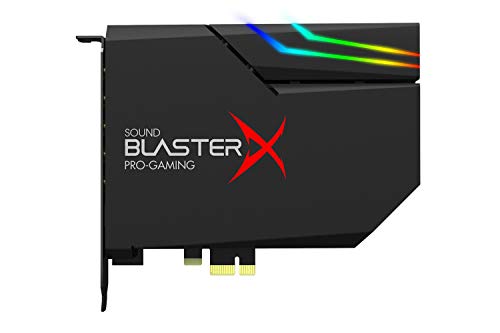
The AE-5 Plus is the card for people who read converter datasheets for fun. Its listing specifies a SABRE32-class DAC running 32-bit/384 kHz, up to 122 dB SNR — the highest figure stated anywhere in this guide — a Xamp discrete headphone bi-amp, and Dolby Digital and DTS support, with an RGB lighting system rounding out the gaming presentation. The bi-amp detail deserves explanation because it is more than a badge: instead of one amplifier stage driving both channels, Xamp gives each side its own discrete amplifier path, which is designed to keep channel separation clean and to hold composure when a headphone’s impedance curve gets awkward at certain frequencies. With easy headphones you may never notice. With a prized pair of planar or high-impedance headphones, that composure is the product.
Against its newer sibling, the AE-5 Plus makes an interesting value argument. The AE-X is the current flagship with the newest app story; the AE-5 Plus counters with the stronger stated SNR and the specialised headphone stage, and it has been on the market long enough that its behaviour across Windows versions is well understood by its owner community. The RGB system will either delight you or be switched off once, and the card’s gaming branding should not put music listeners off — nothing in the conversion path is game-specific. Its limitation is the mirror of its strength: nearly all of the engineering budget went into stereo playback quality, so buyers whose priority is microphone processing or elaborate surround encoding will find the Z SE’s toolkit broader even though its converter figures are lower.
A word about the stated 122 dB SNR, since it is the figure most likely to be quoted back at us. Signal-to-noise ratio describes how far the card’s own noise sits below a full-scale signal; it is a ceiling on cleanliness, not a loudness or quality score by itself. Its value shows up in the quietest moments — the fade at the end of a track, a stealth game played at night volume — where a lesser card’s hiss becomes part of the programme. Paired with the bi-amp stage holding control of the headphone load, it is why this card, rather than a newer one, remains the playback purist’s pick in the family.
- Form factor: internal PCIe gaming sound card and DAC
- Converter stated in listing: SABRE32-class, 32-bit / 384 kHz
- Stated SNR: up to 122 dB
- Headphone stage: Xamp discrete bi-amp
- Extras in listing: Dolby Digital and DTS support, RGB lighting system
Strengths
- Strongest published converter and SNR figures among the internal picks
- Discrete bi-amp headphone stage is genuinely differentiated hardware, not a software effect
- Long market history means mature drivers and a large base of owner knowledge
Trade-offs
- Lighting and gaming presentation add cost that pure music listeners may not value
- Microphone tooling is thinner than the Z SE’s mic-EQ focus
- Internal-only, so the investment stays with one desktop
Best for: headphone-first listeners who game on the same machine and want the playback hardware to be the star. If your money would rather go toward microphone polish or external flexibility, the Z SE and X4 divide that territory between them.
Creative Sound Blaster X4 — External all-rounder
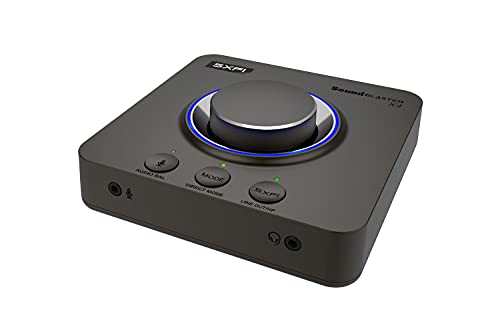
The X4 takes the Sound Blaster formula out of the case. It is an external USB DAC and headphone amp with 7.1 surround, Dolby Audio, multi-device support and physical audio controls, and that combination points it at a specific desk: one where a PC shares space with a console, or where the main computer is a laptop that will never accept a PCIe card. Multi-device support is the feature to weigh most heavily here. Switching audio sources on a desk unit is a button press; doing the same trick with an internal card is impossible by definition, and doing it with Windows settings is a small chore you repeat forever.
As a headphone proposition the X4 sits in the sensible middle: a proper external DAC and amp stage is a clear step beyond a laptop’s built-in jack for both noise and drive, and the surround processing is aimed at games and films on headphones rather than at feeding a room full of speakers. Buyers with a genuine 5.1 speaker set should note the distinction and look at the Z SE’s discrete outputs instead. The X4’s other quiet advantage is longevity of relevance: when you replace your PC, the X4 unplugs and follows you, while an internal card’s fate is tied to whether the new machine has a free slot in the right place. For renters, students and anyone whose setup changes yearly, that portability is worth real money.
The X4 also quietly solves a problem internal cards cannot: electrical distance. A USB unit draws its working environment from outside the case, away from the graphics card and voltage regulators that make internal audio design an exercise in shielding. That does not make every USB device quiet — cheap ones are dreadful — but a properly engineered external DAC starts the noise fight on easier ground. For small-form-factor PCs, where a sound card would sit millimetres from a hot GPU, that physical separation is a legitimate engineering argument, not merely a convenience.
- Form factor: external USB DAC and headphone amp
- Surround: 7.1 surround with Dolby Audio, aimed at headphone listening
- Desk features: multi-device support and physical audio control
- Compatibility angle: works where no PCIe slot exists, including laptops
Strengths
- Serves PC and console setups from one box with quick switching
- Physical controls beat diving into software for volume and source changes
- Moves to your next computer instead of being stranded in the old case
Trade-offs
- Surround story is headphone processing, not discrete outputs for a speaker set
- Occupies desk space and a USB port permanently
- Headphone drive is capable rather than flagship-class for very demanding cans
Best for: mixed-device desks, laptop owners, and anyone who wants Sound Blaster processing without opening a case. A dedicated 5.1 speaker owner should route around it toward the Z SE’s analogue outputs.

Creative Sound Blaster G8 — Dual-input USB DAC
The G8 is Creative’s gaming-focused external unit, described in its listing as a USB dual DAC with a headphone amp, high-resolution audio support and multi-platform ambitions. The dual DAC wording is the interesting part: the design is presented around handling two sources, which matches how gaming desks actually look now — a PC for the game, a second device for voice chat, music or a stream feed, with the player wanting both in the same headphones without a mixer the size of a paperback. The G8 exists to collapse that little stack of compromises into one box that sits within arm’s reach.
Compared with the X4, the G8 leans harder into gaming language and multi-platform play, while the X4 leans toward general multi-device audio control and Dolby Audio branding. Neither is a recording device, and neither pretends to be; microphone handling here is about clear voice chat, not studio capture. The G8 also makes sense for the growing group of players whose primary machine is a handheld or a console but who still want better headphone drive than a controller jack provides. Its trade-off is focus: buyers wanting one box to feed powered speakers, a receiver and headphones in a home-theatre direction will find its gaming-first layout less natural than a card with proper multichannel outputs.
Where the G8 earns its keep most clearly is the two-voice problem: the player who wants game audio and a Discord call — or game audio and a podcast, or a console party chat alongside PC sound — without wearing one earbud under a headphone cup like a stock-photo cliché. Solving that with a small mixer and a fistful of cables works, but it sprawls. A dual-input desk unit keeps the blend on one knob, which is the kind of unglamorous convenience that decides whether a setup stays pleasant after the first month or slowly gets dismantled back to basics.
- Form factor: external USB DAC and headphone amplifier
- Design emphasis in listing: dual DAC arrangement, high-resolution audio
- Audience: gaming and multi-platform desks
- Role in the range: external counterpart to the internal gaming cards
Strengths
- Dual-source design matches PC-plus-second-device gaming setups
- External format works across desktops, laptops and consoles
- Dedicated amp stage is a clear step beyond controller or laptop jacks
Trade-offs
- Gaming-first control layout is less ideal for speaker-centred listening rooms
- No path to discrete multichannel speaker outputs
- Voice features target chat clarity, not recording quality
Best for: players running two audio sources at one desk who want them blended through one good headphone output. If your second device is a speaker system rather than a chat feed, the internal Z SE covers that ground more completely.
How Do These Six Sound Blasters Stack Up Against Each Other?
| Model | Placement | Playback ceiling stated | Headline strength |
|---|---|---|---|
| Sound Blaster AE-X | Internal PCIe | 32-bit / 384 kHz | Current flagship with desktop app control |
| Sound Blaster Audigy Fx Pro | Internal PCIe | Hi-res (listing wording) | Budget fix for tired onboard audio |
| Sound Blaster Z SE | Internal PCI-e | 24-bit / 192 kHz, 116 dB SNR | Discrete 5.1, mic EQ, 600Ω amp rating |
| Sound BlasterX AE-5 Plus | Internal PCIe | 32-bit / 384 kHz, up to 122 dB SNR | SABRE32-class DAC with bi-amp headphone stage |
| Sound Blaster X4 | External USB | USB DAC class | Multi-device switching with physical controls |
| Sound Blaster G8 | External USB | Hi-res (listing wording) | Dual DAC design for two-source gaming desks |
Read the table by placement first and specifications second. Choosing between internal and external decides most of your experience — installation, portability, physical controls — while the converter figures decide the remainder. Notice also what the table cannot show: the software layer. Two cards with similar hardware can feel quite different once their app support and profile handling are part of daily use, which is why the flagship’s desktop app support is listed as a feature in its own right rather than as a footnote.
What Does a Sound Card Change in Everyday Listening?
Marketing concentrates on peak specifications, but the improvements owners actually report are mundane and cumulative. The first is silence where silence belongs: the gap between songs, the pause before a video starts, the quiet menu screen of a game. Onboard audio often fills those moments with a faint electrical weather system — hiss that rises with mouse movement, a tick when a drive spins up. A dedicated card with a properly isolated output stage makes those moments genuinely quiet, and once you have heard your system stop talking to itself, going back is hard. This is also why sensitive in-ear monitors, which reveal noise mercilessly, benefit from a card upgrade out of proportion to their price.
The second change is dynamic confidence. Music with real dynamic range — a film score, a live jazz recording — asks an output stage to be whisper-quiet and then suddenly commanding. Weak stages compress that journey; the quiet parts carry audible noise and the loud parts arrive slightly strained. The converter and amplifier tiers in this guide exist to widen that journey. You will not find the difference in a chart of sample rates; you find it in whether a whispered film scene stays intelligible at the volume you chose for the explosions, without reaching for the remote.
The third change is control. A card with profiles and EQ turns audio from a fixed property of your PC into something you shape per activity: a slight bass lift for late-night films at low volume, a vocal-forward curve for calls, a flat reference for editing your own recordings. None of that requires audiophile vocabulary to enjoy. It requires only that the software be opened once, thoughtfully, instead of never. Buyers deciding between tiers should ask themselves honestly which of these three changes they are actually shopping for — silence, dynamics, or control — because the cheapest card that delivers your particular change is the right card, and the flagship only earns its premium when you want all three at once.
How Does Surround Sound Work Across These Six Cards?
Surround is where this family’s spec sheets most need translating, because three different technologies share the same shelf space. The first is discrete analogue surround: the card carries separate outputs for front, centre/subwoofer and rear channels, and a cable runs to each input on a powered 5.1 speaker set. The Z SE offers this, and it is the only arrangement in this guide where six real channels travel as six real signals all the way to the speakers. If you own a classic PC 5.1 speaker set with three 3.5 mm plugs, this is the feature you are shopping for, and no amount of virtual processing substitutes for it.
The second technology is encoded digital surround. Dolby Digital Live and DTS encoding — both named in the Z SE’s listing, with Dolby and DTS support also on the AE-5 Plus — take the multichannel audio a game produces and compress it into a stream that a single optical or coaxial cable can carry to a receiver or soundbar, which decodes it back into surround. Without such an encoder, a digital connection from a PC normally carries only stereo from games, which surprises many buyers. The third technology is virtual surround for headphones: the X4’s 7.1 processing and the Z SE’s virtual 7.1 mode fold a multichannel mix down to two channels using positional cues, so a headset wearer hears direction without owning six speakers. Done well it is genuinely useful in games; it is not, and cannot be, the same experience as speakers placed around a room.
Knowing which of the three you need prunes this guide quickly. Speaker-set owners need the Z SE. Receiver owners need an encoder model. Headphone-only players can choose freely, because every pick here handles stereo excellently and the virtual modes are a software layer rather than a hardware divide. Buyers who mix all three scenarios across a week are exactly who the flagship’s profile system is designed for — one card, three stored configurations, no cable swapping behind the desk.
Which Questions Should You Ask Before Choosing a Creative Card?
Start with the slot question, because it eliminates half the shelf instantly. Open your case — physically or in the manual — and confirm a free PCIe slot that will not be smothered by your graphics card. Many compact builds technically have a second slot that sits directly under a thick GPU cooler, and a sound card installed there both blocks airflow and bakes in the GPU’s exhaust. If the slot situation is doubtful, the USB picks stop being a compromise and become the correct answer.
Next, name your output device honestly. Powered speakers and ordinary headsets are served by every pick here. High-impedance headphones narrow the field to the cards with serious amp stages — the AE-5 Plus with its bi-amp design, the Z SE with its 600-ohm rating, and the AE-X as the flagship all-rounder. A real 5.1 speaker set narrows it further, to the Z SE’s discrete outputs or to an encoded digital path feeding a receiver. Then consider your microphone: if you stream or spend your evenings in voice chat, mic EQ and clean input handling may matter more to your audience than two extra decibels of SNR matter to you.
Finally, think about how many machines the purchase should serve. A card is married to one desktop. A USB unit can follow a laptop to a different room, serve a console on weekends, and survive your next PC build untouched. Readers weighing the external route in general — including non-Creative options — will find the surround-focused angles in our best external 5.1 channel sound cards roundup worth a look before committing.
How Do You Install a PCIe Sound Card and Set It Up Cleanly?
Installation is a fifteen-minute job if you prepare. Shut the PC down, switch the power supply off, and ground yourself on the case. Remove the slot cover beside your chosen PCIe slot, seat the card firmly until the bracket sits flush, and secure it with the screw. If your case’s front-panel audio cable currently runs to the motherboard and you want the front jacks to use the new card, move that HD Audio header to the card where the model provides one; if you never use the front jacks, leave the cable alone and use the rear outputs, which are the cleaner path anyway.
On first boot, install Creative’s driver and app package before judging anything, then open Windows sound settings and set the Sound Blaster as the default playback and recording device — Windows is perfectly capable of continuing to use the onboard codec out of habit. Disable the onboard audio in the BIOS only after the card is confirmed working; doing it earlier turns a troubleshooting session into a silent one. Set the Windows output format to a sensible default such as 24-bit/48 kHz for games or match your music application’s exclusive-mode settings if you use them, and resist stacking enhancements: enable either the card’s surround processing or a game’s own headphone mode, not both at once, or voices and footsteps smear into each other.
One setup decision deserves its own paragraph: sample-rate defaults. Windows lets you set a shared-mode output format, and setting it to the highest figure the card advertises is a common reflex that accomplishes little, because games and browsers will resample their ordinary-rate audio up to it anyway. A mid-range default keeps everything predictable, while listeners with hi-res music software can let that application take exclusive control when it matters. The card’s ceiling is there for the material that needs it; your everyday settings should serve the material you actually play.
Finish with a listening check at low volume. Play a quiet passage and listen for the noise floor, then a busy game scene and listen for whether the microphone picks up your own speakers. Small problems found now — a loose bracket, a front-panel cable routed across a fan header — are five-minute fixes that otherwise masquerade as product defects for months.
What Mistakes Do Buyers Make With Sound Blaster Cards?
The classic mistake is buying the flagship to fix a problem the flagship does not address. If your complaint is a buzzing microphone, the fix is input handling, grounding or mic placement, and the Z SE’s mic tooling or a USB path away from the motherboard may serve you better than a costlier playback card. The second mistake is double processing: running virtual surround in the card’s app, another spatial mode in Windows, and a third in the game, then concluding the card sounds strange. Pick one layer, preferably the one closest to the hardware, and turn the rest off.
A third mistake is judging the card through the front-panel jack of a cheap case. That thin unshielded cable runs the length of the case past power wiring, and it can reintroduce exactly the interference the card was bought to escape. Rear outputs first; front jacks for convenience only. Fourth, buyers forget the software lifecycle: Creative’s app support is a strength, but it means keeping the package updated and expecting the occasional Windows update to reshuffle default devices. A two-minute settings check after big updates prevents the “my card stopped working” panic that is usually just Windows reverting to the onboard output. And finally, do not buy an internal card for a machine you are about to replace with a laptop — the USB picks exist precisely for lives in transition.
Final Recommendation
For a single gaming and media desktop, the Sound Blaster AE-X is the default recommendation: it is the current flagship, its conversion figures match the best in the family, and its app-centred design is where Creative is clearly heading. Headphone enthusiasts should look hard at the AE-5 Plus before defaulting to the newer card, because its bi-amp stage and stated 122 dB SNR are aimed exactly at them. The Z SE remains the most versatile internal card here — the one to buy when speakers, surround encoding and microphone quality all matter at once — while the Audigy Fx Pro is the honest budget repair for desktops whose onboard audio has given up.
Between the two USB models, choose by desk rather than by spec sheet: the X4 for mixed PC-and-console audio control, the G8 for two-source gaming setups. If your listening extends beyond Creative’s own catalogue and you want to understand how digital outputs change the picture, our best external sound cards with digital out guide picks that thread up in detail. Whatever you choose from this family, the upgrade that matters is the move away from a noisy, compromised onboard output — and on that measure, every card on this page earns its place, though the AE-X earns the headline: it is the Sound Blaster we would install in a new build today and stop thinking about.
Frequently Asked Questions
Is a Creative sound card still worth buying when motherboards include audio?
It depends on what your onboard audio does wrong. Modern motherboard codecs are respectable with easy headphones and quiet cases, but they share space with power-hungry components, and interference, thin headphone drive and weak microphone inputs remain common. A dedicated card addresses all three at once. If your current setup sounds clean and loud enough, a card is a refinement rather than a rescue — buy it for the amp stage or the surround tooling, not out of obligation.
What does 32-bit/384 kHz playback actually get me?
Headroom, mostly. Almost no consumer content is recorded at those rates; games and streaming services live far below them. A converter designed for hi-res ceilings usually brings a quieter analogue stage and better measured performance at ordinary rates along with it, and that is the real benefit. Treat the numbers as evidence of engineering tier, not as a format your library needs to match.
Can these cards drive high-impedance headphones?
The picks differ. The Z SE’s listing rates its amp for headphones up to 600 ohms, and the AE-5 Plus uses a discrete bi-amp stage designed for demanding loads, so both are credible choices for high-impedance models. The Audigy Fx Pro is aimed at mainstream headsets. If headphone drive is your whole reason for shopping, our dedicated best sound cards for headphones guide ranks the options by exactly that criterion.
Do Creative’s drivers and app work reliably on current Windows versions?
Creative maintains its desktop app for supported models, and that support is part of what you are buying — but software evolves, and feature sets can shift between Windows releases. The safe approach is to install the current package from Creative, keep it updated, and re-check your default device after major Windows updates. Buyers who need a guarantee of frozen behaviour for a decade should know that no consumer sound card, from any maker, honestly offers one.
Internal card or USB unit — which sounds better?
Neither format has an inherent sound advantage at the same engineering tier; a good USB DAC and a good PCIe card both convert digits to analogue competently. The differences are practical: internal cards vanish into the case and are usually cheaper per feature, while USB units add physical controls, portability and console compatibility. Choose the format that fits your machines, then choose the tier within it.
How long do sound cards stay useful compared with other PC parts?
Longer than almost anything else in the build. Audio standards move slowly: a good converter and amplifier stage from years ago still handles today’s games, films and music services without strain, because the content itself has not outgrown 24-bit audio, let alone the hi-res ceilings here. The ageing risk is not performance but compatibility — driver and app support for future Windows versions, and the physical question of whether your next machine has a suitable slot. That is a genuine argument for the USB models in a period of your life when hardware changes often, and an equally genuine argument that a flagship internal card, bought once, can serve through two or three graphics-card generations.
Will a sound card improve my microphone for streaming?
It can, within limits. A card like the Z SE offers cleaner input circuitry than most onboard codecs plus mic EQ in software, which together make a decent headset or desk mic sound noticeably more controlled. It will not turn a poor microphone in a reflective room into a studio chain; microphone quality and placement still dominate. Serious recording belongs to an audio interface, not a sound card.
Related Guides
Creative’s catalogue is only one corner of PC audio. If your speakers or receiver could take a digital feed, the digital-output roundup linked in the recommendation above shows why some buyers skip analogue entirely; if headphones are the whole point of the upgrade, the headphone-focused guide linked in the questions compares amp stages across brands; and if your surround ambitions centre on an external box for a speaker set, the 5.1 external roundup linked earlier in this guide separates true analogue surround from optical passthrough and software tricks. Reading the one that matches your actual setup will do more for your final decision than another decibel of spec-sheet comparison. And if you are still deciding whether any card belongs in your build at all, start from your loudest complaint about your current sound — noise, weak headphone drive, a hopeless microphone, or no surround path — and let that complaint, not a tier list, point you at the section of this guide written for it.


