What's inside
- Key Takeaways
- Quick Picks
- How We Chose These Picks
- Comparison
- E-Ink or LCD: Which Surface Should Your Notes Live On?
- Do Pressure Levels Matter for Handwriting?
- How Should You Organise Notes So They Stay Useful?
- What Does a Week of Meetings Look Like on Each Class?
- How Long Do These Devices Stay Useful?
- What Should You Test in the First Days?
- Does Colour Matter in a Notebook?
- What About Left-Handed Writers and Other Edge Cases?
- Should Your Notebook Sync With the Rest of Your Life?
- Common Mistakes
- Final Recommendation
- Frequently Asked Questions
- Related Guides
As an Amazon Associate I earn from qualifying purchases. This post may contain affiliate links at no extra cost to you.
widgetverdict.com is reader-supported. When you buy through links on our site, we may earn an affiliate commission.
The best digital tablets for note taking divide into two families that share a pen and almost nothing else, and this guide keeps them visibly separate because confusing them is the most expensive mistake in the category. The first family is the Android stylus tablet: a full tablet — applications, colour screen, browser, media — that happens to take notes superbly. Samsung’s two S Pen models and Lenovo’s Idea Tab Pro in this list belong to it, and so does TCL’s NXTPAPER 11 Gen 2, with a matte screen that leans toward paper. The second family is the dedicated e-ink notebook: the reMarkable Paper Pro and XPPen’s Magic Note Pad, devices built around electronic paper whose entire purpose is writing and reading. They are not Android tablets, they do not run your applications, and for a certain kind of note-taker they are better than everything else here precisely because of what they refuse to do.
It helps to be clear about what note-taking means across these six, because the word covers three different activities. There is capture — the lecture, the meeting, the idea at 2 a.m. — where speed and always-ready pens decide everything. There is annotation — marking documents, scores, and drawings — where screen size and resolution earn their keep. And there is review — the rereading where notes become understanding — where e-ink’s calm and the big Android canvases both shine in opposite ways. Every pick below is strong at at least two of the three; the sections say which, so you can match the device to the activity your own notes centre on.
Every pick below states its class in its heading and its badge, and every pen claim comes from the listing itself: an S Pen named in the box, a stylus with a stated pressure level, a marker bundled with the device. Pressure levels, where a listing states them, are compared honestly — they shape how a pen feels under a drawing hand far more than under a writing one, and the guide will say which you are.
Key Takeaways
- Two of the six picks are e-ink notebooks, not Android tablets: the reMarkable Paper Pro, an 11.8-inch colour e-ink device with its Marker Plus, and the XPPen Magic Note Pad, a 10.95-inch digital notebook whose X3 Pro Pencil is rated at 16,384 pressure levels.
- The TCL NXTPAPER 11 Gen 2 is the bridge pick — an Android tablet with a paper-like NXTPAPER 4.0 screen, a 4096-level stylus and case included, and an 8000mAh battery.
- Samsung’s Tab S10 Lite and Tab S10 FE both include the S Pen; the FE adds an Exynos 1580, a 90Hz refresh, and IP68 water resistance per its listing.
- The Lenovo Idea Tab Pro offers the largest note canvas here — a 12.7-inch 3K screen with pen and folio included.
- Pen inclusion is stated for all six picks in their listings; what differs is the class of device the pen serves.
Quick Picks
| Pick | Badge | Why it earns a place |
|---|---|---|
| reMarkable Paper Pro with Marker Plus | E-ink, distraction-free | An 11.8-inch colour e-ink notebook with a reading light, built for writing and reading and nothing else. |
| XPPen Magic Note Pad | E-ink class, pen specialist | A 10.95-inch colour digital notebook with a 16,384-level X3 Pro Pencil and magnetic folio. |
| TCL NXTPAPER 11 Gen 2 | Matte-screen Android | A paper-like Android tablet with a 4096-level stylus and case included, plus an 8000mAh battery. |
| Samsung Galaxy Tab S10 Lite | S Pen all-rounder | A 10.9-inch Android tablet with S Pen included and storage expandable to 2TB. |
| Samsung Galaxy Tab S10 FE | S Pen, water-resistant | An Android tablet with S Pen, a 90Hz display, an Exynos 1580, and IP68 water resistance. |
| Lenovo Idea Tab Pro | Big-canvas Android | A 12.7-inch 3K Android tablet with pen and folio included, for split-screen study and work. |
How We Chose These Picks
Note-taking devices were judged as writing instruments first and gadgets second. The pen had to be included — every pick here names its pen, stylus, or marker in its listing — because a note-taking device bought without its pen is a purchase postponed, not completed. The writing surface came next: refresh behaviour and texture for the Android tablets, the e-ink panel itself for the notebooks. Then came the honest classification that structures this whole guide, because an e-ink notebook and an Android tablet answer different lives, and ranking them as if they were one product would mislead both audiences.
Pressure levels are quoted only where listings state them: 16,384 for the XPPen’s pencil, 4096 for the TCL’s stylus. Samsung’s listings name the S Pen without a pressure figure, and the guide does not invent one. Battery claims are handled the same way — the TCL’s 8000mAh is stated, the others’ endurance language is reported as the listings phrase it, and the e-ink family’s well-known stamina is discussed as a class characteristic rather than a tested figure for these units.
The guide also weighed what might be called pen logistics — the unglamorous question of whether the pen is present, charged or passive, housed or loose, at the moment of need. Bundled folios that hold the pen, like the XPPen’s magnetic folio and the Lenovo’s case, score quietly here; so does every system whose pen needs no charging ritual. Note-taking fails in the small seconds — the pen left in another bag, the stylus flat when the lecture starts — and a selection process that ignores those seconds will recommend beautiful instruments that are absent when called on.
One boundary was held firmly: no pick was allowed to borrow another class’s virtues. The reMarkable does not get credited with applications it does not run. The Android tablets do not get credited with e-ink’s freedom from distraction. Each pick’s section argues its own case in its own terms.

reMarkable Paper Pro with Marker Plus — E-ink, distraction-free
Class first, because everything follows from it: the reMarkable Paper Pro is an e-ink digital notebook, not an Android tablet. It will not run your applications, browse your feeds, or play your video, and its listing makes no secret of the fact — it describes an 11.8-inch colour e-ink paper tablet with a reading light, sold with the Marker Plus, for writing, reading, and, in the maker’s own phrase, better thinking. Buyers who understand that sentence are this device’s audience; buyers who skim past it will be disappointed by the most focused product in this guide.
What the focus buys is a writing surface with no exits. An Android tablet offers a hundred doors out of the document you are annotating; the Paper Pro offers none, and for writers, researchers, and meeting-goers whose notes compete with their notifications, that absence is the feature. The 11.8-inch canvas is close to a sheet of A5-to-A4 working paper, large enough for a full page of handwriting at natural size, and the colour e-ink distinguishes annotations, highlights, and diagrams in a way monochrome e-ink never could — a red pen that is actually red changes how markup reads at review time.
The reading light matters more than its modest billing suggests. E-ink reflects ambient light rather than emitting its own, which is gentle in daylight and useless in a dim room; the built-in light closes that gap for evening work, travel, and the bedside review of the day’s pages. The Marker Plus is the bundled pen, and the pairing of device and marker is the whole instrument — there is no separate stylus market to research, no compatibility table to decode.
There is a battery consequence to e-ink that belongs in any honest account, stated as the class characteristic it is: electronic paper draws power mainly when the page changes, so notebooks of this family are measured in days and weeks of writing rather than the hours an LCD tablet counts by. The listings here do not print figures, and this guide will not invent them — but a buyer choosing between classes should know that the charging rhythm of an e-ink notebook resembles a paper notebook’s more than a phone’s, and that this rhythm quietly changes how the device is carried, packed, and trusted on trips.
The trade-offs are the class’s trade-offs, stated without apology. Documents arrive and leave through the maker’s ecosystem rather than an open application store. Handwriting conversion, organisation, and sharing live inside that ecosystem’s design, which you will either find serene or constraining. And the price of focus is that this device does one job: if your notes need to sit beside a browser, a spreadsheet, and a video call, the Android picks below exist for you.
- Display: 11.8-inch colour e-ink, with reading light
- Class: dedicated e-ink notebook — not an Android tablet
- Included: Marker Plus pen
- Purpose per listing: writing, reading, focused thinking
- Storage and memory: not stated in listing title
Strengths
- Total freedom from applications and notifications while writing
- Colour e-ink makes annotation and markup genuinely legible at review
- Reading light extends e-ink’s daylight virtues into dim rooms
Trade-offs
- No Android applications — it is a notebook, not a tablet computer
- Work flows through the maker’s ecosystem rather than an open store
- Single-purpose by design; media and browsing are outside its brief
Best for: writers and thinkers whose notes need protection from distraction.
Not suited for: anyone expecting to install applications or browse the web.

XPPen Magic Note Pad — E-ink class, pen specialist
The second e-ink-class device comes from a different direction. XPPen is a pen-display maker — a company whose reputation rests on drawing instruments — and its Magic Note Pad is a 10.95-inch colour digital notebook described in its listing as a 3-in-1 device for writing and reading, bundled with the X3 Pro Pencil and a magnetic folio, with 6+128GB of memory and storage. The headline figure is the pencil’s: 16,384 pressure levels, the highest pen specification stated anywhere in this guide.
Pressure levels deserve their honest explanation here, because this is the pick they matter to. A pressure-sensitive pen reads how hard you press and translates it into line weight and opacity. At 16,384 levels the gradation is fine enough that a sketcher’s hand — feathering a stroke, building a shadow — finds the tool responding like a traditional medium rather than a switch. For handwriting alone, the difference between 4,096 and 16,384 levels is subtle to invisible; for anyone who draws in their notes — diagrams, marginal sketches, lettering — it is the difference between a pen and an instrument.
The “3-in-1” phrasing in the listing reflects the device’s ambition to serve as notebook, reader, and sketch pad in one e-ink unit, and the magnetic folio completes the carry picture. Storage at 128GB is generous for documents and notebooks, which are small files; the memory figure follows the segment’s blended phrasing, and the guide notes it without leaning on it, because a dedicated notebook’s workload does not stress memory the way a multitasking tablet’s does.
The 3-in-1 description also deserves a buyer’s translation. A device that writes, reads, and sketches in one e-ink unit replaces three objects in a bag — notebook, e-reader, sketchbook — and for travellers and field workers that consolidation is the purchase. The consolidation only holds, though, for buyers whose reading is documents and books rather than the web; the moment the reading list becomes links and feeds, the class boundary reasserts itself and an Android tablet is the right tool again.
Set beside the reMarkable, the Magic Note Pad is the artist’s branch of the e-ink family: slightly smaller, pen-led, from a maker whose name is a drawing credential. Set beside the Android tablets, it shares their class boundary completely — this is a writing and reading device, and buyers should hold it to that standard rather than to a tablet’s.
- Display: 10.95-inch colour digital notebook (e-ink class)
- Class: dedicated digital notebook — not an Android tablet
- Pen: X3 Pro Pencil (PD04D), 16,384 pressure levels as stated
- Memory and storage: listed as 6+128GB
- Included: magnetic folio
Strengths
- 16,384 pressure levels — the finest pen control stated in this guide
- A pen specialist’s instrument, from a maker known for drawing tools
- Magnetic folio included; colour screen serves reading as well as writing
Trade-offs
- A notebook, not an application platform — the e-ink class boundary applies in full
- Smaller canvas than the reMarkable’s 11.8 inches
- Memory figure uses the segment’s blended phrasing
Best for: sketchers and diagram-heavy note-takers — e-ink focus with a serious pen.
Not suited for: notebooks that must sit alongside installed applications.

TCL NXTPAPER 11 Gen 2 — Matte-screen Android
The TCL NXTPAPER 11 Gen 2 is where the two families shake hands. It is a full Android tablet — applications, AI tools, the works — whose 11-inch display uses TCL’s NXTPAPER 4.0 paper-like technology, with a 4096-level stylus and a case included, 8+128GB of memory and storage, and an 8000mAh battery. The paper-like screen is the argument: a matte surface that cuts the glare and the glassy skid that make long handwriting sessions on ordinary tablets feel like skating, while keeping the colour and responsiveness e-ink cannot offer.
For note-taking specifically, that surface changes two things. Reflections disappear, so the page reads the same under library lights, window sun, and a desk lamp — a consistency e-ink achieves by nature and glossy tablets never manage. And the stylus gains a whisper of friction, which slows the stroke the way paper slows a pencil and gives handwriting back its natural grain. Writers who love paper’s feel but need Android’s applications have exactly one pick in this guide engineered for them, and this is it.
The 4096 pressure levels sit in the honest middle of the pen world: fully sufficient for handwriting, annotation, and competent sketching, a step below the XPPen’s instrument-grade figure for artists. The 8000mAh battery is stated plainly, and the AI tools named in the listing serve the student-and-creator audience the tablet addresses — summarising, organising, and assisting around the notes rather than replacing them.
One audience should pay this pick particular attention: the meeting professional. A matte screen reads politely across a table without throwing reflections at colleagues, handwriting on it feels deliberate rather than slippery, and the full Android underneath means the same device opens the deck, the mail, and the document being annotated. The NXTPAPER is the pick in this guide most likely to be underestimated by spec-sheet shoppers and most valued by the people who write on it daily.
The compromises are the middle path’s own. A paper-like LCD is not e-ink: it emits light, it draws power like a tablet, and it will not give you the reMarkable’s weeks-long relationship with a charger or its freedom from applications. Nor is it the sharpest or fastest Android panel here. It is, deliberately, the compromise that keeps both families’ main virtues — and compromises of that quality are rarer than extremes.
- Display: 11-inch NXTPAPER 4.0 paper-like
- Class: Android tablet
- Pen: 4096-level stylus, included with case
- Memory and storage: listed as 8+128GB
- Battery: 8000mAh, as stated in listing
Strengths
- Paper-like matte screen removes glare and gives the stylus natural friction
- Full Android — applications and notes in one device
- Stylus and case included; battery capacity stated outright
Trade-offs
- Not e-ink: it emits light and consumes power like a tablet
- 4096 pressure levels serve writing fully, artists partially
- Memory figure uses the segment’s blended phrasing
Best for: writers taking paper’s feel without leaving Android’s applications behind.
Not suited for: buyers seeking e-ink’s battery life and total freedom from distraction.
Samsung Galaxy Tab S10 Lite — S Pen all-rounder
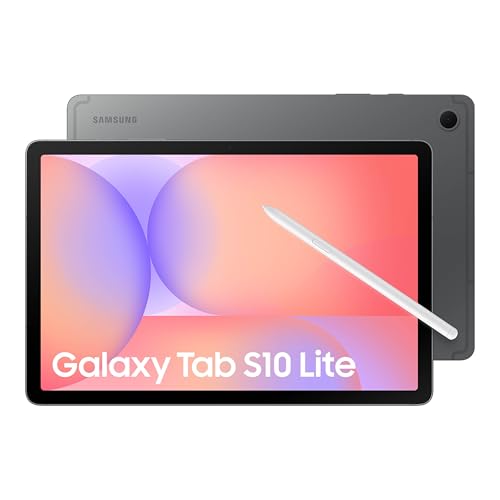
Samsung’s Tab S10 Lite is the mainstream answer: a 10.9-inch LCD Android tablet with the S Pen included for note-taking, an Exynos 1380 processor, 6GB of memory, 128GB of storage expandable by up to 2TB, Circle to Search, AI tools, and a listing that leads with long battery life. In a guide containing two specialist e-ink devices, the Lite represents the note-taker who also needs everything else — the lecture recording, the browser, the document suite, the evening’s media — in the same bag slot.
The S Pen is the mature instrument of the Android world. Samsung has refined it across a decade of devices, and its note-taking software ecosystem is the deepest on this platform: handwriting recognition, note organisation, and PDF annotation are solved problems here rather than features to evaluate. A student or professional whose notes must be searched, converted, and shared will find the Lite’s software story the strongest argument in this guide, ahead of any single hardware figure.
The expansion to 2TB answers the archive question permanently. Notes are small, but the life around them — recorded lectures, photographed boards, reference libraries — is not, and a card slot converts storage from a purchase anxiety into a solved detail. Circle to Search adds a researcher’s shortcut: circle a term or diagram on the page and search from it, without breaking the writing flow to type a query.
There is also a continuity argument that matters to working note-takers: Samsung’s pen platform spans phones and tablets, so a note begun on one Samsung device is at home on another, and the habits — gestures, pen buttons, application layout — transfer without relearning. Note-taking is a muscle-memory activity, and the Lite’s deepest strength may be that it asks for no new muscle memory from the large population already writing the Samsung way.
Against the specialists, the Lite’s compromises are plain. The screen is a glossy LCD — no paper texture, no e-ink calm — and 6GB of memory is the least among this guide’s Android picks, so the heaviest split-screen sessions will find its ceiling first. It is the all-rounder’s classic bargain: nothing it does is the guide’s best, and everything a note-taker’s day requires, it does well in one device.
- Display: 10.9-inch LCD
- Class: Android tablet
- Pen: S Pen included
- Memory and storage: 6GB RAM, 128GB storage, expandable up to 2TB per listing
- Processor and features: Exynos 1380; Circle to Search and AI tools named
Strengths
- The deepest note-taking software ecosystem on Android, behind the S Pen
- Expansion to 2TB ends storage planning permanently
- One device covers notes, applications, and media without class compromises
Trade-offs
- Glossy LCD — no paper-like texture or e-ink reading quality
- 6GB of memory is the least among the Android picks here
- Pressure level for the S Pen is not stated in the listing
Best for: note-takers living a full tablet’s life around their handwriting.
Not suited for: writers chasing a paper feel or a distraction-free page.

Samsung Galaxy Tab S10 FE — S Pen, water-resistant
The Tab S10 FE steps above its Lite sibling on the figures its listing states: an Exynos 1580 processor, a 90Hz refresh rate, IP68 water resistance, a large display, long battery life among its claims, 128GB of storage in this US-version listing, and the S Pen included for note-taking. Each of those figures touches note-taking directly, which is not always true of a spec sheet. The 90Hz refresh keeps the ink trail close under a fast hand. The Exynos 1580 gives split-screen work — source on one side, notes on the other — more headroom than the Lite’s chip. And IP68 water resistance is a field note-taker’s feature in disguise: rain at a site visit, a spill in a laboratory, a bag caught in weather on the walk between buildings.
Water resistance deserves its honest framing. IP68 is a rating with defined test conditions, and it describes survival, not an invitation to write in the rain — the touchscreen itself will misbehave under water regardless of the seal. What the rating buys is the removal of a whole category of anxiety and accident from a device that travels daily, and for students and field workers that removal has real value across years of ownership.
Against the Lite, the FE is the same idea with the dials turned: stronger processor, smoother screen, sealed body. Against the Lenovo below, it trades canvas size for that sealing and for Samsung’s software depth. The 128GB storage, without a stated expansion figure in this listing, is the figure to plan around — check the full listing if card expansion matters to your archive.
For the note-taker specifically, the FE’s combination assembles into a single trait: confidence outdoors and in motion. The sealed body forgives the environment, the 90Hz screen forgives a fast hand, and the stronger chip forgives a cluttered split-screen. Devices get chosen for single specifications and kept for combinations, and this is the pick whose combination is aimed at people who take notes where life happens rather than where desks are.
The US-version note in the listing is worth respecting for warranty and support geography. Note-takers keep devices for years and write on them daily; when a pen nib, a battery, or a screen eventually needs attention, the version you bought decides how local that attention can be.
- Display: large display, 90Hz refresh (size not stated in listing title)
- Class: Android tablet
- Pen: S Pen included
- Processor and storage: Exynos 1580; 128GB, US version
- Durability: IP68 water-resistant, per listing
Strengths
- 90Hz refresh flatters fast handwriting; the ink stays under the nib
- IP68 sealing removes weather and spills from the worry list
- Exynos 1580 gives split-screen note work real headroom
Trade-offs
- 128GB storage, with no expansion figure stated in this listing
- Display size is described as large rather than numbered in the title
- Glossy screen, like its Lite sibling — no paper texture
Best for: students and field note-takers whose tablet travels in all weather.
Not suited for: the largest possible writing canvas — that honour sits with the Lenovo below.

Lenovo Idea Tab Pro — Big-canvas Android
The Idea Tab Pro closes the Android side of this guide with the largest writing surface in it: a 12.7-inch LCD at 3K resolution, a MediaTek Dimensity 8300, 8GB of memory, 128GB of storage, and a pen and folio case included, with Google Gemini named among its features and a student positioning in its listing. Size is a note-taking feature in its own right. A 12.7-inch page holds a full sheet of handwriting without scrolling, shows a textbook page and its margin notes together, and splits into reference-plus-notes with each half still genuinely usable — the working pattern that defines serious study.
The 3K resolution protects that size from softness. Handwriting rendered at low density looks like a photograph of handwriting; at 3K on 12.7 inches, strokes keep their edges and small annotations stay legible when the page is reviewed weeks later at the same size it was written. Note-taking is a write-once, read-many activity, and resolution is the read-many half of the bargain.
The Dimensity 8300 and 8GB of memory give the split-screen pattern its headroom, and the included folio earns its mention as more than protection: propped at a writing angle, it turns a desk into a note station and a lecture hall seat into a workable surface. The pen being in the box, as with every pick in this guide, means the habit can start on the first day rather than after an accessory order.
Researchers should note a subtler virtue of the big canvas: annotation density. A dense journal page annotated at full size accumulates margin notes, underlines, and cross-references in their true spatial relationship to the text — a map of your thinking that survives review. Shrink the page to fit a smaller screen and the map is redrawn at a scale where half the annotations migrate or vanish. Scholars who annotate seriously are this pick’s natural constituency.
The compromises mirror the college guide’s account of this same model: 128GB of storage asks cloud habits of its owner, the size suits desks more than one-handed reading, and the glossy LCD offers none of the TCL’s paper texture or the e-ink pair’s calm. It is the Android maximalist’s pick — the biggest, sharpest canvas — for note-takers whose work is too application-rich for e-ink and too page-hungry for the 11-inch class.
- Display: 12.7-inch 3K LCD
- Class: Android tablet
- Pen: pen included, with folio case
- Memory and storage: 8GB RAM, 128GB storage
- Processor and features: MediaTek Dimensity 8300; Google Gemini named
Strengths
- Largest, sharpest note canvas among the Android picks
- Pen and folio included — the study kit complete at purchase
- Dimensity 8300 supports genuine split-screen note work
Trade-offs
- Glossy screen — no paper-like friction for the pen
- 128GB storage rewards cloud-centred habits
- Size is a desk instrument’s, not a one-handed reader’s
Best for: students and professionals who write beside their sources, in split-screen.
Not suited for: e-ink focus or a matte, paper-like surface — both live elsewhere in this guide.
Comparison
| Pick | Class | Screen | Pen | Defining trait |
|---|---|---|---|---|
| reMarkable Paper Pro | E-ink notebook | 11.8-inch colour e-ink | Marker Plus included | Total focus, reading light |
| XPPen Magic Note Pad | E-ink-class notebook | 10.95-inch colour | X3 Pro Pencil, 16,384 levels | Finest pen control |
| TCL NXTPAPER 11 Gen 2 | Android tablet | 11-inch paper-like | 4096-level stylus included | Paper feel, full Android |
| Samsung Tab S10 Lite | Android tablet | 10.9-inch LCD | S Pen included | Software depth, 2TB expansion |
| Samsung Tab S10 FE | Android tablet | Large, 90Hz | S Pen included | IP68 sealing, smoother ink |
| Lenovo Idea Tab Pro | Android tablet | 12.7-inch 3K LCD | Pen included | Biggest Android canvas |
E-Ink or LCD: Which Surface Should Your Notes Live On?
The decision is about what surrounds the writing. E-ink — the reMarkable and the XPPen — surrounds it with nothing: no applications competing for the hour, no glow in a dark room, a page that behaves like paper because, optically, it nearly is. Writers whose enemy is distraction, and readers whose eyes tire under emitted light, belong on this side of the line, and they should cross it knowing the notebooks’ ecosystems are closed by design.
LCD surrounds the writing with everything else the day contains — the source document, the browser, the recording, the message that actually was urgent. There is a middle observation worth making about the two e-ink picks themselves: they do not even agree with each other. The reMarkable’s bet is minimalism — the notebook as a sheet of paper that remembers — while the XPPen’s bet is instrumentation, a pen of drawing-studio grade married to the page. Writers who think in sentences lean to the first; writers who think in diagrams lean to the second, and the guide’s ordering of the two reflects prose’s majority, not a hierarchy of worth. Students and professionals whose notes are woven into other material belong on this side, and the TCL’s paper-like panel is the negotiated peace between the two: an LCD that borrows e-ink’s matte calm while keeping Android’s whole world one tap away. Neither side is the advanced one. They are answers to two different descriptions of a working day.
Do Pressure Levels Matter for Handwriting?
Mostly, no — and the guide says so because pen marketing hopes you will not ask. Handwriting varies pressure within a narrow band, and any modern pen, from the TCL’s 4096 levels upward, reads that band faithfully. Where pressure becomes decisive is drawing: shading, calligraphy, ink-wash effects, and fine line work all live in the wide band, and there the XPPen’s 16,384 levels are a genuine instrument specification rather than a headline. Know which writer you are. The note-taker can choose on screen, software, and class; the sketcher should choose on the pen first and let the rest follow.
There is a third pen property that outlasts both in daily importance: availability. A pen that lives in its folio, needs no pairing ceremony, and is present at the lecture’s first sentence will produce more notes in a year than a technically superior pen that is flat, forgotten, or paired to the wrong device. Every pick in this guide bundles its pen for this reason, and buyers comparing beyond this list should treat a missing pen as a missing feature, not a saving.
What matters for every writer, at every level, is latency — the gap between nib and ink — and surface friction. The FE’s 90Hz refresh attacks the first; the TCL’s matte finish supplies the second. Those two unglamorous properties will shape your handwriting experience more than any pressure figure in this guide.
How Should You Organise Notes So They Stay Useful?
The device is the smaller half of a note-taking system; the filing is the larger. This is worth dwelling on because buyers routinely spend weeks choosing between devices whose real-world difference is smaller than the difference between a filed notebook and an unfiled one. A mid-range pick with a disciplined system will outperform a flagship used as a pile — the archive’s value compounds with its organisation, while the hardware’s value is fixed on the day of purchase. Choose the device with this guide; then spend the energy you saved on the system it will live inside. Three habits separate archives that get used from archives that merely exist. File by subject and project at the moment of writing, never in a weekly cleanup that life will postpone. Date and title every page as if a stranger must find it — in six months, a stranger is exactly who you will be to your own notes. And review on a rhythm: the e-ink pair’s reading lights and the Android picks’ big screens both serve the Sunday review session where the week’s pages are skimmed, tagged, and connected, which is where isolated notes become knowledge.
Export discipline completes the system. Whichever class you choose, run one real export in the first week — a notebook page moved to your computer, your archive, your team’s hands — and confirm the path works while the stakes are zero. Every class in this guide can export; what varies is friction, and friction discovered at a deadline is the kind that teaches expensive lessons.
What Does a Week of Meetings Look Like on Each Class?
On the e-ink pair, the week is a single notebook that never interrupts: pages accumulate, the device asks nothing, charges rarely, and the review at week’s end happens in the same calm surface the notes were taken in. Its weakness appears at the week’s edges — the agenda that lives in an application, the document that must be opened from mail, the figure that must be checked online mid-meeting all require a second device, and the honest e-ink owner carries a phone for exactly those moments.
On the Android four, the week is one device doing everything, with the discipline outsourced to the owner’s habits: notifications managed, applications arranged, the pen always where the folio holds it. The meetings run identically; the difference is where the effort sits. There is a Friday-afternoon test that separates the classes cleanly: when the week’s notes must become a document someone else will read, the Android owner’s path is a conversion and a share, while the e-ink owner’s path is an export and a conversion — one extra border crossing, every week, forever. Writers who live on that Friday deadline should count the crossings honestly before choosing the calmer device. notifications managed, applications arranged, the pen always where the folio holds it. The meetings run identically; the difference is where the effort sits. E-ink spends the effort at purchase, in accepting limits. Android spends it daily, in defending focus. Neither is cheaper in the currency that matters — attention — and recognising which payment you would rather make is the real selection test of this guide.
How Long Do These Devices Stay Useful?
The two classes age on different clocks. An e-ink notebook’s job — a page, a pen, a filing system — barely changes across years, so a well-kept reMarkable or XPPen can serve as long as its battery and its maker’s ecosystem hold out; the risk is not performance but platform, since your archive lives in the maker’s world. An Android tablet ages with its applications: the 8GB Idea Tab Pro and the Exynos-powered Samsungs have headroom for years of note applications, while the Lite’s 6GB will meet the ceiling sooner under multitasking. The NXTPAPER’s bet is that its screen, being a physical property, never ages at all — matte stays matte.
The practical advice follows the clocks. One more longevity factor is shared by every pick and owned by none of their listings: your own handwriting habit is the real platform. Writers who have taken notes by hand for years will extract full value from any of these six within a week; writers converting from typing should expect a month of awkwardness on any of them, and should not mistake that month for a device’s failure. The return window exists for mismatches of class and surface, not for the ordinary cost of learning to write again. E-ink buyers should export a backup archive on a schedule, so the notebook’s contents outlive any single device. Android buyers should protect the screen and the pen — the two components daily writing actually consumes — and treat replaceable nibs as a running cost of the habit, budgeted like ink.
What Should You Test in the First Days?
Write the way you actually write, at length, before the return window closes. Three tests expose almost everything. The paragraph test: a full page of your natural handwriting at your natural speed, checked for lag, skipped strokes, and palm-rejection behaviour. The document test: annotate a real PDF — underline, margin note, highlight — then export it and open the export somewhere else to see what survived. The week test, compressed: file the pages by your real subjects, find them again the next morning by searching as you would in a month, and convert one page to text if conversion matters to you.
Each class fails these tests in its own accent — e-ink at the export edges, Android at focus and friction, matte LCD somewhere between — and the accent you can live with is the class you should keep. The tests take an evening; the device will take your notes for years. Keep the test pages, whatever you decide: a dated page of your own handwriting on the device you kept becomes a baseline, and if the pen or the screen ever feels different a year later, the baseline tells you whether the device changed or your memory did.
Does Colour Matter in a Notebook?
Two of this guide’s picks write in colour e-ink, and the feature deserves a sober valuation. Colour in notes is not decoration; it is information. The red correction against the black draft, the blue annotation added in review against the grey original, the highlighted passage that must stand out from the merely underlined — colour carries the layering of thought across time, and on monochrome devices that layering collapses into handwriting styles and underlines. Writers who annotate in passes, teachers who mark, and researchers who code their margins will feel colour e-ink as a genuine expansion of the notebook.
Colour on the Android side is simply assumed — every LCD here writes in every colour — which reframes the question: the e-ink pair’s colour is notable because their class historically lacked it, and its arrival removes the last functional argument that kept many annotators on glass. There is also a restraint argument running the other way, and honest guides should voice it: a limited palette disciplines annotation. Writers limited to two or three e-ink colours develop consistent codes — corrections always in one colour, questions in another — while unlimited colour tempts decoration that encodes nothing. The best annotation systems in either class use few colours on purpose. the e-ink pair’s colour is notable because their class historically lacked it, and its arrival removes the last functional argument that kept many annotators on glass. What e-ink colour does not do is match LCD colour for media, and it is not asked to; the notebook’s palette serves the page, not the photograph.
What About Left-Handed Writers and Other Edge Cases?
Note-taking hardware is usually reviewed by right-handed writers at desks, and the edge cases deserve their paragraph. Left-handed writers push the pen where right-handers pull it, which makes surface friction — the TCL’s matte grain, e-ink’s natural drag — more valuable and glossy glass more punishing, and turns palm rejection into what keeps a left-handed page of notes clean instead of smeared. Writers who stand — site engineers, clinicians on rounds, teachers at boards — should weight the FE’s sealing and the e-ink pair’s daylight readability, because their pages are written in corridors and weather, not at desks. Writers with very large hands should handle the pen question physically where possible: the Marker Plus and the X3 Pro Pencil are full-size instruments, and their girth is part of their comfort in a way no specification prints.
The general principle travels beyond these cases: note-taking is the most physically personal computing there is, and the correct response to any guide — this one included — is to let it narrow the field to a class and a pick, then let your own hand, writing your own page, cast the deciding vote inside the return window.
Should Your Notebook Sync With the Rest of Your Life?
Notes that cannot leave the device are a diary; notes that can are a system. The Android picks live inside the same accounts as your phone and computer, so a page written in a lecture is searchable from a desk the same evening, and the filing question is mostly about applications. The e-ink pair syncs through their makers’ services, which is a deliberate trade: the calm of a closed garden in exchange for an export path you do not fully own. Neither arrangement is wrong, but they suit different relationships with one’s own archive — the Android writer keeps notes in an open field, the e-ink writer in a walled one, and both should walk the export path once, early, as the testing section above insists.
Teams add a second dimension. Notes that must be shared — marked-up drawings, meeting records, site reports — travel most easily from the Android side, where the receiving applications already exist on everyone’s machines. A team standardising on e-ink should standardise the export ritual with it, so the notebook’s focus does not become the team’s bottleneck. Individuals face the same choice in miniature whenever a note must become an email, a document, or a submission, which is why the export test in this guide is a purchase test and not an afterthought.
Common Mistakes
Buying an e-ink notebook and expecting a tablet. The reMarkable and XPPen do not run Android applications. Buyers who discover this after purchase bought a description, not a device — the class is stated in every heading of this guide for exactly that reason.
Buying an Android tablet and expecting e-ink calm. The reverse error. A glossy LCD with a hundred applications will not become a distraction-free notebook through willpower; the TCL’s matte screen is the closest compromise, and it is still a tablet.
Chasing pressure levels for plain handwriting. Sixteen thousand levels serve drawing. For notes, latency and friction matter more, and both are cheaper to come by.
Treating the pen as an accessory decision for later. Every pick here includes its pen, and that is a selection criterion, not a coincidence. A note-taking device whose pen arrives next month forms no habit this month.
Ignoring where the notes live afterwards. E-ink notebooks keep notes in their makers’ ecosystems; Android tablets spread them across applications you choose. If your notes must reach other software, other people, or your future devices, decide the export path before the purchase, not at the first deadline.
Judging the pen by a signature. A signature is the easiest stroke a pen ever makes. Judge a note-taker by a full page of your fastest, messiest real handwriting — the lecture pace, not the showroom pace — because that is the writing the device must survive three times a day.
Final Recommendation
Decide your class first, because it decides everything else. A useful shortcut if the classes blur: count the applications you opened during your last day of handwritten notes. If the honest count is zero — the notes were the work — buy e-ink and enjoy the silence. If the count is five, buy Android and defend your focus with settings rather than with hardware. If the count is one or two and the glare is what you remember, the NXTPAPER was designed for you. If your notes need sanctuary — from notifications, from glare, from the whole glowing internet — the reMarkable Paper Pro is the purest instrument here, and the XPPen Magic Note Pad is its artist sibling, with the finest pen in the guide. If your notes live inside a working day of applications, choose among the Android four by surface and size: the TCL NXTPAPER for paper feel, the Tab S10 Lite for software depth and expansion, the Tab S10 FE for its sealed body and smoother ink, and the Idea Tab Pro for the largest canvas. The sentence to carry out of this guide is the one it opened with: these are two families sharing a pen, and the right purchase is the one whose family matches the life your notes actually lead. Buy it, write the first page tonight, and let the habit — not the specification — be the thing you evaluate at the end of the first month.
Frequently Asked Questions
Are the reMarkable and XPPen devices Android tablets?
No. Both are dedicated digital notebooks built on colour e-ink-class screens. They write and read superbly and do not run Android applications. This guide classifies them in their headings and badges so the distinction survives a skim.
Which pick is best for a student?
For notes woven into study — sources, recordings, applications — the Idea Tab Pro’s big split-screen canvas or the S10 Lite’s software depth serve best, and the college guide linked below compares them as student machines. For a student whose single need is lecture handwriting without distraction, the e-ink pair is the honest answer. The TCL deserves the student’s particular attention as the compromise candidate: paper-feeling lectures by day, a full Android tablet for everything else by night, in one bag slot and one purchase.
Does the TCL NXTPAPER feel like paper?
Closer than any glossy tablet: the matte NXTPAPER 4.0 surface cuts reflections and gives the stylus friction, which is most of what the hand reads as “paper.” It remains an LCD — backlit, colourful, power-hungry in a tablet’s normal way — so the resemblance is to paper’s surface, not to e-ink’s whole behaviour. Writers who annotate PDFs for hours and then need the same device for mail and media will find the resemblance sufficient; writers who want the notebook to disappear as a technology should look at the e-ink pair.
Can handwritten notes be converted to text on these devices?
The Android picks offer conversion through their note applications, Samsung’s being the most developed in this guide. The e-ink notebooks handle conversion inside their own ecosystems. If conversion is central to your workflow, treat it as a headline criterion and test the exact application before committing a library of notes to it — write your worst page, at your fastest speed, with your real vocabulary, because conversion quality is personal in a way that demo handwriting never reveals.
Which class is kinder to the eyes over a long day?
E-ink, by construction: it reflects light like paper and emits none of its own, which is why the reMarkable and XPPen suit readers and writers who spend whole days on the page. The NXTPAPER’s matte LCD is the Android family’s answer — it removes glare, though the panel still emits light. The glossy Samsungs and Lenovo are the most demanding surfaces here over long sessions, and their owners should use brightness discipline and breaks the way any screen worker should.
Which pen is best for drawing?
The XPPen’s X3 Pro Pencil, on its stated 16,384 pressure levels, is the drawing instrument of this guide — unsurprising from a pen-display maker. The TCL’s 4096-level stylus sketches competently, and the S Pens draw well within Samsung’s application ecosystem, but the specialist’s tool is the specialist’s tool.
Related Guides
Note-taking sits between three larger questions this site covers. The guide to the best tablets for sheet music applies the same screen logic to the music stand, where the page must be read at a distance rather than written on. Students weighing these same Samsung and Lenovo models as all-round machines will find them compared in the roundup of Android tablets for college students. And when the working day ends and the screen turns to the wall, the survey of Atmos soundbars covers the sound half of the room.


