What's inside
- Key Takeaways
- Quick Picks
- How did we assemble the best thunderbolt external hard drives?
- Why did Thunderbolt storage move to flash so completely?
- Which desks still genuinely benefit from spinning Thunderbolt storage?
- The six enclosures, examined one by one
- How do the six compare side by side?
- How should you configure a Thunderbolt RAID enclosure?
- How do daisy chains and docks reshape a desk?
- What should you check before buying older-generation enclosures?
- How does heat management differ across these enclosures?
- How should a small studio divide roles among several enclosures?
- What does the cable drawer of a Thunderbolt desk need?
- When is a network system the better answer than any enclosure here?
- What mistakes do buyers make in this category?
- Final Recommendation
- How do you verify a mirrored volume is actually protecting you?
- What happens to these enclosures when the next interface arrives?
- How should a freelancer, rather than a studio, approach this category?
- What does a quiet enclosure buy a recording or grading suite?
- Frequently Asked Questions
- Related Guides
As an Amazon Associate I earn from qualifying purchases. This post may contain affiliate links at no extra cost to you.
widgetverdict.com is reader-supported. When you buy through links on our site, we may earn an affiliate commission.
Where to buy: each enclosure below links to its Amazon listing, and this shortlist contains only genuine spinning-disk hardware with a Thunderbolt connection, a rarer combination than the keyword suggests.
Begin with the admission this category owes you: true Thunderbolt hard drives are a thin and ageing class. Search the phrase today and most results are solid-state drives, because Thunderbolt’s bandwidth only justifies itself with flash. The best thunderbolt external hard drives that still spin are concentrated in two surviving shapes, one armoured portable and a family of desktop RAID enclosures, several of them designs from earlier Thunderbolt generations that continue to serve the desks they were built for. This guide lists exactly those, with no USB-only drives dressed up to fill the page.
That honesty reshapes the buying advice. You are probably here for one of three reasons: your machine has Thunderbolt ports and you want storage that speaks its native protocol, your desk is built around a Thunderbolt chain or dock, or you need RAID capacity behind a single high-bandwidth cable. All three are legitimate, and the picks below divide cleanly among them. If what you actually want is the fastest possible portable drive, the honest signpost points to SSDs, and this page will not pretend otherwise.
One more framing note before the products. Several enclosures here carry capacities across two internal drives, and their headline figures assume the striped configuration. Mirrored for safety, the usable space halves. That arithmetic appears beside every RAID pick rather than in a footnote, because discovering it during setup has soured more purchases than any transfer benchmark ever printed.
Key Takeaways
- Genuine Thunderbolt hard drives are rare; most Thunderbolt storage sold now is flash.
- Only one pick here is portable, the armoured LaCie Rugged with Thunderbolt aboard.
- Desktop RAID enclosures are where spinning Thunderbolt storage genuinely survives.
- Mirroring halves headline capacity, and that trade should be chosen deliberately.
- Earlier-generation enclosures suit period desks; current docks suit long horizons.
- RAID guards against drive failure only, never against deletion or disaster.
Quick Picks
| Pick | Badge | Why it earns its place |
|---|---|---|
| LaCie Rugged Thunderbolt USB-C 4TB | The lone true portable | The class’s only portable, armoured and bus-powered, for Thunderbolt laptops in the field. |
| WD 8TB My Book Thunderbolt Duo Desktop RAID | The veteran dual-bay | Dual-bay veteran with daisy-chaining and mirroring for earlier Thunderbolt desks. |
| LaCie 2big Dock RAID 8TB | The creator’s docking RAID | Docking RAID with card slots that turns ingest and archive into one seated ritual. |
| LaCie 2big Dock RAID 16TB | The bigger dock, current generation | Sixteen terabytes of current-generation dock for studios planning years ahead. |
| Glyph BlackBox Pro 40TB RAID | The studio heavyweight | Forty-terabyte production enclosure where capacity and pace serve whole suites. |
| LaCie 2big Dock Thunderbolt 3 8TB | The earlier dock generation | Previous-generation dock offering the same workflow at a gentler entry point. |
How did we assemble the best thunderbolt external hard drives?
The first rule was authenticity: a pick needed spinning disks and a real Thunderbolt connection, verified from its listing identity rather than its marketing adjectives. That single rule eliminated most of the internet’s answer to this keyword, including capable USB drives and every SSD, however excellent. What survived is the honest market, and its small size is information a buyer deserves rather than a gap a guide should pad.
The second rule was role coverage within the survivors. The portable niche, the veteran mirrored enclosure, the creator dock at two capacities and two generations, and the production heavyweight each answer a distinct desk. Where two listings represent generations of one idea, both were kept and the difference explained, because the older unit’s price can be the rational choice for a desk that matches its era.
Finally, capacities and RAID behaviour were recorded from the manufacturers’ own descriptions, with mirrored arithmetic stated in plain terms wherever a headline figure assumed striping. No transfer figure appears in this guide that the maker does not claim for the configuration named beside it.
Why did Thunderbolt storage move to flash so completely?
The economics were irresistible. Thunderbolt controllers and certification add cost to any enclosure, and buyers paying that premium expect the interface’s speed in return. A single spinning drive cannot deliver it, so manufacturers pairing Thunderbolt with platters found themselves selling an expensive port attached to a mechanical ceiling. Flash removed the ceiling, prices fell as volumes rose, and the portable market migrated within a few product cycles.
Desktop enclosures resisted the migration for a capacity reason. Multi-terabyte archives in flash remain expensive, while two large spinning drives behind one Thunderbolt cable deliver deep, mirrored storage at a fraction of the cost per terabyte. Studios archiving media therefore kept the RAID enclosure category alive, and dock designs sweetened it further by absorbing the card reader and the hub into the same chassis.
The survivor pattern teaches buyers how to shop the remnants wisely. Judge portable Thunderbolt hard drives on compatibility and armour, judge enclosures on RAID behaviour, ports and support, and never judge either on the interface’s theoretical bandwidth, which the mechanics cannot reach. The interface is a language here, not a promise of speed.
Which desks still genuinely benefit from spinning Thunderbolt storage?
The creative desk built around a laptop is the strongest case. A dock enclosure turns one cable into storage, card ingest, display chaining and power, and the archive it holds is large enough for years of projects. For photographers and filmmakers whose working day begins with cards and ends with delivery, that consolidation removes a dozen small frictions that otherwise tax every single session.
The period desk is the second case. Studios and home offices running earlier Thunderbolt Macs own machines whose ports match the veteran enclosures exactly, and a mirrored Duo bought for such a desk delivers protected archive space without adapters or compromises. Hardware generations serving each other faithfully is not nostalgia; it is good economics, provided the buyer confirms the match before ordering.
The small production suite is the third case, represented by the Glyph. Several seats sharing project media need one large, brisk volume that behaves like infrastructure, and Thunderbolt RAID enclosures remain the simplest way to provide it without building a network storage project. When the alternative is a server room conversation, a forty-terabyte box on a shelf wins on simplicity alone.
The six enclosures, examined one by one

LaCie Rugged Thunderbolt USB-C 4TB — The lone true portable
Scan this entire shortlist and notice something: only one pick can ride in a jacket pocket. The portable Thunderbolt hard drive is nearly an extinct species, and this LaCie is its surviving representative, an armoured spinning disk whose port speaks Thunderbolt as well as ordinary USB-C. Owners of older MacBooks and mobile workstations with genuine Thunderbolt ports get a single-cable, bus-powered drive that offloads media anywhere, while the sealed orange shell handles the physical side of field life.
Be clear-eyed about what the fast port buys a spinning disk. The platter inside sets the transfer ceiling, so Thunderbolt’s headroom mostly buys compatibility elegance rather than speed: one cable for power and data, daisy-chain friendliness in a Thunderbolt desk setup, and painless behaviour across both port generations. Buyers expecting flash-like transfers from the badge on the box will be disappointed; buyers wanting the toughest portable HDD that speaks their laptop’s native language will be delighted.
Four terabytes is the capacity on offer, and in the field roles this drive serves, ingest, shuttle and backup, that figure covers a serious trip’s acquisition or a season of project transport. The drive also moonlights as the emergency spare in many studios: the disk that can connect to anything, survive anything, and hold enough to keep a production moving while a primary drive is replaced.
Its presence here, alone among portables, is itself the review. If your work genuinely requires a pocketable Thunderbolt hard drive, this is effectively the market. Everyone whose desk can host a larger enclosure should read on, because the remaining five picks trade mobility for RAID hardware, card readers and capacities a pocket drive cannot approach.
One audience should pause before buying even this survivor: owners of the very newest laptops, whose machines may offer USB-C ports without the Thunderbolt behaviour this drive’s name celebrates, or whose workflows have already moved to flash working drives. For them the Rugged’s value narrows to ruggedness alone, and the USB-C sibling in our editing guide may serve as well. Compatibility honesty cuts in every direction, including against this page’s own first pick.
Care habits for a drive that lives outdoors are simple and worth the paragraph. Let it reach room temperature before a long copy after a cold journey, keep the port cover habits the maker suggests against dust, and retire its cable at the first sign of fraying, because a travelling drive’s connection is its lifeline and cables are cheaper than recoveries.
- Capacity: 4TB spinning platter
- Port: Thunderbolt / USB-C, bus powered
- Shell: drop, shock, dust and rain resistant
- Format: Mac and PC ready
- Role: portable field drive
Strengths
- Only portable in the class
- Native Thunderbolt connectivity aboard
- Armour proven across many productions
Trade-offs
- Platter pace despite the fast port
- Capacity ceiling of four terabytes
- Premium over USB-only portables
Best for: field workers whose laptops speak Thunderbolt and whose drives travel hard.
Not suited for: desk setups that could host a larger, more capable RAID enclosure.
Field professionals can review the Rugged Thunderbolt listing on Amazon here. LaCie Rugged Thunderbolt USB-C 4TB.

WD 8TB My Book Thunderbolt Duo Desktop RAID — The veteran dual-bay
This WD is a survivor from the era when Thunderbolt storage meant serious desktop hardware, and its design explains the whole category’s history. Two drive bays sit inside one enclosure, configurable as a striped pair for speed, a mirrored pair for safety, or two independent volumes. Around the back, twin Thunderbolt ports allow daisy-chaining, letting the enclosure join a chain of displays and docks rather than terminating one. It is a thoughtful piece of period engineering that still serves owners of matching-era machines faithfully.
The mirrored configuration is the one this guide recommends for most buyers. A library or project archive on a mirrored Duo survives the failure of either internal drive without losing a file, and the enclosure handles the duplication invisibly. Striped mode doubles the exposure in exchange for pace a spinning array rarely needs in archive duty, while independent mode suits owners who simply want two volumes behind one cable.
Age imposes honest caveats. This is an earlier Thunderbolt generation, so it belongs with the Macs and workstations of its era or with adapters chosen carefully, and buyers should confirm their exact machine’s ports before ordering. Replacement drives for the bays follow WD’s guidance for the enclosure. None of this diminishes the unit’s usefulness in a matched setup; it merely defines the setup it matches.
Studios still running those matched setups often keep a Duo as the archive tier beneath faster working storage, a role its mirroring serves beautifully. New buyers with current machines should weigh the LaCie docks below, which speak the present Thunderbolt generation, unless a bargain on this veteran coincides with a desk full of period hardware that will welcome it.
The Duo also illustrates a buying skill this category rewards: reading an enclosure’s service story. Bays that open for drive replacement, documented rebuild procedures and a maker who still publishes guidance for the model all predict a longer useful life than a sealed box of similar capacity. Veteran hardware with a service story often outlasts newer hardware without one, which is part of how this unit remains recommendable years after its generation passed.
Owners should set the enclosure’s sleep behaviour deliberately. A mirrored archive that spins down aggressively can make the first access of the day feel sluggish, while one that never rests wastes power and bearing life. The middle setting, matched to the desk’s working hours, is a small configuration decision with daily consequences, and it is best made during setup week rather than rediscovered monthly.
- Capacity: 8TB across two bays
- Ports: dual Thunderbolt, daisy-chain capable
- Modes: striped, mirrored or independent
- Power: mains adapter, desktop unit
- Role: mirrored desk archive
Strengths
- Mirroring guards against drive failure
- Daisy-chaining suits Thunderbolt desks
- User-configurable volume layout
Trade-offs
- Earlier Thunderbolt generation hardware
- Best matched to period machines
- Desktop bulk with mains power
Best for: owners of earlier Thunderbolt Macs wanting a mirrored archive.
Not suited for: buyers with only current-generation ports and no adapters.
Owners of period Thunderbolt desks can inspect the My Book Duo on Amazon. WD 8TB My Book Thunderbolt Duo Desktop RAID.
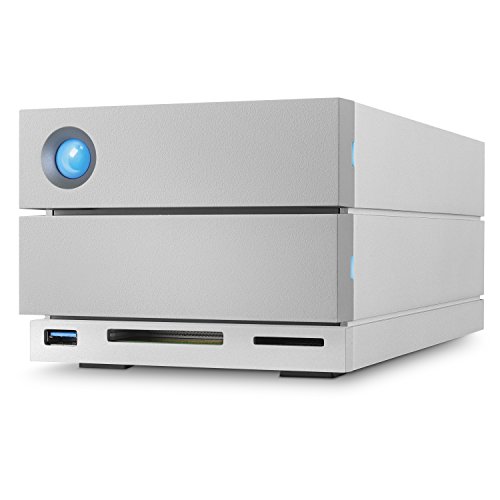
LaCie 2big Dock RAID 8TB — The creator’s docking RAID
LaCie’s 2big Dock answers a question creative desks actually ask: why should the archive drive, the card reader and the laptop dock be three separate boxes competing for ports and power sockets? This enclosure combines two bays of RAID storage with front-facing SD and CF card slots, additional ports for peripherals, and a Thunderbolt connection that ties the whole arrangement to the computer with one cable. For photographers and filmmakers, the ingest ritual becomes: sit down, insert card, plug one cable, work.
The RAID hardware offers the familiar choice between striped speed and mirrored safety, and for media archives this guide steers most owners toward mirroring, where eight terabytes of enclosure presents four terabytes of protected volume. That arithmetic should be understood before purchase rather than discovered during setup. Owners who need every gigabyte can stripe instead, accepting that either drive’s failure then costs the whole volume, and compensating with a separate backup elsewhere.
Docking changes desk ergonomics in ways specification tables miss. A laptop that connects to storage, cards, a display chain and power through one plug gets docked and undocked in seconds, which means it actually gets backed up and offloaded daily instead of when someone finds the cable drawer. Workflow friction, not transfer speed, is what this product is really engineered to reduce, and creative professionals feel the difference within the first week.
LaCie aims the 2big line at working studios, with the build quality, warranty posture and price to match. Hobbyists with a card reader already on the desk may find it more machine than they need. Professionals whose evenings include ingest, archive and client delivery from one chair will recognise it as the desk’s missing centre of gravity.
The card slots deserve a workflow note of their own. Ingesting through the enclosure means the archive and the originals meet at the same device, which makes a verified-copy routine natural: card to dock, copy to the mirrored volume, confirm, and only then format the card for tomorrow. Studios that build that sequence into muscle memory stop losing footage to the gap between ingest and backup, which is where most media losses actually live.
Desk planners should measure before ordering, because a docking enclosure rearranges a workspace rather than merely joining it. Monitors, speakers and the laptop itself all shift around the new centre, and a shelf or stand adjustment bought in the same week prevents the dock from spending its first month perched on a stack of books, shedding heat poorly and cables constantly.
- Capacity: 8TB across two bays
- Port: Thunderbolt 3 / USB-C host link
- Extras: SD and CF card slots, dock ports
- Modes: striped or mirrored RAID
- Role: ingest and archive hub
Strengths
- Ingest, archive and dock combined
- Mirrored mode protects the archive
- One-cable laptop workflow
Trade-offs
- Mirroring halves usable capacity
- Studio pricing for home desks
- Large footprint beside the computer
Best for: photographers and filmmakers centralising a creative desk.
Not suited for: owners who only need silent bulk storage elsewhere.
Studio owners can view the 2big Dock listing on Amazon for full port details. LaCie 2big Dock RAID 8TB.

LaCie 2big Dock RAID 16TB — The bigger dock, current generation
The sixteen-terabyte 2big Dock is the current-generation expression of the same idea as its sibling above, scaled for libraries and archives that outgrew eight terabytes some time ago. It keeps the formula, two RAID bays behind a docking front with card slots and peripheral ports, and adds compatibility with the newest connection standards, including USB4 alongside Thunderbolt, so the enclosure remains welcome on the next computer as well as the present one.
Capacity planning at this size deserves the mirrored conversation in full. Configured for safety, sixteen terabytes of hardware yields eight of protected archive, which is the configuration this guide recommends for client work and media libraries alike. Configured for space, it yields the full sixteen with the understanding that a separate backup must exist somewhere, because a striped array doubles the number of drives whose failure can take the volume.
Studios choosing between the two 2big sizes should count their archive’s growth honestly. A wedding and portrait practice generating a terabyte of keepers per quarter will find the eight-terabyte unit’s mirrored four terabytes a short lease, while the sixteen stretches the same configuration across years. The price difference between the two is small beside the cost of migrating an archive mid-season, which is the purchase this sizing decision is really about avoiding.
Rescue and warranty support sit behind this line at a level aimed at professionals whose archives are business assets. That support posture, plus the forward-looking ports, makes this the pick for a studio equipping a desk it intends to keep. It is the least portable, most deliberate object in this guide, and proud of both qualities.
The newer dock’s broader compatibility changes the second-hand conversation too. A studio that upgrades its computers in two years can carry this enclosure forward without adapters, which protects the purchase in a way the earlier generation cannot promise. Forward compatibility rarely appears in specification comparisons, yet for infrastructure bought by the decade it may be the most valuable line on the page.
Sixteen terabytes also invites a partitioning of duties inside one chassis worth considering: the mirrored volume as the client archive, with the dock’s other conveniences serving the daily ingest that feeds it. Keeping the archive’s boundary clean, rather than letting the volume become the desk’s general dumping ground, preserves the clarity that makes an archive trustworthy when a client calls about a project from three seasons ago.
- Capacity: 16TB across two bays
- Ports: Thunderbolt and USB4 compatibility
- Extras: card slots and docking ports
- Modes: striped or mirrored RAID
- Role: long-horizon studio archive
Strengths
- Deep capacity for growing archives
- Forward-compatible connection standards
- Professional support behind the line
Trade-offs
- Mirrored mode yields eight terabytes
- Substantial desk footprint and price
- Far more than casual storage needs
Best for: studios equipping a primary desk for several years of growth.
Not suited for: anyone whose archive still fits comfortably in a portable.
Studios planning ahead can check the sixteen-terabyte 2big Dock on Amazon. LaCie 2big Dock RAID 16TB.

Glyph BlackBox Pro 40TB RAID — The studio heavyweight
Glyph builds storage for production environments where downtime is billed by the hour, and this forty-terabyte RAID enclosure is the heavyweight of the present company. Two high-capacity drives spin at 7,200 RPM inside a substantial chassis, connected over Thunderbolt 3, with the manufacturer quoting transfer rates up to 550MB/s in the configuration that favours speed. For media houses moving enormous project volumes between suites, that combination of capacity and pace is the entire argument.
The RAID choice carries higher stakes at forty terabytes than anywhere else in this guide. Striped for maximum space and pace, the volume holds a small studio’s active archive; mirrored, it holds half that with genuine protection against a drive failure. Studios at this scale should already know their answer, and should also maintain an entirely separate backup of the array’s contents, because RAID of any flavour protects against disk failure, never against deletion, theft or fire.
Glyph’s reputation rests on build and support aimed at professionals: robust enclosures, sensible cooling for sustained transfers, and service that understands a production schedule. The BlackBox Pro is not a casual purchase, and its audience is not casual either. It belongs in edit bays, audio suites and small post houses where a single volume must serve several seats’ worth of media without becoming the room’s bottleneck or its worry.
Home users should read this pick as a signpost rather than a temptation. It demonstrates where the Thunderbolt hard drive category actually lives now: in professional enclosures of serious capacity, not in consumer portables. If your needs have genuinely grown to this scale, welcome; if they have not, the LaCie docks above offer the same architecture at household proportions.
Sustained transfer behaviour is where this class of hardware earns its keep in a way benchmarks only hint at. Moving two terabytes between suites is a different experience on an enclosure engineered for continuous work than on consumer hardware that throttles, hesitates or cooks itself by hour two. Production managers buy that steadiness deliberately, because a copy that finishes when promised keeps an entire room’s schedule intact.
The chassis also assumes a permanent installation: rack-adjacent shelving, a machine-room corner, or a dedicated bay in the edit suite. Studios should plan its power and cable runs as infrastructure, with the same protected supply as the workstations it serves, because an enclosure of this capacity is effectively a member of the facility rather than an accessory that happens to be large.
- Capacity: 40TB across two bays
- Port: Thunderbolt 3 host connection
- Drives: 7,200 RPM enterprise-flavoured units
- Rated pace: up to 550MB/s striped
- Role: production studio volume
Strengths
- Enormous single-volume capacity
- Built for sustained professional transfers
- Support aimed at production schedules
Trade-offs
- Professional pricing throughout
- RAID is not a backup strategy
- Oversized for household archives
Best for: small studios needing one vast, fast Thunderbolt volume.
Not suited for: home users whose libraries fit in a single portable.
Production teams can review the BlackBox Pro listing on Amazon for configuration options. Glyph BlackBox Pro 40TB RAID.

LaCie 2big Dock Thunderbolt 3 8TB — The earlier dock generation
This listing represents the previous generation of LaCie’s dock concept, sold under the Thunderbolt 3 banner at the same eight-terabyte capacity as its sibling earlier in this guide. The idea is identical: two RAID bays, card slots for ingest, docking ports for the desk, and one cable to the computer. Studios that equipped desks with this generation own hardware that still performs its duties nightly, and buyers encountering it should understand it as a known quantity rather than a compromise.
The practical differences between generations live in port details, compatibility breadth and the support horizon ahead of the unit. A buyer with a Thunderbolt 3 desk that will not change for years may find this generation entirely sufficient, particularly when its price undercuts the newer listing. A buyer equipping for the long term, or running the newest machines, should favour the current model above for its broader connection compatibility.
RAID guidance repeats because it matters: mirror for protected archive space, stripe only with a separate backup in place, and decide before the first card is ingested rather than after the volume fills. The dock’s card slots make it the natural ingest point for a photo or video practice, and an ingest point should be the most deliberately configured device on the desk.
Consider this pick the value route into the 2big pattern. It offers the workflow transformation, the one-cable desk, the card readers where your hands already are, at a generation’s discount. Desks are ecosystems, and an ecosystem bought thoughtfully one generation back often serves better than a flagship bought without the accessories that complete it.
Buyers comparing this generation against its newer sibling should weigh their desk’s remaining lifespan honestly. A Thunderbolt 3 workstation with three good years ahead will extract full value from this dock at its gentler price, and the savings can fund the separate backup drive this guide keeps prescribing. A desk being rebuilt around new machines inverts the calculation entirely, and the newer model becomes the economical choice across the decade.
There is also a quiet availability argument. Earlier-generation units surface in studio clearances and refurbished channels with some regularity, letting a small practice assemble a complete dock-centred desk, enclosure, readers and all, for the price of the current enclosure alone. Bought with its support status understood, that is not a compromise; it is how many real studios actually equip themselves.
- Capacity: 8TB across two bays
- Port: Thunderbolt 3 host connection
- Extras: SD and CF card slots, dock ports
- Modes: striped or mirrored RAID
- Role: ingest and archive hub
Strengths
- Full dock workflow, earlier pricing
- Card ingest where hands already rest
- Proven generation with known behaviour
Trade-offs
- Older port compatibility breadth
- Support horizon shorter than current model
- Mirroring halves usable space
Best for: Thunderbolt 3 desks seeking the dock pattern for less.
Not suited for: buyers equipping around the newest connection standards.
Desk builders comparing generations can view this 2big Dock offer on Amazon. LaCie 2big Dock Thunderbolt 3 8TB.
How do the six compare side by side?
| Pick | Capacity | Connection | Role in the setup |
|---|---|---|---|
| LaCie Rugged Thunderbolt USB-C 4TB | 4TB | Thunderbolt / USB-C | Portable field drive |
| WD 8TB My Book Thunderbolt Duo Desktop RAID | 8TB | Thunderbolt, dual ports | Mirrored veteran archive |
| LaCie 2big Dock RAID 8TB | 8TB | Thunderbolt 3 | Creator desk dock |
| LaCie 2big Dock RAID 16TB | 16TB | Thunderbolt / USB4 | Long-horizon studio dock |
| Glyph BlackBox Pro 40TB RAID | 40TB | Thunderbolt 3 | Production volume |
| LaCie 2big Dock Thunderbolt 3 8TB | 8TB | Thunderbolt 3 | Earlier dock generation |
Read capacities with the RAID warning in mind: every multi-bay figure halves under mirroring, which this guide recommends for archives. The portable’s four terabytes, by contrast, are exactly what they claim, because a single drive has nothing to mirror against. Port generations sort the table’s right-hand column into period matches and forward-looking purchases.
How should you configure a Thunderbolt RAID enclosure?
Decide the RAID mode before the first file lands, because changing modes later erases the volume. For archives and libraries choose mirroring and accept the halved capacity with good grace; the first time a drive fails at a deadline, the grace will feel well spent. For scratch space or media with a separate current backup, striping is defensible, provided the backup’s existence is verified rather than assumed.
Connect the enclosure directly to the computer for its first configuration and formatting, even if it will later live inside a daisy chain. Direct connection removes variables while the volume is created, and the chain can be assembled afterwards with the enclosure already healthy. Label the unit with its mode and capacity in plain language, because the person troubleshooting it in three years may not be the person who configured it.
Finally, rehearse the failure you bought protection against. Read the manufacturer’s procedure for replacing a drive and rebuilding the mirror now, while nothing is wrong, and keep any required tools with the enclosure. A mirror that nobody knows how to rebuild is a promise written in a language the owner cannot read, and the rehearsal costs one calm quarter of an hour.
How do daisy chains and docks reshape a desk?
A Thunderbolt chain lets several devices share one computer port in sequence: storage, a display, perhaps another enclosure, each passing the connection onward. For desks built this way, an enclosure’s second port is not a luxury but a location decision, because a single-port device must sit at the chain’s end whether or not that position suits its cables and cooling. Buyers assembling a chain should map it on paper before ordering anything, marking which devices pass the connection through and which terminate it.
Docks pursue the same goal from the opposite direction, gathering ports into one chassis so the laptop sees a single plug. The 2big models in this guide are storage-first docks, where the hub serves the archive rather than the other way round. Either architecture rewards the same discipline: short, quality cables, a fixed layout that survives cleaning day, and labels on anything a colleague might unplug. Chains fail socially before they fail electrically, usually at the hands of someone tidying.
Power delivery belongs in the same plan. A desk where the laptop charges through its dock connection behaves differently from one with a separate charger, and enclosures should be placed so their mains supplies do not share a strip with heaters, kettles or other hostile loads. Boring power arrangements are a feature of every reliable studio this guide’s authors have ever visited.
What should you check before buying older-generation enclosures?
Start with the support horizon. Confirm the maker still publishes firmware, manuals and compatibility guidance for the exact model, and that replacement drives for its bays are identifiable without guesswork. An enclosure abandoned by its maker can still work for years, but every question it raises will be answered by forums rather than by the company, and a buyer should price that reality in rather than discover it.
Continue with the physical inspection points that listings cannot show: fan noise in a quiet room, the condition of ports that have hosted a thousand insertions, and whether the unit’s RAID configuration can be read and changed with current software. Where a purchase is second-hand or old stock, a full format, a test fill and a rehearsed rebuild before real data lands are worth an evening. Trust in storage should be earned by the specific unit, not inherited from its model name.
Finish with the exit plan. Ask how the data leaves this enclosure in five years: standard volumes readable elsewhere, or a proprietary arrangement that must be migrated while the hardware still lives? Every pick in this guide keeps volumes in broadly standard territory, which is one reason these particular survivors remain recommendable while flashier contemporaries became e-waste.
How does heat management differ across these enclosures?
Two spinning drives in one chassis generate roughly twice a portable’s warmth, and sustained RAID rebuilds or day-long copies push enclosures harder than streaming ever will. Designs answer with fans, vents or massive metalwork, each carrying a noise signature a quiet edit suite will notice. Placement is the owner’s contribution: clearance behind vents, distance from soft furnishings that insulate, and a shelf that does not double as the top of a warm amplifier.
Temperature also interacts with the mirroring bargain. A rebuild after a drive replacement is the longest sustained workload an enclosure ever performs, and it arrives precisely when the surviving drive is the volume’s only protection. Sensible owners start rebuilds promptly, keep the room’s airflow honest during them, and resist the temptation to postpone the replacement drive’s purchase until a quieter week that may never come.
How should a small studio divide roles among several enclosures?
Studios rarely own one enclosure for long, and the healthiest arrangements assign each unit a tense. The dock beside the main seat owns the present: ingest, active projects, the current season’s archive. A second enclosure, perhaps the veteran Duo, owns the recent past in mirrored safety. Anything older migrates toward simpler storage or a separate backup system entirely, because an archive that spans devices without a map becomes a rumour rather than a resource.
The map matters as much as the metal. A shared document recording which enclosure holds which projects, in which RAID mode, with drives of what age, turns a cupboard of similar black boxes into a system a new hire can operate. Studios discover the value of that document on the worst possible day if they skip writing it on a calm one, which is why this guide mentions paperwork in nearly every category it covers.
Rotation completes the pattern. When a new enclosure arrives, it takes the present tense, the previous anchor demotes to the past, and the oldest unit retires to backup or leaves the building. Nobody ever faces a cliff-edge migration, capacity grows in steps the budget can absorb, and every device enjoys a second career proportionate to its remaining trust.
What does the cable drawer of a Thunderbolt desk need?
Thunderbolt cables are short by design, and desks should be arranged around that fact rather than in denial of it. Enclosures belong within a comfortable cable run of the computer, which often means a shelf directly beside or beneath the main display. Owners who plan for a two-metre reach discover the standard’s limit at the worst moment, mid-installation, with the desk already dismantled.
Keep one known-good spare cable, labelled, because a chain is only as healthy as its most fatigued link and intermittent faults in chains present as haunted behaviour in whichever device sits downstream. Swapping in the spare is the fastest diagnostic in the category: if the haunting moves or vanishes, the cable confesses. Studios that skip the spare spend afternoons troubleshooting enclosures that were never ill.
Finally, retire cables honestly. A cable that has been trapped in a door, run over by a chair or bent at a hard angle near its connector may keep working while quietly degrading the chain’s reliability. In a category where a single cable carries an entire desk, cable condition is infrastructure, and replacing a suspect one is cheaper than any evening spent chasing its symptoms.
When is a network system the better answer than any enclosure here?
When several computers must reach the same archive simultaneously, from different rooms, with permissions per person, the honest answer stops being an enclosure. Direct-attached Thunderbolt storage serves one host magnificently and shares only through that host’s goodwill. A studio that has outgrown the single-desk pattern should recognise the moment and plan a network system deliberately, rather than stacking enclosures and daisy chains into a imitation of one.
The recognition signs are practical: assistants queueing for the one seat that can reach the archive, projects copied onto portables purely to move between rooms, and version confusion about which copy of a project is authoritative. Each sign says the archive has become a shared resource wearing a personal device’s clothing. Nothing in this guide solves that, and pretending otherwise would sell enclosures into a job they cannot hold.
Many studios run both patterns in the end: network storage for the shared library, a Thunderbolt dock at the ingest seat where speed of ritual matters, and portables for the road. The categories are complements at scale, whatever their marketing suggests at purchase time.
What mistakes do buyers make in this category?
Expecting the port to outrun the platter. Thunderbolt branding on a single hard drive describes its language, not its pace. Buyers who order expecting flash behaviour return perfectly good drives. The portable pick here should be bought for armour and compatibility, and enclosures for their combined platters, with eyes open about both.
Discovering mirrored arithmetic at setup. An eight-terabyte enclosure that presents four terabytes after mirroring feels like a defect to an unprepared buyer and like insurance to a prepared one. Every RAID purchase should begin with the usable figure for the mode you will actually run, written down before the order, so the setup screen confirms a decision instead of delivering a surprise.
Mismatching generations carelessly. Thunderbolt generations share a connector in recent years but not always behaviour, and older enclosures meet newer machines through adapters of varying quality. Confirm your machine’s exact ports and the enclosure’s requirements as a pair. A five-minute specification check prevents the most common return in this entire category.
Calling RAID a backup in the studio meeting. The mirror duplicates everything, including the afternoon someone deletes the wrong folder across both drives simultaneously. Enclosures in this guide protect against hardware failure beautifully and against human error not at all. Keep the separate backup, and let each system do the job it is actually built for.
Final Recommendation
Field workers with Thunderbolt laptops have exactly one decision to make, and it is the Rugged: buy it for its armour and its native connection, not for speed. Desk-based creators should choose between the two 2big Dock generations by horizon, the current sixteen-terabyte model for a desk being equipped for years, the earlier eight for a Thunderbolt 3 setup that already works and wants the dock pattern at a gentler price.
Owners of earlier Thunderbolt machines should look seriously at the WD Duo’s mirroring and daisy-chaining before assuming they must modernise the whole desk. Production teams, meanwhile, should let the Glyph’s capacity and support posture make their case, while budgeting for the separate backup that any honest RAID conversation includes.
And if reading this guide has clarified that your real need is a fast portable drive, take the signpost seriously and shop for a Thunderbolt SSD instead; the best purchase in a thin category is sometimes the admission that a neighbouring category serves you better.
How do you verify a mirrored volume is actually protecting you?
A mirror’s promise is invisible in daily use, which is precisely why it should be tested rather than trusted. The enclosure’s management tools report each drive’s health and the array’s status; reading that report monthly converts a silent degradation, one drive quietly failed since spring, into a same-week replacement. A mirror running on one drive is not a mirror at all, merely a volume with a memory of safety, and the gap between those states is exactly what monitoring exists to close.
When a drive does fail, the rebuild that follows deserves supervision rather than celebration. The array is at its most vulnerable while copying everything onto the fresh drive, so keep the workload gentle, the cooling honest and the separate backup current until the mirror reports whole again. Studios that rehearse this sequence once, on a calm week with a spare drive, perform it under pressure without improvisation.
Record the event in the studio’s storage document: which bay, which serial number, what date. Drive ages inside an enclosure diverge after the first replacement, and future troubleshooting depends on knowing which unit is the veteran and which is the newcomer. Paperwork, once again, is a storage technology.
What happens to these enclosures when the next interface arrives?
Interfaces retire slowly in professional rooms. The veteran WD in this guide still earns its shelf years after its generation ceded the spotlight, because archives care about reliability and capacity more than fashion. Owners should expect the same long tail for today’s docks: adapters and patient desks will keep them useful well past the arrival of whatever succeeds Thunderbolt, provided the volumes themselves remain in standard formats that other hardware can read.
The practical defence against obsolescence is the one this guide has repeated in several forms: keep data in volumes other systems can mount, keep a separate backup in a different technology, and keep the paperwork that describes both. An archive that can emigrate is never hostage to a connector, and emigration is easiest while the original hardware still works, which argues for planned migrations rather than emergency ones.
How should a freelancer, rather than a studio, approach this category?
A one-person practice has a desk, a laptop and a reputation, and its storage should be sized to those rather than to a facility. For most freelancers the dock pattern at eight terabytes, mirrored to four, covers years of client archives while collapsing the desk’s cable tangle into one plug. The forty-terabyte enclosure belongs to a future with staff and suites; buying it early purchases capacity at the price of the backup drive that would actually protect the business.
The freelancer’s distinctive risk is concentration: one room holds the computer, the archive and the backup if discipline slips. Whatever enclosure is chosen, the separate copy should live somewhere else, a relative’s house, a rented locker, a cloud tier, because a single burglary should not be able to end a practice. That geographic sentence matters more than any specification compared in this guide.
What does a quiet enclosure buy a recording or grading suite?
Rooms where sound matters, or where a colourist works in near-silence for ten hours, experience fan noise as a genuine cost rather than a footnote. Two-bay enclosures vary noticeably in their acoustic manners, and placement is the owner’s main instrument: a ventilated cupboard, a machine alcove, or simply the far side of a desk partition can move an enclosure’s hum out of the working earshot while its cable still reaches comfortably.
The trade to avoid is silence bought with suffocation. An enclosure sealed into an unventilated drawer to hide its noise will cook its drives slowly and fail in a more expensive accent later. Acoustic planning and thermal planning are the same plan viewed from two sides, and studios that treat them together end up with rooms that are both quiet and kind to hardware.
Before ordering any enclosure in this guide, perform the thirty-second audit that prevents most returns: photograph your computer’s ports, write down the machine’s exact model and year, and match both against the listing’s stated requirements. Thunderbolt’s generations share shapes across eras often enough to fool a hurried buyer, and the audit costs nothing but a moment of honesty about the desk you actually own.
Add the enclosure’s serial number and RAID mode to the same record once setup completes, while the information is on screen and the decision is fresh in mind.
Frequently Asked Questions
Are most Thunderbolt drives today actually SSDs?
Yes, and this guide’s introduction says so plainly. The portable Thunderbolt market moved to flash because the interface’s speed only makes sense with storage that can use it. Spinning Thunderbolt hardware survives in two places: one armoured portable line, and desktop RAID enclosures where capacity and mirroring justify the connection. Anyone shopping for a fast pocket drive should be reading about SSDs instead.
Does Thunderbolt make a hard drive faster?
Only up to the limit the mechanics impose. A single spinning drive transfers at platter pace regardless of the port’s headroom, which is why the portable pick here emphasises compatibility and armour over speed. Multi-drive RAID enclosures benefit more, since several platters working together can use bandwidth a single drive cannot, which is why the big enclosures quote higher rates.
What is the difference between Thunderbolt and USB-C?
USB-C names the connector shape; Thunderbolt is a protocol that travels over that shape on equipped ports, adding capabilities such as daisy-chaining and higher bandwidth ceilings. A USB-C port may or may not carry Thunderbolt, which is why checking your exact machine’s specification matters before buying anything in this guide. Cables differ too, and a cable rated only for USB will not deliver Thunderbolt behaviour.
Should a RAID enclosure be striped or mirrored for archives?
Mirrored, in almost every home and small-studio case. Mirroring keeps a complete copy on each drive, so one failure loses nothing and the volume keeps working. Striping pools the capacity and pace but lets either drive’s failure destroy the whole volume, a trade that only makes sense when a separate, current backup exists and the owner understands exactly what was traded.
Can these enclosures daisy-chain with a display?
Enclosures with two Thunderbolt ports, such as the WD Duo in this guide, can sit in a chain with other Thunderbolt devices, passing the connection along. Single-port docks terminate the chain at the computer’s own arrangement. Desk builders who rely on chaining should confirm the port count on the exact model, because it decides where the enclosure can live in the setup.
Is RAID a substitute for a backup?
Never. RAID protects against the mechanical failure of one drive. It does nothing against accidental deletion, corruption, theft, fire or a power event that damages the whole enclosure, because the mirror faithfully duplicates deletions too. Studios using these enclosures still keep a separate backup of anything irreplaceable, ideally in a different building.
Related Guides
Thunderbolt storage connects to several neighbouring topics in our coverage. Readers weighing flash against platters should start with our portable SSD comparison for creative work before deciding. Those building a desk around a dock may also want the laptop docking setup guide for port planning. Finally, our RAID and backup explainer expands on why mirroring and backups remain separate duties.


