What's inside
- Key Takeaways
- Quick Picks
- How Did We Choose These Picks?
- What Makes a Keyboard a Couch Keyboard Rather Than a Small Desk Keyboard?
- Which Connection Should Your Living Room Use: Dongle, Bluetooth or Both?
- What About Key Feel, Key Size and Noise When You Type From a Sofa?
- How Do Couch Keyboards Survive Guests, Children and Gravity?
- How Do Voice Remotes and Phone Apps Compare With a Real Couch Keyboard?
- What Should You Check on Your Television Before Ordering?
- How Do the Six Couch Picks Compare Side by Side?
- How Can You Set Up a Couch Keyboard So It Works Every Single Evening?
- Can a Couch Keyboard Cover Work or Study in a Pinch?
- How Much Should You Spend on a Keyboard That Lives on a Sofa?
- What Mistakes Do Couch Keyboard Buyers Keep Making?
- How Do You Keep a Shared Couch Keyboard Alive for Years?
- Final Recommendation
- Frequently Asked Questions
- Related Guides
As an Amazon Associate I earn from qualifying purchases. This post may contain affiliate links at no extra cost to you.
widgetverdict.com is reader-supported. When you buy through links on our site, we may earn an affiliate commission.
Where to buy: Amazon stocks every keyboard in this guide, and the table below links each name to its listing; couch keyboards are a category where counterfeit and lookalike listings breed freely, so buy from the linked product pages rather than from a suspiciously cheap twin with a nearly identical name.
The best couch keyboards solve a problem that desk keyboards cannot: controlling a computer or smart TV from three metres away, half-reclined, possibly with a drink in one hand and a dog negotiating for the other cushion. A couch keyboard is not a small desk keyboard. It carries its own touchpad because there is no desk for a mouse, it connects wirelessly over a distance that crosses a living room, and it is light enough to pass from person to person like a remote control — because that is what it really is: a remote control that can type.
The six picks below divide by how you actually watch. Two are Logitech’s K400 line, the default answer for a PC connected to a television. Two are Arteck boards that add backlighting and Bluetooth for smart TVs and streaming boxes. Two are Rii models, one a full board with a proper trackpad and one a handheld mini that treats the whole keyboard as a game controller. All of them assume the same truth: on a couch, the best keyboard is the one nobody has to get up to fetch, charge every night, or apologise for when it slides off the armrest.
Key Takeaways
- Every pick here has a built-in touchpad — on a couch, the touchpad is the product and the keys are the accessory.
- Connection splits the field: 2.4GHz dongles suit PCs and media centres, Bluetooth suits smart TVs, tablets and streaming boxes.
- Backlighting, offered by both Arteck picks and the Rii RT518S, is worth real money in a darkened living room.
- The Rii X8 Mini is a handheld controller-style board; everything else is a lap-sized keyboard you type on with both hands.
- Range and battery discipline matter more than key feel — a couch board that dies mid-film fails its only job.
- The original K400 remains the budget safety net years after launch; the K400 Plus is its refined successor.
Quick Picks
| Pick | Badge | Why it earns its place |
|---|---|---|
| Logitech K400 Plus Wireless Touch TV Keyboard | The living-room default | Built-in touchpad, media controls and a dongle that simply works with a PC-connected TV. |
| Arteck Universal Backlit Bluetooth Touch TV Keyboard | The backlit sofa board | Seven-colour backlight and Bluetooth pairing for typing on smart TVs in the dark. |
| Arteck Universal 2.4G Wireless and Bluetooth Touch TV Keyboard | The two-route connector | Both a dongle and Bluetooth in one board, for households with several screens. |
| Rii RT518S Wireless and Bluetooth Multimedia Keyboard | The streamer-friendly pick | Dual-mode connection, a multi-touch trackpad and two-colour backlight aimed at Android TV and boxes. |
| Rii X8 Mini Keyboard | The handheld mini | A pocketable controller-style board with a touchpad, made for passing around and one-thumb navigation. |
| Logitech Wireless Touch Keyboard K400 | The veteran original | The board that defined the category, still sold and still adequate for basic HTPC duty. |
How Did We Choose These Picks?
We judged couch keyboards by living-room criteria, not desk criteria. First, the touchpad: it had to be large enough for a thumb or finger to cross a television screen in one or two strokes, responsive enough that the pointer does not stutter during a password entry, and flanked by click buttons usable without looking down. Second, the connection: the board had to hold a stable link across a typical room, through the interference of a house full of wireless devices, and wake from sleep without a re-pairing ritual — a couch keyboard that needs troubleshooting is a couch keyboard that gets replaced by a phone app within a month.
Third came the human factors. Weight, because a board passed around all evening must not fatigue a wrist. Backlighting, because living rooms go dark. Battery behaviour, because the winning board is the one that is alive on Friday night, and media keys, because volume and playback control are used ten times for every one time the full keyboard is. Key feel ranked last and deliberately so: nobody writes a novel from a sofa, and a couch board’s keys need to be accurate for searches, passwords and chat messages rather than pleasurable for ten thousand words. The six picks each win a different living room; the sections below help you recognise yours.
A word on what did not survive the filters, because the rejects teach the criteria. Several fashionable mini keyboards were cut for touchpads too small to cross a television screen without three swipes — a flaw invisible in a product photo and maddening by the second evening. A few full mechanical boards with wireless modes were considered and rejected on weight and noise: a couch is not a desk, and a kilogram of aluminium with clicky switches serves neither the lap nor the room. And one or two ultra-cheap boards with promising shapes failed the wake-from-sleep test in spirit — a living-room tool that needs re-pairing is a tool that will be replaced by the television’s own remote, however dreadful that remote is.
What Makes a Keyboard a Couch Keyboard Rather Than a Small Desk Keyboard?
The touchpad is the obvious answer, but the design philosophy runs deeper. A desk keyboard assumes a flat surface, a seated posture and a screen an arm’s length away. A couch keyboard assumes none of these: it will be typed on laps, cushions and stomachs, at angles, in the dark, while its owner is also holding a conversation. So couch boards put the touchpad where a thumb falls, add dedicated media keys within reach of the edges, round their cases so they rest comfortably across legs, and use low-profile keys that forgive the sloppy, half-looking keystrokes of someone whose eyes are on a film, not on their fingers.
Range is the invisible specification. A desk dongle travels a metre; a couch dongle must cross a room and often compete with a router, a console and several phones for clean air. The 2.4GHz boards here are rated for typical living-room distances, but placement matters: a dongle buried behind a metal TV panel or inside a closed cabinet loses range that the same dongle keeps in a front USB port or a short extension cable. Bluetooth boards avoid the dongle entirely and pair directly with smart TVs and streaming devices, which is why the category has drifted Bluetooth-ward as televisions got smarter.
There is also the question of handedness, which couch design answers more kindly than desk design. The touchpad sits on the right of most lap boards, but the K400 family’s extra click button at the top-left lets a left hand do the clicking while the right steers, and the handheld X8 is effectively ambidextrous. Left-handed viewers in a right-handed household should test that corner click before assuming a couch board excludes them; in practice this category is one of the more forgiving corners of the keyboard world.
Finally, a couch keyboard is a shared object in a way a desk keyboard never is. It will be dropped, sat on, used as a coaster by guests who should know better, and borrowed by children. Durability, a price that does not sting when accidents happen, and a shape with no fragile protrusions are genuine virtues here — the picks below are all single-piece, spill-tolerant designs with nothing to snap off.
Which Connection Should Your Living Room Use: Dongle, Bluetooth or Both?
If your screen is a PC or Mac connected to the television — the classic home-theatre PC — the 2.4GHz dongle is the dependable route. It pairs before the operating system loads, so it works in BIOS menus and boot screens where Bluetooth cannot follow, and it never asks which profile it is connected to. The K400 pair and the dual-mode Arteck and Rii boards serve this room. Keep the dongle visible to the couch if you can; a front port or a short USB extension transforms borderline range into boring reliability.
A hybrid arrangement deserves mention because so many homes drift into it: the television is smart and the soundbar, console and an ageing laptop all compete for attention. In that room the keyboard’s job narrows to the smart TV’s search and the laptop’s occasional session, and the winning board is the one whose switching is fastest rather than whose connection list is longest. Dual-mode boards switch deliberately; a Bluetooth board with multi-device memory switches fastest of all. Know which of your screens the keyboard truly serves before paying for connections it will never use.
If your screen is a smart TV, a streaming stick or a tablet, Bluetooth is the natural route because those devices have no spare USB port to offer and their remotes already speak wireless fluently. The Arteck backlit board and the Rii RT518S pair directly, and multi-device memory means one board can serve the television and a tablet without re-pairing. The penalty for Bluetooth is the occasional pairing dance after a TV software update — annoying, infrequent, and the reason dual-mode boards exist. If your household contains both kinds of screen, buy the board that speaks both languages and never think about this section again.
What About Key Feel, Key Size and Noise When You Type From a Sofa?
Nobody buys a couch keyboard for its typing feel, but feel still decides whether the board gets used or quietly exiled. The keys on every pick here are low-profile membrane or scissor types, and the realistic standard is accuracy at arm’s length: a key should register once, clearly, when a half-watching thumb lands on it. Full-size keys matter more than mechanism — the lap boards keep desktop-sized key spacing so your fingers find letters by habit, while the X8 Mini deliberately trades that away for its controller grip. If your couch typing includes long chat messages or work email, stay with the full-size boards; if it is searches and passwords, anything here types well enough.
Noise is the social specification. A mechanical board’s clatter across a quiet living room during a film’s dialogue scene is a relationship event, not a sound preference, which is why this entire category uses soft, damped keys. The Logitech pair are the quietest citizens here; the Rii and Arteck boards are close behind. The other half of sofa ergonomics is support: a lap board typed on at cushion height keeps wrists straighter than the same board on a coffee table, which forces a hunch. Rest the board on your lap or a cushion, keep the television at eye height, and a couch session stays comfortable far longer than the furniture suggests it should.
How Do Couch Keyboards Survive Guests, Children and Gravity?
A living-room keyboard lives a harder life than any desk board, and the survivors share a design: one solid piece, no detachable cables to lose, no delicate feet to snap, and keys that tolerate crumbs. All six picks qualify. The practical habits matter more than the hardware. Give the board a home that is not the floor and not the seat of the sofa — the two places it will be stepped or sat on — and wipe it down when the remote gets its own wipe, because the same hands and snacks visit both. Spills should be met with the standard drill: power off, turn it over, let it dry fully before judging it; low-profile boards often survive a splash that would end a mechanical one.
Children deserve a specific plan because a couch board is, to a child, the television’s steering wheel. The inexpensive end of this guide exists partly for this: the original K400 in a family room can be dropped, decorated and eventually replaced without a household summit about the cost. Households with a media PC the children also use for homework sometimes keep two boards — the good one for the evening, the veteran for the afternoon — which sounds extravagant until you price the alternative of one ruined flagship. Shared objects need shared rules, and the rule that matters is simply that the keyboard returns to its home when the screen goes off.

Logitech K400 Plus Wireless Touch TV Keyboard — The living-room default
The K400 Plus is the keyboard that media-centre forums recommend in their sleep, and a decade of living rooms explains why. It is a full, lap-sized board with a proper multi-touch touchpad on the right, media controls along the top, and a left-click button placed at the top-left corner where your other hand naturally holds the board — a small, brilliant detail that lets you steer the pointer with one hand and click with the other, remote-style. The 2.4GHz dongle connection is the set-and-forget kind: plug it into the PC behind the television and the board works every evening thereafter.
Logitech refined this Plus model from the original in the ways that matter on a couch. The keys are quiet, the case resists the flex and creak of cheaper boards, and the battery life stretches across the kind of timescale that makes charging an annual event rather than a routine — it runs on replaceable cells and sips power accordingly. The touchpad supports the gestures a Windows media PC expects, the range comfortably crosses a normal living room, and the whole board is light enough to live on the arm of the sofa without feeling like furniture. For a PC-connected television, this is the answer against which every rival is compared.
Its limits are the limits of its era. There is no backlight, so dark-room typing is by touch and memory; there is no Bluetooth, so smart TVs without a free USB path are out; and the keys, while perfectly accurate, are membrane-dome ordinary. Owners who need to type long text on the television — searching a big media library by keyboard, say — manage fine, but nobody would choose it for an essay. As a controller for a living-room PC, though, the K400 Plus remains the safest purchase in this guide: the one your household will still be using, uncomplaining, years from now.
- Layout: full couch board with integrated multi-touch touchpad
- Connections: 2.4GHz USB dongle
- Extras: media keys, corner left-click button, quiet keys
- Battery: long-life replaceable cells
- Best paired with: PC or Mac connected to a TV
Strengths
- Touchpad and click layout are the best thought-through here
- Battery life measured in seasons, not weekends
- Dongle reliability with zero pairing maintenance
Trade-offs
- No backlight for dark rooms
- No Bluetooth for dongle-less smart TVs
- Key feel is functional rather than enjoyable
One scenario flatters it especially: the household media PC that doubles as the family photo and music library. Navigating folders, renaming files and typing the occasional long search are all tasks where the Plus’s full-size keys and dependable pointer leave phone apps and voice remotes far behind, and its decade of driver maturity means it behaves on Windows and Linux media centres alike. It is the rare gadget that a family buys once and then simply stops discussing.
Households running a PC into the television should buy the K400 Plus first and ask questions later; it is the category’s reference design. Smart-TV households and dark-room typists will find their answers further down this list.

Arteck Universal Backlit Bluetooth Touch TV Keyboard — The backlit sofa board
Arteck looked at the K400 formula and fixed its most obvious living-room flaw: darkness. This board keeps the lap-sized layout and built-in touchpad, connects over Bluetooth so it can pair directly with smart TVs, streaming devices, tablets and computers, and adds a backlight with seven colours and adjustable brightness that turns midnight password entry from a squinting guess into a non-event. Anyone who has ever typed a Wi-Fi password into a television by the light of the screen alone will understand that this feature is not decoration; on a couch board, it is close to a necessity.
The Bluetooth connection suits the modern living room, where the screen is increasingly a smart TV with no interest in dongles. Pairing is a one-time job, the board remembers its host, and the touchpad handles navigation with the usual taps and scroll gestures. The stainless-steel-backed construction Arteck favours gives the board a slim, rigid feel that belies its lightness, and the rechargeable battery keeps it in the USB-charging routine of the rest of the household’s gadgets. Media controls sit where a thumb can find them, which is where they spend their lives.
Backlight and Bluetooth together set the compromises. The light draws power, so this board visits its charger far more often than the K400 Plus visits a battery drawer; run the backlight at full brightness nightly and charging becomes a weekly habit. Bluetooth also means the occasional re-pair after a television updates itself, and there is no dongle fallback for a PC that needs pre-boot control. Judge it as the smart-TV specialist it is: in a streaming household that watches in the dark, it is the most satisfying board here, and its compromises are the honest price of its two headline features.
- Layout: full couch board with built-in touchpad
- Connections: Bluetooth
- Backlight: seven colours, adjustable brightness
- Battery: rechargeable
- Best paired with: smart TVs, streaming devices, tablets
Strengths
- Backlight makes dark-room typing genuinely easy
- Bluetooth pairs directly with smart TVs and boxes
- Slim, rigid build that feels a class above its price
Trade-offs
- Backlight use means regular charging
- No dongle for PCs needing pre-boot input
- Bluetooth re-pairing occasionally follows TV updates
It also flatters renters and students, whose televisions tend to be smart TVs in rooms that double as bedrooms: one board pairs to the TV tonight and to a tablet at the desk tomorrow, and the backlight that serves the film also serves the midnight essay notes. In small spaces a peripheral that covers two jobs earns its shelf room twice.
Streaming households that watch with the lights down should put this Arteck at the top of the list. PC-based media centres, and anyone allergic to charging cables, will be better served by the dongle boards around it.
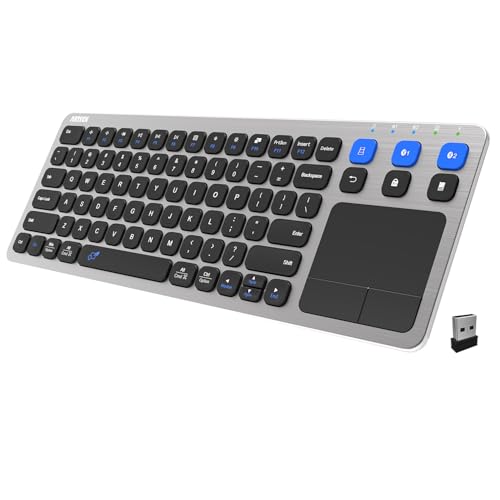
Arteck Universal 2.4G Wireless and Bluetooth Touch TV Keyboard — The two-route connector
This Arteck exists for the household that cannot decide what its television is. It carries both connection routes — a 2.4GHz USB dongle for the PC or media box, and Bluetooth for the smart TV, tablet or laptop — in one lap-sized board with the familiar built-in touchpad and media controls. Buy it once and it serves the current setup and the next one: when the ageing media PC is replaced by a smart TV, the keyboard simply changes mode instead of being replaced alongside it.
In daily use it behaves like its backlit sibling minus the light show. The touchpad is the same sensible size, the board remembers its pairings, and switching between the dongle host and a Bluetooth host is a deliberate mode change rather than a fresh setup. The rechargeable battery lives a calmer life than the backlit model’s, since there are no lamps to feed, and the slim metal-backed body keeps the same rigid, light character. For a second screen in a bedroom or a student flat where one board must cover a laptop, a TV and a tablet across a week, this flexibility is the whole value proposition.
What it surrenders is specialisation. It has no backlight, so it loses the dark-room crown to its own sibling; its key feel and touchpad, while good, match rather than beat the Logitech for PC duty; and mode-switching, though simple, is one more thing for a guest or grandparent to get wrong. None of that dents its role as the guide’s insurance policy: the board for mixed, changing, multi-screen homes where the only certainty is that the setup will be different next year.
- Layout: full couch board with built-in touchpad
- Connections: 2.4GHz dongle and Bluetooth, switchable
- Backlight: no
- Battery: rechargeable
- Best paired with: mixed households, several screen types
Strengths
- Both connection standards in a single board
- Survives a change of TV or media setup without replacement
- Calmer battery life than the backlit model
Trade-offs
- No backlight for dark-room use
- Mode switching can confuse occasional users
- Jack of all trades; the specialists beat it at their own games
Holiday homes and spare rooms are its other natural habitat: a single board left in the drawer serves whichever laptop, box or television the next guest plugs in, without anyone needing to know which connection the house prefers. Versatility is unglamorous, and in a guest room unglamorous is exactly right.
Choose this Arteck when your living room contains more than one kind of screen, or when you know a change of setup is coming. Single-screen households can aim more precisely — at the Logitech for PCs, or at the backlit Arteck for smart TVs.

Rii RT518S Wireless and Bluetooth Multimedia Keyboard — The streamer-friendly pick
Rii has been making living-room keyboards since before smart TVs were smart, and the RT518S is its most complete full-size answer: a lap board with a genuinely large multi-touch trackpad, dual-mode connection over both a 2.4GHz dongle and Bluetooth, and a two-colour backlight for dark rooms. The trackpad deserves first mention because it is the one you will use most — it is generously sized, supports the multi-touch gestures that make scrolling a streaming catalogue tolerable, and sits in a board wide enough that two hands can type a search query without elbow negotiation.
The dual-mode design mirrors the Arteck above but with an Android accent: Rii aims this board squarely at Android TV boxes, streaming sticks with USB ports, and the miscellaneous media players that populate real living rooms, alongside ordinary PCs and smart TVs. The backlight’s two colours are fewer than the Arteck’s seven but arguably more useful — pick the one your eyes prefer and forget the rainbow exists. The rechargeable battery, the media keys and the board’s general toughness all follow the same pragmatic script.
Compromises are of finish rather than function. Rii’s plastics and printing feel a notch more utilitarian than Logitech’s or Arteck’s, the software situation is non-existent (everything is onboard, for better and worse), and the board’s width makes it the least coffee-table-friendly here when space is tight. None of that will matter to its buyer, who is typically resurrecting a media box or feeding a family TV that eats searches all day. For trackpad-first users, this is arguably the most usable board in the guide.
- Layout: full couch board with large multi-touch trackpad
- Connections: 2.4GHz dongle and Bluetooth dual mode
- Backlight: two colours
- Battery: rechargeable
- Best paired with: Android TV boxes, media players, PCs
Strengths
- Largest, most gesture-capable trackpad in this guide
- Dual-mode connection plus a backlight in one board
- Built for the oddball media boxes other brands ignore
Trade-offs
- Widest board here; needs its share of coffee table
- Finish and printing feel utilitarian
- No software layer for customisation
There is a quiet enthusiast use for the RT518S worth naming: the home-cinema PC running unusual software — a Linux media centre, a retro-gaming front end, a karaoke library — where a big trackpad and both connection types rescue you from interfaces designed by people who assumed a mouse. When the menu misbehaves, this is the board that gets you out of it.
Media-box households, and anyone whose couch typing is mostly trackpad with occasional searches, will get the most from the RT518S. Minimalists with small tables should measure before they commit to its width.
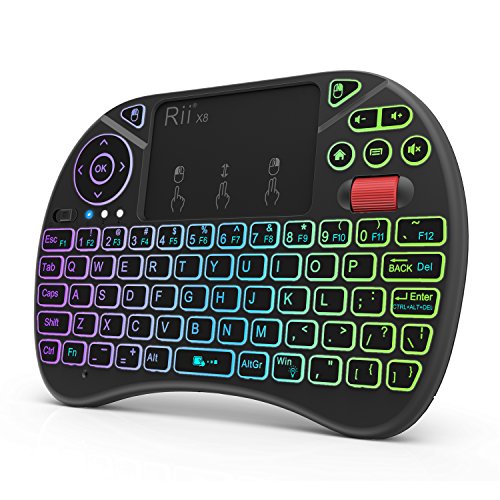
Rii X8 Mini Keyboard — The handheld mini
The X8 Mini abandons the lap-board format entirely and asks a different question: what if the couch keyboard were a game controller? It is a handheld mini board, gripped in two hands, with a compact QWERTY layout your thumbs learn quickly, a touchpad in the middle for pointer duty, and an RGB backlight so the tiny keys remain findable in a dark room. It connects over a 2.4GHz dongle, recharges over USB, and disappears into a drawer, a bag or the gap between sofa cushions — from which, admittedly, it must occasionally be retrieved.
Judge it by controller standards and it shines. For navigating a media interface, typing a search, entering a password and skipping around a streaming app, thumbs are faster than a full board balanced on a lap, and the X8 can be passed around the room like the remote it replaces. It is a favourite with Raspberry Pi and media-box hobbyists, with presenters who wander, and with anyone whose television PC is used for everything except actual typing. The touchpad is small but adequate for menu work, and the backlight’s novelty colours are a genuine aid at this key size, not merely a toy.
The limits are absolute and should be respected: nobody writes an email of any length on a thumb keyboard, the keys are too small for touch-typing, and the dongle-only connection rules out direct pairing with most smart TVs. Battery life is also a handheld’s battery life — days of heavy use rather than the K400’s seasons. Buy the X8 as a controller and it delights; buy it as your only keyboard and it will frustrate you by the second paragraph. Many households end up owning both kinds, and this is the kind to add second.
- Layout: handheld mini QWERTY with central touchpad
- Connections: 2.4GHz USB dongle
- Backlight: RGB
- Battery: rechargeable
- Best paired with: media boxes, Pi projects, presentations
Strengths
- Controller-style handling suits sofa navigation perfectly
- Tiny, light and easy to pass around the room
- Backlight keeps the small keys usable in the dark
Trade-offs
- Thumb typing only; hopeless for long text
- No Bluetooth for direct smart-TV pairing
- Small battery needs regular charging
Presenters and teachers quietly form the X8’s second fan club: it drives slides from anywhere in the room, types the occasional note, and fits in a jacket pocket between classes. A tool bought for the sofa that also earns its keep at work has an easy time justifying its drawer space.
Media-centre hobbyists and remote-control haters will love the X8 as the room’s navigation controller. If your couch sessions involve real typing — chat, email, long searches — start with a full board and add this later if the itch remains.

Logitech Wireless Touch Keyboard K400 — The veteran original
The original K400 is the board that proved a television could be driven from a sofa, and its continued presence in this guide is not nostalgia — it is arithmetic. It remains one of the least expensive ways to get a full couch keyboard with an integrated multi-touch touchpad and a dependable 2.4GHz dongle connection, from a maker whose receivers and drivers behave. Everything the Plus model is, this board is slightly less: the design is older, the keys a touch less refined, the whole package a little more plainly built — and for a second television, a spare room or a first media PC, slightly less is frequently enough.
In use, the experience is the family experience: plug in the receiver, type and point from the couch, forget the board exists. The touchpad handles the pointing with the gestures of its generation, the range covers a normal room, and the battery routine is the same forgetful replaceable-cell story as its successor. It has survived in the market this long because the job it does has not changed, and because its failure modes are known and boring — the highest compliment available to a living-room peripheral.
Why not simply always buy the Plus? If the price gap is wide on the day you shop, the original is the rational buy for secondary screens and light duty; if the gap is narrow, the Plus’s refinements earn it. There is no Bluetooth and no backlight in either, so dark-room smart-TV households should look to the Arteck and Rii boards regardless. Treat the K400 as the category’s honest baseline: the board against which every extra feature elsewhere in this guide must justify its cost.
- Layout: full couch board with integrated multi-touch touchpad
- Connections: 2.4GHz USB dongle
- Extras: media-friendly layout, plug-and-play receiver
- Battery: long-life replaceable cells
- Best paired with: PC-connected TVs, second screens
Strengths
- Category-defining design at a budget position
- Dongle reliability and long battery intervals
- Ideal spare or second-room board
Trade-offs
- Older design with plainer keys and finish
- No Bluetooth and no backlight
- Touchpad gestures are a generation behind
It also makes an unusually sensible gift for the relative whose smart TV baffles them: pair it with their media PC or laptop once, label nothing, explain nothing, and the television simply becomes typeable. Some products sell features; this one, at this stage of its life, sells the absence of phone calls asking how to make it work.
Buy the original K400 for the spare room, the kids’ media PC or any setup where value outranks refinement. For the main television, the Plus earns its small premium — unless your room needs Bluetooth or light, in which case this guide has already introduced you to your board.
How Do Voice Remotes and Phone Apps Compare With a Real Couch Keyboard?
Every household considering a couch keyboard owns two rivals already: the voice remote in the cushions and the phone in a pocket. Voice search is genuinely good at titles — say the film’s name and it appears — and genuinely bad at everything with a password, an unusual spelling, a subtitle preference or a sleeping baby in the room. It also fails socially: dictating a search means announcing it, and some searches a person would rather type. Voice is a fine first attempt and a poor only option.
Phone apps are the subtler rival. A television’s companion app usually includes a keyboard, and for a solo viewer it works — until the phone is charging in another room, locked behind a face scan during a tense scene, or needed as a phone. The dedicated board wins on the oldest principle in tools: it is already there, awake, in the room, belonging to the television rather than to a person. Households that watch together feel this most; a shared keyboard can be tossed to whoever remembers the actor’s name, while a phone app chains the whole room to one person’s handset and battery. The boards in this guide cost less than the replacement remote most televisions would need, which reframes them from gadget to household infrastructure.
What Should You Check on Your Television Before Ordering?
Five minutes with your TV’s settings prevents the commonest couch-keyboard disappointment. First, confirm the input route: does the television accept Bluetooth keyboards (most recent smart TVs do, buried in an accessories or devices menu), and does it have a free USB port if you are choosing a dongle board? Second, check the port’s location — a rear port behind a wall-mounted panel may need the extension-cable trick described earlier, and knowing that before the box arrives turns a frustrating evening into a five-minute setup.
Third, if a streaming stick or box is your real screen, check its rules instead: some sticks accept Bluetooth only, some boxes offer one USB port already occupied by storage, and some media PCs care which receiver they wake from. Fourth, glance at your router’s placement; a television and a couch at opposite ends of a large open room with the dongle behind metal is the one arrangement that can humble any board here. None of these checks requires expertise — only the honesty to look at your own room before believing a category average, which is the closest thing this guide has to a universal law.
How Do the Six Couch Picks Compare Side by Side?
| Pick | Form | Connection | Backlight | Standout trait |
|---|---|---|---|---|
| Logitech K400 Plus | Lap board | 2.4GHz dongle | No | Best all-round PC-to-TV control |
| Arteck Backlit Bluetooth | Lap board | Bluetooth | Seven colours | Dark-room smart-TV typing |
| Arteck Dual-Mode | Lap board | Dongle + Bluetooth | No | One board, every screen type |
| Rii RT518S | Lap board | Dongle + Bluetooth | Two colours | Largest trackpad |
| Rii X8 Mini | Handheld | 2.4GHz dongle | RGB | Controller-style navigation |
| Logitech K400 | Lap board | 2.4GHz dongle | No | Budget baseline |
How Can You Set Up a Couch Keyboard So It Works Every Single Evening?
Reliability on a couch is a setup discipline, not a product feature. Begin with the dongle: give it the clearest possible path to the sofa, using a front USB port or a short extension cable that lifts it out from behind the television’s metal panel. Then teach the board its home — the same cushion, the same coffee-table corner — because a shared peripheral that wanders is a peripheral that is missing at film time. Set the television or PC to wake from the keyboard if you use it as the main controller, and disable any aggressive USB power-saving that puts the receiver to sleep mid-evening.
Decide the board’s relationship with the television’s own remote early. Most households settle into a duet: the remote powers the screen and switches inputs, the keyboard does everything with words in it. Fighting that division — trying to make the keyboard the only controller — creates the friction that makes families abandon good boards. Let each tool do its half and the setup feels designed rather than improvised.
Handle passwords with grace: on-screen keyboards are misery, so let your streaming apps remember you, and keep a note of which profile each service is signed into rather than re-typing credentials by torchlight. Finally, institute a charging or battery ritual tied to something weekly — the rechargeable boards get plugged in on the same evening the bins go out, the replaceable-cell boards get a spare set living in the coffee-table drawer. Couch technology succeeds when it is boring, and boring is a routine you build, not a feature you buy.
Can a Couch Keyboard Cover Work or Study in a Pinch?
Sometimes life moves the office to the sofa: a sick day, a visiting relative in the spare room, a laptop docked to the television because it is the biggest screen in the house. In those pinches the lap boards here type respectably for an hour or two — full-size keys, a workable touchpad, media keys that double as presentation controls. The honest limit is posture rather than the board: a sofa sits you lower and softer than a chair, and by the third hour your back files the complaint that no keyboard can answer. Treat couch working as a bridge, not a destination, and the boards earn their keep as emergency infrastructure.
Students in small flats are the exception who prove the arrangement can work longer: a laptop on a coffee table, a lap board on the knees and a television as the monitor is a legitimate study station when space forbids a desk, and the dual-mode boards serve it best because the same keyboard follows the laptop to the library table. The X8 Mini, by contrast, should never be asked to take notes; its job begins when the studying ends.
How Much Should You Spend on a Keyboard That Lives on a Sofa?
Less than your instincts suggest, and the reasoning is actuarial rather than cheap. A couch keyboard’s enemies are gravity, liquids and loss, and no amount of spending makes a board immune to being sat on. The sensible budget buys the features your room needs — the right connection, a backlight if your room is dark, a trackpad sized for your screen — and stops there. Every pick in this guide sits in that sensible band; the price differences among them buy connection types and lighting, not luxury, which is exactly how money in this category should be spent.
The one place to spend freely is the second unit. Two modest boards — one per television, or a full board plus the X8 Mini — serve a household better than one premium board that must be fetched from another room, because a couch keyboard’s value is measured in evenings it was within reach. Buy for presence, not for prestige, and the living room will feel better equipped than a far more expensive single purchase could make it.
What Mistakes Do Couch Keyboard Buyers Keep Making?
The first is buying a compact desk keyboard and calling it a couch keyboard. Without a touchpad it needs a surface and a mouse, and within a week it is back on a desk while the household returns to shouting search terms at a voice remote. The touchpad is not optional in this category; it is the category.
The second is ignoring the room’s light. Buyers in bright showrooms choose unlit boards, then spend years typing passwords by screen-glow. If your watching happens after dark — most households’ does — a backlit pick is not a luxury upgrade but the correct tool, and it should be chosen at purchase, not regretted afterward.
The third is forgetting the other screen. A board bought for today’s smart TV may face tomorrow’s media PC, and a dongle-only or Bluetooth-only board can be stranded by the change. Unless your setup is carved in stone, the dual-mode boards exist precisely to forgive this mistake in advance.
The fourth is leaving the receiver in the old television when the new one arrives. It sounds too foolish to list, yet it empties more couch keyboards of purpose than any electronic failure: the tiny dongle stays in the traded-in set, and the perfectly good board becomes a paperweight. When any screen leaves the house, walk its ports first. Tape cannot save a forgotten receiver, but a ten-second port check at the door has rescued more living-room setups than any warranty ever written.
How Do You Keep a Shared Couch Keyboard Alive for Years?
Longevity in a living room is mostly housekeeping. Crumbs are the constant: a board that lives near snacks should be shaken out over a bin weekly, a ten-second habit that prevents the gritty keys and phantom presses of year two. The touchpad deserves a wipe with a dry microfibre cloth whenever it starts to feel draggy, because skin oil, not wear, is what makes a pad feel imprecise. Keep the board out of direct sun where possible — plastics yellow and batteries age faster in heat — and store it vertically in its home spot rather than under a pile of cushions where its keys bear weight for hours.
Electronics care is simpler than owners fear. Rechargeable boards should be charged before they are stone dead and unplugged once full; replaceable-cell boards should get fresh cells when the pointer starts to stutter, which is nearly always the battery and not the board. If a key ever doubles or skips, clean around it before condemning it — couch debris impersonates hardware failure with remarkable commitment. Follow those habits and any board in this guide should outlast the television it serves, which is the natural lifespan of a living-room tool.
Final Recommendation
Start from your screen. A PC driving the television wants the K400 Plus — or the original K400 when the budget is strict and the room is a spare. A smart TV in a dark room wants the backlit Arteck; a house with several kinds of screen wants its dual-mode sibling or the trackpad-rich Rii RT518S; and the X8 Mini is the delightful second controller for households that navigate more than they type. Pick the board that matches your room’s light, your screen’s connection and your household’s habits, and the sofa becomes the best seat in the house for everything the television can do. That, in the end, is the whole ambition of this category, and it is a more honourable ambition than most gadgets manage: not a better keyboard in the abstract, but a living room where the screen finally answers to the people sitting in front of it, at their pace, from their cushions, without anyone having to stand up.
Frequently Asked Questions
Can a couch keyboard replace my TV remote entirely?
For a PC-based setup, nearly — it handles navigation, search, volume and playback, though power and input switching usually stay on the original remote. For smart TVs, the keyboard covers search and navigation far better than a remote’s arrow-key typing, but keep the remote nearby for power and settings.
How far from the TV can these keyboards work?
All six are built for typical living-room distances — across a normal room without drama. Range collapses when a dongle hides behind metal or inside a cabinet, so placement matters more than specification: a front port or short extension cable is the cheapest range upgrade in this entire guide.
Is a backlit couch keyboard worth the extra charging?
If your room goes dark when you watch, yes. The Arteck backlit board and the Rii RT518S trade battery intervals for keys you can actually see, and most owners consider a weekly charge a fair price for never typing a password blind again. In a bright family room, skip the light and enjoy the longer intervals.
Can I use one of these boards for gaming from the couch?
For casual and turn-based games, comfortably. For fast competitive play, the touchpad is the limit — it navigates menus beautifully and aims poorly. Couch gamers usually pair one of these boards with a controller, using the keyboard for chat, search and everything outside the match itself.
Do couch keyboards work with game consoles?
Partially. Consoles accept USB and Bluetooth keyboards for text entry — searching stores, naming characters, chatting in supported games — and the dongle boards here generally work the moment they are plugged in. Whether a specific game lets a keyboard control gameplay is the developer’s decision, not the keyboard’s, so buy a couch board for navigation and text, and keep the controller for the match itself.
Can one couch keyboard serve two televisions?
Only the multi-device and dual-mode boards do this gracefully. The dual-mode Arteck and the Rii RT518S can keep a dongle in one screen and a Bluetooth pairing with another; the Bluetooth Arteck remembers its host but must re-pair when moved. Dongle-only boards can travel if you carry the receiver too — tape a spare inside the battery cover’s neighbourhood and the board becomes a genuinely portable television controller.
Which pick suits an elderly parent or a technophobe?
The K400 Plus, because it asks for nothing: no pairing, no modes, no charging ritual, just a dongle in the PC and keys that work every evening. The dual-mode boards’ extra flexibility becomes a liability in hands that did not ask for it, and the mini X8’s small keys suit young thumbs better than older eyes.
Related Guides
Next, browse Best Knob Keyboards for desk boards with proper media dials, Best Keyboards Under 20 Dollars for the cheapest spares worth owning, and Best WiFi Keyboards for wireless boards beyond the living room.


