What's inside
- Key Takeaways
- Quick Picks
- How Did We Choose These Picks?
- What Do You Actually Give Up at This Price — and What Surprisingly Survives?
- Who Should Buy a Keyboard This Cheap — and Who Should Spend More?
- How Do Membrane, Chiclet and Scissor Keys Differ at This Level?
- What Is the Smartest Way to Buy a Spare Keyboard?
- What Should You Check in the First Week With a Budget Board?
- How Do Budget Keyboards Serve Accessibility Needs?
- How Do the Six Budget Picks Compare Side by Side?
- How Should You Set Up a Budget Keyboard for the Longest Possible Life?
- What Mistakes Do Budget Keyboard Buyers Keep Making?
- Why Do Offices, Schools and Hospitals Keep Buying Boards Like These?
- What Is the Environmental Case for a Simple Wired Board?
- How Do These Boards Handle Games, Homework and Everything Between?
- What Happens When a Budget Keyboard Finally Wears Out?
- How Should You Choose Between the Two Logitechs and the Two Combos?
- Final Recommendation
- Frequently Asked Questions
- Related Guides
As an Amazon Associate I earn from qualifying purchases. This post may contain affiliate links at no extra cost to you.
widgetverdict.com is reader-supported. When you buy through links on our site, we may earn an affiliate commission.
Where to buy: Amazon carries all six keyboards below, and each name in the table links to its listing; at this end of the market, listings multiply and mutate like rabbits, so buy through the linked pages to be sure the board that arrives is the board described here.
There is a particular honesty to shopping for the best keyboards under 20 dollars. Nobody pretends a keyboard at this level is a treasure; the question is narrower and more interesting — how much genuine usefulness can this little money buy, and where exactly do the corners get cut? The answer, in 2026, is encouraging. The six boards below all type accurately, all plug in and work without software or pairing, and several of them — the Logitech K120 above all — have survived a decade of offices, schools and spare rooms that would have destroyed lesser equipment. Under twenty dollars buys a tool, not a toy, provided you choose the tool deliberately.
What it does not buy is equally clear, and this guide will not pretend otherwise: there are no mechanical switches here, no wireless connections worth the name, no backlighting, no aluminium. Every pick is a wired membrane or chiclet board, because at this level a cable is not a limitation but the correct engineering decision — it spends the whole budget on keys that work instead of radios that drop. Read on for which of the six suits a main desk, which suits a drawer as the household spare, and which two arrive with a mouse in the box because their makers understand their customers completely.
Key Takeaways
- Every pick is wired, and that is a feature: at this budget a cable buys reliability that a cheap wireless radio cannot.
- The Logitech K120 is the category’s durability benchmark; the MK120 adds a mouse to the same keyboard for combo shoppers.
- Two picks (MK120, Rii RK203) are keyboard-and-mouse sets — judge them as pairs, not as keyboards with a freebie.
- The HP 150’s quiet chiclet keys suit shared rooms; the Rii RK907’s slim body suits small desks and works with Macs.
- Membrane and chiclet keys at this price feel soft and quiet; nobody should expect mechanical crispness, and nobody needs it for these jobs.
- The smartest use of this budget is often the second keyboard: the spare that saves a workday when the main board fails.
Quick Picks
| Pick | Badge | Why it earns its place |
|---|---|---|
| Logitech K120 Full Size Wired Keyboard | The office default | A spill-resistant full-size board with a decade of institutional survival behind it. |
| Amazon Basics Wired QWERTY Keyboard | The house-brand staple | A full-size plug-and-play board with media controls from Amazon’s own label. |
| Logitech MK120 Wired Keyboard and Mouse Combo | The two-for-one combo | The K120’s sibling plus an optical mouse — a whole desk input set in one box. |
| HP 150 Wired Keyboard | The quiet chiclet | Silent-touch chiclet keys and a number pad in a tidy, comfortable full-size board. |
| Rii RK907 Ultra-Slim Compact USB Wired Keyboard | The slim space-saver | An ultra-slim wired board that serves Macs and PCs in tight spaces. |
| Rii RK203 Basic Keyboard and Mouse Combo | The combo alternative | A full-size slim keyboard with number pad and a matching mouse, in one inexpensive set. |
How Did We Choose These Picks?
At this budget, the selection criteria invert. Instead of asking what a keyboard adds, we asked what it must never do: it must never miss keystrokes, never need a driver, never demand a battery at the wrong moment, and never die from the small accidents — a spilled coffee, a drop from a desk — that define real service in homes and offices. Boards with a track record were favoured over boards with a feature list, which is why two Logitechs, an HP and Amazon’s own label anchor the guide: their failure rates are known quantities, written across millions of desks.
The second criterion was honesty of scope. Each pick was assigned the job it is genuinely good at — the K120 as the indestructible default, the HP as the quiet one, the RK907 as the slim one, the two combos as complete input sets for a fresh desk — rather than pretending six near-identical boards differ in ways they do not. The third was availability and support: at this price, a keyboard is close to a consumable, and a consumable from a maker with a real warranty process and permanent listings beats a mysterious brand that may vanish before your board does. What remains is a short list of boards we can recommend without crossing our fingers.
What Do You Actually Give Up at This Price — and What Surprisingly Survives?
The sacrifices are real and worth naming plainly. The keys ride on rubber membranes or scissor mechanisms, so each press feels softer and less defined than a mechanical switch, and very fast typists may notice the mush on long documents. There is no backlighting, so dark-room typing is by memory. There is no wireless, so the cable crosses the desk and the board stays where it is plugged. Keycaps carry printed legends that will, after years of use, fade on the busiest letters. And there is no software, no remapping, no macros: the keyboard is exactly what its keys say it is.
What survives is more than cynics expect. Accuracy survives: every board here registers ordinary typing faithfully, and for email, documents, schoolwork and data entry that is the whole job. Full layouts survive — number pads included on most picks — because these boards are aimed at real desks, not minimal aesthetics. Quiet survives, and is arguably better here than anywhere else in the keyboard world: membrane and chiclet boards are the natural choice for shared bedrooms, call-heavy offices and night work. And durability, in the specific form of spill tolerance and institutional toughness, survives on the Logitech boards to a degree that expensive mechanical boards, with their exposed switches, honestly cannot match.
The right mental model is a kitchen knife versus a chef’s knife. The twenty-dollar board will not delight a hobbyist, will not be photographed for a forum, and will not be repaired in year six. It will type a million words without complaint and then be replaced without grief. For a great many desks, that is not a compromise at all — it is the correct purchase, and the money saved buys something the household will actually notice.
Who Should Buy a Keyboard This Cheap — and Who Should Spend More?
Buy here if the keyboard is infrastructure: a family computer, a kids’ homework desk, a reception or workshop terminal, a home server you administer twice a year, a spare that lives in a drawer against the day the main board dies. Buy here also if the computer itself is elderly or shared, because pairing a premium board with a struggling machine helps no one. And buy here, without a shred of embarrassment, if you have tried mechanical keyboards and simply do not care — your money is real and your indifference is data.
There is a middle case worth separating out: the student. A student types a great deal, but on a budget that is genuinely not a lifestyle choice, and in rooms — shared flats, libraries, family kitchens — where quiet and toughness matter more than key feel. For that reader, the honest advice is to buy from this guide now, type the degree on it without a second thought, and let a future salary buy the mechanical board as a graduation present to yourself. The words will be identical either way; examiners, mercifully, cannot hear your switches.
Spend more if you type for a living and your hands log eight hours a day, because key feel compounds across a career. Spend more if you need wireless for a living-room or a clean desk, if you game competitively, if you remap keys and record macros, or if a backlight is the difference between typing and guessing in your room. The dividing line is not snobbery; it is hours. Under a couple of hours a day, these six boards lose nothing that matters. Over that, the upgrade guides elsewhere on this site start earning their keep.
How Do Membrane, Chiclet and Scissor Keys Differ at This Level?
The three mechanisms in this guide feel different enough that the choice between them is the closest thing to a luxury decision the budget allows. A classic membrane board — the K120, the MK120’s keyboard, the Amazon Basics — presses a rubber dome for every key. The travel is moderate, the landing is soft, and the sound is a low thud that shared rooms tolerate easily. Membrane is the oldest and toughest technology here, which is why the institutional boards use it.
Chiclet keys, as on the HP 150, separate each key into its own flat island with short travel and a crisp, laptop-like stop. Scissor mechanisms, hiding under many slim boards including the Rii models, stabilise each keycap with a tiny crossed linkage so the key descends evenly even when struck at its corner — the reason slim boards can feel more precise than their price suggests. Neither chiclet nor scissor is a lesser membrane; they are different answers to the same problem, tuned for thinner bodies and quieter rooms. If your fingers learned to type on a laptop, chiclet or scissor will feel like home and membrane will feel like a mattress. If you learned on an old desktop board, the reverse is true, and the K120’s descendants will welcome you back.
What Is the Smartest Way to Buy a Spare Keyboard?
Every household with a computer should own a spare keyboard, and this guide is effectively the spare-keyboard catalogue. The logic is simple: keyboards fail at the worst times — a spill on a deadline evening, a dead board on the morning of an online exam — and a spare converts a crisis into a two-minute swap. The spare should be wired, because a spare that needs charging is a spare that is flat when needed; it should be a standard layout, because an emergency is no time to learn a compact board; and it should be bought before it is needed, because delivery times do not care about your deadline.
By those criteria the K120 is the canonical spare, with the RK907 as the alternative for households whose machines include a Mac or whose storage is a single shallow drawer. Store the spare somewhere findable — the same place as the router’s password and the spare cables — and test it once a year by plugging it in for an afternoon. A tested spare is equipment; an untested one is a hope. The cost of this insurance is the lowest in the entire computer-owning hobby, and it pays out in the currency of evenings not ruined.

Logitech K120 Full Size Wired Keyboard — The office default
If you have worked in an office, a school, a library or a call centre in the last decade, your fingers already know the K120. It is the full-size wired board that institutions buy by the pallet: spill-resistant construction with drainage channels that let a knocked-over coffee escape instead of pooling under the keys, a curved space bar that meets the thumb kindly, low-profile keys that stay quiet in a room full of colleagues, and a standard layout with a number pad that asks nothing of anybody. Its legend is durability — these boards survive years of shared-desk abuse that would be a crime against a premium keyboard.
The typing feel is honest membrane: a soft, slightly cushioned press with enough definition for accurate everyday work, and no pretence of more. The keys are rated for the kind of long service that matches its institutional life, the cable is long enough for a tower under a desk, and the whole board works the second it is plugged into anything with a USB port, including machines old enough to vote. There is no software because there is nothing to configure; the K120 is a keyboard in the oldest, most dependable sense of the word.
Its limits are the category’s limits, worn openly: no backlight, no wireless, printed legends that will eventually fade on the home row, and a design that has never once been called beautiful. But as the default answer to “we need keyboards that work,” it has no rival in this guide or, frankly, in its decade. Buy it for any desk where the keyboard is a tool shared by people who will never think about it — which is most desks on Earth.
- Layout: full-size with number pad
- Connections: USB wired, plug and play
- Design: spill-resistant with drainage, curved space bar
- Keys: low-profile, quiet membrane
- Compatibility: Windows and Linux friendly
Strengths
- Proven institutional durability, including spill survival
- Completely standard layout — zero learning curve for anyone
- Quiet enough for shared offices and classrooms
Trade-offs
- Membrane feel will not satisfy mechanical converts
- No backlight and no wireless, by design
- Printed legends fade after years of heavy use
Schools deserve a specific mention in the K120’s story, because a classroom is the harshest keyboard environment short of a building site: thirty students, daily cleaning, liquids that were definitely not supposed to be in the computer room. The boards that survive there earn a kind of trust no laboratory test can confer, and the K120’s continued presence in classrooms is the reason so many adults, meeting one again, feel an odd fondness for a beige-hearted tool.
Choose the K120 when the requirement is a keyboard that works for everyone, forever, starting now. Only buyers who specifically want a quieter chiclet feel, a slimmer body or a mouse in the box need look further down this list.

Amazon Basics Wired QWERTY Keyboard — The house-brand staple
Amazon Basics exists to answer one question — what does the generic version cost when the retailer itself makes it? — and its wired keyboard is the programme working as intended. A full-size QWERTY board, plug and play over USB, with media control keys the K120 does not offer, finished plainly and priced at the floor of the respectable market. It is the keyboard that arrives in the same box as a new desk setup, a replacement monitor or a relative’s first computer, and it asks for nothing in return.
In use it is unremarkable in the best sense. The keys are full-size and accurately spaced, the layout is standard with its number pad, and the media controls handle volume and playback without a function-key chord — a small luxury at this level that music-while-working households will use daily. The board is light, which suits desks it will share with laptops and paperwork, and its simplicity means there is nothing to configure and nothing to break in software.
The honest caveats concern the long term. A house brand’s keyboard is built to a price, and while the Basics line’s quality control is generally respectable, this board does not carry the K120’s decade of institutional evidence behind it; its legends and switches should be expected to age on a consumable’s schedule rather than an heirloom’s. Buy it as what it is — a competent, warranted, immediately available keyboard for ordinary duty — and it will not disappoint you. Ask it to be the last keyboard you ever buy and you are shopping in the wrong guide.
- Layout: full-size with number pad
- Connections: USB wired, plug and play
- Extras: media control keys
- Keys: standard membrane feel
- Compatibility: Windows-focused
Strengths
- Media controls at the very bottom of the market
- Full standard layout with nothing shrunk or moved
- Easy availability and returns through its own retailer
Trade-offs
- Shorter track record than the Logitech boards
- Built as a consumable, with ageing to match
- Windows-first legends and intent
There is also a gift logic to this board: it is the keyboard you can send to a relative whose computer you support by telephone, confident that setup will consist of the words “plug it in” and nothing else. Peripherals that generate no support calls are worth more than their price in family harmony, and the Basics board, like the K120, understands that assignment perfectly.
Pick the Amazon Basics when you are equipping a desk in one order and want media keys without leaving the budget floor. Institutions and heavy abusers should still default to the K120’s proven toughness.

Logitech MK120 Wired Keyboard and Mouse Combo — The two-for-one combo
The MK120 starts from a truth about its buyers: a person shopping at this level usually needs the mouse too. So Logitech boxes a full-size wired keyboard — a close sibling of the K120, with the same spill-resistant thinking and standard layout — together with a comfortable optical mouse, both USB, both plug and play, for a combined price that stays inside this guide’s ceiling. As a way to make a bare computer usable in one purchase, nothing else here is as complete.
Judge the pair as a pair. The keyboard carries the family’s virtues: quiet low-profile keys, a number pad, drainage for spills, and the institutional build that survives shared desks. The mouse is a full-size ambidextrous optical model with a scroll wheel — not a gaming instrument, but accurate and comfortable for documents, browsing and spreadsheets, which is the entire job description at this level. Two USB ports are claimed, which matters on port-poor laptops; on a desktop it is a non-issue, and the cables are long enough for towers under desks.
Who should skip it? Anyone who already owns a good mouse, because the keyboard alone (the K120) then serves better and simpler. Anyone planning to upgrade the mouse soon, because a combo’s economics assume you keep both halves. And laptop-first users, for whom two cables and two ports are friction rather than value. For its intended buyer — a fresh desk, a family PC, a small office being equipped from nothing — the MK120 is the most sensible single box in this entire guide.
- Layout: full-size keyboard with number pad, plus mouse
- Connections: USB wired for both devices
- Design: spill-resistant keyboard, ambidextrous optical mouse
- Keys: low-profile, quiet
- Compatibility: Windows and Linux friendly
Strengths
- A complete input set in one inexpensive box
- Keyboard inherits the K120 family’s toughness
- Mouse is full-size and comfortable for everyday work
Trade-offs
- Two cables and two USB ports claimed
- Mouse is basic; gamers and designers will upgrade it
- Pointless if you already own a good mouse
Small businesses quietly run on this combo: the spare-desk set, the till-side set, the workshop set that must exist before the new starter arrives on Monday. Procurement loves it because one line item equips a human; support loves it because both halves are too simple to generate tickets. When a product becomes invisible to the people paid to worry about it, it has achieved its final form.
Buy the MK120 when you are starting from zero — new desk, new PC, no peripherals worth keeping. If a decent mouse already lives on your desk, buy its keyboard sibling alone and spend the difference on lunch.

HP 150 Wired Keyboard — The quiet chiclet
The HP 150 is the pick for people whose keyboard complaint is noise — their own, echoing through a shared flat at midnight, or a household’s, drifting from the family desk. Its chiclet keys use a silent-touch design: short travel, soft landing, and a muted sound profile that makes it the quietest board in this guide. The layout is full-size with a number pad, the styling is a tidy, modern slab that looks at home beside current laptops, and HP describes the design as ergonomic in the modest sense of comfortable key shaping and a natural typing angle — a claim about comfort, not medicine, and a fair one.
Chiclet typing is a taste. The flat, separated keys feel like a good laptop keyboard — which is precisely the point for the millions whose fingers learned on laptops and find tall membrane keys vague. Accuracy is high, the short travel keeps wrists moving less, and the board’s slim profile sits low on the desk. Plug and play over USB keeps the story simple, and HP’s name brings a real support channel, which at this price is rarer than it should be.
The trade-offs are travel and tactility: typists who love a deep, definite keystroke will find the HP shallow, and there is no spill-resistance story to match the Logitechs — this is a board for careful desks rather than chaotic ones. It is also Windows-first in its intent. Within its brief, though — quiet, tidy, laptop-familiar typing for a home desk — the HP 150 is the most modern-feeling board in the guide, and the one most likely to be chosen by someone upgrading from a laptop’s own keyboard to a proper desk setup.
- Layout: full-size with number pad
- Connections: USB wired, plug and play
- Keys: silent-touch chiclet, short travel
- Design: slim, modern profile
- Compatibility: Windows-focused
Strengths
- Quietest typing in this guide
- Laptop-familiar chiclet feel suits modern typists
- Full layout in a tidy, slim body
Trade-offs
- Shallow travel will not please deep-keystroke typists
- No spill-resistance claims to match Logitech
- No backlight for dark rooms
Call-centre and transcription work at home is the HP’s other quiet constituency: hours of typing beside a microphone or a sleeping household reward exactly its combination of low noise and low travel, which reduces finger fatigue across a shift. If your job is measured in typed hours and your room is shared, this is the board in the guide designed around your actual constraints.
Choose the HP 150 if your desk is shared with sleepers, callers or thin walls, and your fingers grew up on laptops. Buyers who need spill-proof toughness for a family free-for-all should take the K120 instead.

Rii RK907 Ultra-Slim Compact USB Wired Keyboard — The slim space-saver
Rii’s RK907 is the board for the desk that is not really a desk: the kitchen counter corner, the narrow student shelf, the reception ledge, the tray table of a small flat. It is an ultra-slim wired keyboard — thin enough to slide into a drawer or a laptop bag’s flat pocket — that nonetheless keeps full-size keys and, remarkably, works across both Mac and PC, a dual citizenship none of the bigger names here bother to claim at this price. For a household whose spare computer might be either platform, that flexibility is quietly decisive.
The slimness shapes the typing: short-travel keys in a low body, closer in spirit to the HP’s chiclets than to the K120’s membrane domes, and perfectly accurate for the documents-and-email duty this board will see. It is also the most portable pick in the guide by a wide margin, which gives it a second career as the travel keyboard for people who dock a laptop at unfamiliar desks and refuse to hunt-and-peck on whatever they find there. Plug and play keeps the whole proposition friction-free.
What slimness costs is presence. The board is light enough to shift on a slick desk if you type with force, there is no number pad in the compact frame, and the build is a traveller’s build — adequate, not armoured. It will not outlast a K120 in a school, and it is not meant to. Buy the RK907 for the small space, the mixed-platform house or the bag, and its compromises read as the correct engineering for the job.
- Layout: compact full-width keys, no number pad
- Connections: USB wired, plug and play
- Design: ultra-slim, highly portable
- Keys: short-travel, quiet
- Compatibility: Mac and PC
Strengths
- Thinnest, most portable board in this guide
- Genuine Mac and PC compatibility at this price
- Full-size key spacing despite the compact body
Trade-offs
- No number pad
- Light body can wander on smooth desks
- Build is adequate rather than institutional
Point-of-sale and kiosk corners are the RK907’s unglamorous workplace cousins: anywhere a keyboard must fit a ledge, survive being wiped down, and talk to whatever computer was available, a slim wired board with platform manners earns its shelf. It is a reminder that at this end of the market, versatility is a more valuable luxury than any light show.
Small desks, mixed Mac-and-PC households and travelling laptop users will get the most from the RK907. A permanent family desk with room to spare should take one of the full-size boards and enjoy the pad.
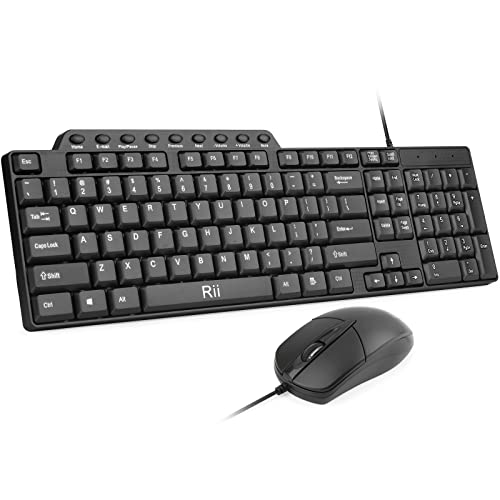
Rii RK203 Basic Keyboard and Mouse Combo — The combo alternative
The RK203 is Rii’s answer to the MK120: a full-size slim wired keyboard with a number pad, boxed with a matching wired mouse, at a combo price that keeps the pair inside this guide’s ceiling. Where Logitech’s set leans institutional, Rii’s leans slim and modern — the keyboard is a low, flat slab in the contemporary style, and the mouse is a simple full-size shape for everyday pointing. For a home desk being equipped from nothing, it is the direct alternative to the MK120 and the comparison between them is genuinely close.
Typing on the RK203’s keyboard is a short-travel, quiet experience in the modern manner, with a standard layout that will not surprise anyone. The mouse covers the basics competently. Both pieces are plug and play over USB, and the set’s slimness suits the smaller home desks that are this guide’s natural habitat — flats, bedrooms and study corners where the MK120’s chunkier, office-bred styling can feel oversized.
The differences that should decide between the two combos are durability expectations and taste. Logitech’s set carries the longer institutional track record and the spill-resistant keyboard; Rii’s set counters with the slimmer profile and a slightly more modern look, from a maker whose reputation was built on living-room peripherals rather than office fleets. Neither is a mistake. If the desk is a family’s front line, take the Logitech; if it is a tidy personal desk that wants to look like this decade, the RK203 earns its place.
- Layout: full-size slim keyboard with number pad, plus mouse
- Connections: USB wired for both devices
- Design: slim, modern profile
- Keys: short-travel, quiet
- Compatibility: PC-focused, works broadly over USB
Strengths
- Complete slim input set in one box
- Modern look suits home desks better than office styling
- Number pad retained despite the slim body
Trade-offs
- No spill-resistance story to match the MK120
- Shorter track record than Logitech’s combo
- Basic mouse, like every combo mouse here
Students furnishing a first flat-desk from scratch are the RK203’s natural buyers: one box, a matched look, a board slim enough for a shelf-desk and a mouse that asks nothing. When the alternative is typing on a laptop balanced on moving boxes, a proper matched set at this money changes the whole feel of a room.
Choose the RK203 for a personal home desk that wants a matched, modern-looking set on the strictest budget. Family front lines and shared offices should take the MK120’s tougher keyboard and accept its plainer face.
What Should You Check in the First Week With a Budget Board?
Cheap keyboards deserve the same first-week audit as expensive ones, because the return window is the buyer’s only laboratory. Type a full page of ordinary work and watch for the two budget failure modes: missed letters when you type at full speed, and doubled letters on keys your fingers strike hardest. Either fault, present in week one, will not improve with age — exchange the board while the retailer’s process is painless. Check also that every key on the board registers, including the function row and the number pad’s corners, because a single dead key on a new board is a quality-control story that rarely ends well.
Then check the human fit. Is the cable long enough to route where you want it without tension? Does the board sit flat, with all feet and pads touching, or does it rock on your particular desk? Do the legends match what your fingers expect — a small thing until a misplaced key costs you a password attempt at a bad moment. A budget board that passes these checks in week one has told you the truth about itself, and the truth at this price is usually that it will serve for years. A board that fails them should go back without sentimentality; the category’s whole advantage is that replacement is cheap and immediate.
How Do Budget Keyboards Serve Accessibility Needs?
Accessibility is rarely discussed at this price, yet these boards have genuine virtues for many hands. The full-size picks keep standard key spacing, which matters for users who rely on consistent tactile landmarks. Membrane keys require a soft, forgiving press rather than a precise strike, and the chiclet boards’ short travel suits fingers with limited range of motion. The wired connection removes pairing — a real barrier for some users — and replaces it with a single plug. For a household adapting a computer for an elderly parent, the combination of a standard layout, a gentle press and zero configuration is not a compromise at all; it is often the most usable option at any price.
The limits deserve the same honesty. There are no high-contrast or large-print legends in this guide, no adjustable key repeat beyond what the operating system provides, and no split ergonomic shapes — those live in other guides and at other budgets. What the operating system gives every board here, free, is worth using: sticky keys, key-repeat control and on-screen keyboards in the accessibility settings of Windows, macOS and ChromeOS alike. A twenty-dollar board plus an afternoon in those settings can be a more accessible workstation than an expensive board left at its defaults.
How Do the Six Budget Picks Compare Side by Side?
| Pick | Layout | Mouse included | Key style | Standout trait |
|---|---|---|---|---|
| Logitech K120 | Full-size | No | Membrane | Spill-resistant durability |
| Amazon Basics Wired | Full-size | No | Membrane | Media controls |
| Logitech MK120 | Full-size | Yes | Membrane | Complete combo, tough keyboard |
| HP 150 | Full-size | No | Chiclet | Quietest typing |
| Rii RK907 | Compact | No | Short-travel | Ultra-slim, Mac and PC |
| Rii RK203 Combo | Full-size slim | Yes | Short-travel | Slim matched set |
How Should You Set Up a Budget Keyboard for the Longest Possible Life?
Longevity at this level is housekeeping, not engineering. Route the cable with slack at the case entry — the most common wired death is a frayed cord where it bends — and never wrap the cable tightly around the board for storage. Keep the board out of the drink zone if you can, and if a spill happens anyway, unplug first, turn the board over to drain, and give it a full day of drying before testing; the spill-resistant picks forgive faster, but patience forgives most.
Position matters more than owners expect. A keyboard pushed to the desk’s edge, half overhanging, flexes with every press and ages its cable at the worst angle; a board seated fully on the desk, at elbow height, with the cable dropping slackly to the machine, will outlive its careless twin by years. Budget boards do not ask for much — a flat surface, a dry neighbourhood, a cable without tension — but what they ask for, they ask for every day, and the owners who provide it are the ones writing reviews about a board that simply never died.
Clean monthly with the board unplugged: shake out the crumbs, brush between the keys, wipe the surface with a barely damp cloth. Printed legends last longer if you avoid harsh cleaners, and chiclet boards like the HP and Rii models should never have their keys pried at. Finally, register nothing, install nothing, and keep the receipt in the same drawer as the spare batteries for everything else — at this price, the warranty that matters is the retailer’s returns window, and it is generous precisely because these boards are simple.
What Mistakes Do Budget Keyboard Buyers Keep Making?
The first is buying a no-name wireless board at this price instead of a wired board from a real maker. Cheap radios drop connections, cheap batteries die at deadlines, and the money saved evaporates into frustration within a month. At this level, wired is not the compromise — wireless is.
The second is expecting one keyboard to be both the household spare and a typist’s delight. A twenty-dollar board can be a superb spare or a perfectly adequate main keyboard for light duty, but the person who types all day will feel its limits by the second week. Match the board to the hours, not to the hope.
The third is judging a budget board by its first-day feel alone. Membrane keys in particular settle over the first fortnight as the domes break in, and several boards that feel merely adequate on day one feel familiar and accurate by week three. The return window exists to catch faults, not to demand love at first touch; give a fault-free board its settling period before condemning it.
The fourth is overlooking the combo economics in both directions: buying a combo when a good mouse already exists wastes money, and buying a lone keyboard for a bare desk, then paying separately for a mouse, wastes more. Count what the desk actually needs before choosing which box to open.
Why Do Offices, Schools and Hospitals Keep Buying Boards Like These?
It is worth understanding the institutional logic, because it explains why these particular models exist and why they are trustworthy. A facilities manager equipping five hundred desks needs four things: a keyboard that works with every machine in the building, a price that survives an annual budget round, a failure rate low enough that the support team stays small, and a replacement that can be ordered today and arrive tomorrow. The K120 and its kin are the answer that logic produces, refined over a decade of purchase orders. Their virtues are boring because the requirement was boring, and boring, at scale, is the hardest specification in technology.
The home buyer inherits all of that refinement free. When you buy the same board a hospital buys, you are buying the hospital’s quality control, the school’s durability testing and the call centre’s noise requirements, compressed into a product whose development costs were paid by institutions. This is the deepest reason the bottom of the keyboard market is better than it has any right to be: the volume lives here, and volume funds engineering that boutique products must charge a premium to recover. The twenty-dollar keyboard is not a cheap imitation of a real keyboard. In the ways that matter to most people, it is the real keyboard, and the expensive ones are the specialised variants.
What Is the Environmental Case for a Simple Wired Board?
A wired membrane keyboard is close to the greenest input device a computer can have. It contains no battery to degrade or to dispose of, draws its trickle of power from the machine it serves, contains no radio components, and — in the case of the durable picks here — stays in service for years rather than seasons. Its packaging is minimal, its failure modes are mechanical and visible, and at the end of its life it is a single simple object for the e-waste stream rather than a sandwich of glued batteries and boards.
None of this requires sacrifice, which is what makes it worth stating. The household that buys a K120 as a spare, keeps it for a decade and recycles it at the end has made the environmentally correct choice by accident, in the course of making the financially correct one. In a category where the premium end now ships a lithium cell in every unit, the humble wired board’s footprint is a genuine, if quiet, argument in its favour — one more reason this guide refuses to treat its subject as a joke.
How Do These Boards Handle Games, Homework and Everything Between?
A fair question from the households that buy most of these boards: will it game? For the games most family computers actually run — strategy, simulation, puzzle, the family Minecraft server — any board here is entirely adequate, because those games ask for accuracy, not for exotic key technology. Fast competitive titles are where membrane boards show their ceiling: simultaneous key presses and rapid repeated inputs are handled less crisply than on a mechanical board, and a teenager who takes ranked play seriously will feel the difference and say so, at length. The grown-up answer is sequencing: the budget board now, the gaming board when the hobby proves itself, and the budget board retiring honourably to spare duty rather than to the bin.
Homework and home admin — the actual centre of gravity for these keyboards — ask for none of that. Essays, forms, spreadsheets, email and the hundred small typings of a household week sit squarely inside every pick’s competence, and the standard layouts match what schools and offices teach. If a single sentence could summarise this entire guide, it is that the distance between a twenty-dollar keyboard and a two-hundred-dollar keyboard is real but narrow, and it only matters to people who type like it is a sport or a profession.
What Happens When a Budget Keyboard Finally Wears Out?
Plan for the ending at the purchase and it stops being an annoyance. A budget board’s decline is usually gradual — a legend faded here, a key growing reluctant there — which gives you the luxury of ordering its replacement before it becomes urgent. When the day comes, retire the old board properly: it contains electronics, so it belongs in e-waste recycling rather than the household bin, and many retailers and councils collect such items free. Keep the best of the old cables if they are detachable — most here are not — and resist keeping the dead board as a spare; a spare that half-works is worse than no spare, because it will be trusted in an emergency it cannot handle.
There is one honourable second life worth mentioning: the garage, workshop or garden-office computer, where a faded but functioning board serves a machine that is itself in honourable semi-retirement. Keyboards at this level often outlast two computers, and a board that ends its days calling up workshop manuals with greasy fingerprints on it has lived a fuller life than most premium equipment ever will.
How Should You Choose Between the Two Logitechs and the Two Combos?
Four of the six picks form two pairs, and the pairs confuse buyers more than any other part of this guide, so here is the whole decision in one place. K120 versus MK120 is a question about a mouse: same keyboard family, same toughness, and the combo simply adds a competent optical mouse for a bare desk. If a mouse is needed, the combo; if not, the lone board. MK120 versus RK203 is a question about the desk’s character: Logitech’s set is the office-bred, spill-resistant, chunkier option for shared and family duty, while Rii’s set is the slimmer, modern-looking option for a tidy personal desk. Neither pair contains a wrong answer — they contain two right answers aimed at different rooms, and the room, as throughout this guide, should cast the deciding vote.
Final Recommendation
If one board must be named, it is the K120: the toughest, most proven keyboard this little money buys, and the correct default for almost any desk. The MK120 extends it into a complete set, the RK203 answers with a slimmer set of its own, the HP 150 owns the quiet hours, the RK907 owns the small spaces and mixed platforms, and the Amazon Basics covers the one-order desk setup. Whatever you choose, choose it on purpose: the only bad purchase in this category is the accidental one, the unconsidered board bundled into an order and regretted for years. Buy the one that matches your desk’s real job, keep the receipt, and enjoy the rare purchase that asks for nothing else — no charging, no pairing, no updates — from the day it arrives. In a product category addicted to novelty, there is something almost radical about a keyboard whose entire promise is that it will be there tomorrow, typing, exactly as it did today, and as it will on the ordinary Tuesday three years from now when you have long forgotten what it cost or even where it came from — which is, when you think about it, exactly what a tool is supposed to do.
Frequently Asked Questions
Can a keyboard this cheap really last for years?
The proven models can. The K120’s institutional life is measured in years of shared-desk abuse, and any board here, kept dry and cleaned occasionally, should serve a home desk for a long time. Expect printed legends and key feel to age before the electronics do — these are consumables with long lives, not heirlooms.
Are membrane keyboards bad for typing?
They are different, not bad. Membrane and chiclet keys are softer and quieter than mechanical switches, and for email, documents, schoolwork and browsing the difference is a preference, not a performance gap. Heavy all-day typists and gamers are the users who genuinely outgrow them.
Why is there no wireless keyboard in this guide?
Because at this ceiling, a wireless radio consumes budget that the keys need more. The wired boards here will work every single day without pairing, interference or battery anxiety; a wireless board at the same money makes compromises in exactly the places a keyboard cannot afford. Spend more if wireless is essential — it is a legitimate need with an honest price.
Which pick is best for a child’s homework computer?
The K120 for a fixed desk — it survives spills and siblings — or the MK120 if the setup also needs a mouse. Both are inexpensive enough that a genuine accident is a story rather than a loss, and both use the standard layout children are taught on at school.
Is a combo or a separate keyboard and mouse better value?
It depends entirely on what you already own. Starting from nothing, the combos (MK120, RK203) deliver a working desk for less than the parts bought separately, and their mice are adequate for everyday work. Owning a good mouse already reverses the arithmetic: buy the lone keyboard, keep the better mouse, and the combo’s bundled one becomes drawer clutter. Audit the desk first; the box should follow the audit, not precede it.
Do these keyboards work with laptops and Chromebooks?
Yes — anything with a USB port and standard keyboard support will type with them immediately, which makes them a cheap cure for a laptop with a failing built-in keyboard. The RK907 is the natural traveller of the group, and it is also the pick that explicitly serves both Mac and PC households.
Related Guides
Finish the tour with Best WiFi Keyboards for cable-free desks, Best Mechanical Keyboards Under 100 Dollars when the budget grows, and Best Ergonomic Keyboards for Macs for comfort-first typing.


