What's inside
- Before You Order: Matching a Number on a Ream to a Machine
- Key Takeaways
- Quick Picks
- How We Chose These Picks
- Comparison
- How to Verify a Machine for 110 lb Stock, Step by Step
- Cover, Index and GSM: Why Does the Same Number Mislead?
- What Should the First Ten Sheets Teach You?
- When Is a Different Stock the Right Answer?
- How Does Humidity Quietly Rewrite Your Paper Specification?
- Should Heavy Stock Rest Before It Is Scored, Folded or Trimmed?
- Common Mistakes
- Final Recommendation
- Frequently Asked Questions
- Related Guides
As an Amazon Associate I earn from qualifying purchases. This post may contain affiliate links at no extra cost to you.
[SITE_DOMAIN] is reader-supported. When you buy through links on our site, we may earn an affiliate commission.
Before You Order: Matching a Number on a Ream to a Machine
Every linked name below opens that model’s Amazon page, where the maker’s description and buyers’ questions sit together. Take two figures with you when you go: the weight printed on your cardstock’s packaging — 110 lb cover is the stock this guide is organised around — and the printable size your designs actually need. Then do the step no listing page can do for you, and find the same weight figure in the manufacturer’s own media documentation for the model. That comparison, ten minutes of reading, is the entire difference between a confident purchase and an expensive guess, and this guide will keep pointing at it rather than pretending a title can settle it.
The search for the best printers for printing 110 cardstock begins with an uncomfortable disclosure: 110 lb cover stock is heavy, stiff material, roughly the class of a greeting card or a business card’s ambitious cousin, and not one of the six listing titles below states a maximum paper weight. Sellers know buyers search by that number, yet the titles talk about format, ink systems, speeds and functions instead. So this guide does the honest thing. It ranks six machines by the mechanical and economic traits their titles can support — wide ceilings that give a stiff sheet room, business feeding heritage, tank systems that forgive the test prints heavy stock demands — and it marks the weight question, in every single spec box, as a documentation check rather than a claim.
Why publish a guide that refuses to promise the one thing its title asks? Because the alternative guides, the ones that cheerfully assign weight ratings to machines whose makers never printed them, are how crafters end up with two hundred ruined sheets. Paper weight limits are real engineering figures that live in media specifications, and they vary by feed route within the same machine: a route that carries a heavy sheet nearly straight may be cleared for far more than a tray path that bends it. A single headline number would be wrong even when it sounded right. What follows is therefore a guide to choosing well under honest uncertainty — which machines deserve your documentation check first, and how to trial the winner before a deadline rides on it.
The six divide into three temperaments. Two EcoTank Photo models bring six-colour tank printing, one of them at wide format. A WorkForce Pro brings business feeding at wide format with a document feeder. A supertank all-in-one brings fax, an ADF and automatic two-sided printing at everyday sizes. And two compact all-in-ones — a Canon MegaTank and an Epson EcoTank — bring refill economics to the desks where most 110 lb work, greeting cards and inserts and tags, actually happens at letter size.
Key Takeaways
- No title among these six states a maximum paper weight, so 110 lb compatibility is a documentation verdict for each model, never a claim printed here.
- Feed route matters as much as the machine: heavy stock belongs on the gentlest path the manufacturer documents for thick media.
- Epson’s EcoTank Photo ET-8550 pairs a stated 13 x 19 inch ceiling with a cartridge-free 6-color system for colour-heavy heavy-stock work.
- The WorkForce Pro WF-7820 brings a stated up to 25 ppm, auto 2-sided printing and a 50-sheet ADF from the business world.
- Tank systems — EcoTank and MegaTank alike — make the supervised test prints that heavy stock demands affordable.
- The ET-4950 is the only pick whose title states both an ADF and auto 2-sided printing alongside fax.
Quick Picks
| Pick | Badge | Why it earns its place |
|---|---|---|
| Epson EcoTank Photo ET-8550 | The wide six-colour tank | Cartridge-free 6-color printing up to 13 x 19 inches for heavy-stock work that is also colour-critical. |
| Epson EcoTank Photo ET-8500 | The letter-size photo tank | A 6-color supertank with USB and memory card support for creative projects at everyday sizes. |
| Epson WorkForce Pro WF-7820 | The business feeder, wide | Wide-format output at a stated up to 25 ppm with a 50-sheet ADF behind its feeding. |
| Epson EcoTank ET-15000 | The connected supertank | Wide-format supertank printing with Ethernet, fax and cartridge-free refills for mixed work. |
| Canon MegaTank G3270 | The compact refillable | A refillable tank all-in-one in a compact desktop design for home and office card work. |
| Epson EcoTank ET-4950 | The duplex all-rounder | A supertank with ADF, auto 2-sided printing and fax at a stated up to 18 ppm. |
How We Chose These Picks
Selection started from the physics of the stock. A 110 lb cover sheet is stiff enough to resist bending, heavy enough to test a pickup roller and unforgiving of tight turns, so priority went to machines whose designs suggest mechanical headroom: wide-format bodies whose paper paths are built at a generous scale, business models specified for sustained feeding, and — because heavy stock always demands trials — tank systems that make a dozen supervised test sheets a trivial expense instead of a cartridge-threatening one.
The second consideration was the work itself. Most 110 lb printing is not tabloid printing; it is greeting cards, invitations, inserts, tags, certificates and small signage, overwhelmingly at letter size and below. A guide that only admitted wide machines would mislead the majority of its readers, so three of the six places went to everyday-format all-in-ones whose refill economics and general competence suit the real shape of the work, with the wide machines held for the minority whose designs genuinely need the area.
The third consideration governed everything written below: restraint. Where a title states a figure — a speed, a capacity, a ceiling — the figure is quoted. Where a title is silent — and on maximum paper weight, every title here is silent — the review says so in the locked wording the spec boxes use, and directs the reader to the manufacturer’s documentation. Any pick could fall at that final check for a particular stock, and the guide’s job is to make sure the check happens before the purchase, in the right order, with the right machines at the front of the shortlist.

Epson EcoTank Photo ET-8550 — The wide six-colour tank
Picture the heaviest common craft scenario: a photographic design, full-bleed, on thick cover stock, at a size larger than letter. That is the corner of the category this machine occupies. Its title describes a wireless wide-format all-in-one tank printer with cartridge-free 6-color photo printing, scan and copy, a stated up to 16 ppm and output up to 13 x 19 inches, made for creators and home studios. For 110 lb work specifically, the relevant gifts are the wide, generously scaled paper path that a 13 x 19 inch ceiling implies, and a tank system that absorbs the cost of the trials heavy stock always requires.
Trials deserve emphasis, because heavy stock is where printing stops being a button press and becomes a craft. The first sheet through any new machine-stock pairing is an experiment: does it pick cleanly, travel straight, take heavy coverage without pooling, and emerge unscuffed? With cartridges, each experiment has a visible price, and crafters start skipping steps. With bottles feeding a 6-color engine, the experiment costs almost nothing, so the crafter runs the full sequence — singles, then a short stack, then a supervised run — and arrives at production with knowledge instead of hope. That behavioural difference is the strongest argument for a tank in this category, stronger than any specification.
The colour system then justifies the results. Six colours on a matte heavy stock keep gradients smooth where four colours start to step, and photographic greeting cards — the premium end of 110 lb work — live or die on exactly that smoothness. Skin tones, skies and watercolour washes are the designs buyers pay extra for, and they are the designs this engine was specified to render. A stated up to 16 ppm reminds you it renders them deliberately rather than quickly; plan production time accordingly and the pace stops being a complaint.
What this review will not do is certify the stock. The title states no maximum weight and names no thick-media feed, so the manufacturer’s media documentation must clear your exact 110 lb sheet for the route you intend to use, and the first session should be supervised singles regardless of what any source promises. Treat that as the buying process rather than a defect: documentation first, trials second, production third. Shoppers who follow that order will find, on its Amazon page, a machine whose format and ink story are stated with unusual clarity for this category.
There is a workflow detail that wide heavy work teaches quickly: output handling. A large, freshly printed sheet of cover stock is both heavy and vulnerable — heavy enough to slide off a small output ledge, vulnerable enough that the slide marks it. Give this machine a clear, flat landing surface at output height and the wide ceiling becomes usable production space; crowd it and the ceiling is theoretical. Studios that print wide card regularly often dedicate a shallow tray or a clean board beside the machine for exactly this, and the habit generalises: the bigger and stiffer the sheet, the more the room around the printer is part of the printer.
- Format ceiling: up to 13 x 19 in., per title
- Ink system: cartridge-free 6-color tank, per title
- Functions: print, scan, copy, per title
- Stated speed: up to 16 ppm, per title
- Maximum paper weight: Not stated in the listing title — verify with the manufacturer documentation
- Thick-media feed route: Not stated in the listing title — verify with the manufacturer documentation
Strengths
- Six-colour output keeps photographic work on heavy matte stock smooth and detailed.
- Bottle refills make the full supervised trial sequence for a new stock effectively free.
- A stated 13 x 19 inch ceiling gives stiff sheets a generously scaled machine to travel through.
Trade-offs
- The title clears no specific cardstock weight, so 110 lb use begins with a documentation check.
- A stated up to 16 ppm is deliberate pace, felt on long runs of identical cards.
- Heavy ink coverage on thick uncoated stock needs unhurried flat drying before stacking.
Best for: colour-critical heavy-stock work at up to 13 x 19 inches, where trials are frequent and gradients matter. Not suited for: buyers needing a title-stated guarantee for 110 lb cover stock — the title states no maximum paper weight at all.

Epson EcoTank Photo ET-8500 — The letter-size photo tank
Not every heavy-stock practice needs width, and the ET-8500 is the proof: a wireless colour all-in-one supertank with cartridge-free 6-color photo printing, scan and copy, a stated up to 16 ppm, and USB and memory card support, positioned for creative projects. Read that title beside its wide sibling’s and the difference is a single absence — no 13 x 19 inch ceiling — traded for a machine that fits an ordinary desk and a workflow that can start from a memory card without a computer waking up.
That memory card support is more relevant to card work than it first appears. Photographers printing their own greeting cards often work in batches shot for the purpose, and a direct card-to-print route shortens the loop between a morning’s photography and an afternoon’s finished cards. Combined with the same 6-color engine family as the wide model, the output quality on photographic designs stays in the premium tier; the sacrifice is purely geometric, and for cards, inserts and certificates, geometry beyond letter size is rarely the binding constraint.
For 110 lb stock, the working questions are identical to its sibling’s and the title answers none of them: no weight rating, no named thick-media route. The documentation check is therefore the purchase, and the trial sequence after it. What the machine offers the heavy-stock buyer is the same behavioural gift — cheap, patient iteration from bottles — in a smaller footprint, which matters in the spare-room studios where most card businesses actually live. A wide machine that dominates the room changes how a studio feels; this one shares the room politely.
Pace matches the wide sibling at a stated up to 16 ppm, so batch planning is similar: an evening’s run of cards is a comfortable session, a same-day emergency order of hundreds is not what either machine is for. Buyers choosing between the two EcoTank Photo models should ask one question — will any design this year exceed letter size? — and let the answer decide, because almost everything else in their titles is shared. On Amazon, confirm the memory card and USB details if the direct-printing workflow is part of your plan.
Desk-sharing deserves a mention in this model’s favour. A letter-size supertank with a modest footprint can live permanently on the work desk rather than being fetched from a cupboard for print days, and permanence changes behaviour: the printer that is already there gets used for the small, frequent jobs — a replacement insert, a corrected card, a one-off certificate — that keep a card practice responsive. Heavy-stock work benefits indirectly, because a machine in daily use stays exercised, its ink moving and its mechanics warm to their task, instead of waking cold for the one big run that matters most.
- Ink system: cartridge-free 6-color supertank, per title
- Functions: print, scan, copy, per title
- Direct input: USB and memory card support, per title
- Stated speed: up to 16 ppm, per title
- Maximum sheet size: Not stated in the listing title — verify with the manufacturer documentation
- Maximum paper weight: Not stated in the listing title — verify with the manufacturer documentation
Strengths
- Six-colour photo output at letter size keeps premium card designs in the top tier.
- Memory card and USB support shorten the camera-to-card workflow for photographers.
- Supertank refills keep heavy-stock trial printing inexpensive and unhurried.
Trade-offs
- No wide-format ceiling is stated, so oversize designs are simply out of scope.
- No cardstock weight or feed route is named in the title for 110 lb verification.
- A stated up to 16 ppm asks for planned sessions rather than deadline sprints.
Best for: photographers and card makers printing 6-color work at letter size and below from a compact desk. Not suited for: designs larger than letter size, or any purchase that needs its 110 lb clearance stated in the title — it is not there.

Epson WorkForce Pro WF-7820 — The business feeder, wide
Heavy stock is, mechanically speaking, a feeding problem wearing a printing problem’s clothes, and the WF-7820 approaches it from the feeding side. The title describes a wireless all-in-one wide-format inkjet with print, scan, copy and fax, a stated up to 25 ppm, auto 2-sided printing and a 50-sheet ADF, aimed at small offices and businesses. Machines specified for office duty cycles are built around pickup reliability across thousands of sheets, and that engineering temperament — grip positively, transport decisively, repeat identically — is what a stiff 110 lb sheet asks of the hardware it travels through.
The wide-format class matters for heavy work in a subtler way than size. A path built to move large sheets is built at a larger mechanical scale, with the turns and clearances that scale implies, and stiff media generally prefers generous geometry to cramped geometry. That is an engineering tendency, not a promise — the title states no weight rating and this review invents none — but when two titles are equally silent on weight, the buyer trialling heavy stock is rational to start with the machine whose whole design brief was moving paper reliably at volume.
Auto 2-sided printing is the feature to handle with the most care in this category. A duplex loop turns a sheet back on itself through the tightest bend in the machine, and 110 lb cover is exactly the material that resists such bends. The title states the feature without a duplex weight limit, so the safe doctrine is simple: duplex ordinary paper freely; print heavy stock one side at a time by the gentlest documented route, and flip by hand when the second side is needed. A hand-flipped card loses thirty seconds; a jammed duplex loop can lose the sheet, the schedule and occasionally the machine’s mood for the rest of the run.
Colour is business-tuned — strong on graphics, charts, bold stationery and signage, less gifted with photographic subtlety than the 6-color tanks — and running costs follow the cartridge model, which makes the trial sequence for a new stock a real expense to plan rather than a free ritual. Buyers whose heavy work is text-and-graphics-led, produced in batches, will find this the most mechanically reassuring option in the six. Its Amazon page is where to weigh the ADF and wide-format details against the way your studio actually produces.
Think about the shape of a production week for the studio this suits. Monday digitises a backlog of client artwork through the document feeder; midweek prints the graphic-heavy heavy-stock runs the feeder’s sibling mechanism handles so confidently; Friday clears the ordinary correspondence and invoices that keep the business legitimate. One machine, three temperaments, and the heavy work sits in the middle of a working system rather than on a pedestal. That integration is the WorkForce proposition at its best, and it explains why offices — which cannot afford single-purpose optimism — buy this class of machine in fleets.
- Format class: wide-format, per title
- Functions: print, scan, copy, fax, per title
- Document feeder: 50-sheet ADF, per title
- Stated speed: up to 25 ppm; auto 2-sided, per title
- Maximum paper weight: Not stated in the listing title — verify with the manufacturer documentation
- Duplex weight limit: Not stated in the listing title — verify with the manufacturer documentation
Strengths
- Business feeding heritage is the strongest mechanical starting point here for stiff sheets.
- Wide-format scale gives large, rigid sheets a generously proportioned path.
- A stated up to 25 ppm and a 50-sheet ADF suit batch production and studio paperwork alike.
Trade-offs
- Cartridge economics make the heavy-stock trial sequence a planned cost, not a free one.
- Business colour tuning sits below the 6-color tanks on photographic gradients.
- The duplex path’s weight limit is unstated, so heavy stock should travel single-sided.
Best for: batch producers of graphic-led heavy work — signage, stationery, certificates — at wide sizes. Not suited for: automatic two-sided printing on 110 lb cover, since the title states duplexing without any weight limit for that path.

Epson EcoTank ET-15000 — The connected supertank
The ET-15000 returns in this guide wearing a different hat: not the blended household’s all-rounder, but the heavy-stock candidate for buyers who want tank economics at a wide ceiling with a wired network option. Its title states a wireless all-in-one wide-format supertank with cartridge-free print, scan, copy and fax, up to 17 ppm, output up to 13 x 19 inches and Ethernet, for homes and small offices. Every element of that sentence earns a place in a 110 lb conversation.
Start with the ceiling. A stiff sheet’s worst enemy is a tight turn, and machines built around a 13 x 19 inch maximum are built at a scale where turns can be gentler; again, a tendency to verify rather than a rating to quote, since the title offers no weight figure. Then the tank: heavy-stock competence is earned through trials, and a supertank turns a fortnight of experiments into a rounding error. Then Ethernet: a wide machine lives where it fits, often across the room or in a studio corner, and a wired connection serves it there without wireless drama — a small, unglamorous reliability that production work appreciates daily.
Fax and the full all-in-one set matter to the small-business end of this audience, where the same machine that prints a run of heavyweight menus in the morning sends a supplier’s form in the afternoon. Four-colour output is the honest limitation for photographic work; bold, graphic designs — which describe most heavy-stock commercial work, from menus to table signage to packaging sleeves — sit comfortably within its range, and its stated up to 17 ppm is a touch quicker than the photo tanks’ ceilings.
The verification burden is unchanged: no weight rating in the title, no named thick-media route, documentation first. A buyer whose practice mixes heavy graphic work at wide sizes with ordinary office life will find this the most complete single-box answer in the six, provided the documentation clears the specific stock. On its listing page, the Ethernet and wide-ceiling wording are the two phrases that distinguish it from the crowd of similar-looking supertanks.
A note on placement and patience applies here as much as to its photo sibling: wide, stiff sheets need a clear landing zone, and a supertank that lives in a studio corner on a wired connection is unusually easy to give one, because it does not need to huddle beside the computer it serves. The corner can be arranged around the paper’s needs — flat storage adjacent, output space clear, stock kept away from the room’s damp wall — and that arrangement, humble as it sounds, is production infrastructure. Machines do not print well in the abstract; they print well in a place that was thought about.
- Format ceiling: up to 13 x 19 in., per title
- Ink system: cartridge-free supertank, per title
- Functions: print, scan, copy, fax, per title
- Connectivity named: wireless and Ethernet, per title
- Stated speed: up to 17 ppm, per title
- Maximum paper weight: Not stated in the listing title — verify with the manufacturer documentation
Strengths
- Wide ceiling and supertank refills combine scale with inexpensive stock trials.
- Ethernet allows studio-corner placement with a dependable wired connection.
- Full function set including fax covers the business half of a mixed practice.
Trade-offs
- Four-colour output trails the EcoTank Photo models on photographic heavy work.
- No title-stated weight rating means 110 lb clearance rests entirely on documentation.
- Its breadth is wasted on a desk that only ever prints one kind of job.
Best for: mixed practices printing graphic-led heavy work at wide sizes alongside everyday office jobs. Not suited for: photographic 110 lb work where six-colour rendering is the priority, or buyers wanting the weight limit in the title itself.

Canon MegaTank G3270 — The compact refillable
Most 110 lb printing happens on small desks, and the G3270 is the small-desk candidate: a Canon MegaTank all-in-one wireless colour printer with print, copy and scan, a refillable tank system and a compact desktop design, for home and office use. Nothing in that title reaches for width or speed records. Its claim on this guide is the combination crafters actually use daily — refillable ink, the three everyday functions, and a footprint that leaves room on the desk for the trimming, scoring and assembling that turn printed card into finished goods.
Refillable ink changes heavy-stock behaviour in a way worth repeating from a different angle: it changes the crafter’s willingness to waste a sheet. Learning a new stock means wasting sheets — a jam here, a scuffed edge there, a coverage test that pools — and on cartridges each lesson invoices you. On a MegaTank, the lessons are nearly free, so they get learned properly and early, on cheap trial quantities, instead of during a paying order. Many a card business’s competence is really just the accumulated result of affordable mistakes, and this machine’s economics manufacture that competence.
The limits are plain and should be respected. No maximum sheet size is stated, no weight rating is stated, and the compact design brief implies an everyday-format machine: assume letter-class work, verify through documentation, and do not plan tabloid or poster work around it. Colour is general-purpose rather than photo-specialist — the PIXMA G620 class of Canon tank is the photo-tuned relative — so photographic card fronts will look good rather than gallery-grade, while graphic designs, text and bold colour will look exactly as intended.
For a first dedicated card printer, or a second machine that absorbs the daily volume so a specialist can rest, the G3270’s proposition is hard to argue with: modest claims, refillable running, complete everyday functions. Buyers browsing its Amazon page should focus on the tank arrangement and the desktop dimensions against their own workspace, because fit — physical and economic — is the whole argument here.
The G3270 also suits a particular stage of a craft business: the stage where the work has outgrown the household’s shared cartridge printer but has not yet justified a specialist. At that stage the binding constraint is rarely quality — it is the cost and friction of iteration, the prototypes not printed because each one felt like spending. A refillable compact machine removes that friction for the price of a modest desk footprint, and the business grows into its competence. Later, a wide or photo specialist may join it; the G3270 typically stays, absorbing the everyday volume it was always best at.
- Ink system: refillable MegaTank system, per title
- Functions: print, copy, scan, per title
- Design: compact desktop, per title
- Colour: wireless colour printer, per title
- Maximum sheet size: Not stated in the listing title — verify with the manufacturer documentation
- Maximum paper weight: Not stated in the listing title — verify with the manufacturer documentation
Strengths
- Refillable tanks make learning a new heavy stock an affordable, unhurried process.
- Compact footprint preserves desk space for the finishing work that follows printing.
- Print, copy and scan cover the complete everyday needs of a small card practice.
Trade-offs
- Neither a sheet-size ceiling nor a weight rating is stated, so both need documentation.
- General-purpose colour sits below photo-tuned tanks on photographic card fronts.
- Compact class rules it out for wide or tabloid heavy work entirely.
Best for: letter-size card makers who print daily and want refill economics in a small footprint. Not suited for: wide-format heavy work, or any plan that needs a stated 110 lb clearance before purchase — the title offers none.
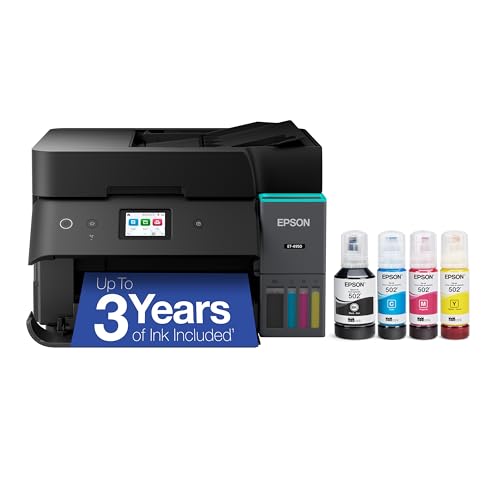
Epson EcoTank ET-4950 — The duplex all-rounder
The ET-4950’s title is the most administratively complete of the six: a wireless colour all-in-one supertank in black with cartridge-free print, scan, copy and fax, a stated up to 18 ppm, an ADF and auto 2-sided printing, for homes and small offices. For the 110 lb reader, two of those phrases need immediate, careful handling — the ADF and the duplex claim — because both describe mechanisms that move paper in ways heavy stock must be excused from, and understanding that distinction is most of what there is to know about using an office all-in-one for card work.
An automatic document feeder is a scanner accessory: it pulls originals across a scan glass, one thin sheet at a time. It is superb for digitising a stack of forms or a client’s paper artwork, and it should never be imagined as a cardstock printing route — card goes through the print path, not the feeder, and conflating the two is a genuine beginner error this category’s marketing does nothing to prevent. Used correctly, the ADF earns its place in a card studio by clearing the paperwork mountain that surrounds the creative work.
Auto 2-sided printing carries the same caution as the WF-7820’s: the title states it without a weight limit, duplex paths bend sheets hard, and 110 lb cover should be printed one side at a time and flipped manually unless the manufacturer’s documentation explicitly clears duplexing at that weight. What remains, once those two cautions are filed, is a very likeable machine: the fastest stated ceiling among the letter-size tanks here at up to 18 ppm, bottle economics for trials, and a full function set for the mixed home-office life most card sellers actually lead.
It is, in other words, the pragmatist’s pick — the machine for a seller whose heavy work is single-sided cards and inserts, whose duplexing is for ordinary-paper booklets and documents, and whose desk also handles the household’s scanning and forms. Buyers comparing it on Amazon should read the ADF and duplex phrases with this review’s cautions in mind: both are real features, both are for paper thinner than the stock this guide is about.
Consider, finally, the temperament this machine rewards: organisation. Its strengths are systemic — documents scanned and filed through the feeder, booklets duplexed on ordinary paper, cards printed single-sided on heavy stock, forms faxed when a supplier insists — and a seller who runs their paperwork as carefully as their print runs extracts the full value. A chaotic desk will still enjoy the tank economics and the brisk stated pace, but the ET-4950 is quietly designed for the studio where the business half of crafting is treated as a craft in itself.
- Ink system: cartridge-free supertank, per title
- Functions: print, scan, copy, fax, per title
- Feeder and duplex: ADF and auto 2-sided, per title
- Stated speed: up to 18 ppm, per title
- Maximum paper weight: Not stated in the listing title — verify with the manufacturer documentation
- Duplex weight limit: Not stated in the listing title — verify with the manufacturer documentation
Strengths
- The most complete office function set among the letter-size picks, fax and ADF included.
- A stated up to 18 ppm is the briskest ceiling of the everyday-format tanks here.
- Supertank bottles keep the heavy-stock learning curve inexpensive.
Trade-offs
- The ADF serves scanning only; it is not a route for printing cardstock.
- Auto 2-sided printing has no title-stated weight limit, so heavy stock stays single-sided.
- No wide-format capability is claimed for oversize heavy designs.
Best for: home-office card sellers printing single-sided heavy work amid everyday documents and scanning. Not suited for: automatic duplexing of 110 lb cover — the title states auto 2-sided printing but no weight clearance for that path.
Comparison
| Pick | Stated format | Ink system | Stated speed | Weight rating in title |
|---|---|---|---|---|
| Epson EcoTank Photo ET-8550 | Up to 13 x 19 in. | 6-color cartridge-free tank | Up to 16 ppm | Not stated in the listing title |
| Epson EcoTank Photo ET-8500 | Not stated in the listing title | 6-color cartridge-free supertank | Up to 16 ppm | Not stated in the listing title |
| Epson WorkForce Pro WF-7820 | Wide-format | Business inkjet | Up to 25 ppm | Not stated in the listing title |
| Epson EcoTank ET-15000 | Up to 13 x 19 in. | Cartridge-free supertank | Up to 17 ppm | Not stated in the listing title |
| Canon MegaTank G3270 | Not stated in the listing title | Refillable MegaTank | Not stated in the listing title | Not stated in the listing title |
| Epson EcoTank ET-4950 | Not stated in the listing title | Cartridge-free supertank | Up to 18 ppm | Not stated in the listing title |
The empty last column is the most important data in the table. Everything else — width, ink, pace — sorts the six into an order for your documentation checks; the weight verdict itself waits in each maker’s media specifications, exactly where engineering figures belong.
How to Verify a Machine for 110 lb Stock, Step by Step
Begin with the stock’s own paperwork. The ream wrapper or the retailer’s specification gives the weight in pounds and usually in grams per square metre as well; keep both numbers, because manufacturers’ documentation may use either. Note also whether your stock is cover or index — 110 lb in one family is not the same physical sheet as 110 lb in another, and confusing the two families is a quiet source of bad purchases.
Next, find the manufacturer’s media documentation for your shortlisted model — the full manual or specification sheet, not the marketing page — and locate the paper table. Read it by feed route: many machines publish different limits for a tray, a manual feed and a rear or specialty route, and the heavy figure, where one exists, usually belongs to the straightest route. If your stock’s weight falls inside a stated route’s limit, that pairing is cleared on paper. If the documentation gives no figure, or your stock exceeds every stated limit, the honest options are a different stock or a different machine — not a hopeful experiment with two hundred sheets.
Finish with the physical trial the earlier sections described: single supervised sheets, then a short sequence, watching pickup, straightness, surface marks and drying, on the exact route the documentation cleared. Record the settings that worked in a notebook kept with the stock. That record, dull as it sounds, is the asset that turns a printer and a ream into a reliable production pairing — and it is yours alone, because no guide can write it for your machine, your stock and your room.
One more source deserves consulting before the documentation is even opened: the stock manufacturer’s own guidance. Paper makers test their heavy lines across popular machines and often publish compatibility notes or, at minimum, a recommended printer class and feed style for a given weight. A stock sold explicitly for inkjet card making, with a coating designed to receive dye and pigment inks, behaves differently from a generic heavy cover sheet meant for laser or offset work — surface chemistry decides whether ink sits crisp or soaks dull, quite apart from whether the sheet can physically travel. Matching a coated-for-inkjet heavy stock to these inkjet machines removes one whole variable from the trial.
Cover, Index and GSM: Why Does the Same Number Mislead?
Paper weight in pounds describes a ream of a standard sheet size that differs by paper family, which is why 110 lb cover and 110 lb index are physically different sheets — cover stock is the heavier, stiffer material used for greeting cards and covers, while index is a lighter family used for file cards and dividers. A buyer who orders by the number alone can receive stock noticeably thinner or thicker than intended, and then blame a printer for a paper mistake.
Grams per square metre cuts through the confusion because it measures the sheet itself rather than a ream convention, and manufacturers’ documentation increasingly speaks in it. Converting your stock’s figure before checking a machine’s limits — the ream’s packaging usually prints both — aligns the two sides of the comparison. When in doubt, bring the physical sheet into the decision: stiffness in the hand, compared against a sheet you already print successfully, is crude but honest evidence.
What Should the First Ten Sheets Teach You?
Feed them one at a time and interrogate each result. A clean pickup with no double-feed says the rollers can grip the stock’s surface; a straight image, square to the sheet’s edges, says the transport is not fighting the stiffness; an unmarked surface under raking light says the path’s guides are not scuffing the finish; and a sheet that lies acceptably flat after an hour says the bend it endured was within its memory to forgive.
Print a deliberately cruel test design on at least one sheet: a large block of the darkest colour your work uses, a fine-line pattern, and a gradient. The block reveals pooling and drying time, the lines reveal any transport judder as doubled edges, and the gradient reveals banding that ordinary designs might hide until a customer finds it. Ten sheets spent this way are tuition; the same lessons learned on a production run are losses.
When Is a Different Stock the Right Answer?
More often than pride admits. If a beloved machine’s documentation clears a slightly lighter cover weight with margin to spare, and the finished piece — a card that will sit in an envelope, an insert inside a box — does not genuinely need the heaviest hand-feel, stepping down a weight class converts a marginal pairing into a reliable one. Hand-feel is a design choice, not a moral position, and many successful card lines print on stock a class below the maximum their makers advertise.
The reverse decision exists too: a product whose entire identity is its substantial, rigid feel — luxury stationery, premium packaging — should drive the machine choice rather than be compromised by it. In that case the documentation check becomes the first filter, applied before any other feature is admired, and the shortlist is simply whichever machines clear the stock in writing. Either direction is respectable; the failure mode is refusing to choose and hoping the hardware will negotiate.
How Does Humidity Quietly Rewrite Your Paper Specification?
Cardstock is hygroscopic: it drinks moisture from the air, and a sheet that has spent a humid week in an open stack is measurably more flexible, more prone to curl and more likely to misbehave in a feed path than the same stock stored sealed and flat. Crafters in damp climates learn to treat the ream’s wrapper as part of the printing equipment — opened for a session, resealed after it — and to keep the working stack small, because the bottom sheets of a tall, week-old stack have been breathing the room the whole time.
The machine’s side of the bargain is consistency: a stock that fed beautifully in a dry winter may need its trial sequence repeated in a wet summer, not because anything broke but because the material changed. Studios that keep their trial notebook note the season beside the settings for exactly this reason. It sounds fussy until the first humid-morning jam destroys a deadline, after which it sounds like the cheapest insurance in the building.
Should Heavy Stock Rest Before It Is Scored, Folded or Trimmed?
Yes, and the rest is doing real work. A freshly printed heavy sheet carries moisture from the ink and stress from the bend it just survived; scoring or folding it immediately invites cracked toner-free ridges along the fold — ink film splitting to show the pale core — and trimming it immediately cuts a sheet that may still be relaxing toward its final flatness. An hour of flat rest under light, even weight lets the sheet equalise, and folds made after that rest are visibly cleaner along the crease.
Production schedules should be built around the rest rather than despite it: print in the morning, finish in the afternoon, or print a day ahead of the finishing session entirely. The sellers whose cards look manufactured rather than homemade are rarely using secret equipment; they are using time, deliberately, at the points where the material asks for it. Heavy stock rewards patience at every stage, and the finishing stage is where impatience leaves the most visible evidence.
Storage between sessions completes the system. Heavy stock that lives flat, sealed and off the floor keeps the characteristics it had during its successful trial; stock that leans against a wall for a month arrives at the printer pre-curled and then gets blamed on the machine. A shallow drawer or a portfolio case sized to your largest sheet, a habit of returning unused sheets to the ream wrapper, and a rule that the working stack never exceeds what the session needs — these unglamorous arrangements protect the verification work you already did. Studios often discover that half their supposed printer problems were storage problems wearing a disguise, and that the fix cost a drawer rather than a service contract. Treat the material as a precision input, because at 110 lb that is exactly what it is: the heaviest, stiffest, least forgiving input most desktop machines will ever be asked to move, and the one whose handling rewards care most visibly in the finished piece.
Common Mistakes
Trusting a headline weight figure from any secondary source sits at the top of this category’s error list. If the figure did not come from the manufacturer’s media documentation for the exact model and feed route, it is folklore, and projects built on folklore fail at production scale rather than at trial scale, which is the most expensive place to learn anything.
Feeding a full tray of heavy stock the way you would feed office paper comes next. Heavy sheets fan poorly, grip differently and punish optimistic loading; small stacks, fanned and squared, fed by the documented thick-media route, are slower by seconds and cheaper by reams. Related closely: leaving the printer’s media setting on plain paper, which tells the machine to expect a thin sheet and handle it accordingly — the media type setting is part of the paper path, and heavy stock deserves to have it set correctly every single run.
Duplexing heavy cover automatically, because the brochure mentioned two-sided printing, ruins more first projects than any other single act; the feature and the stock were never promised to each other. And finally, judging a machine by its first sheet: heavy-stock competence reveals itself across twenty sheets, in pickup consistency and surface condition, not in a single successful pass that luck could explain.
Final Recommendation
Start your documentation checks with the EcoTank Photo ET-8550 if your heavy work is colour-led and large, or its ET-8500 sibling if the same work lives at letter size; both pair six-colour rendering with the bottle economics that make learning a heavy stock painless. Batch producers of graphic work should check the WF-7820 first, mixed practices the ET-15000, small desks the G3270, and paperwork-heavy home offices the ET-4950 — in every case letting the manufacturer’s paper table cast the deciding vote on 110 lb clearance.
Do that, and the number on the ream stops being a gamble. It becomes what it should have been all along: a specification you verified, on a route you trialled, in a notebook you keep.
And a closing thought on expectations: a machine that clears 110 lb cover on paper and passes its trials has earned trust for that stock, that route and those settings — not for every heavy material a catalogue can tempt you with. Metallic, textured and linen-finish covers each introduce their own surface and stiffness variables, and each deserves its own ten-sheet tuition before it joins a product line. The discipline scales; that is its virtue. A studio with a notebook of verified pairings can say yes to new work with confidence, because the confidence was manufactured sheet by sheet rather than asserted.
Frequently Asked Questions
Will these printers definitely handle 110 lb cover stock?
That cannot be promised from their titles, none of which states a maximum paper weight. Each pairing must be cleared in the manufacturer’s media documentation for the specific feed route, then confirmed with supervised trial sheets before a production run.
Why do guides disagree about what a printer can handle?
Because limits vary by feed route within one machine, and because paper families share pound numbers while differing physically. Sources that collapse those distinctions into one figure sound confident and are frequently wrong for your exact stock.
Is 110 lb cover the same as 110 lb index?
No. Pound ratings are measured against different standard sheet sizes per family, so the two are different physical sheets. Grams per square metre, printed on most packaging, is the reliable common language for comparing stock to a machine’s limits.
Can I duplex 110 lb stock on the models with auto 2-sided printing?
Only if the manufacturer’s documentation clears that weight for the duplex path specifically. The titles state the feature without a weight limit, and duplex loops bend sheets hardest, so the default for heavy cover is single-sided printing with a manual flip.
Does a wide-format machine automatically handle heavy stock better?
Not automatically — width is a size claim, not a weight rating. Larger machines often have more generous paper-path geometry, which is a reason to check them first, but the documentation figure for the specific route remains the only verdict that counts.
How many test sheets should I budget for a new stock?
Ten is a sensible tuition: singles for pickup and surface checks, one cruel test design for coverage and banding, and a short sequence for consistency. On a tank machine that tuition costs very little, which is a core reason tanks dominate this guide.
Related Guides
- Best printers for printing double-sided cardstock — the two-sided question taken seriously
- Best printers for crafters that can print 11×17 and cardstock — width and heavy stock together
- Best printers for scrapbooking 12×12 cardstock — full pages for memory keeping


