What's inside
- Two-Sided Work: What to Check on the Listing Before Anything Else
- Key Takeaways
- Quick Picks
- How We Chose These Picks
- Comparison
- Automatic or Manual: How to Choose Your Two-Sided Method
- How Do You Keep Front and Back Registered to the Same Edges?
- Why Does the First Side Need Drying Time Before the Second Pass?
- What Causes Show-Through, and How Do You Design Around It?
- How Should a Two-Sided Run Be Sequenced Across a Working Day?
- Which Card Designs Forgive Two-Sided Printing, and Which Expose It?
- Common Mistakes
- Final Recommendation
- Frequently Asked Questions
- Related Guides
As an Amazon Associate I earn from qualifying purchases. This post may contain affiliate links at no extra cost to you.
[SITE_DOMAIN] is reader-supported. When you buy through links on our site, we may earn an affiliate commission.
Two-Sided Work: What to Check on the Listing Before Anything Else
Follow a linked name below to that printer’s Amazon page and read it as a duplex detective. You are hunting for three separate facts that marketing tends to blur into one: whether the machine prints two sides automatically at all, what the maker says about paper handling for that reversing journey, and whether the ink and stock pairing you plan will leave the first side undisturbed when the second side is printed. Bring your real project to that reading — a wedding programme, a two-sided card, a booklet — because the right machine depends entirely on which of those objects you are making and how heavy its paper is.
The best printers for printing double-sided cardstock are chosen by a mechanism most buyers never picture: the turn. To print a second side automatically, a printer must flip its own sheet — pulling it back, reversing it through a curved path, and presenting the blank face to the print head with the edges registered closely enough that front and back agree. Thin office paper makes that turn easily. Cardstock, which is manufactured to resist bending, makes it reluctantly, and the gap between those two behaviours is where this entire category lives. A duplex feature on a specification sheet is a promise about paper; whether it extends to your card is a separate question that only documentation answers.
So this guide sorts its six machines by the honesty of their two-sided story. One title states duplex printing outright as a headline feature. Another states auto 2-sided printing as part of an office specification. The remaining four state neither — and they are included deliberately, because manual two-sided printing, one side at a time with a hand flip between passes, is how a great deal of the world’s cardstock actually gets printed, and some of those machines serve that workflow beautifully with tank economics or six-colour output. What no review below will do is upgrade a silent title into a duplex claim.
There is a second, quieter half to two-sided work that has nothing to do with mechanisms: show-through and set-off. A design printed heavily on side one can shadow through a light sheet when side two is viewed, and a freshly printed first side can offset onto rollers or onto the sheet beneath it during the second pass. Stock choice, coverage restraint and drying discipline decide those outcomes as much as hardware does, and the guide sections after the reviews treat them in full.
Key Takeaways
- Only two titles here state two-sided printing directly: the Canon MegaTank G3290 names duplex printing, and the Epson EcoTank ET-4950 names auto 2-sided printing.
- Neither of those titles states a duplex weight limit, so automatic duplexing of heavy card still requires a documentation check.
- Manual two-sided printing — one pass per side, flipped by hand — is the realistic route for the heaviest stock on any machine here.
- HP’s OfficeJet Pro 9135e brings an office all-in-one specification with the HP Smart App, but its title states no duplex feature.
- Six-colour tank output from the EcoTank Photo ET-8550 suits two-sided photographic cards printed one side at a time.
- Registration — front and back agreeing at the edges — is a workflow skill as much as a machine trait; test it before a run.
Quick Picks
| Pick | Badge | Why it earns its place |
|---|---|---|
| HP OfficeJet Pro 9135e | The office all-rounder | A wireless colour all-in-one with print, scan, copy and fax plus the HP Smart App for office-led two-sided projects. |
| Canon MegaTank G3270 | The manual-flip economist | A refillable tank all-in-one whose cheap ink makes two-pass, hand-flipped card work painless. |
| Epson EcoTank Photo ET-8550 | The two-sided photo card choice | Six-colour cartridge-free printing up to 13 x 19 inches for photographic cards printed side by side, one pass each. |
| Canon PIXMA TR8620a | The home-office veteran | An all-in-one with copier, scanner, fax and a document feeder for mixed paper duties around card projects. |
| Epson EcoTank ET-4950 | The stated auto 2-sided tank | A supertank naming auto 2-sided printing and an ADF, with fax, at a stated up to 18 ppm. |
| Canon MegaTank G3290 | The named duplex tank | A refillable tank all-in-one whose title states duplex printing outright, with a 2.7-inch colour touchscreen. |
How We Chose These Picks
The first pass through candidates asked a single blunt question: what does the title actually say about two-sided printing? Two machines answered directly and they anchor the guide. The others were admitted only if they brought something the duplex pair could not — an office ecosystem, a six-colour engine, a document feeder for the paperwork around card projects, or tank economics that make the manual two-pass method genuinely attractive rather than a consolation.
The second pass examined the work two-sided cardstock printing actually consists of. Programmes and booklets live on lighter stock and benefit most from automatic duplexing. Greeting cards and postcards live on heavy stock and are usually printed one side at a time regardless of what a machine offers, because the reversing turn is unkind to stiffness and because the first side needs drying time before it travels again. A guide that recommended only automatic duplexers would serve the first group and mislead the second; this one serves both, and labels which is which in every review.
The third pass was about restraint in language. Duplex claims in this guide are quoted, never inferred: a title that lists functions without mentioning two-sided printing is reported as silent, and the spec boxes record the locked wording for what is missing. Registration accuracy, duplex weight limits and show-through behaviour are all real properties of these machines — they simply do not live in the titles, so they are treated as documentation and trial questions, which is where a careful buyer would want them anyway.

HP OfficeJet Pro 9135e — The office all-rounder
An office that prints two-sided documents all day and two-sided card pieces occasionally is this machine’s home ground. The title describes an HP OfficeJet Pro 9135e colour inkjet printer, wireless, all-in-one, built for office documents, with mobile compatibility, print, scan, copy and fax, the HP Smart App and an explicit ideal-for-office positioning. That is a complete administrative workstation in one sentence — and a careful reader will notice the sentence never mentions two-sided printing, which is exactly the kind of absence this guide exists to catch.
Because the absence matters practically, not pedantically. A buyer who assumes an office all-in-one duplexes automatically, and plans a run of two-sided event programmes around that assumption, discovers the truth at the worst possible moment. The correct way to buy this machine for two-sided card work is to check the listing and the manufacturer’s documentation for its exact two-sided arrangement, and to plan — until that check says otherwise — on the manual method: print every first side, let the stack dry properly, reload with attention to orientation, and print every second side. Offices have produced programmes that way for decades, and the HP Smart App’s mobile workflow suits the supervised, batch-by-batch rhythm the method requires.
Within that honest frame, the machine’s virtues are real. Office tuning means crisp text and confident business graphics, which is precisely the content of most two-sided card pieces that are not photographic: programmes, menus, price cards, information cards for packaging, appointment and care cards. The full scan-copy-fax set handles the paperwork ecosystem around those jobs, and wireless plus mobile compatibility means the person running the job is not tethered to one desk while supervising passes.
Ink economics follow the cartridge pattern rather than the tank pattern of most rivals here, so the manual two-pass method carries a real per-sheet cost that tank owners do not feel. For an office whose card work is occasional and whose document volume justifies the machine on its own terms, that trade is coherent. For a card-first studio, the tank picks below make the two-pass method cheaper to live with. Compare it on Amazon with your programme or menu in mind, and let the documentation’s two-sided wording — whatever it turns out to be — make the final call.
There is a staffing angle to this machine that small offices recognise immediately: it centralises. One device that prints the programme, scans the signed booking form, copies the handout and faxes the venue’s contract replaces a shelf of single-purpose gadgets and the cable tangle that came with them, and a two-sided card project benefits from that centralisation because every stage of its paperwork happens within arm’s reach of the print run itself. Centralisation has a shadow — one machine down means every function down — but for the office that prints two-sided card pieces as one job among fifty, the arithmetic of convenience usually wins, and this HP is the most complete expression of it in the guide.
- Functions: print, scan, copy and fax, per title
- Positioning: colour documents, ideal for office use, per title
- Companion software: HP Smart App; mobile compatibility, per title
- Two-sided printing: Not stated in the listing title — verify with the manufacturer documentation
- Maximum cardstock weight: Not stated in the listing title — verify with the manufacturer documentation
- Duplex weight limit: Not stated in the listing title — verify with the manufacturer documentation
Strengths
- Complete office function set with fax covers the administrative life around card projects.
- Office-tuned output suits text-and-graphics two-sided pieces like programmes and menus.
- Mobile compatibility and the HP Smart App fit supervised batch workflows.
Trade-offs
- The title states no two-sided feature, so automatic duplexing cannot be assumed.
- Cartridge running costs exceed the tank picks’ on two-pass card work.
- No cardstock weight guidance appears in the title for heavy two-sided pieces.
Best for: offices producing text-led two-sided pieces on light-to-medium stock amid everyday documents. Not suited for: buyers who need automatic duplexing confirmed by the title — this one states no two-sided feature at all.

Canon MegaTank G3270 — The manual-flip economist
Here is the guide’s argument for the manual method, embodied in one compact machine: a Canon MegaTank all-in-one wireless colour printer with print, copy and scan, a refillable tank system and a compact desktop design for home and office use. Its title claims no duplex feature, and this review claims none for it. What it offers instead is the economic condition that makes hand-flipped two-sided printing genuinely pleasant — ink so inexpensive per page that printing every card twice, once per side, stops registering as a cost at all.
Consider what the manual method actually buys a card maker. Each side is printed as a fresh first side: the sheet travels the gentlest route, the ink gets as much drying time as the maker chooses to give it, and the second pass can be inspected sheet by sheet rather than trusted to a reversing mechanism. For heavy, valuable stock — the textured cover, the metallic-finish card — that control is not a compromise but a preference, and many experienced stationers with duplex-capable machines still choose it for their best work. The G3270 simply makes the preference affordable at volume.
Registration is the skill the method demands, and it is learnable in one session. Print a test card with crop marks and a numbered corner, flip it by the rule your test establishes — long edge or short edge, face up or face down — and print the back. Two or three sacrificed sheets teach the geometry permanently, and a note taped above the machine preserves it. Tank ink makes those sacrificed sheets painless, which loops back to the machine’s central virtue: it converts the learning curve of two-sided craft into a trivial expense.
The constraints are the familiar compact ones. No sheet-size ceiling or weight rating is stated, general-purpose colour rather than photo-specialist rendering, and no automatic anything where two sides are concerned. A card practice built on single designs printed in batches of dozens — the typical shape of the work — will feel none of those as hardships. Shoppers reading its Amazon page should confirm the tank arrangement and desktop dimensions, because the proposition is fit and economics, not features.
The manual method also scales down gracefully, which matters more than scaling up for most makers. A single replacement card — one guest added, one name corrected — can be printed, rested and flipped in a few unhurried minutes without warming up a production process, and the tank’s economics make that single card a negligible expense. Automatic systems earn their keep in volume; manual systems earn theirs in responsiveness, and a card practice lives on responsiveness more often than on volume: the late addition, the corrected spelling, the one extra place card that a host remembers at midnight. This little Canon is built for exactly those moments.
- Ink system: refillable MegaTank system, per title
- Functions: print, copy, scan, per title
- Design: compact desktop, per title
- Two-sided printing: Not stated in the listing title — verify with the manufacturer documentation
- Maximum sheet size: Not stated in the listing title — verify with the manufacturer documentation
- Maximum cardstock weight: Not stated in the listing title — verify with the manufacturer documentation
Strengths
- Bottle-priced ink makes the two-pass manual method effectively free to learn and run.
- Hand-flipping gives each side a gentle, single pass with full drying time between.
- Compact all-in-one design fits the small desks where most card work happens.
Trade-offs
- No automatic two-sided printing is stated; every second side is a second pass.
- Registration between sides depends on the maker’s tested flip routine.
- Sheet size and weight limits are both absent from the title and need documentation.
Best for: card makers printing heavy or precious stock two-sided by the careful manual method. Not suited for: unattended two-sided production, since the title states no duplex feature and every sheet needs a hand flip.

Epson EcoTank Photo ET-8550 — The two-sided photo card choice
Photographic greeting cards are the aristocrats of two-sided cardstock: an image on the front that must look like a photograph, a message inside that must look like print, and a sheet heavy enough to feel like a card rather than a leaflet. The ET-8550’s title — a wireless wide-format all-in-one tank printer with cartridge-free 6-color photo printing, scan and copy, up to 16 ppm and a ceiling of 13 x 19 inches, for creators and home studios — describes the engine those cards want, and its two-sided method is the deliberate one: a pass for the photograph, a rest, a pass for the inside.
The 6-color system earns its keep on the front of the card, where gradients and skin tones decide whether the piece reads as premium. The inside of a card is a different discipline — text, a small motif, perhaps a pale wash — and the same engine handles it with the restraint that six channels allow, laying colour smoothly rather than dithering visibly on matte stock. Printing the two sides in separate passes lets the maker treat them as the two different jobs they are, with settings chosen for each, instead of asking one automatic cycle to compromise between them.
The wide ceiling adds a production trick that card makers value: gang four card fronts onto one large sheet, print the fronts together, rest the sheet, print the backs together, then trim. One sheet’s journey replaces four, registration is consistent within the sheet, and the trimming stage turns the sheet into finished cards whose fronts and backs were born in the same conditions. It is the closest thing to a small press run that a desktop machine offers, and it is only available at this size class.
Nothing in the title speaks of duplexing or of cardstock weight, so both stay in the documentation column, and the manual method should be assumed as the plan. A stated up to 16 ppm sets a session’s rhythm — card making as a craft activity rather than a sprint — and tank refills keep the inevitable proofing of both sides inexpensive. Buyers whose two-sided work is photographic will find this the most capable pair of hands in the guide; its Amazon listing is where to confirm the wide-format wording against your sheet size.
Think about the envelope for a moment, because two-sided photographic cards usually travel. A card printed in two careful passes, dried between them and trimmed from a ganged sheet, arrives at its envelope with flat, unmarked faces — no roller sheen on the photograph, no offset ghost on the message — and that unmarked quality is what recipients register as professional before they read a word. The ET-8550’s contribution to that moment is indirect but real: colour worth protecting, a size that lets the card be born in a batch, and ink cheap enough that the protection steps — rests, proofs, interleaving — never feel like waste.
- Format ceiling: up to 13 x 19 in., per title
- Ink system: cartridge-free 6-color tank, per title
- Functions: print, scan, copy, per title
- Stated speed: up to 16 ppm, per title
- Two-sided printing: Not stated in the listing title — verify with the manufacturer documentation
- Maximum cardstock weight: Not stated in the listing title — verify with the manufacturer documentation
Strengths
- Six-colour rendering gives photographic card fronts their premium smoothness.
- Wide sheets allow four card fronts to be ganged, rested and backed in one cycle.
- Separate passes per side let image and text each get settings chosen for them.
Trade-offs
- No automatic duplexing is stated, so two-sided work is a two-pass craft process.
- A stated up to 16 ppm rewards planned sessions over urgent volume.
- Heavy first-side coverage needs real drying time before the second pass.
Best for: photographic card makers printing two sides in deliberate passes at up to 13 x 19 inches. Not suited for: hands-free automatic duplex production — the title states no two-sided feature whatsoever.

Canon PIXMA TR8620a — The home-office veteran
Some desks measure their lives in mixed paper: a fax for the accountant, copies for a school project, a scan of a signed form, and between those jobs, a batch of two-sided cards for a family event or a small shop. The TR8620a’s title fits that desk precisely — an all-in-one printer for the home office with copier, scanner, fax and an auto document feeder, described as suited to photo and document work, with AirPrint, Android compatibility and Alexa support, in black. It is the generalist of the six, and generalists earn their place by never being the wrong machine for the next job.
For two-sided cardstock, its role is the manual method with administrative support. The title states no duplex feature, so the plan is two passes with a hand flip, exactly as with the G3270 — but here the surrounding functions change the experience: artwork can be scanned directly at the same desk, a paper master for the card’s inside can be copied for proofing, and the document feeder clears the paperwork that would otherwise colonise the workspace where cards need to dry flat. Two-sided printing is a small production line, and this machine is unusually good at keeping the line’s surroundings tidy.
Photo and document versatility, both named in the title, maps well onto the two faces of a card: an image side that benefits from photo tuning and a text side that benefits from document crispness. AirPrint and Android support mean the passes can be driven from the phone in the maker’s pocket while their hands stay at the finishing table — a small thing that becomes a real convenience across a hundred-sheet session of print, rest, flip, print.
The cautions mirror its rivals’: no two-sided claim, no weight rating, no sheet ceiling in the title, so documentation decides what stock and method are cleared, and cartridge-era economics make heavy two-pass work pricier per sheet than the tank machines’. A household that will use every function weekly will not resent that; a dedicated card studio printing thousands of two-sided pieces should look at the tanks first. Its Amazon page rewards a read focused on the feeder and function set, which are this model’s distinguishing assets.
Longevity of role is this model’s quiet argument. A home-office all-in-one with fax, feeder, scanning and both photo and document manners does not become obsolete when a family’s needs shift, because its jobs are the permanent jobs of a household: forms, schoolwork, photographs, the occasional event’s worth of cards. Two-sided card printing may be the reason it is bought in a given month, but it will not be the reason it is kept — the keeping is done by the fifty ordinary tasks it absorbs without complaint. Buyers who value that kind of staying power over specialisation will read its title the way its maker intended: as a promise of breadth.
- Functions: printer, copier, scanner, fax; auto document feeder, per title
- Work types named: photo and document, per title
- Compatibility named: AirPrint, Android, works with Alexa, per title
- Two-sided printing: Not stated in the listing title — verify with the manufacturer documentation
- Maximum sheet size: Not stated in the listing title — verify with the manufacturer documentation
- Maximum cardstock weight: Not stated in the listing title — verify with the manufacturer documentation
Strengths
- The fullest home-office function set here, feeder included, supports the whole card workflow.
- Photo and document tuning in one machine matches the two faces of a typical card.
- Phone-driven printing suits the print-rest-flip rhythm of manual two-sided work.
Trade-offs
- No duplex feature is stated, so two-sided card work is manual two-pass printing.
- Running costs on heavy two-pass volume exceed the refillable tank picks.
- Stock weight and size limits require documentation before a project is planned.
Best for: home offices mixing two-sided card projects with scanning, copying and fax duties. Not suited for: automatic two-sided production or high-volume card runs, given the silent title on duplexing and cartridge economics.
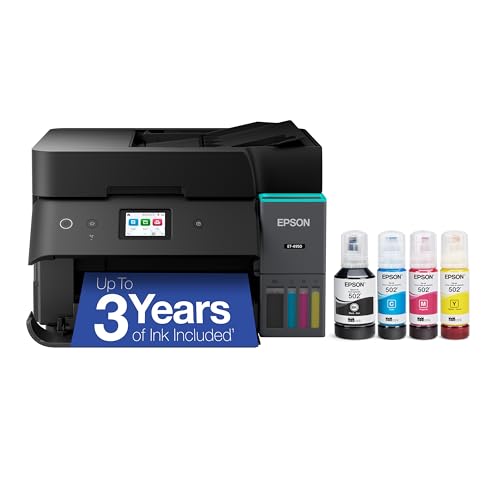
Epson EcoTank ET-4950 — The stated auto 2-sided tank
This is one of only two machines in the guide whose title actually says the words. The ET-4950 is a wireless colour all-in-one supertank in black with cartridge-free print, scan, copy and fax, a stated up to 18 ppm, an ADF and auto 2-sided printing, aimed at homes and small offices. For a buyer whose two-sided work is programmes, booklets, double-sided flyers and information cards on light-to-medium stock, that stated auto 2-sided line is the single most relevant phrase in any of these six titles — it names the exact mechanism this category is about.
Automatic duplexing, where the stock allows it, changes production economics completely. A programme run stops being two supervised passes with a drying interval and becomes a load-and-collect job; the maker’s hands move to finishing while the machine handles the turning. Paired with supertank refills, the running cost of two-sided everyday work drops to the point where drafts and proofs of a booklet can be printed at full size and judged honestly — a creative luxury that cartridge duplexers quietly discourage.
Now the discipline this guide applies to every pick: the title states auto 2-sided printing and states no weight limit for it. Heavy cover stock and a reversing duplex path are natural antagonists, so the correct reading is a split workflow — automatic duplexing for the paper and light card the documentation clears, manual single-side passes for the heavy pieces — with the manufacturer’s paper table deciding where the line falls. A buyer who respects that split gets a machine that is automatic where it should be and supervised where it must be, which is the most any honest duplex claim can offer a cardstock user.
The supporting cast strengthens the case: an ADF for the studio’s paperwork, fax for the supplier who still insists, and the briskest stated pace among the letter-format tanks in this guide at up to 18 ppm. On Amazon, this model’s listing is where a programme-and-booklet maker should spend their comparison time, reading the two-sided wording against the documentation before committing a print run to it.
Programme printing deserves a concrete picture. A school concert or a community ceremony needs eighty programmes by Friday: folded sheets, information on both faces, a cover image that cannot look tired. On the ET-4950, the inner pages duplex automatically on ordinary stock, the covers print in a supervised pass on heavier card, and the two streams meet at the folding table — a division of labour the machine’s split personality, automatic where allowed and manual where necessary, supports naturally. Sellers of printed programmes for local events build reliable small businesses on exactly that rhythm, and the supertank’s ink costs are what make the per-programme margin survivable.
- Ink system: cartridge-free supertank, per title
- Functions: print, scan, copy, fax, per title
- Two-sided printing: auto 2-sided, per title
- Feeder: ADF, per title
- Stated speed: up to 18 ppm, per title
- Duplex weight limit: Not stated in the listing title — verify with the manufacturer documentation
Strengths
- Auto 2-sided printing is stated outright, serving programmes and booklets directly.
- Supertank ink makes two-sided drafts and full-size proofs inexpensive.
- ADF and fax complete a small-office specification around the card work.
Trade-offs
- No duplex weight limit is stated, so heavy cover stays a manual-pass material.
- No wide-format capability is claimed for oversize two-sided pieces.
- The ADF serves scanning, not card printing — a distinction beginners often miss.
Best for: programmes, booklets and double-sided light-card work produced automatically and often. Not suited for: automatic duplexing of heavy cover stock, because the title states the feature without any weight clearance for it.

Canon MegaTank G3290 — The named duplex tank
The G3290 holds a small distinction in this guide: its title is the only one that uses the word duplex as a headline feature. Canon describes a MegaTank all-in-one wireless printer with print, copy and scan, mobile printing, a 2.7-inch LCD colour touchscreen, a refillable tank system and duplex printing, for home and office use. Set beside its G3270 sibling — same tank family, same three functions, no duplex wording anywhere — the G3290 shows exactly what one stated feature is worth, and why this guide reads titles like contracts.
Duplex printing joined to a refillable tank is a compelling pairing for two-sided everyday work. The mechanism removes the hand-flip labour; the tank removes the per-sheet cost anxiety; together they suit the steady middle of the category — double-sided handouts for a class or congregation, two-sided product and care cards on lighter stock, household booklets, the printed matter of a small organisation. The 2.7-inch colour touchscreen supports that walk-up, everyday character: jobs can be driven from the machine’s own screen in a shared space without a computer session for every copy.
The same honesty rule applies here as to the ET-4950, in identical measure: duplex is stated, a duplex weight limit is not. The manufacturer’s documentation decides which stocks may take the reversing turn, and heavy cover belongs on single passes until that documentation says otherwise in writing. A buyer who internalises that rule gets the best of the machine; a buyer who treats the word duplex as a blanket promise for every material in the craft drawer will eventually feed it a sheet that teaches the difference.
Against its sibling, the choice is cleanly binary: if two-sided printing is a weekly need, the G3290’s stated duplex and touchscreen justify choosing it over the G3270; if two sides are an occasional craft project, the sibling’s simpler proposition may serve as well for less commitment. Either way, the tank economics underneath are shared. On its Amazon page, the duplex wording and the touchscreen are the phrases to verify against your own two-sided workload.
The touchscreen deserves its own sentence of respect, because shared machines live or die by their walk-up manners. A grandparent printing a two-sided family newsletter, a teenager copying a worksheet, a partner reprinting a care card for a parcel — none of them wants a driver dialogue, and a 2.7-inch colour screen on the machine itself turns those jobs into taps rather than expeditions. For two-sided work specifically, settings chosen at the machine, in front of the loaded stock, reduce the classic error of sending a duplex job with single-sided expectations from a computer in another room.
- Ink system: refillable MegaTank tank system, per title
- Functions: print, copy, scan, per title
- Two-sided printing: duplex printing stated, per title
- Display: 2.7-inch LCD colour touchscreen, per title
- Extras named: mobile printing, per title
- Duplex weight limit: Not stated in the listing title — verify with the manufacturer documentation
Strengths
- Duplex printing is named in the title — the clearest two-sided claim in this guide.
- Refillable tanks keep automatic two-sided everyday work inexpensive to run.
- A colour touchscreen suits shared, walk-up use in homes and small offices.
Trade-offs
- No weight limit for the duplex path is stated, so heavy cover remains manual-pass work.
- Colour is general-purpose rather than photo-specialist for image-led cards.
- No sheet-size ceiling is given for planning oversize two-sided pieces.
Best for: households and small offices with weekly two-sided work on light-to-medium stock. Not suited for: feeding heavy cover through the duplex path on the title’s authority — it states duplex printing, not a duplex weight clearance.
Comparison
| Pick | Two-sided claim in title | Ink system | Functions in title | Duplex weight limit |
|---|---|---|---|---|
| HP OfficeJet Pro 9135e | Not stated in the listing title | Office inkjet | Print, scan, copy, fax | Not stated in the listing title |
| Canon MegaTank G3270 | Not stated in the listing title | Refillable MegaTank | Print, copy, scan | Not stated in the listing title |
| Epson EcoTank Photo ET-8550 | Not stated in the listing title | 6-color cartridge-free tank | Print, scan, copy | Not stated in the listing title |
| Canon PIXMA TR8620a | Not stated in the listing title | Home-office inkjet | Print, copy, scan, fax, ADF | Not stated in the listing title |
| Epson EcoTank ET-4950 | Auto 2-sided stated | Cartridge-free supertank | Print, scan, copy, fax, ADF | Not stated in the listing title |
| Canon MegaTank G3290 | Duplex printing stated | Refillable MegaTank | Print, copy, scan | Not stated in the listing title |
Two stated claims, four honest silences, and one universal gap in the final column. Sort your shortlist by the first column for automatic work, by ink system for manual work, and settle every heavy-stock question in the documentation column that no title fills.
Automatic or Manual: How to Choose Your Two-Sided Method
Let the stock decide first. If your two-sided pieces live on paper and light card — programmes, booklets, flyers, handouts — automatic duplexing is a genuine production feature, and the ET-4950 and G3290, whose titles state it, belong at the front of your shortlist, subject to the documentation’s weight table. If your pieces live on heavy cover — greeting cards, postcards, premium inserts — plan on the manual method regardless of machine, because the reversing turn and the drying interval both argue against automation at that weight, and choose instead by colour quality and ink economics.
Let volume decide second. Automatic duplexing repays its convenience across hundreds of sheets; across a dozen cards, the hand-flip method’s overhead is minutes. Occasional two-sided makers should not let a duplex badge outrank a better colour engine or cheaper ink for their main work. Let supervision decide third: a second side printed automatically is a second side trusted, and pieces whose backs must align precisely with their fronts — anything trimmed to a border — deserve the inspected, sheet-by-sheet control of manual passes until a test run proves a machine’s registration on your stock.
Whichever method you choose, prototype the whole object before committing materials: one complete piece, printed both sides, dried, trimmed and folded, judged in the hand. Two-sided work fails in the relationships between stages — a back aligned to an untrimmed front, a fold that cracks a heavy first side — and only a finished prototype exposes those relationships while they are still cheap to fix.
Paper grain is the connoisseur’s footnote that turns out to matter. Cardstock has a grain direction inherited from its manufacture, and a sheet folds cleanly along its grain and reluctantly across it; a two-sided card that will be folded — which is most greeting cards — should have its grain running parallel to the fold, a property decided when the stock is bought and oriented when it is loaded. Two-sided printing interacts with grain in a subtler way as well: the second pass’s heat-free but pressure-full journey can emphasise a curl that grain and moisture set up between them. Makers who note grain direction in their stock notebook, beside the verified settings for each pairing, stop being surprised by folds that crack on one batch and behave on another cut from a differently oriented sheet.
How Do You Keep Front and Back Registered to the Same Edges?
Registration begins in the file: design front and back on identically sized pages, with the back’s layout mirrored according to the flip your printer performs — long-edge flips mirror one way, short-edge flips another — and include trim marks on both sides so misalignment has nowhere to hide. Print a single test piece on plain paper, hold it to a window, and read the offset between the two sides directly; light through the sheet is the oldest registration gauge in printing and still the clearest.
Then correct in small moves. Nudge the back’s layout by the measured offset rather than by guesswork, keep the paper stack squared and consistent in the tray so every sheet starts from the same place, and re-test. Makers who record the nudge beside the design file never solve the same alignment twice. For trimmed pieces, the forgiving alternative is designing backs without critical edge alignment — a centred motif tolerates a millimetre of wander that a full-bleed border will advertise to everyone.
Why Does the First Side Need Drying Time Before the Second Pass?
Because a printed surface is not finished when it looks dry. Ink on cardstock dries from the surface down, and a sheet that feels dry can still transfer under pressure or friction — exactly what a second pass applies, as the sheet is gripped, transported and stacked. The visible results are set-off marks on the facing surface and a faint ghost of the design where it should not be, appearing only after the run is complete and the materials are spent.
The discipline is cheap: fan finished first sides on a clean surface, give heavy coverage generous time, and interleave with plain paper if sheets must be stacked before their second pass. Matte and uncoated stocks forgive faster than glossy coated ones, and warm, dry rooms forgive faster than cold damp ones — variables a maker learns for their own space across a few sessions and then builds into the schedule as a matter of routine.
What Causes Show-Through, and How Do You Design Around It?
Show-through is the first side’s design shadowing through the sheet when the second side is viewed, and it is governed by the sheet’s opacity and the design’s appetite. Heavy cover stock is naturally more opaque than light card, which is one reason premium two-sided work gravitates to it — but a saturated, full-bleed photograph on side one can still haunt a pale, text-led side two on anything but the most opaque sheet.
Design is the practical remedy. Keep the second side’s background forgiving where the first side is darkest, avoid placing fine text over the region where a dark image sits behind it, and where a piece must carry heavy art on both faces, choose the most opaque stock your machine’s documentation clears. A single proof held up to ordinary room light settles the question for a given pairing — another entry in the long list of two-sided lessons that cost one sheet to learn and a whole run to ignore.
How Should a Two-Sided Run Be Sequenced Across a Working Day?
Sequence is the invisible craft in two-sided production. Print all first sides in the morning, while the day’s other work happens around the drying sheets; the interval that heavy coverage demands stops being dead time when it is scheduled rather than suffered. Handle the rested stack once, flip it as a single squared block according to your tested routine, and print second sides in one continuous pass, inspecting the first three sheets against the light before letting the run proceed unattended.
Finishing belongs to a separate block again, ideally after the second sides have rested as the first ones did, because trimming and folding are the stages where marginal dryness announces itself as cracked folds and marked faces. Makers who build the day this way — print, rest, print, rest, finish — find that two-sided work stops feeling precarious. The method is not slower in any way that matters; it simply moves the waiting to where the schedule can absorb it, and it converts a fussy process into a rhythm a small studio can repeat on demand.
Which Card Designs Forgive Two-Sided Printing, and Which Expose It?
Forgiving designs share a trait: they keep their critical elements away from the sheet’s edges and from each other. A centred front motif, a text block that floats in generous margins, a back that carries a pattern or a pale wash rather than a precise border — these absorb the small wander that any feed mechanism, automatic or manual, will eventually produce, and they look intentional at every tolerance the machine can deliver. Forgiving design is not timid design; it is design that knows its manufacturing process.
Exposing designs are the mirror image: full-bleed borders that must align front to back, rules and frames that sit a hair from the trim, dark art on one face behind fine text on the other. Such pieces can be made — print professionals make them daily — but they demand tested registration, opaque stock, and a willingness to sacrifice sheets to the tolerance gods. A maker choosing a design language for a whole product line should prototype the exposing version honestly, count its waste rate, and then decide whether the look is worth its tuition, rather than discovering the rate across a season of orders.
Envelopes and presentation complete the discipline. A two-sided card that survived printing, drying, registration and trimming can still be marked in its final minute by a tight envelope, a rough stack or a rubber band, and sellers who interleave finished cards with plain sheets for storage are applying the same set-off lesson one last time. It is fitting that a category obsessed with the second side ends with protection for both: the work is only finished when the recipient opens it, and every stage between the printer and that moment is either preserving the two printed faces or gambling with them.
Common Mistakes
Assuming a duplex feature that the title never stated leads this category’s regrets. Four of these six machines are silent on two-sided printing, and a project planned around an assumed mechanism collapses into improvisation on deadline day. Read the title, then the documentation, and let the manual method be the default plan until an automatic one is confirmed in writing.
Feeding heavy cover through a reversing duplex path, on the strength of the word duplex alone, follows closely. The feature describes a mechanism, not a material clearance; the weight table decides which stocks may take the turn, and a stiff sheet forced through it can jam, scuff or emerge with its first side marked by the journey. Skipping the drying interval between sides is the third recurring error, paid for in set-off marks discovered after the run. Finally, trimming before checking registration wastes finished pieces: one untrimmed proof, held to the light, protects every sheet that follows it.
Final Recommendation
If your two-sided work is programmes, booklets and light-card pieces in real volume, begin with the Canon MegaTank G3290 and the Epson EcoTank ET-4950 — the two titles that state two-sided printing — and let each maker’s weight table confirm your stock. If your work is heavy cards and photographic pieces, choose by colour and ink instead: the ET-8550 for six-colour passes at width, the G3270 for economical manual flipping at a small desk, the TR8620a where the surrounding paperwork is heavy, and the HP 9135e where an office’s documents dominate and card work visits occasionally.
Two-sided printing rewards the maker who treats the second side as a second job — planned, dried, registered and checked. Choose the machine that supports the method your stock demands, and the backs of your cards will look as intentional as their fronts.
Finally, keep the two sides’ ambitions balanced when you design. A common beginner pattern is a lavish front and an apologetic back — a whisper of text floating in white space that reads as an afterthought rather than a design. Recipients turn cards over; the back is half the object and it should be composed like half the object, with its own margins, hierarchy and breathing room. The machines in this guide will print whatever balance you design; the discipline of making the second side worthy of the flip is a design habit, not a hardware feature, and it separates card lines that look manufactured from those that look homemade faster than any specification difference between these six printers.
Frequently Asked Questions
Which of these printers actually duplex automatically?
Two titles say so directly: the Canon MegaTank G3290 states duplex printing and the Epson EcoTank ET-4950 states auto 2-sided printing. The other four titles are silent on two-sided printing, so their automatic capability must be confirmed in documentation rather than assumed.
Can I duplex heavy cardstock on the two stated duplex models?
Only within the weight limits their manufacturers publish for the duplex path, which the titles do not state. Heavy cover is safest printed one side at a time with a manual flip, whatever the machine offers for lighter stock.
Is manual two-sided printing much slower?
For card-sized batches, less than expected: the overhead is the flip and the drying interval, both of which heavy stock benefits from anyway. Automatic duplexing’s advantage compounds on long runs of light stock, not on dozens of cards.
How do I stop the back printing upside down?
Run one marked test sheet — a numbered corner and an arrow — through your exact flip routine and note the result above the machine. Long-edge and short-edge flips produce different orientations, and one tested note ends the guesswork permanently.
Will the first side show through on cardstock?
Heavy cover is relatively opaque, but a saturated first side can still shadow a pale second side. Proof one piece against ordinary light, and design the second side’s layout to keep fine text away from the darkest regions of the first.
Do I need special cardstock for two-sided printing?
Stock coated or finished for inkjet on both faces behaves most predictably, since some craft papers are finished for a single printable side. The stock’s packaging and the printer’s media documentation together decide suitability for your pairing.
Related Guides
- Best printers for printing 110 cardstock — heavy stock, verified the honest way
- Best printers to print color on cardstock — when both sides carry colour
- Best printers for Chromebook — simple wireless printing for the other desk in the house


