What's inside
- Key Takeaways
- Quick Picks
- How We Chose These Picks
- Why Does the Roof Suit a Radiator Better Than the Front?
- 360mm or 420mm — How Much Radiator Does the Roof Need?
- The Six Roofs, Inspected Individually
- How Do You Fit a Top Radiator Without Fouling the Board Below?
- AIO or Custom Loop — Which Belongs at the Roof?
- How Should the Rest of the Fan Plan Support a Roof Radiator?
- What Maintenance Does a Roof Radiator Ask For?
- Which Builders Should Not Mount at the Top at All?
- Positions in Print — the Field Compared
- Where Do Top-Mount Shoppers Most Often Trip?
- Final Recommendation
- Frequently Asked Questions
- Related Guides
As an Amazon Associate I earn from qualifying purchases. This post may contain affiliate links at no extra cost to you.
widgetverdict.com is reader-supported. When you buy through links on our site, we may earn an affiliate commission.
Where to buy: a radiator claim is only as good as its stated position, so each listing below is linked with its wording preserved — four picks name the top of the case in their titles, and two state a radiator size without pinning it to the roof, a distinction their sections record rather than repair.
The best top-mount radiator pc cases serve a specific conviction about how a liquid-cooled PC should breathe: the processor’s heat, captured in coolant, should leave through the roof. Hot air rises, the top panel is the one face of the case with nothing above it, and a radiator mounted there exhausts along the path physics already prefers — while the front intake stays free to feed the graphics card with cool room air instead of pre-warmed radiator exhaust. It is the classic liquid layout, and this guide exists for builders who want it verified rather than assumed.
Verification is the operative word, because “supports a 360mm radiator” and “supports a 360mm radiator on top” are different promises, and case titles make both kinds. Four of the six picks here pin the position down in print: the MONTECH AIR 903 MAX names top and front 360mm radiators, the Okinos case states a 360mm radiator on top in so many words, the NZXT H9 Flow claims 420mm support at the top and front, and the darkFlash-adjacent dual-chamber HAVN HS 420 publishes three 420mm radiator positions’ worth of support — though its title counts the positions without naming the roof specifically, a nuance its section handles carefully. The remaining two picks, the MONTECH HS01 and the DARKROCK Classico Max, state a 360mm radiator figure without a position, and this guide credits them with exactly that — a size, location to be confirmed — rather than promoting them into roof-mount claims they never made.
Why does the distinction deserve a whole guide’s discipline? Because the top-mount buyer usually has a reason rooted in their room or their build: a case that lives under a desk lip, a front panel reserved for intake fans, a graphics card that needs every degree the front can give. A case whose 360mm support turns out to live only at the front defeats that reason entirely, and the return shipping on a mid-tower is nobody’s idea of a good afternoon. Read positions, not just sizes — the titles here reward it, and the two that stay silent are labelled so the silence can be resolved at the manufacturer’s page before money moves.
Key Takeaways
- Four picks state top mounting in their titles: the AIR 903 MAX (top/front 360mm), the Okinos (360mm on top), the H9 Flow (420mm top), and — by position count rather than by naming the roof — the HAVN HS 420’s triple 420mm support.
- The MONTECH HS01 and DARKROCK Classico Max state a 360mm radiator size without a position in their titles; their sections record that gap instead of assuming the roof.
- 420mm top support, claimed by the H9 Flow, is the largest roof figure in the guide and suits the biggest AIO coolers in current lineups.
- The Okinos pairs its stated top 360mm support with a genuine walnut wood front and four pre-installed PWM fans.
- Top mounting keeps the front intake feeding the graphics card with unheated air — the layout’s core thermal argument.
Quick Picks
| Pick | Badge | Why it earns its place |
|---|---|---|
| MONTECH AIR 903 MAX | Top stated, airflow led | An E-ATX high-airflow mid-tower with top and front 360mm radiator support in the title, four fans, and 400mm of card room. |
| Okinos Walnut Wood PC Case (Top 360mm Radiator) | Top stated, walnut finished | 360mm radiator support on top, stated outright, with four pre-installed 120mm PWM fans and a magnetic tempered glass panel. |
| NZXT H9 Flow Dual-Chamber ATX Case (Black) | The 420mm roof | 420mm radiator support at the top and front, four included fans, and wraparound tempered glass in a dual-chamber flagship. |
| HAVN HS 420 Dual-Chamber Mid Tower Case (Black) | Triple 420mm support | Eleven 140mm fan slots and three 420mm radiator positions in a hybrid dual-chamber design with a PWM fan hub. |
| MONTECH HS01 High Airflow ATX Case | 360mm stated, position open | A reversible, back-connect airflow case with 420mm card support and 360mm radiator support whose title leaves the position to be confirmed. |
| DARKROCK Classico Max Storage Master E-ATX Case | Storage with a 360mm figure | An E-ATX storage tower with ten 3.5-inch bays, four fitted fans, and 360mm radiator support whose title does not name its position. |
How We Chose These Picks
The governing rule was positional evidence. A pick could be described as top-mount only where its listing title places a radiator at the top — by the words “on Top,” by a “top/front” pairing, or by a top figure stated alongside the front. Everything else was recorded as size-without-position, in the pick’s own spec-box wording, with the manufacturer’s documentation named as the place to resolve it. That rule split the field four-and-two, and the guide’s structure keeps the split visible from the first table to the last FAQ.
Secondary filters were the usual evidences: fan counts as fitted, card clearances where stated, board classes, and the spread of buyers served. The six survivors cover a high-airflow E-ATX tower, a walnut-fronted mid-tower, two dual-chamber flagships with 420mm ambitions, a reversible airflow design, and a storage tower — a range wide enough that the top-mount requirement, once verified, still leaves a real choice about what kind of machine the radiator will cool.
One judgement deserves stating: the two position-silent picks were kept rather than cut, because their 360mm figures are real and their other virtues — the HS01’s reversible back-connect design, the Classico Max’s storage wall — serve this category’s buyers legitimately. What they are not given is the roof. A guide that quietly upgraded their claims would be more convenient and less true, and in a category defined by one preposition, truth is the entire product.
Why Does the Roof Suit a Radiator Better Than the Front?
The front-mount’s flaw is hospitality: a radiator at the front warms the intake air before that air reaches the graphics card, so the processor’s cooling is partly paid for by the card’s temperatures. In many builds the exchange is acceptable, and front mounting remains a legitimate layout. But the builder with a hot card and a hard-working processor is spending the same air twice, and the top mount is how that builder stops. The front returns to pure intake duty — cool room air, straight to the card — while the processor’s heat leaves through the roof on the convection current’s own route.
The roof has secondary virtues that compound. Radiator fans at the top exhaust upward into the room’s least occupied airspace, away from the desk surface and the owner’s hands. Tubing runs from a top radiator to the processor are typically short and gravity-tidy. And the layout photographs the way builders expect a liquid PC to look, which is not nothing in cases — the H9 Flow and HS 420 among them — designed around glass.
The roof’s demands are equally real. The case needs vertical clearance above it, so a desk lip or a shelf can veto the whole strategy; the radiator’s fans become the machine’s most audible surface from some seats, since the top panel faces the room’s open air; and memory or motherboard heatsink clearance beneath a thick top radiator is a measurement, not an assumption. The top-mount conviction, held honestly, includes checking the space above the case with the same care as the space inside it.
360mm or 420mm — How Much Radiator Does the Roof Need?
The size question is really a fan question in disguise: a 360mm radiator carries three 120mm fans, a 420mm carries three 140mm fans, and the larger format moves its air a little more calmly at the same cooling duty. For the great majority of gaming and workstation processors, the 360mm class — the figure stated by the AIR 903 MAX, the Okinos, and in size-only form by the HS01 and Classico Max — is the established, sufficient answer, with the widest choice of AIO coolers and the easiest fitment story.
The 420mm class, claimed at the top by the H9 Flow and across three positions by the HS 420, serves the top of the processor range and the builders who value fan calm over parts-bin simplicity. Its AIO selection is narrower and its case demands are stricter, but in a dual-chamber flagship built to be looked at, a 420mm roof radiator also fills the visual field the design intends. Choose 420mm for thermal headroom you can name — a flagship processor, a hot room, a silence target — rather than for the number’s prestige, because the prestige does not cool anything.
Either way, the position check precedes the size check in this guide’s discipline. A verified top 360mm serves the top-mount buyer better than an unverified 420mm whose roof position lives in a forum post. The titles that state their positions have done the buyer a service worth rewarding with attention, in the order the service was rendered: position first, size second, everything else after.
The Six Roofs, Inspected Individually

MONTECH AIR 903 MAX — Top stated, airflow led
The AIR 903 MAX states its credentials in the order this guide wishes every case would: a high-airflow E-ATX mid-tower, four fans, 400mm of graphics card room, and top and front 360mm radiators — position and size together, in the title, unambiguous. A top-mount buyer can plan from that sentence alone: the AIO goes to the roof, the front’s four-fan airflow story feeds the card, and the 400mm clearance means the card in question can be a flagship without a measuring incident.
The supporting details keep the airflow-led character consistent. Tempered glass shows the build, USB-C fronts the connectivity alongside two USB 3.0 ports, vertical GPU mounting is ready for owners who want the card presented, and dust filters plus stated cable space acknowledge that a high-airflow case is a dust-management commitment. MONTECH has built its reputation on giving airflow buyers complete specifications at accessible positions in the range, and this listing is that reputation in one title: everything a planner needs, nothing a planner must excuse.
Its ceiling is the 360mm class — builders committed to a 420mm roof should read the NZXT and HAVN sections next — and its high-airflow openness means the fans’ voice is part of the room, as with every mesh-led design. Within its class, though, the AIR 903 MAX is the guide’s benchmark for how a top-mount claim should be published: position first, in print, where a buyer can find it in five seconds.
- Radiator positions, as the title words them: top and front 360mm radiators
- Board class named in the title: E-ATX mid-tower
- Graphics card room named in the title: 400mm
- Fans named in the title: four fans
- Provisions named in the title: tempered glass, USB-C, vertical GPU mount ready, dust filters, cable space, two USB 3.0 ports
- Airflow character, as the title words it: high-airflow
Strengths
- The top position is stated in the title alongside the front — the exact evidence this category turns on.
- 400mm of card clearance pairs the roof plan with flagship graphics room.
- Four fitted fans and dust filters make the high-airflow design complete and maintainable at purchase.
Trade-offs
- Radiator support tops out at the 360mm class; 420mm ambitions belong to the dual-chamber flagships below.
- High-airflow openness passes fan sound to the room untreated.
- E-ATX depth in a mid-tower still asks the builder to route cables with care around large boards.
Best for: a top-mount AIO build on an E-ATX or ATX platform that wants its positions guaranteed by the listing and its card room generous. Not suited for: a 420mm radiator plan, because this title’s stated ceiling is 360mm at both positions it names.

Okinos Walnut Wood PC Case (Top 360mm Radiator) — Top stated, walnut finished
The Okinos listing — the case is the Cypress 7 — makes its top-mount promise with the plainest grammar in the guide: “Support 360mm Radiator on Top.” No pairing, no ambiguity, the roof named as the radiator’s home. Around that promise it assembles a design-led specification: a genuine walnut wood front, four pre-installed 120mm PWM fans, an ATX platform, a Type-C port, and a magnetic tempered glass side panel. It is the top-mount pick for the builder whose living room has opinions.
The magnetic glass panel deserves its sentence, because radiator ownership is maintenance ownership: coolant checks, dust patrols, and the occasional fan replacement all begin with opening the case, and a panel that lifts away magnetically turns that ritual from a screw hunt into a gesture. Four fitted PWM fans give the front intake its working population from day one, leaving the roof free for the AIO the title promises — the division of labour this category exists to describe, pre-assembled.
Okinos is a smaller name than the giants elsewhere in this guide, and the title’s generosity has limits: no card-length figure is published there, so a long flagship card should be measured against the maker’s dimensions before the order. The walnut, like all real wood finishes, also asks for furniture’s courtesies. Neither point dims the central fact: among design-led cases, very few state their radiator’s position as plainly as this one does, and in this category plain speech is the luxury feature.
- Radiator position, as the title words it: 360mm radiator supported on top
- Front material named in the title: genuine walnut wood
- Fans named in the title: four pre-installed 120mm PWM fans
- Panel named in the title: magnetic tempered glass side panel
- Connectivity named in the title: Type-C port
- Model name given in the title: Cypress 7
- Graphics card room: Okinos’ title publishes no card-length ceiling for this case, so verify a long card against the manufacturer’s dimensions before ordering
Strengths
- The top position is stated in the title’s plainest possible words — no interpretation required.
- Walnut and magnetic glass make it the design-led pick that still respects maintenance.
- Four fitted PWM fans complete the intake side of the top-mount division of labour.
Trade-offs
- Card clearance is unpublished in the title, adding a measurement step for flagship cards.
- A smaller brand means a thinner community trail of build reports to consult.
- Real walnut asks for gentler treatment than steel or plastic fronts.
Best for: a design-conscious ATX build that wants its top 360mm radiator promised in print and its front panel in walnut. Not suited for: a buyer fitting an exceptionally long graphics card on the title’s evidence alone, because the ceiling for cards lives in the maker’s documentation, not the listing.

NZXT H9 Flow Dual-Chamber ATX Case (Black) — The 420mm roof
The H9 Flow carries the guide’s largest stated roof: 420mm radiator support at the top and front, printed in a title that also promises a dual-chamber ATX flagship with four included fans and wraparound tempered glass. For the top-mount buyer with a flagship processor, this is the headline pick — the biggest AIO class, at the position this category exists to verify, inside NZXT’s panoramic dual-chamber architecture.
The dual-chamber layout serves the roof strategy directly. The power supply and its cabling live behind the partition, so the main hall — the space the wraparound glass displays — is given over to the board, the card, and the radiator’s presentation. Four included fans populate the intake story, and the front’s matching 420mm support gives the builder a genuine choice of radiator home, even if this guide’s readers will exercise it at the top. NZXT calls the H9 its dual-chamber flagship, and the specification reads like one: nothing in the title is a compromise being disguised.
Flagship terms apply. A wraparound glass case is a permanent exhibition with the cable duties that implies, a 420mm AIO is a narrower and pricier shelf than the 360mm class, and a dual-chamber flagship claims desk territory like the furniture it aspires to be. Buyers whose processor does not need the 420mm class should notice that the AIR 903 MAX states its top position just as clearly at 360mm — the H9’s premium buys size and spectacle, and it is most rationally bought by owners who will use both.
- Radiator positions, as the title words them: 420mm top and front radiator support
- Layout named in the title: dual-chamber ATX flagship
- Fans named in the title: four included fans
- Panels named in the title: wraparound tempered glass
- Finish named in the title: black
- Card clearance: NZXT’s title for the H9 Flow does not print a graphics card length, so flagship-card plans should be checked against the manufacturer’s specification
Strengths
- 420mm at the top is the largest stated roof figure in the guide, with the front matched for flexibility.
- The dual-chamber layout keeps the panoramic hall clear for the build the glass exists to show.
- Four included fans start the airflow story at flagship scale without a second order.
Trade-offs
- 420mm AIO coolers are a narrower, costlier class than the universal 360mm shelf.
- Wraparound glass makes cable discipline a permanent condition, not a build-day event.
- Card clearance is not printed in the title, so the longest cards need a documentation check.
Best for: a flagship processor build that wants the largest stated top radiator in the guide inside a panoramic dual-chamber showcase. Not suited for: a compact desk or a budget-governed build, because a dual-chamber flagship spends on scale and glass that smaller plans cannot use.

HAVN HS 420 Dual-Chamber Mid Tower Case (Black) — Triple 420mm support
The HS 420’s title is a capacity statement: a dual-chamber mid tower of hybrid design with eleven 140mm fan slots, three 420mm radiator positions, SimpliCable cable management, tempered glass, and a PWM fan hub. Three 420mm positions is the most radiator geography in this guide — a case that can carry the largest AIO class at the roof and still have flagship positions to spare — and the eleven fan slots describe an airflow ceiling to match.
Precision matters here, and this guide will practise it on its own favourite numbers: the title counts three 420mm radiator positions without naming which faces they occupy. A dual-chamber tower of this design conventionally offers the roof among its positions, and the case’s name for the HS 420 line supports that reading — but the title itself does not print the word “top,” so this guide credits the HS 420 with triple 420mm support and directs roof-specific planners to HAVN’s layout documentation for the positional confirmation, exactly as it treats the two 360mm picks below. Capacity is certain; the roof’s share of it is documented elsewhere.
What is certain is substantial. The SimpliCable system addresses the dual-chamber showcase’s standing problem — cable mass — as a designed feature, the PWM hub governs the fan population the eleven slots invite, and the hybrid design language gives the glass a structured interior to display. Buyers who confirm the roof position at the source get arguably the most capable radiator platform in this guide; buyers who need the roof promised by the listing itself should take the H9 Flow’s printed word for it.
- Radiator support, as the title words it: three 420mm radiator positions
- Position wording: HAVN’s title tallies the 420mm positions without labelling the roof among them, so a strictly top-mounted plan should be confirmed against the maker’s layout drawings
- Fan capacity named in the title: eleven 140mm fan slots
- Layout named in the title: dual-chamber mid tower, hybrid design
- Cable provision named in the title: SimpliCable cable management
- Control hardware named in the title: PWM fan hub
Strengths
- Three 420mm positions give a liquid plan more flagship geography than any other pick here.
- Eleven 140mm fan slots set an airflow ceiling matched to the radiator ambition.
- A named cable-management system and a fan hub govern the complexity the capacity creates.
Trade-offs
- The title does not name the top among its positions, so roof planners carry one verification step.
- Capacity at this scale is wasted on a single modest AIO — the case earns its keep in ambitious loops.
- Eleven fan slots are an invitation with a price tag; the fitted population is the owner’s to fund.
Best for: a liquid-cooling enthusiast planning around 420mm-class radiators who will confirm the roof position in HAVN’s documentation and then exploit the capacity fully. In total the title promises three 420mm radiator mounts, yet which of them sits in the roof goes unmapped, leaving that confirmation to HAVN’s manual.
MONTECH HS01 High Airflow ATX Case — 360mm stated, position open
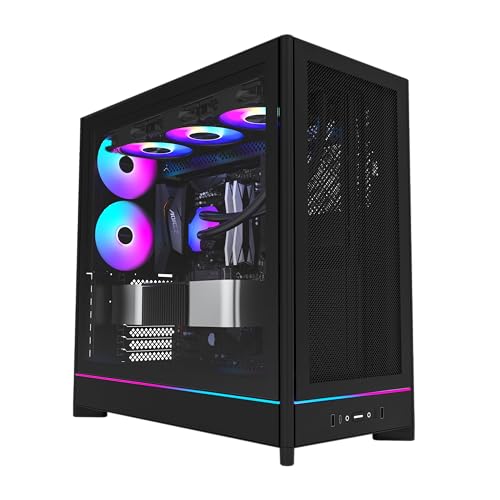
The HS01 is the guide’s exercise in reading a title to its exact end. MONTECH states a high-airflow ATX case, reversible, with back-connect support, 420mm of graphics card room, 360mm radiator support, USB-C, chimney airflow, tool-free panels, and vertical GPU mount support. Every figure there is usable — except that the radiator’s figure arrives without an address. The 360mm support is real; its position is not printed, and so this pick is presented as what its title proves: a 360mm-capable airflow case whose roof must be confirmed before a top-mount plan is built on it.
Stripped of the roof question, the remaining proposition is strong. Chimney airflow — the design’s own phrase — describes a bottom-to-top air path that is philosophically adjacent to this whole category: heat encouraged upward, out of the case’s crown. The reversible layout and back-connect support make the HS01 one of the most configurable designs here, tool-free panels make its maintenance painless, and 420mm of card room is the joint-largest clearance figure in the guide. A buyer whose radiator ends up at the front or the roof alike gets a case engineered around rising air.
The guidance is therefore procedural. Open MONTECH’s documentation, find the radiator map, and let it decide which section of this guide the HS01 belongs to for your build. If the roof carries the 360mm, this becomes one of the most flexible top-mount picks available; if it does not, the case remains an excellent airflow design that a top-mount purist should pass by without rancour. Either way, the title told you the truth — it simply declined to tell you all of it.
- Radiator support, as the title words it: 360mm radiator support
- Position wording: MONTECH’s title for the HS01 gives the radiator’s size without assigning it a face of the case, so the top-mount question must be settled in the manufacturer’s documentation
- Airflow design named in the title: chimney airflow, high airflow
- Graphics card support named in the title: 420mm
- Layout named in the title: reversible, back-connect support, tool-free panels
- Connectivity named in the title: USB-C, with vertical GPU mount support
Strengths
- Chimney airflow aligns the whole case’s breathing with the upward path this category prizes.
- 420mm of card room matches the guide’s best clearance figures.
- Reversible layout and tool-free panels make it the most reconfigurable pick here.
Trade-offs
- The radiator’s position is unstated in the title — the one fact a top-mount buyer cannot proceed without.
- Reversibility means the final layout is the owner’s configuration work, not a factory posture.
- Its PRO sibling elsewhere in this batch states more figures; this listing asks for a documentation visit.
Best for: a flexible airflow build around a 360mm radiator in either position, by an owner happy to confirm the radiator map before committing to the roof. Not suited for: a strict top-mount plan that must be validated from the listing alone, because this title publishes the size and leaves the position to the manual.

DARKROCK Classico Max Storage Master E-ATX Case — Storage with a 360mm figure
The Classico Max closes the guide with the second size-without-position listing, wrapped around a storage tower’s considerable virtues. Its title counts four fitted 120mm fans, ten 3.5-inch hard drive mounts and three 2.5-inch SSD mounts, USB 3.0 readiness, 360mm radiator support, and vertical slots for vertical GPU mounting — inside an E-ATX computer case. The radiator figure is stated; its face of the case is not, and the same discipline applied to the HS01 applies here: a top-mount planner confirms the position in DARKROCK’s documentation before the loop is designed around the roof.
The storage mission is the reason this case exists, and it is a serious one: thirteen drive mounts in an E-ATX tower describe a home archive, a media vault, or a workstation’s project library, with the radiator — wherever it mounts — cooling a processor that serves that library. Four fitted fans give the drive wall its starting airflow, and the vertical GPU slots add an unexpected presentational option for a case whose heart is capacity. Buyers whose build is storage-led and liquid-cooled will find few cases speaking to both halves of the brief at all.
Expectations should be set by the title’s own emphases. This is the Max sibling of the Classico line, sized and priced by its bays; the radiator is a supporting feature in a storage design, and its unstated position is one more sign of where the maker’s attention lives. Storage-first builders who verify the radiator map get a uniquely capacious home for a cooled server; roof-first builders have four stated-position picks above to choose from, and this guide recommends they do exactly that.
- Radiator support, as the title words it: 360mm radiator supported
- Position wording: DARKROCK’s title for the Classico Max names the radiator’s size and no mounting face, so a roof plan needs the position confirmed in the manufacturer’s documentation
- Drive capacity named in the title: ten 3.5-inch HDD and three 2.5-inch SSD mounts
- Fans named in the title: four 120mm black fans
- Board class named in the title: E-ATX
- Graphics provision named in the title: vertical slots for vertical GPU mounting
Strengths
- Thirteen drive mounts give a cooled storage build a capacity no other pick here approaches.
- E-ATX room suits the server-class boards that storage builds often adopt.
- Four fitted fans start the drive wall’s airflow without a second purchase.
Trade-offs
- The radiator’s position is unstated in the title, so the top-mount plan begins with homework.
- Drive density generates its own heat community that the cooling plan must manage alongside the loop.
- Its volume and purpose are storage-led; a pure gaming build carries bays it will never fill.
Best for: a storage-heavy E-ATX build that also runs a 360mm-class liquid loop, with the radiator’s position verified before the plumbing is planned. Not suited for: a roof-or-nothing top-mount purist shopping from titles alone, because this listing states the radiator’s size and leaves its address to the documentation.
How Do You Fit a Top Radiator Without Fouling the Board Below?
Measure the stack before anything is ordered twice. A radiator and its fans form a slab of a combined depth, and beneath that slab live the motherboard’s top edge, its heatsinks, the memory’s taller heatspreaders, and the processor’s power cables arriving from behind. Case documentation publishes an offset or a clearance for exactly this sandwich; the builder’s job is to add their specific cooler’s slab depth to their specific board’s furniture height and confirm the sum fits the published space. Every top-mount disappointment in the forums is this addition performed after delivery instead of before.
Sequence the installation to keep the tight work easy. Fit the motherboard first, route the processor’s power cables through their top-edge path while the roof is still empty, and only then offer the radiator up. Mount the fans to the radiator on the bench, not in the case, and decide the exhaust direction before the assembly goes in — top radiators in this guide’s philosophy exhaust upward, and a fan set installed in haste has a way of arguing otherwise. Connect the fan and pump leads while the radiator is held, not hung, because the headers they seek live in the sandwich’s least accessible corner.
Commission with the panels off and a torch in hand. The first heat cycle is when a top loop proves its fittings and its clearances together: watch for the tube that kisses a fan blade’s arc, the cable that migrated into the radiator’s shadow, the memory stick running warm in the exhaust’s path. Ten attentive minutes at this stage are the difference between a roof that works for five years and a roof that is reopened monthly.
AIO or Custom Loop — Which Belongs at the Roof?
The all-in-one cooler is this category’s default citizen, and the titles reflect it: the stated positions and sizes map directly onto the AIO market’s standard classes, 360mm and 420mm. An AIO arrives sealed, its pump and block integrated, its tubing pre-fitted — the roof’s job is simply to receive it. For the overwhelming majority of top-mount builds, including every gaming build and most workstations, the AIO is the correct answer, and the guide’s picks were chosen with AIO dimensions as the planning unit.
The custom loop earns the roof when the graphics card joins the processor in the circuit — at which point the radiator’s duty doubles and the position’s virtues compound, because a shared loop exhausting through the roof removes both components’ heat along one path. Custom builders should read the HS 420’s triple-position capacity and the H9 Flow’s dual 420mm positions as the field’s serious invitations, while remembering that fittings, tubing runs, and reservoir placement are a design discipline of their own, beyond any title’s power to summarise. The roof does not care which species of loop it carries; the builder’s experience decides, and honesty about that experience is the cheapest component in either build.
How Should the Rest of the Fan Plan Support a Roof Radiator?
A top radiator converts the case’s fan plan into a supply chain: the roof’s fans can only exhaust air that the intakes have delivered, and a starved roof is a loud roof, because its fans spin against resistance to move their rated air. The front intake is therefore the top-mount build’s silent partner — generously fanned, filtered, and unobstructed — and the picks that arrive with four fitted fans, the AIR 903 MAX, Okinos, and H9 Flow among them, have effectively pre-funded the partnership. Builders adding fans should spend them at the front before anywhere else.
Pressure balance is the second consideration, and it deserves plain language. A case exhausting more than it intakes pulls air — and dust — through every unfiltered seam; a case intaking more than it exhausts keeps its interior slightly pressurised and its dust arriving only through the filters. Top-radiator builds lean naturally toward the exhaust-heavy side, so the intake population should be sized to stay ahead of the roof. The HS 420’s eleven slots and the governed hubs in this field exist for owners who intend to tune that balance deliberately rather than discover it in a dusty quarter.
Curves finish the system. The roof’s fans should answer the coolant’s or the processor’s temperature, the intakes should answer the card’s, and neither should be slaved to the other’s sensor, because the two heat sources peak on different schedules. Set that way, a top-mount build idles with its roof nearly still and its front lazier still — and under a gaming load the card breathes first and the roof disposes, each in its own voice, neither shouting over the other.
What Maintenance Does a Roof Radiator Ask For?
A top radiator collects the interior’s rising dust on its underside and the room’s settling dust on its top, which makes it the one component dusted from two directions. The rhythm that serves it is short and calendar-based: the top panel’s filter or mesh brushed monthly in a working machine, the radiator’s fins inspected quarterly, and the whole loop’s fittings given an annual once-over with the machine at working temperature. None of this is burdensome; all of it is skippable in a way that compounds quietly, because a dust-matted radiator does not fail — it merely raises every temperature in the build by degrees that fan curves then chase audibly.
Access decides whether the rhythm survives contact with real life. Cases whose top panels lift or slide without a screw ceremony get cleaned; cases that require a teardown get postponed. The magnetic glass of the Okinos addresses its side rather than its roof, but the principle generalises across this field: judge a top-mount case partly by how its roof opens, because the owner you are buying for is yourself in six months, holding a brush, deciding whether today is the day. Buy the case that makes today easy.
Which Builders Should Not Mount at the Top at All?
Honesty about the roof includes naming its refusals. The builder whose case lives inside a desk cabinet or beneath a low shelf has no exhaust sky, and a front radiator in open air will outperform a roof radiator suffocating against joinery. The builder running an air cooler — a large share of all builders — has no radiator to mount, and for them this category’s titles are a map of a country they may visit later; the AIR 903 MAX and HS01 serve them today as airflow cases whose roof option stays in reserve. And the builder whose room is a bedroom and whose ears are light sleepers should weigh the roof’s exposed fans against a front position’s muffling with genuine care, because the category’s thermal winner can be the household’s acoustic loser.
There is also the small, practical refusal of the very tall build. Dual-chamber flagships are wide rather than tall, but a top radiator still raises the effective servicing height of the machine — panels off, fittings checked, dust brushed — and a case that lives on a high shelf or a raised stand can push that servicing beyond a comfortable reach. The roof rewards the builder who can stand over it. Everyone else has this guide’s blessing to mount at the front and sleep the sleep of the well-ventilated.
Positions in Print — the Field Compared
| Pick | Radiator wording in the title | Top position in print? | Card figure in print |
|---|---|---|---|
| MONTECH AIR 903 MAX | Top/front 360mm radiators | Yes | 400mm GPU |
| Okinos Cypress 7 | 360mm radiator on top | Yes | Not stated |
| NZXT H9 Flow | 420mm top and front support | Yes | Not stated |
| HAVN HS 420 | Three 420mm radiator positions | Count stated, faces unnamed | Not stated |
| MONTECH HS01 | 360mm radiator support | No — size only | 420mm GPU support |
| DARKROCK Classico Max | 360mm radiator supported | No — size only | Not stated |
Notice the pattern in the card column while you are here: the two MONTECH titles publish their card figures and the rest leave them to documentation, which is a reminder that every listing allocates its honesty differently. A complete plan reads each title for what it offers, notes what it omits, and assembles the omissions into a single documentation visit rather than a series of surprises.
The middle column is the guide. Three titles promise the roof in so many words, one promises three flagship positions and leaves their map to the manual, and two promise a size and stay silent on the address. Every pick is recommendable for something; only the first three are recommendable for a top-mount plan drawn from the listing alone, and the table exists so that no reader has to take that sentence on faith.
Where Do Top-Mount Shoppers Most Often Trip?
The signature trip is reading size and assuming position — the error this guide was built to prevent. A 360mm figure in a title feels like a complete sentence, and it is only half of one; the other half is a preposition, and prepositions are where radiator plans live and die. The second trip is clearance amnesia: a top radiator plus its fans occupies real depth beneath the roof, and tall memory, board heatsinks, or a misplaced cable can contest that depth. Measure the stack — radiator, fans, and the components beneath — against the case’s documented offsets before the loop is filled.
A fifth trip is quieter and purely financial: paying flagship prices for radiator capacity the build will never use. Three 420mm positions are a magnificent inheritance for a loop that grows, and an expensive ornament for a single 360mm AIO that would have been equally at home — and equally at the top — in the AIR 903 MAX. Capacity should be bought against a named future plan, not against the fear of one.
Third is forgetting the room above the case. A roof radiator exhausts into whatever space the desk arrangement leaves it, and a shelf or cabinet underside a hand’s breadth above the panel turns the category’s best exhaust path into a recirculation loop. Fourth is assuming every AIO’s tubing reaches gracefully from the roof of a large case; dual-chamber flagships are wide, and a cooler whose tubes were sized for a compact mid-tower may arrive at the processor at an unflattering stretch. The check takes a minute at the documentation stage and saves the entire build’s composure.
Final Recommendation
Buy the preposition first. If your plan is a 360mm AIO on the roof, the AIR 903 MAX states it with airflow and card room to spare, and the Okinos states it in walnut with the fans already fitted — choose between them by whether the room wants mesh-led aggression or furniture. If the plan is a 420mm roof, the H9 Flow prints that promise inside the batch’s most polished dual-chamber showcase. Take the HS 420 when its triple-420mm capacity will genuinely be used and one documentation check is an acceptable toll; take the HS01 for a chimney-airflow build whose radiator position you have confirmed and whose flexibility you will exploit; and take the Classico Max when storage leads and the loop follows, position verified. The roof is a small piece of real estate at the top of the case — the right pick is the one whose title deeds it to your radiator in writing. Verify the position, measure the stack, feed the roof with honest intake, and the oldest layout in liquid cooling will do what it has always done: take the processor’s heat out through the ceiling and leave the cool air below for the hardware that needs it most.
Frequently Asked Questions
Is a top-mounted radiator always better than a front-mounted one?
Not always — it is better at the specific exchange this guide describes: keeping the front intake’s air unheated for the graphics card, and exhausting along convection’s preferred route. Front mounting remains rational where the processor matters more than the card, where the case’s top is obstructed, or where tubing runs favour it. The top mount’s advantage is real but conditional, and the condition is a build whose card deserves first claim on cool air.
Will any 360mm AIO fit any case that claims 360mm top support?
The radiator’s length class will fit the position; the details around it still need checking. Radiator thickness plus fan depth must clear the motherboard’s heatsinks and memory beneath the roof, and tubing length must reach the processor socket from the mounted position — both figures live in the two manufacturers’ documentation rather than in either title. The stated-position picks in this guide guarantee the address; the fitment of a specific cooler at that address remains a two-document check.
Why do two picks in this guide lack a stated top position?
Because their titles state a radiator size and stop there, and this guide reports titles rather than improving them. The MONTECH HS01 and the DARKROCK Classico Max may well mount their 360mm radiators at the top — their documentation will say — but a recommendation built on “may well” is how buyers end up replumbing a build at midnight. They are included for their real virtues, with the verification step named, so the choice to proceed is the buyer’s own informed one.
Does a 420mm radiator cool much better than a 360mm?
Modestly, and more quietly than dramatically. The 420mm format’s three 140mm fans move comparable air at lower speeds, which suits silence-led flagship builds — the H9 Flow’s natural owner — while the raw cooling difference at ordinary processor loads is smaller than the size gap suggests. Buy the 420mm for headroom, calm, and the visual completeness of a big dual-chamber roof; buy the 360mm for the widest cooler choice and the easiest fitment, and neither purchase needs to apologise to the other.
What clearance does a top radiator need above the case?
Enough for its fans to exhaust into moving room air rather than against a surface — in practice, an unobstructed space above the top panel that lets the warm plume disperse, without a shelf or cabinet underside trapping it against the case. Builders placing a top-mount case under furniture should measure that gap as part of the build plan, because a starved exhaust quietly converts the best radiator position in this guide into the worst. When the gap cannot be had, a front-mount layout in a roomier spot is the honest alternative.
Can I mount a radiator at the top and the front at the same time?
In the picks that state both positions — the AIR 903 MAX at 360mm and the H9 Flow at 420mm — the hardware geography allows it, and custom-loop builders do exactly this when a card joins the circuit. The planning questions become tubing routes between the two radiators and whether the combined exhaust and intake balance still favours the filters. AIO builders rarely need the second position; a single roof AIO plus honest front intake fans covers the processor-and-card pattern this guide is built around, with less plumbing and fewer fittings to inspect.
Does a top radiator make the PC louder because it faces the room?
Its fans are the least muffled in the case, since the top panel opens to the room’s air — which is precisely why the size choice matters acoustically. A 420mm roof’s 140mm fans at low speed, or a 360mm roof generously supplied by front intakes, keeps the exposed surface calm; an undersized or starved roof is audible in a way a front radiator behind a panel is not. The mitigation is the system, not a silencer: intake headroom, patient curves, and a radiator sized so its fans can afford to be lazy.
Is a top radiator safe above expensive components?
It is the position the industry’s sealed AIO coolers were designed around, and a properly fitted unit with sound fittings carries no more drama than any other part of the loop — with the commissioning caveat this guide has repeated for every water-adjacent category: check the fittings across the first full heat cycles, in place, before the build is declared finished. Custom loops raise the owner’s responsibility along with their capability, and the roof rewards the same discipline there. Gravity is not the enemy of a sealed system; haste is.
How long do AIO coolers typically serve before the roof needs revisiting?
Years, plural, for a quality unit — long enough that the case will likely outlive one cooler and host its successor, which is another argument for choosing the case by its stated positions rather than by the cooler bundled or fashionable today. The revisiting signs are a pump that has grown audible, temperatures that creep despite clean fins, and fans whose bearings announce themselves. When the day comes, the top-mount discipline repeats pleasantly: the same stated position, the same clearance arithmetic, a new unit in the old roof’s place, and a build that feels maintained rather than replaced. Owners who choose the case for its written positions, rather than for the cooler of the moment, rarely have to re-litigate the roof at all.
What should I do if my chosen case’s radiator position is not in its title?
Exactly what this guide did with the HS01 and the Classico Max: treat the size as proven and the position as an open question, then close the question in the manufacturer’s documentation — the radiator map in the manual or specification sheet — before ordering the cooler. If the documentation is ambiguous, the maker’s support channel is the authority, and a written answer is worth the day it takes. What not to do is infer the position from the case’s photographs or its siblings; radiator maps are engineering, not family resemblance.
Related Guides
The roof is one front in the cooling campaign; the best dual pc cases roundup covers enclosures where two systems’ heat must share one shell, the best inverted gaming pc cases guide examines layouts that relocate every panel including the top, and the best multi-gpu pc cases collection handles the towers and frames whose card loads make radiator strategy a first-order decision.


