What's inside
- Key Takeaways
- Quick Picks
- How We Chose These Picks
- What Does Wall Mounting Actually Demand From the Room?
- How Do the Four ABK Siblings Actually Differ?
- The Six Picks, Hung One at a Time
- How Do You Install a Wall Build Safely, Step by Step?
- How Should the Cable Descent and Desk Connection Be Planned?
- What Does Maintenance Look Like When the PC Lives Above Reach?
- Which Rooms Suit Wall Builds — and Which Refuse Them?
- A Note on Living With an Exposed Machine
- Six Listings, Three Species — the Field at a Glance
- What Do Wall-Build Shoppers Most Often Get Wrong?
- Final Recommendation
- Frequently Asked Questions
- Related Guides
As an Amazon Associate I earn from qualifying purchases. This post may contain affiliate links at no extra cost to you.
widgetverdict.com is reader-supported. When you buy through links on our site, we may earn an affiliate commission.
Where to buy: hanging a computer on a wall is a commitment you make to a stud finder as much as to a case, so the six listings below are linked with their differences stated plainly — four of them come from one small maker and differ in finish, dimensions, and stated provisions, one is an open test bench, and one is a fanless mini-ITX box that mounts by VESA.
The best wall-mountable pc cases answer a question most towers never ask: what if the desk is not where the computer lives? A wall-mounted build frees the entire footprint, lifts the machine out of the dust layer that carpets feed, turns the hardware into the room’s artwork, and — in workshops, studios, and small flats — reclaims space that no desk arrangement could. The price of admission is honesty about structure: a wall build is only as good as the wall, the fixings, and the plan for reaching ports that now live above head height.
This roundup carries a disclosure that most would bury, so here it is in the second paragraph instead: four of the six picks are ABK or ABKCA Design products — variations from a single small maker, not four competing brands. They differ in colour, in how much their titles specify, and in stated provisions like radiator support and drive mounts, and this guide compares them as siblings rather than pretending a diversity that does not exist. The remaining two picks widen the field genuinely: the AL01, an open-frame test bench for ATX boards whose title speaks of bench duty rather than wall mounting, and the MITXPC MX500, a compact fanless mini-ITX case that mounts on a wall or a VESA bracket — a different species entirely, included because for many buyers it is the wall-mount answer that actually fits their machine.
Why does one small maker dominate this niche? Because wall-mountable ATX cases are a specialist’s market: low volumes, handcrafted steel, and buyers who know exactly why they are shopping. The ABK designs lean into that — open-air frames meant to be seen, built around vertical graphics cards and radiators, in black or white. A guide that manufactured rivalries among them would be lying about the market’s shape. What can be compared honestly is specification depth: which sibling states its radiator range, which states its drive mounts, and which asks you to take its dimensions on faith and a product page.
Key Takeaways
- Four picks are ABK-family variations from one small maker — treat them as trim levels of a single design idea, differing in finish and stated specification.
- The fullest ABK specification belongs to the ABKCA Design case: ATX to mini-ITX support, a vertical GPU holder, 240–280mm radiator support, and a 390mm graphics card ceiling.
- The MITXPC MX500 is the outlier worth its place — a fanless mini-ITX case with wall and VESA mounting, aimed at quiet, small machines rather than gaming showcases.
- The AL01 is an open test bench by its title’s own description; it suits hardware testing and open-air builds, and any wall use is the owner’s improvisation.
- Every wall build inherits the same non-negotiables: fixings into structure, a cable plan for elevated ports, and a maintenance routine that works on a ladder’s schedule.
Quick Picks
| Pick | Badge | Why it earns its place |
|---|---|---|
| ABKCA Design Wall Mount PC Case | The fully specified sibling | Handcrafted steel open-air design for ATX, micro-ATX, and mini-ITX, with a vertical GPU holder, 240–280mm radiator support, and room for a 390mm card. |
| ABK Design Wall Mount ATX Case (White) | The white finish option | The family’s wall-mount ATX design in white, for rooms where a black frame would fight the walls it hangs on. |
| ABK Design Wall Mount Gaming PC Case (Black) | The specified black sibling | Stainless steel construction with 240–280mm radiator support, mounts for two SSDs and one HDD, and graphics cards up to 39cm. |
| ABK Design Wall Mount Computer Case (Black) | The sparsest listing | The family’s black wall-mount computer case with the briefest title of the four — a pick for buyers who will verify details at the source. |
| AL01 Open Frame Computer case DIY PC Test Bench for ATX M-Board | The test bench | An open-frame bench for ATX boards and ATX power supplies, built for DIY assembly, hardware testing, and open-air heat dissipation. |
| MITXPC MX500 Compact Mini-ITX Case (Wall/VESA Mount) | The fanless VESA mount | A compact fanless mini-ITX enclosure with USB 3.0 that mounts on a wall or a monitor’s VESA bracket. |
How We Chose These Picks
The pool for this category is what the market actually offers, and the selection reflects it without cosmetic surgery. The ABK family constitutes the purpose-built wall-mount ATX supply, so it constitutes most of the guide; the two non-ABK picks were admitted on explicit terms — the MX500 because its title claims wall mounting outright for a different class of machine, and the AL01 because open-frame buyers cross-shop it constantly, with its bench identity stated wherever it appears.
Evidence discipline mattered more here than in any other cluster of this batch, because the four siblings’ titles vary wildly in generosity. Two state radiator ranges and card ceilings; two state almost nothing beyond colour and purpose. This guide prints the difference rather than averaging it away: a pick whose title specifies earns analysis of its specifications, and a pick whose title is silent earns an honest note that its details live elsewhere. Buyers deserve to know which kind of listing they are clicking.
The final filter was the wall itself. Every pick was considered against the physical realities of elevated computing — fixing strength, radiator weight when filled, cable descent, and the owner’s willingness to maintain hardware at arm’s length above the floor. A case can be beautiful in a photograph and wrong for a plasterboard wall; the analyses below keep returning to that distinction.
What Does Wall Mounting Actually Demand From the Room?
Structure first. A gaming PC with a radiator, a long graphics card, and a steel frame is a meaningful load to hang, and the load must land in studs, masonry, or a mounting board that spreads it — never in plasterboard alone, whatever the fixings promise. The open-air ABK designs at least make the engineering visible: the frame, the board, and the card are all in view, and the owner can see exactly what the wall is being asked to hold. Measure the wall the way you would for a heavy shelf, because that is the honest category of the task.
Gravity’s second demand is water discipline. Several picks support radiators in the 240–280mm range, and a filled radiator mounted high is a reservoir above your motherboard. Routes should be planned so fittings are inspectable, runs are short, and the first week’s leak checks happen with the machine where it will live — not on a bench, after which the loop is disturbed by hanging. Air cooling avoids the question entirely and suits wall builds more often than the photographs suggest; the open frames breathe room air from every side, which is the format’s quiet thermal advantage.
Reach is the third demand, and the one buyers forget until the first USB drive. Ports at wall height need a plan: a hub descended to desk level, front connections routed thoughtfully, and a power switch story that does not involve standing on furniture. The MX500 sidesteps most of this by being small enough to live behind a monitor at arm’s height; the big open frames ask the owner to design the descent of every cable as part of the build, and reward the effort with a desk that has nothing on it but the work.
How Do the Four ABK Siblings Actually Differ?
Think of them as one design photographed at four levels of documentation. The ABKCA Design listing is the family’s full statement: handcrafted steel, open air, support spanning ATX, micro-ATX, and mini-ITX, a vertical GPU holder, radiator support from 240 to 280mm, and a graphics card ceiling of 390mm. The black ABK Design gaming case states a slightly different subset — stainless steel, the same radiator range, two SSD mounts and one HDD mount, and a card ceiling expressed as 39cm, which is the same ceiling wearing metric clothes. Those two listings let a buyer plan on paper.
The other two siblings ask for trust and a product page. The white ATX case’s title offers its finish and its purpose and little else; the black computer case’s title is briefer still. That does not make them lesser hardware — the family resemblance is strong, and the white finish is a genuine differentiator in rooms where black steel would glare — but it changes the purchase process. A buyer choosing either should extract dimensions, radiator confirmation, and drive provisions from the maker’s own documentation before ordering, and this guide’s spec boxes record the silence rather than filling it.
Colour, in the end, may be the most honest axis among the four. Black disappears against dark walls and media rooms; white belongs to bright studios and Scandinavian desks; the specified-versus-unspecified axis decides how much homework precedes the purchase. Choose the sibling whose title answers your questions, or accept the homework as the price of the finish you want.
The Six Picks, Hung One at a Time
ABKCA Design Wall Mount PC Case — The fully specified sibling
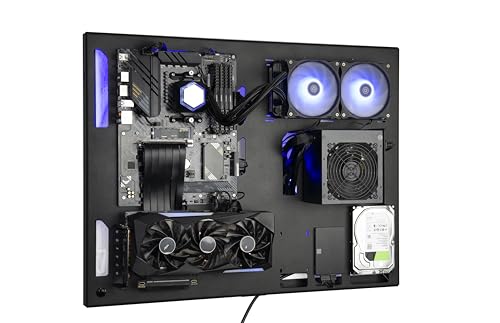
The ABKCA listing is where a wall-build plan can actually be drafted. Its title assembles the whole proposition: an open-air gaming case in handcrafted steel for ATX, micro-ATX, and mini-ITX boards, a vertical GPU holder, radiator support spanning 240 to 280mm, and graphics card room up to 390mm. Every one of those figures answers a question a wall builder must settle before drilling — board class, cooling class, card class — and the fact that one listing answers all three is why this sibling leads the guide.
The vertical GPU holder deserves attention beyond its looks. On a wall, a vertically presented card reads as the build’s centrepiece from across the room, and the holder carries the card’s weight in the orientation the frame was designed around — no small thing when gravity is the case’s permanent co-designer. The open-air format completes the logic: with no panels to trap heat and no glass to clean, the machine breathes the room from every side and shows its owner every connector, every run, every early sign of dust.
Handcrafted steel from a small maker carries the usual small-maker terms, stated kindly and plainly: expect character rather than assembly-line uniformity, and expect the support relationship to be personal rather than departmental. The open format also means the build is exposed — to dust, to curious fingers, to anything the room contains — so the wall it wants is in a controlled space, not above a workbench’s chaos or a toddler’s climbing route.
- Mounting: wall-mount open-air frame
- Board support named in the title: ATX, micro-ATX, mini-ITX
- Construction named in the title: handcrafted steel
- Graphics provision named in the title: vertical GPU holder, cards up to 390mm
- Radiator support named in the title: 240–280mm
- Finish named in the title: black
Strengths
- The most complete specification in the family — a buyer can plan board, card, and loop from the title alone.
- The vertical GPU holder turns wall placement into presentation, with the card carried as designed.
- Open-air steel keeps every component reachable for the maintenance wall builds require.
Trade-offs
- Open hardware has no barrier against dust or contact; the room must be part of the plan.
- Small-maker production means fit and finish follow a workshop’s character, not a factory’s template.
- The wall bears the whole build’s weight through the frame, so fixing quality is entirely the installer’s responsibility.
Best for: a builder planning a full ATX wall showcase who wants radiator and card limits stated before committing to a wall. Not suited for: a household with climbing children or a dusty workshop wall, because an open frame offers its components no protection from either.

ABK Design Wall Mount ATX Case (White) — The white finish option
This sibling’s title is a study in economy: ABK Design, wall mount, ATX, gaming PC case, white. Five facts, one of which — the colour — is the reason this listing exists as a separate product. In a bright room, a white frame changes the entire read of a wall build: the machine becomes a pale sculpture against the wall rather than a dark appliance, components in black and silver stand out in relief, and the installation looks intentional in spaces where a black frame would look borrowed from a server room.
Because the title withholds the engineering figures its siblings publish, this analysis must be honest about what a buyer is choosing: the family’s design language and the white finish, with the specification to be confirmed at the source. Board class is stated — ATX — and purpose is stated — wall-mount gaming — but radiator range, card ceiling, and drive provisions are not in the title, and this guide will not borrow them from the sibling listings, because borrowing specifications across listings is how buyers end up drilling for a radiator that was never promised.
Treat the purchase as a two-step: fall for the finish, then verify the figures. The maker’s documentation for this exact model is the authority, and a buyer who confirms radiator and card limits there gets the family’s wall-mount proposition in the one colour that suits a light interior. A buyer who skips the verification is gambling on sibling resemblance — a gamble the guide declines to endorse on anyone’s behalf.
- Mounting: wall-mount case for ATX builds
- Finish named in the title: white
- Purpose named in the title: gaming PC case
- Radiator support: ABK’s title for the white model gives no radiator range, so take cooling limits from the maker’s page for this exact listing before planning a loop
- Graphics card ceiling: likewise absent from this title — measure your card against the manufacturer’s stated dimensions rather than a sibling model’s figures
- Drive provisions: not enumerated in the title; confirm mounts in the same documentation pass
Strengths
- The white finish is a genuine room-design choice no other pick in this guide offers.
- ATX wall mounting in the family’s open design language suits bright, display-led interiors.
- A sparse title at least makes no promises it cannot keep — every figure is there to be verified, none to be misread.
Trade-offs
- The buyer must source every engineering figure beyond board class from the maker’s documentation.
- White finishes show dust and cable colours more honestly than black — the build’s tidiness is on display.
- Sibling resemblance is not a specification; assuming the black models’ numbers is a self-inflicted risk.
Best for: a bright studio or living space where the wall build is interior design as much as hardware, and the owner is willing to verify figures at the source. Radiator and graphics-card limits simply do not appear in this white edition’s title, unlike the black sibling below, whose listing states 240–280mm and 39cm outright.

ABK Design Wall Mount Gaming PC Case (Black) — The specified black sibling
The second black sibling earns its separate place by stating a different slice of the specification. Where the ABKCA title leads with board range and a card ceiling, this listing leads with material and storage: stainless steel construction, radiator support from 240 to 280mm, mounts for two SSDs and one HDD, and graphics cards up to 39cm. For a wall builder whose plan is storage-light and loop-led, those are the operative numbers, stated in the title where a planner can use them.
Stainless steel is a material choice with a point of view. It shrugs at the humidity that painted steel eventually notices, it reads as industrial in a way that suits the open-frame aesthetic, and it carries the build’s weight with the indifference of a material that expects to be structural. The drive provision — two solid-state mounts and one hard drive mount — describes the modern wall build accurately: fast storage for the system and games, one spinning archive, and nothing pretending to be a NAS.
The title’s silence here is board range: unlike the ABKCA listing, this one names the product an ATX case in its phrasing — “Wall Mount Gaming PC Case – ATX Case” — which states the class without enumerating smaller formats. Builders planning a micro-ATX or mini-ITX wall machine should confirm fitment rather than assume the family’s wider welcome applies. Within its stated terms, though, this is one of the two siblings a buyer can plan from the listing alone, and in black stainless it is arguably the family’s most purposeful-looking member.
- Mounting: wall-mount gaming case, ATX class per the title
- Construction named in the title: stainless steel
- Radiator support named in the title: 240–280mm radiators
- Drive mounts named in the title: two SSD, one HDD
- Graphics card ceiling named in the title: up to 39cm
- Finish named in the title: black
Strengths
- Stainless construction suits the open frame’s structural honesty and resists the years well.
- Radiator range and drive mounts are stated in the title, so the core plan needs no guesswork.
- The storage provision matches how wall builds are actually configured — light, fast, and archive-backed.
Trade-offs
- Board support beyond the ATX class statement is not enumerated, so smaller-format plans need confirmation.
- Three drive mounts total will not serve a storage-led build; that machine belongs in a tower.
- Open stainless shows fingerprints and dust with industrial clarity — upkeep is part of the aesthetic.
Best for: a black, loop-cooled ATX wall build with light storage, planned straight from the listing’s stated figures. Not suited for: a many-drive archive machine, because two SSD mounts and one HDD mount are a gaming provision, not a library.

ABK Design Wall Mount Computer Case (Black) — The sparsest listing
The fourth sibling’s title is the briefest in the family: ABK Design, wall mount, computer case, for PC gaming, black. It makes one promise — a black wall-mounted computer case from this maker, aimed at gaming — and leaves every engineering figure to be discovered elsewhere. This guide includes it because it is part of the family’s real range and because some buyers will land on it first; it is analysed here as what it demonstrably is, the low-documentation entry point to the same design idea.
There is a charitable reading and a practical one. The charitable reading: a small maker with several near-identical listings may simply document its range unevenly, and the case behind this title may share much with its better-described siblings. The practical reading, which this guide recommends: resemblance is not a specification, and a wall build — where mistakes are drilled into studs — is the worst place to shop on resemblance. The buyer for this pick is therefore defined by process rather than by parts: someone who will write to the maker or read the full product documentation, confirm board range, radiator support, and card room, and only then commit.
What can be said on the title’s evidence is still useful. The family’s open, wall-hung, gaming-led design language frames the expectation; black is the finish; the wall is the destination. Buyers who arrive with a sibling’s figures in mind should set them down and start from this listing’s own documentation. Do that, and this pick is a perfectly reasonable door into the family’s world; skip it, and the risk is entirely self-authored.
- Mounting: wall-mount computer case
- Purpose named in the title: PC gaming
- Finish named in the title: black
- Board support: this listing’s title names no formats at all, so the maker’s documentation for this model is the only honest source for fitment
- Radiator support: no range appears in the title — a liquid plan must be confirmed with ABK before parts are ordered
- Graphics card room: likewise unstated here; verify the ceiling for your specific card at the source
Strengths
- An entry into the family’s wall-mount design without a premium specification attached.
- The black finish and gaming purpose match the family’s proven formula.
- Its sparse title sets expectations honestly: this is a verify-first purchase.
Trade-offs
- Every engineering figure requires a documentation step the specified siblings do not demand.
- Planning a loop or a long card from this listing alone is impossible by design.
- Buyers in a hurry will be tempted to borrow sibling figures — the exact error this guide warns against.
Best for: a patient buyer drawn to the family’s black wall-mount design who will confirm the full specification with the maker before drilling anything. Not suited for: a same-weekend build planned from listing titles, because this title deliberately leaves the planning figures elsewhere.

AL01 Open Frame Computer case DIY PC Test Bench for ATX M-Board — The test bench
The AL01 enters this guide under a flag of complete honesty: its title calls it a test bench. It is an open-frame chassis for ATX motherboards, compatible with ATX power supplies, designed for DIY gaming builds and hardware testing setups, with an open-air design for heat dissipation. Nothing in that description promises a wall mount, and this guide does not upgrade it into one. It is here because wall-build shoppers and bench builders are cousins — both want components in open air, fully reachable — and because a bench is sometimes the right answer to the question a buyer brought to this category.
As a bench, its virtues are the format’s classics. Components mount in the open where they can be swapped in minutes: a reviewer cycling graphics cards, a troubleshooter isolating a fault, a hobbyist whose build is a permanent draft. Heat dissipation is the open air itself, with no panels to negotiate. The DIY framing in the title is accurate — this is hardware for people who enjoy the process of assembly as a recurring activity rather than a one-time installation.
Could a bench be wall-hung by a determined owner? Owners have improvised stranger things, but the listing promises no mounting provision, no vertical GPU holder, and no wall hardware, so any such use is fabrication, not configuration — with the safety burden entirely on the fabricator. The guide’s recommendation is simpler: buy the AL01 for the bench work it describes, and buy an ABK sibling for the wall. Each tool at its stated trade is the theme of this entire roundup.
- Species: open-frame test bench — not a wall-mount product by its title
- Board support named in the title: ATX motherboards
- Power provision named in the title: ATX power supply compatible
- Purpose named in the title: DIY gaming and hardware testing setups
- Cooling approach named in the title: open-air design for heat dissipation
- Wall provision: the title describes bench duty and names no wall-mounting hardware, so treat any wall use as owner fabrication rather than a product feature
Strengths
- Total access to every component makes testing, swapping, and troubleshooting as fast as the format allows.
- Open-air dissipation suits components that change too often for a closed case’s airflow plan.
- ATX board and supply compatibility keeps it inside standard parts ecosystems.
Trade-offs
- It is not sold as a wall case, and no mounting provision is stated in its title.
- Open components on a bench are exposed to dust, spills, and accidental contact in a working space.
- A bench is a process tool, not a finished installation — it will never look like furniture.
Best for: a hardware tester, reviewer, or inveterate tinkerer whose ATX build changes parts weekly and lives in the open by preference. Not suited for: a buyer seeking a warrantied wall installation, because this product’s title promises bench service and nothing above it.
MITXPC MX500 Compact Mini-ITX Case (Wall/VESA Mount) — The fanless VESA mount
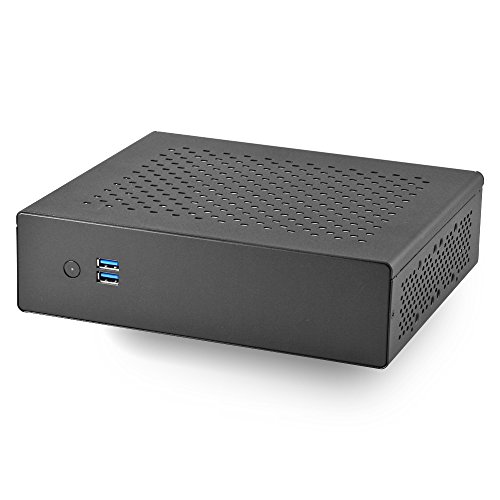
The MX500 closes the guide by changing every variable at once. It is compact where the ABK frames are expansive, mini-ITX where they are ATX, fanless where they are radiator-ready, and VESA-capable where they are wall-only. Its title states the proposition compactly: a compact mini-ITX case, fanless, with USB 3.0, that mounts on a wall or a VESA bracket. For the large class of small machines — office PCs, media boxes, kiosks, quiet workstations — this is not the consolation pick. It is the correct one.
Fanless operation is the headline engineering. A fanless mini-ITX build has no moving cooling parts, which means silence of a kind no fan curve can imitate and a maintenance profile with no bearings to fail. Mounted behind a monitor on its VESA bracket, such a machine effectively disappears: the desk holds a screen, a keyboard, and nothing else, while the computer rides invisibly on the display’s back. Wall mounting at this scale is also a gentler structural conversation than a radiator-laden ATX frame — the load is modest, the fixings are modest, and the whole installation can be one person’s quiet afternoon.
The boundaries are equally clear. Mini-ITX and fanless together describe low-power computing; there is no gaming graphics card story here, no radiator, no showcase. The MX500’s buyer is not a diminished version of the ABK buyer — they are a different person entirely, with a small silent machine and a wall or monitor that can make it vanish. This guide ends with it deliberately: the best wall-mountable case is sometimes the one that makes the computer disappear rather than the one that makes it a monument.
- Mounting: wall mount and VESA mount, both named in the title
- Board class named in the title: mini-ITX
- Cooling named in the title: fanless
- Connectivity named in the title: USB 3.0
- Form named in the title: compact
- Graphics provision: a fanless mini-ITX enclosure of this class is built around integrated or low-power graphics — the title names no card support, so gaming-card plans belong with the ABK frames instead
Strengths
- Fanless silence plus VESA mounting can make a complete PC disappear behind its own monitor.
- The modest scale turns wall mounting into a light structural task rather than a building project.
- No fans means no fan maintenance, noise, or bearing failures across the machine’s life.
Trade-offs
- Mini-ITX and fanless cooling cap the build at low-power components — gaming hardware need not apply.
- A single small enclosure leaves no expansion story beyond its compact brief.
- It hides the computer rather than displaying it, which inverts the showcase buyer’s entire purpose.
Best for: a quiet office, media, or kiosk mini-ITX build that should mount behind a monitor or on a wall and be forgotten. Not suited for: a gaming build with a discrete graphics card, because a fanless mini-ITX case is engineered for low-power silence, not card heat.
How Do You Install a Wall Build Safely, Step by Step?
Survey before hardware. Find the studs or confirm the masonry, mark the intended position, and then sit in every chair the room offers to check sightlines — a wall build is viewed from below and across, and a position that looks right standing may glare from the sofa. Hold the empty frame against the marks, or a cardboard template of it, and live with the outline for a day if patience allows. Walls forgive hesitation and punish haste, in that order.
Mount the frame to structure with fixings rated well beyond the finished build’s weight, and test the mount with your own pull before any component trusts it. Install the heaviest parts in the order that keeps the assembly balanced — board and supply first, radiator dry before it is filled, card last among the majors — and keep a second pair of hands present for the stages where the build is heavy, high, and unfinished simultaneously. A wall build is the one PC project where a helper is equipment.
Commission it at height, in place, before the cables are dressed. Boot the machine on the wall, run it under load, and check the loop’s fittings across a full heat cycle while everything is still reachable and a drip would still be a nuisance rather than a disaster. Only then dress the cable descent — power, display, network, and the hub run to the desk — in channels or sleeves that make the vertical runs look like architecture rather than accident. Photograph the finished installation for your records; the first time you need to recall which fixing went where, the photograph will be the manual.
How Should the Cable Descent and Desk Connection Be Planned?
A wall build moves the computer away from everything it connects to, so the connections become a design layer of their own. Display and network runs descend once, in a channel, and should be measured with slack for the monitor’s movement rather than cut to the millimetre of its current position. A powered USB hub at desk level is the single accessory that most improves wall-build life: drives, dongles, and temporary devices stop requiring a climb, and the machine’s own ports retire to permanent duties.
Power deserves a dedicated thought. The build’s switch, the supply’s switch, and the wall socket form a small chain that the owner will operate in the dark eventually; place the socket or the switched strip where a hand can reach without furniture moving, and consider a remote or keyboard power-on arrangement if the case’s own button lands high. None of the six titles here speaks to switching, which is exactly why the installer must — the listings sell frames and cases, and the ergonomics of living above them is the owner’s department.
Wireless peripherals quietly solve the rest. A keyboard and mouse that never cable to the machine remove the two most frequent climbs from the routine, leaving only deliberate maintenance at height. Builders planning a wired-everything desk should sketch the descent for each lead before ordering the frame; the sketch has ended more wall projects than any weight limit, and it is better ended on paper.
What Does Maintenance Look Like When the PC Lives Above Reach?
Dust arrives from below and settles on every upward face, and open frames collect it visibly — which is their hidden virtue, since a tower hides the same accumulation until it becomes thermal. A wall build wants a rhythm: a soft brush or blower pass on a schedule the owner can keep, performed from a stable step rather than a chair, with the machine off and the room’s other occupants elsewhere. The MX500’s fanless design reduces the stakes to a wipe; the ABK frames reward the rhythm with temperatures that never creep.
Component service is the second rhythm. Cards, drives, and memory in an open frame are reachable in place, which makes wall builds surprisingly serviceable — the whole machine is its own open case, permanently. The discipline is to keep the step, the tools, and the lighting for the job in the same room as the build, so that a five-minute task never becomes a postponed one. Postponed maintenance is the only real failure mode of the format, and it is a habit, not a hardware, problem.
Which Rooms Suit Wall Builds — and Which Refuse Them?
The studio and the workshop lead the suitable list: rooms where the machine is allowed to be an object, where structure is findable, and where the owner passes it daily at eye level. A gaming room with a media wall is the showcase variant, and a small flat whose desk is also its dining table is the space-saving variant — in both, the wall build’s freed footprint is spent immediately on living. Home offices split the difference: the wall build clears the desk for paper and calls, provided the cable descent is planned with the discipline described above.
The refusing rooms share traits rather than names. Rented walls that may not be drilled refuse the big frames outright. Rooms with climbing children or boisterous pets refuse open frames at reachable heights. Humid rooms — bathrooms’ neighbours, unventilated utility spaces — refuse open steel and exposed boards over any long term. And rooms where the computer must be silent refuse everything except the fanless end of the field. Reading your own room against those refusals is the fastest honest filter in this guide: if the room refuses, the MX500’s discretion or a conventional tower is not a defeat but the correct build knocking.
One more room deserves its sentence: the room that will change. Wall builds are semi-permanent installations, and a household expecting to move within the year should weigh the drilling, filling, and re-drilling honestly against twelve months of freed desk. Sometimes the right wall build is next year’s — and the AL01’s bench, which asks nothing of any wall, is this guide’s patient answer for the interim.
A Note on Living With an Exposed Machine
Open wall builds change the owner’s relationship with the hardware in a way no specification captures: the computer becomes a visible, audible member of the room, with a fan’s mood and a drive’s murmur present at dinner-party distance. Many owners discover they love this — the machine’s working is part of the home’s texture, and a component’s distress announces itself early to an attentive ear. Others discover, three weeks in, that they wanted the computer’s output and not its company. Neither discovery is available in advance from photographs, which is why this guide keeps steering undecided buyers toward the reversible experiments: a bench season with the AL01 teaches your own tolerance for exposed hardware at a fraction of a wall installation’s commitment.
Lighting belongs to the same lived reality. A wall build at eye level with lighting effects is a lamp that also computes, and its evening behaviour should be chosen as deliberately as its cooling — dimmable, defeatable, and kind to the room’s other occupants. The frames themselves are neutral steel; the show is the builder’s to stage or to skip, and the rooms that age best with wall builds are the ones where the owner staged it consciously.
Six Listings, Three Species — the Field at a Glance
| Pick | Species | Stated in the title | Left to verify |
|---|---|---|---|
| ABKCA Design Wall Mount | Wall frame, ATX class | 240–280mm radiator, 390mm card, ATX–ITX boards | Drive provisions |
| ABK Design Wall Mount (White) | Wall case, ATX class | White finish, gaming purpose | Radiator, card, and drive figures |
| ABK Design Wall Mount Gaming (Black) | Wall case, ATX class | 240–280mm radiator, 2 SSD + 1 HDD, 39cm card | Board formats beyond ATX class |
| ABK Design Wall Mount Computer (Black) | Wall case | Black finish, gaming purpose | Nearly all engineering figures |
| AL01 Open Frame | Test bench | ATX board and supply, open-air dissipation | Any wall provision — none is claimed |
| MITXPC MX500 | Mini-ITX wall/VESA case | Fanless, USB 3.0, wall and VESA mounting | Card support — low-power by design |
One pattern in the table is worth naming before the shopping starts: documentation depth in this family tracks nothing but the maker’s listing habits, and the two sparse titles sit beside two generous ones for what appear to be identical workshop intentions. A buyer who understands that can shop the family calmly — choosing first by finish and stated figures, then confirming the remainder once, in writing, for the exact model in the cart.
The verify column is this guide in miniature. Two listings let you plan from the title, two ask you to confirm the plan at the source, one is a bench wearing no wall promise at all, and one changes the question to how small a wall-mounted computer can be. None of those is a trick — provided the buyer reads the column before the price.
What Do Wall-Build Shoppers Most Often Get Wrong?
The structural error leads the list: treating the wall as a given. A filled radiator, a steel frame, and a long card sum to a load that belongs in studs or masonry, and the builder who discovers their wall is plasterboard over air after the frame arrives has bought a floor stand’s worth of regret. Survey the wall first; the case decision comes second, and sometimes the wall’s answer changes it — the MX500 exists for exactly the walls that refuse the big frames.
A fifth error deserves naming because it is unique to this category: hanging the build before commissioning it. A machine that has never booted should not be introduced to its owner from a ladder; every build in this guide deserves a first power-on at a bench or table, where a dead component is a swap rather than an unmounting. The wall is the last step of a build, not the first — a sentence worth taping to the frame until the day it is proved unnecessary.
The documentation error follows: borrowing one sibling’s specification for another. This family’s listings differ in what they state, and the differences are the product information. The third error is cable amnesia — a wall build’s ports live high, its cables descend in visible runs, and the owner who plans the descent gets a clean installation while the owner who improvises gets a waterfall of black leads down a white wall. The fourth is maintenance denial: dust settles on upward-facing components with gravitational reliability, and a wall build that cannot be reached comfortably will not be cleaned, and will run hotter every season until it is.
Final Recommendation
For the full-size wall showcase, choose between the two specified siblings: the ABKCA Design case when board range and the vertical GPU holder lead the plan, the black stainless ABK Design gaming case when its stated drive mounts and radiator range match a storage-light loop build. Choose the white sibling when the room demands the finish — and do the verification homework its title asks for. Choose the sparsest black listing only with the maker’s documentation open beside you. Let the AL01 be what it says it is, the finest kind of test bench, and let the MX500 be the answer whenever the machine is small and silence is the point. A wall build is a promise made to a room; the right pick is the one whose title, read literally, already contains everything your wall is about to be asked to hold. Survey the structure, plan the descent, schedule the dusting — and the machine above your desk will repay the ceremony every day it hangs there, visible, reachable, and entirely out of the way.
Frequently Asked Questions
How strong does the wall need to be for an ATX wall build?
Strong in the specific sense of structure: fixings must land in studs, masonry, or a mounting board that transfers load to them. The combined weight of a steel frame, board, long graphics card, and a filled 240–280mm radiator is a serious shelf-load, and plasterboard alone is not a shelf. If the intended wall cannot offer structure, scale the plan down — the fanless MX500’s modest load is the honest alternative — rather than upgrading the fixings and hoping.
Is an open-air wall case louder than an enclosed tower?
It removes the enclosure that would have muffled component noise, so the room hears fans and coil behaviour directly — but it also removes the enclosure that would have trapped heat, often letting fans run slower for the same temperatures. The net character is room-dependent, and the honest planning assumption is that an open wall build is audible equipment, best placed where its sound is acceptable. Buyers for whom silence leads should start at the fanless MX500 and work upward only as far as their ears permit.
Can I mount the AL01 test bench on a wall?
Its title describes a test bench for ATX boards and names no wall-mounting provision, so this guide treats wall use as fabrication rather than a feature — possible for a determined owner with fabrication skills, but carrying no manufacturer’s promise about mounting points, load paths, or safety. If the wall is the destination, the ABK family’s listings state that destination in their titles; buy the promise, not the improvisation.
Which ABK sibling should a first-time wall builder choose?
One of the two whose titles carry the figures: the ABKCA Design case or the black stainless gaming case. A first wall build has enough new variables — structure, cable descent, elevated maintenance — without adding specification uncertainty to the list. The white and sparsest black listings reward buyers who already know the family’s design and can verify the rest at the source; they are second purchases by temperament, whatever their price.
Does a wall-mounted PC run cooler than the same build on a desk?
The open-air frames remove panel restrictions entirely, so components breathe room air from every side — a genuine advantage over a tower tucked under a desk recycling its own exhaust. Height helps marginally, since the machine leaves the floor’s dust layer and the desk’s clutter shadow. The advantage is real but not magic: a wall build in a hot, still room is a hot build, and radiator or fan planning still decides the outcome.
Should a wall build use air cooling or a radiator?
Air is the lower-risk default at height: no fittings above the motherboard, no filled weight on the mount, and the open frames’ whole-room breathing suits air coolers naturally. A radiator in the stated 240–280mm range earns its place when the processor’s heat or the room’s noise tolerance demands liquid, and it asks in return for the commissioning discipline described earlier — fittings checked across heat cycles, in place, before the cables are dressed. Choose liquid for a reason you can name; choose air when you cannot, and the wall will thank you in the only currency it has, which is uneventful years.
How do I hide the cables running down from a wall build?
With a channel, a plan, and restraint. Paintable cable trunking down the wall’s least-seen line handles power, display, and network in one run and disappears against the paint; inside it, keep the runs separated enough to service individually. The discipline is to descend once, together, rather than in drips as devices are added — every later cable should join the existing channel or wait for the day it can. A build whose descent was planned reads as installation; a build whose descent accumulated reads as wiring, and the difference is visible from the door.
Is a VESA-mounted mini PC safe behind any monitor?
The MX500’s VESA provision assumes a monitor whose bracket and stand are rated for the added load, which most quality displays handle without comment — the case is compact and fanless, built to a weight the VESA pattern was designed around. The checks are mundane: confirm the monitor’s VESA pattern matches, confirm the stand is the original or equally sturdy, and route the short cables so they neither strain nor dangle across the screen’s vents. Do those, and the arrangement is among the safest in this guide precisely because the machine is small, cool, and still.
How much desk space does a wall build really save?
All of the tower’s footprint and most of its psychological footprint, which are different measurements. The literal saving is the rectangle the case would have occupied — returned to the desk or the floor entire. The larger saving is the clearing of the machine’s entourage: the cable nest behind it, the exclusion zone around its intakes, the shelf it would have demanded. Owners consistently report the room feels bigger by more than the rectangle, because a wall build converts a piece of furniture into a picture. The cost side of the ledger is the wall rectangle itself and the installation afternoon; households that measure both sides before drilling rarely regret the exchange.
What happens when I move house with a wall-mounted PC?
The build comes down in reverse order of its installation — components or whole frame, depending on the mount’s design — travels as the fragile electronic object it is, and leaves behind holes that an hour of filling and paint restores. The open frames travel better than glass towers in one respect: there are no panels to crack, though the exposed components want the original boxes or careful padding. Households that move often should hear this plainly: a wall build is a per-address project, and the reversible pleasures belong to desks — which is a fine reason to enjoy one address’s wall thoroughly while it lasts.
Related Guides
Wall mounting is one destination for a build that has outgrown its desk; the best silent pc cases with great airflow guide covers machines that stay in the room and behave quietly there, the best top-mount radiator pc cases roundup details enclosed towers with serious liquid plans, and the best dual pc cases collection examines the opposite philosophy — two whole systems sharing one enclosure on the floor.
Related guide: Best RGB PC Cases


