What's inside
- Key Takeaways
- Quick Picks
- How Did We Choose These Long Range Outdoor WiFi Extenders?
- Why Does Outdoor WiFi Behave So Differently From Indoor WiFi?
- How Do the Six Outdoor Picks Compare?
- How Should You Install an Outdoor Extender for Maximum Range?
- Repeater Mode or Access Point Mode: Which Should You Run?
- What Mistakes Ruin Outdoor WiFi Installations?
- How Do You Plan the Cable Run and Mounting Point Like an Installer?
- What Should Camera Owners Expect From Outdoor Extenders?
- Final Recommendation
- Frequently Asked Questions
- Related Guides
As an Amazon Associate I earn from qualifying purchases. This post may contain affiliate links at no extra cost to you.
widgetverdict.com is reader-supported. When you buy through links on our site, we may earn an affiliate commission.
Where to buy: Amazon carries all six outdoor units in this guide, and each name below links to the exact listing we verified — pay attention to the model suffixes, because WAVLINK sells several near-identical housings with different radios inside, and ordering the wrong twin is the most common purchasing error in this category.
The search for the best long range outdoor wifi extenders starts where indoor advice stops working. Outdoor coverage is a different discipline: the signal must leave the house through a wall that was designed to keep weather out, cross open ground where distance rather than obstruction eats it, and arrive at a camera, a barn, a gate, an RV pad or a farmyard office still strong enough to be useful. Indoor extenders fail at this job not because they are weak but because they were never built to live outside, aim directionally, or be powered over a long cable run.
The six picks here are genuine outdoor hardware. Five carry IP67 weatherproofing in their manufacturer descriptions; most are powered over Ethernet, which means a single cable carries both data and power to a mounting point on a wall, pole or eave; several arrive with high-gain external antennas — 4x8dBi arrays on the WAVLINK units — that shape the signal toward the ground you actually want covered. There is a TP-Link Omada access point for people who want managed, business-grade behaviour, and one solar-powered outlier for ground where no cable can reach at all.
Read the range language in this category with a surveyor’s scepticism. Outdoor figures are measured across open fields, and your result will be set by line of sight, mounting height, antenna aim and what stands between the house and the target — a metal barn wall or a wet tree line can undo a specification sheet in a single afternoon. What this guide can do is match each unit to the terrain and task it suits, state each maker’s claims as claims, and explain the installation decisions that decide whether outdoor WiFi feels like magic or like money wasted.
Key Takeaways
- Outdoor units win on weatherproofing, Power over Ethernet and antenna gain — not on the indoor trick of plugging into a hallway socket.
- Line of sight is the whole game outside: mounting height and a clear path beat any headline range figure.
- The WAVLINK AX1800 and AX3000 units are the mainstream picks, both IP67 with PoE and maker positioning for yards, farms and Starlink-fed properties.
- The TP-Link Omada EAP225-Outdoor suits owners who want a managed access point rather than a simple repeater.
- The solar-powered pick solves the one problem PoE cannot: ground with no cable route at all, at the cost of dependence on sunlight and battery.
- Every range figure quoted here is a manufacturer claim for open conditions; your walls, trees and metal buildings will negotiate it down.
Quick Picks
| Pick | Badge | Why it earns its place |
|---|---|---|
| 2026 WAVLINK AX1800 Outdoor WiFi 6 Extender Long Range | Best overall outdoor | IP67 WiFi 6 unit with PoE, 4x8dBi antennas and Starlink-friendly positioning. |
| Omada AC1200 Outdoor Wireless Access Point | Best managed access point | TP-Link Omada outdoor AP with PoE injector included, built for managed networks. |
| 2026 WAVLINK AX3000 Outdoor WiFi 6 Extender | Best for farms and yards | IP67 AX3000 repeater whose maker cites up to 256 devices for farm, yard and RV use. |
| WAVLINK WiFi 7 BE5100 Outdoor WiFi Extender | Best future-proof | WiFi 7 dual-band unit with IP67 housing, 4 x 8dBi antennas and a 2.5 Gbps Ethernet port per maker. |
| WAVLINK AX1800 Outdoor WiFi 6 Extender | Best Starlink companion | IP67 AX1800 access point with engineered antennas and PoE, sold for Starlink setups. |
| Outdoor WiFi Extender Solar Powered | Best off-grid | Solar repeater with a 15W panel and 27Ah battery per maker, built for cameras beyond cable reach. |
How Did We Choose These Long Range Outdoor WiFi Extenders?
Outdoor shortlists are usually built by sorting on claimed range, which is the least useful number in the category. We built this one differently, starting from the failure reports that repeat across outdoor installations: units that died in their second winter because the housing was splash-resistant rather than sealed, repeaters mounted low behind a hedge repeating a signal that arrived already exhausted, and access points installed at the end of cable runs that could not power them. A pick had to answer those failures before its speed class was even considered.
Four filters did the work. Weatherproofing had to be explicit — IP67 in the maker’s own description for the main picks — because outdoor electronics fail by water long before they fail by age. Power had to be practical at distance, which in practice means Power over Ethernet or, for the one deliberate exception, solar with a serious battery. The unit had to offer a genuine outdoor operating mode, whether repeater, access point or both, rather than being an indoor box in a rugged costume. And the antenna arrangement had to be visible and aimable, because outdoors the ability to point gain at the target is worth more than raw radio power, which regulations cap in any case.
Brand mix was deliberate. WAVLINK dominates this niche and earns four of the six places on merit — it is the label that actually specialises in outdoor repeaters, with the antenna arrays and PoE hardware to match. TP-Link’s Omada unit represents the managed alternative for owners who already run, or want to run, a controller-based network. The solar unit is included because it answers a question the other five cannot, and excluding the category’s one genuinely different idea to keep the list tidy would serve nobody with a camera at a far gate.
Throughout, manufacturer range and device figures are reported as the makers state them and framed as open-condition ceilings. We do not convert them into promises, and the detailed sections repeatedly return to the variables that actually decide an installation: height, sight line, cable route and what the far end needs the connection for. A camera sipping a modest stream and a yard office running video calls are different engineering problems wearing the same product category.
Why Does Outdoor WiFi Behave So Differently From Indoor WiFi?
Indoors, walls are the enemy and distance is short. Outdoors, the relationship inverts: a clear hundred metres of air is kinder to a signal than fifteen metres through two brick walls, because air absorbs almost nothing while masonry, foil insulation and wet foliage absorb a great deal. This is why outdoor units emphasise antenna gain and mounting position — with a clean sight line, a modest radio with well-aimed antennas will cover ground that no indoor extender could reach from inside the house, fighting its way out through the exterior wall.
The exterior wall deserves its own warning. Modern construction layers — brick, block, insulation board with foil facing, metal cladding — can cost more signal than the entire outdoor journey that follows. Mounting an outdoor unit on the outside of that wall, fed by a cable through it, routinely outperforms a stronger unit beaming from indoors. Every pick in this guide assumes that logic: the radio lives outside, the cable handles the wall, and the antennas handle the distance.
Weather cuts both ways. Rain itself matters less than people fear at these distances; wet trees, by contrast, are effective signal absorbers, and a link that works beautifully in January can sag in June when the same trees are in full leaf. Seasonal thinking is part of outdoor networking: mount high enough to clear hedges and outbuildings, aim over rather than through vegetation where the ground allows, and leave margin in the link rather than engineering to the exact edge of coverage.
Interference, mercifully, usually falls away outdoors. The neighbour congestion that plagues indoor channels thins quickly with distance, which is why farm and rural installations often report results closer to the makers’ open-field claims than suburban ones. A suburban garden sits between those worlds: fewer walls than indoors, more competing networks than a farm, and results that depend on the specific geometry of houses, fences and trees. The picks below are annotated with those settings in mind.

2026 WAVLINK AX1800 Outdoor WiFi 6 Extender Long Range — Best overall outdoor
This AX1800 unit is the centre of gravity of the outdoor category, and it earns the top place here by covering the most common outdoor brief completely: IP67 weatherproofing in the maker’s description, WiFi 6 radios, Power over Ethernet so one cable run handles both data and power, and a 4x8dBi antenna array to push the signal across real ground. WAVLINK positions it as working with Starlink, which tells you the customer it has in mind — the rural or semi-rural property whose internet arrives by satellite or a distant router and must then be distributed across a yard.
The repeater-versus-access-point choice is where this unit repays thought. As a repeater it listens to the house network and rebroadcasts, which is simple but asks the outdoor link to carry a wireless conversation in both directions. As an access point fed by its PoE cable, it receives a wired feed and spends all its radio effort on the outdoor side — the stronger configuration whenever the cable run is feasible. Many owners install it as a repeater first, then convert it to a wired access point a season later and wonder why they waited.
Antenna aim is the installation skill that matters. Four high-gain antennas are not decoration; they concentrate the signal, and the pattern they produce rewards being pointed at the territory you care about — the barn door, the patio, the camera line — rather than left in whatever orientation the mounting bracket suggested. Mount it as high as the eave or pole reasonably allows, keep the sight line over hedges rather than through them, and the AX1800 class radios have a fair chance to do the rest.
Its limits are the category’s limits. It cannot manufacture a sight line through a metal-clad barn, and in repeater mode it cannot repeat a house signal that dies at the exterior wall — the cable-fed mode exists precisely for that house. Buyers in dense suburbs should also temper expectations: the hardware is willing, but neighbouring networks and garden clutter make outdoor results there a negotiation rather than a specification.
- Rating: IP67 weatherproof per maker
- Standard: WiFi 6, AX1800 class
- Power: PoE (Power over Ethernet)
- Antennas: 4x8dBi external array
- Modes: outdoor access point and repeater
Strengths
- Complete mainstream package: IP67, WiFi 6, PoE and high-gain antennas
- Repeater and access-point modes in one unit
- Positioned for Starlink-fed rural properties as well as router-fed homes
Trade-offs
- Best results need the cable-fed access-point mode, which means a cable run
- Antenna aim and mounting height are the owner’s job to get right
- Repeater mode cannot rescue a signal that dies at the house wall
Best for: yards, smallholdings and rural homes needing one weatherproof unit to cover serious outdoor ground.
Not suited for: indoor dead zones, or properties where no mounting point offers a workable sight line.

Omada AC1200 Outdoor Wireless Access Point — Best managed access point
The Omada EAP225-Outdoor is not a repeater and should not be bought as one. It is a managed outdoor access point: it expects a wired Ethernet feed, delivered over PoE with the injector included in the listing, and in return it behaves like infrastructure rather than an accessory. For owners who run or plan an Omada network indoors, this is the natural way to extend that same managed system into the garden, the yard or the outbuildings, with centralised control instead of a separate box with separate habits.
That managed character is the reason to choose it over the more powerful repeaters surrounding it in this guide. Settings, firmware and monitoring live in the Omada controller alongside any indoor access points, so the outdoor coverage stops being a special case. Guest networks, schedules and device visibility extend outside in a way that a standalone repeater never quite replicates. A smallholding with a holiday let, a workshop business or a farm office will feel that difference weekly; a household wanting WiFi at the barbecue will not miss it at all.
The AC1200 class label marks it as WiFi 5 generation hardware, a step behind the WiFi 6 WAVLINK units in raw radio modernity. In outdoor service that gap matters less than it would indoors: the traffic out there is cameras, phones on a patio, a laptop in a yard office, and the bottleneck is almost always the sight line rather than the standard. What the Omada trades in radio generation it returns in platform maturity — this is among the most deployed outdoor access points in its class, with the documentation depth to prove it.
The buying condition is absolute, though: no cable, no Omada. It has no repeater mode to fall back on, so the installation begins with planning an Ethernet route out of the house and up to the mounting point, staying within Ethernet’s hundred-metre practical limit. Owners who can make that run get the most professional result in this guide. Owners who cannot should choose one of the WAVLINK repeaters and accept the repeater compromise knowingly.
- Family: TP-Link Omada managed platform
- Class: AC1200, WiFi 5 dual band per maker
- Power: PoE, injector included in listing
- Role: outdoor access point (wired feed required)
- Compatibility: described by maker as universally compatible
Strengths
- Managed Omada platform unifies indoor and outdoor networks
- PoE injector included, simplifying the wired installation
- Mature, widely deployed hardware with deep documentation
Trade-offs
- Access point only — requires an Ethernet cable run
- WiFi 5 generation radios behind the WiFi 6 rivals
- Overkill for a single patio or small garden
Best for: properties already running Omada, and owners who want managed, infrastructure-grade outdoor coverage.
Not suited for: anyone unable to run an Ethernet cable to the mounting point.
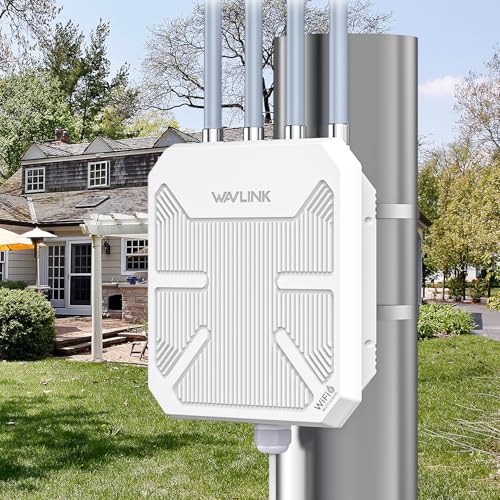
2026 WAVLINK AX3000 Outdoor WiFi 6 Extender — Best for farms and yards
Where the AX1800 above is the all-rounder, this AX3000 model is the scaled-up sibling for properties whose outdoor device list keeps growing. The maker cites support for up to 256 devices and positions the unit squarely at farms, yards and RV setups, working with Starlink and security cameras. Read the device figure as connection capacity rather than a promise of two hundred simultaneous busy clients, and the intent is clear: this is the unit for ground that hosts cameras at several buildings, phones across a yard, and equipment in more than one direction.
The step up in radio class matters outdoors for a specific reason. A farm or large yard concentrates its traffic at distance — the far camera is the far camera, and it cannot move closer to make the link easier. Stronger radios with more headroom hold those edge links steadier through weather and foliage changes, and the AX3000 class gives this unit more composure at the margins of its coverage than its smaller sibling. Margin, outdoors, is the difference between a camera that records and a camera that reconnects.
Like its sibling it offers repeater and access-point behaviour, and the same advice applies with more force at this scale: if a cable can reach the mounting point, feed it, and let the radios serve the yard instead of also serving the journey back to the house. On a multi-building property, a sensible pattern is one wired outdoor access point on the main building covering the yard, with camera positions checked individually against the real sight lines rather than assumed from a coverage circle drawn on a map.
Temperament notes: this is more hardware than a suburban garden can use, and its maker’s framing around farms and RVs should be taken literally. RV and seasonal use is a genuine strength — a unit that can be mounted to serve a pitch or a yard for the season and repositioned when the layout changes. For a compact garden, the money saved by stepping down to the AX1800 buys the pole mount and cable you will actually benefit from.
- Rating: IP67 per maker
- Standard: WiFi 6, AX3000 class
- Device figure: up to 256 devices per maker
- Modes: outdoor repeater and access point
- Positioning: farm, yard, RV and camera coverage
Strengths
- Higher radio class holds distant camera links with more margin
- Maker-rated device capacity suits multi-building properties
- Repeater and access-point flexibility for changing layouts
Trade-offs
- Oversized for ordinary gardens
- Device figure is a connection ceiling, not a workload promise
- Still bound by sight lines — no radio class repeals terrain
Best for: farms, large yards, RV setups and properties running several outdoor cameras.
Not suited for: small suburban gardens or buyers whose only dead zone is a patio.

WAVLINK WiFi 7 BE5100 Outdoor WiFi Extender — Best future-proof
This is the pick for the buyer who installs outdoor infrastructure once and resents revisiting it. The maker describes a WiFi 7 BE5100 dual-band unit in an IP67 housing, with a 4 x 8dBi antenna array, PoE power, a 2.5 Gbps Ethernet port, and repeater, access-point and mesh-router modes. Whether or not your current devices speak WiFi 7 — most do not yet — the port speed and the radio headroom mean the unit will not be the bottleneck when the house network around it is upgraded over the next several years.
The 2.5 Gbps Ethernet port deserves emphasis because it changes the access-point maths. Fed by a cable from a modern router or switch, this unit can accept a faster wired feed than the gigabit ports on its rivals, which matters if the outdoor side will ever serve a building with its own wired devices — a yard office with a small switch, say — rather than only wireless clients in open air. It is the one pick here that can grow from covering a garden into anchoring an outbuilding network without being replaced.
Honesty about WiFi 7 itself: its headline features benefit dense, modern client fleets, and an outdoor link to cameras and phones will rarely stress them. You are paying for longevity and headroom, not for a transformation in this summer’s camera reliability. Buyers should weigh that premium against the AX1800 and AX3000 units with clear eyes — the rational case is the property being wired once, properly, for a decade, not the household chasing the newest standard for a patio.
Installation follows the family pattern: PoE feed, high mounting, antennas aimed at the territory, mode chosen deliberately. The mesh-router mode in the maker’s description adds one more possibility — anchoring an outdoor mesh arrangement — but owners should confirm the companion hardware expectations in the listing before designing around it. As a single, well-fed outdoor access point, it is the most capable hardware in this guide.
- Standard: WiFi 7, BE5100 class per maker
- Rating: IP67 waterproof per maker
- Antennas: 4 x 8dBi array
- Port: 2.5 Gbps Ethernet per maker
- Modes: repeater, access point and mesh router modes listed
Strengths
- WiFi 7 radios and 2.5 Gbps port give years of headroom
- Full mode set: repeater, access point and mesh router per maker
- IP67 housing and 4 x 8dBi antennas match the rest of the outdoor brief
Trade-offs
- Premium buys longevity more than present-day outdoor gains
- Most current outdoor devices cannot use WiFi 7 features
- Serious installation effort deserves the wired mode to justify it
Best for: owners wiring outdoor coverage once for the long term, including outbuildings with wired devices.
Not suited for: budget garden coverage or buyers who replace networking gear frequently anyway.

WAVLINK AX1800 Outdoor WiFi 6 Extender — Best Starlink companion
Two AX1800 WAVLINK units in one guide needs explaining, and the explanation is positioning. This variant is sold explicitly around Starlink compatibility, with engineered antennas and PoE power in an IP67 housing, and it speaks to a now-common rural arrangement: the internet arrives from a dish or a router in one building, and life happens across a yard, in a workshop, or in a second dwelling that the indoor network never reaches. Starlink’s own router is famously indifferent to covering outbuildings; this is the sort of unit owners bolt to the house wall to fix that.
In that role the repeater mode often leads, because the whole point is that no cable route exists between the buildings. The unit mounts outside the main house — outside the wall that would otherwise eat the signal — listens across open ground, and rebroadcasts toward the target. Open rural air is the friendliest medium in this entire guide, and it is in these installations that owners report results closest to the makers’ open-condition claims. Distance across a yard with a clean sight line is exactly the problem this hardware was drawn for.
The engineered-antenna description in the listing translates, in practice, to the same discipline as its sibling: mount high, aim deliberately, and check the far building room by room rather than assuming a coverage circle. A workshop with metal cladding may need the receiving arrangement thought through — a window line or a second unit — because no antenna design negotiates with a metal wall. Within those physical rules, the unit gives satellite-fed properties a way to behave like networked ones.
Choose between this and the first pick by your feed. If your internet is a conventional router and a cable run is plausible, the sibling’s access-point path is the stronger architecture. If your feed is Starlink or any setup where repeating across open ground is the realistic plan, this is the variant WAVLINK built and worded for you, and its IP67-and-PoE fundamentals are identical where it counts.
- Rating: IP67 weatherproof per maker
- Standard: WiFi 6, AX1800 class
- Power: PoE powered
- Antennas: engineered external antennas per maker
- Compatibility: sold as Starlink-compatible
Strengths
- Explicitly positioned for Starlink-fed rural properties
- IP67 housing with PoE suits permanent exterior mounting
- Repeater role across open ground plays to outdoor WiFi’s strengths
Trade-offs
- Repeater-first use inherits the wireless backhaul penalty
- Metal-clad target buildings may still defeat the link
- Duplicates much of the sibling AX1800 for non-Starlink homes
Best for: Starlink households and rural properties spreading coverage across a yard to a second building.
Not suited for: homes where a cable-fed access point is practical — the stronger architecture wins there.

Outdoor WiFi Extender Solar Powered — Best off-grid
Every other pick in this guide assumes power can be delivered — by a PoE cable, which is the right answer wherever a cable can go. This unit exists for the places a cable cannot go: the far gate, the field camera, the end of a long drive, the outbuilding on a separate supply or none. The maker describes a repeater with four antennas, a 15W solar panel and a 27Ah battery, and that battery figure is the serious part of the design — it is the reservoir that carries the unit through nights and dull weeks, and it is what separates a workable solar repeater from a garden ornament.
Expectations must be set by physics rather than by the listing’s enthusiasm. A solar repeater lives on an energy budget: bright seasons are generous, dark winters are not, and panel placement — unshaded, angled toward the sun’s path — matters as much as radio placement. The owner of this unit has two sight lines to manage, one to the sun and one to the network it repeats, and installations fail when either is treated as an afterthought. Shading that looks trivial in summer can deepen when trees leaf out, in the same weeks the radio link also faces wetter foliage.
The workload should match the power. This is a unit for cameras, sensors, a gate intercom, occasional phone use at a remote point — modest, bursty traffic that sleeps between events. It is not a unit for streaming an evening of television to an off-grid cabin, and no panel of this size pretends otherwise for long. Judged on its intended duty, though, it enables coverage that is otherwise simply unavailable without trenching cable, and for a security camera at a genuinely remote point that is the difference between having the camera and not having it.
Before buying, walk the site twice: once for the radio path back to the house network, checking the unit can be mounted where it hears a usable signal, and once for the sun, checking the panel’s sky across the day. If both walks pass, this is a clever and honest piece of kit. If the radio path fails, no battery size will save the installation — the repeater still needs something to repeat.
- Power: 15W solar panel and 27Ah battery per maker
- Antennas: 4-antenna repeater arrangement
- Role: WiFi repeater for cameras and remote points
- Positioning: coverage where no cable can reach
Strengths
- Covers ground no cable can reach — gates, fields and remote cameras
- Substantial maker-rated battery carries nights and dull spells
- Four-antenna repeater design aimed at camera duty
Trade-offs
- Energy budget caps the workload; not for heavy streaming
- Needs both a radio sight line and an unshaded solar aspect
- Winter performance depends heavily on placement and latitude
Best for: remote cameras, gates and field points beyond any practical cable route.
Not suited for: off-grid cabins wanting full household streaming, or shaded mounting sites.
How Do the Six Outdoor Picks Compare?
| Pick | Badge |
|---|---|
| 2026 WAVLINK AX1800 Outdoor WiFi 6 Extender Long Range | Best overall outdoor |
| Omada AC1200 Outdoor Wireless Access Point | Best managed access point |
| 2026 WAVLINK AX3000 Outdoor WiFi 6 Extender | Best for farms and yards |
| WAVLINK WiFi 7 BE5100 Outdoor WiFi Extender | Best future-proof |
| WAVLINK AX1800 Outdoor WiFi 6 Extender | Best Starlink companion |
| Outdoor WiFi Extender Solar Powered | Best off-grid |
The table divides along one axis: how the unit gets its feed. The Omada and, in their wired modes, the WAVLINK access points build on a cable and behave like infrastructure. The repeater-mode installations trade some performance for freedom from cabling. The solar unit stands apart, trading almost everything for independence from power entirely. None of these is the correct default; the terrain and the cable route decide. A property where a cable can be run along a fence line to a pole is an access-point property, whatever the repeater marketing says, while a rented field or a listed building where drilling is forbidden is repeater territory by necessity.
Within the WAVLINK family, the steps are honest ones: AX1800 for the mainstream yard, AX3000 for the multi-building property, the WiFi 7 unit for the owner building once for a decade, and the Starlink-worded AX1800 variant for satellite-fed homes repeating across open ground. Choosing among them is mostly a matter of matching radio class to the distance and device count you genuinely have, rather than the largest you can imagine on a optimistic afternoon.
How Should You Install an Outdoor Extender for Maximum Range?
Height first. Mount the unit as high as is practical — under an eave, on a pole, on the gable end — because height buys the clear sight line that outdoor range is actually made of, clearing hedges, vehicles, outbuildings and the ground clutter that fragments a low-mounted signal. Every metre of height is worth more than any antenna specification on the box, and most disappointing installations are simply units mounted at head height behind obstacles the owner stopped noticing years ago.
Second, solve the wall before the distance. If the unit will be fed by cable, bring the cable through the wall and mount the radio outside it; if it will repeat, mount it outside the wall it would otherwise have to listen through. Exterior walls with foil-backed insulation or metal cladding are the silent killers of outdoor projects, and no repeater setting compensates for a radio sealed indoors behind one. The PoE designs in this guide exist to make the outside mounting easy: one cable, carrying power and data, sealed into the unit.
Third, aim, then verify seasonally. Point the antenna array at the territory, walk the far ground with a phone, and test the actual devices — the camera at its actual mounting point, not your hand at the gate. Then repeat the check when the trees leaf out or the yard’s use changes. Outdoor networks are living installations in a way indoor ones are not, and the owners who re-verify twice a year are the ones whose cameras never seem to drop.
Repeater Mode or Access Point Mode: Which Should You Run?
Every dual-mode unit in this guide forces this choice, and it is the most consequential decision in outdoor networking after the mounting point itself. In access-point mode the unit receives a wired feed and devotes its radios entirely to serving outdoor devices. The link is steadier, the capacity higher, and the behaviour easier to predict, because the hardest journey in the system — house to mounting point — happens on copper rather than through the air. Wherever a cable can be run, this is the architecture professionals choose, and the PoE designs in this guide exist to make it painless.
Repeater mode earns its place where cable cannot go: across a rented yard, over ground you may not trench, to a building on a separate electrical supply where even powerline tricks fail. Its cost is structural. The unit must spend airtime listening to the house and airtime again serving the yard, and the outdoor devices share whatever the house link delivers. For cameras, browsing and calls at a yard office, that is frequently plenty. For a second household trying to live a full streaming life on the far end, it may not be, and the honest upgrade is a cable or a dedicated point-to-point link rather than a bigger repeater.
A hybrid pattern suits many real properties: begin in repeater mode to prove the concept and the positions, live with it for a season, and convert the best-performing mounting point to a wired access point when time and weather allow. The dual-mode WAVLINK units support exactly that evolution without new hardware, which is a quiet argument for choosing a dual-mode unit even when you expect to repeat forever — properties change, cables get run during other works, and the unit that can change roles survives the change.
Whichever mode you run, document it. A note of the mounting point, the mode, the cable route and the network names saves a future owner — or yourself in three years, on a ladder, in November — from reverse-engineering the installation. Outdoor networks outlive memories, and the best-kept rural systems are the ones whose second maintainer can understand them from a single page of notes left in the house.
What Mistakes Ruin Outdoor WiFi Installations?
Mounting too low is the first and commonest. The second is believing a range figure measured across an airfield applies across a wooded, building-dotted property; makers state open-condition ceilings, and treating them as guarantees manufactures disappointment. The third is feeding a repeater through the exterior wall — installing an outdoor unit indoors by the window and expecting it to perform like the same unit mounted outside. The window glass is not the problem; the wall construction around it usually is.
Power planning fails quietly too. A PoE run has length limits, an injector needs a dry indoor home, and a solar panel needs the sun it was promised in June to still reach it in December. Owners also forget the far end: a camera mounted on a metal barn may sit in a radio shadow of its own building, and the fix — moving the camera, adding a second unit, choosing a window line — is architectural, not a setting in an app. Outdoor WiFi rewards people who walk the ground before they open the box.
Finally, do not buy outdoor hardware for an indoor problem. If the dead zone is a bedroom, the indoor guide’s picks are cheaper, simpler and better suited. Outdoor units earn their premium in weather sealing, PoE and antenna gain — virtues that only matter once the radio leaves the house.
How Do You Plan the Cable Run and Mounting Point Like an Installer?
Professional outdoor installs begin with a walk, not a drill. Stand where the router lives and look toward the target. Identify the wall the signal or cable must leave by, the highest practical mounting point on it, and everything between that point and the far ground: trees, outbuildings, fences, a neighbour’s extension. The mounting point you want is the one that sees the most target territory with the least obstruction, and it is frequently not the wall nearest the target — a gable end a few metres further away but three metres higher often wins outright.
The cable route then gets planned as a single run of outdoor-rated Ethernet from an indoor point — beside the router or a switch, where the PoE injector will live in the dry — out through the wall and up to the unit. Keep the run within Ethernet’s hundred-metre practical ceiling, leave a small drip loop where the cable meets the unit so rain runs off rather than along the cable into the gland, and seal the wall penetration properly. None of this is skilled work, but all of it is the difference between an installation that lasts a decade and one that fails at the first winter storm through a damp connector.
For repeater-mode installs with no cable, the walk changes but the thinking does not. The unit still mounts outside, as high as practical, and its own connection back to the house becomes the thing to verify: check the received signal at the mounting point before fixing anything permanently, using a temporary mount or a helper and a phone call. A repeater installed two metres from its ideal spot can lose more performance than a model upgrade would ever return, which is why installers treat position as a specification.
Lightning and surge thinking deserves one sober paragraph. Outdoor cable runs connect your indoor network to the sky’s neighbourhood, and in exposed rural locations a surge protector rated for Ethernet at the building entry is a reasonable precaution that installers in storm country treat as routine. It is not a reason to avoid outdoor networking — millions of farms run exactly this — but it belongs in the plan alongside the drill bits, not as an afterthought after the first scorched switch.
What Should Camera Owners Expect From Outdoor Extenders?
Cameras are the load that sells most outdoor units, and they have a particular profile: modest bandwidth, relentless uptime expectations, and mounting points chosen for what they can see rather than for radio kindness. A camera at the edge of coverage does not usually fail dramatically; it degrades — dropping to lower resolution, missing motion events during reconnection gaps, recording the ten seconds after the one that mattered. The engineering goal for camera ground is therefore margin: a link that is merely adequate on a still, dry afternoon is not adequate.
That margin thinking should drive model choice. On a property with one camera at a gate within easy sight of the house, the mainstream AX1800 has headroom to spare. On ground with cameras at several buildings, the AX3000’s stronger radios and device capacity stop being luxuries. And where no cable or mains power exists at the camera point at all, the solar repeater paired with a modest camera is a coherent system — provided the site walk confirms both sun and signal, the two currencies that installation spends.
Placement interplay matters too: the extender wants height and a view of the house, the camera wants its own view of the gate or yard, and those are rarely the same bracket. Plan the two positions separately rather than compromising both on one mount. Finally, test the camera’s night behaviour, because infrared illumination raises its power draw and the hours of darkness are precisely when the property most wants it awake — doubly true for the solar arrangement, whose battery does its real work between dusk and dawn.
Seasonal maintenance is the last unglamorous truth of outdoor networking. Twice a year, look at the installation with fresh eyes: check the mounting has not loosened in storms, the cable glands are still sealed, no new growth has swallowed the sight line or the solar panel, and no new structure — a shed, a parked caravan, a neighbour’s extension — has moved into the path. Update firmware when the maker offers it, from the comfort of indoors, and re-run the far-ground speed check you did on installation day. Ten minutes of this, in spring and autumn, is what separates the properties whose outdoor WiFi is simply always there from the ones whose cameras fail during the first storm of winter, which is of course the night they were wanted.
Budget honesty belongs in this guide too. The unit is rarely the whole cost outdoors: outdoor-rated cable, a pole or bracket, an injector if one is not included, glands, fixings and perhaps a surge protector join the bill, and a cheap unit on an expensive installation is a false economy that a mid-range unit avoids. Price the whole project before choosing the box, and if the total surprises you, that is the moment — not after the holes are drilled — to reconsider whether a repeater-mode install without the cable run serves your ground well enough.
One audience deserves direct address before the recommendations: owners of listed, rented or otherwise restricted properties, where drilling and cabling may be limited or forbidden. Repeater-mode outdoor units are your route — mounted with clamps or on existing poles rather than new fixings, fed by their own placement rather than a cable. Confirm the mounting rules before ordering, favour the dual-mode units so the installation can go wired if permissions change, and take comfort that some of the best-performing rural installs in this category run exactly this way, on open ground where repeating was never the weak link.
And if the whole project still feels daunting, remember that the first installation is the slow one: every owner in this category reports the second unit — the extra camera point, the workshop addition — taking a fraction of the time, because the sight lines, cable routes and lessons are already understood.
Final Recommendation
Most properties should start with the WAVLINK AX1800: it is the complete mainstream answer, weatherproof, PoE-fed, and equally capable of repeating across a yard or working as a wired access point when a cable becomes possible. Farms and camera-heavy ground step up to the AX3000; owners building for a decade choose the WiFi 7 unit; Omada households add the EAP225-Outdoor and manage everything as one network; Starlink properties take the Starlink-worded AX1800 and repeat across open air; and the one job none of those can do — the far gate with no cable route at all — belongs to the solar repeater. Walk your ground, find your sight lines, mount higher than feels necessary, and the outdoors stops being the place your network apologises for.
Frequently Asked Questions
How far will an outdoor WiFi extender actually reach?
Across genuinely open ground with a clear sight line, outdoor units can cover distances that surprise indoor users — hundreds of metres is the territory their makers design for. Across a real property, the honest answer is: as far as your sight line, mounting height and obstructions allow. Every wall, metal building and wet tree line takes a share. That is why this guide quotes maker range language as open-condition claims and keeps returning to height and aim, which move real results more than any model upgrade.
What does IP67 mean for an outdoor extender?
It is a sealing rating: the housing is dust-tight and can withstand temporary immersion in water, which in practice means driving rain, splashes and garden weather are non-events for the electronics inside. It does not make the unit immortal — cable glands and mounting points still deserve care during installation — but it is the rating that separates hardware built for permanent outdoor mounting from indoor boxes in hopeful enclosures. Five of the six picks here carry IP67 in their makers’ descriptions.
What is PoE and why do outdoor units use it?
Power over Ethernet delivers electricity and data down the same network cable. Outdoors, that is transformative: instead of needing a weatherproof mains socket at the mounting point, you run one low-voltage cable from an indoor injector to the unit, up to Ethernet’s practical hundred-metre limit. It makes high mounting points, poles and outbuilding walls practical, and it is why most serious outdoor units, including the WAVLINK and Omada picks here, are designed around it.
Can an outdoor extender connect two buildings?
Yes — it is one of the commonest uses. Mounted outside the main building with a clean sight line across the gap, a repeater or access point can serve a workshop, office or second dwelling. The target building’s construction decides the last step: an open interior may be served directly, while a metal-clad building may need the signal brought to a window line or a receiving unit of its own. Test at the far building’s actual rooms before declaring the project finished.
Will an outdoor extender work with Starlink?
The WAVLINK units in this guide are explicitly positioned by their maker as working with Starlink, and the pattern is sound: the satellite router feeds the home, and the outdoor unit distributes coverage across the property the dish’s router cannot reach. Owners should note that repeating still shares the satellite link’s capacity, so the outdoor network inherits Starlink’s speeds and limits rather than improving them.
Is a solar WiFi extender reliable enough for a security camera?
For a modest camera load, yes, provided the installation respects its energy budget: an unshaded panel aspect, a mounting point that still hears the house network, and expectations set for dark winter stretches. The maker-rated battery capacity on the solar pick here is sized to carry nights and dull spells. What solar cannot survive is a shaded panel or a radio position with nothing to repeat — both are site problems, and both are checkable on a site walk before purchase.
Can I use an outdoor extender to cover just a patio or garden room?
Yes, though it is worth asking whether you need outdoor-rated hardware for it. A patio close to the house with a clear path through a window or door opening may be served by an indoor extender placed well. A garden room at distance, a detached studio, or any mounting point that itself lives outdoors calls for the weatherproof, PoE-fed hardware in this guide. The deciding factor is where the radio has to live, not where the users sit.
Do outdoor extenders need a separate network name?
In repeater mode they commonly broadcast either a cloned name or an extended variant, depending on the unit and setup choices; in access-point mode you name the network yourself and can match your indoor name and password so devices roam between house and garden with minimal friction. Managed setups like the Omada make that naming deliberate and centralised. For cameras and fixed outdoor devices the name hardly matters, since they join once and stay; for phones moving in and out of the house, matching credentials is the smoother path.


